Widescreen Gaming Forum

[-noun] Web community dedicated to ensuring PC games run properly on your tablet, netbook, personal computer, HDTV and multi-monitor gaming rig.
It is currently 08 Jun 2026, 14:39

All times are UTC [ DST ]


Post new topic Reply to topic  [ 6 posts ] 
Author Message
PostPosted: 15 Feb 2012, 00:18 
Offline
Insiders
Insiders
User avatar

Joined: 12 Dec 2006, 20:37
Posts: 170
Hey guys I was curious who had encountered this issue and if they had any work around or a way to fix the issue.

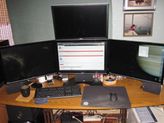
Here is my desktop, the bottom 3 monitors are an NVsurround running on 2x 570s and the fourth monitor is an accessory monitor running off of an Nvidia 210 gfx card. I tried to screenshot it with the game running however the fullscreen game in the NVsurround config didn't screenshot so all you can see is the desktop.


My game starts fine (Eve online) and I can display my browser and various tools, chat, whatever on the upper monitor. I can also mouse up out of game right on to the monitor with no issues.

However when I click on something on upper monitor, Windows moves the focus up to that monitor which minimizes the game.

This kind of defeats the purpose since I can tab in and out without the extra monitor/video card.

Have any of you encountered this, have a work around for it or could offer any help or suggestions?

Greatly appreciated!

_________________
i7 sandy 4.4ghz with a snorkel
1080gtx
8gb RAM
Gigabyte P67-UD7 rev. B3
OS -Samsung 840pro 256GB ssd
Games -Samsung 840pro 500GB ssd
Pagefile -crucial 60GB ssd
Storage -2x 4TB WD
PWS -Seasonic Prime 1k Titanium


Top
 Profile  
Reply with quote  
 Post subject: ]-[iya..
PostPosted: 15 Feb 2012, 01:41 
Offline

Joined: 01 Dec 2011, 19:57
Posts: 74
Location: Toronto
WTF..
I just posted nice reply ..the it came back and said I was not alowed and dumped it!!!! (I had posted 2 or 3 msg's before.)

Short version reply..

Run game windowed/not fullscreen, prefferably boarderless..

Same problem with my USB monitor.

BTW: did you know they make USB monitors powerd by same USB? ..just plug the 22" monitor into USB and yer -done-!!

_________________
- AMD 965 @3.8 - Gigabyte 790fx ud5 - AMD 7970 Ghz - OCZ Reaper 4GB - OCZ Vetex - Eyefinity 3x Asus vw266h - Samsung t260hd + 226ux - (soundcard) - Sony 5.1 ~700w - PC P&C 750w - Corsair K60 -


Top
 Profile  
Reply with quote  
 Post subject: Thanks for replying.Yes
PostPosted: 15 Feb 2012, 01:53 
Offline
Insiders
Insiders
User avatar

Joined: 12 Dec 2006, 20:37
Posts: 170
Thanks for replying.

Yes I've tried windows mode. I'm not a fan of windowed mode and apparently NVsurround isn't either.

If I run the game in windowed mode, the right monitor in the surround group is severely delayed, as in, you move the mouse around and the center and left monitor move in sync and the right monitor is maybe a full second or more out of sync. It catches up but its borked and unworkable.

This could be an issue with Eve windowed mode or something else but the point is, with this game, it doesn't work.

There must be a way to keep the game fullscreen always, after its executed. :

_________________
i7 sandy 4.4ghz with a snorkel
1080gtx
8gb RAM
Gigabyte P67-UD7 rev. B3
OS -Samsung 840pro 256GB ssd
Games -Samsung 840pro 500GB ssd
Pagefile -crucial 60GB ssd
Storage -2x 4TB WD
PWS -Seasonic Prime 1k Titanium


Top
 Profile  
Reply with quote  
PostPosted: 15 Feb 2012, 20:11 
Offline
Editors
Editors
User avatar

Joined: 08 May 2011, 18:58
Posts: 2286
Maximized Window mode doesn't work ? Maybe you can patch it in the ini file somewhere? most MMOG's work!

Thats similar to fullscreen, still you can tab in and out of the game without loosing focus!

_________________
We gonna send it to outa space!


Top
 Profile  
Reply with quote  
 Post subject: I am not sure of the
PostPosted: 15 Feb 2012, 23:56 
Offline

Joined: 01 Dec 2011, 19:57
Posts: 74
Location: Toronto
I am not sure of the relavance w/nVida setup, you guys have 3rd monitor on secound card ..right?

Basicaly I found monitor conection order made a little differance.

When you first fire up the triple the screens are not in order. (1 in 9 they will be)
At this point switch the connectors so they are in order.

If I have to use the software to switch them then sure as snot the software needs to switch -something- every frame to get them in order.
How much needs to get switched ..dunno.
Just pointers ..then not so much.

I your case seems like alot as its lagged. Kinda like its rendering the 3rd mon' on first card then moving it across to 2nd card via bus each frame.
What about yer PCIe two x16? Or one of those wanky MB that has one x16 on Northbridge the other on Southbridge.
Dunno.. Seems like you have nice equip' tho.

_________________
- AMD 965 @3.8 - Gigabyte 790fx ud5 - AMD 7970 Ghz - OCZ Reaper 4GB - OCZ Vetex - Eyefinity 3x Asus vw266h - Samsung t260hd + 226ux - (soundcard) - Sony 5.1 ~700w - PC P&C 750w - Corsair K60 -


Top
 Profile  
Reply with quote  
PostPosted: 16 Feb 2012, 11:23 
Offline
Insiders
Insiders
User avatar

Joined: 12 Dec 2006, 20:37
Posts: 170
When I maximize the window it changes the resolution to different than desktop to accomodate the top bar of the window. 5760x1178 vs. 5760x1200. That may be the issue.

If the top bar weren't there it may fix the issue, I don't know.

Yeah when its windowed everything works fine functionally aside from the right surround monitor being out of sync.

_________________
i7 sandy 4.4ghz with a snorkel
1080gtx
8gb RAM
Gigabyte P67-UD7 rev. B3
OS -Samsung 840pro 256GB ssd
Games -Samsung 840pro 500GB ssd
Pagefile -crucial 60GB ssd
Storage -2x 4TB WD
PWS -Seasonic Prime 1k Titanium


Top
 Profile  
Reply with quote  
Display posts from previous:  Sort by  
Post new topic Reply to topic  [ 6 posts ] 

All times are UTC [ DST ]


Who is online

Users browsing this forum: No registered users and 14 guests


You cannot post new topics in this forum
You cannot reply to topics in this forum
You cannot edit your posts in this forum
You cannot delete your posts in this forum
You cannot post attachments in this forum

Search for:
Jump to:  
cron


Powered by phpBB® Forum Software © phpBB Group