Hi,
So this is my first post on the widescreen gaming forum, I have browsed this site before looking for games which are compatible with eyefinity and making
use of the widescreen fixer tool. The reason I am posting here is because no where else seems to be able to help me with my problem and I figure a forum
dedicated to widescreen/eyefinity gaming will surely have the answer.
So here is the problem I have two 5870's and when it comes to using eyefinity I've never been able to have crossfire enabled. Whenever I start a game
using eyefinity with crossfire enabled I get a problem where all my screens go black and it constantly makes the windows default sound when connecting a
USB or monitor, you know the one (Incoming epic sound to text impression ("Du Du")). The only way to stop it from doing this is to ALT+F4 the application (game)
or CTRL+ALT+DEL back to my desktop. Now if I disable crossfire eyefinity runs perfectly fine. I've had this problem since I got a eyefinity set-up around last June.
I have been googling this issue in my free time now and then since last june with nothing more to go on than it being possible something to do with
the display port not getting enough voltage. Although if that was the case why would eyefinity work perfectly when using one card but suddenly seize up when it comes
to using crossfire.
SPECS:
Motherboard: Asus P6T
CPU: i7 920 @ 4Ghz
RAM: 9GB DDR3 @ 1600Mhz
GPU's: 2x 5870's @ Stock
PSU: Silverstone Strider 800Watt
Monitor's: 3x 27" IIYAMA E2710HDS
Connections: 2x DVI 1x Active Displayport
Display port Adapter: Sapphire Active DP to Single Link DVI-D Adapter
What I've Tried:
Swapping around cards.
Flashing both cards to latest Bios.
Updating motherboard Bios.
RMA'd old display port and got a replacement - still same problem.
Switching which monitor got the Display port.
Checked for overheating - No cards overheating.
Reinstalled Windows.
Tested on all drivers from 10.4 to 12.1.
GPU 1: XFX 5870
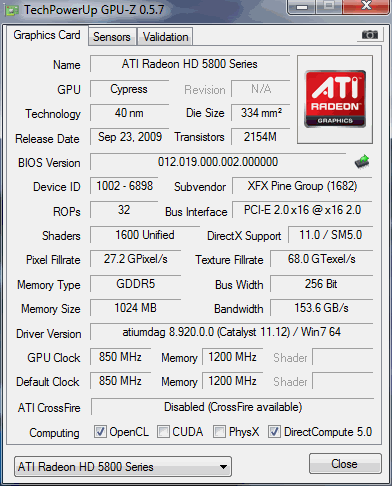
GPU 2: SAPPHIRE 5870
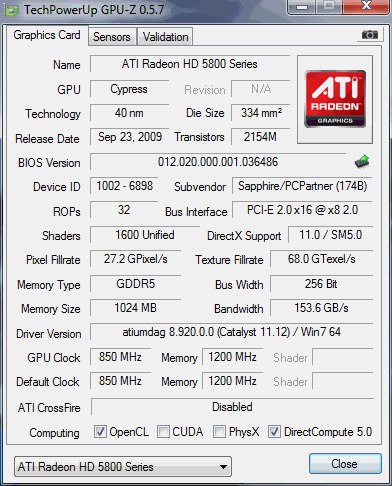
Hoping someone might have a Idea of what is happening as I could really use that extra GPU when it comes to some eyefinity games.
Thanks for reading -SKENG-