| Widescreen Gaming Forum https://www.wsgf.org/phpBB3/ |
|
| 2 x 3 screens and COD4 https://www.wsgf.org/phpBB3/viewtopic.php?f=68&t=22727 |
Page 1 of 1 |
| Author: | nullpunkt [ 18 Sep 2011, 08:58 ] |
| Post subject: | 2 x 3 screens and COD4 |
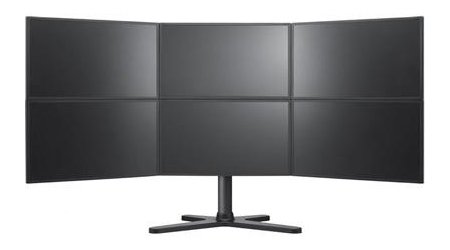
Hi forum I'm new to this board and want to say hello to you. Since yesterday I have my Samsung MD230x6 ready (Pic) I loaded noe the widescreen fixer and the cod4 plugin, but for me it doesn't works. I pressed the multiply (*) but no reaction. Then if I left the game sometimes the widescreenfixer is not responding, sometimes it's closed with no error. I have a 64bit Windows 7 Ultimate. Can someone help me to find the problem? Very best regards from switzerland Nullpunkt |
|
| Author: | BHawthorne [ 18 Sep 2011, 10:54 ] |
| Post subject: | It's called Eyefinity 3x2 |
It's called Eyefinity 3x2 actually. ;) Could you elaborate a little more on how it's not working right? |
|
| Author: | nullpunkt [ 18 Sep 2011, 13:48 ] |
| Post subject: | Hi BHawthorneIt does not |
Hi BHawthorne It does not change the size of the game, thats my problem : ) I can enable the fix, but theres no change.. The game still is shown on a single screen. Please see attached Image. I tried different Ratios, but it never brings me another size. Best regards Nullpunk |
|
| Author: | enforcer [ 19 Sep 2011, 09:07 ] |
| Post subject: | " The game still is shown on |
" The game still is shown on a single screen." well there is your problem. Did you select your desired Resolution ? Btw Widescreenfixer works much better if you enable it while in-game not in the game-menues |
|
| Author: | nullpunkt [ 19 Sep 2011, 21:23 ] |
| Post subject: | HiMy monitors have a total |
Hi My monitors have a total size of 5760 x 2160. I tried this dimension and I also tried 5760 x 1080 (for 3 screens) If I turn on the wide screen fixer while in the game, the game itself crashs with message: call of duty works no more (translated from german meesage) Is there a log I can find more details or does someone knows where the problem could be? Best regards Nullpunkt |
|
| Author: | nullpunkt [ 20 Sep 2011, 15:01 ] |
| Post subject: | HiI buyed now COD: Black |
Hi I buyed now COD: Black Ops from Steam with same result. Settings attached in picture... If I start the fix within the game I can see that it distorts the picture, but do not increase the window. I tried it in full screen and normal mode. Do I have to change something else? Best regards Nullpunkt |
|
| Author: | suiken_2mieu [ 21 Sep 2011, 10:17 ] |
| Post subject: | nullpunkt wrote:HiI buyed |
Hi dude, you have to go ingame in the options menu and change your resolution to 5760x2160. Widescreenfixer just changes the game FOV to match your aspect ratio, not actually changing the resolution (size) of the game. I imagine it goes like this: Options, Video Settings, Resolution: 640x480. Change that last part to 5760x2160. |
|
| Page 1 of 1 | All times are UTC [ DST ] |
| Powered by phpBB® Forum Software © phpBB Group https://www.phpbb.com/ |
|