Widescreen Gaming Forum

[-noun] Web community dedicated to ensuring PC games run properly on your tablet, netbook, personal computer, HDTV and multi-monitor gaming rig.
It is currently 12 Jul 2026, 08:47

All times are UTC [ DST ]


Post new topic Reply to topic  [ 36 posts ]  Go to page 1, 2, 3, 4, 5 ... 36  Next
Author Message
PostPosted: 25 Aug 2013, 14:41 
Offline

Joined: 07 Jun 2013, 12:25
Posts: 116
Hi, just buy the game, gameplay is pefect but menu are zoomed.

Any soluce to fix menu ? when i loose, it's impossible to continu to play..... i am blocked in the menu because i don't see option and it's impossible to return resolution option beacause it's blocked

ingame is perfect
Image

but in menu it s unplayable for strategic option
Image

thanks for help


Top
 Profile  
Reply with quote  
PostPosted: 25 Aug 2013, 18:58 
Offline

Joined: 21 Nov 2011, 17:24
Posts: 24
Interested in this as well... but the game runs on Unreal Engine, so I wouldn't get my hopes up.


Top
 Profile  
Reply with quote  
PostPosted: 26 Aug 2013, 06:00 
Offline
Insiders
Insiders

Joined: 01 Sep 2010, 11:38
Posts: 516
I played around with this and was able to get all in-game HUD elements centred - but due to the menus being Vert-, like mentioned you can't get past squad select screens etc. Regardless I have asked Hayden to look at it, and he said he would if he gets a chance and was able to get his hands on a copy (free perhaps).

I've started thread on steam:

http://steamcommunity.com/app/65930/dis ... 485557054/

And at 2K:

http://forums.2kgames.com/showthread.ph ... -Eyefinity)

_________________
起死回生 (kishi kaisei) Wake from death and return to life..


Top
 Profile  
Reply with quote  
PostPosted: 31 Aug 2013, 16:46 
Offline
Insiders
Insiders
User avatar

Joined: 22 Aug 2007, 19:00
Posts: 647
This game got pretty low reviews.. it's no wonder they rushed it out the door, they don't even have eyefinity support right. (I already got suckered into buying the game myself, preordered it since I'm such a big XCOM fan)


Top
 Profile  
Reply with quote  
PostPosted: 31 Aug 2013, 17:17 
Offline
Insiders
Insiders

Joined: 01 Sep 2010, 11:38
Posts: 516
Downtown1 wrote:
This game got pretty low reviews.. it's no wonder they rushed it out the door, they don't even have eyefinity support right. (I already got suckered into buying the game myself, preordered it since I'm such a big XCOM fan)


I actually really loved this game - I couldn't wait for a fix and played through - loved it. I'll play through again, hopefully Helifax or Hayden will have a fix before then.

_________________
起死回生 (kishi kaisei) Wake from death and return to life..


Top
 Profile  
Reply with quote  
PostPosted: 31 Aug 2013, 19:03 
Offline
Insiders
Insiders
User avatar

Joined: 21 May 2011, 14:18
Posts: 1232
Ok,

I looked at the game. So far I fixed:
- Menus
- Whole UI
(Correctly scaled and Centered)

Things that remain:
- STUPID FMVs to be fixed....arrr
- FOV !? (I believe the fov can be tweaked via INI file so I bet is a "safer way" to do that rather than this way)


I will post screenies later on;))

_________________
WideScreen Fixer... Fixes your Surround problems to give a gorgeous 3D Surround Experience!
WideScreen Fixer

Only website to show TRUE 3D Vision Surround Gaming Videos(viewable by anyone) only at
3D Vision Surround Gallery

E-mail and Paypal (for people who wants it): [email protected]


Top
 Profile  
Reply with quote  
PostPosted: 31 Aug 2013, 22:30 
Offline
Insiders
Insiders
User avatar

Joined: 21 May 2011, 14:18
Posts: 1232
OK,

Game fixed:

- Whole Menus are completely Centered and correctly scaled
- Whole UI is completely centered and scaled (see pics)
- MOVIES(dont know how many are in the game but at least new game movie works) were a PAIN in the ass to fix, but are NOW FIXED

There are some issues:
- I noticed the tutorial mini-movies aren't working as they should be, but nothing game breaking
- Sometimes when playing movies the left+ right monitor will start to flicker. This is because HOW the UE3 engine works. I CANT DO ANYTHING about it, BUT if the flickering is annoying ALT+TAB from and back into the game => it will force the engine to REFRESH the side monitors.
- FOV is not addressed since it can be changed via ini files.


Screenies:
Image
Image
Image
Image
Image
Image
Image

The plugin will probably be DONE tomorrow;))
(In the meantime I let you watch the screenshots:)))))))))

Best Regards,
Helifax

_________________
WideScreen Fixer... Fixes your Surround problems to give a gorgeous 3D Surround Experience!
WideScreen Fixer

Only website to show TRUE 3D Vision Surround Gaming Videos(viewable by anyone) only at
3D Vision Surround Gallery

E-mail and Paypal (for people who wants it): [email protected]


Top
 Profile  
Reply with quote  
PostPosted: 01 Sep 2013, 01:28 
Offline
Insiders
Insiders
User avatar

Joined: 16 Jul 2011, 19:35
Posts: 285
Location: Canada
helifax wrote:
OK,

Game fixed:

- Whole Menus are completely Centered and correctly scaled
- Whole UI is completely centered and scaled (see pics)
- MOVIES(dont know how many are in the game but at least new game movie works) were a PAIN in the ass to fix, but are NOW FIXED

There are some issues:
- I noticed the tutorial mini-movies aren't working as they should be, but nothing game breaking
- Sometimes when playing movies the left+ right monitor will start to flicker. This is because HOW the UE3 engine works. I CANT DO ANYTHING about it, BUT if the flickering is annoying ALT+TAB from and back into the game => it will force the engine to REFRESH the side monitors.
- FOV is not addressed since it can be changed via ini files.

The plugin will probably be DONE tomorrow;))
(In the meantime I let you watch the screenshots:)))))))))

Best Regards,
Helifax


Wow Man you are a machine LOL :) \m/ that is awesome! Thanks a bunch, it looks rad and the way it was meant to be.

Looks like you are going to be a UE3 pro after fixing so many, maybe I need to send you some more :twothumb:


Top
 Profile  
Reply with quote  
PostPosted: 01 Sep 2013, 04:24 
Offline
Insiders
Insiders

Joined: 01 Sep 2010, 11:38
Posts: 516
helifax wrote:
OK,

Game fixed:

- Whole Menus are completely Centered and correctly scaled
- Whole UI is completely centered and scaled (see pics)
- MOVIES(dont know how many are in the game but at least new game movie works) were a PAIN in the ass to fix, but are NOW FIXED

There are some issues:
- I noticed the tutorial mini-movies aren't working as they should be, but nothing game breaking
- Sometimes when playing movies the left+ right monitor will start to flicker. This is because HOW the UE3 engine works. I CANT DO ANYTHING about it, BUT if the flickering is annoying ALT+TAB from and back into the game => it will force the engine to REFRESH the side monitors.
- FOV is not addressed since it can be changed via ini files.


Screenies:
Image
Image
Image
Image
Image
Image
Image

The plugin will probably be DONE tomorrow;))
(In the meantime I let you watch the screenshots:)))))))))

Best Regards,
Helifax


Yay - so many more games to fix too!!! :P Don't stop now you're on a roll! http://www.wsgf.org/forums/viewtopic.ph ... 08#p148308

_________________
起死回生 (kishi kaisei) Wake from death and return to life..


Top
 Profile  
Reply with quote  
PostPosted: 01 Sep 2013, 08:28 
Offline

Joined: 07 Jun 2013, 12:25
Posts: 116
thanks helifax. you are my man

paypal gift for you


Top
 Profile  
Reply with quote  
PostPosted: 01 Sep 2013, 13:37 
Offline

Joined: 01 Sep 2013, 13:33
Posts: 7
U r still working on it? When we can expect your plugin for X-COM Helifax?? :-)


Top
 Profile  
Reply with quote  
PostPosted: 01 Sep 2013, 16:17 
Offline
Insiders
Insiders
User avatar

Joined: 21 May 2011, 14:18
Posts: 1232
prodigalson1 wrote:
thanks helifax. you are my man

paypal gift for you


Big Thank you for your support;))

I finished creating the fix for Surround/Eyefinity.

- All Menus are now centered and scaled
- Movies are now centered and scaled correctly
- WHOLE UI is centered and correctly scaled

- Compatible with the 3D Vision fix
- Ability to Line-up the crosshair when playing in 3D Surround based on the Depth value from NVPanel

Screenies:
Image

Image
Image
Image
Image
Image
Image
Image

You can download the fix from my website : 3D Surround Gallery => WideScreen Fixer MODS

Happy gaming!

Best Regards,
Helifax

_________________
WideScreen Fixer... Fixes your Surround problems to give a gorgeous 3D Surround Experience!
WideScreen Fixer

Only website to show TRUE 3D Vision Surround Gaming Videos(viewable by anyone) only at
3D Vision Surround Gallery

E-mail and Paypal (for people who wants it): [email protected]


Top
 Profile  
Reply with quote  
PostPosted: 01 Sep 2013, 16:47 
Offline

Joined: 01 Sep 2013, 13:33
Posts: 7
Good job but it doesn't work for me. The problem is my monitor with 2560x1080 resolution. It´s possible make a fix for this aspect ratio?


Top
 Profile  
Reply with quote  
PostPosted: 01 Sep 2013, 17:02 
Offline
Insiders
Insiders
User avatar

Joined: 21 May 2011, 14:18
Posts: 1232
Doctorfish wrote:
Good job but it doesn't work for me. The problem is my monitor with 2560x1080 resolution. It´s possible make a fix for this aspect ratio?


Can you post a screenshot without the fix (how the game looks natively on your screen?)

_________________
WideScreen Fixer... Fixes your Surround problems to give a gorgeous 3D Surround Experience!
WideScreen Fixer

Only website to show TRUE 3D Vision Surround Gaming Videos(viewable by anyone) only at
3D Vision Surround Gallery

E-mail and Paypal (for people who wants it): [email protected]


Top
 Profile  
Reply with quote  
PostPosted: 01 Sep 2013, 17:05 
Offline
Insiders
Insiders

Joined: 01 Sep 2010, 11:38
Posts: 516
helifax wrote:
prodigalson1 wrote:
thanks helifax. you are my man

paypal gift for you


Big Thank you for your support;))

I finished creating the fix for Surround/Eyefinity.

- All Menus are now centered and scaled
- Movies are now centered and scaled correctly
- WHOLE UI is centered and correctly scaled

- Compatible with the 3D Vision fix
- Ability to Line-up the crosshair when playing in 3D Surround based on the Depth value from NVPanel

Screenies:
Image

Image
Image
Image
Image
Image
Image
Image

You can download the fix from my website : 3D Surround Gallery => WideScreen Fixer MODS

Happy gaming!

Best Regards,
Helifax


Great work mate - any chance of looking at Rayman origins and legend? They both have the same dramas - I have Origins in my inventory to gift, and I'd be happy to get legends for you as well!

_________________
起死回生 (kishi kaisei) Wake from death and return to life..


Top
 Profile  
Reply with quote  
PostPosted: 01 Sep 2013, 17:09 
Offline

Joined: 01 Sep 2013, 13:33
Posts: 7
Image
Image
Image
Image
In-game is perfect but menu and squad select is broken (u can see on pics ... missing button, text during loading,menu title)


Top
 Profile  
Reply with quote  
PostPosted: 01 Sep 2013, 19:34 
Offline
Insiders
Insiders
User avatar

Joined: 16 Jul 2011, 19:35
Posts: 285
Location: Canada
Awesome, works perfectly Helifax, thanks again man :rockout:


Top
 Profile  
Reply with quote  
PostPosted: 01 Sep 2013, 21:00 
Offline
Insiders
Insiders
User avatar

Joined: 21 May 2011, 14:18
Posts: 1232
Doctorfish wrote:
Image
Image
Image
Image
In-game is perfect but menu and squad select is broken (u can see on pics ... missing button, text during loading,menu title)


I haven't tried since I can't as I don't have a 21:9 monitor but! You can try it.
Technically it should work;))
Try the following:
Image

Like I said, TECHNICALLY SHOULD WOOOORK!! But I really don't know;)) I hope you test it and GIVE ME A :twothumb:

:))

Regards

_________________
WideScreen Fixer... Fixes your Surround problems to give a gorgeous 3D Surround Experience!
WideScreen Fixer

Only website to show TRUE 3D Vision Surround Gaming Videos(viewable by anyone) only at
3D Vision Surround Gallery

E-mail and Paypal (for people who wants it): [email protected]


Top
 Profile  
Reply with quote  
PostPosted: 01 Sep 2013, 22:03 
Offline

Joined: 01 Sep 2013, 13:33
Posts: 7
I tried your advice :
Image

Došlo k pokusu o dělení nulou - An attempt was made to divide by zero

Přerušit - interrupt / Opakovat - repeat / Přeskočit - skip


Top
 Profile  
Reply with quote  
PostPosted: 02 Sep 2013, 03:36 
Offline
Insiders
Insiders
User avatar

Joined: 21 May 2011, 14:18
Posts: 1232
Doctorfish wrote:
I tried your advice :
Image

Došlo k pokusu o dělení nulou - An attempt was made to divide by zero

Přerušit - interrupt / Opakovat - repeat / Přeskočit - skip


Yes I thought as much....
The thing is..the fixes are currently made "in mind" with at least 2 monitors...If you put one monitor you get a division by 0 when trying to calculate the "Bezels"...

I am still thinking i I should enhance this plugin or create a new one just for 21:9...

Thing is..is rather hard for me to test since my monitors are all 16:10 and I can't even select any res that is not 4:3 ,16:9 or 16:10 .... -_-

I will try in the future to see if I can do something about it...(decide what to do) but until then, I am sorry to say this, but stick to a regular 16:9 resolution where the game works (I know..it sux)

_________________
WideScreen Fixer... Fixes your Surround problems to give a gorgeous 3D Surround Experience!
WideScreen Fixer

Only website to show TRUE 3D Vision Surround Gaming Videos(viewable by anyone) only at
3D Vision Surround Gallery

E-mail and Paypal (for people who wants it): [email protected]


Top
 Profile  
Reply with quote  
PostPosted: 02 Sep 2013, 04:39 
Offline
Insiders
Insiders

Joined: 01 Sep 2010, 11:38
Posts: 516
helifax wrote:
Doctorfish wrote:
I tried your advice :
Image

Došlo k pokusu o dělení nulou - An attempt was made to divide by zero

Přerušit - interrupt / Opakovat - repeat / Přeskočit - skip


Yes I thought as much....
The thing is..the fixes are currently made "in mind" with at least 2 monitors...If you put one monitor you get a division by 0 when trying to calculate the "Bezels"...

I am still thinking i I should enhance this plugin or create a new one just for 21:9...

Thing is..is rather hard for me to test since my monitors are all 16:10 and I can't even select any res that is not 4:3 ,16:9 or 16:10 .... -_-

I will try in the future to see if I can do something about it...(decide what to do) but until then, I am sorry to say this, but stick to a regular 16:9 resolution where the game works (I know..it sux)


I was talking to doctorfish last night and I believe he was able to get it to work relatively well by simulating a 3 monitor aspect ratio. So I'm pretty sure he got it at least 99% working.

_________________
起死回生 (kishi kaisei) Wake from death and return to life..


Top
 Profile  
Reply with quote  
PostPosted: 02 Sep 2013, 18:24 
Offline
User avatar

Joined: 01 Dec 2011, 17:36
Posts: 6
Doctorfish wrote:
I tried your advice :
Image

Došlo k pokusu o dělení nulou - An attempt was made to divide by zero

Přerušit - interrupt / Opakovat - repeat / Přeskočit - skip


I have the same problem :-(. I have a dell 21:9 aspect ratio monitor.The dragon age 2 plugin have the same problem.Only this two plugins have this problem all other plugins of the widescreen fixer run very well with my 21:9 monitor. :twothumb:

Markus


Top
 Profile  
Reply with quote  
PostPosted: 03 Sep 2013, 03:40 
Offline
Insiders
Insiders
User avatar

Joined: 21 May 2011, 14:18
Posts: 1232
Wurfi wrote:
Doctorfish wrote:
I tried your advice :
Image

Došlo k pokusu o dělení nulou - An attempt was made to divide by zero

Přerušit - interrupt / Opakovat - repeat / Přeskočit - skip


I have the same problem :-(. I have a dell 21:9 aspect ratio monitor.The dragon age 2 plugin have the same problem.Only this two plugins have this problem all other plugins of the widescreen fixer run very well with my 21:9 monitor. :twothumb:

Markus


Are you saying other plugins work? for your Dell 21:9 Monitor?

Can you give me an example of a game/plugin that works? and what settings are you using to make it work?
This way, hopefully I will be able to address this issue so it works for everyone with 1 monitor 21:9 AR.

Regards,
Helifax

PS: I might have an idea on how to address the 21:9 single monitor problem;)) but it will have to wait a couple of days. Still if you can answer to the above question(s) I will appreciate it.

_________________
WideScreen Fixer... Fixes your Surround problems to give a gorgeous 3D Surround Experience!
WideScreen Fixer

Only website to show TRUE 3D Vision Surround Gaming Videos(viewable by anyone) only at
3D Vision Surround Gallery

E-mail and Paypal (for people who wants it): [email protected]


Top
 Profile  
Reply with quote  
PostPosted: 03 Sep 2013, 15:39 
Offline
User avatar

Joined: 01 Dec 2011, 17:36
Posts: 6
Hi Helifax :)

Here are some game examples.This games runs great with the widescreen fixer.

Attachment:
Mass Effekt 3.JPG
Mass Effekt 3.JPG [ 95.63 KiB | Viewed 6544 times ]

Attachment:
The Wichter 2.JPG
The Wichter 2.JPG [ 70.19 KiB | Viewed 6544 times ]

Attachment:
Tomb Raider Underworld.JPG
Tomb Raider Underworld.JPG [ 65.37 KiB | Viewed 6529 times ]

Attachment:
Diablo 3.JPG
Diablo 3.JPG [ 80.79 KiB | Viewed 6538 times ]


I hope this examples helps you to find a solution.

My Grafik system.
2x Nvidia GTX 680 2GB SLI
1x Dell U2913 WM 21" monitor or a 3x 24" monitor NV surround Setup. It depends :D

Wurfi :)


Top
 Profile  
Reply with quote  
PostPosted: 03 Sep 2013, 17:22 
Offline
Insiders
Insiders
User avatar

Joined: 21 May 2011, 14:18
Posts: 1232
After making some tests...
I managed to create a 21:9 resolution on my 16:10 monitor (1866x800)

Unfortunately even the plugins that appear to WORK (like Me3) don't work correctly.

See image:
Image

as you can see everything IS zoomed and cropped.

The actual results should be like this:
Image

And In-game:
Image

As you can see the whole UI is technically created around 16:9 AR. A 21:9 AR gets you in the same scenario as multi-monitor rendering. As you can see in the image above, fixing is possible.

Also fixed the plugin for XCOM The Bureau for 21:9 Aspect Ratio. It now looks like this:
Image

The trick is to consider your 21:9 monitor as a 16:9 with EXTENSIONS
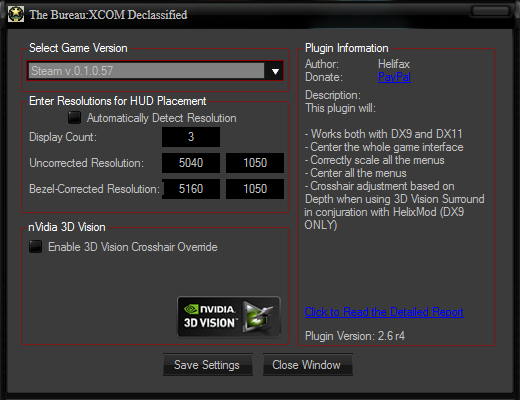
The configuration for the plugins should be like this:
Image


This way it will Work;))

So far I have fixed the following plugins:
- Mass Effect 3
- XCom The bureau
- Dragon Age Origins
- Dragon Age 2

If you find other plugins that dont work correctly in 21:9 let me know.

You can download the latest versions from my website 3D Surround Gallery => WideScreen Fixer MODS

Regards,
Helifax

_________________
WideScreen Fixer... Fixes your Surround problems to give a gorgeous 3D Surround Experience!
WideScreen Fixer

Only website to show TRUE 3D Vision Surround Gaming Videos(viewable by anyone) only at
3D Vision Surround Gallery

E-mail and Paypal (for people who wants it): [email protected]


Top
 Profile  
Reply with quote  
PostPosted: 03 Sep 2013, 17:49 
Offline

Joined: 01 Sep 2013, 13:33
Posts: 7
Hi Helifax. I am sorry for delay but i had a lot of work :-/ Thanks a lot for your testing. I´ll tell u if i find other plugins that dont work correctly in 21:9.
PS: i was testing your configuration. This is my result.
Image
Image


Top
 Profile  
Reply with quote  
PostPosted: 03 Sep 2013, 18:29 
Offline

Joined: 01 Sep 2013, 13:33
Posts: 7
Another screen from your configuration.
Image


Top
 Profile  
Reply with quote  
PostPosted: 03 Sep 2013, 18:36 
Offline
Insiders
Insiders
User avatar

Joined: 21 May 2011, 14:18
Posts: 1232
Doctorfish wrote:
Hi Helifax. I am sorry for delay but i had a lot of work :-/ Thanks a lot for your testing. I´ll tell u if i find other plugins that dont work correctly in 21:9.
PS: i was testing your configuration. This is my result.
Image
Image


I see the menu is correctly scaled now...but is it me? or is not properly centered?

What values did you use?
1920x1080
2560x1080
?

_________________
WideScreen Fixer... Fixes your Surround problems to give a gorgeous 3D Surround Experience!
WideScreen Fixer

Only website to show TRUE 3D Vision Surround Gaming Videos(viewable by anyone) only at
3D Vision Surround Gallery

E-mail and Paypal (for people who wants it): [email protected]


Top
 Profile  
Reply with quote  
PostPosted: 03 Sep 2013, 18:48 
Offline

Joined: 01 Sep 2013, 13:33
Posts: 7
Image
My false..i tried your configuration..this is screen with 1920x1080 / 2560x1080. It works perfectly :-)


Top
 Profile  
Reply with quote  
PostPosted: 03 Sep 2013, 19:11 
Offline
Insiders
Insiders
User avatar

Joined: 21 May 2011, 14:18
Posts: 1232
Doctorfish wrote:
Image
My false..i tried your configuration..this is screen with 1920x1080 / 2560x1080. It works perfectly :-)


;)) See:P
Basically that was just an example:)) I don't have a native 21:9 monitor so I forced via drivers a 21:9 resolution.
The one that I came up with was 1866x800 (in your case it would be 2560x1080 - native)
From there basically I calculated the normal 16:10 one which is (16/10)*800(height) = 1280

In your case for 2560 : (16/9)*1080 = 1920 which acts as the normal 16:9 res (un-corrected) and the 2560 acts as the corrected one;)) (21:9)

The same logic goes for all the other plugins;))

Regards,
Helifax

_________________
WideScreen Fixer... Fixes your Surround problems to give a gorgeous 3D Surround Experience!
WideScreen Fixer

Only website to show TRUE 3D Vision Surround Gaming Videos(viewable by anyone) only at
3D Vision Surround Gallery

E-mail and Paypal (for people who wants it): [email protected]


Top
 Profile  
Reply with quote  
PostPosted: 08 Oct 2013, 22:09 
Offline
Insiders
Insiders
User avatar

Joined: 21 May 2011, 14:18
Posts: 1232
Updated the plugin for the latest version of the game on Steam.

_________________
WideScreen Fixer... Fixes your Surround problems to give a gorgeous 3D Surround Experience!
WideScreen Fixer

Only website to show TRUE 3D Vision Surround Gaming Videos(viewable by anyone) only at
3D Vision Surround Gallery

E-mail and Paypal (for people who wants it): [email protected]


Top
 Profile  
Reply with quote  
PostPosted: 08 Oct 2013, 23:50 
Offline

Joined: 28 Aug 2013, 03:17
Posts: 11
Nope, it's not working with my 21:9 monitor now. Before today's update, the widescreen hack you applied fixed the gameplay and menu view, but screwed up the FMV playback. Now it just crashes the game immediately after the initial loading screen. :doh:


Top
 Profile  
Reply with quote  
PostPosted: 09 Oct 2013, 13:42 
Offline
Insiders
Insiders
User avatar

Joined: 21 May 2011, 14:18
Posts: 1232
Shockwave_S08 wrote:
Nope, it's not working with my 21:9 monitor now. Before today's update, the widescreen hack you applied fixed the gameplay and menu view, but screwed up the FMV playback. Now it just crashes the game immediately after the initial loading screen. :doh:


Oh yes it is working! Just for the sake of things I re-tested it and it works as described. The Movies are "screwed up" since the plugin is CREATED for Multi-monitor resolutions. Last I checked 21:9 is one monitor. For 21:9 since the game doesn't support it correctly the safest way is to get to a 16:9 Resolution one your one monitor.
Also, be sure to check your game install before saying "is not working" as it is working rather fine. After all, is the exact SAME fix as before. If it worked before and now it doesn't guess where the fault lies..... :doh:
(Be sure that your game has actually updated and verify steam integrity cache)

_________________
WideScreen Fixer... Fixes your Surround problems to give a gorgeous 3D Surround Experience!
WideScreen Fixer

Only website to show TRUE 3D Vision Surround Gaming Videos(viewable by anyone) only at
3D Vision Surround Gallery

E-mail and Paypal (for people who wants it): [email protected]


Top
 Profile  
Reply with quote  
PostPosted: 23 Nov 2014, 00:17 
Offline

Joined: 11 Apr 2010, 22:29
Posts: 37
helifax wrote:
Updated the plugin for the latest version of the game on Steam.

uhm...where do I find it?


Top
 Profile  
Reply with quote  
PostPosted: 23 Nov 2014, 03:56 
Offline
I Donated
I Donated
User avatar

Joined: 10 Nov 2010, 02:58
Posts: 264
RED-FROG wrote:
helifax wrote:
Updated the plugin for the latest version of the game on Steam.

uhm...where do I find it?


Hi,

In the the second post on the second page -> http://3dsurroundgaming.com/WSF.html :D

_________________
| i7 6850K Broadwell-e @4.2Ghz | DDR4 32GB @3200Mhz| 2x Msi 1080 X | Asus X99 Deluxe II /H110i/AX1200iw |
| 3x Dell P2314H @ 5760x1080 + Philips 43" 4K IPS BDM4350UC Monitor + Oculus Rift CV1 |
| 1*Samsung EVO 960 500GB NVMe x4 gen.3 | 2x Intel SSD SATA III Raid 0 | 2x Intel SSD SATA III Raid 0 | 2x 2TB SSHD Seagate SATA III Raid 0 |
| Logitech G810 - G502 - G240 - G27 - G940 - | TrackIR 5 Pro | Saitek RHINO X55 HOTAS | Xbox One Elite Gpad |
Asus Vulcan Pro | Asus Xonar U7 | Sony STR-DE495P External Surround Home Cinema Reciever |


Top
 Profile  
Reply with quote  
PostPosted: 02 Oct 2016, 15:46 
Offline

Joined: 02 Oct 2016, 15:44
Posts: 1
Can't get it to work with my 3440x1440 monitor :(


Top
 Profile  
Reply with quote  
Display posts from previous:  Sort by  
Post new topic Reply to topic  [ 36 posts ]  Go to page 1, 2, 3, 4, 5 ... 36  Next

All times are UTC [ DST ]


Who is online

Users browsing this forum: Bing [Bot] and 15 guests


You cannot post new topics in this forum
You cannot reply to topics in this forum
You cannot edit your posts in this forum
You cannot delete your posts in this forum
You cannot post attachments in this forum

Search for:
Jump to:  
cron


Powered by phpBB® Forum Software © phpBB Group