| Widescreen Gaming Forum https://www.wsgf.org/phpBB3/ |
|
| Windows Vista or 7 with Aero at 5040x1050? https://www.wsgf.org/phpBB3/viewtopic.php?f=67&t=17899 |
Page 1 of 1 |
| Author: | Igl007 [ 08 Sep 2009, 05:36 ] |
| Post subject: | Windows Vista or 7 with Aero at 5040x1050? |
Has anyone had any success running 5040x1050 with Aero on? When i run at that res, aero automatically is disabled. It's a little thing, and i should be happy i am able to run at 5040x1050 at all i guess, but window 7 look like crap without aero. Any help? nvidia GTX 280 (182.50) Windows 7 64bit |
|
| Author: | atledreier [ 08 Sep 2009, 08:09 ] |
| Post subject: | Windows Vista or 7 with Aero at 5040x1050? |
What drivers? I have to run the 182.50 drivers to get 5040 at all in Win7 x64 |
|
| Author: | A Small White Box [ 08 Sep 2009, 08:17 ] |
| Post subject: | Windows Vista or 7 with Aero at 5040x1050? |
Been running it since the first beta, works fine. I have nearly the same setup and am using the 181.71 drivers. |
|
| Author: | Igl007 [ 09 Sep 2009, 04:06 ] |
| Post subject: | Windows Vista or 7 with Aero at 5040x1050? |
Been running it since the first beta, works fine. I have nearly the same setup and am using the 181.71 drivers. thanks for the reply... Do you have aero working? I looked at my post and thought it could be translated funny. I have everything working except aero. Trying to get just that to work. Your desktop is nice and transparent with the "glassy look"? |
|
| Author: | A Small White Box [ 09 Sep 2009, 05:02 ] |
| Post subject: | Windows Vista or 7 with Aero at 5040x1050? |
Do you have aero working? Yup; transparent borders, desktop peek, even have the hacked in dreamscene from Vista ultimate working. |
|
| Author: | atledreier [ 09 Sep 2009, 08:13 ] |
| Post subject: | Windows Vista or 7 with Aero at 5040x1050? |
Yep! I can do the fancy 3d thing and all. Looks good too. Sure you haven't disabled it somewhere? |
|
| Author: | Igl007 [ 12 Sep 2009, 04:09 ] |
| Post subject: | Windows Vista or 7 with Aero at 5040x1050? |
Yep! hmm, that's weird as i am running the 182.50 drivers also and 5040x1050 works fine but no aero. As soon as i lower the res to anything, aero automatically turns on so i know it's enabled. I tried 190.62 drivers and can't even get 5040x1050 but i guess that's normal. I don't know what else to try. |
|
| Author: | DigChaos [ 16 Sep 2009, 07:26 ] |
| Post subject: | Windows Vista or 7 with Aero at 5040x1050? |
Hey i'm having a similar problem, aero works but the "peek" feature isn't working, i was wondering if it was an issue with the drivers (181.71) or what. When i hooked up my tower to a single monitor i get the big preview boxes, when i go through the TH2G i get this
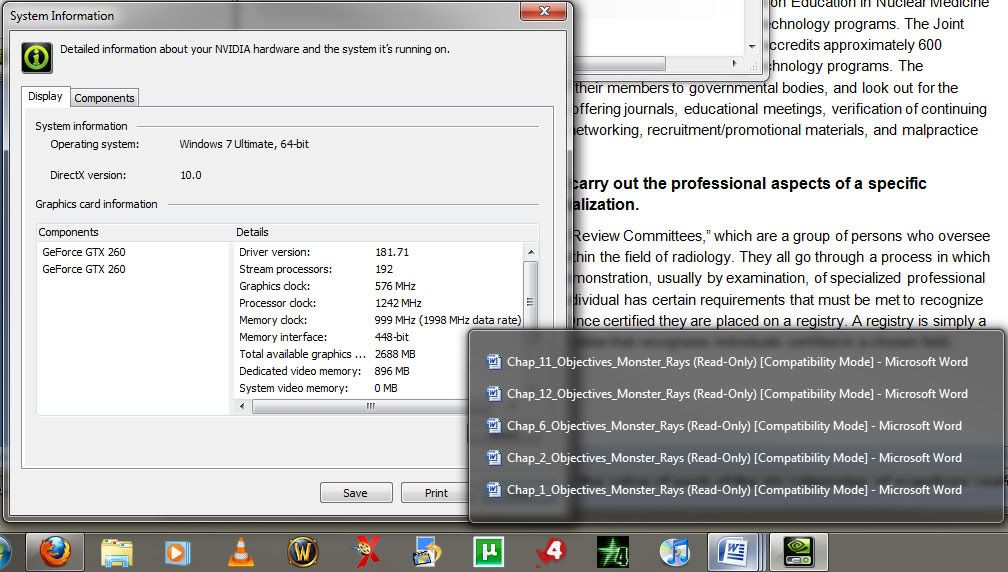
Think i'm not getting a sufficient score to enable the full preview "peek" feature?

whats confusing is i have a 10k drive and my Disk data transfer rate is a 5.9? Can that be right? GTX260x2 and a video score of 6.4? |
|
| Author: | THE1REBEL [ 03 Oct 2009, 18:10 ] |
| Post subject: | Windows Vista or 7 with Aero at 5040x1050? |
Hi Guys, I have a fix you might want to try. See Post below: http://www.widescreengamingforum.com/node/#comment- During my testing I did run into this issue. The problem that I found on my system was the combination of Nivida driver, old firmware, and GXM which was causing Desktop Window Manager (dwm.exe) ,Which is what controls Aero in Win7 & Vista, to stop running or crash. It is not easy to find but can see the issue in Windows Application logs. It states some thing like "Error: maximum texture size reached for display adapter". If you do not want to try the fix above, I would suggest updating your firmware and reinstall the nvidia driver. With out the Firmware I believe the driver is reading the wrong info from the TH2Go when the Custom Resolutions are being created. The Firmware update is really only needed to get the resolutions created so you might be able to downgrade it back after the custom resolutions are created. I hope this helps. THE1REBEL |
|
| Page 1 of 1 | All times are UTC [ DST ] |
| Powered by phpBB® Forum Software © phpBB Group https://www.phpbb.com/ |
|