Widescreen Gaming Forum

[-noun] Web community dedicated to ensuring PC games run properly on your tablet, netbook, personal computer, HDTV and multi-monitor gaming rig.
It is currently 08 Jun 2026, 01:15

All times are UTC [ DST ]


Post new topic Reply to topic  [ 7 posts ] 
Author Message
 Post subject: Planning display setup.
PostPosted: 08 Jul 2011, 20:44 
Offline
Insiders
Insiders
User avatar

Joined: 20 Aug 2009, 04:20
Posts: 2351
Location: Virginia
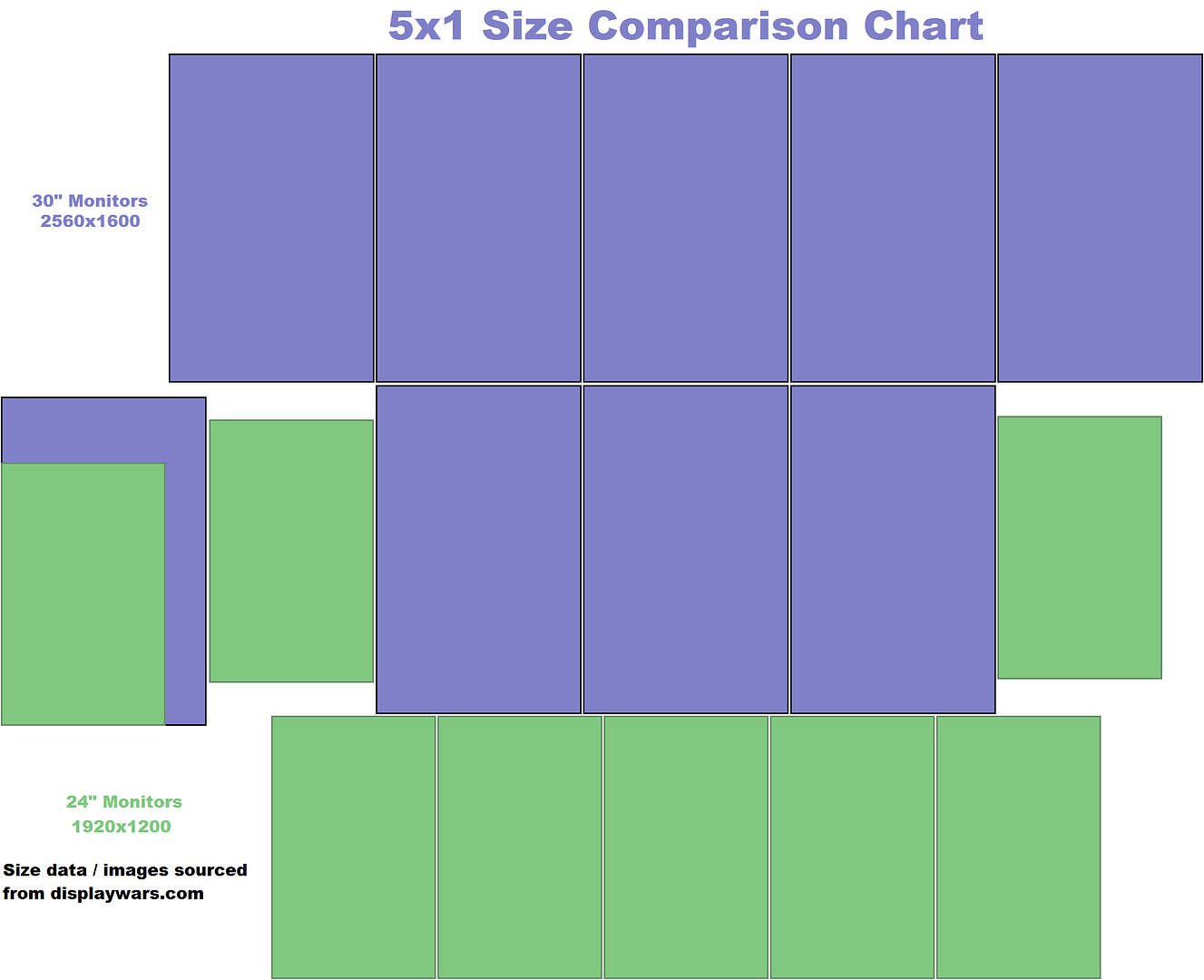
So basically, right now I'm rocking 3 x 30"rs in portrait. Though I want 5 monitors. I found out that after I moved out money was much more scarce than before for I'm think about plunging down to 24"rs. I've never gone down in size though (monitor wise). Do think I'll be disappointed or just have a terrible time transitioning to a smaller monitor, and probably bigger dot pitch?

Also my machine is getting pretty dated and I'm having harder and harder time playing new games at 12MP. Now 6000x1920 isn't that much smaller than 4800x2560, but it may be just enough. The other thing I was thinking of was trying to get some 24"rs on the cheap and putting them next to my 30"r and running 5x1 that way. That method would allow me to run at a lower resolution but not too low (right now I have either 2560x1600 per panel or 1680x1050 per panel bleh).

One other thing is the main thing I use my rig for is browsing the internet. 1600 pixels across seems to be the smallest I can get most web pages without having to side scroll (something my souse doesn't do). So I was just wondering what peoples' thoughts were on what I should do. Also if you have any monitor suggestions, I'd like to hear them. I've only used TN's and IPS panels. I've never seen a VA panel and am afraid to jump in without looking.

_________________
System Core: | Intel Core i5-2500K + ASUS P8Z68-V + 16GB Corsair XMS3 DDR3 1333 MHz | Win7 x64 | MSI R7970 Lightning 3GB [1105/1400] |
Display: | 3 x Dell Ultrasharp 3007WFP-HC @ 7680x1600 | Dell u3011 |


Top
 Profile  
Reply with quote  
 Post subject: BUMP
PostPosted: 11 Jul 2011, 16:08 
Offline
Insiders
Insiders
User avatar

Joined: 20 Aug 2009, 04:20
Posts: 2351
Location: Virginia
BUMP

_________________
System Core: | Intel Core i5-2500K + ASUS P8Z68-V + 16GB Corsair XMS3 DDR3 1333 MHz | Win7 x64 | MSI R7970 Lightning 3GB [1105/1400] |
Display: | 3 x Dell Ultrasharp 3007WFP-HC @ 7680x1600 | Dell u3011 |


Top
 Profile  
Reply with quote  
PostPosted: 16 Sep 2011, 00:35 
Offline
Founder
Founder
User avatar

Joined: 13 Oct 2003, 05:00
Posts: 7358
I've recently gone from my 5x1-P 21.5" setup, back to 3x1-L. I will end up going 1+3x1-L, and am planning a blog post on it very shortly. I liked 5x1-P initially, but the 1080p wide width on my monitors made it difficult for web browsing, and I eventually grew tired of it. Though, I will say having that constraint helped me ensure the WSGF was efficient and compact with the move to Drupal. Some stuff is just made for landscape - Photoshop & video editing. I'd try and get the 2x 30" if you can, as the 1600px wide will help alleviate "productivity" issues.


Top
 Profile  
Reply with quote  
PostPosted: 17 Sep 2011, 12:46 
Offline

Joined: 25 Aug 2010, 20:15
Posts: 13
If I had 3x 30"s already, I would find it hard to part with them.. and would just make the journey to 5x 30", including machine upgrade. Although certainly it'd take longer to get there. If you added 24" screens as wings, how do your 30"s look when scaled down to 1920x1200?

I'm currently running 5x1P with 24" (1920x1200) screens, and find a single screen fairly perfect for most web pages. We are still stuck for the most part with having to design for the lowest common denominator (1024 width), so the only real exceptions I run into are either forum posts embedding a large unscaled image, or video.

I have a Dell 2005FPW in landscape at the side for most video watching, although I'd like to change that in the future to a 1080p *VA panel with deep blacks mounted on the wall above. Maybe a TV sized screen would be best, though currently have a Samsung 2333T (cheap and cheerful) on backorder for the past 2 months.. and keeping a close eye on the new 24" & 27" A-MVA screens from Samsung/iiyama.


Top
 Profile  
Reply with quote  
 Post subject: Even though it isn't
PostPosted: 17 Sep 2011, 16:02 
Offline
User avatar

Joined: 22 Oct 2009, 21:34
Posts: 567
Even though it isn't officially supported, I am incredibly happy with my PLP setup, 2 Portaits are great for having things on the side and the center for movies, editing, etc...

I just hope there is support for this in the future, it is by far the best solution in my opinion.

_________________
Professional... well I'll figure that out.


"I sense something, a presence I've not felt since......."


Top
 Profile  
Reply with quote  
PostPosted: 18 Sep 2011, 01:46 
Offline
Insiders
Insiders
User avatar

Joined: 06 May 2006, 12:46
Posts: 1640
Having used 3x1P 30" and 5x1P 24" I say wait longer and just get 5x1P 30". You'll be disappointed mostly by the bezel spacing on 5x1P 24" when you're used to the bezel spacing of 3x1P 30". Also, to confuse matters further 4x1P doesn't exist in the AMD drivers, so you'll have to buy two at once, not incrementally upgrade 3x1P -> 4x1P -> 5x1P. For some totally illogical reason only 4x1 and 1x4 exist without a proper portrait mode. I'd never do 5x1P with 16:9 displays. I'd only use 16:10 or 5:4.

_________________
Brad Hawthorne
Product Manager
Nthusim Pty. Ltd. | www.nthusim.com


Top
 Profile  
Reply with quote  
PostPosted: 21 Sep 2011, 10:06 
Offline
Insiders
Insiders
User avatar

Joined: 20 Aug 2009, 04:20
Posts: 2351
Location: Virginia
Here's an update, I went and bought 2 23" 1920x1200 displays and not they are sitting on the floor next to my closet. I tried it for a while, but I really don't like the various issues with have different displays, Also I've just bee too spoiled and love my 30"rs. I'm going to end up selling my spare display and just going all 30"Rs (like I should have done in the fisrt place). Plus, the only thing I play now it Minecraft. I can run that at any resolution and not get bogged down. I wish I had a camera so I could show what it looked like, but it was nothing special really.

_________________
System Core: | Intel Core i5-2500K + ASUS P8Z68-V + 16GB Corsair XMS3 DDR3 1333 MHz | Win7 x64 | MSI R7970 Lightning 3GB [1105/1400] |
Display: | 3 x Dell Ultrasharp 3007WFP-HC @ 7680x1600 | Dell u3011 |


Top
 Profile  
Reply with quote  
Display posts from previous:  Sort by  
Post new topic Reply to topic  [ 7 posts ] 

All times are UTC [ DST ]


Who is online

Users browsing this forum: No registered users and 8 guests


You cannot post new topics in this forum
You cannot reply to topics in this forum
You cannot edit your posts in this forum
You cannot delete your posts in this forum
You cannot post attachments in this forum

Search for:
Jump to:  
cron


Powered by phpBB® Forum Software © phpBB Group