Widescreen Gaming Forum

[-noun] Web community dedicated to ensuring PC games run properly on your tablet, netbook, personal computer, HDTV and multi-monitor gaming rig.
It is currently 12 Jul 2026, 12:37

All times are UTC [ DST ]


Post new topic Reply to topic  [ 47 posts ]  Go to page Previous  1 ... 3, 4, 5, 6, 7, 8, 9 ... 47  Next
Author Message
PostPosted: 24 Jun 2015, 12:21 
Offline

Joined: 24 Jun 2015, 11:58
Posts: 2
It's frustrating that AMD are not forthcoming about Eyefinity PLP support in the 300 series. I guess it's rather niche and therefore doesn't come up on the marketing department's radar.

I have cash ready to go for a supporting card for my 20-30-20 setup but don't feel a 285 is quite up to the task. The 390X would fit nicely into my budget but it's looking increasingly likely that this won't do PLP. I personally think there's a very slim hope that new drivers will enable the feature for the 390 since the part of the driver which implements PLP must be there for the 285 and possibly for the 380.

There's better hope for the Fury range with some indication here. So it looks like I'll be waiting some more to see how the Fury and Nano are priced.


Top
 Profile  
Reply with quote  
PostPosted: 24 Jun 2015, 20:07 
Offline
Insiders
Insiders

Joined: 21 Oct 2014, 23:33
Posts: 291
Great find Veube. themeatcleaver says "I did get confirmation from AMD on facebook that the Fury will indeed support the mixed rotation eyefinity"

Notes:
Fury has no proof yet of tested working PLP.
There is a chance it needs a driver update to work, not stated.
It seems likely that chipset codename (e.g. Tonga) is irrelevant for PLP support.


Top
 Profile  
Reply with quote  
PostPosted: 25 Jun 2015, 01:04 
Offline

Joined: 29 Nov 2012, 14:40
Posts: 9
I am also going to test if Fury supports PLP when I get my card. Have 20-30-20 Classic PLP setup.

Heck, its the only reason why I bought the lousy card in the first place.

_________________
M-ATX Rig: Core i7 3930K | Asus Rampage IV GENE | R9 Fury X| 4x4GB 2400Mhz G.Skill TridentX | Silverstone Strider Gold 1200w | Anidees AI7
Watercooling: EK-Supremacy Acetal | Phobya Extreme QUAD 480 | XSPC EX240 | 2x D5 PWM Pump
PLP 20|30|20: HP ZR30W + 2x Dell 2007FP: 4960x1600p | Oculus Rift DK2 | Others: Razer Mamba 2012 & Lycosa | Sennheiser HD800 | Schiit Vali


Top
 Profile  
Reply with quote  
PostPosted: 26 Jun 2015, 14:00 
Offline

Joined: 29 Dec 2011, 23:31
Posts: 2
Hey guys, thanks for all the hard work and research.

I've been investigating this situation too and managed to ask some guys over at reddit to test their new cards.

/u/330066 managed to test his new Fury X in PLP and various other configurations, stretched with rotated. See the thread here: http://www.reddit.com/r/Amd/comments/3b ... irm_if_it/

TL:DR, PLP works on the Fury X.


Top
 Profile  
Reply with quote  
PostPosted: 26 Jun 2015, 22:06 
Offline
Insiders
Insiders

Joined: 21 Oct 2014, 23:33
Posts: 291
Awesome... and ugly :).
Image
(from link above, test by reddit user "330066")

-------------- Eyefinity PLP Graphics Cards List----------------
TESTED, Eyefinity PLP Works:
- R9 285 (GCN1.2, proven by Club3D)
- R9 380 (GCN 1.2, proven by illogique on wsgf. But maybe bit buggier? Tester respond please)
- R9 380X (GCN 1.2, proven by MÆGGES on wsgf. But maybe bit buggier? Tester respond please)
- R9 Fury (GCN 1.2, proven by Adam G in newegg comment)
- R9 Fury X (GCN 1.2, proven by "330066" on reddit)
- R9 Nano (GCN 1.2, proven by KleitusIV on wsgf)

UNTESTED, but they will allow Eyefinity PLP the same (all GCN 1.2):
- R9 285X
- R9 Fury X2
- Radeon Pro Duo (new 2016 Q2 monster)

TESTED, FAILED
- R9 390X (GCN 1.1, proven by Club3D, using a now-older driver (but it was newer than Omega garbage-version)

UNTESTED, WILL FAIL, very likely never allowing Eyefinity PLP:
R9 390, R7 360 (all GCN 1.1). R7 370 (GCN 1.0).
-------------- (updated Apr 2, 2016) --------------


Last edited by imusrt on 02 Apr 2016, 21:21, edited 6 times in total.

Top
 Profile  
Reply with quote  
PostPosted: 28 Jun 2015, 20:31 
Offline
Insiders
Insiders
User avatar

Joined: 20 Aug 2009, 04:20
Posts: 2351
Location: Virginia
Hmm... It's looking like it's attached to architecture, I wonder if we flashed a 380 into a 285 if PLP would be unlocked.

_________________
System Core: | Intel Core i5-2500K + ASUS P8Z68-V + 16GB Corsair XMS3 DDR3 1333 MHz | Win7 x64 | MSI R7970 Lightning 3GB [1105/1400] |
Display: | 3 x Dell Ultrasharp 3007WFP-HC @ 7680x1600 | Dell u3011 |


Top
 Profile  
Reply with quote  
PostPosted: 03 Jul 2015, 13:43 
Offline

Joined: 29 Nov 2012, 14:40
Posts: 9
I can confirm that PLP works on Fury X. Tested with my 20-30-20 (4960-1600p) PLP setup.

Oh boy how excited I am.

_________________
M-ATX Rig: Core i7 3930K | Asus Rampage IV GENE | R9 Fury X| 4x4GB 2400Mhz G.Skill TridentX | Silverstone Strider Gold 1200w | Anidees AI7
Watercooling: EK-Supremacy Acetal | Phobya Extreme QUAD 480 | XSPC EX240 | 2x D5 PWM Pump
PLP 20|30|20: HP ZR30W + 2x Dell 2007FP: 4960x1600p | Oculus Rift DK2 | Others: Razer Mamba 2012 & Lycosa | Sennheiser HD800 | Schiit Vali


Top
 Profile  
Reply with quote  
PostPosted: 03 Jul 2015, 16:40 
Offline
Insiders
Insiders
User avatar

Joined: 20 Aug 2009, 04:20
Posts: 2351
Location: Virginia
Osjur wrote:
I can confirm that PLP works on Fury X. Tested with my 20-30-20 (4960-1600p) PLP setup.

Oh boy how excited I am.

Lucky devil, good to know though.

_________________
System Core: | Intel Core i5-2500K + ASUS P8Z68-V + 16GB Corsair XMS3 DDR3 1333 MHz | Win7 x64 | MSI R7970 Lightning 3GB [1105/1400] |
Display: | 3 x Dell Ultrasharp 3007WFP-HC @ 7680x1600 | Dell u3011 |


Top
 Profile  
Reply with quote  
PostPosted: 04 Jul 2015, 19:31 
Offline

Joined: 03 Jul 2015, 18:38
Posts: 9
Had the choice between 980 Ti and Fury X ,Went for the 980 Ti as the reviews seem to indicate better performance on the Nvidia + Stock of Fury X sold out really quick here in the UK.
Kinda regretting it a little since I've just put finishing touches on my 2 laptop lcd side screens for PLP, having to configure games with Windows borderless gaming and not all of them want to play ball.

wish Nvidia would sort out PLP support, but from what i've read it wont happen any time soon. Nice to see the Fury X and AMD playing nice with PLP.

_________________
27" Asus PB278Q (2560 x 1440) + 2 x Samsung LTN154X7-L03 (1440 x 900) Laptop Side Monitors
Asus P8Z77-i Deluxe Mini-ITX motherboard
8Gb Crucial Ballistix DDR3
Intel Core i5 3570k @ 4.4ghz
Fractel Design Kelvin S24 AIO watercooling
Nvidia Geforce 980Ti "Reference" GPU
Fractel Design Newton R3 1000w PSU
Corsair Carbide Air 540 Case
Windows 7 Home Premium


Top
 Profile  
Reply with quote  
PostPosted: 05 Jul 2015, 05:20 
Offline
Insiders
Insiders
User avatar

Joined: 20 Aug 2009, 04:20
Posts: 2351
Location: Virginia
NeilChill wrote:
Had the choice between 980 Ti and Fury X ,Went for the 980 Ti as the reviews seem to indicate better performance on the Nvidia + Stock of Fury X sold out really quick here in the UK.
Kinda regretting it a little since I've just put finishing touches on my 2 laptop lcd side screens for PLP, having to configure games with Windows borderless gaming and not all of them want to play ball.

wish Nvidia would sort out PLP support, but from what i've read it wont happen any time soon. Nice to see the Fury X and AMD playing nice with PLP.

That's a cool way of getting around the normally low DPI 1440x900 monitors, got a picture of it?

You could either return the card, or sell it and hope for stock. The fury (non-x) should also allow for PLP support.

_________________
System Core: | Intel Core i5-2500K + ASUS P8Z68-V + 16GB Corsair XMS3 DDR3 1333 MHz | Win7 x64 | MSI R7970 Lightning 3GB [1105/1400] |
Display: | 3 x Dell Ultrasharp 3007WFP-HC @ 7680x1600 | Dell u3011 |


Top
 Profile  
Reply with quote  
PostPosted: 05 Jul 2015, 09:51 
Offline

Joined: 03 Jul 2015, 18:38
Posts: 9
suiken_2mieu see my setup here: http://www.wsgf.org/forums/viewtopic.php?f=57&t=29815

_________________
27" Asus PB278Q (2560 x 1440) + 2 x Samsung LTN154X7-L03 (1440 x 900) Laptop Side Monitors
Asus P8Z77-i Deluxe Mini-ITX motherboard
8Gb Crucial Ballistix DDR3
Intel Core i5 3570k @ 4.4ghz
Fractel Design Kelvin S24 AIO watercooling
Nvidia Geforce 980Ti "Reference" GPU
Fractel Design Newton R3 1000w PSU
Corsair Carbide Air 540 Case
Windows 7 Home Premium


Top
 Profile  
Reply with quote  
PostPosted: 05 Jul 2015, 18:24 
Offline

Joined: 29 Nov 2012, 14:40
Posts: 9
Here's a pic of some BF4 in fullscreen PLP glamore... just to make someone envy :P

Image

No idea why the pic on the left monitor looks so different through camera, it doesn't look like that when playing because I have manually calibrated my side monitors to match my center monitor as closely as possible with Spyder 4.

:triplewide: :rockout:
We need PLP smilie.

_________________
M-ATX Rig: Core i7 3930K | Asus Rampage IV GENE | R9 Fury X| 4x4GB 2400Mhz G.Skill TridentX | Silverstone Strider Gold 1200w | Anidees AI7
Watercooling: EK-Supremacy Acetal | Phobya Extreme QUAD 480 | XSPC EX240 | 2x D5 PWM Pump
PLP 20|30|20: HP ZR30W + 2x Dell 2007FP: 4960x1600p | Oculus Rift DK2 | Others: Razer Mamba 2012 & Lycosa | Sennheiser HD800 | Schiit Vali


Top
 Profile  
Reply with quote  
PostPosted: 06 Jul 2015, 09:04 
Offline
Insiders
Insiders
User avatar

Joined: 20 Aug 2009, 04:20
Posts: 2351
Location: Virginia
@Osjur: Can you use the side monitors in different orientation on the Fury X like you're doing in that picture? I thought Eyefinity didn't allow for that. If so, it allows for Portrait Landscape Portrait (Reverse) in which is even cooler then I thought. I wonder if it can do 3x2 where the top 3 monitors are upside down, this would help with all those monitors with uneven bezels around (like the dell S2340M/L).

_________________
System Core: | Intel Core i5-2500K + ASUS P8Z68-V + 16GB Corsair XMS3 DDR3 1333 MHz | Win7 x64 | MSI R7970 Lightning 3GB [1105/1400] |
Display: | 3 x Dell Ultrasharp 3007WFP-HC @ 7680x1600 | Dell u3011 |


Top
 Profile  
Reply with quote  
PostPosted: 06 Jul 2015, 12:54 
Offline

Joined: 29 Nov 2012, 14:40
Posts: 9
Yes I thought so too at first but I decided to test it out before flipping the monitor. And it does work, at least with Fury X so yes, you can do Portrait-Lanscape-Portrait (flipped) to get those ugly buttons to outer edge.

This setup seems to work just like normal Eyefinity, bezel compensation works and all the games with some sort of multi-monitor support have worked so far.

Can't test 3x2 because I have sold all my 22" monitors, Otherwise I would have tested PLP at bottom and LLL (flipped) at top at the same time.

_________________
M-ATX Rig: Core i7 3930K | Asus Rampage IV GENE | R9 Fury X| 4x4GB 2400Mhz G.Skill TridentX | Silverstone Strider Gold 1200w | Anidees AI7
Watercooling: EK-Supremacy Acetal | Phobya Extreme QUAD 480 | XSPC EX240 | 2x D5 PWM Pump
PLP 20|30|20: HP ZR30W + 2x Dell 2007FP: 4960x1600p | Oculus Rift DK2 | Others: Razer Mamba 2012 & Lycosa | Sennheiser HD800 | Schiit Vali


Top
 Profile  
Reply with quote  
PostPosted: 06 Jul 2015, 22:45 
Offline
Insiders
Insiders
User avatar

Joined: 20 Aug 2009, 04:20
Posts: 2351
Location: Virginia
Well can you do a test where you try to eyefinity just your portrait monitors? If 2x1 Portrait / Portrait (Flipped) work, then it should work landscape.

Eyefinity is getting closer to SoftTH, this is awesome.

_________________
System Core: | Intel Core i5-2500K + ASUS P8Z68-V + 16GB Corsair XMS3 DDR3 1333 MHz | Win7 x64 | MSI R7970 Lightning 3GB [1105/1400] |
Display: | 3 x Dell Ultrasharp 3007WFP-HC @ 7680x1600 | Dell u3011 |


Top
 Profile  
Reply with quote  
PostPosted: 26 Jul 2015, 05:21 
Offline

Joined: 17 Mar 2008, 22:17
Posts: 72
Has anyone tested the R9 Fury PLP? I just built a big rig with SLI 980 TIs, but between the idea of natively running PLP and shitty shitty shitty drivers (I cant even use the 980s) I'm thinking about going 2x Fury (dont have the radiator space for 2x Fury X)


Top
 Profile  
Reply with quote  
PostPosted: 02 Aug 2015, 01:25 
Offline

Joined: 30 Nov 2007, 03:11
Posts: 18
r9 380 4gb is working with portrait-landscape-portrait flipped. total of 5250x1600 with bezel

got trouble because it wrongly detect a recommand resolution of 1280x800 instead of 2560x1600 on my 30"
i could set it to 2560x1600 in windows but it always change to 1280x800 when setting eyefinity group.
i change the resolution order with custom resolution utility and then eyefinity group work correctly.


Top
 Profile  
Reply with quote  
PostPosted: 03 Aug 2015, 22:47 
Offline

Joined: 17 Mar 2008, 22:17
Posts: 72
Thanks for the update. I finally got my refund for my 980s and Newegg had 1 Asus R9 Fury Strix (Aircooled) so I snagged it up. I'll be ordering another as soon as they're in stock. Read on a user review that the R9 Fury support PLP as well (was a Sapphire branded R9). Looking forward to it!


Top
 Profile  
Reply with quote  
PostPosted: 04 Aug 2015, 21:04 
Offline
Insiders
Insiders

Joined: 21 Oct 2014, 23:33
Posts: 291
ithrial thanks for spotting Fury's PLP proof (in Reviews, by adam g. here:
http://www.newegg.com/Product/Product.a ... 6814202156

(added R9 Fury to summary post)

edit Aug 8 2015:
AMD has released a new display driver, version 15.20.1062. More cards may work now. Hopefully Club3D will retest their R9 390X (which failed PLP on previous 15.20 beta driver).

edit: R9 380, great news! But sounds like driver's bit buggy still. thanks for testing it illogique


Top
 Profile  
Reply with quote  
PostPosted: 25 Oct 2015, 10:10 
Offline

Joined: 12 Dec 2014, 01:29
Posts: 3
Hey Guys,

I have a dell 20 30 20 setup and I'm ready to make the switch to AMD from Nvidia and get some official support for PLP gaming instead of using 3rd party software. I think I'm going with the R9 380 4gb with plans to buy another one soon as prices continue to drop. This thread hasn't been updated in a while but was wondering if they worked out some of the bugs with new driver's? Illogique or anyone else who has this card can you tell me how it's working out for you?
Thank you in advance,
Ryan


Top
 Profile  
Reply with quote  
PostPosted: 25 Oct 2015, 20:05 
Offline
Insiders
Insiders
User avatar

Joined: 21 Mar 2006, 05:01
Posts: 1993
Yes. Well, for me.I use a Fury X and the last 2 driver versions (the current one being 15.10 ) gave me effortless PLP with a 24-32-24 setup. Love it. The 380 uses the same GCN version and Fuji series, which apparently increases your odds.


Top
 Profile  
Reply with quote  
PostPosted: 27 Oct 2015, 09:15 
Offline

Joined: 01 Apr 2014, 13:23
Posts: 4
Will R9 390 support or R9 380X ?


Top
 Profile  
Reply with quote  
PostPosted: 27 Oct 2015, 12:38 
Offline
Insiders
Insiders

Joined: 21 Oct 2014, 23:33
Posts: 291
R9 390 & R9 390X are GCN 1.1. That architecture is unlikely to work in Eyefinity PLP. But it may, with a future driver update. I'm guessing no dice, hope I'm wrong.

R9 Fury may be around your theoretical power-level, & works for sure. Later 2016 will have more choices.

Regarding R9 380, it is a decent overclocker. It was improved in this way from R9 285.
All/most R9 380 cards seem to overclock to ~ 1135-1175MHz (with voltage increase & stock cooling & fan schedule increase).


Top
 Profile  
Reply with quote  
PostPosted: 01 Dec 2015, 05:12 
Offline

Joined: 01 Dec 2015, 04:52
Posts: 2
great to know that furyx does indeed supports eyefinity plp.

looking to upgrade from quad 290x to quad furyx (although triple furyx might be sufficient).

the question to seal the deal. can someone confirm "if" eyefinity plp also works in crossfire?


Top
 Profile  
Reply with quote  
PostPosted: 02 Dec 2015, 02:09 
Offline
Insiders
Insiders

Joined: 21 Oct 2014, 23:33
Posts: 291
UaVaj, Crossfire works in Eyefinity PLP. It was confirmed by Thebutcher here on wsgf. Couple months back, don't remember which post.

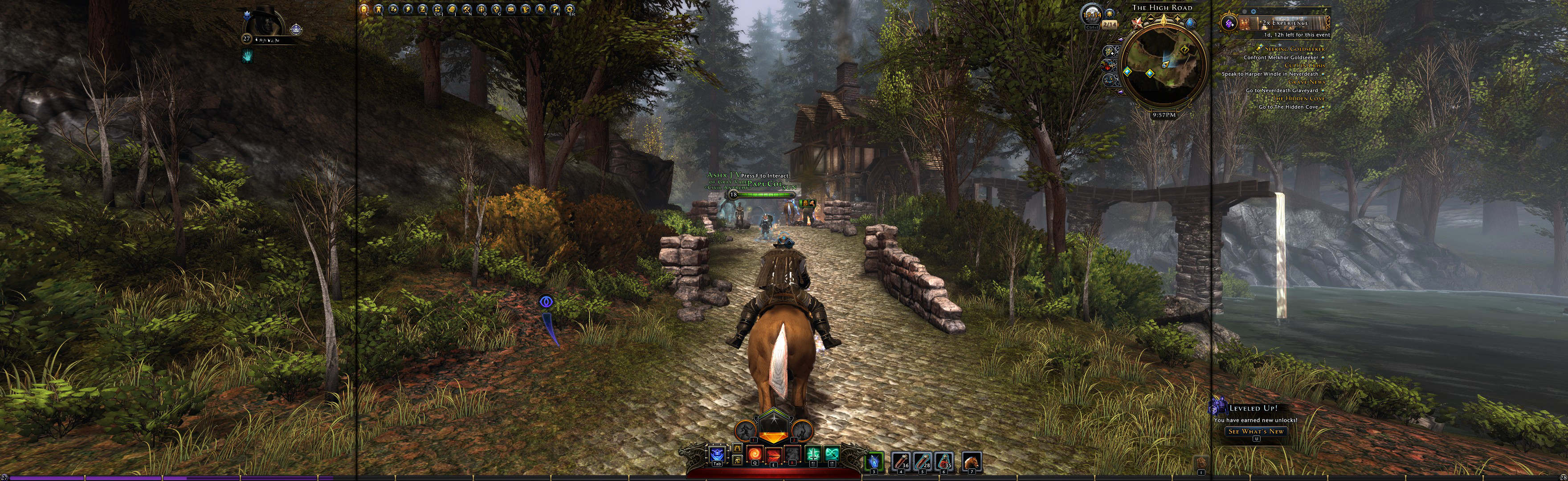
Neverwinter 2013 Manual PLP screenshot, just for kicks
Image


Top
 Profile  
Reply with quote  
PostPosted: 02 Dec 2015, 17:51 
Offline
Insiders
Insiders
User avatar

Joined: 20 Aug 2009, 04:20
Posts: 2351
Location: Virginia
So I'm confused, does the 380x support plp?

_________________
System Core: | Intel Core i5-2500K + ASUS P8Z68-V + 16GB Corsair XMS3 DDR3 1333 MHz | Win7 x64 | MSI R7970 Lightning 3GB [1105/1400] |
Display: | 3 x Dell Ultrasharp 3007WFP-HC @ 7680x1600 | Dell u3011 |


Top
 Profile  
Reply with quote  
PostPosted: 04 Dec 2015, 05:42 
Offline
Insiders
Insiders

Joined: 21 Oct 2014, 23:33
Posts: 291
No-one has specifically tested R9 380X yet, but logically it will work Eyefinity PLP.

Reasoning:
R9 380X is GCN 1.2, which works in Eyefinity PLP. Also R9 380X is based on R9 380 (which works in PLP). Their codenames are bit different, but doesn't matter (both Tonga, but XT vs PRO).

This is where I saw GCN1.2 stated for R9 380X (the main proof):
https://en.wikipedia.org/wiki/AMD_Radeon_Rx_300_series

So have now added R9 380X to list on first page of thread. A beefed up R9 380 is tempting, liking this card. Here are a couple reviews for it:
http://www.anandtech.com/show/9784/the-amd-radeon-r9-380x-review
http://www.pcworld.com/article/3005951/components-graphics/amd-radeon-r9-380x-review-the-best-graphics-card-for-1080p-gaming-priced-to-fight.html


Top
 Profile  
Reply with quote  
PostPosted: 09 Dec 2015, 02:39 
Offline

Joined: 01 Dec 2015, 04:52
Posts: 2
thanks for the confirmation on crossfire.
been dying to upgrade to 30" center monitor eyefinity crossfire.


before i go and 1) spend $1.4k on a dell u3014 + 2 dell 2007fp and 2) $2.6k on quad-fire furyx
and
before i go and 3) sell 1080p surround and 4) sell quad-fire 290x.


this question is regarding the two side portrait monitors (dell 2007fp) regarding the refresh scan (you know the vertical 60hz).
once the side monitors are rotated portrait. and windows is also set to portrait. and now everything looks correct.

for the 2 side monitors
does 1) the refresh scan follow windows and switch accordingly maintaining the normal "up to down."
or
does 2) the refresh scan stay with the monitor (now physically rotated) and continuing to refresh scan "left to right".

hopefully it is #1 above (since no one has mention any issues). just want to make absolutely sure before blowing $4k.

can someone confirm this for me. thanks.


Top
 Profile  
Reply with quote  
PostPosted: 09 Dec 2015, 04:23 
Offline
Insiders
Insiders

Joined: 21 Oct 2014, 23:33
Posts: 291
I will watch for blemish direction as I game, I honestly can't remember. But pretty sure refresh-direction remains stock, it is tied to monitor. Hopefully someone else can confirm this. I have not yet noticed any tearing in current game of interest: TM2 (arcade racing).

So if side monitor is in portrait, I think any line-type picture-blemishes would be vertical & not horizontal. This is not a bad thing imo, seems to me any vertical blemishes on the sides would mesh better into the whole 3D view. Also there are ways to reduce these blemishes. For example the monitor-connection type being used (VGA the worst). FreeSync technology is also available to fix these types of blemishes.

EDIT - Tested
Current game on 3520x1080 manual PLP, using these monitor connections:
- DVI sides: no tearing, no anomalies, perfect clean sides.
- VGA sides: monitor 3 (one side) has shifting vertical anomalies (not tearing, instead multiple moving lines of discoloration). The other side looks perfect.
Those VGA anomalies prove refresh direction remains stock.

Also seems to me you'd get excellent FPS with only 2 Fury X cards on your resolution (7,936,000 px).


Top
 Profile  
Reply with quote  
PostPosted: 18 Dec 2015, 18:33 
Offline

Joined: 18 Dec 2015, 18:21
Posts: 2
Hello!

positive: I can confirm the 380x works!

negative: I have terrible tearing everywhere. I am currently using 2 x Dell 2007 and a 245B in the middle (should be switched to a 30"). If I play in window-mode with extended desktop everything is fine but as soon as i activate the group everything is fuuuuu up.

- mouse dissapears in games
- bad tearing in games (mostly L&R but sometimes on the middle screen - mostly moving slowly downwards, sometimes upwards or stable position)
- tearing in 2D - moving a window across the desktop and it just tears appart
- switching the group on/off mostly kills PC, doesn't boot afterwards

All in all it is completely unusable. Internet says "use only DP monitors, cables and ports" -> impossible. Can anybody help me?


Top
 Profile  
Reply with quote  
PostPosted: 18 Dec 2015, 23:06 
Offline
Insiders
Insiders

Joined: 21 Oct 2014, 23:33
Posts: 291
MÆGGES,

I have some ideas.

1. [REMOVED, IRRELEVANT, re pixel line-up]

2. Your stock PLP resolution (ie if not dropped res on sides) is high for R9 380X. Card may be struggling to keep up (but I doubt this is the source of your tearing).
3. Tests:
A. Try spreading a game manually, using SoftTH fullscreen & Eyefinity Off. Still tearing?
i. This would prove whether or not Eyefinity is at fault for tearing.
ii. To find a suitable game & spread instructions, visit PLP Gaming wiki & go to Manual PLP Games List. You want a game that says "Fullscreen" in pink, at its top.
B. Back to Eyefinity (not SoftTH). Try VGA on the sides, if you can. See if it's better, VGA is pretty forgiving connection.
C. Drop ALL monitors' resolution below stock to get your gaming pixel-count low. Does it still tear?
4. What monitor connections do you use, & what adapters? How long are your cords?
5. Consider FreeSync, would likely fix (e.g monitors supported: http://support.amd.com/en-us/search/faq/284 )

I don't have Eyefinity PLP yet, have not tested it. But I know other people are happy, so you can likely fix tearing somehow... I'm pretty sure it's not the R9 380X itself, but something in-between the 380X & your outputted game. Sounds like connecters & cords.

As for disappearing mouse, this does seem to be an ongoing issue in some games. Some people complain about it, other people don't seem to have the issue (or are playing different games).

Once you get your PLP setup working without tearing. For games that have other issues (e.g. no mouse, breaking game), consider using Manual PLP methods.


Last edited by imusrt on 25 Dec 2015, 18:28, edited 1 time in total.

Top
 Profile  
Reply with quote  
PostPosted: 19 Dec 2015, 21:46 
Offline

Joined: 18 Dec 2015, 18:21
Posts: 2
1. I don't really understand what you expect me to do ;) Maybe because I am not native english-speaking... But the side monitors are 2007fp not wfp so they are 1600x1200 - don't know if that is important.

2. That may be right but I also used 3 x 1280 x 1024 on a HD5770 years ago (which worked) and that card is 10 times slower. So - as you said - i don't think this is the problem. Also the problem is at the desktop where speed shouldn't matter.

3. A. I tested this and played Minecraft windowed over all 3 screens -> works perfect. Eyefinity on -> Tearing.
B. Not tested yet
C. Not tested yet

4. Dells direct DVI, Samsung Active DP to single link DVI

5. I don't want to buy new displays :)

So, i thought: Okay, it is because of the active adaptor and wanted to order a passive one. Because i was annoyed I installed my GTX560Ti. For watching movies I cloned the Samung (native DVI) with my beamer (Optoma HD300X, native HDMI) and you wont believe it -> same tearing. Then i thougt that it was because of different port types HDMI & DVI but a Dell cloned with the Optoma works perfect.

So my actual thought is that the Samsung is the problem. So the next thing i will do is try the Dells with the Optoma in PLP to see if the Samsung is wrong.

Thanks for your help!


Top
 Profile  
Reply with quote  
PostPosted: 20 Dec 2015, 01:15 
Offline
Insiders
Insiders

Joined: 21 Oct 2014, 23:33
Posts: 291
very strange, glad you are making some headway.

As for suggestion #1 & the green layout image, sorry I thought you had different sides.

We are in agreement it seems to be your connections. And it is very likely your center screen's connection (DP to DVI active adapter), not your sides. Would recommend trying next: HDMI to DVI for center monitor. I would try the cheapest adapter you can find first, see what happens. (Not researched proper, but it seems logical next step)

There is another test that could prove interesting: try mixed resolution LLL in Eyefinity. Does it tear too? (would likely prove that PLP orientation has nothing to do with the problem).

[GUTTED, IRRELEVANT pixel line-up]

You have:
Center Samsung SyncMaster 245B (24" 1920x1200, 6:10). Sides: Dell 2007fp 20.1" 1600x1200 (4:3) sides (20.1" when actually measured).


Top
 Profile  
Reply with quote  
PostPosted: 12 Feb 2016, 17:53 
Offline

Joined: 06 Jan 2016, 16:43
Posts: 7
I can testify that R9 Nano works perfectly from my initial tests (Running 20-30-20 PLP setup 4960x1600). On driver 16.1.1 :-)


Top
 Profile  
Reply with quote  
PostPosted: 07 Jun 2016, 19:47 
Offline
User avatar

Joined: 01 Aug 2011, 21:18
Posts: 63
I have tested and can confirm that PLP works on the AMD Pro Duo

Image

and BTW, this card is fricking insane!!

The pic above is BF4 with every setting set to absolute highest "ultra" available, and its pushing over 100FPS at 5208x1600 resolution


Top
 Profile  
Reply with quote  
PostPosted: 25 Jun 2016, 02:51 
Offline
Insiders
Insiders
User avatar

Joined: 20 Aug 2009, 04:20
Posts: 2351
Location: Virginia
Dude, you bought a Pro Duo? Holy Moly.

_________________
System Core: | Intel Core i5-2500K + ASUS P8Z68-V + 16GB Corsair XMS3 DDR3 1333 MHz | Win7 x64 | MSI R7970 Lightning 3GB [1105/1400] |
Display: | 3 x Dell Ultrasharp 3007WFP-HC @ 7680x1600 | Dell u3011 |


Top
 Profile  
Reply with quote  
PostPosted: 08 Jul 2016, 09:01 
Offline

Joined: 06 Jan 2016, 16:43
Posts: 7
Are there any news on the new GCN 4 Polaris support for PLP setups?

I am running a R9 Nano on a 20-30-20 Dell PLP setup and it works perfectly with Eyefinity. Wondering if the new cards also support it.


Top
 Profile  
Reply with quote  
PostPosted: 03 Sep 2016, 05:07 
Offline

Joined: 17 Mar 2008, 22:17
Posts: 72
Anyone having issues recently after new patches? Running 2x R9 Fury and 20 + 30 + 20 Dells. I have to edit the 30" resolutions using the CRU utility and I keep getting crashes when it tries to create the group.


Top
 Profile  
Reply with quote  
PostPosted: 15 Sep 2016, 14:40 
Offline

Joined: 24 Jun 2015, 11:58
Posts: 2
I'm running driver 16.8.3 with an 8GB Sapphire RX480 and Eyefinity PLP (20,30,20) is working fine.

Bezel correction seems to be broken, but I don't think it ever worked on PLP, even with a 380X.


Top
 Profile  
Reply with quote  
PostPosted: 20 Sep 2016, 13:38 
Offline

Joined: 30 Nov 2007, 03:11
Posts: 18
set your bezel with driver 15.x then upgrade to 16 amd it should keep it


Top
 Profile  
Reply with quote  
PostPosted: 23 Sep 2016, 20:09 
Offline

Joined: 17 Mar 2008, 22:17
Posts: 72
Downloaded 15.301 - Going to uninstall with Display driver uninstaller and see how that works.


Top
 Profile  
Reply with quote  
PostPosted: 23 Sep 2016, 21:06 
Offline

Joined: 17 Mar 2008, 22:17
Posts: 72
So tried 15.30 and the latest beta. Neither one. Getting weird symptoms where the resolution will say 4960x1600 but my 30" will be very grainy and pixelated. Like its running on an odd timing. Bezel compensation for me was messed up on 15.30 as well. Plus there were times where I couldn't add my two 20s back even without eyefinity.

***Update*** FINALLY!!! Some how and for some reason, my scaling kept getting changed...!!!! Changed it back to keep aspect ratio and under 15.30 I have bezel compensated resolution. Gonna try to update now and see what happens.

***Update 2***. Updated from 15.30 to latest non beta and it removed my bezel compensation. Looks like I'm hanging out at 15.30.

***Update 3***. Driver crashed for some reason. I'm starting to think that the issue is my monitors itself. One of my Dell 2007FPs was unresponsive to any key presses on the front panel. Had to unplug and replug it in to get it to work. The 30" had some strange lines in it. I think I'm just going to end up going back to 3x 24" screens. I have 2 HP LP2475w LCDs and can get a 3rd one for about $150-175


Top
 Profile  
Reply with quote  
Display posts from previous:  Sort by  
Post new topic Reply to topic  [ 47 posts ]  Go to page Previous  1 ... 3, 4, 5, 6, 7, 8, 9 ... 47  Next

All times are UTC [ DST ]


Who is online

Users browsing this forum: No registered users and 7 guests


You cannot post new topics in this forum
You cannot reply to topics in this forum
You cannot edit your posts in this forum
You cannot delete your posts in this forum
You cannot post attachments in this forum

Search for:
Jump to:  
cron


Powered by phpBB® Forum Software © phpBB Group