Widescreen Gaming Forum

[-noun] Web community dedicated to ensuring PC games run properly on your tablet, netbook, personal computer, HDTV and multi-monitor gaming rig.
It is currently 12 Jul 2026, 12:32

All times are UTC [ DST ]


Post new topic Reply to topic  [ 26 posts ]  Go to page Previous  1 ... 10, 11, 12, 13, 14, 15, 16 ... 26  Next
Author Message
PostPosted: 03 Jan 2013, 16:28 
Offline
Editors
Editors
User avatar

Joined: 08 May 2011, 18:58
Posts: 2286
should be working without any settings! can you Link a Video of yours that doesnt work?

_________________
We gonna send it to outa space!


Top
 Profile  
Reply with quote  
PostPosted: 04 Jan 2013, 00:43 
Offline
Insiders
Insiders
User avatar

Joined: 26 Jan 2010, 01:51
Posts: 354
Abram wrote:
How do you make multi-monitor videos spans more than one screen in youtube? I run my desktop in Eyefinity all the time, and if I watch most EF/NV Surround videos and click the full screen button, the video spans across my screens, but never with my videos. No matter if i put my browser to fullscreen first, and no matter which resolution i select on the youtube player.

I made mine Fraps, and converted to .mp4 using Handbrake. Resolution is correct, with no crops or letterboxing, which i confirmed with Mediainfo. Shoudl I use another editor? Is there a setting in YT's Video Manager I'm not seeing?


This same thing happens to mine as well and I've never found a fix. It has to do with the settings of the program you are using to encode the video though.


Top
 Profile  
Reply with quote  
PostPosted: 04 Jan 2013, 15:25 
Offline
Administrators
Administrators
User avatar

Joined: 02 Nov 2009, 12:14
Posts: 1031
Location: Lincoln, UK
I assume whatever your using to encode is trying to encode to 720p or 1080p or to a You Tube compatible output? If that's the case it'll probably be encoded to a final resolution 1920x1080 or 1280x720, which has an aspect ratio of 16:9. You need to find an encoder that will let you maintain the original aspect ratio.

_________________
: ) Skid : )
My Multi-Monitor Focused YouTube Channel: http://www.youtube.com/c/SkidIncGaming
My Twitch channel which I've been known to stream on from time to time: http://www.twitch.tv/SkidInc
"Imagination is the only weapon in the war against reality."


Top
 Profile  
Reply with quote  
PostPosted: 05 Jan 2013, 06:19 
Offline
Insiders
Insiders
User avatar

Joined: 21 Mar 2006, 05:01
Posts: 1993
Well i removed the video. I used Handbrake, and Mediainfo said it was half my correct Eyefinity resolution, and it plays properly in MPC-HC. I guess i"ll try another format and/or encoder.


Top
 Profile  
Reply with quote  
PostPosted: 14 Jun 2013, 00:54 
Offline

Joined: 23 Nov 2011, 00:52
Posts: 60
Is there a way to view the Youtube videos full screen on 2-3 monitors? I cant seem to figure out how to do it


Top
 Profile  
Reply with quote  
PostPosted: 14 Jun 2013, 02:14 
Offline
Founder
Founder
User avatar

Joined: 13 Oct 2003, 05:00
Posts: 7358
dinglesniff wrote:
Is there a way to view the Youtube videos full screen on 2-3 monitors? I cant seem to figure out how to do it

You need to have a video like the ones Skid produces. They are full-res for multi-mon. Click the quality option for "original" quality. Then go full-screen.


Top
 Profile  
Reply with quote  
PostPosted: 13 Feb 2014, 19:36 
Offline

Joined: 09 Aug 2008, 23:50
Posts: 11
Skid wrote:
You need to find an encoder that will let you maintain the original aspect ratio.

Evening, coup,e of questions -

1. What app do you use to capture in-game footage? I have used fraps but lack of compression and multiple videos files makes almost unusable.
2. what app do you use to compress the video down before uploading to YT.
3. Looking at your YT channel and noticed the 'chase the sun' video ihas the 2160p option available, how were you able to do this as a recent video(http://youtu.be/B_TpGQLoIjg) I recorded at the same 5140*1050 as you just appears green when I select 2160p on youtube.


Top
 Profile  
Reply with quote  
PostPosted: 14 Feb 2014, 00:04 
Offline
Administrators
Administrators
User avatar

Joined: 02 Nov 2009, 12:14
Posts: 1031
Location: Lincoln, UK
b1k3rdude wrote:
Skid wrote:
You need to find an encoder that will let you maintain the original aspect ratio.

Evening, coup,e of questions -

1. What app do you use to capture in-game footage? I have used fraps but lack of compression and multiple videos files makes almost unusable.
2. what app do you use to compress the video down before uploading to YT.
3. Looking at your YT channel and noticed the 'chase the sun' video ihas the 2160p option available, how were you able to do this as a recent video(http://youtu.be/B_TpGQLoIjg) I recorded at the same 5140*1050 as you just appears green when I select 2160p on youtube.


1. Fraps or Dxtory, whichever works best at the time.
2. Depending on the video I'm making, ether AVISynth with MeGUI using X264, or Adobe Premiere and whatever encoder the Media Encoder uses.
3. It's "Race the Sun" and that's because You Tube is not capable of processing videos beyond a 4K resolution, the encoding just fails and the video turns green, so make sure you stay within the 4K resolution limit (4096).

_________________
: ) Skid : )
My Multi-Monitor Focused YouTube Channel: http://www.youtube.com/c/SkidIncGaming
My Twitch channel which I've been known to stream on from time to time: http://www.twitch.tv/SkidInc
"Imagination is the only weapon in the war against reality."


Top
 Profile  
Reply with quote  
PostPosted: 14 Feb 2014, 11:52 
Offline
Administrators
Administrators
User avatar

Joined: 27 Dec 2009, 14:27
Posts: 1789
b1k3rdude wrote:
Looking at your YT channel and noticed the 'chase the sun' video ihas the 2160p option available, how were you able to do this as a recent video(http://youtu.be/B_TpGQLoIjg) I recorded at the same 5140*1050 as you just appears green when I select 2160p on youtube.


Skid wrote:
You Tube is not capable of processing videos beyond a 4K resolution, the encoding just fails and the video turns green, so make sure you stay within the 4K resolution limit (4096).


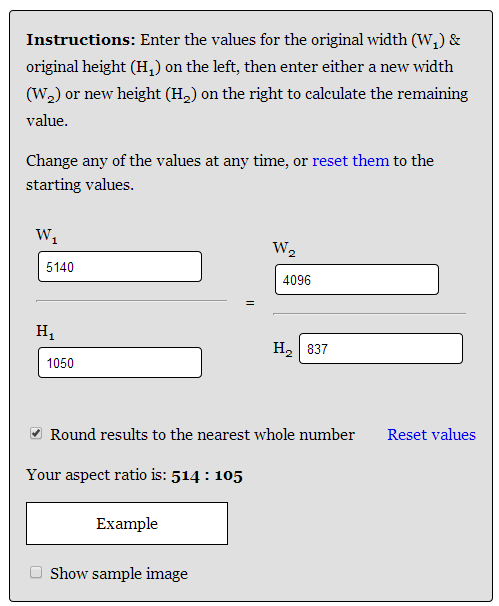
To clarify, you need to encode the video to a width of no more than 4096, using an Aspect Ratio Calculator you can work out the right resolution to keep the right aspect ratio when shrinking the video down.
Example:- 5140x1050 = 4096x837 to keep the aspect ratio as close as possible to the original.
Attachment:
arc.png
arc.png [ 18.77 KiB | Viewed 6572 times ]


I find also that XSplit Broadcaster can also be of some use to capture to 4k resolutions and even allows you to setup a custom resolution of say 4096x837 and output to .mp4 ready for youtube uploading, i think it even has a youtube plugin for live streaming but ive not worked this out yet.
Note xplit will not capture 3D/Directx content you will need DXTory to capture the DirectX output and convert it into a stream format that XSplit can pickup to then capture.

_________________
| Gigabyte X79S-UP5-WiFi Skt2011 | i7 4820k @4.4GHz Watercooled (Ivy Bridge-E) | Corsair Vengence 32GB @2133MHz 11-11-11-27 2T Quad-Channel (8x4GB) | AMD R9-Fury-X 4GB @1140/505MHz + EKWB Watercooled | 256GB Crucial MX200 SSD | 8x 1TB Samsung F3 SATA-II | Corsair 850W TX PSU | 3x Dell S2209W 22"wide TFT's (5760x1080res) | Logitech Z-5400 5.1ch speakers | Win7 Ultimate x64 |


Top
 Profile  
Reply with quote  
PostPosted: 17 Feb 2014, 18:02 
Offline

Joined: 09 Aug 2008, 23:50
Posts: 11
Skid wrote:
1. Dxtory, whichever works best at the time.
2. Depending on the video I'm making, ether AVISynth with MeGUI using X264.
3. Because You Tube is not capable of processing videos beyond a 4K resolution, the encoding just fails and the video turns green, so make sure you stay within the 4K resolution limit (4096).

1. grand Ill give this a try and I fraps too cumbersome.
2. I shall download these and give them a try.
3. ah, cool thanks.
Delphium wrote:
To clarify, you need to encode the video to a width of no more than 4096, for example 5140x1050 = 4096x837 to keep the aspect ratio as close as possible to the original.

Thanks for the info.


Top
 Profile  
Reply with quote  
PostPosted: 26 Feb 2015, 16:03 
Offline

Joined: 20 Jan 2015, 13:38
Posts: 1
Yes, I had too problems with 4K videos on youtube. Like @Delphium and @Skid said before, you need to stay on 4K resolution and not going further. I realised that after 5-6 failed videos :))
I tried two months ago to upload a video, calculated aspect ratio with the calculator, but still getting error that the resolution is to big.


Last edited by rares24 on 28 Feb 2015, 09:18, edited 1 time in total.

Top
 Profile  
Reply with quote  
PostPosted: 26 Feb 2015, 23:11 
Offline
Editors
Editors
User avatar

Joined: 08 May 2011, 18:58
Posts: 2286
Youtube changed the maximum Resolution!
There is no "Original" quality anymore but 2160p(4k) so all videos will be reduced to 3840x2160 pixel no matter what!
Right click on "Statistics" shows the resolution. in this case 3840*686 pixel :( the original i uploaded was 4090*720p
https://www.youtube.com/watch?v=Zjqz9BDbayc

_________________
We gonna send it to outa space!


Top
 Profile  
Reply with quote  
PostPosted: 27 Feb 2015, 12:56 
Offline
Administrators
Administrators
User avatar

Joined: 27 Dec 2009, 14:27
Posts: 1789
Does that mean that Youtube will now accept videos of say 5760x1080 resolution, and then scale them down to 2160p or does one still need to stick to the 4096pixels width when uploading?

_________________
| Gigabyte X79S-UP5-WiFi Skt2011 | i7 4820k @4.4GHz Watercooled (Ivy Bridge-E) | Corsair Vengence 32GB @2133MHz 11-11-11-27 2T Quad-Channel (8x4GB) | AMD R9-Fury-X 4GB @1140/505MHz + EKWB Watercooled | 256GB Crucial MX200 SSD | 8x 1TB Samsung F3 SATA-II | Corsair 850W TX PSU | 3x Dell S2209W 22"wide TFT's (5760x1080res) | Logitech Z-5400 5.1ch speakers | Win7 Ultimate x64 |


Top
 Profile  
Reply with quote  
PostPosted: 27 Feb 2015, 18:08 
Offline
Editors
Editors
User avatar

Joined: 08 May 2011, 18:58
Posts: 2286
Now thats a good question!
I'll test that when i'm back home.
The good thing of 3840x686 pixel is that's roughly 2MP, same as 1920x1080 so the filesize is small :D

_________________
We gonna send it to outa space!


Top
 Profile  
Reply with quote  
Display posts from previous:  Sort by  
Post new topic Reply to topic  [ 26 posts ]  Go to page Previous  1 ... 10, 11, 12, 13, 14, 15, 16 ... 26  Next

All times are UTC [ DST ]


Who is online

Users browsing this forum: No registered users and 1 guest


You cannot post new topics in this forum
You cannot reply to topics in this forum
You cannot edit your posts in this forum
You cannot delete your posts in this forum
You cannot post attachments in this forum

Search for:
Jump to:  
cron


Powered by phpBB® Forum Software © phpBB Group







