Widescreen Gaming Forum

[-noun] Web community dedicated to ensuring PC games run properly on your tablet, netbook, personal computer, HDTV and multi-monitor gaming rig.
It is currently 12 Jul 2026, 17:06

All times are UTC [ DST ]


Post new topic Reply to topic  [ 151 posts ]  Go to page Previous  1 ... 30, 31, 32, 33, 34, 35, 36 ... 151  Next
Author Message
PostPosted: 06 Sep 2018, 09:50 
Offline

Joined: 06 Sep 2018, 09:32
Posts: 1
thank you very much


Top
 Profile  
Reply with quote  
PostPosted: 06 Sep 2018, 12:30 
Offline

Joined: 05 Sep 2018, 14:08
Posts: 15
Homer Morisson wrote:
@susahamat:
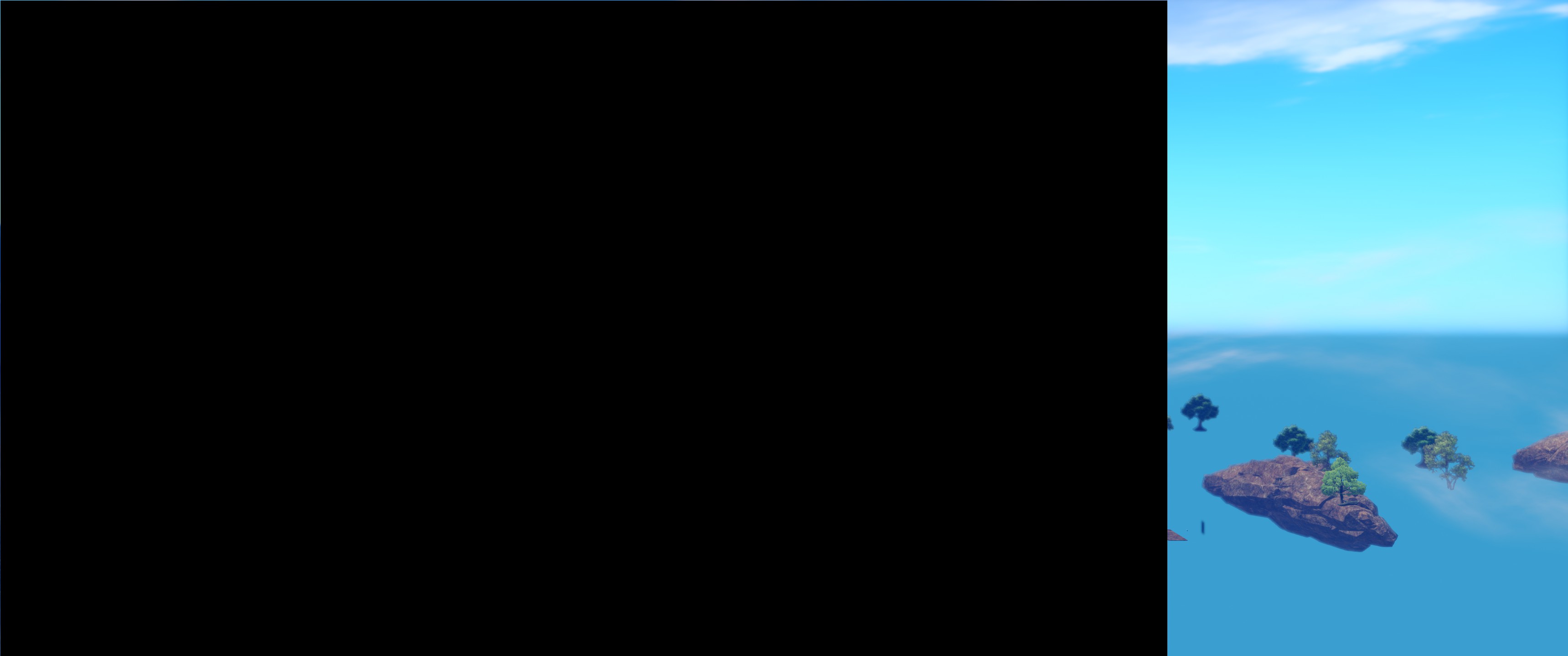
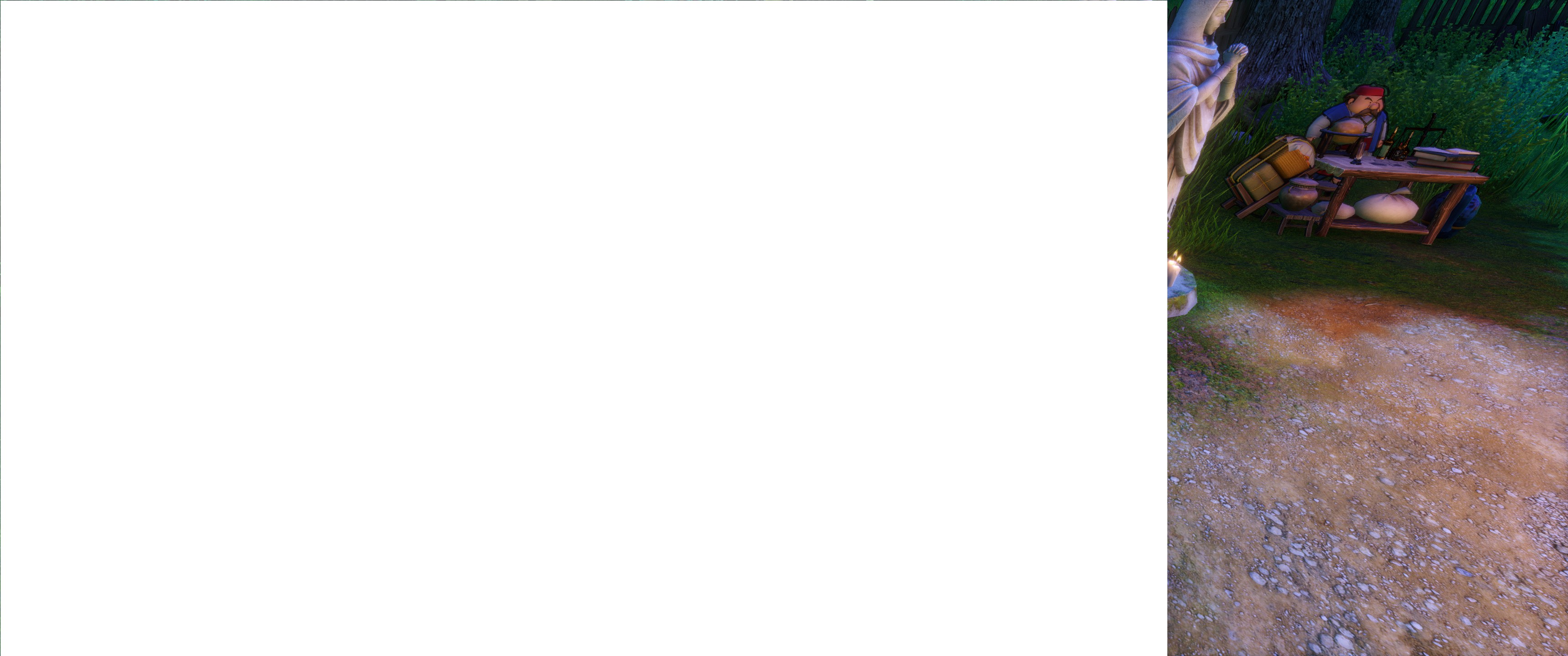
First of all, thank you -- the widescreen hack works in general, however there is one major annoyance: whenever the game does a "fade out", i.e. when starting and ending battle, the screen goes black for a second, and during pep ultimates, the screen has white fade outs multiple times... those were supposed to be fullscreen, but now with your hack, they are aligned to the left side of the screen and fill only the old 2560x1440 area, instead of being a fullscreen effect.

This means that ~2/3rds of the screen regularly black out or white out a number of times during combat, and upon area changes... this is insanely annoying and immersion-killing, so the big 1.000.000 dollar question:
Can this be fixed?

Apparently this is also tied in to the splash screen and menus being aligned to the left side instead of centered/fullscreen, even the crafting result popup (Success/Perfection) is off-center, and second screen shoes the white fade outs while crafting also with the same visual bug.

Screenshot to demonstrate the effect during battles and area transitions:
Image

Screenshot for the white fade outs during crafting and pep burst attacks:
Image


*push*

If there's any other .exe hacking ultrawide wizards around, the question still stands: does anyone have any idea how to fix this?
Getting rid of this visual bug would be the final piece of the puzzle to finally allow for actual 21:9 gaming in this game, all it takes is getting those fade out-effects to scale correctly with the rest of the output image/output resolution.

No idea how to do that or if it can be done even... but sure would be awesome to have some more experienced people have a look at this. =)

_________________
  • CPU: Intel Core i7 8700K @ 6x4.7 GHz
  • RAM: 32 GB G.Skill RipJawsV DDR4/3200 2x16 GB
  • GPU: EVGA RTX 2080 FTW3 ULTRA GAMING @ 2100 Mhz Boost
  • Display: Alienware AW3418DW 34" 21:9 IPS@100 Hz native(!) 3440x1440


Top
 Profile  
Reply with quote  
PostPosted: 06 Sep 2018, 15:01 
Offline

Joined: 06 Sep 2018, 13:38
Posts: 2
Wummhelm wrote:
Hello I've also tested it, although I have no 21: 9 monitor but a 16:10. There, the picture might be centered, but the picture is only shifted upwards. Since I am now synonymous to my question if you could edit the Exe so it is for 16:10 Währe the super because the game synonymous not 16:10 Supports next to Ultra widescreen


+1 please!


Top
 Profile  
Reply with quote  
PostPosted: 06 Sep 2018, 16:38 
Offline

Joined: 04 Sep 2018, 18:45
Posts: 3
jackfuste wrote:
jvlk wrote:
Does not work for me, picture is still 16x9 but not in the middle anymore but to the left.

Try this - dragon-quest-xi.7z


Damn you guys are awesome. Can't wait to try this once I get home! Hopefully someone can find a fix for the minor bugs and we will have a perfect fix!


Top
 Profile  
Reply with quote  
PostPosted: 06 Sep 2018, 17:59 
Offline

Joined: 05 Sep 2018, 20:49
Posts: 7
Homer Morisson wrote:
Mr Protein wrote:
Wonder if someone could help me ? Im playing Dragon quest @ 3440x1440 21.9 and ive tried Jacks fix, downloaded and extracted to game file but its not worked...im trying to figure out what im doing wrong, can anyone tell me where i need to extract the patch to please ?


It's not a patch, it's a hacked .exe -- you need to replace the game's original .exe with this one... but since this seems to be new to you, first of all and most importantly: back up the original file!
That makes it much easier to go back and forth, since then you have the two separate .exe files and can just swap them out.

I don't know what exactly you meant by "extracted to game file", but you need to make sure to put the new .exe file in the exact same directory the original one is in, which is found in:
Code:
\steamapps\common\DRAGON QUEST XI\Game\Binaries\Win64\

After you have done that, you should only need to set your game in the internal options to fullscreen after having loaded a savegame, and you should be set. Well, "set"... aside from the major glitches still in this first iteration.


Thankyou very much !

Edit: I just cannot seem to get this to work, no idea what im doing wrong....i need a step by step conclusive guide for idiots it seems :( Or ! someone install it for me via teamviewer..im on the WSGF discord grp

Top
 Profile  
Reply with quote  
PostPosted: 06 Sep 2018, 23:55 
Offline

Joined: 05 Sep 2018, 14:08
Posts: 15
Mr Protein wrote:
Homer Morisson wrote:
Mr Protein wrote:
Wonder if someone could help me ? Im playing Dragon quest @ 3440x1440 21.9 and ive tried Jacks fix, downloaded and extracted to game file but its not worked...im trying to figure out what im doing wrong, can anyone tell me where i need to extract the patch to please ?


It's not a patch, it's a hacked .exe -- you need to replace the game's original .exe with this one... but since this seems to be new to you, first of all and most importantly: back up the original file!
That makes it much easier to go back and forth, since then you have the two separate .exe files and can just swap them out.

I don't know what exactly you meant by "extracted to game file", but you need to make sure to put the new .exe file in the exact same directory the original one is in, which is found in:
Code:
\steamapps\common\DRAGON QUEST XI\Game\Binaries\Win64\

After you have done that, you should only need to set your game in the internal options to fullscreen after having loaded a savegame, and you should be set. Well, "set"... aside from the major glitches still in this first iteration.


Thankyou very much !

Edit: I just cannot seem to get this to work, no idea what im doing wrong....i need a step by step conclusive guide for idiots it seems :( Or ! someone install it for me via teamviewer..im on the WSGF discord grp

Okay, completely step by step:

Download the .zip file from here.
Extract the .zip file to get the .exe file.
Backup your original .exe in the directory mentioned before.
Copy the new .exe into that very same folder.
Rename the new .exe so it has exactly the same name (including capitalization) as the original .exe.
Start the game.
Load your savegame.
If necessary, set display options to "Fullscreen" and confirm.

That's it.

_________________
  • CPU: Intel Core i7 8700K @ 6x4.7 GHz
  • RAM: 32 GB G.Skill RipJawsV DDR4/3200 2x16 GB
  • GPU: EVGA RTX 2080 FTW3 ULTRA GAMING @ 2100 Mhz Boost
  • Display: Alienware AW3418DW 34" 21:9 IPS@100 Hz native(!) 3440x1440


Top
 Profile  
Reply with quote  
PostPosted: 07 Sep 2018, 01:37 
Offline

Joined: 08 Apr 2015, 21:43
Posts: 5
The new .exe works for me. The battle scenes are a bummer when transitioning, but my computer is so fast that it is only black like that for a split second. Thanks for making it available as it makes the rest of the game beautiful to play!


Top
 Profile  
Reply with quote  
PostPosted: 07 Sep 2018, 04:59 
Offline

Joined: 07 Sep 2018, 04:52
Posts: 7
I am waiting to purchase DQ 11 once ultrawide is working correctly. Glad to see nice progression. I wonder the remaining bug may need someone that know how the engine works to fix it. Kaidaien on steam is very knowledgeable https://steamcommunity.com/app/742120/d ... 103882377/
I can't post on steam yet. Can anyone ask him if he can help? Thanks.


Top
 Profile  
Reply with quote  
PostPosted: 07 Sep 2018, 09:37 
Offline

Joined: 04 Sep 2018, 23:34
Posts: 2
+1 would be awesome to get this sorted


Top
 Profile  
Reply with quote  
PostPosted: 07 Sep 2018, 18:00 
Offline

Joined: 05 Sep 2018, 20:49
Posts: 7
Edit: I just cannot seem to get this to work, no idea what im doing wrong....i need a step by step conclusive guide for idiots it seems :( Or ! someone install it for me via teamviewer..im on the WSGF discord grp[/quote]

Okay, completely step by step:

Download the .zip file from here.
Extract the .zip file to get the .exe file.
Backup your original .exe in the directory mentioned before.
Copy the new .exe into that very same folder.
Rename the new .exe so it has exactly the same name (including capitalization) as the original .exe.
Start the game.
Load your savegame.
If necessary, set display options to "Fullscreen" and confirm.

That's it.[/quote]


Thanks so much Homer, got it working :)


Top
 Profile  
Reply with quote  
PostPosted: 07 Sep 2018, 18:13 
Offline

Joined: 07 Sep 2018, 18:11
Posts: 1
Sorry , I used it ,but it does not work ,is there some special setting for display mode in game ?

thanks a lot !!!


Top
 Profile  
Reply with quote  
PostPosted: 07 Sep 2018, 18:45 
Offline

Joined: 08 Dec 2017, 20:25
Posts: 15
thaiusmle wrote:
I am waiting to purchase DQ 11 once ultrawide is working correctly. Glad to see nice progression. I wonder the remaining bug may need someone that know how the engine works to fix it. Kaidaien on steam is very knowledgeable https://steamcommunity.com/app/742120/d ... 103882377/
I can't post on steam yet. Can anyone ask him if he can help? Thanks.


He seems preoccupied on adding HDR to the game and that will be a while to finish. He's also just ignoring all the 21 9 requests so I doubt anything will come out of it :(

Let's be grateful there is a solution and if there's a 100% fix then that's a nice bonus. Thank you modders for the hard work we appreciate it.


Top
 Profile  
Reply with quote  
PostPosted: 07 Sep 2018, 21:14 
Offline

Joined: 05 Sep 2018, 00:11
Posts: 6
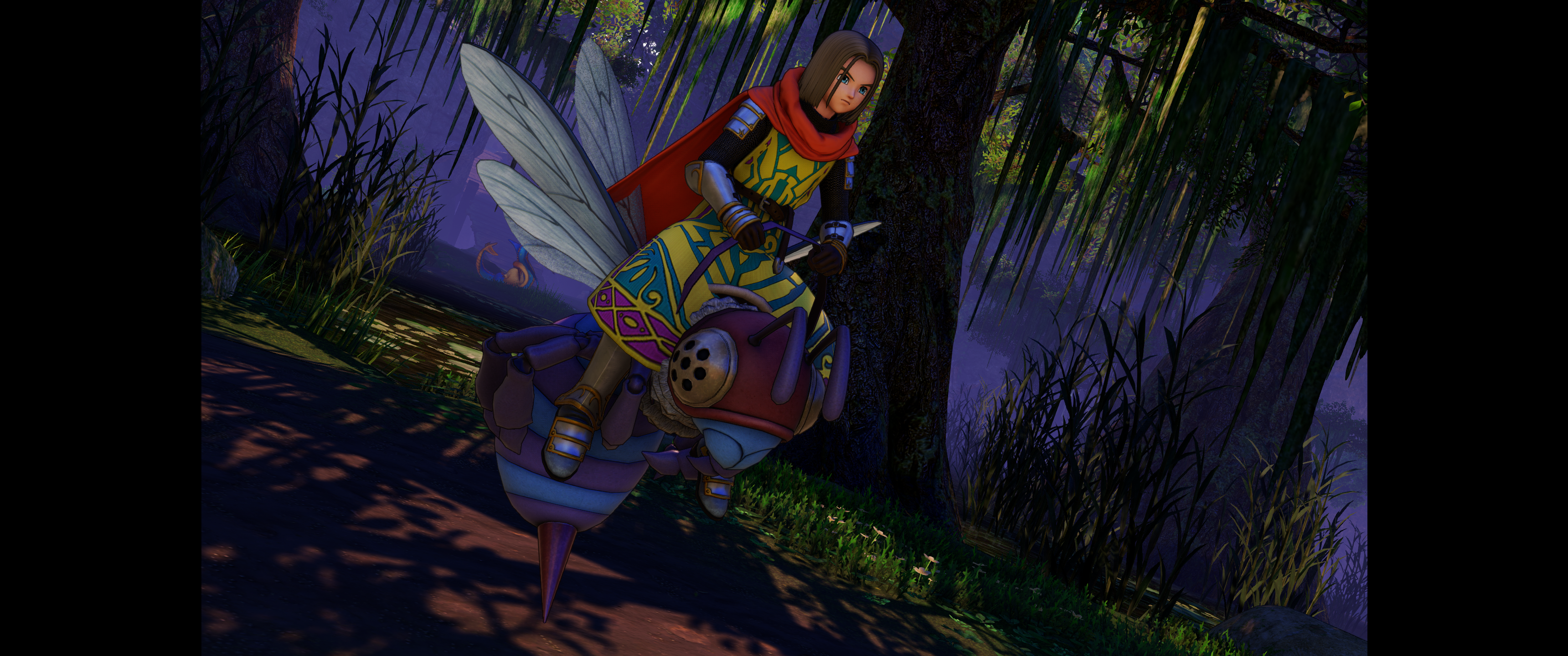
So I followed the directions and replaced the stock .exe with the one from this thread. It’s does fill the screen completely but the characters look ever so slightly stretched/fat. Do I need to select a resolution at all? I selected full screen under the options already but my resolution in game is set for 2160x1440 (although I’m not sure that even matters with this fix)

There’s no distortion or anything but people just look a tad “round”

Never played a Dragon Quest game before so don’t have prior graphics to compare it to. Anyway to tell that I installed this right?


Top
 Profile  
Reply with quote  
PostPosted: 07 Sep 2018, 21:24 
Offline

Joined: 05 Sep 2018, 14:08
Posts: 15
There is no "installing", it's just replace & run -- and there is no aspect ratio distortion, unless something somehow went wrong on your end that shouldn't have been possible to go wrong.
Most likely you're simply referring to the typical character design for DQ that's extremely similar to Blue Dragon as well as Dragon Ball, since all of those had the same lead character artist, Toriyama-san.

If it looks like this on your end, everything's fine... if it is wider than that (relative width, mind, not absolute), then yes, something isn't working as intended.
Image

Also, as one can see from my screenshot, I've gone back to the original .exe -- those glitches with the fade outs are just so majorly ugly and annoying, I'd rather play with bars than endure 100+ hours of those visual glitches.
Still thankful to everyone who tried making 21:9 true Ultrawide possible, of course, just angry that Squenix has screwed this up so badly and made it so hard to fix.

_________________
  • CPU: Intel Core i7 8700K @ 6x4.7 GHz
  • RAM: 32 GB G.Skill RipJawsV DDR4/3200 2x16 GB
  • GPU: EVGA RTX 2080 FTW3 ULTRA GAMING @ 2100 Mhz Boost
  • Display: Alienware AW3418DW 34" 21:9 IPS@100 Hz native(!) 3440x1440


Top
 Profile  
Reply with quote  
PostPosted: 07 Sep 2018, 22:34 
Offline

Joined: 05 Sep 2018, 00:11
Posts: 6
I guess I needed to exit/restart the game after selecting full screen as I quit and came back in and now it looks perfect! (I do see the screen shifted slightly on the loading screens but it's a minor thing).

Thanks everyone and appreciate the work on this!


Top
 Profile  
Reply with quote  
PostPosted: 08 Sep 2018, 05:02 
Offline

Joined: 07 Sep 2018, 04:52
Posts: 7
Spacerik wrote:
thaiusmle wrote:
I am waiting to purchase DQ 11 once ultrawide is working correctly. Glad to see nice progression. I wonder the remaining bug may need someone that know how the engine works to fix it. Kaidaien on steam is very knowledgeable https://steamcommunity.com/app/742120/d ... 103882377/
I can't post on steam yet. Can anyone ask him if he can help? Thanks.


He seems preoccupied on adding HDR to the game and that will be a while to finish. He's also just ignoring all the 21 9 requests so I doubt anything will come out of it :(

Let's be grateful there is a solution and if there's a 100% fix then that's a nice bonus. Thank you modders for the hard work we appreciate it.


He may thought that it is already fully working. I wonder if he aware of the issue that we are discussing here.


Top
 Profile  
Reply with quote  
PostPosted: 08 Sep 2018, 20:53 
Offline
User avatar

Joined: 19 May 2015, 03:52
Posts: 38
Can someone please share a working .7z file? Jackfuste's link is broken.


Top
 Profile  
Reply with quote  
PostPosted: 09 Sep 2018, 18:39 
Offline
User avatar

Joined: 19 May 2015, 03:52
Posts: 38
Image is stretched with the .exe's provided here. Not sure why anyone hasn't mentioned this. Restarting or keeping it in "full screen" mode does not fix fat characters.


Top
 Profile  
Reply with quote  
PostPosted: 09 Sep 2018, 18:51 
Offline

Joined: 08 Apr 2015, 21:43
Posts: 5
Full Screen did not work for me. I had to choose borderless. Then it works (with the bugs mentioned previously),so give that a shot TheWitcher!


Top
 Profile  
Reply with quote  
PostPosted: 09 Sep 2018, 23:24 
Offline
User avatar

Joined: 19 May 2015, 03:52
Posts: 38
Ulfghuld wrote:
Full Screen did not work for me. I had to choose borderless. Then it works (with the bugs mentioned previously),so give that a shot TheWitcher!


Holy shitspa. Thanks bro! That worked :cheers:


Top
 Profile  
Reply with quote  
PostPosted: 10 Sep 2018, 00:33 
Offline

Joined: 05 Sep 2018, 00:11
Posts: 6
Any update on the possibility of working out the bugs? Love the ultrawide but the black screen/transition issues kinda suck...


Top
 Profile  
Reply with quote  
PostPosted: 10 Sep 2018, 22:33 
Offline
User avatar

Joined: 19 May 2015, 03:52
Posts: 38
^ Can almost guarantee no one will fix those glitches. Just seems to be an unfortunate side effect.


Top
 Profile  
Reply with quote  
PostPosted: 11 Sep 2018, 06:29 
Offline

Joined: 11 Sep 2018, 06:28
Posts: 1
You can't guarantee sh*t mate, we just need someone to spend more than 2 minutes on this problem ;)


Top
 Profile  
Reply with quote  
PostPosted: 11 Sep 2018, 08:15 
Offline

Joined: 05 Sep 2018, 14:08
Posts: 15
I still hope someone will find a fix for those visual bugs, they are just too annyoing to ignore, especially when crafting stuff or grinding through some battles.
Thus, I've gone back to the original .exe for now, black bars are still preferable to those transition glitches.

_________________
  • CPU: Intel Core i7 8700K @ 6x4.7 GHz
  • RAM: 32 GB G.Skill RipJawsV DDR4/3200 2x16 GB
  • GPU: EVGA RTX 2080 FTW3 ULTRA GAMING @ 2100 Mhz Boost
  • Display: Alienware AW3418DW 34" 21:9 IPS@100 Hz native(!) 3440x1440


Top
 Profile  
Reply with quote  
PostPosted: 11 Sep 2018, 14:45 
Offline
User avatar

Joined: 19 May 2015, 03:52
Posts: 38
Pendor wrote:
You can't guarantee sh*t mate, we just need someone to spend more than 2 minutes on this problem ;)


We? You just signed up. Who the hell are you even? Lol. And fyi people here have spent more than "2 minutes" on this problem.


Top
 Profile  
Reply with quote  
PostPosted: 13 Sep 2018, 08:49 
Offline

Joined: 05 Sep 2018, 20:49
Posts: 7
Pendor wrote:
You can't guarantee sh*t mate, we just need someone to spend more than 2 minutes on this problem ;)


Do you want to sort the glitch out then ? Do you enjoy roaming about the game with those lovely black bars either side ? Cant you stand the split second screen glitch when transitioning in cutscenes ? Get to work then my friend ! polish the work thats already been done, hopefully you can iron out that bug in just over 2 minutes :thumbup:


Top
 Profile  
Reply with quote  
PostPosted: 13 Sep 2018, 09:38 
Offline

Joined: 13 Sep 2018, 09:36
Posts: 4
Can we have same fix for 16:10 please?


Top
 Profile  
Reply with quote  
PostPosted: 15 Sep 2018, 03:55 
Offline
User avatar

Joined: 20 Sep 2015, 00:58
Posts: 530
i'll lookin the issue when game on sale, very unacceptable to buy in my country

_________________
if you supporting what I do, buy me a coffee here https://ko-fi.com/kevinsesario or instead direct to paypal.me/kevinsesario . EMAIL:[email protected], Steam: https://steamcommunity.com/id/sesariok


Top
 Profile  
Reply with quote  
PostPosted: 16 Sep 2018, 14:40 
Offline

Joined: 07 Sep 2018, 04:52
Posts: 7
susahamat wrote:
i'll lookin the issue when game on sale, very unacceptable to buy in my country

:rockout:


Top
 Profile  
Reply with quote  
PostPosted: 17 Sep 2018, 23:38 
Offline

Joined: 27 Jul 2018, 20:11
Posts: 27
susahamat wrote:
i'll lookin the issue when game on sale, very unacceptable to buy in my country

A cracked version is already available in case you just want to investigate the issue ;)


Top
 Profile  
Reply with quote  
PostPosted: 18 Sep 2018, 01:52 
Offline
User avatar

Joined: 20 Sep 2015, 00:58
Posts: 530
i've tried with CODEX release(Cracked) but out of luck here. the HUD and Pre Rendered Cutscenes still moved to left side . but i've made a trainer for fov correction in realtimecutscenes/in-gameplay and blackbars removal, just press hotkey F1 to remove letterboxed or F2 back to default this is workaround if issue shown up! , this's just optional until someone had knowledge for messing with an issue

DQ11_UWBlackbarsRemoval (Zippyshare)

Attachment:
DQ11_UWBlackbarsRemoval.jpg
DQ11_UWBlackbarsRemoval.jpg [ 77.47 KiB | Viewed 8595 times ]

_________________
if you supporting what I do, buy me a coffee here https://ko-fi.com/kevinsesario or instead direct to paypal.me/kevinsesario . EMAIL:[email protected], Steam: https://steamcommunity.com/id/sesariok


Top
 Profile  
Reply with quote  
PostPosted: 18 Sep 2018, 11:22 
Offline

Joined: 18 Sep 2018, 11:14
Posts: 1
Someone to take codex release (DRAGON QUEST XI.exe) and tried to modify it to play correctly with a resolution of 3440x1440p at fullscreen ?
The HUD patch of Susahamat is good, but the resolution "crash" when we go to setup option in game.
Thanks a lot


Top
 Profile  
Reply with quote  
PostPosted: 19 Sep 2018, 10:47 
Offline

Joined: 19 Sep 2018, 10:45
Posts: 1
can u add fov slider? thx


Top
 Profile  
Reply with quote  
PostPosted: 19 Sep 2018, 11:01 
Offline
User avatar

Joined: 20 Sep 2015, 00:58
Posts: 530
@nanaoA: working on it

_________________
if you supporting what I do, buy me a coffee here https://ko-fi.com/kevinsesario or instead direct to paypal.me/kevinsesario . EMAIL:[email protected], Steam: https://steamcommunity.com/id/sesariok


Top
 Profile  
Reply with quote  
PostPosted: 19 Sep 2018, 11:38 
Offline

Joined: 19 Sep 2018, 11:33
Posts: 1
When I unzip the DQ11_UWBlackbarsRemoval.EXE file windows says error 0x800700E1, the file may contain a virus. :eh: , but thanks anyways. Could it be true?
Sorry my bad english. Im from spain.
PD: I have the cracked version.


Top
 Profile  
Reply with quote  
PostPosted: 19 Sep 2018, 11:44 
Offline
User avatar

Joined: 20 Sep 2015, 00:58
Posts: 530
sorry because that file is trainer should be always flagged by some anti virus . try add file in exclusion AV App

_________________
if you supporting what I do, buy me a coffee here https://ko-fi.com/kevinsesario or instead direct to paypal.me/kevinsesario . EMAIL:[email protected], Steam: https://steamcommunity.com/id/sesariok


Top
 Profile  
Reply with quote  
PostPosted: 19 Sep 2018, 12:22 
Offline
User avatar

Joined: 20 Sep 2015, 00:58
Posts: 530
DRAGON QUEST XI Echoes of an Elusive Age XI FOV Changer CET & Trainer

Attachment:
DQ11FOVChangerTrainer.jpg
DQ11FOVChangerTrainer.jpg [ 61.57 KiB | Viewed 9439 times ]


How To ?
choose one cheat engine table or trainer depending you prefer > Extract rar > Open DQ11FOVChangerTrainer or DQ11FOVChangerCET > play a game

Press Hotkey :

] for increase FOV,
[ for decrease FOV


Troubleshooting & Issues :
1.The FOV Changer Trainer doesn't worked when pressing hotkey (Workaround: Alt+Tab then Re-open file or download this modified exe here DRAGON QUEST XI (Zippyshare) copy & replace in installation folder Game\Binaries\Win64)

Trainer:
Attachment:
DQ11FOVChangerTrainer.rar [4.78 MiB]
Downloaded 1497 times

Cheat Engine Table:
Attachment:
DQ11FOVChangerCET.rar [470 Bytes]
Downloaded 758 times


Attachments:
DRAGON QUEST XI_2018_09_19_17_54_54_294.jpg
DRAGON QUEST XI_2018_09_19_17_54_54_294.jpg [ 1.04 MiB | Viewed 9431 times ]

_________________
if you supporting what I do, buy me a coffee here https://ko-fi.com/kevinsesario or instead direct to paypal.me/kevinsesario . EMAIL:[email protected], Steam: https://steamcommunity.com/id/sesariok
Top
 Profile  
Reply with quote  
PostPosted: 20 Sep 2018, 03:24 
Offline

Joined: 07 Sep 2018, 04:52
Posts: 7
Thanks for the fix. I think the glitch is acceptable IMO. I still wish Square Enix released the game with native 21:9 support. It should not take them long at all to do that if they have access to the engine.


Top
 Profile  
Reply with quote  
PostPosted: 21 Sep 2018, 10:47 
Offline

Joined: 09 Sep 2018, 12:09
Posts: 5
@ Susahamat

Thank you very much for the FoV trainer :) you made my day !


Top
 Profile  
Reply with quote  
PostPosted: 21 Sep 2018, 13:45 
Offline

Joined: 21 Sep 2018, 13:41
Posts: 3
Hi thank you very much for your works , where i can find a patch for 5870x1080 , please ^^


Top
 Profile  
Reply with quote  
PostPosted: 21 Sep 2018, 14:36 
Offline
User avatar

Joined: 20 Sep 2015, 00:58
Posts: 530
working on it

_________________
if you supporting what I do, buy me a coffee here https://ko-fi.com/kevinsesario or instead direct to paypal.me/kevinsesario . EMAIL:[email protected], Steam: https://steamcommunity.com/id/sesariok


Top
 Profile  
Reply with quote  
PostPosted: 21 Sep 2018, 16:55 
Offline
User avatar

Joined: 20 Sep 2015, 00:58
Posts: 530
Dragon Quest XI Multi Monitor Black Bars Removal

Attachment:
DQ11_5870x1080BlackRemoval.jpg
DQ11_5870x1080BlackRemoval.jpg [ 68.75 KiB | Viewed 7018 times ]

How to?
Make Sure Run a Game in Borderless Mode > Close a Game , Play a Game again > When in-gameplay press Alt+Tab then Run The Trainer > Press F1 To Remove Black Bars , F2 back to default if issues appear

48x9 (3840x720;4800x900; 5760x1080; etc...) :
DQ11_MMBlackRemoval

5870x1080 (REQ:@tramphuochuy)
DQ11_5870x1080BlackRemoval


Attachments:
DRAGON QUEST XI_2018_09_21_22_08_47_660.jpg
DRAGON QUEST XI_2018_09_21_22_08_47_660.jpg [ 2.91 MiB | Viewed 7023 times ]

_________________
if you supporting what I do, buy me a coffee here https://ko-fi.com/kevinsesario or instead direct to paypal.me/kevinsesario . EMAIL:[email protected], Steam: https://steamcommunity.com/id/sesariok
Top
 Profile  
Reply with quote  
PostPosted: 21 Sep 2018, 21:08 
Offline

Joined: 21 Sep 2018, 13:41
Posts: 3
absolute great , thanks susahamat , hope you can help us for more games , 7 coffee donated via paypal ^^! :twothumb:


Top
 Profile  
Reply with quote  
PostPosted: 21 Sep 2018, 23:34 
Offline

Joined: 21 Sep 2018, 23:21
Posts: 2
Hey, I'm not big into mods and I'm not very tech literate. However, I followed the instructions from an earlier post and the fix didn't work for me at all. I refunded the game but have been itching it to play for a while so I'm hoping someone here can help me out and explain what I did wrong. Simply put instead of getting black bars on both sides of the image to force it to run 2560x1440 I got one big black bar on the right side of the monitor and the game ran on the entire left side of the monitor. While I can't provide an exact screenshot of the game, I can provide something similar that can generalize my problem and maybe someone else can help me. I should also note all I did was simply extract the 7zip file from like page 2 of this thread and renamed that file and placed it into the proper location.

Link #1) this is what the game kind of looked after the fix that I tried to implement (https://imgur.com/a/wCHsjyU)

edit 1: I know the SS is WoW but like I said I refunded the game so I can't give you an exact screenshot. This screenshot is just a simple generalization.


Top
 Profile  
Reply with quote  
PostPosted: 22 Sep 2018, 04:02 
Offline
User avatar

Joined: 20 Sep 2015, 00:58
Posts: 530
tramphuochuy wrote:
absolute great , thanks susahamat , hope you can help us for more games , 7 coffee donated via paypal ^^! :twothumb:


wow thanks for coffee mate :cheers: you've made my day , of course i'll keep continue to help other :savews:

Jadam wrote:
Hey, I'm not big into mods and I'm not very tech literate. However, I followed the instructions from an earlier post and the fix didn't work for me at all. I refunded the game but have been itching it to play for a while so I'm hoping someone here can help me out and explain what I did wrong. Simply put instead of getting black bars on both sides of the image to force it to run 2560x1440 I got one big black bar on the right side of the monitor and the game ran on the entire left side of the monitor. While I can't provide an exact screenshot of the game, I can provide something similar that can generalize my problem and maybe someone else can help me. I should also note all I did was simply extract the 7zip file from like page 2 of this thread and renamed that file and placed it into the proper location.


sorry to hear that , btw what your aspect ratio and Resolution you've played? are you tried put the number resolution through .ini file ? . the location in here Documents\My Games\DRAGON QUEST XI\Saved\Config\WindowsNoEditor, open gameusersettings . change this
ResolutionSizeX=
ResolutionSizeY=

because in video settings in-game the resolution number is fake, or try run in borderless mode

_________________
if you supporting what I do, buy me a coffee here https://ko-fi.com/kevinsesario or instead direct to paypal.me/kevinsesario . EMAIL:[email protected], Steam: https://steamcommunity.com/id/sesariok


Top
 Profile  
Reply with quote  
PostPosted: 22 Sep 2018, 06:14 
Offline

Joined: 22 Sep 2018, 06:12
Posts: 3
Hi, I am using the 5760x1080 version after using the removeblackbox, the graphic looks strange, with very thick black lines drawing the character.
Anyone know if there is a possible workaround?

Thanks,


Top
 Profile  
Reply with quote  
PostPosted: 22 Sep 2018, 06:55 
Offline
User avatar

Joined: 20 Sep 2015, 00:58
Posts: 530
@akitoyiu : when char in moving ? would you mind capture the problem share screenshoot here , let me take a look

_________________
if you supporting what I do, buy me a coffee here https://ko-fi.com/kevinsesario or instead direct to paypal.me/kevinsesario . EMAIL:[email protected], Steam: https://steamcommunity.com/id/sesariok


Top
 Profile  
Reply with quote  
PostPosted: 22 Sep 2018, 11:25 
Offline

Joined: 22 Sep 2018, 06:12
Posts: 3
susahamat wrote:
@akitoyiu : when char in moving ? would you mind capture the problem share screenshoot here , let me take a look


Hi Susahamat,

screen captures as below:


Attachments:
File comment: After using the removebox
removeOn.jpg
removeOn.jpg [ 2.46 MiB | Viewed 5853 times ]
File comment: Pressed F2 to back to default
Normal.jpg
Normal.jpg [ 875.06 KiB | Viewed 5825 times ]
Top
 Profile  
Reply with quote  
PostPosted: 22 Sep 2018, 12:18 
Offline
User avatar

Joined: 20 Sep 2015, 00:58
Posts: 530
@akitoyiu :
ok i've done investigating that issue. this game has problem in post processing effect UE4, let me guess the effect name is hand-painted comic border line like AFRO SAMURAI, or call of juarez hmmm i remember , it seems higher than 21:9 Ratio make effect stronger. i've tried finding console variable UE4 to remove that effect to put in engine.ini, but out of luck here maybe someone knew how to remove it

_________________
if you supporting what I do, buy me a coffee here https://ko-fi.com/kevinsesario or instead direct to paypal.me/kevinsesario . EMAIL:[email protected], Steam: https://steamcommunity.com/id/sesariok


Top
 Profile  
Reply with quote  
PostPosted: 22 Sep 2018, 19:17 
Offline

Joined: 21 Sep 2018, 23:21
Posts: 2
Jadam wrote:
Hey, I'm not big into mods and I'm not very tech literate. However, I followed the instructions from an earlier post and the fix didn't work for me at all. I refunded the game but have been itching it to play for a while so I'm hoping someone here can help me out and explain what I did wrong. Simply put instead of getting black bars on both sides of the image to force it to run 2560x1440 I got one big black bar on the right side of the monitor and the game ran on the entire left side of the monitor. While I can't provide an exact screenshot of the game, I can provide something similar that can generalize my problem and maybe someone else can help me. I should also note all I did was simply extract the 7zip file from like page 2 of this thread and renamed that file and placed it into the proper location.


Susahamat wrote:
sorry to hear that , btw what your aspect ratio and Resolution you've played? are you tried put the number resolution through .ini file ? . the location in here Documents\My Games\DRAGON QUEST XI\Saved\Config\WindowsNoEditor, open gameusersettings . change this
ResolutionSizeX=
ResolutionSizeY=

because in video settings in-game the resolution number is fake, or try run in borderless mode


I can try buying the game again and providing a short video in case I'm doing everything correctly. However, if I am correct I ran it full screen and adjusted the number resolution to 3440x1440, I don't really remember sorry it has been already a couple of days

edit 1: So I got it working however, I'm not sure if I still made a mistake but it seems the screen is stretched.

edit 2: I am getting the black screen that fades in and out after battles and cutscenes just want to make sure that still hasn't been corrected?


Top
 Profile  
Reply with quote  
PostPosted: 23 Sep 2018, 00:51 
Offline

Joined: 22 Sep 2018, 06:12
Posts: 3
susahamat wrote:
@akitoyiu :
ok i've done investigating that issue. this game has problem in post processing effect UE4, let me guess the effect name is hand-painted comic border line like AFRO SAMURAI, or call of juarez hmmm i remember , it seems higher than 21:9 Ratio make effect stronger. i've tried finding console variable UE4 to remove that effect to put in engine.ini, but out of luck here maybe someone knew how to remove it


thanks for looking into this.


Top
 Profile  
Reply with quote  
PostPosted: 23 Sep 2018, 04:15 
Offline
User avatar

Joined: 20 Sep 2015, 00:58
Posts: 530
Jadam wrote:
Jadam wrote:


I can try buying the game again and providing a short video in case I'm doing everything correctly. However, if I am correct I ran it full screen and adjusted the number resolution to 3440x1440, I don't really remember sorry it has been already a couple of days

edit 1: So I got it working however, I'm not sure if I still made a mistake but it seems the screen is stretched.

edit 2: I am getting the black screen that fades in and out after battles and cutscenes just want to make sure that still hasn't been corrected?


Answer
1. i've made revision for 3440x1440 , here's the screenshot comparison http://screenshotcomparison.com/comparison/121058 without image stretched and i tweaked fov to higher a bit for better view in this resolution.

DQ11_3440x1440BlackRemovalV2

2.yup , the black bars removal still an issue transition black screen fades when after battles


Attachments:
3440x1440.jpg
3440x1440.jpg [ 2.07 MiB | Viewed 7613 times ]

_________________
if you supporting what I do, buy me a coffee here https://ko-fi.com/kevinsesario or instead direct to paypal.me/kevinsesario . EMAIL:[email protected], Steam: https://steamcommunity.com/id/sesariok
Top
 Profile  
Reply with quote  
PostPosted: 23 Sep 2018, 04:35 
Offline

Joined: 07 Sep 2018, 04:52
Posts: 7
susahamat wrote:
Jadam wrote:
Jadam wrote:


I can try buying the game again and providing a short video in case I'm doing everything correctly. However, if I am correct I ran it full screen and adjusted the number resolution to 3440x1440, I don't really remember sorry it has been already a couple of days

edit 1: So I got it working however, I'm not sure if I still made a mistake but it seems the screen is stretched.

edit 2: I am getting the black screen that fades in and out after battles and cutscenes just want to make sure that still hasn't been corrected?


Answer
1. i've made revision for 3440x1440 , here's the screenshot comparison http://screenshotcomparison.com/comparison/121058 without image stretched and i tweaked fov to higher a bit for better view in this resolution.

DQ11_3440x1440BlackRemovalV2

2.yup , the black bars removal still an issue transition black screen fades when after battles


Which version should I use if I play at 2560x1080? Thanks.
There is new Crack Fix from CODEX just FYI.


Top
 Profile  
Reply with quote  
PostPosted: 23 Sep 2018, 04:38 
Offline
User avatar

Joined: 20 Sep 2015, 00:58
Posts: 530
for 2560x1080 download here https://www69.zippyshare.com/v/OVgf9uxb/file.html , yup still working in new CODEX Crack Fix

EDIT : you doesnt need copy additional exe , if you've installed new crack fix just run a trainer

_________________
if you supporting what I do, buy me a coffee here https://ko-fi.com/kevinsesario or instead direct to paypal.me/kevinsesario . EMAIL:[email protected], Steam: https://steamcommunity.com/id/sesariok


Top
 Profile  
Reply with quote  
PostPosted: 23 Sep 2018, 05:00 
Offline

Joined: 07 Sep 2018, 04:52
Posts: 7
susahamat wrote:
for 2560x1080 download here https://www69.zippyshare.com/v/OVgf9uxb/file.html , yup still working in new CODEX Crack Fix

EDIT : you doesnt need copy additional exe , if you've installed new crack fix just run a trainer


Thanks. I tried the trainer, but windows defender keeps deleting the file. I tried to add the file to exception, but it still keep blocking it. Do you happen to have instruction that I can follow to edit the exe by myself? I can wait for your exe as well for 2560x1080. Thanks again.


Top
 Profile  
Reply with quote  
PostPosted: 23 Sep 2018, 05:22 
Offline
User avatar

Joined: 20 Sep 2015, 00:58
Posts: 530
hmmm trainer always being flag in av , try use this .exe copy and replace in Game\Binaries\Win64 DQ_2560x1080CODEXFIX

_________________
if you supporting what I do, buy me a coffee here https://ko-fi.com/kevinsesario or instead direct to paypal.me/kevinsesario . EMAIL:[email protected], Steam: https://steamcommunity.com/id/sesariok


Top
 Profile  
Reply with quote  
PostPosted: 23 Sep 2018, 12:53 
Offline

Joined: 06 Jun 2018, 13:37
Posts: 4
susahamat wrote:
hmmm trainer always being flag in av , try use this .exe copy and replace in Game\Binaries\Win64 DQ_2560x1080CODEXFIX


Hi,
can u make one for 3840x1600? thanks a lot.


Top
 Profile  
Reply with quote  
PostPosted: 23 Sep 2018, 13:08 
Offline
User avatar

Joined: 20 Sep 2015, 00:58
Posts: 530
@dexth1977 : ok working on it

EDIT : done here's fix DQ11_3840x1600BlackRemoval

_________________
if you supporting what I do, buy me a coffee here https://ko-fi.com/kevinsesario or instead direct to paypal.me/kevinsesario . EMAIL:[email protected], Steam: https://steamcommunity.com/id/sesariok


Top
 Profile  
Reply with quote  
PostPosted: 23 Sep 2018, 14:46 
Offline

Joined: 06 Jun 2018, 13:37
Posts: 4
susahamat wrote:
@dexth1977 : ok working on it

EDIT : done here's fix DQ11_3840x1600BlackRemoval


Hi susahamat,
Didnt expect this to be so fast, thank you so much. U da best man!!!


Top
 Profile  
Reply with quote  
PostPosted: 23 Sep 2018, 22:25 
Offline

Joined: 23 Sep 2018, 22:00
Posts: 7
So will any of the patches work to get this game fullscreen on a 4:3 monitor? I actually have purchased it yet, but I want to get it for my dad, and he's on a 4:3 CRT.

And I may eventually play the game too, and I'm also planning on rocking my 4:3 CRT's until 120hz strobing MicroLED becomes a thing.


Top
 Profile  
Reply with quote  
PostPosted: 24 Sep 2018, 06:33 
Offline
User avatar

Joined: 20 Sep 2015, 00:58
Posts: 530
DELETED

_________________
if you supporting what I do, buy me a coffee here https://ko-fi.com/kevinsesario or instead direct to paypal.me/kevinsesario . EMAIL:[email protected], Steam: https://steamcommunity.com/id/sesariok


Top
 Profile  
Reply with quote  
PostPosted: 24 Sep 2018, 06:52 
Offline
User avatar

Joined: 20 Sep 2015, 00:58
Posts: 530
CRTFTW wrote:
So will any of the patches work to get this game fullscreen on a 4:3 monitor? I actually have purchased it yet, but I want to get it for my dad, and he's on a 4:3 CRT.

And I may eventually play the game too, and I'm also planning on rocking my 4:3 CRT's until 120hz strobing MicroLED becomes a thing.


wow you've an awesome daddy :clap: . here's the fix DQ11_4x3BlackRemoval


Attachments:
DRAGON QUEST XI_2018_09_24_12_21_20_084.jpg
DRAGON QUEST XI_2018_09_24_12_21_20_084.jpg [ 526.44 KiB | Viewed 7240 times ]

_________________
if you supporting what I do, buy me a coffee here https://ko-fi.com/kevinsesario or instead direct to paypal.me/kevinsesario . EMAIL:[email protected], Steam: https://steamcommunity.com/id/sesariok
Top
 Profile  
Reply with quote  
PostPosted: 25 Sep 2018, 02:32 
Offline

Joined: 07 Sep 2018, 04:52
Posts: 7
Seem like we can now inject texture using Special K Mod. I wonder if replacing splash screen (black and white) with bigger texture can fix the glitch that we have.


Top
 Profile  
Reply with quote  
PostPosted: 26 Sep 2018, 01:53 
Offline

Joined: 23 Sep 2018, 22:00
Posts: 7
susahamat wrote:
here's the fix DQ11_4x3BlackRemoval


Wow, Thank you so much! From that screenshot it looks great! Since I have family sharing enabled, I'll give it a test soon.

PC I'm building for my dad will have a 380x and an i5 3470. So I think I'll target 1920x1440@30fps. Unfortunately, I'd need to find an i7 for 60fps, based on the benchmarks I've seen.

Also, this is directed at everybody: I'll have to show my dad how to insert this EXE after updates from Steam, right? Otherwise the likelihood of an update breaking it is pretty low?


Top
 Profile  
Reply with quote  
PostPosted: 26 Sep 2018, 02:25 
Offline
User avatar

Joined: 20 Sep 2015, 00:58
Posts: 530
yup after finished update on steam , just open trainer DQ11_4x3BlackRemoval.exe . when in game press F1 to remove letterboxed , and F2 back to default

_________________
if you supporting what I do, buy me a coffee here https://ko-fi.com/kevinsesario or instead direct to paypal.me/kevinsesario . EMAIL:[email protected], Steam: https://steamcommunity.com/id/sesariok


Top
 Profile  
Reply with quote  
PostPosted: 26 Sep 2018, 03:38 
Offline

Joined: 26 Sep 2018, 03:36
Posts: 2
I've tried making this work in a span mode across 3 displays for a resolution of 5760x1080. And it does work kinda, but the camera seems really zooming in on everything, putting parts of the game out of view. Anyone know why this might be?


Top
 Profile  
Reply with quote  
PostPosted: 26 Sep 2018, 03:48 
Offline
User avatar

Joined: 20 Sep 2015, 00:58
Posts: 530
try manually change fov with this http://www.wsgf.org/forums/viewtopic.ph ... 53#p173053

_________________
if you supporting what I do, buy me a coffee here https://ko-fi.com/kevinsesario or instead direct to paypal.me/kevinsesario . EMAIL:[email protected], Steam: https://steamcommunity.com/id/sesariok


Top
 Profile  
Reply with quote  
PostPosted: 26 Sep 2018, 19:44 
Offline

Joined: 26 Sep 2018, 03:36
Posts: 2
I got it working with proper FOV and everything, but I'm having that issue that others have reported with the comic book style border around characters and monsters. Am I correct that there isn't a fix for that yet?


Top
 Profile  
Reply with quote  
PostPosted: 26 Sep 2018, 20:29 
Offline
User avatar

Joined: 20 Sep 2015, 00:58
Posts: 530
yup i cant find any documentation cvar unreal engine 4 to remove that effect

_________________
if you supporting what I do, buy me a coffee here https://ko-fi.com/kevinsesario or instead direct to paypal.me/kevinsesario . EMAIL:[email protected], Steam: https://steamcommunity.com/id/sesariok


Top
 Profile  
Reply with quote  
PostPosted: 01 Oct 2018, 23:50 
Offline

Joined: 03 Jun 2017, 21:14
Posts: 11
Does this work on the new DQ 11. I downloaded the 3440 x 1440 one and the trainer can't be opened because windows is saying it's a trojan..the .exe checked out okay and i replaced it in the directory but it's not working.


Top
 Profile  
Reply with quote  
PostPosted: 02 Oct 2018, 00:30 
Offline
User avatar

Joined: 20 Sep 2015, 00:58
Posts: 530
re-extract then add the file to exception in your antivirus. trainer always being flagged

_________________
if you supporting what I do, buy me a coffee here https://ko-fi.com/kevinsesario or instead direct to paypal.me/kevinsesario . EMAIL:[email protected], Steam: https://steamcommunity.com/id/sesariok


Top
 Profile  
Reply with quote  
PostPosted: 02 Oct 2018, 03:04 
Offline

Joined: 03 Jun 2017, 21:14
Posts: 11
susahamat wrote:
re-extract then add the file to exception in your antivirus. trainer always being flagged


Why is it specifically saying it's a trojan? Did you make this or you got it from somewhere?


Top
 Profile  
Reply with quote  
PostPosted: 02 Oct 2018, 11:51 
Offline
User avatar

Joined: 20 Sep 2015, 00:58
Posts: 530
of course i made this not copy from anywhere, if you afraid read this please https://www.cheatengine.org/forum/viewt ... p?t=571857 or try download this modified exe instead. copy and replace in Game\Binaries\Win64
DQ_3440x1440

_________________
if you supporting what I do, buy me a coffee here https://ko-fi.com/kevinsesario or instead direct to paypal.me/kevinsesario . EMAIL:[email protected], Steam: https://steamcommunity.com/id/sesariok


Top
 Profile  
Reply with quote  
PostPosted: 03 Oct 2018, 21:14 
Offline

Joined: 03 Oct 2018, 21:08
Posts: 10
Alright... I'm super new to this 21:9 stuff. Just got my monitor a month ago and only have played compatible games. I have the base game and OOM mod installed.

I read through this thread but I'm seeing all kinds of confusing things about anti-virus, black lines around characters, downloading trainers (but apparently not? Because there's an EXE?)... And then maybe I have to edit the .ini but it's only mentioned once so I don't know.

Can someone explain to me like I am an idiot (cause I am) the following:

1. Downsides of the current way to run this in 3440x1440?
2. Exact steps to get this running in 3440x1440 in the simplest way possible?

Sorry for the questions. Like I said, I'm an idiot.

EDIT: I do have scaling turned off in Nvidia Control Panel so that really old games can play in 16:9 or 4:3 without stretching. Don't know if that affects this or not, but I think I should mention just in case.


Top
 Profile  
Reply with quote  
PostPosted: 04 Oct 2018, 00:44 
Offline
User avatar

Joined: 20 Sep 2015, 00:58
Posts: 530
you should download link above you , copy and replace is easy way than trainer

_________________
if you supporting what I do, buy me a coffee here https://ko-fi.com/kevinsesario or instead direct to paypal.me/kevinsesario . EMAIL:[email protected], Steam: https://steamcommunity.com/id/sesariok


Top
 Profile  
Reply with quote  
PostPosted: 04 Oct 2018, 00:47 
Offline

Joined: 03 Oct 2018, 21:08
Posts: 10
So. Please correct me if I'm wrong. All I have to do is download that link. And then replace the EXE?

Nothing else? No ini editing? No trainers? No anti-virus exceptions?

Just that one thing?


Top
 Profile  
Reply with quote  
PostPosted: 04 Oct 2018, 00:52 
Offline
User avatar

Joined: 20 Sep 2015, 00:58
Posts: 530
yup just one thing bro

_________________
if you supporting what I do, buy me a coffee here https://ko-fi.com/kevinsesario or instead direct to paypal.me/kevinsesario . EMAIL:[email protected], Steam: https://steamcommunity.com/id/sesariok


Top
 Profile  
Reply with quote  
PostPosted: 04 Oct 2018, 01:09 
Offline

Joined: 03 Oct 2018, 21:08
Posts: 10
What about those thick lines around characters that akitoyiu was experiencing? Do I need to worry about that?


Top
 Profile  
Reply with quote  
PostPosted: 04 Oct 2018, 01:13 
Offline
User avatar

Joined: 20 Sep 2015, 00:58
Posts: 530
only higher than >21:9 has problem with thick lines around characters

_________________
if you supporting what I do, buy me a coffee here https://ko-fi.com/kevinsesario or instead direct to paypal.me/kevinsesario . EMAIL:[email protected], Steam: https://steamcommunity.com/id/sesariok


Top
 Profile  
Reply with quote  
PostPosted: 04 Oct 2018, 01:14 
Offline

Joined: 03 Oct 2018, 21:08
Posts: 10
Alright, all I needed to know. Thanks for the help!


Top
 Profile  
Reply with quote  
PostPosted: 04 Oct 2018, 18:40 
Offline

Joined: 03 Oct 2018, 21:08
Posts: 10
susahamat, I sent you some coffees as a thanks!


Top
 Profile  
Reply with quote  
PostPosted: 04 Oct 2018, 20:52 
Offline

Joined: 04 Oct 2018, 20:51
Posts: 4
I replaced the .exe and it works amazing. The transitions in and out of scenes are a bit strange and the text is a little shifted to the left, but man when you're just walking around the 21:9 feels incredible.

Thanks for the .exe, I sent you something as well.


Top
 Profile  
Reply with quote  
PostPosted: 04 Oct 2018, 21:50 
Offline
User avatar

Joined: 20 Sep 2015, 00:58
Posts: 530
wow thanks guys for all your kindness :)

_________________
if you supporting what I do, buy me a coffee here https://ko-fi.com/kevinsesario or instead direct to paypal.me/kevinsesario . EMAIL:[email protected], Steam: https://steamcommunity.com/id/sesariok


Top
 Profile  
Reply with quote  
PostPosted: 06 Oct 2018, 05:20 
Offline

Joined: 03 Oct 2018, 21:08
Posts: 10
Is there a way for us to get susahamat's fix into an official DB page on WSGF? I think the work-around is as acceptable as the DB entries for games like Splinter Cell Blacklist. It pretty much operates the same way.


Top
 Profile  
Reply with quote  
PostPosted: 06 Oct 2018, 05:28 
Offline

Joined: 08 Nov 2017, 16:02
Posts: 11
I replaced my .exe file with yours but still get black bars, should I try uninstalling and reinstalling the game?


Top
 Profile  
Reply with quote  
PostPosted: 07 Oct 2018, 12:58 
Offline

Joined: 07 Oct 2018, 12:57
Posts: 1
So the 21:9 app works perfectly, expect Windows Defender thinks it's a virus. I try to add it as an exception, but it won't let me because "This file contains a virus". I turn off Windows Defender, but it keeps coming back on and deleting the file.

What am I supposed to do now?


Top
 Profile  
Reply with quote  
PostPosted: 07 Oct 2018, 13:40 
Offline
User avatar

Joined: 20 Sep 2015, 00:58
Posts: 530
use exe modified here , copy and replace in Game\Binaries\Win64
3440x1440 : http://www.wsgf.org/forums/viewtopic.ph ... 94#p173194
2560x1080 : http://www.wsgf.org/forums/viewtopic.ph ... 97#p173097

_________________
if you supporting what I do, buy me a coffee here https://ko-fi.com/kevinsesario or instead direct to paypal.me/kevinsesario . EMAIL:[email protected], Steam: https://steamcommunity.com/id/sesariok


Top
 Profile  
Reply with quote  
PostPosted: 12 Oct 2018, 20:09 
Offline

Joined: 03 Oct 2018, 21:08
Posts: 10
Does anyone know if this is working with the new patch? It broke the OOM mod so I'm not able to update anyway. But hopefully this is still working?


Top
 Profile  
Reply with quote  
PostPosted: 12 Oct 2018, 20:59 
Offline

Joined: 04 Oct 2018, 20:51
Posts: 4
They just patched the game, I guess a new modified .exe needs to be released for 21:9


Top
 Profile  
Reply with quote  
PostPosted: 13 Oct 2018, 00:05 
Offline
User avatar

Joined: 20 Sep 2015, 00:58
Posts: 530
upload the exe

_________________
if you supporting what I do, buy me a coffee here https://ko-fi.com/kevinsesario or instead direct to paypal.me/kevinsesario . EMAIL:[email protected], Steam: https://steamcommunity.com/id/sesariok


Top
 Profile  
Reply with quote  
PostPosted: 13 Oct 2018, 13:56 
Offline

Joined: 04 Oct 2018, 20:51
Posts: 4
susahamat wrote:
upload the exe


Sent you the .exe via WeTransfer


Top
 Profile  
Reply with quote  
PostPosted: 13 Oct 2018, 14:09 
Offline

Joined: 01 Feb 2017, 21:16
Posts: 5
Because of the updated exe it doesn't find my savegames. Will it work itself out with the new one, or is there a way to link the savegames again to the new exe when it comes?


Top
 Profile  
Reply with quote  
PostPosted: 13 Oct 2018, 17:26 
Offline
User avatar

Joined: 20 Sep 2015, 00:58
Posts: 530
@harime : sorry for being late to make a fix , i've been hangout with family this day
here's the fix for new patch guys

21:9
DQXI3440x1440_Patch1
DQXI2560x1080_Patch1

Credit to harime for original exe

_________________
if you supporting what I do, buy me a coffee here https://ko-fi.com/kevinsesario or instead direct to paypal.me/kevinsesario . EMAIL:[email protected], Steam: https://steamcommunity.com/id/sesariok


Top
 Profile  
Reply with quote  
PostPosted: 17 Oct 2018, 22:35 
Offline

Joined: 08 Nov 2017, 16:02
Posts: 11
Hey susahamat, how are you fixing this game like this?


Top
 Profile  
Reply with quote  
PostPosted: 18 Oct 2018, 04:06 
Offline

Joined: 18 Oct 2018, 04:03
Posts: 5
hi_voltg3 wrote:
Hey susahamat, how are you fixing this game like this?

@susahamat I'm also very interested...


Top
 Profile  
Reply with quote  
PostPosted: 24 Oct 2018, 03:01 
Offline

Joined: 24 Oct 2018, 02:45
Posts: 3
Hi guys! Any chance one of guys might be able to get 3440x1440 working with the updated Orchestral Overhaul mod exe? They've had to use an edited exe that rolled back some updates to get the orchestral music working again (as a temporary work around as they make the mod patch-proof), which of course breaks ultrawide again. If any of you have the time, I'd appreciate it!

Orchestral Overhaul EXE download

Orchestral Overhaul Steam Guide


Top
 Profile  
Reply with quote  
PostPosted: 24 Oct 2018, 04:07 
Offline
User avatar

Joined: 20 Sep 2015, 00:58
Posts: 530
@daftbehemoth : for mod compatibility here DQXI3440x1440_OOMOD

_________________
if you supporting what I do, buy me a coffee here https://ko-fi.com/kevinsesario or instead direct to paypal.me/kevinsesario . EMAIL:[email protected], Steam: https://steamcommunity.com/id/sesariok


Top
 Profile  
Reply with quote  
PostPosted: 25 Oct 2018, 03:30 
Offline

Joined: 24 Oct 2018, 02:45
Posts: 3
susahamat wrote:
@daftbehemoth : for mod compatibility here DQXI3440x1440_OOMOD

Much appreciated! You've got a cup of coffee heading your way!


Top
 Profile  
Reply with quote  
PostPosted: 25 Oct 2018, 05:05 
Offline
User avatar

Joined: 20 Sep 2015, 00:58
Posts: 530
thanks DaftBehemoth :cheers:

_________________
if you supporting what I do, buy me a coffee here https://ko-fi.com/kevinsesario or instead direct to paypal.me/kevinsesario . EMAIL:[email protected], Steam: https://steamcommunity.com/id/sesariok


Top
 Profile  
Reply with quote  
PostPosted: 31 Oct 2018, 20:50 
Offline

Joined: 23 Sep 2018, 22:00
Posts: 7
So I finally got around to testing the 4:3 EXE on my own PC (still building my dad's PC). And it works, but I have to insert the 4:3 EXE and use the black bar remover tool.

I also noticed that the old 4:3 EXE is missing some of the new stuff like the 120fps options. So I'm wondering if it's missing out on some other new stuff too, like bug fixes and performance tweaks. Using different EXE's also seems to create separate save folders, though you can copy the contents between them.

So do you think I need an updated 4:3 EXE or should this one work indefinitely?


Top
 Profile  
Reply with quote  
PostPosted: 01 Nov 2018, 07:07 
Offline
User avatar

Joined: 20 Sep 2015, 00:58
Posts: 530
you can use this alternative method to Set custom frame rate

Go to Documents\My Games\DRAGON QUEST XI\Saved\Config\WindowsNoEditor\
Open GameUserSettings.ini.
Change FrameRateLimit=60.000000 to the desired value.

_________________
if you supporting what I do, buy me a coffee here https://ko-fi.com/kevinsesario or instead direct to paypal.me/kevinsesario . EMAIL:[email protected], Steam: https://steamcommunity.com/id/sesariok


Top
 Profile  
Reply with quote  
PostPosted: 03 Nov 2018, 21:14 
Offline

Joined: 03 Nov 2018, 21:12
Posts: 1
Game updated again, sent to you via WeTransfer.


Top
 Profile  
Reply with quote  
PostPosted: 04 Nov 2018, 19:03 
Offline

Joined: 04 Sep 2018, 18:45
Posts: 3
daiceman wrote:
Game updated again, sent to you via WeTransfer.

When? I didn't get an update that I'm aware of other than just the first one.

Can anybody upload a 3440x1440 trainer for the latest patch? I prefer to be able to toggle between 21:9 and 16:9 because some cutscenes are very messy with 21:9 enabled.
I didn't notice the old old was broken with the patch until today when I finally updated my OOM, I was using the hot fix that used the non-patched exe and the old trainer worked fine with that. :P
Thank you in advance!


Top
 Profile  
Reply with quote  
PostPosted: 04 Nov 2018, 23:01 
Offline

Joined: 03 Oct 2018, 21:08
Posts: 10
susahamat wrote:
@harime : sorry for being late to make a fix , i've been hangout with family this day
here's the fix for new patch guys

21:9
DQXI3440x1440_Patch1
DQXI2560x1080_Patch1

Credit to harime for original exe

Hey guys! Does this work with the latest patch? The one with the unlimited framerate support and stuff? And also with the newest OOM?

Thanks!

EDIT: Looks like OOM doesn't require EXE replacement anymore so I don't think it matters on that front.


Top
 Profile  
Reply with quote  
PostPosted: 05 Nov 2018, 00:17 
Offline

Joined: 24 Oct 2018, 02:45
Posts: 3
PatriotRDX wrote:
susahamat wrote:
@harime : sorry for being late to make a fix , i've been hangout with family this day
here's the fix for new patch guys

21:9
DQXI3440x1440_Patch1
DQXI2560x1080_Patch1

Credit to harime for original exe

Hey guys! Does this work with the latest patch? The one with the unlimited framerate support and stuff? And also with the newest OOM?

Thanks!

EDIT: Looks like OOM doesn't require EXE replacement anymore so I don't think it matters on that front.

I just tested with this exe and it appears to be working just fine. Just install OOM V2 and use this exe. The ini edit that unlocks the framerate is still working as usual.

From the looks of things, whatever quiet patch they did broke the executable that OOM was using, rather than the ultrawide version we have here. Now that OOM V2 doesn't rely on an external injector, things should be a bit less of a hassle now.


Top
 Profile  
Reply with quote  
PostPosted: 06 Nov 2018, 04:09 
Offline

Joined: 03 Oct 2018, 21:08
Posts: 10
You're right, works flawlessly.


Top
 Profile  
Reply with quote  
PostPosted: 06 Nov 2018, 20:32 
Offline

Joined: 21 Oct 2018, 00:53
Posts: 4
Can anyone else comment on their performance hit of the Ultrawide Fix? Original 2560 x 1440 is between 100 - 120 fps for me. With the Ultrawide it goes to 60 - 75 fps, I know 3440 is more taxing, but this is considerably more then usual. I have an RTX 2080 (1080ti) & 8700k @5Ghz if that's comparable to anyone else.


There is also some interesting things I've noted through going through all of this all day.

With the fix alone, playing on Full Screen (First switching to Borderless then back to Full Screen) causes cinematic, loading screens & Menu's to all be centered and take up the entire screen in Ultrawide (and it look's great!).

However in game, the image quality is largely distorted. Changing display in game to Borderless clears up the quality, but then (naturally) G-Sync doesn't work and frames are even lower then Full Screen. Not to mention, cinematic & loading screens are on the far left in 16:9, leaving a large black space on the right. Also, dialogue boxes are not centered but to the left.

I then tried playing this Ultrawide alongside Special K. All cinematic and loading screens are to the left with the large black space to the right, dialogues are left centered (Like Borderless from before). However, Full Screen no longer has worse image quality which enables a better frame rate & G-Sync to function. However, using Full Screen with Special K no longer gives the other benefits though either, such as 21:9 Cinematic (the Movies, not in game rendered) and loading screens.

Of course, as others have noted, everything in Ultrawide is effected by the thicker character boarders and what seems to be bad AA & just generally doesn't look the same as non-Ultrawide.

Using the 3440 fix + Special K is the closest to a playable experience I've got, but there are still many compromises.

It's all very odd. Square Enix could of saved everyone a lot of problems with what could be beautiful looking (& running) game.

Edit: I forgot to mention, that there is very noticeable ghosting.


Top
 Profile  
Reply with quote  
PostPosted: 16 Nov 2018, 02:42 
Offline

Joined: 16 Nov 2018, 02:38
Posts: 1
Azeemotron wrote:
Can anyone else comment on their performance hit of the Ultrawide Fix? Original 2560 x 1440 is between 100 - 120 fps for me. With the Ultrawide it goes to 60 - 75 fps, I know 3440 is more taxing, but this is considerably more then usual. I have an RTX 2080 (1080ti) & 8700k @5Ghz if that's comparable to anyone else.


There is also some interesting things I've noted through going through all of this all day.

With the fix alone, playing on Full Screen (First switching to Borderless then back to Full Screen) causes cinematic, loading screens & Menu's to all be centered and take up the entire screen in Ultrawide (and it look's great!).

However in game, the image quality is largely distorted. Changing display in game to Borderless clears up the quality, but then (naturally) G-Sync doesn't work and frames are even lower then Full Screen. Not to mention, cinematic & loading screens are on the far left in 16:9, leaving a large black space on the right. Also, dialogue boxes are not centered but to the left.

I then tried playing this Ultrawide alongside Special K. All cinematic and loading screens are to the left with the large black space to the right, dialogues are left centered (Like Borderless from before). However, Full Screen no longer has worse image quality which enables a better frame rate & G-Sync to function. However, using Full Screen with Special K no longer gives the other benefits though either, such as 21:9 Cinematic (the Movies, not in game rendered) and loading screens.

Of course, as others have noted, everything in Ultrawide is effected by the thicker character boarders and what seems to be bad AA & just generally doesn't look the same as non-Ultrawide.

Using the 3440 fix + Special K is the closest to a playable experience I've got, but there are still many compromises.

It's all very odd. Square Enix could of saved everyone a lot of problems with what could be beautiful looking (& running) game.

Edit: I forgot to mention, that there is very noticeable ghosting.


Yeah I've sort of gotten used to the ghosting and cinematics on one side of the screen. Good breakdown of the issues.

New patch out today as well. If only the patches would add 3440x1440 native support ;_;

EDIT: Last patch's fix is fully working. Noice lol


Top
 Profile  
Reply with quote  
PostPosted: 16 Nov 2018, 15:37 
Offline

Joined: 16 Nov 2018, 15:34
Posts: 1
susahamat wrote:
@harime : sorry for being late to make a fix , i've been hangout with family this day
here's the fix for new patch guys

21:9
DQXI3440x1440_Patch1
DQXI2560x1080_Patch1

Credit to harime for original exe


Hello when i want to launch the game the DQXI2560x1080_Patch1, I have an error steam api 64.
Do you know something about it ?
Thanks


Top
 Profile  
Reply with quote  
PostPosted: 18 Nov 2018, 13:18 
Offline

Joined: 04 Oct 2018, 20:51
Posts: 4
How can I make it work with the latest patch? Thank you.


Top
 Profile  
Reply with quote  
PostPosted: 01 Dec 2018, 21:11 
Offline

Joined: 01 Dec 2018, 21:01
Posts: 2
So, I'm looking for a 2560x1080 fix and from this forum i found 3 alternatives:
1. is the black bar remove using trainer
2. is replace the .exe file from this link below?

susahamat wrote:
hmmm trainer always being flag in av , try use this .exe copy and replace in Game\Binaries\Win64 DQ_2560x1080CODEXFIX


3. is using the new .exe for the new patch?

susahamat wrote:
@harime : sorry for being late to make a fix , i've been hangout with family this day
here's the fix for new patch guys

21:9
DQXI3440x1440_Patch1
DQXI2560x1080_Patch1

Credit to harime for original exe


I tried all of em and I found that the no 1. solution is usable, the 2. is not, it's still shift the screen to the left, and no 3. also not usable it showed missing error steam api 64. which i think because the codex cracked version isn't the patched one like the original game.

So.. i'm asking if there's .exe file for 2560 x 1080 that works with codex fix? cause mine still shift the window to the left...

Thanks a lot in advance.


Top
 Profile  
Reply with quote  
PostPosted: 11 Dec 2018, 21:27 
Offline

Joined: 01 Dec 2017, 19:51
Posts: 3
Hello,
As shimamura tell us,
I am trying to configure Dragon Quest XI to 21: 9 correctly.
I followed this post.
Finally I got it. But there is a detail, and it is that a part of the black screen is shown in the changes of video sequences, even before the battles begin, it is a matter of seconds but something annoying!

Has someone managed to remove it?

Thanks!


Top
 Profile  
Reply with quote  
PostPosted: 15 Dec 2018, 19:36 
Offline

Joined: 01 Dec 2018, 21:01
Posts: 2
LiquidSam wrote:
Hello,
As shimamura tell us,
I am trying to configure Dragon Quest XI to 21: 9 correctly.
I followed this post.
Finally I got it. But there is a detail, and it is that a part of the black screen is shown in the changes of video sequences, even before the battles begin, it is a matter of seconds but something annoying!

Has someone managed to remove it?

Thanks!


Holaa~ so which solution did u use? the first one using the trainer?? I'm still waiting for a better solution though


Top
 Profile  
Reply with quote  
PostPosted: 28 Dec 2018, 09:20 
Offline
User avatar

Joined: 28 Dec 2018, 09:10
Posts: 9
is there a fix for 48:9 triple screen also? thanks


Top
 Profile  
Reply with quote  
PostPosted: 19 Jan 2019, 09:17 
Offline

Joined: 19 Jan 2019, 00:45
Posts: 1
Hello everyone,

The EXEs are not working anymore since the last patch, am I right ? I get a steam error everytime :(
Also, Do you think a 3840x1080 version would be possible?

Thanks a lot :)


Top
 Profile  
Reply with quote  
PostPosted: 19 Jan 2019, 21:53 
Offline

Joined: 03 Oct 2018, 21:08
Posts: 10
@jujuforce the patches here still work fine. You'll just have cutscenes play to the right side, but small price to pay. If you're getting errors then something else is wrong for you.

susahamat wrote:
@harime : sorry for being late to make a fix , i've been hangout with family this day
here's the fix for new patch guys

21:9
DQXI3440x1440_Patch1
DQXI2560x1080_Patch1

Credit to harime for original exe


Top
 Profile  
Reply with quote  
PostPosted: 22 Feb 2019, 19:30 
Offline

Joined: 21 Jan 2014, 21:50
Posts: 112
Game is on sale this weekend.

I've read through the whole thread, but it's a little difficult to follow the varying solutions.

Can anyone report if there is an active 48:9 fix?

(Description of known shortcomings of the fix would be a bonus, to help determine if a purchase is warranted, thanks)


Top
 Profile  
Reply with quote  
PostPosted: 05 Mar 2019, 16:48 
Offline

Joined: 05 Mar 2019, 16:29
Posts: 1
Hi,
I can use the 3440x1440 21:9 patch with trainer and it works great, just a quick transition issue when changing from battle to cutscene or map mode that has been described before but its only for a second.

The framerate option has changed to either 30 or 60 fps, the other options have disappeared. No big deal but when I select 60 fps the cpu fan spins up every few seconds for a few seconds, at 30 fps it does not. Any idea why? 60 fps is a bit smoother than 30 but after a few minutes I don't notice the difference so I play on 30 to stop the fans spinning up.
Also when on borderless at 30 fps setting the framerate goes from 30 to 45 really fast, even when im not moving, moving to full screen it says locked at 30.

Its not a deal breaker, id rather play at 30 fps 21:9 that 60 with the fans spinning, just wondering why they spin at 60? Surely this game cannot be that taxing at 60fps? Other games that are more graphically intense (Metro 2033, project cars 2, Skyrim, Doom 2016) all play at 100 fps without fans spinning.

actually, Valkyrian chronicles 4 which has similar graphics makes the fans spin at anything over 60 fps also. My monitor is 100mhz.
Its not an airflow issue, I don't have a custom pc, its a stock Alienware triad chassis, and its not over heating either, Nvidia inspector says the Gpu's at 60 Celsius, and as I said they don't spin for other games, except Valkyrian chronicles 4.

Sorry if any of that is unclear, I'm new to the ultrawide screens.

Any thoughts?

Thanks.


Top
 Profile  
Reply with quote  
PostPosted: 15 May 2019, 02:21 
Offline

Joined: 15 May 2019, 02:16
Posts: 1
hi everyone, i just got the game and searched for a ultrawide support and google pointed me this forum which i didn't know before, so hi everyone :)

is it possible to reupload the patches cause it's a dead link, thanks!


Top
 Profile  
Reply with quote  
Display posts from previous:  Sort by  
Post new topic Reply to topic  [ 151 posts ]  Go to page Previous  1 ... 30, 31, 32, 33, 34, 35, 36 ... 151  Next

All times are UTC [ DST ]


Who is online

Users browsing this forum: Bing [Bot] and 44 guests


You cannot post new topics in this forum
You cannot reply to topics in this forum
You cannot edit your posts in this forum
You cannot delete your posts in this forum
You cannot post attachments in this forum

Search for:
Jump to:  
cron


Powered by phpBB® Forum Software © phpBB Group