Widescreen Gaming Forum

[-noun] Web community dedicated to ensuring PC games run properly on your tablet, netbook, personal computer, HDTV and multi-monitor gaming rig.
It is currently 12 Jul 2026, 17:09

All times are UTC [ DST ]


Post new topic Reply to topic  [ 101 posts ]  Go to page Previous  1 ... 29, 30, 31, 32, 33, 34, 35 ... 101  Next
Author Message
PostPosted: 25 Oct 2018, 15:01 
Offline

Joined: 24 Oct 2018, 20:41
Posts: 2
Still thank you for a fix. I very appreciate that
Best regards


Top
 Profile  
Reply with quote  
PostPosted: 25 Oct 2018, 15:28 
Offline

Joined: 24 Oct 2018, 12:05
Posts: 8
Thank you very much @susahamat


Top
 Profile  
Reply with quote  
PostPosted: 25 Oct 2018, 19:37 
Offline

Joined: 25 Oct 2018, 19:34
Posts: 1
@susahamat can make 16:10 codex? plz


Top
 Profile  
Reply with quote  
PostPosted: 25 Oct 2018, 20:12 
Offline

Joined: 25 Oct 2018, 20:04
Posts: 2
hello, it's not a joke, can you perform one of CODEX 1920 x 1080p ??? I have an arcade and the PC starts with another resolution (1366 x 768), in certain games I use full HD 1920 x 1080 (Dragon Ball Fighterz, SF V arcade edition, Mortal combat XL ... and others)

Greetings from Argentina


Top
 Profile  
Reply with quote  
PostPosted: 26 Oct 2018, 04:30 
Offline
User avatar

Joined: 20 Sep 2015, 00:58
Posts: 530
@BloodS1re: SCVI_16x10CODEX

@takuramone: try this SCVI_WSCODEX

_________________
if you supporting what I do, buy me a coffee here https://ko-fi.com/kevinsesario or instead direct to paypal.me/kevinsesario . EMAIL:[email protected], Steam: https://steamcommunity.com/id/sesariok


Top
 Profile  
Reply with quote  
PostPosted: 26 Oct 2018, 10:26 
Offline

Joined: 18 Oct 2018, 04:03
Posts: 5
@susahamat Excellent work! Please can u post a 2960x1440(codex) patch? Thank you so much!


Top
 Profile  
Reply with quote  
PostPosted: 26 Oct 2018, 19:32 
Offline

Joined: 25 Oct 2018, 20:04
Posts: 2
susahamat wrote:
@BloodS1re: SCVI_16x10CODEX

@takuramone: try this SCVI_WSCODEX


TNX !!!!!


Top
 Profile  
Reply with quote  
PostPosted: 27 Oct 2018, 00:54 
Offline
User avatar

Joined: 20 Sep 2015, 00:58
Posts: 530
@liunice : SCVI_2960x1440CODEX

_________________
if you supporting what I do, buy me a coffee here https://ko-fi.com/kevinsesario or instead direct to paypal.me/kevinsesario . EMAIL:[email protected], Steam: https://steamcommunity.com/id/sesariok


Top
 Profile  
Reply with quote  
PostPosted: 27 Oct 2018, 06:18 
Offline

Joined: 20 Jan 2005, 17:10
Posts: 43
guys can you confirm there is no virus on the codex 3440x1440? i getting a virus alert when i try to transfer the file. im not sure if its a false positive


Top
 Profile  
Reply with quote  
PostPosted: 27 Oct 2018, 16:48 
Offline

Joined: 18 Oct 2018, 04:03
Posts: 5
susahamat wrote:

Thanks!!!


Top
 Profile  
Reply with quote  
PostPosted: 29 Oct 2018, 19:25 
Offline

Joined: 23 Oct 2018, 12:34
Posts: 1
Hey amazing work btw. I just had an update and now the fix doesn't work. Do i replace the .exe again or does it need to be redone since it might have been updated?


Top
 Profile  
Reply with quote  
PostPosted: 29 Oct 2018, 23:15 
Offline

Joined: 21 Oct 2018, 16:04
Posts: 8
same thing as tekken

1. download hexedit
2. open SoulcaliburVI.exe
3. replace B8 0F 84 D0 01 00 00 F3 with B8 0F 85 D0 01 00 00 F3 (remove black bar)
4. replace 3B 8E E3 3F with 26 B4 17 40 (change aspect ratio)

21:9 (2560x1080) 26 B4 17 40
21:9 (3440x1440) 8E E3 18 40
21:9 (3840x1600) 9A 99 19 40

have fun :D

all credits go to those guys http://www.wsgf.org/forums/viewtopic.php?f=95&t=32130


Top
 Profile  
Reply with quote  
PostPosted: 30 Oct 2018, 13:57 
Offline
User avatar

Joined: 30 Oct 2018, 13:50
Posts: 3
superangrynoob wrote:
same thing as tekken

1. download hexedit
2. open SoulcaliburVI.exe
3. replace B8 0F 84 D0 01 00 00 F3 with B8 0F 85 D0 01 00 00 F3 (remove black bar)
4. replace 3B 8E E3 3F with 26 B4 17 40 (change aspect ratio)

21:9 (2560x1080) 26 B4 17 40
21:9 (3440x1440) 8E E3 18 40
21:9 (3840x1600) 9A 99 19 40

have fun :D

all credits go to those guys http://www.wsgf.org/forums/viewtopic.php?f=95&t=32130


Thanks for the details! :) but unfortunately I tried the "21:9 (3440x1440)" option and the FOV seems wrong - like the camera is too close to there feet, and leaves a lot of empty space high above?

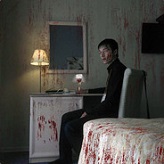
Previously with susahamat's modifed exe it the FOV seemed perfect - wondering how these FOV values are calculated?

Thanks!


Top
 Profile  
Reply with quote  
PostPosted: 31 Oct 2018, 21:50 
Offline

Joined: 31 Oct 2018, 21:14
Posts: 1
Raelgun wrote:
Thanks for the details! :) but unfortunately I tried the "21:9 (3440x1440)" option and the FOV seems wrong - like the camera is too close to there feet, and leaves a lot of empty space high above?

Previously with susahamat's modifed exe it the FOV seemed perfect - wondering how these FOV values are calculated?

Thanks!


Indeed, the FOV stays the same and results in a VERT- image.
The Tekken 7 mod also provide modifications for the FOV, but the default SC VI one may be different and can't be tracked with these values.

But I was able to track the modification of susahamat (Thanks to him) by comparing the original to the modded 3440x1440 executable, it's quite different that the one that was used on Tekken 7:

For 3440x1440 with correct FOV, search for:


35 FA 0E 3C CE CC 4C 3E and replace it with: 04 FB 33 3C CE CC 4C 3E
00 00 F6 41 2C 01 4C 89 and replace it with: 00 00 F6 41 2C 00 4C 89

For 3840x1080:

35 FA 0E 3C CE CC 4C 3E and replace it with: 97 1D 66 3C CE CC 4C 3E
00 00 F6 41 2C 01 4C 89 and replace it with: 00 00 F6 41 2C 00 4C 89


Thanks for all the work done on SC VI UW mod, it's really benefiting the UW treatment.


Top
 Profile  
Reply with quote  
PostPosted: 31 Oct 2018, 23:41 
Offline

Joined: 07 Nov 2017, 16:36
Posts: 14
Makoto wrote:
Raelgun wrote:
Thanks for the details! :) but unfortunately I tried the "21:9 (3440x1440)" option and the FOV seems wrong - like the camera is too close to there feet, and leaves a lot of empty space high above?

Previously with susahamat's modifed exe it the FOV seemed perfect - wondering how these FOV values are calculated?

Thanks!


Indeed, the FOV stays the same and results in a VERT- image.
The Tekken 7 mod also provide modifications for the FOV, but the default SC VI one may be different and can't be tracked with these values.

But I was able to track the modification of susahamat (Thanks to him) by comparing the original to the modded 3440x1440 executable, it's quite different that the one that was used on Tekken 7:

For 3440x1440 with correct FOV, search for:


35 FA 0E 3C CE CC 4C 3E and replace it with: 04 FB 33 3C CE CC 4C 3E
00 00 F6 41 2C 01 4C 89 and replace it with: 00 00 F6 41 2C 00 4C 89

For 3840x1080:

35 FA 0E 3C CE CC 4C 3E and replace it with: 97 1D 66 3C CE CC 4C 3E
00 00 F6 41 2C 01 4C 89 and replace it with: 00 00 F6 41 2C 00 4C 89


Thanks for all the work done on SC VI UW mod, it's really benefiting the UW treatment.


Help with 2560x1080?


Top
 Profile  
Reply with quote  
PostPosted: 01 Nov 2018, 01:50 
Offline

Joined: 07 Nov 2017, 16:36
Posts: 14
OK. I was able to track the 2560x1080 modified exe parameters by comparing the last modified .exe to the original one (the same steps Makoto did to find the 3440x1440 parameters).

2560x1080
35 FA 0E 3C CE CC 4C 3E and replace it with: 9E 20 35 3C CE CC 4C 3E
00 00 F6 41 2C 01 4C 89 and replace it with: 00 00 F6 41 2C 00 4C 89


Top
 Profile  
Reply with quote  
PostPosted: 01 Nov 2018, 04:53 
Offline

Joined: 01 Nov 2018, 04:46
Posts: 4
Makoto wrote:
Raelgun wrote:
Thanks for the details! :) but unfortunately I tried the "21:9 (3440x1440)" option and the FOV seems wrong - like the camera is too close to there feet, and leaves a lot of empty space high above?

Previously with susahamat's modifed exe it the FOV seemed perfect - wondering how these FOV values are calculated?

Thanks!


Indeed, the FOV stays the same and results in a VERT- image.
The Tekken 7 mod also provide modifications for the FOV, but the default SC VI one may be different and can't be tracked with these values.

But I was able to track the modification of susahamat (Thanks to him) by comparing the original to the modded 3440x1440 executable, it's quite different that the one that was used on Tekken 7:

For 3440x1440 with correct FOV, search for:


35 FA 0E 3C CE CC 4C 3E and replace it with: 04 FB 33 3C CE CC 4C 3E
00 00 F6 41 2C 01 4C 89 and replace it with: 00 00 F6 41 2C 00 4C 89

For 3840x1080:

35 FA 0E 3C CE CC 4C 3E and replace it with: 97 1D 66 3C CE CC 4C 3E
00 00 F6 41 2C 01 4C 89 and replace it with: 00 00 F6 41 2C 00 4C 89


Thanks for all the work done on SC VI UW mod, it's really benefiting the UW treatment.


Thanks for your share, would you help for 3840 x 1600 ?


Top
 Profile  
Reply with quote  
PostPosted: 01 Nov 2018, 05:05 
Offline

Joined: 01 Nov 2018, 05:01
Posts: 5
Biparoni wrote:
Could using this get us banned online?


I played about 25 Hours (about 12 in multiplayer) and nothing happened. However, it might be a little bit risky, how knows, but so far so good.


Top
 Profile  
Reply with quote  
PostPosted: 01 Nov 2018, 06:47 
Offline

Joined: 01 Nov 2018, 04:46
Posts: 4
@susahamat Would you help on 3840 x 1600 ?


Top
 Profile  
Reply with quote  
PostPosted: 10 Nov 2018, 12:00 
Offline
User avatar

Joined: 30 Oct 2018, 13:50
Posts: 3
Makoto wrote:
Raelgun wrote:
Thanks for the details! :) but unfortunately I tried the "21:9 (3440x1440)" option and the FOV seems wrong - like the camera is too close to there feet, and leaves a lot of empty space high above?

Previously with susahamat's modifed exe it the FOV seemed perfect - wondering how these FOV values are calculated?

Thanks!


Indeed, the FOV stays the same and results in a VERT- image.
The Tekken 7 mod also provide modifications for the FOV, but the default SC VI one may be different and can't be tracked with these values.

But I was able to track the modification of susahamat (Thanks to him) by comparing the original to the modded 3440x1440 executable, it's quite different that the one that was used on Tekken 7:

For 3440x1440 with correct FOV, search for:


35 FA 0E 3C CE CC 4C 3E and replace it with: 04 FB 33 3C CE CC 4C 3E
00 00 F6 41 2C 01 4C 89 and replace it with: 00 00 F6 41 2C 00 4C 89

For 3840x1080:

35 FA 0E 3C CE CC 4C 3E and replace it with: 97 1D 66 3C CE CC 4C 3E
00 00 F6 41 2C 01 4C 89 and replace it with: 00 00 F6 41 2C 00 4C 89


Thanks for all the work done on SC VI UW mod, it's really benefiting the UW treatment.


Awesome that worked perfectly thanks Makoto!! :)


Top
 Profile  
Reply with quote  
PostPosted: 19 Nov 2018, 12:32 
Offline

Joined: 19 Nov 2018, 11:45
Posts: 1
edit: NVM it works! Thanks so much!

:cheers: :cheers:


Last edited by Ring on 22 Nov 2018, 09:43, edited 1 time in total.

Top
 Profile  
Reply with quote  
PostPosted: 22 Nov 2018, 02:50 
Offline

Joined: 15 Nov 2018, 02:15
Posts: 13
I just used it and it worked fine on 11/21/18.
Looks unreal in 32:9. Thanks a lot!


Top
 Profile  
Reply with quote  
PostPosted: 11 Dec 2018, 18:03 
Offline

Joined: 11 Dec 2018, 16:40
Posts: 2
Sorry to bump this older post- is there anyway we can address the FOV to change on the 5760x1080 resolution for the codex build ?
The FOV is certainly off and the characters are too close to the screen. Awesome work by the way and thanks so much for the 5760x1080 mod.


Top
 Profile  
Reply with quote  
PostPosted: 11 Dec 2018, 18:55 
Offline
User avatar

Joined: 20 Sep 2015, 00:58
Posts: 530
@wsgf_ftw: try this SCVI_5760x1080CODEXV2

_________________
if you supporting what I do, buy me a coffee here https://ko-fi.com/kevinsesario or instead direct to paypal.me/kevinsesario . EMAIL:[email protected], Steam: https://steamcommunity.com/id/sesariok


Top
 Profile  
Reply with quote  
PostPosted: 12 Dec 2018, 01:35 
Offline

Joined: 11 Dec 2018, 16:40
Posts: 2
@susahamat Just tested out the new version. Absolutely amazing, FOV is now perfect for 5760x1080 ! Flawless stuff !! Thanks so much again !!


Top
 Profile  
Reply with quote  
PostPosted: 20 Dec 2018, 19:59 
Offline

Joined: 20 Dec 2018, 19:55
Posts: 1
This worked wonderfully until the 2B DLC came out. It now crashes. I was using the 21:9 from the first page. My resolution is 3620 x 1527 since I use the Nvidia DSR at 2.0x


Top
 Profile  
Reply with quote  
PostPosted: 28 Dec 2018, 09:30 
Offline
User avatar

Joined: 28 Dec 2018, 09:10
Posts: 9
susahamat wrote:
@wsgf_ftw: try this SCVI_5760x1080CODEXV2


does this work for Steam legit version 5760x1080 ratio?


Top
 Profile  
Reply with quote  
PostPosted: 30 Dec 2018, 11:29 
Offline
User avatar

Joined: 20 Sep 2015, 00:58
Posts: 530
nope, could you upload new update exe ? i don't have a legit version

_________________
if you supporting what I do, buy me a coffee here https://ko-fi.com/kevinsesario or instead direct to paypal.me/kevinsesario . EMAIL:[email protected], Steam: https://steamcommunity.com/id/sesariok


Top
 Profile  
Reply with quote  
PostPosted: 03 Jan 2019, 14:48 
Offline
User avatar

Joined: 25 Jun 2018, 08:06
Posts: 88
how to disable HUD ? https://youtu.be/t03CiKXYzGg

_________________
Steam Profile https://steamcommunity.com/profiles/76561198066031175


Top
 Profile  
Reply with quote  
PostPosted: 06 Jan 2019, 11:14 
Offline

Joined: 14 Dec 2018, 21:03
Posts: 7
Could anyone update the 2450x1080 for this game? I tried to attach the .exe file to this post, but it wouldn't work.

Nvm, uploaded it to google drive: https://drive.google.com/open?id=1PtfUn ... C333ZtGnUc


Top
 Profile  
Reply with quote  
PostPosted: 06 Jan 2019, 16:03 
Offline
User avatar

Joined: 20 Sep 2015, 00:58
Posts: 530
Thank you for original update exe, i updated all aspect ratio for latest update legit steam here

Steam (v1.10 2B Update) :

16:10 (1280×800, 1440×900, 1680×1050, 1920×1200)
SCVI_16x10 (Google Drive)

21:9 (2560x1080 , 3440x1440)
SCVI_2560x1080 (Google Drive)
SCVI_3440x1440 (Google Drive)

32:9 (3840x1080)
SCVI_32x9 (Google Drive)

48x9 (3840x720, 4800x900, 5760x1080, etc.)
SCVI_48x9 (Google Drive)

_________________
if you supporting what I do, buy me a coffee here https://ko-fi.com/kevinsesario or instead direct to paypal.me/kevinsesario . EMAIL:[email protected], Steam: https://steamcommunity.com/id/sesariok


Last edited by susahamat on 20 Jan 2019, 08:50, edited 2 times in total.

Top
 Profile  
Reply with quote  
PostPosted: 06 Jan 2019, 21:00 
Offline

Joined: 14 Dec 2018, 21:03
Posts: 7
susahamat wrote:
Thank you for original update exe, i updated all aspect ratio for latest update legit steam here

DOWNLOAD :
Steam (Update 3 (2B Update) ) :

16:10 (1280×800, 1440×900, 1680×1050, 1920×1200)
SCVI_16x10 (Google Drive)

21:9 (2560x1080 , 3440x1440)
SCVI_2560x1080 (Google Drive)
SCVI_3440x1440 (Google Drive)

32:9 (3840x1080)
SCVI_32x9 (Google Drive)

48x9 (3840x720, 4800x900, 5760x1080, etc.)
SCVI_48x9 (Google Drive)


No, thank YOU, sir. I can't do this myself so the fact that you can is a big help.


Top
 Profile  
Reply with quote  
PostPosted: 08 Jan 2019, 14:14 
Offline

Joined: 04 Dec 2018, 05:29
Posts: 15
Does this still work as of the latest patch? and also can it get you banned if you use it online?


Top
 Profile  
Reply with quote  
PostPosted: 08 Jan 2019, 17:24 
Offline
User avatar

Joined: 20 Sep 2015, 00:58
Posts: 530
it worked in latest patch . yea its safe on online here the statement from hunter92 http://www.wsgf.org/forums/viewtopic.ph ... 33#p173533

_________________
if you supporting what I do, buy me a coffee here https://ko-fi.com/kevinsesario or instead direct to paypal.me/kevinsesario . EMAIL:[email protected], Steam: https://steamcommunity.com/id/sesariok


Top
 Profile  
Reply with quote  
PostPosted: 11 Jan 2019, 20:52 
Offline

Joined: 11 Jan 2019, 20:51
Posts: 2
Ok so im new to changing files and whatnot. Ive downloaded the newest thing from susahamat that fits my requirements. But under which folder and which file do i delete and replace with the downloaded one?


Top
 Profile  
Reply with quote  
PostPosted: 11 Jan 2019, 20:57 
Offline
User avatar

Joined: 20 Sep 2015, 00:58
Posts: 530
yeah just replace

_________________
if you supporting what I do, buy me a coffee here https://ko-fi.com/kevinsesario or instead direct to paypal.me/kevinsesario . EMAIL:[email protected], Steam: https://steamcommunity.com/id/sesariok


Top
 Profile  
Reply with quote  
PostPosted: 11 Jan 2019, 21:19 
Offline

Joined: 11 Jan 2019, 20:51
Posts: 2
susahamat wrote:
yeah just replace


Replace what? Under what folder do i replace the file?


Top
 Profile  
Reply with quote  
PostPosted: 12 Jan 2019, 01:49 
Offline

Joined: 04 Dec 2018, 05:29
Posts: 15
meowrice wrote:
susahamat wrote:
yeah just replace


Replace what? Under what folder do i replace the file?


Download the fix and then go to your steam directory where the game is installed
then go to soulcalibur folder then once inside click on the soulcalibur folder and go to binaries and then win64 and thats the file you must replace

it kinda looks like this

program files/steam/steamapps/common/SoulcaliburVI/SoulcaliburVI/binaries/Win64/


Top
 Profile  
Reply with quote  
PostPosted: 20 Jan 2019, 00:14 
Offline

Joined: 24 Oct 2018, 10:49
Posts: 6
Could you make a 3440x1440 fix for the new Codex version (it's also with 2B now)?


Top
 Profile  
Reply with quote  
PostPosted: 20 Jan 2019, 08:49 
Offline
User avatar

Joined: 20 Sep 2015, 00:58
Posts: 530
CODEX (v1.10 2B Update) :

16:10 (1280×800, 1440×900, 1680×1050, 1920×1200)
SCVI_16x10CODEX (Google Drive)

21:9 (2560x1080 , 3440x1440)
SCVI_2560x1080CODEX (Google Drive)
SCVI_3440x1440CODEX (Google Drive)

32:9 (3840x1080)
SCVI_32x9CODEX (Google Drive)

48x9 (3840x720, 4800x900, 5760x1080, etc.)
SCVI_48x9CODEX (Google Drive)

_________________
if you supporting what I do, buy me a coffee here https://ko-fi.com/kevinsesario or instead direct to paypal.me/kevinsesario . EMAIL:[email protected], Steam: https://steamcommunity.com/id/sesariok


Top
 Profile  
Reply with quote  
PostPosted: 20 Jan 2019, 13:03 
Offline

Joined: 24 Oct 2018, 10:49
Posts: 6
Thanks a lot Susahamat : )


Top
 Profile  
Reply with quote  
PostPosted: 01 Feb 2019, 21:50 
Offline

Joined: 01 Feb 2019, 21:41
Posts: 1
@susahamat Hey man, I just downloaded Ace combat 7 and I'm having a similar issue, to my understanding, SCVI and Ace have a similar engine, would you be willing to help me get 2560x1080 support in Ace?


Top
 Profile  
Reply with quote  
PostPosted: 20 Feb 2019, 03:31 
Offline

Joined: 04 Dec 2018, 05:29
Posts: 15
is there a 2560x1080 fix for the latest ver of today? (1.20) @susahamat


Top
 Profile  
Reply with quote  
PostPosted: 20 Feb 2019, 08:29 
Offline

Joined: 04 Dec 2018, 05:29
Posts: 15
Also sorry for bumping but what is codex?


Top
 Profile  
Reply with quote  
PostPosted: 20 Feb 2019, 11:12 
Offline
User avatar

Joined: 20 Sep 2015, 00:58
Posts: 530
Codex is cracked version of game

A jojo maniac wrote:
is there a 2560x1080 fix for the latest ver of today? (1.20) @susahamat


could you upload .exe latest file ?

_________________
if you supporting what I do, buy me a coffee here https://ko-fi.com/kevinsesario or instead direct to paypal.me/kevinsesario . EMAIL:[email protected], Steam: https://steamcommunity.com/id/sesariok


Top
 Profile  
Reply with quote  
PostPosted: 21 Feb 2019, 01:36 
Offline

Joined: 04 Dec 2018, 05:29
Posts: 15
susahamat wrote:
Codex is cracked version of game

A jojo maniac wrote:
is there a 2560x1080 fix for the latest ver of today? (1.20) @susahamat


could you upload .exe latest file ?


How do i upload it? :crazy: i get an error when i try to upload it as an attachment here


Top
 Profile  
Reply with quote  
PostPosted: 21 Feb 2019, 06:52 
Offline
User avatar

Joined: 20 Sep 2015, 00:58
Posts: 530
yeah because this site have limit 5mb.try upload to google drive or another filehost

_________________
if you supporting what I do, buy me a coffee here https://ko-fi.com/kevinsesario or instead direct to paypal.me/kevinsesario . EMAIL:[email protected], Steam: https://steamcommunity.com/id/sesariok


Top
 Profile  
Reply with quote  
PostPosted: 21 Feb 2019, 08:02 
Offline

Joined: 04 Dec 2018, 05:29
Posts: 15
susahamat wrote:
yeah because this site have limit 5mb.try upload to google drive or another filehost


here it is

https://drive.google.com/open?id=1XixCN ... aCVO4JH2BC


Top
 Profile  
Reply with quote  
PostPosted: 21 Feb 2019, 09:02 
Offline
User avatar

Joined: 20 Sep 2015, 00:58
Posts: 530
Thank you for original update exe, i updated all aspect ratio for latest update legit steam here

Steam (v1.20 Update) :

16:10 (1280×800, 1440×900, 1680×1050, 1920×1200)
SCVI_16x10 (Google Drive)

21:9 (2560x1080 , 3440x1440)
SCVI_2560x1080 (Google Drive)
SCVI_3440x1440 (Google Drive)

32:9 (3840x1080)
SCVI_32x9 (Google Drive)

48x9 (3840x720, 4800x900, 5760x1080, etc.)
SCVI_48x9 (Google Drive)

_________________
if you supporting what I do, buy me a coffee here https://ko-fi.com/kevinsesario or instead direct to paypal.me/kevinsesario . EMAIL:[email protected], Steam: https://steamcommunity.com/id/sesariok


Top
 Profile  
Reply with quote  
PostPosted: 24 Mar 2019, 23:09 
Offline

Joined: 04 Dec 2018, 05:29
Posts: 15
@susahamat so there was a secret update in the game and now it's 1.20.01 can you update it again to 2560x1080?

https://drive.google.com/open?id=1yNTnT ... JXh51PgmWf


Top
 Profile  
Reply with quote  
PostPosted: 24 Mar 2019, 23:22 
Offline
User avatar

Joined: 20 Sep 2015, 00:58
Posts: 530
Steam (v1.20.1 Update) :

16:10 (1280×800, 1440×900, 1680×1050, 1920×1200)
SCVI_16x10 (Google Drive)

21:9 (2560x1080 , 3440x1440)
SCVI_2560x1080 (Google Drive)
SCVI_3440x1440 (Google Drive)

32:9 (3840x1080)
SCVI_32x9 (Google Drive)

48x9 (3840x720, 4800x900, 5760x1080, etc.)
SCVI_48x9 (Google Drive)

_________________
if you supporting what I do, buy me a coffee here https://ko-fi.com/kevinsesario or instead direct to paypal.me/kevinsesario . EMAIL:[email protected], Steam: https://steamcommunity.com/id/sesariok


Top
 Profile  
Reply with quote  
PostPosted: 25 Mar 2019, 20:33 
Offline

Joined: 04 Dec 2018, 05:29
Posts: 15
@susahamat sorry for disturbing you once again but there was another unnanounced patch for soulcalibur VI this time it's now 1.30

https://drive.google.com/open?id=1D2ovd ... WbjWj1lcyk


Top
 Profile  
Reply with quote  
PostPosted: 25 Mar 2019, 21:11 
Offline
User avatar

Joined: 20 Sep 2015, 00:58
Posts: 530
A jojo maniac wrote:
@susahamat sorry for disturbing you once again


no problem bro .

Steam (v1.30 Update) :

16:10 (1280×800, 1440×900, 1680×1050, 1920×1200)
SCVI_16x10 (Google Drive)

21:9 (2560x1080 , 3440x1440)
SCVI_2560x1080 (Google Drive)
SCVI_3440x1440 (Google Drive)

32:9 (3840x1080)
SCVI_32x9 (Google Drive)

48x9 (3840x720, 4800x900, 5760x1080, etc.)
SCVI_48x9 (Google Drive)

_________________
if you supporting what I do, buy me a coffee here https://ko-fi.com/kevinsesario or instead direct to paypal.me/kevinsesario . EMAIL:[email protected], Steam: https://steamcommunity.com/id/sesariok


Top
 Profile  
Reply with quote  
PostPosted: 03 May 2019, 16:01 
Offline

Joined: 03 May 2019, 15:52
Posts: 4
thanks bro,it's still working now? i want use these file on the latest version,use 1.30 update file.


Top
 Profile  
Reply with quote  
PostPosted: 04 May 2019, 02:00 
Offline

Joined: 03 May 2019, 15:52
Posts: 4
Ye!
it's working!
I really appreciate your help.


Top
 Profile  
Reply with quote  
PostPosted: 16 May 2019, 03:24 
Offline

Joined: 03 May 2019, 15:52
Posts: 4
@susahamat steam game launch exe is update 1.4 now,can you make new exe data,work on 21:9 screen mode,I'll be very grateful.


Top
 Profile  
Reply with quote  
PostPosted: 26 May 2019, 19:32 
Offline

Joined: 25 Mar 2008, 16:29
Posts: 17
could you update this one, thank you in advance


Top
 Profile  
Reply with quote  
PostPosted: 27 May 2019, 04:23 
Offline

Joined: 27 May 2019, 04:20
Posts: 3
@susahamat please help us again! Now they updated to 1.4. You are great! Thanks in advance.


Top
 Profile  
Reply with quote  
PostPosted: 02 Jun 2019, 15:05 
Offline

Joined: 27 May 2019, 04:20
Posts: 3
@susahamat please help us again! Now they updated to 1.4. You are great! Thanks in advance.


Top
 Profile  
Reply with quote  
PostPosted: 05 Jun 2019, 15:45 
Offline

Joined: 25 Mar 2008, 16:29
Posts: 17
I think this one is dead like Street Fighter V :(


Top
 Profile  
Reply with quote  
PostPosted: 09 Jun 2019, 20:56 
Offline

Joined: 01 Apr 2019, 00:43
Posts: 11
glenbo wrote:
I think this one is dead like Street Fighter V :(

Not true...

3440x1440 for download; https://drive.google.com/open?id=1b-bXU ... Ckm_kUtbUX

For future updates, folllow this tutorial; https://steamcommunity.com/app/544750/d ... 6989638994
I used this website for the edit. https://hexed.it/ As easy as search and overwrite the value you want to replace.


Top
 Profile  
Reply with quote  
PostPosted: 10 Jun 2019, 19:06 
Offline

Joined: 27 May 2019, 04:20
Posts: 3
Thanks a lot for sharing @mith!


Top
 Profile  
Reply with quote  
PostPosted: 14 Jun 2019, 11:52 
Offline

Joined: 25 Mar 2008, 16:29
Posts: 17
Thank you!!!


Top
 Profile  
Reply with quote  
PostPosted: 19 Jun 2019, 13:12 
Offline

Joined: 01 Apr 2019, 00:43
Posts: 11
You are welcome guys.

v1.42 3440x1440 https://drive.google.com/open?id=1fkxWp ... L6ZQ6X0Eu0

Not perfect but playable, this will do it until Susahamat is back.


Top
 Profile  
Reply with quote  
PostPosted: 02 Jul 2019, 22:35 
Offline

Joined: 04 Dec 2018, 05:29
Posts: 15
@susahamat new update happened and bandai took me 2560x1080 away

https://drive.google.com/open?id=1sd4tG ... rlvOnL-jx9


Top
 Profile  
Reply with quote  
PostPosted: 02 Jul 2019, 23:07 
Offline
User avatar

Joined: 20 Sep 2015, 00:58
Posts: 530
Steam (v1.42 Update) :

16:10 (1280×800, 1440×900, 1680×1050, 1920×1200)
SCVI_16x10 (Google Drive)

21:9 (2560x1080 , 3440x1440)
SCVI_2560x1080 (Google Drive)
SCVI_3440x1440 (Google Drive)

32:9 (3840x1080)
SCVI_32x9 (Google Drive)

48x9 (3840x720, 4800x900, 5760x1080, etc.)
SCVI_48x9 (Google Drive)

_________________
if you supporting what I do, buy me a coffee here https://ko-fi.com/kevinsesario or instead direct to paypal.me/kevinsesario . EMAIL:[email protected], Steam: https://steamcommunity.com/id/sesariok


Top
 Profile  
Reply with quote  
PostPosted: 13 Jul 2019, 16:19 
Offline

Joined: 13 Jul 2019, 16:17
Posts: 9
Hello!

Is there a way to run the game with Samsung C49RG94 ?

Its 49" 32:9 with 5120x1440p.

Thanks for helping and great website!


Top
 Profile  
Reply with quote  
PostPosted: 16 Jul 2019, 17:16 
Offline
Founder
Founder
User avatar

Joined: 13 Oct 2003, 05:00
Posts: 7358
I want to share with @everyone an issue that has beset the WSGF over the last week or so. Google has decided that the files we host (exe files, patchers, etc.) are malware. Thus, they have flagged the entire WSGF as hosting and/or linking malware, which inhibits site access and search rankings.

Both the WSGF and our older media server (WSGF Media dot com) have been flagged. We have found a solution for our hosted files, via our friends at PC Gaming Wiki. However, we still have an issue with the forums linking to the old WSGF Media server.

There is no feasible way to go through the forums and edit the possible thousands of posts that reference the WSGF Media server. And there is absolutely no guarantee that Google won't ping some future post attachment and flag the entire site again.

The forums are much quieter today then they used to be, with just 1 or 2 active posts per day on average, on top of this we continue to have issues with bots or humans creating accounts to post spam. Additionally, the forums have hampered our ability to enable HTTPS and update the site to be more modern and mobile friendly.

The internet itself has also shifted, with sites like Reddit and services like Discord, YouTube and Twitch being where most discussion happens. Given all of the above we are exploring the idea of "archiving" the forums into their own domain so that everything could be read, but no new posts or accounts could be created. We would then direct all new discussion to a Reddit community and/or our Discord server, which we hope will make discussing and working on fixes more practical.

We are really at a crossroads where the forums have gone from being a minor or moderate inhibitor to growth of the WSGF, to now a major roadblock (thanks to Google). We need a road forward, and wanted to reach out to the community to socialize the issue and our ideas, and to get your feedback.

I'd love to hear your feedback in our Discord Server - https://discord.gg/FcVYWgh


Top
 Profile  
Reply with quote  
PostPosted: 20 Jul 2019, 10:20 
Offline

Joined: 03 May 2019, 15:52
Posts: 4
Hello,susahamat,now the current version of EXE file is 4.17. I tried to use hexedit to modify it, but the search code failed. Maybe it was changed inside the program. So I can't find the code modification of "B8 0F 84 D0 01 00 F3". I use 21:9 3440x1080 screen mode. Can you help me solve this problem again? I'll be very grateful.


Top
 Profile  
Reply with quote  
PostPosted: 10 Aug 2019, 21:11 
Offline

Joined: 13 Jul 2019, 16:17
Posts: 9
Is there a way to add 32:9 5120x1440p support !? Thanks for helping.

Edit: oh sorry i asked this before..

btw: for me its version 4.17.2.0


Top
 Profile  
Reply with quote  
Display posts from previous:  Sort by  
Post new topic Reply to topic  [ 101 posts ]  Go to page Previous  1 ... 29, 30, 31, 32, 33, 34, 35 ... 101  Next

All times are UTC [ DST ]


Who is online

Users browsing this forum: No registered users and 38 guests


You cannot post new topics in this forum
You cannot reply to topics in this forum
You cannot edit your posts in this forum
You cannot delete your posts in this forum
You cannot post attachments in this forum

Search for:
Jump to:  
cron


Powered by phpBB® Forum Software © phpBB Group