Widescreen Gaming Forum

[-noun] Web community dedicated to ensuring PC games run properly on your tablet, netbook, personal computer, HDTV and multi-monitor gaming rig.
It is currently 12 Jul 2026, 08:27

All times are UTC [ DST ]


Post new topic Reply to topic  [ 137 posts ]  Go to page 1, 2, 3, 4, 5 ... 137  Next
Author Message
PostPosted: 14 Nov 2013, 22:36 
Offline

Joined: 22 Jun 2012, 09:20
Posts: 23
Hello,

i've got a bit of an annoyance to report. it seems that the latest AC game does indeed support nvidia surround, but i when using three 16:10 monitors, the game displays black bars at the top and bottom of the screen. The black bars also span out through all three monitors. Does anyone know how to change this on the Assassin creed engine?

thanks in advance.


Top
 Profile  
Reply with quote  
PostPosted: 14 Nov 2013, 22:50 
Offline
Insiders
Insiders
User avatar

Joined: 06 Sep 2011, 09:29
Posts: 552
Location: Haarlem, the Netherlands
All AC games have always been 16:9 only, so you get black bars when using 16:10 aspect ratio. Pretty sure nothing can be done about that.

_________________
Philips BDM4065UC(3840x2160) Acer Z35(2560x1080@200hz); 980 Ti Hybrid @stock ; 6700K 4.6ghz (1.35v)/D15; 16GB 3200mhz; Asus Maximus Ranger VIII; AX860; 1TB 960 EVO; 750GB 840 EVO; Teufel Concept D 500; Sennheiser HD6XX; Windows 10 (latest build)


Top
 Profile  
Reply with quote  
PostPosted: 14 Nov 2013, 22:58 
Offline

Joined: 22 Jun 2012, 09:20
Posts: 23
Wijkert wrote:
All AC games have always been 16:9 only, so you get black bars when using 16:10 aspect ratio. Pretty sure nothing can be done about that.


actually, all the AC games have never given me black bars on surround, with three 16:10 monitors. sure, when i went to single monitor it would, but the moment i went to 5760x1200 the black bars went away.


Top
 Profile  
Reply with quote  
PostPosted: 14 Nov 2013, 23:15 
Offline
Insiders
Insiders
User avatar

Joined: 06 Sep 2011, 09:29
Posts: 552
Location: Haarlem, the Netherlands
Really, that's weird. I would aspect the aspect ratio to remain the same when going from a single monitor to triple wide. Maybe someone else can shed some light on this issue.

_________________
Philips BDM4065UC(3840x2160) Acer Z35(2560x1080@200hz); 980 Ti Hybrid @stock ; 6700K 4.6ghz (1.35v)/D15; 16GB 3200mhz; Asus Maximus Ranger VIII; AX860; 1TB 960 EVO; 750GB 840 EVO; Teufel Concept D 500; Sennheiser HD6XX; Windows 10 (latest build)


Top
 Profile  
Reply with quote  
PostPosted: 15 Nov 2013, 07:44 
Offline
User avatar

Joined: 08 Jun 2013, 15:45
Posts: 15
I'm glad it has native Surround support, I'm running it (barely) at 7680x1440 16:9 and it works perfectly. Maxxed out, it only runs about 10 FPS slower than III while looking leagues better. The only issue I'm having is that I can't take screenshots, they all turn out completely black, I had the same issue with Sleeping Dogs and was never able to fix it.

EDIT: I fixed it, the problem is the SLI profile for the game, found an obscure thread regarding the issue in sleeping dogs and the solution works on this too if anyone has the same issue. You have to use NVIDIA Inspector and go to the black flag SLI profile, scroll to the bottom of the page, the first setting in the Undefined category whose value will be 0x00000008 and game names in brackets next to it, click the arrow to expand the list, scroll down to 0x00000020 and select it, apply changes. Turns out I could have had my Sleeping Dogs screenshots after all, ah well.

_________________
M


Top
 Profile  
Reply with quote  
PostPosted: 15 Nov 2013, 09:27 
Offline

Joined: 22 Jun 2012, 09:20
Posts: 23
MasterDLG wrote:
I'm glad it has native Surround support, I'm running it (barely) at 7680x1440 16:9 and it works perfectly. Maxxed out, it only runs about 10 FPS slower than III while looking leagues better. The only issue I'm having is that I can't take screenshots, they all turn out completely black, I had the same issue with Sleeping Dogs and was never able to fix it.

EDIT: I fixed it, the problem is the SLI profile for the game, found an obscure thread regarding the issue in sleeping dogs and the solution works on this too if anyone has the same issue. You have to use NVIDIA Inspector and go to the black flag SLI profile, scroll to the bottom of the page, the first setting in the Undefined category whose value will be 0x00000008 and game names in brackets next to it, click the arrow to expand the list, scroll down to 0x00000020 and select it, apply changes. Turns out I could have had my Sleeping Dogs screenshots after all, ah well.


does this increase the fps? if so, how much?


Top
 Profile  
Reply with quote  
PostPosted: 15 Nov 2013, 10:29 
Offline
Insiders
Insiders

Joined: 01 Sep 2010, 11:38
Posts: 516
Wow, you have this early :P Hey can you tell me if the gun reticle thing has been fixed? In ACIII when you went to fine aim you actually had to aim like 3-4 inches to the left of the target to hit it :/

_________________
起死回生 (kishi kaisei) Wake from death and return to life..


Top
 Profile  
Reply with quote  
PostPosted: 15 Nov 2013, 22:22 
Offline

Joined: 01 Nov 2012, 11:20
Posts: 25
My pinterest focus in 21:9 support (wich Im pretty sure it wont work) and, must of all, in FoV tweaking.

I can get used to play 16:9 with black bars, but in AC3 FoV was locked, and there was no possibility to widen it ¬¬

Let's see if the shit is the same, or what


Top
 Profile  
Reply with quote  
PostPosted: 16 Nov 2013, 07:50 
Offline

Joined: 22 Jun 2012, 09:20
Posts: 23
Toothless Spoon wrote:
Wow, you have this early :P Hey can you tell me if the gun reticle thing has been fixed? In ACIII when you went to fine aim you actually had to aim like 3-4 inches to the left of the target to hit it :/


i havnt been playing the game long enough to acquire a long range weapon. the black bars drive me insane, cant stand it.


Top
 Profile  
Reply with quote  
PostPosted: 16 Nov 2013, 09:52 
Offline

Joined: 22 Jun 2012, 09:20
Posts: 23
is anyone here proficient at hex editing? i had the idea that maybe there's something inside the executable that can be edited via hex editor that might force the aspect to 16:9 even on 16:10 resolutions, like the other assassin creeds do.


Top
 Profile  
Reply with quote  
PostPosted: 20 Nov 2013, 08:45 
Offline
I Donated
I Donated

Joined: 18 Jul 2007, 04:19
Posts: 513
I can confirm that Surround is working, however there are black bars on top and bottom of my three screens. This is running nVidia Surround with three 16:10 monitors.

Interestingly enough, I didn't get the black bars in Assassin's Creed 2, Brotherhood, Revelations, or 3.

Here's a picture of AC3 in 5760x1200, no black bars :( :
Image


Top
 Profile  
Reply with quote  
PostPosted: 20 Nov 2013, 11:53 
Offline

Joined: 20 Nov 2013, 11:51
Posts: 9
Here is what I don't understand, if you guys can get all that widescreen goodness, all that extra image on the side. Why the hell doesn't ubisoft allow us 21:9 gamers to get a tiny bit more? Why force us on 16:9 with black bars on each side when the game is already built to support a wider FOV...


Top
 Profile  
Reply with quote  
PostPosted: 20 Nov 2013, 12:18 
Offline

Joined: 01 Nov 2012, 11:20
Posts: 25
Exactly! And not only Aassassin's creed lacks of this...

Other games too, multi-monitor support FTW, but no 21:9 ¿?


Top
 Profile  
Reply with quote  
PostPosted: 20 Nov 2013, 12:28 
Offline
User avatar

Joined: 08 Jun 2013, 15:45
Posts: 15
Ascendance wrote:
MasterDLG wrote:
I'm glad it has native Surround support, I'm running it (barely) at 7680x1440 16:9 and it works perfectly. Maxxed out, it only runs about 10 FPS slower than III while looking leagues better. The only issue I'm having is that I can't take screenshots, they all turn out completely black, I had the same issue with Sleeping Dogs and was never able to fix it.

EDIT: I fixed it, the problem is the SLI profile for the game, found an obscure thread regarding the issue in sleeping dogs and the solution works on this too if anyone has the same issue. You have to use NVIDIA Inspector and go to the black flag SLI profile, scroll to the bottom of the page, the first setting in the Undefined category whose value will be 0x00000008 and game names in brackets next to it, click the arrow to expand the list, scroll down to 0x00000020 and select it, apply changes. Turns out I could have had my Sleeping Dogs screenshots after all, ah well.


does this increase the fps? if so, how much?


It does actually, I didn't go all the way to gameplay before I posted, so if you're already struggling to run it then don't bother, I had to revert the fix because it cut my fps in half. I figure I'll just go back in and take some after I've finished the game, it sucks but what can you do.

_________________
M


Top
 Profile  
Reply with quote  
PostPosted: 21 Nov 2013, 01:17 
Offline
I Donated
I Donated

Joined: 18 Jul 2007, 04:19
Posts: 513
I remember long ago, a member named Dopefish made a fix for the first Assassin's Creed that got rid of the black bar issue for pretty much any monitor setup.

Hopefully someone like Hayden or Helifax can take a look at it!


Top
 Profile  
Reply with quote  
PostPosted: 21 Nov 2013, 08:14 
Offline

Joined: 21 Nov 2013, 07:56
Posts: 14
So there's no hope of getting 21:9 support in Ubisoft games? Personally it wouldn't be too much of a loss to me, since i'm not really that interested, but i did get them for free (splinter cell+AC4) with my 780. Meh


Top
 Profile  
Reply with quote  
PostPosted: 23 Nov 2013, 16:42 
Offline

Joined: 23 Nov 2013, 16:34
Posts: 1
I'm running a 3 5:4 monitor setup and it's downright impossible to play the game. And that's not even talking about how bad the framerate is (no matter what I set in the options).
The top and bottom black bars are ENORMOUS. Have a screenshot from the menu:
Image
4144x1024, HD7950, Catalyst 13.11


Top
 Profile  
Reply with quote  
PostPosted: 23 Nov 2013, 19:13 
Offline
Insiders
Insiders
User avatar

Joined: 06 Sep 2011, 09:29
Posts: 552
Location: Haarlem, the Netherlands
The reason the framerate is locked at 30fps when using vsync (and running at 59 fps or lower), has to do with triple buffering not being active. Follow the steps to get triple buffering to work using the following link: http://pcgamingwiki.com/wiki/Assassin%2 ... Black_Flag It might help some of you guys a little when experiencing choppy gameplay.

_________________
Philips BDM4065UC(3840x2160) Acer Z35(2560x1080@200hz); 980 Ti Hybrid @stock ; 6700K 4.6ghz (1.35v)/D15; 16GB 3200mhz; Asus Maximus Ranger VIII; AX860; 1TB 960 EVO; 750GB 840 EVO; Teufel Concept D 500; Sennheiser HD6XX; Windows 10 (latest build)


Top
 Profile  
Reply with quote  
PostPosted: 24 Nov 2013, 02:04 
Offline
I Donated
I Donated

Joined: 18 Jul 2007, 04:19
Posts: 513
I downloaded the latest nVidia drivers (331.85) and that definitely boasted my FPS to a constant 50-60.

On the note of the black bars: I believe Hayden already mentioned that he doesn't own the game, and someone will need to contribute by donating him a copy if there is be a fix for this.


Top
 Profile  
Reply with quote  
PostPosted: 25 Nov 2013, 07:34 
Offline
I Donated
I Donated

Joined: 18 Jul 2007, 04:19
Posts: 513
Sioclya wrote:
I'm running a 3 5:4 monitor setup and it's downright impossible to play the game. And that's not even talking about how bad the framerate is (no matter what I set in the options).
The top and bottom black bars are ENORMOUS. Have a screenshot from the menu:
Image
4144x1024, HD7950, Catalyst 13.11


Wow, that sounds and looks horrendous. :shock:


Top
 Profile  
Reply with quote  
PostPosted: 26 Nov 2013, 22:16 
Offline

Joined: 23 Dec 2008, 02:44
Posts: 3
Someone is claiming that they have fixed the black borders for those with 16:10 resolution.... http://forums.ubi.com/showthread.php/81 ... d-AC3-Yeah!


Quote:
1.Start AC:4 Black Flag , enter any sequence , just to be in game
2. ALT TAB and get back to dekstop without quitting the game
3. Click Right Mouse Button on the desktop and choose Nvidia Control Panel
4. There go to the DISPLAY section and choose "Match size and desktop position" (position 6 from the top of DISPLAY section)
5. In first Tab choose Scaling , then FULLSCREEN then set desired resolution at "preview" below to 1920x1080
6. Now switch to the second Tab named " Size" and choose "Enable dekstop size changer" (or something like that i don't have english drivers right now)
7. You will see BIG green arrows in the corner of the screen, press both slider to the max to reach 1920x1200 settings (or more if you are using higher res) , then choose OK,
8. Click Use or OK or Apply in main Nvidia Settings Window, close it and back into game.


Is this true?


Top
 Profile  
Reply with quote  
PostPosted: 27 Nov 2013, 02:27 
Offline
I Donated
I Donated

Joined: 18 Jul 2007, 04:19
Posts: 513
Alexious wrote:
Someone is claiming that they have fixed the black borders for those with 16:10 resolution.... http://forums.ubi.com/showthread.php/81 ... d-AC3-Yeah!


Quote:
1.Start AC:4 Black Flag , enter any sequence , just to be in game
2. ALT TAB and get back to dekstop without quitting the game
3. Click Right Mouse Button on the desktop and choose Nvidia Control Panel
4. There go to the DISPLAY section and choose "Match size and desktop position" (position 6 from the top of DISPLAY section)
5. In first Tab choose Scaling , then FULLSCREEN then set desired resolution at "preview" below to 1920x1080
6. Now switch to the second Tab named " Size" and choose "Enable dekstop size changer" (or something like that i don't have english drivers right now)
7. You will see BIG green arrows in the corner of the screen, press both slider to the max to reach 1920x1200 settings (or more if you are using higher res) , then choose OK,
8. Click Use or OK or Apply in main Nvidia Settings Window, close it and back into game.


Is this true?


Doesn't work for surround.


Top
 Profile  
Reply with quote  
PostPosted: 03 Dec 2013, 17:56 
Offline

Joined: 01 Nov 2012, 11:20
Posts: 25
Any 21:9 testing?

Does it benefit of some extra FoV, or something?


Top
 Profile  
Reply with quote  
PostPosted: 07 Dec 2013, 04:14 
Offline

Joined: 07 Dec 2013, 04:04
Posts: 12
Im very very happy about can play AC4 Black Flag in 21:9 with my nec multysinc

Image

But i would liek to know how can i let all the menus, cross and hud in the original 1920x1080 position?

Because when im going to shoot the cross doesnt match with the target...


Top
 Profile  
Reply with quote  
PostPosted: 07 Dec 2013, 05:57 
Offline

Joined: 07 Dec 2013, 05:40
Posts: 4
21:9 support is pretty much f***ed

It looks like the eyefinity/surround support is really just a hack and not true resolution independence. If the resolution is anything but a standard one, it seems to force a 16:3 (3x 1920x1080 eyefinity/surround) aspect.

That means at 2560x1080 the game is completely unplayable since the active game area is a tiny square in the middle of the screen and half or more of the screen is blacked out. Screenshot attached.

I hope they patch it, it's disgusting

Image


Top
 Profile  
Reply with quote  
PostPosted: 07 Dec 2013, 07:43 
Offline

Joined: 07 Dec 2013, 05:40
Posts: 4
Alexious wrote:
Someone is claiming that they have fixed the black borders for those with 16:10 resolution.... http://forums.ubi.com/showthread.php/81 ... d-AC3-Yeah!


Quote:
1.Start AC:4 Black Flag , enter any sequence , just to be in game
2. ALT TAB and get back to dekstop without quitting the game
3. Click Right Mouse Button on the desktop and choose Nvidia Control Panel
4. There go to the DISPLAY section and choose "Match size and desktop position" (position 6 from the top of DISPLAY section)
5. In first Tab choose Scaling , then FULLSCREEN then set desired resolution at "preview" below to 1920x1080
6. Now switch to the second Tab named " Size" and choose "Enable dekstop size changer" (or something like that i don't have english drivers right now)
7. You will see BIG green arrows in the corner of the screen, press both slider to the max to reach 1920x1200 settings (or more if you are using higher res) , then choose OK,
8. Click Use or OK or Apply in main Nvidia Settings Window, close it and back into game.


Is this true?


That just stretches the 1080 image vertically to take the entire 1200 space. It's a silly solution and most monitors can do it using the OSD


Top
 Profile  
Reply with quote  
PostPosted: 07 Dec 2013, 16:25 
Offline
Insiders
Insiders
User avatar

Joined: 19 Dec 2011, 16:03
Posts: 521
NeoG wrote:
21:9 support is pretty much f***ed

It looks like the eyefinity/surround support is really just a hack and not true resolution independence. If the resolution is anything but a standard one, it seems to force a 16:3 (3x 1920x1080 eyefinity/surround) aspect.

That means at 2560x1080 the game is completely unplayable since the active game area is a tiny square in the middle of the screen and half or more of the screen is blacked out. Screenshot attached.

I hope they patch it, it's disgusting

Can try this one - Files available from https://community.pcgamingwiki.com/files (search there)

Image


Last edited by jackfuste on 20 Jul 2015, 11:11, edited 2 times in total.

Top
 Profile  
Reply with quote  
PostPosted: 07 Dec 2013, 20:17 
Offline

Joined: 07 Dec 2013, 04:04
Posts: 12
I overwrote the original .exe by this one but it gives me an error when im going to launch the game....


Top
 Profile  
Reply with quote  
PostPosted: 07 Dec 2013, 23:44 
Offline

Joined: 07 Dec 2013, 05:40
Posts: 4
Amazing stuff.. I have my peripheral vision again!

What sort of tools do you use to find where they've fixed the aspect? Using a binary compare doesn't seem to say anything noteworthy in ASCII (maybe it's compressed)


Top
 Profile  
Reply with quote  
PostPosted: 08 Dec 2013, 17:55 
Offline

Joined: 08 Dec 2013, 17:49
Posts: 5
Any chance AC III gets patched as well? IIRC they use the same engine...


Top
 Profile  
Reply with quote  
PostPosted: 21 Dec 2013, 08:12 
Offline

Joined: 20 Nov 2013, 11:51
Posts: 9
First of all I would like to give my extreme thanks for the person responsible for this patched EXE, it worked wondering with my 21:9 setup. However with the recent Assassins Creed 4 patch that includes the new PhysX addition, using the patched EXE does not allow you to use PhysX. I assume its because the patch was applied on an OLDER EXE file which does not include the additions for PhysX. So would it be possible to apply the same patch of a more recent EXE?


Top
 Profile  
Reply with quote  
PostPosted: 25 Dec 2013, 12:43 
Offline
Insiders
Insiders
User avatar

Joined: 19 Dec 2011, 16:03
Posts: 521
bajs1988 wrote:
So would it be possible to apply the same patch of a more recent EXE?

21:9 and 16:10 fixes for v.1.04 - Files available from https://community.pcgamingwiki.com/files (search there)


Last edited by jackfuste on 20 Jul 2015, 11:06, edited 1 time in total.

Top
 Profile  
Reply with quote  
PostPosted: 25 Dec 2013, 13:08 
Offline

Joined: 25 Dec 2013, 13:02
Posts: 3
First I must say awesome the fix works for some people.

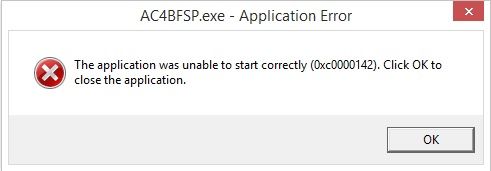
Unfortunately my computer comes up with an error after applying the fix.

[img][IMG]http://i1108.photobucket.com/albums/h406/Shinascus/Error_zps01d7effe.jpg[/img][/img]

Would that have something to do with Windows 8.1 if anyone knows?

Well I hope there is a solution to this considering I really want to play the game.


Top
 Profile  
Reply with quote  
PostPosted: 25 Dec 2013, 13:10 
Offline

Joined: 25 Dec 2013, 13:02
Posts: 3
First of all I am happy to see for some people this fix appears to work.
Unfortunately for me it comes up with an error.

Image

Hope there is a fix for this.

OS: W8.1pro x64
VGA: XFX 7970 DD black


Top
 Profile  
Reply with quote  
PostPosted: 25 Dec 2013, 18:58 
Offline
Insiders
Insiders
User avatar

Joined: 19 Dec 2011, 16:03
Posts: 521
Shinascus Can you upload your AC4BFSP.exe?


Top
 Profile  
Reply with quote  
PostPosted: 30 Dec 2013, 12:44 
Offline

Joined: 25 Dec 2013, 13:02
Posts: 3
It's the one you provided above my post :D

The game does start with the skidrow cracks except the screen is all messy then ofc.


Top
 Profile  
Reply with quote  
PostPosted: 01 Jan 2014, 00:33 
Offline

Joined: 28 Dec 2013, 10:13
Posts: 2
Can you please make a fix for 5760x2160,7680x1600 and 7680x3200? I have blackbars on left and right side of screen and this 21:9 fix really helps but there are still an area of blackbars.

Thanks in advance


Last edited by zesker on 01 Jan 2014, 15:04, edited 1 time in total.

Top
 Profile  
Reply with quote  
PostPosted: 01 Jan 2014, 12:20 
Offline

Joined: 01 Nov 2012, 11:20
Posts: 25
:clap:

Chinascus its obvious that you cant use the fix is the game is cracked

Thanks for awesome work jackfuste


Top
 Profile  
Reply with quote  
PostPosted: 01 Jan 2014, 19:12 
Offline
Insiders
Insiders
User avatar

Joined: 19 Dec 2011, 16:03
Posts: 521
zesker wrote:
Can you please make a fix for 5760x2160,7680x1600 and 7680x3200? I have blackbars on left and right side of screen and this 21:9 fix really helps but there are still an area of blackbars.
Thanks in advance

5760x2160 - Files available from https://community.pcgamingwiki.com/files (search there)
7680x3200 - Files available from https://community.pcgamingwiki.com/files (search there)
For 7680x1600 try 16:10 fix.


Last edited by jackfuste on 20 Jul 2015, 11:05, edited 1 time in total.

Top
 Profile  
Reply with quote  
PostPosted: 01 Jan 2014, 22:11 
Offline

Joined: 28 Dec 2013, 10:13
Posts: 2
Thank you very much


Top
 Profile  
Reply with quote  
PostPosted: 02 Jan 2014, 00:00 
Offline
User avatar

Joined: 31 Jan 2007, 06:46
Posts: 64
Location: Orange, CA
jackfuste - AMAZING WORK! :twothumb:

I currently run 4800x1200. (3) 20" monitors 1600x1200. Is it possible to create an EXE for 4800x1200 or maybe explain how you created this EXE? I would love to learn.

thank you,

b0n3z

_________________
ASUS Maximus XII Gene MB | i7 4790k CPU with Corsair Hydro Series H80i | Corsair Dominator Platinum 32GB | (2) EVGA nVidia GeForce GTX1080 Founders Edition in HB SLI | 1TB Samsung EVO SSD | Corsair Digital AX760i PSU | (3) Asus PG279Q (1) Asus PG278Q mounted on WSGF Ultimate Desk Stand v2 with Thru Desk Mount (3+1 Landscape Surround) | HTC Vive | Grace Design m9XX Headphone Amp/DAC | AudioEngine A5+ Bamboo | Ultimate Ears CIEM UE-5 Pro | ErgoDox Infinity Keyboard (Cherry Red) with Custom Keycaps | Logitech G502 Proteus Core Mouse | Win10 Enterprise x64

Current Setup


Top
 Profile  
Reply with quote  
PostPosted: 02 Jan 2014, 05:03 
Offline
User avatar

Joined: 31 Jan 2007, 06:46
Posts: 64
Location: Orange, CA
b0n3z wrote:
jackfuste - AMAZING WORK! :twothumb:

I currently run 4800x1200. (3) 20" monitors 1600x1200. Is it possible to create an EXE for 4800x1200 or maybe explain how you created this EXE? I would love to learn.

thank you,

b0n3z


In trying to learn, I used HxD to do a hex edit and compare the 7680x3200 and 5760x2160 files. In comparing them I found the following was different:

Block 1A4CE5B - 1A4CE61 (except for 1A4CE5E)

So I'm guess these two areas are the horizontal and vertical. I'm just not sure what translation it's using. So I'm still trying to understand that. Maybe someone who is better at hex editing can figure out what conversion it's using?

Example:
7680x3200
9A 99 19 40 55 55 D5

5760x2160
AB AA 2A 40 00 00 C0

thank you,

b0n3z

_________________
ASUS Maximus XII Gene MB | i7 4790k CPU with Corsair Hydro Series H80i | Corsair Dominator Platinum 32GB | (2) EVGA nVidia GeForce GTX1080 Founders Edition in HB SLI | 1TB Samsung EVO SSD | Corsair Digital AX760i PSU | (3) Asus PG279Q (1) Asus PG278Q mounted on WSGF Ultimate Desk Stand v2 with Thru Desk Mount (3+1 Landscape Surround) | HTC Vive | Grace Design m9XX Headphone Amp/DAC | AudioEngine A5+ Bamboo | Ultimate Ears CIEM UE-5 Pro | ErgoDox Infinity Keyboard (Cherry Red) with Custom Keycaps | Logitech G502 Proteus Core Mouse | Win10 Enterprise x64

Current Setup


Top
 Profile  
Reply with quote  
PostPosted: 02 Jan 2014, 17:15 
Offline
Insiders
Insiders
User avatar

Joined: 19 Dec 2011, 16:03
Posts: 521
b0n3z wrote:
I currently run 4800x1200. (3) 20" monitors 1600x1200. Is it possible to create an EXE for 4800x1200

Two versions with different FOV - Files available from https://community.pcgamingwiki.com/files (search there)
Image
Image
Image


Last edited by jackfuste on 20 Jul 2015, 11:04, edited 1 time in total.

Top
 Profile  
Reply with quote  
PostPosted: 02 Jan 2014, 18:22 
Offline
User avatar

Joined: 31 Jan 2007, 06:46
Posts: 64
Location: Orange, CA
OMG!!! Feels like Christmas again! THANK YOU sooo much jackfuste!!! :D

Eventually I'm going to want to figure out how you did this amazing work by studying the files provided.

thanks again,

b0n3z

_________________
ASUS Maximus XII Gene MB | i7 4790k CPU with Corsair Hydro Series H80i | Corsair Dominator Platinum 32GB | (2) EVGA nVidia GeForce GTX1080 Founders Edition in HB SLI | 1TB Samsung EVO SSD | Corsair Digital AX760i PSU | (3) Asus PG279Q (1) Asus PG278Q mounted on WSGF Ultimate Desk Stand v2 with Thru Desk Mount (3+1 Landscape Surround) | HTC Vive | Grace Design m9XX Headphone Amp/DAC | AudioEngine A5+ Bamboo | Ultimate Ears CIEM UE-5 Pro | ErgoDox Infinity Keyboard (Cherry Red) with Custom Keycaps | Logitech G502 Proteus Core Mouse | Win10 Enterprise x64

Current Setup


Top
 Profile  
Reply with quote  
PostPosted: 12 Jan 2014, 22:06 
Offline
User avatar

Joined: 10 Jul 2005, 18:27
Posts: 92
Location: Madison, WI
How about helping your ole pal, The Surround Gamer out?

I am requesting a fix for: 6030x1200 bezel-corrected, in-game resolution (5760x1200 original resolution, which is using three 1920x1200 monitors).

Thank you.

_________________
\Project\ Triple Surround Fury
•Mountain Mods Ascension case•
•i7 920 D0 @ 4.0GHz•
•ASUS Rampage III Extreme•
•Mushkin Enhanced Ridgeback 3 x 2GB DDR3 1600MHz (6-8-6-24-1T)•
•PNY GTX 670 3-Way SLI•
•Crucial M4 256GB•
•Windows 7 Home Premium 64•
•(2)Corsair HX1000 1000W PSUs•
•(3)ASUS VW266H 25.5" 1920 x 1200 monitors in Nvidia Surround•

YouTubeGoogle PlusFacebookBlogger


Top
 Profile  
Reply with quote  
PostPosted: 14 Jan 2014, 19:35 
Offline
Insiders
Insiders
User avatar

Joined: 19 Dec 2011, 16:03
Posts: 521
UrbanSmooth wrote:
How about helping your ole pal, The Surround Gamer out?

I am requesting a fix for: 6030x1200 bezel-corrected, in-game resolution (5760x1200 original resolution, which is using three 1920x1200 monitors).

Thank you.


Files available from https://community.pcgamingwiki.com/files (search there)


Last edited by jackfuste on 20 Jul 2015, 11:02, edited 1 time in total.

Top
 Profile  
Reply with quote  
PostPosted: 15 Jan 2014, 07:54 
Offline
User avatar

Joined: 10 Jul 2005, 18:27
Posts: 92
Location: Madison, WI
Thank you! :rockout:

_________________
\Project\ Triple Surround Fury
•Mountain Mods Ascension case•
•i7 920 D0 @ 4.0GHz•
•ASUS Rampage III Extreme•
•Mushkin Enhanced Ridgeback 3 x 2GB DDR3 1600MHz (6-8-6-24-1T)•
•PNY GTX 670 3-Way SLI•
•Crucial M4 256GB•
•Windows 7 Home Premium 64•
•(2)Corsair HX1000 1000W PSUs•
•(3)ASUS VW266H 25.5" 1920 x 1200 monitors in Nvidia Surround•

YouTubeGoogle PlusFacebookBlogger


Top
 Profile  
Reply with quote  
PostPosted: 17 Jan 2014, 07:29 
Offline

Joined: 17 Jan 2014, 07:22
Posts: 4
Hey!
Can someone help me? ( jackfuste :wave: )

I need an assassin's creed 4 update to 1.05 in 2560x1080 21:9

Where can I download the new file?

Thanks!


Top
 Profile  
Reply with quote  
PostPosted: 18 Jan 2014, 03:37 
Offline

Joined: 12 Jan 2014, 17:32
Posts: 9
6030x1200.7z[/quote]
I saw that you did a fix for AC3 too ( http://www.wsgf.org/forums/viewtopic.php?f=61&t=25083#p142484 ) but that is only for the Steam version, cant you make a fix for the Uplay version too? thanks


Top
 Profile  
Reply with quote  
PostPosted: 18 Jan 2014, 03:38 
Offline

Joined: 12 Jan 2014, 17:32
Posts: 9
farout-de wrote:
Hey!
Can someone help me? ( jackfuste :wave: )

I need an assassin's creed 4 update to 1.05 in 2560x1080 21:9

Where can I download the new file?

Thanks!

The old version still works for this patch.


Top
 Profile  
Reply with quote  
PostPosted: 18 Jan 2014, 12:49 
Offline

Joined: 17 Jan 2014, 07:22
Posts: 4
Hello!
but then I only have the v1.04 of AC4 and not v1.05

unfortunately I can not do this themselves changeable and UBISOFT makes since nothing


Top
 Profile  
Reply with quote  
PostPosted: 18 Jan 2014, 15:24 
Offline
Insiders
Insiders
User avatar

Joined: 19 Dec 2011, 16:03
Posts: 521
farout-de wrote:
Hey!
Can someone help me? ( jackfuste :wave: )

I need an assassin's creed 4 update to 1.05 in 2560x1080 21:9

Where can I download the new file?

Thanks!

21:9 fix for v.1.05 - Files available from https://community.pcgamingwiki.com/files (search there)


Last edited by jackfuste on 20 Jul 2015, 10:45, edited 1 time in total.

Top
 Profile  
Reply with quote  
PostPosted: 18 Jan 2014, 15:41 
Offline

Joined: 17 Jan 2014, 07:22
Posts: 4
:rockout: great

:onethumb: Thank you very much :onethumb:


Top
 Profile  
Reply with quote  
PostPosted: 19 Jan 2014, 12:25 
Offline

Joined: 19 Jan 2014, 12:23
Posts: 1
Any chance of a 16:10 for v1.05?

I had a quick look in hex compare, but couldn't see much that meant anything to me :(


Top
 Profile  
Reply with quote  
PostPosted: 20 Jan 2014, 07:43 
Offline

Joined: 20 Jan 2014, 07:35
Posts: 1
I'm mainly interested in the FOV change and don't have a tripple monitor setup. I did compare the two files with 4800x1200 resolution and different FOV and did find the offset of the changes, but was unable to make sense of it. I tried patching my exe with the same values but the game doesn't start after that.

Could you perhaps post a fix with regular resolution (mine is 1680x1050 if it can only be changed with the resolution as well) but the FOV change?


Top
 Profile  
Reply with quote  
PostPosted: 23 Jan 2014, 22:42 
Offline

Joined: 19 Jan 2014, 03:59
Posts: 7
Thank you very much Jack.... you're the greatest :twothumb:


Top
 Profile  
Reply with quote  
PostPosted: 25 Jan 2014, 09:54 
Offline

Joined: 07 Jun 2013, 12:25
Posts: 116
amazing work jackfuste. Can you look for splinter cell blacklist, may be it's same thing for 21:9 ???

thanks for your work


Top
 Profile  
Reply with quote  
PostPosted: 05 Feb 2014, 16:54 
Offline

Joined: 05 Feb 2014, 16:48
Posts: 3
What a fantastic work jackfuste! Now Assassin Creed 4 had patch 1.06. Please make a new 21:9 to me. Thank you so much!


Top
 Profile  
Reply with quote  
PostPosted: 05 Feb 2014, 21:51 
Offline
User avatar

Joined: 18 Dec 2013, 22:02
Posts: 16
Does the old one not work?


Top
 Profile  
Reply with quote  
PostPosted: 05 Feb 2014, 22:40 
Offline
User avatar

Joined: 18 Dec 2013, 22:02
Posts: 16
I've just updated and yes the old one still works.


Top
 Profile  
Reply with quote  
PostPosted: 07 Feb 2014, 18:43 
Offline

Joined: 07 Feb 2014, 18:39
Posts: 1
@Jackfuste: may I kindly ask you for 16:10 patch for the current 1.06 version?

thx in advance


Top
 Profile  
Reply with quote  
PostPosted: 07 Feb 2014, 21:34 
Offline

Joined: 17 Jan 2014, 07:22
Posts: 4
:wave:
assassin's creed 4 update to 1.06 in 2560x1080 21:9 :thumbup: please
if it makes any circumstances

:TrueWS:


Top
 Profile  
Reply with quote  
PostPosted: 08 Feb 2014, 00:15 
Offline
User avatar

Joined: 18 Dec 2013, 22:02
Posts: 16
Just use the old one; it works just fine @ 2560 x 1080


Top
 Profile  
Reply with quote  
PostPosted: 11 Feb 2014, 12:37 
Offline

Joined: 05 Feb 2014, 16:48
Posts: 3
Wake up jackfuste. It's time!


Top
 Profile  
Reply with quote  
PostPosted: 11 Feb 2014, 16:05 
Offline
Insiders
Insiders
User avatar

Joined: 19 Dec 2011, 16:03
Posts: 521
21:9 and 16:10 fixes for v.1.06 - Files available from https://community.pcgamingwiki.com/files (search there)


Last edited by jackfuste on 20 Jul 2015, 10:31, edited 1 time in total.

Top
 Profile  
Reply with quote  
PostPosted: 11 Feb 2014, 16:55 
Offline

Joined: 05 Feb 2014, 16:48
Posts: 3
Thanks so much! pal!


Top
 Profile  
Reply with quote  
PostPosted: 15 Feb 2014, 12:00 
Offline

Joined: 01 Nov 2012, 11:20
Posts: 25
Thanks to jackfuste again.

Anyway palies, there is a way to do both things (remove letter and increase FoV).

Remove letterboxing can be done through flawlesswidescreen in its latest version.

And (oh surprise) FoV can be tweaked this way: (video is in spanish, but does the job):

http://youtu.be/7_yNBPi9uwE

Files needed to tweak FoV (already in youtube comments):

Tested and working like a charm in Dell 21:9 monitor.

OMG!!!!

PD: sadly, I've noticed that FLWS has some hud problems (spots pointing characters, crosshair and such)


Top
 Profile  
Reply with quote  
PostPosted: 16 Feb 2014, 01:26 
Offline
Insiders
Insiders

Joined: 01 Sep 2010, 11:38
Posts: 516
oh sweet, gonna test out the FOV now

Works great!! Finally a playable FOV. Why can't dev's do this for every game, not just FPSs.

_________________
起死回生 (kishi kaisei) Wake from death and return to life..


Top
 Profile  
Reply with quote  
PostPosted: 16 Feb 2014, 20:32 
Offline

Joined: 16 Feb 2014, 19:29
Posts: 1
I need the following exe in 2560x1080


Top
 Profile  
Reply with quote  
PostPosted: 24 Feb 2014, 03:01 
Offline
User avatar

Joined: 31 Jan 2007, 06:46
Posts: 64
Location: Orange, CA
zorranco - thanks for letting us know about this. It works great on my 4800x1200 resolution. The hud does seem a bit stretched top and bottom - so a circle (radar/map) is not a perfect circle. I also noticed the aim seems off. The further you go left or right from center, the less you need to move to be on that target. Makes it a real challenge with great white sharks. :wtf:

-b0n3z

_________________
ASUS Maximus XII Gene MB | i7 4790k CPU with Corsair Hydro Series H80i | Corsair Dominator Platinum 32GB | (2) EVGA nVidia GeForce GTX1080 Founders Edition in HB SLI | 1TB Samsung EVO SSD | Corsair Digital AX760i PSU | (3) Asus PG279Q (1) Asus PG278Q mounted on WSGF Ultimate Desk Stand v2 with Thru Desk Mount (3+1 Landscape Surround) | HTC Vive | Grace Design m9XX Headphone Amp/DAC | AudioEngine A5+ Bamboo | Ultimate Ears CIEM UE-5 Pro | ErgoDox Infinity Keyboard (Cherry Red) with Custom Keycaps | Logitech G502 Proteus Core Mouse | Win10 Enterprise x64

Current Setup


Top
 Profile  
Reply with quote  
PostPosted: 24 Feb 2014, 22:14 
Offline
User avatar

Joined: 24 Feb 2014, 22:00
Posts: 1
Is it possible to get the 21:9 support for the AC4BFMP.exe?


Top
 Profile  
Reply with quote  
PostPosted: 27 Feb 2014, 08:25 
Offline

Joined: 23 Nov 2011, 00:52
Posts: 60
Hey guys can anyone help me?

I am using 4 monitors in Nvidia surround (I know the 4th cant be used only accessory).

I put my monitors into portrait mode and the game will do 4800x2560 but with bezel correction at 5000x2560 it switches to a mini landscape mode. Any idea how to fix this?


Top
 Profile  
Reply with quote  
PostPosted: 12 Mar 2014, 17:33 
Offline

Joined: 12 Mar 2014, 17:28
Posts: 1
Thanks Jackfuste! This Game was just perfect with this Resolution!

Could you upload another patched EXE for Assassins Creed Liberation HD? There is the same Letterbox Problem with 2560x1080!

Please :)


Top
 Profile  
Reply with quote  
PostPosted: 26 Mar 2014, 08:55 
Offline

Joined: 24 Mar 2014, 22:17
Posts: 3
hey just wondering if anyone can help me, playing black flag a few days back, i have 3 16:9 screens and they were working fine on black flag for a while but then one day this happened

Image

so i got the game on my main but not sides, i tried flawless widescreen and widescreen fixer the same and nothing worked so... anyone know what i should do?


Top
 Profile  
Reply with quote  
PostPosted: 31 Mar 2014, 19:44 
Offline

Joined: 17 Feb 2006, 19:27
Posts: 14
Sioclya wrote:
I'm running a 3 5:4 monitor setup and it's downright impossible to play the game. And that's not even talking about how bad the framerate is (no matter what I set in the options).
The top and bottom black bars are ENORMOUS. Have a screenshot from the menu:
Image
4144x1024, HD7950, Catalyst 13.11


Did you fix the black border issue?

_________________
Gigabyte GA-965P-DS3P Rev3.3. Motherboard, C2D [email protected].
T.Tower 120. 8GB OCZ DDR2 PC2-6400 / 800MHz / Fatal1ty Edition / EPP-Ready, ASUS EAH 5850,
2 x 1TB SP F3 in RAID0 WINDOWS 7/Games.
1 x 1TB SP F1. Corsair HX 620W. 3 x Asus VN247
26" Samsung LCD TV/Monitor
Coolermaster Stacker 830 + custom wolf vinyl
SB Z


Top
 Profile  
Reply with quote  
PostPosted: 02 Apr 2014, 08:03 
Offline

Joined: 25 Jun 2007, 07:27
Posts: 18
I'm running the game here at 3840x1024, using both FW to remove the letterboxing, and Cheat Engine to adjust FOV.

It took some effort to get it set up right, but now it works great. However, I've been trying to find a solution to an issue, and so far haven't seen any mention of it at all in fact.

Here's the problem. During most sections of the game, everything looks alright. However, once you take the wheel on your ship, the volumetric fog suddenly near clips on the edges of the screen.

I would have posted screenshots of this effect here, but unfortunately, all my attempts to capture the screen come up black (I tried prt screen, bandicam and cropper, all failed).


Anyhow, let me try to describe it then. What I was able to notice is that the volumetric fog in AC4 is rendered using a mesh that's placed in front of the camera. Kind of like putting a lens in front of it.

This mesh is set up with a shader that 'paints' fog over the world. I was able to notice this because when the mesh is clipped at the edges of the screen, as you rotate the camera around you can see the edges warp and bend, very much as what you would see when the camera clips through walls and other surfaces.

For some reason, once you grab the wheel on the ship, either this mesh moves, or the main camera's near clipping plane is changed (likely, to avoid z fighting issues on large open spaces like the ocean), and on very wide screens this is visible as the fog suddenly clipping out at the edges. This not only spoils the atmosphere a bit, it also means you can use the edges of the screen to 'cheat' a bit and see things very far away.


Anyhow, back to the point, I've been trying to find a way to hack the camera near clip value to a better value, but as you might imagine, that's easier said than done when you have to figure out where that value lives in memory. I would assume that AC4 is like any other sane game, and that value is stored somewhere that isn't being written to all the time... I would also suspect it must live somewhere close to the FOV address, since they're all camera parameters.

Hopefully some of you hex-savvy individuals can give me some pointers on this issue? 8-)

Thanks in advance!

Cheers


Top
 Profile  
Reply with quote  
PostPosted: 02 Apr 2014, 11:59 
Offline
Editors
Editors
User avatar

Joined: 06 Mar 2008, 17:20
Posts: 3424
Interesting. I can't say I ever noticed that but I'm not far into the game, not sure I even saw any volumetric fog yet. :think:
Try taking screenshots with Fraps, it's working great here (AC4+FW in Win7).


Top
 Profile  
Reply with quote  
PostPosted: 04 Apr 2014, 08:13 
Offline

Joined: 25 Jun 2007, 07:27
Posts: 18
Ok, I tried FRAPS, and also got a black screen, so I had to resort to a less 'elegant' method of capturing the screen... well, at least it shows the issue.

This is while not holding the wheel. Nice and smooth fog all across the screen:
Image


Now this is while holding the wheel. You can clearly see a dividing line on both sides of the screens, where the fog clips away:
Image


Here's a close-up of the clipping. Notice how much the fog affects visibility of objects near the horizon:
Image


Has anyone experienced or noticed this? For reference, I'm running a single display through a TripleHead2Go, driven by a single output off a GTX 690. NVidia Driver version 331.65.


Again, thanks in advance for any ideas here.

Cheers


Top
 Profile  
Reply with quote  
PostPosted: 04 Apr 2014, 12:18 
Offline
Editors
Editors
User avatar

Joined: 06 Mar 2008, 17:20
Posts: 3424
Not elegant maybe, but very efficient ! Great pics.

Well, since the only difference when holding the wheel is the narrower FOV, I suspect your CE tweak to be the culprit here. It's definitely weird though, and your config has many unique traits (TH2G, 15:4, dual-GPU card, multiple hacks...) that could each be a part of the puzzle. Maybe HaYDeN on the Flawess Widescreen thread could tell you more.

FWIW here's what my game looks like...

Holding the wheel:
Attachment:
AC4BFSP_won.jpg
AC4BFSP_won.jpg [ 703.74 KiB | Viewed 3583 times ]


Not holding the wheel:
Attachment:
AC4BFSP_woff.jpg
AC4BFSP_woff.jpg [ 764.36 KiB | Viewed 3499 times ]


Top
 Profile  
Reply with quote  
PostPosted: 04 Apr 2014, 15:02 
Offline

Joined: 17 Feb 2006, 19:27
Posts: 14
How do you use CE to change FOV. I just can't follow it on the Spanish youtube link.

_________________
Gigabyte GA-965P-DS3P Rev3.3. Motherboard, C2D [email protected].
T.Tower 120. 8GB OCZ DDR2 PC2-6400 / 800MHz / Fatal1ty Edition / EPP-Ready, ASUS EAH 5850,
2 x 1TB SP F3 in RAID0 WINDOWS 7/Games.
1 x 1TB SP F1. Corsair HX 620W. 3 x Asus VN247
26" Samsung LCD TV/Monitor
Coolermaster Stacker 830 + custom wolf vinyl
SB Z


Top
 Profile  
Reply with quote  
PostPosted: 08 Apr 2014, 02:13 
Offline

Joined: 25 Jun 2007, 07:27
Posts: 18
Well, I believe I've solved my problem, the fogless edges are gone, and not only that, I found out that I had been missing the pistol, swivel, harpoon and all other crosshairs entirely.... Harpooning got a LOT easier now.

My "fix", if you can call it that, was to replace the game exe with one of the hacked ones here. None of them really matched my resolution, but I'm using the exe for 21:9 from a few pages back, in conjunction with FW to remove the letterboxing and CE to adjust FOV. It was just a matter of piling on the hacks until it worked. :geek:

It's playing and looking great now! Thanks for all the advice! :)

Cheers


Top
 Profile  
Reply with quote  
PostPosted: 27 Jun 2014, 09:02 
Offline

Joined: 27 Jun 2014, 07:56
Posts: 1
As mentioned few months ago by another User, me too get the following error using any fixed exe for 21:9 :(

Image

Any help about this?


Top
 Profile  
Reply with quote  
PostPosted: 10 Jul 2014, 15:45 
Offline

Joined: 20 Jun 2010, 14:34
Posts: 4
I seem to have problems running AC4 on more than one screen as well... still... (just got it for the PC, had it since launch on the 360.)

Anyway, If I select 5992x1200@60Hz (bezel corrected from 5760x1200@60Hz) it only runs on the middle screen.
If I select 5040x1050@60Hz I get the middle screen and about 100pixels on the two other screens...

I don't know why this is not working, but something is wrong...
This is my exe... I tried to edit it in HxD but didn't get anywhere (no changes made to this uploaded file.)
Do you think you can fix this for my resolution?
*edit* did all the updates as well now and still it's not working as it should... @ version 1.06 now.
*edit* I should maybe add that I'm running a R9 280X and a AMD FX8350... nothing NVIDIA.

Regards
Janno Sinclair BuzzBazz


Top
 Profile  
Reply with quote  
PostPosted: 13 Aug 2014, 19:47 
Offline

Joined: 13 Aug 2014, 19:09
Posts: 1
Hello,

I have the same problem like ACAddict. Last week I changed from a GTX 660 Ti to a Radeon R9 290. Before that change the game runs great at 5760x1080.
I tried to reinstall the game, uplay and the catalyst controll center contoll center but without any sucess. The game setting have no effect to expand the game on 3 monitors. What could solve the mistake - it´s the only game with this issue?? Hope anyone can help me.
Best regards an thanks.

Pictures (Don´t be affraid about the white corners. They are from the snipping tool):
http://i.imgur.com/SbDtRBx.jpg
http://i.imgur.com/O0WNEE5.jpg

My config:
Win 7 64 bit
8 GB Ram
3 Samsung monitors, each 24 Inch
Resolution 5906x1080
Sapphire Radeon R9 290 Vapor-X Tri-X OC
Catalyst Version 14.7


Top
 Profile  
Reply with quote  
PostPosted: 16 Aug 2014, 16:04 
Offline

Joined: 16 Aug 2014, 15:58
Posts: 1
Hey jackfuste,
many thanks for the Black Flag exe! :twothumb:
Had there only a small please, you could for version 1.07 (21: 9) a design?
That would be really great !!! please please :P :P


Top
 Profile  
Reply with quote  
PostPosted: 23 Aug 2014, 16:31 
Offline

Joined: 23 Aug 2014, 16:18
Posts: 1
PeteTheFux wrote:
Hello,

I have the same problem like ACAddict. Last week I changed from a GTX 660 Ti to a Radeon R9 290. Before that change the game runs great at 5760x1080.
I tried to reinstall the game, uplay and the catalyst controll center contoll center but without any sucess. The game setting have no effect to expand the game on 3 monitors. What could solve the mistake - it´s the only game with this issue?? Hope anyone can help me.
Best regards an thanks.

Pictures (Don´t be affraid about the white corners. They are from the snipping tool):
http://i.imgur.com/SbDtRBx.jpg
http://i.imgur.com/O0WNEE5.jpg

My config:
Win 7 64 bit
8 GB Ram
3 Samsung monitors, each 24 Inch
Resolution 5906x1080
Sapphire Radeon R9 290 Vapor-X Tri-X OC
Catalyst Version 14.7


Have the exact same problem.....

Tried everything, modified exe's, different catalyst drivers, flawless widescreen of course. Nothing works. Every other game works perfectly but this piece of shit game refuse to work with 3x screens.... Ubisoft failed completely with newer patch apparently.
Does anyone have the skills no make a exe file fit for 16x9?

My config:
Win 8.1 64 bit
16 GB Ram
3x BenQ monitors, each 24 Inch
Resolution 5760x1080 16x9
Gigabyte Radeon R9 290x
Catalyst Version 14.7


Edit: Spoke with Ubisoft support and got this answer:

Adam8/28/2014 10:53:15 AM
As I mentioned, we don't create the patches here as we are not the developers. I have reported your issue in case it is something that can be undone in future patches. I hope your issue can be solved. If you require any further assistance with any other issues, please don't hesitate to create a new case to contact us again.

FranzJeger20098/27/2014 11:13:12 AM
If what you say it's true then it's a good way to lose your costumers. If you are creating and releasing patches the basically brakes or diminishes the experience of your game then you should fix it ASAP and give customers at least an aprox ETA on when the problem should be solved!

Adam8/27/2014 9:15:51 AM
I'm sorry but unfortunately we at technical support don't create the patches but report the issues that need to be fixed, so we don't know what will be in each patch until it releases and we also don't know when the patches will be ready.

Not a good answer in my ears....


Top
 Profile  
Reply with quote  
PostPosted: 22 Sep 2014, 23:48 
Offline

Joined: 22 Sep 2014, 23:45
Posts: 3
Image

Won't work no matter what.

2 290x @7680x1080


Top
 Profile  
Reply with quote  
PostPosted: 23 Sep 2014, 14:45 
Offline
Insiders
Insiders
User avatar

Joined: 06 Sep 2011, 09:29
Posts: 552
Location: Haarlem, the Netherlands
Justin579 wrote:
Image

Won't work no matter what.

2 290x @7680x1080


Sadly the game does not support 21/9 or 3 x 21/9 aspect ratio's.

_________________
Philips BDM4065UC(3840x2160) Acer Z35(2560x1080@200hz); 980 Ti Hybrid @stock ; 6700K 4.6ghz (1.35v)/D15; 16GB 3200mhz; Asus Maximus Ranger VIII; AX860; 1TB 960 EVO; 750GB 840 EVO; Teufel Concept D 500; Sennheiser HD6XX; Windows 10 (latest build)


Top
 Profile  
Reply with quote  
PostPosted: 23 Sep 2014, 16:30 
Offline

Joined: 22 Sep 2014, 23:45
Posts: 3
Wijkert wrote:
Justin579 wrote:
Image

Won't work no matter what.

2 290x @7680x1080


Sadly the game does not support 21/9 or 3 x 21/9 aspect ratio's.


Guess that explains why it works on my 3 1920 monitors.....


Oh well....not a assassins creed fanboy so I won't lose sleep
:triplewide:


Top
 Profile  
Reply with quote  
PostPosted: 30 Sep 2014, 17:46 
Offline

Joined: 30 Sep 2014, 17:43
Posts: 3
Hi there can you make an exe file for 6048*1080 pls? Well my monitors are 16:9.

Thanks!


Top
 Profile  
Reply with quote  
PostPosted: 30 Sep 2014, 18:00 
Offline

Joined: 30 Sep 2014, 17:43
Posts: 3
PeteTheFux wrote:
Hello,

I have the same problem like ACAddict. Last week I changed from a GTX 660 Ti to a Radeon R9 290. Before that change the game runs great at 5760x1080.
I tried to reinstall the game, uplay and the catalyst controll center contoll center but without any sucess. The game setting have no effect to expand the game on 3 monitors. What could solve the mistake - it´s the only game with this issue?? Hope anyone can help me.
Best regards an thanks.

Pictures (Don´t be affraid about the white corners. They are from the snipping tool):
http://i.imgur.com/SbDtRBx.jpg
http://i.imgur.com/O0WNEE5.jpg

My config:
Win 7 64 bit
8 GB Ram
3 Samsung monitors, each 24 Inch
Resolution 5906x1080
Sapphire Radeon R9 290 Vapor-X Tri-X OC
Catalyst Version 14.7


I changed my graphs cards from hd7850s to r9 280s and as it is now it stopped working in eyefinity. I have no idea why. But I guess I should contact amd then, if you have the same issue. Bollocks, seriously, bollocks.


Top
 Profile  
Reply with quote  
PostPosted: 25 Oct 2014, 17:47 
Offline

Joined: 30 Sep 2014, 17:43
Posts: 3
I downgraded to AMD Display Driver 13.12. It works just fine. Anyway the whole 14 series of drivers is rubbish, full of with bugs. 13.12 is stable even made BF4 lag free. :-)


Top
 Profile  
Reply with quote  
PostPosted: 12 Dec 2014, 19:58 
Offline

Joined: 12 Dec 2014, 18:31
Posts: 1
So, basically if this isn't corrected with drivers (AMD 14-series drivers, stays on single screen despite resolution settings), where out of luck... I ain't gonna downgrade to 13-series for one game...


Top
 Profile  
Reply with quote  
PostPosted: 16 Mar 2015, 22:33 
Offline
User avatar

Joined: 16 Mar 2015, 22:25
Posts: 5
jackfuste,

I really appreciate your fix for allowing me to play AC4 @ 3440x1440 (21:9). Is there any way you could apply this fix to Assassin's Creed Liberation HD so it is playable at that resolution and aspect ratio as well?

Thanks,
Bioforge


Top
 Profile  
Reply with quote  
PostPosted: 16 Mar 2015, 22:44 
Offline
Insiders
Insiders
User avatar

Joined: 19 Dec 2011, 16:03
Posts: 521
Bioforge wrote:
jackfuste,

I really appreciate your fix for allowing me to play AC4 @ 3440x1440 (21:9). Is there any way you could apply this fix to Assassin's Creed Liberation HD so it is playable at that resolution and aspect ratio as well?

Thanks,
Bioforge


Files available from https://community.pcgamingwiki.com/files (search there)


Attachments:
21_9.jpg
21_9.jpg [ 413.46 KiB | Viewed 7718 times ]


Last edited by jackfuste on 20 Jul 2015, 09:32, edited 1 time in total.
Top
 Profile  
Reply with quote  
PostPosted: 17 Mar 2015, 01:06 
Offline
User avatar

Joined: 16 Mar 2015, 22:25
Posts: 5
jackfuste,

I really appreciate the quick reply! Unfortunately the modified exe did not work for me. In 3440x1440 I still have thick black bars on top and bottom, but the menu and hud elements are now squished horribly (can't even read text on the menus.) Any ideas? This is the Steam version by the way.

Thanks,
Bio

edit: added screens when using new exe


Attachments:
ac3lhd_32 2015-03-16 19-12-01-28.jpg
ac3lhd_32 2015-03-16 19-12-01-28.jpg [ 210.45 KiB | Viewed 8002 times ]
ac3lhd_32 2015-03-16 19-12-39-32.jpg
ac3lhd_32 2015-03-16 19-12-39-32.jpg [ 561.67 KiB | Viewed 7990 times ]
Top
 Profile  
Reply with quote  
PostPosted: 17 Mar 2015, 09:34 
Offline
Insiders
Insiders
User avatar

Joined: 19 Dec 2011, 16:03
Posts: 521
Bioforge wrote:
jackfuste,

I really appreciate the quick reply! Unfortunately the modified exe did not work for me. In 3440x1440 I still have thick black bars on top and bottom, but the menu and hud elements are now squished horribly (can't even read text on the menus.) Any ideas? This is the Steam version by the way.

Thanks,
Bio

edit: added screens when using new exe

Try it - Files available from https://community.pcgamingwiki.com/files (search there)

I added additional fixes to prevent the triple screen detection.


Last edited by jackfuste on 20 Jul 2015, 09:28, edited 1 time in total.

Top
 Profile  
Reply with quote  
PostPosted: 17 Mar 2015, 20:10 
Offline
User avatar

Joined: 16 Mar 2015, 22:25
Posts: 5
Thank you sir! I will give it a shot tonight after work.

Regards,
Bio


Top
 Profile  
Reply with quote  
PostPosted: 18 Mar 2015, 02:15 
Offline
User avatar

Joined: 16 Mar 2015, 22:25
Posts: 5
That version worked like a champ man! I cannot thank you enough for doing this, not only for Liberation but AC3 and AC4 as well. :twothumb:

I will link this file in the Liberation thread also. Thanks again!

Cheers,
Bio


Attachments:
ac3lhd_32 2015-03-17 20-11-22-56.jpg
ac3lhd_32 2015-03-17 20-11-22-56.jpg [ 931.91 KiB | Viewed 8034 times ]
Top
 Profile  
Reply with quote  
PostPosted: 03 May 2015, 16:41 
Offline

Joined: 03 May 2015, 16:33
Posts: 1
Hi jackfuste. Can you make a working exe for 3*16:9 using 1.0.7 version of the game? Thank you very much in advance! Great job and shame on ubisoft.


Top
 Profile  
Reply with quote  
PostPosted: 03 May 2015, 18:53 
Offline

Joined: 03 May 2015, 18:49
Posts: 1
I'd also like to request an exe for 3x1920x1080 displays (eyefinity). Really happy to have found this. Would love to play the game with the new displays. Thanks in advance Jack for the great help you have provided!


Top
 Profile  
Reply with quote  
PostPosted: 09 May 2015, 19:10 
Offline

Joined: 09 May 2015, 19:03
Posts: 3
jackfuste,

i know it has been awhile but i was wondering if you see this could you make a 4:3 (800 x 600, 1024 x 768) fix for AC4 v1.07 ? i saw you haven't made a 4:3 fix for this game yet. it would be much appreciated !


Top
 Profile  
Reply with quote  
PostPosted: 10 May 2015, 12:45 
Offline

Joined: 10 May 2015, 12:42
Posts: 4
Hi guys,

I am new to this forum and I got here because of trouble running AC:BlackFlag with a 3x24" - 5760x1080 configuration. Is there any fix?

Thx


Top
 Profile  
Reply with quote  
PostPosted: 12 May 2015, 06:49 
Offline

Joined: 19 Mar 2015, 08:18
Posts: 5
Does anyone know a way to insert CheatEngine's settings into the game for them to launch automatically? its a bit bothersome having to open the program and activate it every time before playing. Im a bit new to CE so if you have a specific guide on how to do this it would be helpful too. Thanks in advance.


Top
 Profile  
Reply with quote  
PostPosted: 29 Jun 2015, 05:25 
Offline

Joined: 09 May 2015, 19:03
Posts: 3
still no 4:3 aspect ratio fix for AC4 Black Flag :(


Top
 Profile  
Reply with quote  
PostPosted: 29 Jun 2015, 09:49 
Offline
Insiders
Insiders
User avatar

Joined: 19 Dec 2011, 16:03
Posts: 521
applepiejr wrote:
jackfuste,

i know it has been awhile but i was wondering if you see this could you make a 4:3 (800 x 600, 1024 x 768) fix for AC4 v1.07 ? i saw you haven't made a 4:3 fix for this game yet. it would be much appreciated !

Try it - Files available from https://community.pcgamingwiki.com/files (search there)


Last edited by jackfuste on 20 Jul 2015, 08:52, edited 1 time in total.

Top
 Profile  
Reply with quote  
PostPosted: 05 Jul 2015, 23:46 
Offline

Joined: 09 May 2015, 19:03
Posts: 3
it works perfectly! :twothumb:

thank you very much jackfuste!


Top
 Profile  
Reply with quote  
PostPosted: 19 Jul 2015, 03:14 
Offline

Joined: 19 Jul 2015, 03:07
Posts: 1
When I try to download anything it says: Page not found
The requested page could not be found.


Top
 Profile  
Reply with quote  
PostPosted: 26 Jul 2015, 21:07 
Offline
User avatar

Joined: 16 Mar 2015, 22:25
Posts: 5
Hi jackfuste,

I had to reinstall Liberation, can you put up a mirror link for the fix you made above?

Thanks,
Bio


Top
 Profile  
Reply with quote  
PostPosted: 26 Jul 2015, 21:19 
Offline
Insiders
Insiders
User avatar

Joined: 19 Dec 2011, 16:03
Posts: 521
Bioforge wrote:
Hi jackfuste,

I had to reinstall Liberation, can you put up a mirror link for the fix you made above?

Thanks,
Bio

http://www.wsgf.org/forums/viewtopic.php?f=64&t=26834&p=156677#p156677


Top
 Profile  
Reply with quote  
PostPosted: 27 Jul 2015, 01:14 
Offline

Joined: 27 Jul 2015, 01:11
Posts: 1
jackfuste wrote:
Bioforge wrote:
Hi jackfuste,

I had to reinstall Liberation, can you put up a mirror link for the fix you made above?

Thanks,
Bio

http://www.wsgf.org/forums/viewtopic.php?f=64&t=26834&p=156677#p156677


Hey Jackfuste,

The link is broken for your 3440x1440 fix for AC4 Black Flag. Could you please host a new link? Much appreciated!!!


Top
 Profile  
Reply with quote  
PostPosted: 11 Aug 2015, 15:55 
Offline

Joined: 20 May 2015, 22:52
Posts: 3
it's possible a fix 21:9 2560x1080 for AC4BFMP.exe?


Top
 Profile  
Reply with quote  
PostPosted: 15 Aug 2015, 22:32 
Offline

Joined: 15 Aug 2015, 21:22
Posts: 1
Hi! i'm new to AC4B and i've been searching for a fix for like 5 hr for my 2560x1080 monitor (which you guys know is not supported.) I'am confused and lost. Can somebody please explain verry simply where, what, and how i should fix my game please. any help is appreciated! thx!


Top
 Profile  
Reply with quote  
PostPosted: 23 Aug 2015, 10:13 
Offline

Joined: 31 Dec 2013, 22:27
Posts: 13
Is there a way to fix this for 5914x1080?
Flawless Widescreen does not work for some reason.


Top
 Profile  
Reply with quote  
PostPosted: 28 Aug 2015, 05:44 
Offline

Joined: 28 Aug 2015, 05:37
Posts: 1
jackfuste wrote:
NeoG wrote:
21:9 support is pretty much f***ed

It looks like the eyefinity/surround support is really just a hack and not true resolution independence. If the resolution is anything but a standard one, it seems to force a 16:3 (3x 1920x1080 eyefinity/surround) aspect.

That means at 2560x1080 the game is completely unplayable since the active game area is a tiny square in the middle of the screen and half or more of the screen is blacked out. Screenshot attached.

I hope they patch it, it's disgusting

Can try this one - Files available from https://community.pcgamingwiki.com/files (search there)

Image


I have the same problem like the guys how have error message

i have upload my file to this link - Files available from https://community.pcgamingwiki.com/files (search there)

can you please make it to apply on 2560X1080 screen without error messages


Top
 Profile  
Reply with quote  
PostPosted: 08 Sep 2015, 05:42 
Offline
User avatar

Joined: 08 Sep 2015, 05:33
Posts: 4
Extreamly need last Uplay version of AC4BFSP.exe and AC4BFMP.exe for
three 5:4 monitors (1280x1024) 3840x1024, but with corner fixer now I have 4032x1024.

Image

Thank you alot, jackfuste!


Top
 Profile  
Reply with quote  
PostPosted: 16 Sep 2015, 15:21 
Offline

Joined: 16 Sep 2015, 15:14
Posts: 1
Is there a change to have 16:10(1440x900) fix for Assassin's Creed Liberation HD ?


Top
 Profile  
Reply with quote  
PostPosted: 03 Oct 2015, 06:36 
Offline

Joined: 03 Oct 2015, 06:31
Posts: 4
Hi jackfuste,

I am sure you are busy but can you make a fix for 16:9, 6048*1080 for the version 1.07, please. thanks in advance.


Top
 Profile  
Reply with quote  
PostPosted: 03 Oct 2015, 07:58 
Offline

Joined: 03 Oct 2015, 06:31
Posts: 4
while we are waiting for jackfuste to reply. flawless widescreen fixere is working. well so-so. settings, display settings, override display detection (manual), tick enable display detection override. make width=hud width wich , height=hud height where width and height the resolution. horizontal display count = 3, vertical display count = 1. hud x=0, hud y = 0, it will not make any difference to change it. well the resolution is fixed this way but the hud is not. of course it is not a proper fix but for temporary use it is, well so-so....


Attachments:
Capture.PNG
Capture.PNG [ 515.15 KiB | Viewed 7073 times ]
Top
 Profile  
Reply with quote  
PostPosted: 04 Oct 2015, 15:37 
Offline
User avatar

Joined: 08 Sep 2015, 05:33
Posts: 4
widescreen wrote:
while we are waiting for jackfuste to reply. flawless widescreen fixere is working. well so-so. settings, display settings, override display detection (manual), tick enable display detection override. make width=hud width wich , height=hud height where width and height the resolution. horizontal display count = 3, vertical display count = 1. hud x=0, hud y = 0, it will not make any difference to change it. well the resolution is fixed this way but the hud is not. of course it is not a proper fix but for temporary use it is, well so-so....

It doesnt work for me (with fix enabled and without). What I do wrong? Radeon 7790 with 3x1280x1024 monitors.


Attachments:
Без имени-1.png
Без имени-1.png [ 66.76 KiB | Viewed 7205 times ]
Top
 Profile  
Reply with quote  
PostPosted: 04 Oct 2015, 15:44 
Offline

Joined: 03 Oct 2015, 06:31
Posts: 4
Oriander wrote:
widescreen wrote:
while we are waiting for jackfuste to reply. flawless widescreen fixere is working. well so-so. settings, display settings, override display detection (manual), tick enable display detection override. make width=hud width wich , height=hud height where width and height the resolution. horizontal display count = 3, vertical display count = 1. hud x=0, hud y = 0, it will not make any difference to change it. well the resolution is fixed this way but the hud is not. of course it is not a proper fix but for temporary use it is, well so-so....

It doesnt work for me (with fix enabled and without). What I do wrong? Radeon 7790 with 3x1280x1024 monitors.


I have no idea.


Top
 Profile  
Reply with quote  
PostPosted: 04 Oct 2015, 16:27 
Offline
User avatar

Joined: 08 Sep 2015, 05:33
Posts: 4
Wow-wow-wow!!! With widescreen-user's tutorial and some resetting resolutions in CCC > Desktop Management > Desktop Properties (setting resolution without angle fixer, and, after, resetting), I have a perfect eyefinity picture! Friends forever, widescreen :)


Attachments:
Assassin’s Creed® IV Black Flag™2015-10-4-17-25-49.jpg
Assassin’s Creed® IV Black Flag™2015-10-4-17-25-49.jpg [ 1.21 MiB | Viewed 6653 times ]
Top
 Profile  
Reply with quote  
PostPosted: 15 Oct 2015, 19:59 
Offline

Joined: 03 Oct 2015, 06:31
Posts: 4
Oriander wrote:
Wow-wow-wow!!! With widescreen-user's tutorial and some resetting resolutions in CCC > Desktop Management > Desktop Properties (setting resolution without angle fixer, and, after, resetting), I have a perfect eyefinity picture! Friends forever, widescreen :)


glad to help. but the credit goes to flawless widescreen`s developer.


Top
 Profile  
Reply with quote  
PostPosted: 27 Oct 2015, 17:55 
Offline

Joined: 03 Apr 2015, 12:03
Posts: 10
Is there any way to get the HUD elements to the corners of the screen? The FOV, HUD and Edward's screen location is all way too cramped imo. Otherwise I'll have to change the FOV somehow, I guess? I'm not sure the fix is working as as intended (I think I'm using the 1.6 fix). Is 1.6 the game's latest version? Playing in 3440x1440 btw.

Image


EDIT: I figured out how to get the HUD in the corners with FWS. Only problem now is the markers in the game are all over the place (mission objectives, etc). So now I'm *not* jack's fix but just FWS.


Top
 Profile  
Reply with quote  
PostPosted: 29 Oct 2015, 20:38 
Offline

Joined: 03 Apr 2015, 12:03
Posts: 10
Is there *any* way to get the HUD elements in the screen center when using Jackfruste's fix?


Top
 Profile  
Reply with quote  
PostPosted: 27 Nov 2015, 21:52 
Offline

Joined: 19 Sep 2014, 09:51
Posts: 3
Pilgore wrote:
Is 1.6 the game's latest version? Playing in 3440x1440 btw.

No, 1.07 is. No one has posted a 21:9 fix for 1.07 yet :(


Top
 Profile  
Reply with quote  
PostPosted: 03 Dec 2015, 01:48 
Offline

Joined: 25 Oct 2008, 11:13
Posts: 6
Is there still no solution to this for the latest version of the game? I tried everything and nothing will remove the black bars from 3440x1440.


Top
 Profile  
Reply with quote  
PostPosted: 08 Dec 2015, 09:03 
Offline

Joined: 10 May 2015, 12:42
Posts: 4
Hi guys!

I am using a triple screen setup here (AMD Eyefinity) and would like to play it accordingly :) As far as I can see there is no working solution (yet).

I can't patch this game in terms of eyefinity support myself but being a software engineer for a long time I can offer my help if someone of you is willing to do so.


Regards


Top
 Profile  
Reply with quote  
PostPosted: 08 Dec 2015, 23:29 
Offline
Insiders
Insiders
User avatar

Joined: 19 Dec 2011, 16:03
Posts: 521
GamingIsFun wrote:
Hi guys!

I am using a triple screen setup here (AMD Eyefinity) and would like to play it accordingly :) As far as I can see there is no working solution (yet).

I can't patch this game in terms of eyefinity support myself but being a software engineer for a long time I can offer my help if someone of you is willing to do so.


Regards

Try this - Files available from https://community.pcgamingwiki.com/files (search there)
This version with forced triple screen mode.


Top
 Profile  
Reply with quote  
PostPosted: 09 Dec 2015, 20:33 
Offline

Joined: 10 May 2015, 12:42
Posts: 4
Thanks for providing this patched executable.

I can select my resolution (5760 x 1080) in game and the screen is using all three monitors, but only in width. Heigt is approximately 400px, so there is a black bar above und below the game screen. So the resolution is 5760 x 400 pixel. Strange.

This is what flawless widescreen prints on its console:
--------------------------------------------------------------------------------------------------------------------------------------------------------------------
DisplayDetection -> Eyefinity Display Detected, Res: 1920x1080, AR: 1.78, Position: {X:0, Y:0}
DisplayDetection -> * Display (1/2): Res: 0x0, Pos: {X:0, Y:0}
DisplayDetection -> * Display (2/2): Res: 1920x1080, Pos: {X:1920, Y:0}
DisplayDetection -> Preferred Display \\.\DISPLAY1 connected to AMD Radeon R9 200 Series
DisplayDetection -> Resolution change detected
DisplayDetection -> Found Psudo Device: FWS Virtual Adapter
DisplayDetection -> Generic Grouped Display Detected, Res: 5760x1080, AR: 5.33, Position: {X:0, Y:0}
DisplayDetection -> * Display (1/3): Res: 1920x1080, Pos: {X:0, Y:0}
DisplayDetection -> * Display (2/3): Res: 1920x1080, Pos: {X:1920, Y:0}
DisplayDetection -> * Display (3/3): Res: 1920x1080, Pos: {X:3840, Y:0}
DisplayDetection -> Preferred Display \\.\CustomDisplay connected to FWS Virtual Adapter
Configuration -> Saving Current Configuration...
DisplayDetection -> Scanning process for signs of SoftTH injection
c_HackTool -> Successfully opened process, ID=6784
Suspending Thread
AspectRatioVH - Addr=AC4BFSP.exe+1A88C6C (float=0.56)
HUDReferenceWidth - Addr=AC4BFSP.exe+1A88C60 (float=1280.00)
AspectRatioHV - Addr=AC4BFSP.exe+1A7A520 (float=1.78)
Un-Suspending Thread
Configure Success = true
Inject delay: 3000ms, Configure() took: 73ms, Adjusted Inject delay: 2927ms
Actual delay: 3356ms
Suspending Thread
Un-Suspending Thread
--------------------------------------------------------------------------------------------------------------------------------------------------------------------

Actually, flawless widescreen detects my eyefinity config, the resolution and the aspect ratio of 5.33. But what is "AspectRatioVH" with the values 0.56 and 1.78? Is this the problem?

Any hints?


Top
 Profile  
Reply with quote  
PostPosted: 11 Dec 2015, 10:20 
Offline
Insiders
Insiders
User avatar

Joined: 19 Dec 2011, 16:03
Posts: 521
GamingIsFun wrote:
Thanks for providing this patched executable.
I can select my resolution (5760 x 1080) in game and the screen is using all three monitors, but only in width. Heigt is approximately 400px, so there is a black bar above und below the game screen. So the resolution is 5760 x 400 pixel. Strange.
Any hints?

Try new one - Files available from https://community.pcgamingwiki.com/files (search there)


Top
 Profile  
Reply with quote  
PostPosted: 14 Dec 2015, 06:29 
Offline

Joined: 10 May 2015, 12:42
Posts: 4
This one is working fine! Excellent work and thank you very, very much. I appreciate it :)

I just wrote you a pm. Would you be so kind and have a look? Thx.


Top
 Profile  
Reply with quote  
PostPosted: 01 Jan 2016, 09:22 
Offline

Joined: 01 Jan 2016, 09:19
Posts: 1
Hi, and thanks for these fixes. Is there a 16:10 patch for Black Flag Uplay version 1.07?

I'm currently using the 1.06 exe, but I notice some graphical errors that I didn't have before, and the game crashes on me occasionally.


edit: I'm now using the 1.05 exe, which seems to perform a bit better, and doesn't give me the graphical issues during the cutscenes after taking a ship (sometimes the background is black, and with some other issues), but it still has crashed on me once, and gives an error when I quit the game.


Top
 Profile  
Reply with quote  
PostPosted: 17 Feb 2016, 16:36 
Offline

Joined: 17 Feb 2016, 04:11
Posts: 1
I'm brand new to PC gaming and triple monitors. Just joined to thank you jackfuste. I applied the AC4BFSP fix and it worked like a charm.


Top
 Profile  
Reply with quote  
PostPosted: 09 Jul 2016, 13:48 
Offline

Joined: 09 Jul 2016, 13:44
Posts: 1
Hello! I am a bit late to the scene. I have a PLP Eyefinity setup and I really want to play AC black flag(also the newer ones after) in Eyefinity but it just wont let me... I saw that @jackfuste made some custom Executables with a resolution. Hate to bother you but could you maybe make one that has 4660x1440 resolution? :) Thanks in advance :D


Top
 Profile  
Reply with quote  
PostPosted: 25 Aug 2016, 02:30 
Offline

Joined: 16 Feb 2015, 01:53
Posts: 11
I know it's very, very late but is there a chance to get an edited version of the 1.07 exe? Yes I know the 1.06 exe does work but I get quite a few annoying graphical errors that aren't present using 1.07. Or if someone could point to the string to be changed in a Hex editor I could handle it myself, I just don't know which ones to target.

_________________
Asus Maximus VII Formula w/ FrontBase - I7-4790k - 16gb Corsair DominatorGT@2133 - 2x EVGA 980 - Soundblaster Z - Corsair ax860i - Corsiar Air 540 - Corsair H100i - Corsair Link Mini - 2x Samsung 840 Pro 256 - 2x WD Black 2tb - Asus BW12D1 - 2x Dell U2412 - Razer Blackwidow - Razer Orbweaver - Razer Naga Chroma


Top
 Profile  
Reply with quote  
PostPosted: 08 Nov 2018, 02:55 
Offline

Joined: 17 Jan 2009, 23:40
Posts: 4
Hello,

I think nobody never read what i write cause game is old but i do the try.

For 16:10 Flawless Widescreen do well the job to remove black bar but aim is completly wrong to aim you need to aim on the left i ve try to change many parameter nothing work.

Some one could help me please ?

Best Regards, ExA


Top
 Profile  
Reply with quote  
Display posts from previous:  Sort by  
Post new topic Reply to topic  [ 137 posts ]  Go to page 1, 2, 3, 4, 5 ... 137  Next

All times are UTC [ DST ]


Who is online

Users browsing this forum: No registered users and 14 guests


You cannot post new topics in this forum
You cannot reply to topics in this forum
You cannot edit your posts in this forum
You cannot delete your posts in this forum
You cannot post attachments in this forum

Search for:
Jump to:  
cron


Powered by phpBB® Forum Software © phpBB Group