Widescreen Gaming Forum

[-noun] Web community dedicated to ensuring PC games run properly on your tablet, netbook, personal computer, HDTV and multi-monitor gaming rig.
It is currently 12 Jul 2026, 08:45

All times are UTC [ DST ]


Post new topic Reply to topic  [ 3012 posts ]  Go to page 1, 2, 3, 4, 5 ... 3012  Next
Author Message
PostPosted: 10 Nov 2011, 18:44 
Offline

Joined: 30 Aug 2010, 19:21
Posts: 4

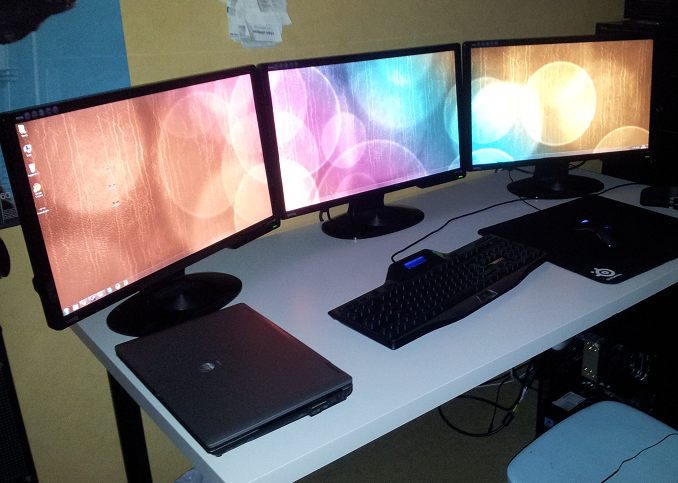
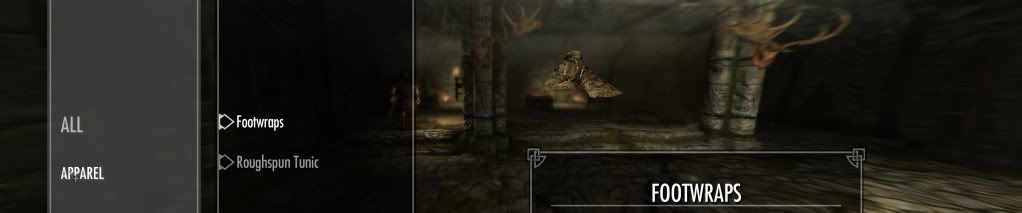
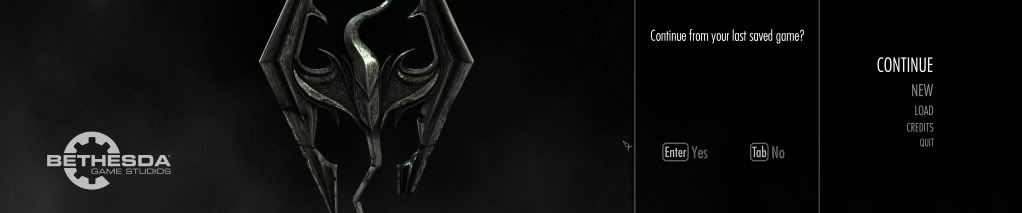
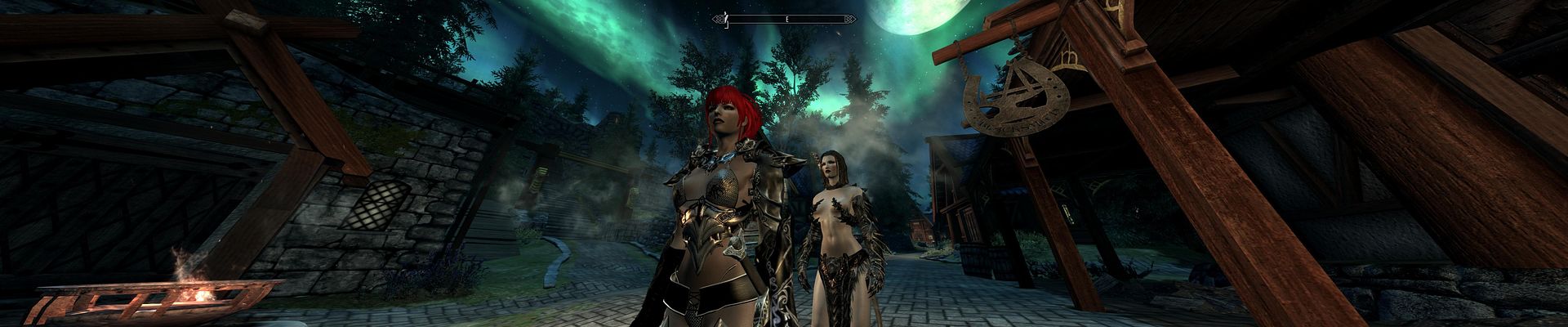
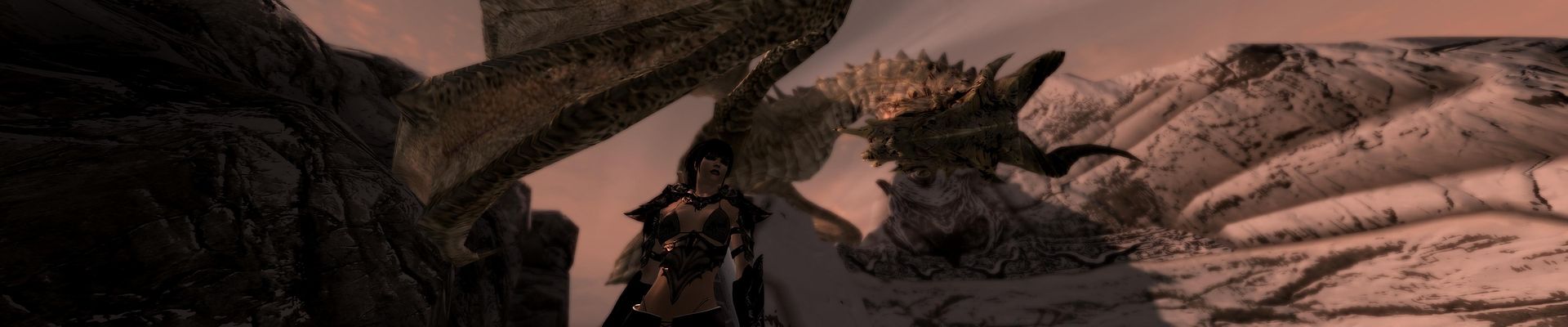
So I thought this game didn't support eyefinity at first, So I played the first few minutes like this:


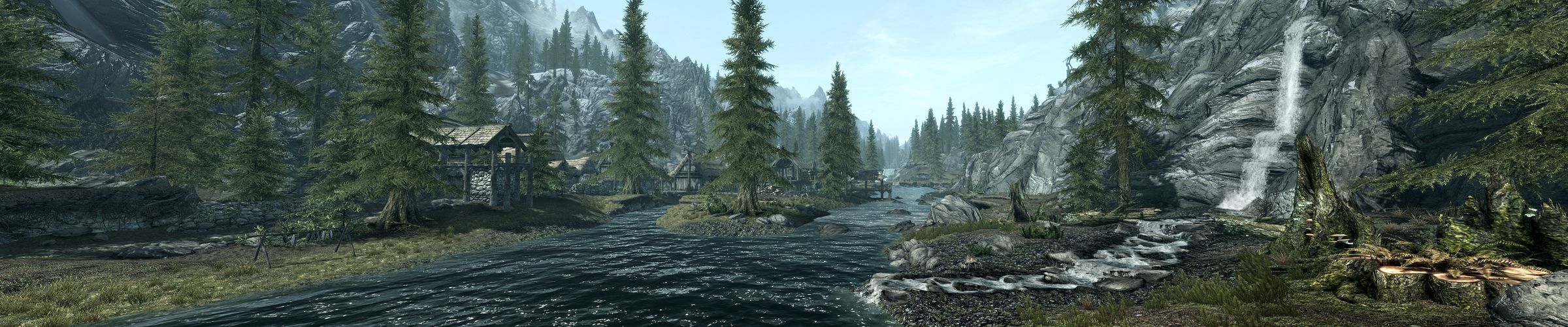
But all I had to do was disable my top 3 and then have the game auto configure video options. If you do it yourself it doesn't give you the option so now I get this ultra panoramic view HOR+ which is proper eyefinity:


And here is a huge image with the game blown up if you're just wondering what it looks like (I prefer wider view):


Source URL: http://neogaf.net/forum/showthread.php?t=450948&page=138


:D THEY HEARD OUR CRIES...THERE WILL BE JOYOUS CELEBRATION TONIGHT!!!!!!


Top
 Profile  
Reply with quote  
PostPosted: 10 Nov 2011, 18:46 
Offline

Joined: 31 Jul 2010, 10:42
Posts: 34
yes indeed. my copy turned up todday..

its just like fallout las vegas.

FOV is fine.. but all the menus are zoomed in...

shouldnt be a problem to fix

its deffo playable!


could have been ALOT worse...

it also runs like a pig on stilts in crossfire. run on 1 gpu till the profiles come out!


Top
 Profile  
Reply with quote  
PostPosted: 10 Nov 2011, 19:42 
Offline

Joined: 03 Jul 2011, 21:07
Posts: 13
I was really suprised to see this work actually, and yeah, can't complain really, these days you've gotta take what you can get lol.


Top
 Profile  
Reply with quote  
PostPosted: 10 Nov 2011, 19:56 
Offline

Joined: 09 Nov 2010, 07:25
Posts: 23
ughhh, menus are really buggy ( very zoomed in , fov is incorrect [not uncomfortable])

_________________
6970crossfire@5040x1050 3x22"


Top
 Profile  
Reply with quote  
 Post subject: Yep. Navigating menus is
PostPosted: 10 Nov 2011, 19:57 
Offline

Joined: 31 Jul 2010, 10:42
Posts: 34
Yep. Navigating menus is difficult. Only tested for an hour at work. It's v similar to fallout las Vegas. There's no horrid mouse lag bug like in fallout, the fov need adjusting on the inventory screens...


Top
 Profile  
Reply with quote  
PostPosted: 10 Nov 2011, 19:58 
Offline

Joined: 22 Oct 2010, 04:23
Posts: 115
>.>
Why am I having to wait till midnight to get my copy if it's out somewhere else?


Top
 Profile  
Reply with quote  
PostPosted: 10 Nov 2011, 20:03 
Offline
User avatar

Joined: 12 Aug 2006, 16:05
Posts: 194
Location: Germany
Here's a Steam Bethesda Forum post with listing of some .ini and console Tweaks, including FOV change: http://forums.bethsoft.com/index.php?/topic/1255692-skyrim-pc-ini-and-console-tweaks/

Question regarding the inventory: Is it playable, or not, yet?

_________________
My Blog || YouTube Channel || Twitch Stream
My PC || Game Screenshots Archive


Top
 Profile  
Reply with quote  
PostPosted: 10 Nov 2011, 20:24 
Offline

Joined: 10 Oct 2011, 06:02
Posts: 14
2xHD6990 in crossfire and all I get from this one is 30 fps at 1920x1200 and maximum 20 fps at 6000x1200. it's a shame


Top
 Profile  
Reply with quote  
PostPosted: 10 Nov 2011, 20:27 
Offline

Joined: 09 Nov 2010, 07:25
Posts: 23
Here's a Steam Bethesda Forum post with listing of some .ini and console Tweaks, including FOV change: http://forums.bethsoft.com/index.php?/topic/1255692-skyrim-pc-ini-and-console-tweaks/

Question regarding the inventory: Is it playable, or not, yet?


The inventory is playable. You can't see things like armor rating, coin value, etc. Theres an issue where the camera clips into the models face when youre creating a character so you can see his face unless you turn it to the side. FOV can be fixed by just console "fov X" I think the fov gets pretty fish eyed though, and 110 was fine with me. I really really want a menu fix though =/. PLEASE! HELP!

_________________
6970crossfire@5040x1050 3x22"


Top
 Profile  
Reply with quote  
 Post subject: So this is more like
PostPosted: 10 Nov 2011, 21:10 
Offline
Insiders
Insiders

Joined: 28 Nov 2010, 22:18
Posts: 405
So this is more like "accidental" support. Not actually support, just that the game happens to be Hor+ in it's scaling. Even a stopped clock is right twice a day.


Top
 Profile  
Reply with quote  
PostPosted: 10 Nov 2011, 21:17 
Offline

Joined: 10 Nov 2011, 21:13
Posts: 14
2xHD6990 in crossfire and all I get from this one is 30 fps at 1920x1200 and maximum 20 fps at 6000x1200. it's a shame


Same here, I have 2x6990's and at 2560x1600 I'm getting 22-24 fps with Ultra. High is around 30. Definitely something wrong.


Top
 Profile  
Reply with quote  
PostPosted: 10 Nov 2011, 21:42 
Offline

Joined: 03 Jun 2010, 04:43
Posts: 13
This is pretty dissappointing multi monitor support for a big budget AAA title. The initial login screen allows choosing of resolution but for my setup it only lets me choose 1920 x 1080 (obviously does not properly give native support for eyefinity). In the SkyrimPrefs.ini I can manually set the res to 5760 x 1080. The game appears to be Hor + which is good but the menus are messed up at the load screen and the ingame menus are too zoomed in. I get clipping at the character gen screen and within the game as well. You can go into the ingame console by pressing the tilde key ` and set the FOV which appears to work well. At my res i found fov 100 to be good. I am now running a radeon 6990 in my rig and the fps in this game is crap. But I reckon that will be sorted soon when AMD release a new CAP that specifically deals with Skyrim. It would be awesome if we could find a fix for these damn menus.


Top
 Profile  
Reply with quote  
 Post subject: fixing fps problems
PostPosted: 10 Nov 2011, 21:58 
Offline

Joined: 10 Nov 2011, 21:37
Posts: 2
[quote][quote]2xHD6990 in crossfire and all I get from this one is 30 fps at 1920x1200 and maximum 20 fps at 6000x1200. it's a shame


Same here, I have 2x6990's and at 2560x1600 I'm getting 22-24 fps with Ultra. High is around 30. Definitely something wrong.

Yeah definitely! Im playing with 6970 crossfire, im getting the 20-35 fps @ 5040x1050 high settings.

haha ( I remind myself of all those trolls)
Still, I think I found a slight fix. I got a 10+ fps average boost by using RadeonPro FORCE Anti-Aliasing Profile "Bioshock" with MVPUMode "Alternate Frame Rendering"

edit: RadeonPro Bioshock/Alternate Frame Rendering DEFINITELY gives a 10-15+fps boost. Im going to try other profiles to see if I can get a even better boost.
edit2: Seems like any of the RadeonPro Force Anti-Aliasing Profiles work better then the stock one, but Bioshock is still 3-5fps higher then the other profiles I've tried.

so when i started playing on eyefinity i noticed i was getting like 25-30 fps on high settings like some other people have claimed. i found a weird way to fix it. do ctrl+alt+del while playing then press cancel and you will be brought back to skyrim and your fps should jump up to 55-60 fps. That worked for me at least. i think it has something to do with the menu being all stretched out, because sometimes after you do the ctr+alt+del fix if you go back into a menu option where its stretched fps will drop back down to 25-30 fps. but then you just do ctrl+alt+del again.

has anyone found out the exact values to change in the .ini file to make menu not be stretched? if thats even how you change menu scaling


Top
 Profile  
Reply with quote  
PostPosted: 10 Nov 2011, 21:59 
Offline
Editors
Editors
User avatar

Joined: 14 Oct 2003, 13:52
Posts: 5706
Forgive me, but both AMD and nVidia give developers support to make sure features like this work correctly.

'Works, the menus are borked' isn't 'supported' in my book, but I'm becoming extremely demanding because more and more devs are basically fobbing PC gamers off. The more lazy they get, the more picky I get. And the less likely it is that they get my money.

...*sigh*... that's why Indie games seem to be just about all I actually play recently.

...

I'll play this (it's shipped, should arrive tomorrow) but I won't bother loading it on my Surround rig until there is a proper fix for the menus. A 3rd party mod if I must, but I'd prefer actual support from Bethesda, makes me feel like I'm actually a valued customer, rather than the shit on their boots that happens to have paid them money.


Top
 Profile  
Reply with quote  
 Post subject: So I haven't seen anyone
PostPosted: 10 Nov 2011, 22:00 
Offline

Joined: 15 Jan 2011, 03:20
Posts: 23
So I haven't seen anyone mention if Nvidia Surround is working? Or what the performance is like? Everyone that has posted uses ATI/Eyefinity.


Top
 Profile  
Reply with quote  
PostPosted: 10 Nov 2011, 22:07 
Offline

Joined: 21 Apr 2011, 09:27
Posts: 14
Well im trying to use 3 x gtx 480's in sli and no go for surround. tried both the new and beta drivers but i get this weird fov issue where im zoomed in too far, but when i change the fov its still wonkey and the shadows are all screwed up and in odd spots... screw this im gettin my 40" sony from the loungeroom.

_________________
http://jimswidescreenwallpapers.blogspot.com/


Top
 Profile  
Reply with quote  
 Post subject: Paradigm Shifter
PostPosted: 10 Nov 2011, 22:17 
Offline

Joined: 03 Jun 2010, 04:43
Posts: 13
Forgive me, but both AMD and nVidia give developers support to make sure features like this work correctly.

'Works, the menus are borked' isn't 'supported' in my book, but I'm becoming extremely demanding because more and more devs are basically fobbing PC gamers off. The more lazy they get, the more picky I get. And the less likely it is that they get my money.

...*sigh*... that's why Indie games seem to be just about all I actually play recently.


I hear you mate. Torchlight, Two Worlds 2, Minecraft etc.. all low budget indi's yet they handle eyefinity straight "out of the box" so to speak. It is astounding that companys like Bethesda, with such massive budgets and huge sales, can't be arsed to support ultra-wide res or multi monitor properly. The lazy buggers rely on the gaming community to fix problems that the game never should have shipped with.


Top
 Profile  
Reply with quote  
 Post subject: Jmatt110 wrote:Gunhead
PostPosted: 10 Nov 2011, 22:18 
Offline

Joined: 09 Nov 2010, 07:25
Posts: 23
[quote]2xHD6990 in crossfire and all I get from this one is 30 fps at 1920x1200 and maximum 20 fps at 6000x1200. it's a shame


Same here, I have 2x6990's and at 2560x1600 I'm getting 22-24 fps with Ultra. High is around 30. Definitely something wrong.

Yeah definitely! Im playing with 6970 crossfire, im getting the 20-35 fps @ 5040x1050 high settings.

haha ( I remind myself of all those trolls)
Still, I think I found a slight fix. I got a 10+ fps average boost by using RadeonPro FORCE Anti-Aliasing Profile "Bioshock" with MVPUMode "Alternate Frame Rendering"
AMD users, Don't forget to Force Process High Priority
edit: RadeonPro Bioshock/Alternate Frame Rendering DEFINITELY gives a 10-15+fps boost. Im going to try other profiles to see if I can get a even better boost.
edit2: Seems like any of the RadeonPro Force Anti-Aliasing Profiles work better then the stock one, but Bioshock is still 3-5fps higher then the other profiles I've tried.

_________________
6970crossfire@5040x1050 3x22"


Top
 Profile  
Reply with quote  
 Post subject: Stay tuned on WSGF ppl,
PostPosted: 10 Nov 2011, 22:21 
Offline
Editors
Editors
User avatar

Joined: 06 Nov 2008, 01:08
Posts: 1898
Stay tuned on WSGF ppl, HaYDeN is taking a look at Skyrim. :bigsmile:


Top
 Profile  
Reply with quote  
PostPosted: 10 Nov 2011, 22:26 
Offline

Joined: 09 Nov 2010, 07:25
Posts: 23
Stay tuned on WSGF ppl, HaYDeN is taking a look at Skyrim. :bigsmile:

oh god yes.

_________________
6970crossfire@5040x1050 3x22"


Top
 Profile  
Reply with quote  
 Post subject: Going by this thread on
PostPosted: 10 Nov 2011, 22:39 
Offline

Joined: 10 Nov 2009, 01:00
Posts: 23
Going by this thread on Guru3d it doesn't support crossfire very well at the moment, im sure they will release an updated driver, or Crossfire profile to fix the problem.


Top
 Profile  
Reply with quote  
PostPosted: 10 Nov 2011, 22:44 
Offline

Joined: 26 Oct 2011, 03:19
Posts: 29
So sounds like it works badly in Eyefinity and not at all in Nvidia Surround... Great.


Top
 Profile  
Reply with quote  
PostPosted: 10 Nov 2011, 22:56 
Offline

Joined: 25 Jan 2011, 08:19
Posts: 27
Could somebody please post pictures of the menus in Eyefinity/Surround? I know that people are saying it's "playable," but the written descriptions make it sound pretty bad. I don't want to spend $60 if the game does not work correctly in Eyefinity/Surround.


Top
 Profile  
Reply with quote  
PostPosted: 10 Nov 2011, 23:00 
Offline

Joined: 03 Jul 2011, 21:07
Posts: 13
For those getting low fps with crossfire, turn it off, i got a boost by only using one card and it also eliminated some micro-stutter when turning.


Top
 Profile  
Reply with quote  
PostPosted: 10 Nov 2011, 23:04 
Offline

Joined: 01 Jun 2011, 15:50
Posts: 11
Its not playable at all in nvidia surround :/
You have to edit the SkyrimPrefs.ini to enable the resolution, in my case 5760x1080 and your character is on the right monitor with the center and left monitors just have a very stretched left view.
The menu and hud have the same problem as ati as far as i can see.


Top
 Profile  
Reply with quote  
PostPosted: 10 Nov 2011, 23:22 
Offline

Joined: 09 Nov 2010, 07:25
Posts: 23
Could somebody please post pictures of the menus in Eyefinity/Surround? I know that people are saying it's "playable," but the written descriptions make it sound pretty bad. I don't want to spend $60 if the game does not work correctly in Eyefinity/Surround.


Here you go, but im too far along to get a picture of character creation face clipping.


Main menu won't allow you to pick from the newest saves


But on the bright side, the hud is centered and you can see your health/,mana fairly easily although theyre pretty spread out


_________________
6970crossfire@5040x1050 3x22"


Top
 Profile  
Reply with quote  
PostPosted: 10 Nov 2011, 23:31 
Offline

Joined: 10 Nov 2011, 23:23
Posts: 60
Hey guys, long time lurker here.

Thread title should be changed, broken menus makes the game unplayable.

Nice to see the .ini files are almost the same as fallout and oblivion too.

Maybe some isafehud=900 commands will work ? i can't rememeber the exact name of the command though.

Pretty dissapointed in Bethesda atm.

_________________
I7 920, ex58ud3r, crossfire 5870, 3x27" @ 6016x1080, 6gig corsair


Top
 Profile  
Reply with quote  
PostPosted: 10 Nov 2011, 23:44 
Offline

Joined: 10 Nov 2011, 23:36
Posts: 2
1st post on WSG so be kind xD

I got the same problems with the whole screen being zoomed in but not actually fitting the screen properly so i sometimes have to revert back to 1920 x 1080 to even find out what button some times to press (id normally assume is would be "Enter" or "right mouse click", but ended up being "R") which was way at the bottom.

Also for some reason i cant have MAX res with my resolution of 5760 x 1080, and if i tinker with the "SkyrimPrefs" in:

My Doc > My Games > Skyrim > SkyrimPrefs

Basically copying the files in VeryHigh.ini in the actual Skyrim directory it becomes super zoomed and i can just see blocky textures.

I want to have it in the 5760 x1080 sexiness but at full detail but NOT with the stretched menus

Peace


Top
 Profile  
Reply with quote  
PostPosted: 10 Nov 2011, 23:50 
Offline
Editors
Editors
User avatar

Joined: 08 May 2011, 18:58
Posts: 2286
http://widescreengamingforum.com/node/18163

Hope Hayden does some magic :D

_________________
We gonna send it to outa space!


Top
 Profile  
Reply with quote  
PostPosted: 10 Nov 2011, 23:50 
Offline

Joined: 10 Nov 2011, 23:22
Posts: 9
I specifically bought a third monitor for this game and I can confirm that the exact same issue happens with Nvidea surround. not really playable until the menus are fixed. Also bezel corrections were non-existant. The post earlier about the character being on the far right I cannot confirm at all as I hadnt had this problem, I let the default graphics options choose my res for me which gave me full surround (as long as you dont try to change it and let it stay blank. this said it had a 4:3 ratio but it didnt.

So yeah surround is no more unplayable than eyefinity by the looks of things.

Anyone have any Ideas on how to rectify the menu problem? that seems to be the only issue for me..


Top
 Profile  
Reply with quote  
PostPosted: 10 Nov 2011, 23:53 
Offline

Joined: 10 Nov 2011, 23:49
Posts: 6
eyefinity not working for me either. everything is super zoomed in. character creation is impossible. How do I go to the next 'menu', anyway? (ie go from 'race' to 'body')


Top
 Profile  
Reply with quote  
PostPosted: 11 Nov 2011, 00:10 
Offline
Editors
Editors
User avatar

Joined: 06 Nov 2008, 01:08
Posts: 1898
Anyone have any Ideas on how to rectify the menu problem? that seems to be the only issue for me..


HaYDeN is checking the game, if its possible to create a memory hack to fix the menus issues he will make it happen, please keep checking WSGF, when we have a solution itll be posted so all community can have it.


Top
 Profile  
Reply with quote  
PostPosted: 11 Nov 2011, 00:40 
Offline

Joined: 10 Nov 2011, 23:23
Posts: 60
[quote] Anyone have any Ideas on how to rectify the menu problem? that seems to be the only issue for me..


HaYDeN is checking the game, if its possible to create a memory hack to fix the menus issues he will make it happen, please keep checking WSGF, when we have a solution itll be posted so all community can have it.

Awesome, but wouldn't there be a .ini command, instead of a memory hack ?

_________________
I7 920, ex58ud3r, crossfire 5870, 3x27" @ 6016x1080, 6gig corsair


Top
 Profile  
Reply with quote  
 Post subject: Pittyh]thales100
PostPosted: 11 Nov 2011, 00:48 
Offline
Editors
Editors
User avatar

Joined: 06 Nov 2008, 01:08
Posts: 1898
Awesome, but wouldn't there be a .ini command, instead of a memory hack ?


Well a .ini command would be incredibly easier, but some fixes require much more than that unfortunately.


Top
 Profile  
Reply with quote  
 Post subject: Thank you daveatx and
PostPosted: 11 Nov 2011, 00:48 
Offline

Joined: 25 Jan 2011, 08:19
Posts: 27
Thank you daveatx and dibadiba for posting those pictures. The menus do look pretty bad. I'll hold off on purchasing it until the menus get fixed by either Bethesda or some developers on WSGF. Hopefully HaYDeN will be able to come up with a solution.


Top
 Profile  
Reply with quote  
PostPosted: 11 Nov 2011, 00:53 
Offline

Joined: 10 Nov 2011, 23:23
Posts: 60
anyone tried the old fallout commands like

fRenderedTerminalZoom=36

pipboyzoom, fdefaultworldFOV, isafezone etc etc..


it seems to have the same 3 .ini files as fallout in the same locations, 2 under users/my docs/ and 1 in the game dir.

i'm at work so i cant try yet.

_________________
I7 920, ex58ud3r, crossfire 5870, 3x27" @ 6016x1080, 6gig corsair


Top
 Profile  
Reply with quote  
PostPosted: 11 Nov 2011, 01:00 
Offline
Insiders
Insiders
User avatar

Joined: 31 Mar 2011, 02:10
Posts: 244
Hey guys,

I haven't unlocked Skyrim yet, but had a fair amount of experience with Fallout 3 and Fallout 3 NV which are Gamebryo Engine Bethesda games and had the same issues you're describing. Zoomed in /off center character creation screens, uncentered HUD elements, etc. Is there a iSafeZoneXWide and iSafeZoneYWide variable in the ini file for Skyrim? In Fallout, I had to adjust those values to =875 to get the HUD on the center screen at 5760x1080. I was never able to get the character creation screen in either Fallout to work properly in Eyefinity and just lived with it being borked.

Bad news is that the pip-boy (think inventory, quest & journal screens) were never super-zoomed in either Fallout 3 or New Vegas, so there's probably no ready-made fix for that in Skyrim...yuck!

*Edit* That's right, Pittyh, I'd forgotten about fRenderedTerminalFOV and fRenderedTerminalZoom values. In my relatively working Fallout 3 and New Vegas ini files I used fRenderedTerminalZoom=72 and fRenderedTerminalFOV=0.15 at 5760x1080.


Top
 Profile  
Reply with quote  
PostPosted: 11 Nov 2011, 01:00 
Offline

Joined: 23 Aug 2007, 05:41
Posts: 52
How satisfying would it be to be able to grab the lazy sob's developers of this game by their throats and punch them in the heads a few times..............EXTREMELY!!


Top
 Profile  
Reply with quote  
 Post subject: yeah the .ini files in
PostPosted: 11 Nov 2011, 01:07 
Offline

Joined: 10 Nov 2011, 23:23
Posts: 60
yeah the .ini files in skyrim, are almost the same as oblivion and fallout, they just seem alot smaller like some commands have been removed.

setting eyefinity=1 was the only way to adjust the "character select screen" in fallout

i remember playing with those .ini files for literally hours. i have fallout new vegas set up perfectly for eyefinity except the char screen like you.

_________________
I7 920, ex58ud3r, crossfire 5870, 3x27" @ 6016x1080, 6gig corsair


Top
 Profile  
Reply with quote  
PostPosted: 11 Nov 2011, 01:10 
Offline
Insiders
Insiders
User avatar

Joined: 14 Feb 2010, 13:39
Posts: 761
I'm at work now - so can't look at it till I get home again - but yes, please exhaust the INI options, because I haven't looked at them yet -- Usually problems like this are not fixable with INI so I don't bother, normally certain scenes/screens are fixable, but we can hope.

Looking at the code - it scales very much like Unreal Engine 3, scaling vertically (resulting in cut off portions)

Before I left however, I had managed to get the entire UI constrained to a single moitor, un-centered.

_________________
Resident Jester - Flawless Widescreen - Widescreen gaming the way it should be.
[Steam Profile]

Want to keep Flawless Widescreen alive? Donate Here


Top
 Profile  
Reply with quote  
PostPosted: 11 Nov 2011, 01:26 
Offline

Joined: 01 Jun 2011, 15:50
Posts: 11
Managed to solve the problem i had with my character appearing on the right monitor instead of the centre.
I deleted my SkyrimPrefs.ini and ran the launcher, it created a new one and then i just entered my 5760x1080 res in the ini file.
I then ran the launcher again and now i just have the same UI problem as everyone else :)


Top
 Profile  
Reply with quote  
PostPosted: 11 Nov 2011, 01:30 
Offline

Joined: 10 Nov 2011, 23:23
Posts: 60
I'm at work now - so can't look at it till I get home again - but yes, please exhaust the INI options, because I haven't looked at them yet -- Usually problems like this are not fixable with INI so I don't bother, normally certain scenes/screens are fixable, but we can hope.

Looking at the code - it scales very much like Unreal Engine 3, scaling vertically (resulting in cut off portions)

Before I left however, I had managed to get the entire UI constrained to a single moitor, un-centered.


nice, go the kiwi's :)

_________________
I7 920, ex58ud3r, crossfire 5870, 3x27" @ 6016x1080, 6gig corsair


Top
 Profile  
Reply with quote  
PostPosted: 11 Nov 2011, 01:30 
Offline

Joined: 10 Nov 2011, 23:49
Posts: 6
Managed to solve the problem i had with my character appearing on the right monitor instead of the centre.
I deleted my SkyrimPrefs.ini and ran the launcher, it created a new one and then i just entered my 5760x1080 res in the ini file.
I then ran the launcher again and now i just have the same UI problem as everyone else :)


Maybe you could help clear up some confusion for me. What is the UI problem you're referring to?
From what I gather, the game runs fine until you go into a menu, where everything looks zoomed in and is unusable, including character creation (I posted a screenshot bottom of page 3)
I simply launched, clicked 'high' on settings in the launcher, and started the game.


Top
 Profile  
Reply with quote  
 Post subject: daveatx wrote:Yeah
PostPosted: 11 Nov 2011, 02:05 
Offline

Joined: 10 Nov 2011, 21:13
Posts: 14
Yeah definitely! Im playing with 6970 crossfire, im getting the 20-35 fps @ 5040x1050 high settings.

haha ( I remind myself of all those trolls)
Still, I think I found a slight fix. I got a 10+ fps average boost by using RadeonPro FORCE Anti-Aliasing Profile "Bioshock" with MVPUMode "Alternate Frame Rendering"
AMD users, Don't forget to Force Process High Priority
edit: RadeonPro Bioshock/Alternate Frame Rendering DEFINITELY gives a 10-15+fps boost. Im going to try other profiles to see if I can get a even better boost.
edit2: Seems like any of the RadeonPro Force Anti-Aliasing Profiles work better then the stock one, but Bioshock is still 3-5fps higher then the other profiles I've tried.


Doing this gave me a massive boost. I went from 20 fps to bouncing around from 60-140fps, which is a crazy swing, but way better than before.


Top
 Profile  
Reply with quote  
PostPosted: 11 Nov 2011, 02:18 
Offline

Joined: 10 Nov 2011, 23:22
Posts: 9
has anyone toyed with the nvidia settings to get a fps boost of this kind? I would have a crack but Im at work


Top
 Profile  
Reply with quote  
 Post subject: dibadiba wrote:Smint
PostPosted: 11 Nov 2011, 02:19 
Offline

Joined: 01 Jun 2011, 15:50
Posts: 11
[quote]Managed to solve the problem i had with my character appearing on the right monitor instead of the centre.
I deleted my SkyrimPrefs.ini and ran the launcher, it created a new one and then i just entered my 5760x1080 res in the ini file.
I then ran the launcher again and now i just have the same UI problem as everyone else :)


Maybe you could help clear up some confusion for me. What is the UI problem you're referring to?
From what I gather, the game runs fine until you go into a menu, where everything looks zoomed in and is unusable, including character creation (I posted a screenshot bottom of page 3)
I simply launched, clicked 'high' on settings in the launcher, and started the game.

Sorry thats what i meant, i now just have the zoomed in menu, i did have an additional problem with my character appearing on the right monitor which is resolved now.


Top
 Profile  
Reply with quote  
PostPosted: 11 Nov 2011, 02:34 
Offline

Joined: 26 Oct 2011, 03:19
Posts: 29
Just forcing VSync off made the mouse and gameplay feel 100x better for me. The mouse was the biggest improvement.


Top
 Profile  
Reply with quote  
PostPosted: 11 Nov 2011, 02:57 
Offline

Joined: 09 Nov 2011, 16:35
Posts: 16
Just saw this posted on the Bethesda forums (note response from Bethesda Moderator at bottom)


Group:Members
Joined:17-April 11


Posted Today, 07:56 PM

I wrote a post about this before because i was worried about how the game would look and it looks very nice!

Apart from some SUPER bland textures even tho i'm on Ultra setting everything to max even all the sliders, but what the main problem is, is that as the game accepts my native resolution the game menus are zoomed in. To an extend that i cant read half the text of something, i cant see an item (might just see the bottom of the handle) don't know what button to press ( i would assume that it would be RMB or Enter, but i was wrong it was "R") but i couldn't of know that because it had been cut off.

Main menu: http://cloud.steampo...9BBABCE5C5E6FE/

In-Game: http://cloud.steampo...DA396EB8B9F9A4/

In-Game convo: http://cloud.steampo...0C61BCE96EAD56/

In-Game Menu (Weapons): http://cloud.steampo...D9C252BB9C1D24/

But what is extremely puzzling is that why when i press ESC the menu is perfectly in ratio to the screen proportions!?

Settings Screen: http://cloud.steampo...6FD0C4BB95600C/

PLEASE fix this as the only way to see the bottom half of the screen sometime is to come out the game go back to the Launcher go back to 1920 x 1080 an start it all over again.

Waste of time. If you can do it to the setting page why not every other overlay on the game?!

***EDIT**

This is also having random affects on the mouse making it super sensitive on the X axis, whizzing all over the place but when its on 1920 x 1080 its totally fine :confused:

This post has been edited by Zijn: Today, 07:58 PM


--------------------------------------------------------------------------------


#2 CCNA


Cat Herder


Group:Moderators
Joined:14-January 04
Location:2 Miles Up On a Mountain


Posted Today, 07:59 PM

You may have to play on one screen until someone makes a UI mod that supports this. The UI is really an XML framework that text is brought into by the game. With other than expected resolutions the text can be put in the wrong place so it is not accessible.


Top
 Profile  
Reply with quote  
PostPosted: 11 Nov 2011, 03:30 
Offline

Joined: 16 Apr 2008, 17:16
Posts: 273
Game is unplayable, not being able to see how much better or worse the Loot is the basic premise of the game :(, hopefully someone will come out with a fix, meanwhile it will have to be played with one screen...


Top
 Profile  
Reply with quote  
 Post subject: CY:G wrote:Game is
PostPosted: 11 Nov 2011, 03:49 
Offline

Joined: 10 Nov 2011, 23:49
Posts: 6
Game is unplayable, not being able to see how much better or worse the Loot is the basic premise of the game :(, hopefully someone will come out with a fix, meanwhile it will have to be played with one screen...


I can understand this happening. I mean realistically, widescreen gamers are in a minority. I also expect there to be a fix to address the problem. However, a Bethesda moderator more or less saying " someone else can fix it rather than us " is where I draw a line. It's total bullshit for a company of this size to turn its back on an issue like this, when indie studios have released tons of games that work in eyefinity out of the box.


Top
 Profile  
Reply with quote  
PostPosted: 11 Nov 2011, 04:00 
Offline
Insiders
Insiders
User avatar

Joined: 14 Feb 2010, 13:39
Posts: 761
The Reps proposed solution will not actually fix the problem [again, based on the short time I've had deep in the bytes of the games code] - the scaling problem is to do with the engine, its _exactly_ the same as say... Borderlands.

There is deffinately a option there for "centering" tho because some of the menu's are fine.

_________________
Resident Jester - Flawless Widescreen - Widescreen gaming the way it should be.
[Steam Profile]

Want to keep Flawless Widescreen alive? Donate Here


Top
 Profile  
Reply with quote  
 Post subject: I agree 100%. A
PostPosted: 11 Nov 2011, 04:07 
Offline

Joined: 03 Jun 2010, 04:43
Posts: 13
I agree 100%. A disrespectful attitude from Bethesda toward PC gamers. I paid $89 for what is supposed to be a PC game, not a console game that is made to run properly only on hi def TV resolution. It is disgraceful for such a high profile and well resourced company to rely on the gaming community to fix their game. I have played $10 indy titles that run better on eyefinity.


Top
 Profile  
Reply with quote  
 Post subject: Wow, this is really
PostPosted: 11 Nov 2011, 04:16 
Offline
I Donated
I Donated

Joined: 18 Jul 2007, 04:19
Posts: 513
Wow, this is really disappointing. I was waiting for this game since February, and I would have thought that Bethesda would have had all PC setups totally tested and ready go.

Now, I pick this game up tomorrow, so I'm waiting until them. But a year's worth of waiting = not having proper surround Support?

Wow, this is kind of sad..

Also, can I please get some confirmation on actual PC performance? What kind of FPS are we getting on NVIDIA surround?


Top
 Profile  
Reply with quote  
PostPosted: 11 Nov 2011, 04:26 
Offline

Joined: 26 Oct 2011, 03:19
Posts: 29
This really is not enjoyable in surround/eyefinity.. No item stats/descriptions. HUGE dialog selections. Massive question boxes with no text, but you can still answer yes or no which is meaningless without a question in the first place...

I wouldn't call it playable unless you've already played the game once through haha


Top
 Profile  
Reply with quote  
PostPosted: 11 Nov 2011, 04:27 
Offline

Joined: 10 Nov 2011, 23:23
Posts: 60
The UI is really an XML framework that text is brought into by the game. [/b][/i]


hmmm, i don't understand, the mod is saying xml, hayden is saying not ?

_________________
I7 920, ex58ud3r, crossfire 5870, 3x27" @ 6016x1080, 6gig corsair


Top
 Profile  
Reply with quote  
PostPosted: 11 Nov 2011, 04:36 
Offline

Joined: 04 Nov 2011, 07:13
Posts: 108
Going to wait another week until consensus builds and/or fixes are discovered.

I just bought an eyfinity setup only to find that titles do not work on release or at all.


Top
 Profile  
Reply with quote  
PostPosted: 11 Nov 2011, 04:40 
Offline
Insiders
Insiders

Joined: 01 Sep 2010, 11:38
Posts: 516
I'd be happy to hook Hayden up with a copy of this game to work on if required. This is a must have in eyefinity/surround, so it's a worthy cause. Although looking at it, he may have a copy already..

_________________
起死回生 (kishi kaisei) Wake from death and return to life..


Top
 Profile  
Reply with quote  
PostPosted: 11 Nov 2011, 04:46 
Offline
I Donated
I Donated

Joined: 18 Jul 2007, 04:19
Posts: 513
There are new NVIDIA drivers released today. Their the BETA 285.79 drivers. Those with Skyrim already: could you please try out these drivers and let us know how it effected the game?


Top
 Profile  
Reply with quote  
 Post subject: I would also be happy to
PostPosted: 11 Nov 2011, 04:51 
Offline

Joined: 27 Jul 2011, 19:13
Posts: 15
I would also be happy to donate to Hayden. I greatly appreciate your work and flawless widescreen was great!


Top
 Profile  
Reply with quote  
 Post subject: Hello everyone.. I just
PostPosted: 11 Nov 2011, 04:54 
Offline

Joined: 11 Nov 2011, 04:45
Posts: 1
Hello everyone.. I just signed up so I can write on the forums because I must be missing something about Nvidia owners having problems running skyrim. I have had NO issues with the game running in Nvidia Surround or in 3d. The only thing that I have had an issue with is just the inventory screen being stretched just like everyone else. I am running the game 5760x1080 and in full 3d and it looks great. No lag from mouse and running smoothly so I was just shocked that fellow Nvidiots are having issues...


Top
 Profile  
Reply with quote  
 Post subject: SithNatas wrote:Hello
PostPosted: 11 Nov 2011, 05:03 
Offline
I Donated
I Donated

Joined: 18 Jul 2007, 04:19
Posts: 513
Hello everyone.. I just signed up so I can write on the forums because I must be missing something about Nvidia owners having problems running skyrim. I have had NO issues with the game running in Nvidia Surround or in 3d. The only thing that I have had an issue with is just the inventory screen being stretched just like everyone else. I am running the game 5760x1080 and in full 3d and it looks great. No lag from mouse and running smoothly so I was just shocked that fellow Nvidiots are having issues...


What graphical settings are you running, and what is the lowest amount of FPS you have received?

So then, are you suffering from the exact same UI/HUD issues everyone else is describing?


Top
 Profile  
Reply with quote  
PostPosted: 11 Nov 2011, 05:34 
Offline

Joined: 13 Mar 2011, 11:43
Posts: 13
sweet! Thanks for the info. I'll be rocking this game 3D surround. There's an Nvidia beta driver available out today, that adds SLI and 3D support for this game. Listed as Excellent for 3D. Can't wait to check it out with my SLI 3GB 580s max OC.


Top
 Profile  
Reply with quote  
PostPosted: 11 Nov 2011, 05:38 
Offline
I Donated
I Donated

Joined: 18 Jul 2007, 04:19
Posts: 513
There are new NVIDIA drivers released today. Their the BETA 285.79 drivers. Those with Skyrim already: could you please try out these drivers and let us know how it effected the game?


There's an Nvidia beta driver available out today, that adds SLI and 3D support for this game. Listed as Excellent for 3D. Can't wait to check it out with my SLI 3GB 580s max OC.


Sigh........

You didn't happen to try the game out yet, have you? With the new driver, that is.


Top
 Profile  
Reply with quote  
PostPosted: 11 Nov 2011, 05:51 
Offline

Joined: 13 Mar 2011, 11:43
Posts: 13
I hadn't bothered to read the entire thread before that post... Excitement about this game I guess. I will let you know here shortly. I'm not bothering with NV surround until I can get workable menus. This game has a ton of menu time, at least Oblivion did. I will be trying 3D right away though, hoping for decent frame rate.


Top
 Profile  
Reply with quote  
 Post subject: I call Bullshit
PostPosted: 11 Nov 2011, 05:56 
Offline

Joined: 08 Nov 2011, 21:59
Posts: 38
This dude is obviously trolling. While I grant that he may not be experiencing performance or mouse issues, I highly doubt that the UI menus magically work for him and nobody else. He also called us nvidiots which I doubt he would do if he were using nvidia hardware.

So if this is just an ATI fanboy trolling, to him I say: How is it that with almost every game release there seems to be issues with ATI cards, you guys can't use physx properly, and you don't have CUDA. Nvidia is also the preferred card for 3D productivity software. So suck it.


Top
 Profile  
Reply with quote  
PostPosted: 11 Nov 2011, 06:04 
Offline

Joined: 08 Nov 2011, 21:59
Posts: 38
Skyrim is decrypting as I post this. I'll test this out with nvidia surround (3 @ 1680x1050) and let you all know how it goes


Top
 Profile  
Reply with quote  
 Post subject: Thank you.However, make
PostPosted: 11 Nov 2011, 06:15 
Offline
I Donated
I Donated

Joined: 18 Jul 2007, 04:19
Posts: 513
Thank you.

However, make sure that the graphic settings are permanently on max. I've been hearing that there's a problem going around that the launcher doesn't properly set the graphics options.


Top
 Profile  
Reply with quote  
PostPosted: 11 Nov 2011, 06:34 
Offline

Joined: 10 Nov 2011, 23:23
Posts: 60
Please change the title of this thread and the front page of WSGF, the game has vert- menus, rendering unplayable. you are giving the wrong idea to people who are thinking of buying it for widescreen.

_________________
I7 920, ex58ud3r, crossfire 5870, 3x27" @ 6016x1080, 6gig corsair


Top
 Profile  
Reply with quote  
PostPosted: 11 Nov 2011, 06:35 
Offline

Joined: 11 Aug 2011, 06:55
Posts: 22
Im running 3 gtx 580 3bs and the game has a terrible sli profile with the new drivers. im getting about 20% usage of my cards on max settings. Runs 60 fps but drops to 40s for no reason occationaly. Nvidia surround works good except the menus being way to streched. Anybody get a working nvidia sli profile yet?

_________________
Youtube Video of my rig playing skyrim in eyefinity http://www.youtube.com/watch?v=PvV8NdpCPeA


Top
 Profile  
Reply with quote  
PostPosted: 11 Nov 2011, 06:40 
Offline
I Donated
I Donated

Joined: 18 Jul 2007, 04:19
Posts: 513
Im running 3 gtx 580 3bs and the game has a terrible sli profile with the new drivers. im getting about 20% usage of my cards on max settings. Runs 60 fps but drops to 40s for no reason occationaly. Nvidia surround works good except the menus being way to streched. Anybody get a working nvidia sli profile yet?


Is this with the new 285.79 drivers?


Top
 Profile  
Reply with quote  
 Post subject: Yes, its strange really.
PostPosted: 11 Nov 2011, 06:44 
Offline

Joined: 11 Aug 2011, 06:55
Posts: 22
Yes, its strange really.

_________________
Youtube Video of my rig playing skyrim in eyefinity http://www.youtube.com/watch?v=PvV8NdpCPeA


Top
 Profile  
Reply with quote  
 Post subject: Like others, long time
PostPosted: 11 Nov 2011, 06:57 
Offline

Joined: 11 Nov 2011, 06:41
Posts: 5
Like others, long time lurker, first time poster.

Have only given skyrim about 2 hours before having to come to work.

6870 OC, Q9400, Eyefinity 3x 19" LCD @ 4320x900 - set to "High" by default. Haven't played with detail settings yet, but everything runs very playably.

Like everyone else, getting the mystical magnified and offset menus. Applied the ini fix to remove v-sync - that was a big improvement for my mouse lag and sluggishness (smooth as glass now)
also running FOV 100 to keep things in a better perspective.

With Rage running Eyefinity I had to apply a number of Launch Options in my steam shortcut to get things to work and look right; could this be the case for Skyrim? (from here of course: http://widescreengamingforum.com/dr/rage/en)

Seen a few comments about Eyefinity support, so far the best games I've seen have been Dirt 3, Payday (I know.. right!) and Shift 2 in terms of "out of the box" and "works". The sad truth seems to be that most people wont get NVSurround or Eyefinity so developers arn't putting alot of emphasis on getting it right. I guess the business arguement circles around the fact they may piss off and loose a few percent of the customers; but the vast majority are on console ports or are casual gamers and will buy whatever they are told is good.

I'll be definately keeping a close eye to this thread, I think getting the menus right would just be the icing on the cake for what seems to be a great evolution of the ES games.


Top
 Profile  
Reply with quote  
PostPosted: 11 Nov 2011, 07:09 
Offline

Joined: 08 Nov 2011, 21:59
Posts: 38
I launched the game on my 4th monitor first (1920x1200) and put all my settings to Ultra and then went into the advanced settings to make sure that everything was at max.
After a quick ini to change the resolution to 5040x1050 I launched the game again

THE GOOD:

  • The game looked AMAZING in surround. It was buttery smooth with the specs below. I experienced no mouse issues.

  • I changed bTreesReceiveShadows=1 and bDrawLandShadows=1 and changed the FOV to 95 using the console and the game was still buttery smooth

  • The textures aren't bad at all. Some are blurrier than others but overall they look great. They look on par with most contemporary games save a few like the witcher. I can't really hold this against Bethesda considering the size of the world, how much of it is being drawn, and the immense amount of content in the game. It will only get better with expansions and mods. After having seen how good the game looks on the PC I am actually quite irritated with all the whiners on the Bethesda forums that are complaining.


THE BAD:

  • The main menu and loading screens are zoomed in quite a bit

  • The in-game menu is zoomed in to where it is unplayable.

  • Because of the zooming the character creation is jacked up so I didn't go any further than that


Screenshots

I hope someone comes to the rescue to fix surround because we are in for one of the most immersive experiences ever in an RPG.


**SYSTEM SPECS**
Intel i7 2600k @ 4.7Ghz
8 GB RAM
(2) nVidia GTX 580
(3) 22" @ 1680x1050 {5040x1050}


Top
 Profile  
Reply with quote  
PostPosted: 11 Nov 2011, 07:23 
Offline
I Donated
I Donated

Joined: 18 Jul 2007, 04:19
Posts: 513
Thanks H8. You laid things out very clearly. I shouldn't have issues running this game, but playing it with the really messed up menus is the main issue it seems.

Can you tell me your exact FPS? I'm running two GTX 570's, so I'll take 1/3 of your framerate off to kinda guess what mine will be.


Top
 Profile  
Reply with quote  
 Post subject: Well, I'm having similar
PostPosted: 11 Nov 2011, 07:24 
Offline

Joined: 13 Mar 2011, 11:43
Posts: 13
Well, I'm having similar issues to the other guy with the 580s. Running 2 GTX580 3GB and I'm getting about 80% GPU usage on both average but the frame rate is erratic. It gets as high as 80 and drops as low as 40 in spots. The kicker, enabling 3D didn't affect my frame rate at all. And this game has awesome 3D. I love it. I didn't try surround. So, it's playable in 3D even though there are some obvious flaws in the drivers. I'm using the beta driver BTW. I jacked up the depth on the 3D all the way and there was no, what's the word? Well there was no need to adjust the convergence level, it was perfect across the board. With the exception of the crosshair and some of the onscreen markers. The Nvidia crosshair works just fine. It's basically the same as New Vegas but much improved in regards to 3D. The only issue aside from that which I've noticed is there seems to be some mouse smoothing enabled, which there is no option for. It's uncomfortable for me as I don't use it normally. I turned up my DPI all the way and it helped a lot, but in the menus my mouse pointer flies around. This game is gonna be legend once we can run it in surround.

I should point out that I've got all in game settings maxed except AA, I have it set to 2x. Set at 8x I was getting frame rate drops into the high 20s which is unacceptable for me. Leaving it at 2x ensures solid frames in most areas. I also always set the view distance on the grass to its minimum as performance usually suffers from it, and it looks like crap to begin with. Res. 1920x1080


Top
 Profile  
Reply with quote  
PostPosted: 11 Nov 2011, 08:00 
Offline
Insiders
Insiders
User avatar

Joined: 06 Sep 2011, 15:27
Posts: 213
I have 2 580's in SLI with 8x AA & AF at 5760x1080 and I am getting 45min about 57 or 63fps average. This is with the new beta drivers that came out today from nvidia. I also had to put in my resolution in the skyrimprefs.ini the game wouldn't detect a res higher then 1920x1080.

_________________
Azza Fusion 4000 Liquid Cooled Full/Mini-ITX Tower - AMD Ryzen 1700x CPU - Tt Water 3.0 Ultimate CPU Cooler - ASUS ROG Crosshair VI Extreme - 2x EVGA GTX 980 in SLI - Geil 16GB - Klipsch 5.1 THX Speakers - Vertex 4 128GB SSD, Sandisk 256GB SSD, Samsung 512GB 850 PRO SSD, WD Black 320GB & Two times Toshiba 5TB (one for Games and the other for Storage) - Logitech G502 - Corsair K65 RGB - Logitech G13 - Win10 Pro 64bit - 2-over-1 Viewsonic VA2448M 24" (2x 1920x1080 Secondary) & Samsung CHG90 Series Curved 49" (3840x1080) - Ergotech Monitor Stand - Shout out to WSGF for the upgrade on my stand!


Top
 Profile  
Reply with quote  
PostPosted: 11 Nov 2011, 08:02 
Offline

Joined: 10 Nov 2011, 23:23
Posts: 60
trying to output the console commands to a txt file


there is a command called SetConsoleOuputFile or scof

it's usage is supposed to be scof "abc.txt"

typing help in the console lists all the commands

i can't seem to get it to output the text though.

_________________
I7 920, ex58ud3r, crossfire 5870, 3x27" @ 6016x1080, 6gig corsair


Top
 Profile  
Reply with quote  
PostPosted: 11 Nov 2011, 08:22 
Offline

Joined: 08 Nov 2011, 21:59
Posts: 38
Alright I forgot to mention that I am using the 285.79 Beta Drivers. Through the whole intro scene it was very smooth with my system. I was getting between 40 and 60 FPS. FPS never went higher than 60 due to vsync; I know from past experiences that it is best to keep the gamebryo engine from fluctuating too wildly. It only dipped into the mid 30s when there were a lot of trees and volumetric fog on the screen but it remained silky smooth.

Aside from the menu issues in surround, I have to say that this is pretty impressive for a day 1 launch. Keep in mind that we are working with beta drivers, and no patches aside from the day 1 patch.

I really hope we get this menu situation solved because this thing is phenomenal. And when we have surround in all it's glory there will be no other experience like it.

Now if you'll excuse me, I am going to get high and kill things. I am also going to order a Fleshlight and paste the game cover on the outside of it.


Top
 Profile  
Reply with quote  
 Post subject: wow... very messed up
PostPosted: 11 Nov 2011, 08:43 
Offline

Joined: 22 Oct 2010, 04:23
Posts: 115
wow... very messed up menus.
Time to play on 1280x1024 ::cringe::


Top
 Profile  
Reply with quote  
PostPosted: 11 Nov 2011, 09:38 
Offline
Insiders
Insiders
User avatar

Joined: 06 Sep 2011, 15:27
Posts: 213
For any one wanting to fix the mouse zipping across the screen vertically, I set bMouseAcceleration=0 to disable mouse acceleration and it helped out a lot. It didn't fix it but it helped.

_________________
Azza Fusion 4000 Liquid Cooled Full/Mini-ITX Tower - AMD Ryzen 1700x CPU - Tt Water 3.0 Ultimate CPU Cooler - ASUS ROG Crosshair VI Extreme - 2x EVGA GTX 980 in SLI - Geil 16GB - Klipsch 5.1 THX Speakers - Vertex 4 128GB SSD, Sandisk 256GB SSD, Samsung 512GB 850 PRO SSD, WD Black 320GB & Two times Toshiba 5TB (one for Games and the other for Storage) - Logitech G502 - Corsair K65 RGB - Logitech G13 - Win10 Pro 64bit - 2-over-1 Viewsonic VA2448M 24" (2x 1920x1080 Secondary) & Samsung CHG90 Series Curved 49" (3840x1080) - Ergotech Monitor Stand - Shout out to WSGF for the upgrade on my stand!


Top
 Profile  
Reply with quote  
PostPosted: 11 Nov 2011, 10:29 
Offline

Joined: 12 Jun 2007, 08:39
Posts: 71
I had only short opportunity to check the game last night....was late. But have same issue as everybody else when running on 5760x1080 Surround (which was automatically detected), that menu seems to be "unplayable". At least the character creation was messed up. Game was running okay on high settings and 8xAF/8xAA. Had around 40 FPS. But with old driver (285.27) and no other "tricks".

Would be great to have a proper fix for this menu-crap and happy to donate the work, as developers doesnt seem to care at all.


Top
 Profile  
Reply with quote  
 Post subject: OK, poking around in the
PostPosted: 11 Nov 2011, 10:53 
Offline

Joined: 22 Oct 2010, 04:23
Posts: 115
OK, poking around in the interface.bsa file for some answers.... and I've found the culprit. .swf files >.<
To make the game cross platform compatible they exported all the menus in .swf format aka flash. Looking through the actual coding it is all in ActionScript2.0 as it uses the old "_stage", "_global" and other references.


I'm pretty sure what we are looking for is in the _Packages.gfx.cor.UIComponent in the function initSize()
Code:

   function initSize()
   {
   var _loc3 = __width ==0? (_width) : (__width);
   var _loc2 = __height==0? (_height) : {__height);
   _xscale = _yscale = 100;
   this.setSize(_loc3, _loc2);
   }


Also in the _Packages.gfx.utils.Contraints
function addElement
seems to do some of the math for setting up the bounds of the visible box.


Top
 Profile  
Reply with quote  
PostPosted: 11 Nov 2011, 11:05 
Offline
Editors
Editors
User avatar

Joined: 06 Nov 2008, 01:08
Posts: 1898
OK, poking around in the interface.bsa file for some answers....


Nice, thanks for posting EvilEngineer. :onethumb


Top
 Profile  
Reply with quote  
PostPosted: 11 Nov 2011, 11:40 
Offline
User avatar

Joined: 20 Oct 2010, 01:14
Posts: 15
OK, poking around in the interface.bsa file for some answers.... and I've found the culprit. .swf files >.<
To make the game cross platform compatible they exported all the menus in .swf format aka flash. Looking through the actual coding it is all in ActionScript2.0 as it uses the old "_stage", "_global" and other references.


I'm pretty sure what we are looking for is in the _Packages.gfx.cor.UIComponent in the function initSize()
Code:

   function initSize()
   {
   var _loc3 = __width ==0? (_width) : (__width);
   var _loc2 = __height==0? (_height) : {__height);
   _xscale = _yscale = 100;
   this.setSize(_loc3, _loc2);
   }


Also in the _Packages.gfx.utils.Contraints
function addElement
seems to do some of the math for setting up the bounds of the visible box.


So for those of us that dont know a lot about all this coding stuff.....

Is there an easy way to edit this and fix the menus? or not really possible?

Thanks

PS. Good luck HaYDeN, hope a fix isnt far away =D


Top
 Profile  
Reply with quote  
 Post subject: Just got it working on
PostPosted: 11 Nov 2011, 11:44 
Offline

Joined: 21 May 2011, 15:29
Posts: 8
Just got it working on tri-sli 480 gtx 3d surround.

When I first started it kept crashing to the desktop after running for a couple of minutes. Could even make it to the character creation screen.

To fix it I've had to lower the textures to medium. Everything else is on max.

Why high textures should break the game for me is very odd though!

_________________
Il n'a ressenti aucun effet secondaire avec le sildénafil à la demande, il est donc convaincu que le tadalafil à 5 ​​mg pourrait un dépistage complet chez les patients positifs.


Top
 Profile  
Reply with quote  
PostPosted: 11 Nov 2011, 12:06 
Offline
User avatar

Joined: 12 Aug 2006, 16:05
Posts: 194
Location: Germany

You may have to play on one screen until someone makes a UI mod that supports this. The UI is really an XML framework that text is brought into by the game. With other than expected resolutions the text can be put in the wrong place so it is not accessible.


This is good news. So we will have a working and clean solution without having to mess with third party programmes, memory injection or similar things. Only a matter of time.

So if this is just an ATI fanboy trolling, to him I say: How is it that with almost every game release there seems to be issues with ATI cards, you guys can't use physx properly, and you don't have CUDA. Nvidia is also the preferred card for 3D productivity software. So suck it.


This isn't helpfull at all and even partly wrong.

_________________
My Blog || YouTube Channel || Twitch Stream
My PC || Game Screenshots Archive


Top
 Profile  
Reply with quote  
PostPosted: 11 Nov 2011, 12:12 
Offline
Insiders
Insiders
User avatar

Joined: 06 Sep 2011, 15:27
Posts: 213
This is good news. So we will have a working and clean solution without having to mess with third party programmes, memory injection or similar things. Only a matter of time.


Only problem is the mod tools have not been released and Bethesda said they are working hard on it, but will not give an eta. A clean solution is more than likely going to happen later rather than sooner unfortunately.

_________________
Azza Fusion 4000 Liquid Cooled Full/Mini-ITX Tower - AMD Ryzen 1700x CPU - Tt Water 3.0 Ultimate CPU Cooler - ASUS ROG Crosshair VI Extreme - 2x EVGA GTX 980 in SLI - Geil 16GB - Klipsch 5.1 THX Speakers - Vertex 4 128GB SSD, Sandisk 256GB SSD, Samsung 512GB 850 PRO SSD, WD Black 320GB & Two times Toshiba 5TB (one for Games and the other for Storage) - Logitech G502 - Corsair K65 RGB - Logitech G13 - Win10 Pro 64bit - 2-over-1 Viewsonic VA2448M 24" (2x 1920x1080 Secondary) & Samsung CHG90 Series Curved 49" (3840x1080) - Ergotech Monitor Stand - Shout out to WSGF for the upgrade on my stand!


Top
 Profile  
Reply with quote  
PostPosted: 11 Nov 2011, 12:19 
Offline
User avatar

Joined: 12 Aug 2006, 16:05
Posts: 194
Location: Germany
That's true for sure. But at least I am going to play this game 200+hours, so a later solution is better than nothing.

_________________
My Blog || YouTube Channel || Twitch Stream
My PC || Game Screenshots Archive


Top
 Profile  
Reply with quote  
PostPosted: 11 Nov 2011, 12:26 
Offline
Editors
Editors
User avatar

Joined: 24 Sep 2006, 16:57
Posts: 1317
Updated post titles to better reflect the current state of the game.

_________________
Formerly eZ`

Follow me on twitter: @theg00seberry and find me on Steam


Top
 Profile  
Reply with quote  
PostPosted: 11 Nov 2011, 12:26 
Offline

Joined: 11 Nov 2011, 12:23
Posts: 4
OK, poking around in the interface.bsa file for some answers.... and I've found the culprit. .swf files >.<
To make the game cross platform compatible they exported all the menus in .swf format aka flash. Looking through the actual coding it is all in ActionScript2.0 as it uses the old "_stage", "_global" and other references.


I'm pretty sure what we are looking for is in the _Packages.gfx.cor.UIComponent in the function initSize()
Code:

   function initSize()
   {
   var _loc3 = __width ==0? (_width) : (__width);
   var _loc2 = __height==0? (_height) : {__height);
   _xscale = _yscale = 100;
   this.setSize(_loc3, _loc2);
   }


Also in the _Packages.gfx.utils.Contraints
function addElement
seems to do some of the math for setting up the bounds of the visible box.


How did you extract the .bsa files?
I wouldn't mind getting my fingers dirty and mess around with those files.


Top
 Profile  
Reply with quote  
 Post subject: All i want is a working
PostPosted: 11 Nov 2011, 12:51 
Offline
Editors
Editors
User avatar

Joined: 06 Nov 2008, 01:08
Posts: 1898
All i want is a working solution, the faster the better, maybe 99.99% of multi-mon users do agree with this.


Top
 Profile  
Reply with quote  
PostPosted: 11 Nov 2011, 12:52 
Offline

Joined: 10 Nov 2011, 23:23
Posts: 60
i don't know about evilengineer, but i used a tool called "FO3 Archive Utility" to extract files from the BSA.

once the BSA was extracted i used a program called Sothink SWF editor to open the SWF Files.

Thats as far as my knowledge goes.

_________________
I7 920, ex58ud3r, crossfire 5870, 3x27" @ 6016x1080, 6gig corsair


Top
 Profile  
Reply with quote  
PostPosted: 11 Nov 2011, 12:59 
Offline

Joined: 11 Nov 2011, 12:23
Posts: 4
i don't know about evilengineer, but i used a tool called "FO3 Archive Utility" to extract files from the BSA.

once the BSA was extracted i used a program called Sothink SWF editor to open the SWF Files.

Thats as far as my knowledge goes.


Cheers!
I'll see if I can come up with anything useful.


Top
 Profile  
Reply with quote  
 Post subject: NV Surround, 285.79
PostPosted: 11 Nov 2011, 13:13 
Offline

Joined: 11 Nov 2011, 13:05
Posts: 35
NV Surround, 285.79 5760x1200, vsync modified, all maxed except 2xaa and 8xaf (not fully tweaked yet) and very playable with 2x GTX570 SLI. Mouse acceleration set to 0, still a little dodgy. Confirming that the menu issue is ruining the surround experience. Not being able to see the selected item stats is a no-go. I felt the need to post because there is strength in numbers!


Top
 Profile  
Reply with quote  
PostPosted: 11 Nov 2011, 13:14 
Offline

Joined: 10 Nov 2011, 23:23
Posts: 60
Maybe also try a opensource flash editor instead, because the Sothink editor is not free and has limitations.

heres some opensource swf editors

http://blog.dreamcss.com/flash/free-flash-editors/


i'm currently installing http://www.flashdevelop.org/community/viewtopic.php?f=11&t=8987&sid=1c78599f0335ceb44bbe95116070a856

see how it goes.

_________________
I7 920, ex58ud3r, crossfire 5870, 3x27" @ 6016x1080, 6gig corsair


Top
 Profile  
Reply with quote  
PostPosted: 11 Nov 2011, 13:55 
Offline

Joined: 11 Nov 2011, 12:23
Posts: 4
I decompiled the UI .swf's and had a look at what's going on.
As EvilEngineer already pointed out, pretty much every UI screen has an initSize() function,
which could most likely be modified to scale the UI correctly.

Unfortunately I have zero knowledge decompiling / recompiling actionscript, so I'm stuck here.
Maybe someone else more knowledgeable in this field will have more success.


Top
 Profile  
Reply with quote  
PostPosted: 11 Nov 2011, 14:16 
Offline

Joined: 28 Jan 2010, 10:11
Posts: 6
Where woud i find to auto setup my graphics card . cause i do not have the triplescreen res. option.
i can only choose a 1 screen resolution .. :(


Top
 Profile  
Reply with quote  
 Post subject: You have to edit the
PostPosted: 11 Nov 2011, 14:20 
Offline

Joined: 11 Nov 2011, 12:23
Posts: 4
You have to edit the resolution manually in:
My DocumentsMy GamesSkyrimSkyrimPrefs.ini

you're looking for:
iSize H=1080
iSize W=6016

this is my resolution 6016x1080, use the correct values for your monitor setup.


Top
 Profile  
Reply with quote  
 Post subject: Hey Spyah,To run at your
PostPosted: 11 Nov 2011, 14:42 
Offline
Insiders
Insiders
User avatar

Joined: 31 Mar 2011, 02:10
Posts: 244
Hey Spyah,

To run at your native desktop resolution instead of being limited to 1 screen, use the SkyrimLauncher.exe or launch from Steam. Then go to Options. Then click Default. Skyrim will autodetect your resolution but it will not show up in the Resolution field. That will remain blank. Then adjust the rest of the settings how you'd like without messing with the Aspect Ratio or Resolution fields.

Alternatively, go to My DocumentsMy GamesSkyrim and edit SkyrimPrefs.ini. You can change the resolution in that file by editing isize H=1080 and isize W=5760 or whatever your preferred resolution is.


Top
 Profile  
Reply with quote  
PostPosted: 11 Nov 2011, 14:50 
Offline

Joined: 29 Jan 2010, 08:10
Posts: 55
double post, (I have no clue why)
Please remove.

_________________
i7 2600k | AMD HD7970 @ 1100MHz | 8GB 1333 DDR3 | Crucial M4 | 3x Dell U2311h @ eyefinity | Thrustmaster F430 | trackir 5.0


Top
 Profile  
Reply with quote  
PostPosted: 11 Nov 2011, 14:51 
Offline

Joined: 29 Jan 2010, 08:10
Posts: 55
Hmm I have played for about an hour now. I really hate the menu's this way. To bad.
I am already really in love with this game but it is unplayable in triple screen. Performance is great tho. Single screen I can play easily on ultra with a single HD5850
On triple I have to lower the viewing distance and disable AA to have good performance but that is fine for me.

I am really hoping somebody can come up with a fix for the menu's soon. I want to play this game!

_________________
i7 2600k | AMD HD7970 @ 1100MHz | 8GB 1333 DDR3 | Crucial M4 | 3x Dell U2311h @ eyefinity | Thrustmaster F430 | trackir 5.0


Top
 Profile  
Reply with quote  
 Post subject: I'm playing on a Matrox
PostPosted: 11 Nov 2011, 15:10 
Offline

Joined: 21 Nov 2008, 02:40
Posts: 3
I'm playing on a Matrox TripleHead2Go @ 3072x768, medium detail. (Q6600, single 8800GT) Performance is pretty good, but the Vert+ menu stretching makes full screen triple head unplayable.

Right now, I've got the game running in windowed mode, at a resolution of 1900x1000. Right when the game launches, I can ALT-TAB and center the window on the center display. In this mode, I can juuust see the bottom of the UI, where the item stats are shown. Overall, this mode is way better than full screen 1280x1024.

I'm antsy for a real fix!


Top
 Profile  
Reply with quote  
 Post subject: *sigh*
PostPosted: 11 Nov 2011, 15:17 
Offline

Joined: 11 Nov 2011, 15:00
Posts: 6
So Im running on ASUS Maximus Extreme board, 2x ATI HD6870 on Crossfire, and Intel i-2500k. Also Running 3 22" Wide LCD's at 5040x1050 Resolution

Pulled up launcher. Auto detect gave me the most awesome thign ever. Autoset to High while running 8x AA and 8x AF. Launched in game and started to get really stoked. Then I saw the menu :(. Hopefully someone extremely awesome in the community of avid TES fans comes up with something soon. I have faith. Outside of the Menu issue. This game was running BEAUTIFULLY for me. No issues whatsoever outside of Menu on eyefinity being out of wack.

I did adjust FOV through the console in game by typing FOV 105 which i adjust to get the view I wanted it but it did nothing to help the menu issue.

The tiring part of this thats in the background is WHY are manufacturers making for consoles and then Porting to PC lately. This approach has caused all sorts of problems with eyefinity and just general other problems. The last 3 games ive had (not counting skyrim) required massive tweaks and control tweaks especially to get working comfortably. What happened to Building for PC and scaling down like they seemingly did for Fallout 3 and New Vegas. Also why is eyefinity sucha problem. Technology has been out for a good while now and for a company so much into the "immersive experience" how can the menu adjustment for the 3 monitor immersive technology get lost in the shuffle? In the end, im not knocking the game for it as its amazingly beatiful and the gameplay i had on single monitor for the 2 hours i played last night was awesome. Im just annoyed that as of lately, almost every game ive gotten has had problems with it. Ive had eyefinity for a year now and when I first got it, companies were releasing games that had no problems with it. Everygame i was playing worked beautifully on eyefinity. I feel like its going backwards here. that should be the other way around.

Anyways enough of the rant. Im just hoping one you coding geniuses out there can help all us fellow gamers out. I have a half day at work and can only hope something is figured out by the time i get off of work.


Top
 Profile  
Reply with quote  
PostPosted: 11 Nov 2011, 15:19 
Offline

Joined: 03 Jul 2009, 13:52
Posts: 12
May akatosh provide a fix!


Top
 Profile  
Reply with quote  
PostPosted: 11 Nov 2011, 15:39 
Offline

Joined: 29 Jan 2010, 08:10
Posts: 55
Im just annoyed that as of lately, almost every game ive gotten has had problems with it. Ive had eyefinity for a year now and when I first got it, companies were releasing games that had no problems with it. Everygame i was playing worked beautifully on eyefinity. I feel like its going backwards here. that should be the other way around.


I got the exact same feeling.
I have got eyefinity now since the HD5xxx series and back then allmost every game supported it. Some had a non centered HUD but that was the only problem I had.

I was hoping it would get better now that both nVidia and AMD deliver a triple screen solution. So far nothing improved.

I really hope this game will be fixed soon. I am having a constant inner conflict until then:

"wait for a fix, the game will be much more immersive."
"Play a little bit more, it works and I want to play it."

_________________
i7 2600k | AMD HD7970 @ 1100MHz | 8GB 1333 DDR3 | Crucial M4 | 3x Dell U2311h @ eyefinity | Thrustmaster F430 | trackir 5.0


Top
 Profile  
Reply with quote  
PostPosted: 11 Nov 2011, 16:18 
Offline

Joined: 27 Jul 2011, 19:13
Posts: 15
CatalystCreator Andrew D
We're working on a CAP update for Skyrim; as soon as an ETA is known I'll let you guys know
17 hours ago


http://twitter.com/#!/@catalystcreator


Top
 Profile  
Reply with quote  
PostPosted: 11 Nov 2011, 16:21 
Offline

Joined: 10 Nov 2011, 23:23
Posts: 60
not going to fix the in game menus though is it ?

:(

_________________
I7 920, ex58ud3r, crossfire 5870, 3x27" @ 6016x1080, 6gig corsair


Top
 Profile  
Reply with quote  
PostPosted: 11 Nov 2011, 16:25 
Offline

Joined: 27 Jun 2011, 03:39
Posts: 16
Just seeing if this works


Top
 Profile  
Reply with quote  
PostPosted: 11 Nov 2011, 16:47 
Offline

Joined: 11 Aug 2011, 06:55
Posts: 22
25$ to who ever can figure out a fix for the menu stretching. I love the game so far, by far the best elder scrolls yet to me, but the lack of ANY SLI profile that's worth a crap and messed up menus makes my Beastly computer very sad. I hate disabling 1200$ in video cards just to play the game. Its pretty depressing

Evga x58 ftw3
i7 960 4.2ghz
3 gtx 580's 3gbs Tri sli
3 23' led monitors nvidia surround
8 gigs 1600 ram

_________________
Youtube Video of my rig playing skyrim in eyefinity http://www.youtube.com/watch?v=PvV8NdpCPeA


Top
 Profile  
Reply with quote  
 Post subject: $20 REWARD FOR MENU FIX
PostPosted: 11 Nov 2011, 16:51 
Offline

Joined: 08 Nov 2011, 21:59
Posts: 38
I'll throw down $20 for a proper solution to the menus.


Top
 Profile  
Reply with quote  
PostPosted: 11 Nov 2011, 16:53 
Offline
User avatar

Joined: 04 Jun 2010, 07:17
Posts: 15
Hi,

I have'nt read the whole thread here, so excuse me if I repeat something that was found before.

There is a strange thing with the menues (and the 30fps-lock) in Skyrim... but take a look at the screenshots and the fps-counter on the upper right side:


Broken menu with 30 fps and a nonbroken menu with over 300 fps... It seems that it's possible to adjust the menus AND kill the fps-lock together.


Top
 Profile  
Reply with quote  
PostPosted: 11 Nov 2011, 16:55 
Offline
Editors
Editors
User avatar

Joined: 06 Nov 2008, 01:08
Posts: 1898
Broken menu with 30 fps and a nonbroken menu with over 300 fps... It seems that it's possible to adjust the menus AND kill the fps-lock together.


How did you get the unbroken menus ?


Top
 Profile  
Reply with quote  
PostPosted: 11 Nov 2011, 17:02 
Offline
Insiders
Insiders
User avatar

Joined: 06 Sep 2011, 15:27
Posts: 213
I have had to go into my NVCP before and add a game manually because it wasn't being properly auto detected by the software. I checked my SLI indicator in game with the new beta drivers and it's working just fine on the multi-display profile. It also might not be switching back to SLI when you go back to a single monitor, so I would check that. It's a bit of a hassle but it's worth a shot.

_________________
Azza Fusion 4000 Liquid Cooled Full/Mini-ITX Tower - AMD Ryzen 1700x CPU - Tt Water 3.0 Ultimate CPU Cooler - ASUS ROG Crosshair VI Extreme - 2x EVGA GTX 980 in SLI - Geil 16GB - Klipsch 5.1 THX Speakers - Vertex 4 128GB SSD, Sandisk 256GB SSD, Samsung 512GB 850 PRO SSD, WD Black 320GB & Two times Toshiba 5TB (one for Games and the other for Storage) - Logitech G502 - Corsair K65 RGB - Logitech G13 - Win10 Pro 64bit - 2-over-1 Viewsonic VA2448M 24" (2x 1920x1080 Secondary) & Samsung CHG90 Series Curved 49" (3840x1080) - Ergotech Monitor Stand - Shout out to WSGF for the upgrade on my stand!


Top
 Profile  
Reply with quote  
 Post subject: He doesn't have unbroken
PostPosted: 11 Nov 2011, 17:04 
Offline

Joined: 26 Oct 2011, 03:19
Posts: 29
He doesn't have unbroken menus, the main game menu works fine in eyefinity.


Top
 Profile  
Reply with quote  
PostPosted: 11 Nov 2011, 17:04 
Offline

Joined: 11 Nov 2011, 16:59
Posts: 5
Just made an account just so I can join the thread and say I am DYING for a solution and would gladly pitch in money to have someone find a fix haha. My rig is dying to get this working!


Top
 Profile  
Reply with quote  
 Post subject: thales100 wrote:uk_uk
PostPosted: 11 Nov 2011, 17:04 
Offline

Joined: 22 Oct 2010, 04:23
Posts: 115
[quote]Broken menu with 30 fps and a nonbroken menu with over 300 fps... It seems that it's possible to adjust the menus AND kill the fps-lock together.


How did you get the unbroken menus ?

The main menu when you hit "esc" works fine and looks to scale properly. All of the other menus... don't >.<

The FPS hit is most likely due to how flash works and how in this case it is actually occupying the entire screen and beyond. It can suck out performance really quickly. Once it's scaled back down it should perform better.

Sadly, I've got to goto work... I won't have time to fiddle some more with the swf files for a couple more hours.


Top
 Profile  
Reply with quote  
PostPosted: 11 Nov 2011, 17:06 
Offline
Editors
Editors
User avatar

Joined: 06 Nov 2008, 01:08
Posts: 1898
The main menu when you hit "esc" works fine and looks to scale properly. All of the other menus... don't >.<


Ah ok, hadnt checked it, thanks. HaYDeN is working on a fix atm, he has been over 5 hours straight on it.


Top
 Profile  
Reply with quote  
PostPosted: 11 Nov 2011, 17:10 
Offline

Joined: 02 Dec 2010, 08:16
Posts: 21
I initially was set up in 3x1 Portrait (3890x1920).
The menus were mostly viewable.
The biggest problem is that the commands themselves, after hitting "Tab" (Controls, Help, Exit, etc) are behind the bezels.
Some of the buttons "enter, exit, equip" at the bottom of the inventory screen were half-cut off.

I flipped the monitors over to 3x1 landscape, installed the new beta drivers from Nvidia and tried again. I now see what the others were talking about with the stretched menu. On the plus side, the menu options aren't behind the bezels, but too many other things are missing. Any NPC's/walls in the side monitors would been seen through if you turned into them.

I'm running GTX580 3gbs in SLI, at 6020x1200. I was getting 60fps. They never dipped, with High "default" setting. The GPU's were at 99% usage, with 1660mbs VRAM being used.

Uldred.


Top
 Profile  
Reply with quote  
PostPosted: 11 Nov 2011, 17:19 
Offline

Joined: 11 Nov 2011, 16:59
Posts: 5
I can't even get it to boot up in my portrait surround setup even after going into the ini file and adjusting the resolution....it starts up and crashes at the main screen......whoever this HaYDEN is he is awesome, lets hope he finds a solution.


Top
 Profile  
Reply with quote  
PostPosted: 11 Nov 2011, 17:19 
Offline

Joined: 11 Nov 2011, 15:00
Posts: 6
I will also throw down an additional $20 for the person to release this fix. No Joke. Itd be worth every penny to me.


Top
 Profile  
Reply with quote  
 Post subject: To all the guys who are
PostPosted: 11 Nov 2011, 17:20 
Offline

Joined: 11 Nov 2011, 17:09
Posts: 5
To all the guys who are offering donations for a fix: thank you! I spent all of my extra money on the game, a new psu, and a new gpu cooler (fan went out on mine) or I would offer up some cash.

_________________
"If Bethesda won't fix it, the community will!" -me


Top
 Profile  
Reply with quote  
PostPosted: 11 Nov 2011, 17:20 
Offline
Insiders
Insiders
User avatar

Joined: 21 May 2011, 14:18
Posts: 1232
Hmm the only thing I could make so far was to "center all the menus" on my left monitor in a 3x setup... Now the tricky part is how to move all the menus to the right and onto the middle monitor:))

_________________
WideScreen Fixer... Fixes your Surround problems to give a gorgeous 3D Surround Experience!
WideScreen Fixer

Only website to show TRUE 3D Vision Surround Gaming Videos(viewable by anyone) only at
3D Vision Surround Gallery

E-mail and Paypal (for people who wants it): [email protected]


Top
 Profile  
Reply with quote  
PostPosted: 11 Nov 2011, 17:25 
Offline

Joined: 11 Nov 2011, 15:00
Posts: 6
Hmm the only thing I could make so far was to "center all the menus" on my left monitor in a 3x setup... Now the tricky part is how to move all the menus to the right and onto the middle monitor:))


YES!!!! You are getting close. If by the time I get out of work in 2.5 hours you have this fixed you will be my hero :). and I will also give you my steam id to add me on steam so I can donate to you for your time :)


Top
 Profile  
Reply with quote  
PostPosted: 11 Nov 2011, 17:29 
Offline

Joined: 11 Nov 2011, 16:59
Posts: 5
Seriously would definitely pitch in for a fix to be working by today or tomorrow, that would be amazing so we can all finally get started on this amazing game the way we want to play it!


Top
 Profile  
Reply with quote  
PostPosted: 11 Nov 2011, 17:35 
Offline
Insiders
Insiders
User avatar

Joined: 16 Jul 2011, 19:35
Posts: 285
Location: Canada
[quote] The main menu when you hit "esc" works fine and looks to scale properly. All of the other menus... don't >.<


Ah ok, hadnt checked it, thanks. HaYDeN is working on a fix atm, he has been over 5 hours straight on it.

Awesome, thales100 you have to tell HaYDeN to get his site up so I can start donating money to him, I really appreciate all his hard work and the communities in general.

Multi screen rulz I don't know what I do with out this site(you guys should have a donate button as well).


Top
 Profile  
Reply with quote  
PostPosted: 11 Nov 2011, 17:42 
Offline

Joined: 10 Nov 2011, 23:23
Posts: 60
Hmm the only thing I could make so far was to "center all the menus" on my left monitor in a 3x setup... Now the tricky part is how to move all the menus to the right and onto the middle monitor:))


How ? what did you edit ?

_________________
I7 920, ex58ud3r, crossfire 5870, 3x27" @ 6016x1080, 6gig corsair


Top
 Profile  
Reply with quote  
 Post subject: Emm... the game memory
PostPosted: 11 Nov 2011, 17:44 
Offline
Insiders
Insiders
User avatar

Joined: 21 May 2011, 14:18
Posts: 1232
Emm... the game memory 8)

_________________
WideScreen Fixer... Fixes your Surround problems to give a gorgeous 3D Surround Experience!
WideScreen Fixer

Only website to show TRUE 3D Vision Surround Gaming Videos(viewable by anyone) only at
3D Vision Surround Gallery

E-mail and Paypal (for people who wants it): [email protected]


Top
 Profile  
Reply with quote  
PostPosted: 11 Nov 2011, 17:45 
Offline

Joined: 10 Nov 2011, 23:23
Posts: 60
Emm... the game memory 8)


oh lol, too advanced for me :)

_________________
I7 920, ex58ud3r, crossfire 5870, 3x27" @ 6016x1080, 6gig corsair


Top
 Profile  
Reply with quote  
PostPosted: 11 Nov 2011, 17:51 
Offline

Joined: 11 Nov 2011, 16:59
Posts: 5
Anyone else having issues where the game won't even boot? No matter what resolution? I'm running portrait surround and I've tried just even getting it to play in windowed mode or anything, and no go, it gets to the bethesda opening thing...then I see the Skyrim logo, and it crashes...every time. I don't know if this is surround related or another issue?


Top
 Profile  
Reply with quote  
PostPosted: 11 Nov 2011, 17:54 
Offline

Joined: 26 Oct 2011, 03:19
Posts: 29
Hmm the only thing I could make so far was to "center all the menus" on my left monitor in a 3x setup... Now the tricky part is how to move all the menus to the right and onto the middle monitor:))


Think you can do a guide on how to do this? I wouldn't mind looking to the left when I accessed a menu from time to time.. Would beat not being able to use the menus at all


Top
 Profile  
Reply with quote  
PostPosted: 11 Nov 2011, 17:57 
Offline
Insiders
Insiders
User avatar

Joined: 21 May 2011, 14:18
Posts: 1232
I could guide into that..but the problem is that all the menus and hud is moved to the left monitor....I simply changed the drawing resolution from 5040 to 1680. The game still renders on 3x monitors but all the hud is moved to the left.
I don't believe you want that: crosshair etc is on the left monitor...

After reading some more here on the forum and personal find it seems that the menus are flash files...so rescaling the swf files could also be a solution:)

_________________
WideScreen Fixer... Fixes your Surround problems to give a gorgeous 3D Surround Experience!
WideScreen Fixer

Only website to show TRUE 3D Vision Surround Gaming Videos(viewable by anyone) only at
3D Vision Surround Gallery

E-mail and Paypal (for people who wants it): [email protected]


Top
 Profile  
Reply with quote  
PostPosted: 11 Nov 2011, 18:07 
Offline

Joined: 03 Jul 2011, 21:07
Posts: 13
Anyone else having issues where the game won't even boot? No matter what resolution? I'm running portrait surround and I've tried just even getting it to play in windowed mode or anything, and no go, it gets to the bethesda opening thing...then I see the Skyrim logo, and it crashes...every time. I don't know if this is surround related or another issue?


Try turning sound quality on your pc down to 48000hz.


Top
 Profile  
Reply with quote  
PostPosted: 11 Nov 2011, 18:10 
Offline

Joined: 11 Nov 2011, 16:59
Posts: 5
Thank you flyingpenguin that did work! Now I can at least experience the other issues everyone else is having haha.


Top
 Profile  
Reply with quote  
 Post subject: Hi everyone,I'm a bit
PostPosted: 11 Nov 2011, 18:22 
Offline

Joined: 11 Nov 2011, 17:46
Posts: 11
Hi everyone,

I'm a bit confuse.. (It doesn't take much as I'm pretty new to this setup). But on the screenshot of the first post of this thread, he was able to get the compass on the top of the screen, I can't even see that on mine. Am I missing some sort of setting? if I change the ini file sizeH value to my resolution, will it brings the UI back in? I'm at work atm so I can't test this.

Also my cross-hair is nowhere to be seen as well..

Thanks in advance.


Top
 Profile  
Reply with quote  
PostPosted: 11 Nov 2011, 18:29 
Offline

Joined: 11 Nov 2011, 17:43
Posts: 55
I thought and read that it would have eyefinity support. I got home @ 12:30AM (I wanted a physical copy and didn't want to wait for the Steam DL) and was crushed when I saw the resolution choices.
I respect all the work everyone with better knowledge/xp is doing to make this playable on large displays.

_________________


Top
 Profile  
Reply with quote  
PostPosted: 11 Nov 2011, 18:37 
Offline

Joined: 31 Jul 2010, 10:42
Posts: 34
I have a simple work around not seeing the stats of the equipment with the menus broken...

highlight it in the inventory..

push R to drop it...

you can then see the stats of the item!

then write the value on a bit of note paper :)

im tallying my inventory with pen and paper. its like AD&D lol

lets hope a better work around comes around..

but for me the game is now just about playable!


Top
 Profile  
Reply with quote  
PostPosted: 11 Nov 2011, 18:44 
Offline

Joined: 11 Nov 2011, 15:00
Posts: 6
I thought and read that it would have eyefinity support. I got home @ 12:30AM (I wanted a physical copy and didn't want to wait for the Steam DL) and was crushed when I saw the resolution choices.
I respect all the work everyone with better knowledge/xp is doing to make this playable on large displays.


Tell me about disappointment. I preordered on steam the second i could. Didnt have to wait for Steam DL because of preload availability for two days before which was awesome. since they unlocked at midnight eastern i was actually on playing at 10pm my time but the disappointment with the menu stretching adn scaling was a major let down.

All the more reason why i will be eternally grateful to Hayden or Helifax or whoever can find a fix for this.


Top
 Profile  
Reply with quote  
 Post subject: SuspendingBJ wrote:wt73
PostPosted: 11 Nov 2011, 18:48 
Offline

Joined: 31 Jul 2010, 10:42
Posts: 34
[quote]I thought and read that it would have eyefinity support. I got home @ 12:30AM (I wanted a physical copy and didn't want to wait for the Steam DL) and was crushed when I saw the resolution choices.
I respect all the work everyone with better knowledge/xp is doing to make this playable on large displays.


Tell me about disappointment. I preordered on steam the second i could. Didnt have to wait for Steam DL because of preload availability for two days before which was awesome. since they unlocked at midnight eastern i was actually on playing at 10pm my time but the disappointment with the menu stretching adn scaling was a major let down.

All the more reason why i will be eternally grateful to Hayden or Helifax or whoever can find a fix for this.


indeed!

lets hope we get this fixed!


Top
 Profile  
Reply with quote  
 Post subject: Dirty work around
PostPosted: 11 Nov 2011, 18:55 
Offline

Joined: 21 May 2011, 15:29
Posts: 8
Hi,

Think I've got it just about playable using Cheat Engine.

Download cheat engine 6.1then load the attached CT file.

http://www.mediafire.com/?593k7i9kn6xumby

Run skyrim and load up your game. (Make sure you load up your last save before you use the hack or the hud will move over to the left)

atl tab out load the tesv.exe process in cheat engine then put the width of one monitor in the value then go back to skyrim.

The hud is still central, but the menus now appear on the left most monitor!

Works for me, hope it works for you too!

_________________
Il n'a ressenti aucun effet secondaire avec le sildénafil à la demande, il est donc convaincu que le tadalafil à 5 ​​mg pourrait un dépistage complet chez les patients positifs.


Top
 Profile  
Reply with quote  
PostPosted: 11 Nov 2011, 19:15 
Offline

Joined: 03 Jul 2009, 13:52
Posts: 12
the cheatengine website seems down, too bad ^^


Top
 Profile  
Reply with quote  
PostPosted: 11 Nov 2011, 19:22 
Offline

Joined: 18 Oct 2011, 00:27
Posts: 5
Hi,
Think I've got it just about playable using Cheat Engine.
Download cheat engine 6.1then load the attached CT file.
http://www.mediafire.com/?593k7i9kn6xumby
Run skyrim and load up your game. (Make sure you load up your last save before you use the hack or the hud will move over to the left)
atl tab out load the tesv.exe process in cheat engine then put the width of one monitor in the value then go back to skyrim.
The hud is still central, but the menus now appear on the left most monitor!
Works for me, hope it works for you too!


SWEET BABY JESUS I LOVE YOU BRO.
It worked for me, I can't even cry about anything I Love you man.


Top
 Profile  
Reply with quote  
 Post subject: Reprobator wrote:the
PostPosted: 11 Nov 2011, 19:25 
Offline

Joined: 18 Oct 2011, 00:27
Posts: 5
the cheatengine website seems down, too bad ^^


The link on the homepage for the download was dead, I clicked on the Downloads Page on the right and it took me to a different page that let me download it.


Top
 Profile  
Reply with quote  
PostPosted: 11 Nov 2011, 19:26 
Offline

Joined: 18 Oct 2011, 00:27
Posts: 5
Edit: Double Post. Fail.


Top
 Profile  
Reply with quote  
PostPosted: 11 Nov 2011, 19:29 
Offline

Joined: 21 May 2011, 15:29
Posts: 8
the maps screwed up but you can always alt tab out, and change the value to the full resolution, then back again as needed. I'm going to try and make a trainer so I can swap between in game, but it'll be specific to my resolution

_________________
Il n'a ressenti aucun effet secondaire avec le sildénafil à la demande, il est donc convaincu que le tadalafil à 5 ​​mg pourrait un dépistage complet chez les patients positifs.


Top
 Profile  
Reply with quote  
 Post subject: Abaddon2501 wrote:Edit:
PostPosted: 11 Nov 2011, 19:29 
Offline

Joined: 11 Nov 2011, 15:00
Posts: 6
Edit: Double Post. Fail.


So quick question. You have to go through this procedure every time you launch the game right?

If so, Im glad since it will be playable but still wanting something thats a more permanent fix and doesnt require this procedure everytime the game launches. Donation still available to whoever finds the fix but this is awesome that we have some sort of workaround in the meantime.


Top
 Profile  
Reply with quote  
PostPosted: 11 Nov 2011, 19:29 
Offline
Insiders
Insiders
User avatar

Joined: 21 May 2011, 14:18
Posts: 1232
Hmm yes I also discovered the same thing:) only I made a small trainer for it. So when I press 1 the image is re-scaled to fit on the left display (prior to opening the menu). After that I press "2" again to go back to original resolution.
It was made for 5040x1050 resolution:) While this is a temporary work-around is not actually a fix. The items in menu are still scaled etc...

http://www.megaupload.com/?d=NOZK5IDS

_________________
WideScreen Fixer... Fixes your Surround problems to give a gorgeous 3D Surround Experience!
WideScreen Fixer

Only website to show TRUE 3D Vision Surround Gaming Videos(viewable by anyone) only at
3D Vision Surround Gallery

E-mail and Paypal (for people who wants it): [email protected]


Top
 Profile  
Reply with quote  
PostPosted: 11 Nov 2011, 19:31 
Offline

Joined: 18 Oct 2011, 00:27
Posts: 5
No idea, I Imagine so, it loads it outta memory via the Cheat Engine program, I Optimistic a perma-fix will come out sooner or later.


Top
 Profile  
Reply with quote  
PostPosted: 11 Nov 2011, 19:32 
Offline

Joined: 11 Nov 2011, 15:00
Posts: 6
Hmm yes I also discovered the same thing:) only I made a small trainer for it. So when I press 1 the image is re-scaled to fit on the left display (prior to opening the menu). After that I press "2" again to go back to original resolution.
It was made for 5040x1050 resolution:) While this is a temporary work-around is not actually a fix. The items in menu are still scaled etc...

http://www.megaupload.com/?d=NOZK5IDS


Awesome. thats my res! Thanks Helifax! Since i have mouse buttons mapped to 1 and 2 that trainer will make my life alot easier.


Top
 Profile  
Reply with quote  
PostPosted: 11 Nov 2011, 19:44 
Offline

Joined: 11 Nov 2011, 19:30
Posts: 14
*Edit
Nvm :) Got it to work o/


Top
 Profile  
Reply with quote  
PostPosted: 11 Nov 2011, 20:04 
Offline

Joined: 31 Jul 2010, 10:42
Posts: 34
really sorry but im a bit of a n00b :(

how do i set this program up?

ive never used it before... looks odd!

any help will be greatly appreciated!


Top
 Profile  
Reply with quote  
 Post subject: Can one of you guys post
PostPosted: 11 Nov 2011, 20:06 
Offline

Joined: 08 Nov 2011, 21:59
Posts: 38
Can one of you guys post images of that work-around?


Top
 Profile  
Reply with quote  
PostPosted: 11 Nov 2011, 20:18 
Offline
Insiders
Insiders
User avatar

Joined: 21 May 2011, 14:18
Posts: 1232
Can one of you guys post images of that work-around?


I think the pictures are self explanatory:)

Best Regards,
Helifax

Attached files

_________________
WideScreen Fixer... Fixes your Surround problems to give a gorgeous 3D Surround Experience!
WideScreen Fixer

Only website to show TRUE 3D Vision Surround Gaming Videos(viewable by anyone) only at
3D Vision Surround Gallery

E-mail and Paypal (for people who wants it): [email protected]


Top
 Profile  
Reply with quote  
PostPosted: 11 Nov 2011, 20:36 
Offline

Joined: 26 Oct 2011, 03:19
Posts: 29
Do you think you could do a trainer for other resolutions? Like 5760x1080? :)


Top
 Profile  
Reply with quote  
PostPosted: 11 Nov 2011, 20:43 
Offline

Joined: 11 Nov 2011, 17:09
Posts: 5
You guys are GODS AMONG MEN! Day of release and there's a fix! Thank the Nine! Or should I say Eight? Lol

_________________
"If Bethesda won't fix it, the community will!" -me


Top
 Profile  
Reply with quote  
PostPosted: 11 Nov 2011, 20:43 
Offline

Joined: 31 Jul 2010, 10:42
Posts: 34
ok so this trainer will not work unless we use his exact res?


Top
 Profile  
Reply with quote  
PostPosted: 11 Nov 2011, 20:47 
Offline
Insiders
Insiders
User avatar

Joined: 21 May 2011, 14:18
Posts: 1232
Do you think you could do a trainer for other resolutions? Like 5760x1080? :)


Yes I will provide a 5760x1080 resolution trainer also:)

_________________
WideScreen Fixer... Fixes your Surround problems to give a gorgeous 3D Surround Experience!
WideScreen Fixer

Only website to show TRUE 3D Vision Surround Gaming Videos(viewable by anyone) only at
3D Vision Surround Gallery

E-mail and Paypal (for people who wants it): [email protected]


Top
 Profile  
Reply with quote  
PostPosted: 11 Nov 2011, 20:49 
Offline
Insiders
Insiders
User avatar

Joined: 21 May 2011, 14:18
Posts: 1232
ok so this trainer will not work unless we use his exact res?


Oh the trainer will work:) for any Surround/Eyefinity res

For ex 4800x900 but the scaling of the menus will be weird when you press "2" because they will be displayed in a 5040x1050 resolution:)

But it will work:)
I will release a 5760x1080 resolution one so you can choose between this and the 5040x1050 one:)

_________________
WideScreen Fixer... Fixes your Surround problems to give a gorgeous 3D Surround Experience!
WideScreen Fixer

Only website to show TRUE 3D Vision Surround Gaming Videos(viewable by anyone) only at
3D Vision Surround Gallery

E-mail and Paypal (for people who wants it): [email protected]


Top
 Profile  
Reply with quote  
PostPosted: 11 Nov 2011, 20:50 
Offline

Joined: 31 Jul 2010, 10:42
Posts: 34
sorry to bug you helifax.

thanks so much for your efforts to fix this game for us!

am I right in thinking this fix will not work unless you write a specific trainer for the res we have?

IE. i have a bezel corrected 5872/1080.

the trainer wont work?


Top
 Profile  
Reply with quote  
PostPosted: 11 Nov 2011, 20:54 
Offline

Joined: 11 Nov 2011, 20:51
Posts: 2
Sorry for my ignorance... but I downloaded Cheat Engine 6.1 and your file and now I have no idea what to do next! Can anyone post a walk through for the less technologically gifted? Thanks!


Top
 Profile  
Reply with quote  
PostPosted: 11 Nov 2011, 20:55 
Offline
Insiders
Insiders
User avatar

Joined: 21 May 2011, 14:18
Posts: 1232
sorry to bug you helifax.

thanks so much for your efforts to fix this game for us!

am I right in thinking this fix will not work unless you write a specific trainer for the res we have?

IE. i have a bezel corrected 5872/1080.

the trainer wont work?


No, no no... The trainer will work for any resolution of 3x. The only problem will be when you resize back to the "normal" resolution. If you have 5872 and press "2" the hud will be displayed in a 5040 resolution which will be a little to the left:) But the scaling down will work the same:) Give it a try and you will see;))

Best Regards.

_________________
WideScreen Fixer... Fixes your Surround problems to give a gorgeous 3D Surround Experience!
WideScreen Fixer

Only website to show TRUE 3D Vision Surround Gaming Videos(viewable by anyone) only at
3D Vision Surround Gallery

E-mail and Paypal (for people who wants it): [email protected]


Top
 Profile  
Reply with quote  
 Post subject: helifax][quote=sn0w
PostPosted: 11 Nov 2011, 20:58 
Offline

Joined: 11 Nov 2011, 06:41
Posts: 5
[quote]

For ex 4800x900 but the scaling of the menus will be weird when you press "2" because they will be displayed in a 5040x1050 resolution:)

But it will work:)
I will release a 5760x1080 resolution one so you can choose between this and the 5040x1050 one:)


would you please have a look at 4320x900?


Also - can someone provide a procedure on how to use this patch?


Top
 Profile  
Reply with quote  
PostPosted: 11 Nov 2011, 21:00 
Offline

Joined: 31 Jul 2010, 10:42
Posts: 34
helifax are you talking about the trainer you made?

the link doesnt work unfortunately :(


Top
 Profile  
Reply with quote  
 Post subject: Not to be a pain,
PostPosted: 11 Nov 2011, 21:02 
Offline

Joined: 11 Nov 2011, 20:59
Posts: 1
Not to be a pain, but...

5760x1200 please ?

:love:


Top
 Profile  
Reply with quote  
 Post subject: trainer works
PostPosted: 11 Nov 2011, 21:03 
Offline

Joined: 08 Nov 2011, 18:17
Posts: 4
i can confirm the trainer works for 6036x1080 bezel corrected resolution. i had to load the game first, then alt-tab and load the trainer. awesome, thanks!


Top
 Profile  
Reply with quote  
 Post subject: Trainer works like a
PostPosted: 11 Nov 2011, 21:06 
Offline

Joined: 11 Nov 2011, 19:30
Posts: 14
Trainer works like a champ.
But i'm seeing alot of different people are requesting different resolutions for the trainer, would it be possible to make a trainer with dropdown menu's of the various resolution.?
Kinda drooling myself for a 5760x1200 ^^

1 to rule (fitt) them all o/


Top
 Profile  
Reply with quote  
 Post subject: Can anyone post a walk
PostPosted: 11 Nov 2011, 21:10 
Offline

Joined: 11 Nov 2011, 20:51
Posts: 2
Can anyone post a walk through on how to use CE with this. I want desperately to play but my tinkering is fruitless thus far!


Top
 Profile  
Reply with quote  
PostPosted: 11 Nov 2011, 21:11 
Offline
Insiders
Insiders
User avatar

Joined: 21 May 2011, 14:18
Posts: 1232
Trainer works like a champ.
But i'm seeing alot of different people are requesting different resolutions for the trainer, would it be possible to make a trainer with dropdown menu's of the various resolution.?
Kinda drooling myself for a 5760x1200 ^^

1 to rule (fitt) them all o/


Yes, that is what I am trying to do:) I am still looking to find a way to downscale the item preview from the inventory and stuff like that. and maybe to permanently make the menu scaled down and centered:)

_________________
WideScreen Fixer... Fixes your Surround problems to give a gorgeous 3D Surround Experience!
WideScreen Fixer

Only website to show TRUE 3D Vision Surround Gaming Videos(viewable by anyone) only at
3D Vision Surround Gallery

E-mail and Paypal (for people who wants it): [email protected]


Top
 Profile  
Reply with quote  
PostPosted: 11 Nov 2011, 21:15 
Offline

Joined: 11 Nov 2011, 06:41
Posts: 5
Confirms seems to work on 4320x900 but the bottom of the menus are still chopped off.
(So you miss the area with gold value etc)


Top
 Profile  
Reply with quote  
PostPosted: 11 Nov 2011, 21:15 
Offline

Joined: 11 Nov 2011, 21:08
Posts: 16
1 - download the trainer on page 15 of this link
2 - unzip it and save it somewhere where you can find it )like your desktop
3 - you should have an application
4 - run skyrim
5 - Alt/tab out of the game
6 - start the trainer
7 - return to the game
8 - press 1
9 - access the ingame menu ui
10 - if you did the above steps then it should appear on the left screen fully viewable

the only problem at the moment is the 3d image of the items are not right, but it does work


Top
 Profile  
Reply with quote  
PostPosted: 11 Nov 2011, 21:16 
Offline

Joined: 23 Feb 2011, 21:49
Posts: 87
Ok, I can officially say the WSGF team are my heroes! You guys are doing a fabulous job! :)


Top
 Profile  
Reply with quote  
PostPosted: 11 Nov 2011, 21:18 
Offline
Insiders
Insiders
User avatar

Joined: 21 May 2011, 14:18
Posts: 1232
Confirms seems to work on 4320x900 but the bottom of the menus are still chopped off.
(So you miss the area with gold value etc)


Yes I noticed that:) I will fix that:)

_________________
WideScreen Fixer... Fixes your Surround problems to give a gorgeous 3D Surround Experience!
WideScreen Fixer

Only website to show TRUE 3D Vision Surround Gaming Videos(viewable by anyone) only at
3D Vision Surround Gallery

E-mail and Paypal (for people who wants it): [email protected]


Top
 Profile  
Reply with quote  
 Post subject: helifax wrote:Sixa
PostPosted: 11 Nov 2011, 21:23 
Offline

Joined: 11 Nov 2011, 06:41
Posts: 5
[quote]Confirms seems to work on 4320x900 but the bottom of the menus are still chopped off.
(So you miss the area with gold value etc)


Yes I noticed that:) I will fix that:)


Also at my res the crosshair flicks over to the left hand screen, has anyone else seen this?


This is very exciting.


Top
 Profile  
Reply with quote  
PostPosted: 11 Nov 2011, 21:26 
Offline
Insiders
Insiders
User avatar

Joined: 06 Sep 2011, 15:27
Posts: 213
Only problem with this Cheat Engine solution is that when I alt+tab out of the game, I can not go back into the game. All I have is a black windowed screen and I have to restart the game.

_________________
Azza Fusion 4000 Liquid Cooled Full/Mini-ITX Tower - AMD Ryzen 1700x CPU - Tt Water 3.0 Ultimate CPU Cooler - ASUS ROG Crosshair VI Extreme - 2x EVGA GTX 980 in SLI - Geil 16GB - Klipsch 5.1 THX Speakers - Vertex 4 128GB SSD, Sandisk 256GB SSD, Samsung 512GB 850 PRO SSD, WD Black 320GB & Two times Toshiba 5TB (one for Games and the other for Storage) - Logitech G502 - Corsair K65 RGB - Logitech G13 - Win10 Pro 64bit - 2-over-1 Viewsonic VA2448M 24" (2x 1920x1080 Secondary) & Samsung CHG90 Series Curved 49" (3840x1080) - Ergotech Monitor Stand - Shout out to WSGF for the upgrade on my stand!


Top
 Profile  
Reply with quote  
PostPosted: 11 Nov 2011, 21:26 
Offline

Joined: 11 Nov 2011, 21:23
Posts: 1
1 - download the trainer on page 15 of this link
2 - unzip it and save it somewhere where you can find it )like your desktop
3 - you should have an application
4 - run skyrim
5 - Alt/tab out of the game
6 - start the trainer
7 - return to the game
8 - press 1
9 - access the ingame menu ui
10 - if you did the above steps then it should appear on the left screen fully viewable

the only problem at the moment is the 3d image of the items are not right, but it does work


I can do everything until 6, when I press Alt/tab again to go back to the game, the screen is black, have to alt-f4 to close it, what should I do?

TIA


Top
 Profile  
Reply with quote  
PostPosted: 11 Nov 2011, 21:27 
Offline
Insiders
Insiders
User avatar

Joined: 21 May 2011, 14:18
Posts: 1232
[quote][quote]Confirms seems to work on 4320x900 but the bottom of the menus are still chopped off.
(So you miss the area with gold value etc)


Yes I noticed that:) I will fix that:)


Also at my res the crosshair flicks over to the left hand screen, has anyone else seen this?


This is very exciting.

Yes that is because you activated the trainer when you were in the game' main menu:) Try to exit and use the trainer after a game has been loaded. If you want to go back to main menu rescale it back to normal:)
I will try to make a generic trainer so anyone can just input their resolution:) but I have never used Cheat Engine to create a complex trainer before:))
Maybe I should go to C# and create the trainer from there:)) but that could take a while:)) still looking for other stuff to fix in the game:)

_________________
WideScreen Fixer... Fixes your Surround problems to give a gorgeous 3D Surround Experience!
WideScreen Fixer

Only website to show TRUE 3D Vision Surround Gaming Videos(viewable by anyone) only at
3D Vision Surround Gallery

E-mail and Paypal (for people who wants it): [email protected]


Top
 Profile  
Reply with quote  
 Post subject: Sanjuro_Makabe wrote:Oz
PostPosted: 11 Nov 2011, 21:31 
Offline

Joined: 11 Nov 2011, 21:08
Posts: 16
[quote]1 - download the trainer on page 15 of this link
2 - unzip it and save it somewhere where you can find it )like your desktop
3 - you should have an application
4 - run skyrim
5 - Alt/tab out of the game
6 - start the trainer
7 - return to the game
8 - press 1
9 - access the ingame menu ui
10 - if you did the above steps then it should appear on the left screen fully viewable

the only problem at the moment is the 3d image of the items are not right, but it does work


I can do everything until 6, when I press Alt/tab again to go back to the game, the screen is black, have to alt-f4 to close it, what should I do?

TIA

i have the same problem, im playing the game through steam and when you press shift/tab it brings up the steam menu, so when i go back into the game on step 7 i wait a little- press shift/tab and then after a few moments the game pops back on.


Top
 Profile  
Reply with quote  
 Post subject: Sanjuro_Makabe wrote:Oz
PostPosted: 11 Nov 2011, 21:34 
Offline

Joined: 11 Nov 2011, 21:08
Posts: 16
oops double tapped sorry


Top
 Profile  
Reply with quote  
PostPosted: 11 Nov 2011, 21:42 
Offline
Insiders
Insiders
User avatar

Joined: 21 May 2011, 14:18
Posts: 1232
Only problem with this Cheat Engine solution is that when I alt+tab out of the game, I can not go back into the game. All I have is a black windowed screen and I have to restart the game.


That is the games fault! Simply ALT+TAB to game once than press ALT+TAB and select the game again! It will go to fullscreen back to game;))

_________________
WideScreen Fixer... Fixes your Surround problems to give a gorgeous 3D Surround Experience!
WideScreen Fixer

Only website to show TRUE 3D Vision Surround Gaming Videos(viewable by anyone) only at
3D Vision Surround Gallery

E-mail and Paypal (for people who wants it): [email protected]


Top
 Profile  
Reply with quote  
PostPosted: 11 Nov 2011, 21:48 
Offline

Joined: 11 Nov 2011, 19:30
Posts: 14
Just Alt tab to the Skyrim window, then you prob get the black window your talking about, then just do it again, the alt tabbing (2 times), then it should be fixed.

So just cycle through the alt tabbing Twice, and then it opens fine.


Top
 Profile  
Reply with quote  
 Post subject: helifax wrote:Kayden
PostPosted: 11 Nov 2011, 21:49 
Offline
Insiders
Insiders
User avatar

Joined: 06 Sep 2011, 15:27
Posts: 213
[quote]Only problem with this Cheat Engine solution is that when I alt+tab out of the game, I can not go back into the game. All I have is a black windowed screen and I have to restart the game.


That is the games fault! Simply ALT+TAB to game once than press ALT+TAB and select the game again! It will go to fullscreen back to game;))

I have tried this but I experience with same result. )c:

_________________
Azza Fusion 4000 Liquid Cooled Full/Mini-ITX Tower - AMD Ryzen 1700x CPU - Tt Water 3.0 Ultimate CPU Cooler - ASUS ROG Crosshair VI Extreme - 2x EVGA GTX 980 in SLI - Geil 16GB - Klipsch 5.1 THX Speakers - Vertex 4 128GB SSD, Sandisk 256GB SSD, Samsung 512GB 850 PRO SSD, WD Black 320GB & Two times Toshiba 5TB (one for Games and the other for Storage) - Logitech G502 - Corsair K65 RGB - Logitech G13 - Win10 Pro 64bit - 2-over-1 Viewsonic VA2448M 24" (2x 1920x1080 Secondary) & Samsung CHG90 Series Curved 49" (3840x1080) - Ergotech Monitor Stand - Shout out to WSGF for the upgrade on my stand!


Top
 Profile  
Reply with quote  
PostPosted: 11 Nov 2011, 21:55 
Offline

Joined: 11 Nov 2011, 13:05
Posts: 35
Thank you for the trainer, at least the game is playable now in surround. I appreciate the contribution. Hope Bethesda can get their crap together, a weekend off was planned around the release of this game! If you have time, can you build a version for 5760x1200? I imagine bezel correction is much less important than aspect ratio, since the bezels are cutting my menu in 16:10, so any triple with a 1200 vert should do!


Top
 Profile  
Reply with quote  
PostPosted: 11 Nov 2011, 22:13 
Offline
User avatar

Joined: 22 Sep 2011, 19:52
Posts: 15
dont really get how to run in 5760x1080? can only run in "normal" resolutions.

_________________
NZXT H2 | Intel Core i5-2500K @ 3.3 GHz | Vengeance 8 GB @ 1333Mhz | ASUS P8P67 Pro Rev B3 | Asus Radeon HD 6870 DirectCU 1GB | Corsair HX650W | CM Hyper 212+ | Crucial M4 128 GB | 2x2TB HDD

Logitech G510 | Razer Deathadder Respawn | Steelseries Qck+ |


Top
 Profile  
Reply with quote  
PostPosted: 11 Nov 2011, 22:21 
Offline

Joined: 19 Oct 2010, 14:50
Posts: 71
dont really get how to run in 5760x1080? can only run in "normal" resolutions.


Specify your resolution in your ini file in DocumentsMy GamesSkyrim


Top
 Profile  
Reply with quote  
PostPosted: 11 Nov 2011, 22:27 
Offline
I Donated
I Donated

Joined: 18 Jul 2007, 04:19
Posts: 513
I truly feel that Bethesda dropped the ball, big time.

At any rate, thanks for the widescreen hack. Has anyone noticed *some* black textures while using the hack?


Top
 Profile  
Reply with quote  
 Post subject: ok so I am getting a
PostPosted: 11 Nov 2011, 22:37 
Offline

Joined: 11 Nov 2011, 22:11
Posts: 4
ok so I am getting a different thing. I run the game from steam and it says game will be ran in High. and I get into game and it looks like this.. all zoomed in and stuff.


Attached files


Top
 Profile  
Reply with quote  
PostPosted: 11 Nov 2011, 22:37 
Offline

Joined: 11 Nov 2011, 22:28
Posts: 2
Thx for all the info in this thread so far! I still have some minor issues:

I had to set the res manually (1200 x 5040), [works]
I ran the trainer [works]
...but withmenu on left [1] the last info (value) on items is behind monitor bezels
and with default [2] the menu is too big and lower part of item info cut by lower screen.

Is that trainer set up for a specific res? How can I fix this?


Top
 Profile  
Reply with quote  
PostPosted: 11 Nov 2011, 22:40 
Offline

Joined: 11 Nov 2011, 17:43
Posts: 55
I truly feel that Bethesda dropped the ball, big time.

At any rate, thanks for the widescreen hack. Has anyone noticed *some* black textures while using the hack?


They not only dropped the ball, they kicked it out of the stadium, asked the Eyefinity/WS gaming community to fetch it and then left.

_________________


Top
 Profile  
Reply with quote  
 Post subject: -Sn1PeR- wrote:morxy49
PostPosted: 11 Nov 2011, 22:43 
Offline
User avatar

Joined: 22 Sep 2011, 19:52
Posts: 15
[quote]dont really get how to run in 5760x1080? can only run in "normal" resolutions.


Specify your resolution in your ini file in DocumentsMy GamesSkyrim

Aaah, thanks, but i still cant manage to get the fix to work, i did all the steps that somebody wrote, but when i click on 1 or 2 NOTHING happens.

_________________
NZXT H2 | Intel Core i5-2500K @ 3.3 GHz | Vengeance 8 GB @ 1333Mhz | ASUS P8P67 Pro Rev B3 | Asus Radeon HD 6870 DirectCU 1GB | Corsair HX650W | CM Hyper 212+ | Crucial M4 128 GB | 2x2TB HDD

Logitech G510 | Razer Deathadder Respawn | Steelseries Qck+ |


Top
 Profile  
Reply with quote  
PostPosted: 11 Nov 2011, 22:44 
Offline
Insiders
Insiders
User avatar

Joined: 21 May 2011, 14:18
Posts: 1232
Thx for all the info in this thread so far! I still have some minor issues:

I had to set the res manually (1200 x 5040), [works]
I ran the trainer [works]
...but withmenu on left [1] the last info (value) on items is behind monitor bezels
and with default [2] the menu is too big and lower part of item info cut by lower screen.

Is that trainer set up for a specific res? How can I fix this?


Yes I am aware of all the issues:) it is fixed for 5040x1050 resolution. I will work on creating a generic one where people can input their resolution:) But now I am still looking in fixing the other stuff that is messed up in the game:)

_________________
WideScreen Fixer... Fixes your Surround problems to give a gorgeous 3D Surround Experience!
WideScreen Fixer

Only website to show TRUE 3D Vision Surround Gaming Videos(viewable by anyone) only at
3D Vision Surround Gallery

E-mail and Paypal (for people who wants it): [email protected]


Top
 Profile  
Reply with quote  
PostPosted: 11 Nov 2011, 23:07 
Offline

Joined: 11 Nov 2011, 23:04
Posts: 1
I can not even seem to get the zoomed in effect with my eyefinity. When i launch the game the only res I can get are ones that makes it copy on all 3 screens. How can i fix this ?

Tanks for the help.


Top
 Profile  
Reply with quote  
PostPosted: 11 Nov 2011, 23:13 
Offline
Editors
Editors
User avatar

Joined: 31 Jul 2006, 14:58
Posts: 1497
Careful with cheat engine and trainers. They can do wonderful things but being considered "cheats" means that if you leave then running on accident and then play a VAC enabled game you can get yourself VAC banned.

Just a FYI always remember to close them immediately after use with a safe game.

_________________
ViciousXUSMC on the Web - YouTube :: FaceBook :: Website


Top
 Profile  
Reply with quote  
PostPosted: 11 Nov 2011, 23:33 
Offline

Joined: 11 Nov 2011, 23:22
Posts: 2
Hi,

Think I've got it just about playable using Cheat Engine.

Download cheat engine 6.1then load the attached CT file.

http://www.mediafire.com/?593k7i9kn6xumby

Run skyrim and load up your game. (Make sure you load up your last save before you use the hack or the hud will move over to the left)

atl tab out load the tesv.exe process in cheat engine then put the width of one monitor in the value then go back to skyrim.

The hud is still central, but the menus now appear on the left most monitor!

Works for me, hope it works for you too!


Long time lurker here. I downloaded cheat engine with no problems, but can't download the CT file. The link takes me to a blank mediafire page. I was able to get the game running in 6016x1200 by adjusting the preferences ini. but have the same UI issues as others. Are you required to have a subscription to mediafire in order to download the CT?


Top
 Profile  
Reply with quote  
PostPosted: 11 Nov 2011, 23:39 
Offline

Joined: 11 Nov 2011, 23:32
Posts: 3
Just a note about using 1 and 2 to switch resolutions:

The keys 1 through 8 are used in Skyrim. I can't find it documented anywhere, but found out through a forum post.

When you bring up your QuickList, you can assign numbers to each item. With an item highlighted, press 1 (it will display the 1 next to the item). Then close the QuickList. Now, in order to use that item, just press 1 without bringing up the Quicklist at all. 1 through 8 can be assigned to Quicklist items.

Makes it easy to switch between melee and range.

Numbers 9 and 0 aren't used, though.


Top
 Profile  
Reply with quote  
PostPosted: 11 Nov 2011, 23:39 
Offline

Joined: 11 Nov 2011, 22:28
Posts: 2
[quote]Thx for all the info in this thread so far! I still have some minor issues:

I had to set the res manually (1200 x 5040), [works]
I ran the trainer [works]
...but withmenu on left [1] the last info (value) on items is behind monitor bezels
and with default [2] the menu is too big and lower part of item info cut by lower screen.

Is that trainer set up for a specific res? How can I fix this?


Yes I am aware of all the issues:) it is fixed for 5040x1050 resolution. I will work on creating a generic one where people can input their resolution:) But now I am still looking in fixing the other stuff that is messed up in the game:)
Ok thanks! Much appreciated. =)
I played some with the trainer and I think it added more issues than it fixed. The map for one is a mess. The locations "float" so map markings move after you place them and the terrain isn't in place. I'll be waiting for later versions, thx again.


Top
 Profile  
Reply with quote  
PostPosted: 11 Nov 2011, 23:53 
Offline
Editors
Editors
User avatar

Joined: 06 Nov 2008, 01:08
Posts: 1898
Are you required to have a subscription to mediafire in order to download the CT?


Hey, you can download it from here too - http://widescreengamingforum.com/f/u/Skyrim_CE_Table.zip .

Attached files


Top
 Profile  
Reply with quote  
PostPosted: 12 Nov 2011, 00:12 
Offline

Joined: 11 Nov 2011, 21:02
Posts: 15
[quote]Thx for all the info in this thread so far! I still have some minor issues:

I had to set the res manually (1200 x 5040), [works]
I ran the trainer [works]
...but withmenu on left [1] the last info (value) on items is behind monitor bezels
and with default [2] the menu is too big and lower part of item info cut by lower screen.

Is that trainer set up for a specific res? How can I fix this?


Yes I am aware of all the issues:) it is fixed for 5040x1050 resolution. I will work on creating a generic one where people can input their resolution:) But now I am still looking in fixing the other stuff that is messed up in the game:)

Thanks for the effort. Any chance you can post the memory addresses you've identified so far?


Top
 Profile  
Reply with quote  
PostPosted: 12 Nov 2011, 00:23 
Offline
Insiders
Insiders
User avatar

Joined: 06 Sep 2011, 15:27
Posts: 213
I tried the Cheat fix while being in windowed mode, but it was a bust. I could get to the prog and load the file, then nothing happened with the in game menu. It may because it was windowed or like previously reported, different resolutions not always working.

_________________
Azza Fusion 4000 Liquid Cooled Full/Mini-ITX Tower - AMD Ryzen 1700x CPU - Tt Water 3.0 Ultimate CPU Cooler - ASUS ROG Crosshair VI Extreme - 2x EVGA GTX 980 in SLI - Geil 16GB - Klipsch 5.1 THX Speakers - Vertex 4 128GB SSD, Sandisk 256GB SSD, Samsung 512GB 850 PRO SSD, WD Black 320GB & Two times Toshiba 5TB (one for Games and the other for Storage) - Logitech G502 - Corsair K65 RGB - Logitech G13 - Win10 Pro 64bit - 2-over-1 Viewsonic VA2448M 24" (2x 1920x1080 Secondary) & Samsung CHG90 Series Curved 49" (3840x1080) - Ergotech Monitor Stand - Shout out to WSGF for the upgrade on my stand!


Top
 Profile  
Reply with quote  
PostPosted: 12 Nov 2011, 00:28 
Offline

Joined: 12 Nov 2011, 00:24
Posts: 1
I thought you guys might find this interesting. I emailed Bethesda and this was my email and the response.


Subject: Skyrim PC Multi Monitor Support

Message: We all thought the game was going to be compatible with Eyefinity multi monitor support. We were all dissapointed to see that we could not pick our native resolution within the games display setup launcher. Also once we manually edited the .ini files to support our resolution it looked fine, until you pull up a menu or a dialogue comes up. The overlay of the menu is HUGE and we so far have not found a fix or solution to the problem. It was very upsetting to play the game right at release and spend over an hour just to TRY and get the settings correct. Also there is no option to disable/enable VSYNC which is a major issue for PC gamers. We don't want to run 30FPS when are cards can handle well over this! Once I threw in the towel and used one monitor and just set everything to default so I could play the game, I found that the shadows were messed up. Do these games even get tested on Eyefinity and Nvidia 3D surround before they are shipped? Here is a thread about how


its a problem to MULTIPLE users.


http://widescreengamingforum.com/forum/forums/multi-monitor-gaming/multi-monitor-gaming/18156/eyefinity-skyrim-confirmed-hor-broken-m


We know it is a console port, but we thought that it would at least be "playable" on PC right out of the box to support MULTI-MONITORS as well as customize options for display, mouse X and Y access, etc.


Please take all these issues into account and provide us with an update for workarounds or patches to fix these very annoying problems.


Best Regards

_______________________________________________________________________________________________________________________________________________________________________________________________

Hey,

Currently, Skyrim does not support SLI, Eyefinity, or Dual Monitor viewing. We do not provide any troubleshooting support for these. If you are encountering an issue in running any of these setups or variations of them, please disable them so that you are running one monitor.

Best Regards,
Mike S.


Top
 Profile  
Reply with quote  
 Post subject: Kayden wrote:I tried the
PostPosted: 12 Nov 2011, 00:29 
Offline

Joined: 22 Oct 2010, 04:23
Posts: 115
I tried the Cheat fix while being in windowed mode, but it was a bust. I could get to the prog and load the file, then nothing happened with the in game menu. It may because it was windowed or like previously reported, different resolutions not always working.


Honestly... not missing much with it turned on. While it tones down the problem of the menus... there are plenty of menus in the game that are still broken. I'm unable to level up at the moment >.<

Time to look into the game coding some more... Here are some of the commands btw....
Code:
LoopGroup
   SkipAnim
   StartCombat
   StopCombat
   GetScale
   IsMoving
   IsTurning
   GetLineOfSight (GetLOS)
   AddSpell
   RemoveSpell
   Cast
   GetButtonPressed
   GetInSameCell
   Enable
   Disable
   GetDisabled
   MenuMode
   PlaceAtMe
   PlaySound
   tLineOfSight(GetLOS)
   GetDisease
   FailAllObjectives
   GetClothingValue
   SameFaction
   SameRace
   SameSex
   GetDetected
   GetDead
   GetItemCount
   GetGold
   GetSleeping
   GetTalkedToPC
   Say
   SayTo
   GetScriptVariable
   StartQuest
   StopQuest
   GetQuestRunning (GetQR)
   SetStage
   GetStage
   GetStageDone
   GetFactionRankDifference
   GetAlarmed
   IsRaining
   GetAttacked
   GetIsCreature
   GetLockLevel
   GetShouldAttack
   GetInCell
   GetIsClass
   GetIsRace
   GetIsSex
   GetInFaction
   GetIsID
   GetFactionRank
   GetGlobalValue
   IsSnowing
   FastTravel (ft)
   GetRandomPercent
   RemoveMusic
   GetQuestVariable
   GetLevel
   IsRotating
   RemoveItem
   GetLeveledEncounterValue
   GetDeadCount
   AddToMap (ShowMap)
   StartConversation -&gt; Start a conversation
   Drop
   AddTopic
   ShowMessage
   SetAlert
   ShowMessage
   SetAlert
   GetIsAlerted
   Look
   StopLook
   EvalutePackage (evp)
   SendAssaultAlarm
   EnabledPlayerControls (epc)
   DisablePlayerControls (dpc)
   GetPlayerControlsDisabled (gpc)
   GetHeadingAngle
   PickIdle
   IsWeaponMagicOut
   IsTorchOut
   IsShieldOut
   CreateDetectionEvent
   IsActionRef
   IsFacingUp
   GetKnockedState
   GetWeaponAnimType
   IsWeaponSkillType
   GetCurrentAIPackage
   IsWaiting
   IsIdlePlaying
   CompleteQuest
   Lock
   UnLock
   IsIntimidatedbyPlayer
   IsPlayerInRegion
   GetActorAggroRadiusViolated
   GetCrimeKnown
   SetEnemy
   SetAlly
   GetCrime
   IsGreetingPlayer
   StartMisterSandMan
   IsGuard
   StartCannibal
   HasBeenEaten
   GetStaminaPercentage (GetStamina)
   GetPCIsClass
   GetPCIsRace
   GetPCIsSex
   GetPCInFaction
   SameFactionAsPC
   SameRaceAsPC
   GetIsReference
   SetFactionRank
   ModFactionRank
   KillActor (kill)
   ResurrectActor (resurrect)
   IsTalking
   GetWalkSpeed (GetWalk)
   GetCurrentAIProcedure
   GetTrespassWarningLevel
   IsTrespassing
   IsInMyOwnedCell
   GetWindSpeed
   GetCurrentWeatherPercent
   GetIsCurrentWeather
   IsContinuingPackagePCNear
   SetCrimeFaction
   GetIsCrimeFaction
   CanHaveFlames
   HasFlames
   AddFlames
   RemoveFlames
   GetOpenState
   MoveToMarker (MoveTo)
   GetSitting
   GetFurnitureMarkerID
   GetIsCurrentPackage
   IsCurrentFurnitureRef
   IsCurrentFurnitureObj
   SetSize (CSize)
   RemoveMe
   GetFactionReaction
   SetFactionReaction
   ModFactionReaction
   GetDayOfWeek
   IgnoreCrime
   GetTalkedToPCParam
   RemoveAllItems
   WakeUpPC
   IsPCSleeping
   IsPCAMurderer
   SetCombatStyle (setcs)
   PlaySound3D
   SelectPlayerSpell (spspell)
   HasSameEditorLocAsRef
   HasSameEditorLocAsRefAlias
   GetEquipped
   Wait
   StopWaiting
   IsSwimming
   ScriptEffectElapsedSeconds
   SetCellPublicFlag (setpublic
   GetPCSleepHours
   SetPCSleepHours
   GetAmountSoldStolen
   ModAmountSoldStolen
   GetIgnoreCrime
   GetPCExpelled
   SetPCExpelled
   GetPCFactionMurder
   SetPCFactionMurder
   GetPCEnemyofFaction
   SetPCEnemyofFaction
   GetPCFactionAttack
   SetPCFactionAttack
   StartScene
   StopScene
   GetDestroyed
   SetDestroyed
   GetActionRef (getAR)
   GetSelf (this)
   GetContainer
   GetForceRun
   SetForceRun
   GetForceSneak
   SetForceSneak
   AdvancePCSkill (AdvSkill)  [advskill onehand 100]
   AdvancePCLevel (AdvLevel)
   HasMagicEffect
   GetDefaultOpen
   SetDefaultOpen
   ShowClassMenu
   ShowRaceMenu (SetPlayerRace)
   GetAnimAction
   ShowNameMenu
   SetOpenState
   ResetReference (RecyleActor)
   IsSpellTarget
   GetVATSMode
   GetPersuasionNumber
   GetVampireFeed
   GetCannibal
   GetIsCalssDefault
   GetClassDefaultMatch
   GetInCellParam
   UnusedFunction1
   GetCombatTarget
   GetPackageTarget
   ShowSpellMaking
   GetVatsTargetHeight
   SetGhost
   GetIsGhost
   EquipItem
   UnequipItem
   SetClass
   SetUnconscious
   GetUnconscious
   SetRestrained
   ForceFlee (Flee)
   GetIsUsedItem
   GetIsUsedItemType
   IsScenePlaying
   IsInDialogueWithPlayer
   GetLocationCleared
   SetLocationCleared
   ForceRefIntoAlias
   EmptyRefAlias
   GetIsPlayableRace
   GetOffersServicesNow
   GetGameSettings (GetGS)
   StopCombatAlarmOnActor (SCAOnActor)
   HasAssociationType
   HasFamilyRelationship (Family)
   SetWeather (sw)
   HasParentRelationship (IsParent)
   IsWarningAbout
   IsWeaponOut
   HasSpell
   IsTimePassing
   IsPleasant
   IsCloudy
   TrapUpdate
   ShowQuestObjectives (SQO)
   ForceActorValues (ForceAV) [player.forceav luck 25]
   IncrementePCSkill (IncPCS) [IncrementSkill onehanded]
   DoTrap
   EnableFastTravel (EnableFast)
   IsSmallBump
   GetParentRef
   PlayBink
   GetBaseActorValue (GetBaseAV) [player.getbaseav luck]
   IsOwner
   SetOwnership
   IsCellOwner
   SetCellOwnership
   IsHorseStolen
   SetCellFullName
   SetActorFullName
   IsLeftUp
   IsSneaking
   IsRunning
   GetFriendHit
   IsInCombat
   SetPackDuration (SPDur)
   PlayMagicShaderVisuals (PMS)
   PlayMagicEffectVisuals (PME)
   StopMagicShaderVisuals (SMS)
   StopMagicEffectVisuals (SME_
   ResetInterior
   IsAnimPlaying
   SetActorAlpha (SAA)
   EnableLinkedPathPoints
   DisableLinkedPathPoints
   IsInInterior
   ForceWeather (fw)
   ToggleActorsAI
   IsActorsAIOff
   IsWaterObject
   GetPlayerAction
   IsActorUsingATorch
   SetLevel
   ResetFallDamageTimer
   IsXBOX
   GetWorldSpace
   ModPCMiscStat (ModPCMS)
   GetPCMiscStat (GetPCMS)
   GetPairedAnimation (GPA)
   IsActorAVictim
   GetTotalPersuasionNumber
   SetScale
   ModScale
   GetIdleDoneOnce
   KillAllActors (killall)
   GetNoRumors
   SetNoRumors
   Dispel
   GetCombatState
   TriggerHitShader (ths)
   GetWithinPackageLocation
   Reset3dState
   IsRidingHorse
   DispelAllSpells
   IsFleeing
   AddAchievement
   DuplicateAllItems
   IsInDangerousWater
   EssentialDeathReload
   SetShowQuestItems
   DuplicateNPCStats
   ResetHealth
   SetIgnorFriendlyHits (sifh)  0-no 1-yes
   GetIgnorFriendlyHits (gifh)
   IsPlayersLastRiddenHorse
   SetActorRefraction (sar)
   SetItemValue
   SetRigidBodyMass
   ShowViewerStrings (svs)
   ReleaseWeatherOverride (rwo)
   SetAllReachable
   SetAllVisible
   SetNoAvoidance
   SentTrespassAlarm
   SetSceneIsComplex
   Autosave
   StartMasterFileSeekData
   DumpMasterFileSeekData
   IsActor
   IsEssential
   PreloadMagicEffect
   ShowDialogSubtitles
   SetPlayerResistingArrest
   IsPlayerMovingIntoNewSpace
   GetInCurrentLoc
   GetInCurrentLocAlias
   GetTimeDead
   HasLinkedRef
   GetLinkedRef
   DamageObject (do)
   isChild
   GetStolenItemValueNoCrime
   GetLastPlayerAction
   IsplayerActionActive
   SetTalkingActivatorActor
   IsTalkingActivatorActor
   ShowBarterMenu (sbm)
   IsInList
   GetStolenItemValue
   AddPerk
   GetCrimeGoldViolent (getviolent)
   GetCrimeGoldNonviolent (getnonviolent)
   ShowRepairMenu
   HasShout
   AddNote (AN)
   RemoveNote (RN)
   GetHasNote (GetN)
   AddToFaction (Addfac)
   DamageActorValue (DamageAV)
   RestoreActorValue (restoreAV)
   TriggerHudShudder (hudsh)
   GetObjectiveFailed
   SetObjectiveFailed
   SetGlobalTimeMultiplier (sgtm)
   GetHitLocation
   IsPC1stPerson (pc1st)
   PurgeCellBuffers (pcb)
   PushActorAway
   SetActorsAI
   ClearOwnership
   GetCausedofDeath
   IsLimbGone
   IsWeaponInList
   PlayIdle
   ApplyingImageSpaceModifier (imod)
   RemoveImageSpaceModifier (rimod)
   IsBribedbyPlayer
   GetRelationshipRank
   SetRelationshipRank
   SetCellImageSpace
   ShowChargenMenu (scgm)
   GetVATSValue
   IsKiller
   IsKillerObject
   GetFactionCombatReaction
   UseWeapon
   EvaluateSpellCOnditions (esc)
   ToggleMotionBlur (tmb)
   Exists
   GetGroupMemberCount
   GetGroupTargetCount
   SetObjectiveCompleted
   SetObjectiveDsiplayed
   GetObjectiveCompleted
   SetImageSpace
   PipboyRadio (prad)
   RemovePerk
   DisableAllActors
   GetIsFormType
   GetIsVoiceType
   GetPlantedExplosive
   CompletedAllObjectives
   IsScneePackageRunning
   GetHealthPercentage
   SetAudioMultithreading (SAM)
   GetIsObjectType
   ShowChargenMenuPararms (scgmp)
   GetDialogueEmotion
   GetDialogueEmotionValue
   ExitGame (exit)
   GetIsCreatureType
   PlayerCreatePotion
   PlayerEnchantObject
   ShowWarning
   EnterTrigger
   MarkForDelete
   SetPlayerAIDriven
   GetInCurrentLocFormList
   GetInZone
   GetVelocity
   GetGraphVariableFloat
   HasPerk
   GetFactionRelation
   IsLastIdlePlayed
   SetNPCRadio (snr)
   SetPlayerTeammate
   GetPlayerTeammate
   GetPlayerTeammateCount
   OpenActorContrainer
   ClearFactionPlayerEnemyFlag
   ClearActorsFactionsPlayerEnemyFlag
   GetActorCrimePlayerEnemy
   GetCrimeGold
   SetCrimeGold
   ModCrimeGold
   GetPlayerGrabbedRef
   IsPlayerGrabbedRef
   PlaceLeveledActorAtMe
   GetKeywordItemCount
   ShowLockpickMenu (slpm)
   GetBroadcastState
   SetBroadcastState
   StartRadioConversation
   GetDestructionStage
   ClearDestruction
   CastImmediateOnSelf (cios)
   GetIsAlignment
   ResetQuest
   SetQuestDelay
   IsProtected
   GetThreatRatio
   MatchFaceGeometry
   GetIsUsedItemEquipType
   GetPlayerName
   FireWeapon
   PayCrimeGold
   UnusedFunction2
   MAtchRace
   SetPCYoung
   SexChange
   IsCarrayable
   GetConcussed
   SetZoneRespawns
   SetVATSTarget
   GetMapMarkerVisible
   REsetInventory
   PlayerKnwos
   GetPermanentActorValue (GetPermAV) [player.getav luck]
   GetKillingBlowLimb
   GoToJail
   CanPayCrimeGold
   ServeTime
   GetDaysInJail
   EPAlchemyGetMakingPoison
   EPAlchemyEffectHasKeyword
   SHowAllMapMarkers (tmm) 1 shows 0 hides
   GetAllowWorldInteractions
   ResetAI
   SetRumble
   SetNoActivationSound
   ClearNoActivationSound
   GetLastHitCritical
   AddMusic
   SetPCToddler
   IsCombatTarget
   TriggerScreenBlood (tsb)
   GetVATSRightAreaFree
   GetVATSLeftAreaFree
   GetVatsBackAreaFree
   GetVatsFrontAreaFree
   GetIsLockBroken
   IsPS3
   IsWin32
   GetVATSRightTargetVisibile
   GetVATSLeftTargetVisible
   GetVATSBackTargetVisible
   GetVATSFrontTargetVisible
   AttachAshPile
   SetCriticalStage
   IsInCriticalStage
   RemoveFromAllFactions
   GETXPForNextLevel
   ShowLockpickingMenuDebug (slpmd)
   ForceSave
   GetInfamy
   GetInfamyViolent
   GetInfamyNonViolent
   SIN
   COS
   TAN
   Sqrt
   Log
   ABS
   GetQuestCompleted (GetQC)
   PibBoyRadioOff
   AutoDisplayObjectives
   IsGoreDisabled
   FadeSFX
   SetMinimalUSE
   IsSceneActionComplete
   ShowQuestStages (SQS)
   GetSpellUsageNum
   ForceRadioStationUpdate
   GetActorsInHigh
   HasLoaded3D
   DisableAllMines
   SetLastExtDoorActivated
   KillQuestUpdates (KQU)
   IsImageSpaceActive
   HasKeyword
   HasRefType
   LocationHasKeyword
   LocationHasRefType
   CreatEvenet
   GetIsEditorLocation
   GetIsAliasRef
   GetIsEditorLocAlias
   IsSprinting
   IsBlocking
   HasEquipedSpell (hasspell)
   GetCurrentCastingType (getcasting)
   GetCurrentDeliveryType (getdelivery)
   EquipSpell
   GetAttackState 0=none, 1=draw, 2=swing, 3=hit, 4=next attack, 5=follow through, 6=bash
   GetAliasedRef
   GetEventData
   IsCloserToAThanB
   EquipShout
   GetEquippedShout
   IsBleedingOut
   UnlockWord
   TeachWord
   AddToContainer
   GetRelativeAngle
   SendAnimEvent (sae)
   Shout
   AddShout
   RemoveShout
   GetMovementDirection
   IsInScene
   GetRefTypeDeadCount
   GetRefTypeAliveCount
   ApplyHavokImpulse
   GetIsFlying
   IsCurrentSpell
   SpellHasKeyword
   GetEquippedItemType
   GetLocationAliasCleared
   SetLocationAliasCleared
   GetLocAliasRefTypeDeadCount
   GetLocAliasRefTypeAliveCount
   IsWardState
   IsInSameCurrentLocAsRef
   IsInSameCurrentLocAsRefAlias
   LocAliasIsLocation
   GetKeywordDataForLocation
   SetKeywordDataForLocation
   GetKeywordDataForAlias
   SetKeywordDataForAlias
   LocAliasHasKeyword
   IsNullPackagedData
   GetNumericPackageData
   IsFurnitureAnimType
   IsFurnitureEntryType
   GetHighestRelationshipRank
   GetLowestRelationshipRank
   HasAssociationTypeAny
   HasFamilyRelationshipAny
   GetPathingTargetOffset
   GetPathingTargetAngleOffset
   GetPathingTargetSpeed
   GetPathingTargetSpeedAngle
   GetMovementSpeed
   GetInContainer
   IsLocationLoaded
   IsLocAliasLoaded
   IsDualCasting
   DualCast
   GetVMQuestVariable
   GetVMScruptVariable
   IsEnteringInteractionQuick
   IsCasting
   GetFlyingState
   SetFavorState
   IsInFavorState
   HasTwoHandedWeaponEquipped
   IsExtingInstant
   IsInFriendStateWithPlayer
   GetWithinDistance
   GetActorValuePercent
   IsUnique
   GetLastBumpDirection
   CameraShake
   IsInFurnitureState
   GetISInjured
   GetIsCrashLandRequest
   GetIsHAstyLandRequest
   UpdateQuestInstanceGlobal
   SetAllowFlying
   IsLinkedTo
   GetKeywordDataForCurrentLocation
   GetInSharedCrimeFaction
   GEtBribeAmount
   GetBribeSuccess
   GetIntimidateSuccess
   GetArrestedState
   GetArrestingActor
   ClearArrestState
   EPTemperinItemIsEnchanted
   EPTemperingItemHasKeyword
   GetRecievedGiftValue
   GetGiftGivenValue
   ForceLocIntoAlias
   GetReplacedItemType
   SetHorseActor
   PlayReferenceEffect (pre)
   StopReferenceEffect (sre)
   PlayShaderParticleGeometry (pspg)
   StopShaderParticleGeometry (sspg)
   ApplyImageSpaceModificerCrossFade (imodcf)
   RemoveImageSpaceModifiersCrossFade(rimodcf)
   IsAttacking
   IsPowerAttacking
   IsLastHostileActor
   GetGraphyVariableInt
   GetCurrentShoutVariation
   PlayImpactEffect (pie)
   ShouldAttackKill
   SendStealAlarm (steal)
   GetActivationHeight
   EPModSkillUsage_ISAdvanceSkill
   WornHasKeyword
   GetPathingCurrentSpeed
   GetPathingCurrentSpeedAngle
   KnockAreaEffect (kae)
   InterruptCast
   AddFormToFormList
   RevertFormList
   AddFormToLeveledList
   RevertLeveledList
   EPModSkillUspage_AdvanceObjectHasKeyword
   EPModSkillUsage_IsAdvanceAction
   EPMagic_SpellHasKeyword
   GetNoBleedoutRecovery
   SetNoBleedoutRecovery
   EPMagic_SpellHasSkill
   IsAttackType
   IsAllowedToFly
   HasMAgicEffectKeyword
   IsCommanderActor
   IsStaggered
   IsRecoiling
   IsExitingInteractionQuick
   IsPathing
   GetShouldHelp
   HasBoundWeaponEquipped
   GetCOmbatTargetHasKeyword (gcthk)
   UpdateLevele`
   GetCombatGroupMemberCount (gcgmc)
   IsIgnoringCombat
   GetLightLevel (gll)
   SavePCFace (spf)
   SpellHasCastingPerk
   IsBeingRidden
   IsUndead
   GetRealHoursPassed
   UnequipAll
   IsUnlockedDoor
   IsHostileToActor
   GetTargetHeight
   IsPoison
   WornApparelHasKeywordCount
   GetItemHealthPercent
   EffectWasDualCast
   GetKknockedStateEnum
   DoesNotExist
   GetScale
   
   ToggleSafeZone (TSZ)


Top
 Profile  
Reply with quote  
 Post subject: FrYBaLLz
PostPosted: 12 Nov 2011, 00:33 
Offline

Joined: 22 Oct 2010, 04:23
Posts: 115

Hey,

Currently, Skyrim does not support SLI, Eyefinity, or Dual Monitor viewing. We do not provide any troubleshooting support for these. If you are encountering an issue in running any of these setups or variations of them, please disable them so that you are running one monitor.

Best Regards,
Mike S.


>.> ::Strangles Mike S.:: Little punk... multi-million dollar game title and they can't spend the tiny fraction to make sure menus work when scaled?
Remind me to send their exec some of their programmers heads on pikes.


Top
 Profile  
Reply with quote  
PostPosted: 12 Nov 2011, 00:37 
Offline

Joined: 01 Jun 2009, 23:36
Posts: 110
What baffles me the most is the fact that you can change your key binds but the keys don't change within menu's.
Considering i play with EDSF basically all keys moved to the right..How have they not done this correctly?

Not a game breaker but come on!


Top
 Profile  
Reply with quote  
PostPosted: 12 Nov 2011, 00:38 
Offline
Editors
Editors
User avatar

Joined: 06 Nov 2008, 01:08
Posts: 1898
Ive uploaded the trainer by helifax to the WSGF FTP, you can download it from here, its far from being a perfect solution but its the best we have by now, please keep checking WSGF for improved solutions.
You can also check the game's Detailed Report, featuring all information about its widescreen and multi-monitor support, updated solutions, comparison screenshots, etc..., here.


Top
 Profile  
Reply with quote  
PostPosted: 12 Nov 2011, 00:52 
Offline

Joined: 11 Nov 2011, 23:56
Posts: 3
I've been fighting with this game since it unlocked, both with the crash to desktop issue.... and with weird glitches and such.

Although i run in a Portrait mode solution with 3x 27" Asus VE278Q monitors (1920x1080) giving me a desktop resolution of 3240x1920. Which is between the 16:9 and 16:10 ratio which should mean the game shouldn't give a single hitch..... alas it apparently isn't at all true...

First off..... i found the crash to desktop was mostly caused by Fraps.... don't ask me why or how.. but attempting to take screenshots using fraps would frequently LEAD to an exit to desktop glitch every single time. Even just leaving fraps running in the background would rarely allow me to play for more than say 5-10 minutes before crashing...

Additionally, using anything above 48khz audio sample for default windows audio sampling would result in numerous skyrim effects, mostly dialogue to come across as a low volume squelching, but it's random, and very irritating..... this wasn't causing a crash to desktop for me though at least....

And if your wondering why i'm using fraps.. it's because skyrim doesn't appear to like high resolutions for screenshots, Asking how do i mean... here i'll kinda list things out a bit.

The one ANNOYING thing since i first started up the game was right around where the subtitles are located RIGHT from the moment you click "new game" i get this text that says "LEVEL UP"..... you can't click on it, and it never goes away and it makes reading subtites impossible as it's on almost the same line if the subtitles are long...

Additionally, Crossfire is a so-so thing...... using the alt+Ctrl+Del solution to trigger it to work (do the alt+crtl+del and then hit the escape key) solves it.. but it's a bit annoying to have to do it..

So to clarify the above things... let me post a few screenshots showing it all..

First off, I cannot select a resolution for skyrim at all, period.... if i clicked windowed mode i can select a "standard" resolution, below that of 1920x1080... but otherwise.... blank. Starting the game results in a crash due to no resolution being set... i fixed this with the manual resolution INI solution which i'm familare with well before anything... that was easy.


so here you can see my settings...... used.... and then after which i apply the 3240x1920 resolution to the ini...

NOW, here is what crossfire works like when i first run skyrim BEFORE the crossfire fix...

(Keep in mind that the drop in gpu activity is due to exiting out of skyrim)


As you can see.... one of the GPUs isn't doing a thing.. totally sleeping/shut down/idling

doing the fix produces this result.


IF you exit and startup skyrim after you've already ran it and done the crossfire fix.... both GPUS will remain active, but at about 50% power... producing the same performance results similare to a single GPU... so doing the crossfire fix again fixes it.


Here is what i run into when i try and use the ingame print screen feature..... as you can see below.... totally useless.....


Attempting to use fraps to take screenshots produced rather unpredictable and well always a crash to desktop.. but sometimes i could squeeze fraps to at least create one or 2 screenshots .....

HOWEVER this image clearly sows whati mean by the "LEVEL UP" issue i'm having... it just doesn't WANT to go away.. i can't get rid of it.... and it appears that it only effects me when i run anything over 1920x1080 or standard resolution. I tried deleting all the INI files and forcing a complete reset, as well as full intagrity checks... no dice... it's just really really strange.


heres a full resolution image that i was able to get before further tweaking skyrim... http://img43.imageshack.us/img43/9616/frapsedscreenshot2.jpg

_________________


Top
 Profile  
Reply with quote  
PostPosted: 12 Nov 2011, 00:56 
Offline

Joined: 12 Nov 2011, 00:36
Posts: 47
ok so I am getting a different thing. I run the game from steam and it says game will be ran in High. and I get into game and it looks like this.. all zoomed in and stuff.


My first post here, Greetings all,
I am having the exact same issue as above. The game installed quickly and when I first started it it filled all three monitors without my having to reset the pref.ini file. In fact when I looked at the file it was already set for my resolution which is 5760 X 1200. When the game loads not only do I have the menu issue but the picture is greatly distorted and zoomed in, highly distorted in the hor like one monitor of data is streached out across all three.
I am running 2 EVGA GTX 580's in SLI surround with the latest NV Beta driver. The distortion as well as the menu mess make this game unplayable and I have not even started to work on the mouse issues as yet. I would have payed twice as much for a semi bug free game but this is worthless.
Any ideas on the Hor streatched picture to start?

_________________
CPU i-7920 DO @3.6 Ghz, PSU Corsair AX1200, GPU's 2 EVGA GTX 580's in SLI Surround, Monitors 3 Ea Samsung 245T's 24" @ 5760 X 1200, Storage, Boot Drive 120 Gb OCZ Vertex 2 SSD, Program drives, 2 Ea 300 Gb V-Raptors in RAID 0, Storage drive, WD RE3 1 TB, M


Top
 Profile  
Reply with quote  
PostPosted: 12 Nov 2011, 00:58 
Offline

Joined: 11 Nov 2011, 21:02
Posts: 15
I've decompiled some of the interface .swf files.

Here's what I know:


  • Most of the interface elements are positioned by calling the "Lock" method on the different MovieClips within each interface

  • The "Lock" method is defined in __Packages.Shared.GlobalFunc, inside the SetLockFunction method

  • The placements of each element are determined by Top-Right, Bottom-Left, etc. Each of these locations are defined based on the Stage's dimensions for the .swf movie itself

  • Given the last point, it either means we'll have to define the dimensions of the .swf file from inside the game itself, OR someone with the correct resources can try to edit and recompile the interface's .swf files after redefining the SetLockFunction method to use arbitrary dimensions.


TLDR: Don't bother playing with the .swf files unless you have experience recompiling them. It's not the cause (but could potentially be hacked to fix things).


Top
 Profile  
Reply with quote  
PostPosted: 12 Nov 2011, 00:58 
Offline

Joined: 17 Jun 2011, 22:31
Posts: 18
I'm looking much forward to some kind of fix for this as well :) But I'm not in a hurry since crossfire kills my performance atm anyway, so I'm only running it on a single 6970 right now (Almost doubled my fps compared to trifire). I think I rather wait for AMD/Bethesda to fix this before going triplescreen so I can match the performance better.

But many kudos to you guys for spending your time on this! I'm keeping an eye on this thread ;)


What baffles me the most is the fact that you can change your key binds but the keys don't change within menu's.
Considering i play with EDSF basically all keys moved to the right..How have they not done this correctly?

Not a game breaker but come on!


Brother! :D I also always use the EDSF-keys, ever since the glorious days of Quake. It's very confusing that Skyrim still hints on default-keys whenever some help-dialog pops up. You simply have to figure out the correct keys yourself and memorize them :P Shouldn't take long to learn, but it's indeed quite frustrating.


Top
 Profile  
Reply with quote  
PostPosted: 12 Nov 2011, 01:08 
Offline
User avatar

Joined: 12 Aug 2006, 16:05
Posts: 194
Location: Germany
First off..... i found the crash to desktop was mostly caused by Fraps.... don't ask me why or how.. but attempting to take screenshots using fraps would frequently LEAD to an exit to desktop glitch every single time. Even just leaving fraps running in the background would rarely allow me to play for more than say 5-10 minutes before crashing...


Strange. I tried to do screenshots via Steams own Screenshot Functionality and it immediately crashed. Then loaded up FRAPS and I could make Screenshots without any problems (http://www.falcon2045.com/photos?g2_itemId=7951)

_________________
My Blog || YouTube Channel || Twitch Stream
My PC || Game Screenshots Archive


Top
 Profile  
Reply with quote  
 Post subject: Casiotone wrote:I've
PostPosted: 12 Nov 2011, 01:10 
Offline
Insiders
Insiders
User avatar

Joined: 21 May 2011, 14:18
Posts: 1232
I've decompiled some of the interface .swf files.

Here's what I know:


  • Most of the interface elements are positioned by calling the "Lock" method on the different MovieClips within each interface

  • The "Lock" method is defined in __Packages.Shared.GlobalFunc, inside the SetLockFunction method

  • The placements of each element are determined by Top-Right, Bottom-Left, etc. Each of these locations are defined based on the Stage's dimensions for the .swf movie itself

  • Given the last point, it either means we'll have to define the dimensions of the .swf file from inside the game itself, OR someone with the correct resources can try to edit and recompile the interface's .swf files after redefining the SetLockFunction method to use arbitrary dimensions.


TLDR: Don't bother playing with the .swf files unless you have experience recompiling them. It's not the cause (but could potentially be hacked to fix things).


I have modified the swf file that I believe is responsible for the menus:) by the look of the content. now something very interesting is that the scene size is 1280x720 which give a locked 1.77..8 aspect ratio. I don't believe we can change this aspect ratio from withing the game's memory.

Now the only problem I am having is recreating the damn BAS file....... I am not a fallout3 etc modder so I am having trouble here. Anyone can tell me how to do this?

Best Regards,
Helifax

_________________
WideScreen Fixer... Fixes your Surround problems to give a gorgeous 3D Surround Experience!
WideScreen Fixer

Only website to show TRUE 3D Vision Surround Gaming Videos(viewable by anyone) only at
3D Vision Surround Gallery

E-mail and Paypal (for people who wants it): [email protected]


Top
 Profile  
Reply with quote  
 Post subject: Casiotone wrote:I've
PostPosted: 12 Nov 2011, 01:10 
Offline

Joined: 22 Oct 2010, 04:23
Posts: 115
I've decompiled some of the interface .swf files.

Here's what I know:


  • Most of the interface elements are positioned by calling the "Lock" method on the different MovieClips within each interface

  • The "Lock" method is defined in __Packages.Shared.GlobalFunc, inside the SetLockFunction method

  • The placements of each element are determined by Top-Right, Bottom-Left, etc. Each of these locations are defined based on the Stage's dimensions for the .swf movie itself

  • Given the last point, it either means we'll have to define the dimensions of the .swf file from inside the game itself, OR someone with the correct resources can try to edit and recompile the interface's .swf files after redefining the SetLockFunction method to use arbitrary dimensions.


TLDR: Don't bother playing with the .swf files unless you have experience recompiling them. It's not the cause (but could potentially be hacked to fix things).


I'm going to attempt to rebuild one of the swfs in a bit... the only other problem I see is that the BSA will override it, as don't yet have a way to package the files back up into a working mod.


Top
 Profile  
Reply with quote  
PostPosted: 12 Nov 2011, 01:13 
Offline
Editors
Editors
User avatar

Joined: 06 Nov 2008, 01:08
Posts: 1898
My first post here, Greetings all,
I am having the exact same issue as above. ...
Any ideas on the Hor streatched picture to start?

Hey Baer, welcome to WSGF, try my .ini file, it runs great here, its set to 5760x1200, if it doesnt work i would suggest to reinstall Nvdia drivers, btw im running beta 285.79.

(link removed)


Top
 Profile  
Reply with quote  
 Post subject: helifax wrote:Casiotone
PostPosted: 12 Nov 2011, 01:16 
Offline

Joined: 22 Oct 2010, 04:23
Posts: 115
[quote]I've decompiled some of the interface .swf files.

Here's what I know:


  • Most of the interface elements are positioned by calling the "Lock" method on the different MovieClips within each interface

  • The "Lock" method is defined in __Packages.Shared.GlobalFunc, inside the SetLockFunction method

  • The placements of each element are determined by Top-Right, Bottom-Left, etc. Each of these locations are defined based on the Stage's dimensions for the .swf movie itself

  • Given the last point, it either means we'll have to define the dimensions of the .swf file from inside the game itself, OR someone with the correct resources can try to edit and recompile the interface's .swf files after redefining the SetLockFunction method to use arbitrary dimensions.


TLDR: Don't bother playing with the .swf files unless you have experience recompiling them. It's not the cause (but could potentially be hacked to fix things).


I have modified the swf file that I believe is responsible for the menus:) by the look of the content. now something very interesting is that the scene size is 1280x720 which give a locked 1.77..8 aspect ratio. I don't believe we can change this aspect ratio from withing the game's memory.

Now the only problem I am having is recreating the damn BAS file....... I am not a fallout3 etc modder so I am having trouble here. Anyone can tell me how to do this?

Best Regards,
Helifax

Try renaming the Skyrim -Interface.bsa after unpacking it. Game launches and still runs so it looks like it's defaulting to the unpacked files now.


Top
 Profile  
Reply with quote  
PostPosted: 12 Nov 2011, 01:17 
Offline
Editors
Editors
User avatar

Joined: 14 Oct 2009, 03:11
Posts: 1441
You're doing good work guys, keep it up. We all appreciate it and hope to pay it back somehow.

_________________
i5-2500K @ 4Ghz ° Asus P8Z68 ° GTX670 Windforce OC ° 8GB DDR3 RipjawsX ° 4x Viewsonic VA2703 ° Logitech G15 / G5 / G27 ° Razer Vespula ° TrackIR 5 ° Thrustmaster Warthog HOTAS


Top
 Profile  
Reply with quote  
PostPosted: 12 Nov 2011, 01:35 
Offline
Insiders
Insiders
User avatar

Joined: 21 May 2011, 14:18
Posts: 1232
[quote][quote]I've decompiled some of the interface .swf files.

Here's what I know:


  • Most of the interface elements are positioned by calling the "Lock" method on the different MovieClips within each interface

  • The "Lock" method is defined in __Packages.Shared.GlobalFunc, inside the SetLockFunction method

  • The placements of each element are determined by Top-Right, Bottom-Left, etc. Each of these locations are defined based on the Stage's dimensions for the .swf movie itself

  • Given the last point, it either means we'll have to define the dimensions of the .swf file from inside the game itself, OR someone with the correct resources can try to edit and recompile the interface's .swf files after redefining the SetLockFunction method to use arbitrary dimensions.


TLDR: Don't bother playing with the .swf files unless you have experience recompiling them. It's not the cause (but could potentially be hacked to fix things).


I have modified the swf file that I believe is responsible for the menus:) by the look of the content. now something very interesting is that the scene size is 1280x720 which give a locked 1.77..8 aspect ratio. I don't believe we can change this aspect ratio from withing the game's memory.

Now the only problem I am having is recreating the damn BAS file....... I am not a fallout3 etc modder so I am having trouble here. Anyone can tell me how to do this?

Best Regards,
Helifax

Try renaming the Skyrim -Interface.bsa after unpacking it. Game launches and still runs so it looks like it's defaulting to the unpacked files now.


YES!!! It worked...sort of:))) I could see it for like 2 seconds before my game crashed:))) (or I thought I saw it:)) ) It seems that the swf file was not properly created...so I need to work on the recreation of the SWF file.... (some more)
Thanks for the info;))

The sucky part is that the swf creation failed to missing resources...it looks like we need to decompile some more swf files....

_________________
WideScreen Fixer... Fixes your Surround problems to give a gorgeous 3D Surround Experience!
WideScreen Fixer

Only website to show TRUE 3D Vision Surround Gaming Videos(viewable by anyone) only at
3D Vision Surround Gallery

E-mail and Paypal (for people who wants it): [email protected]


Top
 Profile  
Reply with quote  
PostPosted: 12 Nov 2011, 01:36 
Offline

Joined: 22 Oct 2010, 04:23
Posts: 115
Yeah... only issue I have with swf files is that when they reference so many classes like this they tend to break upon recompile.


Top
 Profile  
Reply with quote  
 Post subject: Thank you
PostPosted: 12 Nov 2011, 01:38 
Offline

Joined: 12 Nov 2011, 01:34
Posts: 9
Thank you so much for all the hard work guys! I'm actually yelling out 'YES!' as I am reading this thread and seeing the progress your making!


Top
 Profile  
Reply with quote  
PostPosted: 12 Nov 2011, 01:41 
Offline
Insiders
Insiders
User avatar

Joined: 21 May 2011, 14:18
Posts: 1232
yeah...crap... Looks like we need to decompile all the swf files..LOL

Hmm I am wondering about the other possibility to manipulate the size of the "scene" from within the game....

_________________
WideScreen Fixer... Fixes your Surround problems to give a gorgeous 3D Surround Experience!
WideScreen Fixer

Only website to show TRUE 3D Vision Surround Gaming Videos(viewable by anyone) only at
3D Vision Surround Gallery

E-mail and Paypal (for people who wants it): [email protected]


Top
 Profile  
Reply with quote  
PostPosted: 12 Nov 2011, 01:47 
Offline
User avatar

Joined: 22 Sep 2011, 19:52
Posts: 15
hoping for an actual fix when i wake up tommorow! :) keep up the good work guys!

_________________
NZXT H2 | Intel Core i5-2500K @ 3.3 GHz | Vengeance 8 GB @ 1333Mhz | ASUS P8P67 Pro Rev B3 | Asus Radeon HD 6870 DirectCU 1GB | Corsair HX650W | CM Hyper 212+ | Crucial M4 128 GB | 2x2TB HDD

Logitech G510 | Razer Deathadder Respawn | Steelseries Qck+ |


Top
 Profile  
Reply with quote  
PostPosted: 12 Nov 2011, 01:59 
Offline

Joined: 11 Nov 2011, 21:02
Posts: 15
yeah...crap... Looks like we need to decompile all the swf files..LOL

Hmm I am wondering about the other possibility to manipulate the size of the "scene" from within the game....


If it helps, Skyrim uses Scaleform to render the Flash movies. I don't know for certain, but if Scaleform renders the movies to a texture, you might be able to alter the texture or the geometry that it's being rendered to in order to force a Scene resize of the .swf file itself. Here's the Scaleform docs in case it helps: http://gameware.autodesk.com/scaleform/support/documentation

Though I'm a programmer, and have done some game development, I've never done any modding (other than installing a few), so I'm not certain what's feasible with the resources we have. I'd be happy to help code up a solution if anyone has ideas of where to start.


Top
 Profile  
Reply with quote  
PostPosted: 12 Nov 2011, 02:12 
Offline

Joined: 22 Oct 2010, 04:23
Posts: 115
yeah...crap... Looks like we need to decompile all the swf files..LOL

Hmm I am wondering about the other possibility to manipulate the size of the "scene" from within the game....


I'm going to decompile all the SWF and dump them into the same root directory. That way all the .fla files reference the same actionscript files and we can simply edit 1 file and recompile all the swfs with that change. I'll post the zip of the files in a bit on my website.


Top
 Profile  
Reply with quote  
PostPosted: 12 Nov 2011, 02:15 
Offline
Insiders
Insiders
User avatar

Joined: 21 May 2011, 14:18
Posts: 1232
[quote]yeah...crap... Looks like we need to decompile all the swf files..LOL

Hmm I am wondering about the other possibility to manipulate the size of the "scene" from within the game....


I'm going to decompile all the SWF and dump them into the same root directory. That way all the .fla files reference the same actionscript files and we can simply edit 1 file and recompile all the swfs with that change. I'll post the zip of the files in a bit on my website.

I tried that I still have alot of missing links....maybe it requires resources outside the inferface.bas file....:|

_________________
WideScreen Fixer... Fixes your Surround problems to give a gorgeous 3D Surround Experience!
WideScreen Fixer

Only website to show TRUE 3D Vision Surround Gaming Videos(viewable by anyone) only at
3D Vision Surround Gallery

E-mail and Paypal (for people who wants it): [email protected]


Top
 Profile  
Reply with quote  
PostPosted: 12 Nov 2011, 02:18 
Offline

Joined: 11 Nov 2011, 21:02
Posts: 15
[quote]yeah...crap... Looks like we need to decompile all the swf files..LOL

Hmm I am wondering about the other possibility to manipulate the size of the "scene" from within the game....


I'm going to decompile all the SWF and dump them into the same root directory. That way all the .fla files reference the same actionscript files and we can simply edit 1 file and recompile all the swfs with that change. I'll post the zip of the files in a bit on my website.

Good idea. What are you using for decompiling?

It may turn out that we don't have all the libraries we need to recompile things afterwards, but it's an interesting approach nonetheless.


Top
 Profile  
Reply with quote  
 Post subject: Ok.Here are all the
PostPosted: 12 Nov 2011, 02:28 
Offline

Joined: 22 Oct 2010, 04:23
Posts: 115
Ok.
Here are all the decompiled .fla with their associated resources.... lets get to work to see if we can fix this >.<

http://evilworkshop.net/Skyrim/InterfaceMod.zip


Top
 Profile  
Reply with quote  
PostPosted: 12 Nov 2011, 02:29 
Offline
Insiders
Insiders
User avatar

Joined: 21 May 2011, 14:18
Posts: 1232
[quote][quote]yeah...crap... Looks like we need to decompile all the swf files..LOL

Hmm I am wondering about the other possibility to manipulate the size of the "scene" from within the game....


I'm going to decompile all the SWF and dump them into the same root directory. That way all the .fla files reference the same actionscript files and we can simply edit 1 file and recompile all the swfs with that change. I'll post the zip of the files in a bit on my website.

Good idea. What are you using for decompiling?

It may turn out that we don't have all the libraries we need to recompile things afterwards, but it's an interesting approach nonetheless.

I used Flash Decompiller Trillinx...there are no issues with decompilling on my end...only the recompilling gives...as I am forced to use Flash CS5...Mybe here is where I am going wrong...

_________________
WideScreen Fixer... Fixes your Surround problems to give a gorgeous 3D Surround Experience!
WideScreen Fixer

Only website to show TRUE 3D Vision Surround Gaming Videos(viewable by anyone) only at
3D Vision Surround Gallery

E-mail and Paypal (for people who wants it): [email protected]


Top
 Profile  
Reply with quote  
PostPosted: 12 Nov 2011, 02:47 
Offline

Joined: 22 Oct 2010, 04:23
Posts: 115
Ok.
Here are all the decompiled .fla with their associated resources.... lets get to work to see if we can fix this >.<

http://evilworkshop.net/Skyrim/InterfaceMod.zip

Ok.
Here are all the decompiled .fla with their associated resources.... lets get to work to see if we can fix this >.<

http://evilworkshop.net/Skyrim/InterfaceMod.zip


hmmm... well it's not crashing, but it's certainly not ... working yet >.<

http://cloud.steampowered.com/ugc/632982493477055393/F13E134EB71FEE3C4B8C23A951FA340D6CCCF10C/


Top
 Profile  
Reply with quote  
 Post subject: EvilEngineer
PostPosted: 12 Nov 2011, 02:53 
Offline
Insiders
Insiders
User avatar

Joined: 21 May 2011, 14:18
Posts: 1232
[quote]Ok.
Here are all the decompiled .fla with their associated resources.... lets get to work to see if we can fix this >.<

http://evilworkshop.net/Skyrim/InterfaceMod.zip

Ok.
Here are all the decompiled .fla with their associated resources.... lets get to work to see if we can fix this >.<

http://evilworkshop.net/Skyrim/InterfaceMod.zip


hmmm... well it's not crashing, but it's certainly not ... working yet >.<

http://cloud.steampowered.com/ugc/632982493477055393/F13E134EB71FEE3C4B8C23A951FA340D6CCCF10C/


Interesting! What are you using to re-compile??

_________________
WideScreen Fixer... Fixes your Surround problems to give a gorgeous 3D Surround Experience!
WideScreen Fixer

Only website to show TRUE 3D Vision Surround Gaming Videos(viewable by anyone) only at
3D Vision Surround Gallery

E-mail and Paypal (for people who wants it): [email protected]


Top
 Profile  
Reply with quote  
PostPosted: 12 Nov 2011, 02:58 
Offline

Joined: 11 Nov 2011, 21:02
Posts: 15
[quote][quote]Ok.
Here are all the decompiled .fla with their associated resources.... lets get to work to see if we can fix this >.<

http://evilworkshop.net/Skyrim/InterfaceMod.zip

Ok.
Here are all the decompiled .fla with their associated resources.... lets get to work to see if we can fix this >.<

http://evilworkshop.net/Skyrim/InterfaceMod.zip


hmmm... well it's not crashing, but it's certainly not ... working yet >.<

http://cloud.steampowered.com/ugc/632982493477055393/F13E134EB71FEE3C4B8C23A951FA340D6CCCF10C/


Interesting! What are you using to re-compile??

I get the same results publishing with AS3. However, I don't believe the version of Scaleform used in Skyrim supported AS3, so we'll need to try to compile with AS2.

When compiling with AS2, we get a lot of errors due to the Scaleform Actionscript Extensions being missing. Not sure what to do about that. See here: http://gameware.autodesk.com/documents/gfx_3.3_extensions.pdf


Top
 Profile  
Reply with quote  
 Post subject: Casiotone wrote:helifax
PostPosted: 12 Nov 2011, 03:11 
Offline
Insiders
Insiders
User avatar

Joined: 21 May 2011, 14:18
Posts: 1232
[quote][quote][quote]Ok.
Here are all the decompiled .fla with their associated resources.... lets get to work to see if we can fix this >.<

http://evilworkshop.net/Skyrim/InterfaceMod.zip

Ok.
Here are all the decompiled .fla with their associated resources.... lets get to work to see if we can fix this >.<

http://evilworkshop.net/Skyrim/InterfaceMod.zip


hmmm... well it's not crashing, but it's certainly not ... working yet >.<

http://cloud.steampowered.com/ugc/632982493477055393/F13E134EB71FEE3C4B8C23A951FA340D6CCCF10C/


Interesting! What are you using to re-compile??

I get the same results publishing with AS3. However, I don't believe the version of Scaleform used in Skyrim supported AS3, so we'll need to try to compile with AS2.

When compiling with AS2, we get a lot of errors due to the Scaleform Actionscript Extensions being missing. Not sure what to do about that. See here: http://gameware.autodesk.com/documents/gfx_3.3_extensions.pdf

Yes that's the ame thing I got... I tried AS3 and AS2...both give the same results:( (more or less)... Something is still missing....

_________________
WideScreen Fixer... Fixes your Surround problems to give a gorgeous 3D Surround Experience!
WideScreen Fixer

Only website to show TRUE 3D Vision Surround Gaming Videos(viewable by anyone) only at
3D Vision Surround Gallery

E-mail and Paypal (for people who wants it): [email protected]


Top
 Profile  
Reply with quote  
 Post subject: This is why I DESPISE
PostPosted: 12 Nov 2011, 03:41 
Offline

Joined: 22 Oct 2010, 04:23
Posts: 115
This is why I DESPISE extensive class usage. The code for 1 file is so strung out between dozens of files....


Top
 Profile  
Reply with quote  
 Post subject: fast travel crashing
PostPosted: 12 Nov 2011, 03:42 
Offline

Joined: 10 Nov 2011, 21:37
Posts: 2
First off i want to say thanks to all the people who know code and trying to fix this for us. your hard work is appreciated :).

So when i got skyrim yesterday i was playing on eyefinity for a while even with he stretched menus. As i got further along in the game skyrim would crash when i would fast travel to whiterun or a area around whiterun. Later on it would do it when i fast traveled to other places. and so i turned eyefinity off and it wasn't doing it anymore. I was wondering if anyone else was having this problem


Top
 Profile  
Reply with quote  
PostPosted: 12 Nov 2011, 03:49 
Offline

Joined: 11 Nov 2011, 21:02
Posts: 15
This is why I DESPISE extensive class usage ActionScript 2. The code for 1 file is so strung out between dozens of files....


Fixed.

Are you trying to import all of the external classes? That's my next step after dinner.


Top
 Profile  
Reply with quote  
PostPosted: 12 Nov 2011, 03:55 
Offline

Joined: 21 May 2011, 01:58
Posts: 47
Hey Guys,

It seems like you guys are having trouble recompiling the BSA file correct?

Have you guys considered using old fallout mod tools to unpack/repack BSA files?

I found a program called Fallout Mod Manager on the website below that may help.

The program has tools to unpack/repack BSA files (You have to install it and select your fallout directory (hopefully you have it installed) after that you get options to some tools that may help.

Give it a shot and good luck!

kiax0001

Fallout Mod Manager


Top
 Profile  
Reply with quote  
PostPosted: 12 Nov 2011, 03:59 
Offline

Joined: 11 Nov 2011, 21:02
Posts: 15
Hey Guys,

It seems like you guys are having trouble recompiling the BSA file correct?

Have you guys considered using old fallout mod tools to unpack/repack BSA files?

I found a program called Fallout Mod Manager on the website below that may help.

The program has tools to unpack/repack BSA files (You have to install it and select your fallout directory (hopefully you have it installed) after that you get options to some tools that may help.

Give it a shot and good luck!

kiax0001

Fallout Mod Manager


Thanks! Actually, we're trying to recompile the Flash movies that make up all of the interface files inside "Skyrim - Interface.bsa", not the BSA itself :)


Top
 Profile  
Reply with quote  
PostPosted: 12 Nov 2011, 03:59 
Offline

Joined: 22 Oct 2010, 04:23
Posts: 115
Hey Guys,

It seems like you guys are having trouble recompiling the BSA file correct?

Have you guys considered using old fallout mod tools to unpack/repack BSA files?

I found a program called Fallout Mod Manager on the website below that may help.

The program has tools to unpack/repack BSA files (You have to install it and select your fallout directory (hopefully you have it installed) after that you get options to some tools that may help.

Give it a shot and good luck!

kiax0001

Fallout Mod Manager


Nah we've gotten around that. Thankfully once the game can't find the .bsa it defaults to looking in the flat files that are unpacked.


Top
 Profile  
Reply with quote  
 Post subject: Anyone found the file
PostPosted: 12 Nov 2011, 04:01 
Offline

Joined: 22 Oct 2010, 04:23
Posts: 115
Anyone found the file "gfxfontlib.swf" that should be in the interface directory?
I'm trying to straight up just debug the normal startmenu.swf file and it's calling for that file... yet I don't show it anywhere.


Top
 Profile  
Reply with quote  
PostPosted: 12 Nov 2011, 04:01 
Offline
Insiders
Insiders
User avatar

Joined: 21 May 2011, 14:18
Posts: 1232
Ladies, Dames, Girls, Gentlemen, Mans & Boys!!!

I GIVE YOU SKYRIM!!!!!!!!!!!!!!!!!!!!!!!!!!!!!!!!!!!!!!!!!!!!!!!!!!!!!!!!!!!!! (almost FIXED!!!!)


PICTURES:

- MAKING THEM ATM- will be updated!

_________________
WideScreen Fixer... Fixes your Surround problems to give a gorgeous 3D Surround Experience!
WideScreen Fixer

Only website to show TRUE 3D Vision Surround Gaming Videos(viewable by anyone) only at
3D Vision Surround Gallery

E-mail and Paypal (for people who wants it): [email protected]


Top
 Profile  
Reply with quote  
PostPosted: 12 Nov 2011, 04:04 
Offline

Joined: 22 Oct 2010, 04:23
Posts: 115
Ladies, Dames, Girls, Gentlemen, Mans & Boys!!!

I GIVE YOU SKYRIM!!!!!!!!!!!!!!!!!!!!!!!!!!!!!!!!!!!!!!!!!!!!!!!!!!!!!!!!!!!!! (almost FIXED!!!!)


PICTURES:

- MAKING THEM ATM- will be updated!


sweet, what'd you find?


Top
 Profile  
Reply with quote  
 Post subject: Keep up the good work
PostPosted: 12 Nov 2011, 04:12 
Offline
Insiders
Insiders

Joined: 01 Sep 2010, 11:38
Posts: 516
Keep up the good work everyone, I'm just here cheering from the sidelines! But my offer still stands for anyone that gets this game working 100% (or near enough) I'm willing to give you a little gift, Skyrim itself (if you dont already own the legit version) or something else (a game maybe that needs an eyefinity fix etc. ie. Batman, or saints row 3...not sure if they work in eyefinity/surround or not). Now they just need to fix BF3 also and I'll be happy :)

_________________
起死回生 (kishi kaisei) Wake from death and return to life..


Top
 Profile  
Reply with quote  
 Post subject: I give you SKYRIM!!!!
PostPosted: 12 Nov 2011, 04:13 
Offline
Insiders
Insiders
User avatar

Joined: 21 May 2011, 14:18
Posts: 1232
Ladies, Dames, Girls, Gentlemen, Mans & Boys!!!
I GIVE YOU SKYRIM!!!!!!!!!!!!!!!!!!!!!!!!!!!!!!!!!!!!!!!!!!!!!!!!!!!!!!!!!!!!! (almost FIXED!!!!)

PICTURES:

I know is not "yet" perfect because I meddled with the AR in menus...but does the job right..Right?:))

Best Regards,
Helifax


PS: Now I am going to bed since it is 4:15 AM here in Belgium:)) and need some sleep....tomorrow all I have to do is find a way...to share the fix with the community!


Attached files

_________________
WideScreen Fixer... Fixes your Surround problems to give a gorgeous 3D Surround Experience!
WideScreen Fixer

Only website to show TRUE 3D Vision Surround Gaming Videos(viewable by anyone) only at
3D Vision Surround Gallery

E-mail and Paypal (for people who wants it): [email protected]


Top
 Profile  
Reply with quote  
PostPosted: 12 Nov 2011, 04:13 
Offline

Joined: 11 Nov 2011, 21:02
Posts: 15
Looking better. What did you do to get them to compile?


Top
 Profile  
Reply with quote  
PostPosted: 12 Nov 2011, 04:14 
Offline
Insiders
Insiders

Joined: 01 Sep 2010, 11:38
Posts: 516
Ladies, Dames, Girls, Gentlemen, Mans & Boys!!!
I GIVE YOU SKYRIM!!!!!!!!!!!!!!!!!!!!!!!!!!!!!!!!!!!!!!!!!!!!!!!!!!!!!!!!!!!!! (almost FIXED!!!!)

PICTURES:

I know is not "yet" perfect because I meddled with the AR in menus...but does the job right..Right?:))

Best Regards,
Helifax


PS: Now I am going to bed since it is 4:15 AM here in Belgium:)) and need some sleep....tomorrow all I have to do is find a way...to share the fix with the community!


Dont got to bed yet :P I'm up here in Australia, and wanting to play :P will a prize keep you up and get this perfected :PP

_________________
起死回生 (kishi kaisei) Wake from death and return to life..


Top
 Profile  
Reply with quote  
PostPosted: 12 Nov 2011, 04:16 
Offline

Joined: 08 Nov 2011, 21:59
Posts: 38
I got $20 for a simple fix. Please let us know if you think it will stay valid when they patch the game. I'm sure they will have another patch relatively quick.


Top
 Profile  
Reply with quote  
PostPosted: 12 Nov 2011, 04:20 
Offline
Insiders
Insiders
User avatar

Joined: 21 May 2011, 14:18
Posts: 1232
I got $20 for a simple fix. Please let us know if you think it will stay valid when they patch the game. I'm sure they will have another patch relatively quick.


Well depends what they will "patch"...Hope this doesn't turn into a Witcher 2 fiasco....
It should still work if not, it will be relatively easy to make it work again..now that I know what to "look" for:)
Now all there is left is to find a way to change the AR of the whole interface.....so it will fit the actual AR of the game...

_________________
WideScreen Fixer... Fixes your Surround problems to give a gorgeous 3D Surround Experience!
WideScreen Fixer

Only website to show TRUE 3D Vision Surround Gaming Videos(viewable by anyone) only at
3D Vision Surround Gallery

E-mail and Paypal (for people who wants it): [email protected]


Top
 Profile  
Reply with quote  
PostPosted: 12 Nov 2011, 04:22 
Offline

Joined: 22 Oct 2010, 04:23
Posts: 115
[quote]I got $20 for a simple fix. Please let us know if you think it will stay valid when they patch the game. I'm sure they will have another patch relatively quick.


Well depends what they will "patch"...Hope this doesn't turn into a Witcher 2 fiasco....
It should still work if not, it will be relatively easy to make it work again..now that I know what to "look" for:)
Now all there is left is to find a way to change the AR of the whole interface.....so it will fit the actual AR of the game...

Happen to be able to list the memory addresses modified?


Top
 Profile  
Reply with quote  
PostPosted: 12 Nov 2011, 04:26 
Offline
Insiders
Insiders

Joined: 01 Sep 2010, 11:38
Posts: 516
[quote]I got $20 for a simple fix. Please let us know if you think it will stay valid when they patch the game. I'm sure they will have another patch relatively quick.


Well depends what they will "patch"...Hope this doesn't turn into a Witcher 2 fiasco....
It should still work if not, it will be relatively easy to make it work again..now that I know what to "look" for:)
Now all there is left is to find a way to change the AR of the whole interface.....so it will fit the actual AR of the game...

Helifax I'll be happy to hook you up with something for the time you've already put in, it looks like you are putting in the yards as it is, not sure whether Hayden is working on it also, but either way it's cats like you that make my "hobby" possible. :)

_________________
起死回生 (kishi kaisei) Wake from death and return to life..


Top
 Profile  
Reply with quote  
PostPosted: 12 Nov 2011, 04:33 
Offline
Insiders
Insiders
User avatar

Joined: 06 Sep 2011, 15:27
Posts: 213
Helifax I could kiss you! Okay, maybe not literally but if you ask for donations man, I will defiantly contribute. It will be Dec, but dude I swear you will get it! GREAT JOB to everyone who helped with this!

_________________
Azza Fusion 4000 Liquid Cooled Full/Mini-ITX Tower - AMD Ryzen 1700x CPU - Tt Water 3.0 Ultimate CPU Cooler - ASUS ROG Crosshair VI Extreme - 2x EVGA GTX 980 in SLI - Geil 16GB - Klipsch 5.1 THX Speakers - Vertex 4 128GB SSD, Sandisk 256GB SSD, Samsung 512GB 850 PRO SSD, WD Black 320GB & Two times Toshiba 5TB (one for Games and the other for Storage) - Logitech G502 - Corsair K65 RGB - Logitech G13 - Win10 Pro 64bit - 2-over-1 Viewsonic VA2448M 24" (2x 1920x1080 Secondary) & Samsung CHG90 Series Curved 49" (3840x1080) - Ergotech Monitor Stand - Shout out to WSGF for the upgrade on my stand!


Top
 Profile  
Reply with quote  
 Post subject: Casiotone wrote:Looking
PostPosted: 12 Nov 2011, 04:36 
Offline
Insiders
Insiders
User avatar

Joined: 21 May 2011, 14:18
Posts: 1232
Looking better. What did you do to get them to compile?


Hmm actually I didn't compile the SWF files.. I just did what I knew best to do...memory edit it to death:)))

PS: All the menus should work now:)
Hmm I found out that reading books is very hard now...because they are so zoomed....you cannot actually see anything:))

_________________
WideScreen Fixer... Fixes your Surround problems to give a gorgeous 3D Surround Experience!
WideScreen Fixer

Only website to show TRUE 3D Vision Surround Gaming Videos(viewable by anyone) only at
3D Vision Surround Gallery

E-mail and Paypal (for people who wants it): [email protected]


Top
 Profile  
Reply with quote  
PostPosted: 12 Nov 2011, 04:37 
Offline
Insiders
Insiders
User avatar

Joined: 21 May 2011, 14:18
Posts: 1232
[quote][quote]I got $20 for a simple fix. Please let us know if you think it will stay valid when they patch the game. I'm sure they will have another patch relatively quick.


Well depends what they will "patch"...Hope this doesn't turn into a Witcher 2 fiasco....
It should still work if not, it will be relatively easy to make it work again..now that I know what to "look" for:)
Now all there is left is to find a way to change the AR of the whole interface.....so it will fit the actual AR of the game...

Happen to be able to list the memory addresses modified?

Well actually I haven't edited any memory address directly..I injected some stuff that makes this possible... So I cannot give you an exact set of addresses...

_________________
WideScreen Fixer... Fixes your Surround problems to give a gorgeous 3D Surround Experience!
WideScreen Fixer

Only website to show TRUE 3D Vision Surround Gaming Videos(viewable by anyone) only at
3D Vision Surround Gallery

E-mail and Paypal (for people who wants it): [email protected]


Top
 Profile  
Reply with quote  
PostPosted: 12 Nov 2011, 04:57 
Offline

Joined: 08 Nov 2011, 21:59
Posts: 38
Worse come to worse I'd take that stretched menu over the one shoved to the side


Top
 Profile  
Reply with quote  
 Post subject: helifax thanks for the
PostPosted: 12 Nov 2011, 05:42 
Offline

Joined: 30 Jun 2011, 16:04
Posts: 46
helifax thanks for the trainer.

however, do need another one for x1080 resolutions. with the current one, the bottom of the menu is cropped, and so I cannot read item description.


Top
 Profile  
Reply with quote  
PostPosted: 12 Nov 2011, 06:37 
Offline
User avatar

Joined: 09 Jan 2010, 00:50
Posts: 90
ohhhh this is good.. this is very good. :) :)


Top
 Profile  
Reply with quote  
PostPosted: 12 Nov 2011, 06:37 
Offline

Joined: 11 Nov 2011, 22:11
Posts: 4
[quote] My first post here, Greetings all,
I am having the exact same issue as above. ...
Any ideas on the Hor streatched picture to start?

Hey Baer, welcome to WSGF, try my .ini file, it runs great here, its set to 5760x1200, if it doesnt work i would suggest to reinstall Nvdia drivers, btw im running beta 285.79.

(link removed)

OK, this worked. I copied that INI to my INI and it worked, now I have the menu all zoomed in. really disappointing. also running the New Beta Drivers as well. whats up with the two hottest games this year not really supporting Surround Views.


Top
 Profile  
Reply with quote  
PostPosted: 12 Nov 2011, 06:58 
Offline

Joined: 11 Nov 2011, 21:02
Posts: 15
I have them compiling now, but I'm still working on figuring out how to use my powers for the good of mankind resize things properly.

Here's how to get them to compile:


  1. Go download this 1.5GB monstrosity: http://www.udk.com/download (You need all of about a couple megs of it in the end...)

  2. Load up the decompiled InterfaceMod folder as a project in Flash Pro

  3. Open one of the .fla files (I've been testing with startmenu.fla since it's the first thing to come up)

  4. Edit the publish settings for the .fla file so that it publishes the .swf as Flash Player 8 and AS 2.0

  5. Click "Settings" next to the ActionScript 2.0 dropdown in the Publish Settings config and add the CLIK classpath as the FIRST classpath in the list. (CLIK is the Scaleform stuff you downloaded along with the Unreal Engine crap in the 1.5GB download above. For example, my first classpath is "E:UDKUDK-2011-10DevelopmentFlashCLIK")

  6. Give publishing a try


One issue is that the .fla file is supposed to embed the font used in the menu, and I don't happen to have that font installed. I'll be tracking those down at some point (I think it's just Futura).

Once you get through all that, you can get all goofy and move the logo around and pretend you're funny by putting "LOL" over everything. Oh, and I suppose this opens things up for the masochists who want to start creating interface mods...


Top
 Profile  
Reply with quote  
PostPosted: 12 Nov 2011, 06:58 
Offline
Insiders
Insiders
User avatar

Joined: 14 Feb 2010, 13:39
Posts: 761


Not quite happy with it yet, still a few bugs.

_________________
Resident Jester - Flawless Widescreen - Widescreen gaming the way it should be.
[Steam Profile]

Want to keep Flawless Widescreen alive? Donate Here


Top
 Profile  
Reply with quote  
PostPosted: 12 Nov 2011, 07:03 
Offline

Joined: 11 Nov 2011, 21:02
Posts: 15

Not quite happy with it yet, still a few bugs.


Great work. Mind if I ask how you're going about this?


Top
 Profile  
Reply with quote  
PostPosted: 12 Nov 2011, 07:21 
Offline

Joined: 22 Oct 2010, 04:23
Posts: 115
Funny thing is, if we could get the swf files to recompile and work... we need to add just one line.

Stage.scaleMode = "showAll";

that is it... the only thing needed to add to 1 as file.

On the menus that is...
The view port for the model is still going to be screwed up.


Top
 Profile  
Reply with quote  
 Post subject: EvilEngineer wrote:Funny
PostPosted: 12 Nov 2011, 07:33 
Offline

Joined: 11 Nov 2011, 21:02
Posts: 15
Funny thing is, if we could get the swf files to recompile and work... we need to add just one line.

Stage.scaleMode = "showAll";

that is it... the only thing needed to add to 1 as file.

On the menus that is...
The view port for the model is still going to be screwed up.


I have it compiling; see about three posts up. Where do you propose setting the scaleMode? I've given that a try, but I'm not seeing any effect.


Top
 Profile  
Reply with quote  
 Post subject: Scratch that. I found a
PostPosted: 12 Nov 2011, 07:43 
Offline

Joined: 11 Nov 2011, 21:02
Posts: 15
Scratch that. I found a place to put it. Makes the start menu look great. I'll give the Inventory screen a look in a minute.


Top
 Profile  
Reply with quote  
PostPosted: 12 Nov 2011, 07:46 
Offline

Joined: 22 Oct 2010, 04:23
Posts: 115
Scratch that. I found a place to put it. Makes the start menu look great. I'll give the Inventory screen a look in a minute.


Mines still screwing up on the compile =/

I can get the start screen to work, but inventorymenu.swf bombs the game on load.


Top
 Profile  
Reply with quote  
PostPosted: 12 Nov 2011, 07:51 
Offline

Joined: 11 Nov 2011, 21:02
Posts: 15
I'm getting the same thing out of the inventory. What compiler errors are you getting? I had to change "__get_instance()" to "instance" in a few places.


Top
 Profile  
Reply with quote  
PostPosted: 12 Nov 2011, 07:57 
Offline

Joined: 22 Oct 2010, 04:23
Posts: 115
Pretty much the same thing. just calls in the .as files for "__get__instance"
for StartMenu the startmenu.as at lines 424,448,453,460,469
for InventoryMenu the InventoryLists.as @ lines 96,102 and SharedCenteredList.as @ line 52


Top
 Profile  
Reply with quote  
PostPosted: 12 Nov 2011, 08:22 
Offline
Insiders
Insiders
User avatar

Joined: 14 Feb 2010, 13:39
Posts: 761
There's alot of stuff that is not in the SWF( s )

_________________
Resident Jester - Flawless Widescreen - Widescreen gaming the way it should be.
[Steam Profile]

Want to keep Flawless Widescreen alive? Donate Here


Top
 Profile  
Reply with quote  
PostPosted: 12 Nov 2011, 08:35 
Offline

Joined: 22 Oct 2010, 04:23
Posts: 115
There's alot of stuff that is not in the SWF( s )


Yeah the menu / interfaces all seem to be a mix between the overlay flash menu and the rendered 3d items.

Both of which are jacked up =/


Top
 Profile  
Reply with quote  
PostPosted: 12 Nov 2011, 10:56 
Offline

Joined: 11 Nov 2011, 21:08
Posts: 16
wake up helifax, its time to wake up and save the world by posting your fix...........Ring Ring.......Ring Ring.........


Top
 Profile  
Reply with quote  
PostPosted: 12 Nov 2011, 10:59 
Offline

Joined: 29 Jan 2010, 08:10
Posts: 55
It is getting close, as both haYden as helifax are very close to a working fix.

I need to get myself to waiting, but it is hard :P I want to play so badly

_________________
i7 2600k | AMD HD7970 @ 1100MHz | 8GB 1333 DDR3 | Crucial M4 | 3x Dell U2311h @ eyefinity | Thrustmaster F430 | trackir 5.0


Top
 Profile  
Reply with quote  
PostPosted: 12 Nov 2011, 11:08 
Offline

Joined: 11 Nov 2011, 13:05
Posts: 35
Wow, lots of progress over the night. I'm glad to know that there are at least a few players out there that are even more peeved than I am. Bethesda's response above is right on par with my expectations. You know, these guys were over the top with Morrowind, the PC version was great. Then Oblivi-llout was just a touch over the edge for console clunky... Play a few hours of Stalker then play Fallout and it feels like a Fisher-Price toy in comparison. Now this? Visually, it is mediocre and hardly a step above Oblivion. They shouldn't have bothered. The response may as well have read "We don't support pain-in-the-neck PC gaming. Go buy a console if you want to play Skyrim!" This is the most expensive title I've ever bought on release. It's a little bit personal after dropping the cash for the video cards and triple-wide, then forking over such an obscene retail price for the game. Now I remember why test-driving with a pirate copy is such a good idea, that way I could try before I buy. And to you copyright police, I do buy when I intend to play a game through. If I were not so excited about this release... I should have known better. Shame on you, Bethesda.


Top
 Profile  
Reply with quote  
PostPosted: 12 Nov 2011, 11:15 
Offline

Joined: 11 Nov 2011, 06:34
Posts: 64
Thank you everyone for your efforts, I'm dying to dump this single screen non-sense and get back into 3x1 :) Looking promising so far!


Top
 Profile  
Reply with quote  
 Post subject: helifax wrote:I GIVE YOU
PostPosted: 12 Nov 2011, 12:15 
Offline
Editors
Editors
User avatar

Joined: 06 Nov 2008, 01:08
Posts: 1898
I GIVE YOU SKYRIM!!!!!!!!!!!!!!!!!!!!!!!!!!!!!!!!!!!!!!!!!!!!!!!!!!!!!!!!!!!!![/b] (almost FIXED!!!!)


Congrats helifax ! ;)


OK, this worked. I copied that INI to my INI and it worked, now I have the menu all zoomed in. really disappointing. also running the New Beta Drivers as well. whats up with the two hottest games this year not really supporting Surround Views.


Thats nice, the menu solution should be out soon, please keep checking WSGF. :onethumb

Not quite happy with it yet, still a few bugs.


A perfectionist as always eh ? :cheers


Top
 Profile  
Reply with quote  
 Post subject: HaYDeN wrote:Not quite
PostPosted: 12 Nov 2011, 12:50 
Offline
Insiders
Insiders
User avatar

Joined: 21 May 2011, 14:18
Posts: 1232


Not quite happy with it yet, still a few bugs.

Good morning everyone!

Nice!!! I am wondering...what happens if we combine our two fixes...into one! Maybe we can get the menu centered...and unstreached!!!

I already found a problem with my stretched menus..that you are unable to read any book...they are so close to screen that you cannot actually see the text only the pages(like they are un-written):))

_________________
WideScreen Fixer... Fixes your Surround problems to give a gorgeous 3D Surround Experience!
WideScreen Fixer

Only website to show TRUE 3D Vision Surround Gaming Videos(viewable by anyone) only at
3D Vision Surround Gallery

E-mail and Paypal (for people who wants it): [email protected]


Top
 Profile  
Reply with quote  
 Post subject: Hi
PostPosted: 12 Nov 2011, 13:19 
Offline

Joined: 12 Nov 2011, 12:32
Posts: 2
I am really exited about this fix :party:
also, I am new to the forum, hello!


Top
 Profile  
Reply with quote  
 Post subject: Hi guys, I haven't read
PostPosted: 12 Nov 2011, 13:41 
Offline

Joined: 05 Sep 2005, 21:03
Posts: 77
Hi guys, I haven't read through the whole thread, so I might be repeating what someone else has said already. Portrait EF works fine for me (3600x1920) once I went into the ini file and set a custom resolution. There is something weird though: near the bottom of my screen, there is a permanent "LEVEL UP" phrase that cannot be clicked and never goes away. See screenshot:


Anyone experienced something like this?


Top
 Profile  
Reply with quote  
PostPosted: 12 Nov 2011, 14:36 
Offline

Joined: 26 Oct 2011, 03:19
Posts: 29
Maybe you just need to hit TAB and level up?


Top
 Profile  
Reply with quote  
PostPosted: 12 Nov 2011, 14:36 
Offline

Joined: 11 Nov 2011, 21:08
Posts: 16
OOOOOH im at the stage in the game where i have to kill my 1st dragon, yes its still early in the game, but i have been delaying it cus im playing on 1 monitor at the moment and i want to play on 3 screens. the solution must be close now......


Top
 Profile  
Reply with quote  
PostPosted: 12 Nov 2011, 15:04 
Offline

Joined: 12 Nov 2011, 14:58
Posts: 6
Bummed with everyone else that Eyefinity isn't supported, and totally disappointed with Bethesda. Glad there is a fix forthcoming and many thanks to the gurus, Helifax and Hayden, and others who work on these fixes. Can't wait for THIS fix, holding off on starting the game. Best of luck and God's Speed.


Top
 Profile  
Reply with quote  
PostPosted: 12 Nov 2011, 15:14 
Offline

Joined: 11 Nov 2011, 21:08
Posts: 16
Tip for you whilst waiting for the gods to sort this problem that Betisda couldnt be bothered to do, is to have a go at the crafting skills like alchemy, or even do some sub quests. it gives you a good headstart when you get into the main questline.


Top
 Profile  
Reply with quote  
 Post subject: I know it will give me
PostPosted: 12 Nov 2011, 15:19 
Offline

Joined: 29 Jan 2010, 08:10
Posts: 55
I know it will give me headstart, bit it is so much less immersive. Even for simple things like crafting.
The biggest problem I have is that it completely annoys me while playing on a single screen. It just feels so wrong to give a great game like this just one screen when you have three.

_________________
i7 2600k | AMD HD7970 @ 1100MHz | 8GB 1333 DDR3 | Crucial M4 | 3x Dell U2311h @ eyefinity | Thrustmaster F430 | trackir 5.0


Top
 Profile  
Reply with quote  
PostPosted: 12 Nov 2011, 15:25 
Offline

Joined: 12 Nov 2011, 15:03
Posts: 16
The menus are working with the temporary.exe fix, but it's cutting off the bottom stats. I thought it was my bezel correction, but it still does it without a bezel corrected resolution. This is with nVidia Surround btw.

If Hayden can get the inventory object previews, books and lock-picking to zoom out showing these things correctly in addition to the HUD and menu fixes I would be pleased. It sucks that you guys have to do Bethesda's job.

Also, it's running in DirectX9, I thought this game was supposed to support DirectX11??


Top
 Profile  
Reply with quote  
PostPosted: 12 Nov 2011, 15:32 
Offline

Joined: 21 Apr 2010, 12:09
Posts: 126
No, in fairness, Bethesda never claimed it would be running in anything above Dx9


Top
 Profile  
Reply with quote  
PostPosted: 12 Nov 2011, 15:37 
Offline

Joined: 11 Nov 2011, 21:08
Posts: 16
whats happening guys? its seem to have gone all quiet for a bit, just us chatting about this mod/patch/update whatever you want to callit, to be released.


Top
 Profile  
Reply with quote  
 Post subject: I am really hoping for a
PostPosted: 12 Nov 2011, 15:43 
Offline

Joined: 29 Jan 2010, 08:10
Posts: 55
I am really hoping for a patch release in the upcoming hours.
The screen shots from HaYden looked like a very playable fix. Only the 3d elements on screen in the menu's didn't work well.
Hopefully he can sort that out soon.
Maybe HaYDeN and helifax are working together to get the last issues out of the way.
I certainly do hope it will be ready soon.

_________________
i7 2600k | AMD HD7970 @ 1100MHz | 8GB 1333 DDR3 | Crucial M4 | 3x Dell U2311h @ eyefinity | Thrustmaster F430 | trackir 5.0


Top
 Profile  
Reply with quote  
PostPosted: 12 Nov 2011, 15:47 
Offline

Joined: 29 Oct 2011, 14:40
Posts: 18
guess it will be released when it's done. Those guys are doing the game developers job, just for free and it's obviously not so simple. Whithout proper CAPs from AMD the game isn't that much enjoyable in Eyefinity-Resolutions at all performancewise so I play without Crossfire and Eyefinity meanwhile.


Top
 Profile  
Reply with quote  
 Post subject: Jeez, don't be putting
PostPosted: 12 Nov 2011, 15:48 
Offline

Joined: 21 Apr 2010, 12:09
Posts: 126
Jeez, don't be putting pressure on them, it's silly o 'clock in the morning where Hayden is from in NZ


Top
 Profile  
Reply with quote  
PostPosted: 12 Nov 2011, 15:48 
Offline
Administrators
Administrators
User avatar

Joined: 02 Nov 2009, 12:14
Posts: 1031
Location: Lincoln, UK
Please be patient, when they have it sorted they'll let you know, badgering them about it contently isn't going help them go any faster, particularly if they then feel complied to reply to your badgering :P. So just sit tight, play some Battlefield 3 or something in the mean time :P

_________________
: ) Skid : )
My Multi-Monitor Focused YouTube Channel: http://www.youtube.com/c/SkidIncGaming
My Twitch channel which I've been known to stream on from time to time: http://www.twitch.tv/SkidInc
"Imagination is the only weapon in the war against reality."


Top
 Profile  
Reply with quote  
 Post subject: And why the hell hasn't
PostPosted: 12 Nov 2011, 15:53 
Offline

Joined: 21 Apr 2010, 12:09
Posts: 126
And why the hell hasn't Hayden fixed the excessive Bloom in BF3 already..... LAWL ... joke.


Top
 Profile  
Reply with quote  
PostPosted: 12 Nov 2011, 15:58 
Offline

Joined: 29 Jan 2010, 08:10
Posts: 55
Because that game is officially supporting Eyefinity so it will be fixed by DICE.

Don't get me wrong,
I am very thankful for these great guys doing work that Bethesda should have done. For free...
No pressure whats so ever to them.

The only problem there is is that this game is so tempting which makes me inpatient.
Now I will shut up until the next peace of news about a fix :P

_________________
i7 2600k | AMD HD7970 @ 1100MHz | 8GB 1333 DDR3 | Crucial M4 | 3x Dell U2311h @ eyefinity | Thrustmaster F430 | trackir 5.0


Top
 Profile  
Reply with quote  
PostPosted: 12 Nov 2011, 15:58 
Offline

Joined: 11 Nov 2011, 21:02
Posts: 15
guess it will be released when it's done. Those guys are doing the game developers job, just for free and it's obviously not so simple. Whithout proper CAPs from AMD the game isn't that much enjoyable in Eyefinity-Resolutions at all performancewise so I play without Crossfire and Eyefinity meanwhile.


I wish we were doing the developers' jobs. If that were the case, with debug tools, full source, etc., we'd have had this done in about two hours flat. Instead, we're attacking it from multiple angles: EvilEngineer and I have been trying to fix the interface's Flash files (which, admittedly, won't solve everything, but should make the game playable), Helifax is fixing things through memory hacks/injections/etc., and I'm not certain how Hayden goes about things, but it's safe to say he doesn't have source code either :)

I'm not waiting until the fixes are *perfect* to release any progress to you guys, but things just aren't playable yet. We're getting closer.


Top
 Profile  
Reply with quote  
PostPosted: 12 Nov 2011, 16:01 
Offline

Joined: 11 Nov 2011, 19:30
Posts: 14
Evil, Hayden and Helifax you guys should hitt eatchother up on skype for some colab.
Combine the force!
If your working together on the fixes, would be 10 times more efficient then replying to forum posts :)


Top
 Profile  
Reply with quote  
PostPosted: 12 Nov 2011, 16:07 
Offline
Insiders
Insiders
User avatar

Joined: 21 May 2011, 14:18
Posts: 1232
Hayden's fix looks really nice! with the centered HUD and everything!

I couldn't get to move the hud to the center so I "broke" the aspect ratio so the hud fills the screen. Every menu is working and you can select, upgrade, bla bla bla:)

Now the only problem is that I have broken the ability to read books : the book is soooo zoomed and you don't have text on it...
There are still problems with the zoomed things for inventory items, lockpiking and other stuff.
I tried to "reduce" the scale of the objects shown in inventory but I saw they are tied directly to the game rendering surface.... So i cannot scale them down without scaling the whole game..:(

I am trying to find a way to fix the damn book text and view...but so far not so much progress...

_________________
WideScreen Fixer... Fixes your Surround problems to give a gorgeous 3D Surround Experience!
WideScreen Fixer

Only website to show TRUE 3D Vision Surround Gaming Videos(viewable by anyone) only at
3D Vision Surround Gallery

E-mail and Paypal (for people who wants it): [email protected]


Top
 Profile  
Reply with quote  
PostPosted: 12 Nov 2011, 16:41 
Offline

Joined: 11 Nov 2011, 21:08
Posts: 16
Please be patient, when they have it sorted they'll let you know, badgering them about it contently isn't going help them go any faster, particularly if they then feel complied to reply to your badgering :P. So just sit tight, play some Battlefield 3 or something in the mean time :P


ofc im sorry, didnt mean to badger, and that was not my intention. will sit on my hands patiently..........

is it ready now.......

is it ready NOW.........

what about now.......

and now........

lol


Top
 Profile  
Reply with quote  
PostPosted: 12 Nov 2011, 16:46 
Offline

Joined: 29 Oct 2011, 11:44
Posts: 15
Hello I would like to play in 7680x1440 Skyrim. But this is precisely not that easy. Anyone have any advice for me?

My PC: 2 x GTX 480, 3 x DELL U2711

Am very grateful for any tip

I'm sorry for my bad English.

thx


Top
 Profile  
Reply with quote  
PostPosted: 12 Nov 2011, 17:10 
Offline
User avatar

Joined: 04 Nov 2011, 03:16
Posts: 41
First, I want to say thank you for the great work you're doing. I'm currently using the temporary fix with the menus to the left monitor and it's at least playable. However, I emailed Bethesda and kindly asked 'why did this not get implemented' (though much more winded) and received a reply this morning:


from: [email protected]
subject: tech_support_us
to:

Hello ,
We are sorry for the inconvenience you are experiencing with your game. We are currently working on support for Eyefinity, but as of right now, there is no estimated time for this to be available to players.

Best Regards,
Stephani R.


So Stephani at least says Bethesda is working on it. Different than what the forum guy said. Maybe we've complained enough that they're hearing us out.

_________________
Main Box: 3x Dell U2311h 23" Monitors, Intel i7 2600K @4.3Ghz * ASUS P8Z68-V Pro * G.Skill 16Gb DDR3 1866 * ASUS HD6950 DCII 2gb Eyefinity 6 + Sapphire HD6950 2gb Dirt3 Edition [6970 Shader Unlocks, CrossFireX]


Top
 Profile  
Reply with quote  
PostPosted: 12 Nov 2011, 17:10 
Offline

Joined: 02 Dec 2010, 08:16
Posts: 21
There are still problems with the zoomed things for inventory items, lockpiking and other stuff.


No need to reply, when I read this the following popped into my head:

Does "other stuff" include the zoom-in ability of bows, or is that something else entirely?

Uldred


Top
 Profile  
Reply with quote  
PostPosted: 12 Nov 2011, 17:15 
Offline

Joined: 11 Nov 2011, 17:43
Posts: 55
I know it will give me headstart, bit it is so much less immersive. Even for simple things like crafting.
The biggest problem I have is that it completely annoys me while playing on a single screen. It just feels so wrong to give a great game like this just one screen when you have three.


Agreed. I've been looking forward to this for a while. EA games such as Deus Ex and Crysis 2 look amazing in Eyefinity. Why can't Bethesda make it work in the future GOTY?
I'm not a programmer or compiler, and I don't understand all the intricacies of code and 'engines'. Is it the engine that is hard to accommodate? Is it the way the game was written? Or is it Bethesda not giving a chit?
I believe IMHO everyone responsible for the 'final' solution should get together and form a Paypal account so that those among us willing to show our appreciation can do more than just SAY 'thanks'.
I've already paid for this experience, and it is NOT complete, therefore those who strive to make this experience complete should be rewarded.

_________________


Top
 Profile  
Reply with quote  
 Post subject: Uldred101 wrote:helifax
PostPosted: 12 Nov 2011, 17:16 
Offline
Insiders
Insiders
User avatar

Joined: 21 May 2011, 14:18
Posts: 1232
[quote]There are still problems with the zoomed things for inventory items, lockpiking and other stuff.


No need to reply, when I read this the following popped into my head:

Does "other stuff" include the zoom-in ability of bows, or is that something else entirely?

Uldred

Unfortunately I haven't played the game more than 20 mins:)) I was focusing on getting the known issues fixed...so I don't know about the bow part..

I will try to make a tool that enables you to use the things I managed to create so far...
Maybe Hayden will also post his solution:D that way we will have 2 more or less working solutions!

Best Regards Helifax

_________________
WideScreen Fixer... Fixes your Surround problems to give a gorgeous 3D Surround Experience!
WideScreen Fixer

Only website to show TRUE 3D Vision Surround Gaming Videos(viewable by anyone) only at
3D Vision Surround Gallery

E-mail and Paypal (for people who wants it): [email protected]


Top
 Profile  
Reply with quote  
 Post subject: It'll be very soon ppl,
PostPosted: 12 Nov 2011, 17:17 
Offline
Editors
Editors
User avatar

Joined: 06 Nov 2008, 01:08
Posts: 1898
It'll be very soon ppl, please keep checking WSGF, when its done you'll be the first getting it.


Top
 Profile  
Reply with quote  
PostPosted: 12 Nov 2011, 17:19 
Offline

Joined: 29 Jan 2010, 08:10
Posts: 55

So Stephani at least says Bethesda is working on it. Different than what the forum guy said. Maybe we've complained enough that they're hearing us out.


Great news, we all know this will most likely take some time before we get an official patch. Hopefully Stephani spoke the truth.
I emailed Bethesda to but my response was quite similar to the other negative one.

Hi,

Unfortunately we do not support the use of more than one monitor. We do apologize for this inconvenience.

_________________
i7 2600k | AMD HD7970 @ 1100MHz | 8GB 1333 DDR3 | Crucial M4 | 3x Dell U2311h @ eyefinity | Thrustmaster F430 | trackir 5.0


Top
 Profile  
Reply with quote  
PostPosted: 12 Nov 2011, 17:24 
Offline
Insiders
Insiders
User avatar

Joined: 06 Sep 2011, 15:27
Posts: 213
First, I want to say thank you for the great work you're doing. I'm currently using the temporary fix with the menus to the left monitor and it's at least playable. However, I emailed Bethesda and kindly asked 'why did this not get implemented' (though much more winded) and received a reply this morning:


from: [email protected]
subject: tech_support_us
to:

Hello ,
We are sorry for the inconvenience you are experiencing with your game. We are currently working on support for Eyefinity, but as of right now, there is no estimated time for this to be available to players.

Best Regards,
Stephani R.


So Stephani at least says Bethesda is working on it. Different than what the forum guy said. Maybe we've complained enough that they're hearing us out.


Sure would be nice if that is the case. There are currently more ppl playing skyrim on the PC than MW3, which in no small way is saying that there are a lot of PC players for Skyrim. I think what we should do is go to the Bethesda forum and have every one here post on it (same thread of course) so they know that there are more then ever, PC players who want Surround/Eyefinity to work out of the box.

EDIT: I found this one on the forums all ready I will point to WSGF.

http://forums.bethsoft.com/index.php?/topic/1257149-multimonitor-issues/

_________________
Azza Fusion 4000 Liquid Cooled Full/Mini-ITX Tower - AMD Ryzen 1700x CPU - Tt Water 3.0 Ultimate CPU Cooler - ASUS ROG Crosshair VI Extreme - 2x EVGA GTX 980 in SLI - Geil 16GB - Klipsch 5.1 THX Speakers - Vertex 4 128GB SSD, Sandisk 256GB SSD, Samsung 512GB 850 PRO SSD, WD Black 320GB & Two times Toshiba 5TB (one for Games and the other for Storage) - Logitech G502 - Corsair K65 RGB - Logitech G13 - Win10 Pro 64bit - 2-over-1 Viewsonic VA2448M 24" (2x 1920x1080 Secondary) & Samsung CHG90 Series Curved 49" (3840x1080) - Ergotech Monitor Stand - Shout out to WSGF for the upgrade on my stand!


Top
 Profile  
Reply with quote  
PostPosted: 12 Nov 2011, 17:32 
Offline
User avatar

Joined: 09 Jan 2010, 00:50
Posts: 90
Thanks for your HARD work on this issue!! We all appreciate what you do to help us out... I'll donate some $$ if that helps also..


Top
 Profile  
Reply with quote  
PostPosted: 12 Nov 2011, 17:37 
Offline

Joined: 22 Oct 2010, 04:23
Posts: 115
Rather than keeping posting little bits here, I'm gonna hop in the IRC Chat. I'll post if something significant comes up.
I'm going to start on trying to hack my way around the menu system and create new swf files from scratch.


Top
 Profile  
Reply with quote  
PostPosted: 12 Nov 2011, 17:52 
Offline

Joined: 02 Dec 2010, 08:16
Posts: 21
Oh this is funny.
Their fix to the sound crackling and faint NPC voices:
1. Go to Start -> Control Panel -> Sound
2. In the Playback tab, right click on Speakers (or whatever has a green tick next to it), then click Properties
3. In the advanced tab on this new window, select 24 bit, 44100Hz (Studio Quality) in the drop down menu

So, what do you do if your computer doesn't have an option that goes that low, downgrade? Between work and other issues, including the menus, I really haven't tried playing it. I think I did work around the sound crackling by switching from surround sound to stereo (handy button on remote) - only now I lose the sense of hearing something coming up behind me.

Not asking for a solution, just pointing out how they seem to think you can just make an adjustment on your computer to solve their errors, rather than them going into their own game and fixing it.

Sad state of the world now.

Uldred


Top
 Profile  
Reply with quote  
PostPosted: 12 Nov 2011, 18:15 
Offline

Joined: 11 Nov 2011, 19:30
Posts: 14
Helifax did you forgett the attachment?


Top
 Profile  
Reply with quote  
 Post subject: Another fix:)
PostPosted: 12 Nov 2011, 18:33 
Offline
Insiders
Insiders
User avatar

Joined: 21 May 2011, 14:18
Posts: 1232
Heya all!

I am giving you another fix:) that makes the game playable! and the need of the trainer is removed.
This will stretch all the menus on your 3x displays. All the bars and menus are functional.
The following are broken: Inventory zoomed effect on item preview, lockpicking, reading of books(I know I hate this the most with all the lore), etc

1. Download the attached CT table.
2. Run the game.
3. In main menu alt+tab to CT and attach to the process.
4. Insert the resolution of a single monitor for ex: 5040x1050 put 1680.
5. Go to memory view.
6. Press CTRL+A to open Auto assemble
7. Paste the code :

Code:

   alloc(newmem,2048) //2kb should be enough
   label(returnhere)
   label(originalcode)
   label(exit)
   
   newmem:
   mov edx,[0018FC84]
   mov [eax+10],edx
   mov edx,[ecx+10]
   originalcode:
   
   
   exit:
   jmp returnhere
   
   &quot;TESV.exe&quot;+D3D7CC:
   jmp newmem
   nop
   returnhere:
   

8. Alt+tab to game.(you need to alt+tab 2 times and select everytime the game).

The main menu will not be yet fixed. It appears fixed after you load a game and return to menu.

The result is the one found in this post:
http://widescreengamingforum.com/forum/forums/multi-monitor-gaming/multi-monitor-gaming/18156/eyefinity-skyrim-confirmed-hor-broken-m?page=23#comment-234303

Hope this helps, until Hayden posts his solution, or the SWF menus are fixed:)

Best Regards,
Helifax

Attached files TESV.rar (1 KB)

_________________
WideScreen Fixer... Fixes your Surround problems to give a gorgeous 3D Surround Experience!
WideScreen Fixer

Only website to show TRUE 3D Vision Surround Gaming Videos(viewable by anyone) only at
3D Vision Surround Gallery

E-mail and Paypal (for people who wants it): [email protected]


Top
 Profile  
Reply with quote  
 Post subject: While this situation is
PostPosted: 12 Nov 2011, 18:35 
Offline

Joined: 20 Jun 2010, 04:19
Posts: 137
While this situation is indeed BS, I do want to note that the game is honestly pretty damn awesome. I have no experience in this series aside from two disappointing hours in Oblivion and I'm overwhelmed by the scope and scale of things here.

Also, while Surround/Eyefinity would definitely be nice, there's at least an FOV console command so it's bearable in single screen. 3DVision is also really nice in this game; it helps with the "flat" look of the engine a lot (adjust convergence and depth to taste).


Top
 Profile  
Reply with quote  
PostPosted: 12 Nov 2011, 18:44 
Offline
Insiders
Insiders
User avatar

Joined: 06 Sep 2011, 15:27
Posts: 213

Best Regards,
Helifax


Thanks a million Helifax!

_________________
Azza Fusion 4000 Liquid Cooled Full/Mini-ITX Tower - AMD Ryzen 1700x CPU - Tt Water 3.0 Ultimate CPU Cooler - ASUS ROG Crosshair VI Extreme - 2x EVGA GTX 980 in SLI - Geil 16GB - Klipsch 5.1 THX Speakers - Vertex 4 128GB SSD, Sandisk 256GB SSD, Samsung 512GB 850 PRO SSD, WD Black 320GB & Two times Toshiba 5TB (one for Games and the other for Storage) - Logitech G502 - Corsair K65 RGB - Logitech G13 - Win10 Pro 64bit - 2-over-1 Viewsonic VA2448M 24" (2x 1920x1080 Secondary) & Samsung CHG90 Series Curved 49" (3840x1080) - Ergotech Monitor Stand - Shout out to WSGF for the upgrade on my stand!


Top
 Profile  
Reply with quote  
PostPosted: 12 Nov 2011, 18:45 
Offline

Joined: 20 Jun 2010, 04:19
Posts: 137
Sorry, new to this particular process - what do we use to open this CT file? What does it mean to "Attach to process"? And do you have to do the resolution ini edit before doing this?


Top
 Profile  
Reply with quote  
 Post subject: Kayden wrote:helifax
PostPosted: 12 Nov 2011, 18:46 
Offline
Insiders
Insiders
User avatar

Joined: 21 May 2011, 14:18
Posts: 1232
[quote]
Best Regards,
Helifax


Thanks a million Helifax!


Hmm.. where do you get the error? In the Auto Assembly window when you hit execute?
You need to be attached to the process in order to use it..maybe that is why the error is thrown...

_________________
WideScreen Fixer... Fixes your Surround problems to give a gorgeous 3D Surround Experience!
WideScreen Fixer

Only website to show TRUE 3D Vision Surround Gaming Videos(viewable by anyone) only at
3D Vision Surround Gallery

E-mail and Paypal (for people who wants it): [email protected]


Top
 Profile  
Reply with quote  
PostPosted: 12 Nov 2011, 18:48 
Offline
Insiders
Insiders
User avatar

Joined: 21 May 2011, 14:18
Posts: 1232
Sorry, new to this particular process - what do we use to open this CT file? What does it mean to "Attach to process"? And do you have to do the resolution ini edit before doing this?


Yes INI edit is needed in the 1st place for Eyefinity/Surround resolution.
Than you get Cheat Engine for the CT file. Attach to process is the most top left icon. Basically you will hook into the process (game) so you can memory edit it.

_________________
WideScreen Fixer... Fixes your Surround problems to give a gorgeous 3D Surround Experience!
WideScreen Fixer

Only website to show TRUE 3D Vision Surround Gaming Videos(viewable by anyone) only at
3D Vision Surround Gallery

E-mail and Paypal (for people who wants it): [email protected]


Top
 Profile  
Reply with quote  
PostPosted: 12 Nov 2011, 18:52 
Offline

Joined: 11 Nov 2011, 19:30
Posts: 14
But where is the CT File :P?


Top
 Profile  
Reply with quote  
PostPosted: 12 Nov 2011, 18:53 
Offline
Insiders
Insiders
User avatar

Joined: 06 Sep 2011, 15:27
Posts: 213
Yeah I realized that after I made the post. Sorry about that.

_________________
Azza Fusion 4000 Liquid Cooled Full/Mini-ITX Tower - AMD Ryzen 1700x CPU - Tt Water 3.0 Ultimate CPU Cooler - ASUS ROG Crosshair VI Extreme - 2x EVGA GTX 980 in SLI - Geil 16GB - Klipsch 5.1 THX Speakers - Vertex 4 128GB SSD, Sandisk 256GB SSD, Samsung 512GB 850 PRO SSD, WD Black 320GB & Two times Toshiba 5TB (one for Games and the other for Storage) - Logitech G502 - Corsair K65 RGB - Logitech G13 - Win10 Pro 64bit - 2-over-1 Viewsonic VA2448M 24" (2x 1920x1080 Secondary) & Samsung CHG90 Series Curved 49" (3840x1080) - Ergotech Monitor Stand - Shout out to WSGF for the upgrade on my stand!


Top
 Profile  
Reply with quote  
PostPosted: 12 Nov 2011, 18:53 
Offline
Insiders
Insiders
User avatar

Joined: 21 May 2011, 14:18
Posts: 1232
But where is the CT File :P?


Is attached on the post:)

_________________
WideScreen Fixer... Fixes your Surround problems to give a gorgeous 3D Surround Experience!
WideScreen Fixer

Only website to show TRUE 3D Vision Surround Gaming Videos(viewable by anyone) only at
3D Vision Surround Gallery

E-mail and Paypal (for people who wants it): [email protected]


Top
 Profile  
Reply with quote  
PostPosted: 12 Nov 2011, 18:56 
Offline

Joined: 11 Nov 2011, 19:30
Posts: 14
Dohh! I swear it wasnt there before.... My bad :s

Great job! Huzzah!


Top
 Profile  
Reply with quote  
PostPosted: 12 Nov 2011, 19:25 
Offline

Joined: 08 Nov 2011, 21:59
Posts: 38
I appreciate the effort guys. After playing the game all day Friday on my 24" hoping for a fix, I realize that playing without books and 3D items would kind of suck given the context of the game.

Everyone needs to flood Bethesda with emails asking about a multi-monitor UI.


Top
 Profile  
Reply with quote  
 Post subject: morfinx wrote:Hi guys, I
PostPosted: 12 Nov 2011, 19:33 
Offline

Joined: 11 Nov 2011, 23:56
Posts: 3
Hi guys, I haven't read through the whole thread, so I might be repeating what someone else has said already. Portrait EF works fine for me (3600x1920) once I went into the ini file and set a custom resolution. There is something weird though: near the bottom of my screen, there is a permanent "LEVEL UP" phrase that cannot be clicked and never goes away. See screenshot:


Anyone experienced something like this?


yeah i posted this back on page 21 with a detailed discription of some of the things i've figured out so far..

i really wish i could get rid of it.. as it screws up reading subtitles and crap..... BAH


_________________


Top
 Profile  
Reply with quote  
PostPosted: 12 Nov 2011, 19:53 
Offline
Insiders
Insiders
User avatar

Joined: 14 Feb 2010, 13:39
Posts: 761
The work-in-progress fix has been uploaded to WSGF (thanks Thales100) and is available if you care to check the detailed report

Skyrim Detailed Report

There are currently still a few pressing issues, such as the stretched 3D models, although this can be reduced, it's difficult to entirely correct - there may be some other snafu's along the way relating to this, I haven't actually had the opportunity to play it too much, because a game like this needs to be experienced properly the first time, I consider it to be 'reasonably' playable now.

It's packaged in a quick and nasty native Win32 API C++ application, it does require administrative permissions to run because it needs to modify memory [in the Skyrim game process only!] - additionally, you may require the Microsoft C++ 2010 Redistributable (you'll get a error on launch if so) --

As per the blurb in the editbox - I advise starting it before Skyrim, clicking Execute Injection, then starting Skyrim, that way it will hook it instantly upon launch.

_________________
Resident Jester - Flawless Widescreen - Widescreen gaming the way it should be.
[Steam Profile]

Want to keep Flawless Widescreen alive? Donate Here


Top
 Profile  
Reply with quote  
 Post subject: HaYDeN wrote:The
PostPosted: 12 Nov 2011, 19:56 
Offline
Editors
Editors
User avatar

Joined: 06 Nov 2008, 01:08
Posts: 1898
The work-in-progress fix has been uploaded to WSGF (thanks Thales100) and is available if you care to check the detailed report

Skyrim Detailed Report


Nah thanks to you and all hours of hard work you put on this, please check the game's Detailed Report under Multi-Monitor Specific Solution, download the little file and enjoy this outstanding game in surround / eyefinity !


Top
 Profile  
Reply with quote  
 Post subject: Amazing work, thanks.
PostPosted: 12 Nov 2011, 19:59 
Offline

Joined: 20 Jun 2010, 04:19
Posts: 137
Amazing work, thanks.


Top
 Profile  
Reply with quote  
 Post subject: HaYDeN wrote:The
PostPosted: 12 Nov 2011, 20:00 
Offline
Insiders
Insiders
User avatar

Joined: 06 Sep 2011, 15:27
Posts: 213
The work-in-progress fix has been uploaded to WSGF (thanks Thales100) and is available if you care to check the detailed report

Skyrim Detailed Report

There are currently still a few pressing issues, such as the stretched 3D models, although this can be reduced, it's difficult to entirely correct - there may be some other snafu's along the way relating to this, I haven't actually had the opportunity to play it too much, because a game like this needs to be experienced properly the first time, I consider it to be 'reasonably' playable now.

It's packaged in a quick and nasty native Win32 API C++ application, it does require administrative permissions to run because it needs to modify memory [in the Skyrim game process only!] - additionally, you may require the Microsoft C++ 2010 Redistributable (you'll get a error on launch if so) --

As per the blurb in the editbox - I advise starting it before Skyrim, clicking Execute Injection, then starting Skyrim, that way it will hook it instantly upon launch.


Thanks a lot HaYDen! It suffers from the same book issue as helifax's fix but it is a little better with out the stretched screen. Thanks to every one for making this possible for us novices of code!

_________________
Azza Fusion 4000 Liquid Cooled Full/Mini-ITX Tower - AMD Ryzen 1700x CPU - Tt Water 3.0 Ultimate CPU Cooler - ASUS ROG Crosshair VI Extreme - 2x EVGA GTX 980 in SLI - Geil 16GB - Klipsch 5.1 THX Speakers - Vertex 4 128GB SSD, Sandisk 256GB SSD, Samsung 512GB 850 PRO SSD, WD Black 320GB & Two times Toshiba 5TB (one for Games and the other for Storage) - Logitech G502 - Corsair K65 RGB - Logitech G13 - Win10 Pro 64bit - 2-over-1 Viewsonic VA2448M 24" (2x 1920x1080 Secondary) & Samsung CHG90 Series Curved 49" (3840x1080) - Ergotech Monitor Stand - Shout out to WSGF for the upgrade on my stand!


Top
 Profile  
Reply with quote  
PostPosted: 12 Nov 2011, 20:04 
Offline
Editors
Editors
User avatar

Joined: 06 Nov 2008, 01:08
Posts: 1898
A big thanks also to helifax, EvilEngineer, iDavros and everybody that helped on this, btw HaYDeN will release asap a newer version trying to fix the minor remaining flaws, so keep checking WSGF.


Top
 Profile  
Reply with quote  
PostPosted: 12 Nov 2011, 20:04 
Offline
Insiders
Insiders
User avatar

Joined: 14 Feb 2010, 13:39
Posts: 761
I haven't struck a book just yet tbh - But I guess I will, once the 3d models are fixed, everything would be fixed I suspect, unfortunately the 3d models are not flash I don't believe, that's the engine.

_________________
Resident Jester - Flawless Widescreen - Widescreen gaming the way it should be.
[Steam Profile]

Want to keep Flawless Widescreen alive? Donate Here


Top
 Profile  
Reply with quote  
 Post subject: On a separate note, has
PostPosted: 12 Nov 2011, 20:05 
Offline

Joined: 20 Jun 2010, 04:19
Posts: 137
On a separate note, has anyone ever found a way to remove Nvidia's "due to resource constraints, you can't run this game above 2xAA" that it enforces in every game using 3D + Surround?


Top
 Profile  
Reply with quote  
PostPosted: 12 Nov 2011, 20:05 
Offline
User avatar

Joined: 09 Jan 2010, 00:50
Posts: 90
THANKS SO MUCH!! now I can see my item details and whatnot.. so much better :)


Top
 Profile  
Reply with quote  
 Post subject: HaYDeN wrote:The
PostPosted: 12 Nov 2011, 20:05 
Offline
Insiders
Insiders
User avatar

Joined: 21 May 2011, 14:18
Posts: 1232
The work-in-progress fix has been uploaded to WSGF (thanks Thales100) and is available if you care to check the detailed report

Skyrim Detailed Report

There are currently still a few pressing issues, such as the stretched 3D models, although this can be reduced, it's difficult to entirely correct - there may be some other snafu's along the way relating to this, I haven't actually had the opportunity to play it too much, because a game like this needs to be experienced properly the first time, I consider it to be 'reasonably' playable now.

It's packaged in a quick and nasty native Win32 API C++ application, it does require administrative permissions to run because it needs to modify memory [in the Skyrim game process only!] - additionally, you may require the Microsoft C++ 2010 Redistributable (you'll get a error on launch if so) --

As per the blurb in the editbox - I advise starting it before Skyrim, clicking Execute Injection, then starting Skyrim, that way it will hook it instantly upon launch.


You have the same problem as I have...books cannot be read.
This is because mov [eax+10],edx (where you inject the code for rendering surface) is needed to render the fonts on the books. The zoomed effect is because the rendering surface is set to 1x screen width:) I have the same problems:(

What I don't manage is to get the UI centered..can you tell em how you did this?:) I am reall interested in this!

Thank you for this fix!!
Best Regards,
Helifax

_________________
WideScreen Fixer... Fixes your Surround problems to give a gorgeous 3D Surround Experience!
WideScreen Fixer

Only website to show TRUE 3D Vision Surround Gaming Videos(viewable by anyone) only at
3D Vision Surround Gallery

E-mail and Paypal (for people who wants it): [email protected]


Top
 Profile  
Reply with quote  
PostPosted: 12 Nov 2011, 20:06 
Offline
Editors
Editors
User avatar

Joined: 06 Nov 2008, 01:08
Posts: 1898
On a separate note, has anyone ever found a way to remove Nvidia's "due to resource constraints, you can't run this game above 2xAA" that it enforces in every game using 3D + Surround?


That would be amazing, btw this game in 3D Surround... just dont miss it. 8)


Top
 Profile  
Reply with quote  
 Post subject: thales100 wrote:matrices
PostPosted: 12 Nov 2011, 20:11 
Offline
Insiders
Insiders
User avatar

Joined: 06 Sep 2011, 15:27
Posts: 213
[quote]On a separate note, has anyone ever found a way to remove Nvidia's "due to resource constraints, you can't run this game above 2xAA" that it enforces in every game using 3D + Surround?


That would be amazing, btw this game in 3D Surround... just dont miss it. 8)

I envy you man, I only miss out cause I have seizures. )c:

Also I got HaYDeN's fix p on the Bethesda forum forum.

_________________
Azza Fusion 4000 Liquid Cooled Full/Mini-ITX Tower - AMD Ryzen 1700x CPU - Tt Water 3.0 Ultimate CPU Cooler - ASUS ROG Crosshair VI Extreme - 2x EVGA GTX 980 in SLI - Geil 16GB - Klipsch 5.1 THX Speakers - Vertex 4 128GB SSD, Sandisk 256GB SSD, Samsung 512GB 850 PRO SSD, WD Black 320GB & Two times Toshiba 5TB (one for Games and the other for Storage) - Logitech G502 - Corsair K65 RGB - Logitech G13 - Win10 Pro 64bit - 2-over-1 Viewsonic VA2448M 24" (2x 1920x1080 Secondary) & Samsung CHG90 Series Curved 49" (3840x1080) - Ergotech Monitor Stand - Shout out to WSGF for the upgrade on my stand!


Top
 Profile  
Reply with quote  
PostPosted: 12 Nov 2011, 20:11 
Offline
Insiders
Insiders
User avatar

Joined: 21 May 2011, 14:18
Posts: 1232
You cannot remove that... it is locked in the driver. It is locked to 2xAA because think what effort your card(s) must make to render something TWO times in 3X times the single monitor resolution....

_________________
WideScreen Fixer... Fixes your Surround problems to give a gorgeous 3D Surround Experience!
WideScreen Fixer

Only website to show TRUE 3D Vision Surround Gaming Videos(viewable by anyone) only at
3D Vision Surround Gallery

E-mail and Paypal (for people who wants it): [email protected]


Top
 Profile  
Reply with quote  
 Post subject: I took the time here to
PostPosted: 12 Nov 2011, 20:15 
Offline

Joined: 23 Aug 2010, 10:34
Posts: 2
I took the time here to register for one reason only. To thank Hayden for yet ANOTHER fix. This guy has done alot for this forum and for eyefinity users in general without getting anything back really. So kudos to u again Hayden and thx yet again for fixing this game. Thanks


Top
 Profile  
Reply with quote  
PostPosted: 12 Nov 2011, 20:15 
Offline

Joined: 29 Jan 2010, 08:10
Posts: 55
The manual fix with injecting worked fine but hayden fix is not working for me,

output log:
- User supplied resolution: 1920
+ Searching for RUNNING Skyrim Process...
+ Skyrim process found...
! Couldn't open process!


I have it running in admin mode, so any clues?

_________________
i7 2600k | AMD HD7970 @ 1100MHz | 8GB 1333 DDR3 | Crucial M4 | 3x Dell U2311h @ eyefinity | Thrustmaster F430 | trackir 5.0


Top
 Profile  
Reply with quote  
PostPosted: 12 Nov 2011, 20:18 
Offline
Editors
Editors
User avatar

Joined: 06 Nov 2008, 01:08
Posts: 1898
The manual fix with injecting worked fine but hayden fix is not working for me,


Whats the version of the game ? Steam ?


Top
 Profile  
Reply with quote  
PostPosted: 12 Nov 2011, 20:18 
Offline

Joined: 12 Nov 2011, 08:20
Posts: 8
Thank you HaYDeN, also every other community member that has put so much time in this trying to solve it. EvilEngineer, helifax, casiotone and I'm sorry if I forgot anyone else

I'm already happy it's playable don't care for the load screens atm, and I know you guys will get the books and items working like they are supposed to.
:twothumb
So off to play it for the first time

_________________
EVE Online - The Universe is yours

»»───(knee)───►


Top
 Profile  
Reply with quote  
PostPosted: 12 Nov 2011, 20:19 
Offline

Joined: 29 Jan 2010, 08:10
Posts: 55

Whats the version of the game ? Steam ?


Yes normal steam version, no edits or anything

_________________
i7 2600k | AMD HD7970 @ 1100MHz | 8GB 1333 DDR3 | Crucial M4 | 3x Dell U2311h @ eyefinity | Thrustmaster F430 | trackir 5.0


Top
 Profile  
Reply with quote  
PostPosted: 12 Nov 2011, 20:30 
Offline

Joined: 12 Nov 2011, 20:28
Posts: 1
Haydens fix works for me if I input 1920, but as I have bezel compensation I am trying to input 1988. When I DO use that, the screen and menu buttons are gone. Any suggestions?


Top
 Profile  
Reply with quote  
PostPosted: 12 Nov 2011, 20:35 
Offline

Joined: 12 Nov 2011, 20:26
Posts: 1
While I wait patiently for a solid fix, I want to play. So I set it for windowed 1920x1080. But it appears in the left most area of my Eyefinity desktop. I can't seem to find a way to drag that window to the center of the desktop so it appears in the middle monitor. Is there a way to drag this window around my Eyefinity desktop?

Many Thanks


Top
 Profile  
Reply with quote  
PostPosted: 12 Nov 2011, 20:39 
Offline
Insiders
Insiders
User avatar

Joined: 21 May 2011, 14:18
Posts: 1232
It seems the tool does not work in bezel corrected resolutions.
My case:
5230x1050
5230/3=1743. No menu is displayed:(

_________________
WideScreen Fixer... Fixes your Surround problems to give a gorgeous 3D Surround Experience!
WideScreen Fixer

Only website to show TRUE 3D Vision Surround Gaming Videos(viewable by anyone) only at
3D Vision Surround Gallery

E-mail and Paypal (for people who wants it): [email protected]


Top
 Profile  
Reply with quote  
 Post subject: I just tested with mine:
PostPosted: 12 Nov 2011, 20:42 
Offline

Joined: 12 Nov 2011, 15:05
Posts: 3
I just tested with mine: 5890x1080.

Set it to 1963 in Skyrim_UW.exe and it worked like a charm and centered perfectly.


Top
 Profile  
Reply with quote  
PostPosted: 12 Nov 2011, 20:45 
Offline

Joined: 11 Nov 2011, 17:43
Posts: 55
While I wait patiently for a solid fix, I want to play. So I set it for windowed 1920x1080. But it appears in the left most area of my Eyefinity desktop. I can't seem to find a way to drag that window to the center of the desktop so it appears in the middle monitor. Is there a way to drag this window around my Eyefinity desktop?

Many Thanks

Disable Eyefinity - Re-enable after game, w/e

_________________


Top
 Profile  
Reply with quote  
PostPosted: 12 Nov 2011, 20:54 
Offline

Joined: 29 Jan 2010, 08:10
Posts: 55
I just tested with mine: 5890x1080.

Set it to 1963 in Skyrim_UW.exe and it worked like a charm and centered perfectly.


Did you do anything els than running the fix in admin, entering the value, and starting up the game?

_________________
i7 2600k | AMD HD7970 @ 1100MHz | 8GB 1333 DDR3 | Crucial M4 | 3x Dell U2311h @ eyefinity | Thrustmaster F430 | trackir 5.0


Top
 Profile  
Reply with quote  
PostPosted: 12 Nov 2011, 20:56 
Offline
User avatar

Joined: 09 Jan 2010, 00:50
Posts: 90
[quote]I just tested with mine: 5890x1080.

Set it to 1963 in Skyrim_UW.exe and it worked like a charm and centered perfectly.


Did you do anything els than running the fix in admin, entering the value, and starting up the game?


That's all I did.. worked great! one additional side effect. screen shots only take your left monitor's images.. kind of weird but not a big deal.


Top
 Profile  
Reply with quote  
 Post subject: HaYDeN UW-Fix
PostPosted: 12 Nov 2011, 21:00 
Offline

Joined: 30 Jul 2007, 12:38
Posts: 61
Hi,
I get a 'Process found' 'Cannot open process'
after entering '1280'

Matrox TH2G, 3x 1280x1024


Top
 Profile  
Reply with quote  
 Post subject: Hmm strange,Tried about
PostPosted: 12 Nov 2011, 21:02 
Offline

Joined: 29 Jan 2010, 08:10
Posts: 55
Hmm strange,
Tried about everything now, but still getting the same "Cannot open process"

_________________
i7 2600k | AMD HD7970 @ 1100MHz | 8GB 1333 DDR3 | Crucial M4 | 3x Dell U2311h @ eyefinity | Thrustmaster F430 | trackir 5.0


Top
 Profile  
Reply with quote  
PostPosted: 12 Nov 2011, 21:04 
Offline

Joined: 12 Nov 2011, 15:05
Posts: 3
Nope, nothing different.

1. Run Skyrim_UW.exe
2. set resolution offset: 1963
3. Execute Injection
4. Run TESV.exe
5. Wining!

Note, I'm running the Steam version but executing TESV.exe directly from the install folder.


Top
 Profile  
Reply with quote  
PostPosted: 12 Nov 2011, 21:10 
Offline

Joined: 29 Jan 2010, 08:10
Posts: 55
Exactly what I do, the only difference is step 5.

5. ! Couldn't open process!

_________________
i7 2600k | AMD HD7970 @ 1100MHz | 8GB 1333 DDR3 | Crucial M4 | 3x Dell U2311h @ eyefinity | Thrustmaster F430 | trackir 5.0


Top
 Profile  
Reply with quote  
PostPosted: 12 Nov 2011, 21:14 
Offline
Editors
Editors
User avatar

Joined: 31 Jul 2006, 14:58
Posts: 1497
I am loosely following the thread since I do not have the game, however if the information I pulled is correct the trainer is only working for fixed resolutions that it has been programed to work for.

However the trainer is only automatically completing the process that can be done manually via a memory editor like cheat engine or tsearch. If this is the case I would be happy to make a step by step video tutorial showing how to do it manually with an editor so those that use bezel corrected resolutions or other non standard resolutions can activate the fix on there own without making the trainer creator have to tailor to every resolution.

I simply need to learn the fix myself (pretty good at it should be able to figure it out just need a top for what value to look for) and the tutorial probably easier to follow if I manage to get a copy of the game.

_________________
ViciousXUSMC on the Web - YouTube :: FaceBook :: Website


Top
 Profile  
Reply with quote  
PostPosted: 12 Nov 2011, 21:23 
Offline

Joined: 20 Jun 2010, 04:19
Posts: 137
Not that this is a big deal since the in-game menu is easy to navigate using WASD, but it'd be nice if you could "lock" the mouse to the center screen. Currently the left boundary is, correctly, the left boundary of the center screen, but the right boundary is somewhere outside the right boundary of the center screen. As a result, if you hit "Tab", you can't use the mouse to navigate the menu unless you "find" it and hover it over the menu items.

Minor issue, just FYI.


Top
 Profile  
Reply with quote  
PostPosted: 12 Nov 2011, 21:28 
Offline
Insiders
Insiders
User avatar

Joined: 21 May 2011, 14:18
Posts: 1232
Not that this is a big deal since the in-game menu is easy to navigate using WASD, but it'd be nice if you could "lock" the mouse to the center screen. Currently the left boundary is, correctly, the left boundary of the center screen, but the right boundary is somewhere outside the right boundary of the center screen. As a result, if you hit "Tab", you can't use the mouse to navigate the menu unless you "find" it and hover it over the menu items.

Minor issue, just FYI.


Yes:) That is why I am still using my solution with stretched hud over 3 monitors:) No issues like these there:) The offset into drawing on the center screen "kills" alot of other stuff it seems...:(

_________________
WideScreen Fixer... Fixes your Surround problems to give a gorgeous 3D Surround Experience!
WideScreen Fixer

Only website to show TRUE 3D Vision Surround Gaming Videos(viewable by anyone) only at
3D Vision Surround Gallery

E-mail and Paypal (for people who wants it): [email protected]


Top
 Profile  
Reply with quote  
PostPosted: 12 Nov 2011, 21:31 
Offline
Administrators
Administrators
User avatar

Joined: 02 Nov 2009, 12:14
Posts: 1031
Location: Lincoln, UK
If you are having performance issues, and your running crossfire, download Radeon Pro and us it to disable crossfire for this game, the optimisation isn't there in the latest official drivers. If your not sure how to use it then you can disable crossfire via CCC.

_________________
: ) Skid : )
My Multi-Monitor Focused YouTube Channel: http://www.youtube.com/c/SkidIncGaming
My Twitch channel which I've been known to stream on from time to time: http://www.twitch.tv/SkidInc
"Imagination is the only weapon in the war against reality."


Top
 Profile  
Reply with quote  
PostPosted: 12 Nov 2011, 21:55 
Offline

Joined: 15 Sep 2010, 20:44
Posts: 5
I just want to say thanks to you all for the hard work.

BTW, the "temporary fix" works actually pretty well, as long as you use the 360 controller. You press 1 too see most inventory items, then hold the right stick down to zoom in and actually see the item. If you wanna read books, or look at the map, just hit 2, open the menu and read the book/scroll/text. The game is basically playable for me with just this temporary fix from a day or so ago. I haven't tried the new solution yet, cuz this old one was working so well. The game is very playable with the "temporary fix." I'm like 10 hours in and loving it. Thanks for the solution!


Top
 Profile  
Reply with quote  
PostPosted: 12 Nov 2011, 22:09 
Offline

Joined: 20 Jun 2010, 04:19
Posts: 137
Hm, I am running into a very unusual issue: the game CTDs using the Skyrim_UW.exe injection. At first I thought it was random but I noticed that it always happened when I went near this person in the woods. I went back into single screen mode and when I met this person, I got the notice that I had discovered a new location.

Maybe there's an issue with discovering locations? Seems unlikely but I'll investigate more.

580 Tri-SLI, W7 64, latest Nvidia drivers.

e: Yup, this is weird as hell. It's the area after you complete the first dungeon and are told to bring the claw back. You walk through the forest/woods near the river and come across this hut and some cloaked person (old woman?). As soon as I get close enough for the "new location found" thing to trigger, the game immediately CTDs.

And to top it off, it also CTDs if I try to load from a save I made in single monitor mode right after I found the location.

Sigh, damn computers/Bethesda/universe etc, lol.

e2: So it happens only if you have bezel correction enabled, apparently. Will report back again if I find otherwise.


Top
 Profile  
Reply with quote  
 Post subject: kb
PostPosted: 12 Nov 2011, 22:10 
Offline
User avatar

Joined: 12 Nov 2011, 22:00
Posts: 241
do we know if there is a way to read books with the kb/mouse?

this patch is freaking amazing and a huge thanks to any/all who assisted. it basically makes the game playable!
menus are freaking ON POINT!

books are off screen, and the level trees are pretty tough to navigate but if you mess around enough you can sort of get them to do what you want..

are there any workaround for these i missed? i went back and read through a few pages but didnt see anything.

_________________
Asus P8P67 Pro, I7 2600k @ 4.6Ghz, 8gb, 250GB SSD/ 4TB Mechanical, Modded GTX 780TI, 3x AOC 27" IPS 5760x1080


Top
 Profile  
Reply with quote  
 Post subject: Thank you Hayden, I'm
PostPosted: 12 Nov 2011, 22:16 
Offline

Joined: 13 Sep 2011, 22:57
Posts: 16
Thank you Hayden, I'm enjoying the game in Eyefinity!!!


Top
 Profile  
Reply with quote  
PostPosted: 12 Nov 2011, 22:21 
Offline

Joined: 11 Nov 2011, 23:22
Posts: 2
I tried using Hayden's fix posted today, but I can't see any of my menus. Tried in rez's 6016x1200 and 5760x1200. Anyone else run into this?

UPDATED: Now it's working in 5760x1200. Menus scaled correctly. Books don't display properly but no big deal. This is great! TYVM!!


Top
 Profile  
Reply with quote  
 Post subject: 2 new trainers
PostPosted: 12 Nov 2011, 22:28 
Offline
Insiders
Insiders
User avatar

Joined: 21 May 2011, 14:18
Posts: 1232
I created 2 new trainers for 5040x1050 and 5760x1080. The menus will appear on the left monitor:

Key "-" is to fit the left screen
Key"+" is to revert to normal

Yes we are aware of being unable to read the books... I know it bothers me also...as I am a lore RPG fan and like to read and see everything in an RPG... I am still looking into fixing that..for my "stretched menu" solution:)

Link: http://www.megaupload.com/?d=U5JZNX0D

Best Regards
Helifax

_________________
WideScreen Fixer... Fixes your Surround problems to give a gorgeous 3D Surround Experience!
WideScreen Fixer

Only website to show TRUE 3D Vision Surround Gaming Videos(viewable by anyone) only at
3D Vision Surround Gallery

E-mail and Paypal (for people who wants it): [email protected]


Top
 Profile  
Reply with quote  
 Post subject: ugzz wrote:are there any
PostPosted: 12 Nov 2011, 23:00 
Offline
Editors
Editors
User avatar

Joined: 06 Nov 2008, 01:08
Posts: 1898
are there any workaround for these i missed? i went back and read through a few pages but didnt see anything.


HaYDeN is working on a new version of the fix, so all remaining flaws should be fixed, as soon as we have some news itll be posted in this thread and the game's Detailed Report will be updated, please note that the best place to find the latest version is the Detailed Report.


Top
 Profile  
Reply with quote  
 Post subject: So Hayden's fix with the
PostPosted: 12 Nov 2011, 23:02 
Offline

Joined: 11 Nov 2011, 17:43
Posts: 55
So Hayden's fix with the Skyrim_UW.exe and a change to "X:Program Files (x86)SteamsteamappscommonskyrimSkyrimSkyrimPrefs.ini" works? Because it doesn't work for me as a stand-alone 'fix'
If so, which values? There were a few in the other Bethesda games.

Attached files

_________________


Top
 Profile  
Reply with quote  
PostPosted: 12 Nov 2011, 23:06 
Offline

Joined: 29 Jan 2010, 08:10
Posts: 55
helifax his latest fixes does work for me,
Moving the hud to the left monitor in the menus is fine for me.
The biggest issue for me is that this fix has huge issues with mouse movement. Every time I move the mouse a lot I get serious FPS drops. Running fine normally but with this fix it is almost unplayable as choppy as it gets. I think it has something to do with the mouse cursor moving to the artificial edges.

_________________
i7 2600k | AMD HD7970 @ 1100MHz | 8GB 1333 DDR3 | Crucial M4 | 3x Dell U2311h @ eyefinity | Thrustmaster F430 | trackir 5.0


Top
 Profile  
Reply with quote  
PostPosted: 12 Nov 2011, 23:06 
Offline
Administrators
Administrators
User avatar

Joined: 02 Nov 2009, 12:14
Posts: 1031
Location: Lincoln, UK
So Hayden's fix with the Skyrim_UW.exe and a change to "X:Program Files (x86)SteamsteamappscommonskyrimSkyrimSkyrimPrefs.ini" works? Because it doesn't work for me as a stand-alone 'fix'
If so, which values? There were a few in the other Bethesda games.


Try resetting the graphics details via the launcher to default first, then without changing the aspect ratio or the resolution, launch the game.

_________________
: ) Skid : )
My Multi-Monitor Focused YouTube Channel: http://www.youtube.com/c/SkidIncGaming
My Twitch channel which I've been known to stream on from time to time: http://www.twitch.tv/SkidInc
"Imagination is the only weapon in the war against reality."


Top
 Profile  
Reply with quote  
PostPosted: 12 Nov 2011, 23:09 
Offline

Joined: 12 Nov 2011, 23:03
Posts: 4
Those getting "!Couldn't open process!" with Hayden's fix, try running TESV.exe as admin (right click-> "run as"). The fix doesn't work for me either way, actually. Even running TESV.exe as admin, Skyrim_UW.exe successfully gets to "Boom patched", but the game launches in a little window on my left screen which I can't maximize (I tried double-clicking top bar and alt+enter).


Top
 Profile  
Reply with quote  
 Post subject: Skid wrote:wt73 wrote:So
PostPosted: 12 Nov 2011, 23:15 
Offline

Joined: 11 Nov 2011, 17:43
Posts: 55
[quote]So Hayden's fix with the Skyrim_UW.exe and a change to "X:Program Files (x86)SteamsteamappscommonskyrimSkyrimSkyrimPrefs.ini" works? Because it doesn't work for me as a stand-alone 'fix'
If so, which values? There were a few in the other Bethesda games.


Try resetting the graphics details via the launcher to default first, then without changing the aspect ratio or the resolution, launch the game.

Oh it's on now. TY. Rookie mistake leaving the settings on Ultra right out the gate - Had them set to Ultra for 1920x1080

_________________


Top
 Profile  
Reply with quote  
 Post subject: CILLER wrote:helifax his
PostPosted: 12 Nov 2011, 23:16 
Offline
Insiders
Insiders
User avatar

Joined: 21 May 2011, 14:18
Posts: 1232
helifax his latest fixes does work for me,
Moving the hud to the left monitor in the menus is fine for me.
The biggest issue for me is that this fix has huge issues with mouse movement. Every time I move the mouse a lot I get serious FPS drops. Running fine normally but with this fix it is almost unplayable as choppy as it gets. I think it has something to do with the mouse cursor moving to the artificial edges.


You are referring to the trainer fix or the stretched hud fix?

PS: I really need to unplug my xbox 360 controller:))))

_________________
WideScreen Fixer... Fixes your Surround problems to give a gorgeous 3D Surround Experience!
WideScreen Fixer

Only website to show TRUE 3D Vision Surround Gaming Videos(viewable by anyone) only at
3D Vision Surround Gallery

E-mail and Paypal (for people who wants it): [email protected]


Top
 Profile  
Reply with quote  
PostPosted: 12 Nov 2011, 23:18 
Offline

Joined: 29 Jan 2010, 08:10
Posts: 55
Those getting "!Couldn't open process!" with Hayden's fix, try running TESV.exe as admin (right click-> "run as"). The fix doesn't work for me either way, actually. Even running TESV.exe as admin, Skyrim_UW.exe successfully gets to "Boom patched", but the game launches in a little window on my left screen which I can't maximize (I tried double-clicking top bar and alt+enter).


You are right, it works when launching in admin. But not when launching in admin with the launcher and the settings I want. So nice to know, but looking at it and seeing that it works and nothing I can do with it is quite frustrating as well :P

_________________
i7 2600k | AMD HD7970 @ 1100MHz | 8GB 1333 DDR3 | Crucial M4 | 3x Dell U2311h @ eyefinity | Thrustmaster F430 | trackir 5.0


Top
 Profile  
Reply with quote  
 Post subject: matrices wrote:Hm, I am
PostPosted: 12 Nov 2011, 23:18 
Offline

Joined: 09 Nov 2011, 16:35
Posts: 16
Hm, I am running into a very unusual issue: the game CTDs using the Skyrim_UW.exe injection. At first I thought it was random but I noticed that it always happened when I went near this person in the woods. I went back into single screen mode and when I met this person, I got the notice that I had discovered a new location.

Maybe there's an issue with discovering locations? Seems unlikely but I'll investigate more.

580 Tri-SLI, W7 64, latest Nvidia drivers.

e: Yup, this is weird as hell. It's the area after you complete the first dungeon and are told to bring the claw back. You walk through the forest/woods near the river and come across this hut and some cloaked person (old woman?). As soon as I get close enough for the "new location found" thing to trigger, the game immediately CTDs.

And to top it off, it also CTDs if I try to load from a save I made in single monitor mode right after I found the location.

Sigh, damn computers/Bethesda/universe etc, lol.

e2: So it happens only if you have bezel correction enabled, apparently. Will report back again if I find otherwise.


I also CTD just after discovering a new area. I haven't messed with disabling bezel correction. I am using 5760x1080


Top
 Profile  
Reply with quote  
PostPosted: 12 Nov 2011, 23:19 
Offline

Joined: 29 Jan 2010, 08:10
Posts: 55
You are referring to the trainer fix or the stretched hud fix?

PS: I really need to unplug my xbox 360 controller:))))


Your latest trainer fix, I was using the 5760.EXE version

_________________
i7 2600k | AMD HD7970 @ 1100MHz | 8GB 1333 DDR3 | Crucial M4 | 3x Dell U2311h @ eyefinity | Thrustmaster F430 | trackir 5.0


Top
 Profile  
Reply with quote  
PostPosted: 12 Nov 2011, 23:21 
Offline

Joined: 20 Jun 2010, 04:19
Posts: 137
Sadly my CTDs are just way more common running this Hayden fix. Ran GPU at stock, same thing.

I want to try the Helifax fix but I'm too ignorant of Cheat Engine to know what to do. Can anyone help?

I know that I install Cheat Engine and then run TESV.CT file. Then I choose "select a process to open" and choose TESV.exe. But what do I do on that screen? "Open" or "attach debugger to process". Then it gives me some prompt asking if I want to "keep current address/code list?" No idea what that means.


Top
 Profile  
Reply with quote  
PostPosted: 12 Nov 2011, 23:26 
Offline

Joined: 20 Jun 2010, 04:19
Posts: 137
I created 2 new trainers for 5040x1050 and 5760x1080. The menus will appear on the left monitor:

Key "-" is to fit the left screen
Key"+" is to revert to normal

Yes we are aware of being unable to read the books... I know it bothers me also...as I am a lore RPG fan and like to read and see everything in an RPG... I am still looking into fixing that..for my "stretched menu" solution:)

Link: http://www.megaupload.com/?d=U5JZNX0D

Best Regards
Helifax


I think this link is broken.


Top
 Profile  
Reply with quote  
 Post subject: Link works fine for me
PostPosted: 12 Nov 2011, 23:29 
Offline

Joined: 29 Jan 2010, 08:10
Posts: 55
Link works fine for me

_________________
i7 2600k | AMD HD7970 @ 1100MHz | 8GB 1333 DDR3 | Crucial M4 | 3x Dell U2311h @ eyefinity | Thrustmaster F430 | trackir 5.0


Top
 Profile  
Reply with quote  
PostPosted: 12 Nov 2011, 23:32 
Offline

Joined: 11 Nov 2011, 13:05
Posts: 35
Helifax trainer works. Got me through the day. Hayden fix is very good- set res in .ini, run patch and enter offset, then TESV.exe. No issues there. Thank you.

CTD here, seems it wants to do that when it loads sound files? Just a guess, I can reload to last save and play through a part that crashed before just fine. I dunno. No change with my particular CTD with any combination of monitor config, patch, or trainer. Probably a Bethesda issue, and not a result of any of the tweaks presented in this thread.


Top
 Profile  
Reply with quote  
PostPosted: 12 Nov 2011, 23:32 
Offline

Joined: 10 Sep 2011, 08:57
Posts: 13
Thanks a lot HaYDeN and and all others who worked hard to get fix the problem...

some pictures to express my happiness... beautiful game...


Top
 Profile  
Reply with quote  
PostPosted: 12 Nov 2011, 23:32 
Offline

Joined: 20 Jun 2010, 04:19
Posts: 137
"The file you are trying to access is temporarily unavailable. Please try again later."

Weird. Well, with either fix, I get CTD within 5-10 minutes. Just baffling. Going to now go tamp down my CPU overclock and see what happens. Never had any game stability issues before.


Top
 Profile  
Reply with quote  
PostPosted: 12 Nov 2011, 23:54 
Offline
Insiders
Insiders
User avatar

Joined: 21 May 2011, 14:18
Posts: 1232
"The file you are trying to access is temporarily unavailable. Please try again later."

Weird. Well, with either fix, I get CTD within 5-10 minutes. Just baffling. Going to now go tamp down my CPU overclock and see what happens. Never had any game stability issues before.


Neither fixes SHOULD crash your game! They don't DO THAT MUCH!;)) SO it is either the game's fault or some SYSTEM problems...

BTW: I almost fixed the BOOK problem (not being able to read any books) for my "Stretched menu" approach:)...if anyone cares that is:))

_________________
WideScreen Fixer... Fixes your Surround problems to give a gorgeous 3D Surround Experience!
WideScreen Fixer

Only website to show TRUE 3D Vision Surround Gaming Videos(viewable by anyone) only at
3D Vision Surround Gallery

E-mail and Paypal (for people who wants it): [email protected]


Top
 Profile  
Reply with quote  
PostPosted: 13 Nov 2011, 00:02 
Offline

Joined: 12 Nov 2011, 23:58
Posts: 1
Thx for all the work you guys put in for the fixes. I am having a issue with haydens fix where the icons on the map are not in the right place and they move when i scroll around the map.


Top
 Profile  
Reply with quote  
PostPosted: 13 Nov 2011, 00:04 
Offline
Insiders
Insiders
User avatar

Joined: 21 May 2011, 14:18
Posts: 1232
Thx for all the work you guys put in for the fixes. I am having a issue with haydens fix where the icons on the map are not in the right place and they move when i scroll around the map.


Yes, I also have that problem..I think he is aware of that problem....

_________________
WideScreen Fixer... Fixes your Surround problems to give a gorgeous 3D Surround Experience!
WideScreen Fixer

Only website to show TRUE 3D Vision Surround Gaming Videos(viewable by anyone) only at
3D Vision Surround Gallery

E-mail and Paypal (for people who wants it): [email protected]


Top
 Profile  
Reply with quote  
PostPosted: 13 Nov 2011, 00:06 
Offline

Joined: 20 Jan 2010, 20:33
Posts: 53
Hmm .. my game crashes each time i run it at anything else low graphics :(

I also have to run it at 4800 x 900 instead of 5760 x 1080

I have a SB rig and two 470.

Perhaps it is the new BETA drivers? dident have this problem before.


Top
 Profile  
Reply with quote  
 Post subject: helifax wrote:matrices
PostPosted: 13 Nov 2011, 00:11 
Offline

Joined: 20 Jun 2010, 04:19
Posts: 137
[quote]"The file you are trying to access is temporarily unavailable. Please try again later."

Weird. Well, with either fix, I get CTD within 5-10 minutes. Just baffling. Going to now go tamp down my CPU overclock and see what happens. Never had any game stability issues before.


Neither fixes SHOULD crash your game! They don't DO THAT MUCH!;)) SO it is either the game's fault or some SYSTEM problems...

BTW: I almost fixed the BOOK problem (not being able to read any books) for my "Stretched menu" approach:)...if anyone cares that is:))

Keep up the great work! Your approach too has its advantages.

It seems I have fixed my crashing issue. Either the problem was having some apps running - FRAPS, Display Fusion, etc., which seems unlikely - or the problem was some custom ini settings I had put in for graphics (shadows and such). If you're experiencing crashing, go into options and just choose one of the defaults again (high, ultra, etc.).

The game looks gorgeous in Surround and also 3D Surround, though it has the same issue as FONV in regards to misrendered sky depth. Also won't work if you're a bowman because the crosshair is misrendered and the 3D one breaks easily, according to Nvidia forum users. Luckily it's easy enough to hit with spells without needing the crosshair.


Top
 Profile  
Reply with quote  
PostPosted: 13 Nov 2011, 00:18 
Offline
Editors
Editors
User avatar

Joined: 06 Nov 2008, 01:08
Posts: 1898
Thanks a lot HaYDeN and and all others who worked hard to get fix the problem...

some pictures to express my happiness... beautiful game...


Great shots Garden, feel free to create a Gallery here at WSGF if you want - http://widescreengamingforum.com/article/how-create-gallery . We have thousands of eyefinity / surround screenshots that can be checked by clicking on 'Media' on site's top menu.


Top
 Profile  
Reply with quote  
 Post subject: helifax wrote:matrices
PostPosted: 13 Nov 2011, 00:19 
Offline

Joined: 11 Nov 2011, 21:08
Posts: 16
[quote]"The file you are trying to access is temporarily unavailable. Please try again later."

Weird. Well, with either fix, I get CTD within 5-10 minutes. Just baffling. Going to now go tamp down my CPU overclock and see what happens. Never had any game stability issues before.


Neither fixes SHOULD crash your game! They don't DO THAT MUCH!;)) SO it is either the game's fault or some SYSTEM problems...

BTW: I almost fixed the BOOK problem (not being able to read any books) for my "Stretched menu" approach:)...if anyone cares that is:))

i do care mate, i am using the hayden fix at the mo and it works brilliantly, apart from the 3D items and the book issue. I'm like you mate, i love the lore of the game as much as the game itself and religiously read every book i can get my hands on. So please finish your work for us.

Just 1 request mate, can you make it as easy to use as hayden's fix.


Top
 Profile  
Reply with quote  
PostPosted: 13 Nov 2011, 00:23 
Offline
Editors
Editors
User avatar

Joined: 06 Nov 2008, 01:08
Posts: 1898
[quote]BTW: I almost fixed the BOOK problem (not being able to read any books) for my "Stretched menu" approach:)...if anyone cares that is:))


i do care mate

Everybody cares helifax, please keep it up. :twothumb


Top
 Profile  
Reply with quote  
 Post subject: Thanks
PostPosted: 13 Nov 2011, 00:24 
Offline

Joined: 03 Feb 2011, 12:23
Posts: 22
Thanks to Hayden and anyone who helped.
You have taken an angry weekend at Bethesda's "what could have been" and turned it into an awesome game night for me.

Hope they hire you or something!

The game is totally playable now. (I even have it running in 3D Surround - [gloat])


Top
 Profile  
Reply with quote  
PostPosted: 13 Nov 2011, 00:32 
Offline
Insiders
Insiders
User avatar

Joined: 21 May 2011, 14:18
Posts: 1232

Just 1 request mate, can you make it as easy to use as hayden's fix.


I will do that.....unfortunately I never used C++ or C# to "hook" into another application (I used them mainly to create new apps or increase the performance of current ones based on the source code of the apps) so this make take a while. Nevertheless I will provide the fix in form of Cheat Engine ASM scripts and tables so anyone can benefit it (with a little work and research if you don't know how to use it).

Best Regards,
Helifax

_________________
WideScreen Fixer... Fixes your Surround problems to give a gorgeous 3D Surround Experience!
WideScreen Fixer

Only website to show TRUE 3D Vision Surround Gaming Videos(viewable by anyone) only at
3D Vision Surround Gallery

E-mail and Paypal (for people who wants it): [email protected]


Top
 Profile  
Reply with quote  
PostPosted: 13 Nov 2011, 00:32 
Offline

Joined: 11 Nov 2011, 06:34
Posts: 64
Thank you again to everyone working on this, using Hayden's fix now and loving it. With my single 5870 on ultra with 2xAA/16xFiltering I get smooth game play, actually pretty amazed as BF3 just kills my system I have to run @ medium.

Even with the flaws it's at least playable! I'm so damn happy I can't even thank you enough. I can't wait for the final fixes.

One small complaint I haven't seen mentioned, the mouse pointer is really big and zoomed still and doesn't match the menus but I can deal :). Also the introvideo has all moved to the left monitor instead of center.


Top
 Profile  
Reply with quote  
PostPosted: 13 Nov 2011, 00:33 
Offline

Joined: 12 Nov 2011, 00:36
Posts: 47
I am so impressed with the dedication and focus of you guys. I am a hardware guy since vacuum tubes so I am lost with the instructions on how to impliment this. I am going to go back and read it all again but could someone post a "Surround fix implimentation for dummies" :D ?? When you get a chance and get some rest?
For what it is worth, when I am playing in surround at 5760 X 1200 with the exception of the menu issue all is well, I am getting frame rates in excess of 60 on average and no crashes, no sound issues, GPU temps stay good, I have not as yet checked total mem use or if all cores are being used but it plays well. I am using a pair of EVGA GTX 580's with the latest NV beta driver, no real mouse issues although the U I is a little dumed down but we knew that.
I think Bethesda owes you guys a months salary.......At least!!

Oh, and yes I care about seeing the books. I am an old true RPG gamer since the first Ultima's

_________________
CPU i-7920 DO @3.6 Ghz, PSU Corsair AX1200, GPU's 2 EVGA GTX 580's in SLI Surround, Monitors 3 Ea Samsung 245T's 24" @ 5760 X 1200, Storage, Boot Drive 120 Gb OCZ Vertex 2 SSD, Program drives, 2 Ea 300 Gb V-Raptors in RAID 0, Storage drive, WD RE3 1 TB, M


Top
 Profile  
Reply with quote  
PostPosted: 13 Nov 2011, 00:50 
Offline

Joined: 20 Jan 2010, 20:33
Posts: 53
Am i the only one that is getting crashes when i launch the game att full resolution? Cant get it running at all at 5760 x 1080.
The weird thing is that the first time it worked perfectrly at full res and with setrtings on high.. now i cant get it running even at 4800 x 900 with low :/ I seem to be the only one having this problem.
I have tried the latest WHQL driver and the beta driver.

Kinda frustrating!


Top
 Profile  
Reply with quote  
PostPosted: 13 Nov 2011, 00:53 
Offline

Joined: 11 Nov 2011, 23:32
Posts: 3
Weird. Well, with either fix, I get CTD within 5-10 minutes. Just baffling. Going to now go tamp down my CPU overclock and see what happens. Never had any game stability issues before.


I get crashes within 5-10 minutes when running in 4800x900 resolution. I ran around without any of the fixes enabled, just as a test, and it still crashed. For me, it was texture related. I went to medium textures (from the options menu in Skyrim's launch screen) and the crashes went away. I increased some things and have found a happy medium (decent textures - no crashing).

Running CrossFire HD5850's (1GB memory each, but I think CrossFire only uses one card for memory)

Another crash is related to audio, but that's been well documented on the Skyrim forums (have to lower audio quality to 24-bit and 48Khz in your Windows sound settings).


Top
 Profile  
Reply with quote  
 Post subject: Those fixes don’t have
PostPosted: 13 Nov 2011, 00:54 
Offline

Joined: 13 Nov 2011, 00:31
Posts: 1
Those fixes don’t have anything to do with crashes as far as I can tell. For those of you who are experiencing random crashes(CTD), you should try:

1. Disable steam in game community.
2. Disable autosave.
3. Run Large Address Aware program against TESV.exe


Top
 Profile  
Reply with quote  
PostPosted: 13 Nov 2011, 00:57 
Offline

Joined: 13 Nov 2011, 00:50
Posts: 4
My game crashes whenever I try to run my eyefinity resolution. Not even trying to run any of the fixes. Just a normal load of the game with my eyefinity rez set in the prefs.ini will cause the game to crash to windows AFTER the loading screen when I try to load my game. It did not do this before...when I first tried eyefinity for a new game it worked fine. When I switch to single monitor rez the game loads fine.


Top
 Profile  
Reply with quote  
PostPosted: 13 Nov 2011, 00:57 
Offline

Joined: 05 Sep 2005, 21:03
Posts: 77
[quote]Hi guys, I haven't read through the whole thread, so I might be repeating what someone else has said already. Portrait EF works fine for me (3600x1920) once I went into the ini file and set a custom resolution. There is something weird though: near the bottom of my screen, there is a permanent "LEVEL UP" phrase that cannot be clicked and never goes away. See screenshot:


Anyone experienced something like this?


yeah i posted this back on page 21 with a detailed discription of some of the things i've figured out so far..

i really wish i could get rid of it.. as it screws up reading subtitles and crap..... BAH


It seems to only affect us Portrait Eyefinity folks. Hope there is a fix soon...


Top
 Profile  
Reply with quote  
PostPosted: 13 Nov 2011, 01:00 
Offline
User avatar

Joined: 04 Nov 2011, 03:16
Posts: 41
Those fixes don’t have anything to do with crashes as far as I can tell. For those of you who are experiencing random crashes(CTD), you should try:

1. Disable steam in game community.
2. Disable autosave.
3. Run Large Address Aware program against TESV.exe

Large Address Aware seems to be helping me as well. Here is the app I used:
http://www.<-->.com/forums/showthread.php?t=112556 (where I put <-->, change to techpowerup as for some reason this link is being marked as 'spam' when I try to post.)

_________________
Main Box: 3x Dell U2311h 23" Monitors, Intel i7 2600K @4.3Ghz * ASUS P8Z68-V Pro * G.Skill 16Gb DDR3 1866 * ASUS HD6950 DCII 2gb Eyefinity 6 + Sapphire HD6950 2gb Dirt3 Edition [6970 Shader Unlocks, CrossFireX]


Top
 Profile  
Reply with quote  
PostPosted: 13 Nov 2011, 01:02 
Offline

Joined: 15 Jan 2011, 03:20
Posts: 23
Thank you SO much Hayden for your awesome fix! You rock!

A couple minor things are still kind of wonky, though:

1) Alt-tabbing out and back in makes a lot of the textures go black or just disappear. I have to restart the game to fix this.
2) The loading screens with the helpful hints are squished on my center monitor and are almost impossible to read.

Other than that (and the zoomed in books/3D object views), your fix is AWESOME.


Top
 Profile  
Reply with quote  
PostPosted: 13 Nov 2011, 01:02 
Offline
User avatar

Joined: 12 Aug 2006, 16:05
Posts: 194
Location: Germany
Awesome @Hayden!

As always, fix works pretty well here. I hope the book thing will get sorted out, as for some quests you are required to read books or scrolls or whatever.

BUT... One huge disadvantage... Dunno if this can be fixed... The game map. The Icons of the locations are all on the main screen... You can click them and everything works, but it isn't linked to the actual map...

_________________
My Blog || YouTube Channel || Twitch Stream
My PC || Game Screenshots Archive


Top
 Profile  
Reply with quote  
 Post subject: Falcon1 wrote:Awesome
PostPosted: 13 Nov 2011, 01:10 
Offline

Joined: 20 Jun 2010, 04:19
Posts: 137
Awesome @Hayden!

As always, fix works pretty well here. I hope the book thing will get sorted out, as for some quests you are required to read books or scrolls or whatever.

BUT... One huge disadvantage... Dunno if this can be fixed... The game map. The Icons of the locations are all on the main screen... You can click them and everything works, but it isn't linked to the actual map...


Eh, does it really matter though? I saw that and I wasn't even sure whether that was the way it was to begin with. I mean you've got the compass directions and a general sense of where it is; the topography isn't going to change your tactics anyway.


Top
 Profile  
Reply with quote  
 Post subject: tobysauce wrote:My game
PostPosted: 13 Nov 2011, 01:11 
Offline

Joined: 13 Nov 2011, 00:50
Posts: 4
My game crashes whenever I try to run my eyefinity resolution. Not even trying to run any of the fixes. Just a normal load of the game with my eyefinity rez set in the prefs.ini will cause the game to crash to windows AFTER the loading screen when I try to load my game. It did not do this before...when I first tried eyefinity for a new game it worked fine. When I switch to single monitor rez the game loads fine.

I set the textures to medium, and now it loads fine, but there seem to be other issues with eyefinity. The tree sway seems to flicker on and off.

Also the Skyrim_UW app does not work. My rez is 5200x1050, so I input 5200/3 which is 1733.333 (It takes the int, so 1733), and the interface disappears. I figure this is probably because 5200 is not divisible by 3 exactly? Either that or because the app doesn't work with the bezel correction resolutions?


Top
 Profile  
Reply with quote  
PostPosted: 13 Nov 2011, 01:33 
Offline
Editors
Editors
User avatar

Joined: 06 Nov 2008, 01:08
Posts: 1898
This game looks unbeliveable on Ultra settings in 3D Surround, check these two 3D screenshots, you can almost smell the sob :glasses: (click on the 2D preview of the screenshot to download the respective 3D image, you may have to add .jps to the name of the file so you can use a 3D Viewer to open it).


Top
 Profile  
Reply with quote  
PostPosted: 13 Nov 2011, 01:39 
Offline

Joined: 13 Nov 2011, 00:50
Posts: 4
[quote]My game crashes whenever I try to run my eyefinity resolution. Not even trying to run any of the fixes. Just a normal load of the game with my eyefinity rez set in the prefs.ini will cause the game to crash to windows AFTER the loading screen when I try to load my game. It did not do this before...when I first tried eyefinity for a new game it worked fine. When I switch to single monitor rez the game loads fine.

I set the textures to medium, and now it loads fine, but there seem to be other issues with eyefinity. The tree sway seems to flicker on and off.

Also the Skyrim_UW app does not work. My rez is 5200x1050, so I input 5200/3 which is 1733.333 (It takes the int, so 1733), and the interface disappears. I figure this is probably because 5200 is not divisible by 3 exactly? Either that or because the app doesn't work with the bezel correction resolutions?

Ok, so I got the Large Address Aware App, and the game now loads in eyefinity properly (so far), but I still have issues with the Haydens app


Top
 Profile  
Reply with quote  
PostPosted: 13 Nov 2011, 01:43 
Offline
Editors
Editors
User avatar

Joined: 06 Nov 2008, 01:08
Posts: 1898
game now loads in eyefinity properly (so far), but I still have issues with the Haydens app


Have you tried to disable bezel correction ?


Top
 Profile  
Reply with quote  
PostPosted: 13 Nov 2011, 01:50 
Offline

Joined: 13 Nov 2011, 00:50
Posts: 4
[quote] game now loads in eyefinity properly (so far), but I still have issues with the Haydens app


Have you tried to disable bezel correction ?

No, I'd rather no eyefinity than have it without bezel correction...in my mind it defeats the purpose...makes it look bad.

Like I said though, there are other issues with big resolutions it seams; the tree/shadow sway stops as well as other animations, so I think I'm just going to wait a while until there are some fixes.


Top
 Profile  
Reply with quote  
 Post subject: CILLER wrote:Did you do
PostPosted: 13 Nov 2011, 01:51 
Offline
Editors
Editors
User avatar

Joined: 06 Nov 2008, 01:08
Posts: 1898
Did you do anything els than running the fix in admin, entering the value, and starting up the game?


Got HaYDeN's fix working CILLER ? Make sure you run the fix as admin and that UAC is disabled.


Top
 Profile  
Reply with quote  
 Post subject: tobysauce wrote: No, I'd
PostPosted: 13 Nov 2011, 01:54 
Offline
Editors
Editors
User avatar

Joined: 06 Nov 2008, 01:08
Posts: 1898
No, I'd rather no eyefinity than have it without bezel correction...in my mind it defeats the purpose...makes it look bad.


Sure, np, im not sure if its possible to add support for bezel compensation in this fix, HaYDeN may clarify this later in this thread.


Top
 Profile  
Reply with quote  
PostPosted: 13 Nov 2011, 02:08 
Offline

Joined: 11 Nov 2011, 22:11
Posts: 4
ok pretty sure I got this right, FIrst I go into the INI file and change it for my res (5760x1080) save the ini and leave that. then I start HaYDeN's fix tool. Divide my Res by 3 so (1920) then start the tool.. Then I launch the game from folder which is called TESV.exe . did I miss anything...


Top
 Profile  
Reply with quote  
 Post subject: Awesome work you 3 guys
PostPosted: 13 Nov 2011, 02:41 
Offline

Joined: 10 Nov 2011, 23:23
Posts: 60
Awesome work you 3 guys :)

Haydens is nice but i can see it squashes all the icons on the map into the middle monitor, not sure how this could ever get fixed, still an awesome job :)

Editing the SWF's would be the correct way to do things, but meh i can't code, maybe one day some genius will attempt it.

I got it working with bezel correction too, i have a 6016x1080 setup

I entered 2000 into haydens program, because 2005 wouldnt show the main menu.

Also make sure to turn off crossfire from the CCC panel, or you will get terrible fps.

The game is very much playable now, thankyou heaps.

Now just to wait for CAP profiles, so we can squeeze out some more FPS from our super high rez' :)

_________________
I7 920, ex58ud3r, crossfire 5870, 3x27" @ 6016x1080, 6gig corsair


Top
 Profile  
Reply with quote  
PostPosted: 13 Nov 2011, 02:47 
Offline

Joined: 29 Jan 2010, 08:10
Posts: 55
I Just found a way to get it working,
It involves creating another windows account so far from what I would like.
It has to do with windows security settings, and that for security reasons I don't use my computer normally in an administrator account.
When running the game and patch from the same account there are no problems but as my normal account is not an admin account that is not possible for me in my normal configuration. Still the problem surprises me as my admin account can edit the memory of the other account and other fixes that involve memory patching never gave any problems.

BTW the fix itself works great. Now lets hope the 3D object and especially books can be fixed.

_________________
i7 2600k | AMD HD7970 @ 1100MHz | 8GB 1333 DDR3 | Crucial M4 | 3x Dell U2311h @ eyefinity | Thrustmaster F430 | trackir 5.0


Top
 Profile  
Reply with quote  
PostPosted: 13 Nov 2011, 02:48 
Offline

Joined: 11 Nov 2011, 13:40
Posts: 6
ok pretty sure I got this right, FIrst I go into the INI file and change it for my res (5760x1080) save the ini and leave that. then I start HaYDeN's fix tool. Divide my Res by 3 so (1920) then start the tool.. Then I launch the game from folder which is called TESV.exe . did I miss anything...


i also did the same thing with yours, only difference is my res (7680 x 1440)
after i clicked on tesv.exe, my first and third monitor turn off by itself going to power saving mode..

if i disable my crossfire, using hayden tools of course, i can see three similar screen, not eyefinity mode..

this is my steps..

1. set .ini res to 7680 and 1440, save it
2. start hayden fix tool, set it to 2560 and execute injection
3. launch tesv.exe

result with crossfire enabled: only skyrim logo comes out in middle monitor, with no text.. first and third monitor is in power saving mode automatically

result with crossfire disabled: three similar screen, skyrim logo comes out in middle monitor with no text / option menu...

Please help me...
much appreciated...


Top
 Profile  
Reply with quote  
PostPosted: 13 Nov 2011, 02:49 
Offline
User avatar

Joined: 12 Nov 2011, 22:00
Posts: 241
interestingly enough the game isnt bezel corrected for me, which honestly im ok with. sure it would be nice but it looks amazing anyway. my other games allow me to choose my bezel corrected setting but my standard desktop isnt, as it cuts off a shortcut in the launcher. i suppose i could try to edit the ini with the res, but im just using the blank space in teh launcher which grabs desktop res. use the skyrim ultra wide fix and bam. all is well.

had my first crash today about about an hour and a half of play. i was just running down a street, not loading an area, not doing anything, and bam straight to desktop and the game was closed. this could just be the 1.0 of the game and have nothing to do with the fixer. not sure at this point cause im only playing with it on. screw single monitor! i didnt buy a second card and third monitor to play on one screen :P

nvidia 2d surround
2x gtx 470
285.xx drivers

playing on ultra settings and its butter. lots of jumping around tree shadow bugs and such though.

_________________
Asus P8P67 Pro, I7 2600k @ 4.6Ghz, 8gb, 250GB SSD/ 4TB Mechanical, Modded GTX 780TI, 3x AOC 27" IPS 5760x1080


Top
 Profile  
Reply with quote  
PostPosted: 13 Nov 2011, 02:52 
Offline

Joined: 10 Nov 2011, 23:23
Posts: 60
Try setting it to a bit lower than 1/3rd of your rez

2003 is the highest i can enter into haydens program even though 1/3rd of 6016 is 2005.33333

if i go any higher i get just the logo on the screen without the menu.

_________________
I7 920, ex58ud3r, crossfire 5870, 3x27" @ 6016x1080, 6gig corsair


Top
 Profile  
Reply with quote  
 Post subject: matrices wrote:Falcon1
PostPosted: 13 Nov 2011, 02:56 
Offline
User avatar

Joined: 12 Aug 2006, 16:05
Posts: 194
Location: Germany
[quote]Awesome @Hayden!

As always, fix works pretty well here. I hope the book thing will get sorted out, as for some quests you are required to read books or scrolls or whatever.

BUT... One huge disadvantage... Dunno if this can be fixed... The game map. The Icons of the locations are all on the main screen... You can click them and everything works, but it isn't linked to the actual map...


Eh, does it really matter though? I saw that and I wasn't even sure whether that was the way it was to begin with. I mean you've got the compass directions and a general sense of where it is; the topography isn't going to change your tactics anyway.

Well, yes, it does matter to some point. You can make your own marker/waypoint to memorize a certain point... which is quite difficult. Besides that it doesn't look that good and you don't really get an idea of how far this is away etc.
As said, it is playable, but a bit of a "flaw".

However I discovered that with Hayden's fix... Skyrim crashes very often for me. Especially when fast travelling. Dunno what's causing this. Went back to Single-Screen gaming, because it was unplayable this way.

_________________
My Blog || YouTube Channel || Twitch Stream
My PC || Game Screenshots Archive


Top
 Profile  
Reply with quote  
PostPosted: 13 Nov 2011, 03:06 
Offline
Insiders
Insiders
User avatar

Joined: 21 May 2011, 14:18
Posts: 1232
I managed to fix the reading book things:) with a trainer:) for my solution:) So now..there shouldn't be any problems with the game:

- All menus work properly
- Map is working properly (BTW Falcon1 you cannot fix the map in 3x resolution unless you either scale the hud to fit 3d Screens or scale the map to fit only center screen which will break the game..tried that...that is why I choose the "stretch" menu approach)
- BOOKS CAN BE PROPERLY READ (with trainer mod)
- BOW zooming works
- NO CRASHES SO FAR on GTX 590 with 3D SURROUND...(I ALSO DID NOTICE texture corruption on Hayden's tool, but not on my solution)
- NO wierd loading menus or text unreadable etc

All I have to do now is create a single tool instead of a bunch of assembly scripts and memory hack/locations editing, etc...

PS: you cannot fix the "book reading" without breaking the menus...so you have to toggle between reading books and using menus....

Best Regards,

helifax

_________________
WideScreen Fixer... Fixes your Surround problems to give a gorgeous 3D Surround Experience!
WideScreen Fixer

Only website to show TRUE 3D Vision Surround Gaming Videos(viewable by anyone) only at
3D Vision Surround Gallery

E-mail and Paypal (for people who wants it): [email protected]


Top
 Profile  
Reply with quote  
 Post subject: Well, that's good
PostPosted: 13 Nov 2011, 03:13 
Offline
User avatar

Joined: 12 Aug 2006, 16:05
Posts: 194
Location: Germany
Well, that's good news.

Though... I don't want to goof on your efforts with this. I appreciate it! But, I guess we really need a UI rework once the Mod-Tools are out, to have a "final" solution. Kind of annoying :(

My last hope for a "sooner than later" proper solution is, that Bethesda gets off their lame asses and fixed this. I have good hopes that they are working on the menues, as many gamers complain about it... And I hope they will do a Multi-Mon fix then! I know... I'm a dreamer... But hope is the last thing that dies ;)

_________________
My Blog || YouTube Channel || Twitch Stream
My PC || Game Screenshots Archive


Top
 Profile  
Reply with quote  
PostPosted: 13 Nov 2011, 03:22 
Offline
Insiders
Insiders
User avatar

Joined: 21 May 2011, 14:18
Posts: 1232
Well, that's good news.

Though... I don't want to goof on your efforts with this. I appreciate it! But, I guess we really need a UI rework once the Mod-Tools are out, to have a "final" solution. Kind of annoying :(

My last hope for a "sooner than later" proper solution is, that Bethesda gets off their lame asses and fixed this. I have good hopes that they are working on the menues, as many gamers complain about it... And I hope they will do a Multi-Mon fix then! I know... I'm a dreamer... But hope is the last thing that dies ;)


Well yeah!! I also hope that!! This game should have had support for Eyefinity/Surround from the 1st time!!! But better late than never!!!!
Oh, and BWT some people offered to donate for the fix... All I can say is :

Thank you I appreciate the thought! But I think if you really want to donate you should donate to the website and forum. I, for one, am not doing this for the donations or other things! I am doing it because I want to play the game as best as possible, I want to learn new things, and I want to help this "niche" community of 3X users (as the market refers to us).

So I thank you for the fact that you thought about donating and that work should not go un-rewarded...but I am, like most of you, "just" a hardcore game that..well likes games:)) (My wife is going to kill me soon :)) )

I hope this put a smile on your face:D
!!!!

_________________
WideScreen Fixer... Fixes your Surround problems to give a gorgeous 3D Surround Experience!
WideScreen Fixer

Only website to show TRUE 3D Vision Surround Gaming Videos(viewable by anyone) only at
3D Vision Surround Gallery

E-mail and Paypal (for people who wants it): [email protected]


Top
 Profile  
Reply with quote  
PostPosted: 13 Nov 2011, 03:23 
Offline

Joined: 20 Jun 2010, 04:19
Posts: 137
I'm playing without bezel comp (Nvidia) and it doesn't bother me at all. In some games it's more annoying than others - most of all in sims where your cockpit stretches across multiple monitors - but this I barely even notice.


Top
 Profile  
Reply with quote  
PostPosted: 13 Nov 2011, 03:26 
Offline
User avatar

Joined: 12 Nov 2011, 22:00
Posts: 241
you are a king!
thank you so much for the effort, its guys like you and hayden that keep the community alive.

anxiously waiting for the latest..
and as for the toggle, if thems the brakes, then thems the brakes! ill take a toggle over no fix at all!

_________________
Asus P8P67 Pro, I7 2600k @ 4.6Ghz, 8gb, 250GB SSD/ 4TB Mechanical, Modded GTX 780TI, 3x AOC 27" IPS 5760x1080


Top
 Profile  
Reply with quote  
 Post subject: ugzz wrote:you are a
PostPosted: 13 Nov 2011, 03:28 
Offline
Insiders
Insiders
User avatar

Joined: 21 May 2011, 14:18
Posts: 1232
you are a king!
thank you so much for the effort, its guys like you and hayden that keep the community alive.

anxiously waiting for the latest..
and as for the toggle, if thems the brakes, then thems the brakes! ill take a toggle over no fix at all!


:))))))))))))) That's the SPIRIT!!!!!!!!!!!!!!!!!!!!!!!!!!!!!!!!!!!!!!!

;))

_________________
WideScreen Fixer... Fixes your Surround problems to give a gorgeous 3D Surround Experience!
WideScreen Fixer

Only website to show TRUE 3D Vision Surround Gaming Videos(viewable by anyone) only at
3D Vision Surround Gallery

E-mail and Paypal (for people who wants it): [email protected]


Top
 Profile  
Reply with quote  
 Post subject: What pisses me off is
PostPosted: 13 Nov 2011, 03:44 
Offline

Joined: 10 Nov 2011, 23:23
Posts: 60
What pisses me off is bethesda will be using this engine for fallout 4, so yeah it kind of makes sense to futureproof it.

it just boggles my mind to think that no one at thier studio uses multimon, or hasn't even bothered to talk to ati or nvidia about this market of gamers that use multimon.

if you had the game source code and were a programmer, it would probably take all of day or 2 to get this implemented.

The UI designer at Bethesda seriously needs to get the ass.

This is probably the same clown, that worked on fallout 3

_________________
I7 920, ex58ud3r, crossfire 5870, 3x27" @ 6016x1080, 6gig corsair


Top
 Profile  
Reply with quote  
PostPosted: 13 Nov 2011, 03:51 
Offline
Insiders
Insiders
User avatar

Joined: 21 May 2011, 14:18
Posts: 1232
What pisses me off is bethesda will be using this engine for fallout 4, so yeah it kind of makes sense to futureproof it.

it just boggles my mind to think that no one at thier studio uses multimon, or hasn't even bothered to talk to ati or nvidia about this market of gamers that use multimon.

if you had the game source code and were a programmer, it would probably take all of day or 2 to get this implemented.

The UI designer at Bethesda seriously needs to get the ass.

This is probably the same clown, that worked on fallout 3


HMM.. It actually takes like 1h-3h to make this possible...trust me..I KNOOW

_________________
WideScreen Fixer... Fixes your Surround problems to give a gorgeous 3D Surround Experience!
WideScreen Fixer

Only website to show TRUE 3D Vision Surround Gaming Videos(viewable by anyone) only at
3D Vision Surround Gallery

E-mail and Paypal (for people who wants it): [email protected]


Top
 Profile  
Reply with quote  
PostPosted: 13 Nov 2011, 04:06 
Offline

Joined: 13 Nov 2011, 03:49
Posts: 8
Heya,

I was using Hayden's version but noticed the icons for looting were squished and almost unreadable. Is everyone having that issue?


Thanks.


Top
 Profile  
Reply with quote  
 Post subject: helifax wrote:Falcon1
PostPosted: 13 Nov 2011, 04:19 
Offline
Insiders
Insiders

Joined: 01 Sep 2010, 11:38
Posts: 516
[quote]Well, that's good news.

Though... I don't want to goof on your efforts with this. I appreciate it! But, I guess we really need a UI rework once the Mod-Tools are out, to have a "final" solution. Kind of annoying :(

My last hope for a "sooner than later" proper solution is, that Bethesda gets off their lame asses and fixed this. I have good hopes that they are working on the menues, as many gamers complain about it... And I hope they will do a Multi-Mon fix then! I know... I'm a dreamer... But hope is the last thing that dies ;)


Well yeah!! I also hope that!! This game should have had support for Eyefinity/Surround from the 1st time!!! But better late than never!!!!
Oh, and BWT some people offered to donate for the fix... All I can say is :

Thank you I appreciate the thought! But I think if you really want to donate you should donate to the website and forum. I, for one, am not doing this for the donations or other things! I am doing it because I want to play the game as best as possible, I want to learn new things, and I want to help this "niche" community of 3X users (as the market refers to us).

So I thank you for the fact that you thought about donating and that work should not go un-rewarded...but I am, like most of you, "just" a hardcore game that..well likes games:)) (My wife is going to kill me soon :)) )

I hope this put a smile on your face:D
!!!!

Helifax you have put a giant smile on my face, and I thank you...you are a gentleman and a scholar :P So where is your fix? Are we just waiting for you to put it into one tool, as you posted previously? Or have I missed the link? Thank you again, and if you wont accept any offerings I will indeed donate to the web site. cheers.

_________________
起死回生 (kishi kaisei) Wake from death and return to life..


Top
 Profile  
Reply with quote  
PostPosted: 13 Nov 2011, 04:33 
Offline

Joined: 28 Mar 2010, 10:54
Posts: 5
I recently built a new pc.

I7-2700k @ 5.2ghz
Thermaltake Spin-Q black widow cooler / getting a Evga cooler soon
Evga Z68 FTW K2
16gb corsair xms 3
2- 1tb WD Sata III Blacks Raid 0
2- 2tb WD Sata III Blacks
Evga Gtx 590 classified
Corsair AX1200 PSU
Thermaltake level 10 GT CASE
3- asus 27" LEDS
Mayline Varitask Stealth Desk (bragging rights ) LOL

I must not be thinking right due to stroke a year back.
But I cannot figure out how to get this game to work on my screens 5760x1080
I have read all the posts in this forum on this

I will take a screen shot later.

This is what is happening with Haydens: Menu works - but my 3rd screen looks normal everything else is zoomed and unplayable. I walk to the right when i press forward. The people in it look slanted also .... UGHHH
Helifax; i cannot get anything to work.
Someone please help me out I will try to follow the best i can. Due to my stroke I dont get stuff right away so please have patience..


thanks,
AdDiCtEdZ


Attached files


Top
 Profile  
Reply with quote  
PostPosted: 13 Nov 2011, 04:57 
Offline
I Donated
I Donated

Joined: 18 Jul 2007, 04:19
Posts: 513
Thank you so much to everyone who has worked on this thread, while proving once again that the community ends up doing the developer's jobs for them.

I've tried out HaYDeN's latest fix, amazing. Everything is centered! Now, the only thing missing is being able to read books, and being able to "inspect" inventory items, and possibly un-stretching the constellations in the skills menu. And that's it! Everything is almost perfect.

Thanks again guys!


Top
 Profile  
Reply with quote  
PostPosted: 13 Nov 2011, 05:10 
Offline

Joined: 11 Nov 2011, 17:43
Posts: 55
ok pretty sure I got this right, FIrst I go into the INI file and change it for my res (5760x1080) save the ini and leave that. then I start HaYDeN's fix tool. Divide my Res by 3 so (1920) then start the tool.. Then I launch the game from folder which is called TESV.exe . did I miss anything...


I didn't have to modify my .ini files for Hayden's fix. Run as Admin and lower your settings to high or medium if it doesn't work
And for me, changing to setting in Hayden's fix from 1920 to 1963 also worked well. I run 6048x1080 normally and 5760x1080 w/out bezel comp

_________________


Top
 Profile  
Reply with quote  
PostPosted: 13 Nov 2011, 05:14 
Offline

Joined: 13 Nov 2011, 05:04
Posts: 8
have tried both of the fixes (temporary one and skyrimuw) neither one worked for my setup. still get slanted and shadows all messed . did get the menu centered. can someone please help

have been following the forum and have tried everything that has been discussed so far still wont work, am kind of lost and really need help. thanks


Top
 Profile  
Reply with quote  
PostPosted: 13 Nov 2011, 05:35 
Offline

Joined: 13 Nov 2011, 01:47
Posts: 4
Mine was also slanted, try deleting your SkyrimPrefs.ini and then reopening the launcher and launch the game without changing any options etc. I found that if I changed to "ultra" straight up, the slanting occurred, but if I just let the game do it's default, the game ran normally... from there I was able to go back into the prefs upon the next launch and turn everything in the "advanced" section to max and it worked fine. Give that a go?

With HaYDeN's fix the menus are much better, thanks! The inability to read books is a bit of a letdown, but I'm sure this will be fixed soon. I am also experiencing a few CTDs, when exiting a town and fast travelling etc, probably happens about 1 in 10 times. This had never occurred before I applied the fix, but I was running on one screen then too. Thanks for the fix, keep up the good work!


Top
 Profile  
Reply with quote  
PostPosted: 13 Nov 2011, 05:41 
Offline

Joined: 13 Nov 2011, 05:04
Posts: 8
hey i gave that a try too and still no luck getting it un slanted its driving me mad lol really want to play the game on surround

thanks for the tip tho but still no luck


Top
 Profile  
Reply with quote  
PostPosted: 13 Nov 2011, 05:45 
Offline

Joined: 26 Oct 2011, 03:19
Posts: 29
Hayden your fix is great! Played for about 3hrs with it, no crashes. Wish I could read books and the map better but other than that it's really nice! Thanks again!


Top
 Profile  
Reply with quote  
PostPosted: 13 Nov 2011, 05:45 
Offline

Joined: 13 Nov 2011, 05:38
Posts: 6
Thank you so much to everyone who has worked on this thread, while proving once again that the community ends up doing the developer's jobs for them.

I've tried out HaYDeN's latest fix, amazing. Everything is centered! Now, the only thing missing is being able to read books, and being able to "inspect" inventory items, and possibly un-stretching the constellations in the skills menu. And that's it! Everything is almost perfect.

Thanks again guys!


I had to make an account here to say the same thing. Thank you HaYDeN, your fix is working great except for the books. I'm running 5960x1080 bezel corrected and other than the books everything works perfect. Last night the game was unplayable and I woke up this morning and tried HaYDeN's fix, entered 1986 for the offset and It's worked great all day.


Top
 Profile  
Reply with quote  
PostPosted: 13 Nov 2011, 05:53 
Offline
I Donated
I Donated

Joined: 18 Jul 2007, 04:19
Posts: 513
Just something I've noticed, and sorry if it's been mentioned already: I seem to crash to the desktop very frequently with HaYDeN's fix. Is this normal? Any way to fix it?


Top
 Profile  
Reply with quote  
PostPosted: 13 Nov 2011, 05:58 
Offline

Joined: 13 Nov 2011, 05:04
Posts: 8
i must be doing something wrong can some one explain how they got haydens fix to work with nvidia surround like step by step
please from what im seeing it must work everyone says it works


Top
 Profile  
Reply with quote  
PostPosted: 13 Nov 2011, 06:03 
Offline

Joined: 13 Nov 2011, 05:38
Posts: 6
i must be doing something wrong can some one explain how they got haydens fix to work with nvidia surround like step by step
please from what im seeing it must work everyone says it works


Start the fix ( right click, run as admin ), enter the offset, hit execute injection, start Skyrim, that is all I have to do and it works great.
I have 2 570's and updated to the latest beta drivers, bezel corrected res of 5960x108. I use 1986 for the offset in the fix


Top
 Profile  
Reply with quote  
PostPosted: 13 Nov 2011, 06:11 
Offline

Joined: 13 Nov 2011, 05:43
Posts: 1
Hey all, long time lurker as well.

Wanted to post a thank you message for the fixes, for all you who worked on them.

My computer does not seem to like Hayden's fix for some reason?

Attached is a picture, its hard to see but I'll try to explain.
This is after switching from 1920x1080 to 5760x1080.
I'm supposed to be looking at an NPC with torches around him in a building, but all I see are faint outlines and apparently a wall.
But wherever I go or look it seems like its zoomed in on the wall, with about 80% opacity, I can barely see the outlines of the NPC - The torches are also what I'm supposed to see.
Same is outside, starting scene riding in the cart, I saw a silhouette through some way zoomed in trees.

Also in the menu my mouse sensitivity is crazy high when applying Haydens fix.

I'm guessing the two problems are related, any ideas?

Here's pic:

http://img830.imageshack.us/img830/1306/wallopacity.jpg

Edit: 2 more easier to see ones to see the problem.

http://img545.imageshack.us/img545/4506/tesv2011111222090025.jpg
-
http://img85.imageshack.us/img85/239/tesv2011111222083389.jpg


Again Thanks in advance for all the help.


Top
 Profile  
Reply with quote  
PostPosted: 13 Nov 2011, 06:12 
Offline

Joined: 13 Nov 2011, 05:04
Posts: 8
stardragon the pic u posted is what mine is doing as well hope someone can help us lol this sucks want to play (whinning and screaming at my $5000 ) set up


Top
 Profile  
Reply with quote  
PostPosted: 13 Nov 2011, 06:19 
Offline

Joined: 13 Nov 2011, 05:04
Posts: 8
[quote]i must be doing something wrong can some one explain how they got haydens fix to work with nvidia surround like step by step
please from what im seeing it must work everyone says it works


Start the fix ( right click, run as admin ), enter the offset, hit execute injection, start Skyrim, that is all I have to do and it works great.
I have 2 570's and updated to the latest beta drivers, bezel corrected res of 5960x108. I use 1986 for the offset in the fix


i tryed that did not work but thanks for trying to help me


Top
 Profile  
Reply with quote  
 Post subject: Worship HaYDeN
PostPosted: 13 Nov 2011, 06:21 
Offline
User avatar

Joined: 20 Oct 2010, 01:14
Posts: 15
Many thanks to HaYDeN, thanks to him playing perfectly in eyefinity.

No crashes at all, been playing most of the day straight =).

World map still needs a few tweaks, but still very playable.

Many thanks once again for your amasing work HaYDeN!!!


Top
 Profile  
Reply with quote  
PostPosted: 13 Nov 2011, 06:27 
Offline

Joined: 13 Nov 2011, 06:25
Posts: 12
What kind of frame rates are we getting here for the game?

I'm on 2 GTX580 3GB's and running at 5760 x 1080 i'm looking at 20-30 FPS on average with the setting up high/ultra.

What are others getting?


Top
 Profile  
Reply with quote  
PostPosted: 13 Nov 2011, 06:28 
Offline

Joined: 02 Dec 2010, 08:16
Posts: 21
Is it possible that some of the crashes could be caused by running out of Vram?

While I was in the game (and barely out of the starting area) with 6050x1200 on default "High" settings, MSI Afterburner was showing 1660mb of memory usage on each of my 3gbs 580's. Someone posted a couple pages back that they were crashing and turned down the graphics settings and the crashing stopped. They mentioned they were running 1gb video cards.

Uldred


Top
 Profile  
Reply with quote  
PostPosted: 13 Nov 2011, 06:32 
Offline
Insiders
Insiders
User avatar

Joined: 14 Feb 2010, 13:39
Posts: 761


Books - for those that care..


Unzoomed skill tree - and any other menu items that were messed up..

Still the 3D model's being too large (aka, inventory) remains.

_________________
Resident Jester - Flawless Widescreen - Widescreen gaming the way it should be.
[Steam Profile]

Want to keep Flawless Widescreen alive? Donate Here


Top
 Profile  
Reply with quote  
PostPosted: 13 Nov 2011, 06:38 
Offline

Joined: 13 Sep 2011, 22:57
Posts: 16
Cant wait to read the books, and I guess some of the quest notes and bounties lol! Keep up the good work!!!!


Top
 Profile  
Reply with quote  
 Post subject: is the new version up
PostPosted: 13 Nov 2011, 06:46 
Offline

Joined: 10 Nov 2011, 23:23
Posts: 60
is the new version up ?

awesome man

_________________
I7 920, ex58ud3r, crossfire 5870, 3x27" @ 6016x1080, 6gig corsair


Top
 Profile  
Reply with quote  
PostPosted: 13 Nov 2011, 06:50 
Offline
Insiders
Insiders

Joined: 28 Nov 2010, 22:18
Posts: 405
image
Books - for those that care..

image

Unzoomed skill tree - and any other menu items that were messed up..

Still the 3D model's being too large (aka, inventory) remains.


You're the man!


Top
 Profile  
Reply with quote  
 Post subject: HaYDeN wrote:Books - for
PostPosted: 13 Nov 2011, 06:51 
Offline

Joined: 08 Nov 2011, 21:59
Posts: 38


Books - for those that care..

Unzoomed skill tree - and any other menu items that were messed up..

Still the 3D model's being too large (aka, inventory) remains.


Is this your fix HaYDeN? If so where is it? The one I am getting off the detailed report doesn't have the books come up like that.


Top
 Profile  
Reply with quote  
 Post subject: That's because it's not
PostPosted: 13 Nov 2011, 06:52 
Offline
Insiders
Insiders
User avatar

Joined: 14 Feb 2010, 13:39
Posts: 761
That's because it's not finished yet.

_________________
Resident Jester - Flawless Widescreen - Widescreen gaming the way it should be.
[Steam Profile]

Want to keep Flawless Widescreen alive? Donate Here


Top
 Profile  
Reply with quote  
 Post subject: Amazing HayDeN, truly
PostPosted: 13 Nov 2011, 06:57 
Offline
I Donated
I Donated

Joined: 18 Jul 2007, 04:19
Posts: 513
Amazing HayDeN, truly amazing.

All hail the Haydenborn.


Top
 Profile  
Reply with quote  
 Post subject: krezy wrote:JoeDavola
PostPosted: 13 Nov 2011, 07:04 
Offline

Joined: 13 Nov 2011, 05:38
Posts: 6
[quote][quote]i must be doing something wrong can some one explain how they got haydens fix to work with nvidia surround like step by step
please from what im seeing it must work everyone says it works


Start the fix ( right click, run as admin ), enter the offset, hit execute injection, start Skyrim, that is all I have to do and it works great.
I have 2 570's and updated to the latest beta drivers, bezel corrected res of 5960x108. I use 1986 for the offset in the fix


i tryed that did not work but thanks for trying to help me

I also changed the res in the ini file to my setup, did you do that ?


Top
 Profile  
Reply with quote  
PostPosted: 13 Nov 2011, 07:05 
Offline

Joined: 08 Nov 2011, 21:59
Posts: 38
Well as soon as it's up with readable books (fixing the map would be helpful) you just tell me who I send my money to. Because after playing for about 3 hours with your old fix I'm speechless. No other game better represents the immersion and experience you get with multi-monitor gaming.


Top
 Profile  
Reply with quote  
PostPosted: 13 Nov 2011, 07:09 
Offline

Joined: 21 May 2011, 05:10
Posts: 2
What kind of frame rates are we getting here for the game?

I'm on 2 GTX580 3GB's and running at 5760 x 1080 i'm looking at 20-30 FPS on average with the setting up high/ultra.

What are others getting?


On my system:
1 x 6970 = about 30 FPS (5760*1200 - Ultra)
3 * 6970s = about 10 FPS (same settings)

So, it looks like at least for AMD cards, crossfire is currently stupidly broken - try running with just 1 580, and see if that helps - I heard that nvidia had released beta drivers for Skyrim, but I don't know if they've been confirmed to improve anything.

Also, a big thanks to Hayden and Helifax - have tried both of your fixes, and both worked at getting the game playable in eyefinity res - it amazes me how the fine folks here can get seemingly far more complicated things sorted out faster than the guys at Nvidia/AMD who have most likely had access to these games for weeks in advance, but still can't release decent working driveers for weeks after they launch.

Oh well - enough whining - off to bed now, but thanks again, guys :)


Top
 Profile  
Reply with quote  
 Post subject: you are the man alright
PostPosted: 13 Nov 2011, 07:20 
Offline

Joined: 10 Nov 2011, 23:23
Posts: 60
spectacular work from both helifax and hayden

_________________
I7 920, ex58ud3r, crossfire 5870, 3x27" @ 6016x1080, 6gig corsair


Top
 Profile  
Reply with quote  
 Post subject: yeah so true.I would
PostPosted: 13 Nov 2011, 07:30 
Offline

Joined: 13 Nov 2011, 06:25
Posts: 12
yeah so true.

I would disable SLi but then I can't multi-mon.

Anyone else with NVIDIA cards running SLi having average FPS?


Top
 Profile  
Reply with quote  
 Post subject: Luke Appel wrote:yeah so
PostPosted: 13 Nov 2011, 07:59 
Offline

Joined: 08 Nov 2011, 21:59
Posts: 38
yeah so true.

I would disable SLi but then I can't multi-mon.

Anyone else with NVIDIA cards running SLi having average FPS?


I'm running:

Intel 2600-K @ 4.7Ghz
8MB RAM
(2) GTX 580 [(3) 1680x1050 = 5040x1050] Beta Drivers

All settings are max. Also enabled tree shadows and ground shadows in the ini. FOV 90. HaYDeN's fix.

Frames are between 50-60. (vsync enabled)


Top
 Profile  
Reply with quote  
PostPosted: 13 Nov 2011, 08:19 
Offline

Joined: 28 Mar 2010, 10:54
Posts: 5
follow this for the people that say the screen is slanted and very zoomed:

antialasing : OFF
anistoropic filtering:16

advanced tab:
Texture quality: High
Radial Blur quality: High
Shadow Detail: Ultra
Decal Quality: Ulta

[check] FXAA

check all below
view distance has nothing to do with being slanted or zoomed

i hope this works for the people before that posted the same problem i have...


Top
 Profile  
Reply with quote  
 Post subject: Luke Appel wrote:yeah so
PostPosted: 13 Nov 2011, 08:45 
Offline

Joined: 13 Nov 2011, 05:38
Posts: 6
yeah so true.

I would disable SLi but then I can't multi-mon.

Anyone else with NVIDIA cards running SLi having average FPS?


The latest beta drivers helped me


Top
 Profile  
Reply with quote  
PostPosted: 13 Nov 2011, 08:48 
Offline

Joined: 11 Aug 2011, 06:55
Posts: 22
Im running

I7 960 4.2 ghz
3 gtx 580's 3 gbs
8 gigs 1600 ram
Newest beta drivers
Runs 60 fps constant on max settings plus .ini tweaks but will randomly slow down to 40 for no apparent reason. Usually when i look in the distance where a town might be, which is strange because once i enter the town my frames jump back up to 60. game only utilizes 30% of my video cards. Defiantly need a better sli profile

_________________
Youtube Video of my rig playing skyrim in eyefinity http://www.youtube.com/watch?v=PvV8NdpCPeA


Top
 Profile  
Reply with quote  
PostPosted: 13 Nov 2011, 08:50 
Offline

Joined: 10 Nov 2011, 23:23
Posts: 60
follow this for the people that say the screen is slanted and very zoomed:

antialasing : OFF
anistoropic filtering:16

advanced tab:
Texture quality: High
Radial Blur quality: High
Shadow Detail: Ultra
Decal Quality: Ulta

[check] FXAA

check all below
view distance has nothing to do with being slanted or zoomed

i hope this works for the people before that posted the same problem i have...


you sure he is not talking about the FOV ?
edit the .ini file and change the FOV to 90-100

_________________
I7 920, ex58ud3r, crossfire 5870, 3x27" @ 6016x1080, 6gig corsair


Top
 Profile  
Reply with quote  
PostPosted: 13 Nov 2011, 08:57 
Offline

Joined: 13 Nov 2011, 05:04
Posts: 8
follow this for the people that say the screen is slanted and very zoomed:

antialasing : OFF
anistoropic filtering:16

advanced tab:
Texture quality: High
Radial Blur quality: High
Shadow Detail: Ultra
Decal Quality: Ulta

[check] FXAA

check all below
view distance has nothing to do with being slanted or zoomed

i hope this works for the people before that posted the same problem i have...


this fixed the problem thanks very much you are awesome
something so easy caused such a headache


Top
 Profile  
Reply with quote  
 Post subject: Someone on the Bethesda
PostPosted: 13 Nov 2011, 09:03 
Offline

Joined: 12 Nov 2011, 11:34
Posts: 2
Someone on the Bethesda forums was saying the FPS drop was CPU bottleneck. Shadows being rendered by CPU instead of GPU. I don't know enough to say if its true.


Top
 Profile  
Reply with quote  
PostPosted: 13 Nov 2011, 09:05 
Offline

Joined: 03 Jun 2010, 04:43
Posts: 13
I would like to add my voice to the thanks going out to HayDeN and Helifax. It is awesome to have people like you in the gaming community that put so much effort into these fixes that provide a great deal of pleasure to the rest of us. You guys are truly appreciated. Thank you for repairing the lazy efforts of large developers who don't seem to give a toss for anyone outside of the console gaming world.


Top
 Profile  
Reply with quote  
 Post subject: Luke Appel wrote:yeah so
PostPosted: 13 Nov 2011, 09:36 
Offline
Insiders
Insiders
User avatar

Joined: 06 Sep 2011, 15:27
Posts: 213
yeah so true.

I would disable SLi but then I can't multi-mon.

Anyone else with NVIDIA cards running SLi having average FPS?


I am running 5760x1080 on 2 EVGA Hydro 580 FTW, I am getting 45 to 60 fps outdoors, and I am running HaYDeN's first fix. I had my FPS goin in the toilet when I made changes to ini file for water detail and etc, what I did to correct this was go into the launcher turn off FXAA go from 8xAA to 2XAA, start the game, go back into the launcher turn everything but the 8xAA on again, and boom it was working in the same FPS range as before. I then went back to try 8xAA low FPS and had to run through the same thing again to get it run at the high FPS mentioned. I am also running the beta drivers from Nvidia and I also have the profile loaded in my NVCP, sometimes the CP will not load a game properly and utilize the special SLI profile setup for it, so if it isn't in your list, I encourage you to add it manually. Just to make sure we cover all bases, add "TESV.exe" if you add the launcher exe it will do nada. I hope this helps any one Nvidia systems.

_________________
Azza Fusion 4000 Liquid Cooled Full/Mini-ITX Tower - AMD Ryzen 1700x CPU - Tt Water 3.0 Ultimate CPU Cooler - ASUS ROG Crosshair VI Extreme - 2x EVGA GTX 980 in SLI - Geil 16GB - Klipsch 5.1 THX Speakers - Vertex 4 128GB SSD, Sandisk 256GB SSD, Samsung 512GB 850 PRO SSD, WD Black 320GB & Two times Toshiba 5TB (one for Games and the other for Storage) - Logitech G502 - Corsair K65 RGB - Logitech G13 - Win10 Pro 64bit - 2-over-1 Viewsonic VA2448M 24" (2x 1920x1080 Secondary) & Samsung CHG90 Series Curved 49" (3840x1080) - Ergotech Monitor Stand - Shout out to WSGF for the upgrade on my stand!


Top
 Profile  
Reply with quote  
PostPosted: 13 Nov 2011, 09:55 
Offline

Joined: 11 Nov 2011, 17:43
Posts: 55
Amazing HayDeN, truly amazing.

All hail the Haydenborn.


Absolutely. I find that I have to compensate left for aimed shots w/ the bow. I've tried 1986, 1968 and 1920 for offset resolutions, and I get the least amount of aim offset w/ 1986. Not a huge deal - I still aim true for the most part. I'm getting a steady 32-33 FPS with an HD 5870 2Gb stand alone GPU.
Thank You SO much for letting me enjoy this the way it was meant to be (or at least the way I envisioned it) Hayden.
And Helifax, and WSGF. I love everyone right now. Everyone but Bethesda, and that resentment is now laughter, for the community ↑ has for the most part patched it and the game has been out for less than two days.
8xAA 16xAF

_________________


Top
 Profile  
Reply with quote  
 Post subject: wt73I'm getting a steady
PostPosted: 13 Nov 2011, 09:58 
Offline
I Donated
I Donated

Joined: 18 Jul 2007, 04:19
Posts: 513
I'm getting a steady 32-33 FPS with an HD 5870 2Gb stand alone GPU.


Hmm, something interesting going on in that case.

I'm running two GTX 570's in SLI @ 5760x1200 and getting the same amount of. I probably should be getting higher FPS than that shouldn't I?


Top
 Profile  
Reply with quote  
 Post subject: Kayden wrote:Luke Appel
PostPosted: 13 Nov 2011, 10:03 
Offline
I Donated
I Donated

Joined: 18 Jul 2007, 04:19
Posts: 513
[quote]yeah so true.

I would disable SLi but then I can't multi-mon.

Anyone else with NVIDIA cards running SLi having average FPS?


I am running 5760x1080 on 2 EVGA Hydro 580 FTW, I am getting 45 to 60 fps outdoors, and I am running HaYDeN's first fix. I had my FPS goin in the toilet when I made changes to ini file for water detail and etc, what I did to correct this was go into the launcher turn off FXAA go from 8xAA to 2XAA, start the game, go back into the launcher turn everything but the 8xAA on again, and boom it was working in the same FPS range as before. I then went back to try 8xAA low FPS and had to run through the same thing again to get it run at the high FPS mentioned. I am also running the beta drivers from Nvidia and I also have the profile loaded in my NVCP, sometimes the CP will not load a game properly and utilize the special SLI profile setup for it, so if it isn't in your list, I encourage you to add it manually. Just to make sure we cover all bases, add "TESV.exe" if you add the launcher exe it will do nada. I hope this helps any one Nvidia systems.


Umm, Kayden. Could you re-word that again please? Sorry, but I'm having trouble understanding what you wrote grammatically, as I'm trying to see if there's something I can do to boost my FPS - if the game is not properly utilizing my graphics cards.


Top
 Profile  
Reply with quote  
 Post subject: Amon Amarth wrote:I'm
PostPosted: 13 Nov 2011, 10:14 
Offline

Joined: 02 Dec 2010, 08:16
Posts: 21

I'm running two GTX 570's in SLI @ 5760x1200 and getting the same amount of. I probably should be getting higher FPS than that shouldn't I?


How much ram do those 570's have? 1.25gb or 2.5gb?

Afterburner was putting my cards at 1.66gb usage. I'm wondering if you may be pushing it to your limit and maybe causing some kind of issue?

Uldred


Top
 Profile  
Reply with quote  
 Post subject: Amon Amarth wrote:wt73
PostPosted: 13 Nov 2011, 10:16 
Offline

Joined: 11 Nov 2011, 17:43
Posts: 55
[quote]I'm getting a steady 32-33 FPS with an HD 5870 2Gb stand alone GPU.


Hmm, something interesting going on in that case.

I'm running two GTX 570's in SLI @ 5760x1200 and getting the same amount of. I probably should be getting higher FPS than that shouldn't I?

I think, for now, AMD drivers might work a bit better. At least i read less issues w/ ATI than Nvidia. And the GPU I am using is no joke. 3lb, 12 inch long, 2Gb, 6mini display port 5870.
http://www.amd.com/us/products/desktop/graphics/ati-radeon-hd-5000/hd-5870-eyefinity-6-edition/Pages/overview.aspx
there are better cards and configurations to be sure, but as long as I see acceptable results with it I will hold off on the $700 HD6990

_________________


Top
 Profile  
Reply with quote  
PostPosted: 13 Nov 2011, 10:26 
Offline

Joined: 11 Nov 2011, 13:40
Posts: 6
i tried almost everything now,
even lowered my native res and tried all kind of offset res, disabling crossfire, but it always start up with three similar logo on three monitors (does not become one single display), my eyefinity not working..
using amd 6970... please help..

the hayden fix does nothing to my system at all, am i doing something wrong?


Top
 Profile  
Reply with quote  
PostPosted: 13 Nov 2011, 10:48 
Offline
Editors
Editors
User avatar

Joined: 06 Nov 2008, 01:08
Posts: 1898
I Just found a way to get it working


Nice.


I managed to fix the reading book things:)


Great, keep it up m8, awesome ! :onethumb


Books - for those that care..

Unzoomed skill tree - and any other menu items that were messed up..

Still the 3D model's being too large (aka, inventory) remains.


Haha fantastic news ! :onethumb


yeah so true.

I would disable SLi but then I can't multi-mon.

Anyone else with NVIDIA cards running SLi having average FPS?


Game runs smooth as silk here all ulra, but only AA2x in 3D Surround, 3 x GTX 480.

i tried almost everything now,
even lowered my native res and tried all kind of offset res, disabling crossfire, but it always start up with three similar logo on three monitors (does not become one single display), my eyefinity not working..
using amd 6970... please help..

the hayden fix does nothing to my system at all, am i doing something wrong?


Have you tried to delete SkyrimPrefs.ini at C:Users...DocumentsMy GamesSkyrim (make a backup), you may also try a clean reinstall of video drivers.


Top
 Profile  
Reply with quote  
 Post subject: Amon Amarth wrote:Umm,
PostPosted: 13 Nov 2011, 10:53 
Offline
Insiders
Insiders
User avatar

Joined: 06 Sep 2011, 15:27
Posts: 213
Umm, Kayden. Could you re-word that again please? Sorry, but I'm having trouble understanding what you wrote grammatically, as I'm trying to see if there's something I can do to boost my FPS - if the game is not properly utilizing my graphics cards.


No Problem. Were shooting for 580s to have above 40+ FPS here, results will vary with other hardware. Also not trying to sound like a jerk so please bare with. I am also tired as hell, probably why my grammar sucked in my last post. /c:

If you have made changes to your Skyrimprefs.ini or Skyrim.ini (like I did for water effects and FOV) you may want to try this. After I made these changed my FPS went to the teens, I had to do these steps to get it back up to 45+ FPS average at 5760x1080, try this:
1: Open up Skyrim Launcher
2: Go to Options
2: Changed Anti Aliasing (AA) to 2x
3: Go to Advanced
4: Uncheck FXAA*
5: Click Close > OK > Play
6: If you get FPS improvement, go back to the Options, put the AA back to what you want and re-enable FXAA if you want.

* = If FXAA is all ready unchecked that is fine, this worked for me both on and off. I think the AA setting is the problem here anyways.

The reason you may have to do this is because there have been some reports of the launcher not using the defined settings in those files, especially if you have changed them recently. I know that Dragon Age 2 launcher did something similar when it wouldn't disable DX11 features for DX10 cards causing major fps drop, when changing from ultra to high.

If that wasn't your problem or if that didn't work try this:
1: Go to the Nvidia Control Panel
2: Go to "Manage 3D settings" on the left hand side
3: Go to "Program Settings" on the right hand side
4:Check to see if "Elder Scrolls 5: Skyrim" is in the list, *skip to 6 if it has it"
5: Click on ADD go to " Steamsteamappscommonskyrim " and click on "TESV.exe" and then click Open
6: Under "Multi-display/mixed-GPU acceleration" make sure it says to the right "Use global settings (Multipule display performance mode)", if it isn't select it
7: Click Apply at the bottom

The reason you may need to do this is because sometimes NVCP doesn't automatically pick up games that unique SLI profiles. I've noticed this since I started using SLI with my 8800's on up to my current 580's, and most recently with SWTOR beta (yes the nvidia drivers have a profile for it).

_________________
Azza Fusion 4000 Liquid Cooled Full/Mini-ITX Tower - AMD Ryzen 1700x CPU - Tt Water 3.0 Ultimate CPU Cooler - ASUS ROG Crosshair VI Extreme - 2x EVGA GTX 980 in SLI - Geil 16GB - Klipsch 5.1 THX Speakers - Vertex 4 128GB SSD, Sandisk 256GB SSD, Samsung 512GB 850 PRO SSD, WD Black 320GB & Two times Toshiba 5TB (one for Games and the other for Storage) - Logitech G502 - Corsair K65 RGB - Logitech G13 - Win10 Pro 64bit - 2-over-1 Viewsonic VA2448M 24" (2x 1920x1080 Secondary) & Samsung CHG90 Series Curved 49" (3840x1080) - Ergotech Monitor Stand - Shout out to WSGF for the upgrade on my stand!


Top
 Profile  
Reply with quote  
PostPosted: 13 Nov 2011, 10:55 
Offline

Joined: 13 Nov 2011, 06:25
Posts: 12
In terms of Bezel Correction, I know you divide the bezel corrected resolution by 3 but this ends up cutting the menu's up short a little.

Is there a fix for this? I run mine at 2160 x 1080.


Top
 Profile  
Reply with quote  
PostPosted: 13 Nov 2011, 11:44 
Offline
Insiders
Insiders
User avatar

Joined: 14 Feb 2010, 13:39
Posts: 761
In terms of Bezel Correction, I know you divide the bezel corrected resolution by 3 but this ends up cutting the menu's up short a little.

Is there a fix for this? I run mine at 2160 x 1080.


Can you show me a screenshot? at 2160x1080 I would assume you have 2 monitors, you should device by 2, altho 2160 is too low, so you must be refering to a single monitor res? 2160x3? :)

And if anyone wants to help out - try finding a way to adjust the size of the 3D models in the inventory etc, its positioned with + or - 22.0f and sized with 1.5f

_________________
Resident Jester - Flawless Widescreen - Widescreen gaming the way it should be.
[Steam Profile]

Want to keep Flawless Widescreen alive? Donate Here


Top
 Profile  
Reply with quote  
 Post subject: Amon Amarth wrote:I'm
PostPosted: 13 Nov 2011, 11:50 
Offline

Joined: 11 Nov 2011, 13:05
Posts: 35

I'm running two GTX 570's in SLI @ 5760x1200 and getting the same amount of. I probably should be getting higher FPS than that shouldn't I?


Yes, you should be getting higher FPS. Our cards have only 1.2GB VRAM, there should be a ceiling somewhere- but I'm playing at 6000x1200 on ultra 2xAA 16xAF without issue. Haven't run FRAPS, but the game runs as smooth as Fallout3. I haven't bothered with my overclock on the GPUs, seems to be enough at vanilla... 905MHz is there if needed, but it's not necessary here.

Someone mentioned a CPU bottleneck. I disagree- have you checked your chart recorder for CPU usage? This game is pretty low. [email protected], 12GB RAM... decent, but my system resources have elbow room for days. Remember, this game has to run on consoles that represent midrange PCs from 5 years ago.


Top
 Profile  
Reply with quote  
PostPosted: 13 Nov 2011, 12:01 
Offline

Joined: 11 Dec 2006, 21:55
Posts: 5
HaYDeN, thank you so much for your fix. The most important HUD features are properly aligned now and the game is finally playable in 7680x1600 :)

However, I do have a slight issue. With the fix enabled, the game crashes back to the desktop every time I try to take a screenshot (FRAPS, Steam). No error message is displayed. I'm a screenshot junkie so this is pretty annoying. Do you know what this could be?
Thanks!

_________________
Gaming PC Intel Core i7 980X Extreme Edition 4.0GHz # ASUS Rampage III Extreme # 6GB DDR3 1600MHz # Zotac GTX 680 4GB SLI # Intel X25-M G2 160GB # 4TB HDDs, 6.75TB eSATA # Silverstone TJ10

Screen Setup 3x HP ZR30w 30" 7680x1600, LG Flatron W2363D 120Hz 3D Vision, Samsung LE-46M87BD

Mac Pro Mid 2010 # Intel Xeon 6 Core 3.33GHz # 12GB DDR3 1333MHz # 2x AMD Radeon HD 5770 # OCZ Vertex 2 120GB, 5TB HDDs, 2TB USB

MacBook Pro Retina 15" Mid 2012 # Intel Core i7 2.7GHz # 16GB DDR3 1600MHz # nVidia 650M 1024MB # 768GB Flash, 1TB USB # 27" LED Cinema Display

Fileserver Intel Core i3 530 1.2GHz # 4GB DDR3 1333MHz # Intel X25-V G2 40GB, WDC Scorpio 250GB # 16TB RAID 6 # Adaptec RAID 5405 w/ Chenbro CK12804 SAS Expander # Norco RPC 4220


Top
 Profile  
Reply with quote  
PostPosted: 13 Nov 2011, 12:25 
Offline

Joined: 13 Nov 2011, 06:25
Posts: 12
Sorry Hayden, meant to say 6120 x 1080.

And to the NVIDIA people running SLI GTX580's, are you getting the 40 FPS average in towns as well?


Top
 Profile  
Reply with quote  
 Post subject: Luke Appel wrote:Sorry
PostPosted: 13 Nov 2011, 12:32 
Offline
Insiders
Insiders
User avatar

Joined: 14 Feb 2010, 13:39
Posts: 761
Sorry Hayden, meant to say 6120 x 1080.

And to the NVIDIA people running SLI GTX580's, are you getting the 40 FPS average in towns as well?


Odd that you'd have problems, I use ATI but don't use bezel compensation, I'll try it at some point - but can you post a screenshot of the incorrect rendering?

_________________
Resident Jester - Flawless Widescreen - Widescreen gaming the way it should be.
[Steam Profile]

Want to keep Flawless Widescreen alive? Donate Here


Top
 Profile  
Reply with quote  
PostPosted: 13 Nov 2011, 12:36 
Offline
I Donated
I Donated

Joined: 18 Jul 2007, 04:19
Posts: 513
[quote]
I'm running two GTX 570's in SLI @ 5760x1200 and getting the same amount of. I probably should be getting higher FPS than that shouldn't I?


Yes, you should be getting higher FPS. Our cards have only 1.2GB VRAM, there should be a ceiling somewhere- but I'm playing at 6000x1200 on ultra 2xAA 16xAF without issue. Haven't run FRAPS, but the game runs as smooth as Fallout3. I haven't bothered with my overclock on the GPUs, seems to be enough at vanilla... 905MHz is there if needed, but it's not necessary here.

Someone mentioned a CPU bottleneck. I disagree- have you checked your chart recorder for CPU usage? This game is pretty low. [email protected], 12GB RAM... decent, but my system resources have elbow room for days. Remember, this game has to run on consoles that represent midrange PCs from 5 years ago.

Yeah, we essentially have the exact same system.

I actually just added Skyrim to the NVIDIA control panel. Can't *quite* tell if there's an improvement in FPS, I think there might be. But only like about 9 or so FPS. In some places, I dip down to 20 FPS when it's really busy. It's sort of strange, only when there's buildings present. Also, my GPU usage always seems to stay between 40% - 60% usage on both GPU's

Otherwise I'm usually 35 FPS average or so. Some times 40 average.

But honestly, getting the UI elements perfected is way more important than some few places that gives me FPS issues. Although fixing both would be a god send.


Top
 Profile  
Reply with quote  
PostPosted: 13 Nov 2011, 12:43 
Offline

Joined: 10 Nov 2011, 21:13
Posts: 14
HaYDeN, thank you so much for your fix. The most important HUD features are properly aligned now and the game is finally playable in 7680x1600 :)

However, I do have a slight issue. With the fix enabled, the game crashes back to the desktop every time I try to take a screenshot (FRAPS, Steam). No error message is displayed. I'm a screenshot junkie so this is pretty annoying. Do you know what this could be?
Thanks!


There's an in-game screen shot tool. Just press PrtScrn, it saves it to the Skyrim directory.


Top
 Profile  
Reply with quote  
 Post subject: Jmatt110 wrote:slaWter
PostPosted: 13 Nov 2011, 13:18 
Offline

Joined: 11 Dec 2006, 21:55
Posts: 5
[quote]HaYDeN, thank you so much for your fix. The most important HUD features are properly aligned now and the game is finally playable in 7680x1600 :)

However, I do have a slight issue. With the fix enabled, the game crashes back to the desktop every time I try to take a screenshot (FRAPS, Steam). No error message is displayed. I'm a screenshot junkie so this is pretty annoying. Do you know what this could be?
Thanks!


There's an in-game screen shot tool. Just press PrtScrn, it saves it to the Skyrim directory.

Thanks for the reply.
The in-ingame screenshot function also results in a crash. But at least it can create the screenshot file. It only captures the left screen, nothing more. Then I guess it crashes...

_________________
Gaming PC Intel Core i7 980X Extreme Edition 4.0GHz # ASUS Rampage III Extreme # 6GB DDR3 1600MHz # Zotac GTX 680 4GB SLI # Intel X25-M G2 160GB # 4TB HDDs, 6.75TB eSATA # Silverstone TJ10

Screen Setup 3x HP ZR30w 30" 7680x1600, LG Flatron W2363D 120Hz 3D Vision, Samsung LE-46M87BD

Mac Pro Mid 2010 # Intel Xeon 6 Core 3.33GHz # 12GB DDR3 1333MHz # 2x AMD Radeon HD 5770 # OCZ Vertex 2 120GB, 5TB HDDs, 2TB USB

MacBook Pro Retina 15" Mid 2012 # Intel Core i7 2.7GHz # 16GB DDR3 1600MHz # nVidia 650M 1024MB # 768GB Flash, 1TB USB # 27" LED Cinema Display

Fileserver Intel Core i3 530 1.2GHz # 4GB DDR3 1333MHz # Intel X25-V G2 40GB, WDC Scorpio 250GB # 16TB RAID 6 # Adaptec RAID 5405 w/ Chenbro CK12804 SAS Expander # Norco RPC 4220


Top
 Profile  
Reply with quote  
 Post subject: HaYDeN wrote:Luke Appel
PostPosted: 13 Nov 2011, 13:48 
Offline
Insiders
Insiders
User avatar

Joined: 21 May 2011, 14:18
Posts: 1232
[quote]In terms of Bezel Correction, I know you divide the bezel corrected resolution by 3 but this ends up cutting the menu's up short a little.

Is there a fix for this? I run mine at 2160 x 1080.


Can you show me a screenshot? at 2160x1080 I would assume you have 2 monitors, you should device by 2, altho 2160 is too low, so you must be refering to a single monitor res? 2160x3? :)

And if anyone wants to help out - try finding a way to adjust the size of the 3D models in the inventory etc, its positioned with + or - 22.0f and sized with 1.5f

Awesome! Last I checked the inventory scaling things I noticed that are directly tied to the rendering area....at some point I did manage to scale down on Vertical but the gamed crashed 5 minutes later.
I will give a look at those numbers and see maybe I have some luck:)

_________________
WideScreen Fixer... Fixes your Surround problems to give a gorgeous 3D Surround Experience!
WideScreen Fixer

Only website to show TRUE 3D Vision Surround Gaming Videos(viewable by anyone) only at
3D Vision Surround Gallery

E-mail and Paypal (for people who wants it): [email protected]


Top
 Profile  
Reply with quote  
 Post subject: thales100 wrote:CILLER
PostPosted: 13 Nov 2011, 14:54 
Offline

Joined: 11 Nov 2011, 13:40
Posts: 6
[quote]I Just found a way to get it working


Nice.


I managed to fix the reading book things:)


Great, keep it up m8, awesome ! :onethumb


Books - for those that care..

Unzoomed skill tree - and any other menu items that were messed up..

Still the 3D model's being too large (aka, inventory) remains.


Haha fantastic news ! :onethumb


yeah so true.

I would disable SLi but then I can't multi-mon.

Anyone else with NVIDIA cards running SLi having average FPS?


Game runs smooth as silk here all ulra, but only AA2x in 3D Surround, 3 x GTX 480.

i tried almost everything now,
even lowered my native res and tried all kind of offset res, disabling crossfire, but it always start up with three similar logo on three monitors (does not become one single display), my eyefinity not working..
using amd 6970... please help..

the hayden fix does nothing to my system at all, am i doing something wrong?


Have you tried to delete SkyrimPrefs.ini at C:Users...DocumentsMy GamesSkyrim (make a backup), you may also try a clean reinstall of video drivers.

thanks for the reply and the solution for my solved case.. if only u answer sooner, but thanks anyway.. :)
it turns out that i've been editing the .ini in skyrim folder and not in documentsmy games folder... LOL..
running fine n smoothly now without crossfire 7680 x 1440.. THANKS hayden! u r the man!


Top
 Profile  
Reply with quote  
PostPosted: 13 Nov 2011, 15:00 
Offline

Joined: 29 Oct 2011, 11:44
Posts: 15
I play at 7680x1440 but my interface is too large a sample here:


Got it done according to these instructions

Solution
Native support. You can also set your resolution by editing SkyrimPrefs, i.e for 5040x1050 ( iSize H=1050 iSize W=5040), at C:Users...DocumentsMy GamesSkyrim.


Sorry for my bad english


Top
 Profile  
Reply with quote  
PostPosted: 13 Nov 2011, 15:01 
Offline

Joined: 13 Nov 2011, 14:55
Posts: 2
Uhh, wheres the new fix that fixes books? I know its supposed to be attatched somewhere but danged if I can find it :(

Awesome work btw guys. You are legends.

Attached files test.txt


Top
 Profile  
Reply with quote  
PostPosted: 13 Nov 2011, 15:09 
Offline
Insiders
Insiders
User avatar

Joined: 14 Feb 2010, 13:39
Posts: 761
Finally figured it out..... I'm not actually aware of any other flaws... at all


_________________
Resident Jester - Flawless Widescreen - Widescreen gaming the way it should be.
[Steam Profile]

Want to keep Flawless Widescreen alive? Donate Here


Top
 Profile  
Reply with quote  
PostPosted: 13 Nov 2011, 15:11 
Offline

Joined: 29 Oct 2011, 14:40
Posts: 18
Tried haydens fix, disabled Bezzel-Correction but the game runs unstable and crashes to Desktop a lot (which is not a problem without the fix), switched back to Single-Screen. Running Fix and game both as Admin.

Cat 11.9, CAP4, Disabled Crossfire via RadeonPro. Radeon 5970 4GB. Win7 x64


Top
 Profile  
Reply with quote  
 Post subject: Is this working with
PostPosted: 13 Nov 2011, 15:17 
Offline

Joined: 04 Nov 2011, 07:13
Posts: 108
Is this working with eyefinity now? Are the people having problems in the minority, or are there still serious problems?


Top
 Profile  
Reply with quote  
PostPosted: 13 Nov 2011, 15:18 
Offline

Joined: 11 Nov 2011, 19:30
Posts: 14
I'm exsperiencing the same thing, skyrim is crashing to desktop every 10min'ish with the fix.
But i'm stubborn, i'd rather play with surround then on single, so alot of quicksaving and rebooting.

Amazing work on the fix, hopefully the desktop crashing is one of the kinks that will be figgured out.

Thanks to all the people that has partisipated on the work on both fixes, you have saved alot of skyrim fans from oblivion! :p

-Mandy-


Top
 Profile  
Reply with quote  
 Post subject: Awesome Hayden!
PostPosted: 13 Nov 2011, 15:20 
Offline

Joined: 26 Oct 2011, 03:19
Posts: 29
Awesome Hayden!


Top
 Profile  
Reply with quote  
PostPosted: 13 Nov 2011, 15:21 
Offline
Insiders
Insiders
User avatar

Joined: 21 May 2011, 14:18
Posts: 1232
Finally figured it out..... I'm not actually aware of any other flaws... at all


Awesome work!!! Looks really Gorgeous!!!!

_________________
WideScreen Fixer... Fixes your Surround problems to give a gorgeous 3D Surround Experience!
WideScreen Fixer

Only website to show TRUE 3D Vision Surround Gaming Videos(viewable by anyone) only at
3D Vision Surround Gallery

E-mail and Paypal (for people who wants it): [email protected]


Top
 Profile  
Reply with quote  
PostPosted: 13 Nov 2011, 15:23 
Offline

Joined: 26 Oct 2011, 03:19
Posts: 29
k I'm dying for a new version download Hayden, but no rush =p


Top
 Profile  
Reply with quote  
PostPosted: 13 Nov 2011, 15:29 
Offline
Editors
Editors
User avatar

Joined: 06 Nov 2008, 01:08
Posts: 1898
Finally figured it out..... I'm not actually aware of any other flaws... at all


A-W-E-S-O-M-E 8)


Top
 Profile  
Reply with quote  
PostPosted: 13 Nov 2011, 15:30 
Offline
User avatar

Joined: 12 Aug 2006, 16:05
Posts: 194
Location: Germany
Awesome fix Hayden, excellent work, as always. Any news on the map? Same as before or where you able to do any progress on this, too?

Just for the note: Skyrim crashes for me without Hayden's tool, too. But it is wayyyyyyyyyyyy less often. Only every few hours, if at all. The tool (At least in its first iteration) makes it "only" worse...
Dunno if/when/how this can be fixed...

_________________
My Blog || YouTube Channel || Twitch Stream
My PC || Game Screenshots Archive


Top
 Profile  
Reply with quote  
 Post subject: Amazing! And here I was
PostPosted: 13 Nov 2011, 15:44 
Offline

Joined: 13 Nov 2011, 15:26
Posts: 3
Amazing! And here I was thinking we'd have to wait for an official patch to have everything working. Never under estimate the power of community!
Yes, definitely let us know when/where to download this piece of magic. I'm ready t o play some Skyrim this morning!


Top
 Profile  
Reply with quote  
PostPosted: 13 Nov 2011, 15:48 
Offline

Joined: 12 Jun 2007, 08:39
Posts: 71
Great work Hayden! Donation is out.


Top
 Profile  
Reply with quote  
PostPosted: 13 Nov 2011, 15:48 
Offline

Joined: 12 Nov 2011, 15:03
Posts: 16
Finally figured it out..... I'm not actually aware of any other flaws... at all

So the map is fixed too? The map doesn't scale correctly and just has the markers sliding all over the place when you pan and you can't place a marker without it being entirely off from where you clicked.
Is lock-picking zoomed out? And that bug where the loading screen had a black background in the center monitor, but light-blue backgrounds on the left and right monitors.


Top
 Profile  
Reply with quote  
 Post subject: Gr1zzly wrote:I play at
PostPosted: 13 Nov 2011, 15:52 
Offline

Joined: 29 Oct 2011, 11:44
Posts: 15
I play at 7680x1440 but my interface is too large a sample here:


Got it done according to these instructions

Solution
Native support. You can also set your resolution by editing SkyrimPrefs, i.e for 5040x1050 ( iSize H=1050 iSize W=5040), at C:Users...DocumentsMy GamesSkyrim.


Sorry for my bad english


Can no one help me? :(


Top
 Profile  
Reply with quote  
PostPosted: 13 Nov 2011, 15:54 
Offline

Joined: 29 Jan 2010, 08:10
Posts: 55
Looks awesome HaYDeN,
Can't wait to get my hands on that!

I really appreciate all the hard work that is going in to that.
How does the map look?

I don't have any of the crashing issues that are reported here. I am running an 5850 1gb so I don't think it is graphical memory related.

@Grizzly
Read the topic and you will find several temporary fixes.

_________________
i7 2600k | AMD HD7970 @ 1100MHz | 8GB 1333 DDR3 | Crucial M4 | 3x Dell U2311h @ eyefinity | Thrustmaster F430 | trackir 5.0


Top
 Profile  
Reply with quote  
PostPosted: 13 Nov 2011, 16:16 
Offline

Joined: 11 Nov 2011, 13:40
Posts: 6
no crashes here, using hayden fix for one-two hour gameplay... hard to read map.. and i get lost easily..
amd 6970. crossfire disabled. 7680 x 1440, medium quality..


Top
 Profile  
Reply with quote  
PostPosted: 13 Nov 2011, 16:29 
Offline

Joined: 29 Oct 2011, 11:44
Posts: 15
Looks awesome HaYDeN,

@Grizzly
Read the topic and you will find several temporary fixes.


I do not fix HAYDEN, on what page they are on the? :)


Top
 Profile  
Reply with quote  
 Post subject: Gr1zzly wrote:CILLER
PostPosted: 13 Nov 2011, 16:34 
Offline

Joined: 10 Nov 2011, 21:13
Posts: 14
[quote]Looks awesome HaYDeN,

@Grizzly
Read the topic and you will find several temporary fixes.


I do not fix HAYDEN, on what page they are on the? :)

Here


Top
 Profile  
Reply with quote  
PostPosted: 13 Nov 2011, 16:36 
Offline

Joined: 20 Jun 2010, 04:19
Posts: 137
[quote][quote]
I'm running two GTX 570's in SLI @ 5760x1200 and getting the same amount of. I probably should be getting higher FPS than that shouldn't I?


Yes, you should be getting higher FPS. Our cards have only 1.2GB VRAM, there should be a ceiling somewhere- but I'm playing at 6000x1200 on ultra 2xAA 16xAF without issue. Haven't run FRAPS, but the game runs as smooth as Fallout3. I haven't bothered with my overclock on the GPUs, seems to be enough at vanilla... 905MHz is there if needed, but it's not necessary here.

Someone mentioned a CPU bottleneck. I disagree- have you checked your chart recorder for CPU usage? This game is pretty low. [email protected], 12GB RAM... decent, but my system resources have elbow room for days. Remember, this game has to run on consoles that represent midrange PCs from 5 years ago.

Yeah, we essentially have the exact same system.

I actually just added Skyrim to the NVIDIA control panel. Can't *quite* tell if there's an improvement in FPS, I think there might be. But only like about 9 or so FPS. In some places, I dip down to 20 FPS when it's really busy. It's sort of strange, only when there's buildings present. Also, my GPU usage always seems to stay between 40% - 60% usage on both GPU's

Otherwise I'm usually 35 FPS average or so. Some times 40 average.

But honestly, getting the UI elements perfected is way more important than some few places that gives me FPS issues. Although fixing both would be a god send.

To shed some light on this situation for folks, let me say that this is a very unusual game in terms of performance. On my system (3 GTX 580s and i5 @ 4ghz) the GPU usage can go as low as 22% outside before ramping up somewhat to 50%+. If I run it in 3D, then they go full burn at 99%. In either case, the FPS refuses to budge much above 40 to 50 in many outdoor areas.

Part of the problem appears to be a big CPU "bottleneck", and I put that in quotes because the game inexplicably only uses two threads: http://www.tomshardware.com/reviews/skyrim-performance-benchmark,3074-9.html

However, as others note here (http://www.tomshardware.com/reviews/skyrim-performance-benchmark,3074-9.html), the FPS climbs rapidly in dungeons, so I'm sure there are some optimization issues going on as well.

Also, if you have 3DVision and you want to run in 2D, disable 3D from NCP. Like some other games, the 2D performance runs at 3D FPS if you have 3D enabled in NCP.


Top
 Profile  
Reply with quote  
PostPosted: 13 Nov 2011, 16:37 
Offline

Joined: 11 Nov 2011, 13:05
Posts: 35
[quote][quote]
I'm running two GTX 570's in SLI @ 5760x1200 and getting the same amount of. I probably should be getting higher FPS than that shouldn't I?


Yes, you should be getting higher FPS. Our cards have only 1.2GB VRAM, there should be a ceiling somewhere- but I'm playing at 6000x1200 on ultra 2xAA 16xAF without issue. Haven't run FRAPS, but the game runs as smooth as Fallout3. I haven't bothered with my overclock on the GPUs, seems to be enough at vanilla... 905MHz is there if needed, but it's not necessary here.

Someone mentioned a CPU bottleneck. I disagree- have you checked your chart recorder for CPU usage? This game is pretty low. [email protected], 12GB RAM... decent, but my system resources have elbow room for days. Remember, this game has to run on consoles that represent midrange PCs from 5 years ago.

Yeah, we essentially have the exact same system.

I actually just added Skyrim to the NVIDIA control panel. Can't *quite* tell if there's an improvement in FPS, I think there might be. But only like about 9 or so FPS. In some places, I dip down to 20 FPS when it's really busy. It's sort of strange, only when there's buildings present. Also, my GPU usage always seems to stay between 40% - 60% usage on both GPU's

Otherwise I'm usually 35 FPS average or so. Some times 40 average.

But honestly, getting the UI elements perfected is way more important than some few places that gives me FPS issues. Although fixing both would be a god send.


Huh, I'm getting 100% on both cards, 40-60 FPS with no slowdowns. I only did the two shadow tweaks that were brought up on release day, but my ground shadows look like crap... Not using any SLI profile, either.

Now, for some pics of the bummer texture bug... my first dragon had no skin! I did an F9, and the skin was normal after that. Really weird, textures getting corrupted like this then reverting to normal on a quickload.


Top
 Profile  
Reply with quote  
 Post subject: matrices wrote:In either
PostPosted: 13 Nov 2011, 16:37 
Offline

Joined: 10 Nov 2011, 21:13
Posts: 14
In either case, the FPS refuses to budge much above 40 to 50 in many outdoor areas.


You've disabled vsync in the ini file right?


Top
 Profile  
Reply with quote  
PostPosted: 13 Nov 2011, 16:45 
Offline

Joined: 13 Nov 2011, 16:37
Posts: 10
Morning all-

So I finally broke down after reading all the killer reviews. I was completely excited to jump in and try it out. I spent the past 5 hours just trying to get the resolution correct - I am missing something somewhere.

eVGA 460 with Matrox 3H2Go
3x22 = 5040 x 1050
2600k @ 4.7 ghz

I have updated my driver to 285.79. I am still getting the mega-zoom / incorrect field of view when I get in to the game. Here are the things I have tried and done:

1) Manually changed ini to 5040 x 1050
2) Used the HaYDeN tool (with a 1680 injection)
3) Start game with TESV.exe
4) Messed around with ' + FOV ###

I am not even to the menu stretch... I can't even get the base to give me the correct field of view. I have waded through the 46 pages and I don't see anything specific regarding the zoon in / FOV issues - only the menu issue.

Any / all help is appreciated.

Bman.


Top
 Profile  
Reply with quote  
PostPosted: 13 Nov 2011, 16:48 
Offline

Joined: 12 Nov 2011, 14:58
Posts: 6
Thx Hayden. Donated a few bucks. Keep up the good work.


Top
 Profile  
Reply with quote  
 Post subject: kilmoor wrote:Huh, I'm
PostPosted: 13 Nov 2011, 16:52 
Offline

Joined: 26 Oct 2011, 03:19
Posts: 29


Huh, I'm getting 100% on both cards, 40-60 FPS with no slowdowns. I only did the two shadow tweaks that were brought up on release day, but my ground shadows look like crap... Not using any SLI profile, either.

Now, for some pics of the bummer texture bug... my first dragon had no skin! I did an F9, and the skin was normal after that. Really weird, textures getting corrupted like this then reverting to normal on a quickload.


What is the shadow tweaks? They look like crap in this game even on Ultra


Top
 Profile  
Reply with quote  
PostPosted: 13 Nov 2011, 17:05 
Offline
User avatar

Joined: 09 Jan 2010, 00:50
Posts: 90
Just chiming in about vsync and some shadow stuff.. I fired the game up for the first time on friday and had 1920x1080 res with screen tearing and serious mouse lag so did the two

iPresentInterval=0
bMouseAcceleration=0

And it acted more like vsync was on afterward... no tearing and very snappy mouse.. weird. I have a 920 @ 3.8 with HT off and two 470s overclocked to 820/1900 and running the new beta driver with Hayden's fix @ res 5760x1080... I get up to 99% gpu use and up to 1220mb of vmem used in some of the outdoors areas.. I have everything on ultra with no AA and 16x AF. I did the tree and ground shadow tweaks everyone seemed to do on day one

bTreesReceiveShadows=1
bDrawLandShadows=1

and the following additional shadow tweaks

iShadowMapResolution=4096
fShadowBiasScale=0.1500
iShadowMaskQuarter=0
iBlurDeferredShadowMask=5
bFloatPointRenderTarget=1
iShadowFilter=1
iShadowMode=3
bTreesReceiveShadows=1
bDrawLandShadows=1
bDrawShadows=1
bShadowMaskZPrepass=0
bMainZPrepass=0

Those softened the shadows up a bit.. but I get some glitches here and there.. like the shadows are pulsing a bit every 10 seconds or so for 1 second, but only every once in a while.. not everywhere. So I can live with it for now. Outdoors when I pan across a large vista the FPS dip below 30 but for the most part the game runs very smoothly.. I was worried I was going to be disappointed and want to get two 3G 580s right off the bat but these overclocked 470s on this x58 platform seem to be doing fairly well still (after what, almost 2 years now?). Anyways, just wanted to share some info...

and BIG thanks to Hayden and Helifax and everyone involved with the multi screen fix... you totally RULE!


Top
 Profile  
Reply with quote  
 Post subject: Tnx hayden for the great
PostPosted: 13 Nov 2011, 17:09 
Offline

Joined: 13 Nov 2011, 17:01
Posts: 2
Tnx hayden for the great fix!!

One question though, since I like low mouse sensitivity the ingame menu sensitivity seems to be different as in higher than my setting.
Did you insert a fixed mouse sens for the ingame menu? And can I change that somehow? :) I'm all over the place when in the menu since I have troubles controlling my mouse cursor on that sensitivity :D

Apologies if the "problem" has been said already :)

EDIT: typo >>


Top
 Profile  
Reply with quote  
PostPosted: 13 Nov 2011, 17:24 
Offline

Joined: 11 Nov 2011, 13:05
Posts: 35
Huh, couldn't figure out how to edit my own post...
So, here's a pic of the texture bug. The way the dragon looks here is typical of the corrupted objects that seem to be entirely random, and often revert after a F9 quickload. Sorry for the thumb, I can't find good hosting for an image this size.


Top
 Profile  
Reply with quote  
 Post subject: has hayden uploaded the
PostPosted: 13 Nov 2011, 17:28 
Offline

Joined: 11 Nov 2011, 21:08
Posts: 16
has hayden uploaded the book/3D item fix yet?

i have his older fix which works great but a couple pages back he said he fixed the book/3D issues and showed pics too, everyone is thanking him so i feel as tho i have missed it somewhere. dont think i have cus i have been keeping up with this forum?


Top
 Profile  
Reply with quote  
PostPosted: 13 Nov 2011, 17:32 
Offline
Insiders
Insiders
User avatar

Joined: 21 May 2011, 14:18
Posts: 1232
has hayden uploaded the book/3D item fix yet?

i have his older fix which works great but a couple pages back he said he fixed the book/3D issues and showed pics too, everyone is thanking him so i feel as tho i have missed it somewhere. dont think i have cus i have been keeping up with this forum?


No..he's tool is not uploaded..yet...

_________________
WideScreen Fixer... Fixes your Surround problems to give a gorgeous 3D Surround Experience!
WideScreen Fixer

Only website to show TRUE 3D Vision Surround Gaming Videos(viewable by anyone) only at
3D Vision Surround Gallery

E-mail and Paypal (for people who wants it): [email protected]


Top
 Profile  
Reply with quote  
PostPosted: 13 Nov 2011, 17:37 
Offline

Joined: 20 Jun 2010, 04:19
Posts: 137
Huh, couldn't figure out how to edit my own post...
So, here's a pic of the texture bug. The way the dragon looks here is typical of the corrupted objects that seem to be entirely random, and often revert after a F9 quickload. Sorry for the thumb, I can't find good hosting for an image this size.


Haha I saw one of those and I thought it was just a blue dragon. Aside from the strangeness of the idea, it seemed intentional art design wise. Very strange.


Top
 Profile  
Reply with quote  
PostPosted: 13 Nov 2011, 17:38 
Offline

Joined: 20 Jun 2010, 04:19
Posts: 137
has hayden uploaded the book/3D item fix yet?

i have his older fix which works great but a couple pages back he said he fixed the book/3D issues and showed pics too, everyone is thanking him so i feel as tho i have missed it somewhere. dont think i have cus i have been keeping up with this forum?


He typically posts that he has fixed an issue, then he goes about making an easy-to-follow way for the rest of to enable it.


Top
 Profile  
Reply with quote  
PostPosted: 13 Nov 2011, 17:38 
Offline

Joined: 11 Nov 2011, 21:08
Posts: 16
[quote]has hayden uploaded the book/3D item fix yet?

i have his older fix which works great but a couple pages back he said he fixed the book/3D issues and showed pics too, everyone is thanking him so i feel as tho i have missed it somewhere. dont think i have cus i have been keeping up with this forum?


No..he's tool is not uploaded..yet...

cheers mate

hows your fix coming along?


Top
 Profile  
Reply with quote  
 Post subject: Hi guys, Thanks a lot
PostPosted: 13 Nov 2011, 17:45 
Offline

Joined: 13 Nov 2011, 17:41
Posts: 5
Hi guys,

Thanks a lot for all of the hard work. I am trying to get more FPS out of my set up right now, and I have the occasional crash while running w/ the injector application. But, I am pretty happy so far.

Can you guys recommend an FPS tool? Are we all using FRAPS? Any others out there? Thanks.


Top
 Profile  
Reply with quote  
PostPosted: 13 Nov 2011, 17:46 
Offline
Insiders
Insiders
User avatar

Joined: 21 May 2011, 14:18
Posts: 1232
[quote][quote]has hayden uploaded the book/3D item fix yet?

i have his older fix which works great but a couple pages back he said he fixed the book/3D issues and showed pics too, everyone is thanking him so i feel as tho i have missed it somewhere. dont think i have cus i have been keeping up with this forum?


No..he's tool is not uploaded..yet...

cheers mate

hows your fix coming along?

Well, mine is done...basically I know what to do...the only thing I am trying now is to find a way to make this "easy to use". I don't think anyone wants to spend like 5 minutes before playing the game only to make it playable.
Hayden's fix is awesome!!! He basically nailed down everything. Mine is not so advanced..It stretches the hud to screen ( so no problems with loading bars, or map) but I still need to toggle before to read a book. Also the inventory items are still zoomed...

If people are interested I can provide this fix also:) But I do believe Hayden's will be the one mostly used cause is more advanced!

Best Regards,
Helifax

_________________
WideScreen Fixer... Fixes your Surround problems to give a gorgeous 3D Surround Experience!
WideScreen Fixer

Only website to show TRUE 3D Vision Surround Gaming Videos(viewable by anyone) only at
3D Vision Surround Gallery

E-mail and Paypal (for people who wants it): [email protected]


Top
 Profile  
Reply with quote  
 Post subject: wm408 wrote: Can you
PostPosted: 13 Nov 2011, 18:02 
Offline
Editors
Editors
User avatar

Joined: 06 Nov 2008, 01:08
Posts: 1898

Can you guys recommend an FPS tool? Are we all using FRAPS? Any others out there? Thanks.


Hey wm408, welcome to WSGF, i personally use FRAPS, there are some others like EVGA Precision - http://www.evga.com/precision/ .


Top
 Profile  
Reply with quote  
 Post subject: Ok Thx!thales100
PostPosted: 13 Nov 2011, 18:08 
Offline

Joined: 13 Nov 2011, 17:41
Posts: 5
Ok Thx!

[quote]
Can you guys recommend an FPS tool? Are we all using FRAPS? Any others out there? Thanks.


Hey wm408, welcome to WSGF, i personally use FRAPS, there are some others like EVGA Precision - http://www.evga.com/precision/ .


Top
 Profile  
Reply with quote  
 Post subject: I have the problem that
PostPosted: 13 Nov 2011, 18:15 
Offline

Joined: 29 Oct 2011, 11:44
Posts: 15
I have the problem that Skyrim Windows crashes every few minutes.

Exactly my 5 friends to play as the Skyrim. with none of them has a TFT SLI or Crossfire as I did.

Is there already a solution?


Top
 Profile  
Reply with quote  
PostPosted: 13 Nov 2011, 18:25 
Offline

Joined: 06 Feb 2010, 00:03
Posts: 2
I've read a lot of the forums and most are saying that sli and crossfire are not working correctly right now. Try backing down to one card and also try these tips off reddit, the sound fix solved my crashes any way.

How do I fix the crash to desktop?
Go to Start -> Control Panel -> Sound
In the Playback tab, right click on Speakers (or whatever has a green tick next to it), then click Properties
In the advanced tab on this new window, select 24 bit, 44100Hz (Studio Quality) in the drop down menu
How do I fix some sound issues, such as hearing static during NPC dialogue?
Go to Start -> Control Panel -> Sound
In the Playback tab, right click on Speakers (or whatever has a green tick next to it), then click Properties
In the advanced tab on this new window, select 24 bit, 44100Hz (Studio Quality) in the drop down menu
How do I disable the smooth mouse settings?
Go to your Steam Directory -> steamapps -> common -> skyrim -> Skyrim
Create a backup of the SkyrimPrefs.ini file
Open the file, then scroll down to where it says [Controls] and find bMouseAcceleration=1
Change to bMouseAcceleration=0
Save, exit, and play
How do I fix the vsync ("laggy mouse") problem?
Go to your Steam Directory -> steamapps -> common -> skyrim -> Skyrim
Create a backup of the SkyrimPrefs.ini file
Open the file, then scroll down to where it says [Display]
Add to the bottom of the section iPresentInterval=0
Save, exit, and play
How do I change the FOV?
Go to your My Documents -> My Games -> Skyrim -> skyrim
Create a backup of the skyrim.ini file
Open the file, then scroll down to where it says [General]
At the bottom of this section, add fdefaultfov=XX (where XX is the FOV value you want to change to)
Save, exit, and play
EDIT: After much discussion in the thread, it would appear the above FOV command does not stick, and will revert to 70 on Fast-Travel. Try the console command "Fov xx" (~ for console, xx for an fov number)


Top
 Profile  
Reply with quote  
PostPosted: 13 Nov 2011, 18:42 
Offline

Joined: 11 Nov 2011, 19:30
Posts: 14
Ok, so i started trying out various stuff to see if i could manage to get around that Crash to desktop issue.

Its been sayd previously in this thread someone something about the Large Address Aware program, so i checked it out.
Its been 3 hours now, and no crash.

So check it out, from what i've figgured out it allows a process to use more then 2gigs of memory. And it works for me anyways.

I am just in heaven now, playing the game with awsome work from the WSGF community!
You guys save our gaming exsperience time and time again, when the dev's doesnt give a shitt.

Long live the community! Huzzah!!

And Hayden have mah babbies kk :P


Top
 Profile  
Reply with quote  
PostPosted: 13 Nov 2011, 18:47 
Offline

Joined: 12 Nov 2011, 14:58
Posts: 6
I'm using Hayden's fix for 5780x1080 but when I get to the Character Creation screen, I'm at a weird angle where I can't see my character (so I don't know what I'm changing). I can't seem to move the model around. I'm using fov 80 but this shouldn't effect it? How do you manipulate the model so you can see what you're changing? Help please?


Top
 Profile  
Reply with quote  
 Post subject: Interesting...I am not
PostPosted: 13 Nov 2011, 18:52 
Offline
Insiders
Insiders
User avatar

Joined: 21 May 2011, 14:18
Posts: 1232
Interesting...
I am not experiencing any Crashes or SLI Problems... and I am working on a GTX 590 in 3D Surround...so....I don't know what the problem really is..and yes everything is set on Ultra....

For the people that are interested in playing the game with stretched hud (if there are any) I have found a workaround for reading books.

Steps:
1. Fire up the game.
2. Fire up Cheat Engine and attach to the game.
3. Go to "memory view", select a any "line" and press CTRL+A.
4. In the Auto assemble window paste this code:
Code:

   
   alloc(newmem,1024)
   label(returnhere)
   label(exit)
   
   newmem:
   mov edx, [0018FC84]
   mov [eax+10],edx
   
   exit:
   jmp returnhere
   
   &quot;TESV.exe&quot;+D3D7CC:
   jmp newmem
   nop
   returnhere:

5. Hit Execute.
6. Use the provided trainer to select between stretched HUD or Reading books ("-" key to Stretched HUD, "+" key to change to "book reading mode" prior reading a book)
7. ALT+TAB and play.
8. Two trainers are included:5040x1050 & 5760x1080 : http://www.megaupload.com/?d=MVAU8T8P

What you get:
- All the menus are functional, including map, level-up, etc
- Loading screens are working properly
- Items preview in inventory IS STILL ZOOMED (I am still looking into this)

Best Regards,
Helifax

_________________
WideScreen Fixer... Fixes your Surround problems to give a gorgeous 3D Surround Experience!
WideScreen Fixer

Only website to show TRUE 3D Vision Surround Gaming Videos(viewable by anyone) only at
3D Vision Surround Gallery

E-mail and Paypal (for people who wants it): [email protected]


Top
 Profile  
Reply with quote  
PostPosted: 13 Nov 2011, 18:53 
Offline

Joined: 11 Nov 2011, 17:43
Posts: 55
I had no issues before the LAA program, but I have 16Gb of memory, and I'm sure that it helps now that it's allowed to use more than 2Gb. I messed up at first and directed the LAA program to allow the launcher as well as the game itself to utilize the program, and got error 51's from Steam. I also allowed all games on my system to use it - hope it makes them ALL better.
http://xxxxxxxxxxxxxxxxxx/forums/showthread.php?t=112556
x = www.techpowerup.com

_________________


Top
 Profile  
Reply with quote  
 Post subject: I wonder if it would be
PostPosted: 13 Nov 2011, 19:08 
Offline
User avatar

Joined: 12 Aug 2006, 16:05
Posts: 194
Location: Germany
I wonder if it would be possible to simply extend the Menu? Have it on all three screens, but not stretched. This would fix the map and all other issues, I guess.
At least I wouldn't care if the inventory was only on the left screen-

_________________
My Blog || YouTube Channel || Twitch Stream
My PC || Game Screenshots Archive


Top
 Profile  
Reply with quote  
 Post subject: wm408 wrote:Hi guys,
PostPosted: 13 Nov 2011, 19:16 
Offline

Joined: 20 Jun 2010, 04:19
Posts: 137
Hi guys,

Thanks a lot for all of the hard work. I am trying to get more FPS out of my set up right now, and I have the occasional crash while running w/ the injector application. But, I am pretty happy so far.

Can you guys recommend an FPS tool? Are we all using FRAPS? Any others out there? Thanks.


I have two pieces of advice here:

1. Don't run FRAPS. I think these frame-rate counting programs increase the chance of crashing when used with the widescreen fix. This has significantly reduced my CTDs.

2. Once you have a smooth gameplay experience dialed in, don't obsess over and stare at FRAPS counter. I was getting very frustrated to see that, whether on one screen or three screens, the game only runs at 35-45 FPS in the outdoors much of the time even though I'm running three 580s. As I said before, this is because of a weird CPU "bottleneck" where the FPS increases as you increase CPU speed, but it's very inefficient since it only uses two threads.

Anyway, when I turned FRAPS off because of reason #1, I realized that even 30+ FPS minimum feels smooth and just fine in this game - no hitching and stuttering. This is not a title where you need 60 or 120 FPS like a fast-paced FPS. Just enjoy it!


Top
 Profile  
Reply with quote  
PostPosted: 13 Nov 2011, 19:23 
Offline

Joined: 22 Oct 2010, 04:23
Posts: 115
problem is that the maximum stage size for a flash file is 2880x2880.

When it has to present it at a higher resolution, it's only option is to stretch. =/

The game right now is basically using a default scale method which does his. However if they simply added one line in their original FLA files

Stage.scaleMode = "showAll"

That would have fixed most of the problems we are having. Still wouldn't address the 3d model issue though that they incorporate with the menu system though.


Top
 Profile  
Reply with quote  
PostPosted: 13 Nov 2011, 19:34 
Offline
Insiders
Insiders
User avatar

Joined: 06 Sep 2011, 15:27
Posts: 213
[quote]Hi guys,

Thanks a lot for all of the hard work. I am trying to get more FPS out of my set up right now, and I have the occasional crash while running w/ the injector application. But, I am pretty happy so far.

Can you guys recommend an FPS tool? Are we all using FRAPS? Any others out there? Thanks.


I have two pieces of advice here:

1. Don't run FRAPS. I think these frame-rate counting programs increase the chance of crashing when used with the widescreen fix. This has significantly reduced my CTDs.

2. Once you have a smooth gameplay experience dialed in, don't obsess over and stare at FRAPS counter. I was getting very frustrated to see that, whether on one screen or three screens, the game only runs at 35-45 FPS in the outdoors much of the time even though I'm running three 580s. As I said before, this is because of a weird CPU "bottleneck" where the FPS increases as you increase CPU speed, but it's very inefficient since it only uses two threads.

Anyway, when I turned FRAPS off because of reason #1, I realized that even 30+ FPS minimum feels smooth and just fine in this game - no hitching and stuttering. This is not a title where you need 60 or 120 FPS like a fast-paced FPS. Just enjoy it!

Very true. These programs also effect games with standard resolutions as well. I've noticed that I would get any where from 15 to a 40% hit to my FPS in some games with FRAPS on, I figured this out because in these games I could turn on there own FPS counter in game.

_________________
Azza Fusion 4000 Liquid Cooled Full/Mini-ITX Tower - AMD Ryzen 1700x CPU - Tt Water 3.0 Ultimate CPU Cooler - ASUS ROG Crosshair VI Extreme - 2x EVGA GTX 980 in SLI - Geil 16GB - Klipsch 5.1 THX Speakers - Vertex 4 128GB SSD, Sandisk 256GB SSD, Samsung 512GB 850 PRO SSD, WD Black 320GB & Two times Toshiba 5TB (one for Games and the other for Storage) - Logitech G502 - Corsair K65 RGB - Logitech G13 - Win10 Pro 64bit - 2-over-1 Viewsonic VA2448M 24" (2x 1920x1080 Secondary) & Samsung CHG90 Series Curved 49" (3840x1080) - Ergotech Monitor Stand - Shout out to WSGF for the upgrade on my stand!


Top
 Profile  
Reply with quote  
PostPosted: 13 Nov 2011, 19:34 
Offline
User avatar

Joined: 12 Nov 2011, 22:00
Posts: 241
so i only have 4:3 monitors, so resolution wise im a full monitors worth of res less than some of you guys with 1920 wides, so im sure that plays a big role here, but i wanted to note that im having 0 slowdowns really. ive been running around open / dungeon, kinda all over.
watching fraps it looks like when im facing a ton of houses and castle walls etc thats my lowest point. my lowest is about 32, but ive seen an occasional 29 but its not enough to cause a major stutter or anything. average running around is 45, and if its mostly open area and sky it runs at 50.

my settings are like this
hit preset ultra then ended up with
AA- 2x
AF- 16x
Advanced:
tex qual- high
radial blur- high
shadow- high
decal quantity- high
fxaa checked
Water:
reflect- all checked
View distance:
everything maxed
distant objects - medium (default was low)

im also getting increased mouse speed in game when using 3x1, it has nothing to do with the fixes, its the res, if i go back to a standard res its back to normal. i have an adjustable mouse so i just turn it down a notch and it works out fine.
it seems like AA and AF can play into mouse lag moreso than usual in 3x1 mode for me. so i usually just don't crank them up. im actually getting a very minor lag, just noticable as is. i think im going to crank it down to 0AA and 8x AF, thats how i was playing origioinally and wasnt getting any lag. stuff still looks awesome anyways :P

on q9550 @ 3.6ghz
and 2x GTX 470s in sli / surround

(still anxously awaiting dls for latest of either fix! :D)

_________________
Asus P8P67 Pro, I7 2600k @ 4.6Ghz, 8gb, 250GB SSD/ 4TB Mechanical, Modded GTX 780TI, 3x AOC 27" IPS 5760x1080


Top
 Profile  
Reply with quote  
 Post subject: I am using this manual
PostPosted: 13 Nov 2011, 20:09 
Offline

Joined: 29 Oct 2011, 11:44
Posts: 15
I am using this manual adjusted 7680x1440, and then I give and Sarte still Skyrim_UW since 2560 and hit Executy injection.

Solution
Native support. You can also set your resolution by editing SkyrimPrefs, i.e for 5040x1050 ( iSize H=1050 iSize W=5040), at C:Users...DocumentsMy GamesSkyrim .


The game runs more than five minutes and then it crashes to Windows, I've already done the following:

1 Nvidia Driver 285.79 installed
2 Realtek HD Audio Driver 2.66
3 VSYN off and on
4 Fraps Uninstalls
5 sounds configured in 24 bit, 44100 Hz (Studio Quality)

My Computer: Intel Core i5 2500K @ 4,5GHz / 2xGTX 480 MSI 701MHz, 8GB DDR3 1333MHz, Intel DP67BG B3, Enermax Modu87+ 800W, Windows 7 Pro x64

Nothing has helped it crashes extremely hoft, for each additional tip'm very very grateful


Top
 Profile  
Reply with quote  
PostPosted: 13 Nov 2011, 20:16 
Offline

Joined: 11 Nov 2011, 19:30
Posts: 14
Gr1zzly Try what i sayd on the previous page, launch the program and navigate to TESV.exe in your skyrim folder under steam.

Here is where i downloaded Large adress Aware : http://www.techpowerup.com/forums/showthread.php?t=112556 there is a zip file on that page.


Top
 Profile  
Reply with quote  
PostPosted: 13 Nov 2011, 20:27 
Offline

Joined: 26 Oct 2011, 03:19
Posts: 29
Backup your TESV file before trying that. It broke mine :)

I have not seen it come anywhere near 2Gb of RAM usage anyways so I don't think it will make a difference.


Top
 Profile  
Reply with quote  
PostPosted: 13 Nov 2011, 20:39 
Offline
Editors
Editors
User avatar

Joined: 06 Nov 2008, 01:08
Posts: 1898
Gr1zzly Try what i sayd on the previous page, launch the program and navigate to TESV.exe in your skyrim folder under steam.

Here is where i downloaded Large adress Aware : http://www.techpowerup.com/forums/showthread.php?t=112556 there is a zip file on that page.


Yes thats it, dont apply LAA to SkyrimLauncher.exe or Steam may not load the game (error code 51).


Top
 Profile  
Reply with quote  
PostPosted: 13 Nov 2011, 20:56 
Offline
User avatar

Joined: 13 Nov 2011, 19:49
Posts: 10
Finally figured it out..... I'm not actually aware of any other flaws... at all


That looks amazing!

So.... HaY....I can call you HaY right? I know we just met but..... ummmmmm...... Can I haz fix please? :)


Top
 Profile  
Reply with quote  
PostPosted: 13 Nov 2011, 21:00 
Offline

Joined: 11 Nov 2011, 13:05
Posts: 35
Backup your TESV file before trying that. It broke mine :)

I have not seen it come anywhere near 2Gb of RAM usage anyways so I don't think it will make a difference.

I second that. Game RAM use is below 2GB according to my resource monitor. VRAM is maxed, though... but that is a whole 'nuther issue. Wish I had two of those 3GB cards right about now!


Top
 Profile  
Reply with quote  
 Post subject: Maxed? Doesn't go beyond
PostPosted: 13 Nov 2011, 21:15 
Offline

Joined: 20 Jun 2010, 04:19
Posts: 137
Maxed? Doesn't go beyond 1200mb on 1080p x 3 ultra + 3D from what I saw.


Top
 Profile  
Reply with quote  
 Post subject: Xerokai][quote=HaYDeN
PostPosted: 13 Nov 2011, 21:42 
Offline

Joined: 05 Dec 2007, 08:54
Posts: 78
[quote]Finally figured it out..... I'm not actually aware of any other flaws... at all

That looks amazing!

So.... HaY....I can call you HaY right? I know we just met but..... ummmmmm...... Can I haz fix please? :)


+1


Top
 Profile  
Reply with quote  
 Post subject: Im reletively new to
PostPosted: 13 Nov 2011, 21:47 
Offline

Joined: 11 Nov 2011, 21:08
Posts: 16
Im reletively new to widescreen gaming, i got my setup mainly for Forza Motorsport 4 on xbox 360, which works great, but discovered that no other game supports this feature. I contacted a few software developers inc Bathesda, and they all pretty much said that there isn't much call for it.

So sitting at my desk surrounded by pretty much 2 x redundant 32" TV's, unless im racing, i decided to get a PC gaiming rig. Only had it for a few weeks and im very impressed with eyefinity, but 1 thing that seems to get me, on the games i play in eyefinity like Minecraft, Rage, Amnesia and this game i notice the outside screens are stretched, so if i look about and there is a character standing next to me, when he appears on the left or right screen at the extremities he is all stretched and destorted.

My Question - is this normal or do i have things setup wrong?

it doesnt distract much from gaming its just is it the same for everyone. I notice when i go back to xbox and FM4 i dont get the stretching on the edges of the outside screens.

just wanted to throw that out to the comunity whilst we wait for the skyrim fix to appear.


Top
 Profile  
Reply with quote  
PostPosted: 13 Nov 2011, 21:50 
Offline

Joined: 10 Nov 2011, 23:23
Posts: 60
Hayden,

What about the map ?

Also if you scroll the mouse wheel up while looking/hovering over an item it goes to a fullscreen item view, dunno if you've seen that yet.

_________________
I7 920, ex58ud3r, crossfire 5870, 3x27" @ 6016x1080, 6gig corsair


Top
 Profile  
Reply with quote  
PostPosted: 13 Nov 2011, 21:50 
Offline
Insiders
Insiders
User avatar

Joined: 21 May 2011, 14:18
Posts: 1232
Hayden,

what is the number that control the position of objects on Y...I can't seem to figure it out..

_________________
WideScreen Fixer... Fixes your Surround problems to give a gorgeous 3D Surround Experience!
WideScreen Fixer

Only website to show TRUE 3D Vision Surround Gaming Videos(viewable by anyone) only at
3D Vision Surround Gallery

E-mail and Paypal (for people who wants it): [email protected]


Top
 Profile  
Reply with quote  
PostPosted: 13 Nov 2011, 21:50 
Offline
Insiders
Insiders
User avatar

Joined: 06 Sep 2011, 15:27
Posts: 213
Maxed? Doesn't go beyond 1200mb on 1080p x 3 ultra + 3D from what I saw.


I just tested mine with GPUZ and found that my video cards are using 1470mb peak with Ultra, a few tweaks in the ini for better shadows and running 2x AA / 16x AF @ 5760x1080.

_________________
Azza Fusion 4000 Liquid Cooled Full/Mini-ITX Tower - AMD Ryzen 1700x CPU - Tt Water 3.0 Ultimate CPU Cooler - ASUS ROG Crosshair VI Extreme - 2x EVGA GTX 980 in SLI - Geil 16GB - Klipsch 5.1 THX Speakers - Vertex 4 128GB SSD, Sandisk 256GB SSD, Samsung 512GB 850 PRO SSD, WD Black 320GB & Two times Toshiba 5TB (one for Games and the other for Storage) - Logitech G502 - Corsair K65 RGB - Logitech G13 - Win10 Pro 64bit - 2-over-1 Viewsonic VA2448M 24" (2x 1920x1080 Secondary) & Samsung CHG90 Series Curved 49" (3840x1080) - Ergotech Monitor Stand - Shout out to WSGF for the upgrade on my stand!


Top
 Profile  
Reply with quote  
 Post subject: Kayden wrote:matrices
PostPosted: 13 Nov 2011, 21:55 
Offline

Joined: 20 Nov 2010, 06:17
Posts: 19
[quote]Maxed? Doesn't go beyond 1200mb on 1080p x 3 ultra + 3D from what I saw.


I just tested mine with GPUZ and found that my video cards are using 1470mb peak with Ultra, a few tweaks in the ini for better shadows and running 2x AA / 16x AF @ 5760x1080.

Using settings provided in this thread:

http://www.evga.com/forums/tm.aspx?m=1318588

I am hitting 1700MB + at 57x10 with 3 x 580 3GB.


Top
 Profile  
Reply with quote  
 Post subject: helifax
PostPosted: 13 Nov 2011, 22:19 
Offline

Joined: 13 Nov 2011, 05:04
Posts: 8
Interesting...
I am not experiencing any Crashes or SLI Problems... and I am working on a GTX 590 in 3D Surround...so....I don't know what the problem really is..and yes everything is set on Ultra....

For the people that are interested in playing the game with stretched hud (if there are any) I have found a workaround for reading books.

Steps:
1. Fire up the game.
2. Fire up Cheat Engine and attach to the game.
3. Go to "memory view", select a any "line" and press CTRL+A.
4. In the Auto assemble window paste this code:
Code:

   
   alloc(newmem,1024)
   label(returnhere)
   label(exit)
   
   newmem:
   mov edx, [0018FC84]
   mov [eax+10],edx
   
   exit:
   jmp returnhere
   
   &quot;TESV.exe&quot;+D3D7CC:
   jmp newmem
   nop
   returnhere:

5. Hit Execute.
6. Use the provided trainer to select between stretched HUD or Reading books ("-" key to Stretched HUD, "+" key to change to "book reading mode" prior reading a book)
7. ALT+TAB and play.
8. Two trainers are included:5040x1050 & 5760x1080 : http://www.megaupload.com/?d=MVAU8T8P

What you get:
- All the menus are functional, including map, level-up, etc
- Loading screens are working properly
- Items preview in inventory IS STILL ZOOMED (I am still looking into this)

Best Regards,
Helifax


how do u attach the cheat engine to the game
and how do u pull up the memory view to enter the code


Top
 Profile  
Reply with quote  
PostPosted: 13 Nov 2011, 22:22 
Offline

Joined: 29 Oct 2011, 11:44
Posts: 15
Gr1zzly Try what i sayd on the previous page, launch the program and navigate to TESV.exe in your skyrim folder under steam.

Here is where i downloaded Large adress Aware : http://www.techpowerup.com/forums/showthread.php?t=112556 there is a zip file on that page.


Thank you very much, now I can play for an hour or even longer without it crashes.

I have only one problem with the buggy Skyrim_UW then the World Map, here's an example:


Is there already a fix?


Top
 Profile  
Reply with quote  
 Post subject: Are u getting a strange
PostPosted: 13 Nov 2011, 22:32 
Offline

Joined: 11 Aug 2011, 06:55
Posts: 22
Are u getting a strange flickering in the water when u enable this tweak. My setup is very similar to your and i get a weird flickering circle that aprears around me when im near water and the water itself flickers badly

_________________
Youtube Video of my rig playing skyrim in eyefinity http://www.youtube.com/watch?v=PvV8NdpCPeA


Top
 Profile  
Reply with quote  
PostPosted: 13 Nov 2011, 22:32 
Offline

Joined: 11 Nov 2011, 17:43
Posts: 55
"Assuming you are tied of the tunnel vision in the game, and want to adjust your field of view to something more common to shooters (and useful on widescreen monitors), load up a saved game and hit the tilde key (~). That brings up a console overlay (hit tilde again to make it go away) that you can type into. Enter something like:

fov 85
...and hit [enter], and you can immediately see the fov is adjusted. I'm using 90, FWIW, but you can play around with different values to see what looks best. "

http://www.evga.com/forums/tm.aspx?m=1318588

Thanks for the info Johnny Utah

_________________


Top
 Profile  
Reply with quote  
PostPosted: 13 Nov 2011, 22:43 
Offline

Joined: 26 Oct 2011, 03:19
Posts: 29
Are u getting a strange flickering in the water when u enable this tweak. My setup is very similar to your and i get a weird flickering circle that aprears around me when im near water and the water itself flickers badly


I got the flickering before and after.. WIsh I could fix it.


Top
 Profile  
Reply with quote  
PostPosted: 13 Nov 2011, 22:59 
Offline
Editors
Editors
User avatar

Joined: 06 Nov 2008, 01:08
Posts: 1898


My Question - is this normal or do i have things setup wrong?

it doesnt distract much from gaming its just is it the same for everyone. I notice when i go back to xbox and FM4 i dont get the stretching on the edges of the outside screens.

just wanted to throw that out to the comunity whilst we wait for the skyrim fix to appear.


Its a normal behavior when running ultra wide resolutions, you should focus your attention to the centre monitor and let left and right screens add to peripheral vision, meaning immersion.


Top
 Profile  
Reply with quote  
 Post subject: Skyrim .ini tool^ I just
PostPosted: 13 Nov 2011, 23:10 
Offline

Joined: 11 Nov 2011, 13:05
Posts: 35
Skyrim .ini tool

^ I just found this little gem... Makes tweaking the .ini a lot easier to do when fiddling with the little details!


Top
 Profile  
Reply with quote  
 Post subject: Gr1zzly wrote:Mandran
PostPosted: 13 Nov 2011, 23:14 
Offline

Joined: 11 Nov 2011, 19:30
Posts: 14
[quote]Gr1zzly Try what i sayd on the previous page, launch the program and navigate to TESV.exe in your skyrim folder under steam.

Here is where i downloaded Large adress Aware : http://www.techpowerup.com/forums/showthread.php?t=112556 there is a zip file on that page.


Thank you very much, now I can play for an hour or even longer without it crashes.

I have only one problem with the buggy Skyrim_UW then the World Map, here's an example:


Is there already a fix?

Np, alot of people are getting ridd of the crashes with it incl me.


Top
 Profile  
Reply with quote  
 Post subject: Great job and thanks to
PostPosted: 13 Nov 2011, 23:17 
Offline

Joined: 13 Nov 2011, 23:07
Posts: 1
Great job and thanks to Helifax and Hayden. Compelled me to post here just to say that!

BTW, I am currently using Helifax's trainer for 5760...it works great, save for the switching back and forth between modes for maps, etc. but that is a trifle.

However, I remember reading Hayden's post stating that his fix was working without any issues...just wondering if I am missing how I would get a hold of it? Was I mistaken, he did declare if complete and working, so where do i go to get it??

I am new here so maybe completed fixes are posted somewhere else and everyone already has it?


Top
 Profile  
Reply with quote  
PostPosted: 13 Nov 2011, 23:19 
Offline

Joined: 26 Oct 2011, 03:19
Posts: 29
I don't think he released it yet. Just teased us with it =p


Top
 Profile  
Reply with quote  
PostPosted: 13 Nov 2011, 23:20 
Offline

Joined: 13 Nov 2011, 16:37
Posts: 10
My whole display is zoomed in - there is no periphery. It's as if it doesn't know that I want "widescreen" in spite of setting

iSize H=1050
iSize W=5040

at a loss of what to do at this point. Still looking for suggestions if you guys have them.


Top
 Profile  
Reply with quote  
PostPosted: 13 Nov 2011, 23:21 
Offline

Joined: 02 Dec 2010, 08:16
Posts: 21
Great job and thanks to Helifax and Hayden. Compelled me to post here just to say that!

BTW, I am currently using Helifax's trainer for 5760...it works great, save for the switching back and forth between modes for maps, etc. but that is a trifle.

However, I remember reading Hayden's post stating that his fix was working without any issues...just wondering if I am missing how I would get a hold of it? Was I mistaken, he did declare if complete and working, so where do i go to get it??

I am new here so maybe completed fixes are posted somewhere else and everyone already has it?


Try here: http://widescreengamingforum.com/dr/elder-scrolls-v-skyrim/en

I'm not sure if it's completed, but that's where it would be.

Uldred


Top
 Profile  
Reply with quote  
PostPosted: 13 Nov 2011, 23:25 
Offline
Editors
Editors
User avatar

Joined: 06 Nov 2008, 01:08
Posts: 1898
I am new here so maybe completed fixes are posted somewhere else and everyone already has it?


HaYDeN is still working on it, he has fixed everything but it takes some time to test it and finally build a new version of the app, dont worry, as soon as he actually finishes it he will post in this thread, another way of checking if the new version of his fix is out, as this thread has lots of posts, is by checking the game's Detailed Report, all information will be posted there as soon as available, under "Multi-Monitor Specific Solution", you can find the version of the fix thats available to download ok ?


Top
 Profile  
Reply with quote  
PostPosted: 13 Nov 2011, 23:35 
Offline
Insiders
Insiders
User avatar

Joined: 06 Sep 2011, 15:27
Posts: 213
Skyrim .ini tool

^ I just found this little gem... Makes tweaking the .ini a lot easier to do when fiddling with the little details!


Great find. Thanks for the share.

_________________
Azza Fusion 4000 Liquid Cooled Full/Mini-ITX Tower - AMD Ryzen 1700x CPU - Tt Water 3.0 Ultimate CPU Cooler - ASUS ROG Crosshair VI Extreme - 2x EVGA GTX 980 in SLI - Geil 16GB - Klipsch 5.1 THX Speakers - Vertex 4 128GB SSD, Sandisk 256GB SSD, Samsung 512GB 850 PRO SSD, WD Black 320GB & Two times Toshiba 5TB (one for Games and the other for Storage) - Logitech G502 - Corsair K65 RGB - Logitech G13 - Win10 Pro 64bit - 2-over-1 Viewsonic VA2448M 24" (2x 1920x1080 Secondary) & Samsung CHG90 Series Curved 49" (3840x1080) - Ergotech Monitor Stand - Shout out to WSGF for the upgrade on my stand!


Top
 Profile  
Reply with quote  
 Post subject: krezy wrote:helifax
PostPosted: 14 Nov 2011, 00:06 
Offline
Insiders
Insiders
User avatar

Joined: 21 May 2011, 14:18
Posts: 1232
[quote]Interesting...
I am not experiencing any Crashes or SLI Problems... and I am working on a GTX 590 in 3D Surround...so....I don't know what the problem really is..and yes everything is set on Ultra....

For the people that are interested in playing the game with stretched hud (if there are any) I have found a workaround for reading books.

Steps:
1. Fire up the game.
2. Fire up Cheat Engine and attach to the game.
3. Go to "memory view", select a any "line" and press CTRL+A.
4. In the Auto assemble window paste this code:
Code:

   
   alloc(newmem,1024)
   label(returnhere)
   label(exit)
   
   newmem:
   mov edx, [0018FC84]
   mov [eax+10],edx
   
   exit:
   jmp returnhere
   
   &quot;TESV.exe&quot;+D3D7CC:
   jmp newmem
   nop
   returnhere:

5. Hit Execute.
6. Use the provided trainer to select between stretched HUD or Reading books ("-" key to Stretched HUD, "+" key to change to "book reading mode" prior reading a book)
7. ALT+TAB and play.
8. Two trainers are included:5040x1050 & 5760x1080 : http://www.megaupload.com/?d=MVAU8T8P

What you get:
- All the menus are functional, including map, level-up, etc
- Loading screens are working properly
- Items preview in inventory IS STILL ZOOMED (I am still looking into this)

Best Regards,
Helifax


how do u attach the cheat engine to the game
and how do u pull up the memory view to enter the code


Here is a small example on how to do it:


Attached files

_________________
WideScreen Fixer... Fixes your Surround problems to give a gorgeous 3D Surround Experience!
WideScreen Fixer

Only website to show TRUE 3D Vision Surround Gaming Videos(viewable by anyone) only at
3D Vision Surround Gallery

E-mail and Paypal (for people who wants it): [email protected]


Top
 Profile  
Reply with quote  
PostPosted: 14 Nov 2011, 00:10 
Offline

Joined: 12 Nov 2011, 00:36
Posts: 47
HaYDeN's fix is working for me. I am able to play and I have now done so for a few hours. My frame rates are great, no crashes, no sound issues. The first thing I did when exiting the game was to send a donation fo Flawless. Thank you all so much.
I do have a few questions:
1. As I cannot read books I also cannot see spells to learn them so I assume I should just go back to 1920 X 1200 for a short time to read and to learn spells? Right? Am I missing something that will make them readable? I really have no issue going back to a single screen for a short time just to do the reading and to learn spells.
2. Do I turn off my Ultra-Wide Fix Version 1 when using my computer for other normal stuff (like Excell, Outlook Etc>) or is is not active when SKYRIM is not playing or shut down when I reboot?
3. What do I do to go back to normal resolution for a short while, just change the ini file? Do I also have to change the fix settings?
THANKS AGAIN, You guys are really impressive.

_________________
CPU i-7920 DO @3.6 Ghz, PSU Corsair AX1200, GPU's 2 EVGA GTX 580's in SLI Surround, Monitors 3 Ea Samsung 245T's 24" @ 5760 X 1200, Storage, Boot Drive 120 Gb OCZ Vertex 2 SSD, Program drives, 2 Ea 300 Gb V-Raptors in RAID 0, Storage drive, WD RE3 1 TB, M


Top
 Profile  
Reply with quote  
 Post subject: @Baer:1- Next version of
PostPosted: 14 Nov 2011, 00:27 
Offline
Editors
Editors
User avatar

Joined: 06 Nov 2008, 01:08
Posts: 1898
@Baer:

1- Next version of HaYDeN's solution will fix books at multi-monitor resolutions, helifax has a solution that fixes it, you can check this thread for it.
2- You can close it and run again only when you'll play the game.
3- You should set the offset resolution (your resolution divided by 3) always when you start HaYDeN's fix, by default it reverts to 1920, if you play at 5760 youre always ready to go.


Top
 Profile  
Reply with quote  
 Post subject: Thanks. all works well
PostPosted: 14 Nov 2011, 00:38 
Offline

Joined: 12 Nov 2011, 00:36
Posts: 47
Thanks for the quick reply. Now that I have played with it a little I see how it works, I was able to switch back to one monitor and learn the spells and read the books just fine and then go back to full surround with no problems. The first time I enabled it I just went "Wow" and then played for a few hours 8)
I am looking forward to the next update but it works just fine right now and it has made the game very playable. As I noted, no crashes, all is smooth with all settings maxed except AA.
Amazing and impressive.

_________________
CPU i-7920 DO @3.6 Ghz, PSU Corsair AX1200, GPU's 2 EVGA GTX 580's in SLI Surround, Monitors 3 Ea Samsung 245T's 24" @ 5760 X 1200, Storage, Boot Drive 120 Gb OCZ Vertex 2 SSD, Program drives, 2 Ea 300 Gb V-Raptors in RAID 0, Storage drive, WD RE3 1 TB, M


Top
 Profile  
Reply with quote  
 Post subject: Thank you
PostPosted: 14 Nov 2011, 01:04 
Offline

Joined: 20 Nov 2010, 06:17
Posts: 19
A very special thank you to HaYDEN and Helifax for taking time out of their day to help us all here. What a wonderful community and glad to be a part of it.


Top
 Profile  
Reply with quote  
 Post subject: helifax wrote:krezy
PostPosted: 14 Nov 2011, 01:21 
Offline

Joined: 13 Nov 2011, 05:04
Posts: 8
[quote][quote]Interesting...
I am not experiencing any Crashes or SLI Problems... and I am working on a GTX 590 in 3D Surround...so....I don't know what the problem really is..and yes everything is set on Ultra....

For the people that are interested in playing the game with stretched hud (if there are any) I have found a workaround for reading books.

Steps:
1. Fire up the game.
2. Fire up Cheat Engine and attach to the game.
3. Go to "memory view", select a any "line" and press CTRL+A.
4. In the Auto assemble window paste this code:
Code:

   
   alloc(newmem,1024)
   label(returnhere)
   label(exit)
   
   newmem:
   mov edx, [0018FC84]
   mov [eax+10],edx
   
   exit:
   jmp returnhere
   
   &quot;TESV.exe&quot;+D3D7CC:
   jmp newmem
   nop
   returnhere:

5. Hit Execute.
6. Use the provided trainer to select between stretched HUD or Reading books ("-" key to Stretched HUD, "+" key to change to "book reading mode" prior reading a book)
7. ALT+TAB and play.
8. Two trainers are included:5040x1050 & 5760x1080 : http://www.megaupload.com/?d=MVAU8T8P

What you get:
- All the menus are functional, including map, level-up, etc
- Loading screens are working properly
- Items preview in inventory IS STILL ZOOMED (I am still looking into this)

Best Regards,
Helifax


how do u attach the cheat engine to the game
and how do u pull up the memory view to enter the code


Here is a small example on how to do it:


thanks for the help


Top
 Profile  
Reply with quote  
PostPosted: 14 Nov 2011, 03:50 
Offline

Joined: 12 Nov 2011, 14:58
Posts: 6
With Hayden's fix, is there a issue with character creation? Or is it just me?


Top
 Profile  
Reply with quote  
PostPosted: 14 Nov 2011, 04:32 
Offline

Joined: 13 Nov 2011, 06:25
Posts: 12
Yes, I had the issue to.

If you click the moues you can adjust where they are looking and you can get them looking downish. It's not prefect, but it works well enough.

If worst comes to worst, disable the fix and run the game on a single screen, create, save, log back in with multimon.

Though, I couldn't be bothered.


Top
 Profile  
Reply with quote  
 Post subject: For us playing on
PostPosted: 14 Nov 2011, 04:57 
Offline

Joined: 26 Oct 2011, 03:19
Posts: 29
For us playing on multi-monitors, our shadows are pretty garbage..

The fShadowDistance in SkyrimPrefs.ini effects the quality of them greatly.

The HIGHER the number, the worse they look. It is a BUG that Ultra settings put this at 8000. Yes the draw distance becomes huge, but they look absolutely horrible and blocky!

Play on one monitor with this setting at like 1000. Shadows look amazing and sharp! Leave it at 1000 and they look better, but not nearly as good.

I found the best comprimise is about 2000. WHile still not as good looking as on 1 monitor, they are a hell of a lot better than the "ultra" 8000 setting.

Also changing the iShadowMapResolution (there are 3) to 4096 improved them, but the distance made the biggest difference.


Top
 Profile  
Reply with quote  
PostPosted: 14 Nov 2011, 07:01 
Offline
Insiders
Insiders

Joined: 01 Sep 2010, 11:38
Posts: 516
For us playing on multi-monitors, our shadows are pretty garbage..

The fShadowDistance in SkyrimPrefs.ini effects the quality of them greatly.

The HIGHER the number, the worse they look. It is a BUG that Ultra settings put this at 8000. Yes the draw distance becomes huge, but they look absolutely horrible and blocky!

Play on one monitor with this setting at like 1000. Shadows look amazing and sharp! Leave it at 1000 and they look better, but not nearly as good.

I found the best comprimise is about 2000. WHile still not as good looking as on 1 monitor, they are a hell of a lot better than the "ultra" 8000 setting.

Also changing the iShadowMapResolution (there are 3) to 4096 improved them, but the distance made the biggest difference.


Thanks for the heads up, changed it and yeah it looks good, and it no longer has pop in shadows over the mountains. Also not sure whether it's related but after I did this, I also haven't had any texture corruption. So cheers...but it still crashes at random times :-/

_________________
起死回生 (kishi kaisei) Wake from death and return to life..


Top
 Profile  
Reply with quote  
 Post subject: right there with you on
PostPosted: 14 Nov 2011, 07:14 
Offline
User avatar

Joined: 04 Nov 2011, 03:16
Posts: 41
right there with you on Spyle311's fixing shadows. I fixed my random crashing issue with the Large Address Awareness info that someone posted earlier, and then I put a link to a program to do it. (I only have 3 posts, so just look at my post history). Hope the Large Address Aware fix works for you!

_________________
Main Box: 3x Dell U2311h 23" Monitors, Intel i7 2600K @4.3Ghz * ASUS P8Z68-V Pro * G.Skill 16Gb DDR3 1866 * ASUS HD6950 DCII 2gb Eyefinity 6 + Sapphire HD6950 2gb Dirt3 Edition [6970 Shader Unlocks, CrossFireX]


Top
 Profile  
Reply with quote  
PostPosted: 14 Nov 2011, 07:28 
Offline

Joined: 08 Nov 2011, 21:59
Posts: 38
I wish HaYDeN would post the fix he has up to this point. Not being able to read these books is really getting on the nerves. I appreciate helifax's fix but I just prefer a quick and easy solution.

Where you at dude? Help a brotha out.


Top
 Profile  
Reply with quote  
PostPosted: 14 Nov 2011, 07:55 
Offline

Joined: 10 Nov 2011, 21:13
Posts: 14
For those of you with 'Level Up' stuck on your screen, here's a fix: Link


Top
 Profile  
Reply with quote  
 Post subject: Here is a far better 4GB
PostPosted: 14 Nov 2011, 11:23 
Offline

Joined: 11 Nov 2011, 13:05
Posts: 35
Here is a far better 4GB patch for us x64 users, easy to use: HERE
People at Bethesda's Forums are having improvements with their gameplay with the patch.

Also, thanks for the fShadowDistance=2000 tip, trying it now. A small handful of posters on other forums found success with tweaking that value down.


Top
 Profile  
Reply with quote  
PostPosted: 14 Nov 2011, 11:27 
Offline
Editors
Editors
User avatar

Joined: 06 Nov 2008, 01:08
Posts: 1898
Here is a far better 4GB patch for us x64 users, easy to use


Thanks for posting. :onethumb


Top
 Profile  
Reply with quote  
PostPosted: 14 Nov 2011, 12:02 
Offline

Joined: 05 Feb 2010, 11:45
Posts: 2
wow, in one area it took my lows up 4-5 fps


Top
 Profile  
Reply with quote  
 Post subject: does
PostPosted: 14 Nov 2011, 12:20 
Offline

Joined: 10 Nov 2011, 23:23
Posts: 60
does iPreloadSizeLimit=262144000 work anymore ?

if you use the 4gig patch wouldnt you be able to double this value as well ?


its a fallout3 and oblivion command

_________________
I7 920, ex58ud3r, crossfire 5870, 3x27" @ 6016x1080, 6gig corsair


Top
 Profile  
Reply with quote  
 Post subject: helifax
PostPosted: 14 Nov 2011, 12:44 
Offline

Joined: 09 Feb 2006, 00:23
Posts: 48
I'm waiting for many things to get fixed like:

fix sound bug crash, i want to play at 192KHz, not 44 (is skyrims source audio even higher than 24bit 44KHz?)

better shadows

disable crosshair except for bows/ranged weapons/spells/commanding companion

disable 3D model in loading screens, hint text only, in the middle of the screen

seperate buttons for grab and use

F keys for hotkey bindings (spells, weapons, etc)

UI: fix key remapping to anything but defaults

organize items in ui by weight, value, and best(least weight most value)

compare item stats with favourited ones, not just equipped ones (no shit any of these weapons are higher than fists)

when shopping, show ammount of items owned, for exaple: lockpick 5 gold (20 owned), etc

companions:

command companion what weapon to use or at least close range/far range

command them to loot a corpse, pick locks, steal items


Interesting...
I am not experiencing any Crashes or SLI Problems... and I am working on a GTX 590 in 3D Surround...so....I don't know what the problem really is..and yes everything is set on Ultra....

For the people that are interested in playing the game with stretched hud (if there are any) I have found a workaround for reading books.

Steps:
1. Fire up the game.
2. Fire up Cheat Engine and attach to the game.
3. Go to "memory view", select a any "line" and press CTRL+A.
4. In the Auto assemble window paste this code:
Code:

   
   alloc(newmem,1024)
   label(returnhere)
   label(exit)
   
   newmem:
   mov edx, [0018FC84]
   mov [eax+10],edx
   
   exit:
   jmp returnhere
   
   &quot;TESV.exe&quot;+D3D7CC:
   jmp newmem
   nop
   returnhere:

5. Hit Execute.
6. Use the provided trainer to select between stretched HUD or Reading books ("-" key to Stretched HUD, "+" key to change to "book reading mode" prior reading a book)
7. ALT+TAB and play.
8. Two trainers are included:5040x1050 & 5760x1080 : http://www.megaupload.com/?d=MVAU8T8P

What you get:
- All the menus are functional, including map, level-up, etc
- Loading screens are working properly
- Items preview in inventory IS STILL ZOOMED (I am still looking into this)

Best Regards,
Helifax


but thist doesnt center the hud like the original patch did, I followed your steps and I either get a stretched hud across all 3 screens, or this:


Top
 Profile  
Reply with quote  
PostPosted: 14 Nov 2011, 13:47 
Offline
Insiders
Insiders
User avatar

Joined: 21 May 2011, 14:18
Posts: 1232
I'm waiting for many things to get fixed like:

fix sound bug crash, i want to play at 192KHz, not 44 (is skyrims source audio even higher than 24bit 44KHz?)

better shadows

disable crosshair except for bows/ranged weapons/spells/commanding companion

disable 3D model in loading screens, hint text only, in the middle of the screen

seperate buttons for grab and use

F keys for hotkey bindings (spells, weapons, etc)

UI: fix key remapping to anything but defaults

organize items in ui by weight, value, and best(least weight most value)

compare item stats with favourited ones, not just equipped ones (no shit any of these weapons are higher than fists)

when shopping, show ammount of items owned, for exaple: lockpick 5 gold (20 owned), etc

companions:

command companion what weapon to use or at least close range/far range

command them to loot a corpse, pick locks, steal items


[quote]Interesting...
I am not experiencing any Crashes or SLI Problems... and I am working on a GTX 590 in 3D Surround...so....I don't know what the problem really is..and yes everything is set on Ultra....

For the people that are interested in playing the game with stretched hud (if there are any) I have found a workaround for reading books.

Steps:
1. Fire up the game.
2. Fire up Cheat Engine and attach to the game.
3. Go to "memory view", select a any "line" and press CTRL+A.
4. In the Auto assemble window paste this code:
Code:

   
   alloc(newmem,1024)
   label(returnhere)
   label(exit)
   
   newmem:
   mov edx, [0018FC84]
   mov [eax+10],edx
   
   exit:
   jmp returnhere
   
   &quot;TESV.exe&quot;+D3D7CC:
   jmp newmem
   nop
   returnhere:

5. Hit Execute.
6. Use the provided trainer to select between stretched HUD or Reading books ("-" key to Stretched HUD, "+" key to change to "book reading mode" prior reading a book)
7. ALT+TAB and play.
8. Two trainers are included:5040x1050 & 5760x1080 : http://www.megaupload.com/?d=MVAU8T8P

What you get:
- All the menus are functional, including map, level-up, etc
- Loading screens are working properly
- Items preview in inventory IS STILL ZOOMED (I am still looking into this)

Best Regards,
Helifax


but thist doesnt center the hud like the original patch did, I followed your steps and I either get a stretched hud across all 3 screens, or this:


That is exactly what it does...The stretched hud is for normal play. The 2nd mode is to allow you to read books. You just toggle between playing and reading books:) I know is far from perfect:) but it is a workaround for the stretched hud version.
Hayden will finish his tool soon that will fix everything...and the hud will be centered:)

Best Regards,
Helifax

_________________
WideScreen Fixer... Fixes your Surround problems to give a gorgeous 3D Surround Experience!
WideScreen Fixer

Only website to show TRUE 3D Vision Surround Gaming Videos(viewable by anyone) only at
3D Vision Surround Gallery

E-mail and Paypal (for people who wants it): [email protected]


Top
 Profile  
Reply with quote  
PostPosted: 14 Nov 2011, 14:38 
Offline

Joined: 10 Dec 2010, 14:55
Posts: 24
Here is a far better 4GB patch for us x64 users, easy to use: HERE
People at Bethesda's Forums are having improvements with their gameplay with the patch.

Also, thanks for the fShadowDistance=2000 tip, trying it now. A small handful of posters on other forums found success with tweaking that value down.


First of all, I think the name is somewhat misleading. The patch size is 21kb, but it fixes the 2GB limitation of memory usage (hence 4GB patch). Secondly, as a noob, I'm not fully understanding how to use this. There is no read me and the directions leave something to be desired. Do you run the program, then select the .exe you want it to "fix"? Thanks.


Top
 Profile  
Reply with quote  
 Post subject: That is correct.Though I
PostPosted: 14 Nov 2011, 14:43 
Offline

Joined: 13 Nov 2011, 06:25
Posts: 12
That is correct.

Though I found that the game tends to crash more now with the fix.

I wasn't having problems before. Anyone else with the same issue?


Top
 Profile  
Reply with quote  
PostPosted: 14 Nov 2011, 15:07 
Offline

Joined: 11 Nov 2011, 13:05
Posts: 35

First of all, I think the name is somewhat misleading. The patch size is 21kb, but it fixes the 2GB limitation of memory usage (hence 4GB patch). Secondly, as a noob, I'm not fully understanding how to use this. There is no read me and the directions leave something to be desired. Do you run the program, then select the .exe you want it to "fix"? Thanks.

Ha, I like your sense of humor! Yes, you do exactly that.

That is correct.

Though I found that the game tends to crash more now with the fix.

I wasn't having problems before. Anyone else with the same issue?

Funny, I haven't crashed since the 4GB patch. In fact, my frames are up overall. This is an x64 only fix, and is common to do. You can do it in the registry as well, and in some cases it can be enabled by entering some flags into a shortcut's command line string. You CTD or BSOD?


Top
 Profile  
Reply with quote  
 Post subject: fraps
PostPosted: 14 Nov 2011, 16:59 
Offline
User avatar

Joined: 12 Nov 2011, 22:00
Posts: 241
man i was hunting for the post to quote it, but we ended up racking up so many pages so quickly i cant find it now! lol
anyway, someone was saying that fraps causes them framerate lag, i just wanted to chime in that i have no such side effect.
whether i use evga tool, fraps, or whatever to monitor my fps its always the same, or such a small diff its negligible.


"Assuming you are tied of the tunnel vision in the game, and want to adjust your field of view to something more common to shooters (and useful on widescreen monitors), load up a saved game and hit the tilde key (~). That brings up a console overlay (hit tilde again to make it go away) that you can type into. Enter something like:

fov 85
...and hit [enter], and you can immediately see the fov is adjusted. I'm using 90, FWIW, but you can play around with different values to see what looks best. "

http://www.evga.com/forums/tm.aspx?m=1318588

Thanks for the info Johnny Utah


im probobly quite in the minority here being at 3x1 on 4:3 19"s, but i wanted to say that these numbers are wayyyyy too huge for me. someone posted they were using 110, i tried 110, 90, 80, 75, and i think im using 70 right now. which is oddly close to the default view anyway. it puts my left and right hands RIGHT at both edges of my center screen. which is fine for my 4:3 setup. even turning it up to 80 makes my weapons feel "small" and too zoomed out.

*still absolutely dyin for haydens fix! it looks so good from teh screens, ill take it even if theres bugs! its gotta be better than the .1 version you had off the bat right?1 :D

_________________
Asus P8P67 Pro, I7 2600k @ 4.6Ghz, 8gb, 250GB SSD/ 4TB Mechanical, Modded GTX 780TI, 3x AOC 27" IPS 5760x1080


Top
 Profile  
Reply with quote  
PostPosted: 14 Nov 2011, 17:18 
Offline

Joined: 14 Nov 2011, 16:49
Posts: 1
I don't mean to but in here, but I feel this is the right topic. I can get Skyrim to run in eyefinity mode by hitting th defult and it autosetting me to my eyefinity resolution. But, it runs at about 2 frames a second. I can run the game almost flawlessly on a single monitor never dipping below 40, average of about 60 fps. I turned off all aa and the like as well. Anything to try? Also changes that I make to the skyrim .ini don't seem to actually take effect, any fix to this? Any help is appriciated.


Top
 Profile  
Reply with quote  
PostPosted: 14 Nov 2011, 17:28 
Offline
Editors
Editors
User avatar

Joined: 06 Nov 2008, 01:08
Posts: 1898
*still absolutely dyin for haydens fix! it looks so good from teh screens, ill take it even if theres bugs! its gotta be better than the .1 version you had off the bat right?1 :D


HaYDeN is working on it for many many hours, he is fixing each and every aspect of the game to look simply perfect on eyefinity / surround resolutions, its a very hard work, please keep checking WSGF, as soon as he finishes the fix he will post it here and we will update the game's Detailed Report, under Multi-Monitor Specific Solution you may check the version thats available for download (current version is 0.1).

Also changes that I make to the skyrim .ini don't seem to actually take effect, any fix to this? Any help is appriciated.


You may try to delete SkyrimPrefs.ini (backup first) at C:Users...DocumentsMy GamesSkyrim, then set game to lowest quality possible in the game launcher, running it at your desktop resolution, you may adjust it later to a higher gfx quality level.


Top
 Profile  
Reply with quote  
PostPosted: 14 Nov 2011, 18:19 
Offline

Joined: 11 Nov 2011, 17:43
Posts: 55
I wish HaYDeN would post the fix he has up to this point. Not being able to read these books is really getting on the nerves. I appreciate helifax's fix but I just prefer a quick and easy solution.

Where you at dude? Help a brotha out.


I use 4 monitors on two computers so my 4th monitor (above the 3L) I leave on the Skyrim Wiki and Google search - then type the name into google search "Brief History of the Empire XX1" and read them that way - if you have a laptop or another computer handy it works w/out having to go back to regular res to read them. And maps too.
http://elderscrolls.wikia.com/wiki/Skyrim
http://elderscrolls.wikia.com/wiki/Map_%28Skyrim%29

_________________


Top
 Profile  
Reply with quote  
PostPosted: 14 Nov 2011, 18:22 
Offline

Joined: 14 Nov 2011, 18:19
Posts: 5
I don't mean to but in here, but I feel this is the right topic. I can get Skyrim to run in eyefinity mode by hitting th defult and it autosetting me to my eyefinity resolution. But, it runs at about 2 frames a second. I can run the game almost flawlessly on a single monitor never dipping below 40, average of about 60 fps. I turned off all aa and the like as well. Anything to try? Also changes that I make to the skyrim .ini don't seem to actually take effect, any fix to this? Any help is appriciated.


You didn't mention whether or not you were using Crossfire, but I was and had the exact same issue. I pulled my second card and everything works fine now. It's likely a driver issues, so, you can either disable crossfire or wait for new drivers...


Top
 Profile  
Reply with quote  
 Post subject: For everyone with an
PostPosted: 14 Nov 2011, 18:33 
Offline
User avatar

Joined: 12 Aug 2006, 16:05
Posts: 194
Location: Germany
For everyone with an CrossFire Setup: There is an early 11.12 Beta, which is supposed to fix CrossFire.
Get it here, and pls read instructions: http://hardforum.com/showpost.php?p=1038014916&postcount=1

Be warned though: This is a leaked driver, and though reported as safe, it wasn't released directly from AMD. Be carefull!

Also please note that an official 11.11 drivers were announced for this week along with a Performance driver for Skyrim.


[h3]/*Edit:
Get the .dll here and place it in your Skyrim folder: http://forums.guru3d.com/showpost.php?p=4157665&postcount=17[/h3]

_________________
My Blog || YouTube Channel || Twitch Stream
My PC || Game Screenshots Archive


Top
 Profile  
Reply with quote  
PostPosted: 14 Nov 2011, 19:52 
Offline

Joined: 27 Jul 2011, 19:13
Posts: 15
For everyone with an CrossFire Setup: There is an early 11.12 Beta, which is supposed to fix CrossFire.
Get it here, and pls read instructions: http://hardforum.com/showpost.php?p=1038014916&postcount=1

Be warned though: This is a leaked driver, and though reported as safe, it wasn't released directly from AMD. Be carefull!

Also please note that an official 11.11 drivers were announced for this week along with a Performance driver for Skyrim.


[h3]/*Edit:
Get the .dll here and place it in your Skyrim folder: http://forums.guru3d.com/showpost.php?p=4157665&postcount=17[/h3]


Thanks Falcon. This was a big help for me!


Top
 Profile  
Reply with quote  
 Post subject: THANK YOU!
PostPosted: 14 Nov 2011, 20:26 
Offline

Joined: 14 Nov 2011, 19:23
Posts: 3
Just a thank you post. To HaYDeN and everyone working to fix the menu problem. Got to thank you for taking the time to solve it. Im slowly wearing out the 'ol refresh button waiting for it to be released, but I'm just glad there are people like you out there on the internets being so very very helpful! :twothumb


Top
 Profile  
Reply with quote  
PostPosted: 14 Nov 2011, 21:26 
Offline
Insiders
Insiders
User avatar

Joined: 21 May 2011, 14:18
Posts: 1232
Good News people:) I managed to fix the size of the items in the inventory:) Now I am still to decide if I am going for a stretched HUD or maybe move it on the left monitor...
What would you prefer? I would chose this approach so that I not break the loading screens animations and texts.
So please give me your feedback on this matter:)

Best Regards,
Helifax

_________________
WideScreen Fixer... Fixes your Surround problems to give a gorgeous 3D Surround Experience!
WideScreen Fixer

Only website to show TRUE 3D Vision Surround Gaming Videos(viewable by anyone) only at
3D Vision Surround Gallery

E-mail and Paypal (for people who wants it): [email protected]


Top
 Profile  
Reply with quote  
PostPosted: 14 Nov 2011, 21:27 
Offline

Joined: 15 Jan 2011, 03:20
Posts: 23
Seems like this site has been up and down today. Too many people refreshing this thread? :D


Top
 Profile  
Reply with quote  
 Post subject: helifax wrote:Good News
PostPosted: 14 Nov 2011, 21:33 
Offline

Joined: 11 Nov 2011, 21:08
Posts: 16
Good News people:) I managed to fix the size of the items in the inventory:) Now I am still to decide if I am going for a stretched HUD or maybe move it on the left monitor...
What would you prefer? I would chose this approach so that I not break the loading screens animations and texts.
So please give me your feedback on this matter:)

Best Regards,
Helifax


if you were giving me a choice i would go for the menus in the centre screen only, but if thats not possible then on any screen just as long as it all works.

and so many ppl refresh this site cus we are all eagerly waiting for that "yes its done, it works and here is the download to it" message.


Top
 Profile  
Reply with quote  
PostPosted: 14 Nov 2011, 21:33 
Offline

Joined: 14 Nov 2011, 20:49
Posts: 7
I've been refreshing every 5 minutes for about 3 hours... I can't get any of the fixes working properly. Every fix I try f***s up the map.


Top
 Profile  
Reply with quote  
PostPosted: 14 Nov 2011, 21:35 
Offline

Joined: 09 Feb 2006, 00:23
Posts: 48
I don't mean to but in here, but I feel this is the right topic. I can get Skyrim to run in eyefinity mode by hitting th defult and it autosetting me to my eyefinity resolution. But, it runs at about 2 frames a second. I can run the game almost flawlessly on a single monitor never dipping below 40, average of about 60 fps. I turned off all aa and the like as well. Anything to try? Also changes that I make to the skyrim .ini don't seem to actually take effect, any fix to this? Any help is appriciated.


check your video ram usage. if the game uses up all your vram, the fps will start dropping tenfold. atitraytools has an OSD with vram usage, you can monitor through that.
turning off AntiAliasing and lowering texture resolution will drastically lower vram usage.


Top
 Profile  
Reply with quote  
PostPosted: 14 Nov 2011, 22:21 
Offline
User avatar

Joined: 12 Aug 2006, 16:05
Posts: 194
Location: Germany
Would it be possible to only fix the inventory, magic and skills/talents window?

Journal/quests, map, menu and statistics work just fine out of the box.

_________________
My Blog || YouTube Channel || Twitch Stream
My PC || Game Screenshots Archive


Top
 Profile  
Reply with quote  
PostPosted: 14 Nov 2011, 22:58 
Offline
Insiders
Insiders
User avatar

Joined: 21 May 2011, 14:18
Posts: 1232
Would it be possible to only fix the inventory, magic and skills/talents window?

Journal/quests, map, menu and statistics work just fine out of the box.


On my "Stretched menu" version I have fixed that. Also I have a small workaround for the book reading... I haven't released this yet!
However I managed to also center the HUD. The only problem is that I still cannot read books, and the map is kinda weird looking... I do believe Hayden has fixed everything:) Now we have to wait for him to post that fix:)

If people want it I can provide the solution with the stretched menus containing all the above

_________________
WideScreen Fixer... Fixes your Surround problems to give a gorgeous 3D Surround Experience!
WideScreen Fixer

Only website to show TRUE 3D Vision Surround Gaming Videos(viewable by anyone) only at
3D Vision Surround Gallery

E-mail and Paypal (for people who wants it): [email protected]


Top
 Profile  
Reply with quote  
 Post subject: level up fix
PostPosted: 15 Nov 2011, 00:07 
Offline

Joined: 28 Jan 2010, 22:33
Posts: 8
I saw that some ppl have problem with the LEVEL UP text.
i found a fix for it.

Level Up fix

edit: i saw now that its already been posted, sorry


Top
 Profile  
Reply with quote  
 Post subject: This broke my game!!
PostPosted: 15 Nov 2011, 01:22 
Offline

Joined: 12 Nov 2011, 00:36
Posts: 47
Gr1zzly Try what i sayd on the previous page, launch the program and navigate to TESV.exe in your skyrim folder under steam.

Here is where i downloaded Large adress Aware :.php?t=112556 there is a zip file on that page.


Everything was running great, over 60 fps, no crashes, wide screen running great, GPU useage at about 80&, Temps all good and then..... then I tried this. I used it and navagated to the TESV exe and it showed that it had been patched and now my game will not launch. Good lesson I guess. I have no back up of the TESV file only the ini files.
HELP, how do I fix this or do I have to reinstall?

_________________
CPU i-7920 DO @3.6 Ghz, PSU Corsair AX1200, GPU's 2 EVGA GTX 580's in SLI Surround, Monitors 3 Ea Samsung 245T's 24" @ 5760 X 1200, Storage, Boot Drive 120 Gb OCZ Vertex 2 SSD, Program drives, 2 Ea 300 Gb V-Raptors in RAID 0, Storage drive, WD RE3 1 TB, M


Top
 Profile  
Reply with quote  
PostPosted: 15 Nov 2011, 01:50 
Offline
Editors
Editors
User avatar

Joined: 06 Nov 2008, 01:08
Posts: 1898
[quote]I have no back up of the TESV file only the ini files.
HELP, how do I fix this or do I have to reinstall?


No need to reinstall, run LAA again, select the .exe again and uncheck the box, click Save.


Top
 Profile  
Reply with quote  
 Post subject: Still Broken
PostPosted: 15 Nov 2011, 02:16 
Offline

Joined: 12 Nov 2011, 00:36
Posts: 47
Hi Thales, when I use the 4 Gb patch.exe and then navagate to the TESV.exe file and select it I then get a message that says "execcuatable successfully patched". There is no place to unselect that I can see. My only choices are "OK" and "another file". I do see a file called TESV back up in there so I am wondering if I delete the .exe file and change the name of the BU file to TESV.exe?
Update, I tried that. I cut the TESV exe filer out (I still have it) and I changed the name of the back up file that seems to have been created when I originally ran the 4Gb patch app but I still get an error message "Failed to start, Error code 5" when I try to start SKYRIM.
What am I missing?

_________________
CPU i-7920 DO @3.6 Ghz, PSU Corsair AX1200, GPU's 2 EVGA GTX 580's in SLI Surround, Monitors 3 Ea Samsung 245T's 24" @ 5760 X 1200, Storage, Boot Drive 120 Gb OCZ Vertex 2 SSD, Program drives, 2 Ea 300 Gb V-Raptors in RAID 0, Storage drive, WD RE3 1 TB, M


Top
 Profile  
Reply with quote  
PostPosted: 15 Nov 2011, 02:17 
Offline

Joined: 11 Nov 2011, 17:43
Posts: 55
Map for those of us w/ map issues:
http://www.realsg.com/2011/11/guide-skyrim-complete-locations-map.html

_________________


Top
 Profile  
Reply with quote  
PostPosted: 15 Nov 2011, 02:26 
Offline

Joined: 12 Nov 2011, 00:36
Posts: 47
OK, here is an update, with the renamed backup exe file I can start the game by going to the file and executing it and it then runs fine but I can not execute it from my games folder of from the steam folder. Hmmmmm

_________________
CPU i-7920 DO @3.6 Ghz, PSU Corsair AX1200, GPU's 2 EVGA GTX 580's in SLI Surround, Monitors 3 Ea Samsung 245T's 24" @ 5760 X 1200, Storage, Boot Drive 120 Gb OCZ Vertex 2 SSD, Program drives, 2 Ea 300 Gb V-Raptors in RAID 0, Storage drive, WD RE3 1 TB, M


Top
 Profile  
Reply with quote  
 Post subject: @Bare: Steam version ?
PostPosted: 15 Nov 2011, 02:29 
Offline
Editors
Editors
User avatar

Joined: 06 Nov 2008, 01:08
Posts: 1898
@Bare: Steam version ?

Map for those of us w/ map issues:
http://www.realsg.com/2011/11/guide-skyrim-complete-locations-map.html


Nice. :onethumb


Top
 Profile  
Reply with quote  
PostPosted: 15 Nov 2011, 02:32 
Offline

Joined: 20 Jun 2010, 04:19
Posts: 137
I'm going to have to correct myself and agree with the guy from X pages ago - the game is basically unplayable without a working map. You're OK at the beginning, since everything is close by, but once you actually need to try to plot a course and navigate the terrain, you're screwed. I mean the game is awesome, so by getting lost I found some awesome stuff, but trying to get to the Grey Beards from Whiterun was impossible without knowing how or where to get around or through the mountains.

And worse, the map maker is completely broken in triple screen.

Helifax, which is your latest fix that has a correct map option?


Top
 Profile  
Reply with quote  
PostPosted: 15 Nov 2011, 02:33 
Offline

Joined: 20 Jun 2010, 04:19
Posts: 137
@Bare: Steam version ?

[quote]Map for those of us w/ map issues:
http://www.realsg.com/2011/11/guide-skyrim-complete-locations-map.html


Nice. :onethumb

This is a terrible idea! Half the fun is exploring. Knowing where everything is without traveling around kills half the point of the game.


Top
 Profile  
Reply with quote  
 Post subject: I'd like to share my
PostPosted: 15 Nov 2011, 02:42 
Offline

Joined: 04 Nov 2011, 07:13
Posts: 108
I'd like to share my experience in trying to get a crossfire/eyefinity setup working. My system is a PhenomIIx4 @3.8G, w/ 6850x2. Running CCC 11.10+cap4, Radeon Pro, and I have tried hayden's tool for fixing menus. 3x 1920x1080 Dell 2220 led displays.

*Game performance was initially very bad with stock profile. Unplayable bad. I experimented with game options and disabling crossfire. First I disabled crossfire, system was playable but not getting great performance.

*Created a custom profile in RadeonPro, using AA and Crossfire profiles from Oblivion. Now crossfire is working, but I am getting the minute "heartbeat" microstutter (tiny hiccup about every second) I used to get with CCC 11.9 playing witcher 2. Incidentally when I upgraded to CCC 11.10, ms was eliminated in other games, so it is a matter of time til this will (proabably) be fixed, but it is a non-issue at this point compared to other problems.

*Experimented with all graphics settings. I found that I can run the game at ultra at ~61fps(indoors), as long as I do not have shadow detail set to ultra. With this set to ultra, system bogs down and is unplayable. I keep this set to high, and everything else on maximum, and game looks very good w 60fps. If I go to higher detail areas and am not getting 45+, I can always turn down AA/AF, but they are currently maxed.

*According to radeonPro meters, both GPUs are being used at %60 utilization. I dont know if this means I only got 20% scaling, or if because I am testing in the indoor areas at beginning of game, that the framerate is capped at ~60, and thus they dont need greater utilization? Small concern at this point as the game on ultra is in the ballpark of performance I would expect for cf 6850.

*At the beginning of play I have to hit ctrl-alt-del, then "cancel" to bring the framerate back up to expected. It will dip down to 35ish in buildings. I found this tip on youtube. This may be an indication of system processes interfering with gameplay. I briefly experimented disabling all non-MS services and had performance issues. A surgical approach may be required to get around the ctrl-alt-del workaround.

***So at this point, game is playable with crossfire with Ctrl-Alt-Del workaround, and running shadows on at most high. CF scaling is yet to be determined, but game is not that graphically intensive with one 1080 disaplay. Now on to eyefinity...

*My installation of Skyrim does not appear to detect native resolution. I can select "default" settings which will put detail on "high" and (with eyefinity group already enabled at desktop), the game will detect a native resolution of 5:4 (??).

*Start the game with this setting, game is very VERY slow, about .5fps, takes forever to just get through startup splash screen, and then when environment loads, it takes about 1 minute for resources to load before NPC can even talk to me. The resolution appears to be correct at 5760x1080 without stretching. Interestingly, the in-game menus are centered, but the splash screen is stretched (vert-), cutting off some of the menu and graphics.

*Attempted to modify the .ini to set custom resolution, and modified profile to start from TESV, bypassing the config section. This did not have an effect on the resolution of laggggg.

*I had already tried haydens tool prior to any of my eyefinity experiements, but did not get far enough for it to be useful. Game has < 1fps, although fps counter shows it at 35%, and GPUs are showing minimal utilization.

*Could it be that my system is horribly CPU bound in eyefinity? I don't think so. After about five minutes of sitting and waiting, getting my hands unbound (at first save point), I am able to intermittently walk around with a 20-30fps rate, that cannot be maintained. It might be a vram problem? I only have 1G per card.


I am currently stuck. My next step will be to lower detail in eyefinity to see if I am memory staved which is causing effective lock ups. Any help appreciated.


Top
 Profile  
Reply with quote  
PostPosted: 15 Nov 2011, 02:59 
Offline

Joined: 13 Nov 2011, 03:49
Posts: 8
Hey all,

Using Hayden's .1 fix having a small issue. Any loot that is picked up, the text is cut off on the left hand side. This also happens with any menu items, anything near the left side is not being transferred to the left monitor.

I'm a new eyefinity user so I'm not sure what's normal and/or if there is something wrong with my setup? Or is this one of the issues Hayden is looking into?

Thanks!


Top
 Profile  
Reply with quote  
PostPosted: 15 Nov 2011, 03:14 
Offline

Joined: 04 Nov 2011, 07:13
Posts: 108
I'd like to share my experience in trying to get a crossfire/eyefinity setup working. My system is a PhenomIIx4 @3.8G, w/ 6850x2. Running CCC 11.10+cap4, Radeon Pro, and I have tried hayden's tool for fixing menus. 3x 1920x1080 Dell 2220 led displays.

*Game performance was initially very bad with stock profile. Unplayable bad. I experimented with game options and disabling crossfire. First I disabled crossfire, system was playable but not getting great performance.

*Created a custom profile in RadeonPro, using AA and Crossfire profiles from Oblivion. Now crossfire is working, but I am getting the minute "heartbeat" microstutter (tiny hiccup about every second) I used to get with CCC 11.9 playing witcher 2. Incidentally when I upgraded to CCC 11.10, ms was eliminated in other games, so it is a matter of time til this will (proabably) be fixed, but it is a non-issue at this point compared to other problems.

*Experimented with all graphics settings. I found that I can run the game at ultra at ~61fps(indoors), as long as I do not have shadow detail set to ultra. With this set to ultra, system bogs down and is unplayable. I keep this set to high, and everything else on maximum, and game looks very good w 60fps. If I go to higher detail areas and am not getting 45+, I can always turn down AA/AF, but they are currently maxed.

*According to radeonPro meters, both GPUs are being used at %60 utilization. I dont know if this means I only got 20% scaling, or if because I am testing in the indoor areas at beginning of game, that the framerate is capped at ~60, and thus they dont need greater utilization? Small concern at this point as the game on ultra is in the ballpark of performance I would expect for cf 6850.

*At the beginning of play I have to hit ctrl-alt-del, then "cancel" to bring the framerate back up to expected. It will dip down to 35ish in buildings. I found this tip on youtube. This may be an indication of system processes interfering with gameplay. I briefly experimented disabling all non-MS services and had performance issues. A surgical approach may be required to get around the ctrl-alt-del workaround.

***So at this point, game is playable with crossfire with Ctrl-Alt-Del workaround, and running shadows on at most high. CF scaling is yet to be determined, but game is not that graphically intensive with one 1080 disaplay. Now on to eyefinity...

*My installation of Skyrim does not appear to detect native resolution. I can select "default" settings which will put detail on "high" and (with eyefinity group already enabled at desktop), the game will detect a native resolution of 5:4 (??).

*Start the game with this setting, game is very VERY slow, about .5fps, takes forever to just get through startup splash screen, and then when environment loads, it takes about 1 minute for resources to load before NPC can even talk to me. The resolution appears to be correct at 5760x1080 without stretching. Interestingly, the in-game menus are centered, but the splash screen is stretched (vert-), cutting off some of the menu and graphics.

*Attempted to modify the .ini to set custom resolution, and modified profile to start from TESV, bypassing the config section. This did not have an effect on the resolution of laggggg.

*I had already tried haydens tool prior to any of my eyefinity experiements, but did not get far enough for it to be useful. Game has < 1fps, although fps counter shows it at 35%, and GPUs are showing minimal utilization.

*Could it be that my system is horribly CPU bound in eyefinity? I don't think so. After about five minutes of sitting and waiting, getting my hands unbound (at first save point), I am able to intermittently walk around with a 20-30fps rate, that cannot be maintained. It might be a vram problem? I only have 1G per card.


I am currently stuck. My next step will be to lower detail in eyefinity to see if I am memory staved which is causing effective lock ups. Any help appreciated.


Some more testing. . . .

*Put game on LOW setting to see if eyefinity will work. Nada. Still getting horrible lag < 1fps.

*Disabled crossfire (still on low setting). Now, eyefinity seems to work. So there is a problem with Crossfire + eyefinity. It might bear some investigation/experimentation with CAP settings to see if I can fix this. But ATM, CF+eyefinity appears to be broken. If anyone has discovered a solution to this in the 60 pages of this thread, please let me know...

The game shows great promise for eyefinity. It is picking up correct resolution, and FOV stock settings look good. I can walk around inside, on low settings with a reported 27-30fps, but there is lots of intermittent lag. Map is working and spans three screens beautifully. Default menu is centered, but when picking up items, those menus are stretched and cut off. I suspect hayden's tool will fix this, but I need to get crossfire working.


Top
 Profile  
Reply with quote  
 Post subject: c69][quote=c69
PostPosted: 15 Nov 2011, 03:23 
Offline

Joined: 13 Nov 2011, 03:49
Posts: 8
[quote]
*Disabled crossfire (still on low setting). Now, eyefinity seems to work. So there is a problem with Crossfire + eyefinity. It might bear some investigation/experimentation with CAP settings to see if I can fix this. But ATM, CF+eyefinity appears to be broken. If anyone has discovered a solution to this in the 60 pages of this thread, please let me know...


I'd highly suggest reading the thread before doing all that massive testing. CF not working has been known essentially since day 1. I believe in the last 3-4 pages there was a .DLL posted. Might want to start researching in that direction.


Top
 Profile  
Reply with quote  
 Post subject: Intangible wrote:Hey
PostPosted: 15 Nov 2011, 03:27 
Offline

Joined: 11 Nov 2011, 17:43
Posts: 55
Hey all,

Using Hayden's .1 fix having a small issue. Any loot that is picked up, the text is cut off on the left hand side. This also happens with any menu items, anything near the left side is not being transferred to the left monitor.

I'm a new eyefinity user so I'm not sure what's normal and/or if there is something wrong with my setup? Or is this one of the issues Hayden is looking into?

Thanks!


Play with the initial "Resolution Offset:" setting. try 1920, 1986, 1996, 2000, 2016, etc. It doesn't HAVE to be /3, but works best when it is.
Also hit the '~' key in game and play with the FOV settings. Try 'fov 75' fov 85' etc

_________________


Top
 Profile  
Reply with quote  
PostPosted: 15 Nov 2011, 03:42 
Offline

Joined: 26 Jan 2010, 00:20
Posts: 190
Just started playing today since I was busy all weekend. Found Hayden's menu fix which is great... but any word on how to get the 3D models to show up properly in the inventory? This is particularly important for book type items since they are not readable at all right now...

Also, is the game capped at 60 fps or something? Not sure how benches are going over 60 fps when mine is pegged at 60 as if vsync is on. Of course the popular iPresentInterval = 0 'fix' does nothing for me. The [H]ardOcp performance review said they did not change any ini settings yet they were able to get over 60 fps.


Top
 Profile  
Reply with quote  
PostPosted: 15 Nov 2011, 03:48 
Offline

Joined: 04 Nov 2011, 07:13
Posts: 108
I don't mean to but in here, but I feel this is the right topic. I can get Skyrim to run in eyefinity mode by hitting th defult and it autosetting me to my eyefinity resolution. But, it runs at about 2 frames a second. I can run the game almost flawlessly on a single monitor never dipping below 40, average of about 60 fps. I turned off all aa and the like as well. Anything to try? Also changes that I make to the skyrim .ini don't seem to actually take effect, any fix to this? Any help is appriciated.

I had something similar. I had to disable crossfire to get eyefinity to "work".


Top
 Profile  
Reply with quote  
PostPosted: 15 Nov 2011, 03:59 
Offline

Joined: 09 Aug 2010, 03:57
Posts: 37
Looking forward to the final fix. Thanks a ton Hayden & helifax for what you guys have done so far.

Really really really looking forward to the final patch so I can read books :D

Anyway I'm sure the community would be thrilled to "beta test" what you have so far ;)

ps redirect link from the detailed report to here seems to be broken for me.


Top
 Profile  
Reply with quote  
PostPosted: 15 Nov 2011, 04:28 
Offline

Joined: 01 Jul 2010, 20:01
Posts: 77
Just wanted to say thanks to all the community members contributing to fixing the multimonitor issues, hopefully Bethesda has an official fix soon, although IIRC I had to use a community fix for FO3, so..... hopefully.

Here are my results so far. The 0.1 fix on the Skyrim report is great. I can't wait for fixed book reading and a working map.

I play @ 3840x990 windowed or 4032x1024 full screened w/ bezel compensation on SLI GTX275's (280.19) and a 4.2ghz i7 920.
The game runs smooth nearly 100% of the time at 45+FPS on High-Ultra (NoAA, 16xAF, High radial blur, shadows and Decals, All water reflections, and view distances turned down to around 75% of Ultra's preset, +High distant objects). If I drop down to High with noAA, or medium it never drops below 60FPS, and usually hovers around 70-90 with vsync off. Judging by system power consumption and temperatures I'd say the 275's are maxed out, probably near 100% usage. Previously only furmark could draw this much power and push my cards near 80C with the fans turned up to 100%.


Top
 Profile  
Reply with quote  
 Post subject: wt73 wrote:Intangible
PostPosted: 15 Nov 2011, 04:38 
Offline

Joined: 13 Nov 2011, 03:49
Posts: 8
[quote]Hey all,

Using Hayden's .1 fix having a small issue. Any loot that is picked up, the text is cut off on the left hand side. This also happens with any menu items, anything near the left side is not being transferred to the left monitor.

I'm a new eyefinity user so I'm not sure what's normal and/or if there is something wrong with my setup? Or is this one of the issues Hayden is looking into?

Thanks!


Play with the initial "Resolution Offset:" setting. try 1920, 1986, 1996, 2000, 2016, etc. It doesn't HAVE to be /3, but works best when it is.
Also hit the '~' key in game and play with the FOV settings. Try 'fov 75' fov 85' etc

Ok, I'll start tinkering with it. The FOV seems to be ok, it's the menus currently. Hell even when i use the '`' I can't see the commands because they are cut off.

Thanks :)


Top
 Profile  
Reply with quote  
 Post subject: Intangible][quote=c69
PostPosted: 15 Nov 2011, 04:43 
Offline

Joined: 04 Nov 2011, 07:13
Posts: 108
[quote][quote]
*Disabled crossfire (still on low setting). Now, eyefinity seems to work. So there is a problem with Crossfire + eyefinity. It might bear some investigation/experimentation with CAP settings to see if I can fix this. But ATM, CF+eyefinity appears to be broken. If anyone has discovered a solution to this in the 60 pages of this thread, please let me know...


I'd highly suggest reading the thread before doing all that massive testing. CF not working has been known essentially since day 1. I believe in the last 3-4 pages there was a .DLL posted. Might want to start researching in that direction.

Thanks. I tried this .dll and it does NOT work with my configuration (ccc 11.10)


I'm through working with this. Chalk it up to experience, and check back every week to see if/when amd provides drivers that fix crossfire/eyefinity, because I dont have the power to run this eyefinity on a single 6850.

I'd like to take this opportuity to admonish the overly optimistic smack who posted this game as a rating of "B". I was following the thread in the earliest 20 pages, went out and bought the game when it was announced that the menus were fixed and the game is playable. Only to find out, that not exactly true. Crossfire/eyefinity is broken and crossfire setups are probably a good half of eyefinity rigs. Thanks for getting me to waste $60 on a title I probably won't be able to enjoy in eyefinity until December, or ever.


Top
 Profile  
Reply with quote  
PostPosted: 15 Nov 2011, 05:40 
Offline
Insiders
Insiders
User avatar

Joined: 06 Sep 2011, 15:27
Posts: 213
Helifax, while we all wait patiently for HaYDeN's fix, do you think you could post your book fix for us to use along side HaYDeN's fix? Or is that not possible to do with such different code?

_________________
Azza Fusion 4000 Liquid Cooled Full/Mini-ITX Tower - AMD Ryzen 1700x CPU - Tt Water 3.0 Ultimate CPU Cooler - ASUS ROG Crosshair VI Extreme - 2x EVGA GTX 980 in SLI - Geil 16GB - Klipsch 5.1 THX Speakers - Vertex 4 128GB SSD, Sandisk 256GB SSD, Samsung 512GB 850 PRO SSD, WD Black 320GB & Two times Toshiba 5TB (one for Games and the other for Storage) - Logitech G502 - Corsair K65 RGB - Logitech G13 - Win10 Pro 64bit - 2-over-1 Viewsonic VA2448M 24" (2x 1920x1080 Secondary) & Samsung CHG90 Series Curved 49" (3840x1080) - Ergotech Monitor Stand - Shout out to WSGF for the upgrade on my stand!


Top
 Profile  
Reply with quote  
PostPosted: 15 Nov 2011, 05:50 
Offline

Joined: 12 Nov 2011, 00:36
Posts: 47
Hi Thales, when I use the 4 Gb patch.exe and then navagate to the TESV.exe file and select it I then get a message that says "execcuatable successfully patched". There is no place to unselect that I can see. My only choices are "OK" and "another file". I do see a file called TESV back up in there so I am wondering if I delete the .exe file and change the name of the BU file to TESV.exe?
Update, I tried that. I cut the TESV exe filer out (I still have it) and I changed the name of the back up file that seems to have been created when I originally ran the 4Gb patch app but I still get an error message "Failed to start, Error code 5" when I try to start SKYRIM.
What am I missing?


Just an update to close this issue. Thales suggested that I go into Steam and Verify integrity of game cache. I loaded the back up exe file and did just that. Steam found a bad file and reveried and now all is running normally again. I am running at 60 to 70 fps with no AA but everything else maxed ate 5760 X 1200, GPU useage runs between 60 to 80% on both 580's. No crashes, I have now played for about 10 hours and no crashes.
I would like to make two comments:
1. Thales and everyone on here has been so helpful and the fix I am using makes the game very playable in surround mode. THANK YOU!
2. I would not try the memory aware mod or patch unless you feel you really have to. It clearly broke my ability to start the game.

_________________
CPU i-7920 DO @3.6 Ghz, PSU Corsair AX1200, GPU's 2 EVGA GTX 580's in SLI Surround, Monitors 3 Ea Samsung 245T's 24" @ 5760 X 1200, Storage, Boot Drive 120 Gb OCZ Vertex 2 SSD, Program drives, 2 Ea 300 Gb V-Raptors in RAID 0, Storage drive, WD RE3 1 TB, M


Top
 Profile  
Reply with quote  
 Post subject: Always one
PostPosted: 15 Nov 2011, 06:05 
Offline

Joined: 03 Nov 2011, 23:40
Posts: 8
[quote][quote][quote]
*Disabled crossfire (still on low setting). Now, eyefinity seems to work. So there is a problem with Crossfire + eyefinity. It might bear some investigation/experimentation with CAP settings to see if I can fix this. But ATM, CF+eyefinity appears to be broken. If anyone has discovered a solution to this in the 60 pages of this thread, please let me know...


I'd highly suggest reading the thread before doing all that massive testing. CF not working has been known essentially since day 1. I believe in the last 3-4 pages there was a .DLL posted. Might want to start researching in that direction.

Thanks. I tried this .dll and it does NOT work with my configuration (ccc 11.10)


I'm through working with this. Chalk it up to experience, and check back every week to see if/when amd provides drivers that fix crossfire/eyefinity, because I dont have the power to run this eyefinity on a single 6850.

I'd like to take this opportuity to admonish the overly optimistic smack who posted this game as a rating of "B". I was following the thread in the earliest 20 pages, went out and bought the game when it was announced that the menus were fixed and the game is playable. Only to find out, that not exactly true. Crossfire/eyefinity is broken and crossfire setups are probably a good half of eyefinity rigs. Thanks for getting me to waste $60 on a title I probably won't be able to enjoy in eyefinity until December, or ever.

There's always one halfwit isn't there... I think you should go return the game, that way you wont be making rediculous posts here like the above!

Just want to say my thanks to everyone working on getting a fix together, so far done a brilliant job!

_________________
I7 930 @ 3.36ghz | Gigabyte GA-X58A-UD3R | 6gb DDR3 | Corsair H80 Cooler | Antec Nine Hundred Two V3 Case | 2x VTX3D 6970 2gb X-Edition | 120GB OCZ Vertex 3 SSD | 3x Samsung S24A450BW 24" LED Monitors | Corsair HX-850 PSU | Saphire Active DP


Top
 Profile  
Reply with quote  
PostPosted: 15 Nov 2011, 06:29 
Offline

Joined: 11 Nov 2011, 06:34
Posts: 64
*twitch* Dying for a book fix. *twitch* Must stop pressing refresh on the detailed report... *twitch*


Top
 Profile  
Reply with quote  
PostPosted: 15 Nov 2011, 07:37 
Offline

Joined: 09 Feb 2006, 00:23
Posts: 48
collect all books you see, then buy a house, dump all books in house, run game windowed and VNC into your home computer from work to read them!


Top
 Profile  
Reply with quote  
 Post subject: You still alive Hayden?
PostPosted: 15 Nov 2011, 08:46 
Offline

Joined: 09 Aug 2010, 03:57
Posts: 37
You still alive Hayden?


Top
 Profile  
Reply with quote  
PostPosted: 15 Nov 2011, 09:28 
Offline
I Donated
I Donated

Joined: 18 Jul 2007, 04:19
Posts: 513
There's always one halfwit isn't there


Neither yours or c69's comments were necessary, at all. Really now, we are waiting for some great people to fix the game for us - for free. Please don't bicker whilst they work.

You still alive Hayden?


We need to be patient here. The man is working, not only for free, but even being a perfectionist and making sure we can see items, read books. He could have left the fix as is.

Have some patience and faith!


Top
 Profile  
Reply with quote  
PostPosted: 15 Nov 2011, 09:50 
Offline
Insiders
Insiders
User avatar

Joined: 21 May 2011, 14:18
Posts: 1232
I will release this evening (is 10 am in the morning here) a fix that allows you to play the game in fullscreen with map, talent, inventory fixed.
Only reading books will need a workaround....I am still trying to look into that to see why is happening what is happening.

_________________
WideScreen Fixer... Fixes your Surround problems to give a gorgeous 3D Surround Experience!
WideScreen Fixer

Only website to show TRUE 3D Vision Surround Gaming Videos(viewable by anyone) only at
3D Vision Surround Gallery

E-mail and Paypal (for people who wants it): [email protected]


Top
 Profile  
Reply with quote  
PostPosted: 15 Nov 2011, 09:56 
Offline

Joined: 09 Feb 2006, 00:23
Posts: 48
I will release this evening (is 10 am in the morning here) a fix that allows you to play the game in fullscreen with map, talent, inventory fixed.
Only reading books will need a workaround....I am still trying to look into that to see why is happening what is happening.

Great news! You have plenty of fans in this thread!

If a fix isn't possible soon, could you revert to the temporary method of having a fixed hud + a key for swapping it to stretched for book reading?


Top
 Profile  
Reply with quote  
PostPosted: 15 Nov 2011, 10:00 
Offline

Joined: 11 Nov 2011, 22:11
Posts: 4
Well I can happily report that I just completed the Main Story Quest Line. Not going to tell you what happened, but I was a lvl 20 Warrior at end. Pretty cool ending, for the Main Quest stuff. Oh and I used Haydens Ultra-Wide Fix V1 also. it did crash here and there, but over all it was still very enjoyable.


Top
 Profile  
Reply with quote  
 Post subject: Hi Helifax. I remember a
PostPosted: 15 Nov 2011, 10:02 
Offline

Joined: 09 Aug 2010, 03:57
Posts: 37
Hi Helifax.

I remember a few posts ago people were talking about the pain of editing the games UI flash files, and I know the approach both you and Hayden have used was memory based, but if you guys still need the flash files in an editable form, somebody on the nexus uploaded some.

If not, sorry for distracting you ! :)


Top
 Profile  
Reply with quote  
PostPosted: 15 Nov 2011, 10:20 
Offline

Joined: 15 Nov 2011, 10:11
Posts: 1
I've been trying hard to get Skyrim to work on my Surround setup but I just cant seem to fix this problem. Looks like this:


Some sort of combination of bad resolution and tearing is what it looks like to me. I have no idea how to fix this, I've tried both the latest stable and the latest beta driver from nvidia, I've tried different graphics settings and resolutions. Other games, like BFBC2 works fine. The menus in Skyrim (and the loading screen), even though stretched since I haven't downloaded the fix yet, looks just fine.

Anyone got any ideas before I throw in the towel on this one? Running double GTX 570 for the record.


Top
 Profile  
Reply with quote  
PostPosted: 15 Nov 2011, 10:33 
Offline
Insiders
Insiders
User avatar

Joined: 21 May 2011, 14:18
Posts: 1232
Hi Helifax.

I remember a few posts ago people were talking about the pain of editing the games UI flash files, and I know the approach both you and Hayden have used was memory based, but if you guys still need the flash files in an editable form, somebody on the nexus uploaded some.

If not, sorry for distracting you ! :)


Thank you! While the flash editing is on stand-by at the moment from my point of view:) They will come handy in the future when I will look some more into them to see what else can be done from there;))

_________________
WideScreen Fixer... Fixes your Surround problems to give a gorgeous 3D Surround Experience!
WideScreen Fixer

Only website to show TRUE 3D Vision Surround Gaming Videos(viewable by anyone) only at
3D Vision Surround Gallery

E-mail and Paypal (for people who wants it): [email protected]


Top
 Profile  
Reply with quote  
PostPosted: 15 Nov 2011, 10:35 
Offline

Joined: 11 Nov 2011, 10:37
Posts: 1
Normal playing in 3D Vision ended for me with a random crash every 5 to 30 minutes. Switching back from desktop to 3D mode led to a "out of memory error" or taking screenshots made CTD happen even faster. Since patching with "Large Adress Aware", it is all gone. I had 0 crashes since then and I played for hours. Thanks a lot for that hint.


Top
 Profile  
Reply with quote  
PostPosted: 15 Nov 2011, 10:36 
Offline
Insiders
Insiders
User avatar

Joined: 14 Feb 2010, 13:39
Posts: 761
It's working week of course - I will try compile what I have thus far. (which sadly is beginning to produce diminishing returns versus time invested)

There is alot more broken than I first imagined, just wanting to put expectations in perspective, its not going to be perfect.

But be sure to check back!

_________________
Resident Jester - Flawless Widescreen - Widescreen gaming the way it should be.
[Steam Profile]

Want to keep Flawless Widescreen alive? Donate Here


Top
 Profile  
Reply with quote  
PostPosted: 15 Nov 2011, 10:37 
Offline
Insiders
Insiders
User avatar

Joined: 21 May 2011, 14:18
Posts: 1232
It's working week of course - I will try compile what I have thus far. (which sadly is beginning to produce diminishing returns)

There is alot more broken than I first imagined, just wanting to put expectations in perspective, its not going to be perfect.

But be sure to check back!


Yupp!! Working week-sux:)) I would rather be home doing some interesting stuff...but...

We are looking forward for your tool!!!! Yes I also noticed that by inserting the offset to make the hud centered a looot more becomes broken...
Can you please share with me how you made the text in the books to stay...I think by introducing the offset, the text is moved to the right (of the pages from the book) but I cannot find the exact address that contains the value which control this...

_________________
WideScreen Fixer... Fixes your Surround problems to give a gorgeous 3D Surround Experience!
WideScreen Fixer

Only website to show TRUE 3D Vision Surround Gaming Videos(viewable by anyone) only at
3D Vision Surround Gallery

E-mail and Paypal (for people who wants it): [email protected]


Top
 Profile  
Reply with quote  
 Post subject: I may include the source
PostPosted: 15 Nov 2011, 10:47 
Offline
Insiders
Insiders
User avatar

Joined: 14 Feb 2010, 13:39
Posts: 761
I may include the source code.

_________________
Resident Jester - Flawless Widescreen - Widescreen gaming the way it should be.
[Steam Profile]

Want to keep Flawless Widescreen alive? Donate Here


Top
 Profile  
Reply with quote  
PostPosted: 15 Nov 2011, 10:58 
Offline
Insiders
Insiders
User avatar

Joined: 21 May 2011, 14:18
Posts: 1232
I may include the source code.


Thanks:)

_________________
WideScreen Fixer... Fixes your Surround problems to give a gorgeous 3D Surround Experience!
WideScreen Fixer

Only website to show TRUE 3D Vision Surround Gaming Videos(viewable by anyone) only at
3D Vision Surround Gallery

E-mail and Paypal (for people who wants it): [email protected]


Top
 Profile  
Reply with quote  
 Post subject: Other than what has been
PostPosted: 15 Nov 2011, 11:29 
Offline

Joined: 08 Nov 2011, 21:59
Posts: 38
Other than what has been fixed so far, the only thing I really care about is readable books and a simple activation method. What kind of diminishing returns are you talking about? At least we have the old fix if the new one breaks the game. Thanks you guys


Top
 Profile  
Reply with quote  
 Post subject: Intangible wrote:Hey
PostPosted: 15 Nov 2011, 13:04 
Offline
Editors
Editors
User avatar

Joined: 06 Nov 2008, 01:08
Posts: 1898
Hey all,

Using Hayden's .1 fix having a small issue. Any loot that is picked up, the text is cut off on the left hand side. This also happens with any menu items, anything near the left side is not being transferred to the left monitor.

I'm a new eyefinity user so I'm not sure what's normal and/or if there is something wrong with my setup? Or is this one of the issues Hayden is looking into?

Thanks!


Are you using bezel compensation ?


but any word on how to get the 3D models to show up properly in the inventory? This is particularly important for book type items since they are not readable at all right now...


3D models and books have been fixed by HaYDeN, these will be included in the next version of his fix.


*twitch* Dying for a book fix. *twitch* Must stop pressing refresh on the detailed report... *twitch*


HaYDeN will release the new version of the fix soon, books are fixed now.


Top
 Profile  
Reply with quote  
 Post subject: Everyone loves them some
PostPosted: 15 Nov 2011, 14:36 
Offline

Joined: 09 Feb 2006, 00:23
Posts: 48
Everyone loves them some sauce code! What's it written in? C?


PS:
I really enjoy all the posts by thales100, he's like a PR spokesman for HayDeN.


Top
 Profile  
Reply with quote  
 Post subject: I don't know what issues
PostPosted: 15 Nov 2011, 15:05 
Offline

Joined: 21 Apr 2010, 12:09
Posts: 126
I don't know what issues Hayden is concerned about but if its similar to the last fix but with the ability to read books, I'll be quite happy.

We can do character creation on one screen if needs be, the icons not relating correctly to the 3d map isn't a problem because fast travel still works fine and the map is still usable.

If we need to examine a 3d model like a claw or something, pressing C while the inventory item is selected still works reasonably well.

I couldn't care less about the loading screens being squished.

In your own time Hayden but don't stress too much about it needing to be perfect.


Top
 Profile  
Reply with quote  
PostPosted: 15 Nov 2011, 15:28 
Offline
Editors
Editors
User avatar

Joined: 06 Nov 2008, 01:08
Posts: 1898
PS:
I really enjoy all the posts by thales100, he's like a PR spokesman for HayDeN.


Just trying to keep everybody updated. ;)


Top
 Profile  
Reply with quote  
PostPosted: 15 Nov 2011, 16:19 
Offline
User avatar

Joined: 12 Nov 2011, 22:00
Posts: 241
with even just the .1 hayden fix i would play with all anomolies. the only thing i care about is books. i can deal with other menus stretched, not being able to see some stuff, level tree etc. i really dont care much about that stuff. all i need is the basic menu, which .1 did, and books.

im finding my biggest downfall here is my new setup. since its 3x 19"s @ 4:3.. playing on just one of them pretty much sucks. i feel like im back in the stone ages, and it really kills the fun factor. so i pretty much just put the game on complete hold, but im getting so antsy to play! i need a way to hook up my 24" wide and still have desk space for everything.. Hrm, if that WSGF monitor stand comes out, that might do the trick :D

Helifax, if i dloaded your trainer and ran that command, would it fix the books if i was running the hayden fix?

_________________
Asus P8P67 Pro, I7 2600k @ 4.6Ghz, 8gb, 250GB SSD/ 4TB Mechanical, Modded GTX 780TI, 3x AOC 27" IPS 5760x1080


Top
 Profile  
Reply with quote  
 Post subject: ugzz wrote:Helifax, if i
PostPosted: 15 Nov 2011, 16:49 
Offline
Insiders
Insiders
User avatar

Joined: 21 May 2011, 14:18
Posts: 1232

Helifax, if i dloaded your trainer and ran that command, would it fix the books if i was running the hayden fix?


I doubt my trainer will work on that solution since many things are modified in there:) I will release shortly a version with the functional, inventory, map, talents etc and with a workaround for book reading (If I don't manage to fix it in the meanwhile) but my time is limited to evenings only:) so I hope I will manage tonight:)

_________________
WideScreen Fixer... Fixes your Surround problems to give a gorgeous 3D Surround Experience!
WideScreen Fixer

Only website to show TRUE 3D Vision Surround Gaming Videos(viewable by anyone) only at
3D Vision Surround Gallery

E-mail and Paypal (for people who wants it): [email protected]


Top
 Profile  
Reply with quote  
PostPosted: 15 Nov 2011, 16:50 
Offline

Joined: 15 Jan 2011, 03:20
Posts: 23
If you ONLY care about books being fixed, HERE'S a quick solution:

You're playing on Steam, so while in-game you can press SHIFT - TAB to open the Steam overlay. From here, open the Steam web browser and simply google the name of the book you want to read. The Elder Scrolls wiki should have all the text there. :)


Top
 Profile  
Reply with quote  
PostPosted: 15 Nov 2011, 17:42 
Offline

Joined: 12 Nov 2011, 00:36
Posts: 47
That's a good way to read them. What I do is just kick back to single screen mode for a short time and look at books Etc.
BTW, My map seems to be working fine but then I may be blissfully missing something that I do not know is there.

_________________
CPU i-7920 DO @3.6 Ghz, PSU Corsair AX1200, GPU's 2 EVGA GTX 580's in SLI Surround, Monitors 3 Ea Samsung 245T's 24" @ 5760 X 1200, Storage, Boot Drive 120 Gb OCZ Vertex 2 SSD, Program drives, 2 Ea 300 Gb V-Raptors in RAID 0, Storage drive, WD RE3 1 TB, M


Top
 Profile  
Reply with quote  
PostPosted: 15 Nov 2011, 19:19 
Offline

Joined: 04 Nov 2011, 07:13
Posts: 108
I spoke with Bethesda tech support (which is good btw), and they informed me that crossfire, eyefinity, and crossfire/eyefinity will never be supported.

Yet, Elder Scolls Oblivion was rated as Gold by AMD for eyefinity support.
http://support.amd.com/us/eyefinity/Pages/eyefinity-software.aspx

Has bethesda scaled back their eyefinity support, or is this something that will be addressed in the future?


Top
 Profile  
Reply with quote  
PostPosted: 15 Nov 2011, 19:24 
Offline

Joined: 20 Jun 2010, 04:19
Posts: 137
I agree on the book thing. I think of it as going to the library in game - exit, go single screen, restart, read books while eating and drinking in real life.

For me the map is more of an issue. Without the 3D terrain corresponding to icons, and most important, without a working map marker (for some reason it's way off where you place your mouse), you can't plot your way, which IMO is a big part of exploration. Finding or navigating around mountains and streams, etc.


Top
 Profile  
Reply with quote  
PostPosted: 15 Nov 2011, 19:24 
Offline
Editors
Editors
User avatar

Joined: 06 Nov 2008, 01:08
Posts: 1898
Has bethesda scaled back their eyefinity support, or is this something that will be addressed in the future?


Scaled back, fortunately the next version of HaYDeN's fix will make Skyrim 100% enjoyable on eyefinity/surround.


Top
 Profile  
Reply with quote  
 Post subject: Sheeplovsky wrote:Normal
PostPosted: 15 Nov 2011, 19:26 
Offline

Joined: 20 Jun 2010, 04:19
Posts: 137
Normal playing in 3D Vision ended for me with a random crash every 5 to 30 minutes. Switching back from desktop to 3D mode led to a "out of memory error" or taking screenshots made CTD happen even faster. Since patching with "Large Adress Aware", it is all gone. I had 0 crashes since then and I played for hours. Thanks a lot for that hint.


++

Same exact thing happened for me. As a nice side effect, I can now take screenshots without any hitching in-game, which has never happened for me in any game.


Top
 Profile  
Reply with quote  
PostPosted: 15 Nov 2011, 19:27 
Offline
Editors
Editors
User avatar

Joined: 06 Nov 2008, 01:08
Posts: 1898
++

Same exact thing happened for me. As a nice side effect, I can now take screenshots without any hitching in-game, which has never happened for me in any game.


+++ ;)


Top
 Profile  
Reply with quote  
PostPosted: 15 Nov 2011, 19:29 
Offline

Joined: 20 Jun 2010, 04:19
Posts: 137
I will release this evening (is 10 am in the morning here) a fix that allows you to play the game in fullscreen with map, talent, inventory fixed.
Only reading books will need a workaround....I am still trying to look into that to see why is happening what is happening.


This is awesome you are awesome.


Top
 Profile  
Reply with quote  
PostPosted: 15 Nov 2011, 19:54 
Offline

Joined: 13 Nov 2011, 03:49
Posts: 8
[quote]Hey all,

Using Hayden's .1 fix having a small issue. Any loot that is picked up, the text is cut off on the left hand side. This also happens with any menu items, anything near the left side is not being transferred to the left monitor.

I'm a new eyefinity user so I'm not sure what's normal and/or if there is something wrong with my setup? Or is this one of the issues Hayden is looking into?

Thanks!


Are you using bezel compensation ?


Yea. Am I doing it wrong?


Top
 Profile  
Reply with quote  
PostPosted: 15 Nov 2011, 20:10 
Offline

Joined: 04 Nov 2011, 07:13
Posts: 108
For those who have eyefinity working (minus any menu fixes), what drivers are you running?

I get 3-5fps with eyefinity when I disable my crossfire and put details on low. Should be getting much more than that. I have seen videos of eyefinity working well, so it must be my drivers. I am on ccc 11.10 and drivers dated 10/12/11.


Top
 Profile  
Reply with quote  
 Post subject: so as someone who just
PostPosted: 15 Nov 2011, 20:14 
Offline

Joined: 15 Nov 2011, 20:09
Posts: 6
so as someone who just recently joined the 3x monitor club and was thoroughly enjoying incredible Dirt 3 gameplay only to be quickly disappointed by DA2s wonky HUD that was at least playable followed then BF3 which seemed incredible until I kept shooting my teammates then skyrim...

so after stumbling upon this board I'm excited to see a group dedicated to multimonitor support and cant wait to see these fixes released as I've already put 38 hours into skyrim on 1 measly monitor

gonna be sad if you guys can put out a fix faster than AMD can fix crossfire though...need both at this point

so thanks for the work thats going into this


Top
 Profile  
Reply with quote  
PostPosted: 15 Nov 2011, 20:21 
Offline

Joined: 11 Nov 2011, 17:43
Posts: 55
For those who have eyefinity working (minus any menu fixes), what drivers are you running?

I get 3-5fps with eyefinity when I disable my crossfire and put details on low. Should be getting much more than that. I have seen videos of eyefinity working well, so it must be my drivers. I am on ccc 11.10 and drivers dated 10/12/11.


I am using an HD 5870 @6000 x 1080 (so HaYDens fix is set @ 2000) with 11.10 driver, ultra settings with all distances reduced to 75%, AA off, AF x16 and fov @75 - the only issue that remains is the Book reading. I have a 4th monitor for Elder scrolls Wiki to read books, etc. My FPS is 35 average, which is entirely enjoyable to play.
I even rolled the driver back to 11.9 at the beginning of this whole eyefinity 'fix' situation to make sure that my issues were not driver-related. Use Revo uninstaller and COMPLETELY remove CCC and driver then re-install if you think it may be driver.

_________________


Top
 Profile  
Reply with quote  
PostPosted: 15 Nov 2011, 20:22 
Offline
Editors
Editors
User avatar

Joined: 06 Nov 2008, 01:08
Posts: 1898
Yea. Am I doing it wrong?


No, im just trying to find out whats the problem. Some players have reported issues when running bezel compensation.

so after stumbling upon this board I'm excited to see a group dedicated to multimonitor support and cant wait to see these fixes released as I've already put 38 hours into skyrim on 1 measly monitor

gonna be sad if you guys can put out a fix faster than AMD can fix crossfire though...need both at this point

so thanks for the work thats going into this


Wecome to WSGF , yes we are dedicated to discussing and finding out solutions so ppl can enjoy PC games on widescreen and multi-monitor resolutions, WSGF is more than just the board, please dont miss the site's top menu and check the game solutions, under GAMES, or our screenshot galleries, under MEDIA, and much more.


Top
 Profile  
Reply with quote  
 Post subject: wt73 wrote:c69 wrote:For
PostPosted: 15 Nov 2011, 20:32 
Offline

Joined: 04 Nov 2011, 07:13
Posts: 108
[quote]For those who have eyefinity working (minus any menu fixes), what drivers are you running?

I get 3-5fps with eyefinity when I disable my crossfire and put details on low. Should be getting much more than that. I have seen videos of eyefinity working well, so it must be my drivers. I am on ccc 11.10 and drivers dated 10/12/11.


I am using an HD 5870 @6000 x 1080 (so HaYDens fix is set @ 2000) with 11.10 driver, ultra settings with all distances reduced to 75%, AA off, AF x16 and fov @75 - the only issue that remains is the Book reading. I have a 4th monitor for Elder scrolls Wiki to read books, etc. My FPS is 35 average, which is entirely enjoyable to play.
I even rolled the driver back to 11.9 at the beginning of this whole eyefinity 'fix' situation to make sure that my issues were not driver-related. Use Revo uninstaller and COMPLETELY remove CCC and driver then re-install if you think it may be driver.

Are you on 64bit win7?


Top
 Profile  
Reply with quote  
PostPosted: 15 Nov 2011, 20:50 
Offline

Joined: 15 Nov 2011, 19:46
Posts: 13
I have it running on 64-bit win just find, 11.10 CCC, AA 2x Anistropic Filtering 4x, Ultra everything, view distances on Max, resolution is 5760x1080 so Im not sure why your getting 5 fps


Top
 Profile  
Reply with quote  
PostPosted: 15 Nov 2011, 22:00 
Offline
User avatar

Joined: 04 Nov 2011, 03:16
Posts: 41
http://sites.amd.com/us/game/downloads/Pages/radeon_win7-64.aspx

11.11 driver and 11.11 CAP1 catalyst were just posted. Says nothing about Skyrim in the description... I will test as soon as I get home.

_________________
Main Box: 3x Dell U2311h 23" Monitors, Intel i7 2600K @4.3Ghz * ASUS P8Z68-V Pro * G.Skill 16Gb DDR3 1866 * ASUS HD6950 DCII 2gb Eyefinity 6 + Sapphire HD6950 2gb Dirt3 Edition [6970 Shader Unlocks, CrossFireX]


Top
 Profile  
Reply with quote  
 Post subject: c69 wrote:Has bethesda
PostPosted: 15 Nov 2011, 22:26 
Offline

Joined: 01 Jul 2010, 20:01
Posts: 77

Has bethesda scaled back their eyefinity support, or is this something that will be addressed in the future?


From the popularity of this thread and Bethesda's past I would hope they were going to address this issue. Skyrim is the Creation engine where Oblivion and FO3 were still using the Gamebyro engine, and while they both worked in triplehead, they had some issues. They weren't as broken as this though (although I didn't play FO3 on launch, I waited a few months for it to go on sale). From the looks I would say creation is just a more advanced version of the gamebyro engine. The map is also different in skyrim. They probably had to rework some things which would explain the poor support on the initial release. Unfortunately they were probably trying to push the game out on time or as early as possible.


Top
 Profile  
Reply with quote  
 Post subject: c69 wrote:wt73 wrote:c69
PostPosted: 15 Nov 2011, 22:37 
Offline

Joined: 11 Nov 2011, 17:43
Posts: 55
[quote][quote]For those who have eyefinity working (minus any menu fixes), what drivers are you running?

I get 3-5fps with eyefinity when I disable my crossfire and put details on low. Should be getting much more than that. I have seen videos of eyefinity working well, so it must be my drivers. I am on ccc 11.10 and drivers dated 10/12/11.


I am using an HD 5870 @6000 x 1080 (so HaYDens fix is set @ 2000) with 11.10 driver, ultra settings with all distances reduced to 75%, AA off, AF x16 and fov @75 - the only issue that remains is the Book reading. I have a 4th monitor for Elder scrolls Wiki to read books, etc. My FPS is 35 average, which is entirely enjoyable to play.
I even rolled the driver back to 11.9 at the beginning of this whole eyefinity 'fix' situation to make sure that my issues were not driver-related. Use Revo uninstaller and COMPLETELY remove CCC and driver then re-install if you think it may be driver.

Are you on 64bit win7?
Yes
http://valid.canardpc.com/show_oc.php?id=1934355

_________________


Top
 Profile  
Reply with quote  
 Post subject: helifax wrote:RoboPatton
PostPosted: 15 Nov 2011, 22:50 
Offline

Joined: 11 Nov 2011, 21:02
Posts: 15
[quote]Hi Helifax.

I remember a few posts ago people were talking about the pain of editing the games UI flash files, and I know the approach both you and Hayden have used was memory based, but if you guys still need the flash files in an editable form, somebody on the nexus uploaded some.

If not, sorry for distracting you ! :)


Thank you! While the flash editing is on stand-by at the moment from my point of view:) They will come handy in the future when I will look some more into them to see what else can be done from there;))

I'm still giving the Flash route a go here and there, though the inventory files are giving us a headache at this point. As soon as anyone figures out how to recompile inventorymenu.swf in a manner that prevents Skyrim from crashing when the inventory is opened, we're back in business.


Top
 Profile  
Reply with quote  
 Post subject: boink
PostPosted: 15 Nov 2011, 23:19 
Offline
User avatar

Joined: 20 Jul 2011, 17:12
Posts: 69
http://sites.amd.com/us/game/downloads/Pages/radeon_win7-64.aspx

11.11 driver and 11.11 CAP1 catalyst were just posted. Says nothing about Skyrim in the description... I will test as soon as I get home.

I haven't noticed any improvement (Over 11.10 Official and 11.9 CAP4)

The Skyrim CAP is still being worked on according to Twitter

_________________
Intel i7-5930k @ 4.4Ghz ~ ASUS X99-Deluxe ~ Corsair H105 CPU Cooler ~ 16GB G.Skill DDR4 2400
EVGA 1080Ti FTW3 ~ EVGA SuperNova 1000 P2 ~ CaseLabs S8S Case
256GB OS SSD, 960GB SSD, 3.5 TB of total HDD space
1x ACER z35p 3440x1440p 120Hz G-Sync - 1x ACER XB270HU 144Hz 2560x1440 G-Sync ~ 1x BenQ GW2765 60Hz 2560x1440 ~ 1x Sanyo 1080p LCD TV
Corsair K95 RGB Cherry MX Brown ~ Corsair Scimitar RGB Pro ~ Sennheiser PC350 SE Headset
Uplift 900 2 Leg Sit/Stand Desk Frame with Custom Wood Desktop ~ Freedom WSGF Edition Ultimate Desk Stand v1


Top
 Profile  
Reply with quote  
 Post subject: Casiotone wrote:helifax
PostPosted: 15 Nov 2011, 23:50 
Offline

Joined: 10 Nov 2011, 23:23
Posts: 60
[quote][quote]Hi Helifax.

I remember a few posts ago people were talking about the pain of editing the games UI flash files, and I know the approach both you and Hayden have used was memory based, but if you guys still need the flash files in an editable form, somebody on the nexus uploaded some.

If not, sorry for distracting you ! :)


Thank you! While the flash editing is on stand-by at the moment from my point of view:) They will come handy in the future when I will look some more into them to see what else can be done from there;))

I'm still giving the Flash route a go here and there, though the inventory files are giving us a headache at this point. As soon as anyone figures out how to recompile inventorymenu.swf in a manner that prevents Skyrim from crashing when the inventory is opened, we're back in business.

I believe the flash route is the correct way to do things.

Someone on the nexus forums made a post on how to recompile them, they said something about roughly the fist 80 bytes needs to be copied from the original SWF, i'll see if i can find the link, they also mentioned a recompiling program.

EDIT: the program is called SWIX http://www.swixkit.com/

here's the link to the nexus thread http://www.thenexusforums.com/index.php?/topic/457751-trying-to-edit-interface/page__st__10__p__3803823__hl__swix__fromsearch__1#entry3803823

_________________
I7 920, ex58ud3r, crossfire 5870, 3x27" @ 6016x1080, 6gig corsair


Top
 Profile  
Reply with quote  
PostPosted: 15 Nov 2011, 23:51 
Offline
Insiders
Insiders
User avatar

Joined: 21 May 2011, 14:18
Posts: 1232
Hello all!

I took some time to perfect my technique:
In short it does:

- It streches the hud so the inventory is now fully accessible
- Level Up menu works properly
- Map Works properly
- Items are properly scaled in inventory
- Loading screen is not broken and texts are also visible.
- Reading books are still a minor issue and must be Read with the included workaround:
1. Go to inventory select the BOOK. Prior of open it press "+"(plus key) then open it.
2. When reverting from the book press "-"(minus key) to revert to normal hud.

How-To use it:
1. You need Cheat Engine installed.
2. Open the table.
3. select "YES" to load the script and start the game.
4. Play the game

I have included 2 formats: 5040x1050 & 5760x1080.

The game is now fully playable. I know is not nicely wrapped in a tool of its own but that takes time and as long as the game works...isn't that what we want?:)

Best Regards,
Helifax


Attached files fix.rar (2.6 KB)

_________________
WideScreen Fixer... Fixes your Surround problems to give a gorgeous 3D Surround Experience!
WideScreen Fixer

Only website to show TRUE 3D Vision Surround Gaming Videos(viewable by anyone) only at
3D Vision Surround Gallery

E-mail and Paypal (for people who wants it): [email protected]


Top
 Profile  
Reply with quote  
 Post subject: YOU AMAZING PERSON
PostPosted: 15 Nov 2011, 23:56 
Offline

Joined: 14 Nov 2011, 19:23
Posts: 3
Yet to try it, I'm sure it will be perfect. But thank you! THANK YOU!


Top
 Profile  
Reply with quote  
PostPosted: 16 Nov 2011, 00:04 
Offline

Joined: 15 Nov 2011, 19:46
Posts: 13
thanks dude, trying it out now.


Top
 Profile  
Reply with quote  
PostPosted: 16 Nov 2011, 00:33 
Offline

Joined: 10 Nov 2011, 23:23
Posts: 60
Hello all!

I took some time to perfect my technique:
In short it does:

- It streches the hud so the inventory is now fully accessible
- Level Up menu works properly
- Map Works properly
- Items are properly scaled in inventory
- Loading screen is not broken and texts are also visible.
- Reading books are still a minor issue and must be Read with the included workaround:
1. Go to inventory select the BOOK. Prior of open it press "+"(plus key) then open it.
2. When reverting from the book press "-"(minus key) to revert to normal hud.

How-To use it:
1. You need Cheat Engine installed.
2. Open the table.
3. select "YES" to load the script and start the game.
4. Play the game

I have included 2 formats: 5040x1050 & 5760x1080.

The game is now fully playable. I know is not nicely wrapped in a tool of its own but that takes time and as long as the game works...isn't that what we want?:)

Best Regards,
Helifax


nice i will try it when i get home, the books don't worry me at all.
how about 6016x1080 ? can i just edit the 2 values in your file ? or do those hex numbers need to be changed ?

mov edx, [0018FC84]
mov [eax+10],edx
mov [TESV.exe+116E4DC], 3F000000
mov [TESV.exe+116E4D0], 40A00000
mov [TESV.exe+116E784], 3F147AE1
mov [TESV.exe+116E778], 40400000

Are these the UI position values in hex ?

_________________
I7 920, ex58ud3r, crossfire 5870, 3x27" @ 6016x1080, 6gig corsair


Top
 Profile  
Reply with quote  
PostPosted: 16 Nov 2011, 00:40 
Offline
Insiders
Insiders
User avatar

Joined: 06 Sep 2011, 15:27
Posts: 213
Hello all!

I took some time to perfect my technique:
In short it does:

- It streches the hud so the inventory is now fully accessible
- Level Up menu works properly
- Map Works properly
- Items are properly scaled in inventory
- Loading screen is not broken and texts are also visible.
- Reading books are still a minor issue and must be Read with the included workaround:
1. Go to inventory select the BOOK. Prior of open it press "+"(plus key) then open it.
2. When reverting from the book press "-"(minus key) to revert to normal hud.

How-To use it:
1. You need Cheat Engine installed.
2. Open the table.
3. select "YES" to load the script and start the game.
4. Play the game

I have included 2 formats: 5040x1050 & 5760x1080.

The game is now fully playable. I know is not nicely wrapped in a tool of its own but that takes time and as long as the game works...isn't that what we want?:)

Best Regards,
Helifax


Very much so man thank you! My bro uses a irregular resolution for surround gaming on his rig, I was wondering is the res change the same as before or are these preset?

_________________
Azza Fusion 4000 Liquid Cooled Full/Mini-ITX Tower - AMD Ryzen 1700x CPU - Tt Water 3.0 Ultimate CPU Cooler - ASUS ROG Crosshair VI Extreme - 2x EVGA GTX 980 in SLI - Geil 16GB - Klipsch 5.1 THX Speakers - Vertex 4 128GB SSD, Sandisk 256GB SSD, Samsung 512GB 850 PRO SSD, WD Black 320GB & Two times Toshiba 5TB (one for Games and the other for Storage) - Logitech G502 - Corsair K65 RGB - Logitech G13 - Win10 Pro 64bit - 2-over-1 Viewsonic VA2448M 24" (2x 1920x1080 Secondary) & Samsung CHG90 Series Curved 49" (3840x1080) - Ergotech Monitor Stand - Shout out to WSGF for the upgrade on my stand!


Top
 Profile  
Reply with quote  
 Post subject: Pittyh wrote:helifax
PostPosted: 16 Nov 2011, 00:40 
Offline
Insiders
Insiders
User avatar

Joined: 21 May 2011, 14:18
Posts: 1232
[quote]Hello all!

I took some time to perfect my technique:
In short it does:

- It streches the hud so the inventory is now fully accessible
- Level Up menu works properly
- Map Works properly
- Items are properly scaled in inventory
- Loading screen is not broken and texts are also visible.
- Reading books are still a minor issue and must be Read with the included workaround:
1. Go to inventory select the BOOK. Prior of open it press "+"(plus key) then open it.
2. When reverting from the book press "-"(minus key) to revert to normal hud.

How-To use it:
1. You need Cheat Engine installed.
2. Open the table.
3. select "YES" to load the script and start the game.
4. Play the game

I have included 2 formats: 5040x1050 & 5760x1080.

The game is now fully playable. I know is not nicely wrapped in a tool of its own but that takes time and as long as the game works...isn't that what we want?:)

Best Regards,
Helifax


nice i will try it when i get home, the books don't worry me at all.
how about 6016x1080 ? can i just edit the 2 values in your file ? or do those hex numbers need to be changed ?

mov edx, [0018FC84]
mov [eax+10],edx
mov [TESV.exe+116E4DC], 3F000000
mov [TESV.exe+116E4D0], 40A00000
mov [TESV.exe+116E784], 3F147AE1
mov [TESV.exe+116E778], 40400000

Are these the UI position values in hex ?

Some elements of the UI yes:) but not all:) If you want to change for your resolution go to File->generate trainer and just change the values that look like Resolutions EX:1680 and 5040. The other values must not be changed or it will break the UI and even the game:)

_________________
WideScreen Fixer... Fixes your Surround problems to give a gorgeous 3D Surround Experience!
WideScreen Fixer

Only website to show TRUE 3D Vision Surround Gaming Videos(viewable by anyone) only at
3D Vision Surround Gallery

E-mail and Paypal (for people who wants it): [email protected]


Top
 Profile  
Reply with quote  
PostPosted: 16 Nov 2011, 00:51 
Offline

Joined: 16 Nov 2011, 00:42
Posts: 3
Hello all!

I took some time to perfect my technique:
In short it does:

- It streches the hud so the inventory is now fully accessible
- Level Up menu works properly
- Map Works properly
- Items are properly scaled in inventory
- Loading screen is not broken and texts are also visible.
- Reading books are still a minor issue and must be Read with the included workaround:
1. Go to inventory select the BOOK. Prior of open it press "+"(plus key) then open it.
2. When reverting from the book press "-"(minus key) to revert to normal hud.

How-To use it:
1. You need Cheat Engine installed.
2. Open the table.
3. select "YES" to load the script and start the game.
4. Play the game

I have included 2 formats: 5040x1050 & 5760x1080.

The game is now fully playable. I know is not nicely wrapped in a tool of its own but that takes time and as long as the game works...isn't that what we want?:)

Best Regards,
Helifax


I'm getting "This is not a valid cheat table (Error executing this table's lua script: Access violation)". I'm already running this with admin rights and the resolution is correct, 5040. Could this be because of the TESV.exe? Thanks!


Top
 Profile  
Reply with quote  
PostPosted: 16 Nov 2011, 01:03 
Offline

Joined: 20 Jun 2010, 04:19
Posts: 137
Hm, it doesn't seem to be quite working for me. The map is fine and the favorites menu seems fine, but the start menu is zoomed in and so is the items menu. And the loading screen, probably some other things too.

Not using bezel correction. Just ran the table file via cheat engine and then started the game, as instructed.


Top
 Profile  
Reply with quote  
PostPosted: 16 Nov 2011, 01:10 
Offline

Joined: 13 Nov 2011, 06:25
Posts: 12
When you open the script and click yes to load lua script, is it supposed to start the game automatically?

As on my system it is not, and I can't seem to get the trainer to work.


Top
 Profile  
Reply with quote  
PostPosted: 16 Nov 2011, 01:13 
Offline
Insiders
Insiders
User avatar

Joined: 21 May 2011, 14:18
Posts: 1232
Hm, it doesn't seem to be quite working for me. The map is fine and the favorites menu seems fine, but the start menu is zoomed in and so is the items menu. And the loading screen, probably some other things too.

Not using bezel correction. Just ran the table file via cheat engine and then started the game, as instructed.


Yes! I forgot to say press "-" key to adjust the HUD to stretched format:) You will have to rescale only for the books:) Afterwards even the main menu is rescaled:)

_________________
WideScreen Fixer... Fixes your Surround problems to give a gorgeous 3D Surround Experience!
WideScreen Fixer

Only website to show TRUE 3D Vision Surround Gaming Videos(viewable by anyone) only at
3D Vision Surround Gallery

E-mail and Paypal (for people who wants it): [email protected]


Top
 Profile  
Reply with quote  
PostPosted: 16 Nov 2011, 01:14 
Offline
Insiders
Insiders
User avatar

Joined: 21 May 2011, 14:18
Posts: 1232
When you open the script and click yes to load lua script, is it supposed to start the game automatically?

As on my system it is not, and I can't seem to get the trainer to work.


Nope:) You will have to normally start the game. Also use "Yes to all" Other reported to have problems with only "Yes" for the script part:)

_________________
WideScreen Fixer... Fixes your Surround problems to give a gorgeous 3D Surround Experience!
WideScreen Fixer

Only website to show TRUE 3D Vision Surround Gaming Videos(viewable by anyone) only at
3D Vision Surround Gallery

E-mail and Paypal (for people who wants it): [email protected]


Top
 Profile  
Reply with quote  
PostPosted: 16 Nov 2011, 01:17 
Offline
Insiders
Insiders
User avatar

Joined: 06 Sep 2011, 15:27
Posts: 213
[quote]Hello all!

I took some time to perfect my technique:
In short it does:

- It streches the hud so the inventory is now fully accessible
- Level Up menu works properly
- Map Works properly
- Items are properly scaled in inventory
- Loading screen is not broken and texts are also visible.
- Reading books are still a minor issue and must be Read with the included workaround:
1. Go to inventory select the BOOK. Prior of open it press "+"(plus key) then open it.
2. When reverting from the book press "-"(minus key) to revert to normal hud.

How-To use it:
1. You need Cheat Engine installed.
2. Open the table.
3. select "YES" to load the script and start the game.
4. Play the game

I have included 2 formats: 5040x1050 & 5760x1080.

The game is now fully playable. I know is not nicely wrapped in a tool of its own but that takes time and as long as the game works...isn't that what we want?:)

Best Regards,
Helifax


I'm getting "This is not a valid cheat table (Error executing this table's lua script: Access violation)". I'm already running this with admin rights and the resolution is correct, 5040. Could this be because of the TESV.exe? Thanks!

I had the same problem, when the prompt comes up don't click "Yes" rather click "Yes to all" fixed me right up.

_________________
Azza Fusion 4000 Liquid Cooled Full/Mini-ITX Tower - AMD Ryzen 1700x CPU - Tt Water 3.0 Ultimate CPU Cooler - ASUS ROG Crosshair VI Extreme - 2x EVGA GTX 980 in SLI - Geil 16GB - Klipsch 5.1 THX Speakers - Vertex 4 128GB SSD, Sandisk 256GB SSD, Samsung 512GB 850 PRO SSD, WD Black 320GB & Two times Toshiba 5TB (one for Games and the other for Storage) - Logitech G502 - Corsair K65 RGB - Logitech G13 - Win10 Pro 64bit - 2-over-1 Viewsonic VA2448M 24" (2x 1920x1080 Secondary) & Samsung CHG90 Series Curved 49" (3840x1080) - Ergotech Monitor Stand - Shout out to WSGF for the upgrade on my stand!


Top
 Profile  
Reply with quote  
 Post subject: helifax wrote:matrices
PostPosted: 16 Nov 2011, 01:18 
Offline
Insiders
Insiders
User avatar

Joined: 06 Sep 2011, 15:27
Posts: 213
[quote]Hm, it doesn't seem to be quite working for me. The map is fine and the favorites menu seems fine, but the start menu is zoomed in and so is the items menu. And the loading screen, probably some other things too.

Not using bezel correction. Just ran the table file via cheat engine and then started the game, as instructed.


Yes! I forgot to say press "-" key to adjust the HUD to stretched format:) You will have to rescale only for the books:) Afterwards even the main menu is rescaled:)

helifax, my bro uses a irregular resolution for surround gaming on his rig, I was wondering is the res changeable like before or are these preset?

EDIT: Working flawless for me at 5760x1080 res, thanks a million helifax!

_________________
Azza Fusion 4000 Liquid Cooled Full/Mini-ITX Tower - AMD Ryzen 1700x CPU - Tt Water 3.0 Ultimate CPU Cooler - ASUS ROG Crosshair VI Extreme - 2x EVGA GTX 980 in SLI - Geil 16GB - Klipsch 5.1 THX Speakers - Vertex 4 128GB SSD, Sandisk 256GB SSD, Samsung 512GB 850 PRO SSD, WD Black 320GB & Two times Toshiba 5TB (one for Games and the other for Storage) - Logitech G502 - Corsair K65 RGB - Logitech G13 - Win10 Pro 64bit - 2-over-1 Viewsonic VA2448M 24" (2x 1920x1080 Secondary) & Samsung CHG90 Series Curved 49" (3840x1080) - Ergotech Monitor Stand - Shout out to WSGF for the upgrade on my stand!


Top
 Profile  
Reply with quote  
 Post subject: Kayden wrote:helifax
PostPosted: 16 Nov 2011, 01:19 
Offline
Insiders
Insiders
User avatar

Joined: 21 May 2011, 14:18
Posts: 1232
[quote][quote]Hm, it doesn't seem to be quite working for me. The map is fine and the favorites menu seems fine, but the start menu is zoomed in and so is the items menu. And the loading screen, probably some other things too.

Not using bezel correction. Just ran the table file via cheat engine and then started the game, as instructed.


Yes! I forgot to say press "-" key to adjust the HUD to stretched format:) You will have to rescale only for the books:) Afterwards even the main menu is rescaled:)

helifax, my bro uses a irregular resolution for surround gaming on his rig, I was wondering is the res changeable like before or are these preset?

EDIT: Working flawless for me at 5760x1080 res, thanks a million helifax!

If you want to change for your resolution go to File->generate trainer and just change the values that look like Resolutions EX:1680 and 5040. The other values must not be changed or it will break the UI and even the game:)

_________________
WideScreen Fixer... Fixes your Surround problems to give a gorgeous 3D Surround Experience!
WideScreen Fixer

Only website to show TRUE 3D Vision Surround Gaming Videos(viewable by anyone) only at
3D Vision Surround Gallery

E-mail and Paypal (for people who wants it): [email protected]


Top
 Profile  
Reply with quote  
PostPosted: 16 Nov 2011, 01:22 
Offline
Insiders
Insiders
User avatar

Joined: 21 May 2011, 14:18
Posts: 1232
[quote]Hello all!

I took some time to perfect my technique:
In short it does:

- It streches the hud so the inventory is now fully accessible
- Level Up menu works properly
- Map Works properly
- Items are properly scaled in inventory
- Loading screen is not broken and texts are also visible.
- Reading books are still a minor issue and must be Read with the included workaround:
1. Go to inventory select the BOOK. Prior of open it press "+"(plus key) then open it.
2. When reverting from the book press "-"(minus key) to revert to normal hud.

How-To use it:
1. You need Cheat Engine installed.
2. Open the table.
3. select "YES" to load the script and start the game.
4. Play the game

I have included 2 formats: 5040x1050 & 5760x1080.

The game is now fully playable. I know is not nicely wrapped in a tool of its own but that takes time and as long as the game works...isn't that what we want?:)

Best Regards,
Helifax


I'm getting "This is not a valid cheat table (Error executing this table's lua script: Access violation)". I'm already running this with admin rights and the resolution is correct, 5040. Could this be because of the TESV.exe? Thanks!

If this "violation" error appears, quit Cheat Engine and re-open the CT table and hit "YES to ALL". You can start the game afterwards or even ALT+TAB. Then use the "-, +" keys to rescale the hud and when reading books:)

_________________
WideScreen Fixer... Fixes your Surround problems to give a gorgeous 3D Surround Experience!
WideScreen Fixer

Only website to show TRUE 3D Vision Surround Gaming Videos(viewable by anyone) only at
3D Vision Surround Gallery

E-mail and Paypal (for people who wants it): [email protected]


Top
 Profile  
Reply with quote  
PostPosted: 16 Nov 2011, 01:23 
Offline

Joined: 13 Nov 2011, 06:25
Posts: 12
Unfortunately, for me at this point, it is not working.

Do I have to load the game through Steam?

I am loading the game via a shortcut on the desktop to the TESV.exe which is in a different drive to the C:. Would that make a difference?


Top
 Profile  
Reply with quote  
PostPosted: 16 Nov 2011, 01:26 
Offline

Joined: 22 Aug 2007, 21:04
Posts: 49
No offense or anything, but a hud stretched across all three screens is absolutely horrible. Unless I'm doing it wrong.. Having it on just the left screen alone was better..


Top
 Profile  
Reply with quote  
 Post subject: Luke Appel
PostPosted: 16 Nov 2011, 01:27 
Offline
Insiders
Insiders
User avatar

Joined: 21 May 2011, 14:18
Posts: 1232
Unfortunately, for me at this point, it is not working.

Do I have to load the game through Steam?

I am loading the game via a shortcut on the desktop to the TESV.exe which is in a different drive to the C:. Would that make a difference?


It doesn't matter. If the process is opened and it should hook to it. I also use a desktop shortcut. The drive shouldn't matter also. After the table has been loaded and the game started try to hit "-" & "+" and see if the HUD is rescalled. The fix is not automatically applied without pressing "+".

_________________
WideScreen Fixer... Fixes your Surround problems to give a gorgeous 3D Surround Experience!
WideScreen Fixer

Only website to show TRUE 3D Vision Surround Gaming Videos(viewable by anyone) only at
3D Vision Surround Gallery

E-mail and Paypal (for people who wants it): [email protected]


Top
 Profile  
Reply with quote  
PostPosted: 16 Nov 2011, 01:30 
Offline
Insiders
Insiders
User avatar

Joined: 21 May 2011, 14:18
Posts: 1232
No offense or anything, but a hud stretched across all three screens is absolutely horrible. Unless I'm doing it wrong.. Having it on just the left screen alone was better..


None taken:) Hayden will provide the fix where everything is centered:) I for one prefer a stretched HUD because I am not playing at 30-50cm from my 3 screens:) So, when we will have 2 solutions everyone can choose the right one for him:)

_________________
WideScreen Fixer... Fixes your Surround problems to give a gorgeous 3D Surround Experience!
WideScreen Fixer

Only website to show TRUE 3D Vision Surround Gaming Videos(viewable by anyone) only at
3D Vision Surround Gallery

E-mail and Paypal (for people who wants it): [email protected]


Top
 Profile  
Reply with quote  
 Post subject: wt73 wrote:c69 wrote:For
PostPosted: 16 Nov 2011, 01:33 
Offline

Joined: 04 Nov 2011, 07:13
Posts: 108
[quote]For those who have eyefinity working (minus any menu fixes), what drivers are you running?

I get 3-5fps with eyefinity when I disable my crossfire and put details on low. Should be getting much more than that. I have seen videos of eyefinity working well, so it must be my drivers. I am on ccc 11.10 and drivers dated 10/12/11.


I am using an HD 5870 @6000 x 1080 (so HaYDens fix is set @ 2000) with 11.10 driver, ultra settings with all distances reduced to 75%, AA off, AF x16 and fov @75 - the only issue that remains is the Book reading. I have a 4th monitor for Elder scrolls Wiki to read books, etc. My FPS is 35 average, which is entirely enjoyable to play.
I even rolled the driver back to 11.9 at the beginning of this whole eyefinity 'fix' situation to make sure that my issues were not driver-related. Use Revo uninstaller and COMPLETELY remove CCC and driver then re-install if you think it may be driver.

Thanks for this information. I just spent 3 hours doing extensive debugging of my system with the new 11.11 drivers released today. Disabling system services, devices, trying at different details, in both crossfire enabled and disabled, with Radeon Pro profiles ,adn without, and multiple detail levels across eyefinity. This with 6850x2.

There is definietly something wrong. Crossfire is out of the question for this game and even when enabled, it doesnt scale well with the game, showing 50-70% utilization.

Eyefinity on a single 6850 should be able to run at some level of detail, but that is not my experience. Sometimes I was able to get fluid framerate outdoors walking around, but it would hang sometimes, and I got a couple ctd.

The game runs really well with a single 6850 with most ultra details checked at 1920x1080, but I just cant get eyefinity with a single 6850 to work. Leads me to wonder if there is something wrong with the vram of the card (perhaps it was never taxed by other games), or if 1G vram is not enough for eyefinity? (Although there are youtube vids of eyefinity with a single 6850..)

I built this system to play AAA blockbuster titles in eyefinity and its coming up short. Crossfire doesnt work, and may never work with skyrim, although it is impressive with other titles. Should I send back and sell the cards and get a 6970?

If I get a better card, it really wont effect my single monitor play at all, as a 6850 runs it on mostly ultra at a high frame rate. And there seems to be no guarantee that I'll get eyefinity working, so upgrading to a better single card could be a waste of money and short my performance on other titles. What crap.

What little play I did see in eyefinity looks amazing. Going from supported with Oblivion, to not supported with Skyrim is lame. This is flagship technology. Are consoles going to kill eyefinity?


Top
 Profile  
Reply with quote  
 Post subject: I finally got it
PostPosted: 16 Nov 2011, 01:42 
Offline

Joined: 13 Nov 2011, 06:25
Posts: 12
I finally got it working.

For some reason it wouldn't work at the start but after running Haydens injector, then playing, then quiting out, closing the injector and running the code, it works.

But I might wait until Haydens, as like someone earlier mentioned, playing it stretched doesn't work well with my monitor and setup.

Thanks though!

And Hayden, when is the word?


Top
 Profile  
Reply with quote  
PostPosted: 16 Nov 2011, 01:45 
Offline
Editors
Editors
User avatar

Joined: 06 Nov 2008, 01:08
Posts: 1898
The game is now fully playable. I know is not nicely wrapped in a tool of its own but that takes time and as long as the game works...isn't that what we want?:)

Best Regards,
Helifax


Thanks a lot for all your efforts in helping the multi-monitor community helifax, we really appreciate this. :twothumb


Top
 Profile  
Reply with quote  
 Post subject: helifax wrote:matrices
PostPosted: 16 Nov 2011, 01:58 
Offline

Joined: 20 Jun 2010, 04:19
Posts: 137
[quote]Hm, it doesn't seem to be quite working for me. The map is fine and the favorites menu seems fine, but the start menu is zoomed in and so is the items menu. And the loading screen, probably some other things too.

Not using bezel correction. Just ran the table file via cheat engine and then started the game, as instructed.


Yes! I forgot to say press "-" key to adjust the HUD to stretched format:) You will have to rescale only for the books:) Afterwards even the main menu is rescaled:)

Thanks - works! Awesome job!

Granted, the stretched UI isn't as clean-looking as the other one (stretched fonts, mainly), but the key advantage is that everything is functional. Working map FTW.


Top
 Profile  
Reply with quote  
PostPosted: 16 Nov 2011, 02:11 
Offline
User avatar

Joined: 12 Nov 2011, 22:00
Posts: 241
will either of these work on a 3840x1024 setup
i mean of course im going to try with the lower res of the two and see what happens anyway haha, fully understanding things arent streteched properly for me, but thats fine, man im learning quick that there only seems to be a few active members runin this res :P

*sorry missed the other post, trying to edit the files now and see if i have any luck, no idea what to do with the one res. the 5040 one i changed to 3840.. will see how bad it looks, or if it even works haha

_________________
Asus P8P67 Pro, I7 2600k @ 4.6Ghz, 8gb, 250GB SSD/ 4TB Mechanical, Modded GTX 780TI, 3x AOC 27" IPS 5760x1080


Top
 Profile  
Reply with quote  
PostPosted: 16 Nov 2011, 02:20 
Offline

Joined: 10 Nov 2011, 23:23
Posts: 60
So Helifax

what would happen if i entered 1920 x 1080 into your programs code ?


would it all be on the left monitor ?

5760 change to 1920

_________________
I7 920, ex58ud3r, crossfire 5870, 3x27" @ 6016x1080, 6gig corsair


Top
 Profile  
Reply with quote  
PostPosted: 16 Nov 2011, 02:24 
Offline
User avatar

Joined: 12 Nov 2011, 22:00
Posts: 241
helifax, thank you so much for this fix. you are the man, im finally gonna get a few hours in tonight !!! :D :D

i thought it was broken because by + / - i thought you meant the numpad keys. but its actually just the reg keys lol, so i Got It Working!!! Yayyyy

_________________
Asus P8P67 Pro, I7 2600k @ 4.6Ghz, 8gb, 250GB SSD/ 4TB Mechanical, Modded GTX 780TI, 3x AOC 27" IPS 5760x1080


Top
 Profile  
Reply with quote  
PostPosted: 16 Nov 2011, 02:28 
Offline

Joined: 30 Jul 2007, 12:38
Posts: 61
Hello all!

I took some time to perfect my technique:
In short it does:

- It streches the hud so the inventory is now fully accessible
- Level Up menu works properly
- Map Works properly
- Items are properly scaled in inventory
- Loading screen is not broken and texts are also visible.
- Reading books are still a minor issue and must be Read with the included workaround:
1. Go to inventory select the BOOK. Prior of open it press "+"(plus key) then open it.
2. When reverting from the book press "-"(minus key) to revert to normal hud.

How-To use it:
1. You need Cheat Engine installed.
2. Open the table.
3. select "YES" to load the script and start the game.
4. Play the game

I have included 2 formats: 5040x1050 & 5760x1080.

The game is now fully playable. I know is not nicely wrapped in a tool of its own but that takes time and as long as the game works...isn't that what we want?:)

Best Regards,
Helifax


Thanks so much!

I wonder, if you could make a version for 3840 x 1024 ?


Top
 Profile  
Reply with quote  
PostPosted: 16 Nov 2011, 02:40 
Offline

Joined: 03 Nov 2011, 23:40
Posts: 8
Awesome, looking forward to getting my hands on this later tonight. Thanks for all the hard work, you're a LEGEND!!!!

_________________
I7 930 @ 3.36ghz | Gigabyte GA-X58A-UD3R | 6gb DDR3 | Corsair H80 Cooler | Antec Nine Hundred Two V3 Case | 2x VTX3D 6970 2gb X-Edition | 120GB OCZ Vertex 3 SSD | 3x Samsung S24A450BW 24" LED Monitors | Corsair HX-850 PSU | Saphire Active DP


Top
 Profile  
Reply with quote  
 Post subject: look back a few pages,
PostPosted: 16 Nov 2011, 02:40 
Offline
User avatar

Joined: 12 Nov 2011, 22:00
Posts: 241


Thanks so much!

I wonder, if you could make a version for 3840 x 1024 ?


look back a few pages, helifax posts that you can just click file -> generate trainer from table, and edit the values to your 3x1 setup.
im messing with the settings now trying to find the best ones for my taste. which is awesome that i can do this since helifax already did all the hard work :D

_________________
Asus P8P67 Pro, I7 2600k @ 4.6Ghz, 8gb, 250GB SSD/ 4TB Mechanical, Modded GTX 780TI, 3x AOC 27" IPS 5760x1080


Top
 Profile  
Reply with quote  
PostPosted: 16 Nov 2011, 02:41 
Offline
User avatar

Joined: 12 Nov 2011, 22:00
Posts: 241
So Helifax

what would happen if i entered 1920 x 1080 into your programs code ?


would it all be on the left monitor ?

5760 change to 1920


i just did this on my 1280 x 1024 and it worked great for the inventory and all, but broke books. maybe dont edit the books part and it will work? ill try editing it agian..

_________________
Asus P8P67 Pro, I7 2600k @ 4.6Ghz, 8gb, 250GB SSD/ 4TB Mechanical, Modded GTX 780TI, 3x AOC 27" IPS 5760x1080


Top
 Profile  
Reply with quote  
PostPosted: 16 Nov 2011, 02:55 
Offline
User avatar

Joined: 12 Nov 2011, 22:00
Posts: 241
[quote]So Helifax

what would happen if i entered 1920 x 1080 into your programs code ?


would it all be on the left monitor ?

5760 change to 1920


i just did this on my 1280 x 1024 and it worked great for the inventory and all, but broke books. maybe dont edit the books part and it will work? ill try editing it agian..

This WORKS!

1. Open up whichever preset works for you
2. go tto File-Generate trainer from table
3. double click the THIRD Entry down, called "Set DO NOT CHANGE"
4. click on "set value to" and reselect it again, this will unlock the text field
5. enter in your single monitor width
6. click OK
7. Make sure TESTV.exe is in the process name list (when i edited this it deselected this for some reason)
8. Change the output from EXE to CT.
9. Save the file
10. close out of the trainer and open with your file (it didnt work for me when i just loaded it, but when i quit and clicked on it, it worked fine)

*note: this does move the hud over too, not just the menus and such. so your health / magika / stamina are all on the left screen.

this only benefits very few people im sure lol, but i attached my 1024x3840 file with the menus and hud on the left screen. books still work as well when you switch

Attached files 1024test.rar (2.8 KB)

_________________
Asus P8P67 Pro, I7 2600k @ 4.6Ghz, 8gb, 250GB SSD/ 4TB Mechanical, Modded GTX 780TI, 3x AOC 27" IPS 5760x1080


Top
 Profile  
Reply with quote  
PostPosted: 16 Nov 2011, 02:59 
Offline

Joined: 10 Nov 2011, 23:23
Posts: 60
[quote][quote]So Helifax

what would happen if i entered 1920 x 1080 into your programs code ?


would it all be on the left monitor ?

5760 change to 1920


i just did this on my 1280 x 1024 and it worked great for the inventory and all, but broke books. maybe dont edit the books part and it will work? ill try editing it agian..

This WORKS!

1. Open up whichever preset works for you
2. go tto File-Generate trainer from table
3. double click the THIRD Entry down, called "Set DO NOT CHANGE"
4. click on "set value to" and reselect it again, this will unlock the text field
5. enter in your single monitor width
6. click OK
7. Make sure TESTV.exe is in the process name list (when i edited this it deselected this for some reason)
8. Change the output from EXE to CT.
9. Save the file
10. close out of the trainer and open with your file (it didnt work for me when i just loaded it, but when i quit and clicked on it, it worked fine)

*note: this does move the hud over too, not just the menus and such. so your health / magika / stamina are all on the left screen.

this only benefits very few people im sure lol, but i attached my 1024x3840 file with the menus and hud on the left screen. books still work as well when you switch


cool, but does the map work, and the books and everything else ?

_________________
I7 920, ex58ud3r, crossfire 5870, 3x27" @ 6016x1080, 6gig corsair


Top
 Profile  
Reply with quote  
PostPosted: 16 Nov 2011, 03:07 
Offline
User avatar

Joined: 12 Nov 2011, 22:00
Posts: 241
yeah your right, i didnt use it..
NOW i see why these guys take so long to check everything! lol

menus are amazingly perfect. books you still have to use the - switch for, but everything jumps back and forth just fine.
some words are overly thin, but readable. all menu (journal etc) are fine.

level up looks off..

prolly why its called "Don't Change" this hehe


looks like i cant edit my other post to update it with that info.
guess thats cause you quoted it? meh, this is only 2 posts down, people can figure it out :D

_________________
Asus P8P67 Pro, I7 2600k @ 4.6Ghz, 8gb, 250GB SSD/ 4TB Mechanical, Modded GTX 780TI, 3x AOC 27" IPS 5760x1080


Top
 Profile  
Reply with quote  
PostPosted: 16 Nov 2011, 03:10 
Offline

Joined: 20 Jun 2010, 04:19
Posts: 137
The book-reading hotkey isn't quite working for me. I can see the text (instead of blank pages), but I'm too zoomed in to be able to really read it aside from the center 50% of the pages.


Top
 Profile  
Reply with quote  
PostPosted: 16 Nov 2011, 03:17 
Offline

Joined: 16 Nov 2011, 00:46
Posts: 3
I just wanted to say thanks for everyone working on this, even made an account just to say so. Haven't tried the fixes yet because I've been waiting so eagerly for a fire-and-forget solution, but just WOW you guys are awesome.

Oh, note to anyone: The game originally set my parameters to "High" with 8x anti-ailiasing, and when played in 5760x1080 (nVidia Surround) using just .ini tweaks(and mouse tweaks), the game did not look right at all: It seemed as though two aspects were being rendered, the "correct" 5760x1080 was ghosted under a horizontally stretched image at what I imagine was 1920x1080. I could see character models in the wagon as black shadows at the right scale, but the game was completely unplayable. After turning off anti-ailiasing everything looked okay(with the known problems you guys are fixing). I don't know if it was just me, but it's a very strange symptom that might be worth looking into. Anyone else have similar issues with anti-ailising?

Since I bit the bullet and have been playing single screen I don't have much else to report, but it was very strange. Something is dreadfully wrong with the engine or drivers if anti-ailising doesn't respect the primary camera resolution.

_________________
"Someday, someone will best me. But it won't be today, and it won't be you."


Top
 Profile  
Reply with quote  
PostPosted: 16 Nov 2011, 03:51 
Offline
User avatar

Joined: 12 Nov 2011, 22:00
Posts: 241
you have to actually hit the - toggle Before you open the book. so you just want to use the menu, highlight the book, then Don't open it. hit the toggle, then open it.

_________________
Asus P8P67 Pro, I7 2600k @ 4.6Ghz, 8gb, 250GB SSD/ 4TB Mechanical, Modded GTX 780TI, 3x AOC 27" IPS 5760x1080


Top
 Profile  
Reply with quote  
PostPosted: 16 Nov 2011, 04:14 
Offline

Joined: 27 Jul 2011, 19:13
Posts: 15
Works great Helifax. Thanks!


Top
 Profile  
Reply with quote  
PostPosted: 16 Nov 2011, 04:16 
Offline

Joined: 04 Nov 2011, 07:13
Posts: 108
Ohhh. I just figured out the problem with my system.. I had to physically remove the second crossfire card, even though it was disabled and not used.

Now I can get 30-35fps on high/ultra settings with a single, non-overclocked 6850. Thats more like it... With some tweaking and overclocking I might be able to get a few extra frames.

Hopefully AMD will release some crossfire drivers in next week or so, otherwise I am selling these and getting a single card. Live and learn...


Top
 Profile  
Reply with quote  
PostPosted: 16 Nov 2011, 05:17 
Offline

Joined: 13 Nov 2011, 17:41
Posts: 5
Some pics of my new mask on High Hrothgar w/ eyefinity. :) Thx WSGF for your support!

Attached files


Top
 Profile  
Reply with quote  
 Post subject: Helifax
PostPosted: 16 Nov 2011, 05:27 
Offline

Joined: 16 Nov 2011, 05:18
Posts: 58
Helifax, send me your address! I seriously want to send you some cash for your efforts! Thanks to everyone who helped out as well. I just installed the game tonight. I was able to get Eyefinity to work right away but it would have taken me forever to figure out the rest of what you guys did. Then I found this thread and was pumped!!! It was nice to find a forum where everone wasn't complaining at eachother and see everyone working together for a solution.


Top
 Profile  
Reply with quote  
 Post subject: Helifax,I just tried out
PostPosted: 16 Nov 2011, 07:14 
Offline

Joined: 04 Nov 2011, 07:13
Posts: 108
Helifax,
I just tried out your fix and it works great! Thanks very much for putting the work into this.

The +/- thing to read books is functional, and also the map appears to look functional. These are the important things. It looks like you scaled the load screens a bit to look better, and stretched out the normal menus.

I noticed that sometimes, after say reading a book, the esc menu comes up in its original scaling, butwhen closing and opening again it comes up stretched. Normal size is preferable for someone playing with desktop monitors. Is there a way to toggle or revert the load screens and menus back to their normal size without breaking anything else?


Top
 Profile  
Reply with quote  
 Post subject: Thank you for your
PostPosted: 16 Nov 2011, 07:25 
Offline

Joined: 11 Nov 2011, 06:34
Posts: 64
Thank you for your contributions Helifax! I'm glad to see some more progress being made.

Can't wait to see HaYDeN's latest and greatest. I much prefer the "single button" approach and the way he centered everything but more the merrier!


Top
 Profile  
Reply with quote  
PostPosted: 16 Nov 2011, 07:34 
Offline

Joined: 04 Nov 2011, 07:13
Posts: 108
I also tried haydens and in his the menus are centered, and load screens are maybe scaled beter, but you cant read books and there may be other problems. But great job, both of you.


Top
 Profile  
Reply with quote  
PostPosted: 16 Nov 2011, 09:05 
Offline

Joined: 10 Nov 2011, 23:23
Posts: 60
i must be doing something wrong

most of the menus are fine, except the items and spells tabs are too zoomed in, as well as the skills map.

_________________
I7 920, ex58ud3r, crossfire 5870, 3x27" @ 6016x1080, 6gig corsair


Top
 Profile  
Reply with quote  
 Post subject: c69 wrote:I also tried
PostPosted: 16 Nov 2011, 09:53 
Offline

Joined: 11 Nov 2011, 06:34
Posts: 64
I also tried haydens and in his the menus are centered, and load screens are maybe scaled beter, but you cant read books and there may be other problems. But great job, both of you.


He has yet to release his latest and greatest, the version on the detailed report as of now is only version 0.1 (initial rev). A quick and dirty fix. He posted a few pages ago that he had made some progress, but it was not perfect yet.
Its a work week unfortunately, so hopefully we will see it soon.


Top
 Profile  
Reply with quote  
 Post subject: c69 wrote:Helifax,I just
PostPosted: 16 Nov 2011, 11:01 
Offline
Insiders
Insiders
User avatar

Joined: 21 May 2011, 14:18
Posts: 1232
Helifax,
I just tried out your fix and it works great! Thanks very much for putting the work into this.

The +/- thing to read books is functional, and also the map appears to look functional. These are the important things. It looks like you scaled the load screens a bit to look better, and stretched out the normal menus.

I noticed that sometimes, after say reading a book, the esc menu comes up in its original scaling, butwhen closing and opening again it comes up stretched. Normal size is preferable for someone playing with desktop monitors. Is there a way to toggle or revert the load screens and menus back to their normal size without breaking anything else?


I also managed to center the menus, hud. But it breaks more than it fixes. The map is broken, the loading screens are broken (no black background, text is extremly squished, character level bar also). Hayden took the time to fix all of these. There is no point in me trying to do this also:)
When he will release his tool we will have 2 versions so each can use the one he finds the most appealing for him:)

_________________
WideScreen Fixer... Fixes your Surround problems to give a gorgeous 3D Surround Experience!
WideScreen Fixer

Only website to show TRUE 3D Vision Surround Gaming Videos(viewable by anyone) only at
3D Vision Surround Gallery

E-mail and Paypal (for people who wants it): [email protected]


Top
 Profile  
Reply with quote  
PostPosted: 16 Nov 2011, 11:33 
Offline
Editors
Editors
User avatar

Joined: 06 Nov 2008, 01:08
Posts: 1898
Helifax's solution added to the game's Detailed Report. :onethumb


Top
 Profile  
Reply with quote  
PostPosted: 16 Nov 2011, 11:57 
Offline
Editors
Editors
User avatar

Joined: 06 Nov 2008, 01:08
Posts: 1898
Thanks for sharing Azuril.


Top
 Profile  
Reply with quote  
PostPosted: 16 Nov 2011, 12:03 
Offline

Joined: 10 Nov 2011, 23:22
Posts: 9
Hey guys thanks so much to halifax for your fix, im playing with bezels so the items in the menus were caught between monitors. Ive had a tinker with the cheat engine and came up with a solution :)

note I have put my menus on the left screen, but centered my items by finding these addresses. (this doesnt like it when you zoom in/doesnt fix books)

ok so after youve loaded halifax's CT file, add these addresses.

add: 01561070 value: 0 (item pos X)
add: 01561078 value: 0 (item pos Y)
add: 01561138 value: 1059790400 (item zoom) (or possibly camera Z????)

and make sure the 'active' box is ticked on each :)

cheers :D
Az

edit: oops put the wrong value in for item zoom should be good now :)


Top
 Profile  
Reply with quote  
PostPosted: 16 Nov 2011, 12:14 
Offline

Joined: 12 Nov 2011, 15:03
Posts: 16
Still waiting on Hayden's newer fix mentioned a few days ago with the centered HUD. I wouldn't mind another imperfect "quick and dirty" C++ solution that fixed a little more than the 0.1 version so long as my character can stop being illiterate.

I don't care much for the horizontally-stretched HUD as my bezel-correction causes many things to be hidden behind the monitor bezels. The good thing about the stretched solution though is the map actually scales correctly with the items distributed properly. Is there a way you could have the stretched map but have all the little icons and cursor shrunken horizontally so they come out looking correctly sized and not stretched but they are still distributed correctly across the map?? The map is easily panned so bezels over top of it don't matter as much. The local map would probably have to be centered though.


Top
 Profile  
Reply with quote  
PostPosted: 16 Nov 2011, 12:18 
Offline

Joined: 11 Nov 2011, 17:46
Posts: 11
Thank you so much Helifax for all your hard work. Can't wait to try this once I get home.

On the side, I do have another question regarding the mouse sensitivity. From what I have experienced, the Horizontal seems to have speed up while vertical is fine. I have disabled mouse acceleration in the ini file I found in steam and also my documents. Is there another setting to define the Horizontal speed for the mouse?

Sorry if I am repeating this question if it has already been asked.

Thanks in advice.


Top
 Profile  
Reply with quote  
PostPosted: 16 Nov 2011, 12:47 
Offline

Joined: 09 Feb 2006, 00:23
Posts: 48
Thank you so much Helifax for all your hard work. Can't wait to try this once I get home.

On the side, I do have another question regarding the mouse sensitivity. From what I have experienced, the Horizontal seems to have speed up while vertical is fine. I have disabled mouse acceleration in the ini file I found in steam and also my documents. Is there another setting to define the Horizontal speed for the mouse?

Sorry if I am repeating this question if it has already been asked.

Thanks in advice.


C:UsersUSERDocumentsMy GamesSkyrimSkyrimPrefs.ini


[Controls]
fMouseHeadingSensitivity=0.0300
fMouseHeadingYScale=0.0300
fMouseHeadingXScale=0.0300
fGamepadHeadingSensitivity=1.9000
bAlwaysRunByDefault=1
bInvertYValues=0
bGamePadRumble=0


Make sure fMouseHeadingXScale and fMouseHeadingYScale are the same.


Top
 Profile  
Reply with quote  
 Post subject: kohan69 wrote:SilenTKK8
PostPosted: 16 Nov 2011, 13:01 
Offline
Insiders
Insiders
User avatar

Joined: 21 May 2011, 14:18
Posts: 1232
[quote]Thank you so much Helifax for all your hard work. Can't wait to try this once I get home.

On the side, I do have another question regarding the mouse sensitivity. From what I have experienced, the Horizontal seems to have speed up while vertical is fine. I have disabled mouse acceleration in the ini file I found in steam and also my documents. Is there another setting to define the Horizontal speed for the mouse?

Sorry if I am repeating this question if it has already been asked.

Thanks in advice.


C:UsersUSERDocumentsMy GamesSkyrimSkyrimPrefs.ini


[Controls]
fMouseHeadingSensitivity=0.0300
fMouseHeadingYScale=0.0300
fMouseHeadingXScale=0.0300
fGamepadHeadingSensitivity=1.9000
bAlwaysRunByDefault=1
bInvertYValues=0
bGamePadRumble=0


Make sure fMouseHeadingXScale and fMouseHeadingYScale are the same.

Or if the speed on the vertically seems to high you can try to change it to a lower level...until you get an uniform feel of acceleration both on V and H. Personally I haven't meddled with the H acceleration of the mouse as I am using a controller and haven't see any issues with the controller but it is possible for the acceleration to be tighten together with the scaling aspect...

_________________
WideScreen Fixer... Fixes your Surround problems to give a gorgeous 3D Surround Experience!
WideScreen Fixer

Only website to show TRUE 3D Vision Surround Gaming Videos(viewable by anyone) only at
3D Vision Surround Gallery

E-mail and Paypal (for people who wants it): [email protected]


Top
 Profile  
Reply with quote  
 Post subject: helifax wrote:Or if the
PostPosted: 16 Nov 2011, 13:17 
Offline

Joined: 09 Feb 2006, 00:23
Posts: 48


Or if the speed on the vertically seems to high you can try to change it to a lower level...until you get an uniform feel of acceleration both on V and H. Personally I haven't meddled with the H acceleration of the mouse as I am using a controller and haven't see any issues with the controller but it is possible for the acceleration to be tighten together with the scaling aspect...


No, you want them to be 1:1 otherwise it will feel awkward. Also, if you don't use the controller, disable it in options, the game will be more responsive it is is disabled.

The controller settings are different altogether, since the sensitivity doesn't work on an XY plane, but on a curved dome


Top
 Profile  
Reply with quote  
PostPosted: 16 Nov 2011, 13:22 
Offline
Editors
Editors
User avatar

Joined: 06 Nov 2008, 01:08
Posts: 1898
Helifax, did you get my PM i sent you today ? Just checking, forum is a bit bugged, cheers.


Top
 Profile  
Reply with quote  
 Post subject: kohan69 wrote:helifax
PostPosted: 16 Nov 2011, 13:30 
Offline

Joined: 11 Nov 2011, 17:46
Posts: 11
[quote]

Or if the speed on the vertically seems to high you can try to change it to a lower level...until you get an uniform feel of acceleration both on V and H. Personally I haven't meddled with the H acceleration of the mouse as I am using a controller and haven't see any issues with the controller but it is possible for the acceleration to be tighten together with the scaling aspect...


No, you want them to be 1:1 otherwise it will feel awkward. Also, if you don't use the controller, disable it in options, the game will be more responsive it is is disabled.

The controller settings are different altogether, since the sensitivity doesn't work on an XY plane, but on a curved dome

Thanks for the quick response, I'll look into these setting tonight.

Got a question about the ratio guideline. The feel I'm getting from the game is the X is a lot faster than my Y. It seems really awkward which is why I was hoping to find a setting which would allow me to just change the X. If I don't keep it as 1:1 ration, it shouldn't cause any issue to the game other than the mouse going a bit weird?

Thanks.


Top
 Profile  
Reply with quote  
PostPosted: 16 Nov 2011, 14:03 
Offline

Joined: 30 Jul 2007, 12:38
Posts: 61
Nither of helifax files are working for me, because they are no valid cheat files.

Also "Yes to all" doesn't help.

on XP


Top
 Profile  
Reply with quote  
 Post subject: blackrat wrote:Nither of
PostPosted: 16 Nov 2011, 14:19 
Offline
Insiders
Insiders
User avatar

Joined: 21 May 2011, 14:18
Posts: 1232
Nither of helifax files are working for me, because they are no valid cheat files.

Also "Yes to all" doesn't help.

on XP


Windows XP?? That is not even supported by Microsoft anymore.... I am sorry that it doesn't work for you..but you should really think about upgrading your OS...it's like almost 10 years old...

_________________
WideScreen Fixer... Fixes your Surround problems to give a gorgeous 3D Surround Experience!
WideScreen Fixer

Only website to show TRUE 3D Vision Surround Gaming Videos(viewable by anyone) only at
3D Vision Surround Gallery

E-mail and Paypal (for people who wants it): [email protected]


Top
 Profile  
Reply with quote  
PostPosted: 16 Nov 2011, 14:43 
Offline

Joined: 16 Nov 2011, 02:32
Posts: 15
I having the same issue that no matter what I select when trying to use either of the fixes it tell me that it's "not a valid cheat table". I select "yest to all" or yes it doesn't matter I always get the same message and neither work. I'm running Windows 7 Pro 64bit.


Top
 Profile  
Reply with quote  
PostPosted: 16 Nov 2011, 15:19 
Offline

Joined: 16 Dec 2010, 19:10
Posts: 4
I having the same issue that no matter what I select when trying to use either of the fixes it tell me that it's "not a valid cheat table". I select "yest to all" or yes it doesn't matter I always get the same message and neither work. I'm running Windows 7 Pro 64bit.


Same thing here. Try loading the fix by double clicking it and then select yes to all. I've never used CE before so I was opening it first and then trying to load the fix. Got the 'not valid' everytime until I double clicked it. Running win7 pro 64bit as well.


Top
 Profile  
Reply with quote  
PostPosted: 16 Nov 2011, 15:22 
Offline

Joined: 16 Nov 2011, 02:32
Posts: 15
That doesn't work either. Neither of the files work correctly for me. Nothing is loaded into cheat engine and it doesn't work.

What is odd is that I can use halifax's 1st menu fix he released that puts the menu on the left side just fine using cheat engine but neither of the ones he just released work at all in cheat engine. By either me oening the fix directly or by opening cheat engine 1st it doesn't matter.


Top
 Profile  
Reply with quote  
PostPosted: 16 Nov 2011, 15:28 
Offline
Insiders
Insiders
User avatar

Joined: 21 May 2011, 14:18
Posts: 1232
What version of Cheat Engine are you using? Be sure to use Cheat Engine 6.1 not earlier. The tables are correct and work.. I don't understand why you get that error..

It doesn't matter how you open it. I usually double-click and select "Yes to all" load the game that's it
I am using Windows 7 Ultimate x64 and Pro x64 on another computer. And works on both computers. It shouldn't be a problem to run the fixes even on x86 version of Windows....

So double check that you have Cheat Engine 6.1 and re-download the CT tables just to be safe and try again.

_________________
WideScreen Fixer... Fixes your Surround problems to give a gorgeous 3D Surround Experience!
WideScreen Fixer

Only website to show TRUE 3D Vision Surround Gaming Videos(viewable by anyone) only at
3D Vision Surround Gallery

E-mail and Paypal (for people who wants it): [email protected]


Top
 Profile  
Reply with quote  
PostPosted: 16 Nov 2011, 15:38 
Offline

Joined: 16 Nov 2011, 02:32
Posts: 15
Yes, I'm using CE 6.1 and have downloaded the fix several times and still I get no joy. Took some screen so you can see:

Here I've opened CE 6.1 and put the fix in CE and it asks me if want to run it


After clicking "yes to all" I'm greeted by this:


Any ideas?


Top
 Profile  
Reply with quote  
PostPosted: 16 Nov 2011, 15:45 
Offline
Insiders
Insiders
User avatar

Joined: 21 May 2011, 14:18
Posts: 1232
Yes, I'm using CE 6.1 and have downloaded the fix several times and still I get no joy. Took some screen so you can see:

Here I've opened CE 6.1 and put the fix in CE and it asks me if want to run it


After clicking "yes to all" I'm greeted by this:


Any ideas?


I am at work atm:) I promise I will look into it this evening when I reach home:) Are you using Cheat Engine 32bit or 64 bits version?

_________________
WideScreen Fixer... Fixes your Surround problems to give a gorgeous 3D Surround Experience!
WideScreen Fixer

Only website to show TRUE 3D Vision Surround Gaming Videos(viewable by anyone) only at
3D Vision Surround Gallery

E-mail and Paypal (for people who wants it): [email protected]


Top
 Profile  
Reply with quote  
PostPosted: 16 Nov 2011, 15:46 
Offline

Joined: 16 Nov 2011, 02:32
Posts: 15
It happens with either 32bit or 64bit version of CE 6.1


Top
 Profile  
Reply with quote  
 Post subject: CraptacularOne wrote:It
PostPosted: 16 Nov 2011, 16:04 
Offline
Insiders
Insiders
User avatar

Joined: 21 May 2011, 14:18
Posts: 1232
It happens with either 32bit or 64bit version of CE 6.1


Are you running as an Admin? I just tried here on my work computer and both of them works on both 32 and 64 bit version of CE. Just to be sure re-download them from here:
http://widescreengamingforum.com/dr/elder-scrolls-v-skyrim/en
and try to run CE as ADMIN and load the table from there.

There is no problem with the table:)

_________________
WideScreen Fixer... Fixes your Surround problems to give a gorgeous 3D Surround Experience!
WideScreen Fixer

Only website to show TRUE 3D Vision Surround Gaming Videos(viewable by anyone) only at
3D Vision Surround Gallery

E-mail and Paypal (for people who wants it): [email protected]


Top
 Profile  
Reply with quote  
PostPosted: 16 Nov 2011, 16:09 
Offline

Joined: 10 Nov 2011, 23:22
Posts: 9
hey helifax I was wondering if you could throw me the address used to shift the screen across to the right? (centre) im just having a bit of a tinker. That item position/zoom fix i posted earlier works perfectly with stock widescreen setup and also allows you to read books perfectly with no work around required. now im just looking into getting an acceptable scale on everything. :)

Az


Top
 Profile  
Reply with quote  
PostPosted: 16 Nov 2011, 16:17 
Offline

Joined: 19 May 2006, 11:46
Posts: 2
I've searched through this thread but not found a definitive answer. I have a triplehead2go and each time I try and Skyrim at 5760 x 1080 the main menu loads fine and when I load the game the loading screen is ok but the game loads I am left staring at three black screens. Has anyone else managed to get Skyrim running with triplehead2go and if so how did you go about it?


Top
 Profile  
Reply with quote  
PostPosted: 16 Nov 2011, 16:20 
Offline

Joined: 16 Nov 2011, 16:16
Posts: 3
Is bezel compensation ever going to work with this game? Without it in this game I get really dizzy... I'm not sure why.


Top
 Profile  
Reply with quote  
PostPosted: 16 Nov 2011, 16:21 
Offline

Joined: 16 Nov 2011, 02:32
Posts: 15
Yes, I tried running CE as admin already too, nothing works. I still get that it's not a valid cheat message no matter what I do.

*sigh*......I guess I have to wait for Hayden's fix and try that. Really sucks that I have the whole day off today and can't get into Skyrim :(


Top
 Profile  
Reply with quote  
PostPosted: 16 Nov 2011, 16:26 
Offline

Joined: 10 Nov 2011, 23:22
Posts: 9
Is bezel compensation ever going to work with this game? Without it in this game I get really dizzy... I'm not sure why.


I have bezels compensation on, fixed item scaled correctly/centered, working books, working map (overworld and local)
only problem is text is too large still on the skills, inventory and magick menus


Top
 Profile  
Reply with quote  
PostPosted: 16 Nov 2011, 16:44 
Offline

Joined: 01 Feb 2011, 11:40
Posts: 5
Yes, I'm using CE 6.1 and have downloaded the fix several times and still I get no joy. Took some screen so you can see:

Here I've opened CE 6.1 and put the fix in CE and it asks me if want to run it


After clicking "yes to all" I'm greeted by this:


Any ideas?


I had the same problem with the cheat engine giving me an error after I clicked yes to all. To fix it I just clicked direclty on the 5040.ct file which opened the cheat engine with no errors, so try that.


Top
 Profile  
Reply with quote  
PostPosted: 16 Nov 2011, 16:57 
Offline

Joined: 16 Nov 2011, 16:16
Posts: 3
Is bezel compensation ever going to work with this game? Without it in this game I get really dizzy... I'm not sure why.


I have bezels compensation on, fixed item scaled correctly/centered, working books, working map (overworld and local)
only problem is text is too large still on the skills, inventory and magick menus


How did you get everything working? 71 pages of comments is really difficult to go through, especially since half of the information changes as you proceed. I am using Haydens fix, but it only works if bezel compensation is off.


Top
 Profile  
Reply with quote  
PostPosted: 16 Nov 2011, 16:59 
Offline

Joined: 16 Nov 2011, 02:32
Posts: 15
[quote]Yes, I'm using CE 6.1 and have downloaded the fix several times and still I get no joy. Took some screen so you can see:

Here I've opened CE 6.1 and put the fix in CE and it asks me if want to run it


After clicking "yes to all" I'm greeted by this:


Any ideas?


I had the same problem with the cheat engine giving me an error after I clicked yes to all. To fix it I just clicked direclty on the 5040.ct file which opened the cheat engine with no errors, so try that.

Yes, I already tried that. I posted that I tried both files in the "fix" and both have the same results.


Top
 Profile  
Reply with quote  
PostPosted: 16 Nov 2011, 17:07 
Offline
Insiders
Insiders
User avatar

Joined: 21 May 2011, 14:18
Posts: 1232
If you want later on I can have a look on your PC with a VNC server and see if we can make it work:) But I have no ideea really why is not working properly...

_________________
WideScreen Fixer... Fixes your Surround problems to give a gorgeous 3D Surround Experience!
WideScreen Fixer

Only website to show TRUE 3D Vision Surround Gaming Videos(viewable by anyone) only at
3D Vision Surround Gallery

E-mail and Paypal (for people who wants it): [email protected]


Top
 Profile  
Reply with quote  
PostPosted: 16 Nov 2011, 17:11 
Offline

Joined: 04 Nov 2011, 07:13
Posts: 108
Problems with CheatEngine 6.1?

I had Helifax's solution working last night, but now I can't get it to work -- am having the same problem as others report here "not a valid script". I originally got a pop up with four buttons and chose "yes to all" and it would attach to game when I would run it. Now it does nothign.

CheatEngine appears to load some malware that I uninstalled (it loaded some "startup timer" popup.) Uninstalling this may have influenced functionality of CheatEngine, because it is NOT working now.


Top
 Profile  
Reply with quote  
PostPosted: 16 Nov 2011, 17:19 
Offline
User avatar

Joined: 12 Nov 2011, 22:00
Posts: 241
i had issues too.
things to try:

first make sure you extracted the files somewhere normal (not in the windows temp folder)

set the program to always run as an admin, you can do this in teh compatibility tab, but make sure you do it for the PROGRAM, and not just the shortcut. So navigate to the programs exe to make the change.
then just double click to open the file, do not open from the app

if that didnt work you may have luck doing this:
open the app as admin but dont load the files.
drag and drop the files onto the app

last resort
try disabling UAC
http://www.howtogeek.com/howto/4820/how-to-really-completely-disable-uac-on-windows-7/
(use the slider method, cause you can easily put it back)
*also note that disabling uac can make your system more vulnerable to malicious attacks

one last note, when i first tried this, i opened the file and got an error that it couldnt load. but looking at cheat engine i could see that it did actually load anyway.. you can see the resolution fix and book fix show up in the cheat window. from there i did the drag and drop method and the second time through i received no errors.

_________________
Asus P8P67 Pro, I7 2600k @ 4.6Ghz, 8gb, 250GB SSD/ 4TB Mechanical, Modded GTX 780TI, 3x AOC 27" IPS 5760x1080


Top
 Profile  
Reply with quote  
 Post subject: c69 wrote:Problems with
PostPosted: 16 Nov 2011, 17:20 
Offline
Insiders
Insiders
User avatar

Joined: 21 May 2011, 14:18
Posts: 1232
Problems with CheatEngine 6.1?

I had Helifax's solution working last night, but now I can't get it to work -- am having the same problem as others report here "not a valid script". I originally got a pop up with four buttons and chose "yes to all" and it would attach to game when I would run it. Now it does nothign.

CheatEngine appears to load some malware that I uninstalled (it loaded some "startup timer" popup.) Uninstalling this may have influenced functionality of CheatEngine, because it is NOT working now.


I haven't actually looked into what Cheat Engine installs besides CE itself..but on this PC from work I have not "startup timer" (and both Tables are working on this PC). Try uninstalling and reinstalling CE?

Also try to launch the game, ALT+TAB and lunch the table and see if the results are the same.

_________________
WideScreen Fixer... Fixes your Surround problems to give a gorgeous 3D Surround Experience!
WideScreen Fixer

Only website to show TRUE 3D Vision Surround Gaming Videos(viewable by anyone) only at
3D Vision Surround Gallery

E-mail and Paypal (for people who wants it): [email protected]


Top
 Profile  
Reply with quote  
PostPosted: 16 Nov 2011, 17:20 
Offline

Joined: 16 Nov 2011, 02:32
Posts: 15
If you want later on I can have a look on your PC with a VNC server and see if we can make it work:) But I have no ideea really why is not working properly...


I'm willing to try anything at this point. What's odd is that the 1st fix you posted works fine with CE (the one that moves the menu to the left) but neither of the ones recently released works at all.


Top
 Profile  
Reply with quote  
 Post subject: c69 wrote:CheatEngine
PostPosted: 16 Nov 2011, 17:21 
Offline
User avatar

Joined: 12 Nov 2011, 22:00
Posts: 241

CheatEngine appears to load some malware


there is a checkbox during installation to install some crappy malware BS, you can uncheck it from the installer and the install goes through without it.
if you install With it, then remove, maybe that causes an issue? not sure. try a full un-install and reload it. this time unchecking the box for the "additional software" :P

_________________
Asus P8P67 Pro, I7 2600k @ 4.6Ghz, 8gb, 250GB SSD/ 4TB Mechanical, Modded GTX 780TI, 3x AOC 27" IPS 5760x1080


Top
 Profile  
Reply with quote  
 Post subject: well.. it WAS working.
PostPosted: 16 Nov 2011, 17:24 
Offline

Joined: 10 Nov 2011, 23:22
Posts: 9
well.. it WAS working. goddamnit have to find where i went wrong books broke on it again. :(

trying to fix now


Top
 Profile  
Reply with quote  
 Post subject: oh god.. this is
PostPosted: 16 Nov 2011, 17:38 
Offline

Joined: 10 Nov 2011, 23:22
Posts: 9
oh god.. this is infuriating.

had books working properly for the past 4 hours....... what changed?!?! going to bed over this arghgh.


Top
 Profile  
Reply with quote  
 Post subject: oh god.. this is
PostPosted: 16 Nov 2011, 17:39 
Offline

Joined: 10 Nov 2011, 23:22
Posts: 9
edit:double post delete thanks


Top
 Profile  
Reply with quote  
PostPosted: 16 Nov 2011, 17:41 
Offline

Joined: 04 Nov 2011, 07:13
Posts: 108
Its working again now, but I noticed one of the "E" prompts to open a door was missing.. I was still able to open the door, the text was just not there.


Top
 Profile  
Reply with quote  
 Post subject: Shame on Bethesda!
PostPosted: 16 Nov 2011, 17:49 
Offline

Joined: 04 Nov 2011, 07:13
Posts: 108
Shame on Bethesda!


Top
 Profile  
Reply with quote  
PostPosted: 16 Nov 2011, 18:19 
Offline

Joined: 16 Nov 2011, 18:16
Posts: 4
I clicked on the table file, without opening Cheat engine first. Works fine now.

Then I loaded up the game, tabbed out and opened the process from the list "TESV.exe" (I don't run it through steam, was causing me to crash every 20 mins)

The problem with this fix is that the menus and hud are centered, but skewed and stretched. Is this normal?

The other fix works great, but the books are unreadable. Did he include a workaround for that?


Top
 Profile  
Reply with quote  
PostPosted: 16 Nov 2011, 18:35 
Offline
Editors
Editors
User avatar

Joined: 06 Nov 2008, 01:08
Posts: 1898
The other fix works great, but the books are unreadable. Did he include a workaround for that?


Please check the game's Detailed Report, under Multi-Monitor Specific Solution, all instructions are included there, its the best way of keeping you guys updated.


Top
 Profile  
Reply with quote  
 Post subject: rpconrad wrote:Is bezel
PostPosted: 16 Nov 2011, 18:51 
Offline

Joined: 11 Nov 2011, 17:43
Posts: 55
Is bezel compensation ever going to work with this game? Without it in this game I get really dizzy... I'm not sure why.


I'm using HaYDeN's fix : http://widescreengamingforum.com/f/u/Skyrim_UW_1.zip with bezel compensation and fov @ 75. resolution is currently 6000 so the setting in fix is set at 2000. Map is there but as soon as you move it it distorts markers, but I'm just following HUD marker and getting lost along the way (way more fun). Books are an issue, but given the scope of this fix it is a minor problem at most.

Thank you HaYDeN and helifax both. :twothumb

I have not tried helifax's solution because I have a work-around for the book reading problem, and I am just so grateful to be able to play this epic endeavor in Eyefinity with the first 'fix' I tried, which was HaYDeN's.

_________________


Top
 Profile  
Reply with quote  
PostPosted: 16 Nov 2011, 18:53 
Offline
User avatar

Joined: 12 Nov 2011, 22:00
Posts: 241
I clicked on the table file, without opening Cheat engine first. Works fine now.

Then I loaded up the game, tabbed out and opened the process from the list "TESV.exe" (I don't run it through steam, was causing me to crash every 20 mins)

The problem with this fix is that the menus and hud are centered, but skewed and stretched. Is this normal?

The other fix works great, but the books are unreadable. Did he include a workaround for that?


yep, helifax said that he actually likes having everything stretched across all 3, doing so also makes the hud info look correct which may or may not have been part of his thinking.
i was apprehensive about it at first, but now im kinda liking it, its nice having the text larger.
im really glad i was able to mod it for my 3840 as well :D
loving the fix.
helifax, u da man!

_________________
Asus P8P67 Pro, I7 2600k @ 4.6Ghz, 8gb, 250GB SSD/ 4TB Mechanical, Modded GTX 780TI, 3x AOC 27" IPS 5760x1080


Top
 Profile  
Reply with quote  
PostPosted: 16 Nov 2011, 19:08 
Offline

Joined: 16 Nov 2011, 19:03
Posts: 1
Hello,

I am a total noob at this.

I have Dual ATI HD 5870's in crossfire (2) configuration. I know that there are no drivers for skyrim from ati yet.

Last night I tried to change the executable to fallout 3 and it didn't work very well. I used the patch for menus and that worked pretty well; however, the performance was really crappy. So I'm wondering, are 2 HD 5870's enough power to get 5760x1200 triple screen action? I mean, it's basically not playable right now at that resolution.

Is there a guide somewhere with all of the steps to use to set this up?

-Myronman


Top
 Profile  
Reply with quote  
PostPosted: 16 Nov 2011, 19:21 
Offline

Joined: 14 Nov 2011, 19:23
Posts: 3
Hello,

I am a total noob at this.

I have Dual ATI HD 5870's in crossfire (2) configuration. I know that there are no drivers for skyrim from ati yet.

Last night I tried to change the executable to fallout 3 and it didn't work very well. I used the patch for menus and that worked pretty well; however, the performance was really crappy. So I'm wondering, are 2 HD 5870's enough power to get 5760x1200 triple screen action? I mean, it's basically not playable right now at that resolution.

Is there a guide somewhere with all of the steps to use to set this up?

-Myronman


I'm running one HD 5850 on a resolution of 6076x1080 (bezel corrected) and I'm getting an average FPS of 35. That's with all the settings maxed out, with AA turned off. Turn off crossfire and see if that helps?


Top
 Profile  
Reply with quote  
 Post subject: Thankyou
PostPosted: 16 Nov 2011, 19:23 
Offline

Joined: 14 Nov 2011, 20:49
Posts: 7
Thanks for your fix Helifax. Works perfectly for me.


Top
 Profile  
Reply with quote  
PostPosted: 16 Nov 2011, 19:24 
Offline

Joined: 16 Nov 2011, 02:32
Posts: 15
Hello,

I am a total noob at this.

I have Dual ATI HD 5870's in crossfire (2) configuration. I know that there are no drivers for skyrim from ati yet.

Last night I tried to change the executable to fallout 3 and it didn't work very well. I used the patch for menus and that worked pretty well; however, the performance was really crappy. So I'm wondering, are 2 HD 5870's enough power to get 5760x1200 triple screen action? I mean, it's basically not playable right now at that resolution.

Is there a guide somewhere with all of the steps to use to set this up?

-Myronman


The games doesn't support crossfire at all. People have had to actually remove the 2nd card from their system to get eyefinity working at an acceptable performance level. A few pages back there is a guy with the same problem but he has 2 HD6850s and after removing one card form his system he was able to play the game with much better performance.


Top
 Profile  
Reply with quote  
PostPosted: 16 Nov 2011, 19:47 
Offline

Joined: 16 Nov 2011, 16:16
Posts: 3
[quote]Is bezel compensation ever going to work with this game? Without it in this game I get really dizzy... I'm not sure why.


I'm using HaYDeN's fix : http://widescreengamingforum.com/f/u/Skyrim_UW_1.zip with bezel compensation and fov @ 75. resolution is currently 6000 so the setting in fix is set at 2000. Map is there but as soon as you move it it distorts markers, but I'm just following HUD marker and getting lost along the way (way more fun). Books are an issue, but given the scope of this fix it is a minor problem at most.

Thank you HaYDeN and helifax both. :twothumb

I have not tried helifax's solution because I have a work-around for the book reading problem, and I am just so grateful to be able to play this epic endeavor in Eyefinity with the first 'fix' I tried, which was HaYDeN's.

With bezel compensation my resolution is something like 5978x1080 (not too certain as I'm at work right now). When I divide that by 3 I don't get solid integer. When I put 1992 in the tool, Skyrim will load but I won't see any menu text, only the skyrim logo.

I haven't tried putting 2000, but since it's awfully close to 6000 it'll be worth a shot later.

Thanks.


Top
 Profile  
Reply with quote  
PostPosted: 16 Nov 2011, 19:54 
Offline

Joined: 04 Nov 2011, 07:13
Posts: 108
[quote]Hello,

I am a total noob at this.

I have Dual ATI HD 5870's in crossfire (2) configuration. I know that there are no drivers for skyrim from ati yet.

Last night I tried to change the executable to fallout 3 and it didn't work very well. I used the patch for menus and that worked pretty well; however, the performance was really crappy. So I'm wondering, are 2 HD 5870's enough power to get 5760x1200 triple screen action? I mean, it's basically not playable right now at that resolution.

Is there a guide somewhere with all of the steps to use to set this up?

-Myronman


The games doesn't support crossfire at all. People have had to actually remove the 2nd card from their system to get eyefinity working at an acceptable performance level. A few pages back there is a guy with the same problem but he has 2 HD6850s and after removing one card form his system he was able to play the game with much better performance.

Yeah, that was me. I got the game to work with crossfire on a single screen with some tweaks, although scaling was bad.

With eyefinity, the game would hang and stutter, even on the lowest detail. When I removed the second card, that fixed things. Just disabling CF didnt help. I can get 35+ fps with high/ultra settings on 3 1080 monitors with a single 6850. I would recommend disabling/removing one card for now as the game isn't that graphics intensive.

I havent given up however and am trying different things to get crossfire/eyefinity to work. I bought the second 6850 a couple weks ago from newegg and if I cant get CF to work with this title, I will send it back and get a 2GB card and sell my other 6850.


Top
 Profile  
Reply with quote  
PostPosted: 16 Nov 2011, 20:12 
Offline

Joined: 04 Nov 2011, 07:13
Posts: 108
What level of precision can we expect from the Hayden/Halifex fixes?

I have been playing around with both of them. I'm just in the first town with about 2 hours played total. I decided I'm not going to move on with playing the game until the fixes are mostly done.

Both tools have pros/cons.

Haydens tool maintains stock-like menuing (preferred for desktop monitors, imo), but the load screens seem to have been scaled down as a compromise. They show most of the picture, but the text is really compressed. The map looks stock-like. Picking up items, most of the picture is chopped off . Zooming in is broken because the item gets even bigger and you can see less of it. Books can't be read.

Halifex's tool does not do any zooming on load screens, the text is readable, but the pictures are chopped. The start menu is chopped/stretched but functional. Menus are all stretched and functional as long as you are not using bezel compensation. Map looks functional although all the icons are expanded out of scale. THere is a +/- workaround that lets you read books. The skills interface is expanded in an appealing way.

Right now, Halifex's tool is more functional, but less pretty. I've sure both of you guys are continuing to work and I thank you for your efforts. I would use either one without complaint, but I wonder what level of fix will eventually be provided? (I am waiting to play until most issues are fixed.)

Is it possible to decouple the pictures from the text, or will we always have a compromise? If the picture is fully visible, does that mean the text will be tiny/unreadable? Is hayden's current compromise approach, of scaling the load screens down, the best we can hope for?

I hate to be picky, but the game has ALOT of load screens that show items/lore that really adds to the game experience.


Top
 Profile  
Reply with quote  
PostPosted: 16 Nov 2011, 20:13 
Offline

Joined: 11 Nov 2011, 17:46
Posts: 11
Yes, I'm using CE 6.1 and have downloaded the fix several times and still I get no joy. Took some screen so you can see:

Here I've opened CE 6.1 and put the fix in CE and it asks me if want to run it


After clicking "yes to all" I'm greeted by this:


Any ideas?


I just had the same issue. So I took helifax advice and reinstall CE 6.1 and now it is all working. Thanks a million Helifax!!


Top
 Profile  
Reply with quote  
 Post subject: c69 wrote:What level of
PostPosted: 16 Nov 2011, 20:39 
Offline

Joined: 11 Nov 2011, 13:05
Posts: 35
What level of precision can we expect from the Hayden/Halifex fixes?


Precision? It's code, so repeatability tends to be very high... Not sure what you mean by that.

I have been here since release day, and read every one of the 740-odd posts in this thread. Please, be thankful to these two guys for putting in all the time fixing and not playing this game so that we may play it ourselves. Instead of busting in with omygodidontknowhowtomakeitgofixitpleez, just check the last few pages and see how it is coming along. Read the detailed report and be happy that it is being presented to you so nicely on this wonderfully active "niche" forum! Great community effort, cheers!


Top
 Profile  
Reply with quote  
PostPosted: 16 Nov 2011, 20:42 
Offline

Joined: 11 Nov 2011, 17:43
Posts: 55
[quote]What level of precision can we expect from the Hayden/Halifex fixes?


Precision? It's code, so repeatability tends to be very high... Not sure what you mean by that.

I have been here since release day, and read every one of the 740-odd posts in this thread. Please, be thankful to these two guys for putting in all the time fixing and not playing this game so that we may play it ourselves. Instead of busting in with omygodidontknowhowtomakeitgofixitpleez, just check the last few pages and see how it is coming along. Read the detailed report and be happy that it is being presented to you so nicely on this wonderfully active "niche" forum! Great community effort, cheers!

Amen.

_________________


Top
 Profile  
Reply with quote  
 Post subject: c69 wrote:What level of
PostPosted: 16 Nov 2011, 20:56 
Offline
Editors
Editors
User avatar

Joined: 06 Nov 2008, 01:08
Posts: 1898
What level of precision can we expect from the Hayden/Halifex fixes?


Thats not an easy job to fix what developers havent cared to do, please lets show all our repect to these guys, there are thousands and thousands of lines and addresses that must be checked and tested before a way of fixing one single flaw happens, and fixing one flaw may break another, so getting a final 100% perfect solution, if possible, requires lots of time and persistence, you should ask this to Bethesda, that got your money, what level of precision can you expect from them in a future "maybe "patch that will add perfect multi-monitor support to this game, but not to HaYDeN and helifax, as they are doing 1- whats possible, 2- their best.


Top
 Profile  
Reply with quote  
PostPosted: 16 Nov 2011, 21:06 
Offline
User avatar

Joined: 12 Nov 2011, 22:00
Posts: 241
as far as im concerned the current helifax fix, while not perfect, has the game 100% playable. i can read what i need, use what menus i need. level up, use map, read books. while its not always "pretty" its completely usable. and im in the regular game way more than in a menu. so i really dont care.
the toggie is a bummer. but at the same time.. it works. nuff said. as far as the looks of the menus and such, and ill take function before fashion any day of the week. if i can get both, awesome! but at this particular moment, i can't. so the game is now playable again :D


and i was with c69 for a while. i had literally jsut Stopped playing cause i was holding out for a fix. but once helifax pushed his most recent and i found out that with some tweaks to the cheat engine files i could get it working for myself. i was set. its Go time skyrim!
all thanks to helifax :D

im sure haydens fix will be uber awesome too, and i might switch over. heres hoping, and i have a fantastic stop gap filler until that time

_________________
Asus P8P67 Pro, I7 2600k @ 4.6Ghz, 8gb, 250GB SSD/ 4TB Mechanical, Modded GTX 780TI, 3x AOC 27" IPS 5760x1080


Top
 Profile  
Reply with quote  
PostPosted: 16 Nov 2011, 21:14 
Offline

Joined: 04 Nov 2011, 07:13
Posts: 108
You guys misinterpreted my comment. First of all I am a software engineer, so I understand development, just am not familiar with their methods and what level of control they have. I understand that they are making a large time commitment for unpaid work and respect what they are doing.

My question is not to belittle their efforts or gripe, just find out what level of limitations they are dealing with. I would ask the same questions of an engineer on my team to find out what level of confidence he has, how long it will take, how functional it will be.

As I stated, I am waiting to play the game until fixes are made. If the graphics and text are always coupled, then I would not expect mcuh more than what Hayden has provided. IF that is the case, I can forge ahead now with Haydens fix (and use wiki to read books) or use Halifex's solution and just accept that I will not be able to appreciate load screens.

If the text and graphics are not coupled, then a more sophisticated solution may emerge.


Top
 Profile  
Reply with quote  
PostPosted: 16 Nov 2011, 21:17 
Offline
Insiders
Insiders
User avatar

Joined: 21 May 2011, 14:18
Posts: 1232
Ok! Since people really want the menus to look nice and etc:)) I will release tonight a new version that has a "key" bind that will make the menus on the center screen. BUT:

-----Centered HUD-----
- CENTERED HUD
- LEVEL-UP menu works
- Inventory works
- Map DOES NOT PROPERLY WORK
- Reading BOOKS (with the SAME warkaround)
- LOADING SCREEN WOKS (even TEXTS)
= Some WORK others DON'T

-----Stretched HUD-----
- STRETCHED HUD (NOT SO NICE)
- LEVEL-UP menu works
- Inventory works
- Map WORKS
- Reading BOOKS (with the SAME warkaround)
= ALL WORK


Like before you will have to toggle between modes. TBH I wanted to do this without toggleing but too many things are broken and need re-fixing only to break something else....So I'm in a loop. This way everyone can have either CENTERED HUD or FULLY Functional STRETCHED HUD:D
Keep an eye on this thread for the release which will come along this evening...

Best Regards,
Helifax

_________________
WideScreen Fixer... Fixes your Surround problems to give a gorgeous 3D Surround Experience!
WideScreen Fixer

Only website to show TRUE 3D Vision Surround Gaming Videos(viewable by anyone) only at
3D Vision Surround Gallery

E-mail and Paypal (for people who wants it): [email protected]


Top
 Profile  
Reply with quote  
 Post subject: c69 wrote:You guys
PostPosted: 16 Nov 2011, 21:21 
Offline
Insiders
Insiders
User avatar

Joined: 21 May 2011, 14:18
Posts: 1232
You guys misinterpreted my comment. First of all I am a software engineer, so I understand development, just am not familiar with their methods and what level of control they have. I understand that they are making a large time commitment for unpaid work and respect what they are doing.

My question is not to belittle their efforts or gripe, just find out what level of limitations they are dealing with. I would ask the same questions of an engineer on my team to find out what level of confidence he has, how long it will take, how functional it will be.

As I stated, I am waiting to play the game until fixes are made. If the graphics and text are always coupled, then I would not expect mcuh more than what Hayden has provided. IF that is the case, I can forge ahead now with Haydens fix (and use wiki to read books) or use Halifex's solution and just accept that I will not be able to appreciate load screens.

If the text and graphics are not coupled, then a more sophisticated solution may emerge.


Well to be blunt:)) THE DAMN ENGINE WAS MADE FOR SINGLE SCREEN:(( the way the rending is done.. you put an offset here only to find out that the DAMN text in the book is missing...and spend a couple of hours to understand why....which I still don't fully understand how is hanndled..that is why the toggle is there....If I fix the text in books, I begin to have some texture corruption problems... It's a damn vicious circle...
I don't believe they will fix SKyrim for multi mon support anytime soon. Even with the source code I think they need to make some serious changes to the engine...

_________________
WideScreen Fixer... Fixes your Surround problems to give a gorgeous 3D Surround Experience!
WideScreen Fixer

Only website to show TRUE 3D Vision Surround Gaming Videos(viewable by anyone) only at
3D Vision Surround Gallery

E-mail and Paypal (for people who wants it): [email protected]


Top
 Profile  
Reply with quote  
 Post subject: coolness!hey i made that
PostPosted: 16 Nov 2011, 21:23 
Offline
User avatar

Joined: 12 Nov 2011, 22:00
Posts: 241
coolness!

hey i made that mod by complete accident last night! haha. (well i put all the menus and such on the left screen but man did they look "perfect". it just broke almost everything else lol
that was my fun with editing your "do not modify" field haha

i was thinking hey i bet i could make a THIRD hotkey to just do this.. but in the end i decided that id opt for less screwing around with it and just use the stretched menu

_________________
Asus P8P67 Pro, I7 2600k @ 4.6Ghz, 8gb, 250GB SSD/ 4TB Mechanical, Modded GTX 780TI, 3x AOC 27" IPS 5760x1080


Top
 Profile  
Reply with quote  
PostPosted: 16 Nov 2011, 21:37 
Offline
User avatar

Joined: 30 Nov 2008, 07:03
Posts: 96
Thales100:

Thats not an easy job to fix what developers havent cared to do, please lets show all our repect to these guys, there are thousands and thousands of lines and addresses that must be checked and tested before a way of fixing one single flaw happens, and fixing one flaw may break another, so getting a final 100% perfect solution, if possible, requires lots of time and persistence, you should ask this to Bethesda, that got your money, what level of precision can you expect from them in a future "maybe "patch that will add perfect multi-monitor support to this game, but not to HaYDeN and helifax, as they are doing 1- whats possible, 2- their best.


ABSOLUTELY.

From the mouths of the much appreciated coders volunteering their time trying to fix this, these issues could have been so easily avoided with the slightest consideration during development, and if missed, taken an hour's worth of work by the developers with access to the source code, development tools, etc.

This lazy port IS SHAMEFUL. Reminds me of all the positive reviews for the Netflix iphone app just based on the "novelty" of being able to stream movies to your phone, rather than the actual app itself (very buggy). Yes, Skyrim is going to be an awesome game, but in an industry that dwarfs the other industries earnings by multiples, Bethusda needs to be called out for this. The way they have handled it. The arrogant responses. SLI will "never be supported"? What? Might as well have placed a sticker on the package saying "runs best on Commodore 64".

This "charge the suckers full price for a lazy dragon-drop / point n port" culture needs to be opposed.

(you see what I did there? Cause I have no idea... )


Top
 Profile  
Reply with quote  
PostPosted: 16 Nov 2011, 21:48 
Offline

Joined: 04 Nov 2011, 07:13
Posts: 108
[quote]You guys misinterpreted my comment. First of all I am a software engineer, so I understand development, just am not familiar with their methods and what level of control they have. I understand that they are making a large time commitment for unpaid work and respect what they are doing.

My question is not to belittle their efforts or gripe, just find out what level of limitations they are dealing with. I would ask the same questions of an engineer on my team to find out what level of confidence he has, how long it will take, how functional it will be.

As I stated, I am waiting to play the game until fixes are made. If the graphics and text are always coupled, then I would not expect mcuh more than what Hayden has provided. IF that is the case, I can forge ahead now with Haydens fix (and use wiki to read books) or use Halifex's solution and just accept that I will not be able to appreciate load screens.

If the text and graphics are not coupled, then a more sophisticated solution may emerge.


Well to be blunt:)) THE DAMN ENGINE WAS MADE FOR SINGLE SCREEN:(( the way the rending is done.. you put an offset here only to find out that the DAMN text in the book is missing...and spend a couple of hours to understand why....which I still don't fully understand how is hanndled..that is why the toggle is there....If I fix the text in books, I begin to have some texture corruption problems... It's a damn vicious circle...
I don't believe they will fix SKyrim for multi mon support anytime soon. Even with the source code I think they need to make some serious changes to the engine...

Thanks, keep up the great work!


Top
 Profile  
Reply with quote  
 Post subject: Error loading script
PostPosted: 16 Nov 2011, 22:05 
Offline

Joined: 16 Nov 2011, 05:18
Posts: 58
I keep getting the same error everytime I run the script under Cheat Engine 6.1. As a matter of fact I have always gotten the error from the first time I ran the script. However the script still seems to be working when I run the game even with the error. I run cheat engine. load the script. Get the error. I get ?? pn the resolution variables in cheat engine and the script boxes are unchecked. However I run the game and it loads with the large menus. I hit the + key and - key and it toggles back and fourth from very large menus to unreadably small menus. So I switch to the large menu and I load the first game that I can click on. Once the game loads though the modified menus in your script start working well with the + and - keys. If I alt tab out cheat engine shows the script boxes as checked with the proper resolution values in teh ?? I saw before. So the script is still working even though I am getting that error every time in cheat engine when I load the file.


Top
 Profile  
Reply with quote  
 Post subject: Hail to helifax
PostPosted: 16 Nov 2011, 22:13 
Offline

Joined: 29 Jan 2010, 08:10
Posts: 55
That sounds like a awesome fix helifax,
a nicely centered HUD where possible and if it gets broken the ability to toggle to work with it.
You are making me a happy man tonight :P

_________________
i7 2600k | AMD HD7970 @ 1100MHz | 8GB 1333 DDR3 | Crucial M4 | 3x Dell U2311h @ eyefinity | Thrustmaster F430 | trackir 5.0


Top
 Profile  
Reply with quote  
PostPosted: 16 Nov 2011, 22:31 
Offline

Joined: 11 Nov 2011, 21:08
Posts: 16
Good work halifax, but sorry for saying it but i cant get on with tha stretched hud.

im using hayden's fix at the moment, just storing my books in my own home ready to read when a fix is possible to read with a centred hud, so halifax when your ready dude.

oh and where is hayden these last couple days, hopefully he will show up with a "yes here you all go guys 1 perfect patch to fix everything" message :D

thank you guys and damn you Bethesda, hope your reading this forum and can see that the comunity is fixing your broken attitude.


Top
 Profile  
Reply with quote  
PostPosted: 16 Nov 2011, 22:48 
Offline
Insiders
Insiders
User avatar

Joined: 21 May 2011, 14:18
Posts: 1232
Ok! Since people really want the menus to look nice and etc:)) this new version that a "key" bind that will make the menus on the center screen. BUT:

-----Centered HUD-----
- CENTERED HUD
- LEVEL-UP menu works
- Inventory works
- Map DOES NOT PROPERLY WORK
- Reading BOOKS (with the SAME warkaround)
- LOADING SCREEN PARTIALLY WORKS (texts are somehow...funny)
= Some WORK others DON'T

-----Stretched HUD-----
- STRETCHED HUD (NOT SO NICE)
- LEVEL-UP menu works
- Inventory works
- Map WORKS
- LOADING SCREEN WORKS (even TEXTS)
- Reading BOOKS (with the SAME warkaround)
= ALL WORK


Like before you will have to toggle between modes. TBH I wanted to do this without toggleing but too many things are broken and need re-fixing only to break something else....So I'm in a loop. This way everyone can have either CENTERED HUD or FULLY Functional STRETCHED HUD:D

KEYS:
numpad / - CENTERED HUD
numpad * - STRETCHED HUD
numpad - - Activate before ACTIVATING a BOOK

THE Game will start by default in CENTERED HUD. EACH mode can be switched at any moment(except for the Reading BOOK one). So if during loadscreen or when you are in MAP view you want a flawless display press the STRETCHED HUD key and everything will be readable, usable, etc

I also Include a small pic that describes how to SET YOUR CUSTOM RESOLUTION:


Modify only the RED FIELDS with your resolutions (1680 stands for SINGLE monitor resolution, 5040 STANDS for Eyefinity/SUrround resolution) DO NOT MODIFY ANYTHING ELSE OR IT WILL BREAK
Like before use it with CHEAT ENGINE 6.1 and select "YES TO ALL"

Now I am going to SKYrim since I haven't actually played the game until now:)))

Best Regards,
Helifax

EDIT: MINOR PROBLEM WITH THE FIX!!! WILL RE-UPLOAD

Attached files Centered+Stretched+Book FIX.rar (2.7 KB)

_________________
WideScreen Fixer... Fixes your Surround problems to give a gorgeous 3D Surround Experience!
WideScreen Fixer

Only website to show TRUE 3D Vision Surround Gaming Videos(viewable by anyone) only at
3D Vision Surround Gallery

E-mail and Paypal (for people who wants it): [email protected]


Top
 Profile  
Reply with quote  
 Post subject: SLI working
PostPosted: 16 Nov 2011, 23:10 
Offline

Joined: 12 Nov 2011, 00:36
Posts: 47
I have been running fine and my SLI set up with the beta driver from NV seems to be working well. Of course having GTX cards I cannot run in wide screen three monitors without two cards in SLI. I am not a fanboi for either brand but it makes me happy that for this builds latest upgrade I went with 580's. Hopefully AMD will sonn get a new driver out.

I really think that Bethesda got stuck since they had made a big deal of "Available 11-11-11" so I will bet that they shiped it well before it was ready. I know little about writing code but I honestly feel that they have a breach of contract with customers issue and that a class action i could be brewing, just my humble opinion. Not saying it would win but that is something they would not want going on. It would be much easier for them to spend some development time providing a fix. I personally sure wish they had delayed launch of the P C version until it was ready. There is far more wrong with this port than just wide screen compatability. We should all make some noise I think, in forums ETc and perhaps they will decide to put forth a little more efort.
I do know that if you guys here had not at least fixed enough to make it playable I would be angry enough to support some action against them.
I know I continue to check back here for new INfo every day. As said before, great job and we all owe you a big heap of thanks.

_________________
CPU i-7920 DO @3.6 Ghz, PSU Corsair AX1200, GPU's 2 EVGA GTX 580's in SLI Surround, Monitors 3 Ea Samsung 245T's 24" @ 5760 X 1200, Storage, Boot Drive 120 Gb OCZ Vertex 2 SSD, Program drives, 2 Ea 300 Gb V-Raptors in RAID 0, Storage drive, WD RE3 1 TB, M


Top
 Profile  
Reply with quote  
PostPosted: 16 Nov 2011, 23:13 
Offline

Joined: 09 Feb 2006, 00:23
Posts: 48
awesome! how do we change the hotkey, i dont have a numpad

i tried reassignthing the hotkey three times under each value in the table, that didnt work :(


Top
 Profile  
Reply with quote  
PostPosted: 16 Nov 2011, 23:21 
Offline
Insiders
Insiders
User avatar

Joined: 21 May 2011, 14:18
Posts: 1232
Delete that CT Table is not working properly...
I will release a new one:)

_________________
WideScreen Fixer... Fixes your Surround problems to give a gorgeous 3D Surround Experience!
WideScreen Fixer

Only website to show TRUE 3D Vision Surround Gaming Videos(viewable by anyone) only at
3D Vision Surround Gallery

E-mail and Paypal (for people who wants it): [email protected]


Top
 Profile  
Reply with quote  
 Post subject: helifax wrote:Ok! Since
PostPosted: 16 Nov 2011, 23:24 
Offline
Insiders
Insiders
User avatar

Joined: 21 May 2011, 14:18
Posts: 1232
Ok! Since people really want the menus to look nice and etc:)) this new version that a "key" bind that will make the menus on the center screen. BUT:

-----Centered HUD-----
- CENTERED HUD
- LEVEL-UP menu works
- Inventory works
- Map DOES NOT PROPERLY WORK
- Reading BOOKS (with the SAME warkaround)
- LOADING SCREEN PARTIALLY WORKS (texts are somehow...funny)
= Some WORK others DON'T

-----Stretched HUD-----
- STRETCHED HUD (NOT SO NICE)
- LEVEL-UP menu works
- Inventory works
- Map WORKS
- LOADING SCREEN WORKS (even TEXTS)
- Reading BOOKS (with the SAME warkaround)
= ALL WORK


Like before you will have to toggle between modes. TBH I wanted to do this without toggleing but too many things are broken and need re-fixing only to break something else....So I'm in a loop. This way everyone can have either CENTERED HUD or FULLY Functional STRETCHED HUD:D

KEYS:
numpad / - CENTERED HUD
numpad * - STRETCHED HUD
numpad - - Activate before ACTIVATING a BOOK

THE Game will start by default in CENTERED HUD. EACH mode can be switched at any moment(except for the Reading BOOK one). So if during loadscreen or when you are in MAP view you want a flawless display press the STRETCHED HUD key and everything will be readable, usable, etc

I also Include a small pic that describes how to SET YOUR CUSTOM RESOLUTION:


Modify only the RED FIELDS with your resolutions (1680 stands for SINGLE monitor resolution, 5040 STANDS for Eyefinity/SUrround resolution) DO NOT MODIFY ANYTHING ELSE OR IT WILL BREAK
Like before use it with CHEAT ENGINE 6.1 and select "YES TO ALL"

Now I am going to SKYrim since I haven't actually played the game until now:)))

Best Regards,
Helifax

EDIT: MINOR PROBLEM WITH THE FIX!!! WILL RE-UPLOAD


Fixed the CT table:) If you downloaded the previous CT table delete it. Instead use the one attached it!


Attached files Centered HUD+ Stretched HUD+ Book FIX.rar (2.6 KB)

_________________
WideScreen Fixer... Fixes your Surround problems to give a gorgeous 3D Surround Experience!
WideScreen Fixer

Only website to show TRUE 3D Vision Surround Gaming Videos(viewable by anyone) only at
3D Vision Surround Gallery

E-mail and Paypal (for people who wants it): [email protected]


Top
 Profile  
Reply with quote  
 Post subject: AmeerNuub
PostPosted: 16 Nov 2011, 23:34 
Offline
User avatar

Joined: 01 Jun 2010, 17:31
Posts: 55
Thales100:

Thats not an easy job to fix what developers havent cared to do, please lets show all our repect to these guys, there are thousands and thousands of lines and addresses that must be checked and tested before a way of fixing one single flaw happens, and fixing one flaw may break another, so getting a final 100% perfect solution, if possible, requires lots of time and persistence, you should ask this to Bethesda, that got your money, what level of precision can you expect from them in a future "maybe "patch that will add perfect multi-monitor support to this game, but not to HaYDeN and helifax, as they are doing 1- whats possible, 2- their best.


ABSOLUTELY.

From the mouths of the much appreciated coders volunteering their time trying to fix this, these issues could have been so easily avoided with the slightest consideration during development, and if missed, taken an hour's worth of work by the developers with access to the source code, development tools, etc.

This lazy port IS SHAMEFUL. Reminds me of all the positive reviews for the Netflix iphone app just based on the "novelty" of being able to stream movies to your phone, rather than the actual app itself (very buggy). Yes, Skyrim is going to be an awesome game, but in an industry that dwarfs the other industries earnings by multiples, Bethusda needs to be called out for this. The way they have handled it. The arrogant responses. SLI will "never be supported"? What? Might as well have placed a sticker on the package saying "runs best on Commodore 64".

This "charge the suckers full price for a lazy dragon-drop / point n port" culture needs to be opposed.

(you see what I did there? Cause I have no idea... )


First off hear hear, the only comments that should be going out to folks like helifax and hayden are thank you's and great job's because they are spending their time and effort to do what the lame ass developers can't be bothered to do. We can only be thankful we are lucky to have dedicated people that try and fix this stuff and share it with us all.

Secondly, did Bethesda really say SLI will "never be supported" because if so then they can shove it. I heard they said that they would never add support for Eyefinity/Surround for Skyrim and for that right there I won't buy anymore of their products. Because if that is their attitude for this game then I believe that will continue to be their attitude. Hell, if it wasn't for MMO's and folks like helifax and Hayden I would have ditched Eyefinity awhile ago and just gone to a large monitor/TV because the lack of support for Eyefinity/Surround and the "screw you" attitude of many developers nowadays is depressing and it is frustrating to sit around for days and weeks waiting for fixes or just breaking down and playing the game broken as it is. How sad is it that a lesser known developer like Volition can include full Eyefinity support for Saints Row the Third yet a big developer like Bethesda (or Activision or id Software) can't add support for it in their mega popular blockbuster game. If I was a game developer I would have a really small team that included Eyefinity/Surround support for a game.

And yes, the consolification of the gaming industry needs to go away and quit suppressing the PC as a gaming platform. Or better yet, maybe developers just need to stop being such arrogant, lazy, greedy unimaginative wankers and stop dogging on the platform which has been around longer and innovates better than any console.

Anyhow enough ranting I am looking forward to trying out your fix helifax and seeing what goodness Hayden is coming up with just as soon as AMD gets off their ass and gets a CAP out for Skyrim, because my 5970 is gimped until then and I might as well be playing Skyrim on my PS3.


Top
 Profile  
Reply with quote  
 Post subject: OK, now I'm just getting
PostPosted: 16 Nov 2011, 23:41 
Offline

Joined: 16 Nov 2011, 02:32
Posts: 15
OK, now I'm just getting pissed with this stupid game. The latest fix will load in CE but now the goddamn skyrim process won't load in CE......I'm about to toss my copy of skyrim out the damnned window.....


Top
 Profile  
Reply with quote  
PostPosted: 16 Nov 2011, 23:43 
Offline
User avatar

Joined: 22 Sep 2011, 19:52
Posts: 15
dont know if this has been mentioned before, idont have the time to read 77 pages :P
but when i use helifaxs trainer (Cheat Engine), everything just squeeze up to the left of my left side screen, what is the problem?
hope someone will read and reply this in all this mess :P

_________________
NZXT H2 | Intel Core i5-2500K @ 3.3 GHz | Vengeance 8 GB @ 1333Mhz | ASUS P8P67 Pro Rev B3 | Asus Radeon HD 6870 DirectCU 1GB | Corsair HX650W | CM Hyper 212+ | Crucial M4 128 GB | 2x2TB HDD

Logitech G510 | Razer Deathadder Respawn | Steelseries Qck+ |


Top
 Profile  
Reply with quote  
PostPosted: 16 Nov 2011, 23:45 
Offline

Joined: 09 Feb 2006, 00:23
Posts: 48
HELIFAX:

I think i broken something, all i did was use table editor to change tit to my resolution and from numkeys to f1 f2 f3, but not the onyl thing that works is the book fix, and the other 2 make all ui on lthe left screen only.

:(


http://pastebin.com/K2SQ8HKK

What did I do wrong?


Top
 Profile  
Reply with quote  
PostPosted: 16 Nov 2011, 23:50 
Offline
Editors
Editors
User avatar

Joined: 06 Nov 2008, 01:08
Posts: 1898
Fixed the CT table:) If you downloaded the previous CT table delete it. Instead use the one attached it!


Thank helifax, ive update the game's Detailed Report.


Top
 Profile  
Reply with quote  
 Post subject: Hmm I noticed something
PostPosted: 16 Nov 2011, 23:52 
Offline
Insiders
Insiders
User avatar

Joined: 21 May 2011, 14:18
Posts: 1232
Hmm I noticed something interesting...If you are loading the CT table before the actual game...all the items are squashed in the inventory...
So it is better to load the game 1st and than ALT+TAB start the CT table and ALT+TAB back to the game!
Then use the numpad /,*,- to select the desired mode.

Kohan69 please use the "Generate Trainer function to change the keybindings of the resolutions"

_________________
WideScreen Fixer... Fixes your Surround problems to give a gorgeous 3D Surround Experience!
WideScreen Fixer

Only website to show TRUE 3D Vision Surround Gaming Videos(viewable by anyone) only at
3D Vision Surround Gallery

E-mail and Paypal (for people who wants it): [email protected]


Top
 Profile  
Reply with quote  
PostPosted: 16 Nov 2011, 23:53 
Offline
Insiders
Insiders
User avatar

Joined: 21 May 2011, 14:18
Posts: 1232
dont know if this has been mentioned before, idont have the time to read 77 pages :P
but when i use helifaxs trainer (Cheat Engine), everything just squeeze up to the left of my left side screen, what is the problem?
hope someone will read and reply this in all this mess :P


U probably pressed the "-" key. That mode is used for reading books only.

_________________
WideScreen Fixer... Fixes your Surround problems to give a gorgeous 3D Surround Experience!
WideScreen Fixer

Only website to show TRUE 3D Vision Surround Gaming Videos(viewable by anyone) only at
3D Vision Surround Gallery

E-mail and Paypal (for people who wants it): [email protected]


Top
 Profile  
Reply with quote  
PostPosted: 17 Nov 2011, 00:08 
Offline

Joined: 04 Nov 2011, 07:13
Posts: 108
When I spoke with Betesda tech support a few days ago they said that crossfire and eyefinity would never officially be supported. They made a point of also telling me that the same was true for Nvida sli/surround, so they are not discriminating here.


Top
 Profile  
Reply with quote  
 Post subject: helifax is this set to a
PostPosted: 17 Nov 2011, 00:08 
Offline

Joined: 11 Nov 2011, 21:08
Posts: 16
helifax is this set to a specific resolution "out the box" cus when i use it with my res of 5960/1080 the centre is off to the left split between the centre and left screen?

also you said you can change the resolution to whatever you want but erm......where all i can see is hotkeys, no resolution figures anywhere


Top
 Profile  
Reply with quote  
PostPosted: 17 Nov 2011, 00:28 
Offline
Insiders
Insiders
User avatar

Joined: 21 May 2011, 14:18
Posts: 1232
helifax is this set to a specific resolution "out the box" cus when i use it with my res of 5960/1080 the centre is off to the left split between the centre and left screen?

also you said you can change the resolution to whatever you want but erm......where all i can see is hotkeys, no resolution figures anywhere


Double-click on the binding and you can edit it...both the resolution value and the key bind:)

_________________
WideScreen Fixer... Fixes your Surround problems to give a gorgeous 3D Surround Experience!
WideScreen Fixer

Only website to show TRUE 3D Vision Surround Gaming Videos(viewable by anyone) only at
3D Vision Surround Gallery

E-mail and Paypal (for people who wants it): [email protected]


Top
 Profile  
Reply with quote  
 Post subject: helifax wrote:Oz
PostPosted: 17 Nov 2011, 00:56 
Offline

Joined: 09 Feb 2006, 00:23
Posts: 48
[quote]helifax is this set to a specific resolution "out the box" cus when i use it with my res of 5960/1080 the centre is off to the left split between the centre and left screen?

also you said you can change the resolution to whatever you want but erm......where all i can see is hotkeys, no resolution figures anywhere


Double-click on the binding and you can edit it...both the resolution value and the key bind:)

It's greyed out for me:


Top
 Profile  
Reply with quote  
 Post subject: kohan69 wrote:helifax
PostPosted: 17 Nov 2011, 01:05 
Offline
Insiders
Insiders
User avatar

Joined: 21 May 2011, 14:18
Posts: 1232
[quote][quote]helifax is this set to a specific resolution "out the box" cus when i use it with my res of 5960/1080 the centre is off to the left split between the centre and left screen?

also you said you can change the resolution to whatever you want but erm......where all i can see is hotkeys, no resolution figures anywhere


Double-click on the binding and you can edit it...both the resolution value and the key bind:)

It's greyed out for me:


yes but if you click on the combobox and select "Set value to" it will be enabled again:) Also I see in your screenshot that your bind is now "/+LEFT WINDOWS KEY". Be careful to correct that:) and keep your keys clean:)

_________________
WideScreen Fixer... Fixes your Surround problems to give a gorgeous 3D Surround Experience!
WideScreen Fixer

Only website to show TRUE 3D Vision Surround Gaming Videos(viewable by anyone) only at
3D Vision Surround Gallery

E-mail and Paypal (for people who wants it): [email protected]


Top
 Profile  
Reply with quote  
PostPosted: 17 Nov 2011, 01:20 
Offline

Joined: 16 Nov 2011, 02:32
Posts: 15
Any idea when or if Hayden still plans to release a fix for this game? I've tried and tried to no avail with cheat engine and either I can't get the game process to open in CE or the damn fix give me an error message. I'm done screwing with CE at this point and would greatly appreciate any info on if or when Hayden plans to release a complete fix.


Top
 Profile  
Reply with quote  
 Post subject: Hi helifax,Thank you for
PostPosted: 17 Nov 2011, 01:26 
Offline

Joined: 11 Nov 2011, 17:46
Posts: 11
Hi helifax,

Thank you for the awsome setup and your work so far. I manage to get the Centre and stretch perfect.. IN Centre view I could view the items and HUD all in one screen (SWEET!!!), and on the stretch the map looks perfect!! But I can't seem to get the book reading working. Everytime when I click on the shortkey '-' I get an error 'Access violation'. Even if I didn't change the READ BOOK setting I still get that..

This seems to cause an issue when I change the stretched HUD value. But if I don't, the icon within the map would be flowing and out of place.

My resolution is 6092x1080.

The Centre HUD I set the value to 2020
The Stretched HUD I set to 6092

What should I set the READ BOOK to in order to get that working as well?

Thanks in advice. And as always your help is greatly appreciated.


Top
 Profile  
Reply with quote  
 Post subject: SilenTKK8 wrote:Hi
PostPosted: 17 Nov 2011, 01:28 
Offline

Joined: 09 Feb 2006, 00:23
Posts: 48
Hi helifax,

Thank you for the awsome setup and your work so far. I manage to get the Centre and stretch perfect.. IN Centre view I could view the items and HUD all in one screen (SWEET!!!), and on the stretch the map looks perfect!! But I can't seem to get the book reading working. Everytime when I click on the shortkey '-' I get an error 'Access violation'. Even if I didn't change the READ BOOK setting I still get that..

This seems to cause an issue when I change the stretched HUD value. But if I don't, the icon within the map would be flowing and out of place.

My resolution is 6092x1080.

The Centre HUD I set the value to 2020
The Stretched HUD I set to 6092

What should I set the READ BOOK to in order to get that working as well?

Thanks in advice. And as always your help is greatly appreciated.


Same, the default NEW.CT works, but if i edit the values I get access violation error.


Top
 Profile  
Reply with quote  
 Post subject: kohan69 wrote:Same, the
PostPosted: 17 Nov 2011, 01:56 
Offline
Insiders
Insiders
User avatar

Joined: 06 Sep 2011, 15:27
Posts: 213
Same, the default NEW.CT works, but if i edit the values I get access violation error.


Helifax, I get the same thing but only when I use the book key, the others work just. I have verified the original file works just fine, but of course it's off center. I have tried generation my own for 5760x1080 with and without the game running. I have said "Yes to all" on both the original and the one I tried to create, so it should be loading just fine. I have also tried to edit the sections of the original with the number for my resolution, but it wont take effect in the game. I have tried everything I can think of man, sorry if this pulls you away from your game to answer this.

_________________
Azza Fusion 4000 Liquid Cooled Full/Mini-ITX Tower - AMD Ryzen 1700x CPU - Tt Water 3.0 Ultimate CPU Cooler - ASUS ROG Crosshair VI Extreme - 2x EVGA GTX 980 in SLI - Geil 16GB - Klipsch 5.1 THX Speakers - Vertex 4 128GB SSD, Sandisk 256GB SSD, Samsung 512GB 850 PRO SSD, WD Black 320GB & Two times Toshiba 5TB (one for Games and the other for Storage) - Logitech G502 - Corsair K65 RGB - Logitech G13 - Win10 Pro 64bit - 2-over-1 Viewsonic VA2448M 24" (2x 1920x1080 Secondary) & Samsung CHG90 Series Curved 49" (3840x1080) - Ergotech Monitor Stand - Shout out to WSGF for the upgrade on my stand!


Top
 Profile  
Reply with quote  
PostPosted: 17 Nov 2011, 01:59 
Offline

Joined: 10 Nov 2011, 23:22
Posts: 9
I have tried everything I can think of man, sorry if this pulls you away from your game to answer this.


try clicking (after youve alt-tabbed out of the game) on the open process button (computer with a magnifying glass) and double check its linking to TESV,exe


Top
 Profile  
Reply with quote  
 Post subject: I clean up my grammar a
PostPosted: 17 Nov 2011, 02:02 
Offline
Insiders
Insiders
User avatar

Joined: 06 Sep 2011, 15:27
Posts: 213
I cleaned up my grammar a little to better bring my point across, but WSGF wouldn't let me edit my original post. )c:

Helifax, I get the same thing but only when I use the book key, the others work just. I have verified the original file works just fine, but of course it's off center. I have tried generation my own for 5760x1080 with and without the game running. I have said "Yes to all" on both the original and the one I tried to create, so it should be loading just fine. I have also tried to edit the sections of the original with the number for my resolution, but it wont take effect in the game. I have tried everything I can think of man, sorry if this pulls you away from your game to answer this.


EDIT: checking, and this one worked just fine. weird.

_________________
Azza Fusion 4000 Liquid Cooled Full/Mini-ITX Tower - AMD Ryzen 1700x CPU - Tt Water 3.0 Ultimate CPU Cooler - ASUS ROG Crosshair VI Extreme - 2x EVGA GTX 980 in SLI - Geil 16GB - Klipsch 5.1 THX Speakers - Vertex 4 128GB SSD, Sandisk 256GB SSD, Samsung 512GB 850 PRO SSD, WD Black 320GB & Two times Toshiba 5TB (one for Games and the other for Storage) - Logitech G502 - Corsair K65 RGB - Logitech G13 - Win10 Pro 64bit - 2-over-1 Viewsonic VA2448M 24" (2x 1920x1080 Secondary) & Samsung CHG90 Series Curved 49" (3840x1080) - Ergotech Monitor Stand - Shout out to WSGF for the upgrade on my stand!


Top
 Profile  
Reply with quote  
PostPosted: 17 Nov 2011, 02:06 
Offline

Joined: 11 Nov 2011, 19:30
Posts: 14
Hmm i switched to 1 monitor to read a note (schedule for a patrole), now i switched back to surround. Now everything seems to tilt abit towards the left.
Not to mutch, but just so mutch that its clipping Amount of money i get inn, and the quicksave text etc. Basicly everything that appears in the top left corner.

Anyone got a clue whats happend?

I went into the launcher settings and put it on 1920x1200 (got 3 cloned screens ingame), so i could read that schedule.
After i was done, saved exited and put it to default, so it would detect my eyefinity setting.

I've checked the skyrimPrefs that the resolution is set.
Any help would be much apprisiated.
-Mandy-

Using Hayden's fix btw.


Top
 Profile  
Reply with quote  
PostPosted: 17 Nov 2011, 02:24 
Offline

Joined: 15 Nov 2011, 02:44
Posts: 3
I am really hoping that HaYDeN can get that new fix out - because I just love his existing fix. Mad thanks to him and Helifax and all who have worked on this.

In the meantime I noticed a lot of people complaining that CrossfireX is not working or is giving poor performance. I fooled around with it a lot and found a configuration that works for me. I was frustrated that it seemed very sluggish and stuttery.

I run 5760x1200 (3 x 28") on dual 2GB 6950's, core i7 (920), 12GB ram, dual SSDs in RAID-0. Should be fast. It wasn't.

Look at this post:
http://forums.guru3d.com/showpost.php?p=4159680&postcount=118

There is a version of the drivers posted there, install that. Make sure you have CAP3 installed, NOT CAP4.

Install RadeonPro and do as the guy says - set it to TES IV profile and make sure Surface Optimization is turned off, CatalystAI on full and CF mode to AFR.

Using the RadeonPro tools I can see that both VPU's are being used, and I get much better framerate than before. Plus it is just obviously smoother. Before, with no tweaks, I was getting 20-25 fps with "High" settings. Now I am running on Ultra and getting 40-50 fps which is plenty fine. I set the shadows to Medium because many people are saying that this setting is bugged and works opposite to how its labeled. I find the shadows look much better.

I also found that after I applied the >2GB fix (there are a few different ones) I have not had one single CTD. I was getting those every 20 minutes or so before

Really, if HaYDen can get books and maps fixed, I will be in heaven.


Top
 Profile  
Reply with quote  
PostPosted: 17 Nov 2011, 02:39 
Offline
User avatar

Joined: 04 Nov 2011, 03:16
Posts: 41
helifax, I just want to say your latest three option (center, stretch, read) fix is amazing. I switched from Hayden's to this. I just opened the CT file in notepad and edited the config for 5760x1080 and it's working flawless. Thank you and Bethesda owes you some of the $60 I spent on the game!

_________________
Main Box: 3x Dell U2311h 23" Monitors, Intel i7 2600K @4.3Ghz * ASUS P8Z68-V Pro * G.Skill 16Gb DDR3 1866 * ASUS HD6950 DCII 2gb Eyefinity 6 + Sapphire HD6950 2gb Dirt3 Edition [6970 Shader Unlocks, CrossFireX]


Top
 Profile  
Reply with quote  
PostPosted: 17 Nov 2011, 02:57 
Offline

Joined: 17 Nov 2011, 02:44
Posts: 7
Hey guys ! BIG ISSUE ... I am running Duel 6990s 4 gigs .. 11.11 up date , just got skyrim today .. but when i change the SKYRIMPREFS.ini file and change the values to 5900 x 1080 or 5760 x 1080 ..
it loads up And then runs at like 1 FPS !!! i disabled one of the 6990s and it still did it ...
I tryed the Skyrim ultra Wide FIX program in your guys link and its not working correctly... I change it to 1920 then Execute .. and start the game but only my center monitor starts up and the other two side monitors go black!
can someone help me figure this out

my pc specs :
duel: Quad core 1100 T x 6
duel :6990s 4 gig
16 gig ram
1, 500 gig Hd
9, 1.5 Tb drives
Server mother board.
Anyway
Please help me figure this out ! thanks you guys are the best !

Jayson


Top
 Profile  
Reply with quote  
PostPosted: 17 Nov 2011, 03:00 
Offline

Joined: 17 Nov 2011, 02:44
Posts: 7
Double post accedent


Top
 Profile  
Reply with quote  
PostPosted: 17 Nov 2011, 03:24 
Offline

Joined: 04 Nov 2011, 07:13
Posts: 108
I am really hoping that HaYDeN can get that new fix out - because I just love his existing fix. Mad thanks to him and Helifax and all who have worked on this.

In the meantime I noticed a lot of people complaining that CrossfireX is not working or is giving poor performance. I fooled around with it a lot and found a configuration that works for me. I was frustrated that it seemed very sluggish and stuttery.

I run 5760x1200 (3 x 28") on dual 2GB 6950's, core i7 (920), 12GB ram, dual SSDs in RAID-0. Should be fast. It wasn't.

Look at this post:
http://forums.guru3d.com/showpost.php?p=4159680&postcount=118

There is a version of the drivers posted there, install that. Make sure you have CAP3 installed, NOT CAP4.

Install RadeonPro and do as the guy says - set it to TES IV profile and make sure Surface Optimization is turned off, CatalystAI on full and CF mode to AFR.

Using the RadeonPro tools I can see that both VPU's are being used, and I get much better framerate than before. Plus it is just obviously smoother. Before, with no tweaks, I was getting 20-25 fps with "High" settings. Now I am running on Ultra and getting 40-50 fps which is plenty fine. I set the shadows to Medium because many people are saying that this setting is bugged and works opposite to how its labeled. I find the shadows look much better.

I also found that after I applied the >2GB fix (there are a few different ones) I have not had one single CTD. I was getting those every 20 minutes or so before

Really, if HaYDen can get books and maps fixed, I will be in heaven.


Thanks for the tip! I have done some more crossfire testing with 2x6850 and had no luck with CF/eyefinity. CF works for me, but with about 0% scaling, and Radeon Pro shows 40-60% utilization.

I will follow the instructions on that post and report back.

Looking forward to trying Halifax's new fix. The ability to toggle to x1 or x3 should bring the best of everythng.


Top
 Profile  
Reply with quote  
PostPosted: 17 Nov 2011, 03:26 
Offline

Joined: 04 Nov 2011, 07:13
Posts: 108
Hey guys ! BIG ISSUE ... I am running Duel 6990s 4 gigs .. 11.11 up date , just got skyrim today .. but when i change the SKYRIMPREFS.ini file and change the values to 5900 x 1080 or 5760 x 1080 ..
it loads up And then runs at like 1 FPS !!! i disabled one of the 6990s and it still did it ...
I tryed the Skyrim ultra Wide FIX program in your guys link and its not working correctly... I change it to 1920 then Execute .. and start the game but only my center monitor starts up and the other two side monitors go black!
can someone help me figure this out

my pc specs :
duel: Quad core 1100 T x 6
duel :6990s 4 gig
16 gig ram
1, 500 gig Hd
9, 1.5 Tb drives
Server mother board.
Anyway
Please help me figure this out ! thanks you guys are the best !

Jayson


Everyone having similar problems with CF. I get that with 2x6850. To get it working with eyefinity, I had to remove one card physically, disabling was not enough. Count yourself lucky; a single 6990 should run eyefinity on ultra with very good framerate. You dont really need two of those for this game.


Top
 Profile  
Reply with quote  
PostPosted: 17 Nov 2011, 03:42 
Offline

Joined: 17 Nov 2011, 02:44
Posts: 7
OK I just took out one of my 6990s and reset the 11.11 driver and its still doing it !
Please help its getting Horrible 1 Fps in tripple Screen Eyefinity but runs perfectly in single monitor

Can someone please give me Simple step by step instructions on how to get Skyrim to work in Eyefinity correctly Please !
i am so computer illiterate..
thxs

Jayson


Top
 Profile  
Reply with quote  
 Post subject: Helifax, this new fix is
PostPosted: 17 Nov 2011, 04:13 
Offline
User avatar

Joined: 17 Nov 2011, 02:58
Posts: 8
Helifax, this new fix is great. Thank you. Is there any chance to get this to work with bezel corrected resolutions? I tweaked my res settings to get it the best I can, but inevitably some menu / HUD elements get hidden behind the bezels. It would be great if an offset could be added such that the HUD and menus are rendered only on the viewable area inside the bezels.


Top
 Profile  
Reply with quote  
PostPosted: 17 Nov 2011, 04:15 
Offline

Joined: 09 Feb 2006, 00:23
Posts: 48
ALRIGHT!

i got helifax's fix working.

I couldn't modify it throguh cheatengine, but i figured it out via a text editor.

SO!
My config is for 5760x1200, and the 3 keys are -, + and backspace on the standard keyboard, since I don't have a numpad

if you need to modify it for your resolution, just open it with any text editor and replace all instances of "5760" with your horizontal and all instances of "1200" with your vertical!

here's my version:

http://pastebin.com/iJFUptNF

save it as anything.CT (not anything.CT.txt !)

jsut have the latest cheat engine installed and run it!

thanks again helifax, but fuck cheat engine! (Ollydbg is much more reliable for me, but harder to use)


Top
 Profile  
Reply with quote  
 Post subject: Helifax fix is
PostPosted: 17 Nov 2011, 04:36 
Offline

Joined: 09 Aug 2010, 03:57
Posts: 37
Helifax

fix is AWESOME

Seeing my map is AWESOME

You are AWESOME

ty ty ty :D

:triplewide


Top
 Profile  
Reply with quote  
PostPosted: 17 Nov 2011, 04:38 
Offline

Joined: 11 Nov 2011, 17:43
Posts: 55
Didn't 'qoute' b4 reply, so here's a paste
"OK I just took out one of my 6990s and reset the 11.11 driver and its still doing it !
Please help its getting Horrible 1 Fps in tripple Screen Eyefinity but runs perfectly in single monitor
Can someone please give me Simple step by step instructions on how to get Skyrim to work in Eyefinity correctly Please !
i am so computer illiterate..
thxs
Jayson"


I don't know if it will work for you, but I'm using one HD 5870 @ 6000x1080 (bezel comp) with HaYDeN's fix set at 2000 and it works flawlessly exept for reading books and moving the map pointer around. Still it performs amazingly well on Ultra AA=off AF=16 and view distance (all) 75% of max

_________________


Top
 Profile  
Reply with quote  
PostPosted: 17 Nov 2011, 04:41 
Offline

Joined: 12 Nov 2011, 23:03
Posts: 4
@cp_clegg I have it working fine with bezel correction. Edit the NEW.CT file in notepad and change the triple monitor rez's to your total rez (default is 5040), then divide by 3 and use that to change the single monitor rez (default is 1680). Do a "replace all" with each of those values. I had to tweak the single monitor number a little bit further, which I did by shooting arrows into a wall and changing the resolution until they aligned with my reticle.

@Helifax, I'm not sure if this has already been discussed, but the "-" view setting for two-paged books works for me. However, single pages (notes, bounties, etc.) have about 40% of the text spilling off the left side of the paper and not shown. This happens with any Dark Brotherhood assassin's note, for example.


Top
 Profile  
Reply with quote  
PostPosted: 17 Nov 2011, 04:49 
Offline

Joined: 04 Nov 2011, 07:13
Posts: 108
[quote]I am really hoping that HaYDeN can get that new fix out - because I just love his existing fix. Mad thanks to him and Helifax and all who have worked on this.

In the meantime I noticed a lot of people complaining that CrossfireX is not working or is giving poor performance. I fooled around with it a lot and found a configuration that works for me. I was frustrated that it seemed very sluggish and stuttery.

I run 5760x1200 (3 x 28") on dual 2GB 6950's, core i7 (920), 12GB ram, dual SSDs in RAID-0. Should be fast. It wasn't.

Look at this post:
http://forums.guru3d.com/showpost.php?p=4159680&postcount=118

There is a version of the drivers posted there, install that. Make sure you have CAP3 installed, NOT CAP4.

Install RadeonPro and do as the guy says - set it to TES IV profile and make sure Surface Optimization is turned off, CatalystAI on full and CF mode to AFR.

Using the RadeonPro tools I can see that both VPU's are being used, and I get much better framerate than before. Plus it is just obviously smoother. Before, with no tweaks, I was getting 20-25 fps with "High" settings. Now I am running on Ultra and getting 40-50 fps which is plenty fine. I set the shadows to Medium because many people are saying that this setting is bugged and works opposite to how its labeled. I find the shadows look much better.

I also found that after I applied the >2GB fix (there are a few different ones) I have not had one single CTD. I was getting those every 20 minutes or so before

Really, if HaYDen can get books and maps fixed, I will be in heaven.


Thanks for the tip! I have done some more crossfire testing with 2x6850 and had no luck with CF/eyefinity. CF works for me, but with about 0% scaling, and Radeon Pro shows 40-60% utilization.

I will follow the instructions on that post and report back.

Looking forward to trying Halifax's new fix. The ability to toggle to x1 or x3 should bring the best of everythng.


This did not work w/ crossfire 6850s. Same issues with crossfire as before. Poor scaling in single screen mode, hangs and stutters in eyefinity. I'm going to wait for AMD drivers.


Top
 Profile  
Reply with quote  
PostPosted: 17 Nov 2011, 04:51 
Offline
Insiders
Insiders
User avatar

Joined: 06 Sep 2011, 15:27
Posts: 213
helifax, I just want to say your latest three option (center, stretch, read) fix is amazing. I switched from Hayden's to this. I just opened the CT file in notepad and edited the config for 5760x1080 and it's working flawless. Thank you and Bethesda owes you some of the $60 I spent on the game!


ACK! I didn't even try that. I tried it myself and it's working just fine! Thanks boink for that and THANK YOU helifax!

Attached files 5760.rar (2.7 KB)

_________________
Azza Fusion 4000 Liquid Cooled Full/Mini-ITX Tower - AMD Ryzen 1700x CPU - Tt Water 3.0 Ultimate CPU Cooler - ASUS ROG Crosshair VI Extreme - 2x EVGA GTX 980 in SLI - Geil 16GB - Klipsch 5.1 THX Speakers - Vertex 4 128GB SSD, Sandisk 256GB SSD, Samsung 512GB 850 PRO SSD, WD Black 320GB & Two times Toshiba 5TB (one for Games and the other for Storage) - Logitech G502 - Corsair K65 RGB - Logitech G13 - Win10 Pro 64bit - 2-over-1 Viewsonic VA2448M 24" (2x 1920x1080 Secondary) & Samsung CHG90 Series Curved 49" (3840x1080) - Ergotech Monitor Stand - Shout out to WSGF for the upgrade on my stand!


Top
 Profile  
Reply with quote  
PostPosted: 17 Nov 2011, 04:51 
Offline

Joined: 04 Nov 2011, 07:13
Posts: 108
duplicate


Top
 Profile  
Reply with quote  
PostPosted: 17 Nov 2011, 04:57 
Offline

Joined: 10 Nov 2011, 23:23
Posts: 60
Now all we need is a way to make it switch automatically, based on what menu is open :)


should be able to be implememented ? maybe ? :P

_________________
I7 920, ex58ud3r, crossfire 5870, 3x27" @ 6016x1080, 6gig corsair


Top
 Profile  
Reply with quote  
 Post subject: Books work with fix, but
PostPosted: 17 Nov 2011, 05:05 
Offline

Joined: 09 Aug 2010, 03:57
Posts: 37
Books work with fix, but scrolls are uncentered and image is cut in half, like its trying to fit on a book. I wonder if doubling the size of the scroll model would do it? Im betting to "tell" the game we are opening a scroll and not a book is impossible... so I suppose another hotkey to switch it (like the hot key for books) is the fastest fix we can expect.


Top
 Profile  
Reply with quote  
PostPosted: 17 Nov 2011, 05:07 
Offline

Joined: 16 Nov 2011, 02:32
Posts: 15
So has Hayden abandoned this project?


Top
 Profile  
Reply with quote  
PostPosted: 17 Nov 2011, 05:19 
Offline

Joined: 10 Nov 2011, 23:23
Posts: 60
So has Hayden abandoned this project?

He has work i think he said.


anyway Helifax, can you work out a way to change the mode automatically ?

something like an "if" statement

if 33266fc01 then press 1
else press 2

else press 3

hehe something like that to read whats in memory and change

Surely there is a better programmer here.

_________________
I7 920, ex58ud3r, crossfire 5870, 3x27" @ 6016x1080, 6gig corsair


Top
 Profile  
Reply with quote  
PostPosted: 17 Nov 2011, 05:28 
Offline

Joined: 17 Nov 2011, 02:44
Posts: 7
STILL NEED HELP THXS GUYS


Hey guys ! BIG ISSUE ... I am running Duel 6990s 4 gigs .. 11.11 up date , just got skyrim today .. but when i change the SKYRIMPREFS.ini file and change the values to 5900 x 1080 or 5760 x 1080 ..
it loads up And then runs at like 1 FPS !!! i disabled one of the 6990s and it still did it ...
I tryed the Skyrim ultra Wide FIX program in your guys link and its not working correctly... I change it to 1920 then Execute .. and start the game but only my center monitor starts up and the other two side monitors go black!
can someone help me figure this out

my pc specs :
duel: Quad core 1100 T x 6
duel :6990s 4 gig
16 gig ram
1, 500 gig Hd
9, 1.5 Tb drives
Server mother board.
Anyway
Please help me figure this out ! thanks you guys are the best !

Jayson


Top
 Profile  
Reply with quote  
PostPosted: 17 Nov 2011, 05:38 
Offline

Joined: 17 Nov 2011, 05:32
Posts: 1
@cp_clegg I have it working fine with bezel correction. Edit the NEW.CT file in notepad and change the triple monitor rez's to your total rez (default is 5040), then divide by 3 and use that to change the single monitor rez (default is 1680). Do a "replace all" with each of those values. I had to tweak the single monitor number a little bit further, which I did by shooting arrows into a wall and changing the resolution until they aligned with my reticle.

@Helifax, I'm not sure if this has already been discussed, but the "-" view setting for two-paged books works for me. However, single pages (notes, bounties, etc.) have about 40% of the text spilling off the left side of the paper and not shown. This happens with any Dark Brotherhood assassin's note, for example.


hey ported, it works and makes the bezel rez ok, but reading books is messed up and the map i still screwy. When i go to read a book it zooms WAY up to far and on is slightly visible on the left screen and i can only read a few words. i think changing all of the 5670 or whatever numbers in the file is not correct. Can someone make me one thats for a bezel corrected rez of 5930*1080?


Top
 Profile  
Reply with quote  
PostPosted: 17 Nov 2011, 05:46 
Offline
Insiders
Insiders
User avatar

Joined: 06 Sep 2011, 15:27
Posts: 213
Here is a complete package of the standard multi-monitor resolutions. I have only edited helifaxs original file resolutions to make them, no other changes were made. I did this so he could get a well deserved rest, enjoy the fruits of his long labor and to play Skyrim. I did this also for those having issues modifying this, I did as well initially. I have also included a detailed read me on how to properly run this fix, there are NO custom resolutions only standard multi-monitor resolutions.

Files in this package are: !Read ME!.txt, 5760.ct, 5040.ct, 4800.ct, 4320.ct, 4098.ct, 4080.ct, 3840.ct, 3072.ct and 2400.ct.

Attached files Standard Resolutions.rar (24 KB)

_________________
Azza Fusion 4000 Liquid Cooled Full/Mini-ITX Tower - AMD Ryzen 1700x CPU - Tt Water 3.0 Ultimate CPU Cooler - ASUS ROG Crosshair VI Extreme - 2x EVGA GTX 980 in SLI - Geil 16GB - Klipsch 5.1 THX Speakers - Vertex 4 128GB SSD, Sandisk 256GB SSD, Samsung 512GB 850 PRO SSD, WD Black 320GB & Two times Toshiba 5TB (one for Games and the other for Storage) - Logitech G502 - Corsair K65 RGB - Logitech G13 - Win10 Pro 64bit - 2-over-1 Viewsonic VA2448M 24" (2x 1920x1080 Secondary) & Samsung CHG90 Series Curved 49" (3840x1080) - Ergotech Monitor Stand - Shout out to WSGF for the upgrade on my stand!


Top
 Profile  
Reply with quote  
 Post subject: C69
PostPosted: 17 Nov 2011, 05:53 
Offline

Joined: 15 Nov 2011, 02:44
Posts: 3
Hey sorry to hear its not working for you. I had to fiddle a lot to find a combination that worked for me. If the CAP4 was installed, it would not work.

I hear tell that a real CAP for skyrim is coming soon...


Top
 Profile  
Reply with quote  
PostPosted: 17 Nov 2011, 06:14 
Offline
User avatar

Joined: 04 Nov 2011, 03:16
Posts: 41
STILL NEED HELP THXS GUYS


Hey guys ! BIG ISSUE ... I am running Duel 6990s 4 gigs .. 11.11 up date , just got skyrim today .. but when i change the SKYRIMPREFS.ini file and change the values to 5900 x 1080 or 5760 x 1080 ..
it loads up And then runs at like 1 FPS !!! i disabled one of the 6990s and it still did it ...
I tryed the Skyrim ultra Wide FIX program in your guys link and its not working correctly... I change it to 1920 then Execute .. and start the game but only my center monitor starts up and the other two side monitors go black!
can someone help me figure this out

my pc specs :
duel: Quad core 1100 T x 6
duel :6990s 4 gig
16 gig ram
1, 500 gig Hd
9, 1.5 Tb drives
Server mother board.
Anyway
Please help me figure this out ! thanks you guys are the best !

Jayson

The answer is not what you want to hear. AMD has yet to release any multi-GPU drivers/profiles for Skyrim yet which means ANY multi-GPU solution will have issues. Even just one 6990 may act up since it is multi-GPU and Skyrim currently hates multi-GPU. We're all waiting for 11.11 CAP2 (I use CrossFire 6950, but am currently only using one).

I did not have much like with the DLL fix, but here is something to try:

http://www.overclock.net/t/1164849/skyrim-crossfire-issues-complete-list-of-known-fixs-here-11-11-drivers-and-11-11-cap-out-now-link-inside

In this forum, in the very first post, there is a link to a DLL file that you can drop inside of the skyrim folder (same folder as the TESV.exe) and it may help. Like I said, it didn't help my CrossFire much, but it is worth a try. There may also be another fix in that post you can try. However, his first post does state this:

FAQ

Q. "I have a 6990, or two 6990's, why is my scaling SO BAD?!"

A. Simply put, I don't know. This is something on ATI's side.


Honestly, I think until AMD puts out another driver or CAP release, you're screwed :(

_________________
Main Box: 3x Dell U2311h 23" Monitors, Intel i7 2600K @4.3Ghz * ASUS P8Z68-V Pro * G.Skill 16Gb DDR3 1866 * ASUS HD6950 DCII 2gb Eyefinity 6 + Sapphire HD6950 2gb Dirt3 Edition [6970 Shader Unlocks, CrossFireX]


Top
 Profile  
Reply with quote  
 Post subject: Kayden wrote:Here is a
PostPosted: 17 Nov 2011, 06:20 
Offline

Joined: 17 Nov 2011, 02:44
Posts: 7
Here is a complete package of the standard multi-monitor resolutions. I have only edited helifaxs original file resolutions to make them, no other changes were made. I did this so he could get a well deserved rest, enjoy the fruits of his long labor and to play Skyrim. I did this also for those having issues modifying this, I did as well initially. I have also included a detailed read me on how to properly run this fix, there are NO custom resolutions only standard multi-monitor resolutions.

Files in this package are: !Read ME!.txt, 5760.ct, 5040.ct, 4800.ct, 4320.ct, 4098.ct, 4080.ct, 3840.ct, 3072.ct and 2400.ct.


Hello I tryed this fix for my set up.. and what happens is When i start the game in 1920 x 1080 the center monitor works correctly both side monitors shut off...
once i alt + tab and follow your instructions .... once i go back in to the game.. the * and / work and strech the Hud etc but the side monitors still look for a connection lol and dont display anything but a black screen

Anyother work arounds .. useing 11.11 drivers
have two 6990s 4 gig running

jayson

thxs Boink ... your probly Right !!
Well its off to play starwars the Old republic and test there eyefinity tomorrow * SIGH


Top
 Profile  
Reply with quote  
 Post subject: calijayson wrote:Hello I
PostPosted: 17 Nov 2011, 06:28 
Offline
Insiders
Insiders
User avatar

Joined: 06 Sep 2011, 15:27
Posts: 213
Hello I tryed this fix for my set up.. and what happens is When i start the game in 1920 x 1080 the center monitor works correctly both side monitors shut off...
once i alt + tab and follow your instructions .... once i go back in to the game.. the * and / work and strech the Hud etc but the side monitors still look for a connection lol and dont display anything but a black screen

Anyother work arounds .. useing 11.11 drivers
have two 6990s 4 gig running

jayson


This sounds like you haven't setup SkyrimPrefs.ini for you multi-monitor configuration. Go to C:Users(Username)Saved GamesSkyrim. First back up SkyrimPref.ini then look for

iSize H=1080
iSize W=5760

That is what mine looks like, change it to what your resolution is, save it, close and finally run skyrim. After that you should only need to follow from step 3 in that read me. That was written in the assumption that this had been done before trying to implement the fix.

_________________
Azza Fusion 4000 Liquid Cooled Full/Mini-ITX Tower - AMD Ryzen 1700x CPU - Tt Water 3.0 Ultimate CPU Cooler - ASUS ROG Crosshair VI Extreme - 2x EVGA GTX 980 in SLI - Geil 16GB - Klipsch 5.1 THX Speakers - Vertex 4 128GB SSD, Sandisk 256GB SSD, Samsung 512GB 850 PRO SSD, WD Black 320GB & Two times Toshiba 5TB (one for Games and the other for Storage) - Logitech G502 - Corsair K65 RGB - Logitech G13 - Win10 Pro 64bit - 2-over-1 Viewsonic VA2448M 24" (2x 1920x1080 Secondary) & Samsung CHG90 Series Curved 49" (3840x1080) - Ergotech Monitor Stand - Shout out to WSGF for the upgrade on my stand!


Top
 Profile  
Reply with quote  
 Post subject: Kayden wrote:calijayson
PostPosted: 17 Nov 2011, 06:41 
Offline

Joined: 11 Nov 2011, 19:30
Posts: 14
[quote]Hello I tryed this fix for my set up.. and what happens is When i start the game in 1920 x 1080 the center monitor works correctly both side monitors shut off...
once i alt + tab and follow your instructions .... once i go back in to the game.. the * and / work and strech the Hud etc but the side monitors still look for a connection lol and dont display anything but a black screen

Anyother work arounds .. useing 11.11 drivers
have two 6990s 4 gig running

jayson


This sounds like you haven't setup SkyrimPrefs.ini for you multi-monitor configuration. Go to C:Users(Username)Saved GamesSkyrim. First back up SkyrimPref.ini then look for

iSize H=1080
iSize W=5760

That is what mine looks like, change it to what your resolution is, save it, close and finally run skyrim. After that you should only need to follow from step 3 in that read me. That was written in the assumption that this had been done before trying to implement the fix.

Like Kayden sayd, make sure you have the path right. There are 2 files with the same name different paths. One in the game folder under steam, the other under the path above.


Top
 Profile  
Reply with quote  
PostPosted: 17 Nov 2011, 07:03 
Offline

Joined: 17 Nov 2011, 02:44
Posts: 7
WOW ITS WORKING holy heck!

ok only problem is !
its running at like 5 fps ah ha anyway to fix this useing 11.11 drivers , the ones that came out yesterday

jayson


P.s that path Go to C:Users(Username)Saved GamesSkyrim. First back up SkyrimPref.ini, LOL is empty in my Directory ... but they Steam path I changed .ini file to 5760 x 1080
all my saves are under Skyrim / saves Sorry :[


Top
 Profile  
Reply with quote  
PostPosted: 17 Nov 2011, 07:57 
Offline

Joined: 10 Nov 2011, 23:23
Posts: 60
--TRAINERGENERATORSTART--
--This is autogenerated code. Changing code in this block will
--get erased and rewritten if you regenerate the trainer code

--Uncomment the following line if this is a Cheat Table format trainer and you don't want CE to show (Tip, save as .CETRAINER alternatively)
--hideAllCEWindows()
function myattach(timer)
if getProcessIDFromProcessName("TESV.exe") ~= nil then
object_destroy(timer)
openProcess("TESV.exe")
sleep(1000)
autoAssemble(init_script)
sleep(500)
myAdd1="TESV.exe+10A3D58"
myAdd2="0018FC84"
myAdd3="TESV.exe+101B350"
writeInteger(myAdd1,1680)
writeInteger(myAdd2,1680)
writeInteger(myAdd3,1680)
end
end
f=createForm(false) --create an invisible window
t=createTimer(f);
timer_setInterval(t,100) --10 might have been too fast for xp...
timer_onTimer(t,myattach)
init_script = [[
alloc(newmem,2048)
label(returnhere)
label(exit)

newmem:
mov edx, [0141B350]
mov [ecx+08], edx
mov edx, [0018FC84]
mov [ecx], edx
mov edx, [ecx]
mov [TESV.exe+116E4DC], 3F000000
mov [TESV.exe+116E4B8], C1200000
mov [TESV.exe+116E4D0], 40A00000
mov [TESV.exe+116E784], 3F147AE1
mov [TESV.exe+116E778], 40400000
mov [TESV.exe+116E760], 41200000
mov [eax+10],edx
exit:
jmp returnhere

"TESV.exe"+D3D7CC:
jmp newmem
nop
returnhere:
]]
myattach(timer)
addresslist=getAddressList()
memrec1=addresslist_getMemoryRecordByID(addresslist,1)
memrec2=addresslist_getMemoryRecordByID(addresslist,2)
memrec9=addresslist_getMemoryRecordByID(addresslist,9)

memrec1_hotkey0=memoryrecord_getHotkeyByID(memrec1,0)
memrec1_hotkey1=memoryrecord_getHotkeyByID(memrec1,1)
memrec1_hotkey2=memoryrecord_getHotkeyByID(memrec1,2)
memrec2_hotkey0=memoryrecord_getHotkeyByID(memrec2,0)
memrec2_hotkey1=memoryrecord_getHotkeyByID(memrec2,1)
memrec2_hotkey2=memoryrecord_getHotkeyByID(memrec2,2)
memrec9_hotkey0=memoryrecord_getHotkeyByID(memrec9,0)
memrec9_hotkey1=memoryrecord_getHotkeyByID(memrec9,1)
memrec9_hotkey2=memoryrecord_getHotkeyByID(memrec9,2)

function onHotkey0(Hotkey)
--Executed before the hotkey is handled
cheatcomponent_setActive(CETrainer_CHEAT0, true, 1500)
if gBeepOnAction then
beep()
end
end

memoryrecordhotkey_onHotkey(memrec1_hotkey0,onHotkey0)
function onHotkey1(Hotkey)
--Executed before the hotkey is handled
cheatcomponent_setActive(CETrainer_CHEAT1, true, 1500)
if gBeepOnAction then
beep()
end
end

memoryrecordhotkey_onHotkey(memrec1_hotkey1,onHotkey1)
function onHotkey2(Hotkey)
--Executed before the hotkey is handled
cheatcomponent_setActive(CETrainer_CHEAT2, true, 1500)
if gBeepOnAction then
beep()
end
end

memoryrecordhotkey_onHotkey(memrec1_hotkey2,onHotkey2)
function onHotkey3(Hotkey)
--Executed before the hotkey is handled
cheatcomponent_setActive(CETrainer_CHEAT3, true, 1500)
if gBeepOnAction then
beep()
end
end

memoryrecordhotkey_onHotkey(memrec2_hotkey0,onHotkey3)
function onHotkey4(Hotkey)
--Executed before the hotkey is handled
cheatcomponent_setActive(CETrainer_CHEAT4, true, 1500)
if gBeepOnAction then
beep()
end
end

memoryrecordhotkey_onHotkey(memrec2_hotkey1,onHotkey4)
function onHotkey5(Hotkey)
--Executed before the hotkey is handled
cheatcomponent_setActive(CETrainer_CHEAT5, true, 1500)
if gBeepOnAction then
beep()
end
end

memoryrecordhotkey_onHotkey(memrec2_hotkey2,onHotkey5)
function onHotkey6(Hotkey)
--Executed before the hotkey is handled
cheatcomponent_setActive(CETrainer_CHEAT6, true, 1500)
if gBeepOnAction then
beep()
end
end

memoryrecordhotkey_onHotkey(memrec9_hotkey0,onHotkey6)
function onHotkey7(Hotkey)
--Executed before the hotkey is handled
cheatcomponent_setActive(CETrainer_CHEAT7, true, 1500)
if gBeepOnAction then
beep()
end
end

memoryrecordhotkey_onHotkey(memrec9_hotkey1,onHotkey7)
function onHotkey8(Hotkey)
--Executed before the hotkey is handled
cheatcomponent_setActive(CETrainer_CHEAT8, true, 1500)
if gBeepOnAction then
beep()
end
end

memoryrecordhotkey_onHotkey(memrec9_hotkey2,onHotkey8)
control_setVisible(CETrainer_SEPERATOR, false)

strings_add(getAutoAttachList(), "TESV.exe")
gBeepOnAction=false
form_show(CETrainer)
function AboutClick()
showMessage(gAboutText)
end
gAboutText=[[This trainer was made by Cheat Engine
www.cheatengine.org]]

function CloseClick()
closeCE()
return caFree --onClick doesn't care, but onClose would like a result
end

--TRAINERGENERATORSTOP--


Surely theres a way in above code to say something like:

If memory adress is 116E4DC then press hotkey 1? or something like that.

Because of the IF statements in the above code, i can't see why it isn't possible.

Someone with some programming knowledge help please, hehe

_________________
I7 920, ex58ud3r, crossfire 5870, 3x27" @ 6016x1080, 6gig corsair


Top
 Profile  
Reply with quote  
PostPosted: 17 Nov 2011, 08:42 
Offline

Joined: 09 Feb 2006, 00:23
Posts: 48

@Helifax, I'm not sure if this has already been discussed, but the "-" view setting for two-paged books works for me. However, single pages (notes, bounties, etc.) have about 40% of the text spilling off the left side of the paper and not shown. This happens with any Dark Brotherhood assassin's note, for example.


I have also experienced this. left 30% of text is cut off on scrolls.


Top
 Profile  
Reply with quote  
PostPosted: 17 Nov 2011, 11:04 
Offline
Insiders
Insiders
User avatar

Joined: 21 May 2011, 14:18
Posts: 1232
ALRIGHT!

i got helifax's fix working.

I couldn't modify it throguh cheatengine, but i figured it out via a text editor.

SO!
My config is for 5760x1200, and the 3 keys are -, + and backspace on the standard keyboard, since I don't have a numpad

if you need to modify it for your resolution, just open it with any text editor and replace all instances of "5760" with your horizontal and all instances of "1200" with your vertical!

here's my version:

http://pastebin.com/iJFUptNF

save it as anything.CT (not anything.CT.txt !)

jsut have the latest cheat engine installed and run it!

thanks again helifax, but fuck cheat engine! (Ollydbg is much more reliable for me, but harder to use)


Yes Cheat Engine is a PAIN IN THE AS* to modify an existing Cheat Table...Somehow it mixes up the changes and can corrupt your table.... I will update the "how-to change your resolution" in the Detailed Report...

_________________
WideScreen Fixer... Fixes your Surround problems to give a gorgeous 3D Surround Experience!
WideScreen Fixer

Only website to show TRUE 3D Vision Surround Gaming Videos(viewable by anyone) only at
3D Vision Surround Gallery

E-mail and Paypal (for people who wants it): [email protected]


Top
 Profile  
Reply with quote  
 Post subject: kohan69 wrote:ported
PostPosted: 17 Nov 2011, 11:13 
Offline
Insiders
Insiders
User avatar

Joined: 21 May 2011, 14:18
Posts: 1232
[quote]
@Helifax, I'm not sure if this has already been discussed, but the "-" view setting for two-paged books works for me. However, single pages (notes, bounties, etc.) have about 40% of the text spilling off the left side of the paper and not shown. This happens with any Dark Brotherhood assassin's note, for example.


I have also experienced this. left 30% of text is cut off on scrolls.

I haven't actually looked into scrolls:( But I will this evening...

As for the IF STATEMENT part...well is very hard to implement it in assembly especially when you don't have the source code of the game...,. I believe many thing are "returned" when opening a book or a scroll. All I do is manipulating the rendering offset...which breaks the damn hud as you can see it squished to the left...when reading a book.
For scrolls it looks like they are using a different rendering offset...

I will look into it this evening and will try to find a common ground for both books and scrolls:)

_________________
WideScreen Fixer... Fixes your Surround problems to give a gorgeous 3D Surround Experience!
WideScreen Fixer

Only website to show TRUE 3D Vision Surround Gaming Videos(viewable by anyone) only at
3D Vision Surround Gallery

E-mail and Paypal (for people who wants it): [email protected]


Top
 Profile  
Reply with quote  
PostPosted: 17 Nov 2011, 11:44 
Offline
Editors
Editors
User avatar

Joined: 06 Nov 2008, 01:08
Posts: 1898
Any idea when or if Hayden still plans to release a fix for this game?


Yes, he was working on it last night, please keep checking WSGF.


Top
 Profile  
Reply with quote  
PostPosted: 17 Nov 2011, 12:54 
Offline
User avatar

Joined: 17 Nov 2011, 11:27
Posts: 29
I tested the solution from Halifax and Heyden for Skyrim UI with my setting of 6 screens and it works almost perfectly. Only troubles is with the books. It seems the Numpad- key squeeze the menu but not the book display. I use the 5760.CT provided to make all this work and the map works fine. There is another small problem with the dialog selection where they are cut down a little before the end of the line but all in all I can live with that. The books issue is more problematic though. Notably for new recipes, I can't read them at all...

Anyway, thanks for these tweaks and your hard work :)


Top
 Profile  
Reply with quote  
PostPosted: 17 Nov 2011, 14:39 
Offline

Joined: 15 Nov 2011, 20:09
Posts: 6
so when bethesda releases the full tools suite do you think full UI control will be available, I can work in a toolset and may be able to help build something there


Top
 Profile  
Reply with quote  
PostPosted: 17 Nov 2011, 15:56 
Offline

Joined: 04 Nov 2011, 07:13
Posts: 108
This game DEMANDs widescreen. It is so much more immersive. I don't want to play it until its fixed up.


Top
 Profile  
Reply with quote  
PostPosted: 17 Nov 2011, 17:29 
Offline

Joined: 21 Nov 2008, 02:40
Posts: 3
helifax,

Thanks so much for your work on the trainer! It works great for me, running @ 3072x768 on an 8800GT with a Triplehead2Go. Hats off to you!


Top
 Profile  
Reply with quote  
 Post subject: Heli .... I have a
PostPosted: 17 Nov 2011, 17:51 
Offline

Joined: 17 Nov 2011, 02:44
Posts: 7
Heli ....

I have a question , triple screen works great on the set up you told me bout ...
But i am running at 1 Fps ? is there a reason why ? ... any other game Runs perfectly on eyefinity and smooth
The only SkyrimPrefs.ini file i have in my system is the one in the steam folder .. once I change it to 5760x 1080 I go to the TESV.exe start the game and its Running like a DOG
all bogged Down.. any advice or help ?

thanks

jayson


Top
 Profile  
Reply with quote  
PostPosted: 17 Nov 2011, 18:05 
Offline
Insiders
Insiders
User avatar

Joined: 06 Sep 2011, 15:27
Posts: 213
Heli ....

I have a question , triple screen works great on the set up you told me bout ...
But i am running at 1 Fps ? is there a reason why ? ... any other game Runs perfectly on eyefinity and smooth
The only SkyrimPrefs.ini file i have in my system is the one in the steam folder .. once I change it to 5760x 1080 I go to the TESV.exe start the game and its Running like a DOG
all bogged Down.. any advice or help ?

thanks

jayson


This has been confirmed as being a problem with AMD drivers. If you go back a few pages there is all ready a solution posted, go from pg 72 on up, not sure exactly where. This fix has also been said not to work for some WSGF members, so it's hit or miss. Here is where I found out about this being a AMD driver problem:

http://www.hardocp.com/article/2011/11/11/elder_scrolls_v_skyrim_performance_iq_preview/2

Also if your running AA try disabling it. I have SLI going and even with the performance advantage it has over AMD, 8xAA will make my fps drop to teens at best, but when I run 4xAA I manage to run at 45+ fps. This also could be a driver issue with Nvidia or engine, but I'll speculate it's a problem with drivers since it is so drastic.

_________________
Azza Fusion 4000 Liquid Cooled Full/Mini-ITX Tower - AMD Ryzen 1700x CPU - Tt Water 3.0 Ultimate CPU Cooler - ASUS ROG Crosshair VI Extreme - 2x EVGA GTX 980 in SLI - Geil 16GB - Klipsch 5.1 THX Speakers - Vertex 4 128GB SSD, Sandisk 256GB SSD, Samsung 512GB 850 PRO SSD, WD Black 320GB & Two times Toshiba 5TB (one for Games and the other for Storage) - Logitech G502 - Corsair K65 RGB - Logitech G13 - Win10 Pro 64bit - 2-over-1 Viewsonic VA2448M 24" (2x 1920x1080 Secondary) & Samsung CHG90 Series Curved 49" (3840x1080) - Ergotech Monitor Stand - Shout out to WSGF for the upgrade on my stand!


Top
 Profile  
Reply with quote  
 Post subject: Kayden wrote:calijayson
PostPosted: 17 Nov 2011, 18:26 
Offline

Joined: 04 Nov 2011, 07:13
Posts: 108
[quote]Heli ....

I have a question , triple screen works great on the set up you told me bout ...
But i am running at 1 Fps ? is there a reason why ? ... any other game Runs perfectly on eyefinity and smooth
The only SkyrimPrefs.ini file i have in my system is the one in the steam folder .. once I change it to 5760x 1080 I go to the TESV.exe start the game and its Running like a DOG
all bogged Down.. any advice or help ?

thanks

jayson


This has been confirmed as being a problem with AMD drivers. If you go back a few pages there is all ready a solution posted, go from pg 72 on up, not sure exactly where. This fix has also been said not to work for some WSGF members, so it's hit or miss. Here is where I found out about this being a AMD driver problem:

http://www.hardocp.com/article/2011/11/11/elder_scrolls_v_skyrim_performance_iq_preview/2

Also if your running AA try disabling it. I have SLI going and even with the performance advantage it has over AMD, 8xAA will make my fps drop to teens at best, but when I run 4xAA I manage to run at 45+ fps. This also could be a driver issue with Nvidia or engine, but I'll speculate it's a problem with drivers since it is so drastic.

I have tried every fix regarding crossfire performance on the web. All recent versions of ccc drivers 11.9, 11.10, 11.11, associated caps, the "shady" driver, the .dll fix, multiple settings in ccc, RadeonPro profiles, and others.. Being very careful to fully clean and use driver sweeper between tests...

I can get crossfire to "work" with a single 1920x1080. The best the fixes provide is to eliminate a hang in the load screen and get around the Ctrl-Alt-Del trick that you have to employ when framerate unexpectedly drops upon changing locale. The problem is that scaling is still very poor. RadeonPro shows both GPUS averaging 50%, sometime a bit higher. In game framerate on ultra ends up being the same as with single card, so its not worth going through all the fixes, just to eliminate the C-A-D fix. Performance sux. And of course, CF eyefinity is completely borked, thats when you get the 1FPS issue.

I am currently running memory tests on both my cards to rule out hardware issues.

Some people report they get CF to work, try this fix or that, but I dont think they realize they are getting such poor scaling with CF.

Only thing to do now is WAIT for AMD to respond with drivers. The community here has done such an amazing job fixing the game itself to work in eyefinity, now just waiting for AMD to fix the drivers so I can get great details and framerate!

I am not aware of anyone stating that they are successfully running crossfire + eyefinity.


Top
 Profile  
Reply with quote  
 Post subject: helifax wrote:kohan69
PostPosted: 17 Nov 2011, 18:36 
Offline

Joined: 04 Nov 2011, 07:13
Posts: 108
[quote][quote]
@Helifax, I'm not sure if this has already been discussed, but the "-" view setting for two-paged books works for me. However, single pages (notes, bounties, etc.) have about 40% of the text spilling off the left side of the paper and not shown. This happens with any Dark Brotherhood assassin's note, for example.


I have also experienced this. left 30% of text is cut off on scrolls.

I haven't actually looked into scrolls:( But I will this evening...

As for the IF STATEMENT part...well is very hard to implement it in assembly especially when you don't have the source code of the game...,. I believe many thing are "returned" when opening a book or a scroll. All I do is manipulating the rendering offset...which breaks the damn hud as you can see it squished to the left...when reading a book.
For scrolls it looks like they are using a different rendering offset...

I will look into it this evening and will try to find a common ground for both books and scrolls:)

Helifax,
I researched Cheat Engine a bit, wondering if it had a CLI, which I do not think it does. (was hoping to wrap your work in a script!) But it appears that there is a way to customize the interface. It seems possible that once you get the fixes complete that you could provide a way to run CE with a custom Skyrim UI. Perhaps a few checkboxes for various resolutions and an "launch" button. I saw a UI like this for DragonAge II.

This would potentially eliminate all the difficulty users are having interfacing directly with CE.


Top
 Profile  
Reply with quote  
 Post subject: Kayden wrote:Here is a
PostPosted: 17 Nov 2011, 18:38 
Offline

Joined: 11 Nov 2011, 17:46
Posts: 11
Here is a complete package of the standard multi-monitor resolutions. I have only edited helifaxs original file resolutions to make them, no other changes were made. I did this so he could get a well deserved rest, enjoy the fruits of his long labor and to play Skyrim. I did this also for those having issues modifying this, I did as well initially. I have also included a detailed read me on how to properly run this fix, there are NO custom resolutions only standard multi-monitor resolutions.

Files in this package are: !Read ME!.txt, 5760.ct, 5040.ct, 4800.ct, 4320.ct, 4098.ct, 4080.ct, 3840.ct, 3072.ct and 2400.ct.


Thanks for these Kayden. I compared one of yours with my own (modify version of helifaxs), and saw I had three additional lines of code at the beginning??!

I will give this a try later on tonight.

Great community on this forum!


Top
 Profile  
Reply with quote  
PostPosted: 17 Nov 2011, 19:18 
Offline
Insiders
Insiders
User avatar

Joined: 06 Sep 2011, 15:27
Posts: 213
Thanks for these Kayden. I compared one of yours with my own (modify version of helifaxs), and saw I had three additional lines of code at the beginning??!

I will give this a try later on tonight.

Great community on this forum!


No problem. That additional code was probably causing the Access Violation for me when I used the read book hotkey, with the method helifax outlined in his instructions. I never looked myself to figure it, just so long as it worked. (c;

For any one interested the file was put up under helifax's fix under the Detailed Report.

_________________
Azza Fusion 4000 Liquid Cooled Full/Mini-ITX Tower - AMD Ryzen 1700x CPU - Tt Water 3.0 Ultimate CPU Cooler - ASUS ROG Crosshair VI Extreme - 2x EVGA GTX 980 in SLI - Geil 16GB - Klipsch 5.1 THX Speakers - Vertex 4 128GB SSD, Sandisk 256GB SSD, Samsung 512GB 850 PRO SSD, WD Black 320GB & Two times Toshiba 5TB (one for Games and the other for Storage) - Logitech G502 - Corsair K65 RGB - Logitech G13 - Win10 Pro 64bit - 2-over-1 Viewsonic VA2448M 24" (2x 1920x1080 Secondary) & Samsung CHG90 Series Curved 49" (3840x1080) - Ergotech Monitor Stand - Shout out to WSGF for the upgrade on my stand!


Top
 Profile  
Reply with quote  
PostPosted: 17 Nov 2011, 19:24 
Offline

Joined: 12 Nov 2011, 15:03
Posts: 16
This newer fix from helifax is pretty good. Just leaving things at the default "centered" configuration (which is greatly preferred):
Map
Good: Map works. Bad: When placing a marker on the map the dialogue is zoomed and the message doesn't display.
Skills:
Good: Centered with text appearing in the right places. Bad: Text is enormous, cuts off the bottom and very often overlaps becoming unreadable. Activating the "left" mode just throws all the text off to the left monitor while the items are in the center monitor.
Magic and Items:
Bad: Menus and items are zoomed. Having yet a 3rd mode just to align these to the left is not ideal.

If the skills, magic and item menus were shrunken and centered this fix would be near perfect. It would only need one toggle for reading books. Multiple toggles becomes convoluted and a hassle to work with.


Top
 Profile  
Reply with quote  
PostPosted: 17 Nov 2011, 19:41 
Offline

Joined: 13 Nov 2011, 03:49
Posts: 8
Heli ....

I have a question , triple screen works great on the set up you told me bout ...
But i am running at 1 Fps ? is there a reason why ? ... any other game Runs perfectly on eyefinity and smooth
The only SkyrimPrefs.ini file i have in my system is the one in the steam folder .. once I change it to 5760x 1080 I go to the TESV.exe start the game and its Running like a DOG
all bogged Down.. any advice or help ?

thanks

jayson


Pretty sure this guy is trolling. One of his posts said he was running a server board with 7x 1TB HD? Plus 2x 6990s? I'm not buying it.


Top
 Profile  
Reply with quote  
PostPosted: 17 Nov 2011, 20:05 
Offline
Insiders
Insiders
User avatar

Joined: 14 Feb 2010, 13:39
Posts: 761
Just about done....

1 Toggle (for going into map only)

Additionally also the option to keep it spanned, but not blown up... (zero toggles, but spanned as per pic)


Altho personally I rather the minor quirks that accompany the fully centered HUD

_________________
Resident Jester - Flawless Widescreen - Widescreen gaming the way it should be.
[Steam Profile]

Want to keep Flawless Widescreen alive? Donate Here


Top
 Profile  
Reply with quote  
PostPosted: 17 Nov 2011, 20:11 
Offline
User avatar

Joined: 17 Nov 2011, 02:58
Posts: 8
HaYDeN, will your fix work with bezel corrected resolutions such that menus and HUD text won't be drawn in the areas blocked by bezels?


Top
 Profile  
Reply with quote  
 Post subject: HaYDeN wrote:Just about
PostPosted: 17 Nov 2011, 20:18 
Offline

Joined: 11 Nov 2011, 17:43
Posts: 55
Just about done....


Hot damn

_________________


Top
 Profile  
Reply with quote  
 Post subject: HaYDeN wrote:Just about
PostPosted: 17 Nov 2011, 20:19 
Offline
User avatar

Joined: 30 Nov 2008, 07:03
Posts: 96
Just about done....

1 Toggle (for going into map only)

Additionally also the option to keep it spanned, but not blown up... (zero toggles, but spanned as per pic)


Altho personally I rather the minor quirks that accompany the fully centered HUD


Countless thanks to you for what you've done.

Though, I would dare to guess that so many here would be immensely appreciative if you were to release what you have now, and update when perfected... I can hardly imagine a reputation such as yours would be tarnished for such... quite the contrary!

Whatever you decide, thanks again.


Top
 Profile  
Reply with quote  
PostPosted: 17 Nov 2011, 20:20 
Offline
Insiders
Insiders
User avatar

Joined: 14 Feb 2010, 13:39
Posts: 761
HaYDeN, will your fix work with bezel corrected resolutions such that menus and HUD text won't be drawn in the areas blocked by bezels?


Did the previous fix cause problems? because it shouldn't have, I have tried bezel compensation when some others mentioned it.... worked fine.

So for example for me 5760x1080 (NOT bezel compensated) and 5780x1080 (WITH bezel compensation)... the same still applies, 5760/3 or 5780/3 .. the resolution is not the same when bezel compensated.

Basically.. if it doesn't work.. your not entering the correct details.

_________________
Resident Jester - Flawless Widescreen - Widescreen gaming the way it should be.
[Steam Profile]

Want to keep Flawless Widescreen alive? Donate Here


Top
 Profile  
Reply with quote  
 Post subject: HaYDeN wrote:Just about
PostPosted: 17 Nov 2011, 20:20 
Offline

Joined: 04 Nov 2011, 07:13
Posts: 108
Just about done....

1 Toggle (for going into map only)

Additionally also the option to keep it spanned, but not blown up... (zero toggles, but spanned as per pic)


Altho personally I rather the minor quirks that accompany the fully centered HUD


Looks great. So am I correct that you have a mode with centered UI, that has only one flaw, that you have to use a toggle to correctly read the map? Do the books and scolls work too? Are the load screens viewable/readable? Are inventory items chopped?


Top
 Profile  
Reply with quote  
 Post subject: HaYDeN wrote:Just about
PostPosted: 17 Nov 2011, 20:21 
Offline
Editors
Editors
User avatar

Joined: 06 Nov 2008, 01:08
Posts: 1898
Just about done....


Awesome news !


Top
 Profile  
Reply with quote  
PostPosted: 17 Nov 2011, 20:29 
Offline
Insiders
Insiders
User avatar

Joined: 21 May 2011, 14:18
Posts: 1232
I updated the CT table so now it allows you to properly read books and scrolls!
The same quick-keys apply:) for toggling between mods!

Best Regard,
Helifax

Attached files Center_Stretched+Book_Fix.rar (2.7 KB)

_________________
WideScreen Fixer... Fixes your Surround problems to give a gorgeous 3D Surround Experience!
WideScreen Fixer

Only website to show TRUE 3D Vision Surround Gaming Videos(viewable by anyone) only at
3D Vision Surround Gallery

E-mail and Paypal (for people who wants it): [email protected]


Top
 Profile  
Reply with quote  
PostPosted: 17 Nov 2011, 20:33 
Offline

Joined: 11 Nov 2011, 17:46
Posts: 11
I updated the CT table so now it allows you to properly read books and scrolls!
The same quick-keys apply:) for toggling between mods!

Best Regard,
Helifax


Just got home and saw this :)

Thanks Helifax!


Top
 Profile  
Reply with quote  
PostPosted: 17 Nov 2011, 20:39 
Offline
Editors
Editors
User avatar

Joined: 06 Nov 2008, 01:08
Posts: 1898
I updated the CT table so now it allows you to properly read books and scrolls!
The same quick-keys apply:) for toggling between mods!

Best Regard,
Helifax


Detaild Report updated with this new version. :onethumb


Top
 Profile  
Reply with quote  
PostPosted: 17 Nov 2011, 20:41 
Offline

Joined: 04 Mar 2010, 16:46
Posts: 6
fully centered is the way to go, absolutely....I never liked having to look ALL THE WAY over to see my stats.

It might be heresy to some, but single player RPG's need fully customizable HUD's the way some of the big MMO's do it.

Perhaps as time goes on, we can get some sort of DARNifie'd UI for Skyrim.

Honestly I can't wait for Hayden and Halifax to get their hands on the TESV Construction Set....are you guys contemplating

further development of your sweet sweet awesome progress so far? Fully customizable HUDs preez?

Thanks for all you've done so far!


Top
 Profile  
Reply with quote  
 Post subject: Thank you
PostPosted: 17 Nov 2011, 20:53 
Offline

Joined: 17 Nov 2011, 20:46
Posts: 3
I created an account specifically to say "thank you" to those of you who are working on this. I truly admire the hacks that you are putting together, and I mean 'hacks' the way it was originally intended to mean. In short: AWESOME WORK.

The fact that you are willing to do this on your free time and with no compensation shows the type of people you really are, and I think all of us here appreciate it. If only Bethesda showed the same care for everyone that you do.

Cheers.
mudda


Top
 Profile  
Reply with quote  
PostPosted: 17 Nov 2011, 21:10 
Offline

Joined: 11 Nov 2011, 17:46
Posts: 11
I updated the CT table so now it allows you to properly read books and scrolls!
The same quick-keys apply:) for toggling between mods!

Best Regard,
Helifax


Just implemented this onto my screen setting using text editor method. And I am extremely please to say...... (EVERYTHING WORKS!!!) inc books and scroll. Helifax you make me a very happy man!! I got eyefinity because of this game and you made it all happen.

One thing that I notice that is very minor; comparing this patch with the previous version, the map icons are slightly bigger than before but its function is spot on.

Please grant me this wish and allow me to donate something towards all the hard work you done on getting this game working.


Top
 Profile  
Reply with quote  
PostPosted: 17 Nov 2011, 21:19 
Offline

Joined: 16 Nov 2011, 18:16
Posts: 4
[quote]Heli ....

I have a question , triple screen works great on the set up you told me bout ...
But i am running at 1 Fps ? is there a reason why ? ... any other game Runs perfectly on eyefinity and smooth
The only SkyrimPrefs.ini file i have in my system is the one in the steam folder .. once I change it to 5760x 1080 I go to the TESV.exe start the game and its Running like a DOG
all bogged Down.. any advice or help ?

thanks

jayson


Pretty sure this guy is trolling. One of his posts said he was running a server board with 7x 1TB HD? Plus 2x 6990s? I'm not buying it.

Yeah, I have a 6990 + 6970 in tri-fire and I still get 40fps. With just the 6990 it acts as a "single" card for purposes of non CF support. So it runs better on just the 6990. I don't buy 1FPS either, unless he's running full AA on Ultra.


Top
 Profile  
Reply with quote  
 Post subject: SeNate wrote:Intangible
PostPosted: 17 Nov 2011, 21:22 
Offline

Joined: 04 Nov 2011, 07:13
Posts: 108
[quote][quote]Heli ....

I have a question , triple screen works great on the set up you told me bout ...
But i am running at 1 Fps ? is there a reason why ? ... any other game Runs perfectly on eyefinity and smooth
The only SkyrimPrefs.ini file i have in my system is the one in the steam folder .. once I change it to 5760x 1080 I go to the TESV.exe start the game and its Running like a DOG
all bogged Down.. any advice or help ?

thanks

jayson


Pretty sure this guy is trolling. One of his posts said he was running a server board with 7x 1TB HD? Plus 2x 6990s? I'm not buying it.

Yeah, I have a 6990 + 6970 in tri-fire and I still get 40fps. With just the 6990 it acts as a "single" card for purposes of non CF support. So it runs better on just the 6990. I don't buy 1FPS either, unless he's running full AA on Ultra.

I buy it. I also get what seems like 1fps with two cards in CF. The graphics hang and its so slow, movement is not possible. OSD says 25fps, but that is obvisouly not the case, that would be playable. Hitting esc, takes a few seconds for the menu to open up. There is obviously something very wrong for a subset of users.


Top
 Profile  
Reply with quote  
 Post subject: Updated files
PostPosted: 17 Nov 2011, 21:49 
Offline
Insiders
Insiders
User avatar

Joined: 06 Sep 2011, 15:27
Posts: 213
I have taken helifax's newest fix and redone all the files again, for your convenience. I have also updated the read me to resolve my assumption that the multi-monitor edit had been done in SkyrimPrefs.ini, so I have included that under Preparation. I have also put in instructions on exactly what I did to make these edits, that way any one can edit the file for their custom resolutions. Thanks again helifax for this fix!

Attached files Skyrim_Multi-monitor_Standard_Resolutions_v2.rar (24.8 KB)

_________________
Azza Fusion 4000 Liquid Cooled Full/Mini-ITX Tower - AMD Ryzen 1700x CPU - Tt Water 3.0 Ultimate CPU Cooler - ASUS ROG Crosshair VI Extreme - 2x EVGA GTX 980 in SLI - Geil 16GB - Klipsch 5.1 THX Speakers - Vertex 4 128GB SSD, Sandisk 256GB SSD, Samsung 512GB 850 PRO SSD, WD Black 320GB & Two times Toshiba 5TB (one for Games and the other for Storage) - Logitech G502 - Corsair K65 RGB - Logitech G13 - Win10 Pro 64bit - 2-over-1 Viewsonic VA2448M 24" (2x 1920x1080 Secondary) & Samsung CHG90 Series Curved 49" (3840x1080) - Ergotech Monitor Stand - Shout out to WSGF for the upgrade on my stand!


Top
 Profile  
Reply with quote  
PostPosted: 17 Nov 2011, 22:32 
Offline
Insiders
Insiders
User avatar

Joined: 21 May 2011, 14:18
Posts: 1232
I have taken helifax's newest fix and redone all the files again, for your convenience. I have also updated the read me to resolve my assumption that the multi-monitor edit had been done in SkyrimPrefs.ini, so I have included that under Preparation. I have also put in instructions on exactly what I did to make these edits, that way any one can edit the file for their custom resolutions. Thanks again helifax for this fix!


Thank you very much for your support!

_________________
WideScreen Fixer... Fixes your Surround problems to give a gorgeous 3D Surround Experience!
WideScreen Fixer

Only website to show TRUE 3D Vision Surround Gaming Videos(viewable by anyone) only at
3D Vision Surround Gallery

E-mail and Paypal (for people who wants it): [email protected]


Top
 Profile  
Reply with quote  
PostPosted: 17 Nov 2011, 22:48 
Offline
User avatar

Joined: 20 Oct 2010, 01:14
Posts: 15
[quote]HaYDeN, will your fix work with bezel corrected resolutions such that menus and HUD text won't be drawn in the areas blocked by bezels?


Did the previous fix cause problems? because it shouldn't have, I have tried bezel compensation when some others mentioned it.... worked fine.

So for example for me 5760x1080 (NOT bezel compensated) and 5780x1080 (WITH bezel compensation)... the same still applies, 5760/3 or 5780/3 .. the resolution is not the same when bezel compensated.

Basically.. if it doesn't work.. your not entering the correct details.

Just confirming, version 0.1 of your fix DOES work with bezel compentsation.
I play at 6000x1080. Entered 2000 into resolution option and it works like a charm =)

Looking forward to next version.


Top
 Profile  
Reply with quote  
PostPosted: 17 Nov 2011, 23:25 
Offline
User avatar

Joined: 13 Nov 2011, 18:51
Posts: 4
I have the original STEAM version of SKYRIM.

The second solution with a corrected display of books and maps not working for me :( ...

1. I Open the Game and ATL + TAB
2. I Open the table in CT 6.1
3. Select "YES" to load the script.
4. ALT + TAB & Play the game
5 ... = game crashes (every time)

SkyRim_UW.exe /first solution/ works perfectly for me, but unfortunately - not working map and book (which is essential for playing). Do you try to improve it?

Thank you for the excellent work they are doing. Not just for Skyrim!

_________________
Eyefinity user :) - 5760x1200 - 3xACER AL2723W SPVA


Top
 Profile  
Reply with quote  
 Post subject: HanzDD wrote:I have the
PostPosted: 17 Nov 2011, 23:31 
Offline

Joined: 09 Feb 2006, 00:23
Posts: 48
I have the original STEAM version of SKYRIM.

The second solution with a corrected display of books and maps not working for me :( ...

1. I Open the Game and ATL + TAB
2. I Open the table in CT 6.1
3. Select "YES" to load the script.
4. ALT + TAB & Play the game
5 ... = game crashes (every time)

SkyRim_UW.exe /first solution/ works perfectly for me, but unfortunately - not working map and book (which is essential for playing). Do you try to improve it?

Thank you for the excellent work they are doing. Not just for Skyrim!


Just to be clear, there is no steam version of skyrim. All copies of skyrim use steamworks copy protection, but like all bethesda's that does not apply to anything but the LAUNCHER. the game itself is has NO COPY PROTECTION.


Top
 Profile  
Reply with quote  
 Post subject: HanzDD wrote:I have the
PostPosted: 18 Nov 2011, 00:09 
Offline
Insiders
Insiders
User avatar

Joined: 21 May 2011, 14:18
Posts: 1232
I have the original STEAM version of SKYRIM.

The second solution with a corrected display of books and maps not working for me :( ...

1. I Open the Game and ATL + TAB
2. I Open the table in CT 6.1
3. Select "YES" to load the script.
4. ALT + TAB & Play the game
5 ... = game crashes (every time)

SkyRim_UW.exe /first solution/ works perfectly for me, but unfortunately - not working map and book (which is essential for playing). Do you try to improve it?

Thank you for the excellent work they are doing. Not just for Skyrim!


Hmm interesting...

Have you tried to
1. Launch the CT file directly (do not open CT 6.1 File->Open and select the CT)
2. Launch the game via direct executable (NOT via Launcher)

This should work. The only downside is that some values are written to soon and the items in the inventory look a little squished.

_________________
WideScreen Fixer... Fixes your Surround problems to give a gorgeous 3D Surround Experience!
WideScreen Fixer

Only website to show TRUE 3D Vision Surround Gaming Videos(viewable by anyone) only at
3D Vision Surround Gallery

E-mail and Paypal (for people who wants it): [email protected]


Top
 Profile  
Reply with quote  
 Post subject: c69 wrote:SeNate
PostPosted: 18 Nov 2011, 00:24 
Offline

Joined: 20 Jun 2010, 04:19
Posts: 137
[quote][quote][quote]Heli ....

I have a question , triple screen works great on the set up you told me bout ...
But i am running at 1 Fps ? is there a reason why ? ... any other game Runs perfectly on eyefinity and smooth
The only SkyrimPrefs.ini file i have in my system is the one in the steam folder .. once I change it to 5760x 1080 I go to the TESV.exe start the game and its Running like a DOG
all bogged Down.. any advice or help ?

thanks

jayson


Pretty sure this guy is trolling. One of his posts said he was running a server board with 7x 1TB HD? Plus 2x 6990s? I'm not buying it.

Yeah, I have a 6990 + 6970 in tri-fire and I still get 40fps. With just the 6990 it acts as a "single" card for purposes of non CF support. So it runs better on just the 6990. I don't buy 1FPS either, unless he's running full AA on Ultra.

I buy it. I also get what seems like 1fps with two cards in CF. The graphics hang and its so slow, movement is not possible. OSD says 25fps, but that is obvisouly not the case, that would be playable. Hitting esc, takes a few seconds for the menu to open up. There is obviously something very wrong for a subset of users.

I have read that some people can only get their AMD systems in working order by physically removing the second card.


Top
 Profile  
Reply with quote  
PostPosted: 18 Nov 2011, 00:37 
Offline

Joined: 11 Nov 2011, 06:41
Posts: 5
phew

finally caught up all the pages since I was here last. Damn having those things called career, missus, responsibility.

I've been since playing on single screen (yuk) waiting for a fixes to be completed. I'll be trialing haydens current fix tonight.

For those who are comparing systems/wondering if they can run it:

Q9400 / 4gb ddr3 / x-fi 7.1 / 6870 OC / 4320x900 - detail on ULTRA. Smooth as, apart from the non-fix problems.

I'll report how I go for those running similar rigs.

I agree with others, paypal donation account and hayden/helifax shall get some coin for their efforts.

For those that were complaining and bitching (I read a few ingrates with the "IT DOESNT WORK FIX IT NOW I WANNA GAME ON PUTER MUM BOUGHT ME WAAAH" ) - have some damn respect for those who are putting in their own unpaid time to create fixes for you FOR FREE.


Top
 Profile  
Reply with quote  
 Post subject: crossfire tip
PostPosted: 18 Nov 2011, 00:43 
Offline

Joined: 03 Nov 2011, 23:40
Posts: 8
A little off topic but for anyone running a Crossfire rig and still having performance issues running off one GPU, you dont actually have to remove your second card but just disable it in device manager instead. I jumped from running at 35ish fps with some horrid dips to 60.

_________________
I7 930 @ 3.36ghz | Gigabyte GA-X58A-UD3R | 6gb DDR3 | Corsair H80 Cooler | Antec Nine Hundred Two V3 Case | 2x VTX3D 6970 2gb X-Edition | 120GB OCZ Vertex 3 SSD | 3x Samsung S24A450BW 24" LED Monitors | Corsair HX-850 PSU | Saphire Active DP


Top
 Profile  
Reply with quote  
 Post subject: For everyone wishing to
PostPosted: 18 Nov 2011, 01:10 
Offline
Editors
Editors
User avatar

Joined: 14 Oct 2009, 03:11
Posts: 1441
Donations:

For everyone wishing to donate to Hayden and helifax for their fixes, Ibrin has setup a ChipIn which you can donate to, to show your appreciation to these guys! Check it out on the left hand sidebar.

To Hayden and helifax - great work guys, doing WSGF proud. We know you do these fixes for free with no expectation, but allow us to say thanks. 8)

_________________
i5-2500K @ 4Ghz ° Asus P8Z68 ° GTX670 Windforce OC ° 8GB DDR3 RipjawsX ° 4x Viewsonic VA2703 ° Logitech G15 / G5 / G27 ° Razer Vespula ° TrackIR 5 ° Thrustmaster Warthog HOTAS


Top
 Profile  
Reply with quote  
PostPosted: 18 Nov 2011, 01:15 
Offline

Joined: 16 Nov 2011, 02:32
Posts: 15
helifax, I don't know what you changed in the latest version but now it works for me! Thanks for all your hard work that you've put into this :)


Top
 Profile  
Reply with quote  
PostPosted: 18 Nov 2011, 01:22 
Offline

Joined: 10 Nov 2011, 23:23
Posts: 60
A little off topic but for anyone running a Crossfire rig and still having performance issues running off one GPU, you dont actually have to remove your second card but just disable it in device manager instead. I jumped from running at 35ish fps with some horrid dips to 60.


or you casn disable it in CCC just untick crossfirex

_________________
I7 920, ex58ud3r, crossfire 5870, 3x27" @ 6016x1080, 6gig corsair


Top
 Profile  
Reply with quote  
 Post subject: AussieTimmeh
PostPosted: 18 Nov 2011, 01:30 
Offline
User avatar

Joined: 17 Nov 2011, 02:58
Posts: 8
Donations:

For everyone wishing to donate to Hayden and helifax for their fixes, Ibrin has setup a ChipIn which you can donate to, to show your appreciation to these guys! Check it out on the left hand sidebar.

To Hayden and helifax - great work guys, doing WSGF proud. We know you do these fixes for free with no expectation, but allow us to say thanks. 8)


Is the ChipIn widget broke or does it just take some time to update? It still says Raised $0. I donated and probably some others have by now too.

Edit - Nevermind, just took some time to update I guess


Top
 Profile  
Reply with quote  
PostPosted: 18 Nov 2011, 01:38 
Offline
Editors
Editors
User avatar

Joined: 14 Oct 2009, 03:11
Posts: 1441
Yeah, the widget can take a while to update. Be assured that the donations definitely get to the right spot, and the widget will update! 8)

_________________
i5-2500K @ 4Ghz ° Asus P8Z68 ° GTX670 Windforce OC ° 8GB DDR3 RipjawsX ° 4x Viewsonic VA2703 ° Logitech G15 / G5 / G27 ° Razer Vespula ° TrackIR 5 ° Thrustmaster Warthog HOTAS


Top
 Profile  
Reply with quote  
PostPosted: 18 Nov 2011, 03:01 
Offline

Joined: 04 Nov 2011, 07:13
Posts: 108
..


Top
 Profile  
Reply with quote  
PostPosted: 18 Nov 2011, 03:22 
Offline
I Donated
I Donated

Joined: 18 Jul 2007, 04:19
Posts: 513
So regarding HaYDeN's fix, was he saying that in order to do things like see the map properly or view items, the HUD and inventory cannot be centered?

Just wanted to know.


Top
 Profile  
Reply with quote  
PostPosted: 18 Nov 2011, 03:31 
Offline

Joined: 16 Nov 2011, 00:42
Posts: 3
I updated the CT table so now it allows you to properly read books and scrolls!
The same quick-keys apply:) for toggling between mods!

Best Regard,
Helifax


Thank you for your hard work so far Halifax. I noticed a problem with the Center_Stretched+Book_Fix.rar. It is when you use bow and arrow, the shot doesn't line up properly with crosshair/reticule, I tried switching modes but it doesn't fix the problem. I guess it may be because the text in the books have been shifted? This is not a problem with the previous fix Centered HUD+ Stretched HUD+ Book FIX.rar / NEW.CT, just a heads up. Thanks again for your great work!


Top
 Profile  
Reply with quote  
PostPosted: 18 Nov 2011, 03:37 
Offline

Joined: 07 Feb 2010, 18:30
Posts: 26
First off thanks for all the effort H&H, we really appreciate it. Now I've tried both fixes, however both gives me shadow flickering that's not there one 1 screen. Is anyone else experiencing this?


Top
 Profile  
Reply with quote  
PostPosted: 18 Nov 2011, 03:43 
Offline

Joined: 10 Nov 2011, 23:23
Posts: 60
BTW, on the detailed report skyrim is listed as having no HUD stretch, which i think is wrong ?

_________________
I7 920, ex58ud3r, crossfire 5870, 3x27" @ 6016x1080, 6gig corsair


Top
 Profile  
Reply with quote  
PostPosted: 18 Nov 2011, 04:20 
Offline

Joined: 04 Nov 2011, 07:13
Posts: 108
First off thanks for all the effort H&H, we really appreciate it. Now I've tried both fixes, however both gives me shadow flickering that's not there one 1 screen. Is anyone else experiencing this?


I get shadow flixkering in eyefinity that I do not get in single screen. I don't attribute this to the fix.


Top
 Profile  
Reply with quote  
 Post subject: c69 wrote:divertiti
PostPosted: 18 Nov 2011, 04:32 
Offline

Joined: 09 Feb 2006, 00:23
Posts: 48
[quote]First off thanks for all the effort H&H, we really appreciate it. Now I've tried both fixes, however both gives me shadow flickering that's not there one 1 screen. Is anyone else experiencing this?


I get shadow flixkering in eyefinity that I do not get in single screen. I don't attribute this to the fix.
C:UsersUSERDocumentsMy GamesSkyrimSkyrimPrefs.ini

set fShadowDistance to 0 or 1000
set fInteriorShadowDistance to 0

greatly reduces most flickering.


Top
 Profile  
Reply with quote  
PostPosted: 18 Nov 2011, 06:06 
Offline

Joined: 04 Nov 2011, 07:13
Posts: 108
Helifax, thanks for the hard work, I made a donation. Game is working great now and its 10x better in 5760x1080.

I tried adding macro support myself so that it would stretch before going to the map, and center when exiting map, but I wasnt able to get the tool I am using to differentiate between the standard '*' and '/' and the ones on the numpad. That would be icing on the cake, to have it automatically stretch before hitting 'm' and center when hitting tab. Maybe CE can do this?

I have noticed the load screens seem to be going really fast, not sure why. I wonder if there is an .ini option that would let them stay up longer so I could decipher the small text. The load screen text is reallyyy small on a 22" monitor, which you may not have picked up if you are using a larger monitor. But still works great, just need more time to read the text.


Top
 Profile  
Reply with quote  
PostPosted: 18 Nov 2011, 06:29 
Offline

Joined: 20 Jun 2010, 04:19
Posts: 137
Helifax's fix is awesome. Someone noted that the reticle becomes off-centered, but you can fix that by toggling the center/stretched modes; I think it happens when you read a book sometimes. Also, the fix breaks if you read a book and go into a mode that is different from the mode you were in before reading the book, I think. And finally, for me, I'm much more likely to CTD when alt-tabbing in game. Wasn't happening before (no CTDs since LAA fix).


Top
 Profile  
Reply with quote  
PostPosted: 18 Nov 2011, 07:24 
Offline
Insiders
Insiders
User avatar

Joined: 06 Sep 2011, 15:27
Posts: 213
I remember from the comments here, that some WSGF members that have either AMD or Nvidia cards, that they are experiencing low fps more so with AMD users than Nvidia. I spotted over at Skyrim Nexus, that Meritus has released a direct x dll replacement for dx9 to improve performance. Now, I wouldn't recommend anything I haven't tried myself and the areas I was experiencing 45fps has now jumped to above 60 on average, there dips but nothing past 37 and I have a few texture enhancements installed. The only thing I don't like is that water is now clear above the surface, I would have preferred that to stay the way it was or it could be something with my FXAA injection, either way I plan to make a comment on the forum about it.

http://www.skyrimnexus.com/downloads/file.php?id=123#content

Here is a quick description of what he did:

Many peoples asked about this .dll because there is .dll file like this one for F:NV. F:NV have its own d3d9.dll file that improves performance for it. Also F3 have d3d9.dll that improves performance, and Oblivion. However all .dll are for other games, This one is for F3 and this one is for Skyrim.

This works with both Ati and Nvidia. It allows transparency AA so trees and grass will look much better if you have AA turned On. Confirmed by (shuriken200) First .dll works with XFX Radeon HD 5770


I really hope that this can help any one with poor performance. Though it isn't guaranteed to work with all Nvidia GTX series cards, he is looking into it. He does also note that some XFire users have had frequent crashing and suggests this to fix it

- usually crashes with XFIRE possible fix for this - In Xfire go to Tools>options>'game' tab and click on the checkbox "Disable Xfire in game"


Good luck everyone!

_________________
Azza Fusion 4000 Liquid Cooled Full/Mini-ITX Tower - AMD Ryzen 1700x CPU - Tt Water 3.0 Ultimate CPU Cooler - ASUS ROG Crosshair VI Extreme - 2x EVGA GTX 980 in SLI - Geil 16GB - Klipsch 5.1 THX Speakers - Vertex 4 128GB SSD, Sandisk 256GB SSD, Samsung 512GB 850 PRO SSD, WD Black 320GB & Two times Toshiba 5TB (one for Games and the other for Storage) - Logitech G502 - Corsair K65 RGB - Logitech G13 - Win10 Pro 64bit - 2-over-1 Viewsonic VA2448M 24" (2x 1920x1080 Secondary) & Samsung CHG90 Series Curved 49" (3840x1080) - Ergotech Monitor Stand - Shout out to WSGF for the upgrade on my stand!


Top
 Profile  
Reply with quote  
PostPosted: 18 Nov 2011, 07:27 
Offline
Insiders
Insiders

Joined: 01 Sep 2010, 11:38
Posts: 516
Just jumped on to say I threw some money in for the cause, hope it keeps the dream alive! Thanks again to all those involved and cant wait until Hayden is done. Helifax love your work, although I cant talk to people with your fix, as I cant see the text box...am I doing something wrong? I must admit it's great being able to read the books and map, but without being able to have conversations its hard.

_________________
起死回生 (kishi kaisei) Wake from death and return to life..


Top
 Profile  
Reply with quote  
PostPosted: 18 Nov 2011, 07:51 
Offline

Joined: 07 Apr 2011, 12:05
Posts: 5
hey all thanks for the good work,

i tried using the 5040 cheat file and as soon as i alt tab back the game crashes?

i tried finding the direct exe file for skyrim but all i can get is the launcher.

any help much appreciated!


Top
 Profile  
Reply with quote  
PostPosted: 18 Nov 2011, 08:07 
Offline

Joined: 09 Feb 2006, 00:23
Posts: 48
I updated the CT table so now it allows you to properly read books and scrolls!
The same quick-keys apply:) for toggling between mods!

Best Regard,
Helifax


this is for 5760x1200 using "[, ]", "" keys for centered, stretched and books.
http://pastebin.com/pSCCjCuU

while it fixes the scrolls it seems to slighly break some other things, like main menu text and console are squished in centered but console is fine on the LEFT when stretched, or did i mess some my edit again?
edit: running *.ct file AFTER launching the game seemed to fix it slightly, but main menu is still stretched instead of centered

also there's a new key added:

Code:

         &lt;Address&gt;TESV.exe+10A3D58&lt;/Address&gt;
         &lt;Hotkeys&gt;
           &lt;Hotkey&gt;
             &lt;Action&gt;Set Value&lt;/Action&gt;
             &lt;Keys&gt;
               &lt;Key&gt;111&lt;/Key&gt;
   <u><strong>            &lt;Key&gt;91&lt;/Key&gt;</strong></u>
             &lt;/Keys&gt;
             &lt;Value&gt;1740&lt;/Value&gt;
             &lt;Description&gt;CENTER HUD&lt;/Description&gt;


what is the 91 for, is that alt+f10??


Top
 Profile  
Reply with quote  
 Post subject: DasLama69 wrote:hey all
PostPosted: 18 Nov 2011, 08:08 
Offline

Joined: 09 Feb 2006, 00:23
Posts: 48
hey all thanks for the good work,

i tried using the 5040 cheat file and as soon as i alt tab back the game crashes?

i tried finding the direct exe file for skyrim but all i can get is the launcher.

any help much appreciated!


it's TESV.exe right click, compatibility, check run as administrator

also, the game never crashes on alt-tab, it remains black, you just have to alt=tab TWICE every time you alt-tab out.


Top
 Profile  
Reply with quote  
PostPosted: 18 Nov 2011, 08:22 
Offline

Joined: 07 Apr 2011, 12:05
Posts: 5
yeah i know about the double alt-tab and when i do that the game crashes...


Top
 Profile  
Reply with quote  
PostPosted: 18 Nov 2011, 08:33 
Offline

Joined: 11 Nov 2011, 17:43
Posts: 55
My last save is 4.61mb. Has anyone come across this problem of the game getting unbearably slow after saves reach 5.3mb (each)? I currently have 77 saves, and I'm going to be reach 5.3mb per save very soon.
http://forums.bethsoft.com/index.php?%2Ftopic%2F1260142-gamesave-size-limit-lag-and-no-interaction-of-npcs%2F

_________________


Top
 Profile  
Reply with quote  
PostPosted: 18 Nov 2011, 08:50 
Offline

Joined: 18 Nov 2011, 08:41
Posts: 1
yeah i know about the double alt-tab and when i do that the game crashes...


I have the same problem. When I double alt tab back to the game, it crashes.

I also can't seem to run TESV.exe directly, as it asks for a steam driver, in Admin mode...


Top
 Profile  
Reply with quote  
PostPosted: 18 Nov 2011, 09:04 
Offline

Joined: 09 Feb 2006, 00:23
Posts: 48
4.4MB HERE will report if i get drastic performance drops. They had 3 years TWO GAMES to fix that game-breaking bug. I have no idea why people buy their shit.

also: Is there a way to make the bowzoom zoom in more? I play on fov 85 and for the stock 60 fov the zoom is fine, but it barely zooms in for the higher fov, is there a way to modify bow zoom fov?

EDIT: FIX FOUND!!!
http://www.skyrimnexus.com/downloads/file.php?id=522


Top
 Profile  
Reply with quote  
 Post subject: Skyrim working for me
PostPosted: 18 Nov 2011, 09:53 
Offline

Joined: 18 Nov 2011, 09:38
Posts: 3
I dont have a top of the line computer, but i am running skyrim at 5760x1080 with a single ATI 6950 2gb and running around 30(+-)5fps no problem. The menu fix works alright. It doesnt work when i try to level up or if i wanted to create an alt char, i just leave the game, turn off one of my monitors and play the game at 1920x1080. After i level up, i log out, turn the monitor back on, and log back in and WHAMMO back to eyefinity. If people are having problems getting back into the game after alt-tabbing out, i find it works if i alt-tab back into skyrim 2x in a row, or select it on my main toolbar and then alt-tab back into the game. I want to thank everyone who has put time and effort into getting the menu's to work (at least playable) and hope to get a real fix from bethesda/steam (but not holding my breath)

For those of you with 2x6990...is that really necessary? or are you just rubbing it in that you have $1500 worth of graphics cards? i am playing just fine with a single $250 card (unless 30ish fps isn't playable [is just fine for me])


Top
 Profile  
Reply with quote  
PostPosted: 18 Nov 2011, 10:06 
Offline
Insiders
Insiders
User avatar

Joined: 21 May 2011, 14:18
Posts: 1232
Just jumped on to say I threw some money in for the cause, hope it keeps the dream alive! Thanks again to all those involved and cant wait until Hayden is done. Helifax love your work, although I cant talk to people with your fix, as I cant see the text box...am I doing something wrong? I must admit it's great being able to read the books and map, but without being able to have conversations its hard.


Usually I get to main menu then ALT+TAB to windows. Open the CT table and apply it (hit "YES") than the Texts are OK.
If the menu at some point gets squished in the middle try GOING to Stretch Mode 1st and than to Centered HUD. It should fix it.
I am playing in 3D Surround so for me the reticle is always off in 3D. That is why I use the nvidia Cursor. It is possible for the some things to be broken... When I have a little time I will look into these things:)

Best Regards
Helifax

_________________
WideScreen Fixer... Fixes your Surround problems to give a gorgeous 3D Surround Experience!
WideScreen Fixer

Only website to show TRUE 3D Vision Surround Gaming Videos(viewable by anyone) only at
3D Vision Surround Gallery

E-mail and Paypal (for people who wants it): [email protected]


Top
 Profile  
Reply with quote  
 Post subject: Amon Amarth wrote:So
PostPosted: 18 Nov 2011, 10:49 
Offline
I Donated
I Donated

Joined: 18 Jul 2007, 04:19
Posts: 513
So regarding HaYDeN's fix, was he saying that in order to do things like see the map properly or view items, the HUD and inventory cannot be centered?

Just wanted to know.


Um, so any responses? Not necessarily asking for Hayden's response, I know he's busy...


Top
 Profile  
Reply with quote  
PostPosted: 18 Nov 2011, 10:57 
Offline
Editors
Editors
User avatar

Joined: 06 Nov 2008, 01:08
Posts: 1898
[quote]So regarding HaYDeN's fix, was he saying that in order to do things like see the map properly or view items, the HUD and inventory cannot be centered?

Just wanted to know.


Um, so any responses? Not necessarily asking for Hayden's response, I know he's busy...

No, you will be able to choose between:

1- One toggle for going into map (only for this) and centered HUD.

OR

2- No toggles and spanned (but not blown up) HUD. ;)


Top
 Profile  
Reply with quote  
PostPosted: 18 Nov 2011, 12:19 
Offline
I Donated
I Donated

Joined: 18 Jul 2007, 04:19
Posts: 513
[quote][quote]So regarding HaYDeN's fix, was he saying that in order to do things like see the map properly or view items, the HUD and inventory cannot be centered?

Just wanted to know.


Um, so any responses? Not necessarily asking for Hayden's response, I know he's busy...

No, you will be able to choose between:

1- One toggle for going into map (only for this) and centered HUD.

OR

2- No toggles and spanned (but not blown up) HUD. ;)


Amazing.

Thanks thales!


Top
 Profile  
Reply with quote  
PostPosted: 18 Nov 2011, 13:53 
Offline

Joined: 10 Nov 2011, 23:23
Posts: 60
[quote][quote]So regarding HaYDeN's fix, was he saying that in order to do things like see the map properly or view items, the HUD and inventory cannot be centered?

Just wanted to know.


Um, so any responses? Not necessarily asking for Hayden's response, I know he's busy...

No, you will be able to choose between:

1- One toggle for going into map (only for this) and centered HUD.

OR

2- No toggles and spanned (but not blown up) HUD. ;)

option 2 sounds juicy :)

_________________
I7 920, ex58ud3r, crossfire 5870, 3x27" @ 6016x1080, 6gig corsair


Top
 Profile  
Reply with quote  
PostPosted: 18 Nov 2011, 15:15 
Offline
User avatar

Joined: 12 Aug 2006, 16:05
Posts: 194
Location: Germany
@Helifax:
Thx to your fix I finally can play it in Eyefinity!
But: One flaw remains... The map is not completely fixed. The problem is, that even in stretched mode, the map will display correctly (Icons stretched, but that's no major problem)... BUT I can't set an custom marker! No matter if stretched or centered HUD... The custom marker will go way off from where I put it.

So my request: Is it possible to have your script in an version with centered HUD (and Book fix) only and toggle it between On and Off? Because the map works just fine out of the box without any fixes and must not be fixed!

_________________
My Blog || YouTube Channel || Twitch Stream
My PC || Game Screenshots Archive


Top
 Profile  
Reply with quote  
PostPosted: 18 Nov 2011, 15:30 
Offline
Insiders
Insiders

Joined: 01 Sep 2010, 11:38
Posts: 516
Hey I have the fix running but the menu and hud etc are to the left of the middle screen. I take it that it's set at the wrong resolution for me, which is 5760x1080 but when I go to create my own table following the directions it stuffs up?? What am I doing wrong? Can I bother someone to create a table that is 5760x1080?? I'll be you best friend :)

_________________
起死回生 (kishi kaisei) Wake from death and return to life..


Top
 Profile  
Reply with quote  
PostPosted: 18 Nov 2011, 15:47 
Offline
User avatar

Joined: 12 Nov 2011, 22:00
Posts: 241
I have taken helifax's newest fix and redone all the files again, for your convenience. I have also updated the read me to resolve my assumption that the multi-monitor edit had been done in SkyrimPrefs.ini, so I have included that under Preparation. I have also put in instructions on exactly what I did to make these edits, that way any one can edit the file for their custom resolutions. Thanks again helifax for this fix!


Kayden did this back on page 84, head back and check it out!

_________________
Asus P8P67 Pro, I7 2600k @ 4.6Ghz, 8gb, 250GB SSD/ 4TB Mechanical, Modded GTX 780TI, 3x AOC 27" IPS 5760x1080


Top
 Profile  
Reply with quote  
PostPosted: 18 Nov 2011, 15:48 
Offline
Editors
Editors
User avatar

Joined: 06 Nov 2008, 01:08
Posts: 1898
Can I bother someone to create a table that is 5760x1080?? I'll be you best friend :)


Yes, helifax should release a pack of tables for common multi-monitor resolutions, like Kayden did in the previous version, very soon, please keep checking this thread and the game's Detailed Report, under Multi-Monitor Specific Solution.


Top
 Profile  
Reply with quote  
PostPosted: 18 Nov 2011, 16:32 
Offline
User avatar

Joined: 04 Nov 2011, 03:16
Posts: 41
WHAM--ChipIn donation in for Helifax and Hayden. Gods among men.

_________________
Main Box: 3x Dell U2311h 23" Monitors, Intel i7 2600K @4.3Ghz * ASUS P8Z68-V Pro * G.Skill 16Gb DDR3 1866 * ASUS HD6950 DCII 2gb Eyefinity 6 + Sapphire HD6950 2gb Dirt3 Edition [6970 Shader Unlocks, CrossFireX]


Top
 Profile  
Reply with quote  
PostPosted: 18 Nov 2011, 16:35 
Offline
Insiders
Insiders
User avatar

Joined: 06 Sep 2011, 15:27
Posts: 213
[quote]Can I bother someone to create a table that is 5760x1080?? I'll be you best friend :)

Yes, helifax should release a pack of tables for common multi-monitor resolutions, like Kayden did in the previous version, very soon, please keep checking this thread and the game's Detailed Report, under Multi-Monitor Specific Solution.


I've all ready redone all the common multi-monitor resolutions back on page 84. Here is the link for any one needing it still.

(link removed)

_________________
Azza Fusion 4000 Liquid Cooled Full/Mini-ITX Tower - AMD Ryzen 1700x CPU - Tt Water 3.0 Ultimate CPU Cooler - ASUS ROG Crosshair VI Extreme - 2x EVGA GTX 980 in SLI - Geil 16GB - Klipsch 5.1 THX Speakers - Vertex 4 128GB SSD, Sandisk 256GB SSD, Samsung 512GB 850 PRO SSD, WD Black 320GB & Two times Toshiba 5TB (one for Games and the other for Storage) - Logitech G502 - Corsair K65 RGB - Logitech G13 - Win10 Pro 64bit - 2-over-1 Viewsonic VA2448M 24" (2x 1920x1080 Secondary) & Samsung CHG90 Series Curved 49" (3840x1080) - Ergotech Monitor Stand - Shout out to WSGF for the upgrade on my stand!


Top
 Profile  
Reply with quote  
PostPosted: 18 Nov 2011, 16:55 
Offline
Editors
Editors
User avatar

Joined: 06 Nov 2008, 01:08
Posts: 1898
Thanks Kayden, thats really nice, ive included your contribution in the game's Detailed Report.
Helifax told me in the morning that he will add specific tables for each resolution too asap. :onethumb


Top
 Profile  
Reply with quote  
 Post subject: I'm currently running
PostPosted: 18 Nov 2011, 17:06 
Offline
User avatar

Joined: 30 Nov 2008, 07:03
Posts: 96
I'm currently running Helifax's solution with no problems. I really appreciate that you have released each version as it got better, rather than waiting for the perfect one to release. Your fix works splendidly, and allows quick in-game solutions based on the players choice and preference.

Such a response by such a person as you to such a sub par lazy port from Bethusda was worth as much to me as I paid for the game itself, and I delivered so in the Chip-in donation drive. I think the $1000 limit was too low... Everyone please put your money where your mouth is and show your appreciation for what was delivered without thought of monetary gain, as opposed to what was not delivered completely for monetary gain (Bethusda).


Top
 Profile  
Reply with quote  
PostPosted: 18 Nov 2011, 18:58 
Offline
Insiders
Insiders
User avatar

Joined: 21 May 2011, 14:18
Posts: 1232
@Helifax:
Thx to your fix I finally can play it in Eyefinity!
But: One flaw remains... The map is not completely fixed. The problem is, that even in stretched mode, the map will display correctly (Icons stretched, but that's no major problem)... BUT I can't set an custom marker! No matter if stretched or centered HUD... The custom marker will go way off from where I put it.

So my request: Is it possible to have your script in an version with centered HUD (and Book fix) only and toggle it between On and Off? Because the map works just fine out of the box without any fixes and must not be fixed!


yes I noticed that last night.. I was like ..Oo what the hell is that blue arrow doing on my left screen:)) I will check it out and try to fix it during this weekend:D
Edit: Interesting idea:) I will have to see if I can do it... I think I have a little idea on how to do this;)) hehe

_________________
WideScreen Fixer... Fixes your Surround problems to give a gorgeous 3D Surround Experience!
WideScreen Fixer

Only website to show TRUE 3D Vision Surround Gaming Videos(viewable by anyone) only at
3D Vision Surround Gallery

E-mail and Paypal (for people who wants it): [email protected]


Top
 Profile  
Reply with quote  
PostPosted: 18 Nov 2011, 19:49 
Offline

Joined: 30 Jul 2007, 12:38
Posts: 61
I've all ready redone all the common multi-monitor resolutions back on page 84. Here is the link for any one needing it still.

(link removed)

I see helifax and Kayden is working hard, but I have to say the original files (using + and -) are muich better as this results: The map is difficult, as only streching works for world map and only centering works for detailed map (pressing 'L'). Also after pressing '-' on numpad the titles of the books is hard to read, which wasn't before.

The old files work better for me, IMHO. (and I have to thank for these) I think, the file I use is based on 1024test.CT, I generate a trainer of it.


Top
 Profile  
Reply with quote  
 Post subject: blackrat wrote:Kayden
PostPosted: 18 Nov 2011, 19:57 
Offline
Insiders
Insiders
User avatar

Joined: 21 May 2011, 14:18
Posts: 1232
[quote]I've all ready redone all the common multi-monitor resolutions back on page 84. Here is the link for any one needing it still.

(link removed)

I see helifax and Kayden is working hard, but I have to say the original files (using + and -) are muich better as this results: The map is difficult, as only streching works for world map and only centering works for detailed map (pressing 'L'). Also after pressing '-' on numpad the titles of the books is hard to read, which wasn't before.

The old files work better for me, IMHO. (and I have to thank for these) I think, the file I use is based on 1024test.CT, I generate a trainer of it.

Ok... I figured out the problem with the map and map cursor thing:) will release this evening a new version that will have 3 modes for the begining:
1. Centered HUD
2. Map mode (normal default mode)
3. Readin books mode (hopefully in the future I will manage to fix this so no extra key will be required)


Best Regards,
Helifax

_________________
WideScreen Fixer... Fixes your Surround problems to give a gorgeous 3D Surround Experience!
WideScreen Fixer

Only website to show TRUE 3D Vision Surround Gaming Videos(viewable by anyone) only at
3D Vision Surround Gallery

E-mail and Paypal (for people who wants it): [email protected]


Top
 Profile  
Reply with quote  
 Post subject: I still can't see the
PostPosted: 18 Nov 2011, 20:20 
Offline

Joined: 12 Nov 2011, 15:03
Posts: 16
I still can't see the inventory items displayed correctly with any of these fixes. The objects go off-screen and behind bezels. I actually really needed to examine this claw item to see the order of the symbols on it for opening a door, but I couldn't so I had to exit the game, then change to windowed, run the game again, load my save and examine the item, then exit, then change the settings back to triple-screen resolution, then start the game again, load my save, then I could finally open the door by inputting the correct order of symbols. Tried helifax's fix but it doesn't seem to do anything with the inventory objects nor does hayden's or am I using it incorrectly?


Top
 Profile  
Reply with quote  
PostPosted: 18 Nov 2011, 22:19 
Offline
Insiders
Insiders
User avatar

Joined: 21 May 2011, 14:18
Posts: 1232
Ok! New Version will be out in a couple of minutes!!!

It will contain:

- Centered HUD (by default)
- Correct map + Correct POSITION OF CUSTOM MARKER
- Map will automatically switch to correct mode when pressing the default M key.
- Exiting the map by pressing the M key will automatically switch to CENTER HUD
- Workaround for BOOKS and SCROLL reading (using the B key prior to hitting ENTER A BOOK)
- Pressing the B key will automatically switch to CENTER HUD, after reading a BOOK
- Legacy STRETCHED HUD binding to 0 key on normal keyboard (NOT NUMPAD)

More info will come when the fix is released.

_________________
WideScreen Fixer... Fixes your Surround problems to give a gorgeous 3D Surround Experience!
WideScreen Fixer

Only website to show TRUE 3D Vision Surround Gaming Videos(viewable by anyone) only at
3D Vision Surround Gallery

E-mail and Paypal (for people who wants it): [email protected]


Top
 Profile  
Reply with quote  
 Post subject: Awesome! you are awesome
PostPosted: 18 Nov 2011, 22:27 
Offline
User avatar

Joined: 12 Nov 2011, 22:00
Posts: 241
Awesome! you are awesome man.
i think imma stick with the old one still personally
i like the stretched hud, centered on a 19" @ 1024 just isnt enough. action buttons and info is too squished at that low/thin a res. so im still with stretched hud for everything and just books button.
also i really liked it at - * / on the numpad. that was the best key combo "imo anyway"

i guess i prolly suffer from the offset custom marker issue, but i havnt used a custom marker. i only follow the presets and i choose which i want. so it hasnt come up. im a really casual player though, so im not even level 10 yet :P

_________________
Asus P8P67 Pro, I7 2600k @ 4.6Ghz, 8gb, 250GB SSD/ 4TB Mechanical, Modded GTX 780TI, 3x AOC 27" IPS 5760x1080


Top
 Profile  
Reply with quote  
PostPosted: 18 Nov 2011, 22:57 
Offline

Joined: 18 Nov 2011, 20:57
Posts: 12
First of all a big thank you for all the work your putting into this.

I see you mention that your newest fix will auto apply the fix for reading books and scrolls. However i think I've found an issue when reading scrolls. Even with your fix in place and working well, it would seem the the image for scrolls are smaller than that for books. As such the text on scrolls is scaled correclty but appears off center. I've attached some screenshots so you can see what I mean.


Attached files


Top
 Profile  
Reply with quote  
PostPosted: 18 Nov 2011, 23:16 
Offline
Insiders
Insiders
User avatar

Joined: 21 May 2011, 14:18
Posts: 1232
First of all a big thank you for all the work your putting into this.

I see you mention that your newest fix will auto apply the fix for reading books and scrolls. However i think I've found an issue when reading scrolls. Even with your fix in place and working well, it would seem the the image for scrolls are smaller than that for books. As such the text on scrolls is scaled correclty but appears off center. I've attached some screenshots so you can see what I mean.


This issue was been fixed by a fix from yesterday:) Today I am releasing a new version with smarter key-binds:) So stay tuned:D

_________________
WideScreen Fixer... Fixes your Surround problems to give a gorgeous 3D Surround Experience!
WideScreen Fixer

Only website to show TRUE 3D Vision Surround Gaming Videos(viewable by anyone) only at
3D Vision Surround Gallery

E-mail and Paypal (for people who wants it): [email protected]


Top
 Profile  
Reply with quote  
 Post subject: New Version is out!!It
PostPosted: 18 Nov 2011, 23:21 
Offline
Insiders
Insiders
User avatar

Joined: 21 May 2011, 14:18
Posts: 1232
New Version is out!!

It contains:

- Centered HUD (by default)
- Correct map + Correct POSITION OF CUSTOM MARKER
- Map will automatically switch to correct mode when pressing the default M key.
- Exiting the map by pressing the M key will automatically switch to CENTER HUD
- Workaround for BOOKS and SCROLL reading (using the B key prior to hitting ENTER A BOOK)
- Pressing the B key will automatically switch to CENTER HUD, after reading a BOOK
- Legacy STRETCHED HUD binding to 0 key on normal keyboard (NOT NUMPAD)

!!!!!!!!!!!!! If you switch to a mode don't forget to toggle back to the center hud mode (by pressing the same key again). Otherwise you will be stuck in that mode!!!

To add your custom Resolution open the FILE in NOTEPAD++ and search for 5230 and 1743. The first number replace it with your Eyefinity/Surround Width Resolution. The second number is the resolution of one monitor. For example: 5230/3=1743. DO NOT CHANGE ANYTHING ELSE!!!

Enjoy:)

Best Regards!
Helifax


Attached files Center_HUD_V2.rar (2.3 KB)

_________________
WideScreen Fixer... Fixes your Surround problems to give a gorgeous 3D Surround Experience!
WideScreen Fixer

Only website to show TRUE 3D Vision Surround Gaming Videos(viewable by anyone) only at
3D Vision Surround Gallery

E-mail and Paypal (for people who wants it): [email protected]


Top
 Profile  
Reply with quote  
PostPosted: 18 Nov 2011, 23:27 
Offline

Joined: 04 Nov 2011, 07:13
Posts: 108
Does it still have the / and * to change mode, in case you get out of sync?

Nervermind, I can just use the b key to center.


Top
 Profile  
Reply with quote  
PostPosted: 18 Nov 2011, 23:34 
Offline
User avatar

Joined: 12 Aug 2006, 16:05
Posts: 194
Location: Germany
Nice! Gonna test this ASAP.

_________________
My Blog || YouTube Channel || Twitch Stream
My PC || Game Screenshots Archive


Top
 Profile  
Reply with quote  
PostPosted: 18 Nov 2011, 23:36 
Offline

Joined: 18 Nov 2011, 20:57
Posts: 12
You are without question top man. Again well done and i hope your effort will not go unrewarded.


Top
 Profile  
Reply with quote  
PostPosted: 18 Nov 2011, 23:44 
Offline
Insiders
Insiders
User avatar

Joined: 21 May 2011, 14:18
Posts: 1232
Nice! Gonna test this ASAP.


Well you said you didn't like the others versions;)) So I hope this one satisfies you:D Cheers!

_________________
WideScreen Fixer... Fixes your Surround problems to give a gorgeous 3D Surround Experience!
WideScreen Fixer

Only website to show TRUE 3D Vision Surround Gaming Videos(viewable by anyone) only at
3D Vision Surround Gallery

E-mail and Paypal (for people who wants it): [email protected]


Top
 Profile  
Reply with quote  
PostPosted: 19 Nov 2011, 00:02 
Offline

Joined: 13 Nov 2011, 14:55
Posts: 2
Thanks halifax for your fix :)

The one thing I notice which is a bug for me at least is that the normal subtitles are squished a bit, very narrow letters so they are close to unreadable :P The map is strange as well, but that is workable tho, and doesnt bother me at all.

Thanks :D


Top
 Profile  
Reply with quote  
PostPosted: 19 Nov 2011, 00:03 
Offline
Insiders
Insiders
User avatar

Joined: 21 May 2011, 14:18
Posts: 1232
Thanks halifax for your fix :)

The one thing I notice which is a bug for me at least is that the normal subtitles are squished a bit, very narrow letters so they are close to unreadable :P The map is strange as well, but that is workable tho, and doesnt bother me at all.

Thanks :D


Try to load the fix after you launch the game:) otherwise the texts might be squished...

_________________
WideScreen Fixer... Fixes your Surround problems to give a gorgeous 3D Surround Experience!
WideScreen Fixer

Only website to show TRUE 3D Vision Surround Gaming Videos(viewable by anyone) only at
3D Vision Surround Gallery

E-mail and Paypal (for people who wants it): [email protected]


Top
 Profile  
Reply with quote  
PostPosted: 19 Nov 2011, 00:31 
Offline
Insiders
Insiders
User avatar

Joined: 06 Sep 2011, 15:27
Posts: 213
Working on the new update. Should be done in about 30min provided nothing comes up. (c:

_________________
Azza Fusion 4000 Liquid Cooled Full/Mini-ITX Tower - AMD Ryzen 1700x CPU - Tt Water 3.0 Ultimate CPU Cooler - ASUS ROG Crosshair VI Extreme - 2x EVGA GTX 980 in SLI - Geil 16GB - Klipsch 5.1 THX Speakers - Vertex 4 128GB SSD, Sandisk 256GB SSD, Samsung 512GB 850 PRO SSD, WD Black 320GB & Two times Toshiba 5TB (one for Games and the other for Storage) - Logitech G502 - Corsair K65 RGB - Logitech G13 - Win10 Pro 64bit - 2-over-1 Viewsonic VA2448M 24" (2x 1920x1080 Secondary) & Samsung CHG90 Series Curved 49" (3840x1080) - Ergotech Monitor Stand - Shout out to WSGF for the upgrade on my stand!


Top
 Profile  
Reply with quote  
PostPosted: 19 Nov 2011, 00:32 
Offline

Joined: 18 Nov 2011, 20:57
Posts: 12
Very nice indeed. Works just as you describe.

I have noticed two slight things so far. After you alt tab out of game run your fix and alt tab back in. The fix dose not take effect automatically. I have to enter the map, or book mode and return before I get the centered Hub. Second sometimes when exiting the map I get the streched hub. Enter and exit the map a few times with the "m" key and the centered hub then returns.

But such small things are hardly game breaking and i suppose thats just flakeyness in CheatEngine.


As always top man


Top
 Profile  
Reply with quote  
PostPosted: 19 Nov 2011, 00:51 
Offline

Joined: 20 Jun 2010, 04:19
Posts: 137
Someone let Thales know that the donation link at the bottom is messed up. It just brings you back here.


Top
 Profile  
Reply with quote  
 Post subject: Notwenjc wrote:Very nice
PostPosted: 19 Nov 2011, 00:55 
Offline
Insiders
Insiders
User avatar

Joined: 21 May 2011, 14:18
Posts: 1232
Very nice indeed. Works just as you describe.

I have noticed two slight things so far. After you alt tab out of game run your fix and alt tab back in. The fix dose not take effect automatically. I have to enter the map, or book mode and return before I get the centered Hub. Second sometimes when exiting the map I get the streched hub. Enter and exit the map a few times with the "m" key and the centered hub then returns.

But such small things are hardly game breaking and i suppose thats just flakeyness in CheatEngine.


As always top man


Yes that is true...sometimes it can happen to break the view...unfortunately I cannot get the actual state of the game since is very hard for example to know if I am viewing the map or inventory without the source code of the game...
If you go o the main menu ALT+TAB, launch the CT table, ALT+TAB and resume your game...once ingame the interface will be centered for the 1680 resolution of a single monitor. Using the toggles you can center it to your screen:) and custom resolution:)

_________________
WideScreen Fixer... Fixes your Surround problems to give a gorgeous 3D Surround Experience!
WideScreen Fixer

Only website to show TRUE 3D Vision Surround Gaming Videos(viewable by anyone) only at
3D Vision Surround Gallery

E-mail and Paypal (for people who wants it): [email protected]


Top
 Profile  
Reply with quote  
PostPosted: 19 Nov 2011, 00:55 
Offline

Joined: 19 Nov 2011, 00:45
Posts: 1
Can someone please explain how to use the newest update? I joined late and im totally lost.
I downloaded the file just not sure what to do with it.


Top
 Profile  
Reply with quote  
PostPosted: 19 Nov 2011, 01:07 
Offline

Joined: 18 Nov 2011, 20:57
Posts: 12
Also I note that running any other programs in the background while having Skyrim open seems to increase the likelihood of the view breaking. I can't keep explorer open and run skyrim + your fix at the same time. Close all background progs however and view break ups are much less. This seems to make sense to me given that your editing live memory data.

I would say to all close down other running programs before you start.


Top
 Profile  
Reply with quote  
PostPosted: 19 Nov 2011, 01:14 
Offline

Joined: 18 Nov 2011, 20:57
Posts: 12
Can someone please explain how to use the newest update? I joined late and im totally lost.
I downloaded the file just not sure what to do with it.


I would start here :

http://widescreengamingforum.com/dr/elder-scrolls-v-skyrim/en


Top
 Profile  
Reply with quote  
PostPosted: 19 Nov 2011, 01:18 
Offline
Editors
Editors
User avatar

Joined: 06 Nov 2008, 01:08
Posts: 1898
Someone let Thales know that the donation link at the bottom is messed up. It just brings you back here.


Ppl interested in donating to the coders, please check this box on the left side of WSGF page, above "Recent Posts", then click on "ChipIn!". You can use PayPal. Thanks for donating !

]


Top
 Profile  
Reply with quote  
PostPosted: 19 Nov 2011, 01:31 
Offline
Editors
Editors
User avatar

Joined: 06 Nov 2008, 01:08
Posts: 1898
Can someone please explain how to use the newest update? I joined late and im totally lost.
I downloaded the file just not sure what to do with it.


Hey, welcome to WSGF, like Notwenjc posted the best way is by checking the game's Detailed Report. Feel free of course to discuss / post any doubts in this thread.


Top
 Profile  
Reply with quote  
 Post subject: helifax wrote:Notwenjc
PostPosted: 19 Nov 2011, 01:40 
Offline

Joined: 04 Nov 2011, 07:13
Posts: 108
[quote]Very nice indeed. Works just as you describe.

I have noticed two slight things so far. After you alt tab out of game run your fix and alt tab back in. The fix dose not take effect automatically. I have to enter the map, or book mode and return before I get the centered Hub. Second sometimes when exiting the map I get the streched hub. Enter and exit the map a few times with the "m" key and the centered hub then returns.

But such small things are hardly game breaking and i suppose thats just flakeyness in CheatEngine.


As always top man


Yes that is true...sometimes it can happen to break the view...unfortunately I cannot get the actual state of the game since is very hard for example to know if I am viewing the map or inventory without the source code of the game...
If you go o the main menu ALT+TAB, launch the CT table, ALT+TAB and resume your game...once ingame the interface will be centered for the 1680 resolution of a single monitor. Using the toggles you can center it to your screen:) and custom resolution:)

If you changed back to centered mode every time the user hit TAB, and had the user hit tab to exit out of map, then you wouldnt have to manage state.


Top
 Profile  
Reply with quote  
PostPosted: 19 Nov 2011, 01:44 
Offline
Editors
Editors
User avatar

Joined: 06 Nov 2008, 01:08
Posts: 1898
Working on the new update.


Thats great, thanks.


Top
 Profile  
Reply with quote  
 Post subject: helifax wrote:Falcon1
PostPosted: 19 Nov 2011, 01:51 
Offline
User avatar

Joined: 12 Aug 2006, 16:05
Posts: 194
Location: Germany
[quote]Nice! Gonna test this ASAP.


Well you said you didn't like the others versions;)) So I hope this one satisfies you:D Cheers!

I got problems with disappeared menue, after Switching back to the game... With or without Bezel Management. I guess this is due to wrong resolution adjustments!? I had this with hayden's tool, too, when I set any other value than the exact amount of one monitor.

So what values do I have to change exactly in the .CT file? For 5040x1050 or 5240x1050?

Oh and btw. my CheatEngine says that this "not a valid table file", though it executes it anyway. Had this with the old version of your fix, too. Nothing important, just wanted to let you know.

_________________
My Blog || YouTube Channel || Twitch Stream
My PC || Game Screenshots Archive


Top
 Profile  
Reply with quote  
PostPosted: 19 Nov 2011, 01:59 
Offline

Joined: 16 Nov 2011, 00:42
Posts: 3
[quote]I updated the CT table so now it allows you to properly read books and scrolls!
The same quick-keys apply:) for toggling between mods!

Best Regard,
Helifax


Thank you for your hard work so far Halifax. I noticed a problem with the Center_Stretched+Book_Fix.rar. It is when you use bow and arrow, the shot doesn't line up properly with crosshair/reticule, I tried switching modes but it doesn't fix the problem. I guess it may be because the text in the books have been shifted? This is not a problem with the previous fix Centered HUD+ Stretched HUD+ Book FIX.rar / NEW.CT, just a heads up. Thanks again for your great work!

I'm still using Centered HUD+ Stretched HUD+ Book FIX.rar / NEW.CT. This new fix looks complicated :/ Has the crosshair for the bow been fixed?


Top
 Profile  
Reply with quote  
 Post subject: kohan69 wrote:c69
PostPosted: 19 Nov 2011, 02:07 
Offline

Joined: 07 Feb 2010, 18:30
Posts: 26
[quote][quote]First off thanks for all the effort H&H, we really appreciate it. Now I've tried both fixes, however both gives me shadow flickering that's not there one 1 screen. Is anyone else experiencing this?


I get shadow flixkering in eyefinity that I do not get in single screen. I don't attribute this to the fix.
C:UsersUSERDocumentsMy GamesSkyrimSkyrimPrefs.ini

set fShadowDistance to 0 or 1000
set fInteriorShadowDistance to 0

greatly reduces most flickering.


But that just eliminates a lot of shadows and produces a lot of pop-ins....

Helifax and Hayden, is there anyway to fix the shadows?


Top
 Profile  
Reply with quote  
 Post subject: divertiti wrote:kohan69
PostPosted: 19 Nov 2011, 02:23 
Offline

Joined: 11 Nov 2011, 13:05
Posts: 35


But that just eliminates a lot of shadows and produces a lot of pop-ins....

Helifax and Hayden, is there anyway to fix the shadows?


It can all be tweaked in your .ini file, but each person's setup will vary based on hardware. Tweak it to your heart's content: http://donotargue.com/cfg-makers/skyrim/ but it appears the blocky thing may only be with triple view... some contradicting discussion about that. You can get results with shadows, water, and even ambient occlusion (which makes things look really great with a subtle effect). Yep, Bethesda detuned this engine to run on Nintendo it seems.

Edit: Chipping in felt like posting a bounty... :)


Top
 Profile  
Reply with quote  
PostPosted: 19 Nov 2011, 02:25 
Offline

Joined: 09 Feb 2006, 00:23
Posts: 48
The flickering shadows is an ATI issue that might be fixed with a future driver update.

I doesn't cause pop-in for me, and it removes the nasty blocky face shadows.

Sometimes no shadow looks better than ugly shadow.


Top
 Profile  
Reply with quote  
PostPosted: 19 Nov 2011, 03:14 
Offline
User avatar

Joined: 12 Aug 2006, 16:05
Posts: 194
Location: Germany
There are various mods for shadows and everything else on www.skyrimnexus.com
It's worth a view, there are quite some interesting mods for the game.

_________________
My Blog || YouTube Channel || Twitch Stream
My PC || Game Screenshots Archive


Top
 Profile  
Reply with quote  
PostPosted: 19 Nov 2011, 03:51 
Offline

Joined: 07 Apr 2011, 12:05
Posts: 5
hey all,

firstly thanks for your efforts much appreciated!

im still having the crash issue though...


  • i load up skyrim as an admin and get to the main menu

  • i alt-tab out of game, and run the NEW center hud V2 mod (i run at 5040 x 1050 so its modified)

  • i alt-tab back in (twice) the screen flickers and then the game closes...


any help much appreciated!

p.s tried it the other way around as well, got as far as the main menu and it crashes just after the bethesda logo, so something with my resolution and the menu's?


Top
 Profile  
Reply with quote  
PostPosted: 19 Nov 2011, 04:16 
Offline

Joined: 09 Feb 2006, 00:23
Posts: 48
New Version is out!!

It contains:

- Centered HUD (by default)
- Correct map + Correct POSITION OF CUSTOM MARKER
- Map will automatically switch to correct mode when pressing the default M key.
- Exiting the map by pressing the M key will automatically switch to CENTER HUD
- Workaround for BOOKS and SCROLL reading (using the B key prior to hitting ENTER A BOOK)
- Pressing the B key will automatically switch to CENTER HUD, after reading a BOOK
- Legacy STRETCHED HUD binding to 0 key on normal keyboard (NOT NUMPAD)

!!!!!!!!!!!!! If you switch to a mode don't forget to toggle back to the center hud mode (by pressing the same key again). Otherwise you will be stuck in that mode!!!

To add your custom Resolution open the FILE in NOTEPAD++ and search for 5230 and 1743. The first number replace it with your Eyefinity/Surround Width Resolution. The second number is the resolution of one monitor. For example: 5230/3=1743. DO NOT CHANGE ANYTHING ELSE!!!

Enjoy:)

Best Regards!
Helifax


wHAT ABOUT:

function myattach(timer)
if getProcessIDFromProcessName("TESV.exe") ~= nil then
object_destroy(timer)
openProcess("TESV.exe")
sleep(1000)
autoAssemble(init_script)
sleep(500)
writeInteger(myAdd1,1680)
writeInteger(myAdd2,1680)
writeInteger(myAdd3,1680)
end

the three 1680s???


also the latest fix is def more broken for me, after pressing M, the hud often becomes streteched instead of centered and i have to press M a couple of times for it to cycle back to centered.


Top
 Profile  
Reply with quote  
 Post subject: kilmoor wrote:divertiti
PostPosted: 19 Nov 2011, 05:10 
Offline

Joined: 07 Feb 2010, 18:30
Posts: 26
[quote]

But that just eliminates a lot of shadows and produces a lot of pop-ins....

Helifax and Hayden, is there anyway to fix the shadows?


It can all be tweaked in your .ini file, but each person's setup will vary based on hardware. Tweak it to your heart's content: http://donotargue.com/cfg-makers/skyrim/ but it appears the blocky thing may only be with triple view... some contradicting discussion about that. You can get results with shadows, water, and even ambient occlusion (which makes things look really great with a subtle effect). Yep, Bethesda detuned this engine to run on Nintendo it seems.

Edit: Chipping in felt like posting a bounty... :)

What do you mean? I don't know what we're supposed to be tweaking, I left the settings all the same on Ultra, the flickering only happens in 3 screen mode, going back to one screen with the same settings has no flickering.


Top
 Profile  
Reply with quote  
PostPosted: 19 Nov 2011, 05:49 
Offline

Joined: 13 Nov 2011, 06:25
Posts: 12
I've been playing around with this new one and I can't get my middle screen arrow to be perfectly centered. The aimer always seems to sit 1/3 in from the left on the center screen.

Is there a step I am missing?


Top
 Profile  
Reply with quote  
PostPosted: 19 Nov 2011, 05:50 
Offline

Joined: 19 Nov 2011, 05:46
Posts: 6
Hey Guys

I've tried the fix 2.0 for Skyrim and I've triple checked that I've put in my values into the script correctly. When i execute the script i tab back in and everything looks as it should just not centered it's shifted over to the left nice and evenly. Anyone know what's going wrong here?


Top
 Profile  
Reply with quote  
PostPosted: 19 Nov 2011, 06:02 
Offline
Insiders
Insiders
User avatar

Joined: 06 Sep 2011, 15:27
Posts: 213
Sorry for the delay, I got stuck doing something, here is what I promised.

Attached files Skyrim_Center_HUD_V2_Multi-monitor_Standard_Resolutions.rar (23.3 KB)

_________________
Azza Fusion 4000 Liquid Cooled Full/Mini-ITX Tower - AMD Ryzen 1700x CPU - Tt Water 3.0 Ultimate CPU Cooler - ASUS ROG Crosshair VI Extreme - 2x EVGA GTX 980 in SLI - Geil 16GB - Klipsch 5.1 THX Speakers - Vertex 4 128GB SSD, Sandisk 256GB SSD, Samsung 512GB 850 PRO SSD, WD Black 320GB & Two times Toshiba 5TB (one for Games and the other for Storage) - Logitech G502 - Corsair K65 RGB - Logitech G13 - Win10 Pro 64bit - 2-over-1 Viewsonic VA2448M 24" (2x 1920x1080 Secondary) & Samsung CHG90 Series Curved 49" (3840x1080) - Ergotech Monitor Stand - Shout out to WSGF for the upgrade on my stand!


Top
 Profile  
Reply with quote  
PostPosted: 19 Nov 2011, 06:29 
Offline
Editors
Editors
User avatar

Joined: 16 Nov 2005, 20:20
Posts: 82
Question: Will having Cheat Engine 6.1 installed mess with punkbuster? I want to load the hack for Skyrim, but I also play Battlefield 3 which uses punkbuster. Assuming I don't have cheat engine loaded when playing bf3, will I be OK?


Top
 Profile  
Reply with quote  
 Post subject: Cheat Engine
PostPosted: 19 Nov 2011, 06:36 
Offline

Joined: 19 Nov 2011, 05:46
Posts: 6
Yeah, i'm all for games looking good on my system but not if it's getting me banned. Steam problems? punkbuster?


Top
 Profile  
Reply with quote  
PostPosted: 19 Nov 2011, 06:38 
Offline

Joined: 19 Nov 2011, 05:46
Posts: 6
Sorry for the delay, I got stuck doing something, here is what I promised.


Thanks for the link and that was actually pretty fast, my resolution is one of the standards 5760 but still when i load it up everything is shifted left for some reason.


Top
 Profile  
Reply with quote  
PostPosted: 19 Nov 2011, 06:51 
Offline

Joined: 09 Feb 2006, 00:23
Posts: 48
Yeah, i'm all for games looking good on my system but not if it's getting me banned. Steam problems? punkbuster?

No, no problems, you will not get VAC banned, that only applies to multiplayer games.


Top
 Profile  
Reply with quote  
PostPosted: 19 Nov 2011, 06:58 
Offline

Joined: 13 Nov 2011, 06:25
Posts: 12
I'm finding the map functions to still not work. Sometimes I get limited to just the left screen.

Currently I am stuck in cutom marker map screen and cannot get out.

And I have also found the custom marker to not work very well at all.

Am I missing something?


Top
 Profile  
Reply with quote  
PostPosted: 19 Nov 2011, 07:02 
Offline

Joined: 04 Nov 2011, 07:13
Posts: 108
Oh, this game is a gem! I'm glad I waited to play until Eyefinity was working. Thanks to the community for helping me get it working. Even without crossfire, the game looks great with the right settings.


Top
 Profile  
Reply with quote  
 Post subject: Calsov wrote:Kayden
PostPosted: 19 Nov 2011, 07:04 
Offline

Joined: 13 Sep 2011, 22:57
Posts: 16
[quote]Sorry for the delay, I got stuck doing something, here is what I promised.


Thanks for the link and that was actually pretty fast, my resolution is one of the standards 5760 but still when i load it up everything is shifted left for some reason.

Had the same problem, but when I went to look at a book and then re-centered everything was working correctly.


Top
 Profile  
Reply with quote  
 Post subject: Offset Problem
PostPosted: 19 Nov 2011, 07:07 
Offline

Joined: 19 Nov 2011, 05:46
Posts: 6
Just tried what you said, i'm not sure if the problem is inherited by windows or not, I've seen a similar offset when i've switched between users on the computer. Basiclly everything is scaled correctly but the game thinks the center of my screen is 2 inches to the left of where it should be.


Top
 Profile  
Reply with quote  
PostPosted: 19 Nov 2011, 07:23 
Offline

Joined: 20 Jun 2010, 04:19
Posts: 137
I have this problem using the fix just prior to this one. All I had to do was press / or * and it's fixed.


Top
 Profile  
Reply with quote  
PostPosted: 19 Nov 2011, 08:08 
Offline

Joined: 09 Feb 2006, 00:23
Posts: 48
Just tried what you said, i'm not sure if the problem is inherited by windows or not, I've seen a similar offset when i've switched between users on the computer. Basiclly everything is scaled correctly but the game thinks the center of my screen is 2 inches to the left of where it should be.

sigh... you didn't edit the file with your horizontal resolution, please read thoroughly before posing.


Top
 Profile  
Reply with quote  
 Post subject: DasLama69 wrote:hey
PostPosted: 19 Nov 2011, 08:12 
Offline

Joined: 19 Nov 2011, 08:05
Posts: 11
hey all,

firstly thanks for your efforts much appreciated!

im still having the crash issue though...


  • i load up skyrim as an admin and get to the main menu

  • i alt-tab out of game, and run the NEW center hud V2 mod (i run at 5040 x 1050 so its modified)

  • i alt-tab back in (twice) the screen flickers and then the game closes...


Hello Peeps,

I'm experiencing the same problem but am using the pre-made 3840.CT file from the pack. CTDs when I try to alt-tab back into the game.

Thanks for all the work you've put into this :)


Top
 Profile  
Reply with quote  
PostPosted: 19 Nov 2011, 08:14 
Offline
User avatar

Joined: 17 Nov 2011, 11:27
Posts: 29
So I was fiddling around with last version of Halifax fix and as always the recommended settings might work fine for 3 screens display but not really for 6 screens.
To add your custom Resolution open the FILE in NOTEPAD++ and search for 5230 and 1743. The first number replace it with your Eyefinity/Surround Width Resolution. The second number is the resolution of one monitor. For example: 5230/3=1743. DO NOT CHANGE ANYTHING ELSE!!!

So for this I used 5760 to replace 5230 and 3840 to replace 1743, ie the double of one screen size so that it takes in account the double of the height size from the 3 screens display.

It works fine now except for the books which I still can't read at all but everything else is finally scaled just right!!!


Top
 Profile  
Reply with quote  
 Post subject: did you press the B key
PostPosted: 19 Nov 2011, 08:34 
Offline

Joined: 09 Feb 2006, 00:23
Posts: 48
did you press the B key before reading a book?


Top
 Profile  
Reply with quote  
PostPosted: 19 Nov 2011, 08:51 
Offline

Joined: 11 Nov 2011, 19:30
Posts: 14
I've been playing around with this new one and I can't get my middle screen arrow to be perfectly centered. The aimer always seems to sit 1/3 in from the left on the center screen.

Is there a step I am missing?


I encountered the same problem, managed to fix it though.
You have prob done the same error as i did. There are 2 Skyrimprefs.ini, but in 2 different paths. The resolution in one of them are wrong.
There is one in C:Program Files (x86)SteamsteamappscommonskyrimSkyrim and another in C:UsersGamingDocumentsMy GamesSkyrim <- This one is the one you want to fix, if i dont remember wrong.
For some reason this one alterd when i defaulted the game setting. Just make sure you have the right resolution set, click save and voila. Your screen should be back to normal.

Let me know if it works :)
Regards -Mandy-


Top
 Profile  
Reply with quote  
 Post subject: Yeah I do press B but it
PostPosted: 19 Nov 2011, 10:14 
Offline
User avatar

Joined: 17 Nov 2011, 11:27
Posts: 29
did you press the B key before reading a book?

Yeah I do press B but it doesn't work at all. I get a large part of the botton of the book to come splashing on my left screens and a part of the middle screens. I tried B before, B while in the book, resize screen before then B and read the bood and so on. Always the same thing appears. doesn't matter much anyway. I'm just glad I can have a proper UI display in the inventory and the crafting system.


Top
 Profile  
Reply with quote  
PostPosted: 19 Nov 2011, 10:35 
Offline
Editors
Editors
User avatar

Joined: 06 Nov 2008, 01:08
Posts: 1898
Sorry for the delay, I got stuck doing something, here is what I promised.


Very nice, game's Detailed Report was updated with your contribution.


Top
 Profile  
Reply with quote  
 Post subject: thales100 wrote:matrices
PostPosted: 19 Nov 2011, 10:43 
Offline

Joined: 09 Aug 2010, 03:57
Posts: 37
[quote]Someone let Thales know that the donation link at the bottom is messed up. It just brings you back here.


Ppl interested in donating to the coders, please check this box on the left side of WSGF page, above "Recent Posts", then click on "ChipIn!". You can use PayPal. Thanks for donating !

]
:savews

I'm so happy to have eyefinity working, I had to throw in a few bucks. Amazingly shameful bethsoft claims to be for PC gamers and left this feature out, thanks Helifax and Hayden among others for your work.


Top
 Profile  
Reply with quote  
PostPosted: 19 Nov 2011, 11:44 
Offline
Editors
Editors
User avatar

Joined: 06 Nov 2008, 01:08
Posts: 1898
[quote][quote]Someone let Thales know that the donation link at the bottom is messed up. It just brings you back here.


Ppl interested in donating to the coders, please check this box on the left side of WSGF page, above "Recent Posts", then click on "ChipIn!". You can use PayPal. Thanks for donating !

]
:savews

I'm so happy to have eyefinity working, I had to throw in a few bucks. Amazingly shameful bethsoft claims to be for PC gamers and left this feature out, thanks Helifax and Hayden among others for your work.

Thanks for donating RoboPatton ! 8)


Top
 Profile  
Reply with quote  
PostPosted: 19 Nov 2011, 13:03 
Offline

Joined: 19 Nov 2011, 12:56
Posts: 2
First of all, I have to thank you for the great fixes!

Well, I dont really know if this was said before, but I just want to ask, because I'm playing Skyrim with my 360 pad... And while the helifax fix is really nice, I don't like that i have to have my keyboard with me all the time... I want to lean back and just enjoy ;) Is there any way to have a fix without the need to switch between modes all the time? or do i just have to cry now and play in single-monitor? :(

again, thanks for the great work so far!


Top
 Profile  
Reply with quote  
PostPosted: 19 Nov 2011, 13:26 
Offline
Insiders
Insiders
User avatar

Joined: 09 Mar 2011, 21:34
Posts: 88
First of all, I have to thank you for the great fixes!

Well, I dont really know if this was said before, but I just want to ask, because I'm playing Skyrim with my 360 pad... And while the helifax fix is really nice, I don't like that i have to have my keyboard with me all the time... I want to lean back and just enjoy ;) Is there any way to have a fix without the need to switch between modes all the time? or do i just have to cry now and play in single-monitor? :(

again, thanks for the great work so far!


I have a workaround of sorts for you if this is what you want to do. Using this handy mod ( http://www.skyrimnexus.com/downloads/file.php?id=655 ) you can map whatever keys you like to your gamepad. Even more beneficial is the ability to map two buttons to one function. For example, you could set it so that when you hold left trigger and press Y, it presses * for you on the keyboard. And when you press right trigger and Y, it presses / for you. Really useful as you won't need your keyboard :)


Top
 Profile  
Reply with quote  
 Post subject: chieftex wrote:Megothor
PostPosted: 19 Nov 2011, 13:31 
Offline
Insiders
Insiders
User avatar

Joined: 21 May 2011, 14:18
Posts: 1232
[quote]First of all, I have to thank you for the great fixes!

Well, I dont really know if this was said before, but I just want to ask, because I'm playing Skyrim with my 360 pad... And while the helifax fix is really nice, I don't like that i have to have my keyboard with me all the time... I want to lean back and just enjoy ;) Is there any way to have a fix without the need to switch between modes all the time? or do i just have to cry now and play in single-monitor? :(

again, thanks for the great work so far!


I have a workaround of sorts for you if this is what you want to do. Using this handy mod ( http://www.skyrimnexus.com/downloads/file.php?id=655 ) you can map whatever keys you like to your gamepad. Even more beneficial is the ability to map two buttons to one function. For example, you could set it so that when you hold left trigger and press Y, it presses * for you on the keyboard. And when you press right trigger and Y, it presses / for you. Really useful as you won't need your keyboard :)

WOW THANK YOU!! I am also using the x360 controller to play:)) So I was also using the keyboard for the mode changing:) That is the reason I didn't saw in the first place some problems with the mouse and map.
Thank you will be very handy!!!

_________________
WideScreen Fixer... Fixes your Surround problems to give a gorgeous 3D Surround Experience!
WideScreen Fixer

Only website to show TRUE 3D Vision Surround Gaming Videos(viewable by anyone) only at
3D Vision Surround Gallery

E-mail and Paypal (for people who wants it): [email protected]


Top
 Profile  
Reply with quote  
 Post subject: kohan69 wrote:helifax
PostPosted: 19 Nov 2011, 13:37 
Offline
Insiders
Insiders
User avatar

Joined: 21 May 2011, 14:18
Posts: 1232
[quote]New Version is out!!

It contains:

- Centered HUD (by default)
- Correct map + Correct POSITION OF CUSTOM MARKER
- Map will automatically switch to correct mode when pressing the default M key.
- Exiting the map by pressing the M key will automatically switch to CENTER HUD
- Workaround for BOOKS and SCROLL reading (using the B key prior to hitting ENTER A BOOK)
- Pressing the B key will automatically switch to CENTER HUD, after reading a BOOK
- Legacy STRETCHED HUD binding to 0 key on normal keyboard (NOT NUMPAD)

!!!!!!!!!!!!! If you switch to a mode don't forget to toggle back to the center hud mode (by pressing the same key again). Otherwise you will be stuck in that mode!!!

To add your custom Resolution open the FILE in NOTEPAD++ and search for 5230 and 1743. The first number replace it with your Eyefinity/Surround Width Resolution. The second number is the resolution of one monitor. For example: 5230/3=1743. DO NOT CHANGE ANYTHING ELSE!!!

Enjoy:)

Best Regards!
Helifax


wHAT ABOUT:

function myattach(timer)
if getProcessIDFromProcessName("TESV.exe") ~= nil then
object_destroy(timer)
openProcess("TESV.exe")
sleep(1000)
autoAssemble(init_script)
sleep(500)
writeInteger(myAdd1,1680)
writeInteger(myAdd2,1680)
writeInteger(myAdd3,1680)
end

the three 1680s???


also the latest fix is def more broken for me, after pressing M, the hud often becomes streteched instead of centered and i have to press M a couple of times for it to cycle back to centered.

these 1680 are predefined values for the center screen. THey are taken into account only if you load the CT table before the game. Like I said, if you open the CT table and just replace any 5230, 1743, 1680 with your actuall resolution values it would not matter. These 3 values are written just one time, when the CT is loaded. Afterwards they don't matter.
As for the MAP:
Enter the map by pressing M
EXIT the map by pressing M
if the map is exited by pressing Tab the hud is broken!!!! Just think it as a toggle!

And yes lets make a petition to bathesda to give us the source code:))) so we can properly do this from the game:))

_________________
WideScreen Fixer... Fixes your Surround problems to give a gorgeous 3D Surround Experience!
WideScreen Fixer

Only website to show TRUE 3D Vision Surround Gaming Videos(viewable by anyone) only at
3D Vision Surround Gallery

E-mail and Paypal (for people who wants it): [email protected]


Top
 Profile  
Reply with quote  
 Post subject: Anonymalious
PostPosted: 19 Nov 2011, 13:53 
Offline
Insiders
Insiders
User avatar

Joined: 21 May 2011, 14:18
Posts: 1232
[quote][quote]I updated the CT table so now it allows you to properly read books and scrolls!
The same quick-keys apply:) for toggling between mods!

Best Regard,
Helifax


Thank you for your hard work so far Halifax. I noticed a problem with the Center_Stretched+Book_Fix.rar. It is when you use bow and arrow, the shot doesn't line up properly with crosshair/reticule, I tried switching modes but it doesn't fix the problem. I guess it may be because the text in the books have been shifted? This is not a problem with the previous fix Centered HUD+ Stretched HUD+ Book FIX.rar / NEW.CT, just a heads up. Thanks again for your great work!

I'm still using Centered HUD+ Stretched HUD+ Book FIX.rar / NEW.CT. This new fix looks complicated :/ Has the crosshair for the bow been fixed?

Are you using the ingame reticle? and when shooting an arrow the reticle is shifted to the left? I never saw this. But then again I have disabled the ingame reticle and using the nVidia crosshair when I play in 3D so it is possible...

EDIT: I tried it with my latest fix and I saw no problem with the crosshair and bow targeting system :D The crosshair and the bow aim are perfectly aligned.
Be sure that you don't have any other tweaks in the ini files that might produce this output.

_________________
WideScreen Fixer... Fixes your Surround problems to give a gorgeous 3D Surround Experience!
WideScreen Fixer

Only website to show TRUE 3D Vision Surround Gaming Videos(viewable by anyone) only at
3D Vision Surround Gallery

E-mail and Paypal (for people who wants it): [email protected]


Top
 Profile  
Reply with quote  
PostPosted: 19 Nov 2011, 13:58 
Offline
Insiders
Insiders
User avatar

Joined: 21 May 2011, 14:18
Posts: 1232
For all the people who still don't know how to add their resolution I will provide a quick turorial.

1. Open the CT file in Notepad++
2. In the Below code change the following numbers (bold) with your numbers:


CD53CB6EDA40141D........C6422F40F
CD53CB6EDA40141DEC........C6422F40F


0
"val1"
80000008
4 Bytes
TESV.exe+10A3D58


1
"val2"
80000008
4 Bytes
0018FC84


2
"val3"
80000008
4 Bytes
TESV.exe+101B350


3
"temp"
80000008
4 Bytes
TESV.exe+10341C0


Toggle Activation

77

0


Toggle Activation

66

1


Toggle Activation

48

2


--TRAINERGENERATORSTART--
--This is autogenerated code. Changing code in this block will
--get erased and rewritten if you regenerate the trainer code

--Uncomment the following line if this is a Cheat Table format trainer and you don't want CE to show (Tip, save as .CETRAINER alternatively)
--hideAllCEWindows()
function myattach(timer)
if getProcessIDFromProcessName("TESV.exe") ~= nil then
object_destroy(timer)
openProcess("TESV.exe")
sleep(5000)
autoAssemble(init_script)
sleep(2000)
writeInteger(myAdd1,1743)
writeInteger(myAdd2,1743)
writeInteger(myAdd3,1743)
end
end
myAdd1="TESV.exe+10A3D58"
myAdd2="0018FC84"
myAdd3="TESV.exe+101B350"
f=createForm(false) --create an invisible window
t=createTimer(f);
timer_setInterval(t,100) --10 might have been too fast for xp...
timer_onTimer(t,myattach)
init_script = [[
alloc(newmem,2048)
label(returnhere)
label(exit)

newmem:
mov edx, [0141B350]
mov [ecx+08], edx
mov edx, [0018FC84]
mov [ecx], edx
mov edx, [ecx]
mov [TESV.exe+116E4DC], 3F000000
mov [TESV.exe+116E4B8], C1200000
mov [TESV.exe+116E4D0], 40A00000
mov [TESV.exe+116E784], 3F147AE1
mov [TESV.exe+116E778], 40400000
mov [TESV.exe+116E760], 41200000
mov [eax+10],edx
exit:
jmp returnhere

"TESV.exe"+D3D7CC:
jmp newmem
nop
returnhere:
]]
myattach(timer)
val=0
addresslist=getAddressList()
memrec3=addresslist_getMemoryRecordByID(addresslist,3)

memrec3_hotkey0=memoryrecord_getHotkeyByID(memrec3,0)
memrec3_hotkey1=memoryrecord_getHotkeyByID(memrec3,1)
memrec3_hotkey2=memoryrecord_getHotkeyByID(memrec3,2)

function onPostHotkey0(Hotkey)
if val==0 then
writeInteger(myAdd3,0)
writeInteger(myAdd2,5230)
writeInteger(myAdd1,5230)

val=1
else if val==1 then
writeInteger(myAdd1,1743)
writeInteger(myAdd2,1743)
writeInteger(myAdd3,1743)
val=0
end
end
end

memoryrecordhotkey_onPostHotkey(memrec3_hotkey0,onPostHotkey0)

function onPostHotkey1(Hotkey)
if val==0 then
writeInteger(myAdd1,5230)
writeInteger(myAdd2,320)
writeInteger(myAdd3,60)
val=2
else if val==2 then
writeInteger(myAdd1,1743)
writeInteger(myAdd2,1743)
writeInteger(myAdd3,1743)
val=0
end
end
end

memoryrecordhotkey_onPostHotkey(memrec3_hotkey1,onPostHotkey1)

function onPostHotkey2(Hotkey)
if val==0 then
writeInteger(myAdd1,1743)
writeInteger(myAdd2,5230)
writeInteger(myAdd3,0)
val=3
else if val==3 then
writeInteger(myAdd1,1743)
writeInteger(myAdd2,1743)
writeInteger(myAdd3,1743)
val=0
end
end
end

memoryrecordhotkey_onPostHotkey(memrec3_hotkey2,onPostHotkey2)

control_setVisible(CETrainer_SEPERATOR, false)

strings_add(getAutoAttachList(), "TESV.exe")
gBeepOnAction=false
form_show(CETrainer)
function AboutClick()
showMessage(gAboutText)
end
gAboutText=[[Made by Helifax@WSG]]

function CloseClick()
closeCE()
return caFree --onClick doesn't care, but onClose would like a result
end

--TRAINERGENERATORSTOP--


DONT COPY PASTE THIS CODE!!!! JUST USE IT AS A REFERENCE

3. Save the file and use it.

Best Regards,
Helifax

_________________
WideScreen Fixer... Fixes your Surround problems to give a gorgeous 3D Surround Experience!
WideScreen Fixer

Only website to show TRUE 3D Vision Surround Gaming Videos(viewable by anyone) only at
3D Vision Surround Gallery

E-mail and Paypal (for people who wants it): [email protected]


Top
 Profile  
Reply with quote  
PostPosted: 19 Nov 2011, 14:14 
Offline
Insiders
Insiders
User avatar

Joined: 14 Feb 2010, 13:39
Posts: 761
The DR has been updated with the latest fix - apologies, been a little busy... anyway.

Elder Scrolls V: Skyrim Detailed Report

Fixed from last time:
- Books are readable
- Lock picking is scaled properly
- Items are scaled properly
- Background models on main screen and loading screen are scaled properly
- Mouse is centered when going into a menu
- Loading screen text is scaled correctly
- Spell and Main menu background no longer stretched.

Still to be fixed:
- Proper map fix - currently you must use M to access and leave (M or TAB) the map.
- In-game markers (look straight at them and they're OKish)
- Other misc things that I likely don't know about yet.

Please read the instructions carefully before using it to avoid confusion.

Packed in a RAW win32 API non-portable C++ app for you convenience.

_________________
Resident Jester - Flawless Widescreen - Widescreen gaming the way it should be.
[Steam Profile]

Want to keep Flawless Widescreen alive? Donate Here


Top
 Profile  
Reply with quote  
PostPosted: 19 Nov 2011, 14:17 
Offline
Insiders
Insiders
User avatar

Joined: 21 May 2011, 14:18
Posts: 1232
The DR has been updated with the latest fix - apologies, been a little busy... anyway.

Elder Scrolls V: Skyrim Detailed Report

Fixed from last time:
- Books are readable
- Lock picking is scaled properly
- Items are scaled properly
- Background models on main screen and loading screen are scaled properly
- Mouse is centered when going into a menu
- Loading screen text is scaled correctly
- Spell and Main menu background no longer stretched.

Still to be fixed:
- Proper map fix - currently you must use M to access and leave (M or TAB) the map.
- In-game markers (look straight at them and they're OKish)
- Other misc things that I likely don't know about yet.

Please read the instructions carefully before using it to avoid confusion.

Packed in a RAW win32 API non-portable C++ app for you convenience.


Absolutely A.W.E.S.O.M.E STUFF!!!! Really nice:)

_________________
WideScreen Fixer... Fixes your Surround problems to give a gorgeous 3D Surround Experience!
WideScreen Fixer

Only website to show TRUE 3D Vision Surround Gaming Videos(viewable by anyone) only at
3D Vision Surround Gallery

E-mail and Paypal (for people who wants it): [email protected]


Top
 Profile  
Reply with quote  
PostPosted: 19 Nov 2011, 14:22 
Offline

Joined: 12 Nov 2011, 15:03
Posts: 16
I still can't see the inventory items displayed correctly with any of these fixes. The objects go off-screen and behind bezels. I actually really needed to examine this claw item to see the order of the symbols on it for opening a door, but I couldn't so I had to exit the game, then change to windowed, run the game again, load my save and examine the item, then exit, then change the settings back to triple-screen resolution, then start the game again, load my save, then I could finally open the door by inputting the correct order of symbols. Tried helifax's fix but it doesn't seem to do anything with the inventory objects nor does hayden's or am I using it incorrectly?

Nevermind, I figured it out. I was generating a trainer and trying to use that, but that breaks the cheat table for some reason. Now there are new issues though. When I use the M key to enter the map everything is stretched out and the cursor is only active on the left screen so I can only click the stuff in the west, when I exit the map with TAB, then re-open it with TAB then S it appears correctly. I don't think the M key is changing it fast enough. Am I the only one experiencing this? I've changed all the resolutions for bezel-corrected 6000x1080. That means changing the two related values to 2000 and 6000, right? 2000 being the width of one screen and 6000 being the width of all. Also, with the default centered HUD the menus are right but other things are all horizontally-smooshed. This includes the stamina, health, magic, and navigation bars as well as the identifying text when you look at a door or object. Am I still doing something wrong? I was really hoping the M key switch would work and considered changing the hotkey to M myself before helifax released the newer fix.


Top
 Profile  
Reply with quote  
PostPosted: 19 Nov 2011, 14:32 
Offline
Insiders
Insiders
User avatar

Joined: 21 May 2011, 14:18
Posts: 1232
[quote]I still can't see the inventory items displayed correctly with any of these fixes. The objects go off-screen and behind bezels. I actually really needed to examine this claw item to see the order of the symbols on it for opening a door, but I couldn't so I had to exit the game, then change to windowed, run the game again, load my save and examine the item, then exit, then change the settings back to triple-screen resolution, then start the game again, load my save, then I could finally open the door by inputting the correct order of symbols. Tried helifax's fix but it doesn't seem to do anything with the inventory objects nor does hayden's or am I using it incorrectly?

Nevermind, I figured it out. I was generating a trainer and trying to use that, but that breaks the cheat table for some reason. Now there are new issues though. When I use the M key to enter the map everything is stretched out and the cursor is only active on the left screen so I can only click the stuff in the west, when I exit the map with TAB, then re-open it with TAB then S it appears correctly. I don't think the M key is changing it fast enough. Am I the only one experiencing this? I've changed all the resolutions for bezel-corrected 6000x1080. That means changing the two related values to 2000 and 6000, right? 2000 being the width of one screen and 6000 being the width of all. Also, with the default centered HUD the menus are right but other things are all horizontally-smooshed. This includes the stamina, health, magic, and navigation bars as well as the identifying text when you look at a door or object. Am I still doing something wrong? I was really hoping the M key switch would work and considered changing the hotkey to M myself before helifax released the newer fix.

Yes I noticed that sometimes the mouse cursor is locked on the left screen. However if you move the mouse before pressing the M key it will appear in the center screen...weird stuff...

Anyway Hayden released his fix which is awesome!!!!!! You should check it out in the Detailed Report!

_________________
WideScreen Fixer... Fixes your Surround problems to give a gorgeous 3D Surround Experience!
WideScreen Fixer

Only website to show TRUE 3D Vision Surround Gaming Videos(viewable by anyone) only at
3D Vision Surround Gallery

E-mail and Paypal (for people who wants it): [email protected]


Top
 Profile  
Reply with quote  
 Post subject: You sir, deserve a hug.
PostPosted: 19 Nov 2011, 14:34 
Offline

Joined: 13 Nov 2011, 06:25
Posts: 12
You sir, deserve a hug.

EDIT:

Just discovered, if you fast travel, you haven't reset the hotkey with the tab button. Make sure to press TAB when you finish fast travel to put everything on the center screen.


Top
 Profile  
Reply with quote  
PostPosted: 19 Nov 2011, 14:37 
Offline

Joined: 12 Nov 2011, 15:03
Posts: 16
Anyway Hayden released his fix which is awesome!!!!!! You should check it out in the Detailed Report!

I just got it, It's friggin awesome. The only glitch is the items displayed in my inventory are darkened. At least everything is where it's supposed to be and I don't have to Alt+Tab to activate it.
Good stuff, Hayden.


Top
 Profile  
Reply with quote  
 Post subject: helifax wrote:chieftex
PostPosted: 19 Nov 2011, 14:38 
Offline
Insiders
Insiders
User avatar

Joined: 09 Mar 2011, 21:34
Posts: 88
[quote][quote]First of all, I have to thank you for the great fixes!

Well, I dont really know if this was said before, but I just want to ask, because I'm playing Skyrim with my 360 pad... And while the helifax fix is really nice, I don't like that i have to have my keyboard with me all the time... I want to lean back and just enjoy ;) Is there any way to have a fix without the need to switch between modes all the time? or do i just have to cry now and play in single-monitor? :(

again, thanks for the great work so far!


I have a workaround of sorts for you if this is what you want to do. Using this handy mod ( http://www.skyrimnexus.com/downloads/file.php?id=655 ) you can map whatever keys you like to your gamepad. Even more beneficial is the ability to map two buttons to one function. For example, you could set it so that when you hold left trigger and press Y, it presses * for you on the keyboard. And when you press right trigger and Y, it presses / for you. Really useful as you won't need your keyboard :)

WOW THANK YOU!! I am also using the x360 controller to play:)) So I was also using the keyboard for the mode changing:) That is the reason I didn't saw in the first place some problems with the mouse and map.
Thank you will be very handy!!!


Are you kidding? I wish I could help you a fraction of the way you've helped everyone here!

For an extra bit of brilliance, use this mod ( http://www.skyrimnexus.com/downloads/file.php?id=88 ) to stop the game from using hard coded keys for a bunch of things, meaning you can almost map any key/button to any function!


Top
 Profile  
Reply with quote  
 Post subject: vernacular wrote:helifax
PostPosted: 19 Nov 2011, 14:41 
Offline
Insiders
Insiders
User avatar

Joined: 14 Feb 2010, 13:39
Posts: 761
[quote]Anyway Hayden released his fix which is awesome!!!!!! You should check it out in the Detailed Report!

I just got it, It's friggin awesome. The only glitch is the items displayed in my inventory are darkened. At least everything is where it's supposed to be and I don't have to Alt+Tab to activate it.
Good stuff, Hayden.

I know why they are darkened, I did think this to myself but dismissed it - as if maybe its adding atmosphere cause I was in a dark area. I shoulst fix that right now.

Basically I was trying to take a shortcut :)

_________________
Resident Jester - Flawless Widescreen - Widescreen gaming the way it should be.
[Steam Profile]

Want to keep Flawless Widescreen alive? Donate Here


Top
 Profile  
Reply with quote  
 Post subject: HaYDeN wrote:vernacular
PostPosted: 19 Nov 2011, 14:50 
Offline
Insiders
Insiders
User avatar

Joined: 21 May 2011, 14:18
Posts: 1232
[quote][quote]Anyway Hayden released his fix which is awesome!!!!!! You should check it out in the Detailed Report!

I just got it, It's friggin awesome. The only glitch is the items displayed in my inventory are darkened. At least everything is where it's supposed to be and I don't have to Alt+Tab to activate it.
Good stuff, Hayden.

I know why they are darkened, I did think this to myself but dismissed it - as if maybe its adding atmosphere cause I was in a dark area. I shoulst fix that right now.

Basically I was trying to take a shortcut :)

Hmm I am experiencing white textures with the fix.... anyone else has this problem?

_________________
WideScreen Fixer... Fixes your Surround problems to give a gorgeous 3D Surround Experience!
WideScreen Fixer

Only website to show TRUE 3D Vision Surround Gaming Videos(viewable by anyone) only at
3D Vision Surround Gallery

E-mail and Paypal (for people who wants it): [email protected]


Top
 Profile  
Reply with quote  
 Post subject: Some screenshots running
PostPosted: 19 Nov 2011, 15:04 
Offline
Editors
Editors
User avatar

Joined: 06 Nov 2008, 01:08
Posts: 1898
Some screenshots running HayDeN's v.02 fix, everything seems to be perfect now.


Attached files


Top
 Profile  
Reply with quote  
 Post subject: Ppl you may download the
PostPosted: 19 Nov 2011, 15:19 
Offline
Editors
Editors
User avatar

Joined: 06 Nov 2008, 01:08
Posts: 1898
Ppl you may download the latest version of HaYDen's fix from game's Detailed Report, under Multi-Monitor Specific Solution.


Top
 Profile  
Reply with quote  
 Post subject: HaYDeN wrote:vernacular
PostPosted: 19 Nov 2011, 15:32 
Offline

Joined: 01 May 2011, 17:59
Posts: 16
[quote][quote]Anyway Hayden released his fix which is awesome!!!!!! You should check it out in the Detailed Report!

I just got it, It's friggin awesome. The only glitch is the items displayed in my inventory are darkened. At least everything is where it's supposed to be and I don't have to Alt+Tab to activate it.
Good stuff, Hayden.

I know why they are darkened, I did think this to myself but dismissed it - as if maybe its adding atmosphere cause I was in a dark area. I shoulst fix that right now.

Basically I was trying to take a shortcut :)

Thanks for your work HayDeN awesome stuff.

I thought the same as you first time i saw the really dark lockpick textures :)

(Dropped a donation in with paypal)


Top
 Profile  
Reply with quote  
 Post subject: Hi!I dont get skyrim to
PostPosted: 19 Nov 2011, 15:34 
Offline

Joined: 18 Nov 2011, 17:40
Posts: 7
Hi!
I dont get skyrim to 5760x1080 using ither HaYDeN's nor Helifax's solution. I guess im doing the wrong thing? Should you set up the initial resolution trought the launcher to some specific nr or do annything else?
What happends is that the other 2 montirs is disabled or off, so they are all dark, like when i play normaly. should eyefinity be disabled and all screend duplicated?
I have 2x HIS 6950 2GB and a i7-2600k.
Thank you for your replyes!


Top
 Profile  
Reply with quote  
PostPosted: 19 Nov 2011, 15:39 
Offline

Joined: 01 May 2011, 17:59
Posts: 16
Hi!
I dont get skyrim to 5760x1080 using ither HaYDeN's nor Helifax's solution. I guess im doing the wrong thing? Should you set up the initial resolution trought the launcher to some specific nr or do annything else?
What happends is that the other 2 montirs is disabled or off, so they are all dark, like when i play normaly. should eyefinity be disabled and all screend duplicated?
I have 2x HIS 6950 2GB and a i7-2600k.
Thank you for your replyes!


You need to edit skyrimprefs.ini with your res:
It will be these two fields below.

iSize H=1080
iSize W=5760

It does say on the report :)

The fix's the guys have put togther just sort the hud's and interfaces out. The game nativly supports tripple screen but you cant select the res in the menu's.


Top
 Profile  
Reply with quote  
PostPosted: 19 Nov 2011, 15:43 
Offline
Editors
Editors
User avatar

Joined: 06 Nov 2008, 01:08
Posts: 1898
Hi!
I dont get skyrim to 5760x1080 using ither HaYDeN's nor Helifax's solution. I guess im doing the wrong thing? Should you set up the initial resolution trought the launcher to some specific nr or do annything else?
What happends is that the other 2 montirs is disabled or off, so they are all dark, like when i play normaly. should eyefinity be disabled and all screend duplicated?
I have 2x HIS 6950 2GB and a i7-2600k.
Thank you for your replyes!


Hey Fandal, welocome to WSGF, please check the game's Detailed Report, under Solution, its explained how you can manually force your resolution.


Top
 Profile  
Reply with quote  
PostPosted: 19 Nov 2011, 15:43 
Offline

Joined: 10 Nov 2011, 23:23
Posts: 60
Awesome fix hayden


awesome :)

Works perfectly

i'm using a program called shift window, to run it fullscreen windowed, in eyefinity 6016x1080, with windows media center playing tv on left monitor.


Attached files

_________________
I7 920, ex58ud3r, crossfire 5870, 3x27" @ 6016x1080, 6gig corsair


Top
 Profile  
Reply with quote  
 Post subject: v0.3 is now up in the
PostPosted: 19 Nov 2011, 15:47 
Offline
Insiders
Insiders
User avatar

Joined: 14 Feb 2010, 13:39
Posts: 761
v0.3 is now up in the Detailed Report - changed the method used to re-align the inventory items, shouldn't be dark anymore.... however the Lock picking I can't use the other method so it will have to stay a little darker, I've moved it a bit closer tho.

_________________
Resident Jester - Flawless Widescreen - Widescreen gaming the way it should be.
[Steam Profile]

Want to keep Flawless Widescreen alive? Donate Here


Top
 Profile  
Reply with quote  
 Post subject: profd wrote:Fandal
PostPosted: 19 Nov 2011, 15:50 
Offline
Insiders
Insiders
User avatar

Joined: 14 Feb 2010, 13:39
Posts: 761
[quote]Hi!
I dont get skyrim to 5760x1080 using ither HaYDeN's nor Helifax's solution. I guess im doing the wrong thing? Should you set up the initial resolution trought the launcher to some specific nr or do annything else?
What happends is that the other 2 montirs is disabled or off, so they are all dark, like when i play normaly. should eyefinity be disabled and all screend duplicated?
I have 2x HIS 6950 2GB and a i7-2600k.
Thank you for your replyes!


You need to edit skyrimprefs.ini with your res:
It will be these two fields below.

iSize H=1080
iSize W=5760

It does say on the report :)

The fix's the guys have put togther just sort the hud's and interfaces out. The game nativly supports tripple screen but you cant select the res in the menu's.

The easiest way to handle this, is go into the launcher and choose "Default Settings" then do not touch anything resolution related, or you risk it changing the video resolution again.

_________________
Resident Jester - Flawless Widescreen - Widescreen gaming the way it should be.
[Steam Profile]

Want to keep Flawless Widescreen alive? Donate Here


Top
 Profile  
Reply with quote  
PostPosted: 19 Nov 2011, 15:58 
Offline

Joined: 18 Nov 2011, 17:40
Posts: 7
Thtank you! took me some time to find the file and where it said in the report xD, but... should i just exchange the existing numbers or should i just at them benith?
iSize H=900
iSize W=1600
Are the existing, under display then.


Than you too thales ^^


Top
 Profile  
Reply with quote  
 Post subject: The best way to get the
PostPosted: 19 Nov 2011, 15:58 
Offline
Editors
Editors
User avatar

Joined: 06 Nov 2008, 01:08
Posts: 1898
The best way to get the latest version of the multi-monitor fix is by checking the game's Detailed Report, under Multi-Monitor Solution Solution, you may use this thread to discuss / request anything related to multi-monitor solutions for this game.


Top
 Profile  
Reply with quote  
 Post subject: HaYDeN wrote:profd
PostPosted: 19 Nov 2011, 16:00 
Offline

Joined: 18 Nov 2011, 17:40
Posts: 7
[quote][quote]Hi!
I dont get skyrim to 5760x1080 using ither HaYDeN's nor Helifax's solution. I guess im doing the wrong thing? Should you set up the initial resolution trought the launcher to some specific nr or do annything else?
What happends is that the other 2 montirs is disabled or off, so they are all dark, like when i play normaly. should eyefinity be disabled and all screend duplicated?
I have 2x HIS 6950 2GB and a i7-2600k.
Thank you for your replyes!


You need to edit skyrimprefs.ini with your res:
It will be these two fields below.

iSize H=1080
iSize W=5760

It does say on the report :)

The fix's the guys have put togther just sort the hud's and interfaces out. The game nativly supports tripple screen but you cant select the res in the menu's.

The easiest way to handle this, is go into the launcher and choose "Default Settings" then do not touch anything resolution related, or you risk it changing the video resolution again.


Okej, that goes just for resolution right? but other grass and item distances and things i can put up right?


Top
 Profile  
Reply with quote  
PostPosted: 19 Nov 2011, 16:01 
Offline
Editors
Editors
User avatar

Joined: 06 Nov 2008, 01:08
Posts: 1898
Thtank you! took me some time to find the file and where it said in the report xD, but... should i just exchange the existing numbers or should i just at them benith?
iSize H=900
iSize W=1600
Are the existing, under display then.


Than you too thales ^^


Like this, for 5760x1080 :


Attached files


Top
 Profile  
Reply with quote  
PostPosted: 19 Nov 2011, 16:04 
Offline
Editors
Editors
User avatar

Joined: 06 Nov 2008, 01:08
Posts: 1898
Okej, that goes just for resolution right? but other grass and item distances and things i can put up right?


Yes thats it.


Top
 Profile  
Reply with quote  
PostPosted: 19 Nov 2011, 16:12 
Offline

Joined: 18 Nov 2011, 17:40
Posts: 7
Thank you both of you! it realy runs great!
What I found out on my 5 min test was just the map and map/quest markers issue, otherwise is so wow.... thanks alot for a great fix!


Top
 Profile  
Reply with quote  
PostPosted: 19 Nov 2011, 16:14 
Offline
Editors
Editors
User avatar

Joined: 06 Nov 2008, 01:08
Posts: 1898
Thank you both of you! it realy runs great!
What I found out on my 5 min test was just the map and map/quest markers issue, otherwise is so wow.... thanks alot for a great fix!


Please check carefully in the game's Detailed Report, under Multi-Monitor Specific Solution, the instructions concerning the map ok.


Top
 Profile  
Reply with quote  
PostPosted: 19 Nov 2011, 16:29 
Offline
Insiders
Insiders

Joined: 28 Nov 2010, 22:18
Posts: 405
Just snagged Hayden's fix, working nicely looks amazing! Just in case someone has the info to save me digging through all this thread (WSGF is slow from this location) What are the ini settings that can fix how the shadows glitch out with triple wide. It seems they're flickering between their near and far LOD's quite a bit, making them a might jittery.


Top
 Profile  
Reply with quote  
 Post subject: HaYDeN wrote:vernacular
PostPosted: 19 Nov 2011, 16:30 
Offline

Joined: 12 Nov 2011, 15:03
Posts: 16
[quote][quote]Anyway Hayden released his fix which is awesome!!!!!! You should check it out in the Detailed Report!

I just got it, It's friggin awesome. The only glitch is the items displayed in my inventory are darkened. At least everything is where it's supposed to be and I don't have to Alt+Tab to activate it.
Good stuff, Hayden.

I know why they are darkened, I did think this to myself but dismissed it - as if maybe its adding atmosphere cause I was in a dark area. I shoulst fix that right now.

Basically I was trying to take a shortcut :)
I took the liberty of doing a comparison because I wasn't sure myself, but yeah, it looks like there's something weird going on here with darkened objects:

Seems you already went and fixed that within minutes, lol.

I also cannot set a custom width and height. When I set it to 6000x1080 and start the game all the HUD elements and menus are invisible. I can't change the HUD overlay to spanned it's greyed-out no matter what I check or uncheck. When I fast travel the mapfix isn't disabled when I reach the new area until I hit TAB, but that's not a big deal because I have TAB macro'd to my mouse since I'm always hitting TAB in this game.

Oh well, close enough. You seem the perfectionist type so you'll probably be tweaking it more regardless.


Top
 Profile  
Reply with quote  
 Post subject: helifax wrote:these 1680
PostPosted: 19 Nov 2011, 16:36 
Offline

Joined: 09 Feb 2006, 00:23
Posts: 48


these 1680 are predefined values for the center screen. THey are taken into account only if you load the CT table before the game. Like I said, if you open the CT table and just replace any 5230, 1743, 1680 with your actuall resolution values it would not matter. These 3 values are written just one time, when the CT is loaded. Afterwards they don't matter.
As for the MAP:
Enter the map by pressing M
EXIT the map by pressing M
if the map is exited by pressing Tab the hud is broken!!!! Just think it as a toggle!

And yes lets make a petition to bathesda to give us the source code:))) so we can properly do this from the game:))


ah, i see, i was pressing M during loading screen to stretch hud so i can read it on right monitor, thanks, but I think we all can agree while helifax was a great temporary work around for the last week, HaYDeN is the true master of ellegance!

and we greatly thank both of you!!!

now let me get to the other 50 things i hate about the game *check nexus*


Top
 Profile  
Reply with quote  
PostPosted: 19 Nov 2011, 16:40 
Offline

Joined: 10 Nov 2011, 23:23
Posts: 60
Just snagged Hayden's fix, working nicely looks amazing! Just in case someone has the info to save me digging through all this thread (WSGF is slow from this location) What are the ini settings that can fix how the shadows glitch out with triple wide. It seems they're flickering between their near and far LOD's quite a bit, making them a might jittery.


I think the shadows are jittery because they are moving with the sun, you can see them move roughly every 5 seconds, thats when i notice them jitter.

Maybe if you could find an option to update the shadows per second, it would look smoother.


In Skyrim.ini, add under display

fSunShadowUpdateTime=0
fSunUpdateThreshold=2.0
fShadowBiasScale=0.6

_________________
I7 920, ex58ud3r, crossfire 5870, 3x27" @ 6016x1080, 6gig corsair


Top
 Profile  
Reply with quote  
 Post subject: thales100 wrote:Fandal
PostPosted: 19 Nov 2011, 16:41 
Offline

Joined: 18 Nov 2011, 17:40
Posts: 7
[quote]Thank you both of you! it realy runs great!
What I found out on my 5 min test was just the map and map/quest markers issue, otherwise is so wow.... thanks alot for a great fix!


Please check carefully in the game's Detailed Report, under Multi-Monitor Specific Solution, the instructions concerning the map ok.

Hehe saw it swiftly but didnt take my time to read that part thorught, ^^ still the thing that while moving and such, when not facing towards a marker, it moves in sideways, like the towns moved on the map, but had to try the map after I read that M-button part trough, which looks awsome, I'm truly thankfull! :D


Top
 Profile  
Reply with quote  
 Post subject: Thank you!!!
PostPosted: 19 Nov 2011, 16:54 
Offline

Joined: 19 Nov 2011, 16:47
Posts: 5
My first post ever, but I had to register to say this: THANK YOU HAYDEN! I have been lurking in this thread since launch, and have been eagerly awaiting Hayden's fix...I just applied it. It's beautiful, it really is. I'm amazed at what Hayden and Helifax were able to accomplish considering how hampered they've been by Bethesda. You have done what Bethesda should have done, and you have both done it amazingly well. I just donated to the Chip In; I really wish I could afford more, because the work that's been done is amazing. I am so grateful, thank you!


Top
 Profile  
Reply with quote  
PostPosted: 19 Nov 2011, 17:02 
Offline
Editors
Editors
User avatar

Joined: 06 Nov 2008, 01:08
Posts: 1898
My first post ever


:welcome


Top
 Profile  
Reply with quote  
PostPosted: 19 Nov 2011, 17:54 
Offline

Joined: 13 Nov 2011, 17:01
Posts: 2
@Hayden or some1 that can help me

First of all big tnx for these awesome fixes.

But why is my mouse sensitivity much higher when in the menu? I play with low sense so I'm failing in clicking with this sensitivity...

any1? :)


Top
 Profile  
Reply with quote  
PostPosted: 19 Nov 2011, 18:02 
Offline

Joined: 19 Nov 2011, 17:22
Posts: 3
Hi all!
Fixes doesn't work for me at all :((((
HaYDeN's fix crushes Skyrim at startup, Helifax's solution has no effect, even if values in cheatengine are changed by hotkey.
I use 64bit windows 7.
Does this works with non english Skyrim localizations?


Top
 Profile  
Reply with quote  
PostPosted: 19 Nov 2011, 18:23 
Offline

Joined: 11 Nov 2011, 17:43
Posts: 55
Are you running Windows XP w/ an Athlon 1.8 CPU? No one can tell because system specs are never filled out.

_________________


Top
 Profile  
Reply with quote  
 Post subject: Christmas in November
PostPosted: 19 Nov 2011, 18:26 
Offline

Joined: 11 Nov 2011, 17:43
Posts: 55
Thank you HaYDeN.
Donation will be sent sent but really can't express my absolute joy enough. Good Karma man. You should send Bethesda a bill just for chits and giggles.
For your entertainment : http://www.youtube.com/watch?v=j50u0zUeCmU

_________________


Top
 Profile  
Reply with quote  
 Post subject: Horizontal Variables.
PostPosted: 19 Nov 2011, 18:34 
Offline

Joined: 19 Nov 2011, 05:46
Posts: 6
[quote]Just tried what you said, i'm not sure if the problem is inherited by windows or not, I've seen a similar offset when i've switched between users on the computer. Basiclly everything is scaled correctly but the game thinks the center of my screen is 2 inches to the left of where it should be.

sigh... you didn't edit the file with your horizontal resolution, please read thoroughly before posing.

nope, i definitely did if your interested, i can screen shot and we can PM if you'd like.


Top
 Profile  
Reply with quote  
PostPosted: 19 Nov 2011, 18:36 
Offline

Joined: 19 Nov 2011, 18:16
Posts: 5
Hi, this is my first post, I'd just like to give a big thanks to Hayden and Helifax your fixes have been really prompt and helpful. Although I am having trouble with Hayden's latest fix which is why I've come out of lurking; it crashes Skyrim to the desktop pretty much instantly (seems like timtl is having the same problem).
I'm using Windows 7 and my resolution is 6048 x 1080 - I tried using 5760 but that didn't work either (I have altered the .ini). I set to default video settings but that didn't help. I am using the memory fix mentioned earlier in this thread; I don't know if that's the problem, there doesn't seem to be any spike in memory use.

Any help would be much appreciated, thanks.


Top
 Profile  
Reply with quote  
PostPosted: 19 Nov 2011, 18:47 
Offline
Insiders
Insiders
User avatar

Joined: 14 Feb 2010, 13:39
Posts: 761
Are you definitely using the stock standard EXE file - not a cracked executable or anything like this?

Additionally - you could try injecting AFTER you have started Skyrim, if your machine has really poor disk access the areas being patched might not be loaded by the time it comes to write to the process.

Altho if the patch inst placed quick enough you get squished loading text.

and I have no idea if it works on non-english localizations - the hotkey's might not.

_________________
Resident Jester - Flawless Widescreen - Widescreen gaming the way it should be.
[Steam Profile]

Want to keep Flawless Widescreen alive? Donate Here


Top
 Profile  
Reply with quote  
 Post subject: helifax wrote:Hmm I am
PostPosted: 19 Nov 2011, 18:50 
Offline

Joined: 12 Nov 2011, 15:03
Posts: 16
Hmm I am experiencing white textures with the fix.... anyone else has this problem?

It only seemed to happen after extended play, but I'm starting to see white textures too. My character's skin lost it's texture and one of the textures on the werewolf on the loading screen turned white as well. I'm still not sure if this is related to the fix, but it's the first time it has happened on the character and on the loading screen for me. I've had this happen with tree textures when I was messing with SkyrimPrefs.ini too much, but I reverted that file and hadn't had any problems with it since.


Top
 Profile  
Reply with quote  
PostPosted: 19 Nov 2011, 18:50 
Offline

Joined: 19 Nov 2011, 05:46
Posts: 6
I have this problem using the fix just prior to this one. All I had to do was press / or * and it's fixed.


I pressed 0 and turned it off then on again, it fixed the shifted left problem...looks great now that it's working right. Thanks Hayden! great job i definitely chipped in some for this fix!


Top
 Profile  
Reply with quote  
 Post subject: I using standart Skyrim
PostPosted: 19 Nov 2011, 18:51 
Offline

Joined: 19 Nov 2011, 17:22
Posts: 3
I using standart Skyrim downloaded from steam, it's not cracked nor modified with anything else.
I trying run fix many times: before game started and after. I'll try to change localization to english in steam , but it takes some time for me to download.


Top
 Profile  
Reply with quote  
 Post subject: vernacular wrote:helifax
PostPosted: 19 Nov 2011, 18:52 
Offline
Insiders
Insiders
User avatar

Joined: 21 May 2011, 14:18
Posts: 1232
[quote]Hmm I am experiencing white textures with the fix.... anyone else has this problem?

It only seemed to happen after extended play, but I'm starting to see white textures too. My character's skin lost it's texture and one of the textures on the werewolf on the loading screen turned white as well. I'm still not sure if this is related to the fix, but it's the first time it has happened on the character and on the loading screen for me. I've had this happen with tree textures when I was messing with SkyrimPrefs.ini too much, but I reverted that file and hadn't had any problems with it since.

Yes I also noticed it after a some play time and also after ALT+TABing to much! I either get black or white textures...:) I after played for 2h with no alt+tabing and no problems there:)

_________________
WideScreen Fixer... Fixes your Surround problems to give a gorgeous 3D Surround Experience!
WideScreen Fixer

Only website to show TRUE 3D Vision Surround Gaming Videos(viewable by anyone) only at
3D Vision Surround Gallery

E-mail and Paypal (for people who wants it): [email protected]


Top
 Profile  
Reply with quote  
 Post subject: Gave Haydens fix a shot.
PostPosted: 19 Nov 2011, 18:53 
Offline
Editors
Editors
User avatar

Joined: 31 Jul 2006, 14:58
Posts: 1497
Gave Haydens fix a shot. Makes the game playable but not working quite rite for me at 5940x1200.

With the fix on I cant see any menus at all be it inventory, or main menu. With the fix off they are scaled fine just not centered they are on the left.

I consider this livable I suppose, but I would like to see if I can figure out why its not 100%

I may try the other fix later that uses CE.

_________________
ViciousXUSMC on the Web - YouTube :: FaceBook :: Website


Top
 Profile  
Reply with quote  
 Post subject: ViciousXUSMC wrote:Gave
PostPosted: 19 Nov 2011, 18:56 
Offline
Insiders
Insiders
User avatar

Joined: 21 May 2011, 14:18
Posts: 1232
Gave Haydens fix a shot. Makes the game playable but not working quite rite for me at 5940x1200.

With the fix on I cant see any menus at all be it inventory, or main menu. With the fix off they are scaled fine just not centered they are on the left.

I consider this livable I suppose, but I would like to see if I can figure out why its not 100%

I may try the other fix later that uses CE.


On my 1st try I also had that problem! Try "AutoDetect resolution" if that doesn't work try to fill in manually the resolution in his fix. There is something wrong with the game engine and at some resolutions it breaks and no menus are displayed...
First try a non bezel resolution. After try to migrate to a bezel corrected and fill in manually the resolutions.

_________________
WideScreen Fixer... Fixes your Surround problems to give a gorgeous 3D Surround Experience!
WideScreen Fixer

Only website to show TRUE 3D Vision Surround Gaming Videos(viewable by anyone) only at
3D Vision Surround Gallery

E-mail and Paypal (for people who wants it): [email protected]


Top
 Profile  
Reply with quote  
 Post subject: helifax wrote:vernacular
PostPosted: 19 Nov 2011, 18:58 
Offline

Joined: 12 Nov 2011, 15:03
Posts: 16
[quote][quote]Hmm I am experiencing white textures with the fix.... anyone else has this problem?

It only seemed to happen after extended play, but I'm starting to see white textures too. My character's skin lost it's texture and one of the textures on the werewolf on the loading screen turned white as well. I'm still not sure if this is related to the fix, but it's the first time it has happened on the character and on the loading screen for me. I've had this happen with tree textures when I was messing with SkyrimPrefs.ini too much, but I reverted that file and hadn't had any problems with it since.

Yes I also noticed it after a some play time and also after ALT+TABing to much! I either get black or white textures...:) I after played for 2h with no alt+tabing and no problems there:)
I don't remember if I alt+tabbed I don't think I did, but yeah, if you alt+tab a lot some really wonky stuff can happen. I've went back into the game after alt+tabbing and had most things turn black with weird rainbow stuff where specular lighting should be and I've alt+tabbed back into the game to just being floating armor without a body.


Top
 Profile  
Reply with quote  
PostPosted: 19 Nov 2011, 19:04 
Offline

Joined: 19 Nov 2011, 18:16
Posts: 5
I'm using the DVD version which I guess is for PAL regions so it shouldn't be a localisation issue. I've tried running the injector at several stages: using it before the games launched it crashes straight away. Using it on the main menu it crashes when I alt-tab back to the game and using it during gameplay it seems to crash whenever I try to use a menu.


Top
 Profile  
Reply with quote  
PostPosted: 19 Nov 2011, 19:08 
Offline

Joined: 18 Nov 2011, 20:57
Posts: 12
Many thanks Hayden. Have been using your latest fix and so far it appears to be perfect. I'm using three monitors in a eyefinity set. Have not as yet seen any blank textures some have reported and with luck I wont.

There are not enough ways to say thank you for all the hard work.


Top
 Profile  
Reply with quote  
 Post subject: Hayden's fix is awesome.
PostPosted: 19 Nov 2011, 19:31 
Offline

Joined: 20 Jun 2010, 04:19
Posts: 137
Hayden's fix is awesome. Occasionally the crosshair gets off-centered but that's easily fixed by hitting tab.

The only real issue is on the map, if you scroll sideways, two areas at the very top (Winterhold and Dawnstar, at least, I haven't gone exploring up there) don't stay put and move around. Other areas that far north (to the left and right) don't move around, so not sure what's going on there.


Top
 Profile  
Reply with quote  
PostPosted: 19 Nov 2011, 20:02 
Offline

Joined: 04 Nov 2011, 07:13
Posts: 108
Hayden, your fix is amazing, very much like stock. Load screens, maps, books/scrolls, inventory, everything seems to work. 5760x1080 with completely stock exe and .ini. I may however be noticing the slightest reduction in framerate, although I can't imagine your tool adding anything more than negligible overhead. However, my single 6850 (waiting for crossfire) is already taxed on the high/ultra settings.

The only "broken" thing in the game right now is the flickering shadows every 10s or so. I am going to play with the ini and see if I can solve it.

Thanks hayden and halifax for your great work.


Top
 Profile  
Reply with quote  
PostPosted: 19 Nov 2011, 20:32 
Offline

Joined: 20 Jun 2010, 04:19
Posts: 137
5860 x 1080 (set in INI and set to autodetect in the fix) seems to work, except the loading screens are squished. Manually inputting that res results in no menu showing up at the start screen, at the very least.


Top
 Profile  
Reply with quote  
PostPosted: 19 Nov 2011, 21:19 
Offline

Joined: 09 Nov 2011, 16:35
Posts: 16
Thanks for the v.3 release HaYden

One comment, it would appear that text gets jumbled together on the 2nd level and higher of the skill/perk trees


Top
 Profile  
Reply with quote  
PostPosted: 19 Nov 2011, 21:22 
Offline
Editors
Editors
User avatar

Joined: 31 Jul 2006, 14:58
Posts: 1497
Seems leaving the Hayden fix on auto detect fixed it. When I saw the wrong resolution greyed out I figured I needed to enter the proper resolution manually.

However seems to work with auto detect without any problem.

Now I just need more hardware power, a single 5870 cant run 5940x1200 on High without bad frame rates. Ill try medium later on and see if its a good balance.

If not I think I will just not play for now till I can get a good hardware upgrade, id rather play the game on 3 screens vs once since its such a big point of Skyrim is to take the time to immerse yourself into the game.


If I saw any bugs so far it would be the skill tree selection thing where your looking at the stars, where you click does not correspond to what you see.

_________________
ViciousXUSMC on the Web - YouTube :: FaceBook :: Website


Top
 Profile  
Reply with quote  
 Post subject: I just want thank both
PostPosted: 19 Nov 2011, 22:08 
Offline

Joined: 18 Oct 2010, 21:10
Posts: 3
I just want thank both Helifax and Hayden for the awesome work you guys have done in getting this game to run in multi-monitor. My Skyrim experience has been much more enjoyable thanks to both of you. I have been playing with v2 of Helifax's fix since he released it. Haven't had any major issues just some minor annoyances on occasion like having to toggle a key a couple of times, but it works and makes the game very playable.

I just tried Hayden's latest fix. It is near perfect as far as layout of the UI. I have encountered some issues, strange but rather funny ones at that. The first bug I encountered was when I was enchanting a weapon and exited out of the enchanting screen I found I was stuck in place. I couldn't interact with anything or move other than change direction. I could cast spells though. I used the coc console command to teleport outside of Whiterun and discovered NPCs and the dragon flying overhead had no animation. The dragon was flying shooting fire, but animations for movement were not working.

After restarting everything, I loaded up another game zoned into Whiterun and found the guards there speedwalking. The other npcs were fine. It was just the guards.

I have had the game crash on me a couple times in the past, but that's the first time I have ever seen the game do anything like this before. So far, that's the only issues I have noticed myself.


Top
 Profile  
Reply with quote  
 Post subject: ViciousXUSMC wrote:Seems
PostPosted: 19 Nov 2011, 22:09 
Offline

Joined: 04 Nov 2011, 07:13
Posts: 108
Seems leaving the Hayden fix on auto detect fixed it. When I saw the wrong resolution greyed out I figured I needed to enter the proper resolution manually.

However seems to work with auto detect without any problem.

Now I just need more hardware power, a single 5870 cant run 5940x1200 on High without bad frame rates. Ill try medium later on and see if its a good balance.

If not I think I will just not play for now till I can get a good hardware upgrade, id rather play the game on 3 screens vs once since its such a big point of Skyrim is to take the time to immerse yourself into the game.


If I saw any bugs so far it would be the skill tree selection thing where your looking at the stars, where you click does not correspond to what you see.


Start by put everything on High, turn off anti-aliasing, put antiscopic-filtering to x16. Turn shadows to medium or high. In advanced menu, put everything as high as it will go and turn on FXAA. This will look really good and give 30+ fps.


Top
 Profile  
Reply with quote  
PostPosted: 19 Nov 2011, 22:24 
Offline

Joined: 18 Nov 2011, 20:57
Posts: 12
Having used Hayden's fix for bit I am so very very impressed. Hardly any issue at all save one. When lock picking everything scales correctly and works fine. But the lockpick image itself is for some reason much darker than before. Not a problem dose not get in the way of playing the game. Just seems a tab odd. Has anyone eles had this ?


Top
 Profile  
Reply with quote  
PostPosted: 19 Nov 2011, 22:42 
Offline

Joined: 19 Nov 2011, 22:29
Posts: 1
This thread pisses me off. I'm frantically looking for either HaYDeN of Helifax's fix, but I just can't find where to download it. The topic start doesn't say ANYTHING about it, and all i read is "Thanks hayden/helifax for the great awesome fix you made". Even google comes up with squat if I google "Helifax skyrim fix".

On top of that, the search function of this board is utter crap - if I would have had the possibility to seek for a users post history, there would be no problem - but no, you can only see in which topics a specific user contributed. The search funciton only gives topics, and I have to work through 100 pages of posts.

Just my two cents, I've never had a forum/site's software piss me off this much.


Top
 Profile  
Reply with quote  
 Post subject: Boxman wrote:This thread
PostPosted: 19 Nov 2011, 22:47 
Offline

Joined: 12 Nov 2011, 15:05
Posts: 3
This thread pisses me off. I'm frantically looking for either HaYDeN of Helifax's fix, but I just can't find where to download it. The topic start doesn't say ANYTHING about it, and all i read is "Thanks hayden/helifax for the great awesome fix you made". Even google comes up with squat if I google "Helifax skyrim fix".

On top of that, the search function of this board is utter crap - if I would have had the possibility to seek for a users post history, there would be no problem - but no, you can only see in which topics a specific user contributed. The search funciton only gives topics, and I have to work through 100 pages of posts.

Just my two cents, I've never had a forum/site's software piss me off this much.


Relax, count to 10.... now go to the top bar on these forums and click Games. Then in the "Contains" text box put "Skyrim" and hit Apply.

Cheers!


Top
 Profile  
Reply with quote  
 Post subject: Boxman wrote:This thread
PostPosted: 19 Nov 2011, 22:48 
Offline

Joined: 18 Nov 2011, 20:57
Posts: 12
This thread pisses me off. I'm frantically looking for either HaYDeN of Helifax's fix, but I just can't find where to download it. The topic start doesn't say ANYTHING about it, and all i read is "Thanks hayden/helifax for the great awesome fix you made". Even google comes up with squat if I google "Helifax skyrim fix".

On top of that, the search function of this board is utter crap - if I would have had the possibility to seek for a users post history, there would be no problem - but no, you can only see in which topics a specific user contributed. The search funciton only gives topics, and I have to work through 100 pages of posts.

Just my two cents, I've never had a forum/site's software piss me off this much.


Oh stop your belly aching and have a look here. That should help.

http://widescreengamingforum.com/dr/elder-scrolls-v-skyrim/en


Top
 Profile  
Reply with quote  
 Post subject: Boxman wrote:This thread
PostPosted: 19 Nov 2011, 22:50 
Offline
Editors
Editors
User avatar

Joined: 06 Nov 2008, 01:08
Posts: 1898
This thread pisses me off. I'm frantically looking for either HaYDeN of Helifax's fix, but I just can't find where to download it. The topic start doesn't say ANYTHING about it, and all i read is "Thanks hayden/helifax for the great awesome fix you made". Even google comes up with squat if I google "Helifax skyrim fix".

On top of that, the search function of this board is utter crap - if I would have had the possibility to seek for a users post history, there would be no problem - but no, you can only see in which topics a specific user contributed. The search funciton only gives topics, and I have to work through 100 pages of posts.

Just my two cents, I've never had a forum/site's software piss me off this much.


Welcome to WSGF, please check the game's Detailed Report, you can also click on "Games" on site's top menu and search for any game, we have hundreds of game's reports in our archives, including specific widescreen and multi-monitor solutions, WSGF is much more than just the forum.


Top
 Profile  
Reply with quote  
PostPosted: 19 Nov 2011, 22:52 
Offline

Joined: 25 Apr 2009, 19:39
Posts: 6
Looks like the fixes are in the wiki: http://widescreengamingforum.com/dr/elder-scrolls-v-skyrim/en


Top
 Profile  
Reply with quote  
PostPosted: 19 Nov 2011, 22:52 
Offline
Insiders
Insiders
User avatar

Joined: 12 Dec 2006, 20:37
Posts: 170
I've been playing on a single screen 1920x1200 through the first part of the game, character creation, first town, etc. just reading this thread and keeping up with the progress towards a widescreen fix and I just want
to say thank you personally to Hayden and Helifax for all of the hours you guys have put in on this.

I'm currently running Haydens fix 5916x1200 bezel compensated on 2x 570gtx's, 50+fps, everything on Ultra with AA at 4x, FXAA on, 16x AF, only change to the .ini was res and fshadowdistance (2000) and just wow... wow guys, thank you, thank you, thank you!

You have taken a great game and great experience and made it a truly exceptional, immersive, experience.

I payed Bethesda $60 for a widescreen broken POS and you guys have delivered the game as promised. The least any of us can do is tip you a few coin for your efforts.

What many don't realize is that $5 bucks a piece adds up quickly when there are a lot of us.

We have 1000's of dollars in games and hardware and we'll not neglect those of you that help us to enjoy the fruits of our labor.

Thank you guys!

::Donated::

_________________
i7 sandy 4.4ghz with a snorkel
1080gtx
8gb RAM
Gigabyte P67-UD7 rev. B3
OS -Samsung 840pro 256GB ssd
Games -Samsung 840pro 500GB ssd
Pagefile -crucial 60GB ssd
Storage -2x 4TB WD
PWS -Seasonic Prime 1k Titanium


Top
 Profile  
Reply with quote  
PostPosted: 19 Nov 2011, 22:55 
Offline
User avatar

Joined: 12 Nov 2011, 22:00
Posts: 241
the search feature is kinda poop, but thats besides the point :D
when i need to search the forums i do a site search via google hehe

and its been posted countless times and said countless times. as frustrating as it is trying to search 100+ pages for a link, its just as frustrating for those posting in the pages to keep re-linking over and over lol. the detailed report on the game has all the latest updated stuff. you can thank the modders and the editors on the site for that, they are all awesome.

if you navigate to games from the top tab and just punch in skyrim you get what you need :D
and for those who need it spoon-fed, heres another relink: http://widescreengamingforum.com/dr/elder-scrolls-v-skyrim/en

As has been said about the stars issue when using the skill tree being an issue.
after about 4hrs of play thats the only thing i noticed, and i just compensated my clicks to get where i needed, so it was fine.

everything is great on my end, no white textures, no need to alt tab and back. i am really having an excellent experience.
after a fast travel i noticed the script broke, but a quick tap of TAB and it was fixed.

thanks so much to hayden for finally releaseing what he was working on, and thanks a TON to hayden for releasing an amazing stop gap correction and keeping up with it and releasing multiple versions. Made the game playable for me so i wasnt stuck waiting :D

you guys both rock, and im really enjoying the experiance of playing it ultra wide :)
good job fellaz

_________________
Asus P8P67 Pro, I7 2600k @ 4.6Ghz, 8gb, 250GB SSD/ 4TB Mechanical, Modded GTX 780TI, 3x AOC 27" IPS 5760x1080


Top
 Profile  
Reply with quote  
PostPosted: 19 Nov 2011, 22:59 
Offline
Editors
Editors
User avatar

Joined: 06 Nov 2008, 01:08
Posts: 1898
everything is great on my end, no white textures, no need to alt tab and back. i am really having an excellent experience.
after a fast travel i noticed the script broke, but a quick tap of TAB and it was fixed.


Same here, its awesome.
Everybody may discuss / request anything in the forums, but really the best way of checking/downloading the solutions is the game's Detailed Report.


Top
 Profile  
Reply with quote  
PostPosted: 19 Nov 2011, 23:00 
Offline

Joined: 19 Nov 2011, 18:16
Posts: 5
Sorry to be persistent but is anyone else experiencing a crash to desktop with Hayden's latest fix? I've tried everything I can think of to correct the issue besides reinstalling which I'd like to avoid and I don't think will help.
The issue is to do with the menus - well obviously - but whenever a menu is about to appear (the main menu, or an ingame menu) the game crashes and the last log reads 'Skyrim thread exited'. I can get to ingame menus by waiting to use the injector until I've loaded a save.

DVD Version, WIndows 7 x64


Top
 Profile  
Reply with quote  
 Post subject: Beany wrote:Sorry to be
PostPosted: 19 Nov 2011, 23:02 
Offline
Editors
Editors
User avatar

Joined: 06 Nov 2008, 01:08
Posts: 1898
Sorry to be persistent but is anyone else experiencing a crash to desktop with Hayden's latest fix? I've tried everything I can think of to correct the issue besides reinstalling which I'd like to avoid and I don't think will help.
The issue is to do with the menus - well obviously - but whenever a menu is about to appear (the main menu, or an ingame menu) the game crashes and the last log reads 'Skyrim thread exited'. I can get to ingame menus by waiting to use the injector until I've loaded a save.

DVD Version, WIndows 7 x64


UAC is disabled ? Are you running the fix as admin ?


Top
 Profile  
Reply with quote  
PostPosted: 19 Nov 2011, 23:08 
Offline

Joined: 19 Nov 2011, 18:16
Posts: 5
UAC is off and I've tried running the fix and TESV.exe as administrator but it didn't help. I've not had issues with any of the previous fixes so it's unusual for this to happen. It's really annoying since this fix looks really nice in the screens I've seen.


Top
 Profile  
Reply with quote  
PostPosted: 19 Nov 2011, 23:13 
Offline
Insiders
Insiders
User avatar

Joined: 12 Dec 2006, 20:37
Posts: 170
No issues like that here, Beany. 1 crash in 5 hrs of play on Nvidia hardware. I don't have UAC disabled either, running both as admin in compatability tab.

_________________
i7 sandy 4.4ghz with a snorkel
1080gtx
8gb RAM
Gigabyte P67-UD7 rev. B3
OS -Samsung 840pro 256GB ssd
Games -Samsung 840pro 500GB ssd
Pagefile -crucial 60GB ssd
Storage -2x 4TB WD
PWS -Seasonic Prime 1k Titanium


Top
 Profile  
Reply with quote  
PostPosted: 19 Nov 2011, 23:16 
Offline
Editors
Editors
User avatar

Joined: 06 Nov 2008, 01:08
Posts: 1898
Its weird, no crashes here too, ive tested it for many hours.


Top
 Profile  
Reply with quote  
PostPosted: 19 Nov 2011, 23:17 
Offline

Joined: 11 Nov 2011, 06:34
Posts: 64
I want to say thanks again to HaYDeN this latest version is awesome! Well done. I can finally play the game and the UI is no longer an obstacle (nothing a tab won't fix).

Works perfectly for my setup 6032x1080p Bezel Corrected.


Top
 Profile  
Reply with quote  
PostPosted: 19 Nov 2011, 23:31 
Offline
Insiders
Insiders
User avatar

Joined: 06 Sep 2011, 15:27
Posts: 213
Awesome fix HaYDeN, thank you for being so diligent on this fix. The only issue I have run into is related to what you had in v.02 where I read items in the inventory were darker, the issue is the Lockpick minigame comes up a whole lot darker then before, this isn't a inconvenience because there isn't a lot of detail to be had and the rest of inventory is perfectly fine. I've modified the hell out of my game so it could just be my settings as well. If you can dupe it, it's minor as far as I care.

EDIT: Also when I alt+tabbed out to write this the inventory side bar and main hud (crosshair & compass) went to the left screen, the menu for saving and loading were the same at center but then spilled over to the left and right monitors by a little bit. No more alt+tabbing for me. )c:

_________________
Azza Fusion 4000 Liquid Cooled Full/Mini-ITX Tower - AMD Ryzen 1700x CPU - Tt Water 3.0 Ultimate CPU Cooler - ASUS ROG Crosshair VI Extreme - 2x EVGA GTX 980 in SLI - Geil 16GB - Klipsch 5.1 THX Speakers - Vertex 4 128GB SSD, Sandisk 256GB SSD, Samsung 512GB 850 PRO SSD, WD Black 320GB & Two times Toshiba 5TB (one for Games and the other for Storage) - Logitech G502 - Corsair K65 RGB - Logitech G13 - Win10 Pro 64bit - 2-over-1 Viewsonic VA2448M 24" (2x 1920x1080 Secondary) & Samsung CHG90 Series Curved 49" (3840x1080) - Ergotech Monitor Stand - Shout out to WSGF for the upgrade on my stand!


Top
 Profile  
Reply with quote  
PostPosted: 19 Nov 2011, 23:32 
Offline
Editors
Editors
User avatar

Joined: 06 Nov 2008, 01:08
Posts: 1898
V0.3 fixed the dark objects in inventory, lock pick is still a bit darker, plus if you fast travel, you should press "TAB" after you "arrive" to re-enable the fix.


Top
 Profile  
Reply with quote  
PostPosted: 20 Nov 2011, 00:01 
Offline
Insiders
Insiders
User avatar

Joined: 06 Sep 2011, 15:27
Posts: 213
V0.3 fixed the dark objects in inventory, lock pick is still a bit darker, plus if you fast travel, you should press "TAB" after you "arrive" to re-enable the fix.


I must have missed that, thanks Thales!

EDIT:

I have found 2 mods that I think will interest every one here.

lets you configure your gamepad, I don't use a gamepad but some have mentioned they do. I haven't tested it.
http://www.skyrimnexus.com/downloads/file.php?id=655

QD Inventory, redoes the entire inventory UI so make it more friendly for PC players. I have tested this and it does work with HaYDeN's fix, I have not tried it with helifax's yet but it shouldn't be a problem.
http://www.skyrimnexus.com/downloads/file.php?id=667

EDIT2: I tried it and it worked just fine for my alt+tab problem. Thanks again Thales for pointing that out. Next time I should read everything in detail rather then just skimming. (c;

_________________
Azza Fusion 4000 Liquid Cooled Full/Mini-ITX Tower - AMD Ryzen 1700x CPU - Tt Water 3.0 Ultimate CPU Cooler - ASUS ROG Crosshair VI Extreme - 2x EVGA GTX 980 in SLI - Geil 16GB - Klipsch 5.1 THX Speakers - Vertex 4 128GB SSD, Sandisk 256GB SSD, Samsung 512GB 850 PRO SSD, WD Black 320GB & Two times Toshiba 5TB (one for Games and the other for Storage) - Logitech G502 - Corsair K65 RGB - Logitech G13 - Win10 Pro 64bit - 2-over-1 Viewsonic VA2448M 24" (2x 1920x1080 Secondary) & Samsung CHG90 Series Curved 49" (3840x1080) - Ergotech Monitor Stand - Shout out to WSGF for the upgrade on my stand!


Top
 Profile  
Reply with quote  
 Post subject: Thank you HaYDeN the new
PostPosted: 20 Nov 2011, 00:44 
Offline

Joined: 13 Nov 2011, 05:38
Posts: 6
Thank you HaYDeN the new version works great. I run bezel corrected 5960x1080 and leaving the settings on auto detect ( 5760x1080 ) works great.


Top
 Profile  
Reply with quote  
PostPosted: 20 Nov 2011, 00:57 
Offline

Joined: 09 Feb 2006, 00:23
Posts: 48
Thanks for the v.3 release HaYden

One comment, it would appear that text gets jumbled together on the 2nd level and higher of the skill/perk trees


I also experienced this! like when looking at the second branch of sneak, the text overlaps

another small issue is in the map when it saays something in the top-left of the screen (like error about unable to travel there, or whatever), it's on the top left of the left monitor, not the middle one.

also, because the fix hooks the tab and m key, sometimes when you press shift+tab ingame, you will be unable to leave the menu, and will think you're stuck

FEAR NOT!! press ctrl+tab to "release" the tab key


Top
 Profile  
Reply with quote  
PostPosted: 20 Nov 2011, 03:22 
Offline

Joined: 19 Nov 2011, 08:05
Posts: 11
Hello,

Since Hayden's 0.3, I'm experiencing the same immediate crash to desktop as I have with Helifax's most recent solution when starting the game. Hayden's 0.1 works fine.

Running 3840x1024. (3x1). Tried 3072x768 - same issue. Tried setting the resolution manually - no dice. Running Cat 11.10 no bezel comp.

Here's 0.3's output - nothing out of the ordinary...

+ Searching for RUNNING Skyrim Process...
+ Skyrim process found...
+ Process opened successfully!
+ Executing ASM injection...
+ Allocating additional memory to process...
+ Generating Function call 1...
+ Function 1 written successfully...
+ Generating Function call 1...
+ Generating Function call 2...
+ Function 2 written successfully...
+ Patching Mouse Handler...
+ Patched Mouse Handler Successfully...
+ Patching Overscaling..
+ Patched Overscaling Successfully...
+ Too close for missles, switching to guns (switching to hotkey mode)
+ Skyrim thread exited... we're done!

Is there some kind of crash log I can enable to help solve this issue?
It's interesting that both Hayden's and Helifax's crash exactly at the same point (immediately).

Thanks!


Top
 Profile  
Reply with quote  
PostPosted: 20 Nov 2011, 03:54 
Offline

Joined: 16 Nov 2011, 00:46
Posts: 3
Running Hayden's 0.3 - all I can say is it's freaking awesome. Been waiting for a fix with a natural feel so I can truly enjoy the game as it should be played.

There are a few hitches, but nothing close to game breaking if you don't mind navigating skill trees with WASD. It seems the mouse handling patch or some related part of the engine thinks the monitor resolution is 2x, and starts at the left edge of my center monitor, the effects of which only seem apparent in the skill menu and when I try and mouse look during a conversation - left look occurs when the mouse hits the left edge of the center monitor, but right look occurs upon hitting the right edge of the right monitor - further, the mouse cursor is invisible on the right monitor.

Again, awesome work - honestly I'd be happy if 0.3 ends up being the final version, but I'll cross my fingers that it isn't. :p


(Oh, and I can see flame distortion through walls and other objects.... but that's mostly just funny.)

_________________
"Someday, someone will best me. But it won't be today, and it won't be you."


Top
 Profile  
Reply with quote  
 Post subject: Mods
PostPosted: 20 Nov 2011, 03:57 
Offline

Joined: 11 Nov 2011, 17:43
Posts: 55
Not sure if this has been posted but here is a list of mods for Skyrim from PCgamer/Skyrim Nexus
http://www.pcgamer.com/2011/11/14/the-10-best-skyrim-mods-so-far/
I tried the 3D enhanced map but it was too dark and un-detailed to use properly. That might be due to other mods already in place, but if it works it's a great tool.
There is also a different Large Address Aware program to try if deemed necessary.

I have read about Alt+Tab problems and find that if I MINIMIZE with Alt+Tab I can open back up w/ no issues if I hit Windows+Tab a few times until it shows game instead of blank black screen

_________________


Top
 Profile  
Reply with quote  
PostPosted: 20 Nov 2011, 04:39 
Offline

Joined: 19 Nov 2011, 08:05
Posts: 11
Just installed ati's 11.11 - same issue. :
Running on a 6950, Win7 32 bit, 4 GB.


Top
 Profile  
Reply with quote  
 Post subject: BobMarkinson wrote:Just
PostPosted: 20 Nov 2011, 04:55 
Offline

Joined: 04 Nov 2011, 07:13
Posts: 108
Just installed ati's 11.11 - same issue. :
Running on a 6950, Win7 32 bit, 4 GB.


Run msconfig and shut down all non-Microsoft system services, reboot, make sure the services are still off, then try the game.

I dont think the fix has anything to do with your crash.


Top
 Profile  
Reply with quote  
PostPosted: 20 Nov 2011, 05:28 
Offline

Joined: 19 Nov 2011, 17:22
Posts: 3
I have installed the english skyrim localization, and now I can confirm that the fix works perfect!
But with non-english all sad :(


Top
 Profile  
Reply with quote  
PostPosted: 20 Nov 2011, 05:53 
Offline

Joined: 26 Jan 2010, 00:20
Posts: 190
Thanks a bunch Hayden! I've been bogged down this week and have only put about 12 hours into the game. Now I'm kind of glad I can go the rest of the way with this awesome fix.


Top
 Profile  
Reply with quote  
PostPosted: 20 Nov 2011, 06:19 
Offline
Insiders
Insiders
User avatar

Joined: 14 Feb 2010, 13:39
Posts: 761
I have installed the english skyrim localization, and now I can confirm that the fix works perfect!
But with non-english all sad :(


If this is the case then likely the layout for the executable for the different localization is completely different, unless there was call for a specific localization to be added for support unfortunately you'd need to continue using the english EXE....

Have you tried the English EXE with the localized data files? - I could imagine playing the game in non-native language probably quite annoying.

_________________
Resident Jester - Flawless Widescreen - Widescreen gaming the way it should be.
[Steam Profile]

Want to keep Flawless Widescreen alive? Donate Here


Top
 Profile  
Reply with quote  
PostPosted: 20 Nov 2011, 07:44 
Offline
User avatar

Joined: 12 Nov 2011, 22:00
Posts: 241
poop. i said "thanks hayden and thanks hayden. i obviously meant thanks hayden and thanks helifax :P
also keydan or kayden, i forget how its spelled heh, but a BIG thanks for modding helifax's files. also thanks to Thales for keeping the detailed report up to date. its thanks to the 4 of you (any any other who may have helped) that everyone out there has been able to really play this game. you guys are all our Saviors!

_________________
Asus P8P67 Pro, I7 2600k @ 4.6Ghz, 8gb, 250GB SSD/ 4TB Mechanical, Modded GTX 780TI, 3x AOC 27" IPS 5760x1080


Top
 Profile  
Reply with quote  
 Post subject: thales100, What FOV are
PostPosted: 20 Nov 2011, 07:56 
Offline

Joined: 19 Oct 2010, 14:50
Posts: 71
thales100,

Did you do anything special when taking those screenshots? There really isn't much noticeable fisheye at all in those. What's your default FOV set to? I've been trying to get screenshots of the landscape like those and they never look quite that good. I noticed that you are really close in the majority of your 3rd person views - maybe that's the trick.


Top
 Profile  
Reply with quote  
 Post subject: Oh Hell Yeah
PostPosted: 20 Nov 2011, 10:41 
Offline

Joined: 15 Nov 2011, 02:44
Posts: 3
HaYDen's Fix is THE BOMB. Just had a blast of a time.

Thanks HaYDen!!! Thanks Helifax!


Top
 Profile  
Reply with quote  
 Post subject: Awesome fixes by the two
PostPosted: 20 Nov 2011, 11:24 
Offline

Joined: 11 Nov 2011, 17:46
Posts: 11
Awesome fixes by the two legends!


Top
 Profile  
Reply with quote  
PostPosted: 20 Nov 2011, 12:03 
Offline
Editors
Editors
User avatar

Joined: 06 Nov 2008, 01:08
Posts: 1898
thales100,

Did you do anything special when taking those screenshots? There really isn't much noticeable fisheye at all in those. What's your default FOV set to? I've been trying to get screenshots of the landscape like those and they never look quite that good. I noticed that you are really close in the majority of your 3rd person views - maybe that's the trick.


Hey -Sn1PeR-, no nothing special, running default FOV (i havent changed it), yes 3rd person view in 3D is a winner.


Top
 Profile  
Reply with quote  
PostPosted: 20 Nov 2011, 12:07 
Offline
Editors
Editors
User avatar

Joined: 06 Nov 2008, 01:08
Posts: 1898
HaYDeN will soon release a new version of his fix, without any toggles ! :love: Yes you'll run the app, start the game and no other adjustments will be required, including after a fast travel or exiting the map, he found out a way of hooking the map to a memory value, not to M key,so please keep checking WSGF.


Top
 Profile  
Reply with quote  
PostPosted: 20 Nov 2011, 12:53 
Offline

Joined: 11 Dec 2006, 21:55
Posts: 5
The large address fix finally allowed me to take screenshots in Surround without CTDs :D So happy now!

I really love the world in this game, so diverse and stunning!


Thanks for the continuous work that goes into fixing this game for Surround! I'm going to donate a few bucks in a minute.

_________________
Gaming PC Intel Core i7 980X Extreme Edition 4.0GHz # ASUS Rampage III Extreme # 6GB DDR3 1600MHz # Zotac GTX 680 4GB SLI # Intel X25-M G2 160GB # 4TB HDDs, 6.75TB eSATA # Silverstone TJ10

Screen Setup 3x HP ZR30w 30" 7680x1600, LG Flatron W2363D 120Hz 3D Vision, Samsung LE-46M87BD

Mac Pro Mid 2010 # Intel Xeon 6 Core 3.33GHz # 12GB DDR3 1333MHz # 2x AMD Radeon HD 5770 # OCZ Vertex 2 120GB, 5TB HDDs, 2TB USB

MacBook Pro Retina 15" Mid 2012 # Intel Core i7 2.7GHz # 16GB DDR3 1600MHz # nVidia 650M 1024MB # 768GB Flash, 1TB USB # 27" LED Cinema Display

Fileserver Intel Core i3 530 1.2GHz # 4GB DDR3 1333MHz # Intel X25-V G2 40GB, WDC Scorpio 250GB # 16TB RAID 6 # Adaptec RAID 5405 w/ Chenbro CK12804 SAS Expander # Norco RPC 4220


Top
 Profile  
Reply with quote  
 Post subject: That's so sexy.
PostPosted: 20 Nov 2011, 13:16 
Offline

Joined: 20 Nov 2011, 13:06
Posts: 1
That's so sexy.

_________________
My favorite strategy guides


Top
 Profile  
Reply with quote  
PostPosted: 20 Nov 2011, 13:55 
Offline
Insiders
Insiders
User avatar

Joined: 14 Feb 2010, 13:39
Posts: 761
Does there need to be a FOV option in the tool? seems like it resets everytime I reload the level, I hate how zoomed in the hands are...

_________________
Resident Jester - Flawless Widescreen - Widescreen gaming the way it should be.
[Steam Profile]

Want to keep Flawless Widescreen alive? Donate Here


Top
 Profile  
Reply with quote  
 Post subject: Thanks
PostPosted: 20 Nov 2011, 14:12 
Offline

Joined: 12 Nov 2011, 14:58
Posts: 6
Thanks HaYDen for your Fix. Running 5780x1080 fine. No real issues. But I think the next release will make it perfect. Gave to your Widescreen fix by accident. I should have sent it here. It wasn't much so no big deal. But huge thanks from all of us.

Yes, the fov doesn't keep it's setting. It would be awesome if you can add that, but please give us what you have if you feel it's done. The FOV can wait.


Top
 Profile  
Reply with quote  
 Post subject: Hayden, your fix is
PostPosted: 20 Nov 2011, 14:41 
Offline

Joined: 26 Oct 2011, 03:19
Posts: 29
Hayden, your fix is awesome!

I'm not sure what the cause is, but I'm having a real hard time selecting skills when leveling up. My mouse doesn't seem to work, my clicks take me to areas I did not click on, and I can't even click to select the current skill to level up. I have to use nothing but the keyboard, and even that can be challenging..


Top
 Profile  
Reply with quote  
PostPosted: 20 Nov 2011, 14:44 
Offline
Insiders
Insiders
User avatar

Joined: 14 Feb 2010, 13:39
Posts: 761
Hayden, your fix is awesome!

I'm not sure what the cause is, but I'm having a real hard time selecting skills when leveling up. My mouse doesn't seem to work, my clicks take me to areas I did not click on, and I can't even click to select the current skill to level up. I have to use nothing but the keyboard, and even that can be challenging..


Yes - I can't for the life of me figure that out at the moment, because I did have that working at one point.

_________________
Resident Jester - Flawless Widescreen - Widescreen gaming the way it should be.
[Steam Profile]

Want to keep Flawless Widescreen alive? Donate Here


Top
 Profile  
Reply with quote  
PostPosted: 20 Nov 2011, 14:46 
Offline
Insiders
Insiders
User avatar

Joined: 14 Feb 2010, 13:39
Posts: 761
What I have at the moment in addition to the previous fix....

- You can access map via the menu or M and it will show correctly, and coming out of quick travel works also, pressing tab in the Map won't unscale it.
- I've disabled the lock picking scaling because I feel it's too dark, it's not unusable zoomed.
- Fixed mouse cursor being hyper sensitive, but CAVEAT: You have to access the map first before that piece of code executes, but once done it sticks for the entire game.

Remaining serious problems:
- Skills screen still not fixed. (Mouse input doesn't match result)

Remaining very low priority problems;
- Blue either side of the loading screen still unfixed. (I don't consider it game-breaking)

Possible additions:
- World FOV and Hands FOV setting.

_________________
Resident Jester - Flawless Widescreen - Widescreen gaming the way it should be.
[Steam Profile]

Want to keep Flawless Widescreen alive? Donate Here


Top
 Profile  
Reply with quote  
PostPosted: 20 Nov 2011, 14:49 
Offline
I Donated
I Donated

Joined: 18 Jul 2007, 04:19
Posts: 513
Just wanted to pop in and say, thank you so much for this HaYDeN. It's great people like you that basically help game companies make a little more money, because otherwise we wouldn't stand for being neglected as customers.

A donation is headed your way for sure.


Top
 Profile  
Reply with quote  
PostPosted: 20 Nov 2011, 15:36 
Offline
User avatar

Joined: 12 Aug 2006, 16:05
Posts: 194
Location: Germany
[quote]I have installed the english skyrim localization, and now I can confirm that the fix works perfect!
But with non-english all sad :(


If this is the case then likely the layout for the executable for the different localization is completely different, unless there was call for a specific localization to be added for support unfortunately you'd need to continue using the english EXE....

Have you tried the English EXE with the localized data files? - I could imagine playing the game in non-native language probably quite annoying.

Your fix works flawless with german language version.

_________________
My Blog || YouTube Channel || Twitch Stream
My PC || Game Screenshots Archive


Top
 Profile  
Reply with quote  
PostPosted: 20 Nov 2011, 15:46 
Offline
Insiders
Insiders
User avatar

Joined: 14 Feb 2010, 13:39
Posts: 761
Seems like in order to get the skills screen working properly, the background has to be stretched, thoughts?

_________________
Resident Jester - Flawless Widescreen - Widescreen gaming the way it should be.
[Steam Profile]

Want to keep Flawless Widescreen alive? Donate Here


Top
 Profile  
Reply with quote  
PostPosted: 20 Nov 2011, 15:51 
Offline
Insiders
Insiders
User avatar

Joined: 09 Mar 2011, 21:34
Posts: 88
Seems like in order to get the skills screen working properly, the background has to be stretched, thoughts?


If what you say is the case, does this mean the skills screen actually has its own FOV?


Top
 Profile  
Reply with quote  
PostPosted: 20 Nov 2011, 15:59 
Offline
Insiders
Insiders
User avatar

Joined: 14 Feb 2010, 13:39
Posts: 761
Each individual menu has its own set of functions, which is why the thing is so frigging hard to fix, you can't just patch one place, you end up patching 10, if you try and patch a common function, then you end up breaking everything else to fix one thing.

No own FOV so to speak tho, it's very similar to the map basically, its an issue with it "registering" the 2D interface/input for the 3D interface -- make 2D correct and you break 3D and vice versa - I assume Helifax's fix had the same problem?

_________________
Resident Jester - Flawless Widescreen - Widescreen gaming the way it should be.
[Steam Profile]

Want to keep Flawless Widescreen alive? Donate Here


Top
 Profile  
Reply with quote  
PostPosted: 20 Nov 2011, 16:00 
Offline

Joined: 24 Mar 2011, 07:28
Posts: 16
Dont know if its by design, but having problems when enemy uses magick. Its like Battlefield 3 where any lightsource seems to fill the screen. In Skyrim flame using enemies just flood the screen with flames, maybe its same as BF3 with wrong scaling of effect?


Top
 Profile  
Reply with quote  
PostPosted: 20 Nov 2011, 16:01 
Offline
I Donated
I Donated

Joined: 18 Jul 2007, 04:19
Posts: 513
Each individual menu has its own set of functions, which is why the thing is so frigging hard to fix, you can't just patch one place, you end up patching 10, if you try and patch a common function, then you end up breaking everything else to fix one thing.

No own FOV so to speak tho, it's very similar to the map basically, its an issue with it "registering" the 2D interface/input for the 3D interface -- make 2D correct and you break 3D and vice versa - I assume Helifax's fix had the same problem?


Wait, so the Skills Menu isn't working right? In what way? I actually didn't seem to notice it.


Top
 Profile  
Reply with quote  
PostPosted: 20 Nov 2011, 16:07 
Offline

Joined: 11 Nov 2011, 13:05
Posts: 35
The Skills menu works with WASD and Enter. Much better than blind clicking regions in a stretched screen, IMO.

Enchanting station has key-bind issues. When the menus are used to select item, enchantment, soul gem, then press F to rename item, sometimes I get a total keyboard lockout where only ~ key works for dev console. I need to exit game and reload, and have had trouble naming enchanted items. I can't think of any other issues, it has been a wonderful fix. Near perfect, since I don't feel like I'm losing anything by playing in surround, like Bethesda should have done! In Bethesda's defense, even though the engine is underwhelming (to an extreme), the stories, quests, and maps are great. Those elements have topped Morrowind and Oblivion, even if the engine feels 3 years old.


Top
 Profile  
Reply with quote  
PostPosted: 20 Nov 2011, 16:26 
Offline
Insiders
Insiders
User avatar

Joined: 14 Feb 2010, 13:39
Posts: 761
I'll release with FOV option, map fixed properly (or as best can be done) and lock picking scaling off.

Skills will still be broken, will have to use keyboard - will be the only known severe issue AFAIK.

_________________
Resident Jester - Flawless Widescreen - Widescreen gaming the way it should be.
[Steam Profile]

Want to keep Flawless Widescreen alive? Donate Here


Top
 Profile  
Reply with quote  
PostPosted: 20 Nov 2011, 16:44 
Offline

Joined: 12 Jun 2007, 08:39
Posts: 71

Your fix works flawless with german language version.


Can confirm that.

Brilliant fixes@Hayden/Helifax!


Cant remember a thread here which had more than 100 pages within a week. :O


Top
 Profile  
Reply with quote  
PostPosted: 20 Nov 2011, 16:44 
Offline

Joined: 09 Nov 2011, 16:35
Posts: 16
Seems like in order to get the skills screen working properly, the background has to be stretched, thoughts?


HaYDen, I'd welcome as resolution to the skills tree and if stretching corrects this my opinion is it would be more servicable then its current state.

Thanks again for releasing this fix. It's made the game truly memorable.


Top
 Profile  
Reply with quote  
PostPosted: 20 Nov 2011, 17:21 
Offline
Insiders
Insiders
User avatar

Joined: 14 Feb 2010, 13:39
Posts: 761


Version 0.4 is now up in the Skyrim Detailed Report

Additional option:

- World FOV: Standard FOV setting, the world, ya know...
- Hands FOV: The FOV for the players hands.

Changes:

- Lock picking scaling is now off.
- Map no longer requires any form of hot key and can be accessed in any way, fast travel should work without any "after effect"
- Menu mouse sensitivity should be normal after accessing the map ONCE during the entire game.

A note about the FOV:

Because the engine is natively HOR+ and scales the FOV, 90 is actually the most accepted FOV - internally it will be scaling out to about 140 @ 5760x1080, a non-native HOR+ engine you would actually need to specify ~140 for 5760x1080

It should be resolution agnostic.

_________________
Resident Jester - Flawless Widescreen - Widescreen gaming the way it should be.
[Steam Profile]

Want to keep Flawless Widescreen alive? Donate Here


Top
 Profile  
Reply with quote  
PostPosted: 20 Nov 2011, 17:27 
Offline

Joined: 20 Jun 2010, 04:19
Posts: 137
The Skills menu works with WASD and Enter. Much better than blind clicking regions in a stretched screen, IMO.

Enchanting station has key-bind issues. When the menus are used to select item, enchantment, soul gem, then press F to rename item, sometimes I get a total keyboard lockout where only ~ key works for dev console. I need to exit game and reload, and have had trouble naming enchanted items. I can't think of any other issues, it has been a wonderful fix. Near perfect, since I don't feel like I'm losing anything by playing in surround, like Bethesda should have done! In Bethesda's defense, even though the engine is underwhelming (to an extreme), the stories, quests, and maps are great. Those elements have topped Morrowind and Oblivion, even if the engine feels 3 years old.


I read that the "fix" for this is to make sure that you don't hit the delete key beyond the last character you delete in the name.


Top
 Profile  
Reply with quote  
PostPosted: 20 Nov 2011, 17:27 
Offline
Editors
Editors
User avatar

Joined: 08 May 2011, 18:58
Posts: 2286
FOV for Hands and for World ? So hand means with weapons and Wold if you press R and put weapons away ?

What happens if you change FOV in console ? changes for both? gonna try it out...

_________________
We gonna send it to outa space!


Top
 Profile  
Reply with quote  
PostPosted: 20 Nov 2011, 17:36 
Offline
Insiders
Insiders
User avatar

Joined: 14 Feb 2010, 13:39
Posts: 761
FOV for Hands and for World ? So hand means with weapons and Wold if you press R and put weapons away ?

What happens if you change FOV in console ? changes for both? gonna try it out...


The whole point is so that you don't have to change it in the console, and it will persist no matter what - I personally noticed it defaulting on Loading or Quick travel.

You should set it to what you desire it to be, as you would have typed it into the console, the default is 75 for the world and 65 I think for the hands, when you set it in the console, "FOV numf" it will change both hands and world to this setting.

"FOV 90" in the console would be the same as putting 90.0 in both the boxes.

_________________
Resident Jester - Flawless Widescreen - Widescreen gaming the way it should be.
[Steam Profile]

Want to keep Flawless Widescreen alive? Donate Here


Top
 Profile  
Reply with quote  
PostPosted: 20 Nov 2011, 17:41 
Offline

Joined: 20 Jun 2010, 04:19
Posts: 137


Version 0.4 is now up in the Skyrim Detailed Report

Additional option:

- World FOV: Standard FOV setting, the world, ya know...
- Hands FOV: The FOV for the players hands.

Changes:

- Lock picking scaling is now off.
- Map no longer requires any form of hot key and can be accessed in any way, fast travel should work without any "after effect"
- Menu mouse sensitivity should be normal after accessing the map ONCE during the entire game.

A note about the FOV:

Because the engine is natively HOR+ and scales the FOV, 90 is actually the most accepted FOV - internally it will be scaling out to about 140 @ 5760x1080, a non-native HOR+ engine you would actually need to specify ~140 for 5760x1080

It should be resolution agnostic.


Perhaps I am missing something, but the menus are now appearing at the flanking screens rather than the center one. (5760 x 1080)

The map also moves all over the place when scrolling horizontally.


Top
 Profile  
Reply with quote  
 Post subject: hey hayden im using the
PostPosted: 20 Nov 2011, 17:45 
Offline

Joined: 15 Nov 2011, 20:09
Posts: 6
hey hayden im using the newest patch and my UI isnt showing up like it is in ur screenshots, the menu bar shows up at the far left of the left monitor, and im not sure since there isnt a screenshot of it but my UI isnt completely centered with the stamina and mana bars off on the side monitor


Top
 Profile  
Reply with quote  
PostPosted: 20 Nov 2011, 17:56 
Offline

Joined: 04 Nov 2011, 07:13
Posts: 108
Seems like in order to get the skills screen working properly, the background has to be stretched, thoughts?


In trying Halifax's fix, it had a stretched skills menu, and I think the skills menu is the ONLY one that should be stretched. Even though its stretched across 3 screens, all the action takes place in the middle. Go ahed and stretch it, is my opinion, if that will get the mouse to work.


Top
 Profile  
Reply with quote  
PostPosted: 20 Nov 2011, 18:19 
Offline

Joined: 12 Nov 2011, 15:03
Posts: 16


Version 0.4 is now up in the Skyrim Detailed Report

Additional option:

- World FOV: Standard FOV setting, the world, ya know...
- Hands FOV: The FOV for the players hands.

Changes:

- Lock picking scaling is now off.
- Map no longer requires any form of hot key and can be accessed in any way, fast travel should work without any "after effect"
- Menu mouse sensitivity should be normal after accessing the map ONCE during the entire game.

A note about the FOV:

Because the engine is natively HOR+ and scales the FOV, 90 is actually the most accepted FOV - internally it will be scaling out to about 140 @ 5760x1080, a non-native HOR+ engine you would actually need to specify ~140 for 5760x1080

It should be resolution agnostic.

The map isn't rescaling automatically. Whether I access it from the menu or with the M key it's not distributing the icons properly until I manually hit -
I'll be sticking with 0.3 for now I guess. Being able to change the FOV was a good idea though I was getting sick of typing "fov 85" every time I started the game.


Top
 Profile  
Reply with quote  
PostPosted: 20 Nov 2011, 18:28 
Offline

Joined: 20 Jun 2010, 04:19
Posts: 137
Yeah, seems like something is wrong with 0.4. Sticking with 0.3 for now, which is near perfect anyway.


Top
 Profile  
Reply with quote  
PostPosted: 20 Nov 2011, 18:36 
Offline
Editors
Editors
User avatar

Joined: 06 Nov 2008, 01:08
Posts: 1898
Yeah, seems like something is wrong with 0.4. Sticking with 0.3 for now, which is near perfect anyway.


HaYDeN is working on v0.4, please keep checking WSGF.


Top
 Profile  
Reply with quote  
PostPosted: 20 Nov 2011, 19:40 
Offline

Joined: 26 Oct 2011, 03:19
Posts: 29
Adding this to the Display section in the ini files fixed the flickering shadows for me!


fSunShadowUpdateTime=0
fSunUpdateThreshold=2.0
fShadowBiasScale=0.6


Top
 Profile  
Reply with quote  
PostPosted: 20 Nov 2011, 20:26 
Offline

Joined: 20 Nov 2011, 20:22
Posts: 1
Trying to run Hayden's fix and something weird is going on. I have the INI file set for 5760x1080. launch the fix and then launch the game the fix is detected as the 3 monitors work and everything appears correct. As soon as I launch the game though the actual "world" is huge. It looks like I'm zoomed in somehow, and yet the menus look normal. Tried monkeying with everything I could and I'm stumped.

Any ideas?


Top
 Profile  
Reply with quote  
PostPosted: 20 Nov 2011, 20:27 
Offline
Insiders
Insiders
User avatar

Joined: 14 Feb 2010, 13:39
Posts: 761

You may also wish to try 0.4 which includes enhancements, but appears to have some situations where it is not the same across all machines - please try 0.4A first, if you get odd behaviour (uncentered etc) try 0.4B and provide feedback about which one worked for you in the thread, perhaps we can see a pattern.

Download - this fix - version 0.4A and unzip it in your PC.
Download - this fix - version 0.4B and unzip it in your PC.


I have updated the Skyrim Detailed Report - upon testing the fix, it seems like it worked for everyone else using 0.4A, however only 0.4B works for me, not sure if it's progression based or something else causing the difference.

0.3 is still available of course if neither work,

_________________
Resident Jester - Flawless Widescreen - Widescreen gaming the way it should be.
[Steam Profile]

Want to keep Flawless Widescreen alive? Donate Here


Top
 Profile  
Reply with quote  
PostPosted: 20 Nov 2011, 21:01 
Offline
User avatar

Joined: 11 Jul 2011, 00:24
Posts: 3
Thanks for the information Spyle311, this fixed worked for me.
Just need to fix the blocky shadows now, without reducing the draw distance and/or quality.

Thanks to Hayden and Helifax for the UI fixes, running at 7930 x 1600 resolution (bezel corrected) and it looks fantastic.
I've tried to donate unfortunately there is a conflict between Paypal and my bank account that is preventing me from using Paypal at this time.


Top
 Profile  
Reply with quote  
PostPosted: 20 Nov 2011, 21:03 
Offline

Joined: 18 Jun 2010, 23:24
Posts: 8
I thank you for your great effort. I have used Helifax's solution however I I didn't want to bother with hotkeys,etc. Hayden' last fix is great. It seems like the game supports it natively.

I'have donated only 5$ for coders. Don't see it low. if every user that visits here donates 5$, the sum amount would be appreciated. Of course some people who has high wealth should donate more. Afterall , they make us enjoy our expensive rigs more. so just donate whatever the amount is.


Top
 Profile  
Reply with quote  
PostPosted: 20 Nov 2011, 21:21 
Offline

Joined: 11 Jun 2011, 02:56
Posts: 28
The 0.4A runs perfect for me (at the moment). No glitches, no strange things.

But the 0.4B it has some problems. When viewing the MAP, the position of the mouse cursor and the selected place dont' match themselves,so i have to select the places in a blind manner sensing where i'm at pointing. Then, when viewing the items menu, the menu is missplaced to the left screen (in version 0.4A is centered, like in version 0.1). Another thing (the most problematic) is when i enter to the skills menú. If i have leveled up, the games makes me answer what i want to level up (magic, life, resistance), and i can't select any of them cause the mouse cursor is on the left screen and the message on the center screen. So i cant select any of them, and the mouse cursor dont go to the middle screen. So i have to exit windows and close the TESV.exe cause in that part of the game the keyboard is not an option to use.


As i said, the version 0.4A has no visible problems for what i tested. For now is perfect.


I'm running three screens (1920x1080) at bezel correction resolution of 5900x1080.


I want to thank you hayden for your work. You are the man!!! :)


PD: Late this evening, i downloaded the version 0.4 in the game report. At that point, the versions 0.4A and 0.4B were not updated yet. So for the problem of unable to level up in the skill menú i have been playing the game this evening with version 0.1 (didnt know that 0.3 exists). But now, i entered the forum, and i can see that there is an update and you made 0.4A and 0.4B. So wow!!! 0.4A runs perfect!


See you ;)


Top
 Profile  
Reply with quote  
 Post subject: My Experience
PostPosted: 20 Nov 2011, 21:35 
Offline

Joined: 20 Nov 2011, 21:29
Posts: 19
I just did a quick test - here is what I found


0.4A map is broken
0.4B map is not broken

I have not checked much else yet. Will play a few hours tonight and report back.

Thanks for all your work on this.


Top
 Profile  
Reply with quote  
PostPosted: 20 Nov 2011, 21:45 
Offline

Joined: 20 Nov 2011, 21:40
Posts: 2
made an account here just to say thanks to the modders! so far 0.4a is working great, but havent had a chance to fully check it all out and compare to 0.4b. One way or another i think this may be the first thing I ever felt comfortable with donating to. Hopefully by next check i can toss the community $5-$10 to help towards their $1000 goal just for being such an awsome place to get fixes for my eyefinity problems lol.


Top
 Profile  
Reply with quote  
 Post subject: Damn ive been trying for
PostPosted: 20 Nov 2011, 21:45 
Offline

Joined: 10 Jun 2010, 21:37
Posts: 2
Damn ive been trying for hours but i just cant get it to work..

Im running skyrim on 1 screen for days now without any faults. But when i try it on eyefinity it wont let me have any fun..

My specs:
2600K @ 4,8Ghz
8GB DDR3
SSD
2x Ati HD5970 Crossfire
3x Samsung 1080 monitor
latest drivers for everything, running on w7 64b

My ini file is totally standard, no mods or other tools installed. I start up SkyrimUWv0.4A.EXE (or version B, doesn't matter, same thing happens), inject the code and start skyrim. Off course the eyefinity display group is enabled (6076x1080 with bezel corr). Now the game starts but only on the most left screen. Screen 2 & 3 are disabled and looking for a source. After the intro the menu pops up on screen 1 but very small.

Any idea what im doing wrong? Ive bought the second 5870 just for skyrim and now i can use it, totally gutted..


Top
 Profile  
Reply with quote  
PostPosted: 20 Nov 2011, 21:49 
Offline

Joined: 04 Nov 2011, 07:13
Posts: 108
Adding this to the Display section in the ini files fixed the flickering shadows for me!


fSunShadowUpdateTime=0
fSunUpdateThreshold=2.0
fShadowBiasScale=0.6


Thanks for sharing this! It fixed my shadow issues too. Now all I need is AMD to release CF drivers so I can crank up the details.


Top
 Profile  
Reply with quote  
 Post subject: Both 0.4A and 0.4B have
PostPosted: 20 Nov 2011, 21:50 
Offline

Joined: 21 May 2011, 17:24
Posts: 31
Both 0.4A and 0.4B have messed up maps for me. I'm running in Surround at 5760x1080 using whatever default settings came with either program. However, 0.4A has loading screens with compressed text, while 0.4B has loading screens with correctly sized text.


Top
 Profile  
Reply with quote  
PostPosted: 20 Nov 2011, 22:00 
Offline
User avatar

Joined: 11 Jul 2011, 00:24
Posts: 3
Hayden,

I'm seeing different issues with both v4 fixes.
With 4A fix the in game HUD and inventory is stretched for me not centered.
In the skill tree the last skills on the left are stacking up on top of each other.

With 4B fix the text on loading screens is being squeezed together.
The map items are not static, they are scrolling with me and all the icons are only showing on the center monitor, the side monitors only display the landscape.
Disabling the fix with the "-" key forces the map menu and icons to the left screen (the icons are still not static) and then leaves the center and right monitor only displaying the landscape.

After playing with both versions I've figured out that either disabling the fix with the "-" key or enabling the fix with "+" BEFORE entering one of the troubling menus fixes the problem...seems the fix might be disabling or enabling it's self sometimes when it shouldn't be.


Top
 Profile  
Reply with quote  
PostPosted: 20 Nov 2011, 22:01 
Offline

Joined: 11 Jun 2011, 02:56
Posts: 28
Damn ive been trying for hours but i just cant get it to work..

Im running skyrim on 1 screen for days now without any faults. But when i try it on eyefinity it wont let me have any fun..

My specs:
2600K @ 4,8Ghz
8GB DDR3
SSD
2x Ati HD5970 Crossfire
3x Samsung 1080 monitor
latest drivers for everything, running on w7 64b

My ini file is totally standard, no mods or other tools installed. I start up SkyrimUWv0.4A.EXE (or version B, doesn't matter, same thing happens), inject the code and start skyrim. Off course the eyefinity display group is enabled (6076x1080 with bezel corr). Now the game starts but only on the most left screen. Screen 2 & 3 are disabled and looking for a source. After the intro the menu pops up on screen 1 but very small.

Any idea what im doing wrong? Ive bought the second 5870 just for skyrim and now i can use it, totally gutted..


Mmmm, your message sound weird....

This fix only solves the menus, maps and other things for being viewed properly. The Skyrim game supports Eyeffinity and Surround by default for being played at three screens. The only thing you have to do is edit the file SkyrimPrefs.ini (situated in My Documents/My Games/Skyrim) and edit the lines like this

iSize W=5760
iSize H=1080

Or whatever is your resolution.


Both 0.4A and 0.4B have messed up maps for me. I'm running in Surround at 5760x1080 using whatever default settings came with either program. However, 0.4A has loading screens with compressed text, while 0.4B has loading screens with correctly sized text.


Wow, reading posts like this makes me thing that Hayed have to be mad with this. I mean.... how is it possible that some guys works the 0.4A and others 0.4B? You see stretched text in 0.4A?? LOL!! I dont!!

What is the reason why many people is experimenting so different results?...

Weird thing....


Top
 Profile  
Reply with quote  
 Post subject: c69 wrote:BobMarkinson
PostPosted: 20 Nov 2011, 22:25 
Offline

Joined: 19 Nov 2011, 08:05
Posts: 11
[quote]Just installed ati's 11.11 - same issue. :
Running on a 6950, Win7 32 bit, 4 GB.


Run msconfig and shut down all non-Microsoft system services, reboot, make sure the services are still off, then try the game.

I dont think the fix has anything to do with your crash.

All non-MS services are now off. Removed userva via bcdedit. My setup is a basic Win7 install - no special HW, all other apps/games work without problems. Nothing overclocked.

The new fix is definitely triggering the crash as 0.1 was working well. 0.3 and both versions of 0.4 are crashing the TESV.EXE process the second they try to rescale the intro (menu). If I try to inject the patch after launching the game, it'll immediately crash TESV.EXE.

I'd love to enable some kind of crash dump process to help diagnose the issue I'm encountering...


Top
 Profile  
Reply with quote  
PostPosted: 20 Nov 2011, 22:39 
Offline

Joined: 12 Sep 2011, 19:32
Posts: 70
$10 shipped. Everyone who has benefited and can afford it should chip in. Thanks for the fix, game is even better across 3 screens.

M.


Top
 Profile  
Reply with quote  
 Post subject: Yep, game is much better
PostPosted: 20 Nov 2011, 22:53 
Offline
Editors
Editors
User avatar

Joined: 06 Nov 2008, 01:08
Posts: 1898
Yep, game is much better across 3 screens imo.


Top
 Profile  
Reply with quote  
 Post subject: c69 wrote:Spyle311
PostPosted: 20 Nov 2011, 22:58 
Offline
Insiders
Insiders
User avatar

Joined: 09 Mar 2011, 21:34
Posts: 88
[quote]Adding this to the Display section in the ini files fixed the flickering shadows for me!


fSunShadowUpdateTime=0
fSunUpdateThreshold=2.0
fShadowBiasScale=0.6


Thanks for sharing this! It fixed my shadow issues too. Now all I need is AMD to release CF drivers so I can crank up the details.

Anyone who is getting this "shadow flicker" bug, please see this video. If this is what you are getting, fixing it as suggested by Spyle311 is a matter of editing your skyrim.ini (not the skyrim prefs one).

Video: http://www.youtube.com/watch?v=yXgF_IDpFNI


Top
 Profile  
Reply with quote  
 Post subject: Actually neither work
PostPosted: 20 Nov 2011, 22:58 
Offline
Insiders
Insiders
User avatar

Joined: 06 Sep 2011, 15:27
Posts: 213
Actually neither work perfectly for me.

with 0.4a - main menus is all in the center. the inventory menus are on the left screen but the 3d item is at the center and the other txt info is on the right hand screen. the loading screen is fine for the 3d model but the text is on the left hand of the screen and the compass is on the center. the skills menu shows the names clumped up on the left hand side. the esc menu and journal are fine. map is broken where it's all scrunched up, if i hit the hotkeys it just shifts to the left hand screen.

with 0.4b - main menu the bethesda icon is on the left hand screen and the new load & etc are on the right the emblem is center like it should be. the inventory, esc menu, journal and skills are all fine. the loading screen is all back to center but the text for level and description is not sized right so it looks all scrunched up. the map is just as broke with this ver as 0.4a is.

I will go back to 0.3, I had no problem there. Also everything for both of these were set to default nothing was changed, if you want me to try something specific HaYDeN feel free to ask.

_________________
Azza Fusion 4000 Liquid Cooled Full/Mini-ITX Tower - AMD Ryzen 1700x CPU - Tt Water 3.0 Ultimate CPU Cooler - ASUS ROG Crosshair VI Extreme - 2x EVGA GTX 980 in SLI - Geil 16GB - Klipsch 5.1 THX Speakers - Vertex 4 128GB SSD, Sandisk 256GB SSD, Samsung 512GB 850 PRO SSD, WD Black 320GB & Two times Toshiba 5TB (one for Games and the other for Storage) - Logitech G502 - Corsair K65 RGB - Logitech G13 - Win10 Pro 64bit - 2-over-1 Viewsonic VA2448M 24" (2x 1920x1080 Secondary) & Samsung CHG90 Series Curved 49" (3840x1080) - Ergotech Monitor Stand - Shout out to WSGF for the upgrade on my stand!


Top
 Profile  
Reply with quote  
PostPosted: 20 Nov 2011, 23:06 
Offline
Editors
Editors
User avatar

Joined: 06 Nov 2008, 01:08
Posts: 1898
Version 0.4A runs perfectly here, map is perfect, ppl with issues running version 0.4 (A and B) may go back to 0.3 of course, all the links can be found in the game's Detailed Report, under Multi-Monitor Specific Solution.


Top
 Profile  
Reply with quote  
PostPosted: 20 Nov 2011, 23:22 
Offline
Insiders
Insiders
User avatar

Joined: 09 Mar 2011, 21:34
Posts: 88
I myself have an issue with all the fixes (from 0.1 up to the current ones) but I assume it is just me as I haven't seen anyone else mention this. I am using a res of 6048x1080 (which is bezel corrected), causing text and some hud items to be slightly cut off on the sides. For example, when the word "autosaving" appears in the top left of the middle monitor, half of the letter "a" is cut off. Another example is the stamina bar on the lower right being slightly cut off on the right. I assume that I am doing something wrong, would anyone know what that is?


Top
 Profile  
Reply with quote  
 Post subject: 0.4A works flawless!One
PostPosted: 20 Nov 2011, 23:24 
Offline
Insiders
Insiders
User avatar

Joined: 21 May 2011, 14:18
Posts: 1232
0.4A works flawless!

One thing I notice thou....If you read a scroll/note the UI moves on the left monitor. If I read a book the UI stays on center:) I think you forgot an offset there:) Is just a cosmetic thing:) and I wanted to tell you in case you are not aware.
Awesome job, as always!!!!

Best Regards,
Helifax

_________________
WideScreen Fixer... Fixes your Surround problems to give a gorgeous 3D Surround Experience!
WideScreen Fixer

Only website to show TRUE 3D Vision Surround Gaming Videos(viewable by anyone) only at
3D Vision Surround Gallery

E-mail and Paypal (for people who wants it): [email protected]


Top
 Profile  
Reply with quote  
 Post subject: BobMarkinson wrote:c69
PostPosted: 20 Nov 2011, 23:43 
Offline

Joined: 04 Nov 2011, 07:13
Posts: 108
[quote][quote]Just installed ati's 11.11 - same issue. :
Running on a 6950, Win7 32 bit, 4 GB.


Run msconfig and shut down all non-Microsoft system services, reboot, make sure the services are still off, then try the game.

I dont think the fix has anything to do with your crash.

All non-MS services are now off. Removed userva via bcdedit. My setup is a basic Win7 install - no special HW, all other apps/games work without problems. Nothing overclocked.

The new fix is definitely triggering the crash as 0.1 was working well. 0.3 and both versions of 0.4 are crashing the TESV.EXE process the second they try to rescale the intro (menu). If I try to inject the patch after launching the game, it'll immediately crash TESV.EXE.

I'd love to enable some kind of crash dump process to help diagnose the issue I'm encountering...

Are you on Win7 32bit? I am on 64-bit, and I imagine 99% of this forum is as well, because of the need/desire to avoid the memory constraints of 32bit windows. Just a thought. Good luck.


Top
 Profile  
Reply with quote  
 Post subject: 0.4a works like a charm,
PostPosted: 21 Nov 2011, 00:01 
Offline

Joined: 19 Nov 2011, 12:56
Posts: 2
0.4a works like a charm, everything is great!!

5760x1080 here on hd5870, 8 gig ram, phenom II 965 BE


Top
 Profile  
Reply with quote  
PostPosted: 21 Nov 2011, 00:26 
Offline

Joined: 01 May 2011, 17:59
Posts: 16
For me its B which works. with A the map is broken. Im on 5760x1080 with 590 sli


Top
 Profile  
Reply with quote  
 Post subject: HaYDeN wanted to give an
PostPosted: 21 Nov 2011, 00:45 
Offline

Joined: 11 Nov 2011, 06:34
Posts: 64
HaYDeN wanted to give an update on the various versions on my system. (ATI 5870)

0.4A - Worked flawlessly except for the map which had all the icons bunched on the center screen.
0.4B - Worked flawlessly.

Both of course, minus the issues you had previously listed as known bugs (skill menu, etc).

EDIT: Completely redid my Skyrim.ini and SkyrimPref.ini back to default, applied the large address aware patch, and now neither A or B is working right.... investigating. (0.3 works great)

EDIT2:
1. Deleted TESV.exe and all ini files (both in my games/skyrim and in the actual skyrim steam folder)
2. Patched using steam.
3. Ran the launcher, created default ini files for Ultra /w No AA.
4. Updated my resolution in the default ini.
5. Ran the game WITHOUT a fix loaded then exited.
6. Ran the Large Address Aware patch.
7. Ran the game WITHOUT a fix loaded then exited.
8. Ran 0.4B of HaYDeNs fix and started the game, now it's back to working order! :)

Apparently something odd happened and I needed to do a full reset.


Top
 Profile  
Reply with quote  
PostPosted: 21 Nov 2011, 00:53 
Offline

Joined: 19 Oct 2010, 14:50
Posts: 71
0.4B works for me as well. 0.4A has the broken map with floating indicators. Honestly I played all weekend with 0.2 and it worked great :D

6048x1080 bezel corrected with 2x 6950's running 11.11 with Cap2 and RadeonPro with the Oblivion profile.


Top
 Profile  
Reply with quote  
PostPosted: 21 Nov 2011, 01:15 
Offline

Joined: 11 Nov 2011, 17:43
Posts: 55
4.B works but FPS dropped considerably. I will continue with 3.0 but am absolutely impressed with 4.B
4.A has the bunched-up map markers.

Single HD5870 2Gb eyefinity 6 edition
6000 x 1080
Auto-detect and FOV @ default settings


_________________


Top
 Profile  
Reply with quote  
PostPosted: 21 Nov 2011, 01:21 
Offline

Joined: 20 Nov 2011, 21:40
Posts: 2
so 0.4a works great for me, no problems.

Running at 5040x1050, hd6950 with 11.8 drivers


Top
 Profile  
Reply with quote  
PostPosted: 21 Nov 2011, 01:40 
Offline
Insiders
Insiders
User avatar

Joined: 14 Feb 2010, 13:39
Posts: 761
4.B works but FPS dropped considerably. I will continue with 3.0 but am absolutely impressed with 4.B
4.A has the bunched-up map markers.

Single HD5870 2Gb eyefinity 6 edition
6000 x 1080
Auto-detect and FOV @ default settings


Performance dropped considerably? Can you check the CPU usage of the process in task manager and confirm its 0%

_________________
Resident Jester - Flawless Widescreen - Widescreen gaming the way it should be.
[Steam Profile]

Want to keep Flawless Widescreen alive? Donate Here


Top
 Profile  
Reply with quote  
PostPosted: 21 Nov 2011, 01:52 
Offline

Joined: 11 Nov 2011, 06:34
Posts: 64
Noticed Character Creation still zoomed in using the latest fix. Can't see my characters face. Any plans to fix this one? :) Thanks.


Top
 Profile  
Reply with quote  
PostPosted: 21 Nov 2011, 02:04 
Offline
Insiders
Insiders
User avatar

Joined: 14 Feb 2010, 13:39
Posts: 761
It is fixable, it is a value within about a 4096 byte allocation - it is extremely tedious to find, not sure the reward reflects the investment

_________________
Resident Jester - Flawless Widescreen - Widescreen gaming the way it should be.
[Steam Profile]

Want to keep Flawless Widescreen alive? Donate Here


Top
 Profile  
Reply with quote  
PostPosted: 21 Nov 2011, 02:07 
Offline

Joined: 11 Nov 2011, 17:43
Posts: 55
[quote]4.B works but FPS dropped considerably. I will continue with 3.0 but am absolutely impressed with 4.B
4.A has the bunched-up map markers.

Single HD5870 2Gb eyefinity 6 edition
6000 x 1080
Auto-detect and FOV @ default settings


Performance dropped considerably? Can you check the CPU usage of the process in task manager and confirm its 0%


TESV is @ 784428
UWv0.4B @1500
those are mem readings - CPU @ 0

might have been the area I was in or the fact that I was on top of a mountain and distance settings dropped it to really choppy lvls....?
Tried it again to get process info and it seems fine. I am thoroughly impressed and extremely grateful.

_________________


Top
 Profile  
Reply with quote  
PostPosted: 21 Nov 2011, 02:36 
Offline

Joined: 04 Nov 2011, 07:13
Posts: 108
0.4B works for me as well. 0.4A has the broken map with floating indicators. Honestly I played all weekend with 0.2 and it worked great :D

6048x1080 bezel corrected with 2x 6950's running 11.11 with Cap2 and RadeonPro with the Oblivion profile.


What kind of crossfire scaling are your getting? I tried all the combinations of drivers last week and none of them got more than 50% scaling, if they worked at all.

I recently installed my second crossfire card and skyrim didnt lock up, I wonder if there was a stealth patch?


Top
 Profile  
Reply with quote  
PostPosted: 21 Nov 2011, 02:43 
Offline

Joined: 12 Nov 2011, 14:58
Posts: 6
4a worked great for me. The only problem was the mouse feel in the map. It was difficult to control the mouse. I wonder if 4b will solve that. Otherwise, I really like the FOV settings. I'll try 4b and make a report later. Thanks HaYDen.


Top
 Profile  
Reply with quote  
PostPosted: 21 Nov 2011, 03:34 
Offline

Joined: 12 Nov 2011, 00:36
Posts: 47
I am running HaYDeN's latest fix with no issues. Only one Crash and that was when my server hapened to start a back up while I was playing. The books and scrolls all look great. I have been following this thread every day and it seems like the crossfire/eyefinity rigs are having most of the issues now. I would think there would be a driver patch soon/ I am starting to plan my next builds and I have used both AMD and NV but with what I am seeing I will prob. stay with NV this time around.
Are any of you going to be at CES?
Also, I donated and I second the comments that anyone who is benefiting from the admirable efforts here should give what they can.

_________________
CPU i-7920 DO @3.6 Ghz, PSU Corsair AX1200, GPU's 2 EVGA GTX 580's in SLI Surround, Monitors 3 Ea Samsung 245T's 24" @ 5760 X 1200, Storage, Boot Drive 120 Gb OCZ Vertex 2 SSD, Program drives, 2 Ea 300 Gb V-Raptors in RAID 0, Storage drive, WD RE3 1 TB, M


Top
 Profile  
Reply with quote  
 Post subject: Just tested CF.eyefinity
PostPosted: 21 Nov 2011, 04:16 
Offline

Joined: 04 Nov 2011, 07:13
Posts: 108
Just tested CF.eyefinity (again) with 11.11 cap2, and it is still seeing negative scaling, although it is not locking up like it did at launch with 11.10. Sometimes radeon pro will report usage of both GPUs at 70%, and will see a slight fps improve, but more often both are used less than 50% and fps drops alot.

AMD said there is an upcoming driver fix. Given their prior release schedule, I give it 2 weeks minimum.


Top
 Profile  
Reply with quote  
PostPosted: 21 Nov 2011, 05:11 
Offline

Joined: 09 Feb 2006, 00:23
Posts: 48
Dont know if its by design, but having problems when enemy uses magick. Its like Battlefield 3 where any lightsource seems to fill the screen. In Skyrim flame using enemies just flood the screen with flames, maybe its same as BF3 with wrong scaling of effect?

not a bug


Top
 Profile  
Reply with quote  
 Post subject: Amazing people
PostPosted: 21 Nov 2011, 05:14 
Offline

Joined: 21 Nov 2011, 04:59
Posts: 2
First post here, folks. I am stunned by the support that this game has gotten from this, a completely non-Bethesda site. The game was published effectively unplayable (in my opinion) on multi-monitor. Within 24 hours Helifax had a good start on a fix with the Cheat Engine. Within 48 hours Hayden had his first standalone fix. Both made the game playable, albeit with issues. In only a little over a week their fixes have been refined to the point that they're now addressing the small side-issues. Unbelievable. I stand in awe.

I've donated to the ChipIn and I encourage others to do the same. These folks deserve every penny.


Top
 Profile  
Reply with quote  
PostPosted: 21 Nov 2011, 05:37 
Offline

Joined: 01 Jul 2010, 20:01
Posts: 77
I've got an issue with .4a and it moving the HUD to the left monitor when I sneak with CTRL (default crouch). I prefer the centered HUD, but with my bezel correction (96 pixels), the right side of the "P" menu is 'behind' the bezel, this is not game breaking though.

edit: Tried .4b. Had no cursor on the map; made the map mostly useless. There were other alignment issues, things getting put partly on the left monitor, loading screens squished, but spread out over 3 screens.

I went back to .3. This seems to be the best for my setup, I hardly ever have issues with anything.

3840x980 window, 4032x1024 fullscreen.


Top
 Profile  
Reply with quote  
 Post subject: kohan69 wrote:snuble
PostPosted: 21 Nov 2011, 05:39 
Offline

Joined: 01 Jul 2010, 20:01
Posts: 77
[quote]Dont know if its by design, but having problems when enemy uses magick. Its like Battlefield 3 where any lightsource seems to fill the screen. In Skyrim flame using enemies just flood the screen with flames, maybe its same as BF3 with wrong scaling of effect?

not a bug

Just be glad the game doesn't use mainstream BLOOM! :bigsmile: (which is getting out of hand over the past decade of games....)


Top
 Profile  
Reply with quote  
 Post subject: Thank you!
PostPosted: 21 Nov 2011, 06:21 
Offline

Joined: 21 Nov 2011, 06:05
Posts: 1
Registered here just to say thanks to HaYDeN, Helifax and everyone here for making Skyrim playable on multi-monitor setups. I will definitely be making a donation for all this effort!
HaYDeN's 0.4B is working great for me so far, only issue I had was the lockpick screen is zoomed it quite a bit (still usable though). Another very minor thing I noticed was the falling snow seems like it's a lot bigger vs when I ran single monitor. I'm guessing maybe the particles are being stretched out when running multiple displays. I'm running 2x GTX 560 Ti @ 6000x1080. Everything else is perfection :) Thanks again for all the effort.


Top
 Profile  
Reply with quote  
 Post subject: c69 wrote:BobMarkinson
PostPosted: 21 Nov 2011, 07:34 
Offline

Joined: 19 Nov 2011, 08:05
Posts: 11
[quote][quote][quote]Just installed ati's 11.11 - same issue. :
Running on a 6950, Win7 32 bit, 4 GB.


Run msconfig and shut down all non-Microsoft system services, reboot, make sure the services are still off, then try the game.

I dont think the fix has anything to do with your crash.

All non-MS services are now off. Removed userva via bcdedit. My setup is a basic Win7 install - no special HW, all other apps/games work without problems. Nothing overclocked.

The new fix is definitely triggering the crash as 0.1 was working well. 0.3 and both versions of 0.4 are crashing the TESV.EXE process the second they try to rescale the intro (menu). If I try to inject the patch after launching the game, it'll immediately crash TESV.EXE.

I'd love to enable some kind of crash dump process to help diagnose the issue I'm encountering...

Are you on Win7 32bit? I am on 64-bit, and I imagine 99% of this forum is as well, because of the need/desire to avoid the memory constraints of 32bit windows. Just a thought. Good luck.

Yes, I'm on Win7 32 bit. I agree, most people would be on 64 bit. In the past, I've been able to get around the memory constraints of 32 bit windows via the userva command. There's only a handful of games that need more that 2 GB address space - and usually increasing it via the userva parameter is sufficient.
I'm guessing that the recent fix is only working for 64 bit OSes. :

Hayden, any chance you could let me know if this could be the reason why it's not working for me?

Anyone using Hayden's 0.3 and later fixes on 32 bit?


Top
 Profile  
Reply with quote  
PostPosted: 21 Nov 2011, 07:34 
Offline

Joined: 11 Nov 2011, 17:43
Posts: 55
First post here, folks. I am stunned by the support that this game has gotten from this, a completely non-Bethesda site. The game was published effectively unplayable (in my opinion) on multi-monitor. Within 24 hours Helifax had a good start on a fix with the Cheat Engine. Within 48 hours Hayden had his first standalone fix. Both made the game playable, albeit with issues. In only a little over a week their fixes have been refined to the point that they're now addressing the small side-issues. Unbelievable. I stand in awe.

I've donated to the ChipIn and I encourage others to do the same. These folks deserve every penny.


I can only speak for myself, but I think there are quite a few people that feel the same way. Thousands of lurkers and hundreds of posters

_________________


Top
 Profile  
Reply with quote  
 Post subject: BobMarkinson wrote:c69
PostPosted: 21 Nov 2011, 08:31 
Offline

Joined: 19 Nov 2011, 08:05
Posts: 11
[quote][quote][quote][quote]Just installed ati's 11.11 - same issue. :
Running on a 6950, Win7 32 bit, 4 GB.


All non-MS services are now off. Removed userva via bcdedit. My setup is a basic Win7 install - no special HW, all other apps/games work without problems. Nothing overclocked.

The new fix is definitely triggering the crash as 0.1 was working well. 0.3 and both versions of 0.4 are crashing the TESV.EXE process the second they try to rescale the intro (menu). If I try to inject the patch after launching the game, it'll immediately crash TESV.EXE.

I'd love to enable some kind of crash dump process to help diagnose the issue I'm encountering...

Are you on Win7 32bit? I am on 64-bit, and I imagine 99% of this forum is as well, because of the need/desire to avoid the memory constraints of 32bit windows. Just a thought. Good luck.

Yes, I'm on Win7 32 bit. I agree, most people would be on 64 bit. In the past, I've been able to get around the memory constraints of 32 bit windows via the userva command. There's only a handful of games that need more that 2 GB address space - and usually increasing it via the userva parameter is sufficient.
I'm guessing that the recent fix is only working for 64 bit OSes. :

Hayden, any chance you could let me know if this could be the reason why it's not working for me?

Anyone using Hayden's 0.3 and later fixes on 32 bit?

Installed windows debugging tools and captured the crash via a memory dump. Here's a section from the debugger output that might be helpful from the 2nd exception (access violation):

This dump file has an exception of interest stored in it.
The stored exception information can be accessed via .ecxr.
(9c8.a98): Access violation - code c0000005 (first/second chance not available)
eax=120f220c ebx=00000001 ecx=0012f7dc edx=00000000 esi=00000000 edi=fffffffe
eip=00bf1c00 esp=0012f7c8 ebp=0012f80c iopl=0 nv up ei pl nz na pe nc
cs=001b ss=0023 ds=0023 es=0023 fs=003b gs=0000 efl=00010206
*** ERROR: Module load completed but symbols could not be loaded for TESV.exe
TESV+0x7f1c00:
00bf1c00 55 push ebp

The first exception was a "epr_Process_Shut_Down_TESV.exe"

Hopefully this can help...


Top
 Profile  
Reply with quote  
 Post subject: Have tried 0.4A and
PostPosted: 21 Nov 2011, 09:34 
Offline

Joined: 03 Nov 2011, 23:40
Posts: 8
Have tried 0.4A and everything works well except the lockpicking is very zoomed in, I will also try 0.4B and let you know if I see any issues.

I am only new to Eyefinity but is it normal for the side screens to be very zoomed in, almost like a fisk bowl effect but it zooms in quite a bit and is a bit distracting when i spot something like a goat which is actually in the far distance but then look at it straight and can barely spot it on the centre screen.... any tips?

_________________
I7 930 @ 3.36ghz | Gigabyte GA-X58A-UD3R | 6gb DDR3 | Corsair H80 Cooler | Antec Nine Hundred Two V3 Case | 2x VTX3D 6970 2gb X-Edition | 120GB OCZ Vertex 3 SSD | 3x Samsung S24A450BW 24" LED Monitors | Corsair HX-850 PSU | Saphire Active DP


Top
 Profile  
Reply with quote  
PostPosted: 21 Nov 2011, 10:17 
Offline
Insiders
Insiders
User avatar

Joined: 14 Feb 2010, 13:39
Posts: 761
Have tried 0.4A and everything works well except the lockpicking is very zoomed in, I will also try 0.4B and let you know if I see any issues.

I am only new to Eyefinity but is it normal for the side screens to be very zoomed in, almost like a fisk bowl effect but it zooms in quite a bit and is a bit distracting when i spot something like a goat which is actually in the far distance but then look at it straight and can barely spot it on the centre screen.... any tips?


That is the way that Eyefinity works - or any form of surround gaming with a higher FOV, the high FOV makes it more pronounced, you shouldn't generally be looking at the side monitors, turn (in-game) if you want to look at something, you will get it and it will come natural after some hours.

_________________
Resident Jester - Flawless Widescreen - Widescreen gaming the way it should be.
[Steam Profile]

Want to keep Flawless Widescreen alive? Donate Here


Top
 Profile  
Reply with quote  
PostPosted: 21 Nov 2011, 10:53 
Offline
Editors
Editors
User avatar

Joined: 06 Nov 2008, 01:08
Posts: 1898
[quote]I've donated to the ChipIn and I encourage others to do the same. These folks deserve every penny.


I can only speak for myself, but I think there are quite a few people that feel the same way. Thousands of lurkers and hundreds of posters

Thanks for donating guys, thats the way a public and free forum is, all coders and the WSGF team feels great for having a good feedback from the gaming community, of course if you feel like donating for the coders, dont hesitate, they have put many hours of hard and tedious work on this ( btw yes i've donated).

Please check here to donate for WSGF coders


Top
 Profile  
Reply with quote  
 Post subject: Thanks to everyone who
PostPosted: 21 Nov 2011, 11:26 
Offline
Editors
Editors
User avatar

Joined: 14 Oct 2009, 03:11
Posts: 1441
Thanks to everyone who donates to help these guys cover the cost of their tools and for some of their time, although they donate their time for free.

Also wanted to say on behalf of everyone on the forum a big thanks to thales100 for his tireless effort keeping the Skyrim Detailed Report updated as much as possible, to make it easy for people to find the latest information available.

I can't wait to play Skyrim in Eyefinity, been watching this thread closely! 8)

_________________
i5-2500K @ 4Ghz ° Asus P8Z68 ° GTX670 Windforce OC ° 8GB DDR3 RipjawsX ° 4x Viewsonic VA2703 ° Logitech G15 / G5 / G27 ° Razer Vespula ° TrackIR 5 ° Thrustmaster Warthog HOTAS


Top
 Profile  
Reply with quote  
PostPosted: 21 Nov 2011, 11:31 
Offline

Joined: 13 Nov 2011, 01:47
Posts: 4
Thanks for the great work HaYDeN and Helifax! I tried the latest 4a release, however the map didn't work properly, so I tried 4B and it seems to have fixed everything. Thanks!


Top
 Profile  
Reply with quote  
 Post subject: thales100 wrote:wt73
PostPosted: 21 Nov 2011, 11:36 
Offline

Joined: 16 Nov 2011, 05:18
Posts: 58
[quote][quote]I've donated to the ChipIn and I encourage others to do the same. These folks deserve every penny.


I can only speak for myself, but I think there are quite a few people that feel the same way. Thousands of lurkers and hundreds of posters

Thanks for donating guys, thats the way a public and free forum is, all coders and the WSGF team feels great for having a good feedback from the gaming community, of course if you feel like donating for the coders, dont hesitate, they have put many hours of hard and tedious work on this ( btw yes i've donated).

Please check here to donate for WSGF coders


I just donated and it is worth every penny and probably wasn't enough. Thank you Helifax (Who first got this game playable for me) and to you HaYDeN for the final fixes that has made this game so enjoyable for me. Thanks to everyone else who picthed in as well! I LOVE this game in eyefinity and my experience with this game would have been so much less if I had to play it on a single monitor. I am new to Eyefinity and am learning little by little what you guys had to do to manipulate this game and hope I can help contribute to other solutions in the future.

Thanks again!

Exo


Top
 Profile  
Reply with quote  
PostPosted: 21 Nov 2011, 13:09 
Offline
Editors
Editors
User avatar

Joined: 06 Nov 2008, 01:08
Posts: 1898
Hayden, any chance you could let me know if this could be the reason why it's not working for me?

Anyone using Hayden's 0.3 and later fixes on 32 bit?


Hey BobMarkinson, i contacted HaYDeN today and he told me it should work on 32 bit, but he cant test it, are you running it as admin ?


Top
 Profile  
Reply with quote  
PostPosted: 21 Nov 2011, 13:43 
Offline
Insiders
Insiders
User avatar

Joined: 14 Feb 2010, 13:39
Posts: 761
What is prefered?

Zoomed in Lock picking or Darkened lock picking?

_________________
Resident Jester - Flawless Widescreen - Widescreen gaming the way it should be.
[Steam Profile]

Want to keep Flawless Widescreen alive? Donate Here


Top
 Profile  
Reply with quote  
 Post subject: HaYDeN wrote:What is
PostPosted: 21 Nov 2011, 13:52 
Offline
Editors
Editors
User avatar

Joined: 06 Nov 2008, 01:08
Posts: 1898
What is prefered?

Zoomed in Lock picking or Darkened lock picking?


Darkened lock picking, but with the correct FOV for me. I hate zoomed in stuff. |(


Top
 Profile  
Reply with quote  
PostPosted: 21 Nov 2011, 13:57 
Offline

Joined: 01 May 2011, 17:59
Posts: 16
I actually prefer the zoomed. I thought it was supposed to be like that at first. Like you have your head right up to the lock :)


Top
 Profile  
Reply with quote  
 Post subject: Yeah, I must say that I
PostPosted: 21 Nov 2011, 14:11 
Offline

Joined: 13 Nov 2011, 01:47
Posts: 4
Yeah, I must say that I prefer the zoomed, correct brightness option. Otherwise it's a bit hard to see what I'm doing in the middle of the day with the ambient light reflecting off my screen :P


Top
 Profile  
Reply with quote  
PostPosted: 21 Nov 2011, 14:14 
Offline

Joined: 24 Oct 2009, 03:44
Posts: 3
4a working best for me at 5760x1200.

4b had map icon issues.

You guys are the best!


Top
 Profile  
Reply with quote  
 Post subject: HaYDeN wrote:What is
PostPosted: 21 Nov 2011, 14:19 
Offline

Joined: 29 Jan 2010, 08:10
Posts: 55
What is prefered?

Zoomed in Lock picking or Darkened lock picking?


Darkened lock picking for me.
Don't like the zoomed in version.

Anyway, thanks a lot for making this game playable.

_________________
i7 2600k | AMD HD7970 @ 1100MHz | 8GB 1333 DDR3 | Crucial M4 | 3x Dell U2311h @ eyefinity | Thrustmaster F430 | trackir 5.0


Top
 Profile  
Reply with quote  
 Post subject: Definatley zoomed in.In
PostPosted: 21 Nov 2011, 14:33 
Offline

Joined: 10 Nov 2011, 23:23
Posts: 60
Definatley zoomed in.

In some dark caves, it is impossible to see the lockpick.

_________________
I7 920, ex58ud3r, crossfire 5870, 3x27" @ 6016x1080, 6gig corsair


Top
 Profile  
Reply with quote  
 Post subject: Not that anyone actually
PostPosted: 21 Nov 2011, 15:12 
Offline
Insiders
Insiders
User avatar

Joined: 14 Feb 2010, 13:39
Posts: 761
Not that anyone actually cares about char setup anymore, but ->


_________________
Resident Jester - Flawless Widescreen - Widescreen gaming the way it should be.
[Steam Profile]

Want to keep Flawless Widescreen alive? Donate Here


Top
 Profile  
Reply with quote  
PostPosted: 21 Nov 2011, 15:38 
Offline
User avatar

Joined: 04 Nov 2011, 03:16
Posts: 41
What is prefered?

Zoomed in Lock picking or Darkened lock picking?

Zoomed. Not only does the dark make it awkward sometimes, but since I started the game with your original zoomed fix, I'm very use to it.

Not that anyone actually cares about char setup anymore, but ->

doesn't matter at the moment, but it will when I go to generate a new play-through. Thanks for your continued support!

_________________
Main Box: 3x Dell U2311h 23" Monitors, Intel i7 2600K @4.3Ghz * ASUS P8Z68-V Pro * G.Skill 16Gb DDR3 1866 * ASUS HD6950 DCII 2gb Eyefinity 6 + Sapphire HD6950 2gb Dirt3 Edition [6970 Shader Unlocks, CrossFireX]


Top
 Profile  
Reply with quote  
PostPosted: 21 Nov 2011, 15:52 
Offline
Insiders
Insiders
User avatar

Joined: 12 Dec 2006, 20:37
Posts: 170
0.4A works brilliantly here. (Have not tried B)

The zoomed locks will take some getting used to but fast travel with no wonky textures, all menus, books, scrolls correct, Level up works fine, map works perfect.

Thanks HaYDeN!

Was getting quite a bit of CTDs 0.3 but Large Address Aware has remedied that completely.

_________________
i7 sandy 4.4ghz with a snorkel
1080gtx
8gb RAM
Gigabyte P67-UD7 rev. B3
OS -Samsung 840pro 256GB ssd
Games -Samsung 840pro 500GB ssd
Pagefile -crucial 60GB ssd
Storage -2x 4TB WD
PWS -Seasonic Prime 1k Titanium


Top
 Profile  
Reply with quote  
PostPosted: 21 Nov 2011, 15:54 
Offline
Editors
Editors
User avatar

Joined: 06 Nov 2008, 01:08
Posts: 1898
Not that anyone actually cares about char setup anymore, but ->


Hehe awesome ! May i vote again for non-zoomed in lock picking ? 0:)


Top
 Profile  
Reply with quote  
 Post subject: Ill fix the lock picking
PostPosted: 21 Nov 2011, 16:11 
Offline
Insiders
Insiders
User avatar

Joined: 14 Feb 2010, 13:39
Posts: 761
Ill fix the lock picking tomorrow, scaled but not dark.. sleep time.

and then hopefully some actual play time also, such a fantastic game.

_________________
Resident Jester - Flawless Widescreen - Widescreen gaming the way it should be.
[Steam Profile]

Want to keep Flawless Widescreen alive? Donate Here


Top
 Profile  
Reply with quote  
PostPosted: 21 Nov 2011, 16:17 
Offline
Insiders
Insiders
User avatar

Joined: 21 May 2011, 14:18
Posts: 1232
Ill fix the lock picking tomorrow, scaled but not dark.. sleep time.

and then hopefully some actual play time also, such a fantastic game.


Yes you should start playing it! That is the reason at some point I stopped poking around with the UI and started playing it!
As for the lock-picking question: I think doesn't matter for me as long as it is not DARK:))
As always, FANTASTIC JOB HaYDeN!!!!!

_________________
WideScreen Fixer... Fixes your Surround problems to give a gorgeous 3D Surround Experience!
WideScreen Fixer

Only website to show TRUE 3D Vision Surround Gaming Videos(viewable by anyone) only at
3D Vision Surround Gallery

E-mail and Paypal (for people who wants it): [email protected]


Top
 Profile  
Reply with quote  
PostPosted: 21 Nov 2011, 16:36 
Offline

Joined: 19 Nov 2011, 08:05
Posts: 11
[quote] Hayden, any chance you could let me know if this could be the reason why it's not working for me?

Anyone using Hayden's 0.3 and later fixes on 32 bit?


Hey BobMarkinson, i contacted HaYDeN today and he told me it should work on 32 bit, but he cant test it, are you running it as admin ?

Hi Thales100,

Yes, I'm running it as admin.

Thanks for helping :)


Top
 Profile  
Reply with quote  
PostPosted: 21 Nov 2011, 16:56 
Offline
Editors
Editors
User avatar

Joined: 06 Nov 2008, 01:08
Posts: 1898
Ill fix the lock picking tomorrow, scaled but not dark..


Haha fantastic ! HaYDeN => :santa:

As always, FANTASTIC JOB HaYDeN!!!!!


You too helifax, great job m8 ! 8)

Hi Thales100,

Yes, I'm running it as admin.

Thanks for helping :)


Thanks BobMarkinson, the Skyrim_UW runs but nothing happens in game ? Do you get any error message ? Can you Alt+ Tab after launching game and take a screenshot of HaYDeN's app ?


Top
 Profile  
Reply with quote  
PostPosted: 21 Nov 2011, 17:07 
Offline

Joined: 09 Nov 2011, 16:35
Posts: 16
http://forums.bethsoft.com/index.php?/topic/1274769-open-console-saveini-intresting-read/

Check this out. Someone apparently found hundreds of hidden .ini variables. Some of the more interesting ones i saw scanning thru the post were things like

Finventory3dMenuZoomScale
FAllow30Shaders
Various menu related scaling options etc (such as main menu etc)

I wonder if these new ini variables could be manipulated to enhance the multi screen experience?

Btw ive been using HaYDens .4 release and loving it !!


Top
 Profile  
Reply with quote  
PostPosted: 21 Nov 2011, 17:31 
Offline

Joined: 21 Nov 2011, 17:24
Posts: 24
Running Skyrim at 6048x1200, and tried both 0.4A and 0.4B, and can't get them to work properly. (the menus are tiny tiny in the left part of the image)
0.3 works just fine, except for the skills part. :)

edit: oh and it's zoomed in when lockpicking.

Thanks for your work!


Top
 Profile  
Reply with quote  
PostPosted: 21 Nov 2011, 17:48 
Offline

Joined: 19 Nov 2011, 08:05
Posts: 11

Hi Thales100,

Yes, I'm running it as admin.

Thanks for helping :)


Thanks BobMarkinson, the Skyrim_UW runs but nothing happens in game ? Do you get any error message ? Can you Alt+ Tab after launching game and take a screenshot of HaYDeN's app ?


Yup, Skyrim_UW runs without problems. I click on inject patch and run Skyrim. Once the TESV.EXE process is detected by Skyrim_UW, Skyrim_UW does its thing as seen below which immediately causes TESV.EXE to crash back to desktop with an access violation. No chance to alt-tab as the crash happens within a second. In any case, the output log of SKyrim_UW is seen below:

+ Searching for RUNNING Skyrim Process...
+ Skyrim process found...
+ Process opened successfully!
+ Executing ASM injection...
+ Allocating additional memory to process...
+ Generating Function call 1...
+ Function 1 written successfully...
+ Generating Function call 1...
+ Generating Function call 2...
+ Function 2 written successfully...
+ Patching Mouse Handler...
+ Patched Mouse Handler Successfully...
+ Patching Overscaling..
+ Patched Overscaling Successfully...
+ Too close for missles, switching to guns (switching to hotkey mode)
+ Skyrim thread exited... we're done!

As you can see, no error here and it's still running after Skryim crashes. It's TESV.EXE that gets borked when Skyrim_UW hooks into its process. The 0.1 fix worked without problems (but obviously had its limitations).


Top
 Profile  
Reply with quote  
 Post subject: Donation Sent!
PostPosted: 21 Nov 2011, 18:24 
Offline

Joined: 10 Sep 2010, 03:28
Posts: 26
Just chipped in $10 for your troubles, Hayden.
Grab a beer or two on me!
:D


Top
 Profile  
Reply with quote  
PostPosted: 21 Nov 2011, 18:27 
Offline
Editors
Editors
User avatar

Joined: 06 Nov 2008, 01:08
Posts: 1898
As you can see, no error here and it's still running after Skryim crashes. It's TESV.EXE that gets borked when Skyrim_UW hooks into its process. The 0.1 fix worked without problems (but obviously had its limitations).


Steam version ? No modified launcher or anything ?


Top
 Profile  
Reply with quote  
PostPosted: 21 Nov 2011, 18:38 
Offline

Joined: 11 Nov 2011, 06:34
Posts: 64
Not that anyone actually cares about char setup anymore, but ->


You sir, are the man! I am totally an alt-a-holic.

Ill fix the lock picking tomorrow, scaled but not dark.. sleep time.

and then hopefully some actual play time also, such a fantastic game.


You deserve every bit of it. Thanks again for all your hard work! Will be chipping in some $ soon (need to get paid).


Top
 Profile  
Reply with quote  
PostPosted: 21 Nov 2011, 18:45 
Offline

Joined: 19 Nov 2011, 08:05
Posts: 11
[quote] As you can see, no error here and it's still running after Skryim crashes. It's TESV.EXE that gets borked when Skyrim_UW hooks into its process. The 0.1 fix worked without problems (but obviously had its limitations).


Steam version ? No modified launcher or anything ?

Yes, steam version. I can either run skyrim via the unmodified launcher or run the tesv.exe process itself. Same result.


Top
 Profile  
Reply with quote  
PostPosted: 21 Nov 2011, 18:58 
Offline
Editors
Editors
User avatar

Joined: 06 Nov 2008, 01:08
Posts: 1898
Yes, steam version. I can either run skyrim via the unmodified launcher or run the tesv.exe process itself. Same result.


K gonna try to contact HaYDeN tonight on steam, i'll post back.


Top
 Profile  
Reply with quote  
PostPosted: 21 Nov 2011, 19:02 
Offline
User avatar

Joined: 17 Nov 2011, 11:27
Posts: 29
I'm using HaYDeN solution 0.4A and it works perfectly. On version 0.3 I was forced to use the "-" hotkey after each special menu (Invetory, Map, Book reading and so on) but with version 0.4a everything is perfect. On my 5760x2160 resolution I set the Number of monitors to 6 of course and he 3D model Scale to 2. Then it is all as it should have been from the start!

Thank you so much for this!


Top
 Profile  
Reply with quote  
PostPosted: 21 Nov 2011, 19:08 
Offline
Editors
Editors
User avatar

Joined: 06 Nov 2008, 01:08
Posts: 1898
On my 5760x2160 resolution


Nice setup ! :twothumb


Top
 Profile  
Reply with quote  
PostPosted: 21 Nov 2011, 19:16 
Offline
User avatar

Joined: 30 Nov 2008, 07:03
Posts: 96
Detailed report said to post how Hayden's betas are doing to try and see a pattern.

I'm using .4A and everything seems to be perfect as far as menus / maps / everything. The only thing is that the FOV seems to be less perfect than Oblivion in triple screen, but I'm sure that's because I don't know what I'm doing in regard to which FOV settings go best with 3840 X 1024. I leave the fix at AUTO DETECT but I'm guessing the FOV settings don't count and should be adjusted from the normal 85 / 91?

Using:

Win 7 Ultimate 64 bit
3X Asus VK222 monitors ( stock =1680 X 1050 native / max)
TripleHead2Go Digital
Intel Core 2 i7-920 2.66 GHz 8M L3 Cache LGA1366
12 GB ram
2X Nvidia GTX 260's running in SLI

I remember trying to do FOV calculations for this res in COD4, but no matter how correct I thought my math was, it never looked right at all...


Top
 Profile  
Reply with quote  
PostPosted: 21 Nov 2011, 20:08 
Offline

Joined: 20 Jun 2010, 04:19
Posts: 137
These idiots have introduced a patch that encrypts the executable. Now we're fucked because we can't use LAA, which is the only thing that prevents this thing from crashing left and right in triple screen mode.


Top
 Profile  
Reply with quote  
PostPosted: 21 Nov 2011, 20:16 
Offline

Joined: 04 Nov 2011, 07:13
Posts: 108
These idiots have introduced a patch that encrypts the executable. Now we're fucked because we can't use LAA, which is the only thing that prevents this thing from crashing left and right in triple screen mode.


Is this for real!? Does that mean that Hayden's patch will stop working?

I may be in a minority, but I have not had a single crash in eyefinity, of course my video cards only have 1G vram, perhaps that reduces the footprint of the game?


Top
 Profile  
Reply with quote  
PostPosted: 21 Nov 2011, 20:17 
Offline
User avatar

Joined: 12 Aug 2006, 16:05
Posts: 194
Location: Germany
The Good News: Hayden's Tool works with the new patched .exe
The Bad News: LAA Flag no more possible => It crashes for me instantly when fast travelling etc.

_________________
My Blog || YouTube Channel || Twitch Stream
My PC || Game Screenshots Archive


Top
 Profile  
Reply with quote  
PostPosted: 21 Nov 2011, 20:28 
Offline
User avatar

Joined: 17 Nov 2011, 11:27
Posts: 29
New patch? which new patch?


Top
 Profile  
Reply with quote  
PostPosted: 21 Nov 2011, 20:30 
Offline

Joined: 17 Nov 2011, 20:46
Posts: 3
These idiots have introduced a patch that encrypts the executable. Now we're fucked because we can't use LAA, which is the only thing that prevents this thing from crashing left and right in triple screen mode.


If this is true, I will absolutely never buy another Bethesda game again.


Top
 Profile  
Reply with quote  
PostPosted: 21 Nov 2011, 20:39 
Offline
User avatar

Joined: 12 Aug 2006, 16:05
Posts: 194
Location: Germany
It's actually not a patch, they just re-released the TESV.exe which is no encrypted with a steam wrapper.

You still can patch the TESV.exe with the flag, but Steam won't start it, it throws an error when trying to launch it.

_________________
My Blog || YouTube Channel || Twitch Stream
My PC || Game Screenshots Archive


Top
 Profile  
Reply with quote  
PostPosted: 21 Nov 2011, 20:40 
Offline
User avatar

Joined: 17 Nov 2011, 11:27
Posts: 29
I see the fabulous patch they pushed trough. Impressive fix of all the bugs no one cares about...

Anyway if I had one request to make o Hayden it would be to have the fix retain the value you put in it from one session to another. Just lazyness talking :)


Top
 Profile  
Reply with quote  
PostPosted: 21 Nov 2011, 20:50 
Offline

Joined: 21 Nov 2011, 20:34
Posts: 1
Long time lurker, first time poster. Hayden's fix works amazingly well. It's ingenious...


However, today when I try to launch from TESV.exe it actually brings up steam and makes me go thru the launcher... found out I had to re apply the ini fix from earlier to correct it from 1680x1050 to 5040x1050. Might be useful info if anyone else experiences this. =D


Top
 Profile  
Reply with quote  
PostPosted: 21 Nov 2011, 20:51 
Offline
User avatar

Joined: 30 Nov 2008, 07:03
Posts: 96
It's actually not a patch, they just re-released the TESV.exe which is no encrypted with a steam wrapper.

You still can patch the TESV.exe with the flag, but Steam won't start it, it throws an error when trying to launch it.


For those of us who are not coders / techies and are confused...

Is this new "patch" something we can avoid if we choose not to patch, or is it an "auto-patch" type system that will happen whether we like it or not?


Top
 Profile  
Reply with quote  
PostPosted: 21 Nov 2011, 21:05 
Offline
Insiders
Insiders
User avatar

Joined: 12 Dec 2006, 20:37
Posts: 170
Still using 0.4A here and that works fine with whatever they changed.

I noticed when I restarted the game "....Skyrim has finished downloading" message... and I'm like OH NO YOU DIDN'T...

So yeah, now the LAA will patch the .exe but afterward the .exe won't launch. If you use the .exe without the LAA patch, it kicks off steam and launcher when it loads and fast travel causes CTD again..

GG Bethesda!

I do have a backup of my original file though so I copied that back in, patched it with LAA again and it runs without kicking off Steam! YAY

I imagine when the game quits it will update again though.

Ahh, nevermind, with the old .exe LAA patched, sure fast travel works but when you go in some building and probably other places you get bright green and purple flashing textures...

hrm... they had to go and break it didn't they...

_________________
i7 sandy 4.4ghz with a snorkel
1080gtx
8gb RAM
Gigabyte P67-UD7 rev. B3
OS -Samsung 840pro 256GB ssd
Games -Samsung 840pro 500GB ssd
Pagefile -crucial 60GB ssd
Storage -2x 4TB WD
PWS -Seasonic Prime 1k Titanium


Top
 Profile  
Reply with quote  
PostPosted: 21 Nov 2011, 21:06 
Offline
User avatar

Joined: 17 Nov 2011, 02:58
Posts: 8
These idiots have introduced a patch that encrypts the executable. Now we're fucked because we can't use LAA, which is the only thing that prevents this thing from crashing left and right in triple screen mode.


For those of you that haven't backed up your EXE, make sure you disconnect your network connection before starting Steam so you can back it up before it updates. Also, might want to turn off automatic updating for Skyrim.


Top
 Profile  
Reply with quote  
PostPosted: 21 Nov 2011, 21:18 
Offline

Joined: 15 Nov 2011, 01:51
Posts: 3
ya, already too late. can someone post the old .exe if not it looks like its time to go download a cracked exe. :( although if i have the retail cd's can i pull the .exe off them?

on a final note great work on the fixes guys.


Top
 Profile  
Reply with quote  
PostPosted: 21 Nov 2011, 21:25 
Offline
Insiders
Insiders
User avatar

Joined: 12 Dec 2006, 20:37
Posts: 170
Like I said above, the old .exe breaks some textures in the game, so there were definitely other things changed as well.

Also, running the new one and not fast traveling, I'm getting the vanilla light purple texture on some inventory items.

And unless someone finds a way to run the .exe with the LAA patch... random crashes for me every 10-30min. Yippie...

_________________
i7 sandy 4.4ghz with a snorkel
1080gtx
8gb RAM
Gigabyte P67-UD7 rev. B3
OS -Samsung 840pro 256GB ssd
Games -Samsung 840pro 500GB ssd
Pagefile -crucial 60GB ssd
Storage -2x 4TB WD
PWS -Seasonic Prime 1k Titanium


Top
 Profile  
Reply with quote  
PostPosted: 21 Nov 2011, 21:37 
Offline

Joined: 19 Nov 2011, 08:05
Posts: 11
ya, already too late. can someone post the old .exe if not it looks like its time to go download a cracked exe. :( although if i have the retail cd's can i pull the .exe off them?

on a final note great work on the fixes guys.


Here it is:

File name: tesv-b4patch.zip File size: 7.3 MB

eh, not sure if tesv.exe has a 64 bit version (my OS is 32 bit).. give it a shot none-the-less.


Top
 Profile  
Reply with quote  
PostPosted: 21 Nov 2011, 21:45 
Offline

Joined: 20 Jun 2010, 04:19
Posts: 137
It's time to storm Bethesda forums. These people are making our lives harder for what, exactly? It's already on Steam. This does nothing to protect the game. It's not like someone can copy and paste the regular exec to some random directory and play the game. And the game is already cracked I bet, so what's the point of this?


Top
 Profile  
Reply with quote  
PostPosted: 21 Nov 2011, 22:10 
Offline

Joined: 04 Nov 2011, 07:13
Posts: 108
It's time to storm Bethesda forums. These people are making our lives harder for what, exactly? It's already on Steam. This does nothing to protect the game. It's not like someone can copy and paste the regular exec to some random directory and play the game. And the game is already cracked I bet, so what's the point of this?

Its possibly because people with hacked exes can break the steam achievement system.


Top
 Profile  
Reply with quote  
PostPosted: 21 Nov 2011, 22:31 
Offline

Joined: 15 Nov 2011, 01:51
Posts: 3
ya, this game was actually cracked about 20 min after it was let go on steam. but as far as i know you cant run a cracked game on steam at all but i could be wrong. also yes the original .exe does seem to make the odd textures show up but it was not even that noticeable to me, at least to the point of a little blue texture in one spot Vs crashes and bad slow down.


Top
 Profile  
Reply with quote  
PostPosted: 21 Nov 2011, 22:31 
Offline

Joined: 11 Nov 2011, 13:05
Posts: 35
Yep, I'm in the same boat. Now I'm CTD all over again, and not loving it. I hate having to re-do crap because I haven't hit F5 every ten seconds. I want my LAA patch back! Oh, and my junk is not set to auto-update, but in the time between firing up my PC and reading a few posts here, I checked my .exe and it was modified. Hadn't touched it since last night, so that was the magic of Steam. Hands off my files!


Top
 Profile  
Reply with quote  
PostPosted: 21 Nov 2011, 22:46 
Offline
Editors
Editors
User avatar

Joined: 14 Oct 2009, 03:11
Posts: 1441
Does this patch work with the new exe? It was supposed to allow more memory to be used.

http://www.skyrimnexus.com/downloads/file.php?id=134

_________________
i5-2500K @ 4Ghz ° Asus P8Z68 ° GTX670 Windforce OC ° 8GB DDR3 RipjawsX ° 4x Viewsonic VA2703 ° Logitech G15 / G5 / G27 ° Razer Vespula ° TrackIR 5 ° Thrustmaster Warthog HOTAS


Top
 Profile  
Reply with quote  
PostPosted: 21 Nov 2011, 23:07 
Offline

Joined: 11 Nov 2011, 17:43
Posts: 55
Does this patch work with the new exe? It was supposed to allow more memory to be used.

http://www.skyrimnexus.com/downloads/file.php?id=134


@ work atm but I will find out when I get home. That's the one I'm using -
Everything was going so great, too........... Hoping for the best

_________________


Top
 Profile  
Reply with quote  
PostPosted: 21 Nov 2011, 23:08 
Offline

Joined: 11 Nov 2011, 13:05
Posts: 35
Does this patch work with the new exe? It was supposed to allow more memory to be used.

http://www.skyrimnexus.com/downloads/file.php?id=134


Seems so involved for a LAA patch... any which way you apply it, it should be changing the same flag, so I don't think it is the tool used. The LAA patched new .exe returns an error when run, so the file needed to be restored. I don't understand Bethesda's damn problem. I noticed today that my toons weren't casting shadows. This game is jacked on PC.


Top
 Profile  
Reply with quote  
PostPosted: 21 Nov 2011, 23:21 
Offline

Joined: 15 Nov 2011, 01:51
Posts: 3
naa it doesnt. CFF explorer is what ive always used to make .exe LAA. i tried it on the new skyrim on and just get an error. game wont even launch.


Top
 Profile  
Reply with quote  
PostPosted: 21 Nov 2011, 23:31 
Offline
User avatar

Joined: 17 Nov 2011, 02:58
Posts: 8
It sounds like the best thing to do for now is to not allow Skyrim to update at all.


Top
 Profile  
Reply with quote  
PostPosted: 21 Nov 2011, 23:51 
Offline

Joined: 11 Nov 2011, 17:43
Posts: 55
You have no choice but to 'let' it update. It will with or without your permission. Turned off auto update, backed up TESV.exe and it auto-updates as soon as you launch anyway.

_________________


Top
 Profile  
Reply with quote  
PostPosted: 21 Nov 2011, 23:52 
Offline

Joined: 13 Nov 2011, 17:41
Posts: 5
So I constantly CTD now... within a couple of minutes.

Can't patch the tesv.exe to support higher mem.

This sucks.


Top
 Profile  
Reply with quote  
 Post subject: Lots of broken textures,
PostPosted: 21 Nov 2011, 23:57 
Offline
Editors
Editors
User avatar

Joined: 06 Nov 2008, 01:08
Posts: 1898
Lots of broken textures, specially some armor and clothes, running the new .exe :doh , back to the old one and everything is fine.


Top
 Profile  
Reply with quote  
PostPosted: 22 Nov 2011, 00:13 
Offline
User avatar

Joined: 12 Nov 2011, 22:00
Posts: 241
dissallow updating if its not too late!

and sidenote: thales, great sig ;)

_________________
Asus P8P67 Pro, I7 2600k @ 4.6Ghz, 8gb, 250GB SSD/ 4TB Mechanical, Modded GTX 780TI, 3x AOC 27" IPS 5760x1080


Top
 Profile  
Reply with quote  
 Post subject: ugzz wrote:and sidenote:
PostPosted: 22 Nov 2011, 00:39 
Offline
Editors
Editors
User avatar

Joined: 06 Nov 2008, 01:08
Posts: 1898

and sidenote: thales, great sig ;)


Hehe yes :onethumb


Top
 Profile  
Reply with quote  
 Post subject: Reporting in as
PostPosted: 22 Nov 2011, 01:03 
Offline
User avatar

Joined: 13 Nov 2011, 19:49
Posts: 10
Reporting in as requested.

I'm sticking with the .3 fix for the moment, seems to have the best support for my setup. Both the .4 fixes have really bad FOV even once adjusted on my setup. Also the .4A has issues with the map and the .4b has zoomed lock picking again.

My setup
Phenom II x4 965 (3.4)
8 gig 1333 (OC to 1600)
AMD 6970 2 gig reference card running 11.10 ccc
Win7 Ultimate 64-bit


Top
 Profile  
Reply with quote  
PostPosted: 22 Nov 2011, 01:03 
Offline
Insiders
Insiders
User avatar

Joined: 09 Mar 2011, 21:34
Posts: 88
Can someone who is using LAA (Large Address Aware) try this and see if it works?
=======================================================================
First, before Steam updates, set LAA back to 2gb for TESV.exe.

Let Steam update the game.

Re-enable LAA to 4gb.

Try to play (mine gave me an error messag code 51)

Verify game cache (mine re-downloaded one file)

Now it works. LAA is enabled, game is running through Steam. All is well on my end. Hope this helps someone.

========================================================================


Let me know.


Top
 Profile  
Reply with quote  
PostPosted: 22 Nov 2011, 01:16 
Offline

Joined: 16 Nov 2011, 05:18
Posts: 58
So I played until the early hours this morning. I had been using Heilifax's solution up until I installed HaYDeN's solutinon .4a at around 5:00 a.m. MST this morning. The reason I updated to HaYDeN's solution is all of the sudden my game started crashing about every 20 to 30 minutes running Helifax's solution. So I checked back here on the forum's and found .4a and installed it. I assume this all started occuring because of the TestV.exe steam patch issue. Well after I installed Helifax's .4a solution I was up and running great again as far as I know and didn't have any more crashes. When I stopped playing everything seemed fine except I noticed that when I went in a dungeon I started getting clipping (right word?) on my side monitors in dungeons. All the walls in dungeons (and anywhere else for that matter if i get close enough) are now see through. This only happens on the side monitors. I am assuming this has to do with MSAA issues? This pretty much makes the game unplayable in 3 monitor mode for me. :(


Top
 Profile  
Reply with quote  
PostPosted: 22 Nov 2011, 01:39 
Offline

Joined: 11 Nov 2011, 23:32
Posts: 3
For people trying to run AMD Eyefinity and Crossfire, AMD says that crossfire support will have to be a driver update and cannot be fixed with a crossfire profile. They released a new 11.11a driver today that disables crossfire for the game (no more manually removing card), and adds some performance improvements. It's not listed, yet, on their main driver page, but can be found here:
http://support.amd.com/us/kbarticles/Pages/Catalyst1111aperformance.aspx


Top
 Profile  
Reply with quote  
 Post subject: I use a flash drive to
PostPosted: 22 Nov 2011, 01:42 
Offline

Joined: 11 Nov 2011, 17:43
Posts: 55
I use a flash drive to transfer saves between computers so that after work I can continue (at work station) from saved game on home (eyefinity) computer. I'm not sure if the update broke that as well, but now - although I have copied saves from home to saves on work pc the game does not recognize saves from home pc. (Both of which are owned by me) Not sure if it was the update that broke it but it was fine b4 update...

[Edit]
I removed all but the last save and now have one save, but it's the latest one and it works. probably not related to the game (Steam) update at all

_________________


Top
 Profile  
Reply with quote  
 Post subject: Exodus wrote:So I played
PostPosted: 22 Nov 2011, 01:58 
Offline
Insiders
Insiders

Joined: 01 Sep 2010, 11:38
Posts: 516
So I played until the early hours this morning. I had been using Heilifax's solution up until I installed HaYDeN's solutinon .4a at around 5:00 a.m. MST this morning. The reason I updated to HaYDeN's solution is all of the sudden my game started crashing about every 20 to 30 minutes running Helifax's solution. So I checked back here on the forum's and found .4a and installed it. I assume this all started occuring because of the TestV.exe steam patch issue. Well after I installed Helifax's .4a solution I was up and running great again as far as I know and didn't have any more crashes. When I stopped playing everything seemed fine except I noticed that when I went in a dungeon I started getting clipping (right word?) on my side monitors in dungeons. All the walls in dungeons (and anywhere else for that matter if i get close enough) are now see through. This only happens on the side monitors. I am assuming this has to do with MSAA issues? This pretty much makes the game unplayable in 3 monitor mode for me. :(


I'm sure someone here will know more then me about this, but I'm pretty sure the clipping occurs due to a higher FOV. I'm probably wrong, and it is something else causing it. I have it going on, my FOV is normally 95-100. It's doesn't bother me to be honest.

While I'm on here, just like to report that Hayden's 0.4a fix appears to be working flawlessly. I did have dramas with the map, but I think it might be because I've edited my Skyrim.ini so I can "street view" the map. Other then that it's all good. I dont mind the zoomed in lockpick as I can actually see the lock now, it doesn't brake the game for me. Cheers again.

_________________
起死回生 (kishi kaisei) Wake from death and return to life..


Top
 Profile  
Reply with quote  
 Post subject: gnasche wrote:For people
PostPosted: 22 Nov 2011, 02:01 
Offline

Joined: 10 Nov 2011, 23:23
Posts: 60
For people trying to run AMD Eyefinity and Crossfire, AMD says that crossfire support will have to be a driver update and cannot be fixed with a crossfire profile. They released a new 11.11a driver today that disables crossfire for the game (no more manually removing card), and adds some performance improvements. It's not listed, yet, on their main driver page, but can be found here:
http://support.amd.com/us/kbarticles/Pages/Catalyst1111aperformance.aspx


Dude if you removed your card to disable crossfire, your'e doing it wrong.

As for everyone else who didn't want to get updated by steam, just run the game via TesV.exe.

First thing i did was make 3 backups of tesv.exe and .ini's

_________________
I7 920, ex58ud3r, crossfire 5870, 3x27" @ 6016x1080, 6gig corsair


Top
 Profile  
Reply with quote  
 Post subject: I dont have much to
PostPosted: 22 Nov 2011, 02:07 
Offline
User avatar

Joined: 12 Nov 2011, 22:00
Posts: 241
I dont have much to update.
just switched to .4a about 3 hours ago. in 3 hours of play i for the life of me cannot find a single issue that bothered me (other than the known level menu). no texture probs, no travel bugs, no map problems. just loaded and played for 3 hours. inventory and all menus were great.
Phf!! and i was skeptacle to move to .4, GLAD I DID!

my only real notes are:
@ 3840x1024 the preset hands FOV is terrible, but the world at 85 is pretty great. 91 on hands tho? def not @ 3840!, im rocking 75 ATM.

i personally HATE the zoomed lock pick. but that seems like a pretty good split on opinions here. which is funny cause i hate it so much i think those that prefer it zoomed are NUTS!! lol

_________________
Asus P8P67 Pro, I7 2600k @ 4.6Ghz, 8gb, 250GB SSD/ 4TB Mechanical, Modded GTX 780TI, 3x AOC 27" IPS 5760x1080


Top
 Profile  
Reply with quote  
PostPosted: 22 Nov 2011, 02:10 
Offline
Editors
Editors
User avatar

Joined: 06 Nov 2008, 01:08
Posts: 1898
i personally HATE the zoomed lock pick. but that seems like a pretty good split on opinions here. which is funny cause i hate it so much i think those that prefer it zoomed are NUTS!! lol


Same here lol, fortunately next version of HaYDeN's app will fix the lock pick, it'll have the correct FOV and wont be darker.


Top
 Profile  
Reply with quote  
PostPosted: 22 Nov 2011, 02:15 
Offline
User avatar

Joined: 04 Nov 2011, 03:16
Posts: 41
Well, I got the patch and tried to play with an old tesv.exe. The game worked at least where I was, up until the point that I killed a Dragon and I didn't harvest the soul. Twice I tried and it failed both times. Looks like trying to use the old EXE will not work. Using LAA on the new exe causes it to fail to launch, but without LAA the game crashes. Time to send off another email to Bethesda for being jerk offs. Likely they will never see my money again.

_________________
Main Box: 3x Dell U2311h 23" Monitors, Intel i7 2600K @4.3Ghz * ASUS P8Z68-V Pro * G.Skill 16Gb DDR3 1866 * ASUS HD6950 DCII 2gb Eyefinity 6 + Sapphire HD6950 2gb Dirt3 Edition [6970 Shader Unlocks, CrossFireX]


Top
 Profile  
Reply with quote  
 Post subject: bakersville123
PostPosted: 22 Nov 2011, 02:20 
Offline

Joined: 10 Nov 2011, 23:23
Posts: 60
http://forums.bethsoft.com/index.php?/topic/1274769-open-console-saveini-intresting-read/

Check this out. Someone apparently found hundreds of hidden .ini variables. Some of the more interesting ones i saw scanning thru the post were things like

Finventory3dMenuZoomScale
FAllow30Shaders
Various menu related scaling options etc (such as main menu etc)

I wonder if these new ini variables could be manipulated to enhance the multi screen experience?

Btw ive been using HaYDens .4 release and loving it !!


yep this is what we were all looking for

we probably wont need these patches soon, with commands like zooming inventory and whatnot

[Interface]
on: bShowInventory3D=1
off: bShowInventory3D=0

i'm at work now so can't check the 1400 odd commands but i'm sure there will be scaling of the INV somewhere.

just type "saveini" in the console to get the list., do a backup first though.


P.S: Can anyone post that list of 1400 commands here for those of us at work ?

_________________
I7 920, ex58ud3r, crossfire 5870, 3x27" @ 6016x1080, 6gig corsair


Top
 Profile  
Reply with quote  
 Post subject: Here is all 1400
PostPosted: 22 Nov 2011, 02:22 
Offline

Joined: 10 Nov 2011, 23:23
Posts: 60
Here is all 1400 commands

skyrimcommands.txt

Mod Edit: Changed to txt file to save thread space.

_________________
I7 920, ex58ud3r, crossfire 5870, 3x27" @ 6016x1080, 6gig corsair


Top
 Profile  
Reply with quote  
PostPosted: 22 Nov 2011, 02:32 
Offline
User avatar

Joined: 04 Nov 2011, 03:16
Posts: 41
Actually, this problem seems to go much deeper. After the update, I'm on Mount Anthor, and when I kill the dragon it does not absorb his soul. Also when I walk up to the mantel, I do not learn a word.

I have tried hayden's .3, .4a, .4b, old exe, new exe, with laa, without laa, nothing works now. The update must have busted something BAD for me. I'm real pissed at Bethesda right now.

_________________
Main Box: 3x Dell U2311h 23" Monitors, Intel i7 2600K @4.3Ghz * ASUS P8Z68-V Pro * G.Skill 16Gb DDR3 1866 * ASUS HD6950 DCII 2gb Eyefinity 6 + Sapphire HD6950 2gb Dirt3 Edition [6970 Shader Unlocks, CrossFireX]


Top
 Profile  
Reply with quote  
PostPosted: 22 Nov 2011, 02:36 
Offline

Joined: 16 Nov 2011, 18:16
Posts: 4
From what I've read, people are unable to run the game directly from TESV.exe(after the patch). I can still run it, but I think it's because I turned off auto update in Steam.

What I've noticed, though, is that running hayden's 4b now, all 3 monitors go black and refuse to respond. I have to hard reboot.
I'll try 4a for a bit. It's happening on the map. 100% sure of that.


Top
 Profile  
Reply with quote  
PostPosted: 22 Nov 2011, 02:37 
Offline
User avatar

Joined: 04 Nov 2011, 03:16
Posts: 41
Actually, this problem seems to go much deeper. After the update, I'm on Mount Anthor, and when I kill the dragon it does not absorb his soul. Also when I walk up to the mantel, I do not learn a word.

I have tried hayden's .3, .4a, .4b, old exe, new exe, with laa, without laa, nothing works now. The update must have busted something BAD for me. I'm real pissed at Bethesda right now.

Well, seems I'm not the only person having trouble with Mount Anthor. There is a quest that requires you to go there, and if you go without the quest, seems killing the dragon causes the game to bug? I'm not positive yet but I'm getting real tired of these things.

_________________
Main Box: 3x Dell U2311h 23" Monitors, Intel i7 2600K @4.3Ghz * ASUS P8Z68-V Pro * G.Skill 16Gb DDR3 1866 * ASUS HD6950 DCII 2gb Eyefinity 6 + Sapphire HD6950 2gb Dirt3 Edition [6970 Shader Unlocks, CrossFireX]


Top
 Profile  
Reply with quote  
PostPosted: 22 Nov 2011, 02:44 
Offline

Joined: 10 Nov 2011, 23:23
Posts: 60
Interface:fSafeZoneX
Interface:fSafeZoneXWide
Interface:fSafeZoneY
Interface:fSafeZoneYWide


anyone ?

for fallout the command was

iSafeZoneXWide=770
iSafeZoneX=770 "


so i'm wondering if someone puts
fSafeZoneX=770
fSafeZoneXWide=770
in the skyrimprefs.ini

_________________
I7 920, ex58ud3r, crossfire 5870, 3x27" @ 6016x1080, 6gig corsair


Top
 Profile  
Reply with quote  
PostPosted: 22 Nov 2011, 03:09 
Offline

Joined: 11 Nov 2011, 13:40
Posts: 6
It sounds like the best thing to do for now is to not allow Skyrim to update at all.


hint: the pirated version has no issues at all.. and it does not need steam to play the game..


Top
 Profile  
Reply with quote  
PostPosted: 22 Nov 2011, 03:09 
Offline
Insiders
Insiders

Joined: 01 Sep 2010, 11:38
Posts: 516
Well skyrim didn't even boot after the update for me :-/ Steam found 2 files that weren't working so now I'm updating...

_________________
起死回生 (kishi kaisei) Wake from death and return to life..


Top
 Profile  
Reply with quote  
PostPosted: 22 Nov 2011, 03:30 
Offline
User avatar

Joined: 04 Nov 2011, 03:16
Posts: 41
Well skyrim didn't even boot after the update for me :-/ Steam found 2 files that weren't working so now I'm updating...

what a mess.

I'm absolutely certain that the original TESV.exe is broken as walking inside of a building will net you with no textures loading. The new TESV.exe is crashing like crazy. I wrote a nice, long, rather upset email to Bethesda regarding this.

I actually purchased this on DVD then activated it in Steam. So I may just remove it from Steam, install it as it's own installation, and never let it update.

_________________
Main Box: 3x Dell U2311h 23" Monitors, Intel i7 2600K @4.3Ghz * ASUS P8Z68-V Pro * G.Skill 16Gb DDR3 1866 * ASUS HD6950 DCII 2gb Eyefinity 6 + Sapphire HD6950 2gb Dirt3 Edition [6970 Shader Unlocks, CrossFireX]


Top
 Profile  
Reply with quote  
PostPosted: 22 Nov 2011, 03:32 
Offline

Joined: 12 Nov 2011, 23:03
Posts: 4
Been launching directly from TESV.exe since using the UI hacks. I'm too afraid to ever use the launcher now. :(

Well, seems I'm not the only person having trouble with Mount Anthor. There is a quest that requires you to go there, and if you go without the quest, seems killing the dragon causes the game to bug? I'm not positive yet but I'm getting real tired of these things.


That's not so bad :). I had to kill a necromancer in a dungeon the other night, and the final room's door closes permanently behind you. You're "extracted" from the dungeon a different way. Well, that extraction didn't include Lydia. So when I didn't see her outside with me, I crawl back into the dungeon and arrive at the permanently sealed door... great. Open console, "TCL", fly through the door, "TCL", tell her to head on home (she runs up against the locked door and eventually fades), "TCL", fly back through the door, and "TCL" again to head on out. Luckily, Lydia arrived back at home awhile later.


Top
 Profile  
Reply with quote  
 Post subject: LAA fix posted on the
PostPosted: 22 Nov 2011, 03:39 
Offline
User avatar

Joined: 04 Nov 2011, 03:16
Posts: 41
LAA fix posted on the official forums by a user.

http://forums.bethsoft.com/index.php?/topic/1285195-laa-fix-that-doesnt-involve-overwriting-your-exe/

here is the megaupload link to the file: http://www.megaupload.com/?d=MBBKAPTJ

Copy the files in the folder "compiled_files" and run the exe. I'm testing it in depth now.

_________________
Main Box: 3x Dell U2311h 23" Monitors, Intel i7 2600K @4.3Ghz * ASUS P8Z68-V Pro * G.Skill 16Gb DDR3 1866 * ASUS HD6950 DCII 2gb Eyefinity 6 + Sapphire HD6950 2gb Dirt3 Edition [6970 Shader Unlocks, CrossFireX]


Top
 Profile  
Reply with quote  
 Post subject: gnasche wrote:For people
PostPosted: 22 Nov 2011, 03:47 
Offline

Joined: 04 Nov 2011, 07:13
Posts: 108
For people trying to run AMD Eyefinity and Crossfire, AMD says that crossfire support will have to be a driver update and cannot be fixed with a crossfire profile. They released a new 11.11a driver today that disables crossfire for the game (no more manually removing card), and adds some performance improvements. It's not listed, yet, on their main driver page, but can be found here:
http://support.amd.com/us/kbarticles/Pages/Catalyst1111aperformance.aspx


Thanks! I have periodiaclly been trying crossfire, but the best I got was negative scaling. I am using one card now on lowered detail, but it works and looks good. Cant wait to crank everything to ultra.


Top
 Profile  
Reply with quote  
PostPosted: 22 Nov 2011, 03:53 
Offline

Joined: 04 Nov 2011, 07:13
Posts: 108
Just finished a 3 hour play session with Hayden's v0.3 and its working great, no crashes, only the dark lockpick view and wonky skills trees.

My setup is simple, I'm runnign a single 6850 (crossfire disabled), high/ultra details with AA=2. FXAA=on, 5760x1080. System has 8GB although I have not used the LAA fix.

The only things I have modded are three lines in the .ini to fix shadows, and using Hayden's 0.3. I wonder why a subset of users are having crashes?


Top
 Profile  
Reply with quote  
PostPosted: 22 Nov 2011, 03:53 
Offline

Joined: 04 Nov 2011, 07:13
Posts: 108
Just finished a 3 hour play session with Hayden's v0.3 and its working great, no crashes, only the dark lockpick view and wonky skills trees.

My setup is simple, I'm runnign a single 6850 (crossfire disabled), high/ultra details with AA=2. FXAA=on, 5760x1080. System has 8GB although I have not used the LAA fix.

The only things I have modded are three lines in the .ini to fix shadows, and using Hayden's 0.3. I wonder why a subset of users are having crashes?


Top
 Profile  
Reply with quote  
PostPosted: 22 Nov 2011, 04:00 
Offline
User avatar

Joined: 04 Nov 2011, 03:16
Posts: 41
LAA fix posted on the official forums by a user.

http://forums.bethsoft.com/index.php?/topic/1285195-laa-fix-that-doesnt-involve-overwriting-your-exe/

here is the megaupload link to the file: http://www.megaupload.com/?d=MBBKAPTJ

Copy the files in the folder "compiled_files" and run the exe. I'm testing it in depth now.

After fast traveling from city to city to place to city to place to mountain top and spinning all around, I can confirm that I am not getting any crashing with this fix. It seems to be working as a new LAA method for the patch (I have now disabled steam auto-patching).

For Steam users that got patched and need the LAA fix, download the file from megaupload that I linked, extract the contents of "compiled_files" to your /steam/steamapps/common/skyrim folder, the same folder with tesv.exe, and launch "fnv4gb.exe". This works with Hayden's 0.4a release, so I'm sure it does with all the others.

It seems it was written for Fallout New Vegas, and it was just modified for Skyrim. Whatever works! Effing Bethesda better not mess it up again.

Edit: I'd also note that the AMD 11.11a drivers did help single GPU performance just slightly, and I now can leave CrossFireX enabled in CCC since it tells the game to only use one GPU. Hopefully they get a full CrossFireX solution out soon.

_________________
Main Box: 3x Dell U2311h 23" Monitors, Intel i7 2600K @4.3Ghz * ASUS P8Z68-V Pro * G.Skill 16Gb DDR3 1866 * ASUS HD6950 DCII 2gb Eyefinity 6 + Sapphire HD6950 2gb Dirt3 Edition [6970 Shader Unlocks, CrossFireX]


Top
 Profile  
Reply with quote  
PostPosted: 22 Nov 2011, 04:24 
Offline
Editors
Editors
User avatar

Joined: 14 Oct 2009, 03:11
Posts: 1441
Nice one Boink, thanks for posting the fix for people and letting us know your results.

Bethesda deserve a good upper-cut for their update, and another for their initial laziness.

_________________
i5-2500K @ 4Ghz ° Asus P8Z68 ° GTX670 Windforce OC ° 8GB DDR3 RipjawsX ° 4x Viewsonic VA2703 ° Logitech G15 / G5 / G27 ° Razer Vespula ° TrackIR 5 ° Thrustmaster Warthog HOTAS


Top
 Profile  
Reply with quote  
PostPosted: 22 Nov 2011, 04:44 
Offline
Insiders
Insiders
User avatar

Joined: 06 Sep 2011, 15:27
Posts: 213
[quote]LAA fix posted on the official forums by a user.

http://forums.bethsoft.com/index.php?/topic/1285195-laa-fix-that-doesnt-involve-overwriting-your-exe/

here is the megaupload link to the file: http://www.megaupload.com/?d=MBBKAPTJ

Copy the files in the folder "compiled_files" and run the exe. I'm testing it in depth now.

After fast traveling from city to city to place to city to place to mountain top and spinning all around, I can confirm that I am not getting any crashing with this fix. It seems to be working as a new LAA method for the patch (I have now disabled steam auto-patching).

For Steam users that got patched and need the LAA fix, download the file from megaupload that I linked, extract the contents of "compiled_files" to your /steam/steamapps/common/skyrim folder, the same folder with tesv.exe, and launch "fnv4gb.exe". This works with Hayden's 0.4a release, so I'm sure it does with all the others.

It seems it was written for Fallout New Vegas, and it was just modified for Skyrim. Whatever works! Effing Bethesda better not mess it up again.

Edit: I'd also note that the AMD 11.11a drivers did help single GPU performance just slightly, and I now can leave CrossFireX enabled in CCC since it tells the game to only use one GPU. Hopefully they get a full CrossFireX solution out soon.


I am confirming the same thing. Only thing to add is that the .03 of HaYDeN's fix is not effected by this either, picked it up and working just fine. Thanks boink! I knew it would only be a matter of time before some one did this, this was from fonv previously which is probably why it was so quick, either way I don't care it works.

_________________
Azza Fusion 4000 Liquid Cooled Full/Mini-ITX Tower - AMD Ryzen 1700x CPU - Tt Water 3.0 Ultimate CPU Cooler - ASUS ROG Crosshair VI Extreme - 2x EVGA GTX 980 in SLI - Geil 16GB - Klipsch 5.1 THX Speakers - Vertex 4 128GB SSD, Sandisk 256GB SSD, Samsung 512GB 850 PRO SSD, WD Black 320GB & Two times Toshiba 5TB (one for Games and the other for Storage) - Logitech G502 - Corsair K65 RGB - Logitech G13 - Win10 Pro 64bit - 2-over-1 Viewsonic VA2448M 24" (2x 1920x1080 Secondary) & Samsung CHG90 Series Curved 49" (3840x1080) - Ergotech Monitor Stand - Shout out to WSGF for the upgrade on my stand!


Top
 Profile  
Reply with quote  
PostPosted: 22 Nov 2011, 07:34 
Offline

Joined: 10 Nov 2011, 23:49
Posts: 6
I'm using Haydens 0.3 fix (thanks dude!) and it works great. Only problem is I'm getting crashes to desktop more often than I'd like. Usually when going through doors or any place that would require loading. The 0.4a and b both have map marker issues for me...


Top
 Profile  
Reply with quote  
PostPosted: 22 Nov 2011, 07:58 
Offline

Joined: 15 Nov 2011, 15:48
Posts: 14
I have 2 6950's crossfired and installed the newer drivers hoping it would fix my crashing before I realized it was patched and did the fix listed here. Now I have that fixed and no crashing but my FPS has dropped considerably. Is there anythi9ng I can do to fix this? I assume its disabling one of my GPU's now when it seemed to work fine before. Any ideas? Still using the .3 fix as it works fine and didn't see any reason to try one of the newer versions and I assume those won't help my problem?


Top
 Profile  
Reply with quote  
 Post subject: dibadiba wrote:I'm using
PostPosted: 22 Nov 2011, 10:02 
Offline
Editors
Editors
User avatar

Joined: 14 Oct 2009, 03:11
Posts: 1441
I'm using Haydens 0.3 fix (thanks dude!) and it works great. Only problem is I'm getting crashes to desktop more often than I'd like. Usually when going through doors or any place that would require loading. The 0.4a and b both have map marker issues for me...

Have you tried the LAA fix listed here: http://widescreengamingforum.com/forum/forums/multi-monitor-gaming/multi-monitor-gaming/18156/eyefinity-skyrim-confirmed-hor-broken-m#comment-235806

_________________
i5-2500K @ 4Ghz ° Asus P8Z68 ° GTX670 Windforce OC ° 8GB DDR3 RipjawsX ° 4x Viewsonic VA2703 ° Logitech G15 / G5 / G27 ° Razer Vespula ° TrackIR 5 ° Thrustmaster Warthog HOTAS


Top
 Profile  
Reply with quote  
PostPosted: 22 Nov 2011, 11:31 
Offline

Joined: 16 Nov 2011, 05:18
Posts: 58
Has anyone else had an issue since yesterday where the mouse won't move past the left monitor? It happens randomly after I play the game for a little bit. Everything works fine but after a while when I pull up the menu's my mouse won't move to the center or right screen. Just wondering if anyone else has been dealing with this since patch?

I've resolved my other issues with clipping and so far I've been able to run .4A and .4B and .3 without any problems. The LAA fix above worked well.


Top
 Profile  
Reply with quote  
PostPosted: 22 Nov 2011, 13:37 
Offline
Insiders
Insiders
User avatar

Joined: 09 Mar 2011, 21:34
Posts: 88


I've resolved my other issues with clipping and so far I've been able to run .4A and .4B and .3 without any problems. The LAA fix above worked well.


How did you resolve your clipping issues?


Top
 Profile  
Reply with quote  
PostPosted: 22 Nov 2011, 15:05 
Offline
Insiders
Insiders
User avatar

Joined: 12 Dec 2006, 20:37
Posts: 170
Can someone who is using LAA (Large Address Aware) try this and see if it works?
=======================================================================
First, before Steam updates, set LAA back to 2gb for TESV.exe.

Let Steam update the game.

Re-enable LAA to 4gb.

Try to play (mine gave me an error messag code 51)

Verify game cache (mine re-downloaded one file)

Now it works. LAA is enabled, game is running through Steam. All is well on my end. Hope this helps someone.

========================================================================


Let me know.


Yeah but isn't the "one" file that its re-downloading the new .exe? Which means that No, LAA is not enabled because the file that was patched with it has been replaced?


I tried the "new" 4GB fix just posted (fnv4gb.exe) and the game loaded fine, went outside my house and pulled up map, fast traveled to Thieves Guild... CTD. I'll continue testing it but initial results don't look good.

_________________
i7 sandy 4.4ghz with a snorkel
1080gtx
8gb RAM
Gigabyte P67-UD7 rev. B3
OS -Samsung 840pro 256GB ssd
Games -Samsung 840pro 500GB ssd
Pagefile -crucial 60GB ssd
Storage -2x 4TB WD
PWS -Seasonic Prime 1k Titanium


Top
 Profile  
Reply with quote  
 Post subject: Weird problem
PostPosted: 22 Nov 2011, 15:55 
Offline

Joined: 22 Nov 2011, 15:44
Posts: 1
Hi guys,
first of all thank you from Italy! For the great job and for having fixed the surround display view.

Game runs fine but I still have a weird issue when i draw/undraw weapons.
When I am in first person and I draw weapon it looks like the view is the one of the left monitor, stretched on 5760x1080.

I am using Hayden ultra wide ver 0.3 (also same with 0.4a)

I made this video so you can understand.
http://www.youtube.com/watch?v=eWkEjkn7o3o
(best viewed fullscreen)

I have a nvidia surround with 2x570gtx, win7 64 bit, an i7-2600k cpu and 16 gb of RAM.

Thank you and I really hope you can help me !


Top
 Profile  
Reply with quote  
PostPosted: 22 Nov 2011, 16:47 
Offline
User avatar

Joined: 12 Aug 2006, 16:05
Posts: 194
Location: Germany
The author of the FONV LAA tool updated his tool for Skyrim:
http://www.skyrimnexus.com/downloads/file.php?id=1013

I personally am using the old unpatched .exe for now. Let's see how long this will work.

_________________
My Blog || YouTube Channel || Twitch Stream
My PC || Game Screenshots Archive


Top
 Profile  
Reply with quote  
PostPosted: 22 Nov 2011, 16:50 
Offline

Joined: 09 Nov 2011, 16:35
Posts: 16
[quote]LAA fix posted on the official forums by a user.

http://forums.bethsoft.com/index.php?/topic/1285195-laa-fix-that-doesnt-involve-overwriting-your-exe/

here is the megaupload link to the file: http://www.megaupload.com/?d=MBBKAPTJ

Copy the files in the folder "compiled_files" and run the exe. I'm testing it in depth now.

After fast traveling from city to city to place to city to place to mountain top and spinning all around, I can confirm that I am not getting any crashing with this fix. It seems to be working as a new LAA method for the patch (I have now disabled steam auto-patching).

For Steam users that got patched and need the LAA fix, download the file from megaupload that I linked, extract the contents of "compiled_files" to your /steam/steamapps/common/skyrim folder, the same folder with tesv.exe, and launch "fnv4gb.exe". This works with Hayden's 0.4a release, so I'm sure it does with all the others.
d it was just modified for Skyrim. Whatever works! Effing Bethesda better not mess it up again.

Edit: I'd also note that the AMD 11.11a drivers did help single GPU performance just slightly, and I now can leave CrossFireX enabled in CCC since it tells the game to only use one GPU. Hopefully they get a full CrossFireX solution out soon.


Are you playing with a retail dvd install or a steam digital download?

Seems retail dvd folks are having trouble with this new LAA patch. Since i am a retail dvd install i am hesitant to try this as im running ok on the old .exe with haydens .4. I have steam offline.

It seems it was written for Fallout New Vegas, an


Top
 Profile  
Reply with quote  
PostPosted: 22 Nov 2011, 16:53 
Offline

Joined: 21 Apr 2010, 12:09
Posts: 126
Does the LAA patch screw up Steam Achievements? I can live without achievements mind you.


Top
 Profile  
Reply with quote  
PostPosted: 22 Nov 2011, 16:54 
Offline
Insiders
Insiders
User avatar

Joined: 12 Dec 2006, 20:37
Posts: 170
Seems I need to run the new LAA Fallout .exe as an Admin. If I do that, fast travel now works flawlessly :)

I do get some wierd transparent texture overlay after leaving dialogue with 'some' characters. It goes away if I go through a load point though (go in to a house or come out of a building, etc)

Crashes are gone though. YaY.

I am running Skyrim Retail DVD just to note.

Also, I'm running 0.4A with DVD Retail. My brother is using 0.4B with Steam download. He said 0.4A doesn't work right with his Steam version. Curious.

_________________
i7 sandy 4.4ghz with a snorkel
1080gtx
8gb RAM
Gigabyte P67-UD7 rev. B3
OS -Samsung 840pro 256GB ssd
Games -Samsung 840pro 500GB ssd
Pagefile -crucial 60GB ssd
Storage -2x 4TB WD
PWS -Seasonic Prime 1k Titanium


Top
 Profile  
Reply with quote  
PostPosted: 22 Nov 2011, 17:19 
Offline
Insiders
Insiders
User avatar

Joined: 12 Dec 2006, 20:37
Posts: 170
Not sure about achievements. Last one I recieved was "You've reached level 10". I'm level 21 now...

Nice thing about steam is it shows how many hours you've played and if someone pm's you you don't have to tab out and corrupt your game anymore, you can use the overlay.

Now if only I could add in the 16hrs I played with the fix just running the TESV.exe. :/

Also, the "Official" Skyrim4GB patch can be found:

http://www.skyrimnexus.com/downloads/file.php?id=1013

_________________
i7 sandy 4.4ghz with a snorkel
1080gtx
8gb RAM
Gigabyte P67-UD7 rev. B3
OS -Samsung 840pro 256GB ssd
Games -Samsung 840pro 500GB ssd
Pagefile -crucial 60GB ssd
Storage -2x 4TB WD
PWS -Seasonic Prime 1k Titanium


Top
 Profile  
Reply with quote  
PostPosted: 22 Nov 2011, 17:47 
Offline
User avatar

Joined: 12 Nov 2011, 22:00
Posts: 241
^just a note to the few of us on 3840x1024 or similar res.
i see no need for that patch personally. playing on ultra with everything up, all defaults upped. all view distances maxes. fxaa, 16x AF etc.
and a few shadow tweaks on the ini to incease shadows on trees and rocks and other stuff. with all that said, i still get over 30fps all the time, have pretty much no texture bugs, no crashes etc.
and my theory here is "if its not broke, don't fix it". im already running a visual patch and the ultra wide loader. im gonna try and not hack my game to the point of no return hah.

again, this is just my exp, and im 3840x1024, which is almost 35% less than those @ 5760.
*playin on my home machine, specs in sig

_________________
Asus P8P67 Pro, I7 2600k @ 4.6Ghz, 8gb, 250GB SSD/ 4TB Mechanical, Modded GTX 780TI, 3x AOC 27" IPS 5760x1080


Top
 Profile  
Reply with quote  
 Post subject: Shinxware wrote:Hi
PostPosted: 22 Nov 2011, 18:12 
Offline

Joined: 11 Nov 2011, 17:43
Posts: 55
Hi guys,
first of all thank you from Italy! For the great job and for having fixed the surround display view.

Game runs fine but I still have a weird issue when i draw/undraw weapons.
When I am in first person and I draw weapon it looks like the view is the one of the left monitor, stretched on 5760x1080.

I am using Hayden ultra wide ver 0.3 (also same with 0.4a)

I made this video so you can understand.
http://www.youtube.com/watch?v=eWkEjkn7o3o
(best viewed fullscreen)

I have a nvidia surround with 2x570gtx, win7 64 bit, an i7-2600k cpu and 16 gb of RAM.

Thank you and I really hope you can help me !


I have the same issue with 4.b - I just open the console and change FOV settings until 'acceptable' ie: 70, 80, 85 etc

_________________


Top
 Profile  
Reply with quote  
PostPosted: 22 Nov 2011, 18:26 
Offline
User avatar

Joined: 22 Nov 2011, 18:09
Posts: 8
Hi there, I have basically just finished my set-up and Skyrim was the goal to have set up, leading into the release of SWTOR. Thanks to your help through this long and detailed post I was able to have the game be fully playable, minus the minor issue of not being able to see my characters face during character creation. I did however have one question.

The Hayden 0.4A fix is the one I am using and right now I have to run it every time before I launch the game. Is that common practice or should it be a one time hit? I am running a 3X1 and my copy of Skyrim is from Steam.

Thanks again for all your help, what a fantastic user group!

_________________
I run a free snarky sword and sorcery comic about philosophy, that updates every Friday. check it out @ http://cofthea.thecomicseries.com/ and let me know what you think.


Top
 Profile  
Reply with quote  
PostPosted: 22 Nov 2011, 18:31 
Offline

Joined: 04 Nov 2011, 07:13
Posts: 108
^just a note to the few of us on 3840x1024 or similar res.
i see no need for that patch personally. playing on ultra with everything up, all defaults upped. all view distances maxes. fxaa, 16x AF etc.
and a few shadow tweaks on the ini to incease shadows on trees and rocks and other stuff. with all that said, i still get over 30fps all the time, have pretty much no texture bugs, no crashes etc.
and my theory here is "if its not broke, don't fix it". im already running a visual patch and the ultra wide loader. im gonna try and not hack my game to the point of no return hah.

again, this is just my exp, and im 3840x1024, which is almost 35% less than those @ 5760.
*playin on my home machine, specs in sig


I agree, dont fix what is not broken.

I am running 5760x1080 and DONT have any memory problems. I am running a mix of high/ultra settings with a 6850 (1GB), and get high-20s+. Not a single CTD.

I wonder what people are doing to get ctd and require 4GB. It is not resolution. Perhaps having more video memory requires more memory space in the Skyrim process? Or maybe it is texture mods and whatnot causing the ctd?


Top
 Profile  
Reply with quote  
PostPosted: 22 Nov 2011, 18:37 
Offline
Editors
Editors
User avatar

Joined: 06 Nov 2008, 01:08
Posts: 1898
The Hayden 0.4A fix is the one I am using and right now I have to run it every time before I launch the game. Is that common practice or should it be a one time hit? I am running a 3X1 and my copy of Skyrim is from Steam.


Hey ChamberoftheArcanum, welcome to WSGF, yes thats it, HaYDeN's fix is a memory hack, you need to run it every time before you launch the game.


Top
 Profile  
Reply with quote  
 Post subject: Hello,Thanks for your
PostPosted: 22 Nov 2011, 18:43 
Offline

Joined: 27 Jan 2011, 18:51
Posts: 11
Hello,

Thanks for your software.

Is there a solution for the problem with the mouse on the left screen?
It's strange because the problem never occur on the map.

The boring stuff is that since you cannot click on yes or no, it's blocked, and the only to go out is to kill the process and restart it.


Top
 Profile  
Reply with quote  
PostPosted: 22 Nov 2011, 19:00 
Offline
Insiders
Insiders
User avatar

Joined: 12 Dec 2006, 20:37
Posts: 170
[quote]^just a note to the few of us on 3840x1024 or similar res.
i see no need for that patch personally. playing on ultra with everything up, all defaults upped. all view distances maxes. fxaa, 16x AF etc.
and a few shadow tweaks on the ini to incease shadows on trees and rocks and other stuff. with all that said, i still get over 30fps all the time, have pretty much no texture bugs, no crashes etc.
and my theory here is "if its not broke, don't fix it". im already running a visual patch and the ultra wide loader. im gonna try and not hack my game to the point of no return hah.

again, this is just my exp, and im 3840x1024, which is almost 35% less than those @ 5760.
*playin on my home machine, specs in sig


I agree, dont fix what is not broken.

I am running 5760x1080 and DONT have any memory problems. I am running a mix of high/ultra settings with a 6850 (1GB), and get high-20s+. Not a single CTD.

I wonder what people are doing to get ctd and require 4GB. It is not resolution. Perhaps having more video memory requires more memory space in the Skyrim process? Or maybe it is texture mods and whatnot causing the ctd?


This stumps me too, c69.

I just tried it to fix the constant CTD issue and it worked. What's really odd is that when I tab out it shows the Skyrim application using 1024MB of system ram, not even 2GB, or more... but it fixes my constant CTD issue (every 10-30 minutes).

Don't use it if you're not having issues obviously. I just gave it shot and it stopped the CTD issue so whatever it does, I like it :)

Our setups are different and it may or may not be related to that, who knows, but if the game works without it, why use it.

I'm running 5916x1200 bezel corrected on 2x 570s and get 50-60fps with everything ultra with the exceptions - radial blur off, 2x AA, fshadowdistance=3000

_________________
i7 sandy 4.4ghz with a snorkel
1080gtx
8gb RAM
Gigabyte P67-UD7 rev. B3
OS -Samsung 840pro 256GB ssd
Games -Samsung 840pro 500GB ssd
Pagefile -crucial 60GB ssd
Storage -2x 4TB WD
PWS -Seasonic Prime 1k Titanium


Top
 Profile  
Reply with quote  
PostPosted: 22 Nov 2011, 19:03 
Offline
User avatar

Joined: 12 Nov 2011, 22:00
Posts: 241
ah right, in the 110+ pages i forgot this was primarily a C2D fix not just a memory for textures and such thing.
i think ive had 2x C2D my entire play time (knock on wood), and im almost level 20.

_________________
Asus P8P67 Pro, I7 2600k @ 4.6Ghz, 8gb, 250GB SSD/ 4TB Mechanical, Modded GTX 780TI, 3x AOC 27" IPS 5760x1080


Top
 Profile  
Reply with quote  
PostPosted: 22 Nov 2011, 19:07 
Offline

Joined: 01 Jul 2010, 20:01
Posts: 77
For people crashing out when they alt-tab, are you really crashing?

That is a dumb question, but when I alt-tab, and try to tab back in it appears to be hung; blank window, no mouse since it has been grabbed by TESV.exe, sometimes after a minute it will go back to full screen, but not always. If I did not have as much time behind a computer as I do I would say it was hung and force close it.

What I do is tab back out, which works, I have to move my mouse to the task bar to see it and click to get normal mouse control back on top of the window TESV creates, then I click on the TESV window or alt-tab back to TESV. The game goes back to full screen and works normally. I have not crashed from alt-tabbing at all since release.

This is with Nvidia SLI GTX275's with 280.19 drivers. I have not updated to the encrypted .exe, and am LAA.


Top
 Profile  
Reply with quote  
PostPosted: 22 Nov 2011, 19:08 
Offline
User avatar

Joined: 04 Nov 2011, 03:16
Posts: 41
This stumps me too, c69.

I just tried it to fix the constant CTD issue and it worked. What's really odd is that when I tab out it shows the Skyrim application using 1024MB of system ram, not even 2GB, or more... but it fixes my constant CTD issue (every 10-30 minutes).

System RAM + Video RAM

_________________
Main Box: 3x Dell U2311h 23" Monitors, Intel i7 2600K @4.3Ghz * ASUS P8Z68-V Pro * G.Skill 16Gb DDR3 1866 * ASUS HD6950 DCII 2gb Eyefinity 6 + Sapphire HD6950 2gb Dirt3 Edition [6970 Shader Unlocks, CrossFireX]


Top
 Profile  
Reply with quote  
 Post subject: thales100
PostPosted: 22 Nov 2011, 19:09 
Offline
User avatar

Joined: 22 Nov 2011, 18:09
Posts: 8
[quote]The Hayden 0.4A fix is the one I am using and right now I have to run it every time before I launch the game. Is that common practice or should it be a one time hit? I am running a 3X1 and my copy of Skyrim is from Steam.


Hey ChamberoftheArcanum, welcome to WSGF, yes thats it, HaYDeN's fix is a memory hack, you need to run it every time before you launch the game.


Thanks very much. What a difference it is to play in Eyefinity. I almost need to take a step back every now and then to let my brain process all the information it's receiving.

Thanks for the help, this site is a great resource.

_________________
I run a free snarky sword and sorcery comic about philosophy, that updates every Friday. check it out @ http://cofthea.thecomicseries.com/ and let me know what you think.


Top
 Profile  
Reply with quote  
 Post subject: frag85 wrote:For people
PostPosted: 22 Nov 2011, 19:10 
Offline
User avatar

Joined: 04 Nov 2011, 03:16
Posts: 41
For people crashing out when they alt-tab, are you really crashing?

That is a dumb question, but when I alt-tab, and try to tab back in it appears to be hung; blank window, no mouse since it has been grabbed by TESV.exe, sometimes after a minute it will go back to full screen, but not always. If I did not have as much time behind a computer as I do I would say it was hung and force close it.

What I do is tab back out, which works, I have to move my mouse to the task bar to see it and click to get normal mouse control back on top of the window TESV creates, then I click on the TESV window or alt-tab back to TESV. The game goes back to full screen and works normally. I have not crashed from alt-tabbing at all since release.

This is with Nvidia SLI GTX275's with 280.19 drivers. I have not updated to the encrypted .exe, and am LAA.

Tab to Skyrim, and it'll be a black screen with the windows boarder. Then tab to Skyrim A SECOND TIME and it will work. You have to Alt+Tab to Skyrim twice in a row.

_________________
Main Box: 3x Dell U2311h 23" Monitors, Intel i7 2600K @4.3Ghz * ASUS P8Z68-V Pro * G.Skill 16Gb DDR3 1866 * ASUS HD6950 DCII 2gb Eyefinity 6 + Sapphire HD6950 2gb Dirt3 Edition [6970 Shader Unlocks, CrossFireX]


Top
 Profile  
Reply with quote  
 Post subject: Cinnabuns]c69
PostPosted: 22 Nov 2011, 19:14 
Offline

Joined: 04 Nov 2011, 07:13
Posts: 108
[quote][quote]

I'm running 5916x1200 bezel corrected on 2x 570s and get 50-60fps with everything ultra with the exceptions - radial blur off, 2x AA, fshadowdistance=3000


Could it be an underreported SLI issue? If you disable one card, do you get the crash? Well I suppose that now you've fixed it theres no way to test it out.

I can't wait for the radeon crossfire fix, so I can get decent frames on all ultra.


Top
 Profile  
Reply with quote  
PostPosted: 22 Nov 2011, 19:50 
Offline
User avatar

Joined: 12 Nov 2011, 22:00
Posts: 241

Tab to Skyrim, and it'll be a black screen with the windows boarder. Then tab to Skyrim A SECOND TIME and it will work. You have to Alt+Tab to Skyrim twice in a row.


i have the exact same thing. its like this right out of the box. any alt tab takes 2 trys. the first one just shows me a window border of the game, the second actually takes me into the game

_________________
Asus P8P67 Pro, I7 2600k @ 4.6Ghz, 8gb, 250GB SSD/ 4TB Mechanical, Modded GTX 780TI, 3x AOC 27" IPS 5760x1080


Top
 Profile  
Reply with quote  
PostPosted: 22 Nov 2011, 19:52 
Offline

Joined: 11 Nov 2011, 17:43
Posts: 55
After you Alt+Tab out, use Windows+Tab to get back in. It will take two tries with Windows+Tab, but it will pop up after the second execution.

_________________


Top
 Profile  
Reply with quote  
 Post subject: boink wrote:Cinnabuns
PostPosted: 22 Nov 2011, 20:05 
Offline
Insiders
Insiders
User avatar

Joined: 12 Dec 2006, 20:37
Posts: 170
[quote]This stumps me too, c69.

I just tried it to fix the constant CTD issue and it worked. What's really odd is that when I tab out it shows the Skyrim application using 1024MB of system ram, not even 2GB, or more... but it fixes my constant CTD issue (every 10-30 minutes).

System RAM + Video RAM

Ahh, this makes a lot more sense now. I was wondering why ram usage was only at 1GB but this clears that up, thanks, c69.

_________________
i7 sandy 4.4ghz with a snorkel
1080gtx
8gb RAM
Gigabyte P67-UD7 rev. B3
OS -Samsung 840pro 256GB ssd
Games -Samsung 840pro 500GB ssd
Pagefile -crucial 60GB ssd
Storage -2x 4TB WD
PWS -Seasonic Prime 1k Titanium


Top
 Profile  
Reply with quote  
 Post subject: c69]Cinnabuns
PostPosted: 22 Nov 2011, 20:23 
Offline
Insiders
Insiders
User avatar

Joined: 12 Dec 2006, 20:37
Posts: 170
[quote]

I'm running 5916x1200 bezel corrected on 2x 570s and get 50-60fps with everything ultra with the exceptions - radial blur off, 2x AA, fshadowdistance=3000


Could it be an underreported SLI issue? If you disable one card, do you get the crash? Well I suppose that now you've fixed it theres no way to test it out.

I can't wait for the radeon crossfire fix, so I can get decent frames on all ultra.

If I disable one card, no more Nvidia surround ;) Yes, that would fix it! haha, j/k of course.

_________________
i7 sandy 4.4ghz with a snorkel
1080gtx
8gb RAM
Gigabyte P67-UD7 rev. B3
OS -Samsung 840pro 256GB ssd
Games -Samsung 840pro 500GB ssd
Pagefile -crucial 60GB ssd
Storage -2x 4TB WD
PWS -Seasonic Prime 1k Titanium


Top
 Profile  
Reply with quote  
PostPosted: 22 Nov 2011, 20:49 
Offline

Joined: 23 Feb 2011, 21:49
Posts: 87
So are Steam Achievements disabled with the replacement of the .exe?

If true, that's quite unfortunate...


Top
 Profile  
Reply with quote  
PostPosted: 22 Nov 2011, 20:51 
Offline
Insiders
Insiders
User avatar

Joined: 12 Dec 2006, 20:37
Posts: 170
Decided to sit back down and get back in to the game and nope...

"Application load error 3:0000065432"

Now the Skyrim4GB.exe won't launch the game .exe. It was working this morning, any ideas?

I re-verified my steam cache files, said "all validated" and it reset my .ini. Went in and changed res, fshadowdistance, and mouse accel.

Game launches fine without using the 4GB.exe but the first time I did that it ran for about 5 minutes and CTD.

How do you fix it when it won't load the .exe?

_________________
i7 sandy 4.4ghz with a snorkel
1080gtx
8gb RAM
Gigabyte P67-UD7 rev. B3
OS -Samsung 840pro 256GB ssd
Games -Samsung 840pro 500GB ssd
Pagefile -crucial 60GB ssd
Storage -2x 4TB WD
PWS -Seasonic Prime 1k Titanium


Top
 Profile  
Reply with quote  
PostPosted: 22 Nov 2011, 20:53 
Offline

Joined: 23 Feb 2011, 21:49
Posts: 87
We can test the achievement issue relatively quickly. Cinnabuns, if you reach lvl 25 and no achievement pops, then we know its been disabled. Let us know how it goes!


Top
 Profile  
Reply with quote  
 Post subject: Check this out:
PostPosted: 22 Nov 2011, 20:55 
Offline

Joined: 23 Feb 2011, 21:49
Posts: 87
Check this out: http://www.pcgamer.com/2011/11/22/the-elder-scrolls-v-skyrim-patch-ties-launcher-to-steam-breaks-tweaks-and-ram-mod/

It seems the patch broke a lot of other things, including mods.


Top
 Profile  
Reply with quote  
PostPosted: 22 Nov 2011, 21:00 
Offline
Insiders
Insiders
User avatar

Joined: 12 Dec 2006, 20:37
Posts: 170
Check this out: http://www.pcgamer.com/2011/11/22/the-elder-scrolls-v-skyrim-patch-ties-launcher-to-steam-breaks-tweaks-and-ram-mod/

It seems the patch broke a lot of other things, including mods.


Thanks for that link! It appears there was an update to the Skyrim4GB.exe I was using and the new one works!

Thank you!

_________________
i7 sandy 4.4ghz with a snorkel
1080gtx
8gb RAM
Gigabyte P67-UD7 rev. B3
OS -Samsung 840pro 256GB ssd
Games -Samsung 840pro 500GB ssd
Pagefile -crucial 60GB ssd
Storage -2x 4TB WD
PWS -Seasonic Prime 1k Titanium


Top
 Profile  
Reply with quote  
PostPosted: 22 Nov 2011, 21:33 
Offline

Joined: 11 Nov 2011, 13:05
Posts: 35
Well, this is just ducky. Bethesda doesn't want us to break the game with our workarounds, so they lock down the executable. I guess they realize that they're doing enough to break the game on their own, and don't need our help.

I'm on the negative since this LAA thing, because every CTD potentially loses my last quicksave and possibly the autosave to the buffer. They get corrupted. That means repeating up to 30 minutes of gameplay with EACH crash. This makes me not want to play anymore. Haven't played in 24 hours after losing my last quicksave point. I'm taking my ball and going home.

When the quicksave is corrupted, no amount of F5 spamming will save you.

Thanks for the link for the new LAA hook. I'll try it later... I'm too angry to even bother playing Skyrim tonight. Are you listening Bethesda? Probably not hearing a thing under the ching-ching of all the console sales... enough to make the quarter million PC copies sold before release seem like chump change- but we're the chumps here.


Top
 Profile  
Reply with quote  
PostPosted: 22 Nov 2011, 21:48 
Offline
Editors
Editors
User avatar

Joined: 14 Oct 2009, 03:11
Posts: 1441


i have the exact same thing. its like this right out of the box. any alt tab takes 2 trys. the first one just shows me a window border of the game, the second actually takes me into the game

Same for me.

_________________
i5-2500K @ 4Ghz ° Asus P8Z68 ° GTX670 Windforce OC ° 8GB DDR3 RipjawsX ° 4x Viewsonic VA2703 ° Logitech G15 / G5 / G27 ° Razer Vespula ° TrackIR 5 ° Thrustmaster Warthog HOTAS


Top
 Profile  
Reply with quote  
PostPosted: 22 Nov 2011, 23:55 
Offline
Insiders
Insiders
User avatar

Joined: 21 May 2011, 14:18
Posts: 1232
It seems the new patch for the 4GB memory allocations breaks 3D Vision..since the game is loaded using a different exe name and no 3D Vision profile is being loaded.... Still looking for a workaround for this

_________________
WideScreen Fixer... Fixes your Surround problems to give a gorgeous 3D Surround Experience!
WideScreen Fixer

Only website to show TRUE 3D Vision Surround Gaming Videos(viewable by anyone) only at
3D Vision Surround Gallery

E-mail and Paypal (for people who wants it): [email protected]


Top
 Profile  
Reply with quote  
PostPosted: 23 Nov 2011, 00:22 
Offline

Joined: 20 Jun 2010, 04:19
Posts: 137
It seems the new patch for the 4GB memory allocations breaks 3D Vision..since the game is loaded using a different exe name and no 3D Vision profile is being loaded.... Still looking for a workaround for this


What is it being loaded as, FONV.exe? There seems to be a way to set Stereo settings from Inspector if we know the EXE name.


Top
 Profile  
Reply with quote  
PostPosted: 23 Nov 2011, 00:57 
Offline
Insiders
Insiders
User avatar

Joined: 06 Sep 2011, 15:27
Posts: 213
It seems the new patch for the 4GB memory allocations breaks 3D Vision..since the game is loaded using a different exe name and no 3D Vision profile is being loaded.... Still looking for a workaround for this


I would think you can use a 3rd party prog to change the profile in NVCP for that 4gb LAA to use the 3d setting from Skyrim? I have not messed with this myself but I saw something earlier when it came to using FONV file for something but I can't remember what it was. I will try to find it but that's what I am thinking.

_________________
Azza Fusion 4000 Liquid Cooled Full/Mini-ITX Tower - AMD Ryzen 1700x CPU - Tt Water 3.0 Ultimate CPU Cooler - ASUS ROG Crosshair VI Extreme - 2x EVGA GTX 980 in SLI - Geil 16GB - Klipsch 5.1 THX Speakers - Vertex 4 128GB SSD, Sandisk 256GB SSD, Samsung 512GB 850 PRO SSD, WD Black 320GB & Two times Toshiba 5TB (one for Games and the other for Storage) - Logitech G502 - Corsair K65 RGB - Logitech G13 - Win10 Pro 64bit - 2-over-1 Viewsonic VA2448M 24" (2x 1920x1080 Secondary) & Samsung CHG90 Series Curved 49" (3840x1080) - Ergotech Monitor Stand - Shout out to WSGF for the upgrade on my stand!


Top
 Profile  
Reply with quote  
PostPosted: 23 Nov 2011, 00:59 
Offline

Joined: 23 Nov 2011, 00:52
Posts: 60
Anyone figure out how to make this work across two monitors?


Top
 Profile  
Reply with quote  
 Post subject: dinglesniff wrote:Anyone
PostPosted: 23 Nov 2011, 01:19 
Offline

Joined: 20 Jun 2010, 04:19
Posts: 137
Anyone figure out how to make this work across two monitors?


...

Why would you want to play anything across two monitors? Doesn't make sense.


Top
 Profile  
Reply with quote  
 Post subject: dinglesniff wrote:Anyone
PostPosted: 23 Nov 2011, 01:24 
Offline
Insiders
Insiders
User avatar

Joined: 14 Feb 2010, 13:39
Posts: 761
Anyone figure out how to make this work across two monitors?


Use the fix and set it to 2 monitors?!

_________________
Resident Jester - Flawless Widescreen - Widescreen gaming the way it should be.
[Steam Profile]

Want to keep Flawless Widescreen alive? Donate Here


Top
 Profile  
Reply with quote  
PostPosted: 23 Nov 2011, 01:46 
Offline
User avatar

Joined: 13 Nov 2011, 19:49
Posts: 10
Perhaps he has them stacked, not side by side?


Top
 Profile  
Reply with quote  
 Post subject: We got a first inventory
PostPosted: 23 Nov 2011, 02:24 
Offline
User avatar

Joined: 12 Aug 2006, 16:05
Posts: 194
Location: Germany
We got a first inventory mod!
http://www.skyrimnexus.com/downloads/file.php?id=667

Anybody gonna try this!? :D

_________________
My Blog || YouTube Channel || Twitch Stream
My PC || Game Screenshots Archive


Top
 Profile  
Reply with quote  
PostPosted: 23 Nov 2011, 03:02 
Offline

Joined: 04 Nov 2011, 07:13
Posts: 108
I am using Hayden's V0.3 fix, with the newly patched Skyrim. I have noticed there are some mouse glitches. In the load screen, the mouse pointer was on screen, and it seemed disconnected from the Skyrim mouse pointer. After Alt-Tabbing a few times, the two synced up and I was able to control the in-game pointer to start the game.

Also, I have noticed that in conversations (and other times) I lose the ability to choose options with the mouse. I can still rotate my view slowly while in conversation, but the mouse pointer is nowhere to be seen.

I have had the second mouse issue prior to the patched skyrim, and I am not sure it is related to the fix tool, just thought I would mention it. Not game breaking.


Top
 Profile  
Reply with quote  
PostPosted: 23 Nov 2011, 03:33 
Offline
Insiders
Insiders
User avatar

Joined: 12 Dec 2006, 20:37
Posts: 170
I am using Hayden's V0.3 fix, with the newly patched Skyrim. I have noticed there are some mouse glitches. In the load screen, the mouse pointer was on screen, and it seemed disconnected from the Skyrim mouse pointer. After Alt-Tabbing a few times, the two synced up and I was able to control the in-game pointer to start the game.

Also, I have noticed that in conversations (and other times) I lose the ability to choose options with the mouse. I can still rotate my view slowly while in conversation, but the mouse pointer is nowhere to be seen.

I have had the second mouse issue prior to the patched skyrim, and I am not sure it is related to the fix tool, just thought I would mention it. Not game breaking.


The center monitor is the only place the mouse pointer shows up. However it is also on the monitor to your right, you just can't see it there, the pointer goes out of view on the right monitor. The monitor to your left you can't move the mouse on to.

This is probably what you're talking about?

In other words, if you drag the pointer off the center screen to the right it will disappear but it won't stop till it hits the right side of the right screen. Its there, you just can't see it.

This is probably because the menus and what not are offset by one monitor width from the left side. So the mouse is active on both the center and right screens, you just can't see it when it on the right screen. Only on the center.

If the mouse disappears or goes 'out of sync', mouse back to your left till the mouse is back on the center monitor and you should see the pointer again. You had control of it the whole time :)

_________________
i7 sandy 4.4ghz with a snorkel
1080gtx
8gb RAM
Gigabyte P67-UD7 rev. B3
OS -Samsung 840pro 256GB ssd
Games -Samsung 840pro 500GB ssd
Pagefile -crucial 60GB ssd
Storage -2x 4TB WD
PWS -Seasonic Prime 1k Titanium


Top
 Profile  
Reply with quote  
PostPosted: 23 Nov 2011, 04:03 
Offline
Insiders
Insiders
User avatar

Joined: 06 Sep 2011, 15:27
Posts: 213
We got a first inventory mod!
http://www.skyrimnexus.com/downloads/file.php?id=667

Anybody gonna try this!? :D


I have been using this. It works well enough but it's for regular inventory only, it doesn't do anything for the spells. The only other problem is when you go to a vendor and they have varying items to sell, your list gets cut short. I hope this gets fixed down the road.

_________________
Azza Fusion 4000 Liquid Cooled Full/Mini-ITX Tower - AMD Ryzen 1700x CPU - Tt Water 3.0 Ultimate CPU Cooler - ASUS ROG Crosshair VI Extreme - 2x EVGA GTX 980 in SLI - Geil 16GB - Klipsch 5.1 THX Speakers - Vertex 4 128GB SSD, Sandisk 256GB SSD, Samsung 512GB 850 PRO SSD, WD Black 320GB & Two times Toshiba 5TB (one for Games and the other for Storage) - Logitech G502 - Corsair K65 RGB - Logitech G13 - Win10 Pro 64bit - 2-over-1 Viewsonic VA2448M 24" (2x 1920x1080 Secondary) & Samsung CHG90 Series Curved 49" (3840x1080) - Ergotech Monitor Stand - Shout out to WSGF for the upgrade on my stand!


Top
 Profile  
Reply with quote  
 Post subject: HaYDeN.I'm a lurker. I
PostPosted: 23 Nov 2011, 04:10 
Offline

Joined: 23 Nov 2011, 04:00
Posts: 1
HaYDeN.
I'm a lurker. I joined this mess just to throw you kudos. I know a lotta people here have gone out and thrown down for the whole eyefinity setup, but I've been putting one together for a really really long time... my 3x1 setup involves 1 16:9 and two 16:10 screens so my side vision is kinda stretchy...
This was the very first game I *REALLY WANTED* to play with Eyefinity, and thanks to you I've been able to. Although it'd be rad to read books/etc I don't care. I'm too busy killing dragons on three #$%$%# screens :)
Thanks A Million Dude. You, are the ultimate badass :D


Top
 Profile  
Reply with quote  
 Post subject: ok was doing fine with
PostPosted: 23 Nov 2011, 06:40 
Offline

Joined: 11 Nov 2011, 13:40
Posts: 6
ok was doing fine with version 0.3..
then of course i tried the 0.4a and 0.4b, and now map viewing is all broken again..

back to 0.3 again, unfortunately, still hard to read map, everything moves according to mouse movements..
0.3 is now infected as well..

argh......


Top
 Profile  
Reply with quote  
PostPosted: 23 Nov 2011, 08:50 
Offline

Joined: 27 Jan 2011, 18:51
Posts: 11
Hello,

Thanks for your software.

Is there a solution for the problem with the mouse on the left screen?
It's strange because the problem never occur on the map.

The boring stuff is that since you cannot click on yes or no, it's blocked, and the only to go out is to kill the process and restart it.


No solution?
Because it still more boring that what I thaugh. After some mission, a popup message appears and you have to click on OK. If your mouse is locked on the left screen, you are stuck since the message is on the center screen.
I killed the dragon two times. After the first time, I received the popup message and I was stuck.

Up to now, I don't know what cause the beginning of the mouse blocked on the left screen. I mean when I start the game and at least for some times, the mouse can move on the three screens.

The only good news is that reload the game and the savegame is quick... when you don't forget to save before to start some menu.


Top
 Profile  
Reply with quote  
 Post subject: I had read some people
PostPosted: 23 Nov 2011, 10:29 
Offline
Insiders
Insiders
User avatar

Joined: 14 Feb 2010, 13:39
Posts: 761
I had read some people mention this however I have never struck it, even after hours of gaming... how often does it happen? if it happens instantly then something is not right.

Are you sure the hack was not simply deactivated with the hotkey ( PLUS OR MINUS + -) - did you try toggling the enable/disable hotkey?

_________________
Resident Jester - Flawless Widescreen - Widescreen gaming the way it should be.
[Steam Profile]

Want to keep Flawless Widescreen alive? Donate Here


Top
 Profile  
Reply with quote  
PostPosted: 23 Nov 2011, 10:51 
Offline
Editors
Editors
User avatar

Joined: 06 Nov 2008, 01:08
Posts: 1898
It seems the new patch for the 4GB memory allocations breaks 3D Vision..since the game is loaded using a different exe name and no 3D Vision profile is being loaded.... Still looking for a workaround for this


Thanks, thats really great. 8)

HaYDeN.
I'm a lurker. I joined this mess just to throw you kudos. I know a lotta people here have gone out and thrown down for the whole eyefinity setup, but I've been putting one together for a really really long time... my 3x1 setup involves 1 16:9 and two 16:10 screens so my side vision is kinda stretchy...
This was the very first game I *REALLY WANTED* to play with Eyefinity, and thanks to you I've been able to. Although it'd be rad to read books/etc I don't care. I'm too busy killing dragons on three #$%$%# screens :)
Thanks A Million Dude. You, are the ultimate badass :D


Haha nice first post ! :twothumb


Top
 Profile  
Reply with quote  
PostPosted: 23 Nov 2011, 10:57 
Offline

Joined: 27 Jan 2011, 18:51
Posts: 11
Each time that I play.
When I start the game, it always works fine, and I can use the menu more than one time. But after some time, it happens.

I tried -+ whitout success.

This evening, I'll do some tests to see if I can find the sequence of actions that cause the problem.


Top
 Profile  
Reply with quote  
PostPosted: 23 Nov 2011, 12:14 
Offline
Editors
Editors
User avatar

Joined: 06 Nov 2008, 01:08
Posts: 1898
Yes, steam version. I can either run skyrim via the unmodified launcher or run the tesv.exe process itself. Same result.


Hey BobMarkinson, ive contacted HaYDeN, can you please make sure you have C++ Redistributable installed ?
It shouldnt be a problem in 32 bits OS since the app itself is 32bit, runs as 32bit on a 64bit operating system.


Top
 Profile  
Reply with quote  
PostPosted: 23 Nov 2011, 15:17 
Offline
Insiders
Insiders
User avatar

Joined: 12 Dec 2006, 20:37
Posts: 170
Each time that I play.
When I start the game, it always works fine, and I can use the menu more than one time. But after some time, it happens.

I tried -+ whitout success.

This evening, I'll do some tests to see if I can find the sequence of actions that cause the problem.


Are you running mouse software or just default windows control of your mouse?

The reason I ask is because a few other people (not many) have reported this issue and I'm sure there's a common denominator.

I'm using a razor mouse with razor software utility and have never experienced the mouse stuck on the left screen.

_________________
i7 sandy 4.4ghz with a snorkel
1080gtx
8gb RAM
Gigabyte P67-UD7 rev. B3
OS -Samsung 840pro 256GB ssd
Games -Samsung 840pro 500GB ssd
Pagefile -crucial 60GB ssd
Storage -2x 4TB WD
PWS -Seasonic Prime 1k Titanium


Top
 Profile  
Reply with quote  
PostPosted: 23 Nov 2011, 17:15 
Offline

Joined: 04 Nov 2011, 07:13
Posts: 108
[quote]I am using Hayden's V0.3 fix, with the newly patched Skyrim. I have noticed there are some mouse glitches. In the load screen, the mouse pointer was on screen, and it seemed disconnected from the Skyrim mouse pointer. After Alt-Tabbing a few times, the two synced up and I was able to control the in-game pointer to start the game.

Also, I have noticed that in conversations (and other times) I lose the ability to choose options with the mouse. I can still rotate my view slowly while in conversation, but the mouse pointer is nowhere to be seen.

I have had the second mouse issue prior to the patched skyrim, and I am not sure it is related to the fix tool, just thought I would mention it. Not game breaking.


The center monitor is the only place the mouse pointer shows up. However it is also on the monitor to your right, you just can't see it there, the pointer goes out of view on the right monitor. The monitor to your left you can't move the mouse on to.

This is probably what you're talking about?


There may be another problem. There were actually two mouse pointers on the screen, the windows mouse pointer which I had intermittent control over, and the Skyrim pointer which was motionless.


Top
 Profile  
Reply with quote  
PostPosted: 23 Nov 2011, 17:44 
Offline

Joined: 11 Nov 2011, 17:43
Posts: 55
I'm using a controller, 4b, launch the game w/ TESV.exe (not updated - refuse to log onto Steam for the moment) and I noticed the cursor pop up in play last night. I just moved it to the far right and kept truckin'. First time that has happened. Maybe it didn't get stuck because I use a controller.? Just throwing it out there.

_________________


Top
 Profile  
Reply with quote  
 Post subject: c69 wrote:There may be
PostPosted: 23 Nov 2011, 17:49 
Offline
User avatar

Joined: 12 Nov 2011, 22:00
Posts: 241


There may be another problem. There were actually two mouse pointers on the screen, the windows mouse pointer which I had intermittent control over, and the Skyrim pointer which was motionless.


i get this after alt-tabbing sometimes. if you alt tab again (sometimes it even takes two more times) it seems to go away.

also my mouse has always never moved onto the left screen. when in menu or inventory, i assumed since the inventory is centered to the middle, why would i ever need i to? doesnt seem to matter as nothing is over there to click on. i can move it over there in the map though n/p.

and my mouse does move to the right screen, and i can see it. all the time. in inventory, menus etc. it moves right and is still visible. it does occasionally dissapear when its over on the right monitor though. again, doesnt matter as long as it works on the middle one. i did get it lost over on the right once or twice though, but just moving it left either makes it visible again or just brings it to the middle screen

_________________
Asus P8P67 Pro, I7 2600k @ 4.6Ghz, 8gb, 250GB SSD/ 4TB Mechanical, Modded GTX 780TI, 3x AOC 27" IPS 5760x1080


Top
 Profile  
Reply with quote  
 Post subject: Cinnabuns wrote:kcirevaM
PostPosted: 23 Nov 2011, 17:58 
Offline

Joined: 27 Jan 2011, 18:51
Posts: 11
[quote]Each time that I play.
When I start the game, it always works fine, and I can use the menu more than one time. But after some time, it happens.

I tried -+ whitout success.

This evening, I'll do some tests to see if I can find the sequence of actions that cause the problem.


Are you running mouse software or just default windows control of your mouse?

The reason I ask is because a few other people (not many) have reported this issue and I'm sure there's a common denominator.

I'm using a razor mouse with razor software utility and have never experienced the mouse stuck on the left screen.

I use the logitech software for my MX1000 mouse


Top
 Profile  
Reply with quote  
 Post subject: using fix 4a and 4b mine
PostPosted: 23 Nov 2011, 18:05 
Offline

Joined: 05 Sep 2011, 01:55
Posts: 5
using fix 4a and 4b mine still triples on the 3 screens instead of extending. any idea on how to fix this?


Top
 Profile  
Reply with quote  
PostPosted: 23 Nov 2011, 18:15 
Offline

Joined: 27 Jan 2011, 18:51
Posts: 11
I had read some people mention this however I have never struck it, even after hours of gaming... how often does it happen? if it happens instantly then something is not right.

Are you sure the hack was not simply deactivated with the hotkey ( PLUS OR MINUS + -) - did you try toggling the enable/disable hotkey?


Ok I found how to reproduce it, it's when I use the map.
One time I used the map, the mouse is blocked on the left screen (except for the map).

On the MAP I can see the pointer on the center screen and I think it can go on the right screen, even if I can't see it. But I can't go on the left screen. If I do a disable via the hotkey, I can see and move the pointer on the three screen.
But it doesn't change anything for the other menu. One time I used the map, the pointer is blocked on the left screen.


Top
 Profile  
Reply with quote  
PostPosted: 23 Nov 2011, 18:43 
Offline

Joined: 11 Nov 2011, 06:34
Posts: 64
Odd as it sounds, HaYDeNs fix can be messed up (both 0.4A and 0.4B) by changing some of the ini items. For example: iShadowMaskQuarter=5 will cause everything in the UI to be shifted whereas iShadowMaskQuarter=4 works fine.

Therefore, to people having wierd issues, you might want to revert your ini's back to default to check if they are working, then apply changes one by one until something breaks. Thats what I had to do.

I suspect this is the difference between people who use 0.4A and 0.4B also.

-----------------

Additionally confirming that I can't use my mouse on the left screen at any time, and pointer doesn't show up on right. Doesn't really break anything for me so I haven't minded but.. figured I'd chime in.


Top
 Profile  
Reply with quote  
PostPosted: 23 Nov 2011, 19:26 
Offline
Editors
Editors
User avatar

Joined: 06 Nov 2008, 01:08
Posts: 1898
using fix 4a and 4b mine still triples on the 3 screens instead of extending. any idea on how to fix this?


Can you please post a screenshot ?


Top
 Profile  
Reply with quote  
PostPosted: 23 Nov 2011, 19:59 
Offline

Joined: 20 Jun 2010, 04:19
Posts: 137
Using the original (I think?) FONV 4GB fix lets me use 3DVision just fine, so I'm not sure why Helifax is not able to run 3D with the fix.

Helifax what kind of frames were you getting in 3D + Surround? I am starting to suspect something is seriously messed up with my Tri-SLI because at 99% GPU usage I get a miserable 25-35 FPS in 3D Surround...even though I get 45-80 FPS in 2D Surround *with ~50% GPU usage*.

Makes no damn sense.


Top
 Profile  
Reply with quote  
PostPosted: 23 Nov 2011, 20:10 
Offline

Joined: 10 Sep 2010, 03:28
Posts: 26
Hi there.
I am using Hayden's 4b fix on a nVidia Surround set-up at a resolution of 6080 x 1080 (I have fat bezels, OK!) :)

Everything works perfectly except for two small issues...

1) The quest markers that appear in the world seem to rotate too much. i.e. they are in the right place when I look directly at target, but if I am looking to the side of the target, they move a disproportionate amount to the side. I'm guessing they rotate thrice as much as they need to...

2) I am currently auto-detecting the resolution for the HUD. It sets itself to 1080 x 5760 and works fine, albeit with a little of the HUD clipped off. If I set the horizontal resolution to 6080, the entire HUD disappears. This is not really a big deal to be honest...

Also, I fixed the flickering exterior shadows by modifinig my .ini file, but now they flicker constantly when I sprint.
Here is the fix...
http://www.youtube.com/watch?v=yXgF_IDpFNI

Any help would be much appreciated!

:)

Dan


Top
 Profile  
Reply with quote  
PostPosted: 23 Nov 2011, 20:29 
Offline
Insiders
Insiders
User avatar

Joined: 21 May 2011, 14:18
Posts: 1232
Ok!

I made a couple of tests with the original TESV.exe and the TESV.exe..4g (from the 4GB patch) and even if the correct 3D Vision profile is not loaded I could not find any performance or graphical issues. So I can say we are not loosing anything in 3D Vision;)) We can use the patch safely

Best Regards,
Helifax

_________________
WideScreen Fixer... Fixes your Surround problems to give a gorgeous 3D Surround Experience!
WideScreen Fixer

Only website to show TRUE 3D Vision Surround Gaming Videos(viewable by anyone) only at
3D Vision Surround Gallery

E-mail and Paypal (for people who wants it): [email protected]


Top
 Profile  
Reply with quote  
 Post subject: kcirevaM wrote:kcirevaM
PostPosted: 23 Nov 2011, 20:48 
Offline

Joined: 16 Nov 2011, 05:18
Posts: 58
[quote]Hello,

Thanks for your software.

Is there a solution for the problem with the mouse on the left screen?
It's strange because the problem never occur on the map.

The boring stuff is that since you cannot click on yes or no, it's blocked, and the only to go out is to kill the process and restart it.


No solution?
Because it still more boring that what I thaugh. After some mission, a popup message appears and you have to click on OK. If your mouse is locked on the left screen, you are stuck since the message is on the center screen.
I killed the dragon two times. After the first time, I received the popup message and I was stuck.

Up to now, I don't know what cause the beginning of the mouse blocked on the left screen. I mean when I start the game and at least for some times, the mouse can move on the three screens.

The only good news is that reload the game and the savegame is quick... when you don't forget to save before to start some menu.


I have been having this same issue and posted on it before. The mouse reverts to the left screen to me about every half hour or so. Once this occurs the only way to get the mouse off the left screen is to restart the game. Also, if I remember right, I think I tested it and this mouse problem happens to me even if I run the game and don't implement any of HaYDeN's fixes (although I can't remember for sure and can test this again tonight). I have played with the .ini file and have had no luck solving the issue and reverted back to an earlier .ini file and it still happens with about the same frequency. I haven't given up on a solution yet but I am pretty close to wiping the game, re-installing, and starting over from scratch. This did not happen to me before this last "patch". Also the new LAA patch doesnt' effect this problem. The mouse still gets locked on the left monitor whether I start the game with the LAA executable or the steam executable.

I'll post again if I find a solution.

As for my clipping issues someone asked what my solution was. I restored back to an unmodified .ini file and the clipping problems i was having went away. I still get normal clipping in tight dungeons on the outside edges but the extreme clipping that was filling my 2 side monitors went away. I also dropped my FOV from 100 to 80.

Edit: I take it back. I have not tested the mouse issue without one of HaYDeN's fixes installed. What I did was test it with .3, .4a, and .4b and the problem occured with all 3 patches.


Top
 Profile  
Reply with quote  
PostPosted: 23 Nov 2011, 21:08 
Offline

Joined: 16 Nov 2011, 05:18
Posts: 58
I had read some people mention this however I have never struck it, even after hours of gaming... how often does it happen? if it happens instantly then something is not right.

Are you sure the hack was not simply deactivated with the hotkey ( PLUS OR MINUS + -) - did you try toggling the enable/disable hotkey?


If this was in respone to the mouse getting stuck on the left screen I can confirm that it is not because of the hack getting disabled. The hack is still running when this occurs. Toggling the keys doesn't help. I don't know about for the other guy but it doesn't ever happen to me right away and is consistantly occuring about 15 to 30 minutes after restarting the game. I have tried running each version of the patch .3, .4a, and .4b and the problem still occurs. It also still occurs whether I start the game with the LAA executable or steam executable. The only thing I don't think I've tested is whether it occurs by running the game normally with no patches or LAA and can test this later tonight. I haven't directly linked the problem to your patches yet. Also, this has only occured since the Bethesda/Steam "patch".

Exo


Top
 Profile  
Reply with quote  
PostPosted: 23 Nov 2011, 21:31 
Offline

Joined: 01 May 2011, 17:59
Posts: 16
Ok!

I made a couple of tests with the original TESV.exe and the TESV.exe..4g (from the 4GB patch) and even if the correct 3D Vision profile is not loaded I could not find any performance or graphical issues. So I can say we are not loosing anything in 3D Vision;)) We can use the patch safely

Best Regards,
Helifax


I have found i cant play running the 4G patcher. My game pauses every couple of seconds and exits 3d mode. Then it re enters. The GPU shows the usage bouncing from 0-100 %. I had to enter task manage and kill off the process. Running it non 4G mode the problem doesnt occur.


Top
 Profile  
Reply with quote  
 Post subject: Exodus wrote:kcirevaM
PostPosted: 23 Nov 2011, 21:58 
Offline

Joined: 27 Jan 2011, 18:51
Posts: 11
[quote][quote]Hello,

Thanks for your software.

Is there a solution for the problem with the mouse on the left screen?
It's strange because the problem never occur on the map.

The boring stuff is that since you cannot click on yes or no, it's blocked, and the only to go out is to kill the process and restart it.


No solution?
Because it still more boring that what I thaugh. After some mission, a popup message appears and you have to click on OK. If your mouse is locked on the left screen, you are stuck since the message is on the center screen.
I killed the dragon two times. After the first time, I received the popup message and I was stuck.

Up to now, I don't know what cause the beginning of the mouse blocked on the left screen. I mean when I start the game and at least for some times, the mouse can move on the three screens.

The only good news is that reload the game and the savegame is quick... when you don't forget to save before to start some menu.


I have been having this same issue and posted on it before. The mouse reverts to the left screen to me about every half hour or so. Once this occurs the only way to get the mouse off the left screen is to restart the game. Also, if I remember right, I think I tested it and this mouse problem happens to me even if I run the game and don't implement any of HaYDeN's fixes (although I can't remember for sure and can test this again tonight). I have played with the .ini file and have had no luck solving the issue and reverted back to an earlier .ini file and it still happens with about the same frequency. I haven't given up on a solution yet but I am pretty close to wiping the game, re-installing, and starting over from scratch. This did not happen to me before this last "patch". Also the new LAA patch doesnt' effect this problem. The mouse still gets locked on the left monitor whether I start the game with the LAA executable or the steam executable.

I'll post again if I find a solution.

As for my clipping issues someone asked what my solution was. I restored back to an unmodified .ini file and the clipping problems i was having went away. I still get normal clipping in tight dungeons on the outside edges but the extreme clipping that was filling my 2 side monitors went away. I also dropped my FOV from 100 to 80.

Edit: I take it back. I have not tested the mouse issue without one of HaYDeN's fixes installed. What I did was test it with .3, .4a, and .4b and the problem occured with all 3 patches.

Could you check the same than me?

Start the game
open the inventory
test the mouse in the inventory
close the inventory,
open the map
close the map
recheck the inventory

What happen?


Top
 Profile  
Reply with quote  
PostPosted: 23 Nov 2011, 22:08 
Offline
User avatar

Joined: 03 Apr 2011, 23:04
Posts: 36
Donating money never felt more rewarding.....lol is that a sad statement considering this isn't a charity?

Just wanted to report in. I didn't start playing Skyrim until there was a simple elegant solution available (Thanks HaYDeN!) but Helifax and the rest of the contributors deserve just as much credit for making the game playable pretty much from the get go and I hope they benefit from the contributions as well.

I'm running Skyrim at a bezel corrected 5820x1080 using HaYDeN's 4a fix @50-90fps(it varies that much depending on where I am)(what happened to vsync?) everything on Ultra except Shadows (high), 2AA & 12AF. As far as I can tell the fix works flawlessly minus the zoomed lockpick (meh no big deal), choosing skills/perks (though using the gamepad negates any mouse issues some texts overlap each other) and the 'rotating icon' issue dt1000 mentioned which also is not a big deal. As far as I can tell the map works flawlessly too. Really no big issues so far at all!
Using mods, Post Process Injector #4 setting, Enhanced Night Sky, Nvidia 3D Vision Comp Project(for 3D sky fix even though I'm not currently playing in 3D), Detailed Faces and No More Blocky Faces. I also added
fSunShadowUpdateTime=0
fSunUpdateThreshold=2.0
fShadowBiasScale=0.6
to the [Display] category of DocumentsMy GamesSkyrimSkyrim.ini to help with flickering shadow problem.
I haven't used the LAA patch since the 'update' (should I or shouldn't I? I've heard that using it cuts down on pop up, better draw distance as well...)and have had a total of 2 CTD in 10+hrs of gameplay. Thanks again!

_________________
[email protected] w/ Hyper 212+ | GA P67A-UD7-B3 | EVGA GTX 580SC SLI | G.Skill Ripjaws 2x4GB | Corsair P3 128GB SSD | WD 1T Caviar Black | Corsair 1200AX PSU | HAF 932 | Asus VG236HEx2 & Asus VG236H


Top
 Profile  
Reply with quote  
 Post subject: kcirevaM wrote:Exodus
PostPosted: 23 Nov 2011, 23:17 
Offline

Joined: 16 Nov 2011, 05:18
Posts: 58
[quote][quote][quote]Hello,

Thanks for your software.

Is there a solution for the problem with the mouse on the left screen?
It's strange because the problem never occur on the map.

The boring stuff is that since you cannot click on yes or no, it's blocked, and the only to go out is to kill the process and restart it.


No solution?
Because it still more boring that what I thaugh. After some mission, a popup message appears and you have to click on OK. If your mouse is locked on the left screen, you are stuck since the message is on the center screen.
I killed the dragon two times. After the first time, I received the popup message and I was stuck.

Up to now, I don't know what cause the beginning of the mouse blocked on the left screen. I mean when I start the game and at least for some times, the mouse can move on the three screens.

The only good news is that reload the game and the savegame is quick... when you don't forget to save before to start some menu.


I have been having this same issue and posted on it before. The mouse reverts to the left screen to me about every half hour or so. Once this occurs the only way to get the mouse off the left screen is to restart the game. Also, if I remember right, I think I tested it and this mouse problem happens to me even if I run the game and don't implement any of HaYDeN's fixes (although I can't remember for sure and can test this again tonight). I have played with the .ini file and have had no luck solving the issue and reverted back to an earlier .ini file and it still happens with about the same frequency. I haven't given up on a solution yet but I am pretty close to wiping the game, re-installing, and starting over from scratch. This did not happen to me before this last "patch". Also the new LAA patch doesnt' effect this problem. The mouse still gets locked on the left monitor whether I start the game with the LAA executable or the steam executable.

I'll post again if I find a solution.

As for my clipping issues someone asked what my solution was. I restored back to an unmodified .ini file and the clipping problems i was having went away. I still get normal clipping in tight dungeons on the outside edges but the extreme clipping that was filling my 2 side monitors went away. I also dropped my FOV from 100 to 80.

Edit: I take it back. I have not tested the mouse issue without one of HaYDeN's fixes installed. What I did was test it with .3, .4a, and .4b and the problem occured with all 3 patches.

Could you check the same than me?

Start the game
open the inventory
test the mouse in the inventory
close the inventory,
open the map
close the map
recheck the inventory

What happen?


I will give that a try. I am at work right now but I'll try it out when I get home in a couple hours.

Edit: One more thing. When you say "start the game" do you mean without the LAA executable and without of of HaYDeN's patches or with one of his patches running? Also, if so, which version are you using? If we can determine this is a seperate issue that is not caused from one of HaYDeN's fixes we should probably start a new topic to resolve this issue.

Edit 2; One more thing. I don't know how this could cause the issue but I'm curious about it because I found a post simialr to this on this in another forum. I guess people playing EQ2 in eyefinity had a similar mouse issue and one of the guys said it had to do with his video card driver update. I don't know understand how a video card driver could cause this issue but it is interesting to note that the day this started happening I updated my Raydeon driver for my 6950 card from 11.5 to 11.11. Can you tell me what video card you have and if it is a Radeon card what version of the catalyst driver software you are using? I might try to roll back my driver to see if it helps.

Exo


Top
 Profile  
Reply with quote  
 Post subject: thales100 wrote:r3zn0r
PostPosted: 23 Nov 2011, 23:22 
Offline

Joined: 05 Sep 2011, 01:55
Posts: 5
[quote]using fix 4a and 4b mine still triples on the 3 screens instead of extending. any idea on how to fix this?


Can you please post a screenshot ?
[quote]using fix 4a and 4b mine still triples on the 3 screens instead of extending. any idea on how to fix this?


Can you please post a screenshot ?

you can see by the size that its totally squished.


Uploaded with ImageShack.us

here is a photo of what happens as fraps doesnt take a screenshot of all 3


Uploaded with ImageShack.us


Top
 Profile  
Reply with quote  
PostPosted: 23 Nov 2011, 23:47 
Offline
Insiders
Insiders
User avatar

Joined: 09 Mar 2011, 21:34
Posts: 88
Regarding the "auto detect" setting for Hayden's fix - has anyone had success manually entering their resolution? I have mine set to autodetect, though I'm unsure if it is actually doing so properly. However, if I untick this option and set my actual res (which is 6048x1080 bezel corrected), starting the game gives me all the odd menus etc as if it isnt running the fix at all.

Am I alone in this?


Top
 Profile  
Reply with quote  
PostPosted: 23 Nov 2011, 23:49 
Offline

Joined: 05 Sep 2011, 01:55
Posts: 5
Regarding the "auto detect" setting for Hayden's fix - has anyone had success manually entering their resolution? I have mine set to autodetect, though I'm unsure if it is actually doing so properly. However, if I untick this option and set my actual res (which is 6048x1080 bezel corrected), starting the game gives me all the odd menus etc as if it isnt running the fix at all.

Am I alone in this?


happens for me to. setting the actual res fixes my issue above but all menus and everything else is screwed.


Top
 Profile  
Reply with quote  
 Post subject: r3zn0r wrote:thales100
PostPosted: 23 Nov 2011, 23:54 
Offline
Insiders
Insiders
User avatar

Joined: 12 Dec 2006, 20:37
Posts: 170
[quote][quote]using fix 4a and 4b mine still triples on the 3 screens instead of extending. any idea on how to fix this?


Can you please post a screenshot ?
[quote]using fix 4a and 4b mine still triples on the 3 screens instead of extending. any idea on how to fix this?


Can you please post a screenshot ?

you can see by the size that its totally squished.


Uploaded with ImageShack.us

here is a photo of what happens as fraps doesnt take a screenshot of all 3


Uploaded with ImageShack.us

My brothers was doing this and it was because he didn't set his triple monitor resolution in the .ini file.

Its NOT the .ini in the game directory, that one is for when you screw things up it is a backup.

The correct skyrimPrefs.ini is located in your Users//Documents/My Games/Skyrim/. (on Vista/Windows 7)

_________________
i7 sandy 4.4ghz with a snorkel
1080gtx
8gb RAM
Gigabyte P67-UD7 rev. B3
OS -Samsung 840pro 256GB ssd
Games -Samsung 840pro 500GB ssd
Pagefile -crucial 60GB ssd
Storage -2x 4TB WD
PWS -Seasonic Prime 1k Titanium


Top
 Profile  
Reply with quote  
PostPosted: 23 Nov 2011, 23:56 
Offline

Joined: 20 Jun 2010, 04:19
Posts: 137
Use the 0.3 fix, guys. Looks like 0.4 (a, at least) is the one that has been broken by the Steam update in terms of the mouse going bonkers.


Top
 Profile  
Reply with quote  
PostPosted: 23 Nov 2011, 23:59 
Offline
Insiders
Insiders
User avatar

Joined: 12 Dec 2006, 20:37
Posts: 170
Use the 0.3 fix, guys. Looks like 0.4 (a, at least) is the one that has been broken by the Steam update in terms of the mouse going bonkers.


I'm using 0.4A with no issues.

_________________
i7 sandy 4.4ghz with a snorkel
1080gtx
8gb RAM
Gigabyte P67-UD7 rev. B3
OS -Samsung 840pro 256GB ssd
Games -Samsung 840pro 500GB ssd
Pagefile -crucial 60GB ssd
Storage -2x 4TB WD
PWS -Seasonic Prime 1k Titanium


Top
 Profile  
Reply with quote  
PostPosted: 24 Nov 2011, 00:18 
Offline
Editors
Editors
User avatar

Joined: 06 Nov 2008, 01:08
Posts: 1898

I'm using 0.4A with no issues.


Same here.


Top
 Profile  
Reply with quote  
 Post subject: Cinnabuns wrote:r3zn0r
PostPosted: 24 Nov 2011, 00:44 
Offline

Joined: 05 Sep 2011, 01:55
Posts: 5
[quote][quote][quote]using fix 4a and 4b mine still triples on the 3 screens instead of extending. any idea on how to fix this?


Can you please post a screenshot ?
[quote]using fix 4a and 4b mine still triples on the 3 screens instead of extending. any idea on how to fix this?


Can you please post a screenshot ?

you can see by the size that its totally squished.


Uploaded with ImageShack.us

here is a photo of what happens as fraps doesnt take a screenshot of all 3


Uploaded with ImageShack.us

My brothers was doing this and it was because he didn't set his triple monitor resolution in the .ini file.

Its NOT the .ini in the game directory, that one is for when you screw things up it is a backup.

The correct skyrimPrefs.ini is located in your Users//Documents/My Games/Skyrim/. (on Vista/Windows 7)

THANK YOU VERY MUCH! FIXED


Top
 Profile  
Reply with quote  
PostPosted: 24 Nov 2011, 02:15 
Offline
User avatar

Joined: 15 Feb 2011, 16:33
Posts: 13
hi guys. im going INSANE!!

tried every fix available i think..

problem is not FOV, menus or anything like this. but with my rig i get between 5 - 10fps.. it is completely unplayable. tried turning everything low, AA off etc etc etc, dll`s.. but cant seem to shake it.

read about 60+ pages in this tread before i lost it, saw other people have been bothered with the same problem but couldnt find their results..
so i must ask. can anyone help me? i know there are some issues regarding eyefinity and so forth. when playing single monitor everything is fine.
put both in games folder and skyrim folder skyrimprefs.dll 5760x1200.

my rig:
i7 2600k @ 4.8Ghz.
Asus P8P67 Deluxe
3x24" HP ZR24W
2X Asus HD-6970
16GB Ram

_________________
i7 2600k @ 4.8Ghz, Asus P8P67 Deluxe
2x Nvidia GTX Titan, 3x HP-ZR2440 24" 1920x1200


Top
 Profile  
Reply with quote  
PostPosted: 24 Nov 2011, 04:28 
Offline

Joined: 20 Aug 2011, 20:17
Posts: 11
Try disabling crossfire and using one card, along with eyefinity crossfire is broken.


Top
 Profile  
Reply with quote  
 Post subject: r3zn0r wrote:chieftex
PostPosted: 24 Nov 2011, 05:00 
Offline

Joined: 24 Nov 2011, 04:54
Posts: 2
[quote]Regarding the "auto detect" setting for Hayden's fix - has anyone had success manually entering their resolution? I have mine set to autodetect, though I'm unsure if it is actually doing so properly. However, if I untick this option and set my actual res (which is 6048x1080 bezel corrected), starting the game gives me all the odd menus etc as if it isnt running the fix at all.

Am I alone in this?


happens for me to. setting the actual res fixes my issue above but all menus and everything else is screwed.


I couldn't get 4.0A to work setting to my res of 4720x1600, but I found if I set it to one monitor and approximately one third or so - I use 1800 - it does display and doesn't cut off my text. If I set it to auto, it picks what is my 1/3 res and then chops the text.

Map is still screwed for me, but it has been on all versions.

I'm using an ATI 6950, latest drivers and Soft TH to get it to work across my monitors.


Top
 Profile  
Reply with quote  
 Post subject: eyefinity support
PostPosted: 24 Nov 2011, 07:42 
Offline

Joined: 18 Nov 2011, 09:38
Posts: 3
[quote][quote]Regarding the "auto detect" setting for Hayden's fix - has anyone had success manually entering their resolution? I have mine set to autodetect, though I'm unsure if it is actually doing so properly. However, if I untick this option and set my actual res (which is 6048x1080 bezel corrected), starting the game gives me all the odd menus etc as if it isnt running the fix at all.

Am I alone in this?


happens for me to. setting the actual res fixes my issue above but all menus and everything else is screwed.


I couldn't get 4.0A to work setting to my res of 4720x1600, but I found if I set it to one monitor and approximately one third or so - I use 1800 - it does display and doesn't cut off my text. If I set it to auto, it picks what is my 1/3 res and then chops the text.

Map is still screwed for me, but it has been on all versions.

I'm using an ATI 6950, latest drivers and Soft TH to get it to work across my monitors.

eyefinity is designed for 3 monitors or more, not 2, so if you are running 4720x1600 are you running 2x(2360x1600)? and are you using at least one of the monitors as displayport/minidp?
with my single 6950 i find that the .4b works the best at 6048x1080 (bezel compensated) although it tends to get buggy after a few map uses, have to restart skyrim. After a few quest dialogs too it gets buggy, puts the mouse cursor on the far left monitor and will not let it go to the middle to select quest options, but hey that is why you can use the keyboard. Will continue to support these guys and so should other people who use WSGF and their tools, looking out for gamers when the game writers will not.


Top
 Profile  
Reply with quote  
 Post subject: rbuljo wrote:hi guys. im
PostPosted: 24 Nov 2011, 08:45 
Offline

Joined: 16 Nov 2011, 05:18
Posts: 58
hi guys. im going INSANE!!

tried every fix available i think..

problem is not FOV, menus or anything like this. but with my rig i get between 5 - 10fps.. it is completely unplayable. tried turning everything low, AA off etc etc etc, dll`s.. but cant seem to shake it.

read about 60+ pages in this tread before i lost it, saw other people have been bothered with the same problem but couldnt find their results..
so i must ask. can anyone help me? i know there are some issues regarding eyefinity and so forth. when playing single monitor everything is fine.
put both in games folder and skyrim folder skyrimprefs.dll 5760x1200.

my rig:
i7 2600k @ 4.8Ghz.
Asus P8P67 Deluxe
3x24" HP ZR24W
2X Asus HD-6970
16GB Ram


I have two 6950's and you can't run XFire worth anything in this game if you are running 2x 6970's disable xfire and completely remove the other card from the system. I did this and my framerate is fine with one card. Getting up to 60 fps with the one card and lowest I've ever gotten is 30 in Whiterun. Before I disabled Xfire I was getting 10 - 15 frames per second. Xfire is note worth it and you get plenty of fps with one card. Sucks that we spent the money on the second card and cant' use it I know but for this game you really don't need 2x cards.

BTW I am gettting these framerates at the highest graphics settings with my card.


Top
 Profile  
Reply with quote  
 Post subject: I mean with the HaYDeN's
PostPosted: 24 Nov 2011, 08:47 
Offline

Joined: 27 Jan 2011, 18:51
Posts: 11
I will give that a try. I am at work right now but I'll try it out when I get home in a couple hours.

Edit: One more thing. When you say "start the game" do you mean without the LAA executable and without of of HaYDeN's patches or with one of his patches running? Also, if so, which version are you using? If we can determine this is a seperate issue that is not caused from one of HaYDeN's fixes we should probably start a new topic to resolve this issue.

Edit 2; One more thing. I don't know how this could cause the issue but I'm curious about it because I found a post simialr to this on this in another forum. I guess people playing EQ2 in eyefinity had a similar mouse issue and one of the guys said it had to do with his video card driver update. I don't know understand how a video card driver could cause this issue but it is interesting to note that the day this started happening I updated my Raydeon driver for my 6950 card from 11.5 to 11.11. Can you tell me what video card you have and if it is a Radeon card what version of the catalyst driver software you are using? I might try to roll back my driver to see if it helps.

Exo


I mean with the HaYDeN's patch. I tryed the 0.4a and b. I was looking to the older version to test, but I did not find it.

You can try too without the patch, in this case for me, the map doesn't cause the left screen mouse problem. I did not try to play without the HaYDeN's patch, I just did the small test.

I have a radeon 5770, I use the 11.11


Top
 Profile  
Reply with quote  
PostPosted: 24 Nov 2011, 09:02 
Offline

Joined: 19 Nov 2011, 17:44
Posts: 16
Hey guys,
Another long time reader, new poster. Ive been following this tread since page one. Have to say, I love the support and dedication of some of the members here. I want to give a HUGE thanks! shout out to HaYden and helifax!!! And others that have participated in scripting, testing, informing, sharing etc. It is a huge pain every time games come out for PC and not to support eyefinity or surround vision out of the box. I was looking so forward to Skyrim, only to be flat out gut checked that it didnt support widescreen. Thanks to both of your fixes you have made it enjoyable and a painless (mostly). I for one would not even play Skyrim if I had to result to one monitor (like Witcher 2). Other than the occasional crash to desktop, it has been 100% playable for me. Thanks again!! love you guys...

currently running HaYdens 4a version no probs ;)

_________________
* DFI Lanparty TR2S Plus - Q9550 EO @ 3.8 / Liquid cooled / 2 x Saphire 6970 / 8G Dominator 1066 / 1TB & 500g WD drives / Windows 7 64bit / 3x INC 28" monitors @ 5760x1200 / Xclio FT *


Top
 Profile  
Reply with quote  
PostPosted: 24 Nov 2011, 10:13 
Offline

Joined: 24 Nov 2011, 04:54
Posts: 2
[quote]
I'm using an ATI 6950, latest drivers and Soft TH to get it to work across my monitors.


eyefinity is designed for 3 monitors or more, not 2, so if you are running 4720x1600 are you running 2x(2360x1600)? and are you using at least one of the monitors as displayport/minidp?
with my single 6950 i find that the .4b works the best at 6048x1080 (bezel compensated) although it tends to get buggy after a few map uses, have to restart skyrim. After a few quest dialogs too it gets buggy, puts the mouse cursor on the far left monitor and will not let it go to the middle to select quest options, but hey that is why you can use the keyboard. Will continue to support these guys and so should other people who use WSGF and their tools, looking out for gamers when the game writers will not.

Er, right.

No, I'm running three monitors - 2 24" 1920x1080 in portrait mode on either side of a 2560x1600 30" in landscape. Hence why I'm running Soft TH. Looks gorgeous.

The map issue could well be a side-effect of Soft TH, although iirc it has worked for me sporadically.

Anyway, for anyone trying to manually set res, I found setting it to a manual res at more than 1/3 my total width let me read and see more clearly than in autodetect.


Top
 Profile  
Reply with quote  
 Post subject: Exodus wrote:I have two
PostPosted: 24 Nov 2011, 12:30 
Offline
Insiders
Insiders
User avatar

Joined: 09 Mar 2011, 21:34
Posts: 88


I have two 6950's and you can't run XFire worth anything in this game if you are running 2x 6970's disable xfire and completely remove the other card from the system. I did this and my framerate is fine with one card. Getting up to 60 fps with the one card and lowest I've ever gotten is 30 in Whiterun. Before I disabled Xfire I was getting 10 - 15 frames per second. Xfire is note worth it and you get plenty of fps with one card. Sucks that we spent the money on the second card and cant' use it I know but for this game you really don't need 2x cards.

BTW I am gettting these framerates at the highest graphics settings with my card.


For Exodus (and anyone else running crossfire) you no longer need to disable/remove a card from your crossfire set up. You should use the latest Catalyst 11.11 driver, and then use the hotfix (see here: http://support.amd.com/us/kbarticles/Pages/Catalyst1111aperformance.aspx) which disables crossfire support for Skyrim, until they release a driver with full support.


Top
 Profile  
Reply with quote  
 Post subject: chieftex wrote:Exodus
PostPosted: 24 Nov 2011, 12:36 
Offline
User avatar

Joined: 15 Feb 2011, 16:33
Posts: 13
[quote]

I have two 6950's and you can't run XFire worth anything in this game if you are running 2x 6970's disable xfire and completely remove the other card from the system. I did this and my framerate is fine with one card. Getting up to 60 fps with the one card and lowest I've ever gotten is 30 in Whiterun. Before I disabled Xfire I was getting 10 - 15 frames per second. Xfire is note worth it and you get plenty of fps with one card. Sucks that we spent the money on the second card and cant' use it I know but for this game you really don't need 2x cards.

BTW I am gettting these framerates at the highest graphics settings with my card.


For Exodus (and anyone else running crossfire) you no longer need to disable/remove a card from your crossfire set up. You should use the latest Catalyst 11.11 driver, and then use the hotfix (see here: http://support.amd.com/us/kbarticles/Pages/Catalyst1111aperformance.aspx) which disables crossfire support for Skyrim, until they release a driver with full support.

thanks, will try this. will it disable crossfire automaticly for skyrim, or will it disable CF permanent?

_________________
i7 2600k @ 4.8Ghz, Asus P8P67 Deluxe
2x Nvidia GTX Titan, 3x HP-ZR2440 24" 1920x1200


Top
 Profile  
Reply with quote  
 Post subject: chieftex wrote:Exodus
PostPosted: 24 Nov 2011, 12:47 
Offline

Joined: 16 Nov 2011, 05:18
Posts: 58
[quote]

I have two 6950's and you can't run XFire worth anything in this game if you are running 2x 6970's disable xfire and completely remove the other card from the system. I did this and my framerate is fine with one card. Getting up to 60 fps with the one card and lowest I've ever gotten is 30 in Whiterun. Before I disabled Xfire I was getting 10 - 15 frames per second. Xfire is note worth it and you get plenty of fps with one card. Sucks that we spent the money on the second card and cant' use it I know but for this game you really don't need 2x cards.

BTW I am gettting these framerates at the highest graphics settings with my card.


For Exodus (and anyone else running crossfire) you no longer need to disable/remove a card from your crossfire set up. You should use the latest Catalyst 11.11 driver, and then use the hotfix (see here: http://support.amd.com/us/kbarticles/Pages/Catalyst1111aperformance.aspx) which disables crossfire support for Skyrim, until they release a driver with full support.


Thanks Chieftex! I will give that a shot as well! That would be awesome and a lot less work. :)


Top
 Profile  
Reply with quote  
 Post subject: Exodus wrote:kcirevaM
PostPosted: 24 Nov 2011, 13:02 
Offline

Joined: 16 Nov 2011, 05:18
Posts: 58
[quote][quote][quote][quote]Hello,

Thanks for your software.

Is there a solution for the problem with the mouse on the left screen?
It's strange because the problem never occur on the map.

The boring stuff is that since you cannot click on yes or no, it's blocked, and the only to go out is to kill the process and restart it.


No solution?
Because it still more boring that what I thaugh. After some mission, a popup message appears and you have to click on OK. If your mouse is locked on the left screen, you are stuck since the message is on the center screen.
I killed the dragon two times. After the first time, I received the popup message and I was stuck.

Up to now, I don't know what cause the beginning of the mouse blocked on the left screen. I mean when I start the game and at least for some times, the mouse can move on the three screens.

The only good news is that reload the game and the savegame is quick... when you don't forget to save before to start some menu.


I have been having this same issue and posted on it before. The mouse reverts to the left screen to me about every half hour or so. Once this occurs the only way to get the mouse off the left screen is to restart the game. Also, if I remember right, I think I tested it and this mouse problem happens to me even if I run the game and don't implement any of HaYDeN's fixes (although I can't remember for sure and can test this again tonight). I have played with the .ini file and have had no luck solving the issue and reverted back to an earlier .ini file and it still happens with about the same frequency. I haven't given up on a solution yet but I am pretty close to wiping the game, re-installing, and starting over from scratch. This did not happen to me before this last "patch". Also the new LAA patch doesnt' effect this problem. The mouse still gets locked on the left monitor whether I start the game with the LAA executable or the steam executable.

I'll post again if I find a solution.

As for my clipping issues someone asked what my solution was. I restored back to an unmodified .ini file and the clipping problems i was having went away. I still get normal clipping in tight dungeons on the outside edges but the extreme clipping that was filling my 2 side monitors went away. I also dropped my FOV from 100 to 80.

Edit: I take it back. I have not tested the mouse issue without one of HaYDeN's fixes installed. What I did was test it with .3, .4a, and .4b and the problem occured with all 3 patches.

Could you check the same than me?

Start the game
open the inventory
test the mouse in the inventory
close the inventory,
open the map
close the map
recheck the inventory

What happen?


I will give that a try. I am at work right now but I'll try it out when I get home in a couple hours.

Edit: One more thing. When you say "start the game" do you mean without the LAA executable and without of of HaYDeN's patches or with one of his patches running? Also, if so, which version are you using? If we can determine this is a seperate issue that is not caused from one of HaYDeN's fixes we should probably start a new topic to resolve this issue.

Edit 2; One more thing. I don't know how this could cause the issue but I'm curious about it because I found a post simialr to this on this in another forum. I guess people playing EQ2 in eyefinity had a similar mouse issue and one of the guys said it had to do with his video card driver update. I don't know understand how a video card driver could cause this issue but it is interesting to note that the day this started happening I updated my Raydeon driver for my 6950 card from 11.5 to 11.11. Can you tell me what video card you have and if it is a Radeon card what version of the catalyst driver software you are using? I might try to roll back my driver to see if it helps.

Exo

Ok, here is the results of my testing your steps exactly above:

First time: I ran the game. Opened inventory. Closed Inventory. Opened Map. Opened Inventory. Everything is fine and mouse works. This is just running the game running without injecting any of HaYDeN's patches.

Second Time: I ran the game. Alt Tabbed and Injected .4a. Pressed +. Opened Inv. Closed Inv. Opened Map. Closed Map. Opened Inventory. Mouse is working fine. However if I hit the - key any time after this point and open the inventory the inv hud opens up on the left screen not the center screen and the mouse will not move off the left screen at this point. However, if I hit the + key again the inv hud moves back to the center screen with the mouse moving to the center screen. But any time I go back to the - option the hud is on the left screen and the mouse will not move off of this screen. So at this point I can't run the game in the - mode. If I hit the esc key with the - still on the hud for saving the game, etc comes up on the middle screen but the mouse remains on the left screen and I cannot move it to the center screen hud. If I hit + at this point it moves the mouse back to the center screen. The only way to reset the mouse problem at this point in the - option is to restart the game. This is the optoin I play with. Anytime I need to get my mouse to the center screen (for example to load or save a game) I just hit the + Key to minmize the hud to the center screen and bring the mouse back to the center screen. Everything is scrunched by this time using the + option but I only need to do it long enough to manipulate the mouse for either loading or saving or working throught npc discussions.

Third Time: I did the exact same thing as the 2nd option with the same results but ran .4b. However, in this instance the + and - key toggling have no results on my machine. For example even before I follow your steps if i run the game and inject .4b and I hit + it doesn't minimize the Inv HUD to the center screen like .4a does. So when mouse gets stuck on the left monitor I can't just hit the + key to bring the mouse back to the center screen. At this point with .4b I have to restart the game to get the mouse to move back to the other 2 monitors.

Fourth Time: I followed the same procedure as the 2nd time only I injected .3. This time when I hit the + key it moves the inv screen to the center monitor. However when i do this many times I get scrunched text on the center screen and (no matter which HaYDeN fix I install) running the fix on the center screen scrunches my compass to very small and has unreadable charachters. However with .3 I can follow your procedure and the mouse never gets hung up on the left screen. However toggling minus puts the inv hud on the left screen and when I move the mouse to the middle or right screens instead of getting hung up the mouse just dissapears all together. All in all .3 might be the best option for me to run but for some reason I get a lot of text scrunching and I never know what the HUD's are going to look like each time I open them. Sometimes they look normal and sometimes everthing is scunched. In the past I'm pretty sure I was able to get the mouse hung up on the left monitor using .3 before but I could not get that result tonight.


Exo


Top
 Profile  
Reply with quote  
 Post subject: profd wrote:helifax
PostPosted: 24 Nov 2011, 13:02 
Offline
Insiders
Insiders
User avatar

Joined: 21 May 2011, 14:18
Posts: 1232
[quote]Ok!

I made a couple of tests with the original TESV.exe and the TESV.exe..4g (from the 4GB patch) and even if the correct 3D Vision profile is not loaded I could not find any performance or graphical issues. So I can say we are not loosing anything in 3D Vision;)) We can use the patch safely

Best Regards,
Helifax


I have found i cant play running the 4G patcher. My game pauses every couple of seconds and exits 3d mode. Then it re enters. The GPU shows the usage bouncing from 0-100 %. I had to enter task manage and kill off the process. Running it non 4G mode the problem doesnt occur.

Are you using any FXXA injection patch for post processing (the one from the Skyrim Nexus)? I am having some weird problems with that one also;)) Yes I know exactly what you mean!!! I also saw extreme stuttering when using the 4Gb patch and that injector.... Another think that might possible cause this is that the SLI bits are not set for the generic profile (if you use nVidia Inspector you will see under Elder Scrolls Skyrim that the game uses specific SLI compatibility)... It seems this needs some more testing...
I will also try to recompile the patch so it uses the same executable name and not TESV.exe.4g name.
Now I only need to find a copy of Visual Studio 2010 non-Express version as it cannot find all the includes when trying to recompile...

_________________
WideScreen Fixer... Fixes your Surround problems to give a gorgeous 3D Surround Experience!
WideScreen Fixer

Only website to show TRUE 3D Vision Surround Gaming Videos(viewable by anyone) only at
3D Vision Surround Gallery

E-mail and Paypal (for people who wants it): [email protected]


Top
 Profile  
Reply with quote  
 Post subject: Helifax, I posted some
PostPosted: 24 Nov 2011, 14:03 
Offline
Insiders
Insiders
User avatar

Joined: 12 Dec 2006, 20:37
Posts: 170
Helifax, I posted some benchmark info you requested in this thread.

http://widescreengamingforum.com/forum/forums/multi-monitor-gaming/multi-monitor-gaming/18382/batman-arkham-city-surroundeyefinity-su?page=1#comment-235978

_________________
i7 sandy 4.4ghz with a snorkel
1080gtx
8gb RAM
Gigabyte P67-UD7 rev. B3
OS -Samsung 840pro 256GB ssd
Games -Samsung 840pro 500GB ssd
Pagefile -crucial 60GB ssd
Storage -2x 4TB WD
PWS -Seasonic Prime 1k Titanium


Top
 Profile  
Reply with quote  
PostPosted: 24 Nov 2011, 14:04 
Offline

Joined: 11 Jun 2011, 02:56
Posts: 28
Accidentally, I've found a relevant parameter in SkyrimPrefs.ini when I was playing with shadows parameters.

As I sayd few days ago, the version 0.4A runs perfect for me!!! , but now, setting a shadow parameters to improve shadows i've encountered that the parameter iShadowMaskQuarter it has something to do with your fix, helifax.

If i have the parameter set to 3, the version 0.4A runs very very well. But if i set that parameter to 5, then, with the same version (0.4A) the Menu is missplaced to the right screen. In the loading screen the text is stretched and unredeable. And when in map, the cursor is disapeared.


I don't know what this parameter is for. But one thing is obvious, it's relevant.


All of you having problems with helifax fix, i encourage you to test changing that value and see if something happen.


Top
 Profile  
Reply with quote  
 Post subject: @ ExodusIt's really a
PostPosted: 24 Nov 2011, 14:42 
Offline

Joined: 27 Jan 2011, 18:51
Posts: 11
@ Exodus
It's really a complete test. :onethumb
I'll test when I go back home this evening.

But quickly I see two interesting points.
1) I start the patch before to start the game, so I'll try as you to see if it does a difference.
2) The inventory should be on the center screen??? It never works that way for me. The map is well centered but the inventory and the magic are always on the left and on the right screen. It seems other things are not workin on my setup. :O


Top
 Profile  
Reply with quote  
PostPosted: 24 Nov 2011, 14:54 
Offline
Insiders
Insiders
User avatar

Joined: 21 May 2011, 14:18
Posts: 1232
Accidentally, I've found a relevant parameter in SkyrimPrefs.ini when I was playing with shadows parameters.

As I sayd few days ago, the version 0.4A runs perfect for me!!! , but now, setting a shadow parameters to improve shadows i've encountered that the parameter iShadowMaskQuarter it has something to do with your fix, helifax.

If i have the parameter set to 3, the version 0.4A runs very very well. But if i set that parameter to 5, then, with the same version (0.4A) the Menu is missplaced to the right screen. In the loading screen the text is stretched and unredeable. And when in map, the cursor is disapeared.


I don't know what this parameter is for. But one thing is obvious, it's relevant.


All of you having problems with helifax fix, i encourage you to test changing that value and see if something happen.


I think you are referring to Hayden's fix:) My fixes were the "Auto Assembly" scripts. Never made it to a tool:)

_________________
WideScreen Fixer... Fixes your Surround problems to give a gorgeous 3D Surround Experience!
WideScreen Fixer

Only website to show TRUE 3D Vision Surround Gaming Videos(viewable by anyone) only at
3D Vision Surround Gallery

E-mail and Paypal (for people who wants it): [email protected]


Top
 Profile  
Reply with quote  
PostPosted: 24 Nov 2011, 15:05 
Offline

Joined: 11 Jun 2011, 02:56
Posts: 28
Ohhh yes helifax, my fault

I wanted to say it about hayden fix.


Thanks for the correction :)


Accidentally, I've found a relevant parameter in SkyrimPrefs.ini when I was playing with shadows parameters.

As I sayd few days ago, the version 0.4A runs perfect for me!!! , but now, setting a shadow parameters to improve shadows i've encountered that the parameter iShadowMaskQuarter it has something to do with your fix, hayden.

If i have the parameter set to 3, the version 0.4A runs very very well. But if i set that parameter to 5, then, with the same version (0.4A) the Menu is missplaced to the right screen. In the loading screen the text is stretched and unredeable. And when in map, the cursor is disapeared.


I don't know what this parameter is for. But one thing is obvious, it's relevant.


All of you having problems with hayden fix, i encourage you to test changing that value and see if something happen.


Top
 Profile  
Reply with quote  
 Post subject: QD Inventory
PostPosted: 24 Nov 2011, 17:32 
Offline

Joined: 30 Jul 2007, 12:38
Posts: 61
I'd like to ask you (helifax, Hayden), to keep compatibility with the very popular mod QD Inventory.

For this mod it would be perfect to start displaying on the left side (like centered or single monitor displaying) but continue to display on the other monitors, because this mod has issues, where some coloumns (colums after 'books') are cut off.


Top
 Profile  
Reply with quote  
PostPosted: 24 Nov 2011, 18:31 
Offline

Joined: 27 Jan 2011, 18:51
Posts: 11
@ Exodus
It's really a complete test. :onethumb
I'll test when I go back home this evening.

But quickly I see two interesting points.
1) I start the patch before to start the game, so I'll try as you to see if it does a difference.
2) The inventory should be on the center screen??? It never works that way for me. The map is well centered but the inventory and the magic are always on the left and on the right screen. It seems other things are not workin on my setup. :O


Well I have to be honest, I started to play with a "demo" version. I like to see for what I'll give money before to do it, and still more since I have three screen.
I installed my official version only today. And it's another story.

The map doesn't cause any trouble now. I'll play longer to see what happens.

PS: sorry, I'll give a donation for my punition, or better for your good work.


Top
 Profile  
Reply with quote  
 Post subject: helifax wrote:profd
PostPosted: 24 Nov 2011, 19:30 
Offline
Insiders
Insiders
User avatar

Joined: 21 May 2011, 14:18
Posts: 1232
[quote][quote]Ok!

I made a couple of tests with the original TESV.exe and the TESV.exe..4g (from the 4GB patch) and even if the correct 3D Vision profile is not loaded I could not find any performance or graphical issues. So I can say we are not loosing anything in 3D Vision;)) We can use the patch safely

Best Regards,
Helifax


I have found i cant play running the 4G patcher. My game pauses every couple of seconds and exits 3d mode. Then it re enters. The GPU shows the usage bouncing from 0-100 %. I had to enter task manage and kill off the process. Running it non 4G mode the problem doesnt occur.

Are you using any FXXA injection patch for post processing (the one from the Skyrim Nexus)? I am having some weird problems with that one also;)) Yes I know exactly what you mean!!! I also saw extreme stuttering when using the 4Gb patch and that injector.... Another think that might possible cause this is that the SLI bits are not set for the generic profile (if you use nVidia Inspector you will see under Elder Scrolls Skyrim that the game uses specific SLI compatibility)... It seems this needs some more testing...
I will also try to recompile the patch so it uses the same executable name and not TESV.exe.4g name.
Now I only need to find a copy of Visual Studio 2010 non-Express version as it cannot find all the includes when trying to recompile...

Ok, after a bit of fooling around:)) I managed to make the 4GB version to use the nVidia 3D Profile and SLI compatibility bits:

1. Download and install nVidia Inspector
2. Start Nvidia Inspector
3. Go to the driver profile settings
4. Select the Elder Scrolls V Skyrim profile
5. Click the button that says "add application to current profile" (small icon of a window with a plus-sign)
6. Navigate to your Skyrim installation and select TESV.exe
7. Before hitting OK in the Filename field append ".4gb" so the result should be "TESV.exe.4gb"
8. HIT OK
9. HIT "Apply changes"
10. Play the GAME

AGAIN THIS VALID ONLY FOR THOSE WITH nVIDIA cards in SLI and 3D VISION (SURROUND)


Best Regards,
Helifax

_________________
WideScreen Fixer... Fixes your Surround problems to give a gorgeous 3D Surround Experience!
WideScreen Fixer

Only website to show TRUE 3D Vision Surround Gaming Videos(viewable by anyone) only at
3D Vision Surround Gallery

E-mail and Paypal (for people who wants it): [email protected]


Top
 Profile  
Reply with quote  
PostPosted: 24 Nov 2011, 20:06 
Offline
Insiders
Insiders
User avatar

Joined: 21 May 2011, 14:18
Posts: 1232
I'd like to ask you (helifax, Hayden), to keep compatibility with the very popular mod QD Inventory.

For this mod it would be perfect to start displaying on the left side (like centered or single monitor displaying) but continue to display on the other monitors, because this mod has issues, where some coloumns (colums after 'books') are cut off.


EDIT: IT seems the inventory works pretty OK with Hayden's FIX. HOWEVER it doesn't support controller inputs which is crap...at least from my point of view:))
So you can safely use it:)
If you have issues with this mod as it is not properly rendered you could try my approach for a stretched hud and see if that works better for you:)

_________________
WideScreen Fixer... Fixes your Surround problems to give a gorgeous 3D Surround Experience!
WideScreen Fixer

Only website to show TRUE 3D Vision Surround Gaming Videos(viewable by anyone) only at
3D Vision Surround Gallery

E-mail and Paypal (for people who wants it): [email protected]


Top
 Profile  
Reply with quote  
PostPosted: 24 Nov 2011, 20:54 
Offline

Joined: 11 Nov 2011, 06:34
Posts: 64
Accidentally, I've found a relevant parameter in SkyrimPrefs.ini when I was playing with shadows parameters.

As I sayd few days ago, the version 0.4A runs perfect for me!!! , but now, setting a shadow parameters to improve shadows i've encountered that the parameter iShadowMaskQuarter it has something to do with your fix, helifax.

If i have the parameter set to 3, the version 0.4A runs very very well. But if i set that parameter to 5, then, with the same version (0.4A) the Menu is missplaced to the right screen. In the loading screen the text is stretched and unredeable. And when in map, the cursor is disapeared.


I posted something similar about this setting a few pages back.
I use 0.4B and this particular parameter is set to 4 (default for ULTRA), 0.4A does not work for me. I think we've possibly found the disparity between A & B versions.

Hopefully this information can be used to formulate a fix and re-merge the versions back together again for 0.5 (HaYDeN has already stated some features will be fixed lockpicking and working character creation in eyefinity).
Not sure when this update will be but he deserves some playtime, so no rush on it :)


Top
 Profile  
Reply with quote  
 Post subject: fps problem solved!
PostPosted: 24 Nov 2011, 23:19 
Offline
User avatar

Joined: 15 Feb 2011, 16:33
Posts: 13
hi guys. im going INSANE!!

tried every fix available i think..

problem is not FOV, menus or anything like this. but with my rig i get between 5 - 10fps.. it is completely unplayable. tried turning everything low, AA off etc etc etc, dll`s.. but cant seem to shake it.

read about 60+ pages in this tread before i lost it, saw other people have been bothered with the same problem but couldnt find their results..
so i must ask. can anyone help me? i know there are some issues regarding eyefinity and so forth. when playing single monitor everything is fine.
put both in games folder and skyrim folder skyrimprefs.dll 5760x1200.

my rig:
i7 2600k @ 4.8Ghz.
Asus P8P67 Deluxe
3x24" HP ZR24W
2X Asus HD-6970
16GB Ram


ok, i found out what was happening for me at last.. new drivers did not sovle anything. but it was just so easy as to turn off morphologic filtering in catalyst control center..
35+ fps with 5760x1200..

_________________
i7 2600k @ 4.8Ghz, Asus P8P67 Deluxe
2x Nvidia GTX Titan, 3x HP-ZR2440 24" 1920x1200


Top
 Profile  
Reply with quote  
PostPosted: 25 Nov 2011, 06:06 
Offline

Joined: 25 Nov 2011, 05:36
Posts: 5
Thanks alot for the fixes guys!

Im using the original steam exe with 4a. It kept CTD when going outdoors, so after reading through these posts I also tried the 4gb fix with 4a.

Now its working for hours without a single crash, 5790x1080.

Now to figure out how to fix/configure the shadows to my liking.


Top
 Profile  
Reply with quote  
 Post subject: helifax wrote:helifax
PostPosted: 25 Nov 2011, 06:27 
Offline
User avatar

Joined: 20 Jul 2011, 17:12
Posts: 69
[quote][quote][quote]Ok!

I made a couple of tests with the original TESV.exe and the TESV.exe..4g (from the 4GB patch) and even if the correct 3D Vision profile is not loaded I could not find any performance or graphical issues. So I can say we are not loosing anything in 3D Vision;)) We can use the patch safely

Best Regards,
Helifax


I have found i cant play running the 4G patcher. My game pauses every couple of seconds and exits 3d mode. Then it re enters. The GPU shows the usage bouncing from 0-100 %. I had to enter task manage and kill off the process. Running it non 4G mode the problem doesnt occur.

Are you using any FXXA injection patch for post processing (the one from the Skyrim Nexus)? I am having some weird problems with that one also;)) Yes I know exactly what you mean!!! I also saw extreme stuttering when using the 4Gb patch and that injector.... Another think that might possible cause this is that the SLI bits are not set for the generic profile (if you use nVidia Inspector you will see under Elder Scrolls Skyrim that the game uses specific SLI compatibility)... It seems this needs some more testing...
I will also try to recompile the patch so it uses the same executable name and not TESV.exe.4g name.
Now I only need to find a copy of Visual Studio 2010 non-Express version as it cannot find all the includes when trying to recompile...

Ok, after a bit of fooling around:)) I managed to make the 4GB version to use the nVidia 3D Profile and SLI compatibility bits:

1. Download and install nVidia Inspector
2. Start Nvidia Inspector
3. Go to the driver profile settings
4. Select the Elder Scrolls V Skyrim profile
5. Click the button that says "add application to current profile" (small icon of a window with a plus-sign)
6. Navigate to your Skyrim installation and select TESV.exe
7. Before hitting OK in the Filename field append ".4gb" so the result should be "TESV.exe.4gb"
8. HIT OK
9. HIT "Apply changes"
10. Play the GAME

AGAIN THIS VALID ONLY FOR THOSE WITH nVIDIA cards in SLI and 3D VISION (SURROUND)


Best Regards,
Helifax

For AMD Users if you are using RadeonPro (I really, really wish the AMD cards had something as advanced as NVInspector, but we don't) you can do the same thing, it's how I disabled Crossfire. Just add the ".4gb" to the end of the exe and you're golden.

_________________
Intel i7-5930k @ 4.4Ghz ~ ASUS X99-Deluxe ~ Corsair H105 CPU Cooler ~ 16GB G.Skill DDR4 2400
EVGA 1080Ti FTW3 ~ EVGA SuperNova 1000 P2 ~ CaseLabs S8S Case
256GB OS SSD, 960GB SSD, 3.5 TB of total HDD space
1x ACER z35p 3440x1440p 120Hz G-Sync - 1x ACER XB270HU 144Hz 2560x1440 G-Sync ~ 1x BenQ GW2765 60Hz 2560x1440 ~ 1x Sanyo 1080p LCD TV
Corsair K95 RGB Cherry MX Brown ~ Corsair Scimitar RGB Pro ~ Sennheiser PC350 SE Headset
Uplift 900 2 Leg Sit/Stand Desk Frame with Custom Wood Desktop ~ Freedom WSGF Edition Ultimate Desk Stand v1


Top
 Profile  
Reply with quote  
PostPosted: 25 Nov 2011, 08:22 
Offline

Joined: 04 Nov 2011, 07:13
Posts: 108
I am stil using Hayden's 0.3 and I noticed that lockpick view is no longer darkened. Perhaps the patch they provided changed something, because that appeared to fix itself.

However, I had a bug earlier. When drinking a Tree Sap Potion (?) the one that is supposed to give you +100 health, I went blind. The screen went almost black and I could only see little traces of light when staring at a light source. Of course I was quickly killed.

I thought this was a bogus side effect of the potion, (maybe not high enough level) but now am wondering if there is some visual effect that the UI fix does not pick up on and makes it go dark?

Can someone use this potion and confirm?


Top
 Profile  
Reply with quote  
 Post subject: I think I remember this
PostPosted: 25 Nov 2011, 08:52 
Offline

Joined: 10 Nov 2011, 23:49
Posts: 6
I am stil using Hayden's 0.3 and I noticed that lockpick view is no longer darkened. Perhaps the patch they provided changed something, because that appeared to fix itself.

However, I had a bug earlier. When drinking a Tree Sap Potion (?) the one that is supposed to give you +100 health, I went blind. The screen went almost black and I could only see little traces of light when staring at a light source. Of course I was quickly killed.

I thought this was a bogus side effect of the potion, (maybe not high enough level) but now am wondering if there is some visual effect that the UI fix does not pick up on and makes it go dark?

Can someone use this potion and confirm?


I think I remember this happening to me too haha


Top
 Profile  
Reply with quote  
 Post subject: helifax wrote:blackrat
PostPosted: 25 Nov 2011, 21:24 
Offline
User avatar

Joined: 12 Nov 2011, 22:00
Posts: 241
[quote]I'd like to ask you (helifax, Hayden), to keep compatibility with the very popular mod QD Inventory.

For this mod it would be perfect to start displaying on the left side (like centered or single monitor displaying) but continue to display on the other monitors, because this mod has issues, where some coloumns (colums after 'books') are cut off.


EDIT: IT seems the inventory works pretty OK with Hayden's FIX. HOWEVER it doesn't support controller inputs which is crap...at least from my point of view:))
So you can safely use it:)
If you have issues with this mod as it is not properly rendered you could try my approach for a stretched hud and see if that works better for you:)


i can't get this to work at all
when i open the inventory i cant click on anything, not even categories. the only thing that works is the mouse wheel and the right click, which equips. the keyboard keys dont seem to work either, which im not sure has anything to do with haydens patch in that case. duno.. trying to figure out if i can un-install this thing since i got lazy and didnt back up the couple files it replaced...

_________________
Asus P8P67 Pro, I7 2600k @ 4.6Ghz, 8gb, 250GB SSD/ 4TB Mechanical, Modded GTX 780TI, 3x AOC 27" IPS 5760x1080


Top
 Profile  
Reply with quote  
 Post subject: ugzz wrote:helifax
PostPosted: 25 Nov 2011, 21:28 
Offline
User avatar

Joined: 12 Nov 2011, 22:00
Posts: 241
[quote][quote]I'd like to ask you (helifax, Hayden), to keep compatibility with the very popular mod QD Inventory.

For this mod it would be perfect to start displaying on the left side (like centered or single monitor displaying) but continue to display on the other monitors, because this mod has issues, where some coloumns (colums after 'books') are cut off.


EDIT: IT seems the inventory works pretty OK with Hayden's FIX. HOWEVER it doesn't support controller inputs which is crap...at least from my point of view:))
So you can safely use it:)
If you have issues with this mod as it is not properly rendered you could try my approach for a stretched hud and see if that works better for you:)


i can't get this to work at all
when i open the inventory i cant click on anything, not even categories. the only thing that works is the mouse wheel and the right click, which equips. the keyboard keys dont seem to work either, which im not sure has anything to do with haydens patch in that case. duno.. trying to figure out if i can un-install this thing since i got lazy and didnt back up the couple files it replaced...


oh man i think im really dead in the water. and i was really hoping to play today too since i had the day off work

any chance someone can grab their stock files for me and rar them?
it only replaced two files:
datainterfacecraftingmenu.swf
datainterfaceinventory componentsinventorylists.swf

P P P Plllease!

_________________
Asus P8P67 Pro, I7 2600k @ 4.6Ghz, 8gb, 250GB SSD/ 4TB Mechanical, Modded GTX 780TI, 3x AOC 27" IPS 5760x1080


Top
 Profile  
Reply with quote  
PostPosted: 25 Nov 2011, 23:06 
Offline

Joined: 11 Nov 2011, 13:05
Posts: 35


oh man i think im really dead in the water. and i was really hoping to play today too since i had the day off work

any chance someone can grab their stock files for me and rar them?
it only replaced two files:
datainterfacecraftingmenu.swf
datainterfaceinventory componentsinventorylists.swf

P P P Plllease!


Just repair the installation through Steam.


Top
 Profile  
Reply with quote  
PostPosted: 25 Nov 2011, 23:12 
Offline
User avatar

Joined: 12 Nov 2011, 22:00
Posts: 241
thank actually it turns out those files dont even exist out of the box. so all i had to do was delete them!
big thanks to some of the guys in the chatbox while the site was getting some maintenance

_________________
Asus P8P67 Pro, I7 2600k @ 4.6Ghz, 8gb, 250GB SSD/ 4TB Mechanical, Modded GTX 780TI, 3x AOC 27" IPS 5760x1080


Top
 Profile  
Reply with quote  
PostPosted: 26 Nov 2011, 04:34 
Offline

Joined: 26 Nov 2011, 04:25
Posts: 5
Hey guys! I'm using the early release of 11.11B which enables crossfire for Skyrim! It's working great so here ya go.

CatalystCreator Andrew D
Check this link in a few hours bit.ly/urBHJ7 it enables CrossFire for Skyrim just getting it posted now


^^^^^^^That's so you know it's legit. Check his twitter @CatalystCreator


http://www2.ati.com/drivers/hotfix/catalyst_11.11_hotfixes/amd_catalyst_11.11b_windows_vista_7.exe


Top
 Profile  
Reply with quote  
PostPosted: 26 Nov 2011, 05:20 
Offline
User avatar

Joined: 04 Nov 2011, 03:16
Posts: 41
Hey guys! I'm using the early release of 11.11B which enables crossfire for Skyrim! It's working great so here ya go.

CatalystCreator Andrew D
Check this link in a few hours bit.ly/urBHJ7 it enables CrossFire for Skyrim just getting it posted now


^^^^^^^That's so you know it's legit. Check his twitter @CatalystCreator


http://www2.ati.com/drivers/hotfix/catalyst_11.11_hotfixes/amd_catalyst_11.11b_windows_vista_7.exe

you're a marvel. I just checked earlier today and nothing had happened yet. Glad you posted as I wouldn't have checked for another couple days again. Thank you! downloading and trying now.

_________________
Main Box: 3x Dell U2311h 23" Monitors, Intel i7 2600K @4.3Ghz * ASUS P8Z68-V Pro * G.Skill 16Gb DDR3 1866 * ASUS HD6950 DCII 2gb Eyefinity 6 + Sapphire HD6950 2gb Dirt3 Edition [6970 Shader Unlocks, CrossFireX]


Top
 Profile  
Reply with quote  
 Post subject: boink wrote:Anima7ion
PostPosted: 26 Nov 2011, 05:22 
Offline

Joined: 26 Nov 2011, 04:25
Posts: 5
[quote]Hey guys! I'm using the early release of 11.11B which enables crossfire for Skyrim! It's working great so here ya go.

CatalystCreator Andrew D
Check this link in a few hours bit.ly/urBHJ7 it enables CrossFire for Skyrim just getting it posted now


^^^^^^^That's so you know it's legit. Check his twitter @CatalystCreator


http://www2.ati.com/drivers/hotfix/catalyst_11.11_hotfixes/amd_catalyst_11.11b_windows_vista_7.exe

you're a marvel. I just checked earlier today and nothing had happened yet. Glad you posted as I wouldn't have checked for another couple days again. Thank you! downloading and trying now.

No problem man! I'm happy I happened to stumble on it over on Guru3D. Enjoy.


Top
 Profile  
Reply with quote  
 Post subject: I still get negative
PostPosted: 26 Nov 2011, 05:25 
Offline
User avatar

Joined: 20 Jul 2011, 17:12
Posts: 69
I still get negative crossfire scaling with the 11.11b drivers.


I am seriously considering going nvidia next time around just because of drivers.

_________________
Intel i7-5930k @ 4.4Ghz ~ ASUS X99-Deluxe ~ Corsair H105 CPU Cooler ~ 16GB G.Skill DDR4 2400
EVGA 1080Ti FTW3 ~ EVGA SuperNova 1000 P2 ~ CaseLabs S8S Case
256GB OS SSD, 960GB SSD, 3.5 TB of total HDD space
1x ACER z35p 3440x1440p 120Hz G-Sync - 1x ACER XB270HU 144Hz 2560x1440 G-Sync ~ 1x BenQ GW2765 60Hz 2560x1440 ~ 1x Sanyo 1080p LCD TV
Corsair K95 RGB Cherry MX Brown ~ Corsair Scimitar RGB Pro ~ Sennheiser PC350 SE Headset
Uplift 900 2 Leg Sit/Stand Desk Frame with Custom Wood Desktop ~ Freedom WSGF Edition Ultimate Desk Stand v1


Top
 Profile  
Reply with quote  
PostPosted: 26 Nov 2011, 06:31 
Offline
User avatar

Joined: 04 Nov 2011, 03:16
Posts: 41
I still get negative crossfire scaling with the 11.11b drivers.


I am seriously considering going nvidia next time around just because of drivers.

I'm getting worse. I'm now getting a crash to desktop whenever I walk outside. It seemed to be okay since I was in a dungeon, but as soon as I got out it crashed. With or without hayden's fix, with or without the 4gb patch fix, with both ini files deleted and recreated, I've tried it all. Even loaded an old save, where I was outside at the time, and it crashed to desktop instantly on that save. I'm going to roll back to 11.11a again and see if I can recover the game.

EDIT: Seems to be that anisotropic filtering is causing my crashing in 11.11b. If I turn anisotropic filtering and anti-aliasing all the way off, with everything else on Ultra, I'm no longer getting the crash to desktop when walking outside. On 11.11a, I had AA off and filtering to 16x.

EDIT 2: I too am getting way worse scaling from 11.11b than with using RadeonPro. With RadeonPro I see what seems like a very small bump, but not much better than a single card. With just 11.11b, it's fine outside but terrible in the cities. What's worse is that it's running worse now with 11.11b and crossfire enabled than it did with 11.11a and crossfire disabled and the settings LOWER. 11.11b with RadeonPro using the Oblivion profile is fine though. What a mess AMD is making of this.

EDIT 3: Strangest of all, after all these updates and changes, Hayden's 0.4A now has broken maps for me, where 0.4A was always perfect. Now 0.4B is the one with working maps, where 0.4B never worked for me before. It's like my computer is possessed with demons (demons that don't want me to play skyrim). I believe I have it all worked out now.

In the end, I'm 11.11b, AA off, filtering 8x, RadeonPro using Oblivion profile, Hayden 0.4B. Wtf.

_________________
Main Box: 3x Dell U2311h 23" Monitors, Intel i7 2600K @4.3Ghz * ASUS P8Z68-V Pro * G.Skill 16Gb DDR3 1866 * ASUS HD6950 DCII 2gb Eyefinity 6 + Sapphire HD6950 2gb Dirt3 Edition [6970 Shader Unlocks, CrossFireX]


Top
 Profile  
Reply with quote  
PostPosted: 26 Nov 2011, 06:35 
Offline
User avatar

Joined: 04 Nov 2011, 03:16
Posts: 41
I just found a website to make skyrim configurations (the ini file). Hugely full of options. I may have to mess with this: http://donotargue.com/cfg-makers/skyrim/

_________________
Main Box: 3x Dell U2311h 23" Monitors, Intel i7 2600K @4.3Ghz * ASUS P8Z68-V Pro * G.Skill 16Gb DDR3 1866 * ASUS HD6950 DCII 2gb Eyefinity 6 + Sapphire HD6950 2gb Dirt3 Edition [6970 Shader Unlocks, CrossFireX]


Top
 Profile  
Reply with quote  
 Post subject: That's weird guys. I'm
PostPosted: 26 Nov 2011, 06:46 
Offline

Joined: 26 Nov 2011, 04:25
Posts: 5
That's weird guys. I'm playing at 1920x1080 @ Ultra with a bunch of graphic mods and a very edited ini. 8xaa and 16xAF and I'm getting 45-50 fps constant. Sometimes it drops to 30 but not that often.


Top
 Profile  
Reply with quote  
PostPosted: 26 Nov 2011, 07:08 
Offline
User avatar

Joined: 04 Nov 2011, 03:16
Posts: 41
That's weird guys. I'm playing at 1920x1080 @ Ultra with a bunch of graphic mods and a very edited ini. 8xaa and 16xAF and I'm getting 45-50 fps constant. Sometimes it drops to 30 but not that often.

the problem is that AMD does not have a working crossfire profile yet for skyrim, and they're putting out busted solutions. plus we're playing at resolutions like 5760x1080. With just 1 card enabled at 5760x1080, all ultra settings and lots of mods, AA off and 16x AF, I was getting frame rates just like yours. with the new crossfire profile that AMD just put out, my framerates went DOWN.

_________________
Main Box: 3x Dell U2311h 23" Monitors, Intel i7 2600K @4.3Ghz * ASUS P8Z68-V Pro * G.Skill 16Gb DDR3 1866 * ASUS HD6950 DCII 2gb Eyefinity 6 + Sapphire HD6950 2gb Dirt3 Edition [6970 Shader Unlocks, CrossFireX]


Top
 Profile  
Reply with quote  
PostPosted: 26 Nov 2011, 07:30 
Offline

Joined: 26 Nov 2011, 04:25
Posts: 5
I can play at 5040x1050. I just don't like it on Skyrim.


Top
 Profile  
Reply with quote  
PostPosted: 26 Nov 2011, 09:00 
Offline
User avatar

Joined: 12 Nov 2011, 22:00
Posts: 241
what the crap. ive been using .4a from hayden for days. and i fire it up today and the map doesnt work, same prob other describe with mouse being on right screen to highlight map and totally off. seriously ive been using .4a.. and ive definitely used the map..

switching to .4b to see what happens.....

_________________
Asus P8P67 Pro, I7 2600k @ 4.6Ghz, 8gb, 250GB SSD/ 4TB Mechanical, Modded GTX 780TI, 3x AOC 27" IPS 5760x1080


Top
 Profile  
Reply with quote  
 Post subject: Hayden's 0.4A is working
PostPosted: 26 Nov 2011, 10:26 
Offline

Joined: 07 Feb 2010, 18:30
Posts: 26
Hayden's 0.4A is working beautifully for me. My only complain is that my resolution is 4272 x 768 with bezel compensation, and the left most side of the hud (small part of the item menu etc.) gets hidden in the bezel region that's not displayed by the monitors, Is there anyway to reposition the HUD a bit to the right?


Top
 Profile  
Reply with quote  
PostPosted: 26 Nov 2011, 10:41 
Offline
Insiders
Insiders
User avatar

Joined: 14 Feb 2010, 13:39
Posts: 761
what the crap. ive been using .4a from hayden for days. and i fire it up today and the map doesnt work, same prob other describe with mouse being on right screen to highlight map and totally off. seriously ive been using .4a.. and ive definitely used the map..

switching to .4b to see what happens.....


I'm pretty sure the difference is charactor specific, something in-game... either a quest completed or a skill.. it changes the values somehow...

Hence the two version... So yes, if one version suddenly appears to stop working, try the other version, it shouldn't be a constant switchero tho.

_________________
Resident Jester - Flawless Widescreen - Widescreen gaming the way it should be.
[Steam Profile]

Want to keep Flawless Widescreen alive? Donate Here


Top
 Profile  
Reply with quote  
 Post subject: I'm still using 0.3. The
PostPosted: 26 Nov 2011, 14:44 
Offline

Joined: 04 Nov 2011, 07:13
Posts: 108
I'm still using 0.3. The skills are a bit broekn, but everything else works well.

Those 11.11b drivers are not from an official source. If they are still giving negative CF scaling, my bet is they are bogus. Lets not jump to any conclusions regarding AMD's competence based on a "leaked" driver which may well be someone's attempt at humor by rebadging an old driver.

Game has not been out two weeks, and a two week cycle is about the minimum one could be expected to make a patch release in a commercial production environment. The link in the developers blog was unrelated to the linked driver when I checked last night.


Top
 Profile  
Reply with quote  
PostPosted: 26 Nov 2011, 16:20 
Offline

Joined: 07 Feb 2010, 18:30
Posts: 26
Hayden's 0.4A is working beautifully for me. My only complain is that my resolution is 4272 x 768 with bezel compensation, and the left most side of the hud (small part of the item menu etc.) gets hidden in the bezel region that's not displayed by the monitors, Is there anyway to reposition the HUD a bit to the right?


Hey Hayden, can you shed some light on this?


Top
 Profile  
Reply with quote  
 Post subject: c69 wrote:Those 11.11b
PostPosted: 26 Nov 2011, 17:12 
Offline
User avatar

Joined: 12 Aug 2006, 16:05
Posts: 194
Location: Germany
Those 11.11b drivers are not from an official source.


The download links lead to the official AMD download server and the driver is available via the website: http://support.amd.com/us/kbarticles/Pages/catalyst-1111b-performance.aspx

_________________
My Blog || YouTube Channel || Twitch Stream
My PC || Game Screenshots Archive


Top
 Profile  
Reply with quote  
PostPosted: 26 Nov 2011, 17:34 
Offline

Joined: 04 Nov 2011, 07:13
Posts: 108
[quote]Those 11.11b drivers are not from an official source.


The download links lead to the official AMD download server and the driver is available via the website: http://support.amd.com/us/kbarticles/Pages/catalyst-1111b-performance.aspx

They weren't up when he first posted the link. Thank you.


Top
 Profile  
Reply with quote  
PostPosted: 26 Nov 2011, 19:12 
Offline

Joined: 04 Nov 2011, 07:13
Posts: 108
Just performed a fairly detailed test of crossfire performance with 11.11b.

*Test system: [email protected], 8G, Win7-64, 2xSapphire Radeon 6850
*Tests recorded frame rates at high and ultra* settings, using RadeonPro w/ Oblivion profile.
*1920x1080 Resolution (Returned one of new monitors for defect, not currently running Eyefinity.)
*Skyrim installation patched as of 11/26/11 (.ini tweak to fix shadows, no other mods)
*Baseline 11.11 (not a) drivers. The "a" rev caused problem with another game.
*Drivers were removed with AMD installer, then followed with Driver Sweeper to ensure clean.

11.11-High Detail
---------------
*Inside- 60fps
*Whiterun- 35-50fps
*Plains(outside WR gate to right)- 50fps
RadeonPo reports 90%/50%(imbalanced?) utilization of both gpus.

11.11-Ultra Detail (Shadows High)
-----------------------------
*Inside- 60fps
*Whiterun- 30-45fps
*Plains(outside WR gate to right)- 45-50fps
RadeonPo reports 85%/50% (city) utilization of both gpus.
RadeonPo reports 50%/50% (plains) utilization of both gpus.

11.11b-High Detail
-----------------------------
*Inside- 60fps
*Whiterun- 35-50fps
*Plains(outside WR gate to right)- 55-60
RadeonPro reports 45%/35% (city) utilization of both gpus.
RadeonPro reports 50%/50% (plains) utilization of both gpus.
Minor, evenly spaced microstutter.
Menus are glitchy. Pointer hangs periodically.

11.11b-Ultra Detail (High Shadows)
-----------------------------
*Inside- 60fps
*Whiterun- 35-50fps
*Plains(outside WR gate to right)- 45-50
RadeonPro reports 35%/35% (city) utilization of both gpus.
RadeonPro reports 60%/60% (plains) utilization of both gpus.
Minor, evenly spaced microstutter.
Menus are glitchy. Pointer hangs periodically.

11.11b-Crossfire off
-----------------------------
*Inside- 60fps
*Whiterun- 35-50fps
*Plains(outside WR gate to right)- 45-55
RadeonPro reports 90%/0%
Menus are smooth again.

Summary:
*11.11b Drivers provide no improvement at normal 1920x1080 resolution. They reintroduce minor microstuter and menu pointer hangs occasionally.

*New drivers report significantly lower GPU utilization, but same performance. Not sure if Radeon Pro is reporting gpu utilization correctly.

*Disabling crossfire nets same performance minus microstutter.

*Fail


Top
 Profile  
Reply with quote  
PostPosted: 26 Nov 2011, 19:16 
Offline
User avatar

Joined: 04 Nov 2011, 03:16
Posts: 41
thanks, c69. that's exactly how the 11.11b drivers are treating me while running eyefinity.

_________________
Main Box: 3x Dell U2311h 23" Monitors, Intel i7 2600K @4.3Ghz * ASUS P8Z68-V Pro * G.Skill 16Gb DDR3 1866 * ASUS HD6950 DCII 2gb Eyefinity 6 + Sapphire HD6950 2gb Dirt3 Edition [6970 Shader Unlocks, CrossFireX]


Top
 Profile  
Reply with quote  
PostPosted: 26 Nov 2011, 20:05 
Offline
Editors
Editors
User avatar

Joined: 06 Nov 2008, 01:08
Posts: 1898
Just performed a fairly detailed test of crossfire performance with 11.11b.


Great stuff, thanks for sharing c69. 8)


Top
 Profile  
Reply with quote  
PostPosted: 26 Nov 2011, 20:54 
Offline
User avatar

Joined: 12 Nov 2011, 22:00
Posts: 241
[quote]what the crap. ive been using .4a from hayden for days. and i fire it up today and the map doesnt work, same prob other describe with mouse being on right screen to highlight map and totally off. seriously ive been using .4a.. and ive definitely used the map..

switching to .4b to see what happens.....


I'm pretty sure the difference is charactor specific, something in-game... either a quest completed or a skill.. it changes the values somehow...

Hence the two version... So yes, if one version suddenly appears to stop working, try the other version, it shouldn't be a constant switchero tho.


like a charm it works.
.4b now running great. played for a few hours on it. i actually like the spanned screens for the map anyway since the map is so damn huge, its nice to see it across the screens.

_________________
Asus P8P67 Pro, I7 2600k @ 4.6Ghz, 8gb, 250GB SSD/ 4TB Mechanical, Modded GTX 780TI, 3x AOC 27" IPS 5760x1080


Top
 Profile  
Reply with quote  
PostPosted: 26 Nov 2011, 21:40 
Offline

Joined: 10 Nov 2011, 23:49
Posts: 6
thanks for posting, c69. I'm also getting worse performance now on two 2gb 6950s.

Does anybody know how to roll back to the previous version? Do I just download and install it from AMDs site?


Top
 Profile  
Reply with quote  
PostPosted: 26 Nov 2011, 22:32 
Offline

Joined: 13 Sep 2011, 22:57
Posts: 16
Glad I came here about the 11.11b drivers, was over at guru3d.com and had to sift through the crying to get a legit performance review. Awesome work c69, Horrible job AMD :(


Top
 Profile  
Reply with quote  
PostPosted: 26 Nov 2011, 22:56 
Offline

Joined: 26 Nov 2011, 04:25
Posts: 5
I feel like it's my fault for half of you lol. Sorry, was just trying to help lol.


Top
 Profile  
Reply with quote  
PostPosted: 26 Nov 2011, 23:41 
Offline
User avatar

Joined: 04 Nov 2011, 03:16
Posts: 41
thanks for posting, c69. I'm also getting worse performance now on two 2gb 6950s.

Does anybody know how to roll back to the previous version? Do I just download and install it from AMDs site?

I think 11.11b should still be fine if you once again just disable crossfire in CCC.

I feel like it's my fault for half of you lol. Sorry, was just trying to help lol.


not your fault, I was messing with 11.11a when they posted it to their KB and was waiting for them to post 11.11b. You just helped us find out faster that AMD dropped the ball again with these drivers.

_________________
Main Box: 3x Dell U2311h 23" Monitors, Intel i7 2600K @4.3Ghz * ASUS P8Z68-V Pro * G.Skill 16Gb DDR3 1866 * ASUS HD6950 DCII 2gb Eyefinity 6 + Sapphire HD6950 2gb Dirt3 Edition [6970 Shader Unlocks, CrossFireX]


Top
 Profile  
Reply with quote  
PostPosted: 27 Nov 2011, 00:31 
Offline
User avatar

Joined: 12 Nov 2011, 22:00
Posts: 241
one more update with my .4b switch, everything seems great still. my only real complaint is the mission markers arent too great. if you stand with it directly north of you its spot on, but as you rotate it moved farther and farther off, and at times can be a pretty significant amount away. ive run to the wrong doors and wrong people a few times. but im getting used to it and now i just strafe around a bit to make sure im looking at it dead on and then it usually makes sense.

*also i had my first C2D in quite some time. and of Course it was when i was inthe same area transition for like 30 min running around talking to everyone, getting quests and doing stuff. not saying where for possible spoiler reasons heh. but it was my first c2d in about 4.5hrs of play.

_________________
Asus P8P67 Pro, I7 2600k @ 4.6Ghz, 8gb, 250GB SSD/ 4TB Mechanical, Modded GTX 780TI, 3x AOC 27" IPS 5760x1080


Top
 Profile  
Reply with quote  
 Post subject: I am concerned that AMD
PostPosted: 27 Nov 2011, 03:39 
Offline

Joined: 04 Nov 2011, 07:13
Posts: 108
I am concerned that AMD thinks they have fixed the crossfire issue and will move on and not address this. Possibily it will work in concert with an upcoming patch from Bethesda?

My configuration is very common, I would think that getting same-brand 6850s to run the game on crossfire would be easy to reproduce and test.

Either they are being disingenuous, or have a test/validation problem.


Top
 Profile  
Reply with quote  
PostPosted: 27 Nov 2011, 13:43 
Offline

Joined: 10 Nov 2011, 21:13
Posts: 14
I'm getting ~95% usage across all 4 GPU's with 11.11b drivers (2x 6990's),


Top
 Profile  
Reply with quote  
PostPosted: 27 Nov 2011, 19:06 
Offline

Joined: 07 Feb 2010, 18:30
Posts: 26
[quote]Hayden's 0.4A is working beautifully for me. My only complain is that my resolution is 4272 x 768 with bezel compensation, and the left most side of the hud (small part of the item menu etc.) gets hidden in the bezel region that's not displayed by the monitors, Is there anyway to reposition the HUD a bit to the right?


Hey Hayden, can you shed some light on this?

Can anyone help? The menus extend into the portion of the image that's covered up by bezel compensation on both the left and right side of the center screen.


Top
 Profile  
Reply with quote  
PostPosted: 27 Nov 2011, 20:03 
Offline
User avatar

Joined: 12 Nov 2011, 22:00
Posts: 241
bezel comp is great in alot of games, but in games with alot of on screen info and text and etc, i dont even bother. it always cuts off something i want/ need.
im just playing skyrim with no bezel comp :P

_________________
Asus P8P67 Pro, I7 2600k @ 4.6Ghz, 8gb, 250GB SSD/ 4TB Mechanical, Modded GTX 780TI, 3x AOC 27" IPS 5760x1080


Top
 Profile  
Reply with quote  
 Post subject: hey anyone else getting
PostPosted: 27 Nov 2011, 20:57 
Offline
User avatar

Joined: 12 Nov 2011, 22:00
Posts: 241
hey anyone else getting visual anomalys with certain armor on ultra wide?
when i look down even slightly the armor itself shows up on my screen, ive had a bunch of light armors and never had any issues but i recently equipped glass armor and this was instantly noticable.
heres a quick few second video of what im talking about. you an see when im looking up high you cant see it, but when i look even just a bit down from standard forward view it appears. playable of course, but it definitely gets really annoying.

im not sure if its just a game bug with ultra wide or a fov issue, havnt messed around a ton yet. if anyone has any ideas of how to make this better let me know and if i find anything ill post it

*look at the far right and left sides, you can see these armor pieces coming in to view, tops are triangles
http://www.youtube.com/watch?v=KFwW84jK2so

and yes i have a number of visual mods to make the textures look better ;)

_________________
Asus P8P67 Pro, I7 2600k @ 4.6Ghz, 8gb, 250GB SSD/ 4TB Mechanical, Modded GTX 780TI, 3x AOC 27" IPS 5760x1080


Top
 Profile  
Reply with quote  
PostPosted: 28 Nov 2011, 00:33 
Offline
Insiders
Insiders
User avatar

Joined: 06 Sep 2011, 15:27
Posts: 213
I sometimes see my hands when I fall or something but nothing like that.

Whats your FOV? I will try to reproduce it to, I have quite a few mods myself. :bigsmile:

_________________
Azza Fusion 4000 Liquid Cooled Full/Mini-ITX Tower - AMD Ryzen 1700x CPU - Tt Water 3.0 Ultimate CPU Cooler - ASUS ROG Crosshair VI Extreme - 2x EVGA GTX 980 in SLI - Geil 16GB - Klipsch 5.1 THX Speakers - Vertex 4 128GB SSD, Sandisk 256GB SSD, Samsung 512GB 850 PRO SSD, WD Black 320GB & Two times Toshiba 5TB (one for Games and the other for Storage) - Logitech G502 - Corsair K65 RGB - Logitech G13 - Win10 Pro 64bit - 2-over-1 Viewsonic VA2448M 24" (2x 1920x1080 Secondary) & Samsung CHG90 Series Curved 49" (3840x1080) - Ergotech Monitor Stand - Shout out to WSGF for the upgrade on my stand!


Top
 Profile  
Reply with quote  
PostPosted: 28 Nov 2011, 01:11 
Offline
User avatar

Joined: 12 Nov 2011, 22:00
Posts: 241
thanks kayden lemme know if you find anything.

Well i verified its definitely glass armor.
the hands fov does nothing for the image. the world fov does a "little" with the world at 90 it wasnt just the tiny triangles and a little bit more i could see the armor on the whole bottom of the screen, switched world fov to 50 and it was even less than in my video but still pretty noticable, not better enough to be worth the drop in fov. unequipping glass armor fixes it instantly. but its the best armor i have by a landslide, and its regens magika +30%. so i really dont want to switch..

_________________
Asus P8P67 Pro, I7 2600k @ 4.6Ghz, 8gb, 250GB SSD/ 4TB Mechanical, Modded GTX 780TI, 3x AOC 27" IPS 5760x1080


Top
 Profile  
Reply with quote  
PostPosted: 28 Nov 2011, 01:25 
Offline
Insiders
Insiders
User avatar

Joined: 06 Sep 2011, 15:27
Posts: 213
I wouldn't either. I have only found a few helms and weapons of glass, but they are becoming more frequent now that I am past level 30. I'll let u know if I see it when I get some glass armor.

_________________
Azza Fusion 4000 Liquid Cooled Full/Mini-ITX Tower - AMD Ryzen 1700x CPU - Tt Water 3.0 Ultimate CPU Cooler - ASUS ROG Crosshair VI Extreme - 2x EVGA GTX 980 in SLI - Geil 16GB - Klipsch 5.1 THX Speakers - Vertex 4 128GB SSD, Sandisk 256GB SSD, Samsung 512GB 850 PRO SSD, WD Black 320GB & Two times Toshiba 5TB (one for Games and the other for Storage) - Logitech G502 - Corsair K65 RGB - Logitech G13 - Win10 Pro 64bit - 2-over-1 Viewsonic VA2448M 24" (2x 1920x1080 Secondary) & Samsung CHG90 Series Curved 49" (3840x1080) - Ergotech Monitor Stand - Shout out to WSGF for the upgrade on my stand!


Top
 Profile  
Reply with quote  
PostPosted: 28 Nov 2011, 02:37 
Offline

Joined: 23 Feb 2011, 21:49
Posts: 87
Quick question, are Steam Achievements still working with the fix enabled?


Top
 Profile  
Reply with quote  
PostPosted: 28 Nov 2011, 03:26 
Offline

Joined: 01 Jun 2005, 04:54
Posts: 8
[quote][quote]what the crap. ive been using .4a from hayden for days. and i fire it up today and the map doesnt work, same prob other describe with mouse being on right screen to highlight map and totally off. seriously ive been using .4a.. and ive definitely used the map..

switching to .4b to see what happens.....


I'm pretty sure the difference is charactor specific, something in-game... either a quest completed or a skill.. it changes the values somehow...

Hence the two version... So yes, if one version suddenly appears to stop working, try the other version, it shouldn't be a constant switchero tho.


like a charm it works.
.4b now running great. played for a few hours on it. i actually like the spanned screens for the map anyway since the map is so damn huge, its nice to see it across the screens.
[quote][quote]what the crap. ive been using .4a from hayden for days. and i fire it up today and the map doesnt work, same prob other describe with mouse being on right screen to highlight map and totally off. seriously ive been using .4a.. and ive definitely used the map..

switching to .4b to see what happens.....


I'm pretty sure the difference is charactor specific, something in-game... either a quest completed or a skill.. it changes the values somehow...

Hence the two version... So yes, if one version suddenly appears to stop working, try the other version, it shouldn't be a constant switchero tho.


like a charm it works.
.4b now running great. played for a few hours on it. i actually like the spanned screens for the map anyway since the map is so damn huge, its nice to see it across the screens.

Just had this happen, too. 4a map was working great then it wasn't. 4b was no good either. Had to go back to 3. (Just updated to 11.11b. Wonder if that had something to do with it?)


Top
 Profile  
Reply with quote  
PostPosted: 28 Nov 2011, 03:29 
Offline
User avatar

Joined: 16 Apr 2008, 02:43
Posts: 20
Hey, HaYDeN

Thanks for the work on the fixes. I can actually see my gold and encumbrance now! However, none of the fixes up to 0.4b are centered on my screen. I am using two 1024x768 projectors to get a 2048x768 widescreen without a terribly noticeable seam.

In all three of the latest files, setting the number of monitors to 2 will have the UI fill the rightmost screen at the proper aspect ratio. When I set it to 3 monitors, the UI will be centered, but will be quite squished. I have to leave the auto-detect resolution on or the UI will extend off the bottom of the screen.

Let me know if you would like any further info on my case and experiences with the fix.


Top
 Profile  
Reply with quote  
 Post subject: Lev_Astov wrote:Hey,
PostPosted: 28 Nov 2011, 04:14 
Offline
Insiders
Insiders
User avatar

Joined: 09 Mar 2011, 21:34
Posts: 88
Hey, HaYDeN

Thanks for the work on the fixes. I can actually see my gold and encumbrance now! However, none of the fixes up to 0.4b are centered on my screen. I am using two 1024x768 projectors to get a 2048x768 widescreen without a terribly noticeable seam.

In all three of the latest files, setting the number of monitors to 2 will have the UI fill the rightmost screen at the proper aspect ratio. When I set it to 3 monitors, the UI will be centered, but will be quite squished. I have to leave the auto-detect resolution on or the UI will extend off the bottom of the screen.

Let me know if you would like any further info on my case and experiences with the fix.


There are a few of us with similar problems to you (but using 3 screens, not 2). In my case, I run 6048x1080 (bezel corrected) but if I manually force that res in Hayden's fix, the game loads as if there is no fix at all, everything is in the wrong place as per a vanilla install for 3 screens. If I use auto detect, it runs fine, but some of the text/bars/whatever disappears into the bezels.


Top
 Profile  
Reply with quote  
 Post subject: Kayden wrote:I wouldn't
PostPosted: 28 Nov 2011, 04:48 
Offline
User avatar

Joined: 12 Nov 2011, 22:00
Posts: 241
I wouldn't either. I have only found a few helms and weapons of glass, but they are becoming more frequent now that I am past level 30. I'll let u know if I see it when I get some glass armor.


im level 21 and where im at im starting to encounter more and more glass items.
i think imma waste a few levels and pull the chump move of buying mad ingots and just making a ton of daggers and crap just to level so i can make and upgrade more stuff hah

_________________
Asus P8P67 Pro, I7 2600k @ 4.6Ghz, 8gb, 250GB SSD/ 4TB Mechanical, Modded GTX 780TI, 3x AOC 27" IPS 5760x1080


Top
 Profile  
Reply with quote  
 Post subject: chieftex wrote:Lev_Astov
PostPosted: 28 Nov 2011, 05:11 
Offline

Joined: 07 Feb 2010, 18:30
Posts: 26
[quote]Hey, HaYDeN

Thanks for the work on the fixes. I can actually see my gold and encumbrance now! However, none of the fixes up to 0.4b are centered on my screen. I am using two 1024x768 projectors to get a 2048x768 widescreen without a terribly noticeable seam.

In all three of the latest files, setting the number of monitors to 2 will have the UI fill the rightmost screen at the proper aspect ratio. When I set it to 3 monitors, the UI will be centered, but will be quite squished. I have to leave the auto-detect resolution on or the UI will extend off the bottom of the screen.

Let me know if you would like any further info on my case and experiences with the fix.


There are a few of us with similar problems to you (but using 3 screens, not 2). In my case, I run 6048x1080 (bezel corrected) but if I manually force that res in Hayden's fix, the game loads as if there is no fix at all, everything is in the wrong place as per a vanilla install for 3 screens. If I use auto detect, it runs fine, but some of the text/bars/whatever disappears into the bezels.

Try forcing res in the fix software and then in game use "+" and "-" to re-enable the fix.


Top
 Profile  
Reply with quote  
PostPosted: 28 Nov 2011, 07:02 
Offline

Joined: 30 Jan 2010, 01:50
Posts: 3
Can anyone help? The menus extend into the portion of the image that's covered up by bezel compensation on both the left and right side of the center screen.

Yeah I have the same problem at 3944x1600 (three 1600x1200 PPP's):

Attached files


Top
 Profile  
Reply with quote  
PostPosted: 28 Nov 2011, 08:48 
Offline
Insiders
Insiders
User avatar

Joined: 14 Feb 2010, 13:39
Posts: 761
The way that the offset is calculated is by taking the horizontal resolution and deviding it by 3 - this hack is primarly designed around triple wide in landscape.

Why on earth you would wish to try and cram that menu which is designed to be displayed on NO LESS than 5:4 into something even smaller than a 5:4 aspect ratio (eg. 0.75 assuming I read your post correctly) is somewhat confusing to me...

There is no way you are going to get the menu to display in a usable state on a single monitor on a aspect ratio of 0.75, even 640x480 is 1.33

If you are intent on trying however, you need to modify the Monitor number (its a float, change it to 3.1 or 3.2 for example, or 2.9 or 2.8 until you get the desired effect) - altho this may result in it not filling the entire width, eg if you go 5760 / 4 you would get 1440 offset left, 1440 GUI width and 1440 offset right, for a total width of 4320..

_________________
Resident Jester - Flawless Widescreen - Widescreen gaming the way it should be.
[Steam Profile]

Want to keep Flawless Widescreen alive? Donate Here


Top
 Profile  
Reply with quote  
 Post subject: khanitez wrote:Quick
PostPosted: 28 Nov 2011, 10:28 
Offline

Joined: 24 Mar 2011, 07:28
Posts: 16
Quick question, are Steam Achievements still working with the fix enabled?


I've had steam achievment updates with Hayden+ launching with Skyrim4GB fix .


Top
 Profile  
Reply with quote  
 Post subject: khanitez wrote:Quick
PostPosted: 28 Nov 2011, 14:33 
Offline
Insiders
Insiders
User avatar

Joined: 12 Dec 2006, 20:37
Posts: 170
Quick question, are Steam Achievements still working with the fix enabled?


Yes they are working fine here. As is the overlay and Steam screenshot button in triple wide.

_________________
i7 sandy 4.4ghz with a snorkel
1080gtx
8gb RAM
Gigabyte P67-UD7 rev. B3
OS -Samsung 840pro 256GB ssd
Games -Samsung 840pro 500GB ssd
Pagefile -crucial 60GB ssd
Storage -2x 4TB WD
PWS -Seasonic Prime 1k Titanium


Top
 Profile  
Reply with quote  
PostPosted: 28 Nov 2011, 15:45 
Offline
User avatar

Joined: 12 Aug 2006, 16:05
Posts: 194
Location: Germany
The Steam Overlay doesn't work for me... With or without Eyefinity fix. Dunno why. It never worked, although the popups for "Screenshot made" and the achievements work just fine... Really strange...

_________________
My Blog || YouTube Channel || Twitch Stream
My PC || Game Screenshots Archive


Top
 Profile  
Reply with quote  
PostPosted: 28 Nov 2011, 15:46 
Offline
Insiders
Insiders
User avatar

Joined: 06 Sep 2011, 15:27
Posts: 213
New Nvidia drivers are out. Which can be found here:

http://www.geforce.com/News/articles/nvidia-geforce-290-36-beta-drivers-released

They do include an update to Skyrim.

The drivers also add official support for Ambient Occlusion in The Elder Scrolls V: Skyrim.


I am installing now and will post if I see any other improvements.

_________________
Azza Fusion 4000 Liquid Cooled Full/Mini-ITX Tower - AMD Ryzen 1700x CPU - Tt Water 3.0 Ultimate CPU Cooler - ASUS ROG Crosshair VI Extreme - 2x EVGA GTX 980 in SLI - Geil 16GB - Klipsch 5.1 THX Speakers - Vertex 4 128GB SSD, Sandisk 256GB SSD, Samsung 512GB 850 PRO SSD, WD Black 320GB & Two times Toshiba 5TB (one for Games and the other for Storage) - Logitech G502 - Corsair K65 RGB - Logitech G13 - Win10 Pro 64bit - 2-over-1 Viewsonic VA2448M 24" (2x 1920x1080 Secondary) & Samsung CHG90 Series Curved 49" (3840x1080) - Ergotech Monitor Stand - Shout out to WSGF for the upgrade on my stand!


Top
 Profile  
Reply with quote  
 Post subject: Thanks for that Kayden,
PostPosted: 28 Nov 2011, 16:02 
Offline
Insiders
Insiders
User avatar

Joined: 12 Dec 2006, 20:37
Posts: 170
Thanks for that Kayden, downloading and installing now, curious to see improvements in BF3 specifically. Skyrim runs just fine so I'll report if they broke anything.

_________________
i7 sandy 4.4ghz with a snorkel
1080gtx
8gb RAM
Gigabyte P67-UD7 rev. B3
OS -Samsung 840pro 256GB ssd
Games -Samsung 840pro 500GB ssd
Pagefile -crucial 60GB ssd
Storage -2x 4TB WD
PWS -Seasonic Prime 1k Titanium


Top
 Profile  
Reply with quote  
PostPosted: 28 Nov 2011, 17:27 
Offline
Insiders
Insiders
User avatar

Joined: 06 Sep 2011, 15:27
Posts: 213
No prob Cinnabuns. I haven't seen any improvement with Skyrim, nor did it hurt anything either so that's good. I haven't tried BF3 because there are just a ton of problems with it and I haven't looked at it since Skyrim came out :bigsmile: . I did try Batman Arkham City, now if anyone was hoping it would fix the DX11 situation, sadly it does not. I ran in DX11 and DX9 modes, and saw no appreciable improvement, in the benchmarks sadly :( .

EDIT: Also you have to do the fix as mentioned before by helifax to get Ambient Occlusion working if you are using the LAA fix. I tried it and it worked just fine. Here is his description on what to do:


Ok, after a bit of fooling around:)) I managed to make the 4GB version to use the nVidia 3D Profile and SLI compatibility bits:

1. Download and install nVidia Inspector
2. Start Nvidia Inspector
3. Go to the driver profile settings
4. Select the Elder Scrolls V Skyrim profile
5. Click the button that says "add application to current profile" (small icon of a window with a plus-sign)
6. Navigate to your Skyrim installation and select TESV.exe
7. Before hitting OK in the Filename field append ".4gb" so the result should be "TESV.exe.4gb"
8. HIT OK
9. HIT "Apply changes"
10. Play the GAME

AGAIN THIS VALID ONLY FOR THOSE WITH nVIDIA cards in SLI and 3D VISION (SURROUND)


Best Regards,
Helifax

_________________
Azza Fusion 4000 Liquid Cooled Full/Mini-ITX Tower - AMD Ryzen 1700x CPU - Tt Water 3.0 Ultimate CPU Cooler - ASUS ROG Crosshair VI Extreme - 2x EVGA GTX 980 in SLI - Geil 16GB - Klipsch 5.1 THX Speakers - Vertex 4 128GB SSD, Sandisk 256GB SSD, Samsung 512GB 850 PRO SSD, WD Black 320GB & Two times Toshiba 5TB (one for Games and the other for Storage) - Logitech G502 - Corsair K65 RGB - Logitech G13 - Win10 Pro 64bit - 2-over-1 Viewsonic VA2448M 24" (2x 1920x1080 Secondary) & Samsung CHG90 Series Curved 49" (3840x1080) - Ergotech Monitor Stand - Shout out to WSGF for the upgrade on my stand!


Top
 Profile  
Reply with quote  
PostPosted: 28 Nov 2011, 17:46 
Offline
Insiders
Insiders
User avatar

Joined: 21 May 2011, 14:18
Posts: 1232
My 8 months GTX 590 just died last night...really frustrating...
After several attempts to resuscitate it...it finally went down in flames... (not actual flames..just the pop-corn sparks:)))

To bad I'm stuck now only on my Alienware...

Now for the interesting part: Even if you have it like me on watercooling...NEVER EEEVEER change the damn 0.938 voltage....it will not burn instantly...only after a couple of months (maybe 8, maybe more, maybe less).... while the temperature remains in max 70 degrees on 100% load on both GPUs (25 degrees lower than upper limit on air ). So as you can see it is the damn VRM problem again...

Tomorrow is coming my new one.. (yes another GTX 590 as it is an awesome card + once you tested 3D Surround..well you can't get it out) ...
I am posting here from work and kinda hard to search for the correct section and since many people read here I said to give them a fair warning : "If your card is overclocked+overvoltaged return to STOCK ASAP ;)) "


Best Regards,
Helifax

_________________
WideScreen Fixer... Fixes your Surround problems to give a gorgeous 3D Surround Experience!
WideScreen Fixer

Only website to show TRUE 3D Vision Surround Gaming Videos(viewable by anyone) only at
3D Vision Surround Gallery

E-mail and Paypal (for people who wants it): [email protected]


Top
 Profile  
Reply with quote  
PostPosted: 28 Nov 2011, 18:03 
Offline
Editors
Editors
User avatar

Joined: 06 Nov 2008, 01:08
Posts: 1898
once you tested 3D Surround..well you can't get it out


qft :onethumb


Top
 Profile  
Reply with quote  
 Post subject: I've started to have a
PostPosted: 28 Nov 2011, 18:12 
Offline

Joined: 23 Dec 2009, 18:58
Posts: 31
I've started to have a strange issue, all 3D models for my inventory have become really tiny. No idea what i did to shrink them, but you can hardly see them at all. not an issue yet, but if I have to examine an item for a puzzle, I'll be lost. Anyone have an idea what controls this?

edit, found out my lock pick screen is really small as well.

This happens with triplewide fixes or without, so I've somehow changed something in my .ini, but no idea what


Top
 Profile  
Reply with quote  
 Post subject: Update 1.2
PostPosted: 28 Nov 2011, 20:06 
Offline
User avatar

Joined: 12 Aug 2006, 16:05
Posts: 194
Location: Germany
Update 1.2 Patchlog:


UPDATE 1.2 NOTES (all platforms unless specified)

Improved occasional performance issues resulting from long term play (PlayStation 3)
Fixed issue where textures would not properly upgrade when installed to drive (Xbox 360)
Fixed crash on startup when audio is set to sample rate other than 44100Hz (PC)
Fixed issue where projectiles did not properly fade away
Fixed occasional issue where a guest would arrive to the player's wedding dead
Dragon corpses now clean up properly
Fixed rare issue where dragons would not attack
Fixed rare NPC sleeping animation bug
Fixed rare issue with dead corpses being cleared up prematurely
Skeleton Key will now work properly if player has no lockpicks in their inventory
Fixed rare issue with renaming enchanted weapons and armor
Fixed rare issue with dragons not properly giving souls after death
ESC button can now be used to exit menus (PC)
Fixed occasional mouse sensitivity issues (PC)
General functionality fixes related to remapping buttons and controls (PC)


After releasing the 1.2 update, we will continue to monitor forums, blogs, etc. for issues you are reporting, and we will keep you updated on further updates to improve your gameplay experience.

http://forums.bethsoft.com/index.php?/topic/1294882-12-update/

_________________
My Blog || YouTube Channel || Twitch Stream
My PC || Game Screenshots Archive


Top
 Profile  
Reply with quote  
 Post subject: Kayden wrote:New Nvidia
PostPosted: 28 Nov 2011, 23:56 
Offline
Insiders
Insiders
User avatar

Joined: 12 Dec 2006, 20:37
Posts: 170
New Nvidia drivers are out. Which can be found here:

http://www.geforce.com/News/articles/nvidia-geforce-290-36-beta-drivers-released

They do include an update to Skyrim.

The drivers also add official support for Ambient Occlusion in The Elder Scrolls V: Skyrim.


I am installing now and will post if I see any other improvements.


Has anyone else followed this link? Please do NOT if you haven't. I can't find anything wrong with it but instead of checking Nvidia's site directly through the browser I followed this link.

Firefox froze up, not responding, recovered, not responding, recovered, etc. Then other issues occurred, task bar wouldn't load completely on startup and a couple tray icon wouldn't show up
even though the applications showed they were loaded in task manager. Then slower reboots, disk access time to multiple disks was wayyy longer, etc.

Shortly after my computer won't boot now, just sits on the "Starting Windows..." screen and thats it. Start up recovery either can't complete with errors or quickly completes and the computer still won't reboot.

Now I have to reinstall OS.

So if you haven't clicked that link, DO NOT and if you have, did anyone else have issues?

_________________
i7 sandy 4.4ghz with a snorkel
1080gtx
8gb RAM
Gigabyte P67-UD7 rev. B3
OS -Samsung 840pro 256GB ssd
Games -Samsung 840pro 500GB ssd
Pagefile -crucial 60GB ssd
Storage -2x 4TB WD
PWS -Seasonic Prime 1k Titanium


Top
 Profile  
Reply with quote  
PostPosted: 29 Nov 2011, 01:07 
Offline
Insiders
Insiders
User avatar

Joined: 06 Sep 2011, 15:27
Posts: 213

Has anyone else followed this link? Please do NOT if you haven't. I can't find anything wrong with it but instead of checking Nvidia's site directly through the browser I followed this link.

Firefox froze up, not responding, recovered, not responding, recovered, etc. Then other issues occurred, task bar wouldn't load completely on startup and a couple tray icon wouldn't show up
even though the applications showed they were loaded in task manager. Then slower reboots, disk access time to multiple disks was wayyy longer, etc.

Shortly after my computer won't boot now, just sits on the "Starting Windows..." screen and thats it. Start up recovery either can't complete with errors or quickly completes and the computer still won't reboot.

Now I have to reinstall OS.

So if you haven't clicked that link, DO NOT and if you have, did anyone else have issues?


This is an official site from Nvidia, you should not run into that kind of problem. I will say I have downloaded a bad beta driver package before, where it would not open after I got it and I had to go nvidia.com to redownload it, but it was probably a bad copy or it was still being uploaded to that mirror. I did not have any issues when I got it from PCGamer.com, nor is it problem for my friend over at Techgage.com that linked directly to it from his site, after I told him about earlier today like I did here. I am sorry that happened and if you feel that this link was a problem, try nvidia's primary site or report it to nvidia it is possible something may have been compromised on that site. This could also just be a case of coincidence as well, not trying to point a finger that it's your fault or your hardware, but I wont rule it out, just like I wont rule out the site being compromised. I did just try it again in both Chrome and Firefox both up to date with the latest versions and nothing happened on my end. Again I'm sorry to hear about your inconvenience, but as far as I can tell, the site is safe.

_________________
Azza Fusion 4000 Liquid Cooled Full/Mini-ITX Tower - AMD Ryzen 1700x CPU - Tt Water 3.0 Ultimate CPU Cooler - ASUS ROG Crosshair VI Extreme - 2x EVGA GTX 980 in SLI - Geil 16GB - Klipsch 5.1 THX Speakers - Vertex 4 128GB SSD, Sandisk 256GB SSD, Samsung 512GB 850 PRO SSD, WD Black 320GB & Two times Toshiba 5TB (one for Games and the other for Storage) - Logitech G502 - Corsair K65 RGB - Logitech G13 - Win10 Pro 64bit - 2-over-1 Viewsonic VA2448M 24" (2x 1920x1080 Secondary) & Samsung CHG90 Series Curved 49" (3840x1080) - Ergotech Monitor Stand - Shout out to WSGF for the upgrade on my stand!


Top
 Profile  
Reply with quote  
 Post subject: No issues here too.
PostPosted: 29 Nov 2011, 01:16 
Offline
Editors
Editors
User avatar

Joined: 06 Nov 2008, 01:08
Posts: 1898
No issues here too.


Top
 Profile  
Reply with quote  
PostPosted: 29 Nov 2011, 01:21 
Offline

Joined: 29 Nov 2011, 00:57
Posts: 2
Hey folks, sorry if this has been mentioned before in this thread but I'm pretty new to the site and haven't discovered if there was a way to search a specific thread instead of the whole site, but enough of that for now. I'm currently having issues trying to play Skyrim in surround, every time I go triple monitor my screen distorts, menus and everything like that stay fine and if i have 3d enabled through it works fine. Leaving me completely stumped. I've done everything from deleting .inis to a full reinstall of the game (after backing up mods/saves) but it still does this. Even odder it was working fine not 2 days ago using Hayden's fix. Any help with solving this matter would be greatly appreciated.


Top
 Profile  
Reply with quote  
PostPosted: 29 Nov 2011, 01:29 
Offline
Editors
Editors
User avatar

Joined: 06 Nov 2008, 01:08
Posts: 1898
Hey folks, sorry if this has been mentioned before in this thread but I'm pretty new to the site and haven't discovered if there was a way to search a specific thread instead of the whole site, but enough of that for now. I'm currently having issues trying to play Skyrim in surround, every time I go triple monitor my screen distorts, menus and everything like that stay fine and if i have 3d enabled through it works fine. Leaving me completely stumped. I've done everything from deleting .inis to a full reinstall of the game (after backing up mods/saves) but it still does this. Even odder it was working fine not 2 days ago using Hayden's fix. Any help with solving this matter would be greatly appreciated.


Welcome to WSGF Yukie666, please check this thread - http://widescreengamingforum.com/forum/forums/multi-monitor-gaming/nvidia-surround-gaming/18236/nvidia-surround-wierd-skyrim-problem and try the .ini file ive attached (post #3), place it at C:Users....DocumentsMy GamesSkyrim, its set to 5760x1080, if its not the resolution you wanna play the game you may edit "iSize H=1080
iSize W=5760" in the file, as you wish.


Top
 Profile  
Reply with quote  
 Post subject: haydens fix issue
PostPosted: 29 Nov 2011, 01:34 
Offline

Joined: 10 Nov 2011, 01:43
Posts: 34
hello all, I've been trying to use Haydens fixes (I've tried 3, 4a, and 4b). I "INJECT THE PATCH", then start the game but it immediately crashes back to the desktop. BTW I'm using "Radeon PRO" to disable one of my GPUs on my 6990, but I've also tried to start without using Radeon PRO and get the same result (in case anyone was wondering). I've also tried to start the game, ALT+TAB, INJECT, then go back into the game, but that hasn't worked either, it just gives me a black windowed screen and hangs upon trying to re-enter.

Is there something else that I was suppose to do (i.e. an .ini file change, or some other requirement I overlooked)

Thanks for your time!
BTW, my resolution is 5760x1200 with NO bezel comp. (just in case that's important)


Top
 Profile  
Reply with quote  
PostPosted: 29 Nov 2011, 01:37 
Offline
Editors
Editors
User avatar

Joined: 06 Nov 2008, 01:08
Posts: 1898
hello all, I've been trying to use Haydens fixes (I've tried 3, 4a, and 4b). I "INJECT THE PATCH", then start the game but it immediately crashes back to the desktop. ...

Is there something else that I was suppose to do (i.e. an .ini file change, or some other requirement I overlooked)


No, nothing else, run the fix, click on Inject Patch and launch the game. Are you running the steam version without any modified .exes ?


Top
 Profile  
Reply with quote  
 Post subject: hmmmm
PostPosted: 29 Nov 2011, 01:46 
Offline

Joined: 10 Nov 2011, 01:43
Posts: 34
[quote]hello all, I've been trying to use Haydens fixes (I've tried 3, 4a, and 4b). I "INJECT THE PATCH", then start the game but it immediately crashes back to the desktop. ...

Is there something else that I was suppose to do (i.e. an .ini file change, or some other requirement I overlooked)


No, nothing else, run the fix, click on Inject Patch and launch the game. Are you running the steam version without any modified .exes ?

Yes UNmodified. Legit via steam.

DAMN, no idea why this is happening. I've been following this thread since it's inception hoping this would fix it for me. Hmmmmmm.........

Also, I let the Launcher AUTO-Detect my settings because I cannot select 5760x1200. After auto detection it states that the aspect ratio is "Standard (4:3 or 5:4)", though when in game things are displayed properly at 5760x1200 (with the exception of the broken menus of course.). BTW, the game does start for me when I DO NOT use Haydens fix.


Top
 Profile  
Reply with quote  
PostPosted: 29 Nov 2011, 02:01 
Offline
Insiders
Insiders
User avatar

Joined: 06 Sep 2011, 15:27
Posts: 213
[quote][quote]hello all, I've been trying to use Haydens fixes (I've tried 3, 4a, and 4b). I "INJECT THE PATCH", then start the game but it immediately crashes back to the desktop. ...

Is there something else that I was suppose to do (i.e. an .ini file change, or some other requirement I overlooked)


No, nothing else, run the fix, click on Inject Patch and launch the game. Are you running the steam version without any modified .exes ?

Yes UNmodified. Legit via steam.

DAMN, no idea why this is happening. I've been following this thread since it's inception hoping this would fix it for me. Hmmmmmm.........

Also, I let the Launcher AUTO-Detect my settings because I cannot select 5760x1200. After auto detection it states that the aspect ratio is "Standard (4:3 or 5:4)", though when in game things are displayed properly at 5760x1200 (with the exception of the broken menus of course.). BTW, the game does start for me when I DO NOT use Haydens fix.

Just to make sure I am clear you run the launcher, go to the settings let it autodetect then you run the injector, run the game by pressing Play? If that is the case then you should go to C:Users(USERNAME)Saved GamesSkyrim open up SkyrimPrefs.ini and edit these two values "iSize H=" "iSize W=" to "iSize H=1200" "iSize W=5760" save it then exit. Run the injector from Hayden, run Skyrim but don't configure any video settings and see what happens.

_________________
Azza Fusion 4000 Liquid Cooled Full/Mini-ITX Tower - AMD Ryzen 1700x CPU - Tt Water 3.0 Ultimate CPU Cooler - ASUS ROG Crosshair VI Extreme - 2x EVGA GTX 980 in SLI - Geil 16GB - Klipsch 5.1 THX Speakers - Vertex 4 128GB SSD, Sandisk 256GB SSD, Samsung 512GB 850 PRO SSD, WD Black 320GB & Two times Toshiba 5TB (one for Games and the other for Storage) - Logitech G502 - Corsair K65 RGB - Logitech G13 - Win10 Pro 64bit - 2-over-1 Viewsonic VA2448M 24" (2x 1920x1080 Secondary) & Samsung CHG90 Series Curved 49" (3840x1080) - Ergotech Monitor Stand - Shout out to WSGF for the upgrade on my stand!


Top
 Profile  
Reply with quote  
 Post subject: Kayden wrote:RAGE_Saint
PostPosted: 29 Nov 2011, 02:37 
Offline

Joined: 10 Nov 2011, 01:43
Posts: 34
[quote][quote][quote]hello all, I've been trying to use Haydens fixes (I've tried 3, 4a, and 4b). I "INJECT THE PATCH", then start the game but it immediately crashes back to the desktop. ...

Is there something else that I was suppose to do (i.e. an .ini file change, or some other requirement I overlooked)


No, nothing else, run the fix, click on Inject Patch and launch the game. Are you running the steam version without any modified .exes ?

Yes UNmodified. Legit via steam.

DAMN, no idea why this is happening. I've been following this thread since it's inception hoping this would fix it for me. Hmmmmmm.........

Also, I let the Launcher AUTO-Detect my settings because I cannot select 5760x1200. After auto detection it states that the aspect ratio is "Standard (4:3 or 5:4)", though when in game things are displayed properly at 5760x1200 (with the exception of the broken menus of course.). BTW, the game does start for me when I DO NOT use Haydens fix.

Just to make sure I am clear you run the launcher, go to the settings let it autodetect then you run the injector, run the game by pressing Play? If that is the case then you should go to C:Users(USERNAME)Saved GamesSkyrim open up SkyrimPrefs.ini and edit these two values "iSize H=" "iSize W=" to "iSize H=1200" "iSize W=5760" save it then exit. Run the injector from Hayden, run Skyrim but don't configure any video settings and see what happens.

in regard to the "settings" I was just making it known what I had done when I first setup the game. I DO NOT mess with the settings every time. I initially let it auto detect because that seemed to be the only way to get it to allow me to utilize the 5760x1200 res. Now I skip that set (settings/auto-detect) because it is saved that way, though I do click PLAY.

I have checked the "SkyrimPrefs.ini" and it does reflect 5760x1200

Hayden fix does show "Skyrim Process Found", then it looks as if it's going to load for about 1 to 2 seconds, then crashes to desktop (no errors or anything though), it just shuts off as if it's normally shutting down, Haydens program also reflects that it was successful (in the log).


Top
 Profile  
Reply with quote  
PostPosted: 29 Nov 2011, 02:48 
Offline
Insiders
Insiders
User avatar

Joined: 06 Sep 2011, 15:27
Posts: 213
in regard to the "settings" I was just making it known what I had done when I first setup the game. I DO NOT mess with the settings every time. I initially let it auto detect because that seemed to be the only way to get it to allow me to utilize the 5760x1200 res. Now I skip that set (settings/auto-detect) because it is saved that way, though I do click PLAY.

I have checked the "SkyrimPrefs.ini" and it does reflect 5760x1200

Hayden fix does show "Skyrim Process Found", then it looks as if it's going to load for about 1 to 2 seconds, then crashes to desktop (no errors or anything though), it just shuts off as if it's normally shutting down, Haydens program also reflects that it was successful (in the log).


Ah okay, thanks for clearing that for me. What I think maybe happening is that UAC is screwing you up, try just disabling it completely and then restarting your comp. It's under Start > Control Panel > User Accounts > *USER NAME* > Change User Account Control settings. If that doesn't do it, try right clicking on Hayden's fix and choose "Run as Administrator". That's all I can think of with out more to go on, try checking your event viewer in Start > Control Panel > Administrative Tools > Event Viewer and under Windows Logs > Application see if you can find anything in there with a yellow asterisk relating to either TESV.exe or Skyrim_UWv0.3.exe (Skyrim_UWv0.4a or 4b.exe) there might be something there, at least I hope there will be.

_________________
Azza Fusion 4000 Liquid Cooled Full/Mini-ITX Tower - AMD Ryzen 1700x CPU - Tt Water 3.0 Ultimate CPU Cooler - ASUS ROG Crosshair VI Extreme - 2x EVGA GTX 980 in SLI - Geil 16GB - Klipsch 5.1 THX Speakers - Vertex 4 128GB SSD, Sandisk 256GB SSD, Samsung 512GB 850 PRO SSD, WD Black 320GB & Two times Toshiba 5TB (one for Games and the other for Storage) - Logitech G502 - Corsair K65 RGB - Logitech G13 - Win10 Pro 64bit - 2-over-1 Viewsonic VA2448M 24" (2x 1920x1080 Secondary) & Samsung CHG90 Series Curved 49" (3840x1080) - Ergotech Monitor Stand - Shout out to WSGF for the upgrade on my stand!


Top
 Profile  
Reply with quote  
 Post subject: arg!
PostPosted: 29 Nov 2011, 03:29 
Offline

Joined: 10 Nov 2011, 01:43
Posts: 34
[quote]in regard to the "settings" I was just making it known what I had done when I first setup the game. I DO NOT mess with the settings every time. I initially let it auto detect because that seemed to be the only way to get it to allow me to utilize the 5760x1200 res. Now I skip that set (settings/auto-detect) because it is saved that way, though I do click PLAY.

I have checked the "SkyrimPrefs.ini" and it does reflect 5760x1200

Hayden fix does show "Skyrim Process Found", then it looks as if it's going to load for about 1 to 2 seconds, then crashes to desktop (no errors or anything though), it just shuts off as if it's normally shutting down, Haydens program also reflects that it was successful (in the log).


Ah okay, thanks for clearing that for me. What I think maybe happening is that UAC is screwing you up, try just disabling it completely and then restarting your comp. It's under Start > Control Panel > User Accounts > *USER NAME* > Change User Account Control settings. If that doesn't do it, try right clicking on Hayden's fix and choose "Run as Administrator". That's all I can think of with out more to go on, try checking your event viewer in Start > Control Panel > Administrative Tools > Event Viewer and under Windows Logs > Application see if you can find anything in there with a yellow asterisk relating to either TESV.exe or Skyrim_UWv0.3.exe (Skyrim_UWv0.4a or 4b.exe) there might be something there, at least I hope there will be.

Tried all of the above to no avail! Thanks for trying Kayden.


Top
 Profile  
Reply with quote  
PostPosted: 29 Nov 2011, 03:41 
Offline
Insiders
Insiders
User avatar

Joined: 06 Sep 2011, 15:27
Posts: 213
Tried all of the above to no avail! Thanks for trying Kayden.


I just had an idea. I run Comodo Firewall and Antivirus. There are two modes that make my apps run funny Sandbox and Defense, I pretty much disable these because it will prevent things like Winamp from adding it's self to the explorers right click for files. Try disabling your AV or other malware software to see if they are causing the problem, and hopefully you can isolate the culprit.

_________________
Azza Fusion 4000 Liquid Cooled Full/Mini-ITX Tower - AMD Ryzen 1700x CPU - Tt Water 3.0 Ultimate CPU Cooler - ASUS ROG Crosshair VI Extreme - 2x EVGA GTX 980 in SLI - Geil 16GB - Klipsch 5.1 THX Speakers - Vertex 4 128GB SSD, Sandisk 256GB SSD, Samsung 512GB 850 PRO SSD, WD Black 320GB & Two times Toshiba 5TB (one for Games and the other for Storage) - Logitech G502 - Corsair K65 RGB - Logitech G13 - Win10 Pro 64bit - 2-over-1 Viewsonic VA2448M 24" (2x 1920x1080 Secondary) & Samsung CHG90 Series Curved 49" (3840x1080) - Ergotech Monitor Stand - Shout out to WSGF for the upgrade on my stand!


Top
 Profile  
Reply with quote  
 Post subject: Kayden wrote:RAGE_Saint
PostPosted: 29 Nov 2011, 03:51 
Offline

Joined: 10 Nov 2011, 01:43
Posts: 34
[quote]Tried all of the above to no avail! Thanks for trying Kayden.


I just had an idea. I run Comodo Firewall and Antivirus. There are two modes that make my apps run funny Sandbox and Defense, I pretty much disable these because it will prevent things like Winamp from adding it's self to the explorers right click for files. Try disabling your AV or other malware software to see if they are causing the problem, and hopefully you can isolate the culprit.

I use AVG (free) anti-virus. I disabled the protection temporarily within the program itself. Still NO GO. I may try to "kill" AVG all together, then try it that way. Gotta figure out how to do that! brb


Top
 Profile  
Reply with quote  
PostPosted: 29 Nov 2011, 04:00 
Offline
Insiders
Insiders
User avatar

Joined: 06 Sep 2011, 15:27
Posts: 213
Just remember that there is a problem with come configs that crash Skyrim if your audio isn't set to 44100 khz, have you tried changing that in your sound setting under Windows?

When you ALT+TAB back to the game, you also need to ALT+TAB all the way back to it again, then you need a wait a few seconds and it will come up. I just reread your initial post and saw that you didn't mention trying the double ALT+TAB. Just trying to cover all bases. (c:

_________________
Azza Fusion 4000 Liquid Cooled Full/Mini-ITX Tower - AMD Ryzen 1700x CPU - Tt Water 3.0 Ultimate CPU Cooler - ASUS ROG Crosshair VI Extreme - 2x EVGA GTX 980 in SLI - Geil 16GB - Klipsch 5.1 THX Speakers - Vertex 4 128GB SSD, Sandisk 256GB SSD, Samsung 512GB 850 PRO SSD, WD Black 320GB & Two times Toshiba 5TB (one for Games and the other for Storage) - Logitech G502 - Corsair K65 RGB - Logitech G13 - Win10 Pro 64bit - 2-over-1 Viewsonic VA2448M 24" (2x 1920x1080 Secondary) & Samsung CHG90 Series Curved 49" (3840x1080) - Ergotech Monitor Stand - Shout out to WSGF for the upgrade on my stand!


Top
 Profile  
Reply with quote  
PostPosted: 29 Nov 2011, 04:23 
Offline

Joined: 10 Nov 2011, 01:43
Posts: 34
Just remember that there is a problem with come configs that crash Skyrim if your audio isn't set to 44100 khz, have you tried changing that in your sound setting under Windows?

When you ALT+TAB back to the game, you also need to ALT+TAB all the way back to it again, then you need a wait a few seconds and it will come up. I just reread your initial post and saw that you didn't mention trying the double ALT+TAB. Just trying to cover all bases. (c:


in regard to the audio, wouldn't that present a problem even if hayden's fix wasn't implemented? Just to reiterate, I can get the game to function, it just will not start up with Hayden's fix injected.

as for the "double ALT+TAB", I'm not understanding what you mean.

I use ALT+TAB (once) to leave the game, then when I try to re-initiate the game (using ALT+TAB) it basically opens a full screen black window and just hangs there (the audio continues to play. FYI.).


Top
 Profile  
Reply with quote  
PostPosted: 29 Nov 2011, 04:31 
Offline
Insiders
Insiders
User avatar

Joined: 06 Sep 2011, 15:27
Posts: 213
Ah okay. I didn't understand you could get it to launch with out Hayden's fix, sorry for that just trying to brain storm.

The ALT+TAB situation, ALT+TAB to get out and run Hayden's fix, ALT+TAB back to Skyrim when it gets there it will black with a windowed border, then ALT+TAB back to Skyrim again wait a few seconds and you will be back in the game.

_________________
Azza Fusion 4000 Liquid Cooled Full/Mini-ITX Tower - AMD Ryzen 1700x CPU - Tt Water 3.0 Ultimate CPU Cooler - ASUS ROG Crosshair VI Extreme - 2x EVGA GTX 980 in SLI - Geil 16GB - Klipsch 5.1 THX Speakers - Vertex 4 128GB SSD, Sandisk 256GB SSD, Samsung 512GB 850 PRO SSD, WD Black 320GB & Two times Toshiba 5TB (one for Games and the other for Storage) - Logitech G502 - Corsair K65 RGB - Logitech G13 - Win10 Pro 64bit - 2-over-1 Viewsonic VA2448M 24" (2x 1920x1080 Secondary) & Samsung CHG90 Series Curved 49" (3840x1080) - Ergotech Monitor Stand - Shout out to WSGF for the upgrade on my stand!


Top
 Profile  
Reply with quote  
 Post subject: Kayden wrote:Ah okay. I
PostPosted: 29 Nov 2011, 04:59 
Offline

Joined: 10 Nov 2011, 01:43
Posts: 34
Ah okay. I didn't understand you could get it to launch with out Hayden's fix, sorry for that just trying to brain storm.

The ALT+TAB situation, ALT+TAB to get out and run Hayden's fix, ALT+TAB back to Skyrim when it gets there it will black with a windowed border, then ALT+TAB back to Skyrim again wait a few seconds and you will be back in the game.


No worries man! I really appreciate you taking the time!! thanks a ton!

I tried the "double ALT+TAB" as advised. I opened the game and selected my current saved game (which I hadn't done before), Upon the first ALT+TAB I got out of the game and injected the patch, then ALT+TAB'ed back to the game and it went to the "windowed black" screen as it did before, upon trying ALT+TAB again, it went back in succesfully, though as soon as i tried to go into any menu (inventory, MAP, etc.) it crashed right away.

hmmmm........ thoughts?


Top
 Profile  
Reply with quote  
 Post subject: Does anyone know if
PostPosted: 29 Nov 2011, 05:34 
Offline

Joined: 12 Nov 2011, 11:34
Posts: 2
Does anyone know if NexusModManager and Hayden's fix have issues? Sorry if this has been asked elsewhere.
Particularly interested if SkyrimEnhancedShaders mod is compatible.


Top
 Profile  
Reply with quote  
PostPosted: 29 Nov 2011, 06:20 
Offline

Joined: 15 Nov 2011, 15:48
Posts: 14
I have an issue now where the top right corner of my screen (top right corner of right monitor) flashes every second or two showing the desktop. Everything else seems to be working fine for now. Must have been introduced by the new patch I assume. Using hayden's .3 fix and the 4gb launcher.


Top
 Profile  
Reply with quote  
 Post subject: Rage:The double alt tab
PostPosted: 29 Nov 2011, 07:15 
Offline

Joined: 13 Nov 2011, 17:41
Posts: 5
Rage:

The double alt tab thing is like.....: You alt-tab and select skyrim. You may get a blank/black window at this point. Then alt-tab again, cycling through your open windows and choose Skyrim again. It should work the second time.

If you still have crash problems?! I went with the original TESV.exe file and set it to allow greater than 2GB of memory and that fixed my crashes with the Large Address Aware utility. There are a few different ways to adjust that setting too.

If you need a copy of the TESV.exe original, holler. Myself or someone will set you up with it. Just make a backup if your currently used one. The reason people are using the original TESV is because we are unable to allow the memory to go higher than 2GB.. with the latest tesv.exe... it causes an error.

I am probably chiming in here out of line, I didn't read the whole dialogue... my 2 cents.


[quote]Just remember that there is a problem with come configs that crash Skyrim if your audio isn't set to 44100 khz, have you tried changing that in your sound setting under Windows?

When you ALT+TAB back to the game, you also need to ALT+TAB all the way back to it again, then you need a wait a few seconds and it will come up. I just reread your initial post and saw that you didn't mention trying the double ALT+TAB. Just trying to cover all bases. (c:


in regard to the audio, wouldn't that present a problem even if hayden's fix wasn't implemented? Just to reiterate, I can get the game to function, it just will not start up with Hayden's fix injected.

as for the "double ALT+TAB", I'm not understanding what you mean.

I use ALT+TAB (once) to leave the game, then when I try to re-initiate the game (using ALT+TAB) it basically opens a full screen black window and just hangs there (the audio continues to play. FYI.).


Top
 Profile  
Reply with quote  
 Post subject: rkagerer wrote:Quote:Can
PostPosted: 29 Nov 2011, 08:16 
Offline
User avatar

Joined: 12 Nov 2011, 22:00
Posts: 241
Can anyone help? The menus extend into the portion of the image that's covered up by bezel compensation on both the left and right side of the center screen.

Yeah I have the same problem at 3944x1600 (three 1600x1200 PPP's):


try what you will, but i just dont think a single P mode monitor is going to cut it.

i messed around with my 3x1 setup in portrait mode for a while, and while i actually did really enjoy the added height, and i moved the monitors closer so it still felt very immersive, i switched them back to L for a few reasons. one being such issues

_________________
Asus P8P67 Pro, I7 2600k @ 4.6Ghz, 8gb, 250GB SSD/ 4TB Mechanical, Modded GTX 780TI, 3x AOC 27" IPS 5760x1080


Top
 Profile  
Reply with quote  
PostPosted: 29 Nov 2011, 13:01 
Offline

Joined: 04 Nov 2011, 07:13
Posts: 108
Note: The new skyrim patch won't hit until Wednesday (tomorrow) for PC.

Any problems you are having are not related to the new patch.

Im still working well/the same with Hayden's 0.3. The 11.11b drivers did create some missing texture problems, purple trees and whatnot. Meaning to roll back to 11.11, but its not game breaking.

Fingers crossed that tomorrow's patch does not destroy Hayden's work.


Top
 Profile  
Reply with quote  
PostPosted: 29 Nov 2011, 14:24 
Offline
Insiders
Insiders
User avatar

Joined: 06 Sep 2011, 15:27
Posts: 213
No worries man! I really appreciate you taking the time!! thanks a ton!

I tried the "double ALT+TAB" as advised. I opened the game and selected my current saved game (which I hadn't done before), Upon the first ALT+TAB I got out of the game and injected the patch, then ALT+TAB'ed back to the game and it went to the "windowed black" screen as it did before, upon trying ALT+TAB again, it went back in succesfully, though as soon as i tried to go into any menu (inventory, MAP, etc.) it crashed right away.

hmmmm........ thoughts?


It sounds like something is preventing it from running, because it's modifying the memory and is being classified as spyware or something. If you have anything like Spyware Doctor or any other program that runs with real time protection, disable it or go as far as remove it, because I have seen them cause other problems for members on the Techgage forum. As far as the LAA I don't really think you need it cause you can get the game to run with out the fix, and you are running vanilla Skyrim, so texture loading wouldn't be the issue here. At this point anything else I can think of does not account for the fact you can run it with out the fixes, it has to be a third party program shutting it down because it thinks it is spyware, malware or virus. I don't think AVG is the problem or we would see a more persistent pattern with other WSGF members I think, so I really think it's something rarely used like Spyware Doctor or something close to it. I wish there another scenario I could think of that would be causing this, but I can't, sorry at this point I'm out of ideas.

_________________
Azza Fusion 4000 Liquid Cooled Full/Mini-ITX Tower - AMD Ryzen 1700x CPU - Tt Water 3.0 Ultimate CPU Cooler - ASUS ROG Crosshair VI Extreme - 2x EVGA GTX 980 in SLI - Geil 16GB - Klipsch 5.1 THX Speakers - Vertex 4 128GB SSD, Sandisk 256GB SSD, Samsung 512GB 850 PRO SSD, WD Black 320GB & Two times Toshiba 5TB (one for Games and the other for Storage) - Logitech G502 - Corsair K65 RGB - Logitech G13 - Win10 Pro 64bit - 2-over-1 Viewsonic VA2448M 24" (2x 1920x1080 Secondary) & Samsung CHG90 Series Curved 49" (3840x1080) - Ergotech Monitor Stand - Shout out to WSGF for the upgrade on my stand!


Top
 Profile  
Reply with quote  
PostPosted: 29 Nov 2011, 17:48 
Offline
User avatar

Joined: 12 Nov 2011, 22:00
Posts: 241
seriously, i am not patching, nor am i updating my drivers. im not having hardly any issues other than a rare c2d (like maybe 1 ever 5+ hours of play).
at this point im afraid anything i may do might cause undesired effects heh.
so imma play for at least another week before i get gutsy and try to update anything :D

_________________
Asus P8P67 Pro, I7 2600k @ 4.6Ghz, 8gb, 250GB SSD/ 4TB Mechanical, Modded GTX 780TI, 3x AOC 27" IPS 5760x1080


Top
 Profile  
Reply with quote  
PostPosted: 29 Nov 2011, 17:56 
Offline
Editors
Editors
User avatar

Joined: 06 Nov 2008, 01:08
Posts: 1898
at this point im afraid anything i may do might cause undesired effects heh.
so imma play for at least another week before i get gutsy and try to update anything :D


Dont try to fix whats not broken eh ? ;)


Top
 Profile  
Reply with quote  
PostPosted: 29 Nov 2011, 19:26 
Offline

Joined: 19 Nov 2011, 18:16
Posts: 5
This is to everyone (I think I've spotted 3 of us in this thread) whose getting an instant ctd using any of Hayden's fixes. I'm afraid I don't have a solution but I thought I'd let you know that I've tried everything I can think of:

I stripped my pc of any unnecessary processes (literally everything), disabled aero and disconnected from the internet. I set my resolution to 5760 x 1080 and defaulted the Skyrim settings (double checking the prefs). I unplugged all my USB devices, except my keyboard and mouse. I uninstalled and removed my dedicated physx card. I updated my drivers (11.11b Cap 1). I disabled the LAA software. Then I set the fix and the TESV.exe to run as administrator and did so by right-clicking too.
I injected the fix and and ran the TESV.exe - in case steam was the problem :/ - and it crashed straight away, as usual; actually it was quicker, presumably since there were no background applications.
I've since cross checked the system specs of the few people who've had the problem and there doesn't seem to be any correlation beyond all being ATI users but I don't think that's the issue since they're plenty of ATI users in this thread and I doubt it'd be hardware related.

Ultimately it's beyond me, there's obviously something minutely wrong that I can't spot. Helifax's fix still works and is very good, so I'm thankful for that. Incidentally, I have removed mods and defaulted everything in prior attempts to fix this.


Top
 Profile  
Reply with quote  
PostPosted: 29 Nov 2011, 20:02 
Offline

Joined: 16 Apr 2008, 17:16
Posts: 273
First of all, Hayden thank you so much, i have enjoyed this game a lot because of you!!

I have one question... I play with a gamepad and its really annoying to have to move to my keyboard every time i need to fast travel (pressing - key), have you been able to fix this issue?

THANKS


Top
 Profile  
Reply with quote  
 Post subject: Kayden wrote:No prob
PostPosted: 29 Nov 2011, 21:25 
Offline

Joined: 11 Nov 2011, 13:05
Posts: 35
No prob Cinnabuns. I haven't seen any improvement with Skyrim, nor did it hurt anything either so that's good. I haven't tried BF3 because there are just a ton of problems with it and I haven't looked at it since Skyrim came out :bigsmile: . I did try Batman Arkham City, now if anyone was hoping it would fix the DX11 situation, sadly it does not. I ran in DX11 and DX9 modes, and saw no appreciable improvement, in the benchmarks sadly :( .

EDIT: Also you have to do the fix as mentioned before by helifax to get Ambient Occlusion working if you are using the LAA fix. I tried it and it worked just fine. Here is his description on what to do:

[quote]

Ok, after a bit of fooling around:)) I managed to make the 4GB version to use the nVidia 3D Profile and SLI compatibility bits:

1. Download and install nVidia Inspector
2. Start Nvidia Inspector
3. Go to the driver profile settings
4. Select the Elder Scrolls V Skyrim profile
5. Click the button that says "add application to current profile" (small icon of a window with a plus-sign)
6. Navigate to your Skyrim installation and select TESV.exe
7. Before hitting OK in the Filename field append ".4gb" so the result should be "TESV.exe.4gb"
8. HIT OK
9. HIT "Apply changes"
10. Play the GAME

AGAIN THIS VALID ONLY FOR THOSE WITH nVIDIA cards in SLI and 3D VISION (SURROUND)


Best Regards,
Helifax

Thanks for the tip. This game really needs AO! The dungeons' interiors are shaded beautifully, but the objects are just floating out there in terms of lighting. Got my driver installed and tweaked, time to give 'er a whirl.


Top
 Profile  
Reply with quote  
PostPosted: 29 Nov 2011, 22:33 
Offline
User avatar

Joined: 11 Jul 2011, 00:24
Posts: 3
I noticed a similar effect when I tried to run antialiasing on the highest setting, turning this setting down a notch fixed the problem for me.
May want to try turning the setting off and see if clears up for you.

Edit: Meant to quote Yukie666 , post #1363


Top
 Profile  
Reply with quote  
PostPosted: 29 Nov 2011, 22:47 
Offline

Joined: 11 Nov 2011, 13:05
Posts: 35
nvidia driver 290.36 beta - broke the game for me. I'm using Hayden's 0.3 patch (like it the best), but it is unlikely the patch has anything to do with it. Also using 4GB, this combo has been working great all week. Updated to the new driver beta today, now the game crawls down to 5 fps and the resolution is all wrong- 6000x1200, works fine with the 285.79 driver, but it's all stretched and jaggied now. Verified skyrimprefs.ini, also tried manually setting resolution in the 0.3 patch launcher, both results the same. Using 2x 570's.

Anyone else have results like this with the new nvidia driver?


Top
 Profile  
Reply with quote  
PostPosted: 29 Nov 2011, 22:50 
Offline
Editors
Editors
User avatar

Joined: 06 Nov 2008, 01:08
Posts: 1898
nvidia driver 290.36 beta - broke the game for me. ,,,
Anyone else have results like this with the new nvidia driver?


No, its running great here.


Top
 Profile  
Reply with quote  
 Post subject: Beany wrote:This is to
PostPosted: 29 Nov 2011, 23:16 
Offline
Insiders
Insiders
User avatar

Joined: 09 Mar 2011, 21:34
Posts: 88
This is to everyone (I think I've spotted 3 of us in this thread) whose getting an instant ctd using any of Hayden's fixes. I'm afraid I don't have a solution but I thought I'd let you know that I've tried everything I can think of:

I stripped my pc of any unnecessary processes (literally everything), disabled aero and disconnected from the internet. I set my resolution to 5760 x 1080 and defaulted the Skyrim settings (double checking the prefs). I unplugged all my USB devices, except my keyboard and mouse. I uninstalled and removed my dedicated physx card. I updated my drivers (11.11b Cap 1). I disabled the LAA software. Then I set the fix and the TESV.exe to run as administrator and did so by right-clicking too.
I injected the fix and and ran the TESV.exe - in case steam was the problem :/ - and it crashed straight away, as usual; actually it was quicker, presumably since there were no background applications.
I've since cross checked the system specs of the few people who've had the problem and there doesn't seem to be any correlation beyond all being ATI users but I don't think that's the issue since they're plenty of ATI users in this thread and I doubt it'd be hardware related.

Ultimately it's beyond me, there's obviously something minutely wrong that I can't spot. Helifax's fix still works and is very good, so I'm thankful for that. Incidentally, I have removed mods and defaulted everything in prior attempts to fix this.


Beany (and others). Kayden got me thinking about your issues. Can you try two more things? Firstly, I still suspect somewhere that you have some sort of anti-virus, anti-spyware, anti-somethingelse or registry fixer that is doing this. I don't know why, but please see if you have any of these running (or have run them) and let me know. The second thing is entirely ATI related. Use driver 11.9 (yes you read that right), and don't use crossfire if you have two cards. Try these things and let me know!


Top
 Profile  
Reply with quote  
 Post subject: hmm, I have a hard time
PostPosted: 29 Nov 2011, 23:55 
Offline

Joined: 11 Nov 2011, 13:05
Posts: 35
hmm, I have a hard time editing posts on this board. Oh well, a drop in the bucket in this thread.

In Windows desktop, my monitors are being randomly cheddar'd with resolution scaling issues, obviously the driver since nothing else changed. Uninstalled, reverting to 285.79.

*Edit*
Everything is working as it should (minus Bethesda's support for the PC community that built them) after going back to the previous beta driver. I guess the latest from nvidia just isn't for me.


Top
 Profile  
Reply with quote  
PostPosted: 30 Nov 2011, 00:28 
Offline
User avatar

Joined: 05 Oct 2011, 23:31
Posts: 4
HaYDeN's fix version 0.4A works like a charm for me @ 5332x1050. Thank you so much! Count me in for a donation! :)


Top
 Profile  
Reply with quote  
PostPosted: 30 Nov 2011, 03:06 
Offline

Joined: 16 Apr 2008, 17:16
Posts: 273
Nevermind about my map not working, 0.4a doesnt work, but 0.4b give me flawless map, THANKS HAYDEN


Top
 Profile  
Reply with quote  
 Post subject: Kayden wrote:RAGE_Saint
PostPosted: 30 Nov 2011, 03:10 
Offline

Joined: 10 Nov 2011, 01:43
Posts: 34
[quote]No worries man! I really appreciate you taking the time!! thanks a ton!

I tried the "double ALT+TAB" as advised. I opened the game and selected my current saved game (which I hadn't done before), Upon the first ALT+TAB I got out of the game and injected the patch, then ALT+TAB'ed back to the game and it went to the "windowed black" screen as it did before, upon trying ALT+TAB again, it went back in succesfully, though as soon as i tried to go into any menu (inventory, MAP, etc.) it crashed right away.

hmmmm........ thoughts?


It sounds like something is preventing it from running, because it's modifying the memory and is being classified as spyware or something. If you have anything like Spyware Doctor or any other program that runs with real time protection, disable it or go as far as remove it, because I have seen them cause other problems for members on the Techgage forum. As far as the LAA I don't really think you need it cause you can get the game to run with out the fix, and you are running vanilla Skyrim, so texture loading wouldn't be the issue here. At this point anything else I can think of does not account for the fact you can run it with out the fixes, it has to be a third party program shutting it down because it thinks it is spyware, malware or virus. I don't think AVG is the problem or we would see a more persistent pattern with other WSGF members I think, so I really think it's something rarely used like Spyware Doctor or something close to it. I wish there another scenario I could think of that would be causing this, but I can't, sorry at this point I'm out of ideas.

Thanks for trying man, I went as far as uninstalling AVG (for good measure), and still the crashing continues. I don't have any other spyware/malware software installed, SO I'm STUMPED. I have tried using Helifax's fix, it works, but the HUD isn't centered it's deviated to the left (crosshair and all). My Resolution is 5760x1200 (NO Bezel Comp.). I've tried using your (Kayden) Multi-Montior resolution files (the 5760 version) but it remains the same. Any thoughts on that?


UPDATE:
I went into the original file, and edited all the parameters that were 1743 to 1920, and all parameters that were 5230 to 5760, and that seemed to work for me, and the hotkeys for books and the map. NO more off centered HUD for me.

BTW, does anyone have any info regarding whether Xfire will ever work with this game? I hate that I have a 6990 with two GPUs on it, and I'm only getting the performance of one GPU!


Top
 Profile  
Reply with quote  
PostPosted: 30 Nov 2011, 04:59 
Offline

Joined: 19 Nov 2011, 08:05
Posts: 11
Just an update - Hayden's 0.3 and up work fine now on 64 bit Windows 7. My guess is that Win7 32 bit isn't compatible with Hayden's 0.3+ app. Same hardware, same drivers (except 64 bit versions) and minimal Win7 x64 install as my Win7 32 bit setup.

All in all, many thanks Hayden!


Top
 Profile  
Reply with quote  
PostPosted: 30 Nov 2011, 05:53 
Offline
Insiders
Insiders
User avatar

Joined: 14 Feb 2010, 13:39
Posts: 761
Just an update - Hayden's 0.3 and up work fine now on 64 bit Windows 7. My guess is that Win7 32 bit isn't compatible with Hayden's 0.3+ app. Same hardware, same drivers (except 64 bit versions) and minimal Win7 x64 install as my Win7 32 bit setup.

All in all, many thanks Hayden!


There is no code that 32bit specific, infact the application itself is compiled as 32bit and runs in 32bit mode even on 64bit operating system as the target game (Skyrim) is also 32bit.

Odd.

_________________
Resident Jester - Flawless Widescreen - Widescreen gaming the way it should be.
[Steam Profile]

Want to keep Flawless Widescreen alive? Donate Here


Top
 Profile  
Reply with quote  
PostPosted: 30 Nov 2011, 05:54 
Offline

Joined: 11 Nov 2011, 17:43
Posts: 55
Mediafire screenshots - TY to HaYDeN for the ability to even do them .
work in progress...... 6000x1080 Skyrim_multiple

_________________


Top
 Profile  
Reply with quote  
PostPosted: 30 Nov 2011, 07:34 
Offline

Joined: 11 Nov 2011, 06:34
Posts: 64
HaYDeN any update on when we might see 0.5? Really looking forward to getting the final version of character creation and lockpicking.

Though I really couldn't blame you taking the time to actually play the game, it's amazing.


Top
 Profile  
Reply with quote  
PostPosted: 30 Nov 2011, 09:02 
Offline

Joined: 11 Nov 2011, 04:48
Posts: 5
newb to the forum here. i'm glad to see that skyrim can at least be modified to run in eyefinity but does anyone know if/when crossfire support will come availiable? crazy that one of my 6950s runs better than both of them. also, i see that most of you guys seem to run landscape setups. i'm running in portrait with a res of 3902 x 1920 after bezel correction. will haydens patch work for my setup as well?

thanks


Top
 Profile  
Reply with quote  
PostPosted: 30 Nov 2011, 09:02 
Offline
Insiders
Insiders
User avatar

Joined: 14 Feb 2010, 13:39
Posts: 761
HaYDeN any update on when we might see 0.5? Really looking forward to getting the final version of character creation and lockpicking.

Though I really couldn't blame you taking the time to actually play the game, it's amazing.


After the patch maybe, after they break it all and I have to do it all again :(

_________________
Resident Jester - Flawless Widescreen - Widescreen gaming the way it should be.
[Steam Profile]

Want to keep Flawless Widescreen alive? Donate Here


Top
 Profile  
Reply with quote  
 Post subject: wt73 wrote:Mediafire
PostPosted: 30 Nov 2011, 10:42 
Offline
Editors
Editors
User avatar

Joined: 06 Nov 2008, 01:08
Posts: 1898
Mediafire screenshots - TY to HaYDeN for the ability to even do them .
work in progress...... 6000x1080 Skyrim_multiple


Please feel free to create a screenshot gallery here at WSGF - http://widescreengamingforum.com/article/how-create-gallery , you can check our galleries by clicking on "Media" on the top menu, or directly here - http://widescreengamingforum.com/galleries . 8)


Top
 Profile  
Reply with quote  
PostPosted: 30 Nov 2011, 10:51 
Offline

Joined: 30 Nov 2011, 10:36
Posts: 4
newb to the forum here. i'm glad to see that skyrim can at least be modified to run in eyefinity but does anyone know if/when crossfire support will come availiable? crazy that one of my 6950s runs better than both of them. also, i see that most of you guys seem to run landscape setups. i'm running in portrait with a res of 3902 x 1920 after bezel correction. will haydens patch work for my setup as well?

thanks


I'm not sure about the Portrait/Bezel setup, but the Catalyst 11.11b performance drivers have added Crossfire support for Skyrim:

http://support.amd.com/us/kbarticles/Pages/catalyst-1111b-performance.aspx


Top
 Profile  
Reply with quote  
PostPosted: 30 Nov 2011, 11:37 
Offline

Joined: 11 Nov 2011, 04:48
Posts: 5
[quote]newb to the forum here. i'm glad to see that skyrim can at least be modified to run in eyefinity but does anyone know if/when crossfire support will come availiable? crazy that one of my 6950s runs better than both of them. also, i see that most of you guys seem to run landscape setups. i'm running in portrait with a res of 3902 x 1920 after bezel correction. will haydens patch work for my setup as well?

thanks


I'm not sure about the Portrait/Bezel setup, but the Catalyst 11.11b performance drivers have added Crossfire support for Skyrim:

http://support.amd.com/us/kbarticles/Pages/catalyst-1111b-performance.aspx

thanks for the reply. i may have to give those drivers a run...... so long as they don't affect BF3 adversely.


Top
 Profile  
Reply with quote  
PostPosted: 30 Nov 2011, 11:38 
Offline
Insiders
Insiders
User avatar

Joined: 12 Dec 2006, 20:37
Posts: 170
nvidia driver 290.36 beta - broke the game for me. I'm using Hayden's 0.3 patch (like it the best), but it is unlikely the patch has anything to do with it. Also using 4GB, this combo has been working great all week. Updated to the new driver beta today, now the game crawls down to 5 fps and the resolution is all wrong- 6000x1200, works fine with the 285.79 driver, but it's all stretched and jaggied now. Verified skyrimprefs.ini, also tried manually setting resolution in the 0.3 patch launcher, both results the same. Using 2x 570's.

Anyone else have results like this with the new nvidia driver?


Did you run driver cleaner after uninstalling your old drivers? I'm running the new beta drivers on 2x gtx570s with no issues at all that I've seen in 4 hrs of game play so far.

This is with the 4GB fix and 0.4A of HaYDeN's fix.

_________________
i7 sandy 4.4ghz with a snorkel
1080gtx
8gb RAM
Gigabyte P67-UD7 rev. B3
OS -Samsung 840pro 256GB ssd
Games -Samsung 840pro 500GB ssd
Pagefile -crucial 60GB ssd
Storage -2x 4TB WD
PWS -Seasonic Prime 1k Titanium


Top
 Profile  
Reply with quote  
 Post subject: Back to 1.0 it is then.
PostPosted: 30 Nov 2011, 18:29 
Offline

Joined: 17 Nov 2011, 20:46
Posts: 3
Back to 1.0 it is then. :)


Top
 Profile  
Reply with quote  
PostPosted: 30 Nov 2011, 18:45 
Offline

Joined: 15 Nov 2011, 11:23
Posts: 10
Patch 1.2 installed
....
+ Skyrim thread exited... we're done!

And boom crash to desktop

Yup it is broken... (5040*1050 via TH2Go)

Time for a donation ! ^_^

Nvidia 285.62 -W7 64
Just installed 290.36 beta
Same crash


Top
 Profile  
Reply with quote  
PostPosted: 30 Nov 2011, 19:03 
Offline

Joined: 20 Aug 2011, 20:17
Posts: 11
It is indeed broken with the release of 1.2, absolutely unbelievable. grrrrrrrrr!!


Top
 Profile  
Reply with quote  
 Post subject: HMM not good, I quickly
PostPosted: 30 Nov 2011, 19:21 
Offline

Joined: 29 Jan 2010, 08:10
Posts: 55
HMM not good, I quickly disabled updates for skyrim in steam. Hopefully it won't be to hard to fix

_________________
i7 2600k | AMD HD7970 @ 1100MHz | 8GB 1333 DDR3 | Crucial M4 | 3x Dell U2311h @ eyefinity | Thrustmaster F430 | trackir 5.0


Top
 Profile  
Reply with quote  
 Post subject: Cinnabuns wrote:kilmoor
PostPosted: 30 Nov 2011, 19:24 
Offline

Joined: 11 Nov 2011, 13:05
Posts: 35
[quote]nvidia driver 290.36 beta - broke the game for me. I'm using Hayden's 0.3 patch (like it the best), but it is unlikely the patch has anything to do with it. Also using 4GB, this combo has been working great all week. Updated to the new driver beta today, now the game crawls down to 5 fps and the resolution is all wrong- 6000x1200, works fine with the 285.79 driver, but it's all stretched and jaggied now. Verified skyrimprefs.ini, also tried manually setting resolution in the 0.3 patch launcher, both results the same. Using 2x 570's.

Anyone else have results like this with the new nvidia driver?


Did you run driver cleaner after uninstalling your old drivers? I'm running the new beta drivers on 2x gtx570s with no issues at all that I've seen in 4 hrs of game play so far.

This is with the 4GB fix and 0.4A of HaYDeN's fix.
Driver sweeper is standard operating procedure for at least as long as Fermi has been out. My issue was immediate, so anyone else who may have encountered it would know right away. Glad to know it is working for someone, though. I'm kinda scratching my head over what could cause the conflict, since I tend to only apply one change at a time. I'm methodical like that, but the problem came and went with the 290 beta, so whatever isn't playing nice with it was alright with the 285.79 version. Tried settings for the game profile at default, AO on and off, and all iterations with 4gb.exe added to the profile with nvinspector. No changes to the .ini files on either end, so the problem simply went away after removing the new driver. Thanks for the input, I check this thread daily and keep my finger on the pulse.


***update***update***update***
v1.2 does break the game but there is a workaround. Launch Skyrim through steam, exit. Then launch the 4gb loader, alt-tab out and run Hayden's fix. The save game and main menu are still stretched, but once your save is loaded, all is well again- maps, hud, the whole bit. I'm using 0.3, but it probably makes no difference. I bet Bethesda is scanning for the running process on launch and exiting if detected, but the code can still be injected after Skyrim loads. YMMV, FWIW.

Edit again-

Well, the game is playable at least... we're just a lot closer to square one. Map works, menus are stretched. Got a little excited there and spoke up before I checked it out thoroughly. You can launch with the 4gb fix and play the game, but if you want to see your stats... back to a single screen. Time to get some WSGF powah up in dis hizzy!


Top
 Profile  
Reply with quote  
PostPosted: 30 Nov 2011, 20:22 
Offline

Joined: 30 Nov 2011, 20:09
Posts: 4
Had to register just to say this: FFFUUUUUUUUUUUUUUUUUUUU

I literally had *one* day of eyefinity skyrim goodness. Started up skyrim only to get a ctd, and alas, realized it was patch day :(

Also, I have to say, I am seriously grateful for all the hard work you guys put into making this game playable. It really is pathetic that a major development company cannot muster the effort test their games in an eyefinity (and crossfire/sli for that matter) setup at least *once*. It would literally take 30 seconds to realize that something is wrong with their menu system.

/rant

anyways, on a side note, my characters head strobes when playing in eyefinity. anyone else get that? Its not a huge deal, since I usually play in 1st person, but would like to look at my character at least some of the time...


Top
 Profile  
Reply with quote  
PostPosted: 30 Nov 2011, 21:00 
Offline

Joined: 28 Jun 2011, 23:31
Posts: 3
Had to register just to say this: FFFUUUUUUUUUUUUUUUUUUUU

I literally had *one* day of eyefinity skyrim goodness. Started up skyrim only to get a ctd, and alas, realized it was patch day :(

Also, I have to say, I am seriously grateful for all the hard work you guys put into making this game playable. It really is pathetic that a major development company cannot muster the effort test their games in an eyefinity (and crossfire/sli for that matter) setup at least *once*. It would literally take 30 seconds to realize that something is wrong with their menu system.

/rant

anyways, on a side note, my characters head strobes when playing in eyefinity. anyone else get that? Its not a huge deal, since I usually play in 1st person, but would like to look at my character at least some of the time...


same.. i got the game free qith my corsair headphones... used haydens fix.. but now the patch makes haydens fix not work :(
any chance of an update hayden :D refuse to play the game with menus broken...


Top
 Profile  
Reply with quote  
 Post subject: Patch Breaks
PostPosted: 30 Nov 2011, 21:11 
Offline

Joined: 08 Nov 2011, 21:59
Posts: 38
After the new patch the 4gb patch is still working but HaYDeN's patch doesn't work. Injecting before launch causes a CTD and with injecting after an alt+tab doesn't fix the menus and such. Everything was working perfect pre-patch with the v290 beta drivers and Performance AO enabled in the nvidia control panel.


Top
 Profile  
Reply with quote  
PostPosted: 30 Nov 2011, 21:21 
Offline

Joined: 28 Jun 2011, 23:31
Posts: 3
After the new patch the 4gb patch is still working but HaYDeN's patch doesn't work. Injecting before launch causes a CTD and with injecting after an alt+tab doesn't fix the menus and such. Everything was working perfect pre-patch with the v290 beta drivers and Performance AO enabled in the nvidia control panel.


yeh i get the CTD...


Top
 Profile  
Reply with quote  
PostPosted: 30 Nov 2011, 21:24 
Offline
Insiders
Insiders
User avatar

Joined: 21 May 2011, 14:18
Posts: 1232
Ok..so the smart BathesdASS patched the game to version 1.2 and broken the Eyefinity Fix? I just managed to put my new GTX590 in the rig (old one burned..:( ) so I am not aware of this...
Anyone tried my solution? with the Cheat Engine Table? to see if is working or is it broken like Hayden's fix?

Hmm apparently 1.2 Patch broke more than it fixed:)).....

Edit: It seems my CT tables are also broken:) So don't bother to try:)

_________________
WideScreen Fixer... Fixes your Surround problems to give a gorgeous 3D Surround Experience!
WideScreen Fixer

Only website to show TRUE 3D Vision Surround Gaming Videos(viewable by anyone) only at
3D Vision Surround Gallery

E-mail and Paypal (for people who wants it): [email protected]


Top
 Profile  
Reply with quote  
PostPosted: 30 Nov 2011, 21:38 
Offline
Editors
Editors
User avatar

Joined: 14 Oct 2009, 03:11
Posts: 1441
Wow, i can't believe they just keep breaking this.

I am going to try turning off updates to the game. I am happy with it using Hayden's fix and the 4GB patch, don't care if it never gets patched from here.

_________________
i5-2500K @ 4Ghz ° Asus P8Z68 ° GTX670 Windforce OC ° 8GB DDR3 RipjawsX ° 4x Viewsonic VA2703 ° Logitech G15 / G5 / G27 ° Razer Vespula ° TrackIR 5 ° Thrustmaster Warthog HOTAS


Top
 Profile  
Reply with quote  
PostPosted: 30 Nov 2011, 21:45 
Offline

Joined: 25 Nov 2011, 05:36
Posts: 5
I had my steam update turned off, and somehow after playing for a couple hours, i exited the game to check something and it turned on, before i realized wot was happening 1.2 is patched. Now 4A, 4B, 3.. CTD.

im SO pissed right now.


Top
 Profile  
Reply with quote  
 Post subject: bej wrote:I had my steam
PostPosted: 30 Nov 2011, 21:46 
Offline
Insiders
Insiders
User avatar

Joined: 21 May 2011, 14:18
Posts: 1232
I had my steam update turned off, and somehow after playing for a couple hours, i exited the game to check something and it turned on, before i realized wot was happening 1.2 is patched. Now 4A, 4B, 3.. CTD.

im SO pissed right now.


I know!!! the only problem is how to revert to the previous version?:)))

_________________
WideScreen Fixer... Fixes your Surround problems to give a gorgeous 3D Surround Experience!
WideScreen Fixer

Only website to show TRUE 3D Vision Surround Gaming Videos(viewable by anyone) only at
3D Vision Surround Gallery

E-mail and Paypal (for people who wants it): [email protected]


Top
 Profile  
Reply with quote  
PostPosted: 30 Nov 2011, 21:52 
Offline

Joined: 27 Jul 2011, 19:13
Posts: 15
So like everyone else the Skyrim update screwed me

But I had my old tesv.exe backed up and restored just that file and Hayden's 0.3 fix is working for me again so I assume the other fixes will work. It didn't let me attach it here, can I send it to one of the forum mods?

Big Thanks again to everyone's hard work!


Top
 Profile  
Reply with quote  
PostPosted: 30 Nov 2011, 22:01 
Offline
Insiders
Insiders
User avatar

Joined: 21 May 2011, 14:18
Posts: 1232
So like everyone else the Skyrim update screwed me

But I had my old tesv.exe backed up and restored just that file and Hayden's 0.3 fix is working for me again so I assume the other fixes will work. It didn't let me attach it here, can I send it to one of the forum mods?

Big Thanks again to everyone's hard work!


If you attach it somewhere please let us know... I am sick of their crappy patches.... I want to play the game not trying to fix it...again...

_________________
WideScreen Fixer... Fixes your Surround problems to give a gorgeous 3D Surround Experience!
WideScreen Fixer

Only website to show TRUE 3D Vision Surround Gaming Videos(viewable by anyone) only at
3D Vision Surround Gallery

E-mail and Paypal (for people who wants it): [email protected]


Top
 Profile  
Reply with quote  
 Post subject: Tesv.exe
PostPosted: 30 Nov 2011, 22:08 
Offline

Joined: 27 Jul 2011, 19:13
Posts: 15
Just uploaded it here

http://www.mediafire.com/?c1viv6om2m6r36v

Place this file in the steamsteamappscommonskyrim folder.


Top
 Profile  
Reply with quote  
PostPosted: 30 Nov 2011, 22:10 
Offline
User avatar

Joined: 17 Nov 2011, 11:27
Posts: 29
What a pity they didn't fix any real but but just screw this utility that was making their f...ing UI bearable...

I count on you guys to update these fixes and thank you again for doing this for all of us.

Luckily I still have my pirated copy which has not been uselessly updated.


Top
 Profile  
Reply with quote  
PostPosted: 30 Nov 2011, 22:13 
Offline

Joined: 12 Nov 2011, 08:20
Posts: 8
I'm appearently not the only one that got screwed by the patch again.

_________________
EVE Online - The Universe is yours

»»───(knee)───►


Top
 Profile  
Reply with quote  
PostPosted: 30 Nov 2011, 22:15 
Offline

Joined: 22 Oct 2010, 04:23
Posts: 115
Just uploaded it here

http://www.mediafire.com/?c1viv6om2m6r36v

Place this file in the steamsteamappscommonskyrim folder.


Since I kind of despise those ad monster sites.... i'll host it directly and free of charge.

http://evilworkshop.net/skyrim/Pre1.2TESV.zip


Top
 Profile  
Reply with quote  
PostPosted: 30 Nov 2011, 22:22 
Offline

Joined: 25 Nov 2011, 05:36
Posts: 5
Got my original directory back:

Right click on skyrim folder >properties > previous versions.

It had a 'yesterday' box, so i copied that to another hard drive, renamed the patched steam one to 'skyrim_BS_updated', and copied my working one back.

So far that seems to be working, 4a and LLA, menus are back.

Steam update got turn on again. Im going to watch that like a hawk.


Top
 Profile  
Reply with quote  
PostPosted: 30 Nov 2011, 22:29 
Offline

Joined: 08 Nov 2011, 21:59
Posts: 38
Just uploaded it here

http://www.mediafire.com/?c1viv6om2m6r36v

Place this file in the steamsteamappscommonskyrim folder.


This saved my ass. Everything is as it should be now. Thanks dude!

Big money going to coder donation when I get paid Friday.


Top
 Profile  
Reply with quote  
 Post subject: EvilEngineer wrote:Hamet
PostPosted: 30 Nov 2011, 22:34 
Offline

Joined: 11 Nov 2011, 13:05
Posts: 35
[quote]Just uploaded it here

http://www.mediafire.com/?c1viv6om2m6r36v

Place this file in the steamsteamappscommonskyrim folder.


Since I kind of despise those ad monster sites.... i'll host it directly and free of charge.

http://evilworkshop.net/skyrim/Pre1.2TESV.zip

Arkay bless you both. May TOS turn a blind eye.


Top
 Profile  
Reply with quote  
PostPosted: 30 Nov 2011, 22:43 
Offline
Insiders
Insiders
User avatar

Joined: 21 May 2011, 14:18
Posts: 1232
Is the new patch even worth the effort to remake the fixes? From the release notes...it seems not... Also I read that some people are having weird issues with fighting dragons.... like the dragons are running instead of fighting...

_________________
WideScreen Fixer... Fixes your Surround problems to give a gorgeous 3D Surround Experience!
WideScreen Fixer

Only website to show TRUE 3D Vision Surround Gaming Videos(viewable by anyone) only at
3D Vision Surround Gallery

E-mail and Paypal (for people who wants it): [email protected]


Top
 Profile  
Reply with quote  
PostPosted: 30 Nov 2011, 22:55 
Offline

Joined: 30 Nov 2011, 22:49
Posts: 2
Fast travel is broken for me if I use the 1.1 TESV.exe

My guess is that DATASkyrim - Interface.bsa also needs to be reverted, but I don't have the old one to check this.


Top
 Profile  
Reply with quote  
 Post subject: ...
PostPosted: 30 Nov 2011, 22:55 
Offline

Joined: 30 Nov 2011, 11:52
Posts: 7
first post ^ ^

Awesome thanks, was really frustrated about 1.2 patch issue but with the old TESV.exe and HaYDeN 0.4A fix i'm able to play it again in Eyefinity again. ^ ^
but it seems like the 4GB patch does not like it that i replaced the exe with the older version. complained that i have let steam validate the game files, and i'm not sure i want that right now.

Just hope this will not happen every time they release a new patch for the game.

Cheers and thanks for a great community here.

//Aeros


Top
 Profile  
Reply with quote  
 Post subject: ryancampbell wrote:Fast
PostPosted: 30 Nov 2011, 23:16 
Offline
Insiders
Insiders
User avatar

Joined: 21 May 2011, 14:18
Posts: 1232
Fast travel is broken for me if I use the 1.1 TESV.exe

My guess is that DATASkyrim - Interface.bsa also needs to be reverted, but I don't have the old one to check this.


Yes it seems that they made some heavy modifications to the menus and stuff....crap..it looks like we will have to adjust the fixes for this version...

_________________
WideScreen Fixer... Fixes your Surround problems to give a gorgeous 3D Surround Experience!
WideScreen Fixer

Only website to show TRUE 3D Vision Surround Gaming Videos(viewable by anyone) only at
3D Vision Surround Gallery

E-mail and Paypal (for people who wants it): [email protected]


Top
 Profile  
Reply with quote  
PostPosted: 30 Nov 2011, 23:30 
Offline

Joined: 29 Jan 2010, 08:10
Posts: 55
For me it is, I am having trouble with fast travel when using the old exe file. Even when running without any other fixes on single screen.
So please try to get it working again.
BTW, thanks to steam who likes to update when I ask it not to :S

_________________
i7 2600k | AMD HD7970 @ 1100MHz | 8GB 1333 DDR3 | Crucial M4 | 3x Dell U2311h @ eyefinity | Thrustmaster F430 | trackir 5.0


Top
 Profile  
Reply with quote  
 Post subject: interface broken
PostPosted: 30 Nov 2011, 23:32 
Offline

Joined: 30 Nov 2011, 11:52
Posts: 7
Have notice issues with fast travel as well as i cant seem to store items in chests or drawers anymore nothing happens when i press "R"... have to agree that something else seems to have been changed.


Top
 Profile  
Reply with quote  
PostPosted: 30 Nov 2011, 23:35 
Offline

Joined: 12 Nov 2011, 08:20
Posts: 8
I've reverted back to 1.1 TESV.exe and indeed there seems to be something wrong with the menus. Appearntly they did not only update the TESV.exe

What I did was use an Apothecary Satchel and the Alchemy Table. The Satchel did not respond on the keyboard control R (take all) also not with the mouse. On the Alchemy Table when potion was crafted I got like usual the box in wich you have to click ok and there also the mouse would not react. Could only Alt+Tab out of the game and close it..

So Yeah. Thank you Bethesda. Screwed it up again.

_________________
EVE Online - The Universe is yours

»»───(knee)───►


Top
 Profile  
Reply with quote  
PostPosted: 30 Nov 2011, 23:39 
Offline

Joined: 11 Nov 2011, 13:05
Posts: 35

So Yeah. Thank you Bethesda. Screwed it up again.

So it looks like it'll be back to mining veldspar on 3 screens?


Top
 Profile  
Reply with quote  
 Post subject: Aeros wrote:Have notice
PostPosted: 30 Nov 2011, 23:41 
Offline

Joined: 18 Nov 2011, 17:40
Posts: 7
Have notice issues with fast travel as well as i cant seem to store items in chests or drawers anymore nothing happens when i press "R"... have to agree that something else seems to have been changed.


I can't tab out of books, which leads to that I have to kill the game in windows. When klicking on the main menues, I return to my book without reching load or quit, so I can't stop reading at all, this is after downloading the 1.1 TESV file.


Top
 Profile  
Reply with quote  
 Post subject: Fortunately i had a full
PostPosted: 30 Nov 2011, 23:48 
Offline
Editors
Editors
User avatar

Joined: 06 Nov 2008, 01:08
Posts: 1898
Fortunately i had a full backup of skyrim' folder, steam "updated" game, then i deleted the steam folder and replaced with the old and good v1.1.


Top
 Profile  
Reply with quote  
PostPosted: 30 Nov 2011, 23:50 
Offline

Joined: 15 Nov 2011, 19:46
Posts: 13
I'm having issues to, the take all key ('R') isnt working, menus are screwed up, level up screen wasn't functioning correctly, HUD looked a little squished, when Im in the favorites menu, pressing 'q' doesn't exit out, I have to hit tab, and when lock picking the 'a' and 'd' key do not work, I have to use my mouse. I even tried re installing to no avail, I bought the game on CD, so if any can tell me what files where modified I might be able to copy some originals.


Top
 Profile  
Reply with quote  
PostPosted: 30 Nov 2011, 23:56 
Offline

Joined: 11 Nov 2011, 17:09
Posts: 5
THIS GAME HAS CAUSED ME MORE GRIEF THAN ANYTHING ELSE I HAVE EVER ENCOUNTERED IN VIDEO GAMING.
No Crossfire, then AMD releases a patch that is supposed to provide scaling for 6xxx cards in crossfire. I have dual 6870's BUT I GET NEGATIVE SCALING, 24 fps + mega microstutter in whiterun vs over 30 with single card.
I got over that and decided one card could do the trick for now, and then I sit down to play and BETHESDA HAS F%#@ED IT UP.
I want my money back so I can buy a game that ACTUALLY WORKS.

/rant

_________________
"If Bethesda won't fix it, the community will!" -me


Top
 Profile  
Reply with quote  
PostPosted: 30 Nov 2011, 23:57 
Offline

Joined: 12 Nov 2011, 08:20
Posts: 8

So it looks like it'll be back to mining veldspar on 3 screens?


LoL, Yes, I believe I will.

Anyhow, There are some 1.1 Installs floating about on the net. Will try fixing it like that

_________________
EVE Online - The Universe is yours

»»───(knee)───►


Top
 Profile  
Reply with quote  
PostPosted: 01 Dec 2011, 00:24 
Offline

Joined: 15 Jan 2011, 03:20
Posts: 23
Yup, 1.2 screwed up Hayden's fix for me as well. CTD as soon as Skyrim tries to load. Tried the 1.1 TESV.exe and I'm having the same problems as everyone else. Fast travel doesn't work and the menus are screwed up (read a book and couldn't get out of the book screen, had to hit ESC and quit to the main menu).

Rage.


Top
 Profile  
Reply with quote  
PostPosted: 01 Dec 2011, 00:26 
Offline
Insiders
Insiders
User avatar

Joined: 14 Feb 2010, 13:39
Posts: 761
well well, How surprising...

_________________
Resident Jester - Flawless Widescreen - Widescreen gaming the way it should be.
[Steam Profile]

Want to keep Flawless Widescreen alive? Donate Here


Top
 Profile  
Reply with quote  
 Post subject: Hey Guys,Check out this
PostPosted: 01 Dec 2011, 00:46 
Offline

Joined: 21 May 2011, 01:58
Posts: 47
Hey Guys,

Check out this link if you want to fully revert back to version 1.1 (Windows 7 users only)

Revert back to Version 1.1 (Win 7 only)

Also I think its time that we raid the Bethesda forum again and keep bumping the eyefinity/surround thread so it's in the moderators view.

I understand it's a longshot at this point to get a developer off their a$$ to get something implemented and patched but I think there's enough users in this forum to help make a difference.

Official Skyrim Forum Thread

Edit: Almost forgot to Thank all the users in this forum that have helped make triple gaming possible for Skyrim (Hayden, Helifax, Thales, and others). I look forward to your new updates :)

Thanks guys,

kiax0001


Top
 Profile  
Reply with quote  
PostPosted: 01 Dec 2011, 01:33 
Offline

Joined: 20 Jun 2010, 04:19
Posts: 137
Does that revert to 1.1 guide do anything at all for those of us who already started up Steam?

Since Steam doesn't actually listen when you tell it not to autoupdate...

God damn Bethesda.


Top
 Profile  
Reply with quote  
PostPosted: 01 Dec 2011, 01:43 
Offline
User avatar

Joined: 04 Nov 2011, 03:16
Posts: 41
well well, How surprising...

son of a...

I've been playing Skyward Sword for days, and just now decided "let's enjoy some Skyrim for a bit!" Launch Steam, and instantly see Skyrim updating. son of a... I specifically told it not to autoupdate that game! Steam and Bethesda both are really getting on my nerves.

Anyways, I suppose I will continue playing Skyward Sword instead of bothering with Skyrim until I see a fix from you, Hayden. Sorry that you have to work on this so much, but I appreciate immensely. I'll be tossing more donations to you.

And the people shall remember you only as "Hero."

_________________
Main Box: 3x Dell U2311h 23" Monitors, Intel i7 2600K @4.3Ghz * ASUS P8Z68-V Pro * G.Skill 16Gb DDR3 1866 * ASUS HD6950 DCII 2gb Eyefinity 6 + Sapphire HD6950 2gb Dirt3 Edition [6970 Shader Unlocks, CrossFireX]


Top
 Profile  
Reply with quote  
PostPosted: 01 Dec 2011, 01:52 
Offline

Joined: 30 Nov 2011, 20:09
Posts: 4
so win 7 isnt showing any previous version for me...

Is there anyplace I can download the 1.1 version of the game?
or atleast the relevant game files that were changed in 1.2?


Top
 Profile  
Reply with quote  
PostPosted: 01 Dec 2011, 02:07 
Offline
I Donated
I Donated

Joined: 18 Jul 2007, 04:19
Posts: 513
Are you sure you clicked on your Skyrim folder? It was in Program Files (x86)/Steam/steampps/common ?

Worked for me, now to see if the 4GB patch with HaYDeN's fix works again.


Top
 Profile  
Reply with quote  
PostPosted: 01 Dec 2011, 02:12 
Offline
User avatar

Joined: 04 Nov 2011, 03:16
Posts: 41
Not everyone has 'Previous Versions' cranked on for all locations. I included, I have previous generations turned off. I do however have my entire steam folder backed up on my NAS, but I believe it was the straight 1.0 version. Ugh. I'd rather just keep posting and emailing bethesda while I wait for Hayden or Halifax to do bethesda's job.

EDIT: if you want to turn Previous Generations on, right click on 'Computer' > 'Properties' > 'Advanced system settings' > 'System Protection' > 'Configure...' next to Configure restore settings... > mark the radio button 'Restore system settings and previous versions of files'

_________________
Main Box: 3x Dell U2311h 23" Monitors, Intel i7 2600K @4.3Ghz * ASUS P8Z68-V Pro * G.Skill 16Gb DDR3 1866 * ASUS HD6950 DCII 2gb Eyefinity 6 + Sapphire HD6950 2gb Dirt3 Edition [6970 Shader Unlocks, CrossFireX]


Top
 Profile  
Reply with quote  
PostPosted: 01 Dec 2011, 02:12 
Offline
I Donated
I Donated

Joined: 18 Jul 2007, 04:19
Posts: 513
Bummer.

Seems to work just fine, so I lucked out. But now I have to stay in Offline mode until the fallout has cleared...get it? Fallout? |(


Top
 Profile  
Reply with quote  
 Post subject: kiax0001 wrote:Hey
PostPosted: 01 Dec 2011, 02:48 
Offline
User avatar

Joined: 03 Apr 2011, 23:04
Posts: 36
Hey Guys,

Check out this link if you want to fully revert back to version 1.1 (Windows 7 users only)

Revert back to Version 1.1 (Win 7 only)

Also I think its time that we raid the Bethesda forum again and keep bumping the eyefinity/surround thread so it's in the moderators view.

I understand it's a longshot at this point to get a developer off their a$$ to get something implemented and patched but I think there's enough users in this forum to help make a difference.

Official Skyrim Forum Thread

Edit: Almost forgot to Thank all the users in this forum that have helped make triple gaming possible for Skyrim (Hayden, Helifax, Thales, and others). I look forward to your new updates :)

Thanks guys,

kiax0001


Nice to see my thread getting some WSG luv again...... :searchplease
C'mon Bethesda!! You owe us a response at the very least!! Oh whats that? Too busy counting your money?...oh...ok....sorry to bother you :((

_________________
[email protected] w/ Hyper 212+ | GA P67A-UD7-B3 | EVGA GTX 580SC SLI | G.Skill Ripjaws 2x4GB | Corsair P3 128GB SSD | WD 1T Caviar Black | Corsair 1200AX PSU | HAF 932 | Asus VG236HEx2 & Asus VG236H


Top
 Profile  
Reply with quote  
 Post subject: 1.2 KillsHaYDeN's Fix
PostPosted: 01 Dec 2011, 02:55 
Offline

Joined: 01 Dec 2011, 02:43
Posts: 1
I am seeing the same thing as everyone else.

CTD on start with 0.3, 0.4A, & 0.4B.

Hate to say it but again we fall back to HaYDeN to save us from the awful menus.


My rig running HaYDeN 0.4A with 1.1:
http://www.youtube.com/watch?v=dZkbbkQ7sEE&list=LLDVOVgYr_-uQV7QPTWB5Kjw&index=1&feature=plpp_video


Top
 Profile  
Reply with quote  
 Post subject: A well written rant from
PostPosted: 01 Dec 2011, 03:01 
Offline
User avatar

Joined: 03 Apr 2011, 23:04
Posts: 36
A well written rant from somebody in the gaming community....

http://www.atomicmpc.com.au/News/281857,bethesda-and-skyrim-the-fall-of-an-empire.aspx

_________________
[email protected] w/ Hyper 212+ | GA P67A-UD7-B3 | EVGA GTX 580SC SLI | G.Skill Ripjaws 2x4GB | Corsair P3 128GB SSD | WD 1T Caviar Black | Corsair 1200AX PSU | HAF 932 | Asus VG236HEx2 & Asus VG236H


Top
 Profile  
Reply with quote  
 Post subject: I set my game to "do not
PostPosted: 01 Dec 2011, 03:06 
Offline
Insiders
Insiders
User avatar

Joined: 12 Dec 2006, 20:37
Posts: 170
I set my game to "do not automatically update this game" and it didn't and hasn't. Everything still runs and works as it did.

You know whats really funny? I have a buddy that runs 1 monitor, 1680x1050 (probably the most common display resolution), and 1 GFX card, gtx560 (also mainstream) and he pm'd me saying that now whenever he tries to start Skyrim the game launches to the black start menu with the dragon emblem, he clicks on Continue and the game minimizes and then relaunches back to the start menu and he said its an endless loop.

GG Bethesda, breaking the game for your core PC audience, let alone us...

I'm just glad my game didn't update.

_________________
i7 sandy 4.4ghz with a snorkel
1080gtx
8gb RAM
Gigabyte P67-UD7 rev. B3
OS -Samsung 840pro 256GB ssd
Games -Samsung 840pro 500GB ssd
Pagefile -crucial 60GB ssd
Storage -2x 4TB WD
PWS -Seasonic Prime 1k Titanium


Top
 Profile  
Reply with quote  
PostPosted: 01 Dec 2011, 03:18 
Offline

Joined: 18 Nov 2011, 20:57
Posts: 12
Oh Bethesda just what are you playing at.

Anyone would think they were sabotaging the efforts of the modding community deliberately. But that can't possibly be true because that implies that the actually give a dam.

When will they realises that you have to work with and not against your customers. Time for us to shake things up a bit. Here is the link to the their contact us page.

http://www.bethsoft.com/eng/contact_email.php

Select " customer services" and lets start spamming. Everyone on this forum should send one message each day until such time they either fix the game or allow us to do so.


Top
 Profile  
Reply with quote  
PostPosted: 01 Dec 2011, 03:31 
Offline
User avatar

Joined: 04 Nov 2011, 03:16
Posts: 41
Oh Bethesda just what are you playing at.

Anyone would think they were sabotaging the efforts of the modding community deliberately. But that can't possibly be true because that implies that the actually give a dam.

When will they realises that you have to work with and not against your customers. Time for us to shake things up a bit. Here is the link to the their contact us page.

http://www.bethsoft.com/eng/contact_email.php

Select " customer services" and lets start spamming. Everyone on this forum should send one message each day until such time they either fix the game or allow us to do so.

I'm on about email number 5 with them. Every time I get a canned response back about making sure my drivers are updated, to verify my cache, etc etc. Thanks for reading my emails, I can feel the love for your customers. Last $60 I spend with Bethesda.

_________________
Main Box: 3x Dell U2311h 23" Monitors, Intel i7 2600K @4.3Ghz * ASUS P8Z68-V Pro * G.Skill 16Gb DDR3 1866 * ASUS HD6950 DCII 2gb Eyefinity 6 + Sapphire HD6950 2gb Dirt3 Edition [6970 Shader Unlocks, CrossFireX]


Top
 Profile  
Reply with quote  
PostPosted: 01 Dec 2011, 03:38 
Offline

Joined: 15 Nov 2011, 19:46
Posts: 13
for those of you who didn't enable previous version in windows I found this:

linkage


Top
 Profile  
Reply with quote  
PostPosted: 01 Dec 2011, 03:39 
Offline
User avatar

Joined: 04 Nov 2011, 03:16
Posts: 41
I set my game to "do not automatically update this game" and it didn't and hasn't. Everything still runs and works as it did.
I'm just glad my game didn't update.

Most annoyingly, I had set mine to not automatically update. I checked multiple times to make sure it was turned on. Updated anyways. Great work, steam.

EDIT (just so I don't make a third post): you can post on their blog as well: http://www.bethblog.com/index.php/2011/11/30/skyrim-1-2-update/

_________________
Main Box: 3x Dell U2311h 23" Monitors, Intel i7 2600K @4.3Ghz * ASUS P8Z68-V Pro * G.Skill 16Gb DDR3 1866 * ASUS HD6950 DCII 2gb Eyefinity 6 + Sapphire HD6950 2gb Dirt3 Edition [6970 Shader Unlocks, CrossFireX]


Top
 Profile  
Reply with quote  
PostPosted: 01 Dec 2011, 03:51 
Offline

Joined: 04 Nov 2011, 07:13
Posts: 108
Its not hard to imagine the turmoil inside the company. It was either a breakdown of their QA/release process, or insidious bugs introduced by rushed code, not fully tested.

I guarantee they have probably already figured out the guy responsible for breaking it and his days are probably numbered if he is not already gone. Game shops don't take care of their developers. And its probably not even his fault. His manager was cracking the whip, he was the only one to step up, and now he's as good as dead.


Top
 Profile  
Reply with quote  
PostPosted: 01 Dec 2011, 03:51 
Offline

Joined: 04 Nov 2011, 07:13
Posts: 108
Its not hard to imagine the turmoil inside the company. It was either a breakdown of their QA/release process, or insidious bugs introduced by rushed code, not fully tested.

I guarantee they have probably already figured out the guy responsible for breaking it and his days are probably numbered if he is not already gone. Game shops don't take care of their developers. And its probably not even his fault. His manager was cracking the whip, he was the only one to step up, and now he's as good as dead.


Top
 Profile  
Reply with quote  
 Post subject: geeezzzz not again!!...
PostPosted: 01 Dec 2011, 03:54 
Offline

Joined: 19 Nov 2011, 17:44
Posts: 16
geeezzzz not again!!...
Well, I saved the original test exe.. Placed that back in to the Skyrim folder called it Test 2. Ran HaYdens 4b fix as admin, then Test 2 as admin... Seems no problems as it was at the time before patch. Havnt tried the 4G version since update (scared too).I played 45 mins no CTD.. but have to test longer.

_________________
* DFI Lanparty TR2S Plus - Q9550 EO @ 3.8 / Liquid cooled / 2 x Saphire 6970 / 8G Dominator 1066 / 1TB & 500g WD drives / Windows 7 64bit / 3x INC 28" monitors @ 5760x1200 / Xclio FT *


Top
 Profile  
Reply with quote  
PostPosted: 01 Dec 2011, 03:56 
Offline

Joined: 04 Nov 2011, 07:13
Posts: 108
Does anyone know how saves are handled in the game?

Can save files be copied, and if so, restored in the future? Or are they maintained online?


Top
 Profile  
Reply with quote  
PostPosted: 01 Dec 2011, 03:58 
Offline
Insiders
Insiders
User avatar

Joined: 09 Mar 2011, 21:34
Posts: 88
Notes so far (including some fixes/workarounds). Read on!

The new patch (1.2) has fixed some things, and broken others (what did you expect)?!

Of concern to people in this forum, of course, is compatibility with Hayden's brilliant fix. As he so rightly told me himself, any minute change to the code will break his fix, requiring him to look at it again. But this might not be worth it, as I suspect we will see a new patch very soon.

In the mean time, be sure to check the following things to make sure you can run Skyrim properly:

1 - The new bugs. There are a few complaints, such as backwards flying dragons, but the main one that I can personally confirm is that resistances (elemental etc) are broken from this new patch. If you have resistance to fire/ice/whatever, you don't any more! This goes for poison too, and works with enemies as well. Easiest way to see it is to cast fire on a flame atronach - it causes damage when it shouldn't! We have to wait for Bethesda to fix this.

2 - Other bugs. Now this is where it gets interesting. A lot of you remember from before that when the previous patch came out - v1.1 (which we all thought would end the world), you could simply copy your original tesv.exe back to your game folder, and carry on as normal. Before, you were right! But this time, something else has changed. I HIGHLY suspect that the majority of issues people are having are caused by copying the tesv.exe file back into your game folder AFTER patch 1.2. Problems such as those mentioned on the previous page - not being able to put a book down after reading, the take all button not working, the lockpicking keys not working etc.
What's else has changed then? The "interface.bsa" file, that's what. If you intend to carry on using v1.1 (or 1.0 for that matter), you need BOTH these files back to the originals, or you'll have all sorts of problems. Bear in mind Hayden's fix won't work with patch 1.2 at the moment, so if you're desperate for widescreen goodness right now, then reverting is your only option.

3 - Apparently, the popular "skyrim 4gb fix" does still work with 1.2! However, some people are reporting that the only way to do so is copy the dll and the skyrim 4gb file directly to your game folder. This is contrary to the skyrim 4gb readme which says you don't have to do that if you don't want to. It's worth a try, but YMMV as always.

4 - Any ATI users here who want to use catalyst 11.11b drivers (that means the 2nd hotfix) AND also want to use the 4gb fix, see here: http://www.skyrimnexus.com/downloads/file.php?id=2182
This very simple workaround will let you use both! This is good for single AND crossfire users, as single cards do get a small fps increase by using this driver.

5 - If you have used the "verify integrity of games cache" in steam (normally to restore files to latest order), bear in mind this may reset the option to keep the game automatically updated, if you have chosen not to receive updates automatically.

Hope I've helped!


Top
 Profile  
Reply with quote  
PostPosted: 01 Dec 2011, 03:58 
Offline
Insiders
Insiders
User avatar

Joined: 09 Mar 2011, 21:34
Posts: 88
Does anyone know how saves are handled in the game?

Can save files be copied, and if so, restored in the future? Or are they maintained online?


My documentsMy GamesSkyrim


Top
 Profile  
Reply with quote  
 Post subject: This is kind of a silly
PostPosted: 01 Dec 2011, 04:01 
Offline

Joined: 19 Nov 2011, 17:44
Posts: 16
This is kind of a silly question.. but has anyone tried just running the Skyrim exe after patch.. without any fix? Maybe they fixed it?.. oh, wait.. lol, who am I kidding

_________________
* DFI Lanparty TR2S Plus - Q9550 EO @ 3.8 / Liquid cooled / 2 x Saphire 6970 / 8G Dominator 1066 / 1TB & 500g WD drives / Windows 7 64bit / 3x INC 28" monitors @ 5760x1200 / Xclio FT *


Top
 Profile  
Reply with quote  
PostPosted: 01 Dec 2011, 04:20 
Offline

Joined: 30 Nov 2011, 22:49
Posts: 2
Thanks for the link to the 1.1 files. Reverting the Skyrim - Interface.bsa file along with the executable seems to have everything working again. Yay!


Top
 Profile  
Reply with quote  
PostPosted: 01 Dec 2011, 04:20 
Offline

Joined: 11 Nov 2011, 17:43
Posts: 55
I am SO glad that i didn't update anything after 4.b - I won't be logging onto Steam on this computer for a while. I haven't logged onto Steam since before the first patch and don't plan on it. Not on this computer anyway

_________________


Top
 Profile  
Reply with quote  
PostPosted: 01 Dec 2011, 04:20 
Offline
User avatar

Joined: 12 Aug 2006, 16:05
Posts: 194
Location: Germany
This is kind of a silly question.. but has anyone tried just running the Skyrim exe after patch.. without any fix? Maybe they fixed it?.. oh, wait.. lol, who am I kidding


I tried it. No HUD fix, no CTD fix.

_________________
My Blog || YouTube Channel || Twitch Stream
My PC || Game Screenshots Archive


Top
 Profile  
Reply with quote  
 Post subject: NOTE: The 1.2 update is
PostPosted: 01 Dec 2011, 04:38 
Offline

Joined: 04 Nov 2011, 07:13
Posts: 108
NOTE: The 1.2 update is FORCED, even if you have update disabled in Steam.

I disabled my network interface, copied the entire 1.1 game. Went into steam and disabled updates. After activating network and running steam, patch is automatic despite checkbox saying updates are turned off.

I wonder if it will auto-patch every time I overwrite with 1.1? Its not clear how I can get it to not do this.


Top
 Profile  
Reply with quote  
PostPosted: 01 Dec 2011, 04:39 
Offline

Joined: 19 Nov 2011, 17:44
Posts: 16
Bummer, that would of been a pleasant surprise.

_________________
* DFI Lanparty TR2S Plus - Q9550 EO @ 3.8 / Liquid cooled / 2 x Saphire 6970 / 8G Dominator 1066 / 1TB & 500g WD drives / Windows 7 64bit / 3x INC 28" monitors @ 5760x1200 / Xclio FT *


Top
 Profile  
Reply with quote  
 Post subject: c69 wrote:NOTE: The 1.2
PostPosted: 01 Dec 2011, 04:41 
Offline
Insiders
Insiders
User avatar

Joined: 09 Mar 2011, 21:34
Posts: 88
NOTE: The 1.2 update is FORCED, even if you have update disabled in Steam.

I disabled my network interface, copied the entire 1.1 game. Went into steam and disabled updates. After activating network and running steam, patch is automatic despite checkbox saying updates are turned off.

I wonder if it will auto-patch every time I overwrite with 1.1? Its not clear how I can get it to not do this.


Since 1.1 is virtually identical to 1.0, I'd recommend using 1.0.

Why? Because 1.0 did not require steam to run - you could just run the tesv.exe and the game would run without steam :)


Top
 Profile  
Reply with quote  
PostPosted: 01 Dec 2011, 04:43 
Offline

Joined: 20 Jun 2010, 04:19
Posts: 137
Guys what you need to do is just revert, if you're on W7:

Right-click Skyrim in Steam UI, go to settings/whatever and uncheck auto update. Then right-click Skyrim folder in Steam directory, properties, previous versions tab, then copy over last night's version of the game to wherever. Delete the existing Steam folder, replace with the old one.

I read that you can avoid Steam auto update by making it not run at startup. If that doesn't work, well, it's trivial to replace the 6 GB Skyrim file with the old one every time, provided the old one is kept on the same drive.


Top
 Profile  
Reply with quote  
 Post subject: chieftex wrote:c69
PostPosted: 01 Dec 2011, 04:44 
Offline

Joined: 20 Jun 2010, 04:19
Posts: 137
[quote]NOTE: The 1.2 update is FORCED, even if you have update disabled in Steam.

I disabled my network interface, copied the entire 1.1 game. Went into steam and disabled updates. After activating network and running steam, patch is automatic despite checkbox saying updates are turned off.

I wonder if it will auto-patch every time I overwrite with 1.1? Its not clear how I can get it to not do this.


Since 1.1 is virtually identical to 1.0, I'd recommend using 1.0.

Why? Because 1.0 did not require steam to run - you could just run the tesv.exe and the game would run without steam :)

But that doesn't change the overall problem since you need Steam for all your other games.


Top
 Profile  
Reply with quote  
 Post subject: c69 wrote:NOTE: The 1.2
PostPosted: 01 Dec 2011, 05:00 
Offline

Joined: 04 Nov 2011, 07:13
Posts: 108
NOTE: The 1.2 update is FORCED, even if you have update disabled in Steam.

I disabled my network interface, copied the entire 1.1 game. Went into steam and disabled updates. After activating network and running steam, patch is automatic despite checkbox saying updates are turned off.

I wonder if it will auto-patch every time I overwrite with 1.1? Its not clear how I can get it to not do this.


So this is how I got it to continue using 1.1

I copied the entire "skyrim" game folder. (as well as steamapp config files and MyGames/skyrim). When I launched steam for the first time, then clicked "play", even with update disabled, it loaded 1.2. I killed Haydens fix, then clicked play (again). It was now running 1.2 with badly scaled menus as expected. Immediately exited from Skyrim.

Copied the 1.1 skyrim folder back to /common. Started haydens 0.3 fix. Launched from the launcher. Play, continue. Everything is working w/ 1.1

Reboot. Verified again. When started from launcher, does not try to repatch. It may be one of the config files in /common, or perhaps it is maintained on the server, but once it has patched, it did not try to patch again. I can play 1.1.

I feel like I am playing on borrowed time. Perhaps eveyone should keep running 1.1 and give Haydn a rest until they break it again, so that he does not chase his tail too much. Thanks again Hayden for your fix.


Top
 Profile  
Reply with quote  
 Post subject: c69 wrote:NOTE: The 1.2
PostPosted: 01 Dec 2011, 05:11 
Offline

Joined: 11 Nov 2011, 17:43
Posts: 55
NOTE: The 1.2 update is FORCED, even if you have update disabled in Steam.

I disabled my network interface, copied the entire 1.1 game. Went into steam and disabled updates. After activating network and running steam, patch is automatic despite checkbox saying updates are turned off.

I wonder if it will auto-patch every time I overwrite with 1.1? Its not clear how I can get it to not do this.


I never updated to the first patch and have been running it with 4.b and vanilla TESV.exe - If there are any files/etc that you want or need I will be happy to upload (them) to a file sharer of your choice

I haven't logged onto steam on my eyefinity rig since before the first patch. I disabled Skyrim updates on another machine and it updated anyway- so I didn't even log onto Steam on this machine

_________________


Top
 Profile  
Reply with quote  
 Post subject: Once you have 1.1 Skyrim
PostPosted: 01 Dec 2011, 05:19 
Offline

Joined: 01 Dec 2011, 05:09
Posts: 2
Once you have 1.1 Skyrim folder setup, if you are having problems with steam auto updating your game every time even with auto update off, you just need to disconnect your internet connection while logged into steam. You can still run the game and use any of the fixes. Or as some people have been doing; run 1.0 without passing through steam.

Thx btw guys for the fix :) You should apply to Bethesda, cover letter stating what they need to change in the future to actually win game of the year...


Top
 Profile  
Reply with quote  
PostPosted: 01 Dec 2011, 05:41 
Offline

Joined: 30 Nov 2011, 20:09
Posts: 4
for those of you who didn't enable previous version in windows I found this:

linkage


I tried this, but am getting menu problems like getting stuck when reading books or doing alchemy. There are other issues too, like take all not working, and yes/no dialog options not responding to mouse clicks. Those can be worked around by pressing y/n, but if you get a dialog with an "ok" reply, then you're SOL.


Top
 Profile  
Reply with quote  
PostPosted: 01 Dec 2011, 06:15 
Offline

Joined: 08 Nov 2011, 21:59
Posts: 38
I'm getting the pirated disc version of the game and the day 1 patch until Bethesda sorts out all this foolishness with my Steam version. Everything worked perfectly fine (multi-monitors aside) on day one.


Top
 Profile  
Reply with quote  
PostPosted: 01 Dec 2011, 07:33 
Offline

Joined: 18 Nov 2011, 17:40
Posts: 7
[quote]I feel like I am playing on borrowed time. Perhaps eveyone should keep running 1.1 and give Haydn a rest until they break it again, so that he does not chase his tail too much. Thanks again Hayden for your fix.


I agree with you, with this new list of bugs, they have to make another patch for skyrim, quite soon too. I hade 1.0 or 1.1 backedup so running on that, and not via steam then, but straight into game, they say its v 1.0, but the TESV im using is from 1.1 from a earlyer post here when the issue emerged.
So Hayden give it a litle rest, and yea I know that some of you had bugs with fast travel and such in 1.1, but im guessing with this faliure from Bethesda, they'll probobly make a new patch, but it still might take a cuple of weeks.


Top
 Profile  
Reply with quote  
PostPosted: 01 Dec 2011, 08:02 
Offline

Joined: 19 Nov 2011, 17:44
Posts: 16
Just updating with my current exp.. Using the (original) Test app from initial install, and HaYdens .4B, I played for 4 hours not one CTD, or graphical issues...

Previously, I was running Skyrim with 1.1 and using the 4gb patch, with .HaYden 4B fix. Once I heard of the neg feedback with new patch, I chose not to run 4GB because it would update patch version. So, I put the original Test app back in Skyrim main folder.. did not replace new Test app. Simply changed name to Test 2. Without reverting back to vanilla files, or making 2 copies of Skyrim... Just threw it in, and started with HaYden 4B (so Skyrim version 1.1). After injecting patch, ran Test 2 (original test)... No problems.. no menu issues or map issues (at least not within 4 hour test)...

Drivers/performance
11.11b drivers crossfire enabled = 25-34 fps outside, 40's inside - Ultra settings @ 5760x1200.
11.11b drivers crossfire disabled = 40-56 fps outside, upper 50's-lower 60's inside - Ultra settings @ 5760x1200

Um no, 11.11b not scaling well crossfire...

_________________
* DFI Lanparty TR2S Plus - Q9550 EO @ 3.8 / Liquid cooled / 2 x Saphire 6970 / 8G Dominator 1066 / 1TB & 500g WD drives / Windows 7 64bit / 3x INC 28" monitors @ 5760x1200 / Xclio FT *


Top
 Profile  
Reply with quote  
PostPosted: 01 Dec 2011, 08:53 
Offline

Joined: 30 Jul 2007, 12:38
Posts: 61
on a side note, my characters head strobes when playing in eyefinity. anyone else get that? Its not a huge deal, since I usually play in 1st person, but would like to look at my character at least some of the time...


I had this too. Seems a spoiled savegame. Could only get rid of it continuing with an older savegame withot the strobes.


Top
 Profile  
Reply with quote  
PostPosted: 01 Dec 2011, 09:31 
Offline

Joined: 30 Jul 2007, 12:38
Posts: 61
Notes so far (including some fixes/workarounds). Read on!

The new patch (1.2) has fixed some things, and broken others (what did you expect)?!

Of concern to people in this forum, of course, is compatibility with Hayden's brilliant fix. As he so rightly told me himself, any minute change to the code will break his fix, requiring him to look at it again. But this might not be worth it, as I suspect we will see a new patch very soon.

In the mean time, be sure to check the following things to make sure you can run Skyrim properly:

1 - The new bugs. There are a few complaints, such as backwards flying dragons, but the main one that I can personally confirm is that resistances (elemental etc) are broken from this new patch. If you have resistance to fire/ice/whatever, you don't any more! This goes for poison too, and works with enemies as well. Easiest way to see it is to cast fire on a flame atronach - it causes damage when it shouldn't! We have to wait for Bethesda to fix this.

Hope I've helped!


Will these resistances bugs effect savegames made when patch 1.2 was istalled or can this be cured with a new patch?


Top
 Profile  
Reply with quote  
 Post subject: pic related.Keep up the
PostPosted: 01 Dec 2011, 13:11 
Offline

Joined: 01 Dec 2011, 13:08
Posts: 2


pic related.

Keep up the good work hayden and helifax.


Top
 Profile  
Reply with quote  
PostPosted: 01 Dec 2011, 13:28 
Offline
Insiders
Insiders
User avatar

Joined: 12 Dec 2006, 20:37
Posts: 170
So yeah, this morning I get up to find that NONE of the files in my Skyrim folder have been updated but guess what... THEY (STEAM) DELETED THE TESV.EXE!?!??!

Date Modified for every folder is 11/29 or previous but the TESV disappeared over night... WTF! So I launch and with skyrim4GB.exe and now the game won't launch, can't find the specified file.

I have a backup though so I put it back in and now the game launches to a black screen, then exits back to desktop.

I'm so pissed. Looks like I'm going to be finding the 1.1 revert files... hrmmm

_________________
i7 sandy 4.4ghz with a snorkel
1080gtx
8gb RAM
Gigabyte P67-UD7 rev. B3
OS -Samsung 840pro 256GB ssd
Games -Samsung 840pro 500GB ssd
Pagefile -crucial 60GB ssd
Storage -2x 4TB WD
PWS -Seasonic Prime 1k Titanium


Top
 Profile  
Reply with quote  
 Post subject: Ok, so I'm back up and
PostPosted: 01 Dec 2011, 13:47 
Offline
Insiders
Insiders
User avatar

Joined: 12 Dec 2006, 20:37
Posts: 170
Ok, so I'm back up and running.

For those too lazy to search, the 1.1 revert files can also be found in the first post of this thread.

http://forums.steampowered.com/forums/showthread.php?s=5532e595c2ea55d8c70e7598b34a104f&t=2264459

I used the skyrim4GB.exe UPDATE 1 with it and it works. I also tried Update 4 which loads the game but with a broken start menu so I reverted to Update 1 which works like it did yesterday, completely fine.

I also set Steam in offline mode and it shows Skyrim in my Library as "Update Paused" which is FREAKIN FUNNY cause the game is set to NOT UPDATE MY FREAKING FILES VALVE/BETHESDA you bastards...

I think I'm going to show a Screen shot on Steam forums of my setting "DO NOT AUTOMATICALLY UPDATE THIS GAME" with the Library menu next to it that says, "Updating Paused"

I guess in their defense, they didn't update any files, they deleted the primary so you would then HAVE to update your files. Sooo underhanded.

They're violating MY TOS! hahaha.

_________________
i7 sandy 4.4ghz with a snorkel
1080gtx
8gb RAM
Gigabyte P67-UD7 rev. B3
OS -Samsung 840pro 256GB ssd
Games -Samsung 840pro 500GB ssd
Pagefile -crucial 60GB ssd
Storage -2x 4TB WD
PWS -Seasonic Prime 1k Titanium


Top
 Profile  
Reply with quote  
 Post subject: Updated Detailed
PostPosted: 01 Dec 2011, 14:19 
Offline
Insiders
Insiders
User avatar

Joined: 14 Feb 2010, 13:39
Posts: 761
Updated Detailed Report

- Added mouse sensitivity setting
- Manual mode allows custom width with calculated offsets.
- Should no longer require a A/B version
- Model scaling is automatically calculated, accurate? I don't know.
- Supports v1.2 only ATM.

_________________
Resident Jester - Flawless Widescreen - Widescreen gaming the way it should be.
[Steam Profile]

Want to keep Flawless Widescreen alive? Donate Here


Top
 Profile  
Reply with quote  
 Post subject: HaYden's 0.6?
PostPosted: 01 Dec 2011, 14:29 
Offline

Joined: 13 Nov 2011, 15:26
Posts: 3
I noticed there's still lots of posts about rolling back to 1.1. I noticed HaYden has a 0.6 update (for 1.2) on the main Skyrim info page

http://widescreengamingforum.com/dr/elder-scrolls-v-skyrim/en

Anyone try this?

Edit: Oops, HaYDen posted his update as I was typing this :)


Top
 Profile  
Reply with quote  
PostPosted: 01 Dec 2011, 14:32 
Offline
Insiders
Insiders
User avatar

Joined: 21 May 2011, 14:18
Posts: 1232
Updated Detailed Report

- Added mouse sensitivity setting
- Manual mode allows custom width with calculated offsets.
- Should no longer require a A/B version
- Model scaling is automatically calculated, accurate? I don't know.
- Supports v1.2 only ATM.


Nice!!! I also noticed last night that the scaling of items appears to be done automatically now....

_________________
WideScreen Fixer... Fixes your Surround problems to give a gorgeous 3D Surround Experience!
WideScreen Fixer

Only website to show TRUE 3D Vision Surround Gaming Videos(viewable by anyone) only at
3D Vision Surround Gallery

E-mail and Paypal (for people who wants it): [email protected]


Top
 Profile  
Reply with quote  
PostPosted: 01 Dec 2011, 14:40 
Offline
Insiders
Insiders
User avatar

Joined: 14 Feb 2010, 13:39
Posts: 761

Nice!!! I also noticed last night that the scaling of items appears to be done automatically now....


Not as part of the 1.2 Update from Bethesda no... rather simply a removal of the GUI option... They've fixed absolutely _nothing_ with respect to triplewide...

Using formula (ResX / ResY) / 1.77

I only tested it at 48:9 truth be told.

_________________
Resident Jester - Flawless Widescreen - Widescreen gaming the way it should be.
[Steam Profile]

Want to keep Flawless Widescreen alive? Donate Here


Top
 Profile  
Reply with quote  
PostPosted: 01 Dec 2011, 14:46 
Offline
Insiders
Insiders
User avatar

Joined: 12 Dec 2006, 20:37
Posts: 170
Wow HaYDen that was fast!

So does this mean we can safely update to 1.2?
Has your testing revealed any issues?
Does it work with the 4GB update 4 fix?

Just curious before I go messing with my game again as its currently functional :)


EDIT: Also for those interested in reverting back to 1.1, there are 2 files created in this folder during the 1.2 patch process:
:Program Files (x86)Steamsteamappscommonskyrimreslists

Neither of these files were previously there in v1.1 so you must delete both of them for the game to successfully launch v1.1

_________________
i7 sandy 4.4ghz with a snorkel
1080gtx
8gb RAM
Gigabyte P67-UD7 rev. B3
OS -Samsung 840pro 256GB ssd
Games -Samsung 840pro 500GB ssd
Pagefile -crucial 60GB ssd
Storage -2x 4TB WD
PWS -Seasonic Prime 1k Titanium


Top
 Profile  
Reply with quote  
PostPosted: 01 Dec 2011, 14:48 
Offline
Insiders
Insiders
User avatar

Joined: 21 May 2011, 14:18
Posts: 1232
Wow HaYDen that was fast!

So does this mean we can safely update to 1.2?
Has your testing revealed any issues?
Does it work with the 4GB update 4 fix?

Just curious before I go messing with my game again as its currently functional :)


EDIT: Also for those interested in reverting back to 1.1, there are 2 files created in this folder during the 1.2 patch process:
:Program Files (x86)Steamsteamappscommonskyrimreslists

Neither of these files were previously there in v1.1 so you must delete both of them for the game to successfully launch v1.1


If Hayden says is working I do believe it is working...some issues might exist but I doubt that anything gamebreaking.... So go ahead update to 1.2 (but 1st make a back-up of 1.1 folder just in case you might need it in the future)

_________________
WideScreen Fixer... Fixes your Surround problems to give a gorgeous 3D Surround Experience!
WideScreen Fixer

Only website to show TRUE 3D Vision Surround Gaming Videos(viewable by anyone) only at
3D Vision Surround Gallery

E-mail and Paypal (for people who wants it): [email protected]


Top
 Profile  
Reply with quote  
PostPosted: 01 Dec 2011, 14:52 
Offline
Insiders
Insiders
User avatar

Joined: 14 Feb 2010, 13:39
Posts: 761
The 1.2 Patch (From Bethesda) has its fair share of NEW problems.

What I noticed so far-

- Arrow keys no longer work. (must use WASD exclusively, a WTF instigator - but not really a game breaker)
- Rumors about dragons flying backwards (haven't seen it myself)
- Apparently resistances are bung or something.

Yes 4GB patch still works - I did notice FAR less C2D without the 4gb patch.

_________________
Resident Jester - Flawless Widescreen - Widescreen gaming the way it should be.
[Steam Profile]

Want to keep Flawless Widescreen alive? Donate Here


Top
 Profile  
Reply with quote  
PostPosted: 01 Dec 2011, 14:57 
Offline
Insiders
Insiders
User avatar

Joined: 12 Dec 2006, 20:37
Posts: 170
The 1.2 Patch (From Bethesda) has its fair share of NEW problems.

What I noticed so far-

- Arrow keys no longer work. (must use WASD exclusively, a WTF instigator - but not really a game breaker)
- Rumors about dragons flying backwards (haven't seen it myself)
- Apparently resistances are bung or something.

Yes 4GB patch still works - I did notice FAR less C2D without the 4gb patch.


Yeah, I read about these this morning on the Steam forums for those not running triplewide.

I also saw there was a fix for the resistances not functioning correctly.

http://forums.steampowered.com/forums/showthread.php?t=2264445

_________________
i7 sandy 4.4ghz with a snorkel
1080gtx
8gb RAM
Gigabyte P67-UD7 rev. B3
OS -Samsung 840pro 256GB ssd
Games -Samsung 840pro 500GB ssd
Pagefile -crucial 60GB ssd
Storage -2x 4TB WD
PWS -Seasonic Prime 1k Titanium


Top
 Profile  
Reply with quote  
PostPosted: 01 Dec 2011, 15:31 
Offline
Insiders
Insiders
User avatar

Joined: 14 Feb 2010, 13:39
Posts: 761
Added 0.7 to the the DR to include Character creation screen fix, and optional lock picking scaling... additionally modified to consistently use proper Base address rather than guessing. (may help the 1 or 2 people that reported weird crashes)

_________________
Resident Jester - Flawless Widescreen - Widescreen gaming the way it should be.
[Steam Profile]

Want to keep Flawless Widescreen alive? Donate Here


Top
 Profile  
Reply with quote  
PostPosted: 01 Dec 2011, 15:57 
Offline
Insiders
Insiders
User avatar

Joined: 09 Mar 2011, 21:34
Posts: 88
The 1.2 Patch (From Bethesda) has its fair share of NEW problems.

What I noticed so far-

- Arrow keys no longer work. (must use WASD exclusively, a WTF instigator - but not really a game breaker)
- Rumors about dragons flying backwards (haven't seen it myself)
- Apparently resistances are bung or something.

Yes 4GB patch still works - I did notice FAR less C2D without the 4gb patch.


Arrow keys do not work - but you don't have to use WASD exclusively, you can use other keys.

I haven't seen a backwards flying dragon yet, but I have seen a criminally insane dragon with a hilarious flying pattern!

Resistances are most definitely "bung" (that's kiwi if ever I saw it)!


Top
 Profile  
Reply with quote  
 Post subject: After many tests and
PostPosted: 01 Dec 2011, 16:42 
Offline
User avatar

Joined: 17 Nov 2011, 11:27
Posts: 29
After many tests and bewilderment I finally managed to get your lasted (0.7) fix to work HaYDeN. With my 6 screens (5760x2160) it was not easy to see which was the setting to use:
-Plain Auto-Detect? Nope
-Auto-Detect + Number Of Monitors to 6? Hell no!
-GUI Width: 5760? Oh it works!

The lockpicking is not really like it used to be... Did they change it? Well it is a bit on the right side from the center of the screen and there is only the lock on screen with the background being what I was looking at before try to do the lockpicking... Of course, as you said, it is quite dark but we don't really need the visual interface to picks lock. More an hearing thing.

Thank you for this fix!


Top
 Profile  
Reply with quote  
PostPosted: 01 Dec 2011, 16:46 
Offline
Editors
Editors
User avatar

Joined: 06 Nov 2008, 01:08
Posts: 1898
Updated Detailed Report

- Added mouse sensitivity setting
- Manual mode allows custom width with calculated offsets.
- Should no longer require a A/B version
- Model scaling is automatically calculated, accurate? I don't know.
- Supports v1.2 only ATM.


Wow thanks, thats really fast ! ;)


Top
 Profile  
Reply with quote  
PostPosted: 01 Dec 2011, 16:52 
Offline

Joined: 30 Nov 2011, 10:36
Posts: 4
I'm just using a basic install of Skyrim 1.2 via Steam, with a tweaked .ini file on win7 x64, monitoring performance with AMD System Monitor.

I haven't tried a 4GB patch yet.

I have 2x 6950's driving 4x screens in an eyefinity 1+3x1 setup (so 3x1 landscape display with an additional 4th screen with an extended desktop).

With the 11.11b drivers and running Skyrim in a window I don't see the second 6950 kick in at all - is this normal?

If I run the game full screen I'm seeing some excellent crossfire scaling reported by AMD System Monitor - almost 1:1. I'm dubious about this though - should I trust AMD System Monitor?

I haven't tried running it in an eyefinity resolution yet - I was waiting to see if we'd get some better support for it first.


Top
 Profile  
Reply with quote  
PostPosted: 01 Dec 2011, 17:08 
Offline
Editors
Editors
User avatar

Joined: 06 Nov 2008, 01:08
Posts: 1898
I haven't tried running it in an eyefinity resolution yet - I was waiting to see if we'd get some better support for it first.


Better support ? HaYDeN's solution is probably the best we will get, if you plan to wait for an "official" solution form Bethesda it may take forever.


Top
 Profile  
Reply with quote  
PostPosted: 01 Dec 2011, 17:26 
Offline
User avatar

Joined: 04 Nov 2011, 03:16
Posts: 41
Updated Detailed Report

- Added mouse sensitivity setting
- Manual mode allows custom width with calculated offsets.
- Should no longer require a A/B version
- Model scaling is automatically calculated, accurate? I don't know.
- Supports v1.2 only ATM.

thanks man. if I'm so lucky, maybe I'll be able to play tonight when I get home. you're like some form of widescreen god (I'm not saying you're fat).

_________________
Main Box: 3x Dell U2311h 23" Monitors, Intel i7 2600K @4.3Ghz * ASUS P8Z68-V Pro * G.Skill 16Gb DDR3 1866 * ASUS HD6950 DCII 2gb Eyefinity 6 + Sapphire HD6950 2gb Dirt3 Edition [6970 Shader Unlocks, CrossFireX]


Top
 Profile  
Reply with quote  
PostPosted: 01 Dec 2011, 17:30 
Offline

Joined: 30 Nov 2011, 10:36
Posts: 4
Better support ? HaYDeN's solution is probably the best we will get, if you plan to wait for an "official" solution form Bethesda it may take forever.


Maybe - until we get the SDK and the tools. It's entirely possible that will allow us to mod the UI and resolve the issue without having to resort to additional apps.


Top
 Profile  
Reply with quote  
 Post subject: SeraphTC wrote: [Maybe -
PostPosted: 01 Dec 2011, 17:41 
Offline
Editors
Editors
User avatar

Joined: 06 Nov 2008, 01:08
Posts: 1898
[Maybe - until we get the SDK and the tools. It's entirely possible that will allow us to mod the UI and resolve the issue without having to resort to additional apps.


Good luck then waiting.


Top
 Profile  
Reply with quote  
PostPosted: 01 Dec 2011, 18:02 
Offline
User avatar

Joined: 01 Dec 2011, 17:36
Posts: 6
Hi HaYDeN :-)

First.Sorry for my bad English.I am from Germany.

Before Skyrim is patched i use your tool version 0.3.The game runs good and the map work without any problems.
After the the patch i use the tool version 0.7.Everything is ok but the Map is not working.The icons are only on the middle monitor or
on the left monitor when i use the hotkeys.I have the same problem with version 0.4a and 0.4b.I hope you can make a fix for this Problem.

Thanks for your great work HaYDeN.

Markus


Top
 Profile  
Reply with quote  
 Post subject: thales100 wrote:SeraphTC
PostPosted: 01 Dec 2011, 18:06 
Offline

Joined: 30 Nov 2011, 10:36
Posts: 4
[quote] [Maybe - until we get the SDK and the tools. It's entirely possible that will allow us to mod the UI and resolve the issue without having to resort to additional apps.


Good luck then waiting.

Well yeah thanks. I don't mind the waiting. I won't have half the reported issues purely because I have some patience. Does the game look better at 5760x1080? Yes. Does that mean it's bad at 1920x1080? No - of course not.

It does seem to me, reading here and on the Beth forums, that the majority of posters with the largest number of issues are running the 4GB patch and/or the widescreen fix. The problem with that is quite simply that Bethesda won't care. The response to that will be simple - you are using 3rd party apps to manipulate our program, so tough. It basically invalidates your genuine bug reports as soon as you say you are messing about with their game .exe.

I'm not saying I agree with it - I think it's exceedingly poor that they haven't included eyefinity/surround/x64/multithreading/multicore support in a game released in Q4 of 2011 - but the game at least *runs* without these features, and it won't help us get a fix out for the problems introduced into the base game with the patch - such as the dragons and damage resistance.

Please: If you are going to post a bug report make sure you've verified the bug on your system using the base game - no mods, no ini tweaks, no unsupported resolutions, clean game save. If you can't recreate the bug under those conditions then the chances are Bethesda will just put it down to your own tinkering and ignore it.

I would pretty much expect that the 4GB and Widescreen patches will break almost every time Bethesda release a patch - that's just the way it is. It's going to be a long time until the game gets it's final patch, and until then anything the community does will probably require a lot of maintaining, and it's no good complaining about it. Bethesda aren't ever going to patch their game so that our third party fixes continue to work. Why should they? It's their job to fix the bugs in their software, and it's our job to fix the bugs in ours. Simple as that.

I don't like the fact that Steam forces updates through even when you have them disabled, but that's a problem for Valve and Steam, not Bethesda.

So yeah....slightly off topic /end rant.


Top
 Profile  
Reply with quote  
PostPosted: 01 Dec 2011, 18:31 
Offline

Joined: 04 Nov 2011, 07:13
Posts: 108
It's going to be a long time until the game gets it's final patch, and until then anything the community does will probably require a lot of maintaining, and it's no good complaining about it.


This. Because future patches will likely break Hayden's fix, I think it would be reasonable to move forward (Steam allowing) with Patch 1.1. While it may have a few bugs, nothing that is really game breaking. You still get the full game experience, and get to enjoy eyefinity. Even though it is not optimized (and crossfire is not supported), I can run 5760x1080 on a modest 6850 at fairly high detail w/ decent framerate. Honestly, its not impacting my enjoyment of the game that much.

At a later date when they release the API or final patch, it would then make sense to update tools, imo.


Top
 Profile  
Reply with quote  
PostPosted: 01 Dec 2011, 19:27 
Offline

Joined: 19 Nov 2011, 17:44
Posts: 16
Thanks HaYden, you are the man! Not sure what you do for a living, but you should be working for a game software company especially Beth... I will try the 1.2 update with your .7 tonight. So far you havnt let me down.. again thanks.

P.S. if you do so happen to apply for a job with a software company.. I'm sure you'll get one hell of a reference from people here!

_________________
* DFI Lanparty TR2S Plus - Q9550 EO @ 3.8 / Liquid cooled / 2 x Saphire 6970 / 8G Dominator 1066 / 1TB & 500g WD drives / Windows 7 64bit / 3x INC 28" monitors @ 5760x1200 / Xclio FT *


Top
 Profile  
Reply with quote  
 Post subject: Wierd..
PostPosted: 01 Dec 2011, 20:46 
Offline

Joined: 01 Dec 2011, 19:57
Posts: 74
Location: Toronto
]-[iya!

I've been reading in here for so long I feel I know some of you.

Great job HaYDeN, and the rest of you for helpin him.. Great stuff!

I lost track of who here posted on Bethesda Forums and asked us to help bump..

I fear we need to keep it up regular as it keeps rolling away outa sight, So many cranky gamers posting. (sigh)
I started another hoping to make the problem a little more visable. Anyway bump the original and/or bump mine maybe..
(Mine's a little angrier)

http://forums.bethsoft.com/index.php?/topic/1299901-no-eyefinity-yet-search-skyrim-12-broken-123-million-hits/

_________________
- AMD 965 @3.8 - Gigabyte 790fx ud5 - AMD 7970 Ghz - OCZ Reaper 4GB - OCZ Vetex - Eyefinity 3x Asus vw266h - Samsung t260hd + 226ux - (soundcard) - Sony 5.1 ~700w - PC P&C 750w - Corsair K60 -


Top
 Profile  
Reply with quote  
 Post subject: on Guru3d..
PostPosted: 01 Dec 2011, 21:13 
Offline

Joined: 01 Dec 2011, 19:57
Posts: 74
Location: Toronto
Link on Guru3d..

Catalyst 11.11c + the low-down.

http://forums.guru3d.com/showthread.php?t=354962

_________________
- AMD 965 @3.8 - Gigabyte 790fx ud5 - AMD 7970 Ghz - OCZ Reaper 4GB - OCZ Vetex - Eyefinity 3x Asus vw266h - Samsung t260hd + 226ux - (soundcard) - Sony 5.1 ~700w - PC P&C 750w - Corsair K60 -


Top
 Profile  
Reply with quote  
 Post subject: ChainMale wrote:Link on
PostPosted: 01 Dec 2011, 22:05 
Offline

Joined: 04 Nov 2011, 07:13
Posts: 108
Link on Guru3d..

Catalyst 11.11c + the low-down.

http://forums.guru3d.com/showthread.php?t=354962


Lol. Not sure if I believe at this point, but thanks for the link. Will try out later.


Top
 Profile  
Reply with quote  
 Post subject: Here you go then -
PostPosted: 01 Dec 2011, 22:24 
Offline

Joined: 01 Dec 2011, 22:20
Posts: 4
Here you go then - http://support.amd.com/us/kbarticles/Pages/Catalyst1111cperformance.aspx

If you already have 11.11b then all it does is - Delivers AMD CrossfireX performance scaling for the AMD Radeon HD 5000 Series


Top
 Profile  
Reply with quote  
 Post subject: Wurfi wrote:Hi HaYDeN
PostPosted: 01 Dec 2011, 23:11 
Offline

Joined: 21 Apr 2010, 12:09
Posts: 126
Hi HaYDeN :-)

First.Sorry for my bad English.I am from Germany.

Before Skyrim is patched i use your tool version 0.3.The game runs good and the map work without any problems.
After the the patch i use the tool version 0.7.Everything is ok but the Map is not working.The icons are only on the middle monitor or
on the left monitor when i use the hotkeys.I have the same problem with version 0.4a and 0.4b.I hope you can make a fix for this Problem.

Thanks for your great work HaYDeN.

Markus


Yeah, same issues with the map here too. 0.3. and 0.4a were fine however. I think 0.4b used to have identical problems for me, not too sure though if they were exactly the same problems as I used 4b for about 30seconds before switching back to 4a.

In my case the map icons only show on the centre monitor and the mouse pointer is highlighting locations a few inches to the left of where the pointer actually is.

EDIT: Just noticed the inventory menu and the like are on the leftmost screen, the properties of items are on the rightmost screen and the mana, health and stamina are across the 3 screens too.

But I ain't moaning, just some hopefully constructive feedback, the game is very playable again and thanks for the quick 0.7 update Hayden :)

EDIT2: LOL, more feedback, unticked auto-detect and set GUI to 1680 and all was well, everything perfect, inventory, map, books etc. Launched the game again but forget to untick auto and the game was still fine???? I dunno but I'm happy. In the middle of all this I turned off fraps and the ATI Tray tools overlays and tried the game, I've enabled them again and the fix is still running perfectly. Seems manually setting GUI width just once corrected the initial bugs for, set on AUTO now and all good, hope that makes sense to you Hayden.


Top
 Profile  
Reply with quote  
 Post subject: 11.11c seems to make
PostPosted: 01 Dec 2011, 23:23 
Offline

Joined: 26 Jan 2010, 00:20
Posts: 190
11.11c seems to make crossfire work for me now. Scaling varies from very good to barely any in some places.

For whatever reason, Hayden's 0.7 fix sometimes breaks with crossfire. The main menu with the continue etc. options are on the sides (not a big deal), the load screen is scrunched (not a big deal), but most importantly the map breaks for some reason (big deal). Surprisingly the game runs very well on a single 5870 anyway so I'm gonna stick with that for now.


Top
 Profile  
Reply with quote  
PostPosted: 01 Dec 2011, 23:47 
Offline
Insiders
Insiders
User avatar

Joined: 21 May 2011, 14:18
Posts: 1232
For me v.07 is not working properly:
-Map has all icons zoomed on center screen
- Inventory - I cannot put any items in containers or get them...

Hope it helps

_________________
WideScreen Fixer... Fixes your Surround problems to give a gorgeous 3D Surround Experience!
WideScreen Fixer

Only website to show TRUE 3D Vision Surround Gaming Videos(viewable by anyone) only at
3D Vision Surround Gallery

E-mail and Paypal (for people who wants it): [email protected]


Top
 Profile  
Reply with quote  
PostPosted: 01 Dec 2011, 23:57 
Offline
Insiders
Insiders
User avatar

Joined: 09 Mar 2011, 21:34
Posts: 88
For me v.07 is not working properly:
-Map has all icons zoomed on center screen
- Inventory - I cannot put any items in containers or get them...

Hope it helps


Helifax - does the items problem happen only with haydens fix? Or does it happen without it as well? Please test!


Top
 Profile  
Reply with quote  
PostPosted: 02 Dec 2011, 00:08 
Offline
Insiders
Insiders
User avatar

Joined: 06 Sep 2011, 15:27
Posts: 213
Map is zoomed for me, same as ver .04a & b were, but there is a twist this time around none of the map icons line up at all, so if I hover over a town I get nothing, but if I got to the spot on the Map for the Bottom Right I get the one for the Bottom Middle, very skewed. I am not having trouble with the inventory like helifax, but he is using a gamepad and I am using a KB & M, that could be gamepad specific.

As far as I can tell that's the only issue, every thing else is selectable and the other menus line up.

_________________
Azza Fusion 4000 Liquid Cooled Full/Mini-ITX Tower - AMD Ryzen 1700x CPU - Tt Water 3.0 Ultimate CPU Cooler - ASUS ROG Crosshair VI Extreme - 2x EVGA GTX 980 in SLI - Geil 16GB - Klipsch 5.1 THX Speakers - Vertex 4 128GB SSD, Sandisk 256GB SSD, Samsung 512GB 850 PRO SSD, WD Black 320GB & Two times Toshiba 5TB (one for Games and the other for Storage) - Logitech G502 - Corsair K65 RGB - Logitech G13 - Win10 Pro 64bit - 2-over-1 Viewsonic VA2448M 24" (2x 1920x1080 Secondary) & Samsung CHG90 Series Curved 49" (3840x1080) - Ergotech Monitor Stand - Shout out to WSGF for the upgrade on my stand!


Top
 Profile  
Reply with quote  
PostPosted: 02 Dec 2011, 01:00 
Offline

Joined: 01 Dec 2011, 05:09
Posts: 2
Im having an issue where when i hit "Play" on the skyrim launch menu, the game starts i see it going full screen then closes instantly... This is the problem i was having when i first saw 1.2 was installed and using 0.4A. Backed the game to 1.1 and worked fine. Just tried with 0.7 and still same effect/issue, i hit play game seems to want to start but then crashes... i havn't changed anything besides re-update the game and inject 0.7.

any ideas?


Top
 Profile  
Reply with quote  
PostPosted: 02 Dec 2011, 01:42 
Offline
Insiders
Insiders
User avatar

Joined: 21 May 2011, 14:18
Posts: 1232
Map is zoomed for me, same as ver .04a & b were, but there is a twist this time around none of the map icons line up at all, so if I hover over a town I get nothing, but if I got to the spot on the Map for the Bottom Right I get the one for the Bottom Middle, very skewed. I am not having trouble with the inventory like helifax, but he is using a gamepad and I am using a KB & M, that could be gamepad specific.

As far as I can tell that's the only issue, every thing else is selectable and the other menus line up.


Hmm. you know what?? I think...this is another BUG implemented with 1.2...NO playable GAMEPAD Support...ROFL:)) ..............................

Edit: Oh wait.. I still have some of the original SWF files that override the new ones....:D

_________________
WideScreen Fixer... Fixes your Surround problems to give a gorgeous 3D Surround Experience!
WideScreen Fixer

Only website to show TRUE 3D Vision Surround Gaming Videos(viewable by anyone) only at
3D Vision Surround Gallery

E-mail and Paypal (for people who wants it): [email protected]


Top
 Profile  
Reply with quote  
 Post subject: a couple things
PostPosted: 02 Dec 2011, 01:53 
Offline

Joined: 10 Nov 2011, 01:43
Posts: 34
hello all,

I realize the "topic of the hour" is the update and Hayden's new fix (which I have yet to try, because I held onto my old BACKUP SKYRIM FOLDERS and am still using those along with helifax's fix, because for a reason unbeknownst to me and plenty of help from this forum (thank you BTW!), Hayden's 3, 4a, and 4b fixes crashed to desktop immediately for me. Though I am pumped about trying the new one he put together since the latest update. So, now onto a few queries i have.......

I noticed that someone mentioned that there is a new catalyst version out (11.11c) that makes xFire work with SKYRIM. Is this the case? I'm using a Radeon 6990, and I've been using Radeon Pro (third party prog.) to disable one GPU, which drives me NUTZ! I hate not being able to utilize the cards full potential.

Second,.... I occasionally (and at no specific given time in game) CRASH TO DESKTOP (I realize a lot of people have this problem). Many people have mentioned the "4gb fix" and how that helps stop/lessen the CRASH TO DESKTOP problem. How does one go about enabling/utilizing the "4gb fix" or "LAA" as I've also heard it referred to?

thanks


Top
 Profile  
Reply with quote  
PostPosted: 02 Dec 2011, 02:02 
Offline
User avatar

Joined: 03 Apr 2011, 23:04
Posts: 36
1.2 patch caused Hayden's .4a fix to CTD on start of game. reverted back to 1.1 version yesterday and game was playable except for the dragon that wouldn't attack me (I stripped naked and jumped off a tower on fire to get his attention ;) )and in increase in CTD's. Before I would get 1 CTD every 4 hours or so but yesterday I had about 30 in that time....maybe it was where I was in the game(in the heat of battle in Swindlers Cave)?
Quickly tried Hayden's .7-> game boots and runs fine however map is broken now with all of the icons on center monitor and WTF is up with gamepad now? Default config seems to be fine but now my custom config isnt reflected in-game. My only changes are jump button=A, action=B and character/map/inventory=Y

Going back to 1.1. hopefully CTD's will be manageable. Seriously Bethesda you suck...you make a strong case for piracy.

Is it worth updating to new Nvidia drivers?

_________________
[email protected] w/ Hyper 212+ | GA P67A-UD7-B3 | EVGA GTX 580SC SLI | G.Skill Ripjaws 2x4GB | Corsair P3 128GB SSD | WD 1T Caviar Black | Corsair 1200AX PSU | HAF 932 | Asus VG236HEx2 & Asus VG236H


Top
 Profile  
Reply with quote  
PostPosted: 02 Dec 2011, 02:05 
Offline
User avatar

Joined: 12 Aug 2006, 16:05
Posts: 194
Location: Germany
Hayden's v0.7 works flawless here! Epic work Hayden!

The good and the bad news:
http://www.bethblog.com/index.php/2011/12/01/skyrim-what-were-working-on/
We'll be seeing another patch next week... More to come after holiday season.

_________________
My Blog || YouTube Channel || Twitch Stream
My PC || Game Screenshots Archive


Top
 Profile  
Reply with quote  
PostPosted: 02 Dec 2011, 02:13 
Offline

Joined: 20 Aug 2011, 20:17
Posts: 11
Same here with 0.7 the map is no good.


Top
 Profile  
Reply with quote  
PostPosted: 02 Dec 2011, 02:13 
Offline
User avatar

Joined: 12 Aug 2006, 16:05
Posts: 194
Location: Germany
Second,.... I occasionally (and at no specific given time in game) CRASH TO DESKTOP (I realize a lot of people have this problem). Many people have mentioned the "4gb fix" and how that helps stop/lessen the CRASH TO DESKTOP problem. How does one go about enabling/utilizing the "4gb fix" or "LAA" as I've also heard it referred to?


Use this tool: http://www.skyrimnexus.com/downloads/file.php?id=1013

Just place the .dll and the .exe in any folder and start the .exe

[h2]For people that have to use the 4GB launcher and still want to use CrossFire and/or other Tools with Auto Detection[/h2]
The 4GB launcher renames the TESV.exe to TESV.exe.4gb, which will make all tools and CrossFire profiles not working. The solution is to use the newest version of the 4GB launcher v1.4 (or higher) and use the following command parameters to start it:
Code:
Skyrim4GB.exe -laaexe .TESV.exe

It is very important, that you do not place the skyrim4gb.exe and the skyrim4gb_helper.dll in the game's directory, cause it would overwrite your original TESV.exe!

_________________
My Blog || YouTube Channel || Twitch Stream
My PC || Game Screenshots Archive


Top
 Profile  
Reply with quote  
PostPosted: 02 Dec 2011, 02:24 
Offline

Joined: 04 Nov 2011, 07:13
Posts: 108
I am loathe to report that the 11.11c drivers are absolute garbage.

Crossfired 6850s, show mild negative scaling with absolutely horrible stutter. Radeon Pro (no profile) reports 75% utilization, but game feels like 5-10fps.

This is a step back from the 11.11b drivers which had tiny microstutter and menu lags.

An even further step back from 11.11a that just disabled crossfire.

I have tried using Radeon Pro profiles (Oblivion, Bioshock) but profiles cause even WORSE performance, on order of -200% scaling. Have also tried overriding app settings for AA and AF, with negative results.

I am somewhat crestfallen as I had hoped to use my new cards with Skyrim. One card on its own gives marginal fps for eyefinity, I had hopes 2x cards would make it feel good.

Dirt 3 worked exceptionally well OTB, with crossfire and eyefinity.

It seems that Skyrim is the buggiest game of the year with the worst driver support of all time.


Top
 Profile  
Reply with quote  
PostPosted: 02 Dec 2011, 03:14 
Offline
User avatar

Joined: 04 Nov 2011, 03:16
Posts: 41
Here's how I sit.

Skyrim 1.2 (definitely noticed a few odd things, the Draugh often do their shouts behind them, instead of at me. very weird)
Hayden's 0.7 fix (works great, but it seems that if I have used it once, quit Skyrim, and go to use it again without relaunching the fix, I get odd menus. I have to close the fix exe and relaunch it as well)
4gb Fix
AMD 11.11b drivers
CrossFire dll for 4gb fix with 11.11b drivers

I'm getting 99% GPU load on both GPUs now (dual unlocked 6950). This is great! I'm finally seeing some nice scaling.

_________________
Main Box: 3x Dell U2311h 23" Monitors, Intel i7 2600K @4.3Ghz * ASUS P8Z68-V Pro * G.Skill 16Gb DDR3 1866 * ASUS HD6950 DCII 2gb Eyefinity 6 + Sapphire HD6950 2gb Dirt3 Edition [6970 Shader Unlocks, CrossFireX]


Top
 Profile  
Reply with quote  
PostPosted: 02 Dec 2011, 03:27 
Offline

Joined: 19 Nov 2011, 17:44
Posts: 16
Wow.. after update, nothing works for me except... HaYdens .7 and the 4GB mod. Also, if I run it with crossfire.. my map is messed up.... But if I run single gpu no problems.. WEIRD
Some reason if I use reg apps weather it be test or normal launch, it doesnt even run.. wth?

Anyway, guess its .7 and 4gb mod for now
? ? ?

_________________
* DFI Lanparty TR2S Plus - Q9550 EO @ 3.8 / Liquid cooled / 2 x Saphire 6970 / 8G Dominator 1066 / 1TB & 500g WD drives / Windows 7 64bit / 3x INC 28" monitors @ 5760x1200 / Xclio FT *


Top
 Profile  
Reply with quote  
 Post subject: boink wrote:Here's how I
PostPosted: 02 Dec 2011, 03:44 
Offline

Joined: 04 Nov 2011, 07:13
Posts: 108
Here's how I sit.

Skyrim 1.2 (definitely noticed a few odd things, the Draugh often do their shouts behind them, instead of at me. very weird)
Hayden's 0.7 fix (works great, but it seems that if I have used it once, quit Skyrim, and go to use it again without relaunching the fix, I get odd menus. I have to close the fix exe and relaunch it as well)
4gb Fix
AMD 11.11b drivers
CrossFire dll for 4gb fix with 11.11b drivers

I'm getting 99% GPU load on both GPUs now (dual unlocked 6950). This is great! I'm finally seeing some nice scaling.


What was the key to get CF scaling to work for you? Was it Skyrim 1.2, or the "CrossFire dll for 4gb fix ". Can you link this please?

I am not using any 4gb fix as I never had ctd.


Top
 Profile  
Reply with quote  
 Post subject: 11.11 b OR 11.11 c???
PostPosted: 02 Dec 2011, 03:55 
Offline

Joined: 10 Nov 2011, 01:43
Posts: 34
anyone have a verdict on whether to use catalyst 11.11b Or 11.11c Drivers? I noticed someone had mentioned that there were problems with "c". Does "b" enable crossfire? Any advice?


Top
 Profile  
Reply with quote  
PostPosted: 02 Dec 2011, 03:55 
Offline
User avatar

Joined: 04 Nov 2011, 03:16
Posts: 41
What was the key to get CF scaling to work for you? Was it Skyrim 1.2, or the "CrossFire dll for 4gb fix ". Can you link this please?

I am not using any 4gb fix as I never had ctd.


Try just going ahead and using the 4gb Fix as well, just to see what's going on since I'm now using modded dlls. Even if you didn't use it before, try it:

11.11b drivers
4gb Skyrim: http://www.skyrimnexus.com/downloads/file.php?id=1013 (put the exe and dll inside your Skyrim folder where tesv.exe is)
4gb Skyrim Crossfire: http://www.skyrimnexus.com/downloads/file.php?id=2182 (put this dll inside the Skyrim folder where tesv.exe is)

Launch Steam > Launch Hayden 0.7 and 'Inject' > Launch skyrim4gb.exe

This is somehow working great for me. I wasn't seeing anything too different when I first started on 11.11b without the 4gb patch, but I was getting bad CTD. With the 4gb patch, I lost crossfire scaling. With all the stuff I listed, it's now working quite great. I still seem to get a few odd hickups in dungeons, but not bad. Otherwise I'm seeing much higher framerates than single gpu and 99% usage on each GPU watching them in GPU-Z.

_________________
Main Box: 3x Dell U2311h 23" Monitors, Intel i7 2600K @4.3Ghz * ASUS P8Z68-V Pro * G.Skill 16Gb DDR3 1866 * ASUS HD6950 DCII 2gb Eyefinity 6 + Sapphire HD6950 2gb Dirt3 Edition [6970 Shader Unlocks, CrossFireX]


Top
 Profile  
Reply with quote  
PostPosted: 02 Dec 2011, 04:52 
Offline
User avatar

Joined: 12 Aug 2006, 16:05
Posts: 194
Location: Germany
You don't have to use that .dll anymore... Use the method I described above.

_________________
My Blog || YouTube Channel || Twitch Stream
My PC || Game Screenshots Archive


Top
 Profile  
Reply with quote  
 Post subject: Where's the 0.7 version?
PostPosted: 02 Dec 2011, 06:34 
Offline

Joined: 26 Mar 2008, 18:49
Posts: 45
Where's the 0.7 version? Sorry, I downloaded the earlier version; but for the life of me, I can't find it; let alone this new version...


Top
 Profile  
Reply with quote  
PostPosted: 02 Dec 2011, 08:01 
Offline

Joined: 02 Dec 2011, 07:54
Posts: 11
HAYDEN!!!! YOUR AMAZING I OWE YOU A HUGE THANKS FOR FIXING THIS!!!! im so glad to finally have skyrim working on my 3-22" monitors 5040x1050 looks amazing now. as stated though, the map is still screwy but still you should get an award for getting this fixed IDK how you did it or what, but we should take a paypal donation up for u LOL! JK JK but still your awesome! I just wish I could get MW3 working properly with the field of view and all and I'd be set. Anybody have any insight on that or such please let me know! This website rocks! Thanks guys!

Scott


Top
 Profile  
Reply with quote  
PostPosted: 02 Dec 2011, 09:46 
Offline
Insiders
Insiders
User avatar

Joined: 21 May 2011, 14:18
Posts: 1232
1.2 patch caused Hayden's .4a fix to CTD on start of game. reverted back to 1.1 version yesterday and game was playable except for the dragon that wouldn't attack me (I stripped naked and jumped off a tower on fire to get his attention ;) )and in increase in CTD's. Before I would get 1 CTD every 4 hours or so but yesterday I had about 30 in that time....maybe it was where I was in the game(in the heat of battle in Swindlers Cave)?
Quickly tried Hayden's .7-> game boots and runs fine however map is broken now with all of the icons on center monitor and WTF is up with gamepad now? Default config seems to be fine but now my custom config isnt reflected in-game. My only changes are jump button=A, action=B and character/map/inventory=Y

Going back to 1.1. hopefully CTD's will be manageable. Seriously Bethesda you suck...you make a strong case for piracy.

Is it worth updating to new Nvidia drivers?


Yes..Controller support ..is F_CKED........also I noticed dead dragon pop-in out in the sky and falling down like a rock when I enter a new zone (from a city to "Skyrim") and ofc the flying backwards dragons....WTF.....

Also another THING!!!!
if you migrate from 1.1->1.2 SAVEGAMES WORK
if you migrate from 1.2->1.1 SAVEGAMES DO NOT WORK (They are not even seen in the load game menu)...

They managed to break more than they could fix... I am looking for version 1.3 of the game.... Hopefully it will be playable again...as now...waaaaay to many things are simply...broken (Did a clean reinstall of Skyrim)

_________________
WideScreen Fixer... Fixes your Surround problems to give a gorgeous 3D Surround Experience!
WideScreen Fixer

Only website to show TRUE 3D Vision Surround Gaming Videos(viewable by anyone) only at
3D Vision Surround Gallery

E-mail and Paypal (for people who wants it): [email protected]


Top
 Profile  
Reply with quote  
PostPosted: 02 Dec 2011, 11:17 
Offline

Joined: 02 Dec 2011, 11:01
Posts: 1
[quote]Second,.... I occasionally (and at no specific given time in game) CRASH TO DESKTOP (I realize a lot of people have this problem). Many people have mentioned the "4gb fix" and how that helps stop/lessen the CRASH TO DESKTOP problem. How does one go about enabling/utilizing the "4gb fix" or "LAA" as I've also heard it referred to?


Use this tool: http://www.skyrimnexus.com/downloads/file.php?id=1013

Just place the .dll and the .exe in any folder and start the .exe

[h2]For people that have to use the 4GB launcher and still want to use CrossFire and/or other Tools with Auto Detection[/h2]
The 4GB launcher renames the TESV.exe to TESV.exe.4gb, which will make all tools and CrossFire profiles not working. The solution is to use the newest version of the 4GB launcher v1.4 (or higher) and use the following command parameters to start it:
Code:
Skyrim4GB.exe -laaexe .TESV.exe

It is very important, that you do not place the skyrim4gb.exe and the skyrim4gb_helper.dll in the game's directory, cause it would overwrite your original TESV.exe!

I've been trying to get the game stable enough to actually play now all day today. My main problem is constant CTD's - on start, and every five or ten minutes (walking outside or change of scenery mainly causes it I think). I'm pretty sure the 4GB launcher would help a lot but I cannot figure out how to get it to work with HayDen's launcher.

Is it possible to use the two together? If so could you please tell me how that is done. Is HayDen's fix started via command parameter? Or Alt-Tabbing out? When you say place the .dll and the .exe in any folder and start the .exe you are skipping to many steps to make it coherent.

Thanks in advance!


Top
 Profile  
Reply with quote  
PostPosted: 02 Dec 2011, 11:29 
Offline
Editors
Editors
User avatar

Joined: 06 Nov 2008, 01:08
Posts: 1898
Is HayDen's fix started via command parameter? Or Alt-Tabbing out?


HaYDeN's fix is a memory hack m8, just run his app, click on inject patch, and you're ready to launch the game.


Top
 Profile  
Reply with quote  
PostPosted: 02 Dec 2011, 11:37 
Offline
Insiders
Insiders
User avatar

Joined: 09 Mar 2011, 21:34
Posts: 88
For Falcon1 and others trying to use crossfire and the 4gb fix:

There is another way!

http://www.skyrimnexus.com/downloads/file.php?id=2182


Top
 Profile  
Reply with quote  
PostPosted: 02 Dec 2011, 17:50 
Offline

Joined: 11 Nov 2011, 13:05
Posts: 35
Just a status update on my end:
With Hayden's 0.7 and v1.2 skyrim using the 1.4 version of the LAA patch, running 285.79 beta drivers, I'm enjoying a smooth game. I removed all mods (just the face fix package and glowing ore), performed a Steam cache validation and just let it repair itself, then applied the LAA patch, launched UI 0.7, and played for the last couple hours. There are some funny things here and there, like trees in midair and a flashy polygon now and again. I tried the 290.36 driver again, re-downloaded it for integrity, and I still am at a fail state with it. I am guessing, since nobody else has the problem, that it has to do with the driver and my monitors (I run 10-bit CLUT calibrated IPS panels) so maybe that's it. I'll just have to do without ambient occlusion for awhile longer. Probably no much of a loss considering how badly the shadows are degraded in this pseudo-DX10 console port of a game anyway... Anyhow, I have no problems with map scaling, fast travel, inventory, or R and Tab key issues when opening containers like some have reported. 0.7 is just nice! Thanks for saving some of my Friday night plans with your quick answer to Bethesda's ham-handed forced update.


Top
 Profile  
Reply with quote  
 Post subject: Falcon1 wrote:RAGE_Saint
PostPosted: 02 Dec 2011, 18:06 
Offline

Joined: 04 Nov 2011, 07:13
Posts: 108
[quote]Second,.... I occasionally (and at no specific given time in game) CRASH TO DESKTOP (I realize a lot of people have this problem). Many people have mentioned the "4gb fix" and how that helps stop/lessen the CRASH TO DESKTOP problem. How does one go about enabling/utilizing the "4gb fix" or "LAA" as I've also heard it referred to?


Use this tool: http://www.skyrimnexus.com/downloads/file.php?id=1013

Just place the .dll and the .exe in any folder and start the .exe

[h2]For people that have to use the 4GB launcher and still want to use CrossFire and/or other Tools with Auto Detection[/h2]
The 4GB launcher renames the TESV.exe to TESV.exe.4gb, which will make all tools and CrossFire profiles not working. The solution is to use the newest version of the 4GB launcher v1.4 (or higher) and use the following command parameters to start it:
Code:
Skyrim4GB.exe -laaexe .TESV.exe

It is very important, that you do not place the skyrim4gb.exe and the skyrim4gb_helper.dll in the game's directory, cause it would overwrite your original TESV.exe!

I recently tried the 4GB launcher, in conjunction with the ati 4G dll (I would have preferred the command line switches to your launcher, but I am a linux guy and Win7 wouldn't let me attach options to the symbolic link I created to start the launcher.. )

My setup is Skyrim 1.1.21, Radeon 11.11c, Sapphire 6850x2 (1G), AMD [email protected]

I was initially testing crossfire on a single screen with the 11.11c. It *seemed* like I was getting fps improvement (fraps) in Whiterun on subsequent A/B loads (against crossfire turned off). The problems began when I went to test a 5760x1080 setup. FPS seemed good when facing a certain direction and runnign forward in whiterun, but when changing facing, I was getting severe stutter, which led me to believe it was doing some swapping. Perhaps crossfire requires additional memory of tesv.exe?

So thus I installed the 4G patch and reverted to 1920x1080. The problem I was getting was flashing of the menus and flashing of parts of my character (head). I did not do extensive testing to figure out what else was broken.

Does the latest 4G launcher only work with Skyrim 1.2? Or was I doing something wrong?

I can run skyrim w/o crossfire on "high" (minus AA), and get mid20s-45 in town, 45 outside, and 60 inside. Trying to run CF with eyefinity seems to require the 4GB launcher, and that is not working for me. without artifacts. Its as if only one GPU is rendering menus and certain actors in game, causing them to flash.

The graphics in this game are nothing to write home about, difference between high an ultra is small, I'm starting to think that trying to get CF/eyefinity to work with patches is not worth the time to get the same framerate with just a bit better detail. As I can run on high with one card, I may give up on CF /eyefinity.

Edit: I just did some more testing in 1920x1080. There is 0% crossfire scaling. I can run the game in ultra (high detail shadows), with 30-60fps on a single card. I give up.


Top
 Profile  
Reply with quote  
PostPosted: 02 Dec 2011, 20:40 
Offline

Joined: 11 Nov 2011, 06:34
Posts: 64
Thanks again HaYDeN for the quick fix! My experience with 0.7 is the following: Everything works great except for 2 things.

1. Map is scrunched on middle monitor. (Annoying but still minor)
EDIT - Did some fiddling, using -(minus) to disable before going into the map makes it work right? Found that interesting.

2. Load screens scrunched. (No big deal)

What is odd though is I seem to get slightly different results each time (I'm going to assume its because of not restarting the injector) but overall it works! :)

-Neovalen

p.s. Char creation works great, only thing we can't do is turn the characters head like in single screen but its not important. Thanks so much!


Top
 Profile  
Reply with quote  
PostPosted: 02 Dec 2011, 21:00 
Offline
User avatar

Joined: 12 Nov 2011, 22:00
Posts: 241
hrm. i see some mixed results from the latest hayden realease (thanks btw!)
im still on 1.1, i think i might give it a shot tonight when i get home from work.

_________________
Asus P8P67 Pro, I7 2600k @ 4.6Ghz, 8gb, 250GB SSD/ 4TB Mechanical, Modded GTX 780TI, 3x AOC 27" IPS 5760x1080


Top
 Profile  
Reply with quote  
 Post subject: Hey Guys,Figured I would
PostPosted: 03 Dec 2011, 01:45 
Offline

Joined: 21 May 2011, 01:58
Posts: 47
Hey Guys,

Figured I would post my findings too.

I'm running a ATI 5870x2 configuration and I also updated to the new 11.11c drivers. It looks like I'm having the same issues as everyone else (squished map and loading screens, main menu starts on the right, etc.)

As soon as I disable crossfire everything works again. Very wierd....

I'm actually very dissapointed with ATI/AMD at the moment because this game has now been officially out for 3 weeks and they can't seem the get the proper driver support out to the consumers.

It first started with Rage, then Battlefield 3, and now with Skyrim.

It's very dissapointing to have to wait 3 weeks for a crossfire profile when it doesn't even work as smooth as running one card!! I thought the point of seperating crossfire profiles out from drivers was that they can release it sooner but it seems like everytime a new game comes out they can't fix crossfire without updating the entire driver through a "performance driver". I've owned 2 5870's since they were released and I think I've disabled one card in eyefinity about 90% of the time. If I had known this would happen I wouldn't have spent the extra $400 when I purchased my comp.

It's also dissapointing to know that Nvidia had proper driver support one day BEFORE the game was released.

I don't want to hate on the 5870's because I still think they are excellent cards but this driver support is making me go haywire.

I'm sorry If I'm ranting and this probably isn't the best place for it but I'm just furious that once again the solution is to disable the 2nd card.

Are there any suggestions as to what to purchase to enjoy either eyefinity or Nvidia surround and have a "smooth" framerate?

It would probably have to be one powerful ATI card to avoid microstutter or 2 Nvidia cards in SLI.

Is there any microstutter with 580x2?'s

Thanks,

kiax0001


Top
 Profile  
Reply with quote  
PostPosted: 03 Dec 2011, 02:25 
Offline

Joined: 04 Nov 2011, 07:13
Posts: 108

I don't want to hate on the 5870's because I still think they are excellent cards but this driver support is making me go haywire.


This is EXACTLY how I feel. I have two 6850s, and with 11.11b, and 11.11c, I am only getting 30-40% utilization of both gpus in MSI afterburner.

What is maddening, is that some people report they are getting 99% scaling, able to run eyefinity, etc. But I am just running a plain vanilla 1.1 version of skyrim and cant get it to go above -20% scaling with two cards.

Furthermore, I'm not sure if AMD is lying about the drivers to make it seem like they responded in a reasonable time, or if they are incompetent and only got it working on a small subset of test configs. Is this par for the course with crossfire? I've been using it for less than a month and the other two games I played with it get 99% utilization (but they were 6 month old titles.)

Can the community offer any insight into why CF is not working with 11.11c? Is there anything I could be doing wrong? I am just running 1920x1080 for testing and would be happy to see any positive CF scaling at this standard resolution. I removed CAPS. Radeon Pro is not running. I checked the executable name (TESV.exe), to make sure the 4GB fix is not running. Used complete uninstall and driver sweeper between driver upgrades. WTF? Could there be a little known bios setting?


Top
 Profile  
Reply with quote  
PostPosted: 03 Dec 2011, 02:38 
Offline

Joined: 10 Jul 2011, 14:28
Posts: 9
HayDens fix does not work with game update, was working great then Steam updatedfor game
and now will not work


Top
 Profile  
Reply with quote  
 Post subject: 2x HD5870 + Cat 11.11c
PostPosted: 03 Dec 2011, 02:53 
Offline
User avatar

Joined: 12 Aug 2006, 16:05
Posts: 194
Location: Germany
2x HD5870 + Cat 11.11c here... Eyefinity works flawless with CrossFire and Hayden's 0.7 fix.

Cat 11.11c
Game v1.2
Hayden v0.7
4GB Launcher v1.4 (Run with command parameters, as described above)

No more flickering smoke (As in Cat 11.11b), Menues work perfect, including Map etc.!

_________________
My Blog || YouTube Channel || Twitch Stream
My PC || Game Screenshots Archive


Top
 Profile  
Reply with quote  
PostPosted: 03 Dec 2011, 03:22 
Offline
Insiders
Insiders
User avatar

Joined: 14 Feb 2010, 13:39
Posts: 761
For those with supposidly messed up maps...

- Are you 100% sure you are not patching AFTER starting Skyrim?
- Not running some hybrid 1.1/1.2

I've only seen 3-4 people affected thus far unless the others have not posted? The only solution is to switch back to a A/B solution.

"A" solution relied on a particular byte pointer having a value of 3
"B" solution relied on a particular byte pointer having a value of 4

"A" Solution was more common. (estimating maybe 80%)

Currently, I read the byte pointer at start up and add 2, because its always 1 or 2 at the main menu, this results in 3 or 4 as a end result. - this is why if you patch it after Skyrim is already running it will mess this up, the directions do explicitly state to avoid this anyway.

_________________
Resident Jester - Flawless Widescreen - Widescreen gaming the way it should be.
[Steam Profile]

Want to keep Flawless Widescreen alive? Donate Here


Top
 Profile  
Reply with quote  
PostPosted: 03 Dec 2011, 03:45 
Offline
Editors
Editors
User avatar

Joined: 14 Oct 2009, 03:11
Posts: 1441
I start your patch and click Inject Patch before I run Skyrim and it works sweet on the map, in fact everywhere. Thanks once again.

_________________
i5-2500K @ 4Ghz ° Asus P8Z68 ° GTX670 Windforce OC ° 8GB DDR3 RipjawsX ° 4x Viewsonic VA2703 ° Logitech G15 / G5 / G27 ° Razer Vespula ° TrackIR 5 ° Thrustmaster Warthog HOTAS


Top
 Profile  
Reply with quote  
PostPosted: 03 Dec 2011, 03:47 
Offline
User avatar

Joined: 04 Nov 2011, 03:16
Posts: 41
For those with supposidly messed up maps...

- Are you 100% sure you are not patching AFTER starting Skyrim?
- Not running some hybrid 1.1/1.2

I've only seen 3-4 people affected thus far unless the others have not posted? The only solution is to switch back to a A/B solution.

"A" solution relied on a particular byte pointer having a value of 3
"B" solution relied on a particular byte pointer having a value of 4

"A" Solution was more common. (estimating maybe 80%)

Currently, I read the byte pointer at start up and add 2, because its always 1 or 2 at the main menu, this results in 3 or 4 as a end result. - this is why if you patch it after Skyrim is already running it will mess this up, the directions do explicitly state to avoid this anyway.

I'm having the map problem and I am on verified 1.2. Map is squished into the middle screen while everything else seems to be just fine. I am also injecting before launching skyrim via the 4gb patcher.

_________________
Main Box: 3x Dell U2311h 23" Monitors, Intel i7 2600K @4.3Ghz * ASUS P8Z68-V Pro * G.Skill 16Gb DDR3 1866 * ASUS HD6950 DCII 2gb Eyefinity 6 + Sapphire HD6950 2gb Dirt3 Edition [6970 Shader Unlocks, CrossFireX]


Top
 Profile  
Reply with quote  
PostPosted: 03 Dec 2011, 04:21 
Offline

Joined: 02 Dec 2011, 07:54
Posts: 11
hey Hayden, I tried injecting before the game startup, and the map is messed up...however if i exit out of the game, inject a patch again, and re-open the game it works fine on the map, IDK if this is just a fluke or what. However my new issue that I'd like to report is the following: I'm running resolution 5040x1050 on 3 22" screens. While playing skyrim in a city,town, outside ECT.....ive noticed that the front(center) monitor shows the images perfect, however my left and right monitor shows images of building, ect as if they are being magnified through a magnifying glass, then when u turn and bring the right monitor image into the center, its FINE, except for the peripheral vision(left and right monitors!) its really kinda of annoying because it messes with ur view, and it makes things look like people on the left are 10x closer then they really are. Anybody have a solution for this? its rather annoying idk if Hayden has reported or seen this already. Any help would be greatly appreciated. Thanks everyone!

Scott.


Top
 Profile  
Reply with quote  
PostPosted: 03 Dec 2011, 05:14 
Offline

Joined: 01 Dec 2011, 19:57
Posts: 74
Location: Toronto
Hiya guys..

A quick note on what's going on with Ati Xfire.

Basicaly your not seeing what you expect.

Skyrin (currently) does not max out anything unless you force it. Saw a laptop with High settings, neither CPU or GPU were maxxed. He ran Skyrin in a window w/Ati scalling off, so part of desk' was showing Taskmanager and AMD system monitor.

What Ati does is adjust the speed/scaling(CF) to help with the "micro stuttering". So you see some differance in the 2(or more) GPU usages and 'not full' usage from Skyrim.

<-- If you notice my hardware I list a Samsung ux226 monitor, what it doesn't say is that it has a "USB port Monitor" mode. It adds a 4th monitor hangin off the USB. Great for utils' like Taskman, AMD system monitor, email, cheat sheets or whatever. The refresh is slow via USB but no matter. (it has DVI and vga too) (also of note it has a wee USB ROM with the software to run it) (and it could 'chain' 6 more!)

Basicaly I can 'peek' in realtime the usages.. Its cool I love that thing.

CPU never getts close to max' (AMD [email protected]), GPU's mostly max' inside and rarly 'outside' in the wilds. (2x5870)

Further
11.11b mostly for 6xxx CF, minor 5xxx tweeks +2 - 7%
11.11c mostly for 5xxx CF, and other tweeks.

..ya, I admit I actualy read the release notes. (sigh)
I don't always remember them crrectly tho..

My Skyrim 1.1 running better with 11.11c and CF on. Much, much smother not a big FPS boost. (no other MODs 'cept Haydens, and the night sky upgrade texture) Still in Steam "Offline" mode, letting others do my beta testing.(smirk)

_________________
- AMD 965 @3.8 - Gigabyte 790fx ud5 - AMD 7970 Ghz - OCZ Reaper 4GB - OCZ Vetex - Eyefinity 3x Asus vw266h - Samsung t260hd + 226ux - (soundcard) - Sony 5.1 ~700w - PC P&C 750w - Corsair K60 -


Top
 Profile  
Reply with quote  
 Post subject: tooldrmr2009 wrote:hey
PostPosted: 03 Dec 2011, 05:19 
Offline
Insiders
Insiders
User avatar

Joined: 14 Feb 2010, 13:39
Posts: 761
hey Hayden, I tried injecting before the game startup, and the map is messed up...however if i exit out of the game, inject a patch again, and re-open the game it works fine on the map, IDK if this is just a fluke or what. However my new issue that I'd like to report is the following: I'm running resolution 5040x1050 on 3 22" screens. While playing skyrim in a city,town, outside ECT.....ive noticed that the front(center) monitor shows the images perfect, however my left and right monitor shows images of building, ect as if they are being magnified through a magnifying glass, then when u turn and bring the right monitor image into the center, its FINE, except for the peripheral vision(left and right monitors!) its really kinda of annoying because it messes with ur view, and it makes things look like people on the left are 10x closer then they really are. Anybody have a solution for this? its rather annoying idk if Hayden has reported or seen this already. Any help would be greatly appreciated. Thanks everyone!

Scott.


That is how Eyefinity/Surround works - you are not ment to look directly at the secondary monitors, turn with your mouse, not your head, keep looking at the center monitor.

_________________
Resident Jester - Flawless Widescreen - Widescreen gaming the way it should be.
[Steam Profile]

Want to keep Flawless Widescreen alive? Donate Here


Top
 Profile  
Reply with quote  
 Post subject: alright thanks, just
PostPosted: 03 Dec 2011, 05:24 
Offline

Joined: 02 Dec 2011, 07:54
Posts: 11
alright thanks, just wondering cause Crysis 2 and other games seem to be just fine like Flight Simulator using the Matrox Software. Does anyone think that Bethesda will eventually release multi monitor support like they did in Oblivion? CAuse with my Matrox TH2G and oblivion set at 5040x1050 everythings perfect, menus and all. Same with flight simulator or crysis 2 and all....Just hoping they would patch it eventually to allow that or maybe Matrox may allow something eventually?


Top
 Profile  
Reply with quote  
PostPosted: 03 Dec 2011, 05:35 
Offline

Joined: 10 Nov 2011, 23:23
Posts: 60
try delete the files in the main skyrim folder, stuff like FXAA patches, d3d.dll, etc

let steam redownload all the main files.

my map fixed itself after doing that

_________________
I7 920, ex58ud3r, crossfire 5870, 3x27" @ 6016x1080, 6gig corsair


Top
 Profile  
Reply with quote  
PostPosted: 03 Dec 2011, 05:40 
Offline

Joined: 21 May 2011, 01:58
Posts: 47
Hey Hayden,

So based on what Falcon recommended I have tried the following:

1). Running 5870x2 (crossfire on)
2). Running clean version of v1.2 Skyrim (didn't change or modify any files from the patch the other day)
3). Running your 0.7 skyrim tool
4). Running clean Catalyst 11.11c (no errors during installation).
5). Injecting before launching Skyrim
6). Run skyrim either through steam directly or I have installed v1.4 4gb tool with the command parameters that were recommended

Results are mixed.

Sometimes your tool works flawlessly and other times the map is squished.
I realized that if I play around with the iShadowMaskQuarter setting in Skyrim preferences (change it to 3,4,5) it adjusts some of the menus in the game (It's currently set to 4).
I don't think there's anything wrong with your tool but do you think it has something to do with the byte pointer value not being set properly sometimes?

I'm just trying to help debug the issue to see what it could be.

kiax0001


Top
 Profile  
Reply with quote  
PostPosted: 03 Dec 2011, 05:41 
Offline

Joined: 11 Nov 2011, 06:34
Posts: 64
Just wanted to chime back in to respond to HaYDeN to say I have the scrunched map / load screens and I start the injector before starting Skyrim. I used to use the old 0.4B version before to make it work.


Top
 Profile  
Reply with quote  
 Post subject: kiax0001 wrote:Hey
PostPosted: 03 Dec 2011, 06:00 
Offline
Insiders
Insiders
User avatar

Joined: 14 Feb 2010, 13:39
Posts: 761
Hey Hayden,

So based on what Falcon recommended I have tried the following:

1). Running 5870x2 (crossfire on)
2). Running clean version of v1.2 Skyrim (didn't change or modify any files from the patch the other day)
3). Running your 0.7 skyrim tool
4). Running clean Catalyst 11.11c (no errors during installation).
5). Injecting before launching Skyrim
6). Run skyrim either through steam directly or I have installed v1.4 4gb tool with the command parameters that were recommended

Results are mixed.

Sometimes your tool works flawlessly and other times the map is squished.
I realized that if I play around with the iShadowMaskQuarter setting in Skyrim preferences (change it to 3,4,5) it adjusts some of the menus in the game (It's currently set to 4).
I don't think there's anything wrong with your tool but do you think it has something to do with the byte pointer value not being set properly sometimes?

I'm just trying to help debug the issue to see what it could be.

kiax0001
(link removed) <- Please try this one and see if its more consistent.

_________________
Resident Jester - Flawless Widescreen - Widescreen gaming the way it should be.
[Steam Profile]

Want to keep Flawless Widescreen alive? Donate Here


Top
 Profile  
Reply with quote  
 Post subject: HaYDeN
PostPosted: 03 Dec 2011, 06:13 
Offline

Joined: 21 May 2011, 01:58
Posts: 47
(link removed)

I've only spent a few minutes testing this version but so far it's defnitely more consistent than the previous version. It's worked everytime so far for both running from steam directly as well as the 4gb tool.

The only thing that remains squished now is the loading screen but the important thing is the map is working properly now.

I'm assuming from the filename you delayed the read time before applying the byte pointer value adjustment?

Thanks for the quick response and update.

kiax0001


Top
 Profile  
Reply with quote  
PostPosted: 03 Dec 2011, 06:25 
Offline
Insiders
Insiders
User avatar

Joined: 14 Feb 2010, 13:39
Posts: 761
Yes - delayed the reading... however, with the loading screen that is reliant on having the patch injected extremely quickly, before the loading screen widths are calculated.... the delay is after this... I could attempt to reduce the delay between launching and patching, but patch too quickly and it will crash because the code isn't even in memory yet.

What sort of disk access do you have? SSD or mechanical?

_________________
Resident Jester - Flawless Widescreen - Widescreen gaming the way it should be.
[Steam Profile]

Want to keep Flawless Widescreen alive? Donate Here


Top
 Profile  
Reply with quote  
PostPosted: 03 Dec 2011, 06:31 
Offline

Joined: 21 May 2011, 01:58
Posts: 47
Yes - delayed the reading... however, with the loading screen that is reliant on having the patch injected extremely quickly, before the loading screen widths are calculated.... the delay is after this... I could attempt to reduce the delay between launching and patching, but patch too quickly and it will crash because the code isn't even in memory yet.

What sort of disk access do you have? SSD or mechanical?


I have a mechanical. Don't know the exact RPMS but it's pretty quick.


Top
 Profile  
Reply with quote  
 Post subject: OK, try this one ->
PostPosted: 03 Dec 2011, 06:33 
Offline
Insiders
Insiders
User avatar

Joined: 14 Feb 2010, 13:39
Posts: 761
OK, try this one -> (link removed)

Hopefully this will address you problems (any everyone elses... maybe)

Patches delayed a little bit (20ms), activation is still instant... byte pointer for map is read delayed by 1 second after patching.

_________________
Resident Jester - Flawless Widescreen - Widescreen gaming the way it should be.
[Steam Profile]

Want to keep Flawless Widescreen alive? Donate Here


Top
 Profile  
Reply with quote  
 Post subject: So I took the leap and
PostPosted: 03 Dec 2011, 06:34 
Offline
Insiders
Insiders
User avatar

Joined: 12 Dec 2006, 20:37
Posts: 170
So I took the leap and updated my game to 1.2.

Running 4GB fix update 4, and HaYDeN's v0.7 UW patch. When I start the UW patch I change the World and Hands FOV both to 80, leave all other settings alone, launch game.

Game menu is on the right hand screen, Dragon emblem is on the center screen but the proper size. Continue game and Map is on all three screen but the Icons are all on the center screen and I have to mouse around on the right monitor to change location selection on the center monitor which is wierd.

So I exited game, I deselected "Auto-Detect Resolution" and put in 1972 ( 5916 / 3 ) bezel corrected. Launch the game. Now the menus are on the center screen, everything works correctly except the map which is again spanned across all three monitors but all the icons are on the center screen.

So I exit the game and remove 1972 from the GUI Width box and put in 1920. Launch the game. Everything works, menus are correct, Map is correct, lock picking is zoomed and well lit, scrolls/books both read/work fine AND the surprising thing is that bezel correction is still working.

Odd that I can have my resolution at 5916x1200 bezel corrected and run the offset at 1920 instead of 1972 and everything is where it should be but hey, it works, no complaints here :)

Now to fix the resistances.

Thank you, HaYDeN.

_________________
i7 sandy 4.4ghz with a snorkel
1080gtx
8gb RAM
Gigabyte P67-UD7 rev. B3
OS -Samsung 840pro 256GB ssd
Games -Samsung 840pro 500GB ssd
Pagefile -crucial 60GB ssd
Storage -2x 4TB WD
PWS -Seasonic Prime 1k Titanium


Top
 Profile  
Reply with quote  
PostPosted: 03 Dec 2011, 06:41 
Offline

Joined: 21 May 2011, 01:58
Posts: 47
OK, try this one -> (link removed)

Hopefully this will address you problems (any everyone elses... maybe)

Patches delayed a little bit (20ms), activation is still instant... byte pointer for map is read delayed by 1 second after patching.

This is the best one yet! I'll keep testing and let you know if I notice different results.

So far it's very consistent and it fixed the loading screen in addition to the map :)

Thanks Hayden


Top
 Profile  
Reply with quote  
 Post subject: kiax0001 wrote:HaYDeN
PostPosted: 03 Dec 2011, 07:37 
Offline

Joined: 10 Nov 2011, 23:23
Posts: 60
[quote]OK, try this one -> (link removed)

Hopefully this will address you problems (any everyone elses... maybe)

Patches delayed a little bit (20ms), activation is still instant... byte pointer for map is read delayed by 1 second after patching.

This is the best one yet! I'll keep testing and let you know if I notice different results.

So far it's very consistent and it fixed the loading screen in addition to the map :)

Thanks Hayden

Yep works great

Cheers Hayden, here's a present for you bru :P

http://www.youtube.com/watch?v=ZdVHZwI8pcA

_________________
I7 920, ex58ud3r, crossfire 5870, 3x27" @ 6016x1080, 6gig corsair


Top
 Profile  
Reply with quote  
 Post subject: No luck for me as far as
PostPosted: 03 Dec 2011, 07:56 
Offline

Joined: 11 Nov 2011, 06:34
Posts: 64
No luck for me as far as fixing issues. Both files you just posted had no effect for me. Here are some screens of what I'm seeing.

1. Main Menu (Note the menu is to the right side)
2. Load_Screen (Note the scrunch)
3. Map_Enabled (Going to map leaving the fix enabled)
4. Map_Disabled (Going to map after I disable the fix by pressing -)

As I said, it's minor and I've been working around the map by using disable but figured I'd post for debugging purposes :)

As far as what I'm running for hardware, my OS is on SSD and my game is on a 7200 SATA2 drive. Rest is on my profile here.

Attached files


Top
 Profile  
Reply with quote  
PostPosted: 03 Dec 2011, 08:08 
Offline
Insiders
Insiders
User avatar

Joined: 14 Feb 2010, 13:39
Posts: 761
No luck for me as far as fixing issues. Both files you just posted had no effect for me. Here are some screens of what I'm seeing.

1. Main Menu (Note the menu is to the right side)
2. Load_Screen (Note the scrunch)
3. Map_Enabled (Going to map leaving the fix enabled)
4. Map_Disabled (Going to map after I disable the fix by pressing -)

As I said, it's minor and I've been working around the map by using disable but figured I'd post for debugging purposes :)

As far as what I'm running for hardware, my OS is on SSD and my game is on a 7200 SATA2 drive. Rest is on my profile here.


How difficult is it for you to try the game on the SSD?

I can't think of a reason why you'd experience this problem... need more cases of it...

If you experience the same result as Neovalen, then do indeed post.

Make sure firstly tho

A) Your running a legit steam copy
B) Your click "Inject" first before launching Skyrim
C) You have ensured your not running some half cast version, eg. 1.2 EXE and 1.1 GUI file - do a steam cache verification.

_________________
Resident Jester - Flawless Widescreen - Widescreen gaming the way it should be.
[Steam Profile]

Want to keep Flawless Widescreen alive? Donate Here


Top
 Profile  
Reply with quote  
PostPosted: 03 Dec 2011, 08:11 
Offline

Joined: 21 May 2011, 01:58
Posts: 47
No luck for me as far as fixing issues. Both files you just posted had no effect for me. Here are some screens of what I'm seeing.

1. Main Menu (Note the menu is to the right side)
2. Load_Screen (Note the scrunch)
3. Map_Enabled (Going to map leaving the fix enabled)
4. Map_Disabled (Going to map after I disable the fix by pressing -)

As I said, it's minor and I've been working around the map by using disable but figured I'd post for debugging purposes :)

As far as what I'm running for hardware, my OS is on SSD and my game is on a 7200 SATA2 drive. Rest is on my profile here.


Neovalen,

Couple of Quick checks:

1). What is the value of the iShadowMaskQuarter setting in your skyrim pref? If it's 5 change it to 3 or 4 and see if that helps.
2). Are you on version steam 1.2? If so verify the integrity of the game files and make sure your not using any modified files.
3). Are you using the new 11.11c drivers?

The original 0.7 version worked for alot of people (including me) originally before updating to 11.11c drivers to use crossfire. After updating to 11.11c the map was squished when crossfire was enabled. The new versions Hayden released should alleviate that issue now.

kiax0001


Top
 Profile  
Reply with quote  
PostPosted: 03 Dec 2011, 08:21 
Offline
Insiders
Insiders
User avatar

Joined: 06 Sep 2011, 15:27
Posts: 213
For the SkyrimUWv0.7_kiax0001 works like a charm. The ver 0.8 still does the map is still suffering from the same problems in my previous post. Thanks to HaYDeN for this!

_________________
Azza Fusion 4000 Liquid Cooled Full/Mini-ITX Tower - AMD Ryzen 1700x CPU - Tt Water 3.0 Ultimate CPU Cooler - ASUS ROG Crosshair VI Extreme - 2x EVGA GTX 980 in SLI - Geil 16GB - Klipsch 5.1 THX Speakers - Vertex 4 128GB SSD, Sandisk 256GB SSD, Samsung 512GB 850 PRO SSD, WD Black 320GB & Two times Toshiba 5TB (one for Games and the other for Storage) - Logitech G502 - Corsair K65 RGB - Logitech G13 - Win10 Pro 64bit - 2-over-1 Viewsonic VA2448M 24" (2x 1920x1080 Secondary) & Samsung CHG90 Series Curved 49" (3840x1080) - Ergotech Monitor Stand - Shout out to WSGF for the upgrade on my stand!


Top
 Profile  
Reply with quote  
 Post subject: HaYDeN wrote:Neovalen
PostPosted: 03 Dec 2011, 08:31 
Offline

Joined: 11 Nov 2011, 06:34
Posts: 64
[quote]No luck for me as far as fixing issues. Both files you just posted had no effect for me. Here are some screens of what I'm seeing.

1. Main Menu (Note the menu is to the right side)
2. Load_Screen (Note the scrunch)
3. Map_Enabled (Going to map leaving the fix enabled)
4. Map_Disabled (Going to map after I disable the fix by pressing -)

As I said, it's minor and I've been working around the map by using disable but figured I'd post for debugging purposes :)

As far as what I'm running for hardware, my OS is on SSD and my game is on a 7200 SATA2 drive. Rest is on my profile here.


How difficult is it for you to try the game on the SSD?

I can't think of a reason why you'd experience this problem... need more cases of it...

If you experience the same result as Neovalen, then do indeed post.

Make sure firstly tho

A) Your running a legit steam copy
B) Your click "Inject" first before launching Skyrim
C) You have ensured your not running some half cast version, eg. 1.2 EXE and 1.1 GUI file - do a steam cache verification.

Alright, I feel like a total dick for wasting your time HaYDeN :)

A) Yes, of course.
B) Yep, no problem.
C) Did a validation, nothing out of whack.
~Duh!) Remove ENB Series d3d9.dll and any FXAA Injectors/Enhanced Shaders. (Now all versions work 0.7 + both updated files + 0.8 )

If your feeling extra generous an ENB compatible version would be awesome, but honestly I'm fine doing the workaround(disable before map) and don't want to make you work more.
I'm sure 1.3 will be around the corner and we'll likely be back at square one anyways. Thanks for your awesome work HaYDeN.

Honestly surprised even with the ENB patches and such it runs almost flawless. Again, sorry for that, I forgot it was installed! (Let this be a lesson kids)


Top
 Profile  
Reply with quote  
PostPosted: 03 Dec 2011, 08:41 
Offline
Insiders
Insiders
User avatar

Joined: 06 Sep 2011, 15:27
Posts: 213
Okay I just removed my FXAA injector like Pittyh said to do a page back there, cause I was reading to catch up and the 0.8 works like a charm. I had not considered that being the problem so thanks for that Pittyh! I have gotten rid of it and wont use another, too much of a headache. for to little improvement.

_________________
Azza Fusion 4000 Liquid Cooled Full/Mini-ITX Tower - AMD Ryzen 1700x CPU - Tt Water 3.0 Ultimate CPU Cooler - ASUS ROG Crosshair VI Extreme - 2x EVGA GTX 980 in SLI - Geil 16GB - Klipsch 5.1 THX Speakers - Vertex 4 128GB SSD, Sandisk 256GB SSD, Samsung 512GB 850 PRO SSD, WD Black 320GB & Two times Toshiba 5TB (one for Games and the other for Storage) - Logitech G502 - Corsair K65 RGB - Logitech G13 - Win10 Pro 64bit - 2-over-1 Viewsonic VA2448M 24" (2x 1920x1080 Secondary) & Samsung CHG90 Series Curved 49" (3840x1080) - Ergotech Monitor Stand - Shout out to WSGF for the upgrade on my stand!


Top
 Profile  
Reply with quote  
PostPosted: 03 Dec 2011, 12:41 
Offline
Insiders
Insiders
User avatar

Joined: 12 Dec 2006, 20:37
Posts: 170
For you guys having the map issue, mine was also doing that and this is how I fixed it. Have you tried this?

Deselect "Auto Detect Resolution". Put in the number of the width of ONE of your monitors, NOT the bezel corrected size but the actual horizontal size of one monitor.

For example, I'm running 5916x1200 so bezel corrected one monitor would be 1972. But my monitors are 1920 each so I put 1920 in to GUI Width and everything works properly, this fixed the map for me.'

Using Auto Detect or 1972 with Auto Detect off didn't work.

Also, it did not affect my bezel correction. Bezel correction still works.

I tested on 2x570's, Skyrim no mods at all, so YMMV.

_________________
i7 sandy 4.4ghz with a snorkel
1080gtx
8gb RAM
Gigabyte P67-UD7 rev. B3
OS -Samsung 840pro 256GB ssd
Games -Samsung 840pro 500GB ssd
Pagefile -crucial 60GB ssd
Storage -2x 4TB WD
PWS -Seasonic Prime 1k Titanium


Top
 Profile  
Reply with quote  
PostPosted: 03 Dec 2011, 12:42 
Offline
Editors
Editors
User avatar

Joined: 06 Nov 2008, 01:08
Posts: 1898
Version 0.8 of HaYDeN's fix (v1.2 only) is available in game's Detailed Report, under Eyefinity / Surround Specific Solution. :twothumb


Top
 Profile  
Reply with quote  
 Post subject: Kayden wrote:Okay I just
PostPosted: 03 Dec 2011, 14:18 
Offline
Insiders
Insiders
User avatar

Joined: 21 May 2011, 14:18
Posts: 1232
Okay I just removed my FXAA injector like Pittyh said to do a page back there, cause I was reading to catch up and the 0.8 works like a charm. I had not considered that being the problem so thanks for that Pittyh! I have gotten rid of it and wont use another, too much of a headache. for to little improvement.


Yes I noticed also that FXAA messes things up. However version 0.8 can still be used with FXAA with the correct map, by using the "-" "+" toggle:) That is how I am using it:) as I do like the FXAA injector.

_________________
WideScreen Fixer... Fixes your Surround problems to give a gorgeous 3D Surround Experience!
WideScreen Fixer

Only website to show TRUE 3D Vision Surround Gaming Videos(viewable by anyone) only at
3D Vision Surround Gallery

E-mail and Paypal (for people who wants it): [email protected]


Top
 Profile  
Reply with quote  
PostPosted: 03 Dec 2011, 19:41 
Offline
User avatar

Joined: 12 Nov 2011, 22:00
Posts: 241
hrm, i was using .7 on v 1.1 all night. (like 4 hours of play) and then i exited a town and when loading the main map area outside i got a c2d and that was it, game wouldnt launch again no matter what with the .7 fix. tried .7 delayed, and the .8, nada. went back to .4b. I know the detailed report says that .5+ isnt for 1.1 anyway. but i was bummed cause i was having great luck with it but it just quit on me :P

was gonna try and move t o 1.2 but the list of bugs in 1.2 is HUGE. dragons messed up, resistances and boosts not taking effect, more crashes, and a handful of other crap. no part if this patch seems like its an "upgrade"..

_________________
Asus P8P67 Pro, I7 2600k @ 4.6Ghz, 8gb, 250GB SSD/ 4TB Mechanical, Modded GTX 780TI, 3x AOC 27" IPS 5760x1080


Top
 Profile  
Reply with quote  
PostPosted: 03 Dec 2011, 20:15 
Offline
Editors
Editors
User avatar

Joined: 06 Nov 2008, 01:08
Posts: 1898
Im back to v1.1, i can play for 3 or 4 hours without a single crash running it, but on v1.2 game crashes after some few minutes. :(


Top
 Profile  
Reply with quote  
 Post subject: Donated-Stretching
PostPosted: 03 Dec 2011, 22:25 
Offline

Joined: 03 Dec 2011, 13:11
Posts: 6
Hey all

Long time lurker first time poster.

Was so impressed with the work people put in and Haydon for creating a menu veiw fix for skyrim i dontated today via paypal as a thank you.

Im just wondering about the streching of everything i get on my 2 side monitors of the graphics, i thought it was kinda normal as most games are not built for the 3 mon setup, but from a few of the screen shots iv seen in this thread others seems to have alot less of it, if there a setting that can be changed to kinda make the 2 side monitors just display the game as the center one is with no or little stretching?

Many thanks for your Time

Calib


Top
 Profile  
Reply with quote  
PostPosted: 03 Dec 2011, 22:54 
Offline
Editors
Editors
User avatar

Joined: 06 Nov 2008, 01:08
Posts: 1898
Im just wondering about the streching of everything i get on my 2 side monitors of the graphics, i thought it was kinda normal as most games are not built for the 3 mon setup, but from a few of the screen shots iv seen in this thread others seems to have alot less of it


Can you post some screenshots ?


Top
 Profile  
Reply with quote  
 Post subject: thales100
PostPosted: 03 Dec 2011, 23:10 
Offline

Joined: 03 Dec 2011, 13:11
Posts: 6
[quote] Im just wondering about the streching of everything i get on my 2 side monitors of the graphics, i thought it was kinda normal as most games are not built for the 3 mon setup, but from a few of the screen shots iv seen in this thread others seems to have alot less of it


Can you post some screenshots ?

hmm giving me validation error, they are 17 mb so under the 20 mb limit, not sure why they are not attaching


Top
 Profile  
Reply with quote  
PostPosted: 03 Dec 2011, 23:18 
Offline

Joined: 03 Dec 2011, 13:11
Posts: 6
http://imageshack.us/photo/my-images/534/screenshot5sw.png/

http://imageshack.us/photo/my-images/853/screenshot4c.png/

not great as imiage shack has a limit of 5 mb so had to shrink them


Top
 Profile  
Reply with quote  
 Post subject: testing jpeg
PostPosted: 03 Dec 2011, 23:22 
Offline

Joined: 03 Dec 2011, 13:11
Posts: 6
testing jpeg

Attached files


Top
 Profile  
Reply with quote  
PostPosted: 03 Dec 2011, 23:34 
Offline

Joined: 04 Nov 2011, 07:13
Posts: 108
Finally upgraded to 1.2 and Hayden's 0.8. It's working great, just like 0.3.

Unfortuantely, still no crossfire.


Top
 Profile  
Reply with quote  
PostPosted: 03 Dec 2011, 23:46 
Offline
Insiders
Insiders
User avatar

Joined: 09 Mar 2011, 21:34
Posts: 88
testing jpeg


Looks about right - the problem you mention is how games use the Field of View (FOV). Your fov seems to be quite high, you can noticeably lessen the effect by reduce fov. Test it easily in game by pressing ` (this is they key directly below the ESC key, or directly left of the 1 key.

then simply type:

fov 80

or whatever other number between say 60 and 100. When you are happy with one, use that number in Hayden's tool.


Top
 Profile  
Reply with quote  
 Post subject: chieftex
PostPosted: 04 Dec 2011, 00:27 
Offline

Joined: 03 Dec 2011, 13:11
Posts: 6
[quote]testing jpeg


Looks about right - the problem you mention is how games use the Field of View (FOV). Your fov seems to be quite high, you can noticeably lessen the effect by reduce fov. Test it easily in game by pressing ` (this is they key directly below the ESC key, or directly left of the 1 key.

then simply type:

fov 80

or whatever other number between say 60 and 100. When you are happy with one, use that number in Hayden's tool.


Ok, i see that the effect imn trying to describe does not really come accross in the picture, it just seems real bad on the monitors, but as the pic comes out ok ish i see thats what i was seeing on others screenies,

Thanks for the tip as well ill give them a test tommorrow.

Calib


Top
 Profile  
Reply with quote  
PostPosted: 04 Dec 2011, 00:40 
Offline

Joined: 15 Nov 2011, 19:46
Posts: 13
Everytime I click the inject patchs on Haydenss, I run the game, and it crashes. Wont even load the menu. im running a stock version of 1.2 skyrim, AND drivers are 11.11, Single 5870, resoulution is 5760x1080, Win 7 64-bit. Any ideas?


--
Fortis


p.s. I have haydens fix set to run as admin too.


Top
 Profile  
Reply with quote  
PostPosted: 04 Dec 2011, 00:57 
Offline

Joined: 04 Nov 2011, 07:13
Posts: 108
Everytime I click the inject patchs on Haydenss, I run the game, and it crashes. Wont even load the menu. im running a stock version of 1.2 skyrim, AND drivers are 11.11, Single 5870, resoulution is 5760x1080, Win 7 64-bit. Any ideas?


--
Fortis


p.s. I have haydens fix set to run as admin too.


The the 11.11c drivers, and the 0.8 version.


Top
 Profile  
Reply with quote  
PostPosted: 04 Dec 2011, 01:44 
Offline
Insiders
Insiders
User avatar

Joined: 06 Sep 2011, 15:27
Posts: 213
Yes I noticed also that FXAA messes things up. However version 0.8 can still be used with FXAA with the correct map, by using the "-" "+" toggle:) That is how I am using it:) as I do like the FXAA injector.


That never worked for me. It must be different with what ever FXAA injector some one uses, best to ditch it I think.

_________________
Azza Fusion 4000 Liquid Cooled Full/Mini-ITX Tower - AMD Ryzen 1700x CPU - Tt Water 3.0 Ultimate CPU Cooler - ASUS ROG Crosshair VI Extreme - 2x EVGA GTX 980 in SLI - Geil 16GB - Klipsch 5.1 THX Speakers - Vertex 4 128GB SSD, Sandisk 256GB SSD, Samsung 512GB 850 PRO SSD, WD Black 320GB & Two times Toshiba 5TB (one for Games and the other for Storage) - Logitech G502 - Corsair K65 RGB - Logitech G13 - Win10 Pro 64bit - 2-over-1 Viewsonic VA2448M 24" (2x 1920x1080 Secondary) & Samsung CHG90 Series Curved 49" (3840x1080) - Ergotech Monitor Stand - Shout out to WSGF for the upgrade on my stand!


Top
 Profile  
Reply with quote  
 Post subject: All good for me
PostPosted: 04 Dec 2011, 02:05 
Offline

Joined: 12 Nov 2011, 00:36
Posts: 47
I am running the latest patch from Steam and version 0.8, all is good so far, no issues at all.

_________________
CPU i-7920 DO @3.6 Ghz, PSU Corsair AX1200, GPU's 2 EVGA GTX 580's in SLI Surround, Monitors 3 Ea Samsung 245T's 24" @ 5760 X 1200, Storage, Boot Drive 120 Gb OCZ Vertex 2 SSD, Program drives, 2 Ea 300 Gb V-Raptors in RAID 0, Storage drive, WD RE3 1 TB, M


Top
 Profile  
Reply with quote  
PostPosted: 04 Dec 2011, 03:35 
Offline

Joined: 08 Nov 2011, 21:59
Posts: 38
I have a general question for both HaYDen and/or Helifax. It looks as if you guys are gonna be at it every other week with the rate they are supposed to be coming out with patches. Given how far you have dug into the game to fix the menus, do you suppose it might be possible for someone to just redo an interface like DarNified UI that works well with multi-monitor setups, or will we have to deal with this stuff every other week?

I am running version 1.0 and I've had no problems at all with HaYDen's v4 solutions. I rarely run into any trademark Bethesda oddities. I think I'm gonna stick with this until a major update is released.

Does anyone know if the mod QD Inventory works with HaYDen's fix?


Top
 Profile  
Reply with quote  
 Post subject: Kayden wrote:helifax
PostPosted: 04 Dec 2011, 04:15 
Offline

Joined: 10 Nov 2011, 23:23
Posts: 60
[quote]Yes I noticed also that FXAA messes things up. However version 0.8 can still be used with FXAA with the correct map, by using the "-" "+" toggle:) That is how I am using it:) as I do like the FXAA injector.


That never worked for me. It must be different with what ever FXAA injector some one uses, best to ditch it I think.


Yeah shame :(


Anyone got this working with FXAA ?

no matter what i try i can never get it working without crashing

_________________
I7 920, ex58ud3r, crossfire 5870, 3x27" @ 6016x1080, 6gig corsair


Top
 Profile  
Reply with quote  
 Post subject: I'm running iCCC
PostPosted: 04 Dec 2011, 07:23 
Offline

Joined: 11 Nov 2011, 06:34
Posts: 64
I'm running iCCC (http://www.skyrimnexus.com/downloads/file.php?id=11) and Skyrim Enhanced Shaders(http://www.skyrimnexus.com/downloads/file.php?id=822) and I'm able to kind of run using HaYDeN's 0.8, but I do ALOT of +/-'s depending on the screen.
ENBSeries(http://enbdev.com/download_en.htm) patches are included with Skyrim Enhanced Shaders (bug fixes and feature enhancements).
I am also using the 4GB Patch and SKSE (Skyrim Script Extender - http://forums.bethsoft.com/index.php?/topic/1288179-wipz-skyrim-script-extender-skse)

I imagine all of this makes changes some of the resulting memory addresses. Hopefully we find a recompiled interface script soon (maybe with the dev kit in January) so we don't have to rely on memory hacks anymore.

Using all of these just makes it a different game (for the better!)... Just look at the screens (especially enhanced shaders) and you'll see what I mean.


Top
 Profile  
Reply with quote  
PostPosted: 04 Dec 2011, 07:27 
Offline

Joined: 24 Mar 2011, 07:28
Posts: 16
Not running FXAA.
Right click 0.8 - run as admin
Right click skyrim4GB - run as admin

Game plays stable without huge issues. Map works. Skill selection is still fiddly, looks like clicks are registered further to the left then where you point the arrow. And I still want to use a welding mask whenever I come across flame magic.


Top
 Profile  
Reply with quote  
PostPosted: 04 Dec 2011, 09:47 
Offline
User avatar

Joined: 17 Nov 2011, 11:27
Posts: 29
I'm running FXAA + ENBseries without any troubles with Catalyst 11.11b and HaYDeN 0.8 Patch.


Top
 Profile  
Reply with quote  
PostPosted: 04 Dec 2011, 11:30 
Offline
Insiders
Insiders
User avatar

Joined: 06 Sep 2011, 15:27
Posts: 213
Just to update you HaYDeN. I restarted my comp with 0.8 working after I took out the FXAA injector and when I got back into Windows, the map problem came up again. I then disabled the FXAA option in the SkyrimPref.ini and verified it worked, I then restarted, it was still working. I then re-enabled FXAA in the ini file and the map went stupid again, I then went back disabled it and it's working again, this is obviously a problem with Nvidia based systems with FXAA enabled in game.

I am also having an odd issue with flickering with shadows when ever I sprint. I am curious if any one else is having this issue, both on horse back or on foot, in towns or forest area.

Oh yeah on a side note, the patch did not fix the souls not being absorbed nor did it fix the dragons not attacking, so this whole thing has been an exercise in futility for me. I am going to bring it up on the Bethesda Forums.

_________________
Azza Fusion 4000 Liquid Cooled Full/Mini-ITX Tower - AMD Ryzen 1700x CPU - Tt Water 3.0 Ultimate CPU Cooler - ASUS ROG Crosshair VI Extreme - 2x EVGA GTX 980 in SLI - Geil 16GB - Klipsch 5.1 THX Speakers - Vertex 4 128GB SSD, Sandisk 256GB SSD, Samsung 512GB 850 PRO SSD, WD Black 320GB & Two times Toshiba 5TB (one for Games and the other for Storage) - Logitech G502 - Corsair K65 RGB - Logitech G13 - Win10 Pro 64bit - 2-over-1 Viewsonic VA2448M 24" (2x 1920x1080 Secondary) & Samsung CHG90 Series Curved 49" (3840x1080) - Ergotech Monitor Stand - Shout out to WSGF for the upgrade on my stand!


Top
 Profile  
Reply with quote  
 Post subject: Same problem here, it
PostPosted: 04 Dec 2011, 11:44 
Offline

Joined: 04 Dec 2011, 11:05
Posts: 1
Same problem here as fortismilites, it immediately crashes. 11.11c and 0.8 didn't do the trick for me :(

system:
stock version 1.2 (uk version on a german steam client)
amd 11.11c
single 5870
res 5760x1080 (bezel 6024x1080)
win 7 64-bit
ultrawide fix 0.8 (as admin and everything is successfully patched in the injection log)

game settings:
aspect ratio: standard (4:3 or 5:4)
resolution: blank (SkyrimPrefs.ini untouched) <- is that the correct way to get the right res??
no fxaa

last version that did work for me was 0.1. any help would be very appreciated! there is really no way back to just one monitor...

hosh

@fortismilites: since we almost run the same system, did it work for you?


Top
 Profile  
Reply with quote  
PostPosted: 04 Dec 2011, 11:50 
Offline

Joined: 10 Nov 2011, 23:23
Posts: 60
I'm running FXAA + ENBseries without any troubles with Catalyst 11.11b and HaYDeN 0.8 Patch.


i don't think you are.

try pressing pause key on keyboard to see if the color changes

_________________
I7 920, ex58ud3r, crossfire 5870, 3x27" @ 6016x1080, 6gig corsair


Top
 Profile  
Reply with quote  
PostPosted: 04 Dec 2011, 12:22 
Offline

Joined: 03 Dec 2011, 13:11
Posts: 6
Just to update you HaYDeN. I restarted my comp with 0.8 working after I took out the FXAA injector and when I got back into Windows, the map problem came up again. I then disabled the FXAA option in the SkyrimPref.ini and verified it worked, I then restarted, it was still working. I then re-enabled FXAA in the ini file and the map went stupid again, I then went back disabled it and it's working again, this is obviously a problem with Nvidia based systems with FXAA enabled in game.

I am also having an odd issue with flickering with shadows when ever I sprint. I am curious if any one else is having this issue, both on horse back or on foot, in towns or forest area.

Oh yeah on a side note, the patch did not fix the souls not being absorbed nor did it fix the dragons not attacking, so this whole thing has been an exercise in futility for me. I am going to bring it up on the Bethesda Forums.


yeah same im still getting dragons fly backwords, getting stuck in mid air and leaving me alone in most cases that has me haring off across skyrim trying to chase them cos iv not got 12 odd powers but only killed 6 dragons.


Top
 Profile  
Reply with quote  
 Post subject: Pittyh wrote:Ismelda
PostPosted: 04 Dec 2011, 13:36 
Offline
User avatar

Joined: 17 Nov 2011, 11:27
Posts: 29
[quote]I'm running FXAA + ENBseries without any troubles with Catalyst 11.11b and HaYDeN 0.8 Patch.


i don't think you are.

try pressing pause key on keyboard to see if the color changes
Oh yes the color does change and a lot as I'm using sepia colors FXAA. It is a complete dullness to full color change.
Without FXAA
With FXAA


Top
 Profile  
Reply with quote  
 Post subject: Ismelda wrote:Pittyh
PostPosted: 04 Dec 2011, 13:50 
Offline

Joined: 10 Nov 2011, 23:23
Posts: 60
[quote][quote]I'm running FXAA + ENBseries without any troubles with Catalyst 11.11b and HaYDeN 0.8 Patch.


i don't think you are.

try pressing pause key on keyboard to see if the color changes
Oh yes the color does change and a lot as I'm using sepia colors FXAA. It is a complete dullness to full color change.
Without FXAA
With FXAA


Ahh ok i'm using 11.11c

so is your crossfire working ?

I can't even get proper crossfire scaling on 11.11c anyway :(

_________________
I7 920, ex58ud3r, crossfire 5870, 3x27" @ 6016x1080, 6gig corsair


Top
 Profile  
Reply with quote  
PostPosted: 04 Dec 2011, 14:22 
Offline
Insiders
Insiders
User avatar

Joined: 21 May 2011, 14:18
Posts: 1232
Just to update you HaYDeN. I restarted my comp with 0.8 working after I took out the FXAA injector and when I got back into Windows, the map problem came up again. I then disabled the FXAA option in the SkyrimPref.ini and verified it worked, I then restarted, it was still working. I then re-enabled FXAA in the ini file and the map went stupid again, I then went back disabled it and it's working again, this is obviously a problem with Nvidia based systems with FXAA enabled in game.

I am also having an odd issue with flickering with shadows when ever I sprint. I am curious if any one else is having this issue, both on horse back or on foot, in towns or forest area.

Oh yeah on a side note, the patch did not fix the souls not being absorbed nor did it fix the dragons not attacking, so this whole thing has been an exercise in futility for me. I am going to bring it up on the Bethesda Forums.


Hmm I disabled FXXA in Skyrim Launcher and I still have the weird map:) Somehow for me is not working:)) But as long as I can use -+ is ok:) Still weird....

_________________
WideScreen Fixer... Fixes your Surround problems to give a gorgeous 3D Surround Experience!
WideScreen Fixer

Only website to show TRUE 3D Vision Surround Gaming Videos(viewable by anyone) only at
3D Vision Surround Gallery

E-mail and Paypal (for people who wants it): [email protected]


Top
 Profile  
Reply with quote  
 Post subject: helifax wrote:Kayden
PostPosted: 04 Dec 2011, 14:41 
Offline
Insiders
Insiders
User avatar

Joined: 12 Dec 2006, 20:37
Posts: 170
[quote]Just to update you HaYDeN. I restarted my comp with 0.8 working after I took out the FXAA injector and when I got back into Windows, the map problem came up again. I then disabled the FXAA option in the SkyrimPref.ini and verified it worked, I then restarted, it was still working. I then re-enabled FXAA in the ini file and the map went stupid again, I then went back disabled it and it's working again, this is obviously a problem with Nvidia based systems with FXAA enabled in game.

I am also having an odd issue with flickering with shadows when ever I sprint. I am curious if any one else is having this issue, both on horse back or on foot, in towns or forest area.

Oh yeah on a side note, the patch did not fix the souls not being absorbed nor did it fix the dragons not attacking, so this whole thing has been an exercise in futility for me. I am going to bring it up on the Bethesda Forums.


Hmm I disabled FXXA in Skyrim Launcher and I still have the weird map:) Somehow for me is not working:)) But as long as I can use -+ is ok:) Still weird....

I'm using FXAA High from the launcher and not having any issues at all. No backward flying dragons so far (7 hours of play, I've see like 5 of them) either.

BF3 also has crazy issues if you start jacking with settings though. If you set them once to what you know works after deleting the prefs.ini and then launch the game performance is good. Haven't tried this with Skyrim but its worth a shot.

Reason I say that is, I haven't touched my settings in the launcher since I initially launched the game v1 retail Steam install.

Try deleting your skyrim.ini & skyrimPrefs.ini, pull up launcher and set the way you want (mine is all maxed 4xAA, 16xAF, FXAA on) launch the game to title screen NOT using 4GB or HaYDeN patches so it recreates the .ini(s), exit game, edit .ini with your resolution and only other change I made was fshadowdistance=3000 cause at Ultra its 8000. Then launch the game with HaYDeN's fix and 4GB launcher if you're using it.

That's what worked for me on Nvidia hw and I haven't and don't jack with settings or mods at all. Haven't changed settings or edited my .ini since I installed.

The game is still in a buggy state, obviously. Using mods right now is only going to frustrate the user in my view cause its just stacking broken on top of broken.

_________________
i7 sandy 4.4ghz with a snorkel
1080gtx
8gb RAM
Gigabyte P67-UD7 rev. B3
OS -Samsung 840pro 256GB ssd
Games -Samsung 840pro 500GB ssd
Pagefile -crucial 60GB ssd
Storage -2x 4TB WD
PWS -Seasonic Prime 1k Titanium


Top
 Profile  
Reply with quote  
PostPosted: 04 Dec 2011, 14:44 
Offline
Insiders
Insiders
User avatar

Joined: 06 Sep 2011, 15:27
Posts: 213
Hmm I disabled FXXA in Skyrim Launcher and I still have the weird map:) Somehow for me is not working:)) But as long as I can use -+ is ok:) Still weird....


Huh, my bro who is running a similar rig to mine but still running with two EVGA 580's in SLI and his resolution is 3840x1024 I think. I know he did the same thing I did and his problem went away as well. Your running a 590 right?

_________________
Azza Fusion 4000 Liquid Cooled Full/Mini-ITX Tower - AMD Ryzen 1700x CPU - Tt Water 3.0 Ultimate CPU Cooler - ASUS ROG Crosshair VI Extreme - 2x EVGA GTX 980 in SLI - Geil 16GB - Klipsch 5.1 THX Speakers - Vertex 4 128GB SSD, Sandisk 256GB SSD, Samsung 512GB 850 PRO SSD, WD Black 320GB & Two times Toshiba 5TB (one for Games and the other for Storage) - Logitech G502 - Corsair K65 RGB - Logitech G13 - Win10 Pro 64bit - 2-over-1 Viewsonic VA2448M 24" (2x 1920x1080 Secondary) & Samsung CHG90 Series Curved 49" (3840x1080) - Ergotech Monitor Stand - Shout out to WSGF for the upgrade on my stand!


Top
 Profile  
Reply with quote  
PostPosted: 04 Dec 2011, 15:56 
Offline
User avatar

Joined: 17 Nov 2011, 11:27
Posts: 29
Ahh ok i'm using 11.11c

so is your crossfire working ?

I can't even get proper crossfire scaling on 11.11c anyway :(

Well I have a HD 5870 Eyefinity with 6 ports so I don't use Crossfire.


Top
 Profile  
Reply with quote  
PostPosted: 04 Dec 2011, 15:58 
Offline

Joined: 25 Nov 2011, 05:36
Posts: 5
Not that this will matter much, since hayden is at .8, but as of late last night Ive had to switch from .4A to .4B.

The quest that did it was the one to enter Dushnikh Yal, the Orc 'town'. You have to prove yourself worthy, and go fetch an item (which was right by a dragon). Once I handed the item in, I was made family, and I saw 'Map Updated' in the top left corner of my screen. I checked my map and sure enough, it was all screwed up but .4B now works fine.

Even going back to a previous save will not make it revert to .4A.

This isnt a complaint, .4B works fine, just an FYI. It appears to me the flag that's set when you become family to the orcs and Dushnikh Yal, Mor Khazgur, and Narzulbur are added to the map, thats when .4A became not working.

Thanks for making the game playable on widescreen!


Top
 Profile  
Reply with quote  
 Post subject: Kayden wrote:helifax
PostPosted: 04 Dec 2011, 16:28 
Offline
Insiders
Insiders
User avatar

Joined: 21 May 2011, 14:18
Posts: 1232
[quote]Hmm I disabled FXXA in Skyrim Launcher and I still have the weird map:) Somehow for me is not working:)) But as long as I can use -+ is ok:) Still weird....


Huh, my bro who is running a similar rig to mine but still running with two EVGA 580's in SLI and his resolution is 3840x1024 I think. I know he did the same thing I did and his problem went away as well. Your running a 590 right?

Yeah a GTX590 here.. I will do as described above.. Delete my ini files generate new ones and see what happens then:)

_________________
WideScreen Fixer... Fixes your Surround problems to give a gorgeous 3D Surround Experience!
WideScreen Fixer

Only website to show TRUE 3D Vision Surround Gaming Videos(viewable by anyone) only at
3D Vision Surround Gallery

E-mail and Paypal (for people who wants it): [email protected]


Top
 Profile  
Reply with quote  
PostPosted: 04 Dec 2011, 19:29 
Offline

Joined: 05 Dec 2007, 08:54
Posts: 78
I was using 4b before with 1.1 and everything worked fine(minus the skill tree menu). Once 1.2 came out I started using .8 and everything seemed to work fine until I started saving. Anytime I would save(quick or regular) the game would crash. So I reloaded and tried to quick travel and I was at the desktop once again. I reverted to 1.1 and 4b and everything is fine. I also tried 1.2 by itself and I still couldn't save, so I'd just revert to 1.1 if I were you. The game was unplayable for me with it.
Does anyone else get squashed perks in the skill menu? The main skills and stars are fine, but the description of each star(perk) in the skill trees doesn't match up with it's "star" and if you click on one, it takes you to a completely different perk. It looks squashed like the map was in .8(if I didn't relaunch .8 before launching Skyrim again).


Top
 Profile  
Reply with quote  
PostPosted: 04 Dec 2011, 21:43 
Offline

Joined: 10 Sep 2010, 03:28
Posts: 26
I am also having an odd issue with flickering with shadows when ever I sprint. I am curious if any one else is having this issue, both on horse back or on foot, in towns or forest area.


I'm having the same issue with shadows when I sprint. Shadows cast by the sun flicker whenever I sprint - I'm assuming it has something to do with the camera/FOV change...

Also, is it worth getting the v1.2 patch? I get the impression that it causes more problems than it solves...


Top
 Profile  
Reply with quote  
PostPosted: 05 Dec 2011, 00:24 
Offline

Joined: 04 Nov 2011, 07:13
Posts: 108
[quote]I am also having an odd issue with flickering with shadows when ever I sprint. I am curious if any one else is having this issue, both on horse back or on foot, in towns or forest area.


I'm having the same issue with shadows when I sprint. Shadows cast by the sun flicker whenever I sprint - I'm assuming it has something to do with the camera/FOV change...

Also, is it worth getting the v1.2 patch? I get the impression that it causes more problems than it solves...

I avoided 1.2 based on reports of things being broken and Hayden's prior tool not compatible iwth it. Hayden had his new tool ready in a couple days, and since upgrading both, I've had no in game problems. I'm running vanilla 1.2 with ini tweaks to fix shadow flicker.

1.2 Still doesnt clean up dragon bones in Whiterun, and I have not noticed any pros/cons to it over 1.1. I upggraded in hopes of getting crossfire to work, but it did not help.


Top
 Profile  
Reply with quote  
PostPosted: 05 Dec 2011, 01:40 
Offline

Joined: 11 Nov 2011, 06:34
Posts: 64
Chiming in to confirm what some others have said, the offending problem is the FXAA stuff. (in game FXAA or injFXAA both cause issues)

I can run ENBSeries and Skyrim Enhanced Shaders without affecting HaYDeN's 0.8 release. I'm going to do that for now.


Top
 Profile  
Reply with quote  
PostPosted: 05 Dec 2011, 03:03 
Offline
Insiders
Insiders
User avatar

Joined: 06 Sep 2011, 15:27
Posts: 213
I'm using FXAA High from the launcher and not having any issues at all. No backward flying dragons so far (7 hours of play, I've see like 5 of them) either.

BF3 also has crazy issues if you start jacking with settings though. If you set them once to what you know works after deleting the prefs.ini and then launch the game performance is good. Haven't tried this with Skyrim but its worth a shot.

Reason I say that is, I haven't touched my settings in the launcher since I initially launched the game v1 retail Steam install.

Try deleting your skyrim.ini & skyrimPrefs.ini, pull up launcher and set the way you want (mine is all maxed 4xAA, 16xAF, FXAA on) launch the game to title screen NOT using 4GB or HaYDeN patches so it recreates the .ini(s), exit game, edit .ini with your resolution and only other change I made was fshadowdistance=3000 cause at Ultra its 8000. Then launch the game with HaYDeN's fix and 4GB launcher if you're using it.

That's what worked for me on Nvidia hw and I haven't and don't jack with settings or mods at all. Haven't changed settings or edited my .ini since I installed.

The game is still in a buggy state, obviously. Using mods right now is only going to frustrate the user in my view cause its just stacking broken on top of broken.


I tried to enable FXAA again but first I ran the game with it off, then I enabled it and the map was working fine, just like the first time so it might have had something to do with my injector, sprinting with the shadows a problem. Then I tried what you said with the ini files and the map worked with fxaa on, then I tried to sprint....unfortunately it was broke as well and it only happens when I sprint. This could be a mod issue since I have heavily modded this game or it can be an issue with ver 1.2, I didn't have a problem before then. I guess I will just have to live with it until a new patch comes out, if it still remains there I will figure out which mod is causing it and get it sorted. There is no point on going on wild goose chase if the problem is with the update. For now I have FXAA back on and I am going to restart and get something to eat, if the problem comes back with the map, then I know it has something to do with drivers with the map. When I did have the problem btw, the hotkeys did nothing for more but move it to the left monitor. Either way I hope to get you more info on this HaYDeN.

_________________
Azza Fusion 4000 Liquid Cooled Full/Mini-ITX Tower - AMD Ryzen 1700x CPU - Tt Water 3.0 Ultimate CPU Cooler - ASUS ROG Crosshair VI Extreme - 2x EVGA GTX 980 in SLI - Geil 16GB - Klipsch 5.1 THX Speakers - Vertex 4 128GB SSD, Sandisk 256GB SSD, Samsung 512GB 850 PRO SSD, WD Black 320GB & Two times Toshiba 5TB (one for Games and the other for Storage) - Logitech G502 - Corsair K65 RGB - Logitech G13 - Win10 Pro 64bit - 2-over-1 Viewsonic VA2448M 24" (2x 1920x1080 Secondary) & Samsung CHG90 Series Curved 49" (3840x1080) - Ergotech Monitor Stand - Shout out to WSGF for the upgrade on my stand!


Top
 Profile  
Reply with quote  
PostPosted: 05 Dec 2011, 04:35 
Offline
Insiders
Insiders
User avatar

Joined: 06 Sep 2011, 15:27
Posts: 213
Okay so I decided to just get this done and over with. I did the restart and this is what I came up with.

restart comp + fxaa enabled = broken map
http://cloud.steampowered.com/ugc/594703803982257404/73B3798DA616C4FE2DB852D4F052AD5361BDC28B/

leaving fxaa on + ran again = working map
http://cloud.steampowered.com/ugc/594703803982279318/5140206BC65D36E06F5831036EC09729D9DE7B00/

This means that it FXAA is indeed the problem as is not being ran correctly for what ever reason, the first time ran. This does not mean that it will not happen again after you see it working once, all this means is that the FXAA is effectively the wild card causing the map problems, it might work for some but not all in every scenario.

TURN FXAA OFF AND REMOVE AND ANY FXAA INJECTORS, IF YOU ARE HAVING PROBLEMS WITH THE MAP!!!!

I plan to just the feature off, there is no improvement to the fps with AA enabled and the post processing isn't something that I have missed. If you do want to keep around just know you may have to restart your game SEVERAL times for the map to work before the next patch, from either HaYDeN or Bethesda....my money is on HaYDeN. 8)

_________________
Azza Fusion 4000 Liquid Cooled Full/Mini-ITX Tower - AMD Ryzen 1700x CPU - Tt Water 3.0 Ultimate CPU Cooler - ASUS ROG Crosshair VI Extreme - 2x EVGA GTX 980 in SLI - Geil 16GB - Klipsch 5.1 THX Speakers - Vertex 4 128GB SSD, Sandisk 256GB SSD, Samsung 512GB 850 PRO SSD, WD Black 320GB & Two times Toshiba 5TB (one for Games and the other for Storage) - Logitech G502 - Corsair K65 RGB - Logitech G13 - Win10 Pro 64bit - 2-over-1 Viewsonic VA2448M 24" (2x 1920x1080 Secondary) & Samsung CHG90 Series Curved 49" (3840x1080) - Ergotech Monitor Stand - Shout out to WSGF for the upgrade on my stand!


Top
 Profile  
Reply with quote  
PostPosted: 05 Dec 2011, 16:37 
Offline

Joined: 01 Dec 2011, 16:38
Posts: 6
Thanks Hayden for making my Skyrim GUI's usable on 3 moni's.

Surprisingly, game does and has run great on my older rig (except the 590 is new) regardless of the Skyrim .exe version. Only problem I have is low (20s) FPS in towns/villages at 5670x1200. At 1920x1200 on one monitor no low FPS. Memory use on vid cards via. precision only moves in big chunks based on how much AA I use. All settings on and maxed out.

Precision says my 3rd GPU (GTX480) memory is also being allocated in the same amounts as the 590's memory. Is this true? Do the drivers use the 480's memory as extra as needed?
I have one bug that I know of. After killing the first dragon and absorbing it, the game still reports I have collected zero souls. I can still use shouts though.


Using .8 now no probs as 1.2 broke .4a for me.
beta 290.36

Q6700 at 3.2Ghz, 4GB 1000mhz RAM, X-Fi Elite Pro, 5.1
3x24" SyncMaster 60Hz
GTX590, GTX480


Top
 Profile  
Reply with quote  
PostPosted: 05 Dec 2011, 21:29 
Offline
Insiders
Insiders
User avatar

Joined: 21 May 2011, 14:18
Posts: 1232
Thanks Hayden for making my Skyrim GUI's usable on 3 moni's.

Surprisingly, game does and has run great on my older rig (except the 590 is new) regardless of the Skyrim .exe version. Only problem I have is low (20s) FPS in towns/villages at 5670x1200. At 1920x1200 on one monitor no low FPS. Memory use on vid cards via. precision only moves in big chunks based on how much AA I use. All settings on and maxed out.

Precision says my 3rd GPU (GTX480) memory is also being allocated in the same amounts as the 590's memory. Is this true? Do the drivers use the 480's memory as extra as needed?
I have one bug that I know of. After killing the first dragon and absorbing it, the game still reports I have collected zero souls. I can still use shouts though.


Using .8 now no probs as 1.2 broke .4a for me.
beta 290.36

Q6700 at 3.2Ghz, 4GB 1000mhz RAM, X-Fi Elite Pro, 5.1
3x24" SyncMaster 60Hz
GTX590, GTX480


Hmm I think your CPU and the ram is to low for the game...I am using a GTX590 in 3D Surround and get 30-40fps (that means 60-80fps in normal 2D Surround).
For the GTX 480 problem I have no idea. Try to remove it and see if the performance is the same...

Helifax

_________________
WideScreen Fixer... Fixes your Surround problems to give a gorgeous 3D Surround Experience!
WideScreen Fixer

Only website to show TRUE 3D Vision Surround Gaming Videos(viewable by anyone) only at
3D Vision Surround Gallery

E-mail and Paypal (for people who wants it): [email protected]


Top
 Profile  
Reply with quote  
PostPosted: 06 Dec 2011, 00:52 
Offline

Joined: 12 Nov 2011, 15:03
Posts: 16
I updated Skyrim to 1.2 so I could use the new UW fix and maybe get better frames. The fix works, but now I can't look up or down. The Y sensitivity for the mouse in-game is so low it's practically locked. How is this a good idea in a game where you have to pick things off the ground a lot? I ran it without the UW fix and it's obviously the 1.2 Skyrim update. Is there any information about fixing this so I can look at the ground without running my mouse down the mouse pad 20 times? I'll have to revert to 1.1 for now.


Top
 Profile  
Reply with quote  
PostPosted: 06 Dec 2011, 00:56 
Offline
User avatar

Joined: 12 Nov 2011, 22:00
Posts: 241
is it possible that its using it as a seperate physx engine? i know if you have a seperate card it can do that, and if you left it on auto (the default) that may be the case.

Helifax, he is using a quad core cpu @ 3.2ghz, i highly doubt its not enough hehe. sure its no i7 but its plenty. 4gb ram is low, but again unless you using the custom launcher the game never really draws that much system memory anyway. i think the max i ever saw was close to 1.5. win7 takes up about a gig to a gig and a half to run. then you you another ~500mb for running your daily crap. leaving you with 2-2.5gb, should be ok really.

im leaning toward its being used for physx

_________________
Asus P8P67 Pro, I7 2600k @ 4.6Ghz, 8gb, 250GB SSD/ 4TB Mechanical, Modded GTX 780TI, 3x AOC 27" IPS 5760x1080


Top
 Profile  
Reply with quote  
 Post subject: Hi all,I didn't mean the
PostPosted: 06 Dec 2011, 02:39 
Offline

Joined: 01 Dec 2011, 16:38
Posts: 6
Hi all,

I didn't mean the 480 was a problem, just a curiosity. I think it would be great if nVidia made the drivers use the 480's 1.5 gigs of ram...I have the physx indicator turned on and there is no indication of physx being used in Skyrim that the NV drivers notice. The 480 is in there for physx. As for my system, yeah she's old but she's been great. I plan on building a 6 core ivy bridge around the 590 (maybe get another 590). As for my system ram amount, it's been plenty with everything turned up at that monster res without a hiccup.

Edit: I'm not running any mods. I did turn on tree self shadows in the ini. though.

Edit: also the cores aren't being fully utilized, nor is sli being fully used...as it is in BF3.


Top
 Profile  
Reply with quote  
PostPosted: 06 Dec 2011, 02:40 
Offline
Insiders
Insiders
User avatar

Joined: 06 Sep 2011, 15:27
Posts: 213
Thanks Hayden for making my Skyrim GUI's usable on 3 moni's.

Surprisingly, game does and has run great on my older rig (except the 590 is new) regardless of the Skyrim .exe version. Only problem I have is low (20s) FPS in towns/villages at 5670x1200. At 1920x1200 on one monitor no low FPS. Memory use on vid cards via. precision only moves in big chunks based on how much AA I use. All settings on and maxed out.

Precision says my 3rd GPU (GTX480) memory is also being allocated in the same amounts as the 590's memory. Is this true? Do the drivers use the 480's memory as extra as needed?
I have one bug that I know of. After killing the first dragon and absorbing it, the game still reports I have collected zero souls. I can still use shouts though.


Using .8 now no probs as 1.2 broke .4a for me.
beta 290.36

Q6700 at 3.2Ghz, 4GB 1000mhz RAM, X-Fi Elite Pro, 5.1
3x24" SyncMaster 60Hz
GTX590, GTX480


My only question is, what mods are you running? When I installed the realistic water and rain mod, my performance tanks when there is a lot of dynamic water around. Like when I went back to the marsh area, with a lot of visible hot springs (namely coming down from the hill where the Dragon icon is on your map, lower right), I would hit 15 fps at 5760x1080, then to verify it was a mod I went back to 1920x1080 and the fps was the same, until I moved away from the area. Seriously, no setting changes would give me more then 15 fps no matter what. If you are running mods, it could be the culprit rather then your rig in general. I also have the periodic problem of towns giving me low fps, I am not a 100% certain as to the culprit but again I think it is mods because I usually get it in towns that have been re-textured, like Whiterun. I also think your RAM is a little low as well, you should be sporting at least 8gb on that dual channel memory board, especially if you are running HD mods and using the LAA.


is it possible that its using it as a seperate physx engine? i know if you have a seperate card it can do that, and if you left it on auto (the default) that may be the case.

Helifax, he is using a quad core cpu @ 3.2ghz, i highly doubt its not enough hehe. sure its no i7 but its plenty. 4gb ram is low, but again unless you using the custom launcher the game never really draws that much system memory anyway. i think the max i ever saw was close to 1.5. win7 takes up about a gig to a gig and a half to run. then you you another ~500mb for running your daily crap. leaving you with 2-2.5gb, should be ok really.

im leaning toward its being used for physx


Phsyx is not utilized in this game. The game uses the Havok physics engine and that is all CPU based, the CPU he is running is quad core so it should be able to handle Havok just fine.

_________________
Azza Fusion 4000 Liquid Cooled Full/Mini-ITX Tower - AMD Ryzen 1700x CPU - Tt Water 3.0 Ultimate CPU Cooler - ASUS ROG Crosshair VI Extreme - 2x EVGA GTX 980 in SLI - Geil 16GB - Klipsch 5.1 THX Speakers - Vertex 4 128GB SSD, Sandisk 256GB SSD, Samsung 512GB 850 PRO SSD, WD Black 320GB & Two times Toshiba 5TB (one for Games and the other for Storage) - Logitech G502 - Corsair K65 RGB - Logitech G13 - Win10 Pro 64bit - 2-over-1 Viewsonic VA2448M 24" (2x 1920x1080 Secondary) & Samsung CHG90 Series Curved 49" (3840x1080) - Ergotech Monitor Stand - Shout out to WSGF for the upgrade on my stand!


Top
 Profile  
Reply with quote  
 Post subject: Glycogen wrote:Hi all,I
PostPosted: 06 Dec 2011, 06:23 
Offline
Insiders
Insiders
User avatar

Joined: 06 Sep 2011, 15:27
Posts: 213
Hi all,

I didn't mean the 480 was a problem, just a curiosity. I think it would be great if nVidia made the drivers use the 480's 1.5 gigs of ram...I have the physx indicator turned on and there is no indication of physx being used in Skyrim that the NV drivers notice. The 480 is in there for physx. As for my system, yeah she's old but she's been great. I plan on building a 6 core ivy bridge around the 590 (maybe get another 590). As for my system ram amount, it's been plenty with everything turned up at that monster res without a hiccup.

Edit: I'm not running any mods. I did turn on tree self shadows in the ini. though.

Edit: also the cores aren't being fully utilized, nor is sli being fully used...as it is in BF3.


Well you are not going to see to the see game take full advantage of all your CPU's cores all the time. The reason being is because this engine is programmed for dual core primarily, the fact Skyrim recommends quad core is primarily for Havok. As far as the SLI load, that is on nvidia. I don't think they have sussed out the full potential for Skyrim on SLI and that could be because they used a similar profile to what was used for FONV or Oblivion, just to cut corners and get it out the door quickly.

As far as you not running any mods, has me a little stumped as to what is causing the problem. If you turn off the tree shadows, what happens? Also, I think the new patch killed the performance a little. I just think no proof aside from the mods, but I can't go back to 1.1 save files after you have saved with 1.2. )c:

Also if you are looking to get a 6 core, you might want to hold off a little longer. With the X79 coming out there are many models that have 2 8pin additional power connections and if you look at the dye of the new i7-3960X, you will see that there are two additional spots that have nothing in them. This all adds up to me thinking that there is a 8 core coming, and by spring we might hear something on it. If you are wanting to upgrade sooner though, the i7-3960X is still a damn good CPU to get.

EDIT: I forgot to mention that many people reported having troubles using Skyrim HD and that I have had a few CTD, along with a friend of mine who is vanilla as well. That's why I think 1.2 broke something other then game play mechanics.

EDIT 2: Actually you can go back to ver 1.1 but you have to have a few other files. I have verified my 1.2 save files will load with these 1.1 file replacements. I am going to check my performance here is a second. Here are the files:

http://forums.steampowered.com/forums/showthread.php?t=2263471

EDIT 3: During my test my fps went back up to 37 to 42 fps in that marsh area I described when only getting 15fps max even at 1920x1080, to make sure it wasn't a fluke I tested in both night and mid day lighting. My shadow flickering when I spring is GONE, so it was the patch all along. I still have the backwards flying dragons but they are the ones I couldn't collect souls from before and after the patch, no big loss for me. Go back to ver 1.1 if you guys are having poor FPS.

_________________
Azza Fusion 4000 Liquid Cooled Full/Mini-ITX Tower - AMD Ryzen 1700x CPU - Tt Water 3.0 Ultimate CPU Cooler - ASUS ROG Crosshair VI Extreme - 2x EVGA GTX 980 in SLI - Geil 16GB - Klipsch 5.1 THX Speakers - Vertex 4 128GB SSD, Sandisk 256GB SSD, Samsung 512GB 850 PRO SSD, WD Black 320GB & Two times Toshiba 5TB (one for Games and the other for Storage) - Logitech G502 - Corsair K65 RGB - Logitech G13 - Win10 Pro 64bit - 2-over-1 Viewsonic VA2448M 24" (2x 1920x1080 Secondary) & Samsung CHG90 Series Curved 49" (3840x1080) - Ergotech Monitor Stand - Shout out to WSGF for the upgrade on my stand!


Top
 Profile  
Reply with quote  
PostPosted: 06 Dec 2011, 10:08 
Offline
Insiders
Insiders
User avatar

Joined: 21 May 2011, 14:18
Posts: 1232

Helifax, he is using a quad core cpu @ 3.2ghz, i highly doubt its not enough hehe. sure its no i7 but its plenty. 4gb ram is low, but again unless you using the custom launcher the game never really draws that much system memory anyway.......


I wasn't referring to the CPU:) but the somehow limited memory... only 4Gbs. Theoretically it should be enough...practically well..Windows has a weird way of spanning in the RAM and afterwards dumping on your HDD (you know the pagefiles) which kills your performance... Other than this try to remove the GTX480 and run only the GTX590...maybe is a driver issue.

Physx is not used in this game..so do not worry about it..:)

_________________
WideScreen Fixer... Fixes your Surround problems to give a gorgeous 3D Surround Experience!
WideScreen Fixer

Only website to show TRUE 3D Vision Surround Gaming Videos(viewable by anyone) only at
3D Vision Surround Gallery

E-mail and Paypal (for people who wants it): [email protected]


Top
 Profile  
Reply with quote  
PostPosted: 06 Dec 2011, 17:48 
Offline

Joined: 10 Sep 2010, 03:28
Posts: 26
Kayden, what did you do to fix the sprinting shadows problem?

I am running v1.1, with Haden's v0.4B injector, the 4GB executable and a few minor tweaks to the shadows to stop the normal shimmer bug.

If I can get this fixes I'll be well pleased! :)


Top
 Profile  
Reply with quote  
PostPosted: 06 Dec 2011, 19:28 
Offline
Insiders
Insiders
User avatar

Joined: 06 Sep 2011, 15:27
Posts: 213
Kayden, what did you do to fix the sprinting shadows problem?

I am running v1.1, with Haden's v0.4B injector, the 4GB executable and a few minor tweaks to the shadows to stop the normal shimmer bug.

If I can get this fixes I'll be well pleased! :)


With ver 1.1 I had to fiddle with "fShadowDistance" and "fShadowLODStartFade". The "fShadowDistance" default for Ultra is 8000, I ended up going to 10000, and the "fShadowLODStartFade" is 200.0000 for Ultra, then I went to 3000.0000. The flickering started after I enabled tree shadows, and giving that extra distance helped me. The same result could not be achieved with ver 1.2 for some reason.

EDIT: These are located in SkyrimPrefs.ini under [Display]. If you want to keep note of what the default is, just start a new line under it, starting with // this way the info after is not read by the game.

_________________
Azza Fusion 4000 Liquid Cooled Full/Mini-ITX Tower - AMD Ryzen 1700x CPU - Tt Water 3.0 Ultimate CPU Cooler - ASUS ROG Crosshair VI Extreme - 2x EVGA GTX 980 in SLI - Geil 16GB - Klipsch 5.1 THX Speakers - Vertex 4 128GB SSD, Sandisk 256GB SSD, Samsung 512GB 850 PRO SSD, WD Black 320GB & Two times Toshiba 5TB (one for Games and the other for Storage) - Logitech G502 - Corsair K65 RGB - Logitech G13 - Win10 Pro 64bit - 2-over-1 Viewsonic VA2448M 24" (2x 1920x1080 Secondary) & Samsung CHG90 Series Curved 49" (3840x1080) - Ergotech Monitor Stand - Shout out to WSGF for the upgrade on my stand!


Top
 Profile  
Reply with quote  
PostPosted: 07 Dec 2011, 01:09 
Offline
Insiders
Insiders
User avatar

Joined: 21 Mar 2006, 05:01
Posts: 1993
Another beefy tweaking guide from the Tweakguides.com guy:

http://www.geforce.com/Optimize/Guides/the-elder-scrolls-v-skyrim-tweak-guide


Top
 Profile  
Reply with quote  
PostPosted: 07 Dec 2011, 02:32 
Offline

Joined: 01 Dec 2011, 16:38
Posts: 6
Hell I pretty much get the performance I expect for my system besides what else I would get with some optimizations of the drivers/engine by the powers that be.

I'll give the tweaks a try when I look into it next. I am overall pleased with what I do get considering all the problems people seem to be having on the steam forums. It seems like a lot of probs are with guys on newer systems and only one moni. I did check out task manager a few minutes ago with my typical res and things turned to max and the exe was only using around 800 megs of ram (and precision reports 4608 megs of vid ram used). I think I'll go ask about the 480's memory use on the nvidia forums.

Thanks guys for the time and effort.


Top
 Profile  
Reply with quote  
PostPosted: 07 Dec 2011, 19:10 
Offline

Joined: 20 Aug 2011, 20:17
Posts: 11
Apparently 1.3 was released today, and you guessed it......broke haydens fix. Instant crash to desktop once the game loads up on 0.7.


Top
 Profile  
Reply with quote  
PostPosted: 07 Dec 2011, 19:11 
Offline

Joined: 15 Sep 2010, 20:44
Posts: 5
well, steam just released the lasted Skyrim patch and my account downloaded it (despite the fact that I said "do not automatically update this game"). Guess what? It breaks Hadyen's awesome fix...smh. Now when you run the fix, and then load the game, skyrim crashes immediately.... (and everything was so good before)


Top
 Profile  
Reply with quote  
PostPosted: 07 Dec 2011, 19:16 
Offline
Editors
Editors
User avatar

Joined: 06 Nov 2008, 01:08
Posts: 1898
Im still running v1.1, i have a full backup that i use whenever steam "updates" Skyrim.


Top
 Profile  
Reply with quote  
 Post subject: nice to see they will be
PostPosted: 07 Dec 2011, 19:26 
Offline

Joined: 11 Jul 2011, 17:01
Posts: 5
nice to see they will be adding the 4gb fix next week but a shame it keeps breaking haydens fix.

Update 1.3 Notes (all platforms unless specified)

General stability improvements
Optimize performance for Core 2 Duo CPUs (PC)
Fixed Radiant Story incorrectly filling certain roles
Fixed magic resistances not calculating properly
Fixed issue with placing books on bookshelves inside player purchased homes
Fixed dragon animation issues with saving and loading
Fixed Y-look input to scale correctly with framerate

We’re also planning on rolling out support for 4-Gigabyte Tuning (Large Address Aware) next week for our PC users. Stay tuned!


Top
 Profile  
Reply with quote  
PostPosted: 07 Dec 2011, 19:27 
Offline

Joined: 23 Oct 2008, 17:57
Posts: 72
well, steam just released the lasted Skyrim patch and my account downloaded it (despite the fact that I said "do not automatically update this game"). Guess what? It breaks Hadyen's awesome fix...smh. Now when you run the fix, and then load the game, skyrim crashes immediately.... (and everything was so good before)

So I'm not just forgetful eh? yah I was pretty sure I'd set mine to not auto update either and was rather surprised to see steam updating to 1.3. and yah I of course also didn't want to auto-update until Hayden had a chance to update his tool to whatever they did to the exe this time.

At least the 4GB launcher still seems to work but of course with the default menus the game is unplayable at ultra-wide without Hayden's tool working.

_________________
6700K, 2x1080s, 32GB DDR4 etc etc.


Top
 Profile  
Reply with quote  
PostPosted: 07 Dec 2011, 19:51 
Offline
Insiders
Insiders
User avatar

Joined: 21 May 2011, 14:18
Posts: 1232
Anyone tried with Hayden's older version of the tool? 0.4a or b?:) Just asking..I can't test it yet..

_________________
WideScreen Fixer... Fixes your Surround problems to give a gorgeous 3D Surround Experience!
WideScreen Fixer

Only website to show TRUE 3D Vision Surround Gaming Videos(viewable by anyone) only at
3D Vision Surround Gallery

E-mail and Paypal (for people who wants it): [email protected]


Top
 Profile  
Reply with quote  
PostPosted: 07 Dec 2011, 19:55 
Offline

Joined: 23 Oct 2008, 17:57
Posts: 72
To give it the ol' team try I tried all three of the previous versions, unfortunately no success just straight returns to the desktop.

_________________
6700K, 2x1080s, 32GB DDR4 etc etc.


Top
 Profile  
Reply with quote  
PostPosted: 07 Dec 2011, 20:02 
Offline

Joined: 11 Nov 2011, 06:34
Posts: 64
More of the same, 1.3 kills HaYDeN 0.8


Top
 Profile  
Reply with quote  
PostPosted: 07 Dec 2011, 20:25 
Offline
Insiders
Insiders
User avatar

Joined: 21 May 2011, 14:18
Posts: 1232
I will try to adapt the my CT table to the latest version:) until Hayden release his updated version...but no promises..I have a limited time today:(

_________________
WideScreen Fixer... Fixes your Surround problems to give a gorgeous 3D Surround Experience!
WideScreen Fixer

Only website to show TRUE 3D Vision Surround Gaming Videos(viewable by anyone) only at
3D Vision Surround Gallery

E-mail and Paypal (for people who wants it): [email protected]


Top
 Profile  
Reply with quote  
PostPosted: 07 Dec 2011, 20:51 
Offline
Editors
Editors
User avatar

Joined: 06 Nov 2008, 01:08
Posts: 1898
I will try to adapt the my CT table to the latest version:) until Hayden release his updated version...but no promises..I have a limited time today:(


Nice, thanks. :onethumb


Top
 Profile  
Reply with quote  
 Post subject: 1.3 = dead 0.8
PostPosted: 07 Dec 2011, 21:38 
Offline

Joined: 07 Dec 2011, 20:31
Posts: 16
Hello all this is my first post on WSGF. I have been viewing the site on and off for some time but did not get really interested until I got Skyrim and all the associated problems!

Just to chime in with my findings on Skyrim update 1.3 that I installed earlier today.

For me, the updated TESV 'kills' Hayen 0.8. 0.4A and 0.3 - that is, I start up Hayden x.x inject patch then start TESV to play Skyrim. For my efforts, I get the Skyrim launcher screen and, on pressing play, my monitors go black with the windows 'working' donut for a second or so then return to desktop (CTD maybe).

I have not had chance to test the new TSV with Hayden x.x and with the 4GB LAA fix just yet!

Back to TESV1.2 for me for now.

I have not as yet been able to make a contribution to support the fine work of Hayden or others as I am a bit cash strapped at moment - I will try in the near future to do so though. For now, thanks Hayden and all for the great works.

/rant
(You guys can ignore this bit if you like! I do not wish to derail the main thread topic.)

There is a really important question hanging in the air here! Why, when other types of businesses are legally bound to release product or services that are as described and are fit for inteded purpose out of box, has the gaming industry moved to what they seem to think is a perfectly acceptable 'release it broken - fix it if we get hassled - patch later' model with an attitude that seems to be 'take the money and ignore cunsumer law and consumer complaints'? Surely this is bordering on (if not outright) illegal with regard to consumer law (I'm in the UK)!

I understand that, sometimes, a bug slips by QA and that modern games require vast amounts of coding and resources and that patches or updates (even on an otherwise complete product) can be very much of benefit to the consumer. I know though that when I pay for something new, I expect to get a fully functional item that is suitable for purpose and as advertised (and I do not mean in the microscopic small print!)

It is, in a way, a shame that Beth and other game makers are made to look so utterly incompetent when third party coders / modders can do what gamers are asking for and should have from the outset, in (usually) a few days or so, and the gaming companies seem unable or unwilling to.
/rant

Edits: My spellink and granma are horrid at times. :)


Top
 Profile  
Reply with quote  
 Post subject: Hayden 0.8
PostPosted: 07 Dec 2011, 22:06 
Offline

Joined: 07 Dec 2011, 20:31
Posts: 16
Just an update to my earlier post;

I did not have a copy of all the Skyrim files - just the TESV files and the Hayden fixes and the 4GB LAA fix.

Hayden 0.8 worked fine with TESV 1.2 but not with TESV 1.3! Now, after reverting to TESV 1.2, it no longer works with Hayden 0.8 - so I am using Hayden 0.4A and that is fine with or without 4GB LAA fix.

I suspect another file or such that Hayden 0.8 relies on has been altered with update 1.3 and this is why niether 1.3 (and now) 1.2 work with that particular Hayden fix. I will leave that for the experts to discuss / sort out!


Top
 Profile  
Reply with quote  
 Post subject: NightWatch wrote:Just an
PostPosted: 07 Dec 2011, 22:17 
Offline
Insiders
Insiders
User avatar

Joined: 06 Sep 2011, 15:27
Posts: 213
Just an update to my earlier post;

I did not have a copy of all the Skyrim files - just the TESV files and the Hayden fixes and the 4GB LAA fix.

Hayden 0.8 worked fine with TESV 1.2 but not with TESV 1.3! Now, after reverting to TESV 1.2, it no longer works with Hayden 0.8 - so I am using Hayden 0.4A and that is fine with or without 4GB LAA fix.

I suspect another file or such that Hayden 0.8 relies on has been altered with update 1.3 and this is why niether 1.3 (and now) 1.2 work with that particular Hayden fix. I will leave that for the experts to discuss / sort out!


If you want to go back to ver 1.1 go here:

http://forums.steampowered.com/forums/showthread.php?t=2263471

it has all the files you need to make it happen.

_________________
Azza Fusion 4000 Liquid Cooled Full/Mini-ITX Tower - AMD Ryzen 1700x CPU - Tt Water 3.0 Ultimate CPU Cooler - ASUS ROG Crosshair VI Extreme - 2x EVGA GTX 980 in SLI - Geil 16GB - Klipsch 5.1 THX Speakers - Vertex 4 128GB SSD, Sandisk 256GB SSD, Samsung 512GB 850 PRO SSD, WD Black 320GB & Two times Toshiba 5TB (one for Games and the other for Storage) - Logitech G502 - Corsair K65 RGB - Logitech G13 - Win10 Pro 64bit - 2-over-1 Viewsonic VA2448M 24" (2x 1920x1080 Secondary) & Samsung CHG90 Series Curved 49" (3840x1080) - Ergotech Monitor Stand - Shout out to WSGF for the upgrade on my stand!


Top
 Profile  
Reply with quote  
 Post subject: WOOOOO the TESV facebook
PostPosted: 07 Dec 2011, 22:40 
Offline

Joined: 11 Nov 2011, 17:09
Posts: 5
WOOOOO the TESV facebook saved my arse. I turn my computer off when i'm at work, and I noticed they said they released 1.3 today so when I get home, i'm unplugging my ethernet cable so I don't get raped by forced update. Might be a good idea for everyone to add them so you can get the heads up before they break it next time.

Also, I need some advice on my setup. I have crossfire and nothing I have tried has fixed scaling for me.

PhenomII x4 940BE oc'd to 3.4ghz
2x 6870, one in a 2.0 x16 and one in a 2.0 x4 (from what I read, this doesn't bottleneck the 2nd card by any more than like 4% compared to a 2.0 x8)
6gb ram at 800mhz ddr2 with tight timings
96gb ssd for os and skyrim
5788x1080 res
11.11c drivers

I get HORRENDOUS stutter (none in non cfx) out doors and indoors near light sources as well as input lag (also none in non cfx). Also, when I get the worst of the stutter, I also get sound stutter.

_________________
"If Bethesda won't fix it, the community will!" -me


Top
 Profile  
Reply with quote  
PostPosted: 07 Dec 2011, 22:54 
Offline
Insiders
Insiders
User avatar

Joined: 14 Feb 2010, 13:39
Posts: 761
I see the update - I swore a little....

It came out early AM - at work, so I cannot investigate their perpetual failures until I return.

Probably best to revert to 1.2 or 1.1 temporarily as per posted instructions, check back in 24 hours or so, maybe sooner.

_________________
Resident Jester - Flawless Widescreen - Widescreen gaming the way it should be.
[Steam Profile]

Want to keep Flawless Widescreen alive? Donate Here


Top
 Profile  
Reply with quote  
PostPosted: 07 Dec 2011, 23:17 
Offline

Joined: 09 Nov 2010, 07:25
Posts: 23
WOOOOO the TESV facebook saved my arse. I turn my computer off when i'm at work, and I noticed they said they released 1.3 today so when I get home, i'm unplugging my ethernet cable so I don't get raped by forced update. Might be a good idea for everyone to add them so you can get the heads up before they break it next time.

Also, I need some advice on my setup. I have crossfire and nothing I have tried has fixed scaling for me.

PhenomII x4 940BE oc'd to 3.4ghz
2x 6870, one in a 2.0 x16 and one in a 2.0 x4 (from what I read, this doesn't bottleneck the 2nd card by any more than like 4% compared to a 2.0 x8)
6gb ram at 800mhz ddr2 with tight timings
96gb ssd for os and skyrim
5788x1080 res
11.11c drivers

I get HORRENDOUS stutter (none in non cfx) out doors and indoors near light sources as well as input lag (also none in non cfx). Also, when I get the worst of the stutter, I also get sound stutter.


First of all... Thats a HUGE res for two 6870s. I'm having some issues with 6950s in crossfire and a 955BE at 4.0ghz with 10gb DDR3 @ 5040x1050.

,but with all that said.. get the 4gb skyrim patch ( prevents widescreen crashing ) with Radeon Pro set to Bioshock ( for crossfire ) have really helped my frame rates at ultra ( 30-75)

I'm going to use Vanilla Skyrim until somebody comes up with a legitimate fix to end all widescreen crossfire fixes.

_________________
6970crossfire@5040x1050 3x22"


Top
 Profile  
Reply with quote  
PostPosted: 07 Dec 2011, 23:20 
Offline

Joined: 20 Aug 2011, 20:17
Posts: 11
I see the update - I swore a little....

It came out early AM - at work, so I cannot investigate their perpetual failures until I return.

Probably best to revert to 1.2 or 1.1 temporarily as per posted instructions, check back in 24 hours or so, maybe sooner.

I heard next week they are release another patch to fix the 2gb ram issue, guarenteed that will break any fix you are able to create for our current situatuon.


Top
 Profile  
Reply with quote  
 Post subject: Kayden wrote:NightWatch
PostPosted: 07 Dec 2011, 23:21 
Offline

Joined: 07 Dec 2011, 20:31
Posts: 16
[quote]Just an update to my earlier post;

I did not have a copy of all the Skyrim files - just the TESV files and the Hayden fixes and the 4GB LAA fix.

Hayden 0.8 worked fine with TESV 1.2 but not with TESV 1.3! Now, after reverting to TESV 1.2, it no longer works with Hayden 0.8 - so I am using Hayden 0.4A and that is fine with or without 4GB LAA fix.

I suspect another file or such that Hayden 0.8 relies on has been altered with update 1.3 and this is why niether 1.3 (and now) 1.2 work with that particular Hayden fix. I will leave that for the experts to discuss / sort out!


If you want to go back to ver 1.1 go here:

http://forums.steampowered.com/forums/showthread.php?t=2263471

it has all the files you need to make it happen.

Thanks Kayden, but after playing for a little while tonight, I have noticed some more issues;

a, 'floating' NPCs - they glide along the floor in a fixed stance and with no walking animation.
b, pressing 'q' still brings up the 'quick' menu - it is unusable though and only allows exiting with 'q' or 'tab'
c, cannot fast travel - click a site on map and map quits with no message at all

So, not knowing if these are update issue or if I have goosed the install by swapping TESV files etc, I am about to do a fresh (from the box) install and see how it goes.

I have my save files backed up!

Thanks for the link though.


Top
 Profile  
Reply with quote  
 Post subject: daveatx wrote:zakm0n
PostPosted: 08 Dec 2011, 00:08 
Offline

Joined: 11 Nov 2011, 17:09
Posts: 5
[quote]WOOOOO the TESV facebook saved my arse. I turn my computer off when i'm at work, and I noticed they said they released 1.3 today so when I get home, i'm unplugging my ethernet cable so I don't get raped by forced update. Might be a good idea for everyone to add them so you can get the heads up before they break it next time.

Also, I need some advice on my setup. I have crossfire and nothing I have tried has fixed scaling for me.

PhenomII x4 940BE oc'd to 3.4ghz
2x 6870, one in a 2.0 x16 and one in a 2.0 x4 (from what I read, this doesn't bottleneck the 2nd card by any more than like 4% compared to a 2.0 x8)
6gb ram at 800mhz ddr2 with tight timings
96gb ssd for os and skyrim
5788x1080 res
11.11c drivers

I get HORRENDOUS stutter (none in non cfx) out doors and indoors near light sources as well as input lag (also none in non cfx). Also, when I get the worst of the stutter, I also get sound stutter.


First of all... Thats a HUGE res for two 6870s. I'm having some issues with 6950s in crossfire and a 955BE at 4.0ghz with 10gb DDR3 @ 5040x1050.

,but with all that said.. get the 4gb skyrim patch ( prevents widescreen crashing ) with Radeon Pro set to Bioshock ( for crossfire ) have really helped my frame rates at ultra ( 30-75)

I'm going to use Vanilla Skyrim until somebody comes up with a legitimate fix to end all widescreen crossfire fixes.
Here is the weird part, I don't change any settings in skyrim between crossfire and non crossfire, and single card runs amazing at that res on high, where at CFX runs like sheit.

_________________
"If Bethesda won't fix it, the community will!" -me


Top
 Profile  
Reply with quote  
PostPosted: 08 Dec 2011, 00:19 
Offline
Insiders
Insiders
User avatar

Joined: 14 Feb 2010, 13:39
Posts: 761
I run 5760x1080 on a single 5870 - the frame rate never gets low enough to be annoying... maybe the lowest it gets to is around 30fps.

That's on Ultra - except reduing the AA to 0.

_________________
Resident Jester - Flawless Widescreen - Widescreen gaming the way it should be.
[Steam Profile]

Want to keep Flawless Widescreen alive? Donate Here


Top
 Profile  
Reply with quote  
PostPosted: 08 Dec 2011, 00:45 
Offline
Editors
Editors
User avatar

Joined: 14 Oct 2009, 03:11
Posts: 1441
I heard next week they are release another patch to fix the 2gb ram issue, guarenteed that will break any fix you are able to create for our current situatuon.


This is the biggest problem for sure. I wouldn't blame Hayden if he waited for the next patch to come out. It'd suck worse if that patch from Bethesda gets delayed.

_________________
i5-2500K @ 4Ghz ° Asus P8Z68 ° GTX670 Windforce OC ° 8GB DDR3 RipjawsX ° 4x Viewsonic VA2703 ° Logitech G15 / G5 / G27 ° Razer Vespula ° TrackIR 5 ° Thrustmaster Warthog HOTAS


Top
 Profile  
Reply with quote  
PostPosted: 08 Dec 2011, 00:50 
Offline

Joined: 07 Dec 2011, 20:31
Posts: 16
I'm about done for the night - thought I'd post findings;

I did an uninstall then reinstall of Skyrim and allowed the update.

If trying to run the game in any variation of eyefinity, with or without 4GB LAA Fix or with or without any Hayden Fix, I still get these three errors - and maybe more (testing limited to time);

a, 'floating' NPCs - they glide along the floor in a fixed stance and with no walking animation.
b, pressing 'q' still brings up the 'quick' menu - it is unusable though and only allows exiting with 'q' or 'tab'.
c, cannot fast travel - click a site on map and map quits with no message at all.

When I turn monitors to either 'duplicates' or 'extended' game (1.3) runs fine as far as I can see both with and without 4GB LAA fix - no Hayden fix needed or used.

Beth seem to be on to ya Hayden! LOL. Either that or they are inadvertantly pouring petrol on to the flames of customer dissapointment in a futile attempt to quell them.

With my evening of relaxed gaming ruined, I have decided to shut PC down and retry the game in a few days. Thanks Beth!


Top
 Profile  
Reply with quote  
PostPosted: 08 Dec 2011, 01:03 
Offline

Joined: 22 Oct 2010, 04:23
Posts: 115
is it just me or is steam re-enabling the "keep this game up-to date" option on skyrim. I know for a fact I've disabled it twice already... yet low and behold this morning... it's turn on again and the game patched to 1.3.


Top
 Profile  
Reply with quote  
PostPosted: 08 Dec 2011, 02:19 
Offline

Joined: 04 Nov 2011, 07:13
Posts: 108
I took a couple days off from Skyrim to play BF3, now Skyrim is broken.

Using 0.8, Skyrim CTDs immediately. I see they upgraded skyrim to 1.3, this must have broken Hayden's patch, again.


Top
 Profile  
Reply with quote  
PostPosted: 08 Dec 2011, 02:19 
Offline

Joined: 04 Nov 2011, 07:13
Posts: 108
I took a couple days off from Skyrim to play BF3, now Skyrim is broken.

Using 0.8, Skyrim CTDs immediately. I see they upgraded skyrim to 1.3, this must have broken Hayden's patch, again.


Top
 Profile  
Reply with quote  
PostPosted: 08 Dec 2011, 02:25 
Offline

Joined: 04 Nov 2011, 07:13
Posts: 108
WOOOOO the TESV facebook saved my arse. I turn my computer off when i'm at work, and I noticed they said they released 1.3 today so when I get home, i'm unplugging my ethernet cable so I don't get raped by forced update. Might be a good idea for everyone to add them so you can get the heads up before they break it next time.

Also, I need some advice on my setup. I have crossfire and nothing I have tried has fixed scaling for me.

PhenomII x4 940BE oc'd to 3.4ghz
2x 6870, one in a 2.0 x16 and one in a 2.0 x4 (from what I read, this doesn't bottleneck the 2nd card by any more than like 4% compared to a 2.0 x8)
6gb ram at 800mhz ddr2 with tight timings
96gb ssd for os and skyrim
5788x1080 res
11.11c drivers

I get HORRENDOUS stutter (none in non cfx) out doors and indoors near light sources as well as input lag (also none in non cfx). Also, when I get the worst of the stutter, I also get sound stutter.


I have done massive testing to get CF to work with 2x6850. The only way to get positive scaling with these cards, is with certain settings in CCC, this highest settings for AA and AF.

When AA and AF are on ultra in the game, and CCC, you start to see positive scaling, but there is stutter, and the framerate is not great with 1920x1080, but playable.

The problem is that if you want a larger resolution or more fps and lower your AA settings, CF scaling disappears. So it really only useful for lower resolution scenarios where one wants more detail, not more fps.

Its still broken, imo.


Top
 Profile  
Reply with quote  
PostPosted: 08 Dec 2011, 03:14 
Offline

Joined: 22 Aug 2007, 21:04
Posts: 49
Why is Steam updating this game even though I told it not to.... Was all set to play some tonight, but they broke it for me.


Top
 Profile  
Reply with quote  
PostPosted: 08 Dec 2011, 03:28 
Offline
User avatar

Joined: 23 Nov 2011, 17:54
Posts: 3
Agreed, don't even feel like playing anything...lol.


Top
 Profile  
Reply with quote  
 Post subject: Well, same here,
PostPosted: 08 Dec 2011, 03:53 
Offline

Joined: 19 Nov 2011, 17:44
Posts: 16
Well, same here, unplayable... Bethesda keeps this up and HaYDens gonna need a salary not a donation! Really dumb.. I hate the way steam forces updates.. Even when you buy a hard copy, your forced. Not like older games you can choose to download update, or not... I feel like I have as much time in reading this forum as I have in on Skyrim. Im only lvl 23 in Skyrim, but Im probably lvl 45 on WSGF... smpt..

_________________
* DFI Lanparty TR2S Plus - Q9550 EO @ 3.8 / Liquid cooled / 2 x Saphire 6970 / 8G Dominator 1066 / 1TB & 500g WD drives / Windows 7 64bit / 3x INC 28" monitors @ 5760x1200 / Xclio FT *


Top
 Profile  
Reply with quote  
PostPosted: 08 Dec 2011, 04:13 
Offline
Editors
Editors
User avatar

Joined: 14 Oct 2009, 03:11
Posts: 1441
I feel like I have as much time in reading this forum as I have in on Skyrim. Im only lvl 23 in Skyrim, but Im probably lvl 45 on WSGF...

Probably because this whole Skyrim thing is so frustrating, but this made me laugh out loud. Totally feel your pain on this one.

_________________
i5-2500K @ 4Ghz ° Asus P8Z68 ° GTX670 Windforce OC ° 8GB DDR3 RipjawsX ° 4x Viewsonic VA2703 ° Logitech G15 / G5 / G27 ° Razer Vespula ° TrackIR 5 ° Thrustmaster Warthog HOTAS


Top
 Profile  
Reply with quote  
PostPosted: 08 Dec 2011, 05:57 
Offline

Joined: 04 Mar 2010, 16:46
Posts: 6
I've tried to use Helifax's CT fix, specifically the one for 4320 x 900 that was part of the other gentleman's pack.

Don't know the current status of this method, as it's the first time i've tried it, but to no avail. Either it's just not doing anything with 1.3, or the ENBSeries shaders i'm using is overwriting the hotkeys.....but i'm really not even sure if i'm loading cheat engine and the 4320.CT file properly...???

anyone else tryin to use Helifax's fix w/1.3?


Top
 Profile  
Reply with quote  
PostPosted: 08 Dec 2011, 06:21 
Offline
User avatar

Joined: 04 Nov 2011, 03:16
Posts: 41
is it just me or is steam re-enabling the "keep this game up-to date" option on skyrim. I know for a fact I've disabled it twice already... yet low and behold this morning... it's turn on again and the game patched to 1.3.

not just you, bud. I wanted to play some Skyrim just now. Launched it up and instantly got a crash to desktop. Come to find I was patched to 1.3 and auto-update was turned back on. These mother truckers...

_________________
Main Box: 3x Dell U2311h 23" Monitors, Intel i7 2600K @4.3Ghz * ASUS P8Z68-V Pro * G.Skill 16Gb DDR3 1866 * ASUS HD6950 DCII 2gb Eyefinity 6 + Sapphire HD6950 2gb Dirt3 Edition [6970 Shader Unlocks, CrossFireX]


Top
 Profile  
Reply with quote  
 Post subject: 0.9
PostPosted: 08 Dec 2011, 06:37 
Offline

Joined: 22 Aug 2007, 22:32
Posts: 14
HaYDeN, you rock man. Donation complete. Pony up everyone, without this guy our $60 game is worthless. (thanks bethshita) HaYDeN's paypal is on the bottom of the app, maybe he can quit his day job soon. :)

now get yourself a beer, relax... (( and release 0.9? )) :D

-p6


Top
 Profile  
Reply with quote  
PostPosted: 08 Dec 2011, 06:45 
Offline
User avatar

Joined: 04 Nov 2011, 03:16
Posts: 41
now get yourself a beer, relax... (( and release 0.9? )) :D

totally off subject, but I just tried Lagunitas new Holiday Ale called "Lagunitas Sucks" and it is incredibly good.

Heck, back on subject, I'll ship some to Hayden if he's a beer guy.

EDIT: BeerAdvocate Review

_________________
Main Box: 3x Dell U2311h 23" Monitors, Intel i7 2600K @4.3Ghz * ASUS P8Z68-V Pro * G.Skill 16Gb DDR3 1866 * ASUS HD6950 DCII 2gb Eyefinity 6 + Sapphire HD6950 2gb Dirt3 Edition [6970 Shader Unlocks, CrossFireX]


Top
 Profile  
Reply with quote  
PostPosted: 08 Dec 2011, 06:57 
Offline

Joined: 22 Aug 2007, 22:32
Posts: 14
Since I have nothing better to do tonight (with skyrim broken) I will keep us off topic.

Sounds like a CA microbrew. Too bad it can't be had in AZ. Currently i'm putting down a Tetley's

beeradvocate Not rated quite as well, but available at Bevmo and a great change of pace for the draught connoisseur.


Top
 Profile  
Reply with quote  
 Post subject: I am going to try
PostPosted: 08 Dec 2011, 07:10 
Offline
Editors
Editors
User avatar

Joined: 14 Oct 2009, 03:11
Posts: 1441
I am going to try disconnecting from the internet, restoring a previous version of the folder, and seeing if I can play offline until this issue is fixed.... again.

_________________
i5-2500K @ 4Ghz ° Asus P8Z68 ° GTX670 Windforce OC ° 8GB DDR3 RipjawsX ° 4x Viewsonic VA2703 ° Logitech G15 / G5 / G27 ° Razer Vespula ° TrackIR 5 ° Thrustmaster Warthog HOTAS


Top
 Profile  
Reply with quote  
PostPosted: 08 Dec 2011, 07:15 
Offline
User avatar

Joined: 04 Nov 2011, 03:16
Posts: 41
Since I have nothing better to do tonight (with skyrim broken) I will keep us off topic.

Sounds like a CA microbrew. Too bad it can't be had in AZ. Currently i'm putting down a Tetley's

beeradvocate Not rated quite as well, but available at Bevmo and a great change of pace for the draught connoisseur.

I will consider it next time I'm at BevMo. Though 3.60% ABV--mine as well drink water. (sorry, I'm a high ABV IPA man, don't mind me).

I believe Lagunitas is becoming quite large and you can get it outside of CA now. On their distributors page:

Serving Arizona
Alliance Beverage 602.760.5500

Likely ungodly hard to find though. You should be able to find my all-time favorite IPA: Dogfish-head 90 Minute Imperial IPA.

_________________
Main Box: 3x Dell U2311h 23" Monitors, Intel i7 2600K @4.3Ghz * ASUS P8Z68-V Pro * G.Skill 16Gb DDR3 1866 * ASUS HD6950 DCII 2gb Eyefinity 6 + Sapphire HD6950 2gb Dirt3 Edition [6970 Shader Unlocks, CrossFireX]


Top
 Profile  
Reply with quote  
PostPosted: 08 Dec 2011, 07:28 
Offline
Editors
Editors
User avatar

Joined: 14 Oct 2009, 03:11
Posts: 1441
I am going to try disconnecting from the internet, restoring a previous version of the folder, and seeing if I can play offline until this issue is fixed.... again.

Ha, it worked. Playing on 1.2 using Hayden's 0.7 patch. I'll have to reassemble my laptop to use the net for a while, or keep using my phone like now.

_________________
i5-2500K @ 4Ghz ° Asus P8Z68 ° GTX670 Windforce OC ° 8GB DDR3 RipjawsX ° 4x Viewsonic VA2703 ° Logitech G15 / G5 / G27 ° Razer Vespula ° TrackIR 5 ° Thrustmaster Warthog HOTAS


Top
 Profile  
Reply with quote  
PostPosted: 08 Dec 2011, 07:28 
Offline
Insiders
Insiders
User avatar

Joined: 14 Feb 2010, 13:39
Posts: 761
ETA 4 hours or there abouts, as per previous posts, in the meantime, reverting to 1.1 or 1.2 will obviously get you going again.

_________________
Resident Jester - Flawless Widescreen - Widescreen gaming the way it should be.
[Steam Profile]

Want to keep Flawless Widescreen alive? Donate Here


Top
 Profile  
Reply with quote  
PostPosted: 08 Dec 2011, 07:32 
Offline

Joined: 22 Aug 2007, 22:32
Posts: 14
You should be able to find my all-time favorite IPA: Dogfish-head 90 Minute Imperial IPA.

My coworker bought me a pint of that last week. Its great beer if you are the kind of person who enjoys a swift kick in the face. I swear that beer was 50% hops.


Top
 Profile  
Reply with quote  
 Post subject: off topic...beer
PostPosted: 08 Dec 2011, 07:34 
Offline
User avatar

Joined: 23 Nov 2011, 17:54
Posts: 3
I'm San Diego, right around corner from Stone Brewery... yum, and Bevmo with my Heffe, Paulaner and Hopf, perfect for Skyrim or without...lol


Top
 Profile  
Reply with quote  
PostPosted: 08 Dec 2011, 08:02 
Offline

Joined: 05 Dec 2007, 08:54
Posts: 78
I've left steam in offline mode ever since I reverted to 1.1 and .4b. The game works fine for me with this config. I don't feel like testing 1.3 right now. :P


Top
 Profile  
Reply with quote  
 Post subject: boink wrote:EvilEngineer
PostPosted: 08 Dec 2011, 10:44 
Offline

Joined: 27 Dec 2009, 01:02
Posts: 26
[quote]is it just me or is steam re-enabling the "keep this game up-to date" option on skyrim. I know for a fact I've disabled it twice already... yet low and behold this morning... it's turn on again and the game patched to 1.3.

not just you, bud. I wanted to play some Skyrim just now. Launched it up and instantly got a crash to desktop. Come to find I was patched to 1.3 and auto-update was turned back on. These mother truckers...

This is why despite purchasing a retail copy (the Collector's Edition no less) I decided to go the cracked EXE route. No Steam, no forced updates, I patch when I want to patch the game and avoid any potential issues. I was happily playing along on version 1.1 with an older version of Hayden's patch while everyone else got 1.2 forced down their throats and had to deal with the aftermath. Screw that.


Top
 Profile  
Reply with quote  
PostPosted: 08 Dec 2011, 11:22 
Offline
Insiders
Insiders
User avatar

Joined: 21 May 2011, 14:18
Posts: 1232
I've tried to use Helifax's CT fix, specifically the one for 4320 x 900 that was part of the other gentleman's pack.

Don't know the current status of this method, as it's the first time i've tried it, but to no avail. Either it's just not doing anything with 1.3, or the ENBSeries shaders i'm using is overwriting the hotkeys.....but i'm really not even sure if i'm loading cheat engine and the 4320.CT file properly...???

anyone else tryin to use Helifax's fix w/1.3?


My tables are not updated...So they will not work. I managed to make the menus again on center screen but ofc the item size, position, books, map etc is screwed again... That is why I haven't posted an updated version. I didn't had the time yesterday to fix everything else....
Like Hayden said the best way now is to revert to 1.1/1.2 and wait until he posts his complete solution updated to 1.3:)

_________________
WideScreen Fixer... Fixes your Surround problems to give a gorgeous 3D Surround Experience!
WideScreen Fixer

Only website to show TRUE 3D Vision Surround Gaming Videos(viewable by anyone) only at
3D Vision Surround Gallery

E-mail and Paypal (for people who wants it): [email protected]


Top
 Profile  
Reply with quote  
PostPosted: 08 Dec 2011, 11:28 
Offline
Insiders
Insiders
User avatar

Joined: 14 Feb 2010, 13:39
Posts: 761
Im just about done - just trying to find a better way (again) to determine if the map is up, because currently it screws scrolls - when your in the maps and the scrolls too that bit gets set.

AKA viewing scrolls = thinks your viewing the map.

_________________
Resident Jester - Flawless Widescreen - Widescreen gaming the way it should be.
[Steam Profile]

Want to keep Flawless Widescreen alive? Donate Here


Top
 Profile  
Reply with quote  
PostPosted: 08 Dec 2011, 12:16 
Offline

Joined: 23 Oct 2008, 17:57
Posts: 72
Im just about done - just trying to find a better way (again) to determine if the map is up, because currently it screws scrolls - when your in the maps and the scrolls too that bit gets set.

AKA viewing scrolls = thinks your viewing the map.


You the man :)

_________________
6700K, 2x1080s, 32GB DDR4 etc etc.


Top
 Profile  
Reply with quote  
PostPosted: 08 Dec 2011, 15:08 
Offline

Joined: 04 Mar 2010, 16:46
Posts: 6
this is currently the best thread on the internet.

appreciate the quick answers guys, thanks again.


Top
 Profile  
Reply with quote  
PostPosted: 08 Dec 2011, 15:25 
Offline

Joined: 24 Mar 2011, 07:28
Posts: 16
Lets hope Hayden's PC didnt crash :)


Top
 Profile  
Reply with quote  
PostPosted: 08 Dec 2011, 15:26 
Offline

Joined: 16 Nov 2011, 05:18
Posts: 58
ETA 4 hours or there abouts, as per previous posts, in the meantime, reverting to 1.1 or 1.2 will obviously get you going again.


Donated again and worth every penny.


Top
 Profile  
Reply with quote  
 Post subject: - Fixed keeping "Do not
PostPosted: 08 Dec 2011, 16:03 
Offline

Joined: 11 Jul 2011, 17:01
Posts: 5
- Fixed keeping "Do not automatically update this game" setting

just spotted this in the steam update notes. lets hope it works now!!


Top
 Profile  
Reply with quote  
PostPosted: 08 Dec 2011, 16:16 
Offline
User avatar

Joined: 12 Nov 2011, 22:00
Posts: 241

This is why despite purchasing a retail copy (the Collector's Edition no less) I decided to go the cracked EXE route. No Steam, no forced updates, I patch when I want to patch the game and avoid any potential issues. I was happily playing along on version 1.1 with an older version of Hayden's patch while everyone else got 1.2 forced down their throats and had to deal with the aftermath. Screw that.


im with you on this one, i didnt say anything cause i didnt know if people would be like "HOW DARE YOU, GTFO OF OUR FORUMZ- RAWR!"
but with the grief we have been getting i did this like 50 pages ago

but i am still checking multi times a day following cause if everything ends up working great, and the patches dont break more than they fix, ill update and continue

yes, i know reference time in pages of this thread.

and on that note;
I remember the good ol days of the 30s (pages in the 30s that is), and im dating myself here, man do i feel old! Yep, back then when hayden was working diligently on his first release, teaser shots were surfacing, and helifax having just sprung his cheat engine fix, was frantically working and improving with each increment..

ahh those were the days, days that were much more worry-free. Days of just a hotkey or two making things right, always looking toward a beautiful horizen of hope..
Now we live in a word filled with patches and sadness, oh how things change *sigh*

_________________
Asus P8P67 Pro, I7 2600k @ 4.6Ghz, 8gb, 250GB SSD/ 4TB Mechanical, Modded GTX 780TI, 3x AOC 27" IPS 5760x1080


Top
 Profile  
Reply with quote  
PostPosted: 08 Dec 2011, 16:17 
Offline

Joined: 19 Nov 2011, 17:44
Posts: 16
Im just about done - just trying to find a better way (again) to determine if the map is up, because currently it screws scrolls - when your in the maps and the scrolls too that bit gets set.

AKA viewing scrolls = thinks your viewing the map.


We all appreciate you HaYDen!! Without you, this would be a wasted $60 paper weight

_________________
* DFI Lanparty TR2S Plus - Q9550 EO @ 3.8 / Liquid cooled / 2 x Saphire 6970 / 8G Dominator 1066 / 1TB & 500g WD drives / Windows 7 64bit / 3x INC 28" monitors @ 5760x1200 / Xclio FT *


Top
 Profile  
Reply with quote  
PostPosted: 08 Dec 2011, 17:08 
Offline
Editors
Editors
User avatar

Joined: 06 Nov 2008, 01:08
Posts: 1898
- Fixed keeping "Do not automatically update this game" setting

just spotted this in the steam update notes. lets hope it works now!!


Hehe looks good :)


Top
 Profile  
Reply with quote  
 Post subject: love your work
PostPosted: 08 Dec 2011, 19:59 
Offline

Joined: 08 Dec 2011, 19:54
Posts: 41
I donated and will donate again to hopefully show you we really appreciae your work. I called Bethesda tech support inquiring about video support for 3 screens and htey acted like I was crazy. Like it did not work with Oblivion. I so detest teh fact that it was clearly ported over form an xbox. They have recently added dual core support for the pc so maybe there is hope. Can't wait for cration kit to get a decent interace.

Please continue your updates, it saves the game for me.

Respectfully,

Tony


Top
 Profile  
Reply with quote  
 Post subject: Hello, I have been using
PostPosted: 08 Dec 2011, 20:26 
Offline

Joined: 08 Dec 2011, 20:18
Posts: 3
Hello,

I have been using Hayden's brilliant 0.8 UW fix and the 4Gb LAA launcher. I tried playing today, first time after the 1.3 steam update, and it launches the game briefly and then closes back to desktop. It did this when the 1.2 patch came out and updating to Hayden's 0.8 patch fixed it. So do I have to wait for Hayden's 0.9 patch to play? I am playing skyrim at 6000*1080 on a 5870.


Top
 Profile  
Reply with quote  
PostPosted: 08 Dec 2011, 21:19 
Offline
User avatar

Joined: 12 Nov 2011, 22:00
Posts: 241
you are correct, the patch killed .8. hayden is working on another one and making progress.
6000x1080? thats some serious correction from 5760, 240 pixels is some serious business.

_________________
Asus P8P67 Pro, I7 2600k @ 4.6Ghz, 8gb, 250GB SSD/ 4TB Mechanical, Modded GTX 780TI, 3x AOC 27" IPS 5760x1080


Top
 Profile  
Reply with quote  
PostPosted: 08 Dec 2011, 21:51 
Offline
Editors
Editors
User avatar

Joined: 14 Oct 2009, 03:11
Posts: 1441
You can do what I did:

Exit Steam.
Go to your Steam installation, common folder, right click on the skyrim folder, right click, go to Previous Versions, select a date before the patch, and click Restore.
Disconnect your internet connection, restart Steam, and play using whatever fix was working for you prior to the 1.3 update.

That's what I am doing, only using my phone for internet until it's fixed heh.

_________________
i5-2500K @ 4Ghz ° Asus P8Z68 ° GTX670 Windforce OC ° 8GB DDR3 RipjawsX ° 4x Viewsonic VA2703 ° Logitech G15 / G5 / G27 ° Razer Vespula ° TrackIR 5 ° Thrustmaster Warthog HOTAS


Top
 Profile  
Reply with quote  
PostPosted: 08 Dec 2011, 21:51 
Offline

Joined: 11 Nov 2011, 13:05
Posts: 35
Phwew! I am glad I checked WSGF before Steam had a chance to do it's dirty little update. I quit Steam, and have been playing offline. Tonight was my night to play for the week, and I sure am happy I didn't get Bethesda'd cheated out of some much-needed relaxation time in Skyrim!


Top
 Profile  
Reply with quote  
PostPosted: 08 Dec 2011, 22:00 
Offline

Joined: 18 Nov 2011, 09:38
Posts: 3
Just giving a thanks to hayden/helifax for working diligently, despite bethesda patching JUST to mess them up, keep up the good work, looking forward to seeing a 1.3 patch so i can get back to putting books on my shelves....


Top
 Profile  
Reply with quote  
PostPosted: 08 Dec 2011, 22:59 
Offline

Joined: 08 Dec 2011, 19:54
Posts: 41
I did that, thanks though. saving the 1.3 for when Hayden is ready, since it does fix bugs and has core 2 support.

The script extender people just released a 1.3 compatible version, and the 4 gig launcher still works.

Guys, I am not so sure Bethesda is doing something wrong . They are fxing bugs and adding features, which we want. It is not like they are breaking mods on purpose.

I am as anyone that we got a ported over version of the Xbox build complete with a ui made for a controller, but they are also adding what they need to like 4 gig support in the next patch (or shortly)


Top
 Profile  
Reply with quote  
PostPosted: 08 Dec 2011, 23:08 
Offline

Joined: 16 Nov 2011, 05:18
Posts: 58
You can do what I did:

Exit Steam.
Go to your Steam installation, common folder, right click on the skyrim folder, right click, go to Previous Versions, select a date before the patch, and click Restore.
Disconnect your internet connection, restart Steam, and play using whatever fix was working for you prior to the 1.3 update.

That's what I am doing, only using my phone for internet until it's fixed heh.


I'll have to do this tonight, but rather stay connected to the internet, make sure my "do not update" is turned on and see if Steam is not just blowing smoke on the do not update fix.


Top
 Profile  
Reply with quote  
PostPosted: 08 Dec 2011, 23:14 
Offline
User avatar

Joined: 23 Nov 2011, 17:54
Posts: 3
I'm gonna have to wait for the HaYden fix as well, even though I have restore enabled, I do not have any previous versions available to go back to...lol I prolly disabled something but I do have the restore turned on....hmmm
PayDay tomorrow, making a big donation Fo Sho!

THANKS!!!


Top
 Profile  
Reply with quote  
 Post subject: I need some testers -
PostPosted: 08 Dec 2011, 23:22 
Offline
Insiders
Insiders
User avatar

Joined: 14 Feb 2010, 13:39
Posts: 761
I need some testers - preferably with windows configured with non-standard regional areas.. eg. not set to America or generic english country, or maybe different language settings.

The reason for this is automatic version detection, it should now be compatible with 1.1/1.2 and 1.3 but I would like to test this before releasing but its possible it might have some quirks with non-mass regional settings.

Please PM me if you fall in the category above.

_________________
Resident Jester - Flawless Widescreen - Widescreen gaming the way it should be.
[Steam Profile]

Want to keep Flawless Widescreen alive? Donate Here


Top
 Profile  
Reply with quote  
PostPosted: 08 Dec 2011, 23:23 
Offline

Joined: 14 Nov 2011, 18:19
Posts: 5
Guys, I am not so sure Bethesda is doing something wrong . They are fxing bugs and adding features, which we want. It is not like they are breaking mods on purpose.

I am as anyone that we got a ported over version of the Xbox build complete with a ui made for a controller, but they are also adding what they need to like 4 gig support in the next patch (or shortly)


Agree and disagree. It's great they're fixing things, and surely they're not breaking the mods on purposes. The point is, they should have built widescreen support into the game from the start. Considering 2 developers here have been able to backwards engineer their way into the game and make it work in just a few weeks during their spare time, there's no excuse for Bethesda to not have been able to build it into the game in the first place.


Top
 Profile  
Reply with quote  
PostPosted: 08 Dec 2011, 23:32 
Offline

Joined: 08 Dec 2011, 20:18
Posts: 3
Hayden, out of curiosity how complicated would it have been for Bethesda to have supported Eyefinity out of the box?
When I loaded Skyrim for the first time, it didn't even offer a resolution above 1920*1080. I guess "natively supporting" Eyefinity means the game's architecture allows it?
I tried restoring the game to a previous version as was suggested. "There are no previous versions" is what I got lol.

Everytime Hayden fixes this game, Bethesda releases a new 'patch' (which are some of the worst patches I have seen: cleaning up dead wedding guests? Really? How about fixing some of the quests so you can finish them? I had to work some magic JUST to finish the Thieves Guild questline") and it breaks it. Bethesda will EASILY have 5-10 more patches like this, especially when the patches themselves are so minor and address trivialities. Is Hayden really expected to put out 0.9, 1.0, 1.1 ect?? Bethesda should start an Eyefinity division and hire him as project lead...

They are lucky they created such an awesome game...lol

P.S:
My Vapor X 5870 1gb can run Skyrim with AA set to 2 on ultra settings at 6000*1080 quite nicely. I intend to upgrade to the 7970..whenever that comes out.


Top
 Profile  
Reply with quote  
PostPosted: 08 Dec 2011, 23:47 
Offline
Insiders
Insiders
User avatar

Joined: 14 Feb 2010, 13:39
Posts: 761
Hayden, out of curiosity how complicated would it have been for Bethesda to have supported Eyefinity out of the box?
When I loaded Skyrim for the first time, it didn't even offer a resolution above 1920*1080. I guess "natively supporting" Eyefinity means the game's architecture allows it?
I tried restoring the game to a previous version as was suggested. "There are no previous versions" is what I got lol.

Everytime Hayden fixes this game, Bethesda releases a new 'patch' (which are some of the worst patches I have seen: cleaning up dead wedding guests? Really? How about fixing some of the quests so you can finish them? I had to work some magic JUST to finish the Thieves Guild questline") and it breaks it. Bethesda will EASILY have 5-10 more patches like this, especially when the patches themselves are so minor and address trivialities. Is Hayden really expected to put out 0.9, 1.0, 1.1 ect?? Bethesda should start an Eyefinity division and hire him as project lead...

They are lucky they created such an awesome game...lol

P.S:
My Vapor X 5870 1gb can run Skyrim with AA set to 2 on ultra settings at 6000*1080 quite nicely. I intend to upgrade to the 7970..whenever that comes out.


Put it this way, it would have taken them substantially less time to implement a fix by modifying the code rather than spending 20+ hours reverse engineering it to a slightly sub-par effect. [at last count, we're modifying 16 values, rewriting 2 new functions, patching many call events to those functions in quite a few different parts of the EXE, most games you get away with changing ONE OR TWO values, this is why updates take so long -- each one of those changes must happen at a different address every update.]

Perhaps the steamworks workshop will allow this to be addressed in a more exotic fashion in the future, but as with any studio who chooses not to support such features, shame on them.

_________________
Resident Jester - Flawless Widescreen - Widescreen gaming the way it should be.
[Steam Profile]

Want to keep Flawless Widescreen alive? Donate Here


Top
 Profile  
Reply with quote  
PostPosted: 08 Dec 2011, 23:54 
Offline

Joined: 16 Nov 2011, 05:18
Posts: 58
I did that, thanks though. saving the 1.3 for when Hayden is ready, since it does fix bugs and has core 2 support.

The script extender people just released a 1.3 compatible version, and the 4 gig launcher still works.

Guys, I am not so sure Bethesda is doing something wrong . They are fxing bugs and adding features, which we want. It is not like they are breaking mods on purpose.

I am as anyone that we got a ported over version of the Xbox build complete with a ui made for a controller, but they are also adding what they need to like 4 gig support in the next patch (or shortly)


I agree that Bethesda probably isn't going to focus on multi-monitor support for a while if ever. Before I bought the game though I thought I read an interview from Bethesda though saying they would be supporting multi-monitor in Skyrim since it was working in Oblivion. Not sure if my memory is accurate on that though. If not then I can't really fault them fi that is their business model and I can see why they wouldn't want to support multi-monitor configurations for the 100 users or so that are using it.

Actually my beef hasn't really been with Bethesda on this issue as much as Steam because of auto-updating to patches when they have a "Do not update" option that obviously has not been working.

Since people here (Helifax and HaYDeN mostly) have already proven it can be done with reverse effort, I personally feel that it would be in Bethesda's best interest to put it into the game just to say they have it for sales pitching and advertising the game from a company standpoint. It's hard for me to believe that none of the people at Bethesda (especially the developers) don't have a desire to have this game working on multi-monitors for themselves or have it working internally already. Maybe Bethesda should take some of their profits from the game and just start paying HaYDen. :)

Bethesda has always put out fun games but always VERY buggy. I don't know how many employees they have at Bethesda now-a-days but I remember talking to a developer back when Daggerfall came out about issues I was fixing by modifying the files and he told me back then that the company didn't have great support for it's developers and didn't have good game testing procedures in place. It's almost like they release a game counting on the public to finish it. This is probably why they released the developer kit to the public with Oblivion.


Top
 Profile  
Reply with quote  
PostPosted: 09 Dec 2011, 00:13 
Offline
Insiders
Insiders
User avatar

Joined: 14 Feb 2010, 13:39
Posts: 761
Version 0.9 is now available in the Skyrim Detailed Report

0.9 ChangeLog:
- Added support for 1.1 and 1.3
- Automatic detection of EXE version.
- Misc Changes

Note the addition of Version detect - Please report your region and wither or not you have any problems with this (It can be region specific)

+ Searching for RUNNING Skyrim Process...
+ Skyrim process found...
+ Process opened successfully!
# Image: c:program files (x86)steamsteamappscommonskyrimTESV.exe
# Version: 1.3.7.0 - Support Detected!
+ Executing ASM injection...
+ Allocating additional memory to process...
+ Generating Function 1 (Wrote 64 Bytes)...
+ Generating Function 2 (Wrote 10 Bytes)...
+ Patching Mouse Positioning (Wrote 6 Bytes)...
+ Patching Mouse Handler (Wrote 5 Bytes)...
+ Patching Mouse Sensitivity (Wrote 17 Bytes)...
+ Patching Overscaling (Wrote 4 Bytes)...
+ Patching Model Scaling Values (Wrote 36 Bytes)...
+ Patching completed, Leave running until you exit Skyrim.

Thanks to those who tested it before release (no problems detected)

Has it helped you? Consider donating to the Chip-In widget on the left - Thanks all those who have already.

_________________
Resident Jester - Flawless Widescreen - Widescreen gaming the way it should be.
[Steam Profile]

Want to keep Flawless Widescreen alive? Donate Here


Top
 Profile  
Reply with quote  
PostPosted: 09 Dec 2011, 00:33 
Offline
Editors
Editors
User avatar

Joined: 06 Nov 2008, 01:08
Posts: 1898
Version 0.9 is now available in the Skyrim Detailed Report

0.9 ChangeLog:
- Added support for 1.1 and 1.3
- Automatic detection of EXE version.
- Misc Changes


Excellent, thanks a lot HaYDeN. :twothumb


Top
 Profile  
Reply with quote  
PostPosted: 09 Dec 2011, 00:40 
Offline
Insiders
Insiders
User avatar

Joined: 09 Mar 2011, 21:34
Posts: 88
Version 0.9 is now available


You've outdone yourself mate - did you have to set different patches for all 3 different exes?! Surely a lot more work?!


Top
 Profile  
Reply with quote  
PostPosted: 09 Dec 2011, 01:02 
Offline
Editors
Editors
User avatar

Joined: 14 Oct 2009, 03:11
Posts: 1441
Works well for me. I am using the 4GB LAA patch with it too.

Australia local region, map and all looks great. Thank you sir.

BTW version detect did not work with the 4GB LAA patch but not that it worries me in the slightest as the game still loads:

+ Skyrim process found...
+ Process opened successfully!
+ Executing ASM injection...
+ Allocating additional memory to process...
+ Generating Function 1 (Wrote 64 Bytes)...
+ Generating Function 2 (Wrote 10 Bytes)...
+ Patching Mouse Positioning (Wrote 6 Bytes)...
+ Patching Mouse Handler (Wrote 5 Bytes)...
+ Patching Mouse Sensitivity (Wrote 17 Bytes)...
+ Patching Overscaling (Wrote 4 Bytes)...
+ Patching completed, Leave running until you exit Skyrim.

_________________
i5-2500K @ 4Ghz ° Asus P8Z68 ° GTX670 Windforce OC ° 8GB DDR3 RipjawsX ° 4x Viewsonic VA2703 ° Logitech G15 / G5 / G27 ° Razer Vespula ° TrackIR 5 ° Thrustmaster Warthog HOTAS


Top
 Profile  
Reply with quote  
PostPosted: 09 Dec 2011, 01:28 
Offline

Joined: 08 Dec 2011, 19:54
Posts: 41
Thank you for doing what you do. I donated another $5.00 . If my mortgage was not behind I woudl donate more.

But i will make this public pledge:

Anytime there is a new patch that requires a new version of the Ultrawide Fix I will doante another $5 . Will be intersting to see if this ever exceeds the cost of the game!!!

Anyone else take the pledge with me?


Top
 Profile  
Reply with quote  
 Post subject: tonycubed2 wrote:Anytime
PostPosted: 09 Dec 2011, 01:46 
Offline
Editors
Editors
User avatar

Joined: 06 Nov 2008, 01:08
Posts: 1898
Anytime there is a new patch that requires a new version of the Ultrawide Fix I will doante another $5 . Will be intersting to see if this ever exceeds the cost of the game!!!

Anyone else take the pledge with me?


Nice one, ive donated for ten patches in advance. ;)


Top
 Profile  
Reply with quote  
PostPosted: 09 Dec 2011, 02:26 
Offline
Insiders
Insiders
User avatar

Joined: 06 Sep 2011, 15:27
Posts: 213
HaYDeN thank you again for a quick and reliable fix.

_________________
Azza Fusion 4000 Liquid Cooled Full/Mini-ITX Tower - AMD Ryzen 1700x CPU - Tt Water 3.0 Ultimate CPU Cooler - ASUS ROG Crosshair VI Extreme - 2x EVGA GTX 980 in SLI - Geil 16GB - Klipsch 5.1 THX Speakers - Vertex 4 128GB SSD, Sandisk 256GB SSD, Samsung 512GB 850 PRO SSD, WD Black 320GB & Two times Toshiba 5TB (one for Games and the other for Storage) - Logitech G502 - Corsair K65 RGB - Logitech G13 - Win10 Pro 64bit - 2-over-1 Viewsonic VA2448M 24" (2x 1920x1080 Secondary) & Samsung CHG90 Series Curved 49" (3840x1080) - Ergotech Monitor Stand - Shout out to WSGF for the upgrade on my stand!


Top
 Profile  
Reply with quote  
PostPosted: 09 Dec 2011, 02:54 
Offline

Joined: 09 Dec 2011, 02:13
Posts: 3
Whenever I launch Hayden's fix, hit the inject, then launch Skyrim it tries to load up then just crashes out and nothing says it fails in the event log for Hayden's program. Any ideas? Should I patch Skyrim to the latest version??

EDIT: Really new to surround - just installed my cards yesterday and found this site. Seems very helpful, but I just haven't worked with this technology much and maybe am missing something dumb.


Top
 Profile  
Reply with quote  
PostPosted: 09 Dec 2011, 03:12 
Offline

Joined: 08 Dec 2011, 20:18
Posts: 3
0.9 works wonderful! However, I'm not sure whether this is the Steam 1.3 patch or Hayden's patch: when I started smiting or bartering, a how-to-menu appeared giving me instructions as if it were the first time i have ever played lol Not a big deal, but I pondered the origins....


Top
 Profile  
Reply with quote  
PostPosted: 09 Dec 2011, 03:41 
Offline

Joined: 19 Nov 2011, 17:44
Posts: 16
Not sure whats going on with mine?? I inject patch .9, launch 4g or test or even reg launcher... and I get black screen, you hear the beginning of music, then CTD?? Any ideas?

Edit:

Ok, I had to re validate Skyrim through Steam again ( ? ) ok? anyway, its working now with .9 and 4gb

_________________
* DFI Lanparty TR2S Plus - Q9550 EO @ 3.8 / Liquid cooled / 2 x Saphire 6970 / 8G Dominator 1066 / 1TB & 500g WD drives / Windows 7 64bit / 3x INC 28" monitors @ 5760x1200 / Xclio FT *


Top
 Profile  
Reply with quote  
PostPosted: 09 Dec 2011, 04:06 
Offline
User avatar

Joined: 04 Nov 2011, 03:16
Posts: 41
0.9 works wonderful! However, I'm not sure whether this is the Steam 1.3 patch or Hayden's patch: when I started smiting or bartering, a how-to-menu appeared giving me instructions as if it were the first time i have ever played lol Not a big deal, but I pondered the origins....

I suspect 1.3 must have done this to the save files, I got the same thing when trying to smith or selling items. It's confused. hahaha.

_________________
Main Box: 3x Dell U2311h 23" Monitors, Intel i7 2600K @4.3Ghz * ASUS P8Z68-V Pro * G.Skill 16Gb DDR3 1866 * ASUS HD6950 DCII 2gb Eyefinity 6 + Sapphire HD6950 2gb Dirt3 Edition [6970 Shader Unlocks, CrossFireX]


Top
 Profile  
Reply with quote  
PostPosted: 09 Dec 2011, 05:57 
Offline
Insiders
Insiders
User avatar

Joined: 09 Mar 2011, 21:34
Posts: 88
I put the last $30 required - we now have hit the $2000 goal! Woohoo! :twothumb :triplewide :twothumb


Top
 Profile  
Reply with quote  
PostPosted: 09 Dec 2011, 06:03 
Offline
Editors
Editors
User avatar

Joined: 14 Oct 2009, 03:11
Posts: 1441
Whenever I launch Hayden's fix, hit the inject, then launch Skyrim it tries to load up then just crashes out and nothing says it fails in the event log for Hayden's program. Any ideas? Should I patch Skyrim to the latest version??

EDIT: Really new to surround - just installed my cards yesterday and found this site. Seems very helpful, but I just haven't worked with this technology much and maybe am missing something dumb.

This usually happens when you are running a different version of the game to the version of Hayden's patch.

For me:
Skyrim 1.1 was Hayden patch version 0.4a
Skyrim 1.2 was Hayden patch version 0.7
Skyrim 1.3 is Hayden patch version 0.9

Try re-validating the game through Steam as well if this keeps happening for you.

_________________
i5-2500K @ 4Ghz ° Asus P8Z68 ° GTX670 Windforce OC ° 8GB DDR3 RipjawsX ° 4x Viewsonic VA2703 ° Logitech G15 / G5 / G27 ° Razer Vespula ° TrackIR 5 ° Thrustmaster Warthog HOTAS


Top
 Profile  
Reply with quote  
 Post subject: I did not buy it through
PostPosted: 09 Dec 2011, 06:32 
Offline

Joined: 09 Dec 2011, 02:13
Posts: 3
I did not buy it through steam. I have tried all the versions. Do I only need Hayden or is there another program used for all WSG that I should get?? I am really new to surround.


Top
 Profile  
Reply with quote  
PostPosted: 09 Dec 2011, 07:20 
Offline
Editors
Editors
User avatar

Joined: 14 Oct 2009, 03:11
Posts: 1441
I did not buy it through steam. I have tried all the versions. Do I only need Hayden or is there another program used for all WSG that I should get?? I am really new to surround.

You don't need any special program to run games in eyefinity once the monitors have been set up. The only other thing I can think that could help is the 4gb LAA patch. My system crashes to desktop if I don't use it but not immediately. Hayden may be able to shed more light on non steam installs if he has encountered it. I thought you had to activate it through steam.

_________________
i5-2500K @ 4Ghz ° Asus P8Z68 ° GTX670 Windforce OC ° 8GB DDR3 RipjawsX ° 4x Viewsonic VA2703 ° Logitech G15 / G5 / G27 ° Razer Vespula ° TrackIR 5 ° Thrustmaster Warthog HOTAS


Top
 Profile  
Reply with quote  
PostPosted: 09 Dec 2011, 10:36 
Offline
Editors
Editors
User avatar

Joined: 06 Nov 2008, 01:08
Posts: 1898
I put the last $30 required - we now have hit the $2000 goal! Woohoo! :twothumb :triplewide :twothumb


Nice one ! :onethumb


Top
 Profile  
Reply with quote  
PostPosted: 09 Dec 2011, 11:04 
Offline
Insiders
Insiders
User avatar

Joined: 14 Feb 2010, 13:39
Posts: 761
I did not buy it through steam. I have tried all the versions. Do I only need Hayden or is there another program used for all WSG that I should get?? I am really new to surround.


You need to be specific - where did it come from? Cracked?

If it's a cracked copy then it won't work.

I could add support but it's alot of time for one or two users...

_________________
Resident Jester - Flawless Widescreen - Widescreen gaming the way it should be.
[Steam Profile]

Want to keep Flawless Widescreen alive? Donate Here


Top
 Profile  
Reply with quote  
PostPosted: 09 Dec 2011, 11:11 
Offline

Joined: 23 Oct 2008, 17:57
Posts: 72
You can do what I did:

Exit Steam.
Go to your Steam installation, common folder, right click on the skyrim folder, right click, go to Previous Versions, select a date before the patch, and click Restore.
Disconnect your internet connection, restart Steam, and play using whatever fix was working for you prior to the 1.3 update.

That's what I am doing, only using my phone for internet until it's fixed heh.

That's sneaky ... kudos on remembering that feature of windows. My hat's off to you sir.

_________________
6700K, 2x1080s, 32GB DDR4 etc etc.


Top
 Profile  
Reply with quote  
 Post subject: Thanks HaYDen!Up and
PostPosted: 09 Dec 2011, 11:45 
Offline
Insiders
Insiders
User avatar

Joined: 12 Dec 2006, 20:37
Posts: 170
Thanks HaYDen!

Up and running again, everything works great. Maps, scrolls, books, inventory, lockpicking, etc. Thank you so much.

<---System specs under name, 1.3.7 game .exe, UW 0.9, LAA 4GB patch.

_________________
i7 sandy 4.4ghz with a snorkel
1080gtx
8gb RAM
Gigabyte P67-UD7 rev. B3
OS -Samsung 840pro 256GB ssd
Games -Samsung 840pro 500GB ssd
Pagefile -crucial 60GB ssd
Storage -2x 4TB WD
PWS -Seasonic Prime 1k Titanium


Top
 Profile  
Reply with quote  
PostPosted: 09 Dec 2011, 11:50 
Offline
Insiders
Insiders
User avatar

Joined: 12 Dec 2006, 20:37
Posts: 170
[quote]I did not buy it through steam. I have tried all the versions. Do I only need Hayden or is there another program used for all WSG that I should get?? I am really new to surround.


You need to be specific - where did it come from? Cracked?

If it's a cracked copy then it won't work.

I could add support but it's alot of time for one or two users...


Scals, I purchased retail also but it still installs with Steam and INTo Steam. If it doesn't then.... lets not even go in to that.

_________________
i7 sandy 4.4ghz with a snorkel
1080gtx
8gb RAM
Gigabyte P67-UD7 rev. B3
OS -Samsung 840pro 256GB ssd
Games -Samsung 840pro 500GB ssd
Pagefile -crucial 60GB ssd
Storage -2x 4TB WD
PWS -Seasonic Prime 1k Titanium


Top
 Profile  
Reply with quote  
PostPosted: 09 Dec 2011, 14:53 
Offline

Joined: 29 Nov 2011, 13:17
Posts: 13
Hi guys, long time lurker - first post in this forum. Great community here and since this game came out, this thread is for me rechecked from morning till night time!
This update to 1.3 gave me nothing but CTD, CTD and CTD! Tried so many things: roll back to 1.1 -> CTD, then I tried the folder replacement from a week ago -> CTD, deleted the drivers and installed ATI 11.11c + CCAPS -> CTD...
I was so happy when I saw the UW0.9 from Hayden, so I switched the files back again to version 1.3, started UW0.9 and TESV.exe -> CTD. Oh dear!

The game always crashes, when on the start screen the smoke would appear.
Any ideas?

System is: i7950, 12Gig, 2x5970(+GTX470Physx), 3x Samsung1920x1080, common res. 5992x1080 (Bezel comp),

I have played until this latest patch with a rollback to 1.1 + UW04a +4GBPatch + rename the patched TESV to 'Crysis.exe'.
That worked like charm!


Top
 Profile  
Reply with quote  
 Post subject: (No subject)
PostPosted: 09 Dec 2011, 16:04 
Offline

Joined: 09 Dec 2011, 02:13
Posts: 3
Scals, I purchased retail also but it still installs with Steam and INTo Steam. If it doesn't then.... lets not even go in to that.


Honestly, the game is worth it - so I just grabbed it on steam. Really want to get this working in surround it makes gaming so much more immersive.


Top
 Profile  
Reply with quote  
PostPosted: 09 Dec 2011, 16:19 
Offline

Joined: 14 Nov 2011, 18:19
Posts: 5
Hayden, thanks a ton as usual for your latest patch, awesome job! You and Heli really need to reach out to Bethesda and see if they'll give you jobs, apparently they need good coders :)

On a related note, has anyone had any problems with the latest patch? I'm noticing some people are now missing their skin textures for their arms, face, etc. While it's nice to see the Phantom Limb make his appearance in Skyrim, it's a bit distracting to see only two eyeballs floating where a head should be.

I'm running 2 x Radeon 6950's in Crossfire with the Catalyst 11.11c drivers.


Top
 Profile  
Reply with quote  
PostPosted: 09 Dec 2011, 16:22 
Offline

Joined: 09 Dec 2011, 15:59
Posts: 1
in lieu of paypal, do you guys accept bitcoins?


Top
 Profile  
Reply with quote  
PostPosted: 09 Dec 2011, 16:37 
Offline

Joined: 21 May 2011, 17:24
Posts: 31
Hayden, thank you for doing such a quick release for the 1.3 patch. Everything seems to be working perfectly with 0.9, except for one thing. When I open up a note (not a book, but things like letters and recipes), I notice the bottom bar (with the turn pages M1 and M2 instructions) goes to the far left monitor. With books this does not happen. Afterwards, when I close the letter and go back to inventory, I notice the mouse pointer becomes compressed and doesn't match my mouse movements. I then fix this by quitting out of inventory and when I open the inventory again, the pointer is normal-sized again.

You mentioned before how viewing scrolls was messed up and the game thinks that viewing scrolls is viewing the map. I wonder if this is the same problem?


Top
 Profile  
Reply with quote  
PostPosted: 09 Dec 2011, 16:51 
Offline
Editors
Editors
User avatar

Joined: 06 Nov 2008, 01:08
Posts: 1898
Hi guys, long time lurker - first post in this forum. Great community here and since this game came out, this thread is for me rechecked from morning till night time!
This update to 1.3 gave me nothing but CTD, CTD and CTD!


Hey Hans, wlecome to WSGF, have you tried to delete SkyrimPrefs at C:Users...DocumentsMy GamesSkyrim (you may backup it first) ? The game should create a new .ini file, you may set the config you want in the launcher.


Top
 Profile  
Reply with quote  
PostPosted: 09 Dec 2011, 16:58 
Offline

Joined: 29 Nov 2011, 13:17
Posts: 13
Hey Thales,
thanks for your feedback. Sure I have deleted those two files in My Games Skyrim folder. But still CTD.
I will try again some more things like Steam Game Repair when I get back from work.
I will feedback later, if/when I found a successful change.


Top
 Profile  
Reply with quote  
 Post subject: Hans Dampf wrote: I will
PostPosted: 09 Dec 2011, 17:09 
Offline
Editors
Editors
User avatar

Joined: 06 Nov 2008, 01:08
Posts: 1898
I will feedback later, if/when I found a successful change.


K, sounds good, if its running fine before there is certainly a way of fixing the CTDs. :onethumb


Top
 Profile  
Reply with quote  
PostPosted: 09 Dec 2011, 17:27 
Offline
Insiders
Insiders
User avatar

Joined: 09 Mar 2011, 21:34
Posts: 88
Hayden, thank you for doing such a quick release for the 1.3 patch. Everything seems to be working perfectly with 0.9, except for one thing. When I open up a note (not a book, but things like letters and recipes), I notice the bottom bar (with the turn pages M1 and M2 instructions) goes to the far left monitor. With books this does not happen. Afterwards, when I close the letter and go back to inventory, I notice the mouse pointer becomes compressed and doesn't match my mouse movements. I then fix this by quitting out of inventory and when I open the inventory again, the pointer is normal-sized again.

You mentioned before how viewing scrolls was messed up and the game thinks that viewing scrolls is viewing the map. I wonder if this is the same problem?


I've had this problem with the last 3 fixes (and possibly before, but I didn't notice if so). It's not the end of the world by any means, but I'm chiming in here just in case Hayden needs this kind of feedback. Here's another bit of feedback - great patch Hayden!


Top
 Profile  
Reply with quote  
PostPosted: 09 Dec 2011, 19:16 
Offline

Joined: 09 Dec 2011, 19:08
Posts: 18
Just made a donation. Really appreciate the work Hayden and others have been doing.


Top
 Profile  
Reply with quote  
 Post subject: ..aaw!
PostPosted: 09 Dec 2011, 19:20 
Offline

Joined: 01 Dec 2011, 19:57
Posts: 74
Location: Toronto
]-[iya all again..

Some great posts I've been reading here.
@Meatball, I went to quote one of yours, its was great. I couldn't find it ..throw us another Meatball! :)

I bring bad news.

0.9 on 1.1 has one wee problem, but it breaks it for me. (sigh)

When I am in 'Enchanting' mode my key binds have the R key bound to KP- (key pad minus). "Ready/Sheath" weapon is bound to KP-.
(most of my keys are bound on the KP), ...buuut that should not matter.

When I hit that, craft/create key the whole menu system gets jammed to the LEFT monitor. Never to return.
That "R" key would do the same thing on v0.3 BUT I could get the MENU centered again by hitting M fer MAP and come back again, It would fix it right up. If I ever "Sheathed" my weapons it would do it as well on 0.3. Does NOT do it on 0.9. So I would toggle the MAP and be good to go..

The only relavent MOD I am using is the control.map for the keys.
..commonskyrimDataInterfaceControlsPCcontrolmap.txt
I forgot what its called. Its on Nexus.

system set to US, Skyrin set to High, AA and FXAA off, no LAA and 2x5870 CF(on) CCC11.11c no CAP added.
I miss anything? System NEVER crashes. (oh, trees and land self-shadow ON)

(side note: as soon as you turn on any AA another -tripple-screen- buffer is added, minimum. Start runnin out of VIDMEM fast on 1gig cards. Then ya start texture thrashin and FPS tanks) Some seem to forget this. We are try'n to run around 7mega pixels @ 60 FPS!

..am I the only 1.1 tester/user?

Hey GUYS (GALS?) put Steam in OFFLINE MODE. All the games work except the yap-yap lines. (chat?)
Far Left MENU near the bottom ..GO OFF LINE MODE. Save yerself some grief. I am staying away from the main quest lines just incase they get pooched. Just bootin around, makin stuff, wack'n dragons, finding WORDs ..level 43. Maybe 40+ dragons.. 8-)

Wow, that was long winded, been up ALL night playin. (currently on sick leave, lotsa time!)

_________________
- AMD 965 @3.8 - Gigabyte 790fx ud5 - AMD 7970 Ghz - OCZ Reaper 4GB - OCZ Vetex - Eyefinity 3x Asus vw266h - Samsung t260hd + 226ux - (soundcard) - Sony 5.1 ~700w - PC P&C 750w - Corsair K60 -


Top
 Profile  
Reply with quote  
PostPosted: 09 Dec 2011, 21:04 
Offline

Joined: 29 Nov 2011, 13:17
Posts: 13
[quote] I will feedback later, if/when I found a successful change.


K, sounds good, if its running fine before there is certainly a way of fixing the CTDs. :onethumb

Found it!
When you start the game, there will be a window showing mountains and on the right: Play - Options - and then 'Datendateien' (in German) in english should be: 'Data Files' or something like that. There I untickted: Skirimvanilla.esm and skyrim1.1.esm -> ONLY Skyrim.esm shall be ticked!
Now it works!
Tricky little hidden details!
Maybe that helps for guys like me, who tried all possible backup procedures and could't start the game any more.
Only skyrim.esm shall be ticked at those 'data files' - or what's written on the starting window at third position.

Edit: Quoted too early. Game crashes now after around one minute. Tried several times. Set textures to medium, gives some more secs, but crash will surely happen on TESV.exe (4GB patched) or Crysis.exe (4GB patched).

Difficult to get this stable!

Edit 2: OK, set all details to low and FXAA off (how could they enable that on medium settings?? ) - now can keep on gaming without crashes, but sure I will try again to set the image settings higher. Maybe some advise from someone with ATI 5000 series on current development stage?


Top
 Profile  
Reply with quote  
PostPosted: 09 Dec 2011, 22:41 
Offline
Insiders
Insiders
User avatar

Joined: 12 Dec 2006, 20:37
Posts: 170
[quote][quote] I will feedback later, if/when I found a successful change.


K, sounds good, if its running fine before there is certainly a way of fixing the CTDs. :onethumb

Found it!
When you start the game, there will be a window showing mountains and on the right: Play - Options - and then 'Datendateien' (in German) in english should be: 'Data Files' or something like that. There I untickted: Skirimvanilla.esm and skyrim1.1.esm -> ONLY Skyrim.esm shall be ticked!
Now it works!
Tricky little hidden details!
Maybe that helps for guys like me, who tried all possible backup procedures and could't start the game any more.
Only skyrim.esm shall be ticked at those 'data files' - or what's written on the starting window at third position.

Edit: Quoted too early. Game crashes now after around one minute. Tried several times. Set textures to medium, gives some more secs, but crash will surely happen on TESV.exe (4GB patched) or Crysis.exe (4GB patched).

Difficult to get this stable!

Edit 2: OK, set all details to low and FXAA off (how could they enable that on medium settings?? ) - now can keep on gaming without crashes, but sure I will try again to set the image settings higher. Maybe some advise from someone with ATI 5000 series on current development stage?


Don't know if this is ATI related or not but you mentioned "data files" which means you're running mods. Have you tried to not complicate the issue and run the game with no mods?

Only reason I ask this is because if the mod hasn't been updated for v1.3.7 TESV than THAT can brake things. I have no issues with no mods so it is just my penny penny (2 cents)

_________________
i7 sandy 4.4ghz with a snorkel
1080gtx
8gb RAM
Gigabyte P67-UD7 rev. B3
OS -Samsung 840pro 256GB ssd
Games -Samsung 840pro 500GB ssd
Pagefile -crucial 60GB ssd
Storage -2x 4TB WD
PWS -Seasonic Prime 1k Titanium


Top
 Profile  
Reply with quote  
PostPosted: 09 Dec 2011, 23:01 
Offline
Editors
Editors
User avatar

Joined: 14 Oct 2009, 03:11
Posts: 1441

Don't know if this is ATI related or not but you mentioned "data files" which means you're running mods. Have you tried to not complicate the issue and run the game with no mods?

Only reason I ask this is because if the mod hasn't been updated for v1.3.7 TESV than THAT can brake things. I have no issues with no mods so it is just my penny penny (2 cents)

I would also recommend removing any mods. If they weren't updated for 1.3 then they could be causing issues. I run the game with no mods other than the 4gb LAA patch and don't encounter any issues at all. Of course, this doesn't guarantee no issues, but it's something you should try if you are having issues, along with verifying the game data in steam.

_________________
i5-2500K @ 4Ghz ° Asus P8Z68 ° GTX670 Windforce OC ° 8GB DDR3 RipjawsX ° 4x Viewsonic VA2703 ° Logitech G15 / G5 / G27 ° Razer Vespula ° TrackIR 5 ° Thrustmaster Warthog HOTAS


Top
 Profile  
Reply with quote  
 Post subject: CTD's
PostPosted: 10 Dec 2011, 00:09 
Offline

Joined: 16 Nov 2011, 05:18
Posts: 58
All you guys that are having lots of CTD's using the LAA executable make sure you are using the latest version of this executable. I was having constant CTD's after 1.2 until I updated to the latest version. I think it's still 1.4 which is found here: http://www.skyrimnexus.com/downloads/file.php?id=1013. I was having a large amount of CTD's until I updated to this December 1st version.

Not sure if any of you are using an old version but updating to the latest one sure helped me. I am also running about 15 mods. I can't run for more than about 30 seconds on the steam executable without a ctd, except for save games that are in very remote areas around the map. If I am anywhere near a city it's an instand CTD. I am running the latest LAA execuatable though and haven't had a single crash since I updated.

Exo


Top
 Profile  
Reply with quote  
PostPosted: 10 Dec 2011, 00:21 
Offline
Editors
Editors
User avatar

Joined: 14 Oct 2009, 03:11
Posts: 1441
All you guys that are having lots of CTD's using the LAA executable make sure you are using the latest version of this executable. I was having constant CTD's after 1.2 until I updated to the latest version. I think it's still 1.4 which is found here: http://www.skyrimnexus.com/downloads/file.php?id=1013. I was having a large amount of CTD's until I updated to this December 1st version.

Not sure if any of you are using an old version but updating to the latest one sure helped me. I am also running about 15 mods. I can't run for more than about 30 seconds on the steam executable without a ctd, except for save games that are in very remote areas around the map. If I am anywhere near a city it's an instand CTD. I am running the latest LAA execuatable though and haven't had a single crash since I updated.

Exo

Interesting and good point.

I am using an old LAA patch (probably the very first) and Catalyst 11.9 drivers and I don't have any issues, but if I do come across some, I will try the latest patch. Thanks for posting it!

_________________
i5-2500K @ 4Ghz ° Asus P8Z68 ° GTX670 Windforce OC ° 8GB DDR3 RipjawsX ° 4x Viewsonic VA2703 ° Logitech G15 / G5 / G27 ° Razer Vespula ° TrackIR 5 ° Thrustmaster Warthog HOTAS


Top
 Profile  
Reply with quote  
PostPosted: 10 Dec 2011, 00:27 
Offline

Joined: 29 Nov 2011, 13:17
Posts: 13
[quote]
Don't know if this is ATI related or not but you mentioned "data files" which means you're running mods. Have you tried to not complicate the issue and run the game with no mods?

Only reason I ask this is because if the mod hasn't been updated for v1.3.7 TESV than THAT can brake things. I have no issues with no mods so it is just my penny penny (2 cents)

I would also recommend removing any mods. If they weren't updated for 1.3 then they could be causing issues. I run the game with no mods other than the 4gb LAA patch and don't encounter any issues at all. Of course, this doesn't guarantee no issues, but it's something you should try if you are having issues, along with verifying the game data in steam.

I do not have any mods installed. Just the 4GB, which is the latest version (Dec 1st).
I was referring to this one:


which shall only have the top entry ticked:


This seems to be caused by trying to many versions of the related files.
So if you find CTD's on the game start, you could check this.


Top
 Profile  
Reply with quote  
PostPosted: 10 Dec 2011, 01:09 
Offline
Editors
Editors
User avatar

Joined: 06 Nov 2008, 01:08
Posts: 1898
All you guys that are having lots of CTD's using the LAA executable make sure you are using the latest version of this executable. I was having constant CTD's after 1.2 until I updated to the latest version. I think it's still 1.4 which is found here: http://www.skyrimnexus.com/downloads/file.php?id=1013.


Great stuff, im running now this + v1.3 and HaYDeN's fix 0.9. :twothumb


Top
 Profile  
Reply with quote  
 Post subject: thales100 wrote:Exodus
PostPosted: 10 Dec 2011, 05:14 
Offline

Joined: 16 Nov 2011, 05:18
Posts: 58
[quote]All you guys that are having lots of CTD's using the LAA executable make sure you are using the latest version of this executable. I was having constant CTD's after 1.2 until I updated to the latest version. I think it's still 1.4 which is found here: http://www.skyrimnexus.com/downloads/file.php?id=1013.


Great stuff, im running now this + v1.3 and HaYDeN's fix 0.9. :twothumb


Yeah I am running the same configuration and I have to say this is the most stable and complete patch yet for me. I haven't had a single issue so far.

HaYDeN is the man! I I built this system just for this game alone and wouldn't even be playing it if it wasn't for all the awesome people on this forum who've figured all this stuff out. I haven't been on a thread ever that had so much good input on one topic.

EDIT: Actually I have been having one minor issue since 1.3 came out but I am not sure what is causing it and am going to do some more testing tonight to see if it's related to the .9 patch or the LAA executable by itself. When I use console commands such as showinventory, additem, or equipitem on any NPC or companion the console command for them won't work when I run the LAA executable and .9 patch. It runs the console command without errors but nothing happens. It seem to work if I do an player.additem or player.equipitem on myself but won't work on any NPC's or other charachters after I select them. However, I know it's not a syntax thing because it works if I can somehow manage to load the game without the LAA executable (CTD's) and .9 patch from the steam executable. I was thinking this was occuring from mods but the mods are still installed when I get it to work without the LAA executable. Anyway it's not a big deal. I wouldnt' worry so much about that but I've had to use the console to get past some quest bugs.


Top
 Profile  
Reply with quote  
PostPosted: 10 Dec 2011, 06:13 
Offline

Joined: 01 Dec 2011, 19:57
Posts: 74
Location: Toronto

.../ When I use console commands such as showinventory, additem, or equipitem on any NPC or companion the console command for them won't work when I run the LAA executable and .9 patch. It runs the console command without errors but nothing happens. It seem to work if I do an player.additem /...


Something I have noted;
Clicking in the world is not what I was clicking.. eh? 3 people on screen Left to Right, A B and C. Center'd on each monitor. You click on B (with console up) and you get an ID tag. It, actualy for -A-. I was using "removeallitems" for testing as it is obvious and instantly visable. With con' still up, you would see thier weapon dissapear. Drop con' and everything goes, leaving skivies or underwear.
Kept try'n it, nothing worked. Sometimes got Lydia.. huh. But she is on the side ...DING. Heh.

removeallitems: takes everything off the person, they are locked out of thier own homes ..no key etc. You don't get the "stuff" either (v1.1) ..it all goes to the big bit bucket in the sky. Reload that area (city/tavern) and thier outfits are back, dunno about the rest. (Merchants still have thier inventory.)
(poteninaly could nuke quest items..ecK!)

player.removeallitems ..nukes yers! ha! Just incase you want to go back to nature and give up yer life or war, thievery and butcherin cute dragons. :)

_________________
- AMD 965 @3.8 - Gigabyte 790fx ud5 - AMD 7970 Ghz - OCZ Reaper 4GB - OCZ Vetex - Eyefinity 3x Asus vw266h - Samsung t260hd + 226ux - (soundcard) - Sony 5.1 ~700w - PC P&C 750w - Corsair K60 -


Top
 Profile  
Reply with quote  
 Post subject: Hans Dampf wrote:This
PostPosted: 10 Dec 2011, 06:32 
Offline

Joined: 27 Dec 2009, 01:02
Posts: 26


This seems to be caused by trying to many versions of the related files.
So if you find CTD's on the game start, you could check this.


It seems to me that there was something weird going on with your install of Skyrim. Because as far as I know, if you have no mods installed the only file you should see in the "Data Files" is the "Skyrim.esm".

Good to see you've got it sorted.


Top
 Profile  
Reply with quote  
 Post subject: ChainMale wrote:Exodus
PostPosted: 10 Dec 2011, 07:37 
Offline

Joined: 16 Nov 2011, 05:18
Posts: 58
[quote]
.../ When I use console commands such as showinventory, additem, or equipitem on any NPC or companion the console command for them won't work when I run the LAA executable and .9 patch. It runs the console command without errors but nothing happens. It seem to work if I do an player.additem /...


Something I have noted;
Clicking in the world is not what I was clicking.. eh? 3 people on screen Left to Right, A B and C. Center'd on each monitor. You click on B (with console up) and you get an ID tag. It, actualy for -A-. I was using "removeallitems" for testing as it is obvious and instantly visable. With con' still up, you would see thier weapon dissapear. Drop con' and everything goes, leaving skivies or underwear.
Kept try'n it, nothing worked. Sometimes got Lydia.. huh. But she is on the side ...DING. Heh.

removeallitems: takes everything off the person, they are locked out of thier own homes ..no key etc. You don't get the "stuff" either (v1.1) ..it all goes to the big bit bucket in the sky. Reload that area (city/tavern) and thier outfits are back, dunno about the rest. (Merchants still have thier inventory.)
(poteninaly could nuke quest items..ecK!)

player.removeallitems ..nukes yers! ha! Just incase you want to go back to nature and give up yer life or war, thievery and butcherin cute dragons. :)


Thats interesting. I did note that I kept getting different ID tags even when clicking on the same spot sometimes. I'll have to check into that further to see if that's what is going on. Yeah, I'm definitely not using the player. commands when trying to mess with my NPC's. ;)

EDIT: Well I think you hit the nail on the head. I just tested it and when I click on Saadia in Whiteholm it comes up with a few different ID's and none of them are hers. So.... I don't know why i can't ever get hers up but at least I know what's going on now. I can click on the same spot on her and it brings up like 3 or 5 different ID's. Maybe if I go back and click on the ugly innkeeper a few times Saadia's will come up. Haha!

Thanks much for the input, I just got her's up just by clicking randomly around the screen. You just saved me a lot of frustration!. :) I'm glad I don't have to do this a lot because it would get tiresome having to lookup up everyones codes all day long. Although it was kinda funny when I realized I changed the innkeeper into an assassin.


Top
 Profile  
Reply with quote  
PostPosted: 10 Dec 2011, 10:25 
Offline

Joined: 29 Nov 2011, 13:17
Posts: 13
Hi Joe, guess my install is fine. Weird for me is that with every FORCED patch Bethesda broke, what was working before. So to keep on playing that game I always rolled back to previous versions by replacing the updated files with 1.1 vanilla versions. But I did not delete the newer files in that folder, I renamed them. For rollback from1.2 that worked nicely, but now at 1.3 it looks like the renamed files will be loaded by the game engine, too.
So I learned now, that replaced files must be dropped into an external folder. So its sorted and game loads fine again.


Top
 Profile  
Reply with quote  
PostPosted: 11 Dec 2011, 01:33 
Offline

Joined: 11 Dec 2011, 01:01
Posts: 15
I can't seem to get HaYDeN's .9 fix and the 1.4LAA fix to work together.
Both of them work fine when run separately, .9 works, .3 before it was great, and then the 1.4 LAA fix works by itself, but when I try and run both... it crashes.

I'm running 3 monitors @ 5760x1080 off of a Sapphire 6950 2GB, with 8GB RAM, and a Core 2 Quad. On 1 monitor (1920x1080) at Ultra, while not running either patch, I get about 45-60 minutes of gameplay before CTD. Generally event triggered (ie. loading screen/fast travel, or attempting to take a screenshot). When running in eyefinity, it drops down to 10-15 minutes before CTD. When running in only 1 monitor, I've monitored RAM and CPU load, and it seems to crash after attempting to use more than 2GB of RAM (split roughly evenly between system and video RAM), hence my desire to use both patches...

Given that other people seem to be running HaYDeN's fix with the 4GB LAA Patch, I assume that I'm doing something wrong... any suggestions?

Edit: Also, I thought it would go without saying, but decided to add it just in case. HaYDeN's fix isn't outputting any errors. Standard 'Waiting... Found.. opened... injected... allocating... etc' messages. No output from the LAA patch. Even when run from command line.


Top
 Profile  
Reply with quote  
PostPosted: 11 Dec 2011, 07:17 
Offline
Editors
Editors
User avatar

Joined: 14 Oct 2009, 03:11
Posts: 1441
I can't seem to get HaYDeN's .9 fix and the 1.4LAA fix to work together.
Both of them work fine when run separately, .9 works, .3 before it was great, and then the 1.4 LAA fix works by itself, but when I try and run both... it crashes.

I'm running 3 monitors @ 5760x1080 off of a Sapphire 6950 2GB, with 8GB RAM, and a Core 2 Quad. On 1 monitor (1920x1080) at Ultra, while not running either patch, I get about 45-60 minutes of gameplay before CTD. Generally event triggered (ie. loading screen/fast travel, or attempting to take a screenshot). When running in eyefinity, it drops down to 10-15 minutes before CTD. When running in only 1 monitor, I've monitored RAM and CPU load, and it seems to crash after attempting to use more than 2GB of RAM (split roughly evenly between system and video RAM), hence my desire to use both patches...

Given that other people seem to be running HaYDeN's fix with the 4GB LAA Patch, I assume that I'm doing something wrong... any suggestions?

Edit: Also, I thought it would go without saying, but decided to add it just in case. HaYDeN's fix isn't outputting any errors. Standard 'Waiting... Found.. opened... injected... allocating... etc' messages. No output from the LAA patch. Even when run from command line.
I am running a very similar setup to you (same exact video card), but I am running an older 4GB LAA patch with no issues. I have uploaded it for you to try: (link removed)

Same deal as the others. Unzip the LAA patch into a directory somewhere. Start Hayden's 0.9 patch, click Inject patch. Start skyrim4gb.exe in the LAA patch folder and all should work. I found that on the very odd occasion, the game would not take the patch on load and your menu options would be on the right hand screen. I would close Skyrim, click Inject Patch again, and restart Skyrim via the 4GB LAA patch again and all is well. This is very rare but has happened maybe 3 times.

_________________
i5-2500K @ 4Ghz ° Asus P8Z68 ° GTX670 Windforce OC ° 8GB DDR3 RipjawsX ° 4x Viewsonic VA2703 ° Logitech G15 / G5 / G27 ° Razer Vespula ° TrackIR 5 ° Thrustmaster Warthog HOTAS


Top
 Profile  
Reply with quote  
 Post subject: GOTY!!
PostPosted: 11 Dec 2011, 07:53 
Offline

Joined: 08 Nov 2011, 21:59
Posts: 38
GAME OF THE YEAR!!! As if anything else even stood a chance...


Top
 Profile  
Reply with quote  
PostPosted: 11 Dec 2011, 10:23 
Offline
Editors
Editors
User avatar

Joined: 06 Nov 2008, 01:08
Posts: 1898
GAME OF THE YEAR!!! As if anything else even stood a chance...


Absolutely. :onethumb


Top
 Profile  
Reply with quote  
PostPosted: 11 Dec 2011, 10:59 
Offline

Joined: 16 Nov 2011, 05:18
Posts: 58
[quote]I can't seem to get HaYDeN's .9 fix and the 1.4LAA fix to work together.
Both of them work fine when run separately, .9 works, .3 before it was great, and then the 1.4 LAA fix works by itself, but when I try and run both... it crashes.

I'm running 3 monitors @ 5760x1080 off of a Sapphire 6950 2GB, with 8GB RAM, and a Core 2 Quad. On 1 monitor (1920x1080) at Ultra, while not running either patch, I get about 45-60 minutes of gameplay before CTD. Generally event triggered (ie. loading screen/fast travel, or attempting to take a screenshot). When running in eyefinity, it drops down to 10-15 minutes before CTD. When running in only 1 monitor, I've monitored RAM and CPU load, and it seems to crash after attempting to use more than 2GB of RAM (split roughly evenly between system and video RAM), hence my desire to use both patches...

Given that other people seem to be running HaYDeN's fix with the 4GB LAA Patch, I assume that I'm doing something wrong... any suggestions?

Edit: Also, I thought it would go without saying, but decided to add it just in case. HaYDeN's fix isn't outputting any errors. Standard 'Waiting... Found.. opened... injected... allocating... etc' messages. No output from the LAA patch. Even when run from command line.
I am running a very similar setup to you (same exact video card), but I am running an older 4GB LAA patch with no issues. I have uploaded it for you to try: (link removed)

Same deal as the others. Unzip the LAA patch into a directory somewhere. Start Hayden's 0.9 patch, click Inject patch. Start skyrim4gb.exe in the LAA patch folder and all should work. I found that on the very odd occasion, the game would not take the patch on load and your menu options would be on the right hand screen. I would close Skyrim, click Inject Patch again, and restart Skyrim via the 4GB LAA patch again and all is well. This is very rare but has happened maybe 3 times.


let me know if going back to Aussie's version helped you. I have a friend who has a similar configuration who was having a similar problem and we rolled back to the Nov 21st version of the LAA Patch and it seems to have fixed it. I'm curious though, what Catalyst drivers are you using? We upadate his Catalyst drivers to 11.11 as well, so I'm nto really sure which of the two fixed his problem but he doesn't seem to be crashing anymore. He has the Sapphire 6950 as well. I am running similar configurations as both of you but am running XFX 6950. One more thing. How much system memory do you have?


Top
 Profile  
Reply with quote  
 Post subject: thales100 wrote:H8Cr1me
PostPosted: 11 Dec 2011, 11:10 
Offline

Joined: 16 Nov 2011, 05:18
Posts: 58
[quote]GAME OF THE YEAR!!! As if anything else even stood a chance...


Absolutely. :onethumb

LOL even with all the bugs and non multi-monitor support I agree. I think I've spent as much time modifying my game, and helping other trying to get it running on their systems as playing it, but even when all that's done I'm still excited to log back in and kick a Dragon's butt.


Top
 Profile  
Reply with quote  
 Post subject: Anyone else been having
PostPosted: 11 Dec 2011, 17:49 
Offline

Joined: 14 Nov 2011, 18:19
Posts: 5
Anyone else been having issues with 1.3/Hayden 0.9? I'm getting CTD's constantly now, mainly any time I go to Fast Travel off the map. Occasionally I'll see a red screen for the map, but all the map icons are fine. Almost every crash is either right when I say "Yes" to Fast Travel, or I load into the new location, take three steps and then CTD. This is new in 1.3/0.9 and I never had any problems up prior. I know I can roll back, but just want to see if anyone else is seeing the same issues.

I've also noticed a lot of texture issues with missing textures and such, but that could be a driver issue on my side.

Running 2 x Radeon 6950's with Catalyst 11.11c.


Top
 Profile  
Reply with quote  
PostPosted: 11 Dec 2011, 19:11 
Offline

Joined: 15 Sep 2010, 20:44
Posts: 5
Anyone else been having issues with 1.3/Hayden 0.9? I'm getting CTD's constantly now, mainly any time I go to Fast Travel off the map. Occasionally I'll see a red screen for the map, but all the map icons are fine. Almost every crash is either right when I say "Yes" to Fast Travel, or I load into the new location, take three steps and then CTD. This is new in 1.3/0.9 and I never had any problems up prior. I know I can roll back, but just want to see if anyone else is seeing the same issues.

I've also noticed a lot of texture issues with missing textures and such, but that could be a driver issue on my side.

Running 2 x Radeon 6950's with Catalyst 11.11c.


I'm having the same issue with CTDs. I'm not sure if it is 1.3 or Hayden .9 either, but it wasn't happening before for me too


Top
 Profile  
Reply with quote  
PostPosted: 11 Dec 2011, 19:13 
Offline
User avatar

Joined: 04 Nov 2011, 03:16
Posts: 41
It seems with 0.9 Hayden Fix (though I think all of them were this way) that you can not click an NPC correctly in Console. Is anyone else having this issue? I had a problem with a quest, and had to do a command on an NPC but I could not select them. I had to change to 1920x1080, fix the quest, then change back.

_________________
Main Box: 3x Dell U2311h 23" Monitors, Intel i7 2600K @4.3Ghz * ASUS P8Z68-V Pro * G.Skill 16Gb DDR3 1866 * ASUS HD6950 DCII 2gb Eyefinity 6 + Sapphire HD6950 2gb Dirt3 Edition [6970 Shader Unlocks, CrossFireX]


Top
 Profile  
Reply with quote  
 Post subject: Twinsen77 wrote:Meatball
PostPosted: 11 Dec 2011, 19:44 
Offline
Editors
Editors
User avatar

Joined: 06 Nov 2008, 01:08
Posts: 1898
[quote]Anyone else been having issues with 1.3/Hayden 0.9? I'm getting CTD's constantly now, mainly any time I go to Fast Travel off the map. Occasionally I'll see a red screen for the map, but all the map icons are fine. Almost every crash is either right when I say "Yes" to Fast Travel, or I load into the new location, take three steps and then CTD. This is new in 1.3/0.9 and I never had any problems up prior. I know I can roll back, but just want to see if anyone else is seeing the same issues.

I've also noticed a lot of texture issues with missing textures and such, but that could be a driver issue on my side.

Running 2 x Radeon 6950's with Catalyst 11.11c.


I'm having the same issue with CTDs. I'm not sure if it is 1.3 or Hayden .9 either, but it wasn't happening before for me too

Im running this 4Gb patch - http://widescreengamingforum.com/forum/forums/multi-monitor-gaming/multi-monitor-gaming/18156/eyefinity-skyrim-confirmed-hor-broken-m?page=172#comment-237304 (post #1721) posted by Exodus, plus v1.3 and HaYDeN's fix 0.9, excellent combo, no CTDs at all. :twothumb


Top
 Profile  
Reply with quote  
 Post subject: I will be waiting for
PostPosted: 11 Dec 2011, 20:04 
Offline
Editors
Editors
User avatar

Joined: 31 Jul 2006, 14:58
Posts: 1497
I will be waiting for crossfire to work properly as with one card the game is a bit slow in eyefinity.

Anybody else have issues with trying to download the 4GB LLA file from the nexus? For me the popup window comes up and I see the download servers for a split second and then the box goes white and I can not download it. I tried both firefox and IE.

_________________
ViciousXUSMC on the Web - YouTube :: FaceBook :: Website


Top
 Profile  
Reply with quote  
PostPosted: 11 Dec 2011, 21:47 
Offline
User avatar

Joined: 04 Nov 2011, 03:16
Posts: 41
I will be waiting for crossfire to work properly as with one card the game is a bit slow in eyefinity.

Anybody else have issues with trying to download the 4GB LLA file from the nexus? For me the popup window comes up and I see the download servers for a split second and then the box goes white and I can not download it. I tried both firefox and IE.

Seems their website is having issues as I've been trying to DL a few other mods and half the time I get a 404. Just try refreshing a few times.

_________________
Main Box: 3x Dell U2311h 23" Monitors, Intel i7 2600K @4.3Ghz * ASUS P8Z68-V Pro * G.Skill 16Gb DDR3 1866 * ASUS HD6950 DCII 2gb Eyefinity 6 + Sapphire HD6950 2gb Dirt3 Edition [6970 Shader Unlocks, CrossFireX]


Top
 Profile  
Reply with quote  
PostPosted: 11 Dec 2011, 23:03 
Offline
Editors
Editors
User avatar

Joined: 14 Oct 2009, 03:11
Posts: 1441
I will be waiting for crossfire to work properly as with one card the game is a bit slow in eyefinity.

Anybody else have issues with trying to download the 4GB LLA file from the nexus? For me the popup window comes up and I see the download servers for a split second and then the box goes white and I can not download it. I tried both firefox and IE.

I've hosted an older one here for those having troubles with the new one, in case you have problems long term. However, if you're after the latest one, I can't help, sorry.

_________________
i5-2500K @ 4Ghz ° Asus P8Z68 ° GTX670 Windforce OC ° 8GB DDR3 RipjawsX ° 4x Viewsonic VA2703 ° Logitech G15 / G5 / G27 ° Razer Vespula ° TrackIR 5 ° Thrustmaster Warthog HOTAS


Top
 Profile  
Reply with quote  
PostPosted: 12 Dec 2011, 00:40 
Offline

Joined: 16 Nov 2011, 05:18
Posts: 58
It seems with 0.9 Hayden Fix (though I think all of them were this way) that you can not click an NPC correctly in Console. Is anyone else having this issue? I had a problem with a quest, and had to do a command on an NPC but I could not select them. I had to change to 1920x1080, fix the quest, then change back.


This is an issue I discussed a couple pages ago with another poster. I didn't switch out to get the vendor code up when I did it but I had to click all over the screen to finally get the right NPC code to show up. And by doing it my way I had to move around the vendor several times and keep opening the console command and clicked all over the screen until the right code came up. Doing it my way I also had to look up each NPC's code so I would finally know when I got the right code to come up.


Top
 Profile  
Reply with quote  
 Post subject: boink wrote:ViciousXUSMC
PostPosted: 12 Dec 2011, 01:37 
Offline

Joined: 16 Nov 2011, 05:18
Posts: 58
[quote]I will be waiting for crossfire to work properly as with one card the game is a bit slow in eyefinity.

Anybody else have issues with trying to download the 4GB LLA file from the nexus? For me the popup window comes up and I see the download servers for a split second and then the box goes white and I can not download it. I tried both firefox and IE.

Seems their website is having issues as I've been trying to DL a few other mods and half the time I get a 404. Just try refreshing a few times.


I get the same thing from Nexus. However, if I just wait a little bit it eventually comes up and starts to download. Sometimes I have to let it sit for a couple minutes. if you can't get it let me know in a pm and I can send you the zipped file directly or find a server to put it on.

EDIT: I get the same thing as the OP. The 404 error I haven't had problems accessing their site.

As for the CTD's I have helped a few people where we eventually got it running without CTD's by messing with a combination of their video driver version and LAA executable version. Most people it seems to fix the problem by updating to the latest video driver and using the latest LAA fix. However I ran into an issue with a friend of mine on Fri night where we updated to the latest catalyst driver but had to revert to the Nov 21st LAA fix to get it working. I know it was related to the 11.7 catalyst drivers because we reverted back and it started crashing again with the same LAA file. However it was still crashing with the newest LAA file. So it was definitely a combination issue. If playing with these doesn't work right away I'd also disable any mods your running while trying to resolve the issue.

Edit: One more thing about CTD's and Crossfire. I have a Crossfire system with two 6950's and even though I know they "fixed" it I was just having too many wierd issues and CTD's and my framerate was fine with one card so I disabled the 2nd card completely by pulling it out of the machine and I haven't had any CTD's since. I know it sucks to not be able to take advantage of both the cards but it might save people a lot of headache by at least trying the game with one card to see if that solves the CTD problem. If you have an earlier card than the 6900 series cards I don't know the framerate may suck bad enough to not be playable. I usually get 60fps with the one card with the low being in the mid 30's in places like Whiterun.


Top
 Profile  
Reply with quote  
PostPosted: 12 Dec 2011, 01:40 
Offline
User avatar

Joined: 04 Nov 2011, 03:16
Posts: 41
[quote]It seems with 0.9 Hayden Fix (though I think all of them were this way) that you can not click an NPC correctly in Console. Is anyone else having this issue? I had a problem with a quest, and had to do a command on an NPC but I could not select them. I had to change to 1920x1080, fix the quest, then change back.


This is an issue I discussed a couple pages ago with another poster. I didn't switch out to get the vendor code up when I did it but I had to click all over the screen to finally get the right NPC code to show up. And by doing it my way I had to move around the vendor several times and keep opening the console command and clicked all over the screen until the right code came up. Doing it my way I also had to look up each NPC's code so I would finally know when I got the right code to come up.
if you already know the NPC's ID, I found you can type 'prid [id]' in the console to make that the selected NPC.

_________________
Main Box: 3x Dell U2311h 23" Monitors, Intel i7 2600K @4.3Ghz * ASUS P8Z68-V Pro * G.Skill 16Gb DDR3 1866 * ASUS HD6950 DCII 2gb Eyefinity 6 + Sapphire HD6950 2gb Dirt3 Edition [6970 Shader Unlocks, CrossFireX]


Top
 Profile  
Reply with quote  
 Post subject: boink wrote:Exodus
PostPosted: 12 Dec 2011, 01:43 
Offline

Joined: 16 Nov 2011, 05:18
Posts: 58
[quote][quote]It seems with 0.9 Hayden Fix (though I think all of them were this way) that you can not click an NPC correctly in Console. Is anyone else having this issue? I had a problem with a quest, and had to do a command on an NPC but I could not select them. I had to change to 1920x1080, fix the quest, then change back.


This is an issue I discussed a couple pages ago with another poster. I didn't switch out to get the vendor code up when I did it but I had to click all over the screen to finally get the right NPC code to show up. And by doing it my way I had to move around the vendor several times and keep opening the console command and clicked all over the screen until the right code came up. Doing it my way I also had to look up each NPC's code so I would finally know when I got the right code to come up.
if you already know the NPC's ID, I found you can type 'prid [id]' in the console to make that the selected NPC.


Awesome! Thanks Boink that will help a lot!


Top
 Profile  
Reply with quote  
PostPosted: 12 Dec 2011, 09:44 
Offline

Joined: 01 Dec 2011, 19:57
Posts: 74
Location: Toronto


EDIT: Well I think you hit the nail on the head. I just tested it and when I click on Saadia in Whiteholm it comes up with a few different ID's and none of them are hers. So.... I don't know why i can't ever get hers up but at least I know what's going on now. I can click on the same spot on her and it brings up like 3 or 5 different ID's. Maybe if I go back and click on the ugly innkeeper a few times Saadia's will come up. Haha!

Thanks much for the input, I just got her's up just by clicking randomly around the screen. You just saved me a lot of frustration!. :) I'm glad I don't have to do this a lot because it would get tiresome having to lookup up everyones codes all day long. Although it was kinda funny when I realized I changed the innkeeper into an assassin.


..Just center the character/item you WANT in the middle the left screen, but click in the middle of the middle screen. Some how the console interface is active in the middle but the 'world' it sees is on the left. Uhg.. :/


Any way, great fun.

_________________
- AMD 965 @3.8 - Gigabyte 790fx ud5 - AMD 7970 Ghz - OCZ Reaper 4GB - OCZ Vetex - Eyefinity 3x Asus vw266h - Samsung t260hd + 226ux - (soundcard) - Sony 5.1 ~700w - PC P&C 750w - Corsair K60 -


Top
 Profile  
Reply with quote  
PostPosted: 12 Dec 2011, 21:36 
Offline

Joined: 12 Nov 2011, 00:36
Posts: 47
I have been in Vegas (on business) for a week and just got back and wanted to play some SKYRIM. I of couse got the forced update and then Hayden's ,4 patch did not work for me, got CTDitis. I came here, got the .9 patch, I still had CTD so I revirified at Steam and then could get in. I now have distorted graphics, like I am streatched out to fill my monitors. I deleted the pref ini file and then got the new one when I loaded. I reset my resolution but I still get the stretched graphics. Alsomy WASD movements are strange but that could be an inusion due to the distorted graphics.
I am using auto detect resolution in the . patch as recommended. If I uncheck it I see that it shows GUI Width of 1920. I tried unchecking auto detect and changing the resolution to 5760 but then when I start the game I get the title screen but no menu.
I am running at 5760 X 1200 (three 1920 X 1200 monitors) . When I lasy player I was using the .4 patch and the earlier SKYRIM version and all was great.
I am not running the 4Gb memory mod as it corrupted my gane when I tried it some weeks ago.
Any Ides?

(On the donation issuent in $50 and I will commit to adding $5 for every new patch that is necessary and that I get from this site)

_________________
CPU i-7920 DO @3.6 Ghz, PSU Corsair AX1200, GPU's 2 EVGA GTX 580's in SLI Surround, Monitors 3 Ea Samsung 245T's 24" @ 5760 X 1200, Storage, Boot Drive 120 Gb OCZ Vertex 2 SSD, Program drives, 2 Ea 300 Gb V-Raptors in RAID 0, Storage drive, WD RE3 1 TB, M


Top
 Profile  
Reply with quote  
 Post subject: Baer wrote:I now have
PostPosted: 12 Dec 2011, 21:43 
Offline
Editors
Editors
User avatar

Joined: 06 Nov 2008, 01:08
Posts: 1898
I now have distorted graphics, like I am streatched out to fill my monitors. I deleted the pref ini file and then got the new one when I loaded. I reset my resolution but I still get the stretched graphics.


Try this .ini file, place it at C:Users...DocumentsMy GamesSkyrim.


Top
 Profile  
Reply with quote  
 Post subject: Baer wrote: I now have
PostPosted: 12 Dec 2011, 21:45 
Offline
Editors
Editors
User avatar

Joined: 14 Oct 2009, 03:11
Posts: 1441
I now have distorted graphics, like I am streatched out to fill my monitors.

The first thing that comes to mind is the FOV entry in Haydens patch. You can try increasing or decreasing the FOV to change the feel of how the graphics are presented in front of you. If it seems stretched, you can try increasing the FOV. You do this when you first start Haydens patch, before you click Inject Patch and then start the game. However, I have found Hayden's default value to work well for me, but it's something to try.

_________________
i5-2500K @ 4Ghz ° Asus P8Z68 ° GTX670 Windforce OC ° 8GB DDR3 RipjawsX ° 4x Viewsonic VA2703 ° Logitech G15 / G5 / G27 ° Razer Vespula ° TrackIR 5 ° Thrustmaster Warthog HOTAS


Top
 Profile  
Reply with quote  
PostPosted: 12 Dec 2011, 22:04 
Offline

Joined: 12 Nov 2011, 00:36
Posts: 47
Thanks but that ini as well as playing with the FOV makes no difference.
I did notice one thing. when I try to move forward I actually move to the right so it looks like I am seeing across all three screens only what I would usually see in my left monitor (monitor 1) but it is streatched across all three monitors thus causing the distortion.

_________________
CPU i-7920 DO @3.6 Ghz, PSU Corsair AX1200, GPU's 2 EVGA GTX 580's in SLI Surround, Monitors 3 Ea Samsung 245T's 24" @ 5760 X 1200, Storage, Boot Drive 120 Gb OCZ Vertex 2 SSD, Program drives, 2 Ea 300 Gb V-Raptors in RAID 0, Storage drive, WD RE3 1 TB, M


Top
 Profile  
Reply with quote  
PostPosted: 12 Dec 2011, 22:14 
Offline
Editors
Editors
User avatar

Joined: 06 Nov 2008, 01:08
Posts: 1898
Thanks but that ini as well as playing with the FOV makes no difference.
I did notice one thing. when I try to move forward I actually move to the right so it looks like I am seeing across all three screens only what I would usually see in my left monitor (monitor 1) but it is streatched across all three monitors thus causing the distortion.


Like this ?

http://widescreengamingforum.com/forum/forums/multi-monitor-gaming/nvidia-surround-gaming/18236/nvidia-surround-wierd-skyrim-problem


Top
 Profile  
Reply with quote  
PostPosted: 12 Dec 2011, 22:35 
Offline

Joined: 12 Nov 2011, 00:36
Posts: 47
Kind of. I just noted that when I draw my sword and can therefore look at my arm and the sword that they look normal. When I draw a bow and shoot the arm, the bow and arrows all look normal and not distorted. In inventory screens all looks normal but the world looks like I have one of my non center monitors background spread across all three screens.
My normal monitor set up is going from Left to Right 3,2,1 with monitor 1 on the right. Monitor 3, on the left is my main Windows monitor, I have run this way for a long time and had no issues and SKYRIM ran great using the previous fixes. All was well untill this last upgrade from Steam.

_________________
CPU i-7920 DO @3.6 Ghz, PSU Corsair AX1200, GPU's 2 EVGA GTX 580's in SLI Surround, Monitors 3 Ea Samsung 245T's 24" @ 5760 X 1200, Storage, Boot Drive 120 Gb OCZ Vertex 2 SSD, Program drives, 2 Ea 300 Gb V-Raptors in RAID 0, Storage drive, WD RE3 1 TB, M


Top
 Profile  
Reply with quote  
 Post subject: Baer wrote: All was well
PostPosted: 12 Dec 2011, 22:43 
Offline
Editors
Editors
User avatar

Joined: 06 Nov 2008, 01:08
Posts: 1898
All was well untill this last upgrade from Steam.


Have you verified the integrity of game cache ?


Top
 Profile  
Reply with quote  
PostPosted: 12 Dec 2011, 22:54 
Offline

Joined: 12 Nov 2011, 00:36
Posts: 47
Yes, I have but not since I downloaded the ini file you provided. I did just change my monitor allignment to 1,2,3 but that made no difference.
I will do an integrity check and try again.
Thanks for the suggestions. I had this same issue when I first got the geme but when I installed and used Hayden's first fix it took care of this issue.

_________________
CPU i-7920 DO @3.6 Ghz, PSU Corsair AX1200, GPU's 2 EVGA GTX 580's in SLI Surround, Monitors 3 Ea Samsung 245T's 24" @ 5760 X 1200, Storage, Boot Drive 120 Gb OCZ Vertex 2 SSD, Program drives, 2 Ea 300 Gb V-Raptors in RAID 0, Storage drive, WD RE3 1 TB, M


Top
 Profile  
Reply with quote  
PostPosted: 12 Dec 2011, 23:03 
Offline

Joined: 12 Nov 2011, 00:36
Posts: 47
OK, verified but I still have the problem. The background and my companion are greatly distorted in the hor all else looks normal. THe injection output log on the fix looks as it should with all messages
The only thing I can think to do is to reinstall at this point. I am going to leave it alone for a while and see if any of you have additional suggestions.

_________________
CPU i-7920 DO @3.6 Ghz, PSU Corsair AX1200, GPU's 2 EVGA GTX 580's in SLI Surround, Monitors 3 Ea Samsung 245T's 24" @ 5760 X 1200, Storage, Boot Drive 120 Gb OCZ Vertex 2 SSD, Program drives, 2 Ea 300 Gb V-Raptors in RAID 0, Storage drive, WD RE3 1 TB, M


Top
 Profile  
Reply with quote  
 Post subject: An Update
PostPosted: 13 Dec 2011, 00:46 
Offline

Joined: 12 Nov 2011, 00:36
Posts: 47
Here is an update, my problem is not the fix. Even when running the game without the fix in widescreen I get the distortion except for my own body and weapons.
If I change the ini to 1920 X 1200 then the game plays normally but only on my center monitor as you would expect. When I change the ini to 5760 X 1200 I get game across all three monitors but distroted beyone playability. The fix does fix the menues as it is designed to do but it is not my problem. I am going to try one more thing and that is the latest NVidia beta driver 290.36, I have been running the previous beta, 285.79 that came out on 11/11.

_________________
CPU i-7920 DO @3.6 Ghz, PSU Corsair AX1200, GPU's 2 EVGA GTX 580's in SLI Surround, Monitors 3 Ea Samsung 245T's 24" @ 5760 X 1200, Storage, Boot Drive 120 Gb OCZ Vertex 2 SSD, Program drives, 2 Ea 300 Gb V-Raptors in RAID 0, Storage drive, WD RE3 1 TB, M


Top
 Profile  
Reply with quote  
 Post subject: All Fixed
PostPosted: 13 Dec 2011, 01:06 
Offline

Joined: 12 Nov 2011, 00:36
Posts: 47
All Fixed. :cheers
The problem, as noted above, was not the widescreen Version 0.9 fix but the latest SKYRIM upgrade which seems to have broken the NVIDIA beta driver which enabled SLI for SKYIM. NVIDIA has a new beta driver out, 290.36. I installed it, reset up my surround and Violla..... all is well again. I am running the latest SKYRIM update, the latest Widescreen fix from HaYDeN and the latest NVIDIA beta driver and all is well.

_________________
CPU i-7920 DO @3.6 Ghz, PSU Corsair AX1200, GPU's 2 EVGA GTX 580's in SLI Surround, Monitors 3 Ea Samsung 245T's 24" @ 5760 X 1200, Storage, Boot Drive 120 Gb OCZ Vertex 2 SSD, Program drives, 2 Ea 300 Gb V-Raptors in RAID 0, Storage drive, WD RE3 1 TB, M


Top
 Profile  
Reply with quote  
PostPosted: 13 Dec 2011, 02:20 
Offline
Editors
Editors
User avatar

Joined: 14 Oct 2009, 03:11
Posts: 1441
All Fixed. :cheers
The problem, as noted above, was not the widescreen Version 0.9 fix but the latest SKYRIM upgrade which seems to have broken the NVIDIA beta driver which enabled SLI for SKYIM. NVIDIA has a new beta driver out, 290.36. I installed it, reset up my surround and Violla..... all is well again. I am running the latest SKYRIM update, the latest Widescreen fix from HaYDeN and the latest NVIDIA beta driver and all is well.

Oh good news, glad you got it sorted and thanks for sharing in case others have the same issue!

_________________
i5-2500K @ 4Ghz ° Asus P8Z68 ° GTX670 Windforce OC ° 8GB DDR3 RipjawsX ° 4x Viewsonic VA2703 ° Logitech G15 / G5 / G27 ° Razer Vespula ° TrackIR 5 ° Thrustmaster Warthog HOTAS


Top
 Profile  
Reply with quote  
PostPosted: 13 Dec 2011, 11:54 
Offline

Joined: 13 Dec 2011, 10:59
Posts: 2
Hello,

I am currently having an issue trying to get my game of Skyrim into multi-monitor wide screen. The main problem I am finding is even when I change the .ini file to 5760x1080 the game stays in the center screen with no alteration. The monitor connected to the second card does not even receive a connection at all and goes into power save mode. I am fairly new to the whole multi-monitor scene so I could be missing a simple step so pardon my newbness if that is the case. I have also attempted to use haydens menu fix to see if anything happens but all it does is what it was designed for, change the menu. I also saw somewhere that the .ini file could be in different spots so this is the one that I have been editing: C:Program Files (x86)SteamsteamappscommonskyrimSkyrimSkyrimPrefs

System Specs:
-OP: Windows 7, 64 bit
-GPU: 2 sli Geforce 550 ti
-GPU Driver: 290.36 (beta) and 285.62 (problem occurred in both versions)
-CPU: Intel i7-2600k @ 3.40 GHz

Thank you in advance


Top
 Profile  
Reply with quote  
PostPosted: 13 Dec 2011, 15:18 
Offline
Editors
Editors
User avatar

Joined: 06 Nov 2008, 01:08
Posts: 1898
I also saw somewhere that the .ini file could be in different spots so this is the one that I have been editing: C:Program Files (x86)SteamsteamappscommonskyrimSkyrimSkyrimPrefs


Hey, welcome to WSGF, try the attached SkyrimPrefs.ini, its set to 5760x1080, unzip it at C:Users...DocumentsMy GamesSkyrim.

Attached files SkyrimPrefs5760_1080.zip (1.6 KB)


Top
 Profile  
Reply with quote  
 Post subject: New Catalyst's (11.12)
PostPosted: 13 Dec 2011, 21:14 
Offline

Joined: 14 Nov 2011, 18:19
Posts: 5
New Catalyst's (11.12) available on AMD's site. Don't see any reference to any Skyrim fixes though.

Edit: Appears that 12.1 "Preview" drivers are available as well and AMD is suggesting all Gamers use those.


Top
 Profile  
Reply with quote  
PostPosted: 14 Dec 2011, 01:39 
Offline

Joined: 03 Nov 2011, 23:40
Posts: 8
Thanks Meatball, would be very interested in anyone testing Crossfire performance with these new drivers.

_________________
I7 930 @ 3.36ghz | Gigabyte GA-X58A-UD3R | 6gb DDR3 | Corsair H80 Cooler | Antec Nine Hundred Two V3 Case | 2x VTX3D 6970 2gb X-Edition | 120GB OCZ Vertex 3 SSD | 3x Samsung S24A450BW 24" LED Monitors | Corsair HX-850 PSU | Saphire Active DP


Top
 Profile  
Reply with quote  
 Post subject: Are the maps working for
PostPosted: 14 Dec 2011, 02:50 
Offline

Joined: 10 Dec 2010, 14:55
Posts: 24
Are the maps working for anyone else? Mine were working perfect for 2 days and then something happened where they are all jacked up again. Not sure if it was the patch or not...I thought they were working after the patch though...


Top
 Profile  
Reply with quote  
PostPosted: 14 Dec 2011, 05:33 
Offline

Joined: 11 Dec 2011, 01:01
Posts: 15
[quote][quote]I can't seem to get HaYDeN's .9 fix and the 1.4LAA fix to work together.
Both of them work fine when run separately, .9 works, .3 before it was great, and then the 1.4 LAA fix works by itself, but when I try and run both... it crashes.

I'm running 3 monitors @ 5760x1080 off of a Sapphire 6950 2GB, with 8GB RAM, and a Core 2 Quad. On 1 monitor (1920x1080) at Ultra, while not running either patch, I get about 45-60 minutes of gameplay before CTD. Generally event triggered (ie. loading screen/fast travel, or attempting to take a screenshot). When running in eyefinity, it drops down to 10-15 minutes before CTD. When running in only 1 monitor, I've monitored RAM and CPU load, and it seems to crash after attempting to use more than 2GB of RAM (split roughly evenly between system and video RAM), hence my desire to use both patches...

Given that other people seem to be running HaYDeN's fix with the 4GB LAA Patch, I assume that I'm doing something wrong... any suggestions?

Edit: Also, I thought it would go without saying, but decided to add it just in case. HaYDeN's fix isn't outputting any errors. Standard 'Waiting... Found.. opened... injected... allocating... etc' messages. No output from the LAA patch. Even when run from command line.
I am running a very similar setup to you (same exact video card), but I am running an older 4GB LAA patch with no issues. I have uploaded it for you to try: (link removed)

Same deal as the others. Unzip the LAA patch into a directory somewhere. Start Hayden's 0.9 patch, click Inject patch. Start skyrim4gb.exe in the LAA patch folder and all should work. I found that on the very odd occasion, the game would not take the patch on load and your menu options would be on the right hand screen. I would close Skyrim, click Inject Patch again, and restart Skyrim via the 4GB LAA patch again and all is well. This is very rare but has happened maybe 3 times.


let me know if going back to Aussie's version helped you. I have a friend who has a similar configuration who was having a similar problem and we rolled back to the Nov 21st version of the LAA Patch and it seems to have fixed it. I'm curious though, what Catalyst drivers are you using? We upadate his Catalyst drivers to 11.11 as well, so I'm nto really sure which of the two fixed his problem but he doesn't seem to be crashing anymore. He has the Sapphire 6950 as well. I am running similar configurations as both of you but am running XFX 6950. One more thing. How much system memory do you have?


Haven't had a chance to try out the fix yet, but I am officially done with finals for the year!

Exodus, I have 8GB of System RAM and 2GB of Video RAM.

Now time to go and test out this patch and see how immersed I can get!
PS. Many thanks AussieTimmeh!


Top
 Profile  
Reply with quote  
PostPosted: 14 Dec 2011, 05:35 
Offline

Joined: 13 Dec 2011, 10:59
Posts: 2
Thanks, That seemed to be the issue.

I am having some strange stretching on my side monitors though, plus everything seems a lot closer than they really are on them. I have noticed this on some other games but not this bad. is that a simple FOV tweak of something more?


Top
 Profile  
Reply with quote  
 Post subject: Updated
PostPosted: 14 Dec 2011, 06:10 
Offline

Joined: 11 Nov 2011, 17:43
Posts: 55
Broke down and finally connected to Steam and updated. Now I CTD every time I get an achievement.
Not looking for version 11 or a fix, just voicing continued frustration with this whole experience. Looks amazing while working, though.
Also, does the v.9 fix interfere with the console commands? I have a few that jsut won't work, and I've re-installed and tried a few 'fixes' and a few commands just won't work. I target the desired object, etc and no bueno

_________________


Top
 Profile  
Reply with quote  
PostPosted: 14 Dec 2011, 06:30 
Offline

Joined: 11 Dec 2011, 01:01
Posts: 15
LAA + HaYDeN's .9 patches are still not working for me. Found a 'log' file from the 4gb patch in my 'documents/my games/skyrim' folder that was entirely unhelpful.

Also, I was running 11.12 when it wasn't working (I hadn't tried LAA on 11.11). Updated to 12.1 Preview, same issues of not working.


Top
 Profile  
Reply with quote  
PostPosted: 14 Dec 2011, 08:03 
Offline

Joined: 16 Nov 2011, 05:18
Posts: 58
Broke down and finally connected to Steam and updated. Now I CTD every time I get an achievement.
Not looking for version 11 or a fix, just voicing continued frustration with this whole experience. Looks amazing while working, though.
Also, does the v.9 fix interfere with the console commands? I have a few that jsut won't work, and I've re-installed and tried a few 'fixes' and a few commands just won't work. I target the desired object, etc and no bueno


If you are talking about console commands you are trying to use on NPC's there is a known issue where clicking on the target doesn't bring up the correct targets ID code. There are a few workarounds in the few pages before this but make sure that you are gettting the target ID that you actually want to be using the console command on. Other than that I dont' think any console commands are broken that I know of with .9.


Top
 Profile  
Reply with quote  
PostPosted: 14 Dec 2011, 10:06 
Offline
Editors
Editors
User avatar

Joined: 14 Oct 2009, 03:11
Posts: 1441
Thanks, That seemed to be the issue.

I am having some strange stretching on my side monitors though, plus everything seems a lot closer than they really are on them. I have noticed this on some other games but not this bad. is that a simple FOV tweak of something more?

This is very normal for games in surround, unfortunately. Games are coded slightly differently so it appears worse in some games than others. You can play with FOV to minimise it.

LAA + HaYDeN's .9 patches are still not working for me. Found a 'log' file from the 4gb patch in my 'documents/my games/skyrim' folder that was entirely unhelpful.

Also, I was running 11.12 when it wasn't working (I hadn't tried LAA on 11.11). Updated to 12.1 Preview, same issues of not working.

Bummer, I can't work out why. Does the game run by itself with no patch or mod? Are you running the LAA patch in the folder with its other filesand not in the skyrim folder? The original exe is still available in the original folder?

I would try validating the game cache in steam, if this doesn't work, I don't know. Maybe a re-install. :(

_________________
i5-2500K @ 4Ghz ° Asus P8Z68 ° GTX670 Windforce OC ° 8GB DDR3 RipjawsX ° 4x Viewsonic VA2703 ° Logitech G15 / G5 / G27 ° Razer Vespula ° TrackIR 5 ° Thrustmaster Warthog HOTAS


Top
 Profile  
Reply with quote  
PostPosted: 14 Dec 2011, 15:08 
Offline

Joined: 11 Nov 2011, 17:43
Posts: 55
[quote]Broke down and finally connected to Steam and updated. Now I CTD every time I get an achievement.
Not looking for version 11 or a fix, just voicing continued frustration with this whole experience. Looks amazing while working, though.
Also, does the v.9 fix interfere with the console commands? I have a few that jsut won't work, and I've re-installed and tried a few 'fixes' and a few commands just won't work. I target the desired object, etc and no bueno


If you are talking about console commands you are trying to use on NPC's there is a known issue where clicking on the target doesn't bring up the correct targets ID code. There are a few workarounds in the few pages before this but make sure that you are gettting the target ID that you actually want to be using the console command on. Other than that I dont' think any console commands are broken that I know of with .9.


|I beg to differ, sir. I have clicked on target as well as manually entering target ID. Just because you don't have an issue does not mean one does not exist.

_________________


Top
 Profile  
Reply with quote  
PostPosted: 14 Dec 2011, 15:39 
Offline

Joined: 01 Dec 2011, 19:57
Posts: 74
Location: Toronto

Also, does the v.9 fix interfere with the console commands? I have a few that jsut won't work, and I've re-installed and tried a few 'fixes' and a few commands just won't work. I target the desired object, etc and no bueno


]-[iya wt73..

..starting back about page 171 of these messages I mentioned are larger version.

When the console is UP the interface is all on CENTER screen ..what is 'sees' is on the LEFT monitor.

So... If you want to "click on an item" _center_ it on the LEFT screen but click on the _center_ of the CENTER monitor.

Ya its wacked.. but fun.

(could I explian that better?)

_________________
- AMD 965 @3.8 - Gigabyte 790fx ud5 - AMD 7970 Ghz - OCZ Reaper 4GB - OCZ Vetex - Eyefinity 3x Asus vw266h - Samsung t260hd + 226ux - (soundcard) - Sony 5.1 ~700w - PC P&C 750w - Corsair K60 -


Top
 Profile  
Reply with quote  
 Post subject: c69 wrote:fortismilites
PostPosted: 14 Dec 2011, 18:36 
Offline

Joined: 15 Nov 2011, 19:46
Posts: 13
[quote]Everytime I click the inject patchs on Haydenss, I run the game, and it crashes. Wont even load the menu. im running a stock version of 1.2 skyrim, AND drivers are 11.11, Single 5870, resoulution is 5760x1080, Win 7 64-bit. Any ideas?


--
Fortis


p.s. I have haydens fix set to run as admin too.


The the 11.11c drivers, and the 0.8 version.


I apologize for it took take me so long to respond.

I have 11.11c drivers. Any executable fix for skyrim does not work at all on my computer, it just crashes the games, however the CT table fixes worked flawlessly. Is there a way to get that program in a CT table?


Top
 Profile  
Reply with quote  
 Post subject: My face
PostPosted: 14 Dec 2011, 19:48 
Offline

Joined: 01 Dec 2011, 13:08
Posts: 2
My face when 11.12 or 12.1 preview didn't fix crossfire


Top
 Profile  
Reply with quote  
 Post subject: Ive clicked all over all
PostPosted: 14 Dec 2011, 20:16 
Offline

Joined: 11 Nov 2011, 17:43
Posts: 55
Ive clicked all over all three and tried numerous times as well as manually entering the ID of intended target. TY for suggestion.
I know the commands are being entered properly - I use them at work and they work fine. Great forum, great help, and I'm not pointing fingers at anyone.
It's just not that much fun anymore. CTD on achievements, patching every other day, etc. Looks great though while it runs: http://www.mediafire.com/?4nl8p9fbegceb
I know there is a section for screenshots, but- :þ

_________________


Top
 Profile  
Reply with quote  
PostPosted: 15 Dec 2011, 02:51 
Offline

Joined: 11 Dec 2011, 01:01
Posts: 15
[quote]LAA + HaYDeN's .9 patches are still not working for me. Found a 'log' file from the 4gb patch in my 'documents/my games/skyrim' folder that was entirely unhelpful.

Also, I was running 11.12 when it wasn't working (I hadn't tried LAA on 11.11). Updated to 12.1 Preview, same issues of not working.

Bummer, I can't work out why. Does the game run by itself with no patch or mod? Are you running the LAA patch in the folder with its other filesand not in the skyrim folder? The original exe is still available in the original folder?

I would try validating the game cache in steam, if this doesn't work, I don't know. Maybe a re-install. :(
No, that's the odd thing. It works just fine if I run LAA OR HaYDeN's .9 patch. I just can't run them together. I do appreciate the help, even though it hasn't fixed my issues, hopefully it's helped someone else's.

Edit: And cache has been validated a few times now.

I've gotten more than 90 hours logged in the game (Steam says 109 hours, but I've lost so many given my habit of not saving very frequently), but most of that has been on 1 screen instead of on all three. Leaves me a bit bummed that it didn't just work out of the gate...


Top
 Profile  
Reply with quote  
 Post subject: Bethesda is supposed to
PostPosted: 15 Dec 2011, 05:58 
Offline

Joined: 12 Nov 2011, 00:36
Posts: 47
Bethesda is supposed to release their LAA patch any time now. Want to bet that it breaks our surround setups again? ;)

_________________
CPU i-7920 DO @3.6 Ghz, PSU Corsair AX1200, GPU's 2 EVGA GTX 580's in SLI Surround, Monitors 3 Ea Samsung 245T's 24" @ 5760 X 1200, Storage, Boot Drive 120 Gb OCZ Vertex 2 SSD, Program drives, 2 Ea 300 Gb V-Raptors in RAID 0, Storage drive, WD RE3 1 TB, M


Top
 Profile  
Reply with quote  
 Post subject: Baer wrote:Bethesda is
PostPosted: 15 Dec 2011, 06:35 
Offline

Joined: 11 Nov 2011, 17:43
Posts: 55
Bethesda is supposed to release their LAA patch any time now. Want to bet that it breaks our surround setups again? ;)


Is 9 working for you? Every time I fast travel or get an achievement I CTD. So frustrated. I went a while (until two days ago) lurking here and not connecting to Steam and playing with 4b error-free. I saw here that maybe the coast was clear and started using 9 and updated. BIG mistake. I have read every page up to this point and need to ask - am I missing something? Using ver.9 and latest Scream updates.

_________________


Top
 Profile  
Reply with quote  
 Post subject: wt73 wrote:Baer
PostPosted: 15 Dec 2011, 07:50 
Offline
Insiders
Insiders
User avatar

Joined: 14 Feb 2010, 13:39
Posts: 761
[quote]Bethesda is supposed to release their LAA patch any time now. Want to bet that it breaks our surround setups again? ;)


Is 9 working for you? Every time I fast travel or get an achievement I CTD. So frustrated. I went a while (until two days ago) lurking here and not connecting to Steam and playing with 4b error-free. I saw here that maybe the coast was clear and started using 9 and updated. BIG mistake. I have read every page up to this point and need to ask - am I missing something? Using ver.9 and latest Scream updates.

Please state ALL details regarding your setup...

_________________
Resident Jester - Flawless Widescreen - Widescreen gaming the way it should be.
[Steam Profile]

Want to keep Flawless Widescreen alive? Donate Here


Top
 Profile  
Reply with quote  
PostPosted: 15 Dec 2011, 10:24 
Offline
Editors
Editors
User avatar

Joined: 14 Oct 2009, 03:11
Posts: 1441
Remember, for those running on Windows 7, there is a good chance that you can roll back to a previous version of the game if you regret updating it.

1. Turn off automatic updates for the game on steam (it should stay this time, since steam apparently fixed the issue)
2. Exit steam completely.
3. Go to your steam installation/steamapps/common/ folder.
4. Right click on the skyrim folder and go to Properties.
5. Restore a previous version of the folder, before you updated it.
6. Restart steam and play using the last known good patches for you.

The only time this won't work is if you have steam installed on the non-OS hard drive and you haven't told it to have the same previous-version properties of the OS hard drive, it may not have any previous version info of the folder otherwise.

I used this feature to play for a while until 0.9 fixed the game for me.

_________________
i5-2500K @ 4Ghz ° Asus P8Z68 ° GTX670 Windforce OC ° 8GB DDR3 RipjawsX ° 4x Viewsonic VA2703 ° Logitech G15 / G5 / G27 ° Razer Vespula ° TrackIR 5 ° Thrustmaster Warthog HOTAS


Top
 Profile  
Reply with quote  
PostPosted: 15 Dec 2011, 10:41 
Offline
Editors
Editors
User avatar

Joined: 06 Nov 2008, 01:08
Posts: 1898
Is 9 working for you? Every time I fast travel or get an achievement I CTD. So frustrated.


Its working perfectly fine here, no CTDs after maybe 25 hours of gameplay.
Skyrim v1.3 + HaYDeN's fix v0.9 + this 4Gb patch.


Top
 Profile  
Reply with quote  
PostPosted: 15 Dec 2011, 18:17 
Offline

Joined: 11 Nov 2011, 17:43
Posts: 55
[quote][quote]Bethesda is supposed to release their LAA patch any time now. Want to bet that it breaks our surround setups again? ;)


Is 9 working for you? Every time I fast travel or get an achievement I CTD. So frustrated. I went a while (until two days ago) lurking here and not connecting to Steam and playing with 4b error-free. I saw here that maybe the coast was clear and started using 9 and updated. BIG mistake. I have read every page up to this point and need to ask - am I missing something? Using ver.9 and latest Scream updates.

Please state ALL details regarding your setup...

Asus Crosshair 4 formula MB
AMD 1090T @ 3.9Ghz
Sapphire HD 5870 2Gb Eyefinity 6
6000 x 1080
OS installed on Corsair 120 SSD
Steam and most other program files/Docs, etc on 1Tb mechanical HDD
more specs and validation:
https://www.facebook.com/photo.php?fbid=288150687867971&l=4a8b3763e6

Everything was great using 4b and never connecting to Steam. Maybe it has something to do with the game and Steam being on another drive than the OS?

TY AussieTimmeh-HaYDeN-thales-WSGF for your assistance. Will try solutions when I get back. Off to work....

_________________


Top
 Profile  
Reply with quote  
PostPosted: 15 Dec 2011, 21:46 
Offline

Joined: 15 Nov 2011, 19:46
Posts: 13
[quote]Is 9 working for you? Every time I fast travel or get an achievement I CTD. So frustrated.


Its working perfectly fine here, no CTDs after maybe 25 hours of gameplay.
Skyrim v1.3 + HaYDeN's fix v0.9 + this 4Gb patch.

I tried that 4Gb patch and no dice, game still crashed with .9 (running skyrim 1.3). I had the option disabled to back up folders so attempting to restore to a previous point won't work.


Top
 Profile  
Reply with quote  
PostPosted: 16 Dec 2011, 02:42 
Offline

Joined: 14 Dec 2011, 17:42
Posts: 45
I have a problem with the NV Surround. The best way to describe it is that the charter's shadow and texture are off... way off. That is the shadow of my character will appear in the center of the frame, while it's texture will be on the left. Please advice!!!

Seems like I am having trouble posting a screenshot... is there a size limit for pics?


Top
 Profile  
Reply with quote  
PostPosted: 16 Dec 2011, 07:18 
Offline
Editors
Editors
User avatar

Joined: 06 Nov 2008, 01:08
Posts: 1898
The maximum upload size is 20 MB.


Top
 Profile  
Reply with quote  
PostPosted: 17 Dec 2011, 00:27 
Offline

Joined: 14 Dec 2011, 17:42
Posts: 45
here is the screenshot from my game... please help... tried change FOV but doesnt work... you can kinda see the shadow of my character is in the center, while the texture body is not...

No idea what is going on...

http://picpaste.com/pics/sc1-7pPWsIzt.1324077964.png


Top
 Profile  
Reply with quote  
PostPosted: 17 Dec 2011, 01:06 
Offline
Editors
Editors
User avatar

Joined: 06 Nov 2008, 01:08
Posts: 1898
here is the screenshot from my game... please help... tried change FOV but doesnt work...


Please try the attached .ini file (its set to 5040x1050), unzip it at C:Users...DocumentsMy GamesSkyrim, if it doesnt work try to reinstall video drivers.

Attached files SkyrimPrefs.zip (1.6 KB)


Top
 Profile  
Reply with quote  
 Post subject: thank you for the
PostPosted: 17 Dec 2011, 02:21 
Offline

Joined: 14 Dec 2011, 17:42
Posts: 45
thank you for the suggestion.. nope, it doesnt work...

also reinstalled driver.. doesnt work either.. driver version is 290.36

here is the screen shot i took after using your ini and reinstalling the driver... figured it is easy to see the problem when he is in snow... =)

http://picpaste.com/pics/TESV_2011_12_16_19_17_03_184-66agqVxS.1324084793.png

thanks!


Top
 Profile  
Reply with quote  
 Post subject: thank you for the
PostPosted: 17 Dec 2011, 02:22 
Offline

Joined: 14 Dec 2011, 17:42
Posts: 45
thank you for the suggestion.. nope, it doesnt work...

also reinstalled driver.. doesnt work either.. driver version is 290.36

here is the screen shot i took after using your ini and reinstalling the driver... figured it is easy to see the problem when he is in snow... =)

http://picpaste.com/pics/TESV_2011_12_16_19_17_03_184-66agqVxS.1324084793.png

thanks!


Top
 Profile  
Reply with quote  
PostPosted: 17 Dec 2011, 04:45 
Offline

Joined: 01 Dec 2011, 19:57
Posts: 74
Location: Toronto
@super12
It seems like you have a "purely 3D rendering" problem. If you have the latest drivers then drop back one or two versions, if you don't then get them.
I looked at each of yer pics, they would be hilarious if it wasn't such a pain.

General update;
ATI 12.1 is working realy smooth on my system.. realy great.

Skyrim 1.1 (still in offline mode), Win7x64, 2x 5870 (CF on), 3x 26" w/1920x1200 (5760x1200), No LAA, 2 data MODS (Sky relacement pics and controlmap.txt for key binds)

Oh, and HaYDeN's .9 fixer-upper.

Runnin' like it should have out of the box. Grrrr..

_________________
- AMD 965 @3.8 - Gigabyte 790fx ud5 - AMD 7970 Ghz - OCZ Reaper 4GB - OCZ Vetex - Eyefinity 3x Asus vw266h - Samsung t260hd + 226ux - (soundcard) - Sony 5.1 ~700w - PC P&C 750w - Corsair K60 -


Top
 Profile  
Reply with quote  
PostPosted: 17 Dec 2011, 06:16 
Offline

Joined: 14 Dec 2011, 17:42
Posts: 45
i tried different versions... none of them work... it works fine with 1680 x 1050... but not in surround... not sure what the problem is... wonder if I am the only one having this problem... sigh


Top
 Profile  
Reply with quote  
PostPosted: 17 Dec 2011, 06:39 
Offline

Joined: 17 Dec 2011, 06:23
Posts: 3
Skyrim is disregarding the bezel compensation I set up in Catalyst Control Center. (It's also happening for Portal 2. However, Trackmania seems to work just fine, so it may be application dependent. Both Skyrim and Portal 2 are running under Steam.)

Bezel compensation does work when I'm at the desktop. The mouse pointer disappears under each Bezel. But when the game launches, no luck. Running Skyrim Ultrawide fix for the menu's doesn't help either (but I wouldn't think it would have anything to do with it anyway).

I just installed the latest Catalyst Drivers, and still no luck.

System:
Windows 7, 64 bit

Card:
MSI 6950 TwinFrozr

I wasn't able to find anything about this issue yet. Sorry if this has already been answered. Otherwise, has anyone else experienced this?


Top
 Profile  
Reply with quote  
 Post subject: What resolution have you
PostPosted: 17 Dec 2011, 07:15 
Offline
Editors
Editors
User avatar

Joined: 14 Oct 2009, 03:11
Posts: 1441
What resolution have you chosen in the pre-game setup screen?

In my case, my non-corrected resolution is 5040x1050 and my corrected is 5292x1050. My desktop resolution stays at 5292x1050 all the time.
In the setup screen, if I choose 5040x1050, it will not use bezel correction, but if I choose 5292x1050, it will be bezel corrected.

I would check this first of all.

_________________
i5-2500K @ 4Ghz ° Asus P8Z68 ° GTX670 Windforce OC ° 8GB DDR3 RipjawsX ° 4x Viewsonic VA2703 ° Logitech G15 / G5 / G27 ° Razer Vespula ° TrackIR 5 ° Thrustmaster Warthog HOTAS


Top
 Profile  
Reply with quote  
 Post subject: Hmm, just tried your
PostPosted: 17 Dec 2011, 07:52 
Offline

Joined: 17 Dec 2011, 06:23
Posts: 3
Hmm, just tried your 5292x1050 recommendation and Skyrim responds that that resolution is not supported. So I had to set it back to 5040x1050, which at least runs the game. Strangely, I cannot see any resolution options in the drop down list even though I have the .ini file set to: iSize H=1050, iSize W=5040. I wonder if that is part of the problem?

I've also set it to iSize H=1200, iSize W=5760 (which is the maximum resolution of all 3 of my monitors) and though the game still runs at this higher resolution, the bezel compensation is still ignored.


Top
 Profile  
Reply with quote  
 Post subject: moodflow wrote:Hmm, just
PostPosted: 17 Dec 2011, 08:13 
Offline
Editors
Editors
User avatar

Joined: 14 Oct 2009, 03:11
Posts: 1441
Hmm, just tried your 5292x1050 recommendation and Skyrim responds that that resolution is not supported. So I had to set it back to 5040x1050, which at least runs the game. Strangely, I cannot see any resolution options in the drop down list even though I have the .ini file set to: iSize H=1050, iSize W=5040. I wonder if that is part of the problem?

I've also set it to iSize H=1200, iSize W=5760 (which is the maximum resolution of all 3 of my monitors) and though the game still runs at this higher resolution, the bezel compensation is still ignored.

When you right click on your desktop and choose Screen Resolution, what does it say the resolution is?

Try putting this in the .ini file. If you put in 5760x1200, it will not take into consideration any bezel correction. It will need to be 5XXXx1200, whatever it says your desktop is at.

_________________
i5-2500K @ 4Ghz ° Asus P8Z68 ° GTX670 Windforce OC ° 8GB DDR3 RipjawsX ° 4x Viewsonic VA2703 ° Logitech G15 / G5 / G27 ° Razer Vespula ° TrackIR 5 ° Thrustmaster Warthog HOTAS


Top
 Profile  
Reply with quote  
 Post subject: Well the check is in the
PostPosted: 17 Dec 2011, 09:31 
Offline

Joined: 17 Dec 2011, 06:23
Posts: 3
Well the check is in the mail...That did it! This was the answer.

I probably never would have figured that out since I was assuming the desktop resolution was 5760x1200. Checking the settings as you suggested showed the resolution at 6016x1200 (likely adjusting for the extra space of the bezels).

Now it's just a matter of figuring out how to scale the resolution down a bit for better performance. Likely just a ratio thing.


Top
 Profile  
Reply with quote  
PostPosted: 17 Dec 2011, 10:52 
Offline
Editors
Editors
User avatar

Joined: 14 Oct 2009, 03:11
Posts: 1441
Good to hear. I'd recommend leaving the resolution and playing with other settings to increase performance. I heard turning off AA (anti aliasing) helps performance a great deal without touching any other settings, but play with them and see what works for your system.

Glad to be of help.

_________________
i5-2500K @ 4Ghz ° Asus P8Z68 ° GTX670 Windforce OC ° 8GB DDR3 RipjawsX ° 4x Viewsonic VA2703 ° Logitech G15 / G5 / G27 ° Razer Vespula ° TrackIR 5 ° Thrustmaster Warthog HOTAS


Top
 Profile  
Reply with quote  
PostPosted: 17 Dec 2011, 13:22 
Offline

Joined: 04 Nov 2011, 07:13
Posts: 108
I have a theory on the CTD. I have had very rare CTD, only 3 in 80 hours of play. But my video card(s) are 6850s with only 1GB vram. Is it possible that the exectutable image is larger for cards using more vram? And if so, is it possible to limit the vram used by the cards?

It seems the WSGF is getting more crashes than the population at large; I also suspect they have better graphics cards than most.

Anyone with 1GB cards getting frequent ctd?


Top
 Profile  
Reply with quote  
PostPosted: 17 Dec 2011, 21:50 
Offline
Editors
Editors
User avatar

Joined: 14 Oct 2009, 03:11
Posts: 1441
For sure this is an issue. Which is why many of us run LAA patches and I never CTD anymore when using it.

_________________
i5-2500K @ 4Ghz ° Asus P8Z68 ° GTX670 Windforce OC ° 8GB DDR3 RipjawsX ° 4x Viewsonic VA2703 ° Logitech G15 / G5 / G27 ° Razer Vespula ° TrackIR 5 ° Thrustmaster Warthog HOTAS


Top
 Profile  
Reply with quote  
PostPosted: 18 Dec 2011, 00:51 
Offline

Joined: 12 Nov 2011, 00:36
Posts: 47
The only time I get some CTD issues is when I am running Fraps. Otherwise with HaYDen's .9 fix in surround it is fast and stable. If I load Fraps just to do a fps check chances are I will get a CTD within 10 minutes.

_________________
CPU i-7920 DO @3.6 Ghz, PSU Corsair AX1200, GPU's 2 EVGA GTX 580's in SLI Surround, Monitors 3 Ea Samsung 245T's 24" @ 5760 X 1200, Storage, Boot Drive 120 Gb OCZ Vertex 2 SSD, Program drives, 2 Ea 300 Gb V-Raptors in RAID 0, Storage drive, WD RE3 1 TB, M


Top
 Profile  
Reply with quote  
 Post subject: CTD immediately
PostPosted: 18 Dec 2011, 02:24 
Offline

Joined: 10 Nov 2011, 01:43
Posts: 34
Hello all, I've been playing a non-updated version of Skyrim along with HELIFAX's fix, because I cannot seem to get HAYDENS fixes to work for me. I've already tried to resolve my problem via this forum a few weeks back, because Haydens fix at that time (and also the new/current version) would make the game crash upon start up. I'm able to run his fix, inject it, but upon starting skyrim THE FIX shows that the games process is found, the game start to load for about one second, then immediately crashes to desktop. I'm running the AMD 11.11c drivers for my Radeon 6990, also, I'm using the 4gb loader, I have tried turning off UAC, and running all things as ADMIN as well.

The game works great with Helifaxs fix, but some of the map problems are limiting, and because I'm still using the first version of Skyrim I'm having key bind problems (can't use FAVORITES no matter what I do). I heard that got fixed (maybe) in the later version/s of the game. Any help would be greatly appreciated.


Top
 Profile  
Reply with quote  
PostPosted: 18 Dec 2011, 03:11 
Offline

Joined: 14 Dec 2011, 17:42
Posts: 45
can somebody PLEASE help with this problem?!?

http://picpaste.com/pics/TESV_2011_12_16_19_17_03_184-66agqVxS.1324084793.png


Top
 Profile  
Reply with quote  
PostPosted: 18 Dec 2011, 10:13 
Offline
Editors
Editors
User avatar

Joined: 06 Nov 2008, 01:08
Posts: 1898
can somebody PLEASE help with this problem?!?

http://picpaste.com/pics/TESV_2011_12_16_19_17_03_184-66agqVxS.1324084793.png


Can you please post your setup, video drivers etc... ? Btw have you tried to reinstall video drivers ?


Top
 Profile  
Reply with quote  
PostPosted: 18 Dec 2011, 13:26 
Offline

Joined: 15 Nov 2011, 19:46
Posts: 13
Hello all, I've been playing a non-updated version of Skyrim along with HELIFAX's fix, because I cannot seem to get HAYDENS fixes to work for me. I've already tried to resolve my problem via this forum a few weeks back, because Haydens fix at that time (and also the new/current version) would make the game crash upon start up. I'm able to run his fix, inject it, but upon starting skyrim THE FIX shows that the games process is found, the game start to load for about one second, then immediately crashes to desktop. I'm running the AMD 11.11c drivers for my Radeon 6990, also, I'm using the 4gb loader, I have tried turning off UAC, and running all things as ADMIN as well.

The game works great with Helifaxs fix, but some of the map problems are limiting, and because I'm still using the first version of Skyrim I'm having key bind problems (can't use FAVORITES no matter what I do). I heard that got fixed (maybe) in the later version/s of the game. Any help would be greatly appreciated.


Same things happens to me , I have a ATI 5870 running the 11.11c drivers and I have tried with and without a 4gb loader and All versions of skyrim with all versions of Haydens fix, all CTD upon start with the fix reading it as the process exited successfully. I was able to run Helifax's fix and skyrim version 1.0 and 1.1 but I haven't been able to play skyrim after that (I disabled the windows 7 back up to save HD space, really regretting that now)

Some other system specs: 4 gigs of Ram, I7 quad-core processor @ 2.66 5.1 audio system (set it to Stereo to see if that was the issue and no dice still CTD on Skyrim start) 500 GB HD 7200 RPM, Resolution is 5870x1080 No bezel compensation set. OS is Windows 7 Ultimate 64-bit. If I missed anything let me know.


Top
 Profile  
Reply with quote  
PostPosted: 18 Dec 2011, 19:21 
Offline

Joined: 11 Nov 2011, 17:43
Posts: 55
I have a 5870 2gb Eyefinity 6 edition GPU and I am having issues as well. Running 4Gb LAA, ver.9 by HaYDeN, and 11.12 driver. Everything was fine until I updated via Steam. Should have just kept off of Steam and running it through TESV.exe -
I am going to completely un-install ATI/AMD driver(s) and re-install to 11.11
When it does run my FPS is so choppy it's not even worth playing. Settings are set to default (4.3 - high) with FXAA off - Inject patch, LAA (without it I get CTDs all over the place) and it runs, it's just unplayable due to FPS.
No mods, etc.

_________________


Top
 Profile  
Reply with quote  
PostPosted: 18 Dec 2011, 19:34 
Offline

Joined: 18 Nov 2011, 14:49
Posts: 7
Hey all

I seem to be unable to run v0.9 of Hayden's fix :( Used 0.3 until now, but after downloading the latest fix, i receive error messages when trying to execute it. (Something about "wrong parameters" or "that I lack the required rights" bla bla). Thing is, I AM admin on my own PC (of course ^^) and UAC has long been disabled.
Can someone help?

Thx a lot


Top
 Profile  
Reply with quote  
PostPosted: 18 Dec 2011, 19:56 
Offline

Joined: 18 Dec 2011, 19:51
Posts: 2
Long time lurker first time poster here, just wanted to say a HUGE thank you to Hayden and Helifax for their work on this workaround. Using Hayden's 0.9 fix plus the 4gb LAA fix and not a single crash since I started using the two together. Just wanted to toss this out there, as I found this http://skyrimnexus.com/downloads/file.php?id=3863 earlier, and they claim the UI elements they've fiddled with ARE compatible with super widescreen resolutions. Can't test it at the moment since I'm at work, just thought I'd throw it out there for people who are having problems with the workaround.

Cheers


Top
 Profile  
Reply with quote  
 Post subject: @thales100yes, i have
PostPosted: 18 Dec 2011, 22:21 
Offline

Joined: 14 Dec 2011, 17:42
Posts: 45
@thales100

yes, i have reinstalled the drivers, tried older versions of the drivers, used the ini you posted earlier, none of those would solve the problem...

My setup is as follow:
-- GTX 560ti SLI (also tried GTX 460 SLI), same problem.. so I am pretty sure it's setting/software problem
-- driver is 290.36
-- running at 3x 1680x1050

thanks.


Top
 Profile  
Reply with quote  
 Post subject: super12
PostPosted: 18 Dec 2011, 23:18 
Offline
Editors
Editors
User avatar

Joined: 06 Nov 2008, 01:08
Posts: 1898
@thales100

yes, i have reinstalled the drivers, tried older versions of the drivers, used the ini you posted earlier, none of those would solve the problem...


Please try to set AA to 2x or disabled, and report back.


Top
 Profile  
Reply with quote  
 Post subject: Need help with eyeinity?
PostPosted: 18 Dec 2011, 23:57 
Offline

Joined: 10 Dec 2011, 23:42
Posts: 2
So I have my eyefinity group set up, and I have adjusted the bezel and I have been able to successfully run skyrim at proper bezel compensation at 5884x1080 on a triple monitor setup... I currently have crossfire hd 6950s and am enjoying the game with haydens 9.0 patch which works wonderfully for me... I just have one issue I need to fix... Everything on my center monitor is scaled correctly it seems and everything looks like it is supposed to, no stretching or awkward aspect ratio... However, on my two side monitors, things look stretched out a bit and I don't know if it is an aspect ratio problem or what it is... I just know that on the side monitors things look stretched out, and the depth of field seems to get skewed. For instance, a bridge that look like it is atleast a foot ball field away on my center monitor, when I turn to have it in my side view on one of my side monitors, it stretches that area and the bridge looks not only really big and stretched, but it looks like it is like 5 feet away. So my side monitors seem to be stretching the images and messing with my depth of field.

Is this normal with eyefinity? Is this an aspect ratio problem? Did I possibly set up the eyefinity group incorrectly on my desktop? I am running 3 1920x1080 monitors, all are exactly the same brand and model. I have the skyrim ini set to h/w as the same as my bezel corrected desktop size, and I am running it fullscreen using the 4gb address awareness patch on 1.12... If anyone could help me I appreciate it

I have seen YouTube videos of eyefinity, and none of their side monitors look stretched at all, it all looks like a beautiful landscape of properly scaled gaming. However I can't seem to get that same effect. In my skyrim ini I have ulastaspectratio:0, at the moment and I have haydens patch fov world:86 fov hands:91


ANYONE who could help me resolve this would make my night and week. Thank you guys so much..


Top
 Profile  
Reply with quote  
 Post subject: @thales100set AA to 2x
PostPosted: 19 Dec 2011, 01:16 
Offline

Joined: 14 Dec 2011, 17:42
Posts: 45
@thales100

set AA to 2x problem solved immediately... brilliant!!! Thank you....

so i guess over AA is the cause of the problem?


Top
 Profile  
Reply with quote  
PostPosted: 19 Dec 2011, 01:30 
Offline

Joined: 11 Nov 2011, 13:05
Posts: 35
@thales100

set AA to 2x problem solved immediately... brilliant!!! Thank you....

so i guess over AA is the cause of the problem?


The cause of the problem is your 560 cards don't have the VRAM to handle AA in surround. 1GB just isn't enough for AA. Not a problem, just set your driver to 16x AI and FXAA- you will not mind having AA disabled, game looks real nice with all those pixels and all the other goodies turned up. AA is not a problem itself, the 3GB versions of the 580 do well with it. Run Precision or the utility of choice, and you can see the impact on VRAM use with AA.


Top
 Profile  
Reply with quote  
 Post subject: fortismilites
PostPosted: 19 Dec 2011, 01:31 
Offline

Joined: 10 Nov 2011, 01:43
Posts: 34
[quote]Hello all, I've been playing a non-updated version of Skyrim along with HELIFAX's fix, because I cannot seem to get HAYDENS fixes to work for me. I've already tried to resolve my problem via this forum a few weeks back, because Haydens fix at that time (and also the new/current version) would make the game crash upon start up. I'm able to run his fix, inject it, but upon starting skyrim THE FIX shows that the games process is found, the game start to load for about one second, then immediately crashes to desktop. I'm running the AMD 11.11c drivers for my Radeon 6990, also, I'm using the 4gb loader, I have tried turning off UAC, and running all things as ADMIN as well.

The game works great with Helifaxs fix, but some of the map problems are limiting, and because I'm still using the first version of Skyrim I'm having key bind problems (can't use FAVORITES no matter what I do). I heard that got fixed (maybe) in the later version/s of the game. Any help would be greatly appreciated.


Same things happens to me , I have a ATI 5870 running the 11.11c drivers and I have tried with and without a 4gb loader and All versions of skyrim with all versions of Haydens fix, all CTD upon start with the fix reading it as the process exited successfully. I was able to run Helifax's fix and skyrim version 1.0 and 1.1 but I haven't been able to play skyrim after that (I disabled the windows 7 back up to save HD space, really regretting that now)

Some other system specs: 4 gigs of Ram, I7 quad-core processor @ 2.66 5.1 audio system (set it to Stereo to see if that was the issue and no dice still CTD on Skyrim start) 500 GB HD 7200 RPM, Resolution is 5870x1080 No bezel compensation set. OS is Windows 7 Ultimate 64-bit. If I missed anything let me know.

The fix claims that it exited successfully after CTD happens for me as well. Also, this same thing was happening for me even prior to updating to the 11.11c driver (just throwing that in there in case someone was wondering).

WHAT THE **BLEEP** COULD BE CAUSING THIS!?!?!


Top
 Profile  
Reply with quote  
PostPosted: 19 Dec 2011, 01:52 
Offline

Joined: 14 Dec 2011, 17:42
Posts: 45
i see... thank you for the explanation...

do you think a pair of 1.5GB or a pair of 2GB 560 cards would make any *significant* different? My cards are still new and I can still return and exchange without problem... should I even bother?


Top
 Profile  
Reply with quote  
 Post subject: warp not..
PostPosted: 19 Dec 2011, 01:55 
Offline

Joined: 01 Dec 2011, 19:57
Posts: 74
Location: Toronto
]-[iya guys..

First a note on the "warping".. its normal. Yer not suposed to "look" at the side screens. Periferal vision sorts it out just fine. Something about our "eyes' being little domes and not flat lens's.

Second, '1080 (or 16:9)screens with bezel comp' ON adds even more 'warping'. A good chunk skinier and wider. Pushin 6ooo x 1o8o. Close to 6 to 1.

I am running, and a few others here, are running the '12oo screens (1920x12oo). These are taller and taking some of the 'skiny' out of it. I also have the monitors 'under-lapped, so there is only ONE border between. I am not using bezel comp'. I figure its like upping the rez'. I also went to pains to arrange the outputs so I didn't have to shuffle the screen order in display proporties. ..because if -I- had to do it ,,sure as snot the -vid-card- has to do it too every single frame. (poor buggers)

Single monitors have warp too, just -alot- less. Watch a corner while you swing the veiw back and forth slowly

Next, I have 2x 5870's. More importanty 1gig'rs with 3 screens. AA wants to eat another 3screens worth, AT LEAST. One 5870 on Ultra with some AA on a single monitor would run fine, nice in fact. That eats alot of vid'mem. =texture thrashing. And ya just know thats got to slow things.

So I run Crossfire, no AA, no Bezel comp', default monitor layout, ATI 12.1, no LAA, no FXAA, Steam in ofline mode ..etc. Lots of "little" things add up.
Leaves me room for "self shadow" on the trees and rox and a new night sky with a nebula from NASA. Its the little things that count.

An old hero of mine wrote "If yer lookin for 100hp or losing 100 lbs ..don't. Look for 100 ways to get 1. Prefferably both."

...and my system's just rockin! (see the rest of my sustem stats on the side)
<--- over there and up a bit. Nudge; some of you guts need to fill yours in. :)

Somebody posted a link for the UI tweek, I think I am going to have go at that as long as it doesn't require 1.2+, that is.

class; dismissed.. heh.

EDIT; man was I slow, 4 post came out while I was writing.. (sigh)

_________________
- AMD 965 @3.8 - Gigabyte 790fx ud5 - AMD 7970 Ghz - OCZ Reaper 4GB - OCZ Vetex - Eyefinity 3x Asus vw266h - Samsung t260hd + 226ux - (soundcard) - Sony 5.1 ~700w - PC P&C 750w - Corsair K60 -


Top
 Profile  
Reply with quote  
PostPosted: 19 Dec 2011, 02:44 
Offline

Joined: 01 Dec 2011, 19:57
Posts: 74
Location: Toronto
i see... thank you for the explanation...

do you think a pair of 1.5GB or a pair of 2GB 560 cards would make any *significant* different? My cards are still new and I can still return and exchange without problem... should I even bother?


I'm sure, but at *significant* cost.. heh.

I do regret not getting the 2gig'rs, but only a little. The cost differance was huge and I only need the extra NOW, and I've had these along time. uh, since new. :)

I've never been a big fan of AA. Back when the choice as 640x480/AA and 1280x1024.. 1280 wins.

The ailised lines got real small.. who cares! (Quake2)

Now we have 640 vs 640/AA.. its not realy a choice. Wait. there is those 256o x 16oo.. ut oh. :)

Well, 4 times the current 1920's they are not. 640 vs 1280 it was.

My thoughts; 1.5g would work like 1g with AA ..and 2g would be close to "crank'er 'til she chokes, then back it out a 'tad". 8)
(gurgle)

_________________
- AMD 965 @3.8 - Gigabyte 790fx ud5 - AMD 7970 Ghz - OCZ Reaper 4GB - OCZ Vetex - Eyefinity 3x Asus vw266h - Samsung t260hd + 226ux - (soundcard) - Sony 5.1 ~700w - PC P&C 750w - Corsair K60 -


Top
 Profile  
Reply with quote  
PostPosted: 19 Dec 2011, 07:15 
Offline

Joined: 14 Dec 2011, 17:42
Posts: 45
wait wait.. so you are saying it is pointless to get 1.5GB.. and even 2GB wont cut it?

i am running BF3 in low with three screens... fps is about 60-70... that's the best i can do... for skyrim, i am running at about 50fps... was hoping a 2GB will get some better result...


Top
 Profile  
Reply with quote  
PostPosted: 19 Dec 2011, 07:53 
Offline

Joined: 29 Nov 2011, 00:57
Posts: 2
Okay, have a new issue that turned up as of late, I'm getting very imbalanced loads in my tri sli setup using hayden's fix 0.9 and the 4g enabler 1.4 version so I have ease for my various .dlls. During 1.1 I had no issues with sli and skyrim using a 4gb enabled Tesv.exe, frame rates was damn good with my settings hovering over 50+ in the open world with the usual slowdowns in the town but now I'm lucky if I can manage 20 with max load my middle card while the other 2 are lucky if they break 40% usage. I've tried adding the exe for the 4gb to the profile but it doesn't seem to do a thing. Any insight on how I can solve this till Bethesda gets off their ass and release their own Laa executable would be much appreciated.


Top
 Profile  
Reply with quote  
PostPosted: 19 Dec 2011, 08:37 
Offline

Joined: 01 Dec 2011, 19:57
Posts: 74
Location: Toronto
wait wait.. so you are saying it is pointless to get 1.5GB.. and even 2GB wont cut it?

i am running BF3 in low with three screens... fps is about 60-70... that's the best i can do... for skyrim, i am running at about 50fps... was hoping a 2GB will get some better result...


Not quite what I said. On 1g's you kinda need to go easy. Simplest is no AA, then you tweek up the detail until it slows. Then back it down.

1.5 and up the detail a little more and add some AA. 2g go for broke.

Triplets @ 19'x12' eats about 1/3 of 1g just to turn the screens on. (dbl check my math guys?) 3 HD screens about 1/4, maybe a little less. So with an extra 1/2 gig you have rom for some AA and maybe some more detail.

Wait, look at it another way. Take 1 screen on 1 gig, max out everything. Hows that run? Compare to 3 on 2gig? Not quite the same, unless you had some room left over from the 1 on 1. Then you might squeek it into 2gig with 3. To realy match 1 on 1 you'd need 3 on 3. ..eeckS!

Hopefuly you have enough Ghz on the CPU to push it. Notice I said Ghz. Skyrin doesn't do threads real great. Bethesda said its optimized for dual. So it would max out about 50/70% on a quad.. Any guys got some other numbers out there?

BTW, that "inventory mod" installed manualy worked fine for me. Font is maybe a tad small but ya get a long list. Tab's are sideways. I was gettin use to the verticals. (shrug)

@yukie.. did you turn up the details or add something to the point yer getting texture thrasing? Or other apps' runnin and into v'mem, or (fingers crossed) both? Just guessin here.
or.. the slots all 16x speed or 8x? A -little- texture thrashin would hurt alot more on 8x slots.

Sort out what you changed and go back. or turn something down and see if it bouces back.

_________________
- AMD 965 @3.8 - Gigabyte 790fx ud5 - AMD 7970 Ghz - OCZ Reaper 4GB - OCZ Vetex - Eyefinity 3x Asus vw266h - Samsung t260hd + 226ux - (soundcard) - Sony 5.1 ~700w - PC P&C 750w - Corsair K60 -


Top
 Profile  
Reply with quote  
 Post subject: Some quick
PostPosted: 19 Dec 2011, 09:18 
Offline

Joined: 01 Dec 2011, 19:57
Posts: 74
Location: Toronto
Some quick numbers..

Dawnstar pub, Windpeak?

10ft inside the door looking diagonaly through the fire, 3 bodies visable, about 70fps.

Looking back at door, at cute follower ..80+

12/15ft outside looking across "outside town" ..40-45

pub on left monitor, 2 screens looking across country side 80+

CPU 60-75% maybe.

GPU 2 ..90-95% maybe a little higher
GPU 1 about 8-10% less, about.
This balance is pretty close to perfect.

Looking across Dawnstar is close to a "worst case" sceen as the town is outside, unlike Whiterun an "inside" town.

Numbers are about right. Take out Taskman', Fraps and AMD System Monitor and I would pick up 5% or so..

(yawn 3am here)

_________________
- AMD 965 @3.8 - Gigabyte 790fx ud5 - AMD 7970 Ghz - OCZ Reaper 4GB - OCZ Vetex - Eyefinity 3x Asus vw266h - Samsung t260hd + 226ux - (soundcard) - Sony 5.1 ~700w - PC P&C 750w - Corsair K60 -


Top
 Profile  
Reply with quote  
PostPosted: 19 Dec 2011, 11:30 
Offline
Editors
Editors
User avatar

Joined: 06 Nov 2008, 01:08
Posts: 1898
wait wait.. so you are saying it is pointless to get 1.5GB.. and even 2GB wont cut it?


1.5Gb will cut it, im running 3 x GTX480 all maxed (Ultra) in 3D Surround, game runs smooth as silk.


Top
 Profile  
Reply with quote  
PostPosted: 19 Dec 2011, 16:16 
Offline

Joined: 18 Nov 2011, 14:49
Posts: 7
Hey all

I seem to be unable to run v0.9 of Hayden's fix :( Used 0.3 until now, but after downloading the latest fix, i receive error messages when trying to execute it. (Something about "wrong parameters" or "that I lack the required rights" bla bla). Thing is, I AM admin on my own PC (of course ^^) and UAC has long been disabled.
Can someone help?

Thx a lot


Noone here having an idea what might be wrong?


Top
 Profile  
Reply with quote  
PostPosted: 19 Dec 2011, 16:43 
Offline
Editors
Editors
User avatar

Joined: 06 Nov 2008, 01:08
Posts: 1898
i receive error messages when trying to execute it. (Something about "wrong parameters" or "that I lack the required rights" bla bla).
Noone here having an idea what might be wrong?


Are you running steam legit version without any modified .exe ?


Top
 Profile  
Reply with quote  
 Post subject: Nope, I don't have any
PostPosted: 19 Dec 2011, 16:51 
Offline

Joined: 18 Nov 2011, 14:49
Posts: 7
Nope, I don't have any modified .exe installed. To be sure, I've just let steam verify all the files - no finding. And as version 0.3 has worked flawlessly until now, I wonder what might be wrong...

(Don't want to "downgrade" to Skyrim 1.1)


Top
 Profile  
Reply with quote  
PostPosted: 19 Dec 2011, 17:07 
Offline
Editors
Editors
User avatar

Joined: 06 Nov 2008, 01:08
Posts: 1898
Nope, I don't have any modified .exe installed. To be sure, I've just let steam verify all the files - no finding. And as version 0.3 has worked flawlessly until now, I wonder what might be wrong...

(Don't want to "downgrade" to Skyrim 1.1)


K, please copy and paste here exactly what is the error message you get. Game launches but crashes ? HaYDeN's fix crashes too or not ? Whats your setup (including video drivers) ? Please provide all information you can ok.


Top
 Profile  
Reply with quote  
 Post subject: Ok. I'll do my very best
PostPosted: 19 Dec 2011, 17:26 
Offline

Joined: 18 Nov 2011, 14:49
Posts: 7
Ok. I'll do my very best ;)

The Game launches correctly, without using the fix (but, as we all know, it's not useable in Eyefinity without it...). Unfortunately, HaYDeN's fix itself does not run. If I execute "his" exe, I get an error message, which I'd love to post here, but doubt that it would help you a lot, as I am from Germany. But I will try to translate it as good as possible.

1st (when executing "normally")

Just saying "Wrong Parameter"

2nd (when right-clicking on it and choosing to run as admin)

This says:
"The specified device, path or file can not be accessed. You may not have sufficient privileges to access the item. "

Setup is:
HD6970 with Catalyst 12.1 preview.


Top
 Profile  
Reply with quote  
PostPosted: 19 Dec 2011, 17:31 
Offline
Editors
Editors
User avatar

Joined: 06 Nov 2008, 01:08
Posts: 1898
K thanks, whats your OS ? Windows 7 ? 32 or 64bits ?


Top
 Profile  
Reply with quote  
 Post subject: Win7 64bit
PostPosted: 19 Dec 2011, 17:56 
Offline

Joined: 18 Nov 2011, 14:49
Posts: 7
Win7 64bit


Top
 Profile  
Reply with quote  
PostPosted: 19 Dec 2011, 18:29 
Offline
Editors
Editors
User avatar

Joined: 06 Nov 2008, 01:08
Posts: 1898
Win7 64bit


K, install the x86 Visual C++ 2010 Runtimes and report back - http://www.microsoft.com/download/en/details.aspx?displaylang=en&id=5555 .


Top
 Profile  
Reply with quote  
PostPosted: 19 Dec 2011, 20:49 
Offline

Joined: 19 Dec 2011, 19:53
Posts: 3
Just wanted to thanks you guys for the widescreen and 4gb mods put in about 2 hours of game play and no crashing and achievements are working with the mods.. Was about to uninstall this game before finding these fixes, great work the game is now playable and fun!!!


Top
 Profile  
Reply with quote  
 Post subject: thales100 wrote:Matutin
PostPosted: 19 Dec 2011, 22:09 
Offline

Joined: 10 Nov 2011, 01:43
Posts: 34
[quote]Win7 64bit


K, install the x86 Visual C++ 2010 Runtimes and report back - http://www.microsoft.com/download/en/details.aspx?displaylang=en&id=5555 .

THALES100, is this only specific to Matutin's problem, or could it be a possibility for the rest of us who are trying to use HAYDENS fix but get immediate Crash to Desktop WITHOUT error messages?


Top
 Profile  
Reply with quote  
PostPosted: 19 Dec 2011, 22:27 
Offline

Joined: 18 Nov 2011, 14:49
Posts: 7
No help. Have a newer version already installed (Microsoft Visual C++ 2010 Redistributable).

Goddamiit! I've found the solution. My Cloud AntiVir judged the .exe as a threat and inhibited the execution of the file. Who would have thought that after such a cryptic error message?

THX FOR THE HELP ANYWAY! I know that the 20 bucks I donated were a good investment!


Top
 Profile  
Reply with quote  
 Post subject: @Matutin: Thas nice.
PostPosted: 19 Dec 2011, 23:01 
Offline
Editors
Editors
User avatar

Joined: 06 Nov 2008, 01:08
Posts: 1898
@Matutin: Thas nice. :onethumb

[quote][quote]Win7 64bit


K, install the x86 Visual C++ 2010 Runtimes and report back - http://www.microsoft.com/download/en/details.aspx?displaylang=en&id=5555 .

THALES100, is this only specific to Matutin's problem, or could it be a possibility for the rest of us who are trying to use HAYDENS fix but get immediate Crash to Desktop WITHOUT error messages?

No, you may try to install x86 C++ Runtimes, and also check any AV software too, btw Skyrim is immediately crashing only when you run HaYDeN's fix ?


Top
 Profile  
Reply with quote  
PostPosted: 19 Dec 2011, 23:28 
Offline

Joined: 14 Dec 2011, 17:42
Posts: 45
sorry, i am new to the video card scene... that's why I trying to figure out the GPU vs VRAM issue...

so now you make it almost sounds like VRAM would help with FPS in the case of multi-monitors (which make sense)... but how about the GPU power... wouldn't a 570 be able to much push pixels much more efficient even with only 1GB? or the 570 1GB will have the same problem as a 560ti 1GB?


Top
 Profile  
Reply with quote  
PostPosted: 20 Dec 2011, 00:03 
Offline

Joined: 14 Dec 2011, 17:42
Posts: 45
is it a known problem for the map markers to be all messed up for HaYDeN's solution? Thanks.


Top
 Profile  
Reply with quote  
PostPosted: 20 Dec 2011, 01:48 
Offline

Joined: 10 Nov 2011, 01:43
Posts: 34
@Matutin: Thas nice. :onethumb

[quote][quote][quote]Win7 64bit


K, install the x86 Visual C++ 2010 Runtimes and report back - http://www.microsoft.com/download/en/details.aspx?displaylang=en&id=5555 .

THALES100, is this only specific to Matutin's problem, or could it be a possibility for the rest of us who are trying to use HAYDENS fix but get immediate Crash to Desktop WITHOUT error messages?

No, you may try to install x86 C++ Runtimes, and also check any AV software too, btw Skyrim is immediately crashing only when you run HaYDeN's fix ?

I have tried the anti-virus avenue already, even went as far as uninstalling it altogether (I'm using AVG Free), and yes it is ONLY crashing after I inject the patch.

here's what it states after I inject it, then run the game:
+ Searching for RUNNING Skyrim Process...
+ Skyrim process found...
+ Process opened successfully!
# Image: c:program files (x86)steamsteamappscommonskyrimTESV.exe.4gb
# Version: 1.1.21.0
+ Version Support Detected!
+ Executing ASM injection...
+ Allocating additional memory to process...
+ Generating Function 1 (Wrote 64 Bytes)...
+ Generating Function 2 (Wrote 10 Bytes)...
+ Patching Mouse Positioning (Wrote 6 Bytes)...
+ Patching Mouse Handler (Wrote 5 Bytes)...
+ Patching Mouse Sensitivity (Wrote 17 Bytes)...
+ Patching Overscaling (Wrote 4 Bytes)...
+ Patching completed, Leave running until you exit Skyrim.
+ Skyrim thread exited... we're done!

It all looks good, but like I said, screen goes black as if it's loading then immediately crashes to desktop as if there was no problem, and when I run the game with the same method without using HAYDENS Fix, it works fine (I've been using Helifaxs fix along with non-updated skyrim). Thoughts?

EDIT: all above mentioned things are still true, but I tried to install "the x86 Visual C++ 2010 Runtimes", and upon installation I got this error.
see photo

Attached files


Top
 Profile  
Reply with quote  
PostPosted: 20 Dec 2011, 07:02 
Offline

Joined: 01 Dec 2011, 19:57
Posts: 74
Location: Toronto
RAGE_Saint
That is realy odd, as MS would "know what's newest". Language would not matter but x64/x32 and XP or Win7 would. ..or corupt system files.

Something else could have modified your runtime libraries.

Note; x64 systems have both x64 and x86(32b) runtimes.

So verfiy the basics, OS, language and x86/x64.
If you did get the right version then run ScanDisk on yer OS drive.

One other possibility if yer recovering from a virus/trojan smash up then something small is still twisted in the OS. As an example I did not have user:"Everyone" (with full access) in my "temp" folder. So nothing would instal. (don't bother looking for Everyone as that user is not actualy viewable)

User/User/Admin mix up maybe. More than one user?

_________________
- AMD 965 @3.8 - Gigabyte 790fx ud5 - AMD 7970 Ghz - OCZ Reaper 4GB - OCZ Vetex - Eyefinity 3x Asus vw266h - Samsung t260hd + 226ux - (soundcard) - Sony 5.1 ~700w - PC P&C 750w - Corsair K60 -


Top
 Profile  
Reply with quote  
PostPosted: 20 Dec 2011, 11:05 
Offline
Editors
Editors
User avatar

Joined: 06 Nov 2008, 01:08
Posts: 1898
sorry, i am new to the video card scene... that's why I trying to figure out the GPU vs VRAM issue...

so now you make it almost sounds like VRAM would help with FPS in the case of multi-monitors (which make sense)... but how about the GPU power... wouldn't a 570 be able to much push pixels much more efficient even with only 1GB? or the 570 1GB will have the same problem as a 560ti 1GB?


VRAM and GPU power should be linked, imagine a GTX 580 with 512mb of VRAM, its a waste of GPU power, as much as a GTX 560 with 3Gb of VRAM is a waste of VRAM.
Im running 3 x GTX 480, thats a lot of GPU power, and the 1.5Gb of VRAM wont limit Skyrim on ultra settings, in 3D Surround.


is it a known problem for the map markers to be all messed up for HaYDeN's solution? Thanks.


Im also getting broken map markers occasionally (Skyrim v1.3 + HaYDeN's fix v0.9), ill try to contact HaYDeN tonight.


I have tried the anti-virus avenue already, even went as far as uninstalling it altogether (I'm using AVG Free), and yes it is ONLY crashing after I inject the patch. ...

EDIT: all above mentioned things are still true, but I tried to install "the x86 Visual C++ 2010 Runtimes", and upon installation I got this error.
see photo


Are you running W7 ? Like ChainMale said, its weird since having a newer version shouldnt be considered a "blocking issue" by an online installer that should be the newest version. Maybe you could try to uninstall C++ 2010 x86 from your PC and then install back using the provided microsoft link ? You could also update game to v1.3 and try HaYDeN's fix v0.9 (make a full backup of skyrim folder v1.0 if you want).


Top
 Profile  
Reply with quote  
 Post subject: thales100 wrote:super12
PostPosted: 20 Dec 2011, 11:55 
Offline

Joined: 01 Dec 2011, 19:57
Posts: 74
Location: Toronto

Are you running W7 ? Like ChainMale said, its weird since having a newer version shouldnt be considered a "blocking issue" by an online installer that should be the newest version. Maybe you could try to uninstall C++ 2010 x86 from your PC and then install back using the provided microsoft link ? You could also update game to v1.3 and try HaYDeN's fix v0.9 (make a full backup of skyrim folder v1.0 if you want).


um.. The CheckDisk scan first. Then uninstall.

I'm just worried the uninstall would make a bigger mess with a messed up file system. It's still a bit of a stretch. Something quirky going on.

_________________
- AMD 965 @3.8 - Gigabyte 790fx ud5 - AMD 7970 Ghz - OCZ Reaper 4GB - OCZ Vetex - Eyefinity 3x Asus vw266h - Samsung t260hd + 226ux - (soundcard) - Sony 5.1 ~700w - PC P&C 750w - Corsair K60 -


Top
 Profile  
Reply with quote  
 Post subject: Skyrim just updates :(
PostPosted: 20 Dec 2011, 19:48 
Offline

Joined: 14 Nov 2011, 20:49
Posts: 7
Skyrim just updated and now none of Haydens fixes will work. 0.9 gives me an error message " ! This version is not supported, Terminating.
# Supporting: 1.1.21.0, 1.2.12.0, 1.3.7.0". And all the other versions just crash the game immediately and don't give any error messages. Is anyone else having any problems with the newest version of skyrim?


Top
 Profile  
Reply with quote  
 Post subject: Skyrim just updated :(
PostPosted: 20 Dec 2011, 19:48 
Offline

Joined: 14 Nov 2011, 20:49
Posts: 7
Skyrim just updated and now none of Haydens fixes will work. 0.9 gives me an error message " ! This version is not supported, Terminating.
# Supporting: 1.1.21.0, 1.2.12.0, 1.3.7.0". And all the other versions just crash the game immediately and don't give any error messages. Is anyone else having any problems with the newest version of skyrim?


Top
 Profile  
Reply with quote  
 Post subject: Skyrim just updated :(
PostPosted: 20 Dec 2011, 19:48 
Offline

Joined: 14 Nov 2011, 20:49
Posts: 7
Skyrim just updated and now none of Haydens fixes will work. 0.9 gives me an error message " ! This version is not supported, Terminating.
# Supporting: 1.1.21.0, 1.2.12.0, 1.3.7.0". And all the other versions just crash the game immediately and don't give any error messages. Is anyone else having any problems with the newest version of skyrim?


Top
 Profile  
Reply with quote  
 Post subject: broken
PostPosted: 20 Dec 2011, 19:50 
Offline

Joined: 19 Dec 2011, 19:53
Posts: 3
Aww just when everything was fine i come back to find Skyrim auto updated and now Hayden injection patch is not supported anymore :( any chance there will be an update for it?


Top
 Profile  
Reply with quote  
PostPosted: 20 Dec 2011, 20:30 
Offline

Joined: 20 Dec 2011, 20:27
Posts: 3
Yep, unplayable for me too now that Skyrim's updated to 1.3.10


Top
 Profile  
Reply with quote  
PostPosted: 20 Dec 2011, 20:33 
Offline

Joined: 19 Dec 2011, 19:53
Posts: 3
the 4gb seems to still work so the game still playable i guess, "no crashing" but yea no widescreen repairs . i will wait to play till there is a new injection update damn auto update crap!!!


Top
 Profile  
Reply with quote  
PostPosted: 20 Dec 2011, 20:48 
Offline
Insiders
Insiders
User avatar

Joined: 21 May 2011, 14:18
Posts: 1232
Yep, unplayable for me too now that Skyrim's updated to 1.3.10


Revert to 1.3.0 and play that version until Hayden has the time to update the tool?:)

_________________
WideScreen Fixer... Fixes your Surround problems to give a gorgeous 3D Surround Experience!
WideScreen Fixer

Only website to show TRUE 3D Vision Surround Gaming Videos(viewable by anyone) only at
3D Vision Surround Gallery

E-mail and Paypal (for people who wants it): [email protected]


Top
 Profile  
Reply with quote  
PostPosted: 20 Dec 2011, 21:00 
Offline

Joined: 20 Dec 2011, 20:27
Posts: 3
ofc, I forgot all about the ol' reverting thing... oh well, time to read up on just how it's done :)


Top
 Profile  
Reply with quote  
 Post subject: Reverting
PostPosted: 20 Dec 2011, 21:10 
Offline

Joined: 14 Nov 2011, 20:49
Posts: 7
Doint that... Had a back up that I made since the start, but now it won't work so I have to redownload the game...


Top
 Profile  
Reply with quote  
PostPosted: 20 Dec 2011, 21:27 
Offline

Joined: 29 Nov 2011, 13:17
Posts: 13
WTF ! Broken again!
Did a fast shot on revert back: TESV.exe and interface.bsa - no luck!
Which files else need an earlier version?

Helifax: Could you upload pls (maybe once again) to those 1.3.0 files ?
I would like to keep on playing the game .. now..


Top
 Profile  
Reply with quote  
PostPosted: 20 Dec 2011, 21:37 
Offline
Insiders
Insiders
User avatar

Joined: 21 May 2011, 14:18
Posts: 1232
WTF ! Broken again!
Did a fast shot on revert back: TESV.exe and interface.bsa - no luck!
Which files else need an earlier version?

Helifax: Could you upload pls (maybe once again) to those 1.3.0 files ?
I would like to keep on playing the game .. now..


Sure I can:) but are you sure you only need TESV.exe and interface.bsa from 1.3.0?

_________________
WideScreen Fixer... Fixes your Surround problems to give a gorgeous 3D Surround Experience!
WideScreen Fixer

Only website to show TRUE 3D Vision Surround Gaming Videos(viewable by anyone) only at
3D Vision Surround Gallery

E-mail and Paypal (for people who wants it): [email protected]


Top
 Profile  
Reply with quote  
 Post subject: helifax wrote:Hans Dampf
PostPosted: 20 Dec 2011, 21:40 
Offline

Joined: 29 Nov 2011, 13:17
Posts: 13
[quote]WTF ! Broken again!
Did a fast shot on revert back: TESV.exe and interface.bsa - no luck!
Which files else need an earlier version?

Helifax: Could you upload pls (maybe once again) to those 1.3.0 files ?
I would like to keep on playing the game .. now..


Sure I can:) but are you sure you only need TESV.exe and interface.bsa from 1.3.0?

Thats my point! Something is missing. Pls help me (or us ) out until it's sorted!
Thanks man! :-)


Top
 Profile  
Reply with quote  
 Post subject: Reverted to 1.3.7 and
PostPosted: 20 Dec 2011, 21:54 
Offline

Joined: 20 Dec 2011, 20:27
Posts: 3
Reverted to 1.3.7 and hayden's fix working fine - also running enbdev's patch and the 4Gb loader - all seems to be groovy so far :)


Top
 Profile  
Reply with quote  
 Post subject: Hans Dampf wrote:helifax
PostPosted: 20 Dec 2011, 22:08 
Offline
Insiders
Insiders
User avatar

Joined: 21 May 2011, 14:18
Posts: 1232
[quote][quote]WTF ! Broken again!
Did a fast shot on revert back: TESV.exe and interface.bsa - no luck!
Which files else need an earlier version?

Helifax: Could you upload pls (maybe once again) to those 1.3.0 files ?
I would like to keep on playing the game .. now..


Sure I can:) but are you sure you only need TESV.exe and interface.bsa from 1.3.0?

Thats my point! Something is missing. Pls help me (or us ) out until it's sorted!
Thanks man! :-)

I checked version 1.3.10 with 1.3.0 and only the TESV.exe is different. So I upload it here. No need to change the interface.bsa. So update to latest version (1.3.10) and just swap the exe file. It should work. Let me know what the outcome is:)

Link:http://www.megaupload.com/?d=3G9LJ979

_________________
WideScreen Fixer... Fixes your Surround problems to give a gorgeous 3D Surround Experience!
WideScreen Fixer

Only website to show TRUE 3D Vision Surround Gaming Videos(viewable by anyone) only at
3D Vision Surround Gallery

E-mail and Paypal (for people who wants it): [email protected]


Top
 Profile  
Reply with quote  
 Post subject: I bet these people are
PostPosted: 20 Dec 2011, 22:32 
Offline
Editors
Editors
User avatar

Joined: 31 Jul 2006, 14:58
Posts: 1497
I bet these people are driving Hayden nuts with all the updates, esp since its small stuff and things that should have been right out of the box in the first place.

Maybe forgive them if they just fix eyefinity for themselves (also hayden's fix still messed up skill tree for me, is there a hotkey or something I am missing to get around this or any way to navigate w/ keyboard?)

_________________
ViciousXUSMC on the Web - YouTube :: FaceBook :: Website


Top
 Profile  
Reply with quote  
 Post subject: ViciousXUSMC wrote:I bet
PostPosted: 20 Dec 2011, 22:54 
Offline

Joined: 14 Nov 2011, 20:49
Posts: 7
I bet these people are driving Hayden nuts with all the updates, esp since its small stuff and things that should have been right out of the box in the first place.

Maybe forgive them if they just fix eyefinity for themselves (also hayden's fix still messed up skill tree for me, is there a hotkey or something I am missing to get around this or any way to navigate w/ keyboard?)


You should be able to navigate the skill tree using WASD and enter


Top
 Profile  
Reply with quote  
PostPosted: 20 Dec 2011, 23:21 
Offline

Joined: 29 Nov 2011, 13:17
Posts: 13


I checked version 1.3.10 with 1.3.0 and only the TESV.exe is different. So I upload it here. No need to change the interface.bsa. So update to latest version (1.3.10) and just swap the exe file. It should work. Let me know what the outcome is:)

Link:http://www.megaupload.com/?d=3G9LJ979


Wow! Thanks a lot for that one! Works nicely !


Top
 Profile  
Reply with quote  
PostPosted: 21 Dec 2011, 01:22 
Offline
Insiders
Insiders
User avatar

Joined: 09 Mar 2011, 21:34
Posts: 88
You guys know that the latest patch (1.3.10) INCLUDES the LAA fix now right? It's one of only two changes in the patch, but obviously a welcome one!


Top
 Profile  
Reply with quote  
PostPosted: 21 Dec 2011, 01:54 
Offline

Joined: 10 Nov 2011, 01:43
Posts: 34
You guys know that the latest patch (1.3.10) INCLUDES the LAA fix now right? It's one of only two changes in the patch, but obviously a welcome one!


So does that mean there's no longer a need for the 4gb fix in this newest update?


Top
 Profile  
Reply with quote  
PostPosted: 21 Dec 2011, 02:06 
Offline
Insiders
Insiders
User avatar

Joined: 09 Mar 2011, 21:34
Posts: 88
[quote]You guys know that the latest patch (1.3.10) INCLUDES the LAA fix now right? It's one of only two changes in the patch, but obviously a welcome one!


So does that mean there's no longer a need for the 4gb fix in this newest update?

Yes!


Top
 Profile  
Reply with quote  
PostPosted: 21 Dec 2011, 04:30 
Offline

Joined: 04 Nov 2011, 07:13
Posts: 108
This is one of the best, most constructive threads I have ever seen on the internet.

I am waiting for Skyrim mods to be released and maybe I will play some more. My opinion is that the game is seriously imbalanced. Beyond level 25 or so there is only a vague sense of progression and accomplishment. What I would like them to do is "throttle" progression. The cost in gold of mid-level items really needs to be raised. For high level items they should use special ingredients for craftables, like Daedra hearts were for the Daedra armor. There should be a limited set of these unique craftables ingame. Its just stupid that Dragon armor is so easy to obtain, and power leveling smithing, with no other gold sinks makes obtaining high level items trivial. I really wish questing in dungeons, that world drops were an important part of progression.

The combat system is workable, but they need to come up with a solution to potting. You can win any fight with enough health and stamina pots. Time should not stop completely when drinking, or the act of drinking a potion should take time, so you cant chain pot without consequences.

Difficulty scaling works well in some ways but also contributes to the vague sense of progression.

I don't think this is even close to goty, but it is a very good game. It lacks depth. Thankfully, eyefinity with hayden's fix really augments the game's strength which is exploration through scenic vistas. Eyefinity really enhances immersion and is the only reason to play this game.


Top
 Profile  
Reply with quote  
PostPosted: 21 Dec 2011, 09:50 
Offline
User avatar

Joined: 03 Dec 2011, 20:15
Posts: 7
Location: ontario canada
+ Skyrim process found...
+ Process opened successfully!
# Image: c:program files (x86)steamsteamappscommonskyrimTESV.exe
# Version: 1.3.10.0
! This version is not supported, Terminating.
# Supporting: 1.1.21.0, 1.2.12.0, 1.3.7.0
any chance on a newer version i have disabled steam up dates as of today |


Top
 Profile  
Reply with quote  
PostPosted: 21 Dec 2011, 10:07 
Offline

Joined: 08 May 2011, 11:19
Posts: 46
Thanks for the exe, I rolled back to older version [something like 11/24], but I couldn't click books' menus and such. Thanks!

_________________
Skyrim Build: i7 2700k@45x _ Asrock Extreme4 Gen3 ~ H100 _ 690 _ 430 _ Cosair V. 16gb _ 2xKingston 128gb ssd RAID0 + 1tb HDD + 500GB HDD_ Xigmatek Elysium [Built 2011-11]


Top
 Profile  
Reply with quote  
PostPosted: 21 Dec 2011, 10:10 
Offline
Editors
Editors
User avatar

Joined: 31 Jul 2006, 14:58
Posts: 1497
[quote]I bet these people are driving Hayden nuts with all the updates, esp since its small stuff and things that should have been right out of the box in the first place.

Maybe forgive them if they just fix eyefinity for themselves (also hayden's fix still messed up skill tree for me, is there a hotkey or something I am missing to get around this or any way to navigate w/ keyboard?)


You should be able to navigate the skill tree using WASD and enter

For me A&D work but S just exits the tree and cant recall if W works or not so I cant navigate around or actually pick any skills.

_________________
ViciousXUSMC on the Web - YouTube :: FaceBook :: Website


Top
 Profile  
Reply with quote  
PostPosted: 21 Dec 2011, 10:23 
Offline
Administrators
Administrators
User avatar

Joined: 02 Nov 2009, 12:14
Posts: 1031
Location: Lincoln, UK
For me A&D work but S just exits the tree and cant recall if W works or not so I cant navigate around or actually pick any skills.


If your on the bottom branch of the tree then S will exit, W will take you up the currently selected tree.

_________________
: ) Skid : )
My Multi-Monitor Focused YouTube Channel: http://www.youtube.com/c/SkidIncGaming
My Twitch channel which I've been known to stream on from time to time: http://www.twitch.tv/SkidInc
"Imagination is the only weapon in the war against reality."


Top
 Profile  
Reply with quote  
PostPosted: 21 Dec 2011, 11:24 
Offline

Joined: 18 Nov 2011, 14:49
Posts: 7
Can someone maybe provide the "old" 1.3 .exe? I forgot to backup mine and can't play anymore with the patched one, as it does not work with Hayden's fix anymore :(


Top
 Profile  
Reply with quote  
PostPosted: 21 Dec 2011, 11:28 
Offline
Editors
Editors
User avatar

Joined: 06 Nov 2008, 01:08
Posts: 1898
Can someone maybe provide the "old" 1.3 .exe? I forgot to backup mine and can't play anymore with the patched one, as it does not work with Hayden's fix anymore :(


Please check page 186, post #1853 by helifax.


Top
 Profile  
Reply with quote  
PostPosted: 21 Dec 2011, 14:23 
Offline
Insiders
Insiders
User avatar

Joined: 14 Feb 2010, 13:39
Posts: 761
0.91 Supporting the latest update from Bethesda is up, Get it from the detailed report...

Skyrim Detailed Report

_________________
Resident Jester - Flawless Widescreen - Widescreen gaming the way it should be.
[Steam Profile]

Want to keep Flawless Widescreen alive? Donate Here


Top
 Profile  
Reply with quote  
 Post subject: Prompt as ever! Thanks
PostPosted: 21 Dec 2011, 16:02 
Offline
Insiders
Insiders
User avatar

Joined: 21 May 2011, 14:18
Posts: 1232
Prompt as ever! Thanks Hayden!!!

In the future I will update the CT tables as well... Sucky that I don't have the original 1.0 version of the game so I can search after op-codes to update my tables:(

_________________
WideScreen Fixer... Fixes your Surround problems to give a gorgeous 3D Surround Experience!
WideScreen Fixer

Only website to show TRUE 3D Vision Surround Gaming Videos(viewable by anyone) only at
3D Vision Surround Gallery

E-mail and Paypal (for people who wants it): [email protected]


Top
 Profile  
Reply with quote  
PostPosted: 21 Dec 2011, 16:11 
Offline

Joined: 14 Dec 2011, 17:42
Posts: 45
is it a known problem for the map markers to be all messed up for HaYDeN's solution? Thanks.


Top
 Profile  
Reply with quote  
PostPosted: 21 Dec 2011, 16:52 
Offline
Insiders
Insiders
User avatar

Joined: 21 May 2011, 14:18
Posts: 1232
is it a known problem for the map markers to be all messed up for HaYDeN's solution? Thanks.


You can use the num "-" key prior to accessing the map. all the markers will be properly displayed then. Hit "-" again to center the hud after leaving the map.

FOr some the markers work properly for others don't...

Hope this helps:)

_________________
WideScreen Fixer... Fixes your Surround problems to give a gorgeous 3D Surround Experience!
WideScreen Fixer

Only website to show TRUE 3D Vision Surround Gaming Videos(viewable by anyone) only at
3D Vision Surround Gallery

E-mail and Paypal (for people who wants it): [email protected]


Top
 Profile  
Reply with quote  
PostPosted: 21 Dec 2011, 17:03 
Offline

Joined: 23 Oct 2008, 17:57
Posts: 72
0.91 Supporting the latest update from Bethesda is up, Get it from the detailed report...

Skyrim Detailed Report

As always, you are the best :) I also just saw that my self-present is on route for delivery (3xGTX580 3GB editions!!!!) so suuuweeet again! Merry Christmas!

_________________
6700K, 2x1080s, 32GB DDR4 etc etc.


Top
 Profile  
Reply with quote  
PostPosted: 21 Dec 2011, 17:23 
Offline

Joined: 01 Dec 2011, 19:57
Posts: 74
Location: Toronto
is it a known problem for the map markers to be all messed up for HaYDeN's solution? Thanks.


...er, not exactly. But kinda. heh.

Thats what the .4a / .4b was about sorta. There was something in the tweeks that wrecked havoc with Hayden's fix. Like the differance between High and Ultra settings.

There is one mod I'd love to use but it messes with the FOV/zoom for the Map. Lets you zoom the map to almost street level, turn the map clouds on/off. But like I said. differantly, it would mess with Hayden's fix for Eyefinity/Surround. damn.

I was worried the SkyUI would too but didn't. ..buuut, they only have mod for inventory screen so far.

_________________
- AMD 965 @3.8 - Gigabyte 790fx ud5 - AMD 7970 Ghz - OCZ Reaper 4GB - OCZ Vetex - Eyefinity 3x Asus vw266h - Samsung t260hd + 226ux - (soundcard) - Sony 5.1 ~700w - PC P&C 750w - Corsair K60 -


Top
 Profile  
Reply with quote  
PostPosted: 21 Dec 2011, 17:32 
Offline

Joined: 14 Dec 2011, 17:42
Posts: 45
thank you.. let me give it a try.. =)


Top
 Profile  
Reply with quote  
PostPosted: 21 Dec 2011, 18:32 
Offline

Joined: 11 Nov 2011, 13:05
Posts: 35
Cheers, Hayden!

"You look like someone who can get things done." :D


Top
 Profile  
Reply with quote  
PostPosted: 21 Dec 2011, 19:30 
Offline

Joined: 08 May 2011, 11:19
Posts: 46
Thanks again hayden! This update is even better then the last, my loading screening is not squashed anymore!

_________________
Skyrim Build: i7 2700k@45x _ Asrock Extreme4 Gen3 ~ H100 _ 690 _ 430 _ Cosair V. 16gb _ 2xKingston 128gb ssd RAID0 + 1tb HDD + 500GB HDD_ Xigmatek Elysium [Built 2011-11]


Top
 Profile  
Reply with quote  
PostPosted: 21 Dec 2011, 19:43 
Offline

Joined: 21 Dec 2011, 19:32
Posts: 2
I just thought I'd register to give some feedback on Haydens fix and some of my issues getting it working. Hopefully some of you guys might have had a similar issue and have found a workaround.

This has happened to me as long as I've tried Haydens fix (ver .8 or so) up until now.

I can run the fix just fine as long as I run no other mods that mess with the executable. So if I try to launch Hayden's fix with any combination of SKSE (skyrim script extender) or the 4GB patch (no longer needed but previously the problem was the same)
, the game will crash hard the second the fix is done patching. No error message/dialogs etc.

I've heard there are people out there running quite a few mods with Hayden's fix. Hopefully one of you can help me :).

Things I've tried:

  1. Running all involved processes as admin

  2. Trying multiple versions when possible

  3. Checking file integrity through Steam

  4. Removal of all mods


Nothing seems to change the behaviour :(.

Thanks for the help in advance!


Top
 Profile  
Reply with quote  
PostPosted: 22 Dec 2011, 00:28 
Offline

Joined: 15 Nov 2011, 19:46
Posts: 13
0.91 Supporting the latest update from Bethesda is up, Get it from the detailed report...

Skyrim Detailed Report


I Tried that fix witht he latest version and still no dice.

Code:
 + Searching for RUNNING Skyrim Process...
    + Skyrim process found...
    + Process opened successfully!
    # Image: C:program files (x86)steamsteamappscommonskyrimTESV.exe
    # Version: 1.3.10.0 - Support Detected!
    + Executing ASM injection...
    + Allocating additional memory to process...
    + Generating Function 1 (Wrote 64 Bytes)...
    + Generating Function 2 (Wrote 10 Bytes)...
    + Patching Mouse Positioning (Wrote 6 Bytes)...
    + Patching Mouse Handler (Wrote 5 Bytes)...
    + Patching Mouse Sensitivity (Wrote 17 Bytes)...
    + Patching Overscaling (Wrote 4 Bytes)...
    + Patching Model Scaling Values (Wrote 40 Bytes)...
    + Patching completed, Leave running until you exit Skyrim.
    + Skyrim thread exited... we're done!


Game CTD at that point with no errors, running everything as admin with latest AMD drivers.


Top
 Profile  
Reply with quote  
PostPosted: 22 Dec 2011, 04:06 
Offline

Joined: 19 Nov 2011, 17:44
Posts: 16
Hmm.. havnt played for about a week, get on today and I get this error : "The Specified module could not be found" This is the first error I have gotten within all the fix's. However, if I hit the X or ok, it will run game fine as far as I can tell (didnt play much)..
Anyone else get this?
Prob not a huge deal if its playable...

Edit:
Also, tried 91 fix, and I believe I am running 4gb 1.5

_________________
* DFI Lanparty TR2S Plus - Q9550 EO @ 3.8 / Liquid cooled / 2 x Saphire 6970 / 8G Dominator 1066 / 1TB & 500g WD drives / Windows 7 64bit / 3x INC 28" monitors @ 5760x1200 / Xclio FT *


Top
 Profile  
Reply with quote  
 Post subject: Odd 1_3_1 problem
PostPosted: 22 Dec 2011, 13:36 
Offline

Joined: 07 Dec 2011, 20:31
Posts: 16
Hi all,

Yesterday I played Skyrim v1.3 with LAA 4GB patch and Hayden v0.9 - all was swell!

Today I decided to upgrade to Skyrim v1.3.1 and got the Hayden v0.91 to compensate for the Skyrim update.

I allowed Skyrim to patch and it seemed to do so qithout issue. I got Hayden v0.91 without issue also.

I went to my Skyrim folder and launched 'SkyrimLauncher' and chose default to make sure settings where good then exited the 'SkyrimLauncher'.

I then tried to launch 'TESV' and that is where the problem starts! When launching TESV, it automatically runs the launcher - no problem - so from launcher I select play and all that happens is the launcher closes then re opens!

I tried running Skyrim without Hayden and with, from launcher and from TESV - no luck!

I am NOT writing to ask for help but to let anyone with this issue - looped launcher that will not start game - know how I fixed the problem.

It seems TESV v1.3.1 is set to run as administrator seemingly by default on patching - crazy as that may seem!

To correct the looping launch problem, I went into Skyrim folder and the properties of TESV then 'compatibility' and removed the tick from the box for 'Run this program as an administrator'.

Now, I have not yet tested the game for a reasonable time but I am able to launch it - that is inject Hayden v0.91 if I want widescreen to work right or not inject if not (!) then launch TESV and press play from launcher.

I have no idea why this happened but hope the simple solution I present can help others that may have the problem.

Thanks Hayden for a fast fix too BTW!


Top
 Profile  
Reply with quote  
PostPosted: 22 Dec 2011, 19:54 
Offline

Joined: 01 Dec 2011, 19:57
Posts: 74
Location: Toronto

I can run the fix just fine as long as I run no other mods that mess with the executable.

I've heard there are people out there running quite a few mods with Hayden's fix. Hopefully one of you can help me :).

Things I've tried:

  1. Running all involved processes as admin

  2. Trying multiple versions when possible

  3. Checking file integrity through Steam

  4. Removal of all mods


Somebody just pointed out running as Admin is not the way to go. It seems the last update may have turned this on.
Ah, a thought; anyone who was running as Admin AND allowed Steam to update may have caused this. Otherwise -eveynody- would have been screwd!

First get it running decent then experiment with mods. None are garenteed to work. Anything the mess's with resolution/FOV are going to trip over each other and crash.

The # 1 thing Hayden's patch is doing is resolution/FOV fix. Anything else is expendable.

I am runng a few PASSIVE mods. New textures like the night sky w/nebula is awsome and "Passive".
I run the SkyUI with "manual instal", not with script expander that it would "like to have".

_________________
- AMD 965 @3.8 - Gigabyte 790fx ud5 - AMD 7970 Ghz - OCZ Reaper 4GB - OCZ Vetex - Eyefinity 3x Asus vw266h - Samsung t260hd + 226ux - (soundcard) - Sony 5.1 ~700w - PC P&C 750w - Corsair K60 -


Top
 Profile  
Reply with quote  
PostPosted: 22 Dec 2011, 23:07 
Offline

Joined: 10 Dec 2010, 14:55
Posts: 24
First of all, thanks for the fixes!!!

Secondly, maps still aren't working...for me at least. I have NO map mods at all. The maps have been jacked up since day 1.
Am I the only one? Is there a fix I don't know about?


Top
 Profile  
Reply with quote  
 Post subject: If you press number '-'
PostPosted: 22 Dec 2011, 23:28 
Offline

Joined: 08 Aug 2010, 21:15
Posts: 6
If you press number '-' BEFORE entering the map screen then it's rendered correctly.
Assuming you haven't changed the default keys in Hayden's fix.


Top
 Profile  
Reply with quote  
PostPosted: 23 Dec 2011, 00:08 
Offline

Joined: 19 Mar 2004, 15:19
Posts: 298

I am NOT writing to ask for help but to let anyone with this issue - looped launcher that will not start game - know how I fixed the problem.

It seems TESV v1.3.1 is set to run as administrator seemingly by default on patching - crazy as that may seem!

To correct the looping launch problem, I went into Skyrim folder and the properties of TESV then 'compatibility' and removed the tick from the box for 'Run this program as an administrator'.

Now, I have not yet tested the game for a reasonable time but I am able to launch it - that is inject Hayden v0.91 if I want widescreen to work right or not inject if not (!) then launch TESV and press play from launcher.

I have no idea why this happened but hope the simple solution I present can help others that may have the problem.

Thanks Hayden for a fast fix too BTW!

Weird, just checked my 1.31 Skyrim installed (auto updated by Steam) and none of the Exe's are set to Admin (by me or automatically). I did notice that the SMAA injector now actually does need the "Steam Overlay fix" enabled in the INI file however.
Also Haydens fix works perfectly for me, didnt change a thing (ie maps etc fine).

_________________
[GTX1080 - 4.48GHz 4690k - planning projector mayhem]


Top
 Profile  
Reply with quote  
 Post subject: Check this out:TESV
PostPosted: 23 Dec 2011, 03:17 
Offline

Joined: 04 Nov 2011, 07:13
Posts: 108
Check this out:

TESV Acceleration Layer


Top
 Profile  
Reply with quote  
 Post subject: c69 wrote:Check this
PostPosted: 23 Dec 2011, 10:17 
Offline
Insiders
Insiders
User avatar

Joined: 21 May 2011, 14:18
Posts: 1232
Check this out:

TESV Acceleration Layer


Interesting stuff! Did somebody actually tried this?:)

_________________
WideScreen Fixer... Fixes your Surround problems to give a gorgeous 3D Surround Experience!
WideScreen Fixer

Only website to show TRUE 3D Vision Surround Gaming Videos(viewable by anyone) only at
3D Vision Surround Gallery

E-mail and Paypal (for people who wants it): [email protected]


Top
 Profile  
Reply with quote  
PostPosted: 23 Dec 2011, 12:03 
Offline

Joined: 12 Nov 2011, 08:20
Posts: 8
Hey Guys.

I've been running 1.1 + 4gb Launcher + Hayden fix 0.9 for quite some while now. Because it was the only combination that allowed me to play without crashing or major problems.
Probably later today I will try the 1.3.10 version with Hayden 0.91 I also want to use SkyUI from this LINK.

It mentions it support all resolutions, was wondering if anyone tried it yet and if it works with, without or is compatible with Hayden Fix. I'm gonna try it out like I said.
But would be helpfull if anyone already tried it and would save me some time fiddling around and getting it to work proper.
Thx

edit: will try out the the TESV Acceleration Layer too it appears it's from the same guy that made the Skyrim Script Extender that you need so it can run SkyUI.

_________________
EVE Online - The Universe is yours

»»───(knee)───►


Top
 Profile  
Reply with quote  
PostPosted: 23 Dec 2011, 16:01 
Offline

Joined: 23 Dec 2011, 14:50
Posts: 1
TESV Acceleration Layer works excellently with Hayden's fix for us, it really makes everything a lot smoother! (and lowering the FOV made everything look better as well, we settled for 55 to avoid exaggerated stretch on the side screens)

I was wondering if there's any launch argument for the fix application (Hayden's) that will immediately trigger "inject patch", without having to click the button? It could make for a sweet opportunity to create a one-click shortcut to start the game.


Top
 Profile  
Reply with quote  
PostPosted: 24 Dec 2011, 01:03 
Offline

Joined: 29 Nov 2011, 02:35
Posts: 7
Hey I'm new here. :D
I'm having trouble with Hayden's fix. My game just updated and Hayden's 9.0 version of the fix says that the version of the game I am running is not supported.
Any ideas? Thanks for the help in advance.

Edit: nevermind i found it... lol


Top
 Profile  
Reply with quote  
 Post subject: ..eh?
PostPosted: 24 Dec 2011, 06:25 
Offline

Joined: 01 Dec 2011, 19:57
Posts: 74
Location: Toronto
I use to write nice big "how-to's" and reviews, then I took an arrow in the knee..

_________________
- AMD 965 @3.8 - Gigabyte 790fx ud5 - AMD 7970 Ghz - OCZ Reaper 4GB - OCZ Vetex - Eyefinity 3x Asus vw266h - Samsung t260hd + 226ux - (soundcard) - Sony 5.1 ~700w - PC P&C 750w - Corsair K60 -


Top
 Profile  
Reply with quote  
 Post subject: Ok update.Running Skyrim
PostPosted: 24 Dec 2011, 10:01 
Offline

Joined: 12 Nov 2011, 08:20
Posts: 8
Ok update.

Running Skyrim 1.3.10 + Hayden Fix 0.91 + SkyUI mod installed. And most Amazingly it all works and the game is stable.
SkyUI is a script based interface mod that changes quite a bit and was afraid that it would interfere with th Hayden Fix, it doesn't, Yaaay

It's a work in progress but a very cool mod, that makes the inventory more pc-user friendly.
Because it's not completely finished it I use it together with QD inventory to take over the parts that are not finished yet.

About the TESV Acceleration Layer, haven't noticed the massive increase in FPS like some of the users report. There's actually no increase in fps, It's still the same according to my fps counter.
The game does run smoother, no more hiccups when running in the open world. Can't say if it's the 1.3.10 skyrim or TESVAL.
Or TESVAL is just not working, will look in to that later.

_________________
EVE Online - The Universe is yours

»»───(knee)───►


Top
 Profile  
Reply with quote  
 Post subject: Hello all,Because some
PostPosted: 24 Dec 2011, 15:44 
Offline
Insiders
Insiders
User avatar

Joined: 21 May 2011, 14:18
Posts: 1232
Hello all,

Because some people requested it, as they are having problems with Hayden's tool, I updated my CT Tables (only V2 of the table) to be compatible with 1.3.10 version of Skyrim.
The download link can be found in the Detailed Report.

If you are having troubles with running this table please let me know!

Best Regards & Merry Christmas;))
Helifax

_________________
WideScreen Fixer... Fixes your Surround problems to give a gorgeous 3D Surround Experience!
WideScreen Fixer

Only website to show TRUE 3D Vision Surround Gaming Videos(viewable by anyone) only at
3D Vision Surround Gallery

E-mail and Paypal (for people who wants it): [email protected]


Top
 Profile  
Reply with quote  
 Post subject: Updated version of the
PostPosted: 24 Dec 2011, 16:00 
Offline
Insiders
Insiders
User avatar

Joined: 21 Mar 2006, 05:01
Posts: 1993
Updated version of the Accelerated Layermod:

http://forums.bethsoft.com/topic/1322545-rel-tesv-acceleration-layer-thread-3/


Top
 Profile  
Reply with quote  
 Post subject: helifax wrote:Hello
PostPosted: 24 Dec 2011, 16:34 
Offline
Editors
Editors
User avatar

Joined: 06 Nov 2008, 01:08
Posts: 1898
Hello all,

Because some people requested it, as they are having problems with Hayden's tool, I updated my CT Tables (only V2 of the table) to be compatible with 1.3.10 version of Skyrim.


Thanks helifax, great job, xmas. :twothumb


Top
 Profile  
Reply with quote  
 Post subject: helifax wrote:Hello
PostPosted: 24 Dec 2011, 17:22 
Offline

Joined: 04 Nov 2011, 07:13
Posts: 108
Hello all,

Because some people requested it, as they are having problems with Hayden's tool, I updated my CT Tables (only V2 of the table) to be compatible with 1.3.10 version of Skyrim.
The download link can be found in the Detailed Report.

If you are having troubles with running this table please let me know!

Best Regards & Merry Christmas;))
Helifax


Thanks. I started with your tool and got a good two weeks with it before Hayden's was ready. Merry Xmas.


Top
 Profile  
Reply with quote  
PostPosted: 25 Dec 2011, 02:19 
Offline

Joined: 11 Nov 2011, 13:05
Posts: 35
The 290.53 Nvidia beta driver is out, and heavily optimized for Skyrim: official site

Edit: And they fixed the panel resolution timing bug that was fawking up on my 10-bit monitors, making the prior beta unusable... YAY! Ambient occlusion for me finally!


Top
 Profile  
Reply with quote  
 Post subject: That acceleration layer
PostPosted: 25 Dec 2011, 16:58 
Offline

Joined: 23 Oct 2008, 17:57
Posts: 72
That acceleration layer thing: Its a great big upgrade for sure, wander around the cities to see where it provides the most benefit, especially the notorious kill views like the dragonreach plateau looking down at the tree in whiterun.

Now there's one thing left that's been seriously bugging me and that's how the shadow engine seems constrained by something to with FOV & display resolution. I've tried all kinds of combinations of the various shadow settings but there seems like there's some constant that A) Forces the over all quality of your shadows within some limited quantity of memory and B) is heavily influenced by the size of the active player view upon the game world. For examples:

Setting the outdoor shadow radius to 8000 means all your shadow qualities outdoors suffer and this is even with ridiculous things like 16K shadow resolution settings, as you lower the max range of the shadow engine's radius it will start to make use of those higher settings relative to the radius size, so there's something that seems to over-ride ridiculous settings based on how many shadows total it needs to be drawing, it won't let you just consume more vram and party on. So yah doesn't matter what you set any of those three shadow resolution settings, if it reaches whatever that maximum quality/distance value it will ignore anything higher then whatever it can fit into that space.

The second influence is resolution, with identical high-end shadow settings my outdoor shadows look way finer in 1920x1080 vs 5760x1080, this shouldn't happen but yah something is hamstringing the shadow detail based on how much of the world is on screen. To further tinker with this I set the FOV down to very low levels even while triple screen and after the next sun-shadow update the very same shadows I was looking at became more details, resetting the FOV back to where I regularly have it instantly make those same shadows blockier again.

So the trick here has been trying to identify what that shadow quality vs shadow radius is limited by and finding a way to let it consume more resources, anyone else been lucky enough to get around this? I want mah ubah shadows! ;)

_________________
6700K, 2x1080s, 32GB DDR4 etc etc.


Top
 Profile  
Reply with quote  
 Post subject: I would like to make a
PostPosted: 26 Dec 2011, 09:28 
Offline

Joined: 08 May 2011, 11:19
Posts: 46
I would like to make a request for Hayden's mod to work with SkyUI's mod. The items that are preview in the menu are maximizing to fit all screens, even though by default Hayden's mod fixes SkyUI's menu to fit correctly to one screen, it does not correct the item previews. SkyUI's is the BEST GUI mod out there, and a huge following. It adds larger size menu, with special icon, and even adds a filter for finding items faster. This is a MUST have, and it's a must to get SkyUI working with multiple monitor and Hayden. Please, Hayden provide us a fix for this must have GUInterface mod.

SkyUI, the GUI mod:
http://www.skyrimnexus.com/downloads/file.php?id=3863
Here's some additional information on the mod: 2,610 Endorsements // 175,116 Times Downloaded // 620,218 Total Views
[SkyUI is mod that aims to improve Skyrim's User Interface by making it easier to use with mouse and keyboard, less wasteful of available screen space and nicer to look at.]
Currently it holds rank #1 for the best mod of the last two weeks and it holds rank #7 for the best mod ever!
http://www.skyrimnexus.com/downloads/top/


Youtube: http://www.youtube.com/watch?v=MdDU8loGB1I&feature=player_embedded

My attachment shows the issue with using Hayden's mod + SkyUI mod.

Attached files

_________________
Skyrim Build: i7 2700k@45x _ Asrock Extreme4 Gen3 ~ H100 _ 690 _ 430 _ Cosair V. 16gb _ 2xKingston 128gb ssd RAID0 + 1tb HDD + 500GB HDD_ Xigmatek Elysium [Built 2011-11]


Top
 Profile  
Reply with quote  
PostPosted: 26 Dec 2011, 11:58 
Offline
User avatar

Joined: 17 Nov 2011, 11:27
Posts: 29
I would like to make a request for Hayden's mod to work with SkyUI's mod. The items that are preview in the menu are maximizing to fit all screens, even though by default Hayden's mod fixes SkyUI's menu to fit correctly to one screen, it does not correct the item previews. SkyUI's is the BEST GUI mod out there, and a huge following. It adds larger size menu, with special icon, and even adds a filter for finding items faster. This is a MUST have, and it's a must to get SkyUI working with multiple monitor and Hayden. Please, Hayden provide us a fix for this must have GUInterface mod.

SkyUI, the GUI mod:
http://www.skyrimnexus.com/downloads/file.php?id=3863
Here's some additional information on the mod: 2,610 Endorsements // 175,116 Times Downloaded // 620,218 Total Views
[SkyUI is mod that aims to improve Skyrim's User Interface by making it easier to use with mouse and keyboard, less wasteful of available screen space and nicer to look at.]
Currently it holds rank #1 for the best mod of the last two weeks and it holds rank #7 for the best mod ever!
http://www.skyrimnexus.com/downloads/top/


My attachment shows the issue with using Hayden's mod + SkyUI mod.


There is no need for HaYDeN to do anything. SkyUI comes with a SkyUI.cfg whihc you have to edit to pout the item representation (itemicon) and the item card (itemcard) to the correct position for you. I even provided in the mod 2 version, one for 5760x1080 and the other for 5760x1080 resolutions if you look in the optional folder.
Then it will look like this:


If your inventory is centered on the middle screen, just press the - or + keys on your numpads to have it use the whole screens.


Top
 Profile  
Reply with quote  
PostPosted: 26 Dec 2011, 19:30 
Offline

Joined: 08 May 2011, 11:19
Posts: 46
Ismelda, thank you for reply and information, but I am unable to get the config file to work with / without Hayden's mod. Here are some in-game screenshots. The item description is cut off as you can see in the screenshot. Here are my changes for the custom 5760x1080. Btw, is there a way to get this working with custom bezels? Mine would be at 6138x1080.

; =====================================================================================================================
[ItemInfo]
; =====================================================================================================================

itemcard.align = right
itemcard.xOffset = 175
itemcard.yOffset = -20

itemicon.xOffset = 50
itemicon.yOffset = -12
itemicon.scale = 0.6


Current Resolution: 5760x1080 // Hayden's mod Enable

Attached files

_________________
Skyrim Build: i7 2700k@45x _ Asrock Extreme4 Gen3 ~ H100 _ 690 _ 430 _ Cosair V. 16gb _ 2xKingston 128gb ssd RAID0 + 1tb HDD + 500GB HDD_ Xigmatek Elysium [Built 2011-11]


Top
 Profile  
Reply with quote  
PostPosted: 26 Dec 2011, 20:47 
Offline
User avatar

Joined: 17 Nov 2011, 11:27
Posts: 29
Well LOWao it does look to me that you are not using the "-" (or "+") key from the numpad which allow the UI to spread on all your resolution width when using HaYDeN solution 0.91


Top
 Profile  
Reply with quote  
 Post subject: issues still
PostPosted: 26 Dec 2011, 22:40 
Offline

Joined: 08 May 2011, 11:19
Posts: 46
I am still having issues with Hayden's mod and SkyUI. Here's a screen shot of the following modes.


_________________
Skyrim Build: i7 2700k@45x _ Asrock Extreme4 Gen3 ~ H100 _ 690 _ 430 _ Cosair V. 16gb _ 2xKingston 128gb ssd RAID0 + 1tb HDD + 500GB HDD_ Xigmatek Elysium [Built 2011-11]


Top
 Profile  
Reply with quote  
PostPosted: 26 Dec 2011, 22:44 
Offline
User avatar

Joined: 17 Nov 2011, 11:27
Posts: 29
Well it seems you're almost there from your second screenshot. Because you can't gat anything more than that mut moving your itemcard to some better place. for which i suggest using my settings:

Code:
itemcard.align = right
   itemcard.xOffset = -60
   itemcard.yOffset = 0


and maybe enlarge your item representation with:
Code:

   itemicon.scale = 0.8


Top
 Profile  
Reply with quote  
PostPosted: 26 Dec 2011, 23:32 
Offline

Joined: 08 May 2011, 11:19
Posts: 46
This is what I get when I use the default profile.
; =====================================================================================================================
[ItemInfo]
; =====================================================================================================================

itemcard.align = right
itemcard.xOffset = -60
itemcard.yOffset = 0

itemicon.xOffset = 50
itemicon.yOffset = -12
itemicon.scale = 0.8


Attached files

_________________
Skyrim Build: i7 2700k@45x _ Asrock Extreme4 Gen3 ~ H100 _ 690 _ 430 _ Cosair V. 16gb _ 2xKingston 128gb ssd RAID0 + 1tb HDD + 500GB HDD_ Xigmatek Elysium [Built 2011-11]


Top
 Profile  
Reply with quote  
PostPosted: 27 Dec 2011, 05:21 
Offline

Joined: 04 Nov 2011, 07:13
Posts: 108
TESV Acceleration layer is giving me a 25% increase. Looking down from dragonreach to the tree is going from mid 20s up to low-30s, for a particular ultra-ish setting. This with a Phenom2x4 @3.8.

Does anyone know if Skyrim uses all available cores? An upgrade to an x6 or x8 would then be worthwhile.


Top
 Profile  
Reply with quote  
PostPosted: 27 Dec 2011, 05:52 
Offline
Editors
Editors
User avatar

Joined: 31 Jul 2006, 14:58
Posts: 1497
Wow Skyrim is really comming together now.

The combo of the acceleration mod (not sure if it will help me w/ a 4.5ghz i7), the UI mod, and Haydens fix looks like a winner.

Cant wait to get some game time in and try it all out.

_________________
ViciousXUSMC on the Web - YouTube :: FaceBook :: Website


Top
 Profile  
Reply with quote  
PostPosted: 27 Dec 2011, 08:23 
Offline
User avatar

Joined: 17 Nov 2011, 11:27
Posts: 29
@LOWao, You use the default profile plus the numpad key to redistribute your inventory on the width of your resolution and your problem is solved. Those keys are here to be used and KaYDeN solution allows you to see the top and the bottom of the UI (the full UI) while vanilla would allow you t o only see the middle of it. So there is noting more to get.


Top
 Profile  
Reply with quote  
 Post subject: Try this;
PostPosted: 27 Dec 2011, 14:20 
Offline

Joined: 10 Nov 2011, 23:23
Posts: 60
Try this, i'm using 6028x1080 bezel corrected with haydens 0.91 patch

; =====================================================================================================================
[ItemInfo]
; =====================================================================================================================

itemcard.align = right
itemcard.xOffset = -90
itemcard.yOffset = 30

itemicon.xOffset = 22
itemicon.yOffset = -9
itemicon.scale = 0.6


you can also just play around with the values, dont change them by much though

_________________
I7 920, ex58ud3r, crossfire 5870, 3x27" @ 6016x1080, 6gig corsair


Top
 Profile  
Reply with quote  
PostPosted: 27 Dec 2011, 16:36 
Offline

Joined: 27 Dec 2011, 15:39
Posts: 3
Just got skyrim on steam - downloaded 0.91 of HaYDeN's widescreen fix.
Running the suggested GeForce 290.53 Drivers.
Clean skyrim steam download, nothing else changed, no UI mods installed yet.

The starting intro (as I go into the game, being carted along) looks like this, Left / Right screens are blank, middle screen appears as per:


ie, my 3 screens look like this all up:


I would expect the intro to look like this:


My setup is 5760x1080 resolution on 2x nvidia 460's (in sli).

The fix definitely changes things from 'normal' (where I would only get the middle screen of the second image), but the image is squished onto the middle screen.

Any ideas?


Top
 Profile  
Reply with quote  
PostPosted: 27 Dec 2011, 17:23 
Offline
Editors
Editors
User avatar

Joined: 06 Nov 2008, 01:08
Posts: 1898
Any ideas?


Please try AA 2x (in game launcher) and report back.


Top
 Profile  
Reply with quote  
 Post subject: Hey guys.I'm having some
PostPosted: 27 Dec 2011, 23:27 
Offline

Joined: 27 Dec 2011, 23:19
Posts: 2
Hey guys.

I'm having some issues with Eyefinity with Skyrim.
I'm running Eyefinty at 5760x1080 on my 6970.

I have tried to use Hayden's mod to fix the menus - but aren't having much luck.

When I run Haydens tool as Administrator, I click 'Inject Patch'. I then open Skyrim and it crashes instantly back to my desktop.

Click Inject Patch again - start Skyrim - crash.

I'm not sure why - but I can't get Skyrim to run with Haydens tool at all!

I'm running 1.3.10.0 for Skyrim and Haydens latest 0.91 tool.


Top
 Profile  
Reply with quote  
PostPosted: 28 Dec 2011, 07:46 
Offline

Joined: 01 Dec 2011, 19:57
Posts: 74
Location: Toronto
(What happened to this msg board? All the text getting cut off on the right side! Should it not size to my (yours too!) browser window? The msg editor does it fine. ) cut -->

_________________
- AMD 965 @3.8 - Gigabyte 790fx ud5 - AMD 7970 Ghz - OCZ Reaper 4GB - OCZ Vetex - Eyefinity 3x Asus vw266h - Samsung t260hd + 226ux - (soundcard) - Sony 5.1 ~700w - PC P&C 750w - Corsair K60 -


Top
 Profile  
Reply with quote  
PostPosted: 28 Dec 2011, 08:34 
Offline

Joined: 27 Dec 2011, 15:39
Posts: 3
[quote]Any ideas?


Please try AA 2x (in game launcher) and report back.

Changed to 2x AA. No change. It was no AA before.

Edit - New symptom
Apparently I was editing the wrong SkyrimPrefs.ini -
I was editing -> D:Program Files (x86)SteamsteamappscommonskyrimSkyrim
But it was using -> C:UsersDocumentsMy GamesSkyrim

Updated the iSize values to reflect:
iSize H=1080
iSize W=5670

However, now I get a new error -


Top
 Profile  
Reply with quote  
 Post subject: myr, try 5760 instead of
PostPosted: 28 Dec 2011, 09:06 
Offline

Joined: 27 Dec 2011, 23:19
Posts: 2
myr, try 5760 instead of 5670.


Top
 Profile  
Reply with quote  
PostPosted: 28 Dec 2011, 10:45 
Offline

Joined: 27 Dec 2011, 15:39
Posts: 3
/facepalm

Cheers :)

edit: WOOOOOOO!


Top
 Profile  
Reply with quote  
 Post subject: Is there a way to
PostPosted: 28 Dec 2011, 17:48 
Offline

Joined: 30 Nov 2011, 20:09
Posts: 4
Is there a way to resize/reposition the item preview model for the *non* SkyUI menus? I was able to edit SkyUI's config file to get the icons back to the normal size and position, but now the barter and chest item models are huge again with the .91 UI fix and latest skyrim patch.

(i've reverted back to previous patch, and no problems).


Top
 Profile  
Reply with quote  
PostPosted: 29 Dec 2011, 13:01 
Offline

Joined: 06 May 2010, 05:52
Posts: 210
After having logged over 200 hours in this game, I finally decided to try the HayDen Eyefinity app available here. I started it up, then started Skyrim. I was able to get a 6048x1080 resolution working. But, the menus are very zoomed in and not that easy to navigate. However, it does seem to be playable....for just a few moments to about 3 minutes. Then the game CTD without any warning. I have had 5 CTDs within 15 minutes. Then, even after reverting to just one screen it still CTD.

The game has been very, VERY stable for me since the latest patch and hasn't CTD in well over a week now until trying this eyefinity patch. Any ideas as to what may be wrong?

_________________
~Windows 7 x64 Professional~MSI X58A-GD45~Intel I7-950~6x2 GB DDR3 1600 RAM (Triple Channel)~RealTek Onboard~XFX HD 6950 2 GB GDDR5~3 ViewSonic 24 inch LCDs in Eyefinity~SATA Dual Layer DVD RW~1000 W PSU~And a Whole Lot More!~Done with Vista~XP Pro on the way out, too!~AND....250 GB XBOX 360~


Top
 Profile  
Reply with quote  
 Post subject: ChainMale wrote:(What
PostPosted: 29 Dec 2011, 13:04 
Offline

Joined: 06 May 2010, 05:52
Posts: 210
(What happened to this msg board? All the text getting cut off on the right side! Should it not size to my (yours too!) browser window? The msg editor does it fine. ) cut -->


Someone posted an image that causes the board to stretch beyond your screen's width. Just look up and down the thread for the image and you'll see what's going on.

_________________
~Windows 7 x64 Professional~MSI X58A-GD45~Intel I7-950~6x2 GB DDR3 1600 RAM (Triple Channel)~RealTek Onboard~XFX HD 6950 2 GB GDDR5~3 ViewSonic 24 inch LCDs in Eyefinity~SATA Dual Layer DVD RW~1000 W PSU~And a Whole Lot More!~Done with Vista~XP Pro on the way out, too!~AND....250 GB XBOX 360~


Top
 Profile  
Reply with quote  
PostPosted: 29 Dec 2011, 13:12 
Offline
Editors
Editors
User avatar

Joined: 06 Nov 2008, 01:08
Posts: 1898
But, the menus are very zoomed in and not that easy to navigate. However, it does seem to be playable....


Menus zoomed in running HaYDeN's fix ? Mmm are you sure you've clicked on the "Inject Patch" button on the app before launching Skyrim ?


Top
 Profile  
Reply with quote  
PostPosted: 30 Dec 2011, 03:30 
Offline

Joined: 06 May 2010, 05:52
Posts: 210
[quote]But, the menus are very zoomed in and not that easy to navigate. However, it does seem to be playable....


Menus zoomed in running HaYDeN's fix ? Mmm are you sure you've clicked on the "Inject Patch" button on the app before launching Skyrim ?

Yes, I had HayDen's app up and running, then went and started up Skyrim. HayDen's app then started scanning files and I waited until that finished before starting the game.

Now, even though I've reverted to a single screen the game is CTD every few moments/minutes. I haven't gotten more than 4-5 minutes of play without a CTD so far.

EDIT: OK, on my last attempt the menus were fine. BUT, within 5 min of starting the game, I had another CTD.


EDIT2: I got the CTD resolved after doing a Validate Files via Steam. I'm now back to --hopefully-- a crash free game experience.

BUT, I'm also back to a single screen rather than trying Eyefinity at this time.

_________________
~Windows 7 x64 Professional~MSI X58A-GD45~Intel I7-950~6x2 GB DDR3 1600 RAM (Triple Channel)~RealTek Onboard~XFX HD 6950 2 GB GDDR5~3 ViewSonic 24 inch LCDs in Eyefinity~SATA Dual Layer DVD RW~1000 W PSU~And a Whole Lot More!~Done with Vista~XP Pro on the way out, too!~AND....250 GB XBOX 360~


Top
 Profile  
Reply with quote  
 Post subject: Pettyh,This is almost
PostPosted: 30 Dec 2011, 09:42 
Offline

Joined: 08 May 2011, 11:19
Posts: 46
Pettyh,
This is almost prefect on my 6138x1080 setup! I will have to play with it just a bit, but thank you so much. This has been really bugging me.

Try this, i'm using 6028x1080 bezel corrected with haydens 0.91 patch

; =====================================================================================================================
[ItemInfo]
; =====================================================================================================================

itemcard.align = right
itemcard.xOffset = -90
itemcard.yOffset = 30

itemicon.xOffset = 22
itemicon.yOffset = -9
itemicon.scale = 0.6


you can also just play around with the values, dont change them by much though

_________________
Skyrim Build: i7 2700k@45x _ Asrock Extreme4 Gen3 ~ H100 _ 690 _ 430 _ Cosair V. 16gb _ 2xKingston 128gb ssd RAID0 + 1tb HDD + 500GB HDD_ Xigmatek Elysium [Built 2011-11]


Top
 Profile  
Reply with quote  
PostPosted: 30 Dec 2011, 11:15 
Offline
Insiders
Insiders
User avatar

Joined: 12 Dec 2006, 20:37
Posts: 170
[quote][quote]But, the menus are very zoomed in and not that easy to navigate. However, it does seem to be playable....


Menus zoomed in running HaYDeN's fix ? Mmm are you sure you've clicked on the "Inject Patch" button on the app before launching Skyrim ?

Yes, I had HayDen's app up and running, then went and started up Skyrim. HayDen's app then started scanning files and I waited until that finished before starting the game.

Now, even though I've reverted to a single screen the game is CTD every few moments/minutes. I haven't gotten more than 4-5 minutes of play without a CTD so far.

EDIT: OK, on my last attempt the menus were fine. BUT, within 5 min of starting the game, I had another CTD.


EDIT2: I got the CTD resolved after doing a Validate Files via Steam. I'm now back to --hopefully-- a crash free game experience.

BUT, I'm also back to a single screen rather than trying Eyefinity at this time.


This statement kinda makes me wonder, "HayDen's app then started scanning files and I waited until that finished before starting the game."

HaYDen's app doesn't 'finish' before you can start the game, at least not on my system. All I see is "scanning for skyrim process...." Once you start the game, it loads and HaYDeN's app is no longer visible ( its in the background). How are you going about this? Tabbing in and out "can" mess things up from time to time.

What video drivers are you running? the latest?

Have you correctly edited your res in the correct .ini file? There shouldn't be any issue with running that res.

_________________
i7 sandy 4.4ghz with a snorkel
1080gtx
8gb RAM
Gigabyte P67-UD7 rev. B3
OS -Samsung 840pro 256GB ssd
Games -Samsung 840pro 500GB ssd
Pagefile -crucial 60GB ssd
Storage -2x 4TB WD
PWS -Seasonic Prime 1k Titanium


Top
 Profile  
Reply with quote  
PostPosted: 30 Dec 2011, 22:10 
Offline

Joined: 07 Dec 2010, 12:52
Posts: 17
got a problem; used the patch and still get three separate screens just as always.

Win7 64 (UAC disabled)
Steam Skyrim running the latest 1.3.10
ATI 5870 2GB (11.12 drivers)

ran the latest 9.1 fix as admin

then start the game, but looks the same as always.

output log:
+ Searching for RUNNING Skyrim Process...
+ Skyrim process found...
+ Process opened successfully!
# Image: j:program files (x86)steamsteamappscommonskyrimTESV.exe
# Version: 1.3.10.0 - Support Detected!
+ Executing ASM injection...
+ Allocating additional memory to process...
+ Generating Function 1 (Wrote 64 Bytes)...
+ Generating Function 2 (Wrote 10 Bytes)...
+ Patching Mouse Positioning (Wrote 6 Bytes)...
+ Patching Mouse Handler (Wrote 5 Bytes)...
+ Patching Mouse Sensitivity (Wrote 17 Bytes)...
+ Patching Overscaling (Wrote 4 Bytes)...
+ Patching Model Scaling Values (Wrote 40 Bytes)...
+ Patching completed, Leave running until you exit Skyrim.
+ Skyrim thread exited... we're done!


Top
 Profile  
Reply with quote  
 Post subject: Jedibeeftrix wrote:got a
PostPosted: 30 Dec 2011, 23:11 
Offline
Editors
Editors
User avatar

Joined: 06 Nov 2008, 01:08
Posts: 1898
got a problem; used the patch and still get three separate screens just as always.


Can you please copy and paste here your settings from SkyrimPrefs.ini, at C:Users...DocumentsMy GamesSkyrim ?


Top
 Profile  
Reply with quote  
 Post subject: many thanks for the
PostPosted: 31 Dec 2011, 02:27 
Offline

Joined: 07 Dec 2010, 12:52
Posts: 17
many thanks for the assistance:

[General]
fBrightLightColorB=1.0000
fBrightLightColorG=1.0000
fBrightLightColorR=1.0000
iStoryManagerLoggingEvent=-1
bEnableStoryManagerLogging=0
[Imagespace]
bDoDepthOfField=1
iRadialBlurLevel=2
[Display]
iBlurDeferredShadowMask=3
fInteriorShadowDistance=3000.0000
fShadowDistance=8000.0000
iShadowMapResolutionSecondary=1024
iShadowMapResolutionPrimary=2048
iShadowSplitCount=2
iMaxAnisotropy=16
fLeafAnimDampenDistEnd=4600.0000
fLeafAnimDampenDistStart=3600.0000
fTreesMidLODSwitchDist=10000000.0000
fGamma=1.0000
fDecalLOD2=1500.0000
fDecalLOD1=1000.0000
fSpecularLODStartFade=2000.0000
fShadowLODStartFade=200.0000
fLightLODStartFade=3500.0000
iTexMipMapMinimum=0
iTexMipMapSkip=0
iWaterMultiSamples=0
iMultiSample=8
iShadowMode=3
bTreesReceiveShadows=0
bDrawLandShadows=0
bFull Screen=1
iSize H=1200
iSize W=1920
fMeshLODFadePercentDefault=1.2000
fMeshLODFadeBoundDefault=256.0000
fMeshLODLevel2FadeTreeDistance=2048.0000
fMeshLODLevel1FadeTreeDistance=2844.0000
fMeshLODLevel2FadeDist=10000000.0000
fMeshLODLevel1FadeDist=10000000.0000
iScreenShotIndex=2
bShadowMaskZPrepass=0
bMainZPrepass=0
iMaxSkinDecalsPerFrame=25
iMaxDecalsPerFrame=100
bFloatPointRenderTarget=0
sD3DDevice="ATI Radeon HD 5800 Series"
bFXAAEnabled=0
iShadowMapResolution=4096
fShadowBiasScale=0.1500
iShadowMaskQuarter=4
iAdapter=0
iPresentInterval=1
iShadowFilter=3
bTransparencyMultisampling=0
bDrawShadows=1
[Grass]
b30GrassVS=1
fGrassStartFadeDistance=7000.0000
fGrassMaxStartFadeDistance=7000.0000
fGrassMinStartFadeDistance=0.0000
[MAIN]
bGamepadEnable=1
bCrosshairEnabled=1
fHUDOpacity=1.0000
bSaveOnPause=1
bSaveOnTravel=1
bSaveOnWait=1
bSaveOnRest=1
fSkyCellRefFadeDistance=150000.0000
[GamePlay]
bShowFloatingQuestMarkers=1
bShowQuestMarkers=1
iDifficulty=2
[Interface]
bDialogueSubtitles=0
bGeneralSubtitles=0
bShowCompass=1
fMouseCursorSpeed=1.0000
[Controls]
fGamepadHeadingSensitivity=1.0000
fMouseHeadingSensitivity=0.0125
bAlwaysRunByDefault=1
bInvertYValues=0
bGamePadRumble=1
bMouseAcceleration=1
[Particles]
iMaxDesired=750
[SaveGame]
fAutosaveEveryXMins=15.0000
[AudioMenu]
fAudioMasterVolume=1.0000
fVal7=1.0000
uID7=0
fVal6=1.0000
uID6=0
fVal5=1.0000
uID5=0
fVal4=1.0000
uID4=0
fVal3=1.0000
uID3=94881
fVal2=0.4000
uID2=466532
fVal1=1.0000
uID1=554685
fVal0=0.8000
uID0=1007612
[Clouds]
fCloudLevel2Distance=262144.0000
fCloudLevel1Distance=32768.0000
fCloudLevel0Distance=16384.0000
fCloudNearFadeDistance=9000.0000
[TerrainManager]
fTreeLoadDistance=75000.0000
fBlockMaximumDistance=250000.0000
fBlockLevel1Distance=70000.0000
fBlockLevel0Distance=35000.0000
fSplitDistanceMult=1.5000
bShowLODInEditor=0
[NavMesh]
fObstacleAlpha=0.5000
fCoverSideHighAlpha=0.8000
fCoverSideLowAlpha=0.6500
fEdgeFullAlpha=1.0000
fEdgeHighAlpha=0.7500
fEdgeLowAlpha=0.5000
fTriangleFullAlpha=0.7000
fTriangleHighAlpha=0.3500
fTriangleLowAlpha=0.2000
fLedgeBoxHalfHeight=25.0000
fEdgeDistFromVert=10.0000
fEdgeThickness=10.0000
fPointSize=2.5000
[Trees]
bRenderSkinnedTrees=1
uiMaxSkinnedTreesToRender=20
[Decals]
uMaxDecals=1000
bDecals=1
bSkinnedDecals=1
uMaxSkinDecals=100
uMaxSkinDecalsPerActor=60
[LOD]
fLODFadeOutMultObjects=15.0000
fLODFadeOutMultItems=15.0000
fLODFadeOutMultActors=15.0000
fLODFadeOutMultSkyCell=1.0000
[Launcher]
bEnableFileSelection=1
bShowAllResolutions=1
uLastAspectRatio=4
[BlurShaderHDR]
bDoHighDynamicRange=1
[BlurShader]
bUseBlurShader=0
[Water]
iWaterReflectHeight=512
iWaterReflectWidth=512
bUseWaterDisplacements=1
bUseWaterRefractions=1
bUseWaterReflections=1
bUseWaterDepth=1


Top
 Profile  
Reply with quote  
 Post subject: Jedibeeftrix wrote:many
PostPosted: 31 Dec 2011, 13:48 
Offline
Insiders
Insiders
User avatar

Joined: 12 Dec 2006, 20:37
Posts: 170
many thanks for the assistance:
[General]
fBrightLightColorB=1.0000
fBrightLightColorG=1.0000
fBrightLightColorR=1.0000
iStoryManagerLoggingEvent=-1
bEnableStoryManagerLogging=0
[Imagespace]
bDoDepthOfField=1
iRadialBlurLevel=2
[Display]
iBlurDeferredShadowMask=3
fInteriorShadowDistance=3000.0000
fShadowDistance=8000.0000
iShadowMapResolutionSecondary=1024
iShadowMapResolutionPrimary=2048
iShadowSplitCount=2
iMaxAnisotropy=16
fLeafAnimDampenDistEnd=4600.0000
fLeafAnimDampenDistStart=3600.0000
fTreesMidLODSwitchDist=10000000.0000
fGamma=1.0000
fDecalLOD2=1500.0000
fDecalLOD1=1000.0000
fSpecularLODStartFade=2000.0000
fShadowLODStartFade=200.0000
fLightLODStartFade=3500.0000
iTexMipMapMinimum=0
iTexMipMapSkip=0
iWaterMultiSamples=0
iMultiSample=8
iShadowMode=3
bTreesReceiveShadows=0
bDrawLandShadows=0
bFull Screen=1
iSize H=1200
iSize W=1920
fMeshLODFadePercentDefault=1.2000
fMeshLODFadeBoundDefault=256.0000
fMeshLODLevel2FadeTreeDistance=2048.0000
fMeshLODLevel1FadeTreeDistance=2844.0000
fMeshLODLevel2FadeDist=10000000.0000
fMeshLODLevel1FadeDist=10000000.0000
iScreenShotIndex=2
bShadowMaskZPrepass=0
bMainZPrepass=0
iMaxSkinDecalsPerFrame=25
iMaxDecalsPerFrame=100
bFloatPointRenderTarget=0
sD3DDevice="ATI Radeon HD 5800 Series"
bFXAAEnabled=0
iShadowMapResolution=4096
fShadowBiasScale=0.1500
iShadowMaskQuarter=4
iAdapter=0
iPresentInterval=1
iShadowFilter=3
bTransparencyMultisampling=0
bDrawShadows=1
[Grass]
b30GrassVS=1
fGrassStartFadeDistance=7000.0000
fGrassMaxStartFadeDistance=7000.0000
fGrassMinStartFadeDistance=0.0000
[MAIN]
bGamepadEnable=1
bCrosshairEnabled=1
fHUDOpacity=1.0000
bSaveOnPause=1
bSaveOnTravel=1
bSaveOnWait=1
bSaveOnRest=1
fSkyCellRefFadeDistance=150000.0000
[GamePlay]
bShowFloatingQuestMarkers=1
bShowQuestMarkers=1
iDifficulty=2
[Interface]
bDialogueSubtitles=0
bGeneralSubtitles=0
bShowCompass=1
fMouseCursorSpeed=1.0000
[Controls]
fGamepadHeadingSensitivity=1.0000
fMouseHeadingSensitivity=0.0125
bAlwaysRunByDefault=1
bInvertYValues=0
bGamePadRumble=1
bMouseAcceleration=1
[Particles]
iMaxDesired=750
[SaveGame]
fAutosaveEveryXMins=15.0000
[AudioMenu]
fAudioMasterVolume=1.0000
fVal7=1.0000
uID7=0
fVal6=1.0000
uID6=0
fVal5=1.0000
uID5=0
fVal4=1.0000
uID4=0
fVal3=1.0000
uID3=94881
fVal2=0.4000
uID2=466532
fVal1=1.0000
uID1=554685
fVal0=0.8000
uID0=1007612
[Clouds]
fCloudLevel2Distance=262144.0000
fCloudLevel1Distance=32768.0000
fCloudLevel0Distance=16384.0000
fCloudNearFadeDistance=9000.0000
[TerrainManager]
fTreeLoadDistance=75000.0000
fBlockMaximumDistance=250000.0000
fBlockLevel1Distance=70000.0000
fBlockLevel0Distance=35000.0000
fSplitDistanceMult=1.5000
bShowLODInEditor=0
[NavMesh]
fObstacleAlpha=0.5000
fCoverSideHighAlpha=0.8000
fCoverSideLowAlpha=0.6500
fEdgeFullAlpha=1.0000
fEdgeHighAlpha=0.7500
fEdgeLowAlpha=0.5000
fTriangleFullAlpha=0.7000
fTriangleHighAlpha=0.3500
fTriangleLowAlpha=0.2000
fLedgeBoxHalfHeight=25.0000
fEdgeDistFromVert=10.0000
fEdgeThickness=10.0000
fPointSize=2.5000
[Trees]
bRenderSkinnedTrees=1
uiMaxSkinnedTreesToRender=20
[Decals]
uMaxDecals=1000
bDecals=1
bSkinnedDecals=1
uMaxSkinDecals=100
uMaxSkinDecalsPerActor=60
[LOD]
fLODFadeOutMultObjects=15.0000
fLODFadeOutMultItems=15.0000
fLODFadeOutMultActors=15.0000
fLODFadeOutMultSkyCell=1.0000
[Launcher]
bEnableFileSelection=1
bShowAllResolutions=1
uLastAspectRatio=4
[BlurShaderHDR]
bDoHighDynamicRange=1
[BlurShader]
bUseBlurShader=0
[Water]
iWaterReflectHeight=512
iWaterReflectWidth=512
bUseWaterDisplacements=1
bUseWaterRefractions=1
bUseWaterReflections=1
bUseWaterDepth=1


Also, please use a text editor like Notepad++ to open ".ini" files as it will make them much more easy for you or others to read :)

Also, notepad++ has a nice feature. Once you find your .ini file and open it, all you have to do is start Notepad++ and it will keep that file as a tab within the application so you don't have to keep hunting it down every time
you want to make a change to it.


From your paste above, your resolution is set to:

iSize H=1200
iSize W=1920

Change your iSize W=1920 to 5760 or whatever the bezel corrected Width of your monitors is. Save the .ini file and try to launch the game again.

_________________
i7 sandy 4.4ghz with a snorkel
1080gtx
8gb RAM
Gigabyte P67-UD7 rev. B3
OS -Samsung 840pro 256GB ssd
Games -Samsung 840pro 500GB ssd
Pagefile -crucial 60GB ssd
Storage -2x 4TB WD
PWS -Seasonic Prime 1k Titanium


Top
 Profile  
Reply with quote  
PostPosted: 31 Dec 2011, 16:14 
Offline
Editors
Editors
User avatar

Joined: 06 Nov 2008, 01:08
Posts: 1898
From your paste above, your resolution is set to:

iSize H=1200
iSize W=1920

Change your iSize W=1920 to 5760 or whatever the bezel corrected Width of your monitors is. Save the .ini file and try to launch the game again.


This. ;)


Top
 Profile  
Reply with quote  
 Post subject: ] Jedibeeftrix]] got a
PostPosted: 31 Dec 2011, 19:12 
Offline

Joined: 01 Dec 2011, 19:57
Posts: 74
Location: Toronto
] Jedibeeftrix
]
] got a problem; used the patch and still get three separate screens just as always.


Soundz to me like you might not have EYEFINITY setup.

Is your desktop an Eyefinity tripple wide with "Start menu" and clock about 6 feet apart? heh..

Go to ATI/AMD control center and "Create Eyefinity..."

] ATI 5870 2GB (11.12 drivers)
12.1 preview drivers..

] ran the latest 9.1 fix as admin
..version is .91
..nothing run as Admin.

User WITH admin status is differant and proll'y ok.

_________________
- AMD 965 @3.8 - Gigabyte 790fx ud5 - AMD 7970 Ghz - OCZ Reaper 4GB - OCZ Vetex - Eyefinity 3x Asus vw266h - Samsung t260hd + 226ux - (soundcard) - Sony 5.1 ~700w - PC P&C 750w - Corsair K60 -


Top
 Profile  
Reply with quote  
 Post subject: brilliant, thank you.
PostPosted: 31 Dec 2011, 19:14 
Offline

Joined: 07 Dec 2010, 12:52
Posts: 17
brilliant, thank you.

editing the ini file sorted it out.


Top
 Profile  
Reply with quote  
 Post subject: ..just thinkin
PostPosted: 31 Dec 2011, 19:24 
Offline

Joined: 01 Dec 2011, 19:57
Posts: 74
Location: Toronto
I was wander'n around Future Shop lookin at all the spanky 50-60+ inch displays and thinking.

3 of them, on a wall, in portait mode ..like the "Total Recal" movie beginning at break fast.

..We Have The POWER!

Sure there are some spanky custom systems. (26 foot w/rear projection).

Something simple.

(Yeah off topic ..just thinkin, opps out load)

_________________
- AMD 965 @3.8 - Gigabyte 790fx ud5 - AMD 7970 Ghz - OCZ Reaper 4GB - OCZ Vetex - Eyefinity 3x Asus vw266h - Samsung t260hd + 226ux - (soundcard) - Sony 5.1 ~700w - PC P&C 750w - Corsair K60 -


Top
 Profile  
Reply with quote  
 Post subject: ChainMale wrote:I was
PostPosted: 31 Dec 2011, 22:29 
Offline
Editors
Editors
User avatar

Joined: 06 Nov 2008, 01:08
Posts: 1898
I was wander'n around Future Shop lookin at all the spanky 50-60+ inch displays and thinking.

3 of them, on a wall, in portait mode ..like the "Total Recal" movie beginning at break fast.

..We Have The POWER!


Yep, something like this 3 x 47" eyefinity setup (dont miss page 2) - http://widescreengamingforum.com/forum/forums/multi-monitor-gaming/amd-eyefinity-discussions/17511/extreme-eyefinity-finally-3x-47-le .


Top
 Profile  
Reply with quote  
PostPosted: 02 Jan 2012, 11:13 
Offline

Joined: 01 Dec 2011, 19:57
Posts: 74
Location: Toronto
I just snooped the numbers and a Sharp 80" in portrait would be about 6' 2".. not quite what Total Recal had. They had to be about 9'. Ah well, another year, maybe. (sigh)

Problem: Take me 2yrs to save for 3 of 'em. Then they'd be obsolete befor I bought them.
(I know, I'd just have to buy sumthin bigger)

_________________
- AMD 965 @3.8 - Gigabyte 790fx ud5 - AMD 7970 Ghz - OCZ Reaper 4GB - OCZ Vetex - Eyefinity 3x Asus vw266h - Samsung t260hd + 226ux - (soundcard) - Sony 5.1 ~700w - PC P&C 750w - Corsair K60 -


Top
 Profile  
Reply with quote  
PostPosted: 02 Jan 2012, 14:18 
Offline

Joined: 06 May 2010, 05:52
Posts: 210
[quote][quote][quote]But, the menus are very zoomed in and not that easy to navigate. However, it does seem to be playable....


Menus zoomed in running HaYDeN's fix ? Mmm are you sure you've clicked on the "Inject Patch" button on the app before launching Skyrim ?

Yes, I had HayDen's app up and running, then went and started up Skyrim. HayDen's app then started scanning files and I waited until that finished before starting the game.

Now, even though I've reverted to a single screen the game is CTD every few moments/minutes. I haven't gotten more than 4-5 minutes of play without a CTD so far.

EDIT: OK, on my last attempt the menus were fine. BUT, within 5 min of starting the game, I had another CTD.


EDIT2: I got the CTD resolved after doing a Validate Files via Steam. I'm now back to --hopefully-- a crash free game experience.

BUT, I'm also back to a single screen rather than trying Eyefinity at this time.


This statement kinda makes me wonder, "HayDen's app then started scanning files and I waited until that finished before starting the game."

HaYDen's app doesn't 'finish' before you can start the game, at least not on my system. All I see is "scanning for skyrim process...." Once you start the game, it loads and HaYDeN's app is no longer visible ( its in the background). How are you going about this? Tabbing in and out "can" mess things up from time to time.

What video drivers are you running? the latest?

Have you correctly edited your res in the correct .ini file? There shouldn't be any issue with running that res.

I was finally able to play for quite a while during this last session without a CTD at all. AND, this was with 3x1 Eyefinity on my single HD 6950 2 GB system. The only real downside is the very choppy 35-40 FPS that has developed. On a single screen @1080p I'm averaging 60+ FPS in the game. 35 FPS for a game like this would be OK if it wasn't for the very, very noticeable choppiness. I'd hate to have to turn down some of the eye candy just to get a smoother experience, though.

I'm presently using the 12.1 Preview drivers.

_________________
~Windows 7 x64 Professional~MSI X58A-GD45~Intel I7-950~6x2 GB DDR3 1600 RAM (Triple Channel)~RealTek Onboard~XFX HD 6950 2 GB GDDR5~3 ViewSonic 24 inch LCDs in Eyefinity~SATA Dual Layer DVD RW~1000 W PSU~And a Whole Lot More!~Done with Vista~XP Pro on the way out, too!~AND....250 GB XBOX 360~


Top
 Profile  
Reply with quote  
PostPosted: 02 Jan 2012, 15:18 
Offline
Insiders
Insiders
User avatar

Joined: 12 Dec 2006, 20:37
Posts: 170
When you say, "I was finally able to play for quite a while during this last session without a CTD at all. ", What changed between this last successful, low FPS session, and the previous where you could only play ~3 minutes and then CTD?

Someone with Crossfire configuration exp is going to have to address this but as I'm sure you're aware, its hard for 1 single GPU card to push triple monitor res's.

I would guess you would need to either turn down your game graphics settings or have some type of dual GPU configuration to have enough grunt to run Skyrim at acceptable framerates.

_________________
i7 sandy 4.4ghz with a snorkel
1080gtx
8gb RAM
Gigabyte P67-UD7 rev. B3
OS -Samsung 840pro 256GB ssd
Games -Samsung 840pro 500GB ssd
Pagefile -crucial 60GB ssd
Storage -2x 4TB WD
PWS -Seasonic Prime 1k Titanium


Top
 Profile  
Reply with quote  
PostPosted: 02 Jan 2012, 21:18 
Offline

Joined: 06 May 2010, 05:52
Posts: 210
When you say, "I was finally able to play for quite a while during this last session without a CTD at all. ", What changed between this last successful, low FPS session, and the previous where you could only play ~3 minutes and then CTD?

Someone with Crossfire configuration exp is going to have to address this but as I'm sure you're aware, its hard for 1 single GPU card to push triple monitor res's.

I would guess you would need to either turn down your game graphics settings or have some type of dual GPU configuration to have enough grunt to run Skyrim at acceptable framerates.


The only known change to me was doing a file verification via Steam. That ended the CTDs from previous sessions. After some more successful single screen sessions, I, once again, tried the eyefinity setup. It worked this time.

As for going with CF, I've been down that road and don't intend to travel it again anytime soon. My experience with it has left a very bad taste in my mouth. The games I wanted to play, and really needed CF with, would zoom in so large they were unplayable. Using a single GPU in eyefinity allowed the games to, at least, be playable.

_________________
~Windows 7 x64 Professional~MSI X58A-GD45~Intel I7-950~6x2 GB DDR3 1600 RAM (Triple Channel)~RealTek Onboard~XFX HD 6950 2 GB GDDR5~3 ViewSonic 24 inch LCDs in Eyefinity~SATA Dual Layer DVD RW~1000 W PSU~And a Whole Lot More!~Done with Vista~XP Pro on the way out, too!~AND....250 GB XBOX 360~


Top
 Profile  
Reply with quote  
PostPosted: 02 Jan 2012, 22:22 
Offline

Joined: 04 Nov 2011, 07:13
Posts: 108
Skyrim is woefully CPU bound, so unless you have an i7, crossfire doesnt help that much in the "problem areas" (cities). My experience is that crossfire now works, but it will only be obvious if you really turn up the detail options. But with the options up that high, when you finally get to a city, the system will bog down under the cpu load.

So it really doesnt help THAT much. You should check out the acceleration layer to get more frames with skyrim. Its important to very carefully choose you graphics options. Especially AA and AF.

As far as other games and crossfire, my experience has been generally positive, or should say would be very positive if you buy games a month after launch when the drivers are released. That first month may be cause for some hair pulling.


Top
 Profile  
Reply with quote  
PostPosted: 03 Jan 2012, 10:22 
Offline

Joined: 03 Jan 2012, 10:19
Posts: 1
Currently using SKYUI with Haydens Fix for Eyefinity..When selecting the Inventory everything is working fine..But when i buy from an NPC the old interface is shown with the pictures of the products being too big...IS there a solution to this or is this how it is supposed to be??any help would be appreciated..


Top
 Profile  
Reply with quote  
PostPosted: 04 Jan 2012, 01:50 
Offline
I Donated
I Donated

Joined: 28 May 2010, 02:21
Posts: 86
Currently using SKYUI with Haydens Fix for Eyefinity..When selecting the Inventory everything is working fine..But when i buy from an NPC the old interface is shown with the pictures of the products being too big...IS there a solution to this or is this how it is supposed to be??any help would be appreciated..


If you want to use an inventory mod with Hayden's fix try QD Inventory. I am using both without issue.

_________________
Corsair Air 540 | Asus Maximus VIII Formula | Intel 6700K @4.6 GHz | 32GB DDR4 3200
Samsung 850 EVO 500GB | EVGA GTX 980 Ti Classified | Creative Sound Blaster Z
Sennheiser HD 598 SE | Zalman Zm-Mic1 | Corsair HX1000i | Dell U3415W | Dell U2715H
Zowie EC1-A | Logitech G15 | Razer Nostromo | Windows 10 Pro x64


Top
 Profile  
Reply with quote  
PostPosted: 04 Jan 2012, 08:52 
Offline

Joined: 06 May 2010, 05:52
Posts: 210
So far [knock on wood] the only oddity when using Eyefinity now is with the lock-picking. That mini-game gets zoomed in to about 30 times its normal size. But, at least it zeroes in on the lock so I can still do it.

_________________
~Windows 7 x64 Professional~MSI X58A-GD45~Intel I7-950~6x2 GB DDR3 1600 RAM (Triple Channel)~RealTek Onboard~XFX HD 6950 2 GB GDDR5~3 ViewSonic 24 inch LCDs in Eyefinity~SATA Dual Layer DVD RW~1000 W PSU~And a Whole Lot More!~Done with Vista~XP Pro on the way out, too!~AND....250 GB XBOX 360~


Top
 Profile  
Reply with quote  
PostPosted: 05 Jan 2012, 01:27 
Offline

Joined: 01 Dec 2011, 19:57
Posts: 74
Location: Toronto
Currently using SKYUI with Haydens Fix for Eyefinity..When selecting the Inventory everything is working fine..But when i buy from an NPC the old interface is shown with the pictures of the products being too big...IS there a solution to this or is this how it is supposed to be??any help would be appreciated..


..yuppers, suposed to be.

You read the dox to install it, why not to rest? That is all they have sone -so-far-. I love the "column sorting".

Cinnabuns;
I am still unsure if DS is using the Injection button.

Cinnabuns I also note you have my monitors. I love the "x12oo". And quite flabbergasted that they aren't more popular and commonly available. In general computers -like- a little more height than width. More realistate is always better. I feel I am going to bang my head on a "x1o8o" screen.
Last I looked Samsung and Asus dropped them but HP and Dell now have them. Realy weird. (someone else?)

_________________
- AMD 965 @3.8 - Gigabyte 790fx ud5 - AMD 7970 Ghz - OCZ Reaper 4GB - OCZ Vetex - Eyefinity 3x Asus vw266h - Samsung t260hd + 226ux - (soundcard) - Sony 5.1 ~700w - PC P&C 750w - Corsair K60 -


Top
 Profile  
Reply with quote  
 Post subject: ChainMale wrote:bas1L1s
PostPosted: 05 Jan 2012, 12:07 
Offline

Joined: 06 May 2010, 05:52
Posts: 210
[quote]Currently using SKYUI with Haydens Fix for Eyefinity..When selecting the Inventory everything is working fine..But when i buy from an NPC the old interface is shown with the pictures of the products being too big...IS there a solution to this or is this how it is supposed to be??any help would be appreciated..


..yuppers, suposed to be.

You read the dox to install it, why not to rest? That is all they have sone -so-far-. I love the "column sorting".

Cinnabuns;
I am still unsure if DS is using the Injection button.

Cinnabuns I also note you have my monitors. I love the "x12oo". And quite flabbergasted that they aren't more popular and commonly available. In general computers -like- a little more height than width. More realistate is always better. I feel I am going to bang my head on a "x1o8o" screen.
Last I looked Samsung and Asus dropped them but HP and Dell now have them. Realy weird. (someone else?)

Yes, I start up HayDen's program and click the Inject button. Then, I have a shortcut on the Desktop straight to the TESV.exe in the directory rather than to the Steam launcher. Is that what you were wanting to know?

_________________
~Windows 7 x64 Professional~MSI X58A-GD45~Intel I7-950~6x2 GB DDR3 1600 RAM (Triple Channel)~RealTek Onboard~XFX HD 6950 2 GB GDDR5~3 ViewSonic 24 inch LCDs in Eyefinity~SATA Dual Layer DVD RW~1000 W PSU~And a Whole Lot More!~Done with Vista~XP Pro on the way out, too!~AND....250 GB XBOX 360~


Top
 Profile  
Reply with quote  
 Post subject: Dyre Straits
PostPosted: 05 Jan 2012, 22:17 
Offline

Joined: 01 Dec 2011, 19:57
Posts: 74
Location: Toronto
[quote]
Cinnabuns;
I am still unsure if DS is using the Injection button.

Cinnabuns I also note you have my monitors. I love the "x12oo". And quite flabbergasted that they aren't more popular and commonly available. In general computers -like- a little more height than width. More realistate is always better. I feel I am going to bang my head on a "x1o8o" screen.
Last I looked Samsung and Asus dropped them but HP and Dell now have them. Realy weird. (someone else?)


Yes, I start up HayDen's program and click the Inject button. Then, I have a shortcut on the Desktop straight to the TESV.exe in the directory rather than to the Steam launcher. Is that what you were wanting to know?

Beautiful.. You are pay'n attention, great! I thought we might lose you. It realy wasn't clear.

I'm guessing but near the end I imagine HaYDeN will have a wee config/ini file for the options so we don't have to do the unique dance to run it.

_________________
- AMD 965 @3.8 - Gigabyte 790fx ud5 - AMD 7970 Ghz - OCZ Reaper 4GB - OCZ Vetex - Eyefinity 3x Asus vw266h - Samsung t260hd + 226ux - (soundcard) - Sony 5.1 ~700w - PC P&C 750w - Corsair K60 -


Top
 Profile  
Reply with quote  
PostPosted: 05 Jan 2012, 23:14 
Offline

Joined: 05 Jan 2012, 21:57
Posts: 2
Hey guys, can someone tell me what's going on here please?

http://www.flickr.com/photos/73672736@N04/6643427097/in/photostream/

http://www.flickr.com/photos/73672736@N04/6643433415/in/photostream


Top
 Profile  
Reply with quote  
PostPosted: 06 Jan 2012, 00:19 
Offline

Joined: 01 Dec 2011, 19:57
Posts: 74
Location: Toronto
Hey guys, can someone tell me what's going on here please?

http://www.flickr.com/photos/73672736@N04/6643427097/in/photostream/

http://www.flickr.com/photos/73672736@N04/6643433415/in/photostream


Not enough info..

Runnin HaYDeN's fix? .91? Try toggling the enable/disable keys. Your custom key binds stepping on them?

Running other Mods' that mess with FOV?

Over extended gfx mods on 1gig card[s]?

Is your granma breathin heavy?

Anybody here know Mods' WE SHOULD NOT BE USING? (seems the 2 UI mods are ok)

Hrmmm.. I just recalled there was an nVida driver problem recently.. not sure, I have ATI.

_________________
- AMD 965 @3.8 - Gigabyte 790fx ud5 - AMD 7970 Ghz - OCZ Reaper 4GB - OCZ Vetex - Eyefinity 3x Asus vw266h - Samsung t260hd + 226ux - (soundcard) - Sony 5.1 ~700w - PC P&C 750w - Corsair K60 -


Top
 Profile  
Reply with quote  
 Post subject: Sorry about the late
PostPosted: 08 Jan 2012, 16:40 
Offline

Joined: 05 Jan 2012, 21:57
Posts: 2
Sorry about the late reply.
Yeah I'm running HaYDeN's fix,
No other mods, i left FOV as what was set,
i Have 2 GTX 480's running in surround, usually work fine on other games e.g. Battlefield 3
Still haven't checked any nvidia sites, I'll get onto that.
Thanks anyway.


Top
 Profile  
Reply with quote  
PostPosted: 08 Jan 2012, 21:55 
Offline
Insiders
Insiders
User avatar

Joined: 12 Dec 2006, 20:37
Posts: 170
Sorry about the late reply.
Yeah I'm running HaYDeN's fix,
No other mods, i left FOV as what was set,
i Have 2 GTX 480's running in surround, usually work fine on other games e.g. Battlefield 3
Still haven't checked any nvidia sites, I'll get onto that.
Thanks anyway.


Latest Nvidia drivers? Latest HaYDeN's fix?
2x GTX570s here with no issues.

_________________
i7 sandy 4.4ghz with a snorkel
1080gtx
8gb RAM
Gigabyte P67-UD7 rev. B3
OS -Samsung 840pro 256GB ssd
Games -Samsung 840pro 500GB ssd
Pagefile -crucial 60GB ssd
Storage -2x 4TB WD
PWS -Seasonic Prime 1k Titanium


Top
 Profile  
Reply with quote  
PostPosted: 08 Jan 2012, 22:13 
Offline
Insiders
Insiders
User avatar

Joined: 12 Dec 2006, 20:37
Posts: 170
[quote][quote]
Cinnabuns;
I am still unsure if DS is using the Injection button.

Cinnabuns I also note you have my monitors. I love the "x12oo". And quite flabbergasted that they aren't more popular and commonly available. In general computers -like- a little more height than width. More realistate is always better. I feel I am going to bang my head on a "x1o8o" screen.
Last I looked Samsung and Asus dropped them but HP and Dell now have them. Realy weird. (someone else?)


Yes, I start up HayDen's program and click the Inject button. Then, I have a shortcut on the Desktop straight to the TESV.exe in the directory rather than to the Steam launcher. Is that what you were wanting to know?

Beautiful.. You are pay'n attention, great! I thought we might lose you. It realy wasn't clear.

I'm guessing but near the end I imagine HaYDeN will have a wee config/ini file for the options so we don't have to do the unique dance to run it.


Couple replies within replies here. Heheh.

Yeah its a damn shame x1200 monitors have all but gone away. MUCH better for general computing AND gaming if you ask me. Hell, who are we kidding, what would be bad about a 2400x1800 (4:3) monitor???? Truth be told most 16:9 monitors have black bars on the top and bottom anyway so what the heck does "Widescreen" mean anyway. Some frivolous industry standard I would guess to extraneously "cap" or limit the amount of general bandwidth a company "has to" or "is required" to use in order to have an "industry standard over the wire HD channel broadcast". Less band width = less money and that's all they care about. Hell the majority of providers will put out 1366x720 and you have to push the zoom or aspect button on the remote just to size it to your screen.

Then the panel providers think, Why should we make 4 different panels, it would be cheaper to make 2 so monitors for computers have followed suit in the TV department and x720 or x1080 are pretty much the norm now-a-days. Its a travesty.

I got these back at the end of most of the mfg's stopping making them. Actually I WISH i'd gotten the 28" 1920x1200 monitors that Asus made just prior to these. I think they only made them for one year.

But yeah, I agree... x1200 FTW or x1600 if you're a triple 30" snob :P (I'm jealous) ...if only we had the GFX horsepower to run 3x 30" monitors natively...


On that other reply, I don't believe creating a shortcut to the direct TESV.exe does anything anymore. They circumvented that in the 1st patch I believe, when a lot of us were short-cutting straight to the .exe to get around steam. Some "piracy" issue was claimed by them.

Now it just launches the launcher anyway so you may as just well use the direct Steam menu link. It does the same thing now. Works fine here.

_________________
i7 sandy 4.4ghz with a snorkel
1080gtx
8gb RAM
Gigabyte P67-UD7 rev. B3
OS -Samsung 840pro 256GB ssd
Games -Samsung 840pro 500GB ssd
Pagefile -crucial 60GB ssd
Storage -2x 4TB WD
PWS -Seasonic Prime 1k Titanium


Top
 Profile  
Reply with quote  
 Post subject: ..oops
PostPosted: 09 Jan 2012, 14:10 
Offline

Joined: 01 Dec 2011, 19:57
Posts: 74
Location: Toronto
You scared me for a sec' there.


../width = less money and that's all they care about. Hell the majority of providers will put out 1366x720 and you have to push the zoom or aspect button on the remote just to size it to your screen.


I had to go check "1366x720". Typo? Its 1366x768.

I just put that res' into my Quake2 tweek, as well as the Landscape and Portrait Triplets. Actualy I put in all the modes from 720p to our 19'x12'.
Ah, something you might check for me(your nV'),, My ATI won't let me do 720p, just the 800p (1280x800 16:10) You got Quake2 still installed? Drop me yer email and I'll send you the exe if yer game.

Anybody else out there with 1280x1024 (L or P) thro' 1920x1200 Triple Portrait modes and Quake 2 and game for a quick test?

I am getting close to releasing it on WSG I think, just dunno how yet. But first want to fix the 'demos' wank of keeping the FOV in the recording.
(The other Q2's either broke the lights or the demos for out NightHunters MOD)

..getting back to that wanky 1366x768 res'. What the 'ells with that one? Godda stretch 720p or shrink 1080p! Nothin will run it right except the computer. They 'trim' 1080's that didn't work right?

Cinnabuns; on another note, I am still in "Steam Offline" mode with 400hrs+ and Level 68. I ain't takin any chances somethings gunna break. I haven't takin a side in the cival war yet nor gone very far in the main quest. Just gettin my nerve up to assasinate the emperor. :)

_________________
- AMD 965 @3.8 - Gigabyte 790fx ud5 - AMD 7970 Ghz - OCZ Reaper 4GB - OCZ Vetex - Eyefinity 3x Asus vw266h - Samsung t260hd + 226ux - (soundcard) - Sony 5.1 ~700w - PC P&C 750w - Corsair K60 -


Top
 Profile  
Reply with quote  
PostPosted: 09 Jan 2012, 22:21 
Offline
Insiders
Insiders
User avatar

Joined: 12 Dec 2006, 20:37
Posts: 170
Yeah sorry for the typo, my brother bought a "720p" 37" TV and all I recall from him setting it up initially on his computer was that it was 1366 wide which I thought was wack.

I don't own Quake 2 so you're on your own on that one :P

I'm only lvl 54 I believe, 165ish hours in... never took a side in the civil war but instead negotiated a peace treaty between the two sides o_0 ... The main quest has dropped off the Active Quests so I don't know where exactly I stand on it however I still have a dragon nest map which I've done nothing with nor was told to do anything with other than there being 8 named dragons. There are more "nests" on the map than 8 though, and no further instructions have been given so its kind of a mystery.

Other than that I still have the quests under "Misc" to join either the Stormcloaks or the Imperials which is odd considering the peace treaty though it was mentioned by several characters that it "wouldn't last".

I've iced the main dragon and other than continually doing Dark Brotherhood or Thieves Guild missions (I am a full member after finding the Crown of Barenziah), there doesn't appear to be much left.

Guess its time to start on Arkham City...it is still fun running around Skyrim though on foot just exploring. Really some neat areas, streams, waterfalls, vistas, etc...

_________________
i7 sandy 4.4ghz with a snorkel
1080gtx
8gb RAM
Gigabyte P67-UD7 rev. B3
OS -Samsung 840pro 256GB ssd
Games -Samsung 840pro 500GB ssd
Pagefile -crucial 60GB ssd
Storage -2x 4TB WD
PWS -Seasonic Prime 1k Titanium


Top
 Profile  
Reply with quote  
 Post subject: Hi, I happened upon this
PostPosted: 19 Jan 2012, 20:08 
Offline

Joined: 19 Jan 2012, 19:49
Posts: 3
Hi, I happened upon this board just recently. Finally managed to get an eyefinity setup, and my first thoughts were to try Skyrim with it. I have the latest drivers for my card (hd 6870), the .91 fix, and Skyrim updated through Steam to 1.3. I'm running into an issue where the patcher will tell me it has successfully patched the game, but Skyrim immediately crashes to desktop without even fully loading (process starts, exits before it even goes full screen). I've checked the ini file, and it shows iSize W and H at 5040 and 1050 respectively. At this point I'm not really sure what else I should be checking.


Top
 Profile  
Reply with quote  
PostPosted: 19 Jan 2012, 20:31 
Offline
Editors
Editors
User avatar

Joined: 06 Nov 2008, 01:08
Posts: 1898
Hey eyekantspel, welcome to WSGF, are you running .91 fix as admin ? Whats the SkyrimPrefs.ini file you're checking, the one in game's folder or at C:Users...DocumentsMy GamesSkyrim ? Are you running any modified .exe ?


Top
 Profile  
Reply with quote  
 Post subject: Looks like 1.4 is coming
PostPosted: 20 Jan 2012, 01:22 
Offline

Joined: 11 Nov 2011, 06:34
Posts: 64
Looks like 1.4 is coming soon, just a heads up!

http://www.bethblog.com/2012/01/19/news-on-the-creation-kit-and-game-updates/


Top
 Profile  
Reply with quote  
PostPosted: 20 Jan 2012, 08:14 
Offline

Joined: 19 Jan 2012, 19:49
Posts: 3
Hi, thanks for the welcome. Yes, .91 is being run as Admin, and the preference ini is the one in my C:Users...DocumentsMy GamesSkyrim folder. I don't believe the exe is modified, after 1.3 came out I no longer needed to use the loader for more than 2 gigs of memory. However, I do have skyrim script extender, and while that is a separate exe from which I normally run the game now, I've been trying with the actual TESV.exe; I don't know if skyrim script extender has modified it though.


Top
 Profile  
Reply with quote  
PostPosted: 20 Jan 2012, 11:17 
Offline
Editors
Editors
User avatar

Joined: 06 Nov 2008, 01:08
Posts: 1898
I don't believe the exe is modified, after 1.3 came out I no longer needed to use the loader for more than 2 gigs of memory. However, I do have skyrim script extender, and while that is a separate exe from which I normally run the game now, I've been trying with the actual TESV.exe; I don't know if skyrim script extender has modified it though.


Thats a possibility, why dont you delete both TESV and launcher .exes (backup first if you want) and use Steam to download them again using the "Verify Integrity oif Game Cache" function ?


Top
 Profile  
Reply with quote  
PostPosted: 20 Jan 2012, 19:44 
Offline

Joined: 19 Jan 2012, 19:49
Posts: 3
I'll give that a try today, see how it goes.

EDIT: Alright, tried with the newly downloaded TESV.exe, after removing the exe for the skyrim script extender, same thing occurred. Is it possible that the FXAA files I have that load when Skyrim loads are causing it? I was pretty certain those just have an affect on the final image displayed rather than messing about with Skyrim's process.


Top
 Profile  
Reply with quote  
PostPosted: 21 Jan 2012, 22:46 
Offline

Joined: 12 Nov 2011, 00:36
Posts: 47
I wonder if the next SKYRIM update will again break the wide screen fix??

Also, I have been using .91 fix but not running it as an administrator and it is running fine? Is that normal?

_________________
CPU i-7920 DO @3.6 Ghz, PSU Corsair AX1200, GPU's 2 EVGA GTX 580's in SLI Surround, Monitors 3 Ea Samsung 245T's 24" @ 5760 X 1200, Storage, Boot Drive 120 Gb OCZ Vertex 2 SSD, Program drives, 2 Ea 300 Gb V-Raptors in RAID 0, Storage drive, WD RE3 1 TB, M


Top
 Profile  
Reply with quote  
PostPosted: 21 Jan 2012, 23:04 
Offline
Editors
Editors
User avatar

Joined: 06 Nov 2008, 01:08
Posts: 1898
I'll give that a try today, see how it goes.

EDIT: Alright, tried with the newly downloaded TESV.exe, after removing the exe for the skyrim script extender, same thing occurred. Is it possible that the FXAA files I have that load when Skyrim loads are causing it? I was pretty certain those just have an affect on the final image displayed rather than messing about with Skyrim's process.


Well you may try without the file (if possible)s, anything may help now, please post back if you find the solution as it may help other users.

I wonder if the next SKYRIM update will again break the wide screen fix??

Also, I have been using .91 fix but not running it as an administrator and it is running fine? Is that normal?


Yes, it will probably break it, but HaYDeN should release a new version of the fix that will support v 1.4. Yes it normal, no problem.


Top
 Profile  
Reply with quote  
PostPosted: 22 Jan 2012, 04:52 
Offline

Joined: 12 Nov 2011, 00:36
Posts: 47
Thanks Thales.
I have not had a CTD for weeks. All is running well.

_________________
CPU i-7920 DO @3.6 Ghz, PSU Corsair AX1200, GPU's 2 EVGA GTX 580's in SLI Surround, Monitors 3 Ea Samsung 245T's 24" @ 5760 X 1200, Storage, Boot Drive 120 Gb OCZ Vertex 2 SSD, Program drives, 2 Ea 300 Gb V-Raptors in RAID 0, Storage drive, WD RE3 1 TB, M


Top
 Profile  
Reply with quote  
PostPosted: 23 Jan 2012, 07:28 
Offline

Joined: 11 Nov 2011, 06:34
Posts: 64
Has anyone been able to get SKY UI inventory to work properly with the widescreen patch from HaYDeN?
http://skyrimnexus.com/downloads/file.php?id=3863

For me the image is off onto the right monitor for the 3rd item...
I found an optional config file that says 5760x1080 but it doesn't appear correctly either...


Top
 Profile  
Reply with quote  
 Post subject: For those that may be
PostPosted: 23 Jan 2012, 22:39 
Offline

Joined: 07 Dec 2011, 20:31
Posts: 16
For those that may be interested incoming;
Update 1.4 Beta!
Personally going to wait for confirmed full update and gonna check the boards before updating.
Some of you may want to turn off auto updates in readiness for the (main) inbound patch. The Beta is an opt in so, unless you opted in, it should not bother any one.


Top
 Profile  
Reply with quote  
 Post subject: Just gave the 1.4 Beta a
PostPosted: 24 Jan 2012, 01:14 
Offline

Joined: 23 Oct 2008, 17:57
Posts: 72
Just gave the 1.4 Beta a quick whirl: Its a significant FPS boost, more then Skyboost SSE41 revision and by a good 20%. Meanwhile you guys are going to love how they rigged the dragonreach view to get more out of it. If you do the essential top of the stairs->tree view point with the crosshairs on the tree you'll notice at least in triple screen that the whole right-half of the town gets unloaded, for single screen players they would never know...but we do :P Now of course just need the mighty HayDeN to once again bring his magical UI fixer up to work with this one and its gold.

_________________
6700K, 2x1080s, 32GB DDR4 etc etc.


Top
 Profile  
Reply with quote  
 Post subject: This concerns me
PostPosted: 24 Jan 2012, 06:04 
Offline

Joined: 20 Nov 2011, 21:29
Posts: 19
I heard rave reviews about 1.4 so far on other boards that are not concerned with surround gaming, but your comment about the town unloading concerns me. Is this saying it is not rendering your entire screen resolution? Is this something that might be a hard break that cannot be fixed with a memory tweak?


Top
 Profile  
Reply with quote  
PostPosted: 24 Jan 2012, 06:45 
Offline

Joined: 23 Oct 2008, 17:57
Posts: 72
I heard rave reviews about 1.4 so far on other boards that are not concerned with surround gaming, but your comment about the town unloading concerns me. Is this saying it is not rendering your entire screen resolution? Is this something that might be a hard break that cannot be fixed with a memory tweak?


Usually what we see is this, the important part is the hall of the dead building and stuff around it:


Here's what happens when I adjust my point of view just a tiny bit further to the left:


It appears that Bethesda has acknowledged that this view has been considered one of the more challenging for the engine to render...so they've got some sort of trickery in play that tries to unload parts that wouldn't be seen by a single screen resolution...or they just did a poor job of things. Either way this is the only spot I've see this effect within and it does flip back instantly if you look more towards the building. Same thing happens if you're close to the pillar on the left vs everything that is usually drawn on that side but is considered obscured by it. I doubt people with single resolutions are ever going to see this, end result is they see higher FPS in this shot without seeing that the extra stems from having less of Whiterun being rendered that's in their point of view off screen.

This is definitely new in V1.4 and again this is the only spot I've seen such a thing happen so far. Either way the city comes back if you start to look in that direction and yah the FPS benefits are off the hook. Its a great patch no doubt, just kind of funny catching something like this and goes to show how they really aren't testing with or even really aware of triple screens anymore, which gives me a sad.

_________________
6700K, 2x1080s, 32GB DDR4 etc etc.


Top
 Profile  
Reply with quote  
PostPosted: 24 Jan 2012, 11:13 
Offline
Editors
Editors
User avatar

Joined: 06 Nov 2008, 01:08
Posts: 1898
you'll notice at least in triple screen that the whole right-half of the town gets unloaded, for single screen players they would never know...but we do :P Now of course just need the mighty HayDeN to once again bring his magical UI fixer up to work with this one and its gold.


Loool, hope HaYDeN can do something about it, not sure if its possible. :Sp


Top
 Profile  
Reply with quote  
PostPosted: 24 Jan 2012, 11:34 
Offline
Insiders
Insiders
User avatar

Joined: 21 May 2011, 14:18
Posts: 1232
Interesting clipping there:)) Can't the view distance be increased from the ini files or something? if not the other thing you can do is try to increase the fov a little....maybe you can fool it to actually show the rest:) Since this is a beta release might be different in the official release...

_________________
WideScreen Fixer... Fixes your Surround problems to give a gorgeous 3D Surround Experience!
WideScreen Fixer

Only website to show TRUE 3D Vision Surround Gaming Videos(viewable by anyone) only at
3D Vision Surround Gallery

E-mail and Paypal (for people who wants it): [email protected]


Top
 Profile  
Reply with quote  
 Post subject: A bit of a problem..
PostPosted: 24 Jan 2012, 12:04 
Offline

Joined: 01 Dec 2011, 19:57
Posts: 74
Location: Toronto
A bit of a problem here guys/gals..

I am running version 1.3.10.0 ..eh? (Duh, it`s 1 o`clock and time for lunch.) (know that quote?)

Current fix is for 1.3.7 and folks are talking about 1.4/1.4a..

I am loeth(sp?) to switch/revert back as it took me almost 3 days to get it running from 1.1.

Come to think of it, I thought Steam was screwy reporting DL times. Seemed to be done, tried to run it it -crash/hang-. Twice, All I wanted to do was check on Supreme Commander2 ..but Steam screwd me on Skyrim. Updates were turned off. ..and nothing for SC2. ..grrRR.

Any clues guys or am I the first?

Sky UI note, original still working w/o the scriper/installer thingy it wants.

_________________
- AMD 965 @3.8 - Gigabyte 790fx ud5 - AMD 7970 Ghz - OCZ Reaper 4GB - OCZ Vetex - Eyefinity 3x Asus vw266h - Samsung t260hd + 226ux - (soundcard) - Sony 5.1 ~700w - PC P&C 750w - Corsair K60 -


Top
 Profile  
Reply with quote  
PostPosted: 24 Jan 2012, 14:04 
Offline

Joined: 23 Oct 2008, 17:57
Posts: 72
Interesting clipping there:)) Can't the view distance be increased from the ini files or something? if not the other thing you can do is try to increase the fov a little....maybe you can fool it to actually show the rest:) Since this is a beta release might be different in the official release...

Aye there's quite a few various distance editing values and I've got them all roofed into some 'beyond the control panel' levels of settings, nah fraid this particular effect is very deliberately trying to favourably skew people's FPS readings when doing the dragonreach->stair FPS comparison epeenin' :P

A bit of a problem here guys/gals..
I am running version 1.3.10.0 ..eh? (Duh, it`s 1 o`clock and time for lunch.) (know that quote?)
Current fix is for 1.3.7 and folks are talking about 1.4/1.4a..
I am loeth(sp?) to switch/revert back as it took me almost 3 days to get it running from 1.1.
Come to think of it, I thought Steam was screwy reporting DL times. Seemed to be done, tried to run it it -crash/hang-. Twice, All I wanted to do was check on Supreme Commander2 ..but Steam screwd me on Skyrim. Updates were turned off. ..and nothing for SC2. ..grrRR.
Any clues guys or am I the first?
Sky UI note, original still working w/o the scriper/installer thingy it wants.

To get at Skyrim 1.4 you need to opt into the 'beta' through the steam panel, in there View->Settings and you'll see something about Beta Participation in the first tab, add the Skyrim beta and then you'll be patched up to 1.4. But yah Hayden's tool is meant to work with the last patch from December so we'll need to wait patiently for his update for this one before triple screeners can genuinely give this version a try in ultra wide.

_________________
6700K, 2x1080s, 32GB DDR4 etc etc.


Top
 Profile  
Reply with quote  
PostPosted: 24 Jan 2012, 17:27 
Offline

Joined: 26 Mar 2008, 18:49
Posts: 45
1.4 broke Hayden's hud fix, of course, too.

Hoping it's fixable.

Hayden?


Top
 Profile  
Reply with quote  
 Post subject: fix for new beta version
PostPosted: 25 Jan 2012, 20:28 
Offline

Joined: 08 Dec 2011, 19:54
Posts: 41
Hayden, I have my 5 dollars ready for the new fix! Hitting send the second you have it ready!

;-)


Top
 Profile  
Reply with quote  
PostPosted: 25 Jan 2012, 21:38 
Offline

Joined: 26 Mar 2008, 18:49
Posts: 45
Ya know what?

I will, too. I got a lil dough right now, and your work is certainly deserving of it.


Top
 Profile  
Reply with quote  
PostPosted: 25 Jan 2012, 23:10 
Offline

Joined: 11 Nov 2011, 06:34
Posts: 64
Sky UI note, original still working w/o the scriper/installer thingy it wants.


ChainMale can you elaborate? Mine appears to work fine as is except for the 3d model for items/magic being large and off to the right instead of where it should be.


Top
 Profile  
Reply with quote  
PostPosted: 25 Jan 2012, 23:22 
Offline

Joined: 11 Nov 2011, 06:34
Posts: 64
Did something happen to the detailed report? It comes up blank for me!

http://widescreengamingforum.com/dr/elder-scrolls-v-skyrim/en


Top
 Profile  
Reply with quote  
PostPosted: 25 Jan 2012, 23:47 
Offline

Joined: 26 Mar 2008, 18:49
Posts: 45
same here.

maybe a patch is uploading?


Top
 Profile  
Reply with quote  
PostPosted: 26 Jan 2012, 00:53 
Offline
Editors
Editors
User avatar

Joined: 06 Nov 2008, 01:08
Posts: 1898
same here.


Its fixed ppl. :onethumb


Top
 Profile  
Reply with quote  
 Post subject: What, the
PostPosted: 26 Jan 2012, 15:47 
Offline

Joined: 26 Mar 2008, 18:49
Posts: 45
What, the forum?

Thanks.

Calling on Hayden!


Top
 Profile  
Reply with quote  
 Post subject: Neovalen wrote:ChainMale
PostPosted: 26 Jan 2012, 16:56 
Offline

Joined: 01 Dec 2011, 19:57
Posts: 74
Location: Toronto
[quote]Sky UI note, original still working w/o the scriper/installer thingy it wants.


ChainMale can you elaborate? Mine appears to work fine as is except for the 3d model for items/magic being large and off to the right instead of where it should be.

Well not realy much as I copied off my whole Skrim folder at the start of this up date ..just in case. I only ran the 1.3.10 a few times shortly.

I installed the original SkyUI manualy, it realy wants some other util/tool which I did not do. Dunno if its been updated since. It only works when I look at my own inventory as its supposed to. Columns sorted in various ways, smaller font, horiz' tabs. The models seem to be in the right place and zoom fine. (Skyrim 1.1)
In 1.3.10 I can not test it realy but it did come up still working, can't get to the top of the menu.

Others were asking about it before, much like yerself. So I put a wee mention of it at the bottom after any system changes just incase they were going to ask ..much like yerself. heh.

My 1.1 seems to be a "stand alone" and does not need Steam in any way so I went back to that.

Some of us are running low on vid-mem' w/triplets (2x ATI5870 1gig) and have to be careful what extra gfx' we add. I have 3. The others are enhanced sky w/nebula and a basic body/face skin clean up. I think these are more "replaced" textures and don't "add to" vid-mem' useage. The SkyUI adds a little or rather uses a little more.
I use 2 other tweaks, ground/rox and tree "self shadow".

Open Question;
Whats with the "plant life", lots complain about it being "pixelated" and go to extra measures to alias them. (leaves/branches) Up close mine look fine. Realy fine.
Other relavant stats; I run "High Quality" and ATI 12.1 drivers as well as above tweaks. ..or is it an "nVida" thingy. heh.

_________________
- AMD 965 @3.8 - Gigabyte 790fx ud5 - AMD 7970 Ghz - OCZ Reaper 4GB - OCZ Vetex - Eyefinity 3x Asus vw266h - Samsung t260hd + 226ux - (soundcard) - Sony 5.1 ~700w - PC P&C 750w - Corsair K60 -


Top
 Profile  
Reply with quote  
 Post subject: What resolution are you
PostPosted: 26 Jan 2012, 17:26 
Offline

Joined: 26 Mar 2008, 18:49
Posts: 45
What resolution are you running, Chainmale?

I have SkyUI installed, seeing that in the description, it mentions a config for Eyefinity resolutions. I can't seem to make it work, though.

As far as the Script Extender it requires, it's updated for the 1.4 beta.

Using SkyUI, is it drawing the menus in Eyefinity resolutions without Hayden's work?


Top
 Profile  
Reply with quote  
PostPosted: 26 Jan 2012, 20:25 
Offline

Joined: 11 Nov 2011, 06:34
Posts: 64
Using SkyUI, is it drawing the menus in Eyefinity resolutions without Hayden's work?


Unfortunately no, I just tried running the "supposed" 5760x1080 config with and without HaYDeN's work and it's no good.

Without HaYDeN the models are still WAY too large and can't see the UI (zoomed in completely).
With HaYDeN the base config has the 3d model off to the right mostly on the 3rd monitor, the 5760x1080 config has the 3d model superimposed over the inventory menu.

However, other than the 3d model being in the wrong place, the menu's themselves work great! I'm going to try and work with it to see if I can get my own config to work.


Top
 Profile  
Reply with quote  
PostPosted: 26 Jan 2012, 20:41 
Offline

Joined: 26 Mar 2008, 18:49
Posts: 45
That's funny that you say so.

I probably am putting that config in the wrong folder, I guess. Or maybe it's because my vertical res is 1050, not 1080; but the top items on all the menus are not visable or clickable to me.

How would you adjust the 1080 res for 1050? I searched through the document, and it doesn't actually say 1080 anywhere, so I don't know how it works...


Top
 Profile  
Reply with quote  
PostPosted: 26 Jan 2012, 21:05 
Offline

Joined: 11 Nov 2011, 06:34
Posts: 64
I found the solution to the 5760x1080 problem for SKYUI.

1. Use HaYDeN's Fix from http://widescreengamingforum.com/dr/elder-scrolls-v-skyrim/en
2. Download and Install SKYUI per the included instructions
3. Open SkyUI.cfg (should be in the data/interface folder) and modify the following
itemicon.xOffset = 19.5
itemicon.yOffset = -8
itemicon.scale = 0.5

This is for 5760x1080 non-bezel corrected. This will fix the 3d model showing in the wrong location,

This is for SKYUI 2.0, HaYDeN 0.91, and the 1.3.10 version of Skyrim.

Edit: Added Screenshots.

Attached files


Top
 Profile  
Reply with quote  
PostPosted: 26 Jan 2012, 22:53 
Offline

Joined: 01 Dec 2011, 19:57
Posts: 74
Location: Toronto
SkyUI..

I was running the .9 fix not .91 which I thought I was.
I'm also using the original SkyUI. I did manual install, SE did not sound like it was ready yet.

So you two guys are using SE and newer SkyUI?

_________________
- AMD 965 @3.8 - Gigabyte 790fx ud5 - AMD 7970 Ghz - OCZ Reaper 4GB - OCZ Vetex - Eyefinity 3x Asus vw266h - Samsung t260hd + 226ux - (soundcard) - Sony 5.1 ~700w - PC P&C 750w - Corsair K60 -


Top
 Profile  
Reply with quote  
 Post subject: ChainMale wrote:I'm also
PostPosted: 27 Jan 2012, 01:39 
Offline

Joined: 11 Nov 2011, 06:34
Posts: 64
I'm also using the original SkyUI. I did manual install, SE did not sound like it was ready yet.

So you two guys are using SE and newer SkyUI?


I downloaded 2.0 from http://skyrim.nexusmods.com/downloads/file.php?id=3863 ... not sure what you mean by SE and newer...
I just used the nexus mod manager to install it. They have a custom installer included.


Top
 Profile  
Reply with quote  
PostPosted: 27 Jan 2012, 01:52 
Offline

Joined: 26 Mar 2008, 18:49
Posts: 45
Yep, using those.

They don't work for 5040x1050, which I'm stuck playing at with CCC.


Top
 Profile  
Reply with quote  
 Post subject: Pokletu wrote:Yep, using
PostPosted: 27 Jan 2012, 13:07 
Offline

Joined: 01 Dec 2011, 19:57
Posts: 74
Location: Toronto
Yep, using those.

They don't work for 5040x1050, which I'm stuck playing at with CCC.


These will work if you tweak the numbers a wee bit;

>3. Open SkyUI.cfg (should be in the data/interface folder) and modify the following
>itemicon.xOffset = 19.5
>itemicon.yOffset = -8
>itemicon.scale = 0.5

Just reduce one of the numbers and try it. If it doesn't work put it back and tweak another. "19" might be too much so try "19.2" ..etc.

I tried the "1o8o" .cfg and it works fine on my 12oo's (192o x 12oo).

..yea, I upgraded to the SkyUI 2. The font seems a little small still, I wonder if I can tweak that.

_________________
- AMD 965 @3.8 - Gigabyte 790fx ud5 - AMD 7970 Ghz - OCZ Reaper 4GB - OCZ Vetex - Eyefinity 3x Asus vw266h - Samsung t260hd + 226ux - (soundcard) - Sony 5.1 ~700w - PC P&C 750w - Corsair K60 -


Top
 Profile  
Reply with quote  
PostPosted: 27 Jan 2012, 17:35 
Offline

Joined: 26 Mar 2008, 18:49
Posts: 45
Can you guys post in this forum thread, to get Beth to acknowledge it?

http://forums.bethsoft.com/topic/1338669-the-menus-are-still-messed-up-in-the-beta/

Thanks.


Top
 Profile  
Reply with quote  
 Post subject: Hey guysI'm using the
PostPosted: 28 Jan 2012, 15:11 
Offline

Joined: 22 Jan 2012, 15:48
Posts: 19
Hey guys

I'm using the latest steam version of Skyrim and when I try to start my game with Hayden's fix it just ctd's instantly after I click play.
Any idea what's causing this? I'm using a resolution of 5760x1200 with Eyefinity on Catalyst 12.1
Thx


Top
 Profile  
Reply with quote  
PostPosted: 28 Jan 2012, 17:51 
Offline

Joined: 26 Mar 2008, 18:49
Posts: 45
You opt into the beta build of Skyrim? That's running peachy. I always had CTD before this beta patch. Just that, Hayden's fix doesn't work for it. It doesn't crash it, though.


Top
 Profile  
Reply with quote  
PostPosted: 28 Jan 2012, 19:15 
Offline

Joined: 22 Jan 2012, 15:48
Posts: 19
No Pokletu, I'm just running the normal 1.3.1


Top
 Profile  
Reply with quote  
 Post subject: ctd
PostPosted: 28 Jan 2012, 19:40 
Offline

Joined: 08 Dec 2011, 19:54
Posts: 41
AMDR, did you verify that it really is 1.3.1 by right clicking on it and checking the version. The symptom is classic to a new version not being compatible.

Do we know if Hayden is working on an update, or waiting for 1.4x final version?


Top
 Profile  
Reply with quote  
PostPosted: 28 Jan 2012, 22:16 
Offline

Joined: 22 Jan 2012, 15:48
Posts: 19
Yep I'm sure. I checked the version in the ingame menu but explorer says 1.3.10.0 aswell.


Top
 Profile  
Reply with quote  
 Post subject: ctd
PostPosted: 29 Jan 2012, 03:33 
Offline

Joined: 08 Dec 2011, 19:54
Posts: 41
AMDR:

try this first, I jus thad MY game not start(!) and thsi fixed it: in the Skyrim data folder rename the SKSE folder to soemthing else, like tempSKSE , and then try to run the game. Worked for me.

If not,

I can only outline for you what I do when I have a CTD and the game will not start, maybe it will help you:

1) make sure Skyrim Script Extender is version 1.42 or 1.43 since your TESV.exe is 1.31
2) If using Script Dragon make sure it is between 1.3 1 and 1.415
3) download and run the nexus mod manager 0.14.1 and temporarily disable ALL your modes to see if the problem goes away. If it does then add them in a few at a time to find the culprit.

Good luck!


Top
 Profile  
Reply with quote  
PostPosted: 29 Jan 2012, 10:24 
Offline

Joined: 22 Jan 2012, 15:48
Posts: 19
Thanks tonycubed, sadly non of those solutions work.
The patch does seem to want to do something because I it does this everytime
+ Searching for RUNNING Skyrim Process...
+ Skyrim process found...
+ Process opened successfully!
# Image: e:steamsteamappscommonskyrimTESV.exe
# Version: 1.3.10.0 - Support Detected!
+ Executing ASM injection...
+ Allocating additional memory to process...
+ Generating Function 1 (Wrote 64 Bytes)...
+ Generating Function 2 (Wrote 10 Bytes)...
+ Patching Mouse Positioning (Wrote 6 Bytes)...
+ Patching Mouse Handler (Wrote 5 Bytes)...
+ Patching Mouse Sensitivity (Wrote 17 Bytes)...
+ Patching Overscaling (Wrote 17 Bytes)...
+ Patching Model Scaling Values (Wrote 153 Bytes)...
+ Patching completed, Leave running until you exit Skyrim.
+ Skyrim thread exited... we're done!


But the game itself just crashes, even before showing the Bethesda logo


Top
 Profile  
Reply with quote  
PostPosted: 29 Jan 2012, 19:54 
Offline

Joined: 26 Mar 2008, 18:49
Posts: 45
That's normal, Amdr.

Looks like that's running fine.

Trust me, it's Skyrim, itself. For some wierd reason, everybody gets on the bandwagon of Skyrim failing to load/CTD eventually. I'm relieved and happy to say that the beta patch of Skyrim runs rock-solid, in my experience. I wasn't able to play at all, pre-beta.

We'll have to wait on Hayden to come out of hybernation once there's a release-grade patch of Skyrim, to get the menus right...


Top
 Profile  
Reply with quote  
PostPosted: 29 Jan 2012, 23:15 
Offline

Joined: 22 Jan 2012, 15:48
Posts: 19
Just FYi, without activating the Hayden fix Skyrim will just run fine. :)


Top
 Profile  
Reply with quote  
PostPosted: 30 Jan 2012, 14:16 
Offline

Joined: 01 Dec 2011, 19:57
Posts: 74
Location: Toronto
Just FYi, without activating the Hayden fix Skyrim will just run fine. :)


Heh, if was was just fine we wouldn't need HaYDen's fix, but we know what you mean.

Then look to any MODs that -might- be messing with screens directly, like a Map mod. Or memory getting pushed over a limit somewhere. I have seen a case where the 2nd stick of mem' was no good.

Overclocking on unstable system, turn it down a notch or two.

Both Vid cards running 16x or 8x PCIe and not one of each.. any other game troubles?

..details, details.

_________________
- AMD 965 @3.8 - Gigabyte 790fx ud5 - AMD 7970 Ghz - OCZ Reaper 4GB - OCZ Vetex - Eyefinity 3x Asus vw266h - Samsung t260hd + 226ux - (soundcard) - Sony 5.1 ~700w - PC P&C 750w - Corsair K60 -


Top
 Profile  
Reply with quote  
PostPosted: 31 Jan 2012, 20:26 
Offline

Joined: 11 Nov 2011, 06:34
Posts: 64
Kind of glad HaYDeN hasn't attempted to work a fix for the beta patches yet... they keep rolling them, all the modders can't keep up.


Top
 Profile  
Reply with quote  
PostPosted: 31 Jan 2012, 21:59 
Offline

Joined: 23 Oct 2008, 17:57
Posts: 72
Absolutely, it'd have been a pain to rebuild that patcher for each one, just more of looking forward to having such a patcher available for when the dust settles that's all.

_________________
6700K, 2x1080s, 32GB DDR4 etc etc.


Top
 Profile  
Reply with quote  
 Post subject: version 1.4
PostPosted: 01 Feb 2012, 15:05 
Offline

Joined: 08 Dec 2011, 19:54
Posts: 41
It makes sense to wait for the release, but hopefully Hayden has not gotten sick of making them. His user stats shows he has been away for over two weeks. I wish I could program so I could help with this...


Top
 Profile  
Reply with quote  
 Post subject: Take a look at
PostPosted: 01 Feb 2012, 18:24 
Offline

Joined: 26 Mar 2008, 18:49
Posts: 45
Take a look at this.

http://www.ign.com/blogs/bethesda_softworks/2008/01/24/inside-the-vault-erik-deitrick

The email might be fake, but I took time to email him, asking for his help...


Top
 Profile  
Reply with quote  
 Post subject: 1.41 is now golden
PostPosted: 01 Feb 2012, 23:13 
Offline

Joined: 08 Dec 2011, 19:54
Posts: 41
They just released the final version. Hayden, if you are too busy could we perhaps beg off you the notes on what settings need to be hunted , and any other hints would help another programmer to duplicate your great work? Maybe the programmer just contacted can help. I have not coded since using assembly language on a 6502 based system, the commodore 64. Made a copy of PAC-man from scratch while skipping classes in high school. What version of c would be used for skyrim?


Top
 Profile  
Reply with quote  
PostPosted: 01 Feb 2012, 23:57 
Offline

Joined: 26 Mar 2008, 18:49
Posts: 45
Pretty impressive, Tonycubed!


Top
 Profile  
Reply with quote  
PostPosted: 02 Feb 2012, 02:02 
Offline

Joined: 02 Feb 2012, 01:59
Posts: 10
Well, lloks like TESV.exe just got silently upgraded to 1.4.21. I also have skse_1_4_21.dll in the pile. The fix refused to run saying "version is not supported". Anyone facing this issue? How do you solve it?

(Sure wish the fix was open-sourced... as a professional developer, I could probably tweak it.)


Top
 Profile  
Reply with quote  
PostPosted: 02 Feb 2012, 04:32 
Offline

Joined: 05 Jul 2010, 06:38
Posts: 19
Yep, the new patch is here and the Ultrawide Fix by HaYDeN does not work as it doesn't support the new version. Anyone have a clue how to resolve this issue?


Top
 Profile  
Reply with quote  
PostPosted: 02 Feb 2012, 04:47 
Offline

Joined: 15 Nov 2011, 19:46
Posts: 13
I had the exact same issue with Hayden fix However the CT tables from helifax worked completely fine. Windows 7 64-bit Skyrim patch 1.0, 1.1, 1.2, and 1.3 ATI 5870 Cat driver 11.10 and 11.11. Vanilla no mods fresh install verified cache etc etc. If Skyrim is the issue why isn't it happening to someone else? More likely than not we have something conflicting with it. It seems most people who have this issue either give up or don't report back with their solution. Not like it matters, I was forced to update to 1.4 and steam backup utility is broken. Man I hope bethsda knocks off the crap and releases the dev kit, and even more hopefully they allow us to edit the menus.


Top
 Profile  
Reply with quote  
PostPosted: 02 Feb 2012, 04:56 
Offline

Joined: 02 Feb 2012, 04:46
Posts: 33
Well, lloks like TESV.exe just got silently upgraded to 1.4.21. I also have skse_1_4_21.dll in the pile. The fix refused to run saying "version is not supported". Anyone facing this issue? How do you solve it?

(Sure wish the fix was open-sourced... as a professional developer, I could probably tweak it.)

Yep, the new patch is here and the Ultrawide Fix by HaYDeN does not work as it doesn't support the new version. Anyone have a clue how to resolve this issue?

How to resolve?

WAIT FOR NEW FIX!... duh!
I had the exact same issue with Hayden fix However the CT tables from helifax worked completely fine. Windows 7 64-bit Skyrim patch 1.0, 1.1, 1.2, and 1.3 ATI 5870 Cat driver 11.10 and 11.11. Vanilla no mods fresh install verified cache etc etc. If Skyrim is the issue why isn't it happening to someone else? More likely than not we have something conflicting with it. It seems most people who have this issue either give up or don't report back with their solution. Not like it matters, I was forced to update to 1.4 and steam backup utility is broken. Man I hope bethsda knocks off the crap and releases the dev kit, and even more hopefully they allow us to edit the menus.

Had what exact same issue? i run win7 64x with a 5770 and 12.01 drivers, everything works GREAT.
one of the main features of the 1.4 update from bethesda was to add support for the mod tools.

_________________
============================================

AMD FX8320 - ASUS Sabertooth 990FX

Alphacool and Heatkiller Watercooling

16GB Patriot DDR3 - HIS R9 280x & 7950 Crossfired

NZXT H440 - Razer Naga Epic - 4320x900 3x Samsung 940Bw

Corsair Ax1000i - Logitech DiNovo Edge & G13

============================================


Top
 Profile  
Reply with quote  
 Post subject: TRusselo wrote:Had what
PostPosted: 02 Feb 2012, 05:07 
Offline

Joined: 15 Nov 2011, 19:46
Posts: 13

Had what exact same issue? i run win7 64x with a 5770 and 12.01 drivers, everything works GREAT.
one of the main features of the 1.4 update from bethesda was to add support for the mod tools.


Of running Haydens fix and Skyrim CTD before the logo with the fix saying everything worked fine while helifaxes CT tables worked flawlessly.

And as far as it working on your rig thats my point exactly for all defensive purposes it should be working and its not and no one can figure out why some people it wont work.


Top
 Profile  
Reply with quote  
 Post subject: people... check Hayden's
PostPosted: 02 Feb 2012, 05:26 
Offline

Joined: 14 Dec 2011, 17:42
Posts: 45
people... check Hayden's version history and you will notice Hayden need to update the fix for every new version of official patch.. all we can do now is wait...

man... withdrawing from Skyrim is harder than I thought... I tried to play it with the broken menu and stuff... it only lasted me for about 15 minutes...

please please please... let's pray and hope Hayden is looking into this at this very moment....


Top
 Profile  
Reply with quote  
PostPosted: 02 Feb 2012, 06:03 
Offline

Joined: 02 Feb 2012, 04:46
Posts: 33
[quote]
Had what exact same issue? i run win7 64x with a 5770 and 12.01 drivers, everything works GREAT.
one of the main features of the 1.4 update from bethesda was to add support for the mod tools.


Of running Haydens fix and Skyrim CTD before the logo with the fix saying everything worked fine while helifaxes CT tables worked flawlessly.

And as far as it working on your rig thats my point exactly for all defensive purposes it should be working and its not and no one can figure out why some people it wont work.

there is nothing defensive about a purpose. Its " For All Intents And Purposes ".

but you are correct, it should work.

_________________
============================================

AMD FX8320 - ASUS Sabertooth 990FX

Alphacool and Heatkiller Watercooling

16GB Patriot DDR3 - HIS R9 280x & 7950 Crossfired

NZXT H440 - Razer Naga Epic - 4320x900 3x Samsung 940Bw

Corsair Ax1000i - Logitech DiNovo Edge & G13

============================================


Top
 Profile  
Reply with quote  
 Post subject: Glad I set it to not
PostPosted: 02 Feb 2012, 07:12 
Offline

Joined: 11 Nov 2011, 06:34
Posts: 64
Glad I set it to not update.... still using old version until HaYDeN is updated.

Would appreciate an update HaYDeN just to know your alive and going to be providing us with an update this time around. Please and thank you.


Top
 Profile  
Reply with quote  
PostPosted: 02 Feb 2012, 10:39 
Offline
Insiders
Insiders
User avatar

Joined: 21 May 2011, 14:18
Posts: 1232
Hey!

I will give a look at the updated version this evening when I get home:) I will update my CT tables so you can use that until Hayden Releases his updated tool;))

Best Regards

_________________
WideScreen Fixer... Fixes your Surround problems to give a gorgeous 3D Surround Experience!
WideScreen Fixer

Only website to show TRUE 3D Vision Surround Gaming Videos(viewable by anyone) only at
3D Vision Surround Gallery

E-mail and Paypal (for people who wants it): [email protected]


Top
 Profile  
Reply with quote  
PostPosted: 02 Feb 2012, 11:07 
Offline
Editors
Editors
User avatar

Joined: 06 Nov 2008, 01:08
Posts: 1898
people... check Hayden's version history and you will notice Hayden need to update the fix for every new version of official patch.. all we can do now is wait...


Yep, ppl please keep checking WSGF, HaYDeN should release a new version of hix fix soon, then we will update game's Detailed Report, under Eyefinity / Surround Specific Solution. :onethumb


Top
 Profile  
Reply with quote  
 Post subject: Helifax
PostPosted: 02 Feb 2012, 13:39 
Offline

Joined: 08 Dec 2011, 19:54
Posts: 41
Bless you!!! I know we all appreciate it!


Top
 Profile  
Reply with quote  
PostPosted: 02 Feb 2012, 15:04 
Offline

Joined: 31 Jan 2012, 20:19
Posts: 5
i had a copy of tesv.exe from a system backup and replaced new file with copy and im up and running , have to see if there is a way to turn off steam updates


Top
 Profile  
Reply with quote  
PostPosted: 02 Feb 2012, 16:35 
Offline

Joined: 07 Dec 2011, 20:31
Posts: 16
have to see if there is a way to turn off steam updates


In theory, to disable steam updates is simple;

Open steam library - right click skyrim and select properties - select updates tab - under automatic updates select 'Do not automatically update this game'.

In practice though steam resets this option and goes ahead with the updates for many users.

Some / most Skyrim users (depending on what you read) run steam in offline mode to counter this issue. It is reported though that as soon as steam online mode is reactivated the updates option resets and again the updates start downloading.

I have read many posts on various forums about this issue and most people affected negatively rightly (IMHO) complain that either the option is broken or that steam want control of what updates we use - regardless of our want or need to control our own computers (to a degree). Other users sing the praise of the update feature and give arguments for how good the feature is and that it is supposed to update skyrim no matter what the user wants. I ask; why give an option to not update then ride roughshod other the users preference? The answers to that vary from uninformed through fanboy to outright rude!

Anyway, it seems you have the right idea by keeping backups and using them till fix is found by one of the 'modders' on this forum.

Minor edit for rewording


Top
 Profile  
Reply with quote  
PostPosted: 02 Feb 2012, 21:00 
Offline
User avatar

Joined: 16 Apr 2008, 02:43
Posts: 20
Has anyone tried the SkyUI mod since 1.4 came out last night? The new version of the mod, released last night, claims "Support for exotic resolutions. Tested from 800x600 to 5760x2160." I noticed an option for odd UI resolutions when I was installing it last night, but I got distracted before I actually fired up the game. My odd 8:3 aspect ratio was in their new options, so I'm quite hopeful. Aside from that, SkyUI is fantastic!


Top
 Profile  
Reply with quote  
PostPosted: 02 Feb 2012, 22:32 
Offline

Joined: 02 Feb 2012, 19:03
Posts: 2
I can get the eyefinity setup to work correctly but once the load game menu appears it crashes.... Anyone know why?


Top
 Profile  
Reply with quote  
 Post subject: Updated!!!!
PostPosted: 02 Feb 2012, 22:32 
Offline
Insiders
Insiders
User avatar

Joined: 21 May 2011, 14:18
Posts: 1232
Hello all,

I have updated my fix for Skyrim. Now supports the official version 1.4.21 that was released public on Steam (not the Beta versions). I maintained the same safe code like before, which means that the game will not CTD if you use the fix. All the information+download link are in the Detailed Report!. However if you have problems with this fix, please don't hesitate to let me know;))

Best Regards,
Helifax

PS: Enjoy again the latest version of Skyrim in Surround/Eyefinity :D

_________________
WideScreen Fixer... Fixes your Surround problems to give a gorgeous 3D Surround Experience!
WideScreen Fixer

Only website to show TRUE 3D Vision Surround Gaming Videos(viewable by anyone) only at
3D Vision Surround Gallery

E-mail and Paypal (for people who wants it): [email protected]


Top
 Profile  
Reply with quote  
 Post subject: Donations
PostPosted: 02 Feb 2012, 22:55 
Offline

Joined: 08 Dec 2011, 19:54
Posts: 41
Do you have a link for paypal donations, helifax? I want to treat you to a fast food dinner.

Thank you


Top
 Profile  
Reply with quote  
PostPosted: 02 Feb 2012, 23:07 
Offline

Joined: 26 Mar 2008, 18:49
Posts: 45
Helifax,

You're a frikkin' HERO, dude.

THANK YOU.


Top
 Profile  
Reply with quote  
PostPosted: 02 Feb 2012, 23:19 
Offline

Joined: 29 Nov 2011, 02:35
Posts: 7
I am having trouble getting my HUD to center.
Any help?


Top
 Profile  
Reply with quote  
PostPosted: 02 Feb 2012, 23:28 
Offline
Insiders
Insiders
User avatar

Joined: 21 May 2011, 14:18
Posts: 1232
Hi,

If you have any problems with the fix, try to run the game 1st, alt+tab run the table, select "Yes to all" Alt+tab to game (Alt+tab twice to return to game) and it should work:)

Best Regards,
Helifax

_________________
WideScreen Fixer... Fixes your Surround problems to give a gorgeous 3D Surround Experience!
WideScreen Fixer

Only website to show TRUE 3D Vision Surround Gaming Videos(viewable by anyone) only at
3D Vision Surround Gallery

E-mail and Paypal (for people who wants it): [email protected]


Top
 Profile  
Reply with quote  
PostPosted: 02 Feb 2012, 23:59 
Offline

Joined: 26 Mar 2008, 18:49
Posts: 45
Helifax,

I just tried it. It was challenging, because I was lazy-brained in following directions; I discover.

YOU DID IT, MAN!!

I couldn't play the game before 1.4 Skyrim. Hayden's patch was broken by it.

Thank you so much, man! For the first time, I'm able to play my character past level 5!

If you didn't know, we hold you, Hayden, and Dopefish in very high regard.

Like the previous poster: I'll ask for your PayPal, sir!


Top
 Profile  
Reply with quote  
PostPosted: 03 Feb 2012, 00:42 
Offline

Joined: 14 Dec 2011, 17:42
Posts: 45
any word on Hayden's fix?


Top
 Profile  
Reply with quote  
PostPosted: 03 Feb 2012, 00:52 
Offline
Insiders
Insiders
User avatar

Joined: 21 May 2011, 14:18
Posts: 1232
any word on Hayden's fix?


Is my fix not not working for you? :(

_________________
WideScreen Fixer... Fixes your Surround problems to give a gorgeous 3D Surround Experience!
WideScreen Fixer

Only website to show TRUE 3D Vision Surround Gaming Videos(viewable by anyone) only at
3D Vision Surround Gallery

E-mail and Paypal (for people who wants it): [email protected]


Top
 Profile  
Reply with quote  
 Post subject: helifax... no no, i
PostPosted: 03 Feb 2012, 01:05 
Offline

Joined: 14 Dec 2011, 17:42
Posts: 45
helifax... no no, i appreciate your work and I am sure it works fine...

just that I was using Hayden's fix... and not sure if i should (or able to) learn something new... (you know it has something to do with old dog and new tricks).... =)


Top
 Profile  
Reply with quote  
 Post subject: Helifax, I really do
PostPosted: 03 Feb 2012, 01:10 
Offline
Editors
Editors
User avatar

Joined: 16 Nov 2005, 20:20
Posts: 82
Helifax, I really do appreciate your hard work - but HaYDeN's method was much better for me personally.

I am running a bezel-corrected res of 6030x1080 - i've follow your directions correctly: replacing 5230 with 6030 and 1743 with 2010 - but there are lots of issues.

The main screen image is still stretched. The map is stretched across three of my screens and the mouse cursor only works inside my left-most monitor.


Top
 Profile  
Reply with quote  
 Post subject: The cursor part happens
PostPosted: 03 Feb 2012, 01:35 
Offline
Insiders
Insiders
User avatar

Joined: 21 May 2011, 14:18
Posts: 1232
The cursor part happens sometimes...It was also in Haydens fix:) As for the rest.. try to lunch the Table after the game and see if your experience improves:)
Also read the Detailed Report..some keys are needed to be pressed for books and map:)

I am not saying it is better than his fix:) I am just saying that it exists (this is my implementation and what I managed to fix). If you don't like it...wait for his fix:D which is better than this one;))

Best Regards,
Helifax

_________________
WideScreen Fixer... Fixes your Surround problems to give a gorgeous 3D Surround Experience!
WideScreen Fixer

Only website to show TRUE 3D Vision Surround Gaming Videos(viewable by anyone) only at
3D Vision Surround Gallery

E-mail and Paypal (for people who wants it): [email protected]


Top
 Profile  
Reply with quote  
 Post subject: seriously, Helifax
PostPosted: 03 Feb 2012, 01:57 
Offline

Joined: 08 Dec 2011, 19:54
Posts: 41
Do you have a paypal donation link? I really want to conribute.

Also, what version of C is Skyring written in? Just curious.


Top
 Profile  
Reply with quote  
PostPosted: 03 Feb 2012, 02:01 
Offline

Joined: 03 Feb 2012, 01:48
Posts: 1
Hi Helifax,
I just signed up to say thank you! I'll try your fix later tonight and report back if there's any problem. Thanks again.


Top
 Profile  
Reply with quote  
PostPosted: 03 Feb 2012, 02:04 
Offline
Editors
Editors
User avatar

Joined: 16 Nov 2005, 20:20
Posts: 82
Nah cursor part in map on Hayden's worked fine - I never got locked into the left screen. All good though, hopefully he comes back soon


Top
 Profile  
Reply with quote  
PostPosted: 03 Feb 2012, 02:11 
Offline
User avatar

Joined: 16 Apr 2008, 02:43
Posts: 20
Bah, no good with the SkyUI mod. I don't know what they mean by "support for exotic resolutions" because 2048x768 sure doesn't work still. I'd use Helifax's fix like I have in the past, but it just takes a ton of tweaking to get working right on my two screen setup, since it's designed for three screens. I'll just stick with BF3 until Hayden gets around to it.


Top
 Profile  
Reply with quote  
PostPosted: 03 Feb 2012, 03:07 
Offline

Joined: 14 Dec 2011, 17:42
Posts: 45
oh.. BF3.. that's right... i completely forgot about that... now it's a good time to go back...


Top
 Profile  
Reply with quote  
PostPosted: 03 Feb 2012, 04:23 
Offline

Joined: 02 Feb 2012, 01:05
Posts: 10
Thank you so much for your quick, hard work. (These couple of days have been an eternity). :)

I too would gladly buy you a burger.

1. I was also using Hayden's fix since starting to play Skyrim, but the Ninja update knocked me out as well. However, I would not be able to play right now if it weren't for YOU and your effort. We all owe you a great deal of gratitude.

2. I don't think any other posters mean to appear as ungrateful as they might be taken. Please don't sweat it. Sure, nothing's perfect, but let's not too harshly criticize the main game in town right now--and it works pretty well. :)

Guys like Hayden, Helifax, Alexander Blade, etc., don't owe us a thing, fellas. We're lucky they love the same game and solve some of our our problems for us. :)

Oh yeah, and did I say "thank you?" *ggg*

Hello all,

I have updated my fix for Skyrim. Now supports the official version 1.4.21 that was released public on Steam (not the Beta versions). I maintained the same safe code like before, which means that the game will not CTD if you use the fix. All the information+download link are in the Detailed Report!. However if you have problems with this fix, please don't hesitate to let me know;))

Best Regards,
Helifax

PS: Enjoy again the latest version of Skyrim in Surround/Eyefinity :D


Top
 Profile  
Reply with quote  
PostPosted: 03 Feb 2012, 04:48 
Offline

Joined: 05 Jul 2010, 06:38
Posts: 19
Truly I am lost in attempting to get Helifax's solution to work.

I downloaded some app called CheatEngine (the name doesn't really make me feel very warm and fuzzy inside). I installed that.

It asked me to do some tutorial. I started showing me some confusing windows. I closed out of it and it called me a Loser???

Next I downloaded CT table for 1.4.21.0.4 (NON BETA) and extracted the TESV_1.4_Final.CT to my desktop.

I opened up the file using Notepadd++ and changed all the 5230 to 6048 and 1743 to 1920.

I then started the game and ALT+Tab out of the game.

I double clicked the CT file and watched the cheat engine tell me something, I don't know.

I then ALT+TAB back into the game and everything is all squished into the middle and I can't seem to click on any of the menu stuff with the mouse and get it to register.

So what did I do wrong?


Top
 Profile  
Reply with quote  
PostPosted: 03 Feb 2012, 05:07 
Offline

Joined: 05 Jul 2010, 06:38
Posts: 19
I tried. I can't get it to work.

Have we heard any response from Hayden on the issue?


Top
 Profile  
Reply with quote  
 Post subject: try this, Ristogod
PostPosted: 03 Feb 2012, 05:47 
Offline

Joined: 08 Dec 2011, 19:54
Posts: 41
Instead of double clicking open the file with the cheat program. It will do the rest by itself, and a pop up windows will show with the hotkeys to use in game. It is active at that point, do not close the window. Depending on whwat menu you are in or if yo are reading a book you switch modes with the hot keys. Works good enough to play the game.


Top
 Profile  
Reply with quote  
 Post subject: HaYDeN!!! where are you
PostPosted: 03 Feb 2012, 06:08 
Offline

Joined: 22 Aug 2007, 22:32
Posts: 14
HaYDeN!!! where are you buddy??

I finally convinced a coworker that all was well in skyrim/eyefinity land and he attempted to play tonight. Blam! broken. I didn't believe him, ran it myself... Blam. 6 weeks and hundreds of hours of playtime without problems and they F everything up today?!?

Help!


Top
 Profile  
Reply with quote  
 Post subject: Helifax's solution v1.4
PostPosted: 03 Feb 2012, 06:13 
Offline

Joined: 03 Feb 2012, 06:04
Posts: 5
Helifax's solution v1.4 works perfectly on my computer.


Top
 Profile  
Reply with quote  
 Post subject: Awesome fix once again
PostPosted: 03 Feb 2012, 09:13 
Offline

Joined: 10 Nov 2011, 23:23
Posts: 60
Awesome fix once again Helifax !!

appreciate the constant fixes.

_________________
I7 920, ex58ud3r, crossfire 5870, 3x27" @ 6016x1080, 6gig corsair


Top
 Profile  
Reply with quote  
PostPosted: 03 Feb 2012, 09:52 
Offline
Insiders
Insiders
User avatar

Joined: 14 Feb 2010, 13:39
Posts: 761
Sorry guys... working on it now, no garentee I will get it done tho, leaving for another country in less than 8 hours haha :/

_________________
Resident Jester - Flawless Widescreen - Widescreen gaming the way it should be.
[Steam Profile]

Want to keep Flawless Widescreen alive? Donate Here


Top
 Profile  
Reply with quote  
PostPosted: 03 Feb 2012, 10:59 
Offline
Editors
Editors
User avatar

Joined: 06 Nov 2008, 01:08
Posts: 1898
Sorry guys... working on it now


Thanks m8, thats really great. :twothumb


Top
 Profile  
Reply with quote  
 Post subject: Thanks for the support
PostPosted: 03 Feb 2012, 11:28 
Offline

Joined: 03 Feb 2012, 11:16
Posts: 3
Thanks for the support guys.

I'm really having a hard time trying to get Helifax's solution to work.

Do I load the game to the menu where I'm ready load a saved game and then run the Cheat program?

If so, I'm still getting three seperate screens but with no visible menu, also when pressing 0 (non keypad) I only see half of a stretched menu.

I was using HaYDeN's solution before the patch (sorry Helifax, his is much easier to use) but I can't find the updated version. From what I see WSGF is only linking version 0.91, or is that contain the for Skyrim 1.4?

Cheers


Top
 Profile  
Reply with quote  
PostPosted: 03 Feb 2012, 11:38 
Offline
Editors
Editors
User avatar

Joined: 06 Nov 2008, 01:08
Posts: 1898
I can't find the updated version. From what I see WSGF is only linking version 0.91, or is that contain the for Skyrim 1.4?


Hey CoderX71, welcome to WSGF, HaYDeN is atm working on a fix for v1.4 - http://widescreengamingforum.com/forum/forums/multi-monitor-gaming/multi-monitor-gaming/18156/eyefinity-skyrim-confirmed-hor-broken-m?page=203#comment-240117 .


Top
 Profile  
Reply with quote  
PostPosted: 03 Feb 2012, 13:26 
Offline

Joined: 02 Feb 2012, 01:59
Posts: 10
No disrespect intended, but why can't the source to this be opened up and go on Github? I mean, if you are busy, I'm sure someone (myself included, although I can get buys too) would be glad to take the baton and run the next leg of the relay... till Bethesda updates again...


Top
 Profile  
Reply with quote  
 Post subject: Thanks and thanks for
PostPosted: 03 Feb 2012, 13:54 
Offline

Joined: 03 Feb 2012, 11:16
Posts: 3
Thanks and thanks for clarifying that for me. I read HaYDeN's post as that he'd finished it. All good, looking forward to its release :)


Top
 Profile  
Reply with quote  
 Post subject: Yeah, HaYDen having the
PostPosted: 03 Feb 2012, 16:06 
Offline
Editors
Editors
User avatar

Joined: 16 Nov 2005, 20:20
Posts: 82
Yeah, HaYDen having the source code would be nice - we could easily continue your work if you get busy and aren't available :)


Top
 Profile  
Reply with quote  
PostPosted: 03 Feb 2012, 16:09 
Offline

Joined: 14 Dec 2011, 17:42
Posts: 45
Hayden... please dont leave the country without finishing it first... i don't think i can survive without skyrim for another day.... please please please please please =)


Top
 Profile  
Reply with quote  
PostPosted: 03 Feb 2012, 16:49 
Offline
Insiders
Insiders
User avatar

Joined: 21 May 2011, 14:18
Posts: 1232
If you find it to complicated or are having trouble with the CT table I provided I can make export it to WideScreen Fixer. That way it will be easier for everyone to use it:)
Ofc you will still need to use the toggles :) If not...

Best Regards,
Helifax

_________________
WideScreen Fixer... Fixes your Surround problems to give a gorgeous 3D Surround Experience!
WideScreen Fixer

Only website to show TRUE 3D Vision Surround Gaming Videos(viewable by anyone) only at
3D Vision Surround Gallery

E-mail and Paypal (for people who wants it): [email protected]


Top
 Profile  
Reply with quote  
PostPosted: 03 Feb 2012, 17:11 
Offline

Joined: 03 Feb 2012, 15:44
Posts: 1
Hi guys!

I'm a 6970 xfire eyefinity 3x1L junkie!

How the hell can we fix the menus, as the new patch has rendered Hayden's great fix unusable!

Is the man himself creating a new one?

Any help appreciated!

Gary

_________________
Gary

3x 22" Acer Led screens in eyefinity

Phenom 11 x6 clocked to 3.8

X 2 Ati Radeon 6790's in crossfire

Creative X-Fi sound blaster fidelity

128gb Ssd and 1tb

Win 7 home premium


Top
 Profile  
Reply with quote  
PostPosted: 03 Feb 2012, 17:40 
Offline
Editors
Editors
User avatar

Joined: 06 Nov 2008, 01:08
Posts: 1898
Hey Gary, welcome to WSGF, please check the game's Detailed Report, under Eyefinity / Surround Specific Solution. HaYDeN's fix doesnt support v1.4, he is working on a new version of his hack that will support it, and helifax's solution supports v 1.4 ok ?


Top
 Profile  
Reply with quote  
 Post subject: Hey Helifax,If you could
PostPosted: 03 Feb 2012, 17:44 
Offline

Joined: 21 May 2011, 01:58
Posts: 47
Hey Helifax,

If you could export it to widescreen fixer and create a template that would be awesome. I've also had trouble getting your cheat table to work. I don't mind the the toggling back and forth either. Right now Im using a backup version of 1.3 exe but it would be great to use 1.4 because I've heard of alot of performance/bug fixes

I appreciate your hardwork and quick responses.

Regards,

Kiax0001


Top
 Profile  
Reply with quote  
 Post subject: kiax0001 wrote:Hey
PostPosted: 03 Feb 2012, 18:29 
Offline
Insiders
Insiders
User avatar

Joined: 21 May 2011, 14:18
Posts: 1232
Hey Helifax,

If you could export it to widescreen fixer and create a template that would be awesome. I've also had trouble getting your cheat table to work. I don't mind the the toggling back and forth either. Right now Im using a backup version of 1.3 exe but it would be great to use 1.4 because I've heard of alot of performance/bug fixes

I appreciate your hardwork and quick responses.

Regards,

Kiax0001


Ok will start doing that;)) Keep you posted:)

_________________
WideScreen Fixer... Fixes your Surround problems to give a gorgeous 3D Surround Experience!
WideScreen Fixer

Only website to show TRUE 3D Vision Surround Gaming Videos(viewable by anyone) only at
3D Vision Surround Gallery

E-mail and Paypal (for people who wants it): [email protected]


Top
 Profile  
Reply with quote  
PostPosted: 03 Feb 2012, 18:52 
Offline

Joined: 03 Feb 2012, 06:04
Posts: 5
Helifax's solution is easy to use, just read this and you'll be ok. Still, something is missing. When the game is running, press alt+tab and then open the CT.


Then select the game process and click «Open».


Return to the game and the main menu should look like this :


Or like this :


This is working for me.


Top
 Profile  
Reply with quote  
 Post subject: Thanks for the post
PostPosted: 04 Feb 2012, 00:15 
Offline

Joined: 03 Feb 2012, 11:16
Posts: 3
Thanks for the post Coolboy1403. I still can't get it to work.

There must be a step I'm missing or not getting right.

In step 4. Select "YES" to load the script.

I'm not getting asked to click YES / NO, it just loads is that normal?

Also after selecting and opening TESV.exe via the Cheat Engine the label "Found: 0" still says ... 0, is that normal?


Top
 Profile  
Reply with quote  
PostPosted: 04 Feb 2012, 01:17 
Offline
Insiders
Insiders
User avatar

Joined: 21 May 2011, 14:18
Posts: 1232
Hello all,

No more worries!!!!!!

I made a plugin for Dopefish famous WideScreen Fixer !!!!!
Simply download this plugin, put it in the "Plugins" folder, start the game and activate the fix!!!

Places where you will want to deactivate the fix are:
- Loading screen (if you want to read the text :P )
- Before reading a book.
- Before entering the map.

Important!!!
For those who are using nVidia Surround the plugin will automatically detect the resolution of your screen (from Windows) and will center the hud based on that. So if you play at other resolution than your Desktop either change to the game resolution or set it up manually!

If you have any problems just let me know! If you are new to WidescreenFixer check the official page:)

Big thanks again dopefish for providing the source code that I needed and info!! and for letting me to add more material to your already awesome tool!!

So Happy Dragon Killing again!!!

Ps: It currently support only 1.4 but in the future I will add support for the legacy version 1.3.10.

Best Regards,
Helifax

Attached files Plugin.Elder Scrolls Skyrim.rar (13.7 KB) Plugin.Elder Scrolls Skyrim.rar (13.7 KB)

_________________
WideScreen Fixer... Fixes your Surround problems to give a gorgeous 3D Surround Experience!
WideScreen Fixer

Only website to show TRUE 3D Vision Surround Gaming Videos(viewable by anyone) only at
3D Vision Surround Gallery

E-mail and Paypal (for people who wants it): [email protected]


Top
 Profile  
Reply with quote  
 Post subject: HaYDeNborn
PostPosted: 04 Feb 2012, 01:33 
Offline

Joined: 08 Nov 2011, 21:59
Posts: 38
As soon as someone makes a mod to have children in Skyrim, I'm naming my first dragonborn after you HaYDeN


Top
 Profile  
Reply with quote  
PostPosted: 04 Feb 2012, 01:57 
Offline

Joined: 03 Feb 2012, 06:04
Posts: 5
CoderX71, do you got the good version? In step 2, the file to download is an older version so you can forget it. You need to download TESV_1.4_Final (NON BETA) file instead.

When you start this version it should show you this :


Just click «Yes to All».
After that do what I posted last time, return to the game and this should be working. I can't help anymore if it still not working.
No need to worry about ''Found: 0''


Top
 Profile  
Reply with quote  
 Post subject: Hey Heli, luckily your
PostPosted: 04 Feb 2012, 02:00 
Offline

Joined: 02 Feb 2012, 01:05
Posts: 10
Hey Heli, luckily your original fix is working well for me because I'm having trouble with the dopefish plugin. LOL

It's all working like it should, (I see game/fix running when I tab out and single mon rez is right), but when I activate the WSF key, my hud entirely disappears! haha, and if I open items menu or anything, it just freezes, showing nothing until I come out of the menu. When I hit the key to disable WSF the hud comes back. Don't know if anyone else is seeing this or has any ideas. Not stressing because your original way is working fine. :)

And for those seeming to be having trouble with the CT way, you don't really need to open cheat engine at all. Put the table (TESV_1.4_Final.CT) on your desktop. When you tab out of Skyrim, just double click that file, say yes to running lula, and then tab back into Skyrim (usually 2x). Been working here, anyway. :)

Good hunting. :)

[Edit: typo]


Hello all,

No more worries!!!!!!

I made a plugin for Dopefish famous WideScreen Fixer !!!!!
Simply download this plugin, put it in the "Plugins" folder, start the game and activate the fix!!!

Places where you will want to deactivate the fix are:
- Loading screen (if you want to read the text :P )
- Before reading a book.
- Before entering the map.

Important!!!
For those who are using nVidia Surround the plugin will automatically detect the resolution of your screen (from Windows) and will center the hud based on that. So if you play at other resolution than your Desktop either change to the game resolution or set it up manually!

If you have any problems just let me know! If you are new to WidescreenFixer check the official page:)

Big thanks again dopefish for providing the source code that I needed and info!! and for letting me to add more material to your already awesome tool!!

So Happy Dragon Killing again!!!

Ps: It currently support only 1.4 but in the future I will add support for the legacy version 1.3.10.

Best Regards,
Helifax


Top
 Profile  
Reply with quote  
 Post subject: widescreen fix
PostPosted: 04 Feb 2012, 02:35 
Offline

Joined: 08 Dec 2011, 19:54
Posts: 41
Using Nvidia surround at 5760 by 1080 the new fix using the widescreen plugin works even better!!! The HUD is centrered a lot better and skyrimui 2.1 looks perfect. I can deal with the extra steps to read a book and the map, I chose shift A as the hot key to toggle on and off. Donated to the guy $5.00 . The guy whomakes teh script dragon just updated it to the new version as well (another 5.00 ). Worth mroe than I can give, thank you guys and thank you Helifax!!!

If Using skyrimui 2.1 the same ini tweaks in the skyrimui ini file work for thsi fix. So if you at itmes and the picture of the object is too far in nay direction, you can adjust it there as well as the size. Took me about 30 minutes to get mine perfect.

Is Hayden ok though? I envy where he lives, New Zealand looks gorgeous in every movie or show made there (Xena, Hercules, Lord of the Rings, upcoming The Hobbit, many others).


Top
 Profile  
Reply with quote  
PostPosted: 04 Feb 2012, 03:55 
Offline

Joined: 14 Dec 2011, 17:42
Posts: 45
I am happy to report back that the widescreen plugin doesnt work for me, and it screwed up my screen settings...

the first time i ran it, games displayed fine over 3 monitors.. but menu and item displays just like how it is without the fix... then i hit the hot key to activate the fix, text and hud will squeeze in center screen, the game play resolution remain...

quit the game and ran it again... this time the game only shows on center monitor...

i should have no better... old dog + new trick = bad idea... sigh

if i want to roll back to 1.3 what do i have to do?


Top
 Profile  
Reply with quote  
PostPosted: 04 Feb 2012, 04:01 
Offline

Joined: 14 Dec 2011, 17:42
Posts: 45
somehow i managed to broke the game... now when i tried to run the game without any fix.. it pops up

"Failed to initialize renderer. Your display doesn't support the selected resolution. Please set a different resolution in Skyrim's Launcher under 'Display Setting'.

Funny thing is, I already set it to 1680 x 1050... something screwed up my pref file or something, i dont know..... SIGH


Top
 Profile  
Reply with quote  
 Post subject: super12 wrote:somehow i
PostPosted: 04 Feb 2012, 04:20 
Offline

Joined: 03 Feb 2012, 06:04
Posts: 5
somehow i managed to broke the game... now when i tried to run the game without any fix.. it pops up

"Failed to initialize renderer. Your display doesn't support the selected resolution. Please set a different resolution in Skyrim's Launcher under 'Display Setting'.

Funny thing is, I already set it to 1680 x 1050... something screwed up my pref file or something, i dont know..... SIGH


Return your Skyrim quality option to default and it should work well after.


Top
 Profile  
Reply with quote  
PostPosted: 04 Feb 2012, 04:53 
Offline

Joined: 14 Dec 2011, 17:42
Posts: 45
no, it doesnt.. that's why i started to freak...

then i finally figured out what went wrong... somehow the skyrimprefs file has the resolution reset to iSize H=1050 iSize W=0... weird....


Top
 Profile  
Reply with quote  
PostPosted: 04 Feb 2012, 05:08 
Offline

Joined: 21 May 2011, 01:58
Posts: 47
Hey Guys,

I'm still not able to get either of Helifax's solution's to work. Here's all the different things I've tried:

CT Table:
-Every possible combination of loading the game and the CT Table (Game then Table, Table then Game, Load Program First then load script then Game, etc.) No dice :(

Widescreen Fixer
-Installed the test verison with the plugin. Start game and press * All of the menus dissappear including the mouse cursor. Press * brings it all back. In the game Pressing * makes all the menu's and hud's dissappear as well.
Widescreen fixer says the fix is enabled, recognizes the game, sets the proper values but again no dice :(

I've verified the integrity of the game files too.

I don't know what I'm missing or why its not working because I use to be able to use Helifax's older tables no problem. My resolution is 5760x1080 for anyone who's curious.

I'll go back to version 1.3 for the time being.

Thanks to coolboy for the tutorial and most importantly thank you Helifax for helping the widescreen gaming community.

kiax0001


Top
 Profile  
Reply with quote  
PostPosted: 04 Feb 2012, 05:08 
Offline

Joined: 03 Feb 2012, 06:04
Posts: 5
no, it doesnt.. that's why i started to freak...

then i finally figured out what went wrong... somehow the skyrimprefs file has the resolution reset to iSize H=1050 iSize W=0... weird....


Weird... I got the same bug, I returned my graphics settings to default and it worked after that.


Top
 Profile  
Reply with quote  
PostPosted: 04 Feb 2012, 05:10 
Offline

Joined: 02 Feb 2012, 01:05
Posts: 10
For some reason, this has happened to me also after playing the game using Helifax's fix. It can be quite puzzling.

For some reason, something doesn't change skrimpref.ini back. For example, my horizontal rez is set to 4064 in the ini. However, sometimes the game will change and leave it at (1354--the rez of a single monitor). When trying to run the game again, it won't load at all.

Simply double-checking skyrimpref.ini to make sure it still has my screen rez correct, (4064x1020) always fixes it for me.

I know, this one can be really frustrating/scary until you figure out what's going on. just don't do anything drastic. :)

HTH

somehow i managed to broke the game... now when i tried to run the game without any fix.. it pops up

"Failed to initialize renderer. Your display doesn't support the selected resolution. Please set a different resolution in Skyrim's Launcher under 'Display Setting'.

Funny thing is, I already set it to 1680 x 1050... something screwed up my pref file or something, i dont know..... SIGH


Top
 Profile  
Reply with quote  
 Post subject: Until Hayden's fix gets
PostPosted: 04 Feb 2012, 05:15 
Offline

Joined: 12 Jul 2011, 19:15
Posts: 65
Until Hayden's fix gets updated (hopefully soon), I've reverted to v1.3.10 EXE. Nice work Helifax :) , but unfortunately not yet as seamless, and it only took an hour of looking to source an old TEV.exe on the internets...that really is the only thing that seems to *need* reverting, other main files help with bugs.

For those who want to revert but don't have the old exe, look for "update 4" hosted anywhere should only be 200MB or so, and will have the 20MB exe inside.


Top
 Profile  
Reply with quote  
 Post subject: Sorry to hear that
PostPosted: 04 Feb 2012, 05:17 
Offline

Joined: 02 Feb 2012, 01:05
Posts: 10
Sorry to hear that Kiax.

I've had the exact same problem with the widescreen fixer. I'm stumped on that one.

However, I have been able to get the CT one going, with some occasional crashes, always in the smithing or enchanting screens. Frustrating, but livable. :) Hey, I wouldn't be playing at all without these fixes.

I don't know. Maybe it's an ATI/Nvidia thing. I've got an ATI 5870 here.

Best of luck to you.

Hey Guys,

I'm still not able to get either of Helifax's solution's to work. Here's all the different things I've tried:

CT Table:
-Every possible combination of loading the game and the CT Table (Game then Table, Table then Game, Load Program First then load script then Game, etc.) No dice :(

Widescreen Fixer
-Installed the test verison with the plugin. Start game and press * All of the menus dissappear including the mouse cursor. Press * brings it all back. In the game Pressing * makes all the menu's and hud's dissappear as well.
Widescreen fixer says the fix is enabled, recognizes the game, sets the proper values but again no dice :(

I've verified the integrity of the game files too.

I don't know what I'm missing or why its not working because I use to be able to use Helifax's older tables no problem. My resolution is 5760x1080 for anyone who's curious.

I'll go back to version 1.3 for the time being.

Thanks to coolboy for the tutorial and most importantly thank you Helifax for helping the widescreen gaming community.

kiax0001


Top
 Profile  
Reply with quote  
PostPosted: 04 Feb 2012, 05:28 
Offline
I Donated
I Donated

Joined: 28 May 2010, 02:21
Posts: 86
Hey Guys,

I'm still not able to get either of Helifax's solution's to work. Here's all the different things I've tried:

CT Table:
-Every possible combination of loading the game and the CT Table (Game then Table, Table then Game, Load Program First then load script then Game, etc.) No dice :(

Widescreen Fixer
-Installed the test verison with the plugin. Start game and press * All of the menus dissappear including the mouse cursor. Press * brings it all back. In the game Pressing * makes all the menu's and hud's dissappear as well.
Widescreen fixer says the fix is enabled, recognizes the game, sets the proper values but again no dice :(

I've verified the integrity of the game files too.

I don't know what I'm missing or why its not working because I use to be able to use Helifax's older tables no problem. My resolution is 5760x1080 for anyone who's curious.

I'll go back to version 1.3 for the time being.

Thanks to coolboy for the tutorial and most importantly thank you Helifax for helping the widescreen gaming community.

kiax0001


Same thing for me all the menu items disappear and the hud. I am running at 6048x1200 bezel compensated.

_________________
Corsair Air 540 | Asus Maximus VIII Formula | Intel 6700K @4.6 GHz | 32GB DDR4 3200
Samsung 850 EVO 500GB | EVGA GTX 980 Ti Classified | Creative Sound Blaster Z
Sennheiser HD 598 SE | Zalman Zm-Mic1 | Corsair HX1000i | Dell U3415W | Dell U2715H
Zowie EC1-A | Logitech G15 | Razer Nostromo | Windows 10 Pro x64


Top
 Profile  
Reply with quote  
PostPosted: 04 Feb 2012, 05:28 
Offline
Editors
Editors
User avatar

Joined: 16 Nov 2005, 20:20
Posts: 82
Until Hayden's fix gets updated (hopefully soon), I've reverted to v1.3.10 EXE. Nice work Helifax :) , but unfortunately not yet as seamless, and it only took an hour of looking to source an old TEV.exe on the internets...that really is the only thing that seems to *need* reverting, other main files help with bugs.

For those who want to revert but don't have the old exe, look for "update 4" hosted anywhere should only be 200MB or so, and will have the 20MB exe inside.


You have to roll back skse too, if you updated that for SkyUI 2.1 - it will not work with the 1.3.10 exe


Top
 Profile  
Reply with quote  
PostPosted: 04 Feb 2012, 08:11 
Offline

Joined: 11 Nov 2011, 06:34
Posts: 64
Slightly off topic but I'm running a single 5870 card now for Skyrim, I'm hoping to pop out some more performance in Eyefinity 5760x1080... anyone got a suggestion for a beast card? Tax return coming up.

Can't wait for HaYDeN's fix and STEP 2.0 so I can update to the latest and greatest.


Top
 Profile  
Reply with quote  
PostPosted: 04 Feb 2012, 08:17 
Offline

Joined: 19 Oct 2010, 14:50
Posts: 71
Slightly off topic but I'm running a single 5870 card now for Skyrim, I'm hoping to pop out some more performance in Eyefinity 5760x1080... anyone got a suggestion for a beast card? Tax return coming up.

Can't wait for HaYDeN's fix and STEP 2.0 so I can update to the latest and greatest.


7970 is really the only single card option here... or a 7950. Grab the Asus DirectCU II with 4x DP ports and you won't get any tearing :)


Top
 Profile  
Reply with quote  
PostPosted: 04 Feb 2012, 10:43 
Offline
Insiders
Insiders
User avatar

Joined: 21 Mar 2006, 05:01
Posts: 1993
Wow.. over 200 pages, 260,000 views, and over 2,000 replies. Could this our beefiest thread ever?


Top
 Profile  
Reply with quote  
PostPosted: 04 Feb 2012, 11:24 
Offline
Insiders
Insiders
User avatar

Joined: 21 May 2011, 14:18
Posts: 1232
Funny how the Prefs.ini file gets modified. I don't write anything to it..but it must be the game. I suggest that once you have a working settings file just hit Properties -> Read Only. This way it will not be overwritten :) and you are safe.

As for those people for whom is not working, I am still looking into seeing why that happens...:)

_________________
WideScreen Fixer... Fixes your Surround problems to give a gorgeous 3D Surround Experience!
WideScreen Fixer

Only website to show TRUE 3D Vision Surround Gaming Videos(viewable by anyone) only at
3D Vision Surround Gallery

E-mail and Paypal (for people who wants it): [email protected]


Top
 Profile  
Reply with quote  
PostPosted: 04 Feb 2012, 11:31 
Offline
Insiders
Insiders
User avatar

Joined: 21 May 2011, 14:18
Posts: 1232
Hey Guys,

I'm still not able to get either of Helifax's solution's to work. Here's all the different things I've tried:

CT Table:
-Every possible combination of loading the game and the CT Table (Game then Table, Table then Game, Load Program First then load script then Game, etc.) No dice :(

Widescreen Fixer
-Installed the test verison with the plugin. Start game and press * All of the menus dissappear including the mouse cursor. Press * brings it all back. In the game Pressing * makes all the menu's and hud's dissappear as well.
Widescreen fixer says the fix is enabled, recognizes the game, sets the proper values but again no dice :(

I've verified the integrity of the game files too.

I don't know what I'm missing or why its not working because I use to be able to use Helifax's older tables no problem. My resolution is 5760x1080 for anyone who's curious.

I'll go back to version 1.3 for the time being.

Thanks to coolboy for the tutorial and most importantly thank you Helifax for helping the widescreen gaming community.

kiax0001


Hi! Give me more info:
- Skyrim complete version 1.4.x.x Is it from Steam?
- Are you using nVidia Surround or Eyefinity? -if the last dont forget to configure your plug-in 1st:)
- How many monitors are you using? x3, x5, x7, x1001 ? :)
- What resolution are you using: Normal/Corrected ?

The only way the menus would disappear is if the offset is not calculated correct. But I need more info;))

_________________
WideScreen Fixer... Fixes your Surround problems to give a gorgeous 3D Surround Experience!
WideScreen Fixer

Only website to show TRUE 3D Vision Surround Gaming Videos(viewable by anyone) only at
3D Vision Surround Gallery

E-mail and Paypal (for people who wants it): [email protected]


Top
 Profile  
Reply with quote  
PostPosted: 04 Feb 2012, 13:45 
Offline

Joined: 22 Jan 2012, 15:48
Posts: 19
Hey Halifax,

Thanks for your CE fix, it seems to do the trick on the latest version for me. I tried the .dll but I didnt really get which plugin folder u ment :)
The only problem with the CheatEngine fix is that my HUD isnt centered which in turn means that my crosshair isn't centered either :D
Another little annoyance is that part of my menus are behind my bezels because of that.

Is it something I did wrong or is this normal? I edited the downloaded CT file to match my res (5760x1200) and I'm using ATI Eyefinity across 3 screens

Thanks man!


Top
 Profile  
Reply with quote  
 Post subject: amdr wrote:Hey
PostPosted: 04 Feb 2012, 14:01 
Offline
Insiders
Insiders
User avatar

Joined: 21 May 2011, 14:18
Posts: 1232
Hey Halifax,

Thanks for your CE fix, it seems to do the trick on the latest version for me. I tried the .dll but I didnt really get which plugin folder u ment :)
The only problem with the CheatEngine fix is that my HUD isnt centered which in turn means that my crosshair isn't centered either :D
Another little annoyance is that part of my menus are behind my bezels because of that.

Is it something I did wrong or is this normal? I edited the downloaded CT file to match my res (5760x1200) and I'm using ATI Eyefinity across 3 screens

Thanks man!


So basically what you need to replace in the Script 5230 with 5760 and 1743 with 1920. Also if the menu is a little to the left you can add more pixels to 1920. For ex:1925 that will move it with 5 more pixels to the right:)

I strongly recommend using the plugin for widescreenfixer and configure your plugin correctly from there! (for eyefinity disable the checkbox and write in your resolutions:))

Best Regards

_________________
WideScreen Fixer... Fixes your Surround problems to give a gorgeous 3D Surround Experience!
WideScreen Fixer

Only website to show TRUE 3D Vision Surround Gaming Videos(viewable by anyone) only at
3D Vision Surround Gallery

E-mail and Paypal (for people who wants it): [email protected]


Top
 Profile  
Reply with quote  
 Post subject: Well apparantly I didn't
PostPosted: 04 Feb 2012, 15:03 
Offline

Joined: 22 Jan 2012, 15:48
Posts: 19
Well apparantly I didn't change all the values :)
I wanted to use the plugin but I don't really know which plugin folder you mean, skyrims? The widescreenfixer install dir? Because neither of those have a folder called plugins.
And when I made a plugins folder myself in the widescreenfixer dir I didn't see Skyrim show up in the drop down menu. I never used that program before so maybe I forgot something;

Thanks


Top
 Profile  
Reply with quote  
 Post subject: OMG!!!!!!!!!!!!!! Was
PostPosted: 04 Feb 2012, 15:14 
Offline

Joined: 04 Feb 2012, 15:07
Posts: 2
OMG!!!!!!!!!!!!!! Was working fine with the hayden fix. steam updated so I downloaded the Helifax fix. It worked like three times....then on the last time my guy got stuck in walk mode for some reason. exited the game and tried to get back in. now the helifax fix doesn't work....I've tried everything. screw all this shit....can somebody please tell me how to revert back to 1.3. details please!!!!!!!


Top
 Profile  
Reply with quote  
PostPosted: 04 Feb 2012, 15:18 
Offline
Insiders
Insiders
User avatar

Joined: 21 May 2011, 14:18
Posts: 1232
Well apparantly I didn't change all the values :)
I wanted to use the plugin but I don't really know which plugin folder you mean, skyrims? The widescreenfixer install dir? Because neither of those have a folder called plugins.
And when I made a plugins folder myself in the widescreenfixer dir I didn't see Skyrim show up in the drop down menu. I never used that program before so maybe I forgot something;

Thanks


Hi go to http://www.widescreenfixer.org/test.php and download the WSF. Unpack it. In its folder you will see a folder "Plugins" where the you must put the dll file from my post.
Launch WSF and select Skyrim from the list.
Press the little cog on the right to configure it:
For eyefinity disable automatic detection and put your resolutions:
Normal is 5040x1050 (without bezels)
Corrected is 5230x1050 (with bezels)
Click on save and close the config window

Start the game and during the Bathesda intro movie enable the plugin (default is numpad *)
Play the game;))

Before viewing the map and reading books you will need to disable the plugin to work properly. After just enable it again to have everything corrected.
Let me know if it works;))


Ps: Just to be safe, as some people mentioned SkyrimPrefs.ini can get corrupted, put the file as read-only, Although my plugin doesnt write to files and I suspect a mod or something else modifing the file:)
Best regards,
Helifax

_________________
WideScreen Fixer... Fixes your Surround problems to give a gorgeous 3D Surround Experience!
WideScreen Fixer

Only website to show TRUE 3D Vision Surround Gaming Videos(viewable by anyone) only at
3D Vision Surround Gallery

E-mail and Paypal (for people who wants it): [email protected]


Top
 Profile  
Reply with quote  
PostPosted: 04 Feb 2012, 15:20 
Offline

Joined: 14 Dec 2011, 17:42
Posts: 45
OMG!!!!!!!!!!!!!! Was working fine with the hayden fix. steam updated so I downloaded the Helifax fix. It worked like three times....then on the last time my guy got stuck in walk mode for some reason. exited the game and tried to get back in. now the helifax fix doesn't work....I've tried everything. screw all this shit....can somebody please tell me how to revert back to 1.3. details please!!!!!!!


dude... read the old posts before you begging for attention... Helifax has been working on the issue for days for free.. dont think he needs your attitude...

there are also posts on how to roll back to 1.3... again, read the old posts....


Top
 Profile  
Reply with quote  
PostPosted: 04 Feb 2012, 16:58 
Offline

Joined: 12 Jul 2011, 19:15
Posts: 65
OMG!!!!!!!!!!!!!! Was working fine with the hayden fix. steam updated so I downloaded the Helifax fix. It worked like three times....then on the last time my guy got stuck in walk mode for some reason. exited the game and tried to get back in. now the helifax fix doesn't work....I've tried everything. screw all this shit....can somebody please tell me how to revert back to 1.3. details please!!!!!!!


You need to find an "Update 4" download for Skyrim somewhere on the internet. It will include the v1.3.10 .exe and some other stuff, totaling about 200MB. Most likely in Googling you're going to end up on a torrent tracker FYI. Exe by itself is only 20MB. Oh. And turn off auto-update on steam, though there are reports this does little good sometimes.

Or you can use Helifax's fix.

*NOTE: If you use mods that are version dependent like SKSE etc, you'll need to mind you compatibility. If you don't use SKSE, it should be drag and drop of the EXE to get it working.


Top
 Profile  
Reply with quote  
PostPosted: 04 Feb 2012, 17:00 
Offline

Joined: 04 Feb 2012, 15:07
Posts: 2
dude wasn't trying to give anybody attitude.... just frustrated as hell. my situation...married with 4 kids and travel 4 to 5 days a week for work. my play time is extremely limited. my research time is extremely limited. i tried searching for how to revert back. all stuff i find is cryptic to say the least. i don't have time to spend like 20 hrs looking for this. if you have a link to a thread with details then by all means please reply otherwise could somebody list it for me. again...i'm not giving attitude to helifax...appreciate the work! just frustrated as all hell at the situation! i need details for reverting back...not something that says do a search for this or that key word then read the eight post to the sixth reply then combine that with this......jsut give me some steps 1. 2. 3.


Top
 Profile  
Reply with quote  
PostPosted: 04 Feb 2012, 17:03 
Offline

Joined: 21 May 2011, 01:58
Posts: 47

Hi! Give me more info:
- Skyrim complete version 1.4.x.x Is it from Steam?
- Are you using nVidia Surround or Eyefinity? -if the last dont forget to configure your plug-in 1st:)
- How many monitors are you using? x3, x5, x7, x1001 ? :)
- What resolution are you using: Normal/Corrected ?

The only way the menus would disappear is if the offset is not calculated correct. But I need more info;))


Hey Helifax,

I got it to finally work with widescreen fixer! I must have missed it earlier but I forgot to disabled automatic resolution detection in the widescreen fixer tool (running ATI 5870x2). I just put 5760x1080 in both normal and corrected resolution boxes and then run the game and it worked!

Just a few quick side notes (for debug purposes):

1). I'm also getting weird skyrimprefs.ini changes - specifically resolution changes as others have mentioned. Changing to read only will work in the meantime.
2). Everytime I quit to desktop from the ingame menu I receive the following error message from widescreen fixer.

Windows Forms Error popup message:

An application error occurred. Pleate contact the administrator with the following information:

Process with an Id of 5456 is not running. Stack Trace: xxx info listed here.

I think it may have to do more with the widescreen fixer tool itself then the skyrim plugin. (It sounds like it's trying to still write values to memory even though the application has exit).

I also thought I would give the CT Tables another try and no dice. ( I did change the proper values to 5760 and 1920). The game menu still loads squished.

Also answers to your questions above (in case you still need them):
-running Skyrim 1.4 complete from Steam
-Eyefinity (configured CT Table properly)
-3 monitors
-running Normal resolution of 5760x1080.

Thanks again for all your help!

kiax0001


Top
 Profile  
Reply with quote  
PostPosted: 04 Feb 2012, 17:23 
Offline
User avatar

Joined: 16 Apr 2008, 02:43
Posts: 20
Hey, Helifax, nice job on the Widescreen Fixer plugin! That's exactly the kind of fix that lazy people like me have been looking for XD

Unfortunately, I'm using two screens, and it squishes the menu into 1/3rd of the screen width or less no matter what I put into the config. It's still totally playable, so I'm back to my old Skyrim antics thanks to you. Perhaps I'm just doing it wrong. Any insight into that?

I'm using TH2G with two 1024x768 projectors.

Keep up the good work!


Top
 Profile  
Reply with quote  
PostPosted: 04 Feb 2012, 18:10 
Offline

Joined: 02 Feb 2012, 01:05
Posts: 10
Eyefinity users please take note! This is important advice from Helifax.

I must have missed this the first time around. Don't let widescreen fixer set the resolution automatically. That is what was causing the menus to disappear/not work correctly.

Once I put in my corrected and uncorrected resolution manually, it works as advertised. :)


Hi go to http://www.widescreenfixer.org/test.php and download the WSF. Unpack it. In its folder you will see a folder "Plugins" where the you must put the dll file from my post.
Launch WSF and select Skyrim from the list.
Press the little cog on the right to configure it:
For eyefinity disable automatic detection and put your resolutions:
Normal is 5040x1050 (without bezels)
Corrected is 5230x1050 (with bezels)
Click on save and close the config window

Start the game and during the Bathesda intro movie enable the plugin (default is numpad *)
Play the game;))

Before viewing the map and reading books you will need to disable the plugin to work properly. After just enable it again to have everything corrected.
Let me know if it works;))


Ps: Just to be safe, as some people mentioned SkyrimPrefs.ini can get corrupted, put the file as read-only, Although my plugin doesnt write to files and I suspect a mod or something else modifing the file:)
Best regards,
Helifax


Top
 Profile  
Reply with quote  
PostPosted: 04 Feb 2012, 18:47 
Offline
Insiders
Insiders
User avatar

Joined: 21 May 2011, 14:18
Posts: 1232
Hey, Helifax, nice job on the Widescreen Fixer plugin! That's exactly the kind of fix that lazy people like me have been looking for XD

Unfortunately, I'm using two screens, and it squishes the menu into 1/3rd of the screen width or less no matter what I put into the config. It's still totally playable, so I'm back to my old Skyrim antics thanks to you. Perhaps I'm just doing it wrong. Any insight into that?

I'm using TH2G with two 1024x768 projectors.

Keep up the good work!


Hello!!! Thanks for this valuable input!! At the moment I kinda hardcoded the number of monitors to 3;)) But I will just make a small change and you will be able to use the plugin for any number of monitors;)) So check this thread back in a couple of hours;)) (Not sure when I will make the updated version but it will be definetely today!)

Thanks again!;))

Best Regards,
Helifax

_________________
WideScreen Fixer... Fixes your Surround problems to give a gorgeous 3D Surround Experience!
WideScreen Fixer

Only website to show TRUE 3D Vision Surround Gaming Videos(viewable by anyone) only at
3D Vision Surround Gallery

E-mail and Paypal (for people who wants it): [email protected]


Top
 Profile  
Reply with quote  
 Post subject: kiax0001 wrote:Hey
PostPosted: 04 Feb 2012, 18:53 
Offline
Insiders
Insiders
User avatar

Joined: 21 May 2011, 14:18
Posts: 1232

Hey Helifax,

I got it to finally work with widescreen fixer! I must have missed it earlier but I forgot to disabled automatic resolution detection in the widescreen fixer tool (running ATI 5870x2). I just put 5760x1080 in both normal and corrected resolution boxes and then run the game and it worked!

Just a few quick side notes (for debug purposes):

1). I'm also getting weird skyrimprefs.ini changes - specifically resolution changes as others have mentioned. Changing to read only will work in the meantime.
2). Everytime I quit to desktop from the ingame menu I receive the following error message from widescreen fixer.

Windows Forms Error popup message:

An application error occurred. Pleate contact the administrator with the following information:

Process with an Id of 5456 is not running. Stack Trace: xxx info listed here.

I think it may have to do more with the widescreen fixer tool itself then the skyrim plugin. (It sounds like it's trying to still write values to memory even though the application has exit).

I also thought I would give the CT Tables another try and no dice. ( I did change the proper values to 5760 and 1920). The game menu still loads squished.

Also answers to your questions above (in case you still need them):
-running Skyrim 1.4 complete from Steam
-Eyefinity (configured CT Table properly)
-3 monitors
-running Normal resolution of 5760x1080.

Thanks again for all your help!

kiax0001


Hi,

1. The changes in config file is the engines doing not my own! I think he tries to save the new settings when you exit the game and the fix is working.
The only thing you can do is put the config as "Read-only" (it is best even in the future:)) )
2. Yes I saw that error and I working with dopefish in finding the cause of the issue and remove it. Still it doesnt affect the performance of the fix;))

As for the CT table..if the fix is working ignore it ;) But its the same code in the dll plugin. Although I did notice CT having unstable and unreliable results sometimes:(

Thank you very much for all the provided feedback! It is very much appreaciated!!!!

Best Regards,
Helifax

_________________
WideScreen Fixer... Fixes your Surround problems to give a gorgeous 3D Surround Experience!
WideScreen Fixer

Only website to show TRUE 3D Vision Surround Gaming Videos(viewable by anyone) only at
3D Vision Surround Gallery

E-mail and Paypal (for people who wants it): [email protected]


Top
 Profile  
Reply with quote  
 Post subject: Updated!!!!
PostPosted: 04 Feb 2012, 22:13 
Offline
Insiders
Insiders
User avatar

Joined: 21 May 2011, 14:18
Posts: 1232
Hello all again,

I made some modifications for resolution detection, HUD Width and HUD offset calculations and Now supports every configuration from 2 monitors to 1000001 monitors:)

Now for a 5 monitor config the hud will appear on the 3rd monitor.
Now for a 2 monitor config the hud will appear half on 1st monitor and half on the 2nd monitor (In the center of the whole rendered image).
Important note: Item location is still fixed, so items and magic may look shifted more or less to the right/left

Like before:

========================================================
Go to http://www.widescreenfixer.org/test.php and download the WSF. Unpack it. In its folder you will see a folder "Plugins" where the you must put the dll file from my post. Launch WSF and select Skyrim from the list. Press the little cog on the right to configure it:

For Eyefinity disable automatic detection and put your resolutions: Normal is 5040x1050 (without bezels) Corrected is 5230x1050 (with bezels) Click on save and close the config window
Start the game and during the Bathesda intro movie enable the plugin (default is numpad *)
Play the game;))
Before viewing the map and reading books you will need to disable the plugin to work properly. After just enable it again to have everything corrected.
Let me know if it works;))
Ps: Just to be safe, as some people mentioned SkyrimPrefs.ini can get corrupted, put the file as read-only, Although my plugin doesnt write to files and I suspect a mod or something else modifing the file:)

Nvidia Surround Users can leave it on auto-detect mode

Please test it and let me know;))

Best Regards,
Helifax


Attached files Plugin.The Elder Scrolls V Skyrim.rar (8.9 KB)

_________________
WideScreen Fixer... Fixes your Surround problems to give a gorgeous 3D Surround Experience!
WideScreen Fixer

Only website to show TRUE 3D Vision Surround Gaming Videos(viewable by anyone) only at
3D Vision Surround Gallery

E-mail and Paypal (for people who wants it): [email protected]


Top
 Profile  
Reply with quote  
 Post subject: helifax wrote:Hello all
PostPosted: 04 Feb 2012, 23:12 
Offline
Editors
Editors
User avatar

Joined: 06 Nov 2008, 01:08
Posts: 1898
Hello all again,

I made some modifications for resolution detection, HUD Width and HUD offset calculations and Now supports every configuration from 2 monitors to 1000001 monitors:)


Ah finally, thanks m8, 1000001should be fine. ;)
Btw awesome job helifax, really outstading. You --> :crown:


Top
 Profile  
Reply with quote  
 Post subject: ChainMale wrote:Pokletu
PostPosted: 04 Feb 2012, 23:16 
Offline

Joined: 26 Mar 2008, 18:49
Posts: 45
[quote]Yep, using those.

They don't work for 5040x1050, which I'm stuck playing at with CCC.


These will work if you tweak the numbers a wee bit;

>3. Open SkyUI.cfg (should be in the data/interface folder) and modify the following
>itemicon.xOffset = 19.5
>itemicon.yOffset = -8
>itemicon.scale = 0.5

Just reduce one of the numbers and try it. If it doesn't work put it back and tweak another. "19" might be too much so try "19.2" ..etc.

I tried the "1o8o" .cfg and it works fine on my 12oo's (192o x 12oo).

..yea, I upgraded to the SkyUI 2. The font seems a little small still, I wonder if I can tweak that.

Now that things are working otherwise,

These changes did the trick! Thanks, Chainmale!


Top
 Profile  
Reply with quote  
PostPosted: 04 Feb 2012, 23:23 
Offline
User avatar

Joined: 17 Nov 2011, 11:27
Posts: 29
HaYDeN is not coming back for a fix for version 1.4 of Skyrim?


Top
 Profile  
Reply with quote  
PostPosted: 04 Feb 2012, 23:31 
Offline
Editors
Editors
User avatar

Joined: 06 Nov 2008, 01:08
Posts: 1898
HaYDeN is not coming back for a fix for version 1.4 of Skyrim?


He posted something about leaving his country (NZ) for some days, im trying to contact him but no luck.


Top
 Profile  
Reply with quote  
PostPosted: 04 Feb 2012, 23:33 
Offline
User avatar

Joined: 17 Nov 2011, 11:27
Posts: 29
If it is just some days it is ok :) I was just afraid he left the scene.


Top
 Profile  
Reply with quote  
PostPosted: 04 Feb 2012, 23:42 
Offline
Editors
Editors
User avatar

Joined: 06 Nov 2008, 01:08
Posts: 1898
If it is just some days it is ok :) I was just afraid he left the scene.


Ah yes, HaYDeN should be back soon, anyway helifax released a solution using a dopefish' widescreenfixer plugin, supporting Skyrim v1.4, you should definetely check the Detailed Report.


Top
 Profile  
Reply with quote  
PostPosted: 05 Feb 2012, 00:25 
Offline

Joined: 22 Jan 2012, 15:48
Posts: 19
[quote]Well apparantly I didn't change all the values :)
I wanted to use the plugin but I don't really know which plugin folder you mean, skyrims? The widescreenfixer install dir? Because neither of those have a folder called plugins.
And when I made a plugins folder myself in the widescreenfixer dir I didn't see Skyrim show up in the drop down menu. I never used that program before so maybe I forgot something;

Thanks


Hi go to http://www.widescreenfixer.org/test.php and download the WSF. Unpack it. In its folder you will see a folder "Plugins" where the you must put the dll file from my post.
Launch WSF and select Skyrim from the list.
Press the little cog on the right to configure it:
For eyefinity disable automatic detection and put your resolutions:
Normal is 5040x1050 (without bezels)
Corrected is 5230x1050 (with bezels)
Click on save and close the config window

Start the game and during the Bathesda intro movie enable the plugin (default is numpad *)
Play the game;))

Before viewing the map and reading books you will need to disable the plugin to work properly. After just enable it again to have everything corrected.
Let me know if it works;))


Ps: Just to be safe, as some people mentioned SkyrimPrefs.ini can get corrupted, put the file as read-only, Although my plugin doesnt write to files and I suspect a mod or something else modifing the file:)
Best regards,
HelifaxOke thanks for the instructions, I got everything working with the plugin. All the menus are lined up oke so they aren't behind any bezels.
The only problem I now get with the wsf is that instead of the onscreen HUD being too much to the left, it's now placed too much to the right. (I say too much but the crosshair is about 1cm too much to the right)
When I typ in my res in WSF it gives me a corrected res of 6050*1200 for my 5760*1200, is this correct or should I change anything?
Also, do I have to do something with the bezel correction I use trough my CCC or can I just leave that enabled?
I also found out that it seems to disable vsync for some reason, is this a known "side effect" aswell?

Thanks for all the responses


Top
 Profile  
Reply with quote  
PostPosted: 05 Feb 2012, 00:42 
Offline
Insiders
Insiders
User avatar

Joined: 21 May 2011, 14:18
Posts: 1232
Vsync should not be disable:) I am not doing anything there so;))

You should type in your numbers when you configure it;))(If you are not using Surround) Those are just predefined... If you are using NV Surround than the detected resolution is indeed the correct one;)) But I have a feeling this is the case;)) Just type in your numbers after you disable the checkbox;)) and it will work:D

If however your Hud is centered to much to the right you can decrease the Corrected resolution, but it should work:)

_________________
WideScreen Fixer... Fixes your Surround problems to give a gorgeous 3D Surround Experience!
WideScreen Fixer

Only website to show TRUE 3D Vision Surround Gaming Videos(viewable by anyone) only at
3D Vision Surround Gallery

E-mail and Paypal (for people who wants it): [email protected]


Top
 Profile  
Reply with quote  
 Post subject: thales100 wrote:Ismelda
PostPosted: 05 Feb 2012, 10:52 
Offline
User avatar

Joined: 17 Nov 2011, 11:27
Posts: 29
Ah yes, HaYDeN should be back soon, anyway helifax released a solution using a dopefish' widescreenfixer plugin, supporting Skyrim v1.4, you should definetely check the Detailed Report.

I tried it but for my resolution of 5760x2160 this solution doesn't really work (fonts get squished, windows go in the center of the screen, dialog option are cut) as well as HaYDeN solution. This is the reason why I came to ask about him :)


Top
 Profile  
Reply with quote  
 Post subject: Hi Helifax. The plugin's
PostPosted: 05 Feb 2012, 17:29 
Offline

Joined: 02 Feb 2012, 01:05
Posts: 10
Hi Helifax. The plugin's working pretty well, so thanks again for being the only reason I can play right now.

ATI 5870 here. Eyefinity x3, 4064 corrected rez, 3840 uncorrected.

However, since you asked, this is some of the minor behavior I'm seeing.

Yes, the Hud fonts are definitely "squished." (Also things like Character names, "Open Door" etc.)

More importantly, I've noticed that if I set the rez in WSF as instructed, 3840 uncorrected rez, 4064 corrected, the map icons will float and move--whether I disable WSF before going in or not. Makes the map much less usable.

However, if I have WSF at 4064/4064, the map will work fine--disable WSF and all the icons are where they're supposed to be and don't move when scrolling the map. I also don't really notice much of a difference in the overall display. (The only difference I've noticed is that with 3840/4064, the hud will jump to the far left screen when disabling WSF. With 4064/4064, the hud will go from squished to normal, but stay in the center when WSF is disabled.) Don't know why.

Certainly, nothing that's preventing enjoyment, and certainly a heck of a lot better than Bethesda--who really are to blame for this in the first place. :)


Top
 Profile  
Reply with quote  
 Post subject: Stack Trace error
PostPosted: 05 Feb 2012, 17:34 
Offline

Joined: 05 Feb 2012, 17:23
Posts: 1
Hey Helifax,

First off, thanks for all of your efforts on this fix, they are much appreciated. I'm running into this error and was wondering if you have any suggestions:

Setup:
3 monitors
5760x1080
Nvida Surround (2 460GTX SLI)

I'm getting the following error message when activating the fix (*) at the menu screen.

Stack Trace:
at Plugin.The_Elder-Scrolls_V_Skyrim.The_Elder-Scrolls_V_Skyrim.Enable()
at Library.Plugin.FixerHost.Enable()
at Widescreen_Fixer.WidescreenFixer.TimerFixer_Tick(Object sender, EventArgs e)
at System.Windows.Forms.Timer.TimerNativeWIndow.WndProc(MEssage & m)
at System.Windows.Forms.NativeWIndow.Callback(InPtr hWnd, Int32 msg, IntPTr wparam, IntPtr lparam)

I've set my Prefs.ini to read only and have verified integrity of my game files. I'm running 1.4 and not using SKSE or any other script engines to launch.

I'm using the latest version of your Fix, downloaded the plugin, selected it, and have it set to auto detect resolution.

-Scott


Top
 Profile  
Reply with quote  
PostPosted: 05 Feb 2012, 17:50 
Offline
Insiders
Insiders
User avatar

Joined: 21 May 2011, 14:18
Posts: 1232
Hi Helifax. The plugin's working pretty well, so thanks again for being the only reason I can play right now.

ATI 5870 here. Eyefinity x3, 4064 corrected rez, 3840 uncorrected.

However, since you asked, this is some of the minor behavior I'm seeing.

Yes, the Hud fonts are definitely "squished." (Also things like Character names, "Open Door" etc.)

More importantly, I've noticed that if I set the rez in WSF as instructed, 3840 uncorrected rez, 4064 corrected, the map icons will float and move--whether I disable WSF before going in or not. Makes the map much less usable.

However, if I have WSF at 4064/4064, the map will work fine--disable WSF and all the icons are where they're supposed to be and don't move when scrolling the map. I also don't really notice much of a difference in the overall display. (The only difference I've noticed is that with 3840/4064, the hud will jump to the far left screen when disabling WSF. With 4064/4064, the hud will go from squished to normal, but stay in the center when WSF is disabled.) Don't know why.

Certainly, nothing that's preventing enjoyment, and certainly a heck of a lot better than Bethesda--who really are to blame for this in the first place. :)


Hi,
The text appears squishes if you activate the fix too late for example when the menu is already rendered.
For the fix to work properly activate it when the Bathesda logo appears, before the menu. Then everything will work out nice;))
I will improve it in the future to make it automatically enabled when the game is lunched;))

Best Regards,
Helifax

_________________
WideScreen Fixer... Fixes your Surround problems to give a gorgeous 3D Surround Experience!
WideScreen Fixer

Only website to show TRUE 3D Vision Surround Gaming Videos(viewable by anyone) only at
3D Vision Surround Gallery

E-mail and Paypal (for people who wants it): [email protected]


Top
 Profile  
Reply with quote  
 Post subject: Thank's TRusselo for the
PostPosted: 05 Feb 2012, 23:38 
Offline

Joined: 10 Jul 2011, 14:28
Posts: 9
Thank's TRusselo for the download. Never did make backup, and was having some trouble with other fixes,
So was happy to have you post, I just had to make sure auto update on steam was turned off, and now I can play again
untill HayDen updates his fix


Top
 Profile  
Reply with quote  
 Post subject: thanks dude. much
PostPosted: 05 Feb 2012, 23:51 
Offline
I Donated
I Donated
User avatar

Joined: 28 Oct 2010, 17:08
Posts: 13
thanks dude. much appreciated.


Top
 Profile  
Reply with quote  
PostPosted: 06 Feb 2012, 05:27 
Offline
Editors
Editors
User avatar

Joined: 31 Jul 2006, 14:58
Posts: 1497
Skyrim version 1.3 has 4GB LLA in the .exe file already there is no need to use the 4GB patch/fix separately. I would recommend Skyboost if you need to get some performance improvements.

Also please do not post game .exe files or links to them on the forum. Just like any other legit forum we have rules to follow.

_________________
ViciousXUSMC on the Web - YouTube :: FaceBook :: Website


Top
 Profile  
Reply with quote  
PostPosted: 06 Feb 2012, 08:08 
Offline

Joined: 02 Feb 2012, 04:46
Posts: 33
the original 4gbskyrim.exe doesnt work with steam free versions. as well as other mods dont run with or lauch 4gbskyrim.exe either.

its just easier to use the patcher on TESV.exe

_________________
============================================

AMD FX8320 - ASUS Sabertooth 990FX

Alphacool and Heatkiller Watercooling

16GB Patriot DDR3 - HIS R9 280x & 7950 Crossfired

NZXT H440 - Razer Naga Epic - 4320x900 3x Samsung 940Bw

Corsair Ax1000i - Logitech DiNovo Edge & G13

============================================


Top
 Profile  
Reply with quote  
 Post subject: Thanks man. That did the
PostPosted: 06 Feb 2012, 17:25 
Offline

Joined: 02 Feb 2012, 01:05
Posts: 10
Thanks man. That did the trick. :)

[quote=helifax
Hi,
The text appears squishes if you activate the fix too late for example when the menu is already rendered.
For the fix to work properly activate it when the Bathesda logo appears, before the menu. Then everything will work out nice;))
I will improve it in the future to make it automatically enabled when the game is lunched;))

Best Regards,
Helifax


Top
 Profile  
Reply with quote  
 Post subject: Anyone have a clue when
PostPosted: 07 Feb 2012, 00:42 
Offline

Joined: 11 Nov 2011, 06:34
Posts: 64
Anyone have a clue when HaYDeN will be back in his home country to finish his fix?


Top
 Profile  
Reply with quote  
PostPosted: 07 Feb 2012, 00:53 
Offline
Editors
Editors
User avatar

Joined: 06 Nov 2008, 01:08
Posts: 1898
Anyone have a clue when HaYDeN will be back in his home country to finish his fix?


Ive been trying to contact him for some days but no luck yet.


Top
 Profile  
Reply with quote  
PostPosted: 07 Feb 2012, 07:32 
Offline

Joined: 02 Feb 2012, 04:46
Posts: 33
he had posted a .. post in this tread, but it was removed within an hour, he said he was going away for 2 weeks. didnt sound like he will have internet.

_________________
============================================

AMD FX8320 - ASUS Sabertooth 990FX

Alphacool and Heatkiller Watercooling

16GB Patriot DDR3 - HIS R9 280x & 7950 Crossfired

NZXT H440 - Razer Naga Epic - 4320x900 3x Samsung 940Bw

Corsair Ax1000i - Logitech DiNovo Edge & G13

============================================


Top
 Profile  
Reply with quote  
PostPosted: 07 Feb 2012, 19:29 
Offline

Joined: 11 Nov 2011, 06:34
Posts: 64
The creation kit and high resolution texture pack have been posted on Steam. Figured you guys might want to know! :)


Top
 Profile  
Reply with quote  
PostPosted: 07 Feb 2012, 23:17 
Offline

Joined: 29 Nov 2011, 02:35
Posts: 7
do you know if this effects either of the fixes???


Top
 Profile  
Reply with quote  
PostPosted: 08 Feb 2012, 02:47 
Offline

Joined: 08 Nov 2011, 21:59
Posts: 38
Does anyone know where I can view screenshots of the new high resolution texture pack?


Top
 Profile  
Reply with quote  
 Post subject: I'm not even sure if the
PostPosted: 08 Feb 2012, 03:10 
Offline

Joined: 10 Nov 2011, 23:23
Posts: 60
I'm not even sure if the Creation Kit allows you to mod the UI.

Would be nice to not need a patch from Hayden and Helifax every time steam updates.

Will play around with the CK when i get home from work.

_________________
I7 920, ex58ud3r, crossfire 5870, 3x27" @ 6016x1080, 6gig corsair


Top
 Profile  
Reply with quote  
PostPosted: 08 Feb 2012, 05:11 
Offline
User avatar

Joined: 16 Apr 2008, 02:43
Posts: 20
Hello all again,

I made some modifications for resolution detection, HUD Width and HUD offset calculations and Now supports every configuration from 2 monitors to 1000001 monitors:)

Now for a 5 monitor config the hud will appear on the 3rd monitor.
Now for a 2 monitor config the hud will appear half on 1st monitor and half on the 2nd monitor (In the center of the whole rendered image).


Thanks for the attention to my unique situation, Helifax! It's definitely calculating the offset right now, but just to make things difficult, it's still only displaying on the one monitor.

When I put the following inputs in the config section: 2 monitors, 2048x768 uncorrected resolution, 2048x768 corrected resolution, it then says the following in the status window: HUD Offset: 512, HUD Width: 1024. That's correct. However, the HUD ends up looking like the attached images. I've tried this both with and without SkyUI and SKSE and got the same effect. Am I doing something wrong? I really don't quite understand what the corrected and uncorrected resolutions should be set to.

Also, like many, I owe you beers. You should have a donate link!

Attached files


Top
 Profile  
Reply with quote  
PostPosted: 08 Feb 2012, 18:56 
Offline

Joined: 10 Feb 2011, 00:29
Posts: 24
Anyone else notice a jump in framerates after moving to 3 monitors?

With one @ 1080 i would get 30-35FPS with a massive amount of mods added. Now @ 3500x1920 i am receiving 50-60FPS throughout the entire game with the same mods loaded :D


BTW thanks Helifax for the fix! Menus in portrait are still a little big but not terrible :D


Top
 Profile  
Reply with quote  
 Post subject: Lev_Astov wrote:helifax
PostPosted: 08 Feb 2012, 19:14 
Offline
Insiders
Insiders
User avatar

Joined: 21 May 2011, 14:18
Posts: 1232
[quote]Hello all again,

I made some modifications for resolution detection, HUD Width and HUD offset calculations and Now supports every configuration from 2 monitors to 1000001 monitors:)

Now for a 5 monitor config the hud will appear on the 3rd monitor.
Now for a 2 monitor config the hud will appear half on 1st monitor and half on the 2nd monitor (In the center of the whole rendered image).


Thanks for the attention to my unique situation, Helifax! It's definitely calculating the offset right now, but just to make things difficult, it's still only displaying on the one monitor.

When I put the following inputs in the config section: 2 monitors, 2048x768 uncorrected resolution, 2048x768 corrected resolution, it then says the following in the status window: HUD Offset: 512, HUD Width: 1024. That's correct. However, the HUD ends up looking like the attached images. I've tried this both with and without SkyUI and SKSE and got the same effect. Am I doing something wrong? I really don't quite understand what the corrected and uncorrected resolutions should be set to.

Also, like many, I owe you beers. You should have a donate link!

Ahaa!!!! nice! That is indeed what it should does. By the look of the screenshots half ot the problem looks OK. And ofc I managed to see where the error is in the above screenshot;))
One important question: Are you using SoftTH for example? to display the game on 2 screens? When configuring the plugin did you put in 2 monitors as number?


I will change somethings and if you are willing to test it, it would be awesome;)) (I dont have a 2 monitors setup)
I will send you a PM with a new version;)) when I have it;))

Best Regards,
Helifax

PS: for the link..is there in my signature;))

_________________
WideScreen Fixer... Fixes your Surround problems to give a gorgeous 3D Surround Experience!
WideScreen Fixer

Only website to show TRUE 3D Vision Surround Gaming Videos(viewable by anyone) only at
3D Vision Surround Gallery

E-mail and Paypal (for people who wants it): [email protected]


Top
 Profile  
Reply with quote  
PostPosted: 08 Feb 2012, 23:57 
Offline
Insiders
Insiders
User avatar

Joined: 04 May 2011, 22:54
Posts: 77
Location: Space
hello guys I just bought the game through steam, and I can not even use one of the fix, I use to solve the following resolution 5992 x 1080, when it appears the first char selection screen the camera is on him too much, main menu is also too big, someone could give me a help?

_________________
Sorry my bad english!


My Wallpapers For Multi Display Monitors => http://www.wsgf.org/forums/viewtopic.php?t=22137


Top
 Profile  
Reply with quote  
PostPosted: 09 Feb 2012, 02:15 
Offline
User avatar

Joined: 16 Apr 2008, 02:43
Posts: 20
Cool, Helifax. I did put 2 as the monitor number and I am using a TH2G digital edition for the monitor combo, so Windows should treat it as a single screen. That doesn't stop some games from omitting the right side of the UI, but I haven't seen that outside of Source games, and this time the UI is just scrunched to the one side, so that's different.

I'd definitely be up for being the guinea pig, so send that stuff my way and I'll give it a go.


Top
 Profile  
Reply with quote  
PostPosted: 09 Feb 2012, 02:59 
Offline

Joined: 19 Oct 2010, 14:50
Posts: 71
Anyone else notice a jump in framerates after moving to 3 monitors?

With one @ 1080 i would get 30-35FPS with a massive amount of mods added. Now @ 3500x1920 i am receiving 50-60FPS throughout the entire game with the same mods loaded :D


BTW thanks Helifax for the fix! Menus in portrait are still a little big but not terrible :D


I believe that the 1.4 Skyrim patch significantly optimized the game.


Top
 Profile  
Reply with quote  
PostPosted: 09 Feb 2012, 05:59 
Offline

Joined: 20 Nov 2011, 21:29
Posts: 19
Hi all,

I have read the detailed report and a lot of the recent posts here and still have one basic question. What is the difference when playing the game between Hayden's and Helifax's fixes?

I tried Helifax's fix when the game first came out and never got it to work.

I am currently using Hayden's just fine on v1.3 and the skyui mod and am fat dumb and happy. (I have steam set to offline mode and just do not reconnect.)

I am thinking of upgrading to 1.4 and getting the texture pack, framerate increase and such.

But I am worried that I might not like the difference in play with the new fix. Hayden's was a great "click and forget" type fix. I thought I read Helifax's fix needed to be toggled at different points n the game. Is this still the case? and is it a pain in the rear to do?

Thanks for any feedback. And thanks to the authors for finishing the game as Bethsoft should have.

Thanks!


Top
 Profile  
Reply with quote  
PostPosted: 09 Feb 2012, 08:14 
Offline

Joined: 22 Jan 2012, 15:48
Posts: 19
Helifax's trick does require some toggling + not everything is perfect like the loading menu images are being stretched a bit.
But apart from that he has done a great job, the widescreenfixer works brilliantly once it's setup properly and skyrim + 3 screens = epic.
I even lowered Skyrim's FOV to I think 60 (im a fov whore like that,it has to be right) and it's amazing how life like and immersive the game has become.
Draugrs are actually pretty big and scary now :D


Top
 Profile  
Reply with quote  
PostPosted: 09 Feb 2012, 10:14 
Offline

Joined: 07 Dec 2010, 12:52
Posts: 17
Hi all,

I have read the detailed report and a lot of the recent posts here and still have one basic question. What is the difference when playing the game between Hayden's and Helifax's fixes?

I tried Helifax's fix when the game first came out and never got it to work.

I am currently using Hayden's just fine on v1.3 and the skyui mod and am fat dumb and happy. (I have steam set to offline mode and just do not reconnect.)

I am thinking of upgrading to 1.4 and getting the texture pack, framerate increase and such.

But I am worried that I might not like the difference in play with the new fix. Hayden's was a great "click and forget" type fix. I thought I read Helifax's fix needed to be toggled at different points n the game. Is this still the case? and is it a pain in the rear to do?

Thanks for any feedback. And thanks to the authors for finishing the game as Bethsoft should have.

Thanks!

more or less my concerns.

is hayden intending to make his patch 1.4 compatible?

been using it up to the 1.4 patch when it broke, and it's been great.


Top
 Profile  
Reply with quote  
 Post subject: -Sn1PeR- wrote:tnewnham
PostPosted: 09 Feb 2012, 15:59 
Offline

Joined: 10 Feb 2011, 00:29
Posts: 24
[quote]Anyone else notice a jump in framerates after moving to 3 monitors?

With one @ 1080 i would get 30-35FPS with a massive amount of mods added. Now @ 3500x1920 i am receiving 50-60FPS throughout the entire game with the same mods loaded :D


BTW thanks Helifax for the fix! Menus in portrait are still a little big but not terrible :D


I believe that the 1.4 Skyrim patch significantly optimized the game.

Oh alright Thanks for the info! Last time I played was at the beginning of 1.3 then my machine was down for a mod and just started playing again when 1.4 was out :D


Top
 Profile  
Reply with quote  
 Post subject: I just bought this game
PostPosted: 09 Feb 2012, 18:34 
Offline

Joined: 09 Feb 2012, 18:26
Posts: 5
I just bought this game (yesterday), with the 33% steam rebate, but I was disappointed the game didn't support widescreen well. I bought Deus Ex some times ago and it worked just fine with eyefinity out of the box...

Incredible some big companies like bethesda can still make games without a good eyefinity support.

So now we have to rely on patches and tricks like those ones on this thread... What a shame for those companies...

I hope hayden will make his trick work with 1.4 version of Skyrim... Until then I'll just not play the game, and play other games instead... Hey, even titan quest works fine with Eyefinity ^^

I have a 6016x1080 resolution triple screen system. (Three 1920x1080 screens, with bezel correction)

Oh and btw in the profile, what means 3x1P or 3x1L? ;)

Thanks


Top
 Profile  
Reply with quote  
PostPosted: 09 Feb 2012, 19:05 
Offline
Insiders
Insiders
User avatar

Joined: 21 May 2011, 14:18
Posts: 1232
I just bought this game (yesterday), with the 33% steam rebate, but I was disappointed the game didn't support widescreen well. I bought Deus Ex some times ago and it worked just fine with eyefinity out of the box...

Incredible some big companies like bethesda can still make games without a good eyefinity support.

So now we have to rely on patches and tricks like those ones on this thread... What a shame for those companies...

I hope hayden will make his trick work with 1.4 version of Skyrim... Until then I'll just not play the game, and play other games instead... Hey, even titan quest works fine with Eyefinity ^^

I have a 6016x1080 resolution triple screen system. (Three 1920x1080 screens, with bezel correction)

Oh and btw in the profile, what means 3x1P or 3x1L? ;)

Thanks


Out of curiosity ^_^ Did you tried my fix?:)

3x1P = three multiplied by one Portrait = 3 screens seen as one put in Portrait mode.
3x1L= three multiplied by one Landscape = 3 screens seen as one put in Landscape mode.

_________________
WideScreen Fixer... Fixes your Surround problems to give a gorgeous 3D Surround Experience!
WideScreen Fixer

Only website to show TRUE 3D Vision Surround Gaming Videos(viewable by anyone) only at
3D Vision Surround Gallery

E-mail and Paypal (for people who wants it): [email protected]


Top
 Profile  
Reply with quote  
PostPosted: 09 Feb 2012, 19:15 
Offline
Insiders
Insiders
User avatar

Joined: 14 Feb 2010, 13:39
Posts: 761
Been in Singapore for a week on business, returning to NZ tomorrow - I'll have a look then assuming its still required.

_________________
Resident Jester - Flawless Widescreen - Widescreen gaming the way it should be.
[Steam Profile]

Want to keep Flawless Widescreen alive? Donate Here


Top
 Profile  
Reply with quote  
 Post subject: HaYDeN wrote:Been in
PostPosted: 09 Feb 2012, 19:27 
Offline

Joined: 11 Nov 2011, 06:34
Posts: 64
Been in Singapore for a week on business, returning to NZ tomorrow - I'll have a look then assuming its still required.


Yep still required, good to have you back HaYDeN :)


Top
 Profile  
Reply with quote  
PostPosted: 09 Feb 2012, 19:46 
Offline

Joined: 09 Feb 2012, 18:26
Posts: 5
Out of curiosity ^_^ Did you tried my fix?:)


No I didn't try it yet ;)
I may be wrong but what I read about your fix worried me a bit...

So, correct me if I'm wrong, but we have to deactivate your fix when we read books or when we do some other things I do not remember? If this is true, this is why I have not tried it yet ;) I want to play the game without worrying to do other things every once in a while before I do something in game, if you see what I mean ;)


Top
 Profile  
Reply with quote  
 Post subject: HaYDeN wrote:Been in
PostPosted: 09 Feb 2012, 19:53 
Offline

Joined: 27 Jan 2012, 18:13
Posts: 7
Been in Singapore for a week on business, returning to NZ tomorrow - I'll have a look then assuming its still required.


This is great news! I can't wait for a new version of your fix HaYDeN. It's definitely needed. Not that the others aren't appreciated, it's just that HaYDeN's is so easy to use. Basically a single click and the game works flawlessly. I'm sure there are a lot of people here waiting for this. I'm looking forward to a weekend full of Skyrim in Surround

Thanks for all your hard work guys!


Top
 Profile  
Reply with quote  
 Post subject: HaYDeN wrote:Been in
PostPosted: 09 Feb 2012, 19:59 
Offline
Editors
Editors
User avatar

Joined: 16 Nov 2005, 20:20
Posts: 82
Been in Singapore for a week on business, returning to NZ tomorrow - I'll have a look then assuming its still required.


Most def needed HaYDeN - your patch seems to be the most polished of what we have available.

If you need assistance for future patches, feel free to release your source code so others can continue development :)


Top
 Profile  
Reply with quote  
PostPosted: 09 Feb 2012, 22:44 
Offline

Joined: 22 Jan 2012, 15:48
Posts: 19
Is there anyone that can get around with the CK? I don't know if it allows UI editing but it might so that's perhaps another option


Top
 Profile  
Reply with quote  
 Post subject: Helifax
PostPosted: 09 Feb 2012, 22:51 
Offline

Joined: 08 Dec 2011, 19:54
Posts: 41
Your fix is awesome and greatly greatly greatly appreciated . I am mainly happy Hayden did not fall off a cliff in nz and s ok.

If he makes a new fix, fine. If not, yours is plenty good and I would have continued playing the game forever with it.

Respectfully,

Tony Torres


Top
 Profile  
Reply with quote  
 Post subject: Helifax
PostPosted: 09 Feb 2012, 22:52 
Offline

Joined: 08 Dec 2011, 19:54
Posts: 41
Your fix is awesome and greatly greatly greatly appreciated . I am mainly happy Hayden did not fall off a cliff in nz and s ok.

If he makes a new fix, fine. If not, yours is plenty good and I would have continued playing the game forever with it.

Respectfully,

Tony Torres

My iPad posted twice, can someone delete this one?


Top
 Profile  
Reply with quote  
PostPosted: 09 Feb 2012, 23:33 
Offline

Joined: 10 Nov 2011, 23:23
Posts: 60
Is there anyone that can get around with the CK? I don't know if it allows UI editing but it might so that's perhaps another option


I can't see anything in the CK that lets you play with UI, it seems to be all models, animations, landscapes, quests and scripting - nothing about UI.

_________________
I7 920, ex58ud3r, crossfire 5870, 3x27" @ 6016x1080, 6gig corsair


Top
 Profile  
Reply with quote  
 Post subject: HaYDeN wrote:Been in
PostPosted: 10 Feb 2012, 03:57 
Offline

Joined: 13 Dec 2010, 22:01
Posts: 62
Been in Singapore for a week on business, returning to NZ tomorrow - I'll have a look then assuming its still required.


I have not played Skyrim since it was broken, I am going through withdrawl!!!!!

Your fix was pure genius.....since it was simply beyond the capability of the Bethseda devs to do.

_________________
Exmortis Darkenblade aka "Scott"

These days you can find me:

Vanguard - Exmortis/Falcron/Treager/Goraag/Scrotal/Phailse - Telon Server

Asus P8Z68 Deluxe Gen3/Gskill 4x4 DDR3-1600cl7/i7-2600K/7970 Lightning/24x27x24 eyefinity/Corsair K90/Corsair AX850/Revo3 240/ocz Vertex 3 240/WD VelociRapter 600/Corsair 600T/Logitech 5450Z 5.1

The priest asked "Who are you?"

And the voice replied "Legion for we are many."


Top
 Profile  
Reply with quote  
 Post subject: HaYDeN wrote:Been in
PostPosted: 10 Feb 2012, 11:29 
Offline
Editors
Editors
User avatar

Joined: 06 Nov 2008, 01:08
Posts: 1898
Been in Singapore for a week on business, returning to NZ tomorrow - I'll have a look then assuming its still required.


Awesome, thanks HaYDeN. :twothumb


Top
 Profile  
Reply with quote  
PostPosted: 10 Feb 2012, 11:32 
Offline

Joined: 14 Dec 2011, 01:29
Posts: 3
same here, i have not played since haydens patch does not work... cant wait for the upgrade...


Top
 Profile  
Reply with quote  
 Post subject: Gotta say im definitely
PostPosted: 10 Feb 2012, 11:45 
Offline

Joined: 19 Mar 2009, 02:51
Posts: 78
Gotta say im definitely looking forward to your fix Hayden, just got my 7970, new desk and my rig FINALLY set back up after nearly a year without it..

Havent even played skyrim yet, only just installed it so waiting to see what all the hub-bub is about..


Top
 Profile  
Reply with quote  
PostPosted: 10 Feb 2012, 17:36 
Offline

Joined: 11 Nov 2011, 13:05
Posts: 35
Same here, have taken a break and playing other games that support triples ever since the latest breakage. Interested in trying the texture pak and hoping it doesn't blow my VRAM ceiling!


Top
 Profile  
Reply with quote  
 Post subject: According to the Sky UI
PostPosted: 10 Feb 2012, 19:37 
Offline

Joined: 26 Mar 2008, 18:49
Posts: 45
According to the Sky UI team's comment section, it's made in Flash.

Anybody who fixes it IN-GAME will have to know how to program Flash...


Top
 Profile  
Reply with quote  
 Post subject: Helifax,I'd just like to
PostPosted: 10 Feb 2012, 19:47 
Offline

Joined: 02 Feb 2012, 01:05
Posts: 10
Helifax,

I'd just like to second all of this post. Thanks so much for all your hard work, dude. I've been continuing to enjoy this game the past couple of weeks thanks to you. :)


Your fix is awesome and greatly greatly greatly appreciated . I am mainly happy Hayden did not fall off a cliff in nz and s ok.

If he makes a new fix, fine. If not, yours is plenty good and I would have continued playing the game forever with it.

Respectfully,

Tony Torres


Top
 Profile  
Reply with quote  
 Post subject: Indeed
PostPosted: 10 Feb 2012, 19:57 
Offline

Joined: 10 Nov 2011, 01:43
Posts: 34
Helifax,

I'd just like to second all of this post. Thanks so much for all your hard work, dude. I've been continuing to enjoy this game the past couple of weeks thanks to you. :)


[quote]Your fix is awesome and greatly greatly greatly appreciated . I am mainly happy Hayden did not fall off a cliff in nz and s ok.

If he makes a new fix, fine. If not, yours is plenty good and I would have continued playing the game forever with it.

Respectfully,

Tony Torres


BUMP!


Top
 Profile  
Reply with quote  
PostPosted: 11 Feb 2012, 10:36 
Offline

Joined: 29 Jan 2010, 08:10
Posts: 55
I havent played it for a few weeks now, but wanted to start again with a second play-trough as a different class and with some nice mods. Reinstalled the game and HD texture back, Some mods with steam and some from nexus.
Downloaded the latest patch from here to play,
Not supported, so I would really appreciate a new version. I enjoyed the game a lot and I am hoping to do that again.

_________________
i7 2600k | AMD HD7970 @ 1100MHz | 8GB 1333 DDR3 | Crucial M4 | 3x Dell U2311h @ eyefinity | Thrustmaster F430 | trackir 5.0


Top
 Profile  
Reply with quote  
 Post subject: New member here as well.
PostPosted: 11 Feb 2012, 14:23 
Offline

Joined: 11 Feb 2012, 14:11
Posts: 3
New member here as well. Current Skyrim Version is 1.3.12
My system specs are as follows:

CPU_Name: Intel(R) Core(TM) i7 CPU 980 @ 3.33GHz
CPU_Manufacturer: GenuineIntel
CPU_Caption: Intel64 Family 6 Model 44 Stepping 2

System Memory

Memory Module
Mem_Capacity: 2048MB
Mem_BankLabel: DIMM #1
Mem_Type: DDR3
Mem_Bandwidth: PC3-10700 (667 MHz)
Mem_Frequency: MHz
Memory Module
Mem_Capacity: 2048MB
Mem_BankLabel: DIMM #2
Mem_Type: DDR3
Mem_Bandwidth: PC3-10700 (667 MHz)
Mem_Frequency: MHz
Memory Module
Mem_Capacity: 2048MB
Mem_BankLabel: DIMM #3
Mem_Type: DDR3
Mem_Bandwidth: PC3-10700 (667 MHz)
Mem_Frequency: MHz

Video_Caption: 2x AMD Radeon HD 6900 Series (crossfire enabled)
Video_AdapterRAM: 0MB


Large menus / latency issues experienced. Patch injecting is out of date as manual configuration of the native Skyrimperf file does nothing to fix the issue. I have yet to see if my crossfire is actually working as it is supposed to. Both kingdom of amalur and skyrim unplayable due to menu errors (Skyrim = menu huge / Kingdom of Amalur = unable to pick quests from questbook). Is there an ETA on the next fixes?

Thank you


Top
 Profile  
Reply with quote  
PostPosted: 11 Feb 2012, 18:15 
Offline
User avatar

Joined: 13 Nov 2011, 19:49
Posts: 10
Any idea if Hayden plans on updating his fix for 1.4? His last post seemed to imply that he would only update it if there was a need for it. With all due thanks and appreciation to Helifax for his fix, I would still like to throw a vote in for Hayden's fix being needed. Perhaps it was just my setup but Hayden's fix worked for me without having to swap "modes" before reading a book or using my map. All though this is not a huge issue, if given the choice to not have to use hotkeys I would definitely prefer it. Thanks to everyone here!


Top
 Profile  
Reply with quote  
 Post subject: I am also waiting for
PostPosted: 11 Feb 2012, 19:56 
Offline

Joined: 12 Nov 2011, 00:36
Posts: 47
I am also waiting for HaYDen's next fix before I play again. It really sucks that even with the fixes posted here by dedicated wide screen gamers that Bethesda keeps breaking the fixes and does not apply their own fix.
This is the last game I buy in advance without knowing if it supports surround gaming.
HayDen, please, yes it is needed.

_________________
CPU i-7920 DO @3.6 Ghz, PSU Corsair AX1200, GPU's 2 EVGA GTX 580's in SLI Surround, Monitors 3 Ea Samsung 245T's 24" @ 5760 X 1200, Storage, Boot Drive 120 Gb OCZ Vertex 2 SSD, Program drives, 2 Ea 300 Gb V-Raptors in RAID 0, Storage drive, WD RE3 1 TB, M


Top
 Profile  
Reply with quote  
PostPosted: 11 Feb 2012, 21:44 
Offline

Joined: 01 Jun 2010, 20:06
Posts: 15
+1 for hayden to come fix things lol!! Won't play untill he fixes this mess.. Thanks again to everyone providing a fix.. really appreciated!


Top
 Profile  
Reply with quote  
PostPosted: 11 Feb 2012, 23:11 
Offline

Joined: 02 Feb 2012, 01:59
Posts: 10
Anyone know a little bit on how Hayden's fix works? Since he seems unwilling to release his source and we have to wait umpteen weeks for fixes at version changes, I'd be willing to try to create something and open-source it, but it would really short-circuit the process if someone knows what the fix actually does already... (And, yes, I am a coder.)

PS: No disrespect intended to Hayden, but I've been without Skyrim for a while and I'd like to rectify this for myself instead of waiting for a benevolent handout.


Top
 Profile  
Reply with quote  
PostPosted: 11 Feb 2012, 23:22 
Offline
Editors
Editors
User avatar

Joined: 16 Nov 2005, 20:20
Posts: 82
Anyone know a little bit on how Hayden's fix works? Since he seems unwilling to release his source and we have to wait umpteen weeks for fixes at version changes, I'd be willing to try to create something and open-source it, but it would really short-circuit the process if someone knows what the fix actually does already... (And, yes, I am a coder.)

PS: No disrespect intended to Hayden, but I've been without Skyrim for a while and I'd like to rectify this for myself instead of waiting for a benevolent handout.


If you read the output log in his program, you can see how many bytes it's writing and for what purpose.

I'm not sure if it's possible to inspect what's being written to as it happens though.


Top
 Profile  
Reply with quote  
 Post subject: HaYDeN's Fix 1.4 NEEDED
PostPosted: 11 Feb 2012, 23:33 
Offline

Joined: 11 Feb 2012, 22:59
Posts: 6
Been in Singapore for a week on business, returning to NZ tomorrow - I'll have a look then assuming its still required.

Been in Singapore for a week on business, returning to NZ tomorrow - I'll have a look then assuming its still required.


Are you kidding, off course its needed! I'm all cranky, from not being able to play a proper game of Skyrim.

The only thing that i was able to do was go nuts and kill every one on sight, (Ingame in Skyrim i mean!!) wich by the way got me the Master Criminal Acievement LOL.
But of course i have my last good Pre 1.4 Save and will pick it up from there once your AWSOME Fix is good to go with 1.4, oh my High King.

Hope this will motivate you HaYDeN!
1.4 Fix will be greatly appriciated by all Widescreen Skyrim players, cause it worked the best, and "hassle free" so to speak.

Anxiously awaiting.....

_________________
STOFFIE


Top
 Profile  
Reply with quote  
 Post subject: Where is the log file
PostPosted: 11 Feb 2012, 23:55 
Offline

Joined: 02 Feb 2012, 01:59
Posts: 10
Where is the log file saved?

PS: Personally, I would have coded it to complain but not crap out on version changes.


Top
 Profile  
Reply with quote  
PostPosted: 12 Feb 2012, 00:26 
Offline

Joined: 23 Oct 2008, 17:57
Posts: 72
I tried editing Hayden's .91 to accept the 1.4 version and while I got it to proceed it'd just cause the game to CTD after doing its thing. (opened in a hexeditor and found the spot with the 1.3 version memtion and just changed the values while hoping it was a strprefix rather then a strcmp type check and it seems to be). Yah this guy would need to be fixed proper I'm afraid. Helifax your fix is neat and all but the second time I tried to open the map and my mouse got stuck on the left monitor was enough to me want the 'simple and it just works'ness of Hayden's fix.

I've even tried cracking open the swf files that make up the game's UI but I really don't know what I'm looking for in terms of how to teach them to be more respectful of ultra wide resolutions. If anyone does happen to know flash though, I got at them by using the old FO3archive extractor to open up and pull them out of the interfaces.bsa and then opened them up with a trial copy of this swf editor: http://www.sothink.com/product/swfquicker/ I'm thinking that editing these files would be the best long-term solution since far as i understand they are the things being poked with the various memory editors any ways and this would make such a fix resilient to updates in the executable.

_________________
6700K, 2x1080s, 32GB DDR4 etc etc.


Top
 Profile  
Reply with quote  
 Post subject: stoffie wrote:HaYDeN
PostPosted: 12 Feb 2012, 01:05 
Offline

Joined: 02 Feb 2012, 04:46
Posts: 33
[quote]Been in Singapore for a week on business, returning to NZ tomorrow - I'll have a look then assuming its still required.

Been in Singapore for a week on business, returning to NZ tomorrow - I'll have a look then assuming its still required.


Are you kidding, off course its needed! I'm all cranky, from not being able to play a proper game of Skyrim.

The only thing that i was able to do was go nuts and kill every one on sight, (Ingame in Skyrim i mean!!) wich by the way got me the Master Criminal Acievement LOL.
But of course i have my last good Pre 1.4 Save and will pick it up from there once your AWSOME Fix is good to go with 1.4, oh my High King.

Hope this will motivate you HaYDeN!
1.4 Fix will be greatly appriciated by all Widescreen Skyrim players, cause it worked the best, and "hassle free" so to speak.

Anxiously awaiting.....WHOO-SAH there boy. chill. dont risk offeding trying to be funny.

_________________
============================================

AMD FX8320 - ASUS Sabertooth 990FX

Alphacool and Heatkiller Watercooling

16GB Patriot DDR3 - HIS R9 280x & 7950 Crossfired

NZXT H440 - Razer Naga Epic - 4320x900 3x Samsung 940Bw

Corsair Ax1000i - Logitech DiNovo Edge & G13

============================================


Top
 Profile  
Reply with quote  
 Post subject: Helifax vs HaYDEn Patch
PostPosted: 12 Feb 2012, 01:05 
Offline

Joined: 13 Nov 2011, 16:37
Posts: 10
Hello all-

I have been walking through all current 216 pages to get here. I haven't picked up this game since the first week I bought it since everything was so clunky with my 3H2Go setup. So back to flight simming I went. I decided today to see if there were any updates to make everything work well on 3x widescreen setups. It appears there was for a while right up until v1.4 updates rolled around.

Easy question-

Currently I have Helifax's (option 2) patch running to allow the widescreen work right. It appears this only fixes the resolution but non of the menu items, is that correct? While the menus are readable, they are entirely to large to be useful.

If this what I need HaYDen's patch for? I trust once Hayden has a new working patch, I won't need Helifax's fix? I am confused as to which ones I will need in the end.

Thanks and sorry for the noob question.

Currently:
5040x1050 3H2Go
Skyrim v1.4.21.04

Win7 64 / SB2600 @ 4.6 / 570 gtx 2.5gb

Thanks

Benjamin


Top
 Profile  
Reply with quote  
 Post subject: Bman. wrote:Hello all-I
PostPosted: 12 Feb 2012, 02:28 
Offline
Insiders
Insiders
User avatar

Joined: 21 May 2011, 14:18
Posts: 1232
Hello all-

I have been walking through all current 216 pages to get here. I haven't picked up this game since the first week I bought it since everything was so clunky with my 3H2Go setup. So back to flight simming I went. I decided today to see if there were any updates to make everything work well on 3x widescreen setups. It appears there was for a while right up until v1.4 updates rolled around.

Easy question-

Currently I have Helifax's (option 2) patch running to allow the widescreen work right. It appears this only fixes the resolution but non of the menu items, is that correct? While the menus are readable, they are entirely to large to be useful.

If this what I need HaYDen's patch for? I trust once Hayden has a new working patch, I won't need Helifax's fix? I am confused as to which ones I will need in the end.

Thanks and sorry for the noob question.

Currently:
5040x1050 3H2Go
Skyrim v1.4.21.04

Win7 64 / SB2600 @ 4.6 / 570 gtx 2.5gb

Thanks

Benjamin


????!?!???!? Menus to large? not at that resolution. The only thing is that you need to toggle before reading a book or going to the map:) And the mouse being stuck on the left screen..that is also in Hayden's fix;)). For that you need just to try to open the map again:)

PS: I read a post above that was very hilarious:)) I am now working on a fix so that you can command the game through voice! that way you dont need to press any keys at all!! Hell you dont even need a computer!!! ;))

_________________
WideScreen Fixer... Fixes your Surround problems to give a gorgeous 3D Surround Experience!
WideScreen Fixer

Only website to show TRUE 3D Vision Surround Gaming Videos(viewable by anyone) only at
3D Vision Surround Gallery

E-mail and Paypal (for people who wants it): [email protected]


Top
 Profile  
Reply with quote  
 Post subject: Interesting, Helifax.Are
PostPosted: 12 Feb 2012, 03:44 
Offline

Joined: 26 Mar 2008, 18:49
Posts: 45
Interesting, Helifax.

Are you making an addon to Thuumic, or something?

I bet you'll still need a computer after all, though, lol...


Top
 Profile  
Reply with quote  
 Post subject: helifax wrote:Bman.
PostPosted: 12 Feb 2012, 04:35 
Offline

Joined: 12 Jul 2011, 19:15
Posts: 65
[quote]Hello all-

I have been walking through all current 216 pages to get here. I haven't picked up this game since the first week I bought it since everything was so clunky with my 3H2Go setup. So back to flight simming I went. I decided today to see if there were any updates to make everything work well on 3x widescreen setups. It appears there was for a while right up until v1.4 updates rolled around.

Easy question-

Currently I have Helifax's (option 2) patch running to allow the widescreen work right. It appears this only fixes the resolution but non of the menu items, is that correct? While the menus are readable, they are entirely to large to be useful.

If this what I need HaYDen's patch for? I trust once Hayden has a new working patch, I won't need Helifax's fix? I am confused as to which ones I will need in the end.

Thanks and sorry for the noob question.

Currently:
5040x1050 3H2Go
Skyrim v1.4.21.04

Win7 64 / SB2600 @ 4.6 / 570 gtx 2.5gb

Thanks

Benjamin


????!?!???!? Menus to large? not at that resolution. The only thing is that you need to toggle before reading a book or going to the map:) And the mouse being stuck on the left screen..that is also in Hayden's fix;)). For that you need just to try to open the map again:)

PS: I read a post above that was very hilarious:)) I am now working on a fix so that you can command the game through voice! that way you dont need to press any keys at all!! Hell you dont even need a computer!!! ;))

If you're taking suggestions, it would be great if your fix did not require user input at all. :)

Not sure how to do that of if it is possible.


Top
 Profile  
Reply with quote  
PostPosted: 12 Feb 2012, 05:54 
Offline

Joined: 13 Nov 2011, 16:37
Posts: 10
Hmm - I have missed something somewhere then I suppose. The user interface for items area takes 1 full screen on the left (1/3 of the view). I just cleared out the entire data folder and/uninstalled/reinstalled just to make sure I hadn't screwed something up along the way when the games was first released.

It all looks like this


Do I need to do anything specific with the perfs.ini?
I leave the Widescreen Fixer on auto-detect (nVidia), 1 monitor 5040x1050 and go...
Not sure what else I need to do to get the menus to scale correctly.

It should be noted, I didn't install the cheat engine and CT tables. Seeing 'Legacy' in the instructions, I wasn't sure if it was still needed.


Top
 Profile  
Reply with quote  
PostPosted: 12 Feb 2012, 07:42 
Offline
Editors
Editors
User avatar

Joined: 16 Nov 2005, 20:20
Posts: 82
Where is the log file saved?

PS: Personally, I would have coded it to complain but not crap out on version changes.


There is a log output as part of the program when it successfully patches - right inside the program itself. It doesnt say what's written, but it does tell you how many bytes and what it's purpose is.


Top
 Profile  
Reply with quote  
 Post subject: Bman. wrote:Hmm - I have
PostPosted: 12 Feb 2012, 12:54 
Offline

Joined: 22 Jan 2012, 15:48
Posts: 19
Hmm - I have missed something somewhere then I suppose. The user interface for items area takes 1 full screen on the left (1/3 of the view). I just cleared out the entire data folder and/uninstalled/reinstalled just to make sure I hadn't screwed something up along the way when the games was first released.

It all looks like this


[IMG]http://i192.photobucket.com/albums/z1/FLYBman2007/2012-02-11_00003.jpg

[IMG]http://i192.photobucket.com/albums/z1/FLYBman2007/2012-02-11_00002.jpg

[IMG]http://i192.photobucket.com/albums/z1/FLYBman2007/2012-02-11_00001.jpg

Did you activate the fix?


Top
 Profile  
Reply with quote  
PostPosted: 12 Feb 2012, 14:48 
Offline
Insiders
Insiders
User avatar

Joined: 21 May 2011, 14:18
Posts: 1232

Do I need to do anything specific with the perfs.ini?
I leave the Widescreen Fixer on auto-detect (nVidia), 1 monitor 5040x1050 and go...
Not sure what else I need to do to get the menus to scale correctly.


Wait!!! Does the auto detection sees 1 monitor ?? If so try to disable auto-detection and put the values by hand.
So 3 monitors and your resolution. Also be sure to manually insert the values in all the edit boxes, even if they are already written.
This should work now:)

_________________
WideScreen Fixer... Fixes your Surround problems to give a gorgeous 3D Surround Experience!
WideScreen Fixer

Only website to show TRUE 3D Vision Surround Gaming Videos(viewable by anyone) only at
3D Vision Surround Gallery

E-mail and Paypal (for people who wants it): [email protected]


Top
 Profile  
Reply with quote  
 Post subject: yeah, the TH2Go is
PostPosted: 12 Feb 2012, 15:27 
Offline

Joined: 29 Dec 2010, 18:34
Posts: 18
yeah, the TH2Go is technically seen as one monitor in the OS's mind but in powerdesk it sees it as three. However eyefinity has the OS recognize that there is three but tells it to render it in one giant image. If it helps with anything in Bman's situation.


Top
 Profile  
Reply with quote  
PostPosted: 12 Feb 2012, 17:33 
Offline

Joined: 13 Nov 2011, 16:37
Posts: 10
Thanks for the suggestions guys. Still a no go. When I activate - all text goes away, hit '*' again and text comes back.
Not sure what else to try here. 1 monitor set and values manually input in the W.fixer.

You are correct zezgamer - OS = 1 monitor, powerdesk knows there are 3. I am not really sure how this plays into the mix but it must as the fixer couldn't be more straight forward.


UPDATE: Ok, setting to Display Count: 3 and manually setting the resolutions seems to have worked. The front menu is squished if I activate WF on that page but everything else is correct. The hotkey to toggle just moved everything to the left screen. Otherwise, it just stays in the middle screen.

Now... for some sort of mouse scaling. It's slow to the left / right.

UPDATE 2 : Not everything is correct I guess. For example, the indicators of objects say like a chest are 1/3 size on the screen if the WF is active. If I deactivate the WF the text for comments on the screen are correct size but once you open the chest everything is x3 size again.

Is this the correct function so far.. on screen notifications are small? I guess I could toggle like mad or just list with the small 1/3 size on screen notifications.


Top
 Profile  
Reply with quote  
PostPosted: 12 Feb 2012, 19:46 
Offline
Insiders
Insiders
User avatar

Joined: 21 May 2011, 14:18
Posts: 1232
Thanks for the suggestions guys. Still a no go. When I activate - all text goes away, hit '*' again and text comes back.
Not sure what else to try here. 1 monitor set and values manually input in the W.fixer.

You are correct zezgamer - OS = 1 monitor, powerdesk knows there are 3. I am not really sure how this plays into the mix but it must as the fixer couldn't be more straight forward.


UPDATE: Ok, setting to Display Count: 3 and manually setting the resolutions seems to have worked. The front menu is squished if I activate WF on that page but everything else is correct. The hotkey to toggle just moved everything to the left screen. Otherwise, it just stays in the middle screen.

Now... for some sort of mouse scaling. It's slow to the left / right.

UPDATE 2 : Not everything is correct I guess. For example, the indicators of objects say like a chest are 1/3 size on the screen if the WF is active. If I deactivate the WF the text for comments on the screen are correct size but once you open the chest everything is x3 size again.

Is this the correct function so far.. on screen notifications are small? I guess I could toggle like mad or just list with the small 1/3 size on screen notifications.


Hi,
I said it on a few pages ago.... enable the fix BEFORE you reach the Main menu;)) Then everything will look nice except for the text during loading screen which are squished;)) If you want to read them just toggle the fix:)

The map & books need to toggle also. Everything else works without issues;)) Let me know if this solved your problem;))

_________________
WideScreen Fixer... Fixes your Surround problems to give a gorgeous 3D Surround Experience!
WideScreen Fixer

Only website to show TRUE 3D Vision Surround Gaming Videos(viewable by anyone) only at
3D Vision Surround Gallery

E-mail and Paypal (for people who wants it): [email protected]


Top
 Profile  
Reply with quote  
PostPosted: 12 Feb 2012, 22:22 
Offline

Joined: 13 Nov 2011, 16:37
Posts: 10
Yes - I have done that many times (in all combinations) to enable before main menu. That's where I started from since it noted to do so in the instructions.
This yields a 100% blank screen (with intro music).

Convinced this is relating to matrox treating game as 3 screens and OS as 1.
Thanks for trying though I appreciate the help for sure. I can't stomach going to single screen after 5 years of 3x. It's just not the same. :)

It should be noted: When I go look at the perfs.ini these settings a listed.

bFull Screen=1
iSize H=1050
iSize W=0

Before I start the the game at all, I set it to 1050 / 5040.
WF is set to (1) screen and both corrected / uncorrected are set a 1050 / 5040


SO - I went ahead and set the perf.ini to 5040/1050 and set the .ini to 'read only'
Went back to the WF settings and set "3" monitors and 5040/1050. Low and behold, everything is working now!
I new there had to be some combination that would do it. For whatever reason the perfs.ini was reloading to a 0 value and I think that was causing all the conflict.

Thanks again.


Top
 Profile  
Reply with quote  
PostPosted: 12 Feb 2012, 22:52 
Offline
Insiders
Insiders
User avatar

Joined: 06 Sep 2011, 15:27
Posts: 213
Hey Helifax, I am having a little trouble with your fix. Like a few others have stated it will modify the ini file, mine will change to 1920 from 5760 when I exit the game, what I did to resolve this was make the ini file read only, but aside from that no other problems.

_________________
Azza Fusion 4000 Liquid Cooled Full/Mini-ITX Tower - AMD Ryzen 1700x CPU - Tt Water 3.0 Ultimate CPU Cooler - ASUS ROG Crosshair VI Extreme - 2x EVGA GTX 980 in SLI - Geil 16GB - Klipsch 5.1 THX Speakers - Vertex 4 128GB SSD, Sandisk 256GB SSD, Samsung 512GB 850 PRO SSD, WD Black 320GB & Two times Toshiba 5TB (one for Games and the other for Storage) - Logitech G502 - Corsair K65 RGB - Logitech G13 - Win10 Pro 64bit - 2-over-1 Viewsonic VA2448M 24" (2x 1920x1080 Secondary) & Samsung CHG90 Series Curved 49" (3840x1080) - Ergotech Monitor Stand - Shout out to WSGF for the upgrade on my stand!


Top
 Profile  
Reply with quote  
 Post subject: Same here - set reso and
PostPosted: 12 Feb 2012, 23:02 
Offline

Joined: 13 Nov 2011, 16:37
Posts: 10
Same here - set reso and change to read only. Problem solved.
Interestingly enough, the map is still working just right without de-activating. Books, yes, highlight book, swap activation it it's golden

Thanks again Helifax! Works great.


Top
 Profile  
Reply with quote  
PostPosted: 13 Feb 2012, 04:52 
Offline

Joined: 19 Oct 2010, 14:50
Posts: 71
I also had the black screen issue and resolved it by selecting 3 screens under the gear icon in widescreen fixer.

Has anyone been able to get SkyUI to work correctly with Helifax's fix? I'm launching through skse and it simply doesn't load SkyUI when in eyefinity (works fine on a single screen). I've got the mod installed via. Steam. I'm going to uninstall it and try through Nexus Mod Manager, as I saw that SkyUI has some triple screen configurable options listed when installed through there.


Top
 Profile  
Reply with quote  
PostPosted: 13 Feb 2012, 09:59 
Offline
Administrators
Administrators
User avatar

Joined: 02 Nov 2009, 12:14
Posts: 1031
Location: Lincoln, UK
I am moving this thread to the Request/Discuss Game Solutions sub forum, as it is more appropriate there now, hopefully this will help stop people creating new threads asking about this.

_________________
: ) Skid : )
My Multi-Monitor Focused YouTube Channel: http://www.youtube.com/c/SkidIncGaming
My Twitch channel which I've been known to stream on from time to time: http://www.twitch.tv/SkidInc
"Imagination is the only weapon in the war against reality."


Top
 Profile  
Reply with quote  
PostPosted: 13 Feb 2012, 18:15 
Offline

Joined: 22 Jan 2012, 15:48
Posts: 19
I also had the black screen issue and resolved it by selecting 3 screens under the gear icon in widescreen fixer.

Has anyone been able to get SkyUI to work correctly with Helifax's fix? I'm launching through skse and it simply doesn't load SkyUI when in eyefinity (works fine on a single screen). I've got the mod installed via. Steam. I'm going to uninstall it and try through Nexus Mod Manager, as I saw that SkyUI has some triple screen configurable options listed when installed through there.

Hey sniper, I use SkyUI with Helifax's fix on an eyefinity setup and it works no problem.
I did use NMM to install it and selected the 48/9 aspect ratio (while I actually have 48/10 but whatever :p) and it seems to do the trick.
The only annoyance, and I don't know if this is due to SkyUI or Helifaxes fix, but when you are in your inventory (or indeed any item related menu), the item you are hovering over is supposed to appear on the right hand side of the screen above the stats box... Well, in my case, it always appears right in the middle of the item list which makes it a bitch to find something :D Only solution I have is use the widescreenfixer key (while you have the inventory open), this will make the inventory move to your most left screen instead of the middle one and it will appear without issues.

The biggest flaw with my work around is when it gives you a certain pop up, like for instance the vender doesnt have enough cash, you are screwed. Because that popup will appear on the middle screen and you cant get your mouse there. Tab or esc don't do anything so the only option I found was exit the game completely... This can be quite annoying if you haven't saved for a while.

So think ahead :D


Top
 Profile  
Reply with quote  
 Post subject: Anyone heard from HaYDeN
PostPosted: 13 Feb 2012, 18:52 
Offline

Joined: 11 Nov 2011, 06:34
Posts: 64
Anyone heard from HaYDeN about the status of his fix? I would very much like to know how long it will be before I can enjoy Skyrim without toggles. :)

I know he had said he'd be back at home by now so was curious.


Top
 Profile  
Reply with quote  
 Post subject: WTB Fix :'(
PostPosted: 13 Feb 2012, 20:28 
Offline

Joined: 01 Jun 2010, 20:06
Posts: 15
WTB Fix :'(


Top
 Profile  
Reply with quote  
PostPosted: 14 Feb 2012, 05:35 
Offline

Joined: 23 Oct 2008, 17:57
Posts: 72
I am moving this thread to the Request/Discuss Game Solutions sub forum, as it is more appropriate there now, hopefully this will help stop people creating new threads asking about this.

Oh that's what happened! Was wondering all day where this thread went, everyone's links to it broke because of the name/subforum change and I eventually just searched the site looking for any other skyrim threads to figure out what'd happened. Btw pretty sure I'm not the only one that'd been left somewhat confused as to why the thread's old link is now returning an error. Perhaps make a skeleton thread of the same name back in the original spot with a link to this one?

_________________
6700K, 2x1080s, 32GB DDR4 etc etc.


Top
 Profile  
Reply with quote  
 Post subject: Quote:Oh that's what
PostPosted: 14 Feb 2012, 08:26 
Offline
User avatar

Joined: 14 Feb 2012, 08:22
Posts: 1
Oh that's what happened! Was wondering all day where this thread went, everyone's links to it broke because of the name/subforum change and I eventually just searched the site looking for any other skyrim threads to figure out what'd happened. Btw pretty sure I'm not the only one that'd been left somewhat confused as to why the thread's old link is now returning an error. Perhaps make a skeleton thread of the same name back in the original spot with a link to this one?


Yeah, I think that would be a good idea. I've been following this thread since Skyrim's release only to come home from work today and be confused thinking the thread was deleted.

*waiting patiently on Hayden's fix*


Top
 Profile  
Reply with quote  
PostPosted: 15 Feb 2012, 02:15 
Offline

Joined: 11 Nov 2011, 06:34
Posts: 64
I hope HaYDeN didn't lose the thread or we'll be stuck in limbo... FOREVER! *dun dun duuuun!* ok maybe not. ;)

Anxiously awaiting the fix.


Top
 Profile  
Reply with quote  
PostPosted: 15 Feb 2012, 05:24 
Offline

Joined: 14 Dec 2011, 17:42
Posts: 45
I hope HaYDeN didn't lose the thread or we'll be stuck in limbo... FOREVER! *dun dun duuuun!* ok maybe not. ;)

Anxiously awaiting the fix.


more like he is holding the fix hostage and then ask us all for an One Billion dollar ransom.....


Top
 Profile  
Reply with quote  
PostPosted: 15 Feb 2012, 13:34 
Offline

Joined: 21 Apr 2010, 12:09
Posts: 126
Hopefully Thales has alerted Hayden to the threads new location. It is a bit tricky to find without a redirect from its old location.

@Hellifax, dude I can't get your fix to work at all very well, I'm running eyefinity at 5040(5292 bez com) and the centre screen blurs out when I bring up the inventory but no inventory can be seen, the inventory is there, I can blindly scroll thru it and select random things, just can't see it. Auto detection certainly doesn't work, what manual entries should I be sticking in there for 5292 x 1050(base 5040). Auto seems to put in 5292x1050 in both corrected and uncorrected fields.

If I press the enable hotfix key repeatedly, the UI occasionally appears on the wrong screen or really compressed or disappears again.

Thanks for your efforts lads.


Top
 Profile  
Reply with quote  
PostPosted: 15 Feb 2012, 16:36 
Offline
Editors
Editors
User avatar

Joined: 06 Nov 2008, 01:08
Posts: 1898
HaYDeN should release the new version very soon, im out of home for two days so i cant use steam to talk with him, but on monday he told me the new version of his fix was 60% finished, please keep checking WSGF, as soon as we have something new we will post here and also of course update game's Detailed Report. :onethumb


Top
 Profile  
Reply with quote  
 Post subject: Cheers thales for the
PostPosted: 15 Feb 2012, 18:01 
Offline

Joined: 21 Apr 2010, 12:09
Posts: 126
Cheers thales for the update...

If you've got a smartphone, this might be useful to you...

http://store.steampowered.com/mobile


Top
 Profile  
Reply with quote  
PostPosted: 15 Feb 2012, 18:26 
Offline

Joined: 25 Feb 2011, 06:10
Posts: 125
HaYDeN should release the new version very soon, im out of home for two days so i cant use steam to talk with him, but on monday he told me the new version of his fix was 60% finished, please keep checking WSGF, as soon as we have something new we will post here and also of course update game's Detailed Report. :onethumb

:bigsmile:


Top
 Profile  
Reply with quote  
PostPosted: 15 Feb 2012, 18:46 
Offline

Joined: 12 Nov 2011, 00:36
Posts: 47
I also could not find this thread for the last few days and I thought it was gone. I finally did a searech and found it again. Add me to one who is patiently waiting for the next HayDen fix.
I second the suggestion that a link to this new location be put at the old one as many of us has posted that link on various forums as a suggested place to look for a solution.
Thanks for the update.

_________________
CPU i-7920 DO @3.6 Ghz, PSU Corsair AX1200, GPU's 2 EVGA GTX 580's in SLI Surround, Monitors 3 Ea Samsung 245T's 24" @ 5760 X 1200, Storage, Boot Drive 120 Gb OCZ Vertex 2 SSD, Program drives, 2 Ea 300 Gb V-Raptors in RAID 0, Storage drive, WD RE3 1 TB, M


Top
 Profile  
Reply with quote  
PostPosted: 15 Feb 2012, 20:20 
Offline

Joined: 11 Feb 2012, 22:59
Posts: 6
HaYDeN should release the new version very soon, im out of home for two days so i cant use steam to talk with him, but on monday he told me the new version of his fix was 60% finished, please keep checking WSGF, as soon as we have something new we will post here and also of course update game's Detailed Report. :onethumb


OOHHH YES!!! i cant wait for HaYDeN's fix 2B ready!! , and finaly be able to continue Skyrim.

_________________
STOFFIE


Top
 Profile  
Reply with quote  
PostPosted: 15 Feb 2012, 23:54 
Offline
Insiders
Insiders
User avatar

Joined: 21 May 2011, 14:18
Posts: 1232
Hopefully Thales has alerted Hayden to the threads new location. It is a bit tricky to find without a redirect from its old location.

@Hellifax, dude I can't get your fix to work at all very well, I'm running eyefinity at 5040(5292 bez com) and the centre screen blurs out when I bring up the inventory but no inventory can be seen, the inventory is there, I can blindly scroll thru it and select random things, just can't see it. Auto detection certainly doesn't work, what manual entries should I be sticking in there for 5292 x 1050(base 5040). Auto seems to put in 5292x1050 in both corrected and uncorrected fields.

If I press the enable hotfix key repeatedly, the UI occasionally appears on the wrong screen or really compressed or disappears again.

Thanks for your efforts lads.


Dude, If you read a couple of pages back;)) you will see that AUTODECT works only for NV Surround... Which obviously you dont have:)) So try to manually config the pluging:) Basically standard resolution is 5040x1050 and corrected it 5292x1050...Not hard yes? :)) I think it is better to wait for Haydens fix anyway:) Since it works and most of the people who were interested in the fix got it working;)) So no loss there;))

Best Regards,
Helifax

_________________
WideScreen Fixer... Fixes your Surround problems to give a gorgeous 3D Surround Experience!
WideScreen Fixer

Only website to show TRUE 3D Vision Surround Gaming Videos(viewable by anyone) only at
3D Vision Surround Gallery

E-mail and Paypal (for people who wants it): [email protected]


Top
 Profile  
Reply with quote  
PostPosted: 16 Feb 2012, 09:39 
Offline

Joined: 16 Nov 2011, 05:18
Posts: 58
Hopefully Thales has alerted Hayden to the threads new location. It is a bit tricky to find without a redirect from its old location.
.


I found this moved thread in about 3 minutes, I'm sure Hayden can get here pretty quickly. lol

Unfortunately I've had things going on and haven't been able to play this game (or any game) in over a month or so. Does anyone know if they released the Developer kit yet?

Ahhh, nevermind, I found it. :)

Hey Helifax, thanks for posting your fix!


Top
 Profile  
Reply with quote  
 Post subject: helifax wrote:Gimpylung
PostPosted: 16 Feb 2012, 14:53 
Offline

Joined: 21 Apr 2010, 12:09
Posts: 126
[quote]Hopefully Thales has alerted Hayden to the threads new location. It is a bit tricky to find without a redirect from its old location.

@Hellifax, dude I can't get your fix to work at all very well, I'm running eyefinity at 5040(5292 bez com) and the centre screen blurs out when I bring up the inventory but no inventory can be seen, the inventory is there, I can blindly scroll thru it and select random things, just can't see it. Auto detection certainly doesn't work, what manual entries should I be sticking in there for 5292 x 1050(base 5040). Auto seems to put in 5292x1050 in both corrected and uncorrected fields.

If I press the enable hotfix key repeatedly, the UI occasionally appears on the wrong screen or really compressed or disappears again.

Thanks for your efforts lads.


Dude, If you read a couple of pages back;)) you will see that AUTODECT works only for NV Surround... Which obviously you dont have:)) So try to manually config the pluging:) Basically standard resolution is 5040x1050 and corrected it 5292x1050...Not hard yes? :)) I think it is better to wait for Haydens fix anyway:) Since it works and most of the people who were interested in the fix got it working;)) So no loss there;))

Best Regards,
Helifax

Sorry this thread is long.

Ahhh never mind, I was being a n00b, the autodetect or myself must have inserted 1080 in the height fields at some point, I never noticed it as I was more concerned with the width. So I had 5040 x 1080 and 5292 x 1080 in the fields, obviously I should have had 5292 x 1050 etc in there.

Keep up the good work Hellifax, I know everyone is looking for Haydens fix but yours is the only one working at the moment and that is appreciated.

Hopefully that'll be an end to the patches until the DLC start arriving and you gents can have a break for a while (and concentrate on Mass Effect 3 ;) hehe )


Top
 Profile  
Reply with quote  
PostPosted: 17 Feb 2012, 04:33 
Offline

Joined: 11 Nov 2011, 06:34
Posts: 64
I tried to use widescreen fixer today with the Helifax solution and got the following error message on startup:

Plugin.The Elder Scrolls V Skyrim.dll, API Version: 2.0
Required API Version: 2.1

The application will now exit.

So I am unable to use the fix, is anyone else getting this? Hopefully we'll have working fixes again soon from both HaYDeN and Helifax :)


Top
 Profile  
Reply with quote  
 Post subject: It took some work but I
PostPosted: 17 Feb 2012, 13:00 
Offline

Joined: 16 Nov 2011, 05:18
Posts: 58
It took some work but I finally got mine working again. I have so many hacks and edits now I'm not sure whether HaYDen's patch will help or push my install over the edge. lol


Top
 Profile  
Reply with quote  
PostPosted: 18 Feb 2012, 00:19 
Offline

Joined: 12 Nov 2011, 00:36
Posts: 47
Has anyone been in contact with HayDEn. Is there hope for a new updated fix?

_________________
CPU i-7920 DO @3.6 Ghz, PSU Corsair AX1200, GPU's 2 EVGA GTX 580's in SLI Surround, Monitors 3 Ea Samsung 245T's 24" @ 5760 X 1200, Storage, Boot Drive 120 Gb OCZ Vertex 2 SSD, Program drives, 2 Ea 300 Gb V-Raptors in RAID 0, Storage drive, WD RE3 1 TB, M


Top
 Profile  
Reply with quote  
PostPosted: 18 Feb 2012, 00:46 
Offline

Joined: 11 Nov 2011, 06:34
Posts: 64
Has anyone been in contact with HayDEn. Is there hope for a new updated fix?


I hope so, as of right now I can't play in Eyefinity at all... since Helifax solution is aparently not compatible with the new Widescreenfixer version. (at least thats what I got from that error message).

Here's to hoping I can play Skyrim this weekend!


Top
 Profile  
Reply with quote  
PostPosted: 18 Feb 2012, 02:05 
Offline
User avatar

Joined: 12 Aug 2006, 16:05
Posts: 194
Location: Germany
I really hope we will see an update from HaYdeN. Want to play the game again and finally end the quest line.

I doubt we will ever get an official fix from Bethesda, though :(

_________________
My Blog || YouTube Channel || Twitch Stream
My PC || Game Screenshots Archive


Top
 Profile  
Reply with quote  
PostPosted: 18 Feb 2012, 02:05 
Offline

Joined: 02 Feb 2012, 04:46
Posts: 33
Has anyone been in contact with HayDEn. Is there hope for a new updated fix?

read any of the last few pages. hell.. read the quoted text at the top of THIS FRIGGIN PAGE... READ ANYTHING PLEASE, you might learn something.


[quote]Has anyone been in contact with HayDEn. Is there hope for a new updated fix?


I hope so, as of right now I can't play in Eyefinity at all... since Helifax solution is aparently not compatible with the new Widescreenfixer version. (at least thats what I got from that error message).

Here's to hoping I can play Skyrim this weekend!
YOU TOO... READ!!!! there is a widescreen fixer plugin BY HELIFAX NOW... and helifaxes regular fix works too. (by itself...) read the updated notes...

READ the updated game report.

GOH...

_________________
============================================

AMD FX8320 - ASUS Sabertooth 990FX

Alphacool and Heatkiller Watercooling

16GB Patriot DDR3 - HIS R9 280x & 7950 Crossfired

NZXT H440 - Razer Naga Epic - 4320x900 3x Samsung 940Bw

Corsair Ax1000i - Logitech DiNovo Edge & G13

============================================


Top
 Profile  
Reply with quote  
PostPosted: 18 Feb 2012, 03:26 
Offline

Joined: 12 Nov 2011, 00:36
Posts: 47
[quote]Has anyone been in contact with HayDEn. Is there hope for a new updated fix?

read any of the last few pages. hell.. read the quoted text at the top of THIS FRIGGIN PAGE... READ ANYTHING PLEASE, you might learn something.


[quote]Has anyone been in contact with HayDEn. Is there hope for a new updated fix?


I hope so, as of right now I can't play in Eyefinity at all... since Helifax solution is aparently not compatible with the new Widescreenfixer version. (at least thats what I got from that error message).

Here's to hoping I can play Skyrim this weekend!
YOU TOO... READ!!!! there is a widescreen fixer plugin BY HELIFAX NOW... and helifaxes regular fix works too. (by itself...) read the updated notes...

READ the updated game report.

GOH...

Smartass (and I am being nice), You added a lot of value (NOT!) I have read every page in here. I have given donations to every author for every fix. I have posted elsewhere praising the work done here. I know that he was working on one but I was asking if there was an update that someone might have known that is obviously not noted here. After all, there are those that he is sometimes in touch with without posting that conversation here. I was also gently saying that I want a new fix from HaYDen. Kind of a gentle please.If you do not have an answer to our questions why bother to post?
So, does anyone know if there is progress that has not been posted here?

_________________
CPU i-7920 DO @3.6 Ghz, PSU Corsair AX1200, GPU's 2 EVGA GTX 580's in SLI Surround, Monitors 3 Ea Samsung 245T's 24" @ 5760 X 1200, Storage, Boot Drive 120 Gb OCZ Vertex 2 SSD, Program drives, 2 Ea 300 Gb V-Raptors in RAID 0, Storage drive, WD RE3 1 TB, M


Top
 Profile  
Reply with quote  
PostPosted: 18 Feb 2012, 07:06 
Offline

Joined: 16 Nov 2011, 05:18
Posts: 58
[quote]Has anyone been in contact with HayDEn. Is there hope for a new updated fix?


I hope so, as of right now I can't play in Eyefinity at all... since Helifax solution is aparently not compatible with the new Widescreenfixer version. (at least thats what I got from that error message).

Here's to hoping I can play Skyrim this weekend!


It's easy to miss things with this many pages but go to the detailed report page and read Helifax's latest update. You should only need to add the plugin to get this to work.


Top
 Profile  
Reply with quote  
 Post subject: Baer wrote:TRusselo
PostPosted: 18 Feb 2012, 07:51 
Offline

Joined: 02 Feb 2012, 04:46
Posts: 33
[quote][quote]Has anyone been in contact with HayDEn. Is there hope for a new updated fix?

read any of the last few pages. hell.. read the quoted text at the top of THIS FRIGGIN PAGE... READ ANYTHING PLEASE, you might learn something.


[quote]Has anyone been in contact with HayDEn. Is there hope for a new updated fix?


I hope so, as of right now I can't play in Eyefinity at all... since Helifax solution is aparently not compatible with the new Widescreenfixer version. (at least thats what I got from that error message).

Here's to hoping I can play Skyrim this weekend!
YOU TOO... READ!!!! there is a widescreen fixer plugin BY HELIFAX NOW... and helifaxes regular fix works too. (by itself...) read the updated notes...

READ the updated game report.

GOH...

Smartass (and I am being nice), You added a lot of value (NOT!) I have read every page in here. I have given donations to every author for every fix. I have posted elsewhere praising the work done here. I know that he was working on one but I was asking if there was an update that someone might have known that is obviously not noted here. After all, there are those that he is sometimes in touch with without posting that conversation here. I was also gently saying that I want a new fix from HaYDen. Kind of a gentle please.If you do not have an answer to our questions why bother to post?
So, does anyone know if there is progress that has not been posted here?
you asked if anyone has talked to hayden.... the answer was THE FIRST SENTANCE of the page you asked on. and i told you that. so yes i did add something and just because you feel dumb isnt a reason to rant.. oh wait.. its the internet.. so i guess its ok..

_________________
============================================

AMD FX8320 - ASUS Sabertooth 990FX

Alphacool and Heatkiller Watercooling

16GB Patriot DDR3 - HIS R9 280x & 7950 Crossfired

NZXT H440 - Razer Naga Epic - 4320x900 3x Samsung 940Bw

Corsair Ax1000i - Logitech DiNovo Edge & G13

============================================


Top
 Profile  
Reply with quote  
 Post subject: Steam on the go
PostPosted: 18 Feb 2012, 10:29 
Offline

Joined: 08 Nov 2011, 21:59
Posts: 38
You know Steam has a mobile app now. It works pretty good too.


Top
 Profile  
Reply with quote  
PostPosted: 18 Feb 2012, 16:21 
Offline

Joined: 02 Feb 2012, 01:59
Posts: 10
This wait is getting long. I can't play with Eyefinity on because Bethesda can't be bothered to make things properly resolution-independent, and I can't disable Eyefinity, because the mouse keeps going off the game and into the desktop.

By the time it comes out, will there be another version change and we're back in the same boat?

Hayden, name your price for a public release of the source to Git, if that will entice you.

I'm tired of waiting, and no disrespect, I know how busy life can get, but I'm sure I or some other user would have had more availability of time to have had it fixed a long time ago.

Let's crowdsource this mother...


Top
 Profile  
Reply with quote  
PostPosted: 18 Feb 2012, 17:55 
Offline

Joined: 09 Nov 2011, 16:35
Posts: 16
This is most likely end user error :)

First time user of helifaxs latest fix, and I'm getting a API conflict error upon launching widescreen fixer. It says Plugin: The Elder Scrolls V Skyrim.dll, API version:2.0, Required version: 2.1....now exiting.

I followed the instructions/links on the game details page.

Any help would be appreciated !!


Top
 Profile  
Reply with quote  
 Post subject: +1 to open source
PostPosted: 18 Feb 2012, 18:48 
Offline
Editors
Editors
User avatar

Joined: 16 Nov 2005, 20:20
Posts: 82
+1 to open source


Top
 Profile  
Reply with quote  
PostPosted: 18 Feb 2012, 19:04 
Offline
Insiders
Insiders
User avatar

Joined: 21 May 2011, 14:18
Posts: 1232
This is most likely end user error :)

First time user of helifaxs latest fix, and I'm getting a API conflict error upon launching widescreen fixer. It says Plugin: The Elder Scrolls V Skyrim.dll, API version:2.0, Required version: 2.1....now exiting.

I followed the instructions/links on the game details page.

Any help would be appreciated !!


Hi! You need this version of WSF until I update the plugin with the new APi:
https://www.widescreenfixer.org/files/c1562c7ba6c3b9121cab72f02510a1e8/4f3fe7e6/WidescreenFixer-r311.7z

_________________
WideScreen Fixer... Fixes your Surround problems to give a gorgeous 3D Surround Experience!
WideScreen Fixer

Only website to show TRUE 3D Vision Surround Gaming Videos(viewable by anyone) only at
3D Vision Surround Gallery

E-mail and Paypal (for people who wants it): [email protected]


Top
 Profile  
Reply with quote  
PostPosted: 18 Feb 2012, 19:20 
Offline
User avatar

Joined: 12 Aug 2006, 16:05
Posts: 194
Location: Germany
YOU TOO... READ!!!! there is a widescreen fixer plugin BY HELIFAX NOW... and helifaxes regular fix works too. (by itself...) read the updated notes...


First of all: Helifax's fix doesn't work anymore with the current version of widescreenfixer. He has to update his plugin, to make it work again.
Second, his legacy method using the CheatEngine Tables never worked correctly for me.
Third: Haydens fix works flawless without needing to switch anything on and off, while Helifax's fix must be toggled.

I prefer to not be forced to install any other software (CheatEngine), nor do I want to use any hotkeys whenever I want to read books/map/whatever (Which is quite often).

I really appreciate everyone's work, regardless of me using it or not. I just asked whether we will see an updated fix by Hayden.

_________________
My Blog || YouTube Channel || Twitch Stream
My PC || Game Screenshots Archive


Top
 Profile  
Reply with quote  
PostPosted: 18 Feb 2012, 19:56 
Offline

Joined: 14 Dec 2011, 17:42
Posts: 45
This wait is getting long. I can't play with Eyefinity on because Bethesda can't be bothered to make things properly resolution-independent, and I can't disable Eyefinity, because the mouse keeps going off the game and into the desktop.

By the time it comes out, will there be another version change and we're back in the same boat?

Hayden, name your price for a public release of the source to Git, if that will entice you.

I'm tired of waiting, and no disrespect, I know how busy life can get, but I'm sure I or some other user would have had more availability of time to have had it fixed a long time ago.

Let's crowdsource this mother...


+1 with crowdsource... i will chip in for donation to buy it off from Hayden to make it open... have been waiting for almost 4 weeks now.....


Top
 Profile  
Reply with quote  
PostPosted: 18 Feb 2012, 19:58 
Offline

Joined: 09 Nov 2011, 16:35
Posts: 16
***EDIT: I found a working dowmload link for r311. Thanks


Thanks helifax however that link doesn't work; just redirects back to widescreenfixer mainpage. Do you have the compatible widescreen fixer version you could email to me? I could PM you my address.


[quote]This is most likely end user error :)

First time user of helifaxs latest fix, and I'm getting a API conflict error upon launching widescreen fixer. It says Plugin: The Elder Scrolls V Skyrim.dll, API version:2.0, Required version: 2.1....now exiting.

I followed the instructions/links on the game details page.

Any help would be appreciated !!


Hi! You need this version of WSF until I update the plugin with the new APi:
https://www.widescreenfixer.org/files/c1562c7ba6c3b9121cab72f02510a1e8/4f3fe7e6/WidescreenFixer-r311.7z


Top
 Profile  
Reply with quote  
PostPosted: 18 Feb 2012, 20:10 
Offline
Insiders
Insiders
User avatar

Joined: 21 May 2011, 14:18
Posts: 1232
***EDIT: I found a working dowmload link for r311. Thanks


Thanks helifax however that link doesn't work; just redirects back to widescreenfixer mainpage. Do you have the compatible widescreen fixer version you could email to me? I could PM you my address.


[quote][quote]This is most likely end user error :)

First time user of helifaxs latest fix, and I'm getting a API conflict error upon launching widescreen fixer. It says Plugin: The Elder Scrolls V Skyrim.dll, API version:2.0, Required version: 2.1....now exiting.

I followed the instructions/links on the game details page.

Any help would be appreciated !!


Hi! You need this version of WSF until I update the plugin with the new APi:
https://www.widescreenfixer.org/files/c1562c7ba6c3b9121cab72f02510a1e8/4f3fe7e6/WidescreenFixer-r311.7z


Go here: http://www.widescreenfixer.org/old.php and download the oldest revision (bottom one). It should work with that.

Best Regards,
Helifax

_________________
WideScreen Fixer... Fixes your Surround problems to give a gorgeous 3D Surround Experience!
WideScreen Fixer

Only website to show TRUE 3D Vision Surround Gaming Videos(viewable by anyone) only at
3D Vision Surround Gallery

E-mail and Paypal (for people who wants it): [email protected]


Top
 Profile  
Reply with quote  
 Post subject: Thanks helifax; got it
PostPosted: 18 Feb 2012, 20:30 
Offline

Joined: 09 Nov 2011, 16:35
Posts: 16
Thanks helifax; got it working just fine now !


[quote]***EDIT: I found a working dowmload link for r311. Thanks


Thanks helifax however that link doesn't work; just redirects back to widescreenfixer mainpage. Do you have the compatible widescreen fixer version you could email to me? I could PM you my address.


[quote][quote]This is most likely end user error :)

First time user of helifaxs latest fix, and I'm getting a API conflict error upon launching widescreen fixer. It says Plugin: The Elder Scrolls V Skyrim.dll, API version:2.0, Required version: 2.1....now exiting.

I followed the instructions/links on the game details page.

Any help would be appreciated !!


Hi! You need this version of WSF until I update the plugin with the new APi:
https://www.widescreenfixer.org/files/c1562c7ba6c3b9121cab72f02510a1e8/4f3fe7e6/WidescreenFixer-r311.7z


Go here: http://www.widescreenfixer.org/old.php and download the oldest revision (bottom one). It should work with that.

Best Regards,
Helifax


Top
 Profile  
Reply with quote  
PostPosted: 18 Feb 2012, 21:08 
Offline

Joined: 11 Nov 2011, 06:34
Posts: 64
[quote][quote]This is most likely end user error :)

First time user of helifaxs latest fix, and I'm getting a API conflict error upon launching widescreen fixer. It says Plugin: The Elder Scrolls V Skyrim.dll, API version:2.0, Required version: 2.1....now exiting.

I followed the instructions/links on the game details page.

Any help would be appreciated !!


Hi! You need this version of WSF until I update the plugin with the new APi:
https://www.widescreenfixer.org/files/c1562c7ba6c3b9121cab72f02510a1e8/4f3fe7e6/WidescreenFixer-r311.7z


Go here: http://www.widescreenfixer.org/old.php and download the oldest revision (bottom one). It should work with that.

Best Regards,
Helifax

Thanks Helifax! Thats answers our questions clear and concisely. That is what we've been looking for as opposed to the smartass answer from some of the others. Up and running now!


Top
 Profile  
Reply with quote  
PostPosted: 18 Feb 2012, 23:10 
Offline
User avatar

Joined: 12 Nov 2011, 22:00
Posts: 241
so i got my new computer up and running and i can't run any of haydens fixes now.
at first it told me i needed the msvcr100 and msvcp100 dlls which i found odd since those came with windows and were in my system32 folder already
i moved them into the skyrim folder copied from my system32 folder and now when i launch any of the skyrimUW fixes i just get an application error 0xc000007b and thats that.
i did forget to kill uac, but i remedied that and no change.

i am going to go ahead and update to 1.4 and mess with the Dopefish fix, but i still thought i would post this.
i did a site search on the error and didnt come up with anything. havnt been on the thread in a few hundred posts heh but i did some catching up and didnt see anything about it, its prolly just something weird with the new windows install.. duno wtf

_________________
Asus P8P67 Pro, I7 2600k @ 4.6Ghz, 8gb, 250GB SSD/ 4TB Mechanical, Modded GTX 780TI, 3x AOC 27" IPS 5760x1080


Top
 Profile  
Reply with quote  
PostPosted: 19 Feb 2012, 11:27 
Offline

Joined: 19 Feb 2012, 10:52
Posts: 2
Im a bit curious why people cannot make this great solution work, so here is how I've used Helifax's great work.

I'm on a Radeon 7970 doing no Xfire, because with the lacking drivers its not stable. The 2nd card is turned off.

My way to glory and a great game.

1. Downloaded and installed CheatEngine61
2. Downloaded the CT table for 1.4.21.0.4
3. Downloaded the Skyrim_Center_HUD_V2_Multi-monitor_Standard_Resolutions.

I was all taken from this page: (scrolling down to the bottom of the page just before the Screenshots)
http://widescreengamingforum.com/dr/elder-scrolls-v-skyrim/en

I then opened the CT table in a notepad and did the same with the table that I needed from the package in 3. (For me it was the 5760 one),
and went ahead and changed the resolutions in the CT table (Also called TESV_1.4_Final) with the ones from the 5760 one, and VOILA! it works.
The lines I needed to change ended up looking like this:

writeInteger(myAdd1,1920)
writeInteger(myAdd2,1920)
writeInteger(myAdd3,1920)
---------------------------------
writeInteger(myAdd3,0 ) <---- No space between the 0 and the ) but the forum makes it into a smiley!
writeInteger(myAdd2,5760)
writeInteger(myAdd1,5760)

val=1
else if val==1 then
writeInteger(myAdd1,1920)
writeInteger(myAdd2,1920)
writeInteger(myAdd3,1920)
-------------------------------
writeInteger(myAdd1,5760)
writeInteger(myAdd2,320)
writeInteger(myAdd3,60)
val=2
else if val==2 then
writeInteger(myAdd1,1920)
writeInteger(myAdd2,1920)
writeInteger(myAdd3,1920)
-------------------------------
writeInteger(myAdd1,1920)
writeInteger(myAdd2,5760)
writeInteger(myAdd3,0 ) <---- No space between the 0 and the ) but the forum makes it into a smiley!
val=3
else if val==3 then
writeInteger(myAdd1,1920)
writeInteger(myAdd2,1920)
writeInteger(myAdd3,1920)
--------------------------------
Now all I have to do is tab out after starting the game, and run the CT table file, choose yes, and tab back in, and I can use the buttons 0, B and M to change
resolutions when needed in game.

Only thing that looks a tad off for me is reading notes. The text is somewhat squished together in the left side of the note, but other than that its great!

Thanks for a fine working solution, now I can finally play this great game as it was supposed to be played :)


Top
 Profile  
Reply with quote  
 Post subject: Hey everyone,First off
PostPosted: 20 Feb 2012, 16:14 
Offline

Joined: 29 Dec 2010, 18:34
Posts: 18
Hey everyone,
First off thanks to helifax and hayden for their work with making the game multimonitor compatible.
However, I finally had time to put helifax's version into the fixer and run Skyrim, and when I apply the fix, all my screens go black and I'm not really sure.
Thanks to whoever is able to help me with this, it'd be much appreciated.
If it says it in another post then sorry for the wasting your time.


Top
 Profile  
Reply with quote  
PostPosted: 20 Feb 2012, 19:58 
Offline

Joined: 05 Dec 2011, 08:02
Posts: 2
Could someone post a direct link to the download for the version of the fixer that works with the current version of the plugin? I can't find anything other than the newest version.


Top
 Profile  
Reply with quote  
PostPosted: 20 Feb 2012, 20:03 
Offline
User avatar

Joined: 12 Nov 2011, 22:00
Posts: 241
i quit playing around with the exe errors i mentioned above, i have no idea why i am getting them with the new isntall, google searched lead me to belive possible .dll issues, not sure.

anyway i just updated to the latest patch and went with the modified dopefish fix using the universal widescreen fixer.
thanks to everyone again as usual cause it works great.

definitely miss having the map auto-adjust and being able to pick a FOV from the launcher, but it gets the job done.
just a quick press to disable for maps and books and a quick fov command after game is loaded.

ive had more game bugs than ever before since the patch, but thats no ones fault but bethesda (mostly ai walking path and script issues, but also inventory bugs). ive literally seen more of that in the 2 days ive played on the latest patch then i have in all the time combined playing off the straight disc version :P

_________________
Asus P8P67 Pro, I7 2600k @ 4.6Ghz, 8gb, 250GB SSD/ 4TB Mechanical, Modded GTX 780TI, 3x AOC 27" IPS 5760x1080


Top
 Profile  
Reply with quote  
PostPosted: 20 Feb 2012, 20:22 
Offline

Joined: 09 Jan 2012, 16:04
Posts: 13
http://www.widescreenfixer.org/old.php

It's the 3.12 version, you will have to download the plugin for it though. It should be on the Detailed report page.


Top
 Profile  
Reply with quote  
 Post subject: Kinematic9
PostPosted: 20 Feb 2012, 20:32 
Offline
Insiders
Insiders
User avatar

Joined: 21 May 2011, 14:18
Posts: 1232
http://www.widescreenfixer.org/old.php

It's the 3.12 version, you will have to download the plugin for it though. It should be on the Detailed report page.


Thank you! Forgot to update the DR accordingly will do it now:)

_________________
WideScreen Fixer... Fixes your Surround problems to give a gorgeous 3D Surround Experience!
WideScreen Fixer

Only website to show TRUE 3D Vision Surround Gaming Videos(viewable by anyone) only at
3D Vision Surround Gallery

E-mail and Paypal (for people who wants it): [email protected]


Top
 Profile  
Reply with quote  
PostPosted: 20 Feb 2012, 22:19 
Offline

Joined: 21 Apr 2010, 12:09
Posts: 126
They're at it again, beta patch available, official patch otw I guess

http://www.gamersdailynews.com/story-27128-Skyrim-Beta-Update-v-1426-Available-on-Steam.html


Top
 Profile  
Reply with quote  
PostPosted: 20 Feb 2012, 22:23 
Offline
Insiders
Insiders
User avatar

Joined: 21 May 2011, 14:18
Posts: 1232
They're at it again, beta patch available, official patch otw I guess

http://www.gamersdailynews.com/story-27128-Skyrim-Beta-Update-v-1426-Available-on-Steam.html


I will not support Beta patches since they are waste of time;)) and they will be changed in the final release anyway:))

_________________
WideScreen Fixer... Fixes your Surround problems to give a gorgeous 3D Surround Experience!
WideScreen Fixer

Only website to show TRUE 3D Vision Surround Gaming Videos(viewable by anyone) only at
3D Vision Surround Gallery

E-mail and Paypal (for people who wants it): [email protected]


Top
 Profile  
Reply with quote  
 Post subject: helifax wrote:Gimpylung
PostPosted: 20 Feb 2012, 22:38 
Offline

Joined: 21 Apr 2010, 12:09
Posts: 126
[quote]They're at it again, beta patch available, official patch otw I guess

http://www.gamersdailynews.com/story-27128-Skyrim-Beta-Update-v-1426-Available-on-Steam.html


I will not support Beta patches since they are waste of time;)) and they will be changed in the final release anyway:))

Cool, don't worry about the beta patches Helifax, don't think anyone expects fixes for those, I'm just passing on the news that an official one will no doubt follow pretty soon :)


Top
 Profile  
Reply with quote  
 Post subject: problem reading books
PostPosted: 20 Feb 2012, 22:51 
Offline

Joined: 30 Jul 2007, 12:38
Posts: 61
Helifax, thanks for your efforts. The Widescreen Fixer didn't work for me, because upper and lower parts are cut off, but the Cheat Engine Script is o.k.

It (or the game) resets the SkyrimPrefs.ini resolution to that of a single monitor. For the moment I set to read only, which seems to be an acceptable workaround.

The only real problem seems, that I nearly cannot read books any more. See


Any ideas? Maybe can stretching activated in book view?


Top
 Profile  
Reply with quote  
 Post subject: blackrat wrote:Helifax,
PostPosted: 20 Feb 2012, 22:57 
Offline
Insiders
Insiders
User avatar

Joined: 21 May 2011, 14:18
Posts: 1232
Helifax, thanks for your efforts. The Widescreen Fixer didn't work for me, because upper and lower parts are cut off, but the Cheat Engine Script is o.k.

It (or the game) resets the SkyrimPrefs.ini resolution to that of a single monitor. For the moment I set to read only, which seems to be an acceptable workaround.

The only real problem seems, that I nearly cannot read books any more. See


Any ideas? Maybe can stretching activated in book view?


Widescreenfixer works:) Is based on the same CT table. I think you might not have it configured properly...for the book part...restart the game and read the description on the Detailed Report... :)

_________________
WideScreen Fixer... Fixes your Surround problems to give a gorgeous 3D Surround Experience!
WideScreen Fixer

Only website to show TRUE 3D Vision Surround Gaming Videos(viewable by anyone) only at
3D Vision Surround Gallery

E-mail and Paypal (for people who wants it): [email protected]


Top
 Profile  
Reply with quote  
 Post subject: Creation Kit Solution?
PostPosted: 20 Feb 2012, 23:24 
Offline

Joined: 08 Nov 2011, 21:59
Posts: 38
Hey does anyone know if it is possible to come up with a Creation Kit, multi-monitor solution? Perhaps someone could collaborate with the SkyUI guy? I can't tell you how appreciative I am of these fixes but it sucks to have the playability of my game solely dependent on someone fixing this crap with each update.


Top
 Profile  
Reply with quote  
PostPosted: 21 Feb 2012, 00:52 
Offline
Insiders
Insiders
User avatar

Joined: 21 May 2011, 14:18
Posts: 1232
Hey does anyone know if it is possible to come up with a Creation Kit, multi-monitor solution? Perhaps someone could collaborate with the SkyUI guy? I can't tell you how appreciative I am of these fixes but it sucks to have the playability of my game solely dependent on someone fixing this crap with each update.


No offence...but with that attitude...you will not convince anyone;)) And I suspect no...this cannot be done via creation kit...
That is made to create new content..not alter the way the engine "thinks"

_________________
WideScreen Fixer... Fixes your Surround problems to give a gorgeous 3D Surround Experience!
WideScreen Fixer

Only website to show TRUE 3D Vision Surround Gaming Videos(viewable by anyone) only at
3D Vision Surround Gallery

E-mail and Paypal (for people who wants it): [email protected]


Top
 Profile  
Reply with quote  
PostPosted: 21 Feb 2012, 01:33 
Offline

Joined: 08 Nov 2011, 21:59
Posts: 38
It was a simple question. No "attitude" was intended. You shouldn't be overly sensitive when you read text. All I said was it sucks to have to rely on someone to fix it each update, which is simply a factual statement.

I was looking at the SkyUI description and it says it supports "exotic" resolutions but as we all know it doesn't automatically adjust without a multi-monitor fix. I posted a comment asking exactly what they mean by "supports" and if there are values I might need to change in the cfg.


Top
 Profile  
Reply with quote  
PostPosted: 21 Feb 2012, 01:45 
Offline

Joined: 02 Feb 2012, 04:46
Posts: 33
when you setup skyUI through the download manager you get a setup screen. in the setup screen you can set your resolution. for me it gave me the options 4:5 , 16:10 , 48:10 ( 3x16:10) correct possible configs for my setup. not unnecessary ones. other people get the 16:9 if it applies to them.

_________________
============================================

AMD FX8320 - ASUS Sabertooth 990FX

Alphacool and Heatkiller Watercooling

16GB Patriot DDR3 - HIS R9 280x & 7950 Crossfired

NZXT H440 - Razer Naga Epic - 4320x900 3x Samsung 940Bw

Corsair Ax1000i - Logitech DiNovo Edge & G13

============================================


Top
 Profile  
Reply with quote  
PostPosted: 21 Feb 2012, 01:46 
Offline

Joined: 08 Nov 2011, 21:59
Posts: 38
Oh. I suppose that doesn't eliminate the need for a multi-monitor fix eh?


Top
 Profile  
Reply with quote  
PostPosted: 21 Feb 2012, 09:42 
Offline
Insiders
Insiders
User avatar

Joined: 21 May 2011, 14:18
Posts: 1232
It was a simple question. No "attitude" was intended. You shouldn't be overly sensitive when you read text. All I said was it sucks to have to rely on someone to fix it each update, which is simply a factual statement.

I was looking at the SkyUI description and it says it supports "exotic" resolutions but as we all know it doesn't automatically adjust without a multi-monitor fix. I posted a comment asking exactly what they mean by "supports" and if there are values I might need to change in the cfg.


Ah;)) Understood...Yes I also noticed that in the SkyUi and the support is there (meaning support huge resolutions but...that doesnt overcome the engine own limitations ex: lack of 3x screens support) What we should do is ask the developers of SkyUI to proper scale the hud on 3screens..but even then ..is a little interesting to do it since there are so many configurations:)

_________________
WideScreen Fixer... Fixes your Surround problems to give a gorgeous 3D Surround Experience!
WideScreen Fixer

Only website to show TRUE 3D Vision Surround Gaming Videos(viewable by anyone) only at
3D Vision Surround Gallery

E-mail and Paypal (for people who wants it): [email protected]


Top
 Profile  
Reply with quote  
 Post subject: WSF not working
PostPosted: 22 Feb 2012, 00:22 
Offline

Joined: 22 Feb 2012, 00:09
Posts: 9
Hi,

I have three 6970s in 5760x1080 and i can't get the WSF v3.0.307 to work. My menus in Skyrim are all over the place. Anyone have suggestions?

Thanks.


Top
 Profile  
Reply with quote  
 Post subject: helifax wrote:H8Cr1me
PostPosted: 22 Feb 2012, 03:51 
Offline
User avatar

Joined: 17 Nov 2011, 11:27
Posts: 29
[quote]It was a simple question. No "attitude" was intended. You shouldn't be overly sensitive when you read text. All I said was it sucks to have to rely on someone to fix it each update, which is simply a factual statement.

I was looking at the SkyUI description and it says it supports "exotic" resolutions but as we all know it doesn't automatically adjust without a multi-monitor fix. I posted a comment asking exactly what they mean by "supports" and if there are values I might need to change in the cfg.


Ah;)) Understood...Yes I also noticed that in the SkyUi and the support is there (meaning support huge resolutions but...that doesnt overcome the engine own limitations ex: lack of 3x screens support) What we should do is ask the developers of SkyUI to proper scale the hud on 3screens..but even then ..is a little interesting to do it since there are so many configurations:)
I used HaYDeN fix to propose some different SkyUI.ini file to set up the item representation and item card correctly for 2 resolutions as an exemple. But of course this doesn't work right now with the newest version of Skyrim because Helifax's fix doesn't handle the menus the same way (other parameters are to be used for SkyUI.ini) and HaYDeN got kidnapped by aliens and we hope he we safely return to us and continue his work of Skyrim if not too traumatized :)

PS: I discovered that most game if not all (those I tried anyway like Skyrim (menus and dialogs issues), Kingdoms of Amalur (some menu issues), Mass Effect 1-2-3 (menus and dialogs issues)) support natively the resolution of 2400x1200 (basically 800x600 x6) which I can achieve on my 6 screens setting and still have the game displayed on all screens. So for now, with all those pesky games which do not have a native support of WideScreen, it is at least a resolution I can play in full screen instead of my normal 5760x2160 (1980x1080 x6).


Top
 Profile  
Reply with quote  
PostPosted: 22 Feb 2012, 06:37 
Offline

Joined: 30 Jan 2012, 20:16
Posts: 13
So, I am thankful for Helifax and his continued support but can't stop thinking about what Hayden did to create his script. It sucks that he is MIA, but I'm sure he has better things to do than write free fixes for Bethseda's oversight. For the record though, I will send him $50 if he updates his script and I hope others do to. It is incredible that Skyrim, arguably the "Game of the Year", does not have multi-monitor support, whereas a game like The Witcher 2 does in DX9 from a smaller studio. And that the community of intelligent people like Helifax and Hayden are picking up the pieces. But I digress...

Anyone have any ideas on how Hayden created his script? Where does one start to write this kind of a thing? Can anyone point me in the right direction? What kind of research has to be done to implement such a script? I am assuming this involves Visual Basic and C++ but really have no clue as websites and desktop support are my thing.


Top
 Profile  
Reply with quote  
PostPosted: 22 Feb 2012, 21:56 
Offline

Joined: 12 Nov 2011, 00:36
Posts: 47
I keep checking back here every day in hopes that there will be some news on a new HaYDen fix. I will also donate for a new one.

_________________
CPU i-7920 DO @3.6 Ghz, PSU Corsair AX1200, GPU's 2 EVGA GTX 580's in SLI Surround, Monitors 3 Ea Samsung 245T's 24" @ 5760 X 1200, Storage, Boot Drive 120 Gb OCZ Vertex 2 SSD, Program drives, 2 Ea 300 Gb V-Raptors in RAID 0, Storage drive, WD RE3 1 TB, M


Top
 Profile  
Reply with quote  
PostPosted: 22 Feb 2012, 22:48 
Offline
Editors
Editors
User avatar

Joined: 06 Nov 2008, 01:08
Posts: 1898
I keep checking back here every day in hopes that there will be some news on a new HaYDen fix. I will also donate for a new one.


HaYDeN will release a new version of his flawlessws tool in the next few days, including a Skyrim plugin, i have tested the app in my system, running Nvidia Surround (HaYDeN runs an eyefinity setup).


Top
 Profile  
Reply with quote  
PostPosted: 23 Feb 2012, 01:28 
Offline

Joined: 02 Feb 2012, 04:46
Posts: 33
thanks for the update, but i cant help but feel extremely jealous...

BTW, i was able to roll back my exe to use the old fix, with the new updated files. works but crashes alot, must quicksave often.

_________________
============================================

AMD FX8320 - ASUS Sabertooth 990FX

Alphacool and Heatkiller Watercooling

16GB Patriot DDR3 - HIS R9 280x & 7950 Crossfired

NZXT H440 - Razer Naga Epic - 4320x900 3x Samsung 940Bw

Corsair Ax1000i - Logitech DiNovo Edge & G13

============================================


Top
 Profile  
Reply with quote  
PostPosted: 23 Feb 2012, 04:28 
Offline

Joined: 02 Feb 2012, 01:59
Posts: 10
Still confused as to why this can't be opensourced?


Top
 Profile  
Reply with quote  
 Post subject: alphadogg wrote:Still
PostPosted: 23 Feb 2012, 04:41 
Offline

Joined: 14 Dec 2011, 17:42
Posts: 45
Still confused as to why this can't be opensourced?


still a bit upset that I was hold hostage for more than a month...


Top
 Profile  
Reply with quote  
 Post subject: Held Hostage?
PostPosted: 23 Feb 2012, 05:09 
Offline

Joined: 23 Feb 2012, 04:54
Posts: 1
No offense intended just an observation:

Everyone who contributes to this effort does so because they want to. They take time out of their own lives to give us the opportunity to experience games in a better way.

My thanks goes out to anyone who is willing to participate and facilitate a better gaming experience.

While I am awaiting an update with all of you I by no means expect, nor demand, such from anyone.

If you have issues, gripes, or wishes for features to be added to a game please, by all means, relentlessly pursue such requests with the Game Producers. The only way they will make these types of features defaults to such titles as Skyrim is if we, the gamers and purchasers, do so.

Again my thanks goes out to helifax, HaYDeN, as well as the countless others for adding functionality and playability for all of us to enjoy.

Zen


Top
 Profile  
Reply with quote  
 Post subject: Open sourced?Just create
PostPosted: 23 Feb 2012, 06:25 
Offline

Joined: 25 Feb 2011, 06:10
Posts: 125
Open sourced?

Just create your own fix. If you don't know how then be very thankful someone else is


Top
 Profile  
Reply with quote  
PostPosted: 23 Feb 2012, 11:53 
Offline

Joined: 22 Feb 2012, 22:58
Posts: 1
[quote]I keep checking back here every day in hopes that there will be some news on a new HaYDen fix. I will also donate for a new one.


HaYDeN will release a new version of his flawlessws tool in the next few days, including a Skyrim plugin, i have tested the app in my system, running Nvidia Surround (HaYDeN runs an eyefinity setup).

Registered just to say thank you for this. Extremely Appreciated. Finally got all the mods done to Skyrim I wanted working perfectly and was just waiting on this.


Top
 Profile  
Reply with quote  
 Post subject: zen001 wrote:No offense
PostPosted: 23 Feb 2012, 20:29 
Offline

Joined: 12 Nov 2011, 00:36
Posts: 47
No offense intended just an observation:

Everyone who contributes to this effort does so because they want to. They take time out of their own lives to give us the opportunity to experience games in a better way.

My thanks goes out to anyone who is willing to participate and facilitate a better gaming experience.

While I am awaiting an update with all of you I by no means expect, nor demand, such from anyone.

If you have issues, gripes, or wishes for features to be added to a game please, by all means, relentlessly pursue such requests with the Game Producers. The only way they will make these types of features defaults to such titles as Skyrim is if we, the gamers and purchasers, do so.

Again my thanks goes out to helifax, HaYDeN, as well as the countless others for adding functionality and playability for all of us to enjoy.

Zen


Very well said. I absolutly agree. I am looking forward to the new fix. I have also been posting in the Bethesda forums about the lack of native wide screen support in SKYRIM, Anyway, well said Zen.

_________________
CPU i-7920 DO @3.6 Ghz, PSU Corsair AX1200, GPU's 2 EVGA GTX 580's in SLI Surround, Monitors 3 Ea Samsung 245T's 24" @ 5760 X 1200, Storage, Boot Drive 120 Gb OCZ Vertex 2 SSD, Program drives, 2 Ea 300 Gb V-Raptors in RAID 0, Storage drive, WD RE3 1 TB, M


Top
 Profile  
Reply with quote  
PostPosted: 23 Feb 2012, 20:47 
Offline

Joined: 23 Oct 2008, 17:57
Posts: 72
Speaking of mods, Alexander Blade released an R5 of Skyboost for the 1.4 gen Skyrim, I haven't tried it yet (needs me mah HaYDeN fix! ;) ) but people are once again reporting nice gains from his continued work on code optimizations :)
http://forums.bethsoft.com/topic/1349813-skyboost-topic-10/

Between this, what the Nvidia 295.73 are reportedly gaining and proper ultra-wide support I could have my weekend laid out for sure :)

ED: Also wanted to add that from what I'm reading the Skyboost mod is also dabbling in GPU optimizations now too, neat and very excited to try that out :)

_________________
6700K, 2x1080s, 32GB DDR4 etc etc.


Top
 Profile  
Reply with quote  
PostPosted: 23 Feb 2012, 21:52 
Offline

Joined: 07 Dec 2011, 20:31
Posts: 16
[quote]No offense intended just an observation:

Everyone who contributes to this effort does so because they want to. They take time out of their own lives to give us the opportunity to experience games in a better way.

My thanks goes out to anyone who is willing to participate and facilitate a better gaming experience.

While I am awaiting an update with all of you I by no means expect, nor demand, such from anyone.

If you have issues, gripes, or wishes for features to be added to a game please, by all means, relentlessly pursue such requests with the Game Producers. The only way they will make these types of features defaults to such titles as Skyrim is if we, the gamers and purchasers, do so.

Again my thanks goes out to helifax, HaYDeN, as well as the countless others for adding functionality and playability for all of us to enjoy.

Zen


Very well said. I absolutly agree. I am looking forward to the new fix. I have also been posting in the Bethesda forums about the lack of native wide screen support in SKYRIM, Anyway, well said Zen.
Allow me to 'third' that! I too agree to what Zen said.
Also, as with Baer, I have been giving my input on this issue over at the Beth forums. (Prefix 'UK' to my tag.)
Helifax, I'm sure your fix for this issue is great. I in no way mean to demean you though when I express my preference for the Hayden fix. You guys working to help us all out with any fix for Skyrim or other games should be saluted!


Top
 Profile  
Reply with quote  
 Post subject: Imagine if all the FOSS
PostPosted: 24 Feb 2012, 01:13 
Offline

Joined: 02 Feb 2012, 01:59
Posts: 10
Imagine if all the FOSS project participants thought that way.

Look, I too appreciate Hayden's work, so it would be a boon for him to show us all how it's done so that we could participate in an inclusive manner or educate ourselves or many other reasons, rather than sit by the sidelines. I actually *want* to be active, but I suspect I may not have his expertise. He seems to have found a really good way to work with Skyrim and make it do what it needs to do.

I just don't understand why people think I am an ingrate or something for asking to help and then start getting all whiteknight-y.


Top
 Profile  
Reply with quote  
 Post subject: @alphadogg
PostPosted: 24 Feb 2012, 03:49 
Offline

Joined: 08 Nov 2011, 21:59
Posts: 38
@alphadogg - Truth is, the minute anyone reads text and perceive something said as negative they want to put on their super suit and come save the day. Granted, there are some ungrateful scumbags that want to piss and moan about this, that, and the other thing; but in general, the whole of the internet is entirely too sensitive. Everyone wants to take offence or be captain save-a-hoe. Usually one does it and ten more want to 2nd his comment and pat him on the back. They like to gang up like some kinda internet Power Rangers. It wasn't always like that. Back in my day men were men and sensitivity drew scorn and mockery! Anywho....

C'mon HaYDeN! I'm almost ready to perform sexual favors for an update to your fix.


Top
 Profile  
Reply with quote  
 Post subject: Quote:Open sourced?Just
PostPosted: 24 Feb 2012, 10:26 
Offline

Joined: 24 Feb 2012, 08:25
Posts: 6
Open sourced?

Just create your own fix. If you don't know how then be very thankful someone else is


I've got mad respect for the work the Hayden and Helifax have put into to giving us the gaming experience we should've got from the company itself; and I am certain there is a good reason why they've chosen to keep their work private, but that attitude is just BS. If they want to keep the work they do for themselves, that's fine.. they are putting a ton [I'm sure] of their own time into it, and we as gamers owe them countless hours of awesome gaming (that I for one wouldn't have without them.. I just can't bring myself to play skyrim on one screen), but outright saying just do it yourself or be grateful? Must be nice way up on that pedestal of yours; I take it you've never once in your life used what someone else figured out before you, to accomplish something (android, custom kernals, linux, wordpress, anything you've ever been taught!)

People are asking because [for the most part] they honestly want to help; not to be a$$#o73$ with the "if you can't I will attitude" Isn't that what this whole community (and oh so many like it, hackforums, xda, etc) are about anyway?

If we knew how to fix this, or had the time to devote to learning, we wouldn't be here given such high praise and support to these guys for their hard work. No need to be a dick; be constructive or go post with the other /b/ros on 4chan.


Top
 Profile  
Reply with quote  
PostPosted: 24 Feb 2012, 11:10 
Offline
Editors
Editors
User avatar

Joined: 06 Nov 2008, 01:08
Posts: 1898
K i woke up today at 5:40am so i could talk to HaYDeN, he lives in NZ and i live in Brazil. He will release the new version of hix fix on sunday 26/02 (evening). Its an app called "flawlessws", thats similar to dopefish's widescreenfixer, that uses plugins to run specific game solutions. He will release on sunday only skyrim's plugin (supporting v1.4), and will add new games in the future.
Please keep checking this thread and game's Detailed Report, we will update it as soon as he releases the fix.


Top
 Profile  
Reply with quote  
PostPosted: 24 Feb 2012, 11:56 
Offline
Insiders
Insiders
User avatar

Joined: 21 May 2011, 14:18
Posts: 1232
K i woke up today at 5:40am so i could talk to HaYDeN, he lives in NZ and i live in Brazil. He will release the new version of hix fix on sunday 26/02 (evening). Its an app called "flawlessws", thats similar to dopefish's widescreenfixer, that uses plugins to run specific game solutions. He will release on sunday only skyrim's plugin (supporting v1.4), and will add new games in the future.
Please keep checking this thread and game's Detailed Report, we will update it as soon as he releases the fix.


No disrespect intended...but wouldn't it be easier just to make the plugin compatible with WSF? I mean why use so many applications ? The scope should be to have a unified architecture (application) which we can easily maintain and in which we can easily add more fixes and also improve it..instead of having an app for each fix... At least this is my idea;))

_________________
WideScreen Fixer... Fixes your Surround problems to give a gorgeous 3D Surround Experience!
WideScreen Fixer

Only website to show TRUE 3D Vision Surround Gaming Videos(viewable by anyone) only at
3D Vision Surround Gallery

E-mail and Paypal (for people who wants it): [email protected]


Top
 Profile  
Reply with quote  
 Post subject: It seems each developer
PostPosted: 24 Feb 2012, 12:31 
Offline
Editors
Editors
User avatar

Joined: 06 Nov 2008, 01:08
Posts: 1898
It seems each developer prefers to release and update his own application, we have dopefish and his Multi-Game WidescreenFixer, stone and the Widescreen Patcher and HaYDeN working again on his FlawlessWS.


Top
 Profile  
Reply with quote  
PostPosted: 24 Feb 2012, 12:41 
Offline
Insiders
Insiders
User avatar

Joined: 21 May 2011, 14:18
Posts: 1232
It seems each developer prefers to release and update his own application, we have dopefish and his Multi-Game WidescreenFixer, stone and the Widescreen Patcher and HaYDeN working again on his FlawlessWS.


Yeah:( that is too bad... Imagine if we would merge all the fixes into one tool!;)) One tool for everything ^_^

_________________
WideScreen Fixer... Fixes your Surround problems to give a gorgeous 3D Surround Experience!
WideScreen Fixer

Only website to show TRUE 3D Vision Surround Gaming Videos(viewable by anyone) only at
3D Vision Surround Gallery

E-mail and Paypal (for people who wants it): [email protected]


Top
 Profile  
Reply with quote  
 Post subject: Thanks Thales, 5am is no
PostPosted: 24 Feb 2012, 13:39 
Offline

Joined: 21 Apr 2010, 12:09
Posts: 126
Thanks Thales, 5am is no laughing matter.


Top
 Profile  
Reply with quote  
 Post subject: helifax wrote:thales100
PostPosted: 24 Feb 2012, 15:02 
Offline

Joined: 07 Dec 2011, 20:31
Posts: 16
[quote]It seems each developer prefers to release and update his own application, we have dopefish and his Multi-Game WidescreenFixer, stone and the Widescreen Patcher and HaYDeN working again on his FlawlessWS.


Yeah:( that is too bad... Imagine if we would merge all the fixes into one tool!;)) One tool for everything ^_^
This seems like a great idea and has its merits.

However, it still does not change the fact that Beth could sort this issue out once and for all by making the Skyrim menus etc scale properly.

The thing is, trying to explain the issue or ask politely for a fix over at the Beth forums is somewhat akin to banging your head against a brick wall or blowing against the wind (clean version) - either way, ya gonna looooooose! (I say this with the greatest respect for the mods over in those forums - I suppose their job is somewhat like trying to nail jelly to the ceiling sometimes!)


Top
 Profile  
Reply with quote  
 Post subject: Thanks for the update
PostPosted: 24 Feb 2012, 17:35 
Offline

Joined: 12 Nov 2011, 00:36
Posts: 47
Thanks for the update Thales.
As for the various fix choices, I guess that is why some folks drive Chevys and some Fords, Some Toyotas and some Huyndai's and some Mercedes and some BMW's.
The two dedicated people who have worked on SKYRIM WSG fixes are to be thanked by all of us. I have my favorite for this game but I do think that this is a case of 2 + 2 = 5.

_________________
CPU i-7920 DO @3.6 Ghz, PSU Corsair AX1200, GPU's 2 EVGA GTX 580's in SLI Surround, Monitors 3 Ea Samsung 245T's 24" @ 5760 X 1200, Storage, Boot Drive 120 Gb OCZ Vertex 2 SSD, Program drives, 2 Ea 300 Gb V-Raptors in RAID 0, Storage drive, WD RE3 1 TB, M


Top
 Profile  
Reply with quote  
PostPosted: 24 Feb 2012, 20:37 
Offline
Insiders
Insiders
User avatar

Joined: 14 Apr 2007, 02:13
Posts: 1514
I don't mind working with others to get them involved in making plugins for Widescreen Fixer. While I do not have the source publicly available I'm willing to work with anyone interested in making plugins. You don't need access to the source to make plugins for Widescreen Fixer, and as long as you know what you're doing with Cheat Engine, it's really simple to take the data you found and wrap it up in a plugin. Just get in contact with me and we can discuss source arrangements and SVN access.

_________________
Widescreen Fixer - https://www.widescreenfixer.org/

Widescreen Fixer Twitter - https://twitter.com/widescreenfixer
Personal Twitter - https://twitter.com/davidrudie


Top
 Profile  
Reply with quote  
 Post subject: Quote:No disrespect
PostPosted: 25 Feb 2012, 01:04 
Offline

Joined: 02 Feb 2012, 04:46
Posts: 33

No disrespect intended...but wouldn't it be easier just to make the plugin compatible with WSF? I mean why use so many applications ? The scope should be to have a unified architecture (application) which we can easily maintain and in which we can easily add more fixes and also improve it..instead of having an app for each fix... At least this is my idea;))


if someone would open source an application that took plugins, it would be super easy for many more people to just pick up and write a new/updated plugin for a patcher system that is already created.

_________________
============================================

AMD FX8320 - ASUS Sabertooth 990FX

Alphacool and Heatkiller Watercooling

16GB Patriot DDR3 - HIS R9 280x & 7950 Crossfired

NZXT H440 - Razer Naga Epic - 4320x900 3x Samsung 940Bw

Corsair Ax1000i - Logitech DiNovo Edge & G13

============================================


Top
 Profile  
Reply with quote  
PostPosted: 25 Feb 2012, 16:53 
Offline

Joined: 11 Nov 2011, 13:05
Posts: 35
I understand the flaw with open source is quality control... Thanks to all for continuing to support wide-screen patches. Personally, I don't like the idea of running an executable called "Cheat Engine" while running Steam... which is why I haven't played Skyrim in over a month (sorry Helifax) ...it's just a name, but it seems a bit, eh, dirty.


Top
 Profile  
Reply with quote  
PostPosted: 25 Feb 2012, 18:32 
Offline
Administrators
Administrators
User avatar

Joined: 02 Nov 2009, 12:14
Posts: 1031
Location: Lincoln, UK
I understand the flaw with open source is quality control... Thanks to all for continuing to support wide-screen patches. Personally, I don't like the idea of running an executable called "Cheat Engine" while running Steam... which is why I haven't played Skyrim in over a month (sorry Helifax) ...it's just a name, but it seems a bit, eh, dirty.


Creat Engine is just a tool to do the same thing most of these fixers use, and that is to open up the program while its in memory and ether injecting or changing the code or data of the exe while its running. The fixers are just very specific tools created to fix XYZ game easily by doing the memory editing for you, while cheat engine is just a tool to read, search and edit the memory of any running program.

Cheat Engine is called as such because it was originally created to make trainers, it just happens it can also be used to make the fixes we use here.

_________________
: ) Skid : )
My Multi-Monitor Focused YouTube Channel: http://www.youtube.com/c/SkidIncGaming
My Twitch channel which I've been known to stream on from time to time: http://www.twitch.tv/SkidInc
"Imagination is the only weapon in the war against reality."


Top
 Profile  
Reply with quote  
PostPosted: 25 Feb 2012, 22:26 
Offline

Joined: 29 Nov 2011, 02:35
Posts: 7
the fixer isnt working for me. it says something that i have a 2.0 version and need a 2.1 version any help?


Top
 Profile  
Reply with quote  
PostPosted: 25 Feb 2012, 23:34 
Offline

Joined: 02 Feb 2012, 04:46
Posts: 33
I understand the flaw with open source is quality control... Thanks to all for continuing to support wide-screen patches. Personally, I don't like the idea of running an executable called "Cheat Engine" while running Steam... which is why I haven't played Skyrim in over a month (sorry Helifax) ...it's just a name, but it seems a bit, eh, dirty.

from my experience open source usually leads to quicker patches, more community involvement, feedback, and better technical help, for the few that understand whats going on, they can lend valuable advice and input or just fix it themselves.

the ONLY TRUE PROBLEM with open source is others can build on what you started and might get more credit because they make it better
**even though in open source GNU / GPL licencing you MUST give credit to anyone who's project/code/ect you use in yours and the licence must transfer to your code...

only for example... if haydens fix was open source project, someone would have made an updated fix while hayden was in NZ, and everyone would have been like " OMFG!! thank you for this..." and all he did was make the adjustments...

the only reason hayden's fix is taking so long after coming back from NZ is he started a new multi game system from scratch...

_________________
============================================

AMD FX8320 - ASUS Sabertooth 990FX

Alphacool and Heatkiller Watercooling

16GB Patriot DDR3 - HIS R9 280x & 7950 Crossfired

NZXT H440 - Razer Naga Epic - 4320x900 3x Samsung 940Bw

Corsair Ax1000i - Logitech DiNovo Edge & G13

============================================


Top
 Profile  
Reply with quote  
 Post subject: TRusselo wrote:kilmoor
PostPosted: 26 Feb 2012, 00:28 
Offline

Joined: 24 Feb 2012, 08:25
Posts: 6
[quote]I understand the flaw with open source is quality control... Thanks to all for continuing to support wide-screen patches. Personally, I don't like the idea of running an executable called "Cheat Engine" while running Steam... which is why I haven't played Skyrim in over a month (sorry Helifax) ...it's just a name, but it seems a bit, eh, dirty.

from my experience open source usually leads to quicker patches, more community involvement, feedback, and better technical help, for the few that understand whats going on, they can lend valuable advice and input or just fix it themselves.

the ONLY TRUE PROBLEM with open source is others can build on what you started and might get more credit because they make it better
**even though in open source GNU / GPL licencing you MUST give credit to anyone who's project/code/ect you use in yours and the licence must transfer to your code...

only for example... if haydens fix was open source project, someone would have made an updated fix while hayden was in NZ, and everyone would have been like " OMFG!! thank you for this..." and all he did was make the adjustments...

the only reason hayden's fix is taking so long after coming back from NZ is he started a new multi game system from scratch...

QFT

I have respect for coders that take time to help, but if this were open source.. this forum would be like 4 pages long, and we'd have a fix within a day of any patches.

And no offense, but stating quality control as a reason for closed source is a pretty weak argument. Examples are too numerous to list, but would include Wordpress, Firefox, Android, Ubuntu, MySql, Fedora, 7-zip, Blender, Thunderbird, Wikipedia, Eclipse, PHP, Python, Perl, etc, etc. These are just some of the great open source projects that easily trump their closed source competitors.

Perhaps some incentive, some compensation for the work already put in? I for one would be willing to "donate" some paypal funds (or other things of value) to help achieve this.. probably others too. Thoughts?


Top
 Profile  
Reply with quote  
PostPosted: 26 Feb 2012, 02:30 
Offline

Joined: 14 Dec 2011, 17:42
Posts: 45
[quote][quote]I understand the flaw with open source is quality control... Thanks to all for continuing to support wide-screen patches. Personally, I don't like the idea of running an executable called "Cheat Engine" while running Steam... which is why I haven't played Skyrim in over a month (sorry Helifax) ...it's just a name, but it seems a bit, eh, dirty.

from my experience open source usually leads to quicker patches, more community involvement, feedback, and better technical help, for the few that understand whats going on, they can lend valuable advice and input or just fix it themselves.

the ONLY TRUE PROBLEM with open source is others can build on what you started and might get more credit because they make it better
**even though in open source GNU / GPL licencing you MUST give credit to anyone who's project/code/ect you use in yours and the licence must transfer to your code...

only for example... if haydens fix was open source project, someone would have made an updated fix while hayden was in NZ, and everyone would have been like " OMFG!! thank you for this..." and all he did was make the adjustments...

the only reason hayden's fix is taking so long after coming back from NZ is he started a new multi game system from scratch...

QFT


I have respect for coders that take time to help, but if this were open source.. this forum would be like 4 pages long, and we'd have a fix within a day of any patches.

And no offense, but stating quality control as a reason for closed source is a pretty weak argument. Examples are too numerous to list, but would include Wordpress, Firefox, Android, Ubuntu, MySql, Fedora, 7-zip, Blender, Thunderbird, Wikipedia, Eclipse, PHP, Python, Perl, etc, etc. These are just some of the great open source projects that easily trump their closed source competitors.

Perhaps some incentive, some compensation for the work already put in? I for one would be willing to "donate" some paypal funds (or other things of value) to help achieve this.. probably others too. Thoughts?

I second that... and i will donate... i have been begging for the HAYDEN fix since day 1 of the new patch... waited patiently, told all the newbies to be patient and wait quietly, helped others to try the other fix, and keep telling myself and everyone else to be patient and wait for HAYDEN's fix (if they like that better)... i was trying to be polite with the situation, was trying to be understanding...

fast forward one month, I am done waiting now... i have not touch the game for more than 3 weeks now... basically cut it off cold turkey... i dont need the game anymore, i dont care if there is a fix, i moved on...

i mean... WTF? why the game developer is doing this to us? why my game has to rely on one programming guru to fix if and whenever he has spare time to fix it? This is just all kinds of wrong... WTF!


Top
 Profile  
Reply with quote  
 Post subject: Yes, I agree, I have not
PostPosted: 26 Feb 2012, 04:28 
Offline

Joined: 12 Nov 2011, 00:36
Posts: 47
Yes, I agree, I have not played for weeks and I feel like I have moved on.

BTW TRusselo , you blasted some of us for not reading all the posts, even though you misunderstood what we were saying. FYI HaYDeN LIVES in NZ, he was VISITING Singapore.

As for open sorce, the original author has the right 100% of the time to keep the code to themselvs or to open it. Those of us that did not do the work only have one choice, use it or not.

If there is a new fix that is easy to use and that works I may come back to SKYRIM one day. Without a fix from Bethesda however I will certainly NOT buy any expansions or DLC.

_________________
CPU i-7920 DO @3.6 Ghz, PSU Corsair AX1200, GPU's 2 EVGA GTX 580's in SLI Surround, Monitors 3 Ea Samsung 245T's 24" @ 5760 X 1200, Storage, Boot Drive 120 Gb OCZ Vertex 2 SSD, Program drives, 2 Ea 300 Gb V-Raptors in RAID 0, Storage drive, WD RE3 1 TB, M


Top
 Profile  
Reply with quote  
PostPosted: 26 Feb 2012, 04:33 
Offline

Joined: 26 Feb 2012, 04:21
Posts: 1
Hi All,

New to the forums and having problems with the patcher. I have 3x BENQ G2420HD monitors running with AMD Radeon 6900 with an i7 processor.

I have edited the Skyrimprefs file and set it to the rez that I run (5824x1080), I run the skyrimUWv0.91 file (Leave everything as default) and then run the game and I find that the screen menus are still very close up in the menu and character creation but looks kinda fine in the game itself. when I check the patcher it has the following in the output log...

+ Searching for RUNNING Skyrim Process...
+ Skyrim process found...
+ Process opened successfully!
# Image: d:gamessteamsteamappscommonskyrimTESV.exe
# Version: 1.4.21.0
! This version is not supported, Terminating.
# Supporting: 1.1.21.0, 1.2.12.0, 1.3.7.0, 1.3.10.0

Can anyone help?

Cheers


Top
 Profile  
Reply with quote  
 Post subject: stormvermin wrote:Hi
PostPosted: 26 Feb 2012, 06:56 
Offline

Joined: 14 Dec 2011, 17:42
Posts: 45
Hi All,

New to the forums and having problems with the patcher. I have 3x BENQ G2420HD monitors running with AMD Radeon 6900 with an i7 processor.

I have edited the Skyrimprefs file and set it to the rez that I run (5824x1080), I run the skyrimUWv0.91 file (Leave everything as default) and then run the game and I find that the screen menus are still very close up in the menu and character creation but looks kinda fine in the game itself. when I check the patcher it has the following in the output log...

+ Searching for RUNNING Skyrim Process...
+ Skyrim process found...
+ Process opened successfully!
# Image: d:gamessteamsteamappscommonskyrimTESV.exe
# Version: 1.4.21.0
! This version is not supported, Terminating.
# Supporting: 1.1.21.0, 1.2.12.0, 1.3.7.0, 1.3.10.0

Can anyone help?

Cheers


1. please read the old posts, this thread exists for a GOOD reason...

2. please search the site and educate yourself before asking question... answers to your questions can be found here...
http://widescreengamingforum.com/dr/elder-scrolls-v-skyrim/en

you are welcome!


Top
 Profile  
Reply with quote  
 Post subject: Hello everyone,Regarding
PostPosted: 26 Feb 2012, 12:57 
Offline

Joined: 15 Nov 2011, 11:23
Posts: 10
Hello everyone,
Regarding that multi-program and programmer solution, I don't know what are your primary occupation (jobs), but why not considering funding ?

I am not talking about donation, but I believe there is a small niche market for user like me (us?) that are in Triple (head) or screen (infinity, whatever) and who are using game apps, always hopping for support form the makers, or month later that someone make a fix.

There is indeed not a general application that works with "all games" (yeah I know it is an impossible dream...), but from what I see form this great community on Wsgf the "brains" are here, and so are the users...
More to the point : Team work, and kickstarter...
(www.kickstarter.com)

I would not dare telling you what to do, but to me it make sense... you could get spotlight, funding, and it could be a good way to gauge your future market even if it looks small. Maybe it is bigger than what I think, maybe it is smaller...
But when I see Nvidia and AMD showing off product on TripleScreen at convention/E3 what ever... I can't help thinking that once inside the spotlight you could get a reconnaissance/ help for them to distribute your application.... (let's go on dreaming...) in the CD that is given with every CG with the driver...

Who knows ?

Maybe it a good think to think about that ?
(but maybe your regular jobs are swamping you, and spending too much time on this is not a solution, money/time wise) I have no idea.
I do believe there is a market, small, but one. (now that all the CG are eye infinity/triple enabled)

(I am a TripleHeader btw)

Anyway, keep it up, my game experience wouldn't be the same without all of you. Merci again.


Top
 Profile  
Reply with quote  
PostPosted: 26 Feb 2012, 16:04 
Offline

Joined: 26 Feb 2012, 15:51
Posts: 2
Yes, I agree, I have not played for weeks and I feel like I have moved on.


I don't feel like I've moved on, I've MOVED on. I made a mistake when I purchased Skyrim. My rule is if the game doesn't support multiple monitors out of the box, I don't buy it. I bought Skyrim assuming it was supported. Well, my error, and I wont make it again.

Finally, thank you to both Hayden and Halifax. I did get to play Skyrim for several weeks using Hayden's fix, so I thank you for that. I never could get Halifax's fix working, but admittedly, didn't really try that hard. Still, I appreciate his efforts.

Movin on....

Var


Top
 Profile  
Reply with quote  
PostPosted: 26 Feb 2012, 19:24 
Offline

Joined: 11 Nov 2011, 17:43
Posts: 55
[quote]Hi All,

New to the forums and having problems with the patcher. I have 3x BENQ G2420HD monitors running with AMD Radeon 6900 with an i7 processor.

I have edited the Skyrimprefs file and set it to the rez that I run (5824x1080), I run the skyrimUWv0.91 file (Leave everything as default) and then run the game and I find that the screen menus are still very close up in the menu and character creation but looks kinda fine in the game itself. when I check the patcher it has the following in the output log...

+ Searching for RUNNING Skyrim Process...
+ Skyrim process found...
+ Process opened successfully!
# Image: d:gamessteamsteamappscommonskyrimTESV.exe
# Version: 1.4.21.0
! This version is not supported, Terminating.
# Supporting: 1.1.21.0, 1.2.12.0, 1.3.7.0, 1.3.10.0

Can anyone help?

Cheers


1. please read the old posts, this thread exists for a GOOD reason...

2. please search the site and educate yourself before asking question... answers to your questions can be found here...
http://widescreengamingforum.com/dr/elder-scrolls-v-skyrim/en

you are welcome!


Your link led to exactly what he did. And everyone's doing. If you're not part of the solution, you are part of the problem - and you offer no solutions with a side of attitude.

_________________


Top
 Profile  
Reply with quote  
 Post subject: Fix update?
PostPosted: 26 Feb 2012, 19:28 
Offline
User avatar

Joined: 23 Feb 2012, 10:49
Posts: 29
Didn't I read that there was going to be a fix released today?

....Am I the only one that has constructed a Hayden/Helifax shrine in hopes of a Temp Fix. I'll give up eating red meat, for one year, as a sacrifice to these Gods.


........"I wa I wa I wa I waanntt the Knife" :)


(Kudos to those who get that movie quote) :)


...and now back to praying.


~MaxSharp


Top
 Profile  
Reply with quote  
 Post subject: OlivierJT wrote:Hello
PostPosted: 26 Feb 2012, 19:28 
Offline

Joined: 14 Dec 2011, 17:42
Posts: 45
Hello everyone,
Regarding that multi-program and programmer solution, I don't know what are your primary occupation (jobs), but why not considering funding ?

I am not talking about donation, but I believe there is a small niche market for user like me (us?) that are in Triple (head) or screen (infinity, whatever) and who are using game apps, always hopping for support form the makers, or month later that someone make a fix.

There is indeed not a general application that works with "all games" (yeah I know it is an impossible dream...), but from what I see form this great community on Wsgf the "brains" are here, and so are the users...
More to the point : Team work, and kickstarter...
(www.kickstarter.com)

I would not dare telling you what to do, but to me it make sense... you could get spotlight, funding, and it could be a good way to gauge your future market even if it looks small. Maybe it is bigger than what I think, maybe it is smaller...
But when I see Nvidia and AMD showing off product on TripleScreen at convention/E3 what ever... I can't help thinking that once inside the spotlight you could get a reconnaissance/ help for them to distribute your application.... (let's go on dreaming...) in the CD that is given with every CG with the driver...

Who knows ?

Maybe it a good think to think about that ?
(but maybe your regular jobs are swamping you, and spending too much time on this is not a solution, money/time wise) I have no idea.
I do believe there is a market, small, but one. (now that all the CG are eye infinity/triple enabled)

(I am a TripleHeader btw)

Anyway, keep it up, my game experience wouldn't be the same without all of you. Merci again.


I agree with you and sure there is a market for this sort of 'fix'. But the most important part is... if someone started (or "kickstarted") a new company and start tapping into that market, I am very sure the big boys (game developers and video card markers) would be like "oh wow, there actually IS a market for this kinda of thing we considered as waste of time... maybe we should start making DLC and get a share of that pie... for god sake, those are our games/cards afterall, we should be the one going to the bank..."

i guess my point is, to those fat cats, we can post as much as we want on their forum, they will just see it as "trolling from fanboys"... the only way we can get their attention is to show them there is a market for this sort of carp... there is $$$ to milk, and all they have to do is just have someone look into a solution for multi-screen game plays....


Top
 Profile  
Reply with quote  
PostPosted: 26 Feb 2012, 20:10 
Offline

Joined: 11 Feb 2012, 22:59
Posts: 6
Didn't I read that there was going to be a fix released today?

....Am I the only one that has constructed a Hayden/Helifax shrine in hopes of a Temp Fix. I'll give up eating red meat, for one year, as a sacrifice to these Gods.


........"I wa I wa I wa I waanntt the Knife" :)


(Kudos to those who get that movie quote) :)


...and now back to praying.


~MaxSharp


I second that! Waiting for those fixes, checking in every hour, refreshing the pages looking back and forward to see if the gods favour us.

(The "knife is froM ; "The GoldenBoy" (Eddie Murphy") !

... now where did i put that sacrificial altar....

_________________
STOFFIE


Top
 Profile  
Reply with quote  
PostPosted: 26 Feb 2012, 20:14 
Offline
Insiders
Insiders
User avatar

Joined: 21 May 2011, 14:18
Posts: 1232
Didn't I read that there was going to be a fix released today?

....Am I the only one that has constructed a Hayden/Helifax shrine in hopes of a Temp Fix. I'll give up eating red meat, for one year, as a sacrifice to these Gods.


........"I wa I wa I wa I waanntt the Knife" :)


(Kudos to those who get that movie quote) :)


...and now back to praying.


~MaxSharp


Hi! My fix is working:) for the latest version of Skyrim (not the beta patched one). If you go to the detailed report you can find both the plugin and the WSF version that you need for the plugin to work:)
More than that I cannot do...you have to download them in your computer, configure them and use them;)

_________________
WideScreen Fixer... Fixes your Surround problems to give a gorgeous 3D Surround Experience!
WideScreen Fixer

Only website to show TRUE 3D Vision Surround Gaming Videos(viewable by anyone) only at
3D Vision Surround Gallery

E-mail and Paypal (for people who wants it): [email protected]


Top
 Profile  
Reply with quote  
 Post subject: Thank you!
PostPosted: 26 Feb 2012, 22:31 
Offline
User avatar

Joined: 23 Feb 2012, 10:49
Posts: 29
Helifax!!

I have definitely been using your fix! Much much appreciated, my friend! If it wasn't for you, Skyrim would have been shelved because the game is unplayable without your fix...

When I first tackled and decided to 'inject your fix', I'll admit that it took me a bit to figure the whole process out. I've been successfully using your fix, but also admit that I get confused on whether the fix should be activated/deactivated when doing certain tasks (i.e. looking at maps, inventory, spell book, books, etc). Too clarify, I clearly know 'when' to activate, but in the heat of the battle, I sometimes forget to activate and I end up having to exit out of Spells/Inventory in order to activate...I'm running 5760x1080 and if I leave the fix activated, while on the main screen (while fighting), my HUD (compass/direction) at the top is shrunk-Cant see my next direction/task markers....Am I just retarded or am I missing something in the fix that I haven't implemented?

I'm also using the CT 5760/Cheat Engine program (listed on your fix page), but have a question regarding a couple of lines on your directions -->

"To add your custom Resolution open the FILE in NOTEPAD++ and search for 5230 and 1743. The first number replace it with your Eyefinity/Surround Width Resolution. The second number is the resolution of one monitor. For example: 5230/3=1743. DO NOT CHANGE ANYTHING ELSE!!!"

Question--> Is the FILE you're referring to here the CT 5760 file that I've been using? I never 'replaced' any numbers that specified my width resolution nor the resolution of one monitor within the CT file!? All I've done is Alt Tab out of game and launch the CT 5760 file. I DID, however, replace the resolution in my skyrim pref.ini file...Did I miss something else?

...Lastly, should I be running BOTH the CT/Cheat Engine Program (after the game loads) AND the Widescreen Fixer r312 program (before the game loads)?

...Appreciate your input. I've played with your fix for some time now and wanted to make sure I was doing everything right and getting the most out of it!

~MaxSharp


Top
 Profile  
Reply with quote  
PostPosted: 26 Feb 2012, 22:53 
Offline

Joined: 29 Nov 2011, 02:35
Posts: 7
How do you roll back Skyrim to older versions. I accidentally applied to the beta release :(. It be much appreciated for the links :D
Thanks guys,
RoadKill


Top
 Profile  
Reply with quote  
PostPosted: 26 Feb 2012, 23:06 
Offline

Joined: 05 Dec 2007, 08:54
Posts: 78
Well, I was going to try to download r312 to work with the plugin, but the link has expired..... I guess no skyrim for me today...


Top
 Profile  
Reply with quote  
PostPosted: 26 Feb 2012, 23:22 
Offline

Joined: 05 Dec 2007, 08:54
Posts: 78
It started working again.


Top
 Profile  
Reply with quote  
PostPosted: 27 Feb 2012, 04:14 
Offline

Joined: 27 Feb 2012, 03:52
Posts: 3
I've found the fix, however, I am still not able to play. The error popping up states API Version 2.1 needs to be downloaded. Any idea where I can get that download.


Top
 Profile  
Reply with quote  
PostPosted: 27 Feb 2012, 04:27 
Offline

Joined: 14 Dec 2011, 17:42
Posts: 45
I've found the fix, however, I am still not able to play. The error popping up states API Version 2.1 needs to be downloaded. Any idea where I can get that download.


i got the same error too...


Top
 Profile  
Reply with quote  
PostPosted: 27 Feb 2012, 05:19 
Offline

Joined: 11 Nov 2011, 06:34
Posts: 64
[quote]I've found the fix, however, I am still not able to play. The error popping up states API Version 2.1 needs to be downloaded. Any idea where I can get that download.

i got the same error too...

You must follow the instructions on the detailed report.


LATESTS 1.4.21.0.4
Plugin for Dopefish famous Widescreen Fixer r312 - 2012 February 10, 20:13:48 EST


You must install and use r312 version or you will get that error message and it will not work.


Top
 Profile  
Reply with quote  
 Post subject: LMAO TY soo much fix my
PostPosted: 27 Feb 2012, 05:30 
Offline

Joined: 27 Feb 2012, 03:52
Posts: 3
LMAO TY soo much fix my problem =)


Top
 Profile  
Reply with quote  
PostPosted: 27 Feb 2012, 05:31 
Offline

Joined: 27 Feb 2012, 03:52
Posts: 3
lmao ty soo much that fixed my problem =)


Top
 Profile  
Reply with quote  
PostPosted: 27 Feb 2012, 06:46 
Offline

Joined: 25 Feb 2011, 06:10
Posts: 125
HaYDeN, He will release the new version of hix fix on sunday 26/02 (evening). Its an app called "flawlessws", thats similar to dopefish's widescreenfixer, that uses plugins to run specific game solutions. He will release on sunday only skyrim's plugin (supporting v1.4), and will add new games in the future.
Please keep checking this thread and game's Detailed Report, we will update it as soon as he releases the fix.


wahhhhh still no Flawless I used his old one for alice madness returns and it worked great


Top
 Profile  
Reply with quote  
PostPosted: 27 Feb 2012, 23:36 
Offline

Joined: 11 Nov 2011, 06:34
Posts: 64
Any news on the fixer from HaYDeN? :) I know it was supposed to be here yesterday. Not in a rush just curious.


Top
 Profile  
Reply with quote  
 Post subject: skyrim agian
PostPosted: 28 Feb 2012, 04:12 
Offline
User avatar

Joined: 03 Dec 2011, 20:15
Posts: 7
Location: ontario canada
is this game still; that popular it still is for me even with 386 hours play time that is ontill steeeeeam agian maybe its time to take a little break you deserve it hayden but still its just a great game


Top
 Profile  
Reply with quote  
PostPosted: 28 Feb 2012, 04:25 
Offline

Joined: 28 Feb 2012, 04:18
Posts: 3
Edit: Double post, don't know how that happened. Sorry. :P


Top
 Profile  
Reply with quote  
PostPosted: 28 Feb 2012, 05:04 
Offline

Joined: 28 Feb 2012, 04:18
Posts: 3
Hey everyone.

I was trying to use the SkyrimUWv0.91. Works fine unless the TESV.exe is renamed. I'm not sure if this was mentioned before but if you rename your 'TESV.exe' to 'fallout3' (do not add .exe [If you have issues, add the .exe]), you'll gain a significant amount of FPS (Depending on your PC specs of course). I ran SkyrimUW and it works with 'TESV.exe' but not 'fallout3.exe'. It would be nice to use SkyrimUW without the major framerate drop so is it possible for you guys to add this?


Top
 Profile  
Reply with quote  
PostPosted: 28 Feb 2012, 07:23 
Offline

Joined: 25 Feb 2011, 06:10
Posts: 125
That because you are using a pirated version that has a old crack for a older version of the game


Top
 Profile  
Reply with quote  
 Post subject: Dear Hayden, Would you
PostPosted: 28 Feb 2012, 07:44 
Offline

Joined: 24 Feb 2012, 08:25
Posts: 6
Dear Hayden,

Would you please consider releasing your source. I, and many others are willing to PAY you and (while I can't speak for everyone.. I sure as hell will) give you full credit for your hard work. Just name your price... Hell, give me a skin contract and a blood quill and you can even have my soul, on top of the paypal funds ;p Just name your price and we'll make it happen!


side note:
anyone know what happened with Bf3? Not sure if it was the new nvidia drivers or a patch they did, but now I can't get surround in that either... I'm starting to feel like I wasted money buying a surround setup :(


Top
 Profile  
Reply with quote  
 Post subject: neonsnake wrote:Hey
PostPosted: 28 Feb 2012, 12:26 
Offline

Joined: 23 Oct 2008, 17:57
Posts: 72
Hey everyone.

I was trying to use the SkyrimUWv0.91. Works fine unless the TESV.exe is renamed. I'm not sure if this was mentioned before but if you rename your 'TESV.exe' to 'fallout3' (do not add .exe [If you have issues, add the .exe]), you'll gain a significant amount of FPS (Depending on your PC specs of course). I ran SkyrimUW and it works with 'TESV.exe' but not 'fallout3.exe'. It would be nice to use SkyrimUW without the major framerate drop so is it possible for you guys to add this?

Are you perhaps using an older driver that doesn't have a profile for Skyrim but does have one for fallout3?

_________________
6700K, 2x1080s, 32GB DDR4 etc etc.


Top
 Profile  
Reply with quote  
 Post subject: Nooooooooooooo! Stealth
PostPosted: 28 Feb 2012, 20:19 
Offline

Joined: 11 Nov 2011, 06:34
Posts: 64
Nooooooooooooo! Stealth update! Went right through my "Do Not Update This Game"... :( Fix broken again.

New version: 1.4.27.0.4 (apparently they applied the beta patch to the mainline today?)

Confirmation: Bethsoft


Top
 Profile  
Reply with quote  
 Post subject: Neovalen
PostPosted: 28 Feb 2012, 20:29 
Offline
Insiders
Insiders
User avatar

Joined: 21 May 2011, 14:18
Posts: 1232
Nooooooooooooo! Stealth update! Went right through my "Do Not Update This Game"... :( Fix broken again.
New version: 1.4.27.0.4 (apparently they applied the beta patch to the mainline today?)
Confirmation: Bethsoft


If anyone is using my fix I can update to the new version on Friday/Saturday...cant sooner than this:( and ofc depending on the people are still interested in it:)

Best Regards,
Helifax

_________________
WideScreen Fixer... Fixes your Surround problems to give a gorgeous 3D Surround Experience!
WideScreen Fixer

Only website to show TRUE 3D Vision Surround Gaming Videos(viewable by anyone) only at
3D Vision Surround Gallery

E-mail and Paypal (for people who wants it): [email protected]


Top
 Profile  
Reply with quote  
 Post subject: great so the game is
PostPosted: 28 Feb 2012, 21:36 
Offline

Joined: 25 Feb 2011, 06:10
Posts: 125
great so the game is unplayable

how can I rollback the update on steam? should I just use a crack? What is the best way to go back to the previous update?


Top
 Profile  
Reply with quote  
PostPosted: 28 Feb 2012, 21:43 
Offline

Joined: 12 Jul 2011, 19:15
Posts: 65
great so the game is unplayable

how can I rollback the update on steam? should I just use a crack? What is the best way to go back to the previous update?


Less than legal is about your only option for finding an old executable.


Top
 Profile  
Reply with quote  
 Post subject: whats the point in even
PostPosted: 28 Feb 2012, 21:49 
Offline

Joined: 25 Feb 2011, 06:10
Posts: 125
whats the point in even trying to fix this game? it gets patched before a fix is even ready. all the ppl that download this illegally don't have to put up with this steam auto-update shit. I fucking hate this. The ones that pay for it get screwed


Top
 Profile  
Reply with quote  
PostPosted: 28 Feb 2012, 21:55 
Offline

Joined: 28 Feb 2012, 21:47
Posts: 1
@Helifax

I just started playing this game, using youre fix, so yeah i'm intrested in an update :-)

Thanks in advance,

Fjodarian


Top
 Profile  
Reply with quote  
PostPosted: 28 Feb 2012, 22:02 
Offline

Joined: 25 Feb 2011, 06:10
Posts: 125
So angry. I wanted to play this. If it wasn't for your fix, Helifax, I would have never bought it and thank you. Bethesida's sales for 3 screen users are completely dependent on helifax's fixes wow. The game is useless without him he should get half the profit from all the 3 screen user purchases


Top
 Profile  
Reply with quote  
 Post subject: Bumpinthenight
PostPosted: 28 Feb 2012, 22:19 
Offline

Joined: 28 Feb 2012, 04:18
Posts: 3
[quote]Hey everyone.

I was trying to use the SkyrimUWv0.91. Works fine unless the TESV.exe is renamed. I'm not sure if this was mentioned before but if you rename your 'TESV.exe' to 'fallout3' (do not add .exe [If you have issues, add the .exe]), you'll gain a significant amount of FPS (Depending on your PC specs of course). I ran SkyrimUW and it works with 'TESV.exe' but not 'fallout3.exe'. It would be nice to use SkyrimUW without the major framerate drop so is it possible for you guys to add this?

Are you perhaps using an older driver that doesn't have a profile for Skyrim but does have one for fallout3?

Using the latest ATI drivers and CAP.


Top
 Profile  
Reply with quote  
 Post subject: helifax wrote:Neovalen
PostPosted: 28 Feb 2012, 22:52 
Offline

Joined: 11 Nov 2011, 06:34
Posts: 64
[quote]Nooooooooooooo! Stealth update! Went right through my "Do Not Update This Game"... :( Fix broken again.
New version: 1.4.27.0.4 (apparently they applied the beta patch to the mainline today?)
Confirmation: Bethsoft


If anyone is using my fix I can update to the new version on Friday/Saturday...cant sooner than this:( and ofc depending on the people are still interested in it:)

Best Regards,
Helifax

I am definitely interested, been using your patch now for quite some time for WideScreenFixer. Hopefully we'll be back to having both you and HaYDeN's fixes back up and running soon.
Also, for anyone running mods, they updated the load order logic/code for steam workshop, etc to new encoding... so if you need to re-order mods you have to do it from the launcher now until the utilities such as NMM, BOSS, MO, etc get updated to the new encoding/system.

Here is a focal point for this: Mod Ordering Threads


Top
 Profile  
Reply with quote  
PostPosted: 28 Feb 2012, 22:55 
Offline

Joined: 29 Nov 2011, 02:35
Posts: 7
Sign me up plz, especially the cheat engine tables :D


Top
 Profile  
Reply with quote  
PostPosted: 28 Feb 2012, 23:14 
Offline

Joined: 28 Feb 2012, 22:55
Posts: 1
This is how you can run the game until a proper fix is made. It allows you to use a previous version from system restore folder on vista and 7 systems
http://news.softpedia.com/news/How-to-Rollback-Your-Skyrim-Steam-Version-to-Before-Patch-1-2-237801.shtml
This is not a hack or cheat.
Just make sure to back up or save your TESV 1.4.27 somewhere safe so you can come back to it once a proper widescreen fix is available. Then copy the old TESV file you find and paste it into C:/program files/steam/steamapps/common/skyrim


Top
 Profile  
Reply with quote  
PostPosted: 29 Feb 2012, 00:10 
Offline

Joined: 30 Jan 2012, 20:16
Posts: 13
Any ETA on the new release from hayden? I keep checking this site all the time in anticipation!


Top
 Profile  
Reply with quote  
PostPosted: 29 Feb 2012, 00:20 
Offline

Joined: 25 Feb 2011, 06:10
Posts: 125
This is how you can run the game until a proper fix is made. It allows you to use a previous version from system restore folder on vista and 7 systems
http://news.softpedia.com/news/How-to-Rollback-Your-Skyrim-Steam-Version-to-Before-Patch-1-2-237801.shtml
This is not a hack or cheat.
Just make sure to back up or save your TESV 1.4.27 somewhere safe so you can come back to it once a proper widescreen fix is available. Then copy the old TESV file you find and paste it into C:/program files/steam/steamapps/common/skyrim


That is way to much work. I just backed up my TESV and then replaced it with skidrows update 5 TESV Problem solved


Top
 Profile  
Reply with quote  
PostPosted: 29 Feb 2012, 00:23 
Offline

Joined: 25 Feb 2011, 06:10
Posts: 125
Any ETA on the new release from hayden? I keep checking this site all the time in anticipation!


Hayden's release is due on sunday feb 26 :p

I remember waiting forever for flawless to be updated for Alice Madness returns. It never happened. Helifax's fix works perfect with skidrows crack


Top
 Profile  
Reply with quote  
 Post subject: There is a problem with
PostPosted: 29 Feb 2012, 02:24 
Offline

Joined: 24 Nov 2010, 21:36
Posts: 2
(problem solved)

Thanks.


Top
 Profile  
Reply with quote  
PostPosted: 29 Feb 2012, 02:36 
Offline

Joined: 31 Jul 2011, 22:44
Posts: 31
Ages ago I went 3 x P and it works fine, no hacks are needed. I know a lot of people prefer 3 x L but if you are dying to play it is an option.

I kind of like 3 x P now, sitting about 50cm from the screens Skyrim becomes my whole world :)

_________________
Intel 3930k (stock speed), Asus P9X79 LE, 16GB of some ram. 240gb SSD and 1TB Raid 0. Silverstone Fortress FT02 case.

2 x Sapphire 7970 Dual-X OC/Boost

3 x Dell 2412 in 3P 3600x1920 (3880x1920 bezel corrected)


Top
 Profile  
Reply with quote  
PostPosted: 29 Feb 2012, 04:49 
Offline

Joined: 30 Jan 2012, 20:16
Posts: 13
Ages ago I went 3 x P and it works fine, no hacks are needed. I know a lot of people prefer 3 x L but if you are dying to play it is an option.

I kind of like 3 x P now, sitting about 50cm from the screens Skyrim becomes my whole world :)


That's a great idea! I don't know why I didn't think of that earlier. As soon as I read your post, I tried it out. Sadly the game crashes. It doesn't like my 3 Dell 2208 in portrait mode. I tried with and without bezel correction to no avail. So, I'm just sitting tight, waiting on hayden to release the fix so I can play at 5270 x 1050 with the menu fixed.

Come on hayden! I'm just one of hundreds or maybe thousands of people ready to send you a donation. We need your fix!

:)


Top
 Profile  
Reply with quote  
 Post subject: Pledge
PostPosted: 29 Feb 2012, 04:52 
Offline

Joined: 30 Jan 2012, 20:16
Posts: 13
People! Post what you are willing to pledge to hayden for his fix. Let him know how much this means to us.

I pledge $50 to hayden for the release of his working fix. Who's with me? Post any amount that you are willing to give him. This guy could make a ton of money...and he deserves it!


Top
 Profile  
Reply with quote  
 Post subject: I'm in for 20.00.
PostPosted: 29 Feb 2012, 04:55 
Offline

Joined: 19 May 2010, 12:39
Posts: 10
I'm in for 20.00.


Top
 Profile  
Reply with quote  
 Post subject: Hi all,Hayden has had an
PostPosted: 29 Feb 2012, 04:58 
Offline
Editors
Editors
User avatar

Joined: 14 Oct 2009, 03:11
Posts: 1441
Hi all,

Hayden has had an unexpected high load at work recently and is working hard on getting a fix out for you. He hasn't forgotten about this and is spending every spare minute he gets on it. Hopefully he'll have something released very soon.

Thanks to Helifax for your hard work trying to keep people gaming in the meantime.

_________________
i5-2500K @ 4Ghz ° Asus P8Z68 ° GTX670 Windforce OC ° 8GB DDR3 RipjawsX ° 4x Viewsonic VA2703 ° Logitech G15 / G5 / G27 ° Razer Vespula ° TrackIR 5 ° Thrustmaster Warthog HOTAS


Top
 Profile  
Reply with quote  
 Post subject: AussieTimmeh wrote:Hi
PostPosted: 29 Feb 2012, 05:21 
Offline

Joined: 11 Nov 2011, 06:34
Posts: 64
Hi all,

Hayden has had an unexpected high load at work recently and is working hard on getting a fix out for you. He hasn't forgotten about this and is spending every spare minute he gets on it. Hopefully he'll have something released very soon.

Thanks to Helifax for your hard work trying to keep people gaming in the meantime.


Totally understood, thanks for the update Aussie. Hopefully work will slow down for him and in the meantime we have Helifax to save us! :)


Top
 Profile  
Reply with quote  
 Post subject: I still pledge $50.00
PostPosted: 29 Feb 2012, 05:33 
Offline
User avatar

Joined: 23 Feb 2012, 10:49
Posts: 29
I still pledge $50.00


Top
 Profile  
Reply with quote  
 Post subject: AussieTimmeh wrote:Hi
PostPosted: 29 Feb 2012, 05:42 
Offline

Joined: 19 May 2010, 12:39
Posts: 10
Hi all,

Hayden has had an unexpected high load at work recently and is working hard on getting a fix out for you. He hasn't forgotten about this and is spending every spare minute he gets on it. Hopefully he'll have something released very soon.

Thanks to Helifax for your hard work trying to keep people gaming in the meantime.


thank you very much for the update, all the more reason i'm will to throw some jack his way when it's done.


Top
 Profile  
Reply with quote  
PostPosted: 29 Feb 2012, 06:15 
Offline
User avatar

Joined: 23 Feb 2012, 10:49
Posts: 29
I changed the resolution to the recommended of 3240 x 1920 in the Skyrimpref file...put the x3 in Portrait mode, yet the game tries to launch, yet crashes to desktop? What am I doing wrong?


Top
 Profile  
Reply with quote  
PostPosted: 29 Feb 2012, 06:49 
Offline

Joined: 30 Jan 2012, 20:16
Posts: 13
I still pledge $50.00


Me too. I still pledge $50.

So far we have 2 for $50 and 1 for $20. Who's next, ready to pledge a donation for hayden's work and fix?


Top
 Profile  
Reply with quote  
 Post subject: AussieTimmeh wrote:Hi
PostPosted: 29 Feb 2012, 07:16 
Offline

Joined: 16 Nov 2011, 05:18
Posts: 58
Hi all,

Hayden has had an unexpected high load at work recently and is working hard on getting a fix out for you. He hasn't forgotten about this and is spending every spare minute he gets on it. Hopefully he'll have something released very soon.

Thanks to Helifax for your hard work trying to keep people gaming in the meantime.


Thanks for the update Aussie!

I have hacked my game and files so much I'm surprised mine still even works. I'm probably headed for a full re-install before I'm done messing with everything. I kind of have a hybrid fix to all my skyrim problems.

I will continue to donate for fixes. I do wish Bethesda would support triple screen but we all know that isn't going to happen anytime soon. I very much appreciate HaYDeN and Helifax's solutions but these guys need to do what's important in their own lives first before focusing their extra time on fixes for us.

BTW, HaYDeN if you need a tester again let me know. I've been testing a lot lately and don't mind doing a little more.


Top
 Profile  
Reply with quote  
 Post subject: $10 i'm a broke computer
PostPosted: 29 Feb 2012, 07:58 
Offline

Joined: 25 Feb 2011, 06:10
Posts: 125
$10 i'm a broke computer science university student. If I had more I would give it

BETHESDA SHOULD BE PAYING HAYDEN AND HELIFAX!


Top
 Profile  
Reply with quote  
 Post subject: Just joined to pledge!
PostPosted: 29 Feb 2012, 08:27 
Offline

Joined: 29 Feb 2012, 08:19
Posts: 1
I've been following this page for a while as an outsider, and have been patiently awaiting Hayden's fix. I understand personal issues, so I appreciate the time he does put into his work. I just joined to say that Ill also pledge $20 for Hayden. His original fix seems flawless, so I'm imagining that anything he has in the works now would be even better, so it's well worth an investment. I would pledge more, but I'm broke. :)


Top
 Profile  
Reply with quote  
 Post subject: So I have been patiently
PostPosted: 29 Feb 2012, 10:41 
Offline

Joined: 11 Feb 2012, 14:11
Posts: 3
So I have been patiently awaiting Haydens fix, and in the meantime i have been using Halifax's plugin. The menu's are fixed, however there seems to be two main issues i am hitting... 1) about 80% of the time skyrim resets back to single monitor mode, even before establishing the quick fix.... and 2) my in-game map is all kinds of catty-whompus....Is this something I am doing wrong or ??? I don't have much time to devote looking into issues, i am currently a forward deployed Marine Corps officer in Okinawa Japan and work has consumed me almost completely to the point that i am, unfortunately, unable to do as detailed of a reserach as i would like to.... my computer settings are as follows:

Pentium i7 3.3 ghz (overclocked to 4.2)
dual ATI 6990's with 12.1 patch installed
12 gigs ram (DDR3)
3x 300g SSD hard drives
1 1.5 terabyte hard drive
1500 watt power supply...

any feedback would be greatly appreciated... also i have pledged $25 to Hayden


Top
 Profile  
Reply with quote  
PostPosted: 29 Feb 2012, 11:01 
Offline
Insiders
Insiders
User avatar

Joined: 21 May 2011, 14:18
Posts: 1232
Hi!

1. Set the configuration of the game for 3x screens.
2. Put the Skyrimprefs.ini file as read-only (the game tries during game to rewrite this file)
3. Use the plugin and activate the fix.
4. Toggle between the fix for reading books and viewing the map.

That should work:) Let me know if you solved the problem.

Best Regards,
Helifax

_________________
WideScreen Fixer... Fixes your Surround problems to give a gorgeous 3D Surround Experience!
WideScreen Fixer

Only website to show TRUE 3D Vision Surround Gaming Videos(viewable by anyone) only at
3D Vision Surround Gallery

E-mail and Paypal (for people who wants it): [email protected]


Top
 Profile  
Reply with quote  
 Post subject: I had big problems with
PostPosted: 29 Feb 2012, 14:21 
Offline

Joined: 29 Feb 2012, 14:11
Posts: 1
I had big problems with helifax' patch at first. I always activated it after having pressed "continue" from the main screen to load the last save game. UI was very messed up this way. The trick was to activate it right after having started the game before loading any save game. This way it works almost perfectly for me.


Top
 Profile  
Reply with quote  
 Post subject: war10ck wrote:I had big
PostPosted: 29 Feb 2012, 15:15 
Offline
Insiders
Insiders
User avatar

Joined: 21 May 2011, 14:18
Posts: 1232
I had big problems with helifax' patch at first. I always activated it after having pressed "continue" from the main screen to load the last save game. UI was very messed up this way. The trick was to activate it right after having started the game before loading any save game. This way it works almost perfectly for me.


Yes that Is true.. I think I stated that in the Detailed Report and in older posts;)) Thanks for re-adding this point:)

_________________
WideScreen Fixer... Fixes your Surround problems to give a gorgeous 3D Surround Experience!
WideScreen Fixer

Only website to show TRUE 3D Vision Surround Gaming Videos(viewable by anyone) only at
3D Vision Surround Gallery

E-mail and Paypal (for people who wants it): [email protected]


Top
 Profile  
Reply with quote  
 Post subject: Hi, i playing yesterday
PostPosted: 29 Feb 2012, 17:45 
Offline

Joined: 29 Oct 2011, 11:44
Posts: 15
Hi, i playing yesterday Skyrim without Problems with "WidescreenFixer-r312". Today works the fix no more, here a Screen


Please help me, i will playing :)

THX


Top
 Profile  
Reply with quote  
PostPosted: 29 Feb 2012, 17:55 
Offline
Insiders
Insiders
User avatar

Joined: 21 May 2011, 14:18
Posts: 1232
Hi, i playing yesterday Skyrim without Problems with "WidescreenFixer-r312". Today works the fix no more, here a Screen


Please help me, i will playing :)

THX


Hi:) I said in the above post I think:) Apparently the game modifies the SkyrimPrefs.ini file. So its better to put it on Read-Only after you setup your game via the games tool. Than you can use the fix and there will not be any problem anymore.

Best Regards.

_________________
WideScreen Fixer... Fixes your Surround problems to give a gorgeous 3D Surround Experience!
WideScreen Fixer

Only website to show TRUE 3D Vision Surround Gaming Videos(viewable by anyone) only at
3D Vision Surround Gallery

E-mail and Paypal (for people who wants it): [email protected]


Top
 Profile  
Reply with quote  
PostPosted: 29 Feb 2012, 18:13 
Offline

Joined: 29 Feb 2012, 18:06
Posts: 8
helifax, I tried fix from official page and I get error about 2.0 API vs 2.1 API. I'm sure that was resolved somewhere here but with 230 pages of this forum I cant quite find it.

Using latest Skyrim version from 2/28/12
Got latest WSF from main "WSGF Skyrim fix page"
Got plugin from link on same page
Installed required .NET 4 and x64 framework.

WSF fails on API... what am I missing?


Help much appreciated

_________________
Skyrim: my daily dose of violence and scenery.

AMD QuadCore Black 3.2gHz x4

Win7 Ult x64, 8GB Ram

Eyefinity 27'' x3 @ 5790 x 1080


Top
 Profile  
Reply with quote  
 Post subject: Thank you for this
PostPosted: 29 Feb 2012, 18:47 
Offline
User avatar

Joined: 23 Feb 2012, 10:49
Posts: 29
Thank you for this update...I've been pain stakingly going through the 200+ pages of data on this thread and it's surprising how much you learn on the creation of the Helifax & Hayden fixes. It's almost like watching the birth of a new baby...which is actually a bit disturbing. :)


Though there are detailed instructions posted (on these fixes), it still is a bit confusing. Thank you, though!


Top
 Profile  
Reply with quote  
 Post subject: war10ck wrote:I had big
PostPosted: 29 Feb 2012, 18:49 
Offline
User avatar

Joined: 23 Feb 2012, 10:49
Posts: 29
I had big problems with helifax' patch at first. I always activated it after having pressed "continue" from the main screen to load the last save game. UI was very messed up this way. The trick was to activate it right after having started the game before loading any save game. This way it works almost perfectly for me.


Thank you for this update...I've been pain stakingly going through the 200+ pages of data on this thread and it's surprising how much you learn on the creation of the Helifax & Hayden fixes. It's almost like watching the birth of a new baby...which is actually a bit disturbing.

Though there are detailed instructions posted (on these fixes), it still is a bit confusing. Thank you, though!


Top
 Profile  
Reply with quote  
PostPosted: 29 Feb 2012, 19:39 
Offline
Insiders
Insiders
User avatar

Joined: 21 May 2011, 14:18
Posts: 1232
helifax, I tried fix from official page and I get error about 2.0 API vs 2.1 API. I'm sure that was resolved somewhere here but with 230 pages of this forum I cant quite find it.

Using latest Skyrim version from 2/28/12
Got latest WSF from main "WSGF Skyrim fix page"
Got plugin from link on same page
Installed required .NET 4 and x64 framework.

WSF fails on API... what am I missing?


Help much appreciated


Hi!

Plugin for Dopefish famous Widescreen Fixer r312 - 2012 February 10, 20:13:48 EST !!!!!
Simply download this plugin, put it in the "Plugins" folder, start the game and activate the fix!!!

You need to use that build (r312) . The fix is not updated for the latest patch ( from 28.02). I will update it during the weekend if I have time.

Best Regard,

_________________
WideScreen Fixer... Fixes your Surround problems to give a gorgeous 3D Surround Experience!
WideScreen Fixer

Only website to show TRUE 3D Vision Surround Gaming Videos(viewable by anyone) only at
3D Vision Surround Gallery

E-mail and Paypal (for people who wants it): [email protected]


Top
 Profile  
Reply with quote  
 Post subject: API conflict error
PostPosted: 29 Feb 2012, 19:45 
Offline

Joined: 29 Feb 2012, 18:06
Posts: 8
Tried using Old WideScreenfixer to work-around the API issue, but using that my menus completely dissappeared. Tabbing blurs the screen but no menus are visible... Has anyone had that issue?

Thanks in advance

_________________
Skyrim: my daily dose of violence and scenery.

AMD QuadCore Black 3.2gHz x4

Win7 Ult x64, 8GB Ram

Eyefinity 27'' x3 @ 5790 x 1080


Top
 Profile  
Reply with quote  
PostPosted: 29 Feb 2012, 19:54 
Offline

Joined: 29 Feb 2012, 18:06
Posts: 8
Helifax, woops, I think I used r311, not 312... I will try that later today..... thanks

_________________
Skyrim: my daily dose of violence and scenery.

AMD QuadCore Black 3.2gHz x4

Win7 Ult x64, 8GB Ram

Eyefinity 27'' x3 @ 5790 x 1080


Top
 Profile  
Reply with quote  
 Post subject: Shut down
PostPosted: 29 Feb 2012, 21:10 
Offline

Joined: 07 Dec 2011, 20:31
Posts: 16
Hi guys,

Seems we have an answer from Bethesda on the wide screen gaming issue!

In a recently opened thread about WSG a mod posted this: 'Use this topic please.' and linked to here: http://forums.bethsoft.com/topic/1340144-eyefinitysurround-ui-issues-merged-similar-topics/. The link also got locked.

Then the mod locked the linked (merged) topic having pointed at it - see: http://forums.bethsoft.com/topic/1340144-eyefinitysurround-ui-issues-merged-similar-topics/page__st__60.

Note that in answer to a user post saying 'I tried to start another thread just to get their attention. They locked it as I was expecting them to do. It would be nice if someone from the team would just give us an answer. ' the moderator replied;

'It would be even nicer if you posted in the correct thread as linked last time and not restart closed topics.'

Obviously, this mod thinks it is OK to treat Bethesda customer queries or complaints as petty and the multi monitor issue as trivial. This is apparent in the actions of this mod.

EDIT: Seems pointless to me to post about the WSG again over at the Beth forums - Any chance of WSGF contacting Beth directly?

If this is the official line from Bethesda - it stinks - we can kiss any hope of an official fix goodbye. :(

So, thanks Bethesda - way to treat your customers and loose at least one in respect to future purchases.

NEW EDIT: Yet another mod has got involved and closed another WSG thread with the post;
'The suggestion that people spam the forums with new threads rather than keeping the discussion in a central location is not appreciated.

You're welcome to voice your support in the existing thread, but please be more considerate of the forum rules. '
WHAT AN INCONSIDERATE IDIOT! We cannot reply to the existing thread as those guys have locked it. No wonder we are not getting an official fix with fantastic thinking and attitudes like those shown by those mods. It makes ya wanna scream at Beth - 'learn something about customer relations!'


Top
 Profile  
Reply with quote  
PostPosted: 29 Feb 2012, 21:10 
Offline
User avatar

Joined: 12 Nov 2011, 22:00
Posts: 241
^it honestly doesnt look like he meant to close that second thread.
the first one links to it and he says "post here"

being a mod (elsewhere), ive done this before, you have a bunch of dupe threads and just get confused.
a pm to him saying "my bad i shouldnt have made that second thread and wont make a dupe again, you said i could post in xxx, but then you closed it, can you please open it back up" might do the trick.

of course since you posted in the thread "i made another thread to get their attention and they locked it as i suspected".. you might have pi**ed him off.
in which case he might not reopen it..

_________________
Asus P8P67 Pro, I7 2600k @ 4.6Ghz, 8gb, 250GB SSD/ 4TB Mechanical, Modded GTX 780TI, 3x AOC 27" IPS 5760x1080


Top
 Profile  
Reply with quote  
PostPosted: 29 Feb 2012, 22:07 
Offline

Joined: 08 Nov 2011, 21:59
Posts: 38
Flood this guy's email. He is the UI designer for Skyrim: [[Redacted by Site Founder, Ibrin]]

Founder/EIC Note: If you find an official email address for someone, you are welcome to post it. However, it is impolite and improper to post what appears to be his personal email - it was a hotmail account after all.


Top
 Profile  
Reply with quote  
 Post subject: ugzz wrote:^it honestly
PostPosted: 29 Feb 2012, 22:07 
Offline

Joined: 07 Dec 2011, 20:31
Posts: 16
^it honestly doesnt look like he meant to close that second thread.
the first one links to it and he says "post here"

being a mod (elsewhere), ive done this before, you have a bunch of dupe threads and just get confused.
a pm to him saying "my bad i shouldnt have made that second thread and wont make a dupe again, you said i could post in xxx, but then you closed it, can you please open it back up" might do the trick.

of course since you posted in the thread "i made another thread to get their attention and they locked it as i suspected".. you might have pi**ed him off.
in which case he might not reopen it..


Have done - without reply or result. I'm just seething at this attitude these mods seem to have.

EDIT: Was not my thread BTW! :) 3 threads over at Beth central now locked and though this may be accidental, it looks very bad. Will be interesting to see how my request to reopen the (merged) thread goes. I am more than willing to admit I was wrong!

It appears I may have been a bit rash. After editing my pm to one of the mods involved, it seems the matter is being looked into. The mod asked my to contact another mod (shift rotation it looks like) and if the issue is not resolved then the mod I have been in contact with will get back to it ASAP.

I just hope it is my rashness as apposed to the seemingly bad attitude of the other two mods!


Top
 Profile  
Reply with quote  
 Post subject: H8Cr1me wrote:Flood this
PostPosted: 29 Feb 2012, 23:14 
Offline
User avatar

Joined: 23 Feb 2012, 10:49
Posts: 29
Flood this guy's email. He is the UI designer for Skyrim: [[Redacted by Site Founder, Ibrin]]

Founder/EIC Note: If you find an official email address for someone, you are welcome to post it. However, it is impolite and improper to post what appears to be his personal email - it was a hotmail account after all.


My response has been sent...a very professional letter....now who's the next name on the list?


Top
 Profile  
Reply with quote  
 Post subject: NightWatch wrote:ugzz
PostPosted: 29 Feb 2012, 23:26 
Offline

Joined: 07 Dec 2011, 20:31
Posts: 16
[quote]^it honestly doesnt look like he meant to close that second thread.
the first one links to it and he says "post here"

being a mod (elsewhere), ive done this before, you have a bunch of dupe threads and just get confused.
a pm to him saying "my bad i shouldnt have made that second thread and wont make a dupe again, you said i could post in xxx, but then you closed it, can you please open it back up" might do the trick.

of course since you posted in the thread "i made another thread to get their attention and they locked it as i suspected".. you might have pi**ed him off.
in which case he might not reopen it..


Have done - without reply or result. I'm just seething at this attitude these mods seem to have.

EDIT: Was not my thread BTW! :) 3 threads over at Beth central now locked and though this may be accidental, it looks very bad. Will be interesting to see how my request to reopen the (merged) thread goes. I am more than willing to admit I was wrong!

It appears I may have been a bit rash. After editing my pm to one of the mods involved, it seems the matter is being looked into. The mod asked my to contact another mod (shift rotation it looks like) and if the issue is not resolved then the mod I have been in contact with will get back to it ASAP.

I just hope it is my rashness as apposed to the seemingly bad attitude of the other two mods!

Right then, time for an update!

Yes I was rash.

Yes the thread has been unlocked (with a pm'd apology!)

And, yes, it is frustrating as heck still not having an official answer from Bethesda. :(

Any who, gonna keep the game play on one monitor for ease while using CK. :)


Top
 Profile  
Reply with quote  
 Post subject: H8Cr1me wrote:Flood this
PostPosted: 01 Mar 2012, 00:31 
Offline

Joined: 30 Jan 2012, 20:16
Posts: 13
Flood this guy's email. He is the UI designer for Skyrim: [[Redacted by Site Founder, Ibrin]]

Founder/EIC Note: If you find an official email address for someone, you are welcome to post it. However, it is impolite and improper to post what appears to be his personal email - it was a hotmail account after all.


I sent him an email too. Anyone have the official email address for feedback at Bethesda for this game?


Top
 Profile  
Reply with quote  
PostPosted: 01 Mar 2012, 01:37 
Offline

Joined: 25 Feb 2011, 06:10
Posts: 125
[quote][quote]^it honestly doesnt look like he meant to close that second thread.
the first one links to it and he says "post here"

being a mod (elsewhere), ive done this before, you have a bunch of dupe threads and just get confused.
a pm to him saying "my bad i shouldnt have made that second thread and wont make a dupe again, you said i could post in xxx, but then you closed it, can you please open it back up" might do the trick.

of course since you posted in the thread "i made another thread to get their attention and they locked it as i suspected".. you might have pi**ed him off.
in which case he might not reopen it..


Have done - without reply or result. I'm just seething at this attitude these mods seem to have.

EDIT: Was not my thread BTW! :) 3 threads over at Beth central now locked and though this may be accidental, it looks very bad. Will be interesting to see how my request to reopen the (merged) thread goes. I am more than willing to admit I was wrong!

It appears I may have been a bit rash. After editing my pm to one of the mods involved, it seems the matter is being looked into. The mod asked my to contact another mod (shift rotation it looks like) and if the issue is not resolved then the mod I have been in contact with will get back to it ASAP.

I just hope it is my rashness as apposed to the seemingly bad attitude of the other two mods!

Right then, time for an update!

Yes I was rash.

Yes the thread has been unlocked (with a pm'd apology!)

And, yes, it is frustrating as heck still not having an official answer from Bethesda. :(

Any who, gonna keep the game play on one monitor for ease while using CK. :)


I would rather eat poo than play this game on 1 screen besides the helifax fix is great for now. HD textures and mods maxed 3 screens is amazing. 7970 oced AMD ftw


Top
 Profile  
Reply with quote  
 Post subject: wow... what a bunch of
PostPosted: 01 Mar 2012, 01:39 
Offline

Joined: 02 Feb 2012, 04:46
Posts: 33
wow... what a bunch of childish crap.

_________________
============================================

AMD FX8320 - ASUS Sabertooth 990FX

Alphacool and Heatkiller Watercooling

16GB Patriot DDR3 - HIS R9 280x & 7950 Crossfired

NZXT H440 - Razer Naga Epic - 4320x900 3x Samsung 940Bw

Corsair Ax1000i - Logitech DiNovo Edge & G13

============================================


Top
 Profile  
Reply with quote  
PostPosted: 01 Mar 2012, 01:47 
Offline
Founder
Founder
User avatar

Joined: 13 Oct 2003, 05:00
Posts: 7358
When trying to find the email address of someone at a company, the way to do it is to take the person's name and match it to an email address you can publicly find from the company. This person's name is Erik Deitrick. The thing to do is to find the format of the company's email system. The best place to do that is in a press release. Company press contacts often have their name and email address at the bottom. You can find out the format used by the company:

[email protected]
[email protected]
[email protected]
etc., etc., etc.

I tried looking up press releases for Bethesda, but all I found were these at bethblog.com

http://www.bethblog.com/category/press-release/

They are listed, but none of them have contact information at the bottom. The contact page there redirects to bethsoft.com

http://www.bethsoft.com/eng/contact.php

Which simply has a form. Bethesda is owned by ZeniMax

http://www.zenimax.com/contact.htm

But there are no email addresses either. Best I can do at this point is to try and call them and get through to either that UI designer and possibly the Executive Producer of Skyrim (whom we sent our awards to). With this community and Google, maybe we can find the email format.

This tactic comes from an article at the Consumerist about launching an "Executive Email Carpet Bomb".

http://consumerist.com/2007/05/how-to-launch-an-executive-email-carpet-bomb.html


Top
 Profile  
Reply with quote  
PostPosted: 01 Mar 2012, 01:49 
Offline

Joined: 09 Nov 2011, 16:35
Posts: 16
Looks like Skyrim was just updated to 1.4.27.0.4

I had been running fine on Helifaxs great fix until this recent update to the game...


Top
 Profile  
Reply with quote  
PostPosted: 01 Mar 2012, 02:46 
Offline

Joined: 08 Nov 2011, 21:59
Posts: 38
The email for the Skyrim UI designer guy was posted BY HIMSELF on the Bethesda blog: http://www.bethblog.com/2008/01/23/inside-the-vault-erik-deitrick/


So as far as I am concerned he is fair game.
[email protected]


Top
 Profile  
Reply with quote  
PostPosted: 01 Mar 2012, 03:03 
Offline
User avatar

Joined: 23 Feb 2012, 10:49
Posts: 29
The email for the Skyrim UI designer guy was posted BY HIMSELF on the Bethesda blog: http://www.bethblog.com/2008/01/23/inside-the-vault-erik-deitrick/


So as far as I am concerned he is fair game.
[email protected]


My favorite quote from Mr. Deitrick's post...

"Beyond that I like working with the artists and designers to implement the cool stuff that they come up with. I also like having a final product that I can point to after all of the hard work, especially one that a lot of people enjoy."


....Personally, I like his menus.


Top
 Profile  
Reply with quote  
 Post subject: MaxSharp wrote:H8Cr1me
PostPosted: 01 Mar 2012, 05:54 
Offline

Joined: 11 Nov 2011, 06:34
Posts: 64
[quote]The email for the Skyrim UI designer guy was posted BY HIMSELF on the Bethesda blog: http://www.bethblog.com/2008/01/23/inside-the-vault-erik-deitrick/


So as far as I am concerned he is fair game.
[email protected]


My favorite quote from Mr. Deitrick's post...

"Beyond that I like working with the artists and designers to implement the cool stuff that they come up with. I also like having a final product that I can point to after all of the hard work, especially one that a lot of people enjoy."


....Personally, I like his menus.

His menu's are fine, as long as they scaled properly for eyefinity that is! (which they currently don't)


Top
 Profile  
Reply with quote  
PostPosted: 01 Mar 2012, 07:04 
Offline

Joined: 24 Feb 2012, 08:25
Posts: 6
You can put me down for $20 as well for some source from Hayden.. I bet the number will keep getting bigger too. C'mon man, if life is busy, we get that, but why not let someone else help, especially if you're going to be well paid for it?


Top
 Profile  
Reply with quote  
PostPosted: 01 Mar 2012, 07:13 
Offline

Joined: 30 Jan 2012, 20:16
Posts: 13
The pledge update for Hayden is as follows:

2 @ $50
1 @ $25
3 @ $20
1 @ $10

That's $195 pledged so far for Hayden's fix. Who's with me? Post any amount you are willing to pledge in this forum and I will keep track of it.


Top
 Profile  
Reply with quote  
 Post subject: htm2112 wrote:The pledge
PostPosted: 01 Mar 2012, 07:22 
Offline

Joined: 24 Feb 2012, 08:25
Posts: 6
The pledge update for Hayden is as follows:

2 @ $50
1 @ $25
3 @ $20
1 @ $10

That's $195 pledged so far for Hayden's fix. Who's with me? Post any amount you are willing to pledge in this forum and I will keep track of it.


Fix or source? I'd really love some community work on this, maybe we could keep up with Beth destroying out work that way ;p

Make it $25, just so it's up to 200 ;p I'd give more, but I'm pretty damn broke...


Top
 Profile  
Reply with quote  
PostPosted: 01 Mar 2012, 09:06 
Offline

Joined: 16 Nov 2011, 05:18
Posts: 58
The email for the Skyrim UI designer guy was posted BY HIMSELF on the Bethesda blog: http://www.bethblog.com/2008/01/23/inside-the-vault-erik-deitrick/


So as far as I am concerned he is fair game.
[email protected]


You have to be kidding me if you really think this guy uses this e-mail for anything other than junk mail, free naked pictures, and porn subscriptions!

I am not a fan of Bethesda on this game design but in reality they have the right to create and support this game in any way they see fit. We are a very small handful of people who really want to play this game on multi-monitors and it doesn't make much marketing sense for them to commit resources to support this game in the capicity we want. It does boggle my mind that the company itself wouldn't want to see or play this game internally on multi-montors however. This really is the part that surprises me the most. I just can't believe they aren't using multi-montiros to enjoy their own creation to it's fullest internally and if they do have a solution that allows them to do this internally it would be a true shame not to impletment or deliver it to their customers. Either way, this part just blows my mind.

Other than that I have my own fix with the help of Helifax's fix and some other peoples work that is getting me by. I wish I knew what tools HaYDeN uses to create and package his fix and I would put time into learning how to do it myself if someone pointed me in the right direction but I just don't know how to package a fix the way he does.


Top
 Profile  
Reply with quote  
 Post subject: Exodus wrote:H8Cr1me
PostPosted: 01 Mar 2012, 10:20 
Offline
Insiders
Insiders
User avatar

Joined: 21 May 2011, 14:18
Posts: 1232
[quote]The email for the Skyrim UI designer guy was posted BY HIMSELF on the Bethesda blog: http://www.bethblog.com/2008/01/23/inside-the-vault-erik-deitrick/


So as far as I am concerned he is fair game.
[email protected]


You have to be kidding me if you really think this guy uses this e-mail for anything other than junk mail, free naked pictures, and porn subscriptions!

I am not a fan of Bethesda on this game design but in reality they have the right to create and support this game in any way they see fit. We are a very small handful of people who really want to play this game on multi-monitors and it doesn't make much marketing sense for them to commit resources to support this game in the capicity we want. It does boggle my mind that the company itself wouldn't want to see or play this game internally on multi-montors however. This really is the part that surprises me the most. I just can't believe they aren't using multi-montiros to enjoy their own creation to it's fullest internally and if they do have a solution that allows them to do this internally it would be a true shame not to impletment or deliver it to their customers. Either way, this part just blows my mind.

Other than that I have my own fix with the help of Helifax's fix and some other peoples work that is getting me by. I wish I knew what tools HaYDeN uses to create and package his fix and I would put time into learning how to do it myself if someone pointed me in the right direction but I just don't know how to package a fix the way he does.


Hayden's "package" is created in Visual Basic (might be wrong though) by the looks of the UI. But you can use C++ or C# or any other language from which can can get a hook to an external program (exe file).
As a side note is really awesome to see how people bet and how much are willing to pay for the fix;)) I think I will also wait for Haydens fix and see when he will get it out;))

Best Regards,
Helifax

_________________
WideScreen Fixer... Fixes your Surround problems to give a gorgeous 3D Surround Experience!
WideScreen Fixer

Only website to show TRUE 3D Vision Surround Gaming Videos(viewable by anyone) only at
3D Vision Surround Gallery

E-mail and Paypal (for people who wants it): [email protected]


Top
 Profile  
Reply with quote  
 Post subject: candytripn wrote:htm2112
PostPosted: 01 Mar 2012, 15:22 
Offline
Founder
Founder
User avatar

Joined: 13 Oct 2003, 05:00
Posts: 7358
[quote]The pledge update for Hayden is as follows:

2 @ $50
1 @ $25
3 @ $20
1 @ $10

That's $195 pledged so far for Hayden's fix. Who's with me? Post any amount you are willing to pledge in this forum and I will keep track of it.


Fix or source? I'd really love some community work on this, maybe we could keep up with Beth destroying out work that way ;p

Make it $25, just so it's up to 200 ;p I'd give more, but I'm pretty damn broke...
Just for reference, we had a donation drive before Christmas. We collected over $2500 for the folks who had developed hacks and solutions such as this. Hayden, Helifax, Dopefish and GeneralAdmission were all recipients. Hayden was well compensated for the work put in up to that point.

He does have a donation link in his tool (IIRC, I don't play Skyrim), and he had a donation link on his website when it was live. At this point I feel the WSGF has done what we need in collecting donations for our coders. Once his tool is updated and/or his website is back online, you can donate directly to him. Same with Helifax or dopefish. You can donate directly at any time.


Top
 Profile  
Reply with quote  
PostPosted: 01 Mar 2012, 15:25 
Offline
Founder
Founder
User avatar

Joined: 13 Oct 2003, 05:00
Posts: 7358
The email for the Skyrim UI designer guy was posted BY HIMSELF on the Bethesda blog: http://www.bethblog.com/2008/01/23/inside-the-vault-erik-deitrick/


So as far as I am concerned he is fair game.
[email protected]

I wasn't aware of that. My apologies.


Top
 Profile  
Reply with quote  
PostPosted: 01 Mar 2012, 15:37 
Offline

Joined: 09 Nov 2011, 16:35
Posts: 16
Looks like Skyrim was just updated to 1.4.27.0.4

I had been running fine on Helifaxs great fix until this recent update to the game...


Re-posting as I didn't see any feedback. Figured it got lost in yesterdays 'email the dev' debate


Top
 Profile  
Reply with quote  
 Post subject: Ibrin wrote:candytripn
PostPosted: 01 Mar 2012, 17:19 
Offline

Joined: 19 May 2010, 12:39
Posts: 10
[quote][quote]The pledge update for Hayden is as follows:

2 @ $50
1 @ $25
3 @ $20
1 @ $10

That's $195 pledged so far for Hayden's fix. Who's with me? Post any amount you are willing to pledge in this forum and I will keep track of it.


Fix or source? I'd really love some community work on this, maybe we could keep up with Beth destroying out work that way ;p

Make it $25, just so it's up to 200 ;p I'd give more, but I'm pretty damn broke...
Just for reference, we had a donation drive before Christmas. We collected over $2500 for the folks who had developed hacks and solutions such as this. Hayden, Helifax, Dopefish and GeneralAdmission were all recipients. Hayden was well compensated for the work put in up to that point.

He does have a donation link in his tool (IIRC, I don't play Skyrim), and he had a donation link on his website when it was live. At this point I feel the WSGF has done what we need in collecting donations for our coders. Once his tool is updated and/or his website is back online, you can donate directly to him. Same with Helifax or dopefish. You can donate directly at any time.

that is good to know. wow, wsgf blows my mind. i'll be hanging out more often.


Top
 Profile  
Reply with quote  
 Post subject: bakersville123
PostPosted: 01 Mar 2012, 20:21 
Offline

Joined: 25 Feb 2011, 06:10
Posts: 125
[quote]Looks like Skyrim was just updated to 1.4.27.0.4

I had been running fine on Helifaxs great fix until this recent update to the game...


Re-posting as I didn't see any feedback. Figured it got lost in yesterdays 'email the dev' debate


I just backed up my TESV and then replaced it with skidrows update 5 TESV Problem solved


Top
 Profile  
Reply with quote  
 Post subject: helifax wrote:Exodus
PostPosted: 01 Mar 2012, 20:25 
Offline

Joined: 16 Nov 2011, 05:18
Posts: 58
[quote][quote]The email for the Skyrim UI designer guy was posted BY HIMSELF on the Bethesda blog: http://www.bethblog.com/2008/01/23/inside-the-vault-erik-deitrick/


So as far as I am concerned he is fair game.
[email protected]


You have to be kidding me if you really think this guy uses this e-mail for anything other than junk mail, free naked pictures, and porn subscriptions!

I am not a fan of Bethesda on this game design but in reality they have the right to create and support this game in any way they see fit. We are a very small handful of people who really want to play this game on multi-monitors and it doesn't make much marketing sense for them to commit resources to support this game in the capicity we want. It does boggle my mind that the company itself wouldn't want to see or play this game internally on multi-montors however. This really is the part that surprises me the most. I just can't believe they aren't using multi-montiros to enjoy their own creation to it's fullest internally and if they do have a solution that allows them to do this internally it would be a true shame not to impletment or deliver it to their customers. Either way, this part just blows my mind.

Other than that I have my own fix with the help of Helifax's fix and some other peoples work that is getting me by. I wish I knew what tools HaYDeN uses to create and package his fix and I would put time into learning how to do it myself if someone pointed me in the right direction but I just don't know how to package a fix the way he does.


Hayden's "package" is created in Visual Basic (might be wrong though) by the looks of the UI. But you can use C++ or C# or any other language from which can can get a hook to an external program (exe file).
As a side note is really awesome to see how people bet and how much are willing to pay for the fix;)) I think I will also wait for Haydens fix and see when he will get it out;))

Best Regards,
Helifax


Thanks Helifax,

I have only a little experience in Visual Basic but I do have the tools available to me for VB or C++. Unfortunately, for all of the people here, my programing experience is mostly all in Assembly code for programming and testing our Analog Devices ADSP Microprocessors which operate in our hardware. My coding experience is geared for operating military and aerospace equipment such as servo and driver electronics rather than work In gui interface fixes that target TESTV.exe files. I have modified a ton of peoples C++ and some VB code over time to interface with our hardware but rarely ever write my own C++ or VB code from scratch. It is too bad we don't have HaYDeN's source code as that is what I'm best at, modifying and testing other peoples code. I can say I will try to figure this out using VB but if I were you people I wouldn't hold my breath. :(

Another side note: I agree it is interesting to watch and see how much people will pay. If I were HaYDeN i'd hold out for $1K or start paying you right away since you are right here. :)


Top
 Profile  
Reply with quote  
 Post subject: While I respect and
PostPosted: 01 Mar 2012, 23:36 
Offline

Joined: 24 Feb 2012, 21:13
Posts: 2
While I respect and appreciate the work done by our resident hackers, some of this money could probably be better used to lobby developers to finish their multi-monitor support. There are now a significant number of people running widescreen and MM setups, and developers who promise support need to know that this is not acceptable.


Top
 Profile  
Reply with quote  
 Post subject: onthemour
PostPosted: 02 Mar 2012, 02:57 
Offline

Joined: 02 Feb 2012, 04:46
Posts: 33
[quote][quote]Looks like Skyrim was just updated to 1.4.27.0.4

I had been running fine on Helifaxs great fix until this recent update to the game...


Re-posting as I didn't see any feedback. Figured it got lost in yesterdays 'email the dev' debate


I just backed up my TESV and then replaced it with skidrows update 5 TESV Problem solved
problem solved?? what problem?

dont need fix anymore? or...

_________________
============================================

AMD FX8320 - ASUS Sabertooth 990FX

Alphacool and Heatkiller Watercooling

16GB Patriot DDR3 - HIS R9 280x & 7950 Crossfired

NZXT H440 - Razer Naga Epic - 4320x900 3x Samsung 940Bw

Corsair Ax1000i - Logitech DiNovo Edge & G13

============================================


Top
 Profile  
Reply with quote  
 Post subject: TRusselo wrote:onthemour
PostPosted: 02 Mar 2012, 03:38 
Offline

Joined: 25 Feb 2011, 06:10
Posts: 125
[quote][quote][quote]Looks like Skyrim was just updated to 1.4.27.0.4

I had been running fine on Helifaxs great fix until this recent update to the game...


Re-posting as I didn't see any feedback. Figured it got lost in yesterdays 'email the dev' debate


I just backed up my TESV and then replaced it with skidrows update 5 TESV Problem solved
problem solved?? what problem?

dont need fix anymore? or...

For the update the breaks the helifax fix, that is what he is asking


Top
 Profile  
Reply with quote  
 Post subject: TRusselo wrote:onthemour
PostPosted: 02 Mar 2012, 03:39 
Offline

Joined: 16 Nov 2011, 05:18
Posts: 58
[quote][quote][quote]Looks like Skyrim was just updated to 1.4.27.0.4

I had been running fine on Helifaxs great fix until this recent update to the game...


Re-posting as I didn't see any feedback. Figured it got lost in yesterdays 'email the dev' debate


I just backed up my TESV and then replaced it with skidrows update 5 TESV Problem solved
problem solved?? what problem?

dont need fix anymore? or...


I think he's just saying he reverted his TESTV and now Helifax's fix is working fine again.


Top
 Profile  
Reply with quote  
 Post subject: oh like ive been doing.
PostPosted: 02 Mar 2012, 04:47 
Offline

Joined: 02 Feb 2012, 04:46
Posts: 33
oh like ive been doing.

_________________
============================================

AMD FX8320 - ASUS Sabertooth 990FX

Alphacool and Heatkiller Watercooling

16GB Patriot DDR3 - HIS R9 280x & 7950 Crossfired

NZXT H440 - Razer Naga Epic - 4320x900 3x Samsung 940Bw

Corsair Ax1000i - Logitech DiNovo Edge & G13

============================================


Top
 Profile  
Reply with quote  
PostPosted: 02 Mar 2012, 09:05 
Offline

Joined: 29 Oct 2011, 11:44
Posts: 15
Does anyone in the widescreen fixer with the latest patch Skyrim. Here are 2 Pic's


Please Help Me :)

THX


Top
 Profile  
Reply with quote  
 Post subject: Ibrin wrote:Just for
PostPosted: 02 Mar 2012, 13:18 
Offline

Joined: 02 Feb 2012, 01:59
Posts: 10
Just for reference, we had a donation drive before Christmas. We collected over $2500 for the folks who had developed hacks and solutions such as this.


I would never donate to closed, proprietary projects. That's like donating to a terrorist to fund his ability to hold you hostage.


Top
 Profile  
Reply with quote  
 Post subject: agarjogger wrote:While I
PostPosted: 02 Mar 2012, 13:28 
Offline
Founder
Founder
User avatar

Joined: 13 Oct 2003, 05:00
Posts: 7358
While I respect and appreciate the work done by our resident hackers, some of this money could probably be better used to lobby developers to finish their multi-monitor support. There are now a significant number of people running widescreen and MM setups, and developers who promise support need to know that this is not acceptable.

What would the money do for us, that old fashioned grass roots lobbying wouldn't do?


Top
 Profile  
Reply with quote  
PostPosted: 02 Mar 2012, 15:17 
Offline

Joined: 29 Feb 2012, 18:06
Posts: 8
Rolling back from update to PROPER update 5 worked for me too but screwed up my HD Texture Mods... now they're all somewhat blurry, as in new texture is there but lost its sharpness...wtf ?

_________________
Skyrim: my daily dose of violence and scenery.

AMD QuadCore Black 3.2gHz x4

Win7 Ult x64, 8GB Ram

Eyefinity 27'' x3 @ 5790 x 1080


Top
 Profile  
Reply with quote  
PostPosted: 02 Mar 2012, 16:41 
Offline

Joined: 25 Feb 2011, 06:10
Posts: 125
Rolling back from update to PROPER update 5 worked for me too but screwed up my HD Texture Mods... now they're all somewhat blurry, as in new texture is there but lost its sharpness...wtf ?


ok i knew something was up with some of the textures. I was at a new part of the map and thought they just didn't look as good


Top
 Profile  
Reply with quote  
PostPosted: 02 Mar 2012, 17:17 
Offline

Joined: 29 Feb 2012, 18:06
Posts: 8
[quote]Rolling back from update to PROPER update 5 worked for me too but screwed up my HD Texture Mods... now they're all somewhat blurry, as in new texture is there but lost its sharpness...wtf ?


ok i knew something was up with some of the textures. I was at a new part of the map and thought they just didn't look as good

Excellent, now that someone else has same issue I know that I'm not insane and it is related to TESV exe versions.

Can someone clarify this for me: If I'm using Helifax CheatEngine solution with CT tables - do I have to be running WSF app at the same time? Or are they two standalone solutions to be used as either-or. ?

_________________
Skyrim: my daily dose of violence and scenery.

AMD QuadCore Black 3.2gHz x4

Win7 Ult x64, 8GB Ram

Eyefinity 27'' x3 @ 5790 x 1080


Top
 Profile  
Reply with quote  
PostPosted: 02 Mar 2012, 17:56 
Offline
Insiders
Insiders
User avatar

Joined: 21 May 2011, 14:18
Posts: 1232
[quote][quote]Rolling back from update to PROPER update 5 worked for me too but screwed up my HD Texture Mods... now they're all somewhat blurry, as in new texture is there but lost its sharpness...wtf ?


ok i knew something was up with some of the textures. I was at a new part of the map and thought they just didn't look as good

Excellent, now that someone else has same issue I know that I'm not insane and it is related to TESV exe versions.

Can someone clarify this for me: If I'm using Helifax CheatEngine solution with CT tables - do I have to be running WSF app at the same time? Or are they two standalone solutions to be used as either-or. ?

They are 2 different things. Either CT table or WSF will work:) In this weekend, I will try to update the fix also adding support for the newest WSF instead of r312 build.

Best Regards.

_________________
WideScreen Fixer... Fixes your Surround problems to give a gorgeous 3D Surround Experience!
WideScreen Fixer

Only website to show TRUE 3D Vision Surround Gaming Videos(viewable by anyone) only at
3D Vision Surround Gallery

E-mail and Paypal (for people who wants it): [email protected]


Top
 Profile  
Reply with quote  
 Post subject: Anyone else notice that
PostPosted: 02 Mar 2012, 19:34 
Offline

Joined: 22 Oct 2010, 04:23
Posts: 115
Anyone else notice that Hayden disappeared around the time all of the arrests for MegaUpload started happening?

"Police in New Zealand have arrested four men after US authorities shut down the filesharing site Megaupload." - guardian UK


Top
 Profile  
Reply with quote  
PostPosted: 02 Mar 2012, 19:41 
Offline
Administrators
Administrators
User avatar

Joined: 27 Dec 2009, 14:27
Posts: 1789
Anyone else notice that Hayden disappeared around the time all of the arrests for MegaUpload started happening?

"Police in New Zealand have arrested four men after US authorities shut down the filesharing site Megaupload." - guardian UK

Thats is totaly irrelevant I can assure you.

_________________
| Gigabyte X79S-UP5-WiFi Skt2011 | i7 4820k @4.4GHz Watercooled (Ivy Bridge-E) | Corsair Vengence 32GB @2133MHz 11-11-11-27 2T Quad-Channel (8x4GB) | AMD R9-Fury-X 4GB @1140/505MHz + EKWB Watercooled | 256GB Crucial MX200 SSD | 8x 1TB Samsung F3 SATA-II | Corsair 850W TX PSU | 3x Dell S2209W 22"wide TFT's (5760x1080res) | Logitech Z-5400 5.1ch speakers | Win7 Ultimate x64 |


Top
 Profile  
Reply with quote  
PostPosted: 02 Mar 2012, 19:58 
Offline

Joined: 29 Oct 2011, 11:44
Posts: 15
I have today send a email to Bethesta, and now become this answer

"Bethsoft support [email protected]
19:48 (vor 2 Minuten)

an mich
Currently, this game does not support SLI, Eyefinity, or Dual Monitor viewing. We do not provide any troubleshooting support for these. If you are encountering an issue in running any of these setups or variations of them, please disable them so that you are running one monitor."

Its lol or? ^^


Top
 Profile  
Reply with quote  
PostPosted: 02 Mar 2012, 20:06 
Offline

Joined: 12 Nov 2011, 00:36
Posts: 47
And that is why I have now stoped playing SKYRIM. I really like the game but it is not worth all this work. Work and agrivation required to have fun? Nonsense. I am not going to play games on a single screen, may as well get a console, I am not going to spend day after day fixing and refixing a game or having to look for an updated fix.
Bethesda may as well just go to making console games for all I now care. They have lost me as a customer.
Perhaps in six months or so I will check back to see if they have fixed it. if so I will reload it and play.
A successful company strives to satisfy all of its customers and while that is not always possiable they should at least never openly disrespect any of them, especially those that are leading edge.

_________________
CPU i-7920 DO @3.6 Ghz, PSU Corsair AX1200, GPU's 2 EVGA GTX 580's in SLI Surround, Monitors 3 Ea Samsung 245T's 24" @ 5760 X 1200, Storage, Boot Drive 120 Gb OCZ Vertex 2 SSD, Program drives, 2 Ea 300 Gb V-Raptors in RAID 0, Storage drive, WD RE3 1 TB, M


Top
 Profile  
Reply with quote  
PostPosted: 02 Mar 2012, 23:24 
Offline

Joined: 25 Feb 2011, 06:10
Posts: 125
Helifaxs fix works great. I don't see what the problem most ppl are having. It is hardly an inconvenience to use. Playing this game on single screen is god awful compared to eyefinity. As for beth not supporting it, well that's there choice. We are so very minor in the consumers market. Pc sales are way smaller than consoles and the 3 screen gaming community even smaller. Out of all the sales they get on this game we are probably 1% lol. supporting 3 screen is more for a company's bragging rights


Top
 Profile  
Reply with quote  
PostPosted: 02 Mar 2012, 23:59 
Offline

Joined: 02 Dec 2011, 07:54
Posts: 11
does helifaxs fix still work for the latest beta release? im having trouble getting it to work at all....whats the best one to run for 3 screens in 5040x1050 res? ive tried the CT tables and the widescreen fix and all its doing its still leaving the menus blown up.....can someone walk me through how they are getting it to work currently? ive got the latest 1.4.027 and the high res textures pack......thanks!


Top
 Profile  
Reply with quote  
 Post subject: tooldrmr2009 wrote:does
PostPosted: 03 Mar 2012, 00:29 
Offline

Joined: 25 Feb 2011, 06:10
Posts: 125
does helifaxs fix still work for the latest beta release? im having trouble getting it to work at all....whats the best one to run for 3 screens in 5040x1050 res? ive tried the CT tables and the widescreen fix and all its doing its still leaving the menus blown up.....can someone walk me through how they are getting it to work currently? ive got the latest 1.4.027 and the high res textures pack......thanks!

use a crack like skidrow update 5 with widescreen fixer and unable the fix right after the game starts


Top
 Profile  
Reply with quote  
PostPosted: 03 Mar 2012, 00:34 
Offline

Joined: 02 Dec 2011, 07:54
Posts: 11
where do u get skidrow update 5 sorry im lost...i must be missing where the location information was my fault...and how do u use it


Top
 Profile  
Reply with quote  
PostPosted: 03 Mar 2012, 01:19 
Offline

Joined: 25 Feb 2011, 06:10
Posts: 125
The Elder Scrolls V Skyrim Update 5-RELOADED


Backup your TESV launch exe and replace it with skidrows TESV. Just the TESV


Admin Edit:-
We do not allow links to cracks on this forum, thank you.


Top
 Profile  
Reply with quote  
PostPosted: 03 Mar 2012, 01:57 
Offline
User avatar

Joined: 23 Feb 2012, 10:49
Posts: 29
Helifaxs fix works great. I don't see what the problem most ppl are having. It is hardly an inconvenience to use. Playing this game on single screen is god awful compared to eyefinity. As for beth not supporting it, well that's there choice. We are so very minor in the consumers market. Pc sales are way smaller than consoles and the 3 screen gaming community even smaller. Out of all the sales they get on this game we are probably 1% lol. supporting 3 screen is more for a company's bragging rights


Thank you, Bethesda Onthemour.....I've got it! I truly have got the message that's trying to be conveyed here.

Without a doubt--100% received--I understand the Bethesda Message......10-4!!!

I got that the Leading Edge Gaming Guru's are being shat on because Bethesda has the right to do so.

I got it...And I beg that I don't have to read another post that actually tries to play Super Mediator, the Neutral Game or Rock-a-Bye-Bethesda.

....Stick a fork in me because I AM DONE!

The fact remains that this menu issue is a simple fix for their team and they know it! The last time I checked, the 1% is not asking for an outrageous request. We're not asking for better Dragons, better Graphics, better Weapons, better Story line or better Maps. We're asking them to fix a simple mistake that would take them a Micro-minute to accomplish. For God Sakes, they fixed backward flying Dragons through out the Lands...maybe, just maybe they could fix a friggin Menu Issue by December 2012.

....Maybe, just maybe they could throw me an acceptable response within the next 4 months other than Billy Bob Cutting and Pasting a dictated response onto the forums that says, "Uhhh...if you're using more than 1 Monitor...then don't".

Blah....

I'm sick of reading the 1% of responses that actually accept and stick up for such ridiculousness. If Beth thinks I'm going back to playing their game on one monitor, then they need to accept my response on telling them where they can stick their cut & paste answer...

20 Million Skyrim copies shipped out for eager consumers. 1-2% of us equals 200,000-400,00 people $50-$60 per copy equals $12-$24 Million they are making off of us and they repay us with a Teenagers Silent Treament and a slap in the face. I will not accept this...There's no excuse for it.

We're not asking for an outrageous request--Keep in mind of exactly what the 1% is really asking for--The game already looks absolutely gorgeous on Surround/Eyefinity, yet a simple Menu/UI Disorder has FUBARed the game, making it unplayable for us.

Do I appreciate it? No...Would anyone appreciate, accept or understand the pitiful response that Bethesda has given every single person that has written about this ridiculous scaling issue? No...Absolutely not!

...They have every right to steal my money, to not answer my questions nor fix simple problems with their design...I get it and don't need to hear about it anymore. I also have the right to remind Beth each month (on as many forums as I can find) what a bunch of Ignorant Douchebags they are for ignoring some of their die-hard supporters.

....I truly do support and salute Helifax & Hayden for stepping up to the plate in order to clean-up Beth's mess. They didn't & shouldn't have to do this and I can't thank them enough for their effort...but we shouldn't have to go through such a Friggin Mess to find a fix after each update. RIDICULOUS!!! Absolutely Ridiculousness!


Sincerely...with Love & Respect
Fan # .000001%
~MaxSharp


Top
 Profile  
Reply with quote  
 Post subject: MaxSharp wrote:onthemour
PostPosted: 03 Mar 2012, 02:09 
Offline

Joined: 03 Mar 2012, 02:04
Posts: 2
[quote]Helifaxs fix works great. I don't see what the problem most ppl are having. It is hardly an inconvenience to use. Playing this game on single screen is god awful compared to eyefinity. As for beth not supporting it, well that's there choice. We are so very minor in the consumers market. Pc sales are way smaller than consoles and the 3 screen gaming community even smaller. Out of all the sales they get on this game we are probably 1% lol. supporting 3 screen is more for a company's bragging rights


Thank you, Bethesda Onthemour.....I've got it! I truly have got the message that's trying to be conveyed here.

Without a doubt--100% received--I understand the Bethesda Message......10-4!!!

I got that the Leading Edge Gaming Guru's are being shat on because Bethesda has the right to do so.

I got it...And I beg that I don't have to read another post that actually tries to play Super Mediator, the Neutral Game or Rock-a-Bye-Bethesda.

....Stick a fork in me because I AM DONE!

I registered an account here just to support this person's post. When people that are not involved in creating the game can continue to pump out fixes, the developer themselves not doing so is inexcusable. It is even worse when games like the Witcher 2 put in patches to purposefully STOP fixes that the community brought.

The fact remains that this menu issue is a simple fix for their team and they know it! The last time I checked, the 1% is not asking for an outrageous request. We're not asking for better Dragons, better Graphics, better Weapons, better Story line or better Maps. We're asking them to fix a simple mistake that would take them a Micro-minute to accomplish. For God Sakes, they fixed backward flying Dragons through out the Lands...maybe, just maybe they could fix a friggin Menu Issue by December 2012.

....Maybe, just maybe they could throw me an acceptable response within the next 4 months other than Billy Bob Cutting and Pasting a dictated response onto the forums that says, "Uhhh...if you're using more than 1 Monitor...then don't".

Blah....

I'm sick of reading the 1% of responses that actually accept and stick up for such ridiculousness. If Beth thinks I'm going back to playing their game on one monitor, then they need to accept my response on telling them where they can stick their cut & paste answer...

20 Million Skyrim copies shipped out for eager consumers. 1-2% of us equals 200,000-400,00 people $50-$60 per copy equals $12-$24 Million they are making off of us and they repay us with a Teenagers Silent Treament and a slap in the face. I will not accept this...There's no excuse for it.

We're not asking for an outrageous request--Keep in mind of exactly what the 1% is really asking for--The game already looks absolutely gorgeous on Surround/Eyefinity, yet a simple Menu/UI Disorder has FUBARed the game, making it unplayable for us.

Do I appreciate it? No...Would anyone appreciate, accept or understand the pitiful response that Bethesda has given every single person that has written about this ridiculous scaling issue? No...Absolutely not!

...They have every right to steal my money, to not answer my questions nor fix simple problems with their design...I get it and don't need to hear about it anymore. I also have the right to remind Beth each month (on as many forums as I can find) what a bunch of Ignorant Douchebags they are for ignoring some of their die-hard supporters.

....I truly do support and salute Helifax & Hayden for stepping up to the plate in order to clean-up Beth's mess. They didn't & shouldn't have to do this and I can't thank them enough for their effort...but we shouldn't have to go through such a Friggin Mess to find a fix after each update. RIDICULOUS!!! Absolutely Ridiculousness!


Sincerely...with Love & Respect
Fan # .000001%
~MaxSharp

Hmm, it posted everything except what I added.

I registered an account just to support Max's post. When the community can provide fixes on a regular basis there is no excuse for a developer to not do so. It gets even worse when companies like CD Projekt Red (Witcher 2) patch the game to BREAK fixes that the community has given us.


Top
 Profile  
Reply with quote  
PostPosted: 03 Mar 2012, 02:13 
Offline

Joined: 24 Feb 2012, 21:13
Posts: 2
[quote]While I respect and appreciate the work done by our resident hackers, some of this money could probably be better used to lobby developers to finish their multi-monitor support. There are now a significant number of people running widescreen and MM setups, and developers who promise support need to know that this is not acceptable.

What would the money do for us, that old fashioned grass roots lobbying wouldn't do?

Sometimes sending cookies works. Signed- wsgf

[note- I have no evidence of cookies actually working]


Top
 Profile  
Reply with quote  
PostPosted: 03 Mar 2012, 02:16 
Offline

Joined: 02 Dec 2011, 07:54
Posts: 11
i switched out the TESV with the skidrow 5, and im using widescreen fixer R312 i believe, and when i enable the fix, my menu and everything is off the screen completely( just black) and when i disable the fix the menus are back but still blown up like normal? Any ideas?


Top
 Profile  
Reply with quote  
PostPosted: 03 Mar 2012, 03:45 
Offline
User avatar

Joined: 23 Feb 2012, 10:49
Posts: 29
For those that have written me (for Kudos) in regards to my post on Bethesda, I salute you...I encourage everyone to speak their mind and post on that damn site. Enough is enough...


Dear Beth,


For goodness sakes it's flippin March and Beth's only response/acknowledgement to this issue has been, "Um, we don't support multiple monitors....please change back to 1 monitor, please".

What?

Are you kidding me?

Is this not Bethesda/Skyrim...The #1 Game that single handedly lowered overall PC Game sales since its release date?

Really?

You're joking, right?

Might I remind you that it's March, again...and I've read hundreds, if not thousands of posts from 'Frustrated Wide Screen Gamers' asking politely for a simple answer...Months have gone by and still not a single acceptable response has been released..

Not even a...

1. "Hey, as popular as this game is, a Wide-Screen Fix will be implemented in the near future."
2. "We understand your frustration, we'll look into it and address the problem."
3. "You got us! We dropped the football on this one and should have caught it before launch."
4. "Hah! April Fools...The fix will be in the next update to be released 4/1/12."
5. "Widescreen gaming?? What's that? Tell me more about this you will!"

I would take flippin anything at this point! Write it on a damn napkin and slide it underneath the table like my friends wife did to me the other night. I won't blush nor say 'No'....Just stop the damn silent treatment or this relationship is just not going to work anymore.
I will break-up with you, Beth.

Might I remind you that it's March, again...and we haven't spoken in 4 months.

I've read posts from so many people that try and kiss Beth's butt for an answer, apologize for raising their voice, and dance around the real truth that this 'Menu Problem' is a very simple issue that can be easily fixed by your designers....which will ultimately make MANY MANY
faithful Beth Fans happy! This is not Fluff...This is Truth!

Why should we have to rely on Third Party designers to play your game? I just don't get it??

I also don't understand when Nvidia Surround/ATI Eyefinity are advertising their product like the Dickens, Monitor costs are currently dirt cheap and Widescreen Gamers are being produced faster than a Barn Full of Rabbits...yet Beth is turning her sweet cheek to such a dedicated
group of consumers.

I mean, throw me a bone here?

Why?

I'm completely confused on this...Baffled....I feel like you just told me that I was adopted.

What did we ever do to you anyways?? All we did was build a sweet system to drool over you, Beth? I'm not going to sugar coat it anymore because I'm sick of being bent over the couch and forced to play Minecraft until a fix is released. Four months of Axing/Shoveling
Dirt with a Diamond pick is all I can handle. I've been so bored that at one point I actually video taped my face while playing minecraft and realized after 1 hour of straight playing/'picking' I looked 100%...completely retardo in the face. Let's be honest...If I built this flippin rig for Minecraft, then I was either still delusional from the wifey yanking me to see the 'Vow' or I was unable to find a 'mint condition' Commodore 64...

Take my comments how you may, but from the sounds of it--they are complementary. Spending $5k on a system, for a Multiple Monitor supported game that I had complete faith in, is a sweet sweet complement...And for such love & popularity, Skyrim/Beth can't even get the correct Menu Scaling issue resolved!?
Basic, older, more primitive/childish games already work with Multiple Monitor Gaming....which, truthfully, is the funniest part of this whole 4+ month long plea...

Did I mention that it was MARCH!?

If I may, I'd like to introduce an analogy....It's like buying a Ferrari without a steering wheel...For God Sakes, if a consumer brought back his brand new Ferrari to the dealership and reminded the Dealer that they forgot to install a damn steering wheel, the sales person would not stare at the ceiling and give
him the silent treatment. He would give him a wheel so that same guy could go out & enjoy his toy/rig...the same toy/rig that he built/saved up for these past two years!

...And forgive me if Beth is actually a female...If I may...It's like purchasing a Louis Vuitton bag and realizing it has no shoulder straps...You would not want to carry this purse anymore and you would demand the store implement an easy fix to sew some damn straps on...Wouldn't you!?


....The fact is that it's MARCH and MARCH MADNESS happens during this month and I would love to see Beth let down her hair a little bit...maybe hike up her skirt a smidge and do something for her audience that we haven't seen before...Let's get a little CrAzY, Beth!?
What do ya say, Ol Girl...Let's give em something to talk about.


How about it, Beth?

How about telling us when a permanent fix, for Wide Screen Gamers, is going to happen? Just a hint...a hopeful thought...a wing or a prayer.

So many are waiting for you to speak (with hopeful promise) during the month of MARCH.....I Love You, Beth. I look forward to hearing from you.


P.S. I apologize about my friend's wife...Won't happen again.


With Love & Respect,
~MaxSharp


Top
 Profile  
Reply with quote  
PostPosted: 03 Mar 2012, 04:34 
Offline

Joined: 30 Jan 2012, 20:16
Posts: 13
Notice that nvidia's latest driver update has the following bullet point:


  • Game-changing performance boost of up to 45% in The Elder Scrolls V: Skyrim, “the fastest selling title in Steam’s history”


It really does piss me off, actually, to think of the amount of money this game has made, yet this can't get an official fix. Or some kind of polite acknowledgment from Bethesda.


Top
 Profile  
Reply with quote  
PostPosted: 03 Mar 2012, 04:35 
Offline

Joined: 30 Jan 2012, 20:16
Posts: 13
Sorry, double post.


Top
 Profile  
Reply with quote  
PostPosted: 03 Mar 2012, 04:56 
Offline

Joined: 25 Feb 2011, 06:10
Posts: 125
I have come to learn that when a company makes a game and does not support eyefinity then thats all I can expect. "Here is our product it only works on 1 screen and we sell it for this amount. Sorry but it does not work on 3. We will not support 3 screens and if you are not willing to play it on just 1 screen then please don't buy it"

Simple as that

This does not mean I am happy with this it just means that is the way it is. Complaining and bitching on forums may or may not change the way they sell there products. All I care about is the fix. Helifax has made it possible to play the game without problems and Hayden can perfect it. Thats all I care about because I have zero faith that beth will add eyefinity support....unless we give them lots and lots off money lol

In the mean time I am going to enjoy the game


Top
 Profile  
Reply with quote  
PostPosted: 03 Mar 2012, 04:59 
Offline

Joined: 02 Feb 2012, 04:46
Posts: 33
i switched out the TESV with the skidrow 5, and im using widescreen fixer R312 i believe, and when i enable the fix, my menu and everything is off the screen completely( just black) and when i disable the fix the menus are back but still blown up like normal? Any ideas?

the purpose of rolling back is to use hayden's fix.

_________________
============================================

AMD FX8320 - ASUS Sabertooth 990FX

Alphacool and Heatkiller Watercooling

16GB Patriot DDR3 - HIS R9 280x & 7950 Crossfired

NZXT H440 - Razer Naga Epic - 4320x900 3x Samsung 940Bw

Corsair Ax1000i - Logitech DiNovo Edge & G13

============================================


Top
 Profile  
Reply with quote  
PostPosted: 03 Mar 2012, 07:18 
Offline

Joined: 11 Nov 2011, 17:43
Posts: 55
Maybe we could kill 'em with kindness.
Choose a neutral vendor and send some Bethesda Devs a care package or two. Take the road less traveled and let them know that we are only upset because we care so much for the game, and appreciate what they do and have ♥ and respect for them anyway, regardless of the outcome.
I'm severely disappointed at the lack of Eyefinity/Multi-Monitor support and it really deflated me when, at 1am after standing in line for a physical PC copy of Skyrim all night, to find that the game I had been waiting for forever would not 'work' on my setup just like everyone here, but w/e.
I'm finally at the 'acceptance' phase of this loss, and anger and frustration is counter-productive.

_________________


Top
 Profile  
Reply with quote  
 Post subject: I2Wrote
PostPosted: 03 Mar 2012, 10:48 
Offline

Joined: 11 Feb 2012, 22:59
Posts: 6
I to wrote to Bethesda support (UK);

Hi,


Thanks to the 1.4 patch i am back to an unplayable Skyrim!!!


I play @ a 5740x1200 resolution, but now the menus are faling out of

bounds again, since the 3rd party fix (SkyrimUWv0.91) doen't work with

1.4 patch.


Why on earth did you people make a patch that still does not address

this Issue!!! To me and i'm sure many others, this is the most

importand issue that sould be fixed. What is even worse; 1.4 gets

pushed down your throat via steam, and i cant roll back the patch.


The game is worthless for me without proper eyefinity support! i

invested a good ? 3000,00 in my gaming rig, and you people haven't got

the decency to fix these outscaled menus.

I think it should be easy to do, because a 3rd party modder can, or at

least did it for previous versions, all the more reason for me to think

WHY????


I attached 2 screenshots with the menu issue, as you can see this way

the menu misses vital information on the various items and ingredients

and so on.


I could go on for hours stating my discontent, but i think its all clear now.
Hope you guys can supply a fix/patch/solution soon.


Best regards,


Stoffie (a disillusioned Skyrim fan)


AND THIS I GOT IN REPLY:

"Hello,

As far as we are aware the game does not have any official eyefinity support built in, this is why you need 3rd Party modifications in order to make it work correctly. I can only suggest that you wait for the 3rd party modder to update whatever mod they have created to enable this to work in the game.

Regards,

Jamie D.
Bethesda technical support. "


So i hope Hayden's fix will come arround soon.... Cause Bethesda isnt supporting this.

_________________
STOFFIE


Top
 Profile  
Reply with quote  
 Post subject: That reply was pure
PostPosted: 03 Mar 2012, 11:37 
Offline
Insiders
Insiders
User avatar

Joined: 21 May 2011, 14:18
Posts: 1232
That reply was pure AWESOME!!! AWESOME AWESOME AWESOME response Bathesda:)) I really like them.. They have style:P :)))

Best Regards,
Helifax

_________________
WideScreen Fixer... Fixes your Surround problems to give a gorgeous 3D Surround Experience!
WideScreen Fixer

Only website to show TRUE 3D Vision Surround Gaming Videos(viewable by anyone) only at
3D Vision Surround Gallery

E-mail and Paypal (for people who wants it): [email protected]


Top
 Profile  
Reply with quote  
PostPosted: 03 Mar 2012, 11:44 
Offline

Joined: 11 Feb 2012, 22:59
Posts: 6
That reply was pure AWESOME!!! AWESOME AWESOME AWESOME response Bathesda:)) I really like them.. They have style:P :)))

Best Regards,
Helifax


Yes the reply is so damn sad, its actualy funny! :O

_________________
STOFFIE


Top
 Profile  
Reply with quote  
PostPosted: 03 Mar 2012, 13:57 
Offline

Joined: 28 Oct 2010, 03:59
Posts: 10
So is the current solution to use Helifax's widescreen fix and the 1.4.20 TES V.exe? If so does anyone have a copy of the exe they could post or PM?

Thanks a lot! (And thanks to Helifax for his solution)


Top
 Profile  
Reply with quote  
PostPosted: 03 Mar 2012, 14:04 
Offline
Insiders
Insiders
User avatar

Joined: 14 Apr 2007, 02:13
Posts: 1514
If helifax wants to update his cheat engine table I'll try and throw together a Widescreen Fixer plugin.

_________________
Widescreen Fixer - https://www.widescreenfixer.org/

Widescreen Fixer Twitter - https://twitter.com/widescreenfixer
Personal Twitter - https://twitter.com/davidrudie


Top
 Profile  
Reply with quote  
PostPosted: 03 Mar 2012, 14:15 
Offline
Insiders
Insiders
User avatar

Joined: 21 May 2011, 14:18
Posts: 1232
If helifax wants to update his cheat engine table I'll try and throw together a Widescreen Fixer plugin.


I will update the fix for the game during this day (later on..still at work). I don't think I will maintain the Cheat Engine Table anymore though... I will also update it to work with the latest version of WSF and will send you the source code to make it prettier :)) and include it on the official list of fixes provided by WSF!

Best Regards,
Helifax

_________________
WideScreen Fixer... Fixes your Surround problems to give a gorgeous 3D Surround Experience!
WideScreen Fixer

Only website to show TRUE 3D Vision Surround Gaming Videos(viewable by anyone) only at
3D Vision Surround Gallery

E-mail and Paypal (for people who wants it): [email protected]


Top
 Profile  
Reply with quote  
PostPosted: 03 Mar 2012, 16:33 
Offline

Joined: 02 Feb 2012, 01:59
Posts: 10
Can anyone tell me what is fixed by these fixers wrt Skyrim?

I'm a developer and, although I've never worked on something that tweaks a running exe, I am more than willing to create an open-source solution that the community can use and tweak even if I stop. ;) If anyone can shed some light into what is being fixed, it could streamline the amount of work to be done.

Thanks.


Top
 Profile  
Reply with quote  
PostPosted: 03 Mar 2012, 16:54 
Offline

Joined: 30 Jan 2012, 20:16
Posts: 13
Any word on Hayden? The last I heard was that he was going to release his fix last Sunday. Any update???


Top
 Profile  
Reply with quote  
PostPosted: 03 Mar 2012, 17:52 
Offline
Insiders
Insiders
User avatar

Joined: 21 May 2011, 14:18
Posts: 1232
Any word on Hayden? The last I heard was that he was going to release his fix last Sunday. Any update???


Did you see him posting? No.. I can say yes...he will release his update NOW. Are interested in the update or in a post? I would say patience..

As for open Sourcing ...I don't agree. The fewer people that are working on a fix the better. Less chance of screw-ups. I see alot of people who arent able to set-up 2 simple things...and are complaining that is not working;))

As a different Idea: I will try to improve the fix in order to minimize the chances of something getting wrong.

_________________
WideScreen Fixer... Fixes your Surround problems to give a gorgeous 3D Surround Experience!
WideScreen Fixer

Only website to show TRUE 3D Vision Surround Gaming Videos(viewable by anyone) only at
3D Vision Surround Gallery

E-mail and Paypal (for people who wants it): [email protected]


Top
 Profile  
Reply with quote  
PostPosted: 03 Mar 2012, 18:40 
Offline
Insiders
Insiders
User avatar

Joined: 14 Feb 2010, 13:39
Posts: 761


I am working on it - I need a delivery mechanism first and that has been what I have primarily been working on, ignore the odd control colors and placement, its a "test suite"

_________________
Resident Jester - Flawless Widescreen - Widescreen gaming the way it should be.
[Steam Profile]

Want to keep Flawless Widescreen alive? Donate Here


Top
 Profile  
Reply with quote  
PostPosted: 03 Mar 2012, 19:35 
Offline

Joined: 14 Dec 2011, 17:42
Posts: 45


I am working on it - I need a delivery mechanism first and that has been what I have primarily been working on, ignore the odd control colors and placement, its a "test suite"


Hadyen thank you so much for the excellent news... more important, you haven't abandon us yet....

is it possible for you to work on a quick update for your skyrim fix? I understand your flawless awesome fix will need time and patient... but there are many many many of us have stopped playing Skyrim ever since the last update... would you please please please bless us with an update of your Skyrim fix so we can get back to the game while you work on your awesome flawless suite?

Just my 2 cents... but I hope you will consider.


Top
 Profile  
Reply with quote  
 Post subject: Rock on! If Flawless
PostPosted: 03 Mar 2012, 19:41 
Offline

Joined: 11 Nov 2011, 13:05
Posts: 35
Rock on! If Flawless Widescreen fixes Rage as well, I'm gonna have to do a happy dance.


Top
 Profile  
Reply with quote  
PostPosted: 03 Mar 2012, 21:20 
Offline

Joined: 11 Nov 2011, 06:34
Posts: 64


I am working on it - I need a delivery mechanism first and that has been what I have primarily been working on, ignore the odd control colors and placement, its a "test suite"


Awesome! Can't wait to see the finished product. For the moment I've just reverted back to single monitor but dying to get back into Eyefinity. Glad to see it's being worked on.


Top
 Profile  
Reply with quote  
PostPosted: 03 Mar 2012, 22:21 
Offline
Insiders
Insiders
User avatar

Joined: 21 May 2011, 14:18
Posts: 1232
Hi all,

Major Update is in development Manged to fix so far:

- Books , no longer require a toggle. Now work 100% (Scrolls to)
- Map is functional 100% no toggles are required.
- Correct Aspect Ratio and full usage of skill menu
- Items are automatically scaled and centered based on your resolution.
- Hud is centered.
- Will feature automatic launch when game is detected (and fix can be disabled at you convenience)
- Will be updated to work with the latest WSF build (big thanks to dopefish)
- Support for monitors starting from 2- 1001 monitors with nVidia Surround & Eyefinity Autodetection (thanks to WideScreen Fixer and dopefish for this)

Status:

- Working on the framework


Best Regards,
helifax

_________________
WideScreen Fixer... Fixes your Surround problems to give a gorgeous 3D Surround Experience!
WideScreen Fixer

Only website to show TRUE 3D Vision Surround Gaming Videos(viewable by anyone) only at
3D Vision Surround Gallery

E-mail and Paypal (for people who wants it): [email protected]


Top
 Profile  
Reply with quote  
 Post subject: Good.
PostPosted: 03 Mar 2012, 22:32 
Offline

Joined: 11 Feb 2012, 22:59
Posts: 6
That looks like good news and development Helifax! Thanx for all your effort on this matter, and Dopefish of course!

:cheers

_________________
STOFFIE


Top
 Profile  
Reply with quote  
PostPosted: 03 Mar 2012, 22:32 
Offline

Joined: 12 Jul 2011, 19:15
Posts: 65
Hi all,

Major Update is in development Manged to fix so far:

- Books , no longer require a toggle. Now work 100% (Scrolls to)
- Map is functional 100% no toggles are required.
- Correct Aspect Ratio and full usage of skill menu
- Items are automatically scaled and centered based on your resolution.
- Hud is centered.
- Will feature automatic launch when game is detected (and fix can be disabled at you convenience)
- Will be updated to work with the latest WSF build (big thanks to dopefish)
- Support for monitors starting from 2- 1001 monitors with nVidia Surround & Eyefinity Autodetection (thanks to WideScreen Fixer and dopefish for this)

Status:

- Working on the framework


Best Regards,
helifax


Woot! :)


Top
 Profile  
Reply with quote  
PostPosted: 03 Mar 2012, 23:05 
Offline
Insiders
Insiders
User avatar

Joined: 16 Jul 2011, 19:35
Posts: 285
Location: Canada
Hi all,

Major Update is in development Manged to fix so far:

- Books , no longer require a toggle. Now work 100% (Scrolls to)
- Map is functional 100% no toggles are required.
- Correct Aspect Ratio and full usage of skill menu
- Items are automatically scaled and centered based on your resolution.
- Hud is centered.
- Will feature automatic launch when game is detected (and fix can be disabled at you convenience)
- Will be updated to work with the latest WSF build (big thanks to dopefish)
- Support for monitors starting from 2- 1001 monitors with nVidia Surround & Eyefinity Autodetection (thanks to WideScreen Fixer and dopefish for this)

Status:

- Working on the framework


Best Regards,
helifax

Awesome Helifax and Dopefish we all massively appreciate your work for our community, that update sounds rad, looking forward to it.


Top
 Profile  
Reply with quote  
 Post subject: Wow great stuff, looking
PostPosted: 03 Mar 2012, 23:57 
Offline

Joined: 28 Oct 2010, 03:59
Posts: 10
Wow great stuff, looking forward to this! Thanks very much helifax and hayden.


Top
 Profile  
Reply with quote  
PostPosted: 03 Mar 2012, 23:58 
Offline
User avatar

Joined: 23 Feb 2012, 10:49
Posts: 29
Hi all,

Major Update is in development Manged to fix so far:

- Books , no longer require a toggle. Now work 100% (Scrolls to)
- Map is functional 100% no toggles are required.
- Correct Aspect Ratio and full usage of skill menu
- Items are automatically scaled and centered based on your resolution.
- Hud is centered.
- Will feature automatic launch when game is detected (and fix can be disabled at you convenience)
- Will be updated to work with the latest WSF build (big thanks to dopefish)
- Support for monitors starting from 2- 1001 monitors with nVidia Surround & Eyefinity Autodetection (thanks to WideScreen Fixer and dopefish for this)

Status:

- Working on the framework


Best Regards,
helifax


Bravo Helifax & Hayden...Bravo! :rockout :cheers :rockout


Top
 Profile  
Reply with quote  
 Post subject: Seriously? omg
PostPosted: 04 Mar 2012, 01:07 
Offline

Joined: 25 Feb 2011, 06:10
Posts: 125
Seriously? omg


Top
 Profile  
Reply with quote  
 Post subject: Tonight
PostPosted: 04 Mar 2012, 01:18 
Offline

Joined: 25 Feb 2011, 06:10
Posts: 125
Tonight :quest: :bigsmile:


Top
 Profile  
Reply with quote  
 Post subject: onthemour wrote:Tonight
PostPosted: 04 Mar 2012, 01:47 
Offline
Insiders
Insiders
User avatar

Joined: 21 May 2011, 14:18
Posts: 1232
Tonight :quest: :bigsmile:


I really hope so:) Still working on it:) I plan to make it tonight...but its getting late here;)) IF now 1st thing in the morning:)

_________________
WideScreen Fixer... Fixes your Surround problems to give a gorgeous 3D Surround Experience!
WideScreen Fixer

Only website to show TRUE 3D Vision Surround Gaming Videos(viewable by anyone) only at
3D Vision Surround Gallery

E-mail and Paypal (for people who wants it): [email protected]


Top
 Profile  
Reply with quote  
 Post subject: HaYDeN is back?
PostPosted: 04 Mar 2012, 02:49 
Offline

Joined: 16 Nov 2011, 05:18
Posts: 58
So it looks like Hayden is back and Helifax is upgrading his fix to be more user friendly for people? I really don't understand why people were having so much trouble getting Helifax's fix to work anyway.

Seriously, does this mean I can stop trying to figure out how to write yet another fix? I made some (small) progress trying to figure this out in VB but (and I'm not kidding) this would take me at least 4-6 weeks to figure out. i could keep going if we seriously think we need to release the source code for a fix but I really am not even sure mine will ever work even as well as Helifax's anyway, and it sucks trying to write this all from scratch since other people have already figured this out.

Welcome back HaYDeN!


Top
 Profile  
Reply with quote  
PostPosted: 04 Mar 2012, 03:12 
Offline

Joined: 02 Dec 2011, 07:54
Posts: 11
Awesome helifax and Hayden! Hopefully helifax u get urs tonight that would be awesome thanks a bunch for all your guys hard work!!!


Top
 Profile  
Reply with quote  
 Post subject: Still some things to
PostPosted: 04 Mar 2012, 03:42 
Offline
Insiders
Insiders
User avatar

Joined: 21 May 2011, 14:18
Posts: 1232
Still some things to improve... I will probably release it tomorrow:)

_________________
WideScreen Fixer... Fixes your Surround problems to give a gorgeous 3D Surround Experience!
WideScreen Fixer

Only website to show TRUE 3D Vision Surround Gaming Videos(viewable by anyone) only at
3D Vision Surround Gallery

E-mail and Paypal (for people who wants it): [email protected]


Top
 Profile  
Reply with quote  
 Post subject: thanks Helifax
PostPosted: 04 Mar 2012, 05:02 
Offline

Joined: 08 Dec 2011, 19:54
Posts: 41
Please take your time. Great work cannot be rushed. Sounds like your latest fix takes care of all.

Am I right in thinking that Oblivion was patched only 1 time by Bethesda, versus Skyrim every 3 or 4 weeks?


Top
 Profile  
Reply with quote  
PostPosted: 04 Mar 2012, 05:29 
Offline

Joined: 02 Dec 2011, 07:54
Posts: 11
No rush honestly helifax im just glad ur able to get everything functioning!!! That rules.... u guys use skype? MSN messenger or anything....didnt know what you guys use to communicate over there...would love to keep in contact and discuss stuff, get the latest cool stuff ect.....lemme know ill PM my contact info!


Top
 Profile  
Reply with quote  
 Post subject: TestV.exe
PostPosted: 04 Mar 2012, 10:39 
Offline

Joined: 16 Nov 2011, 05:18
Posts: 58
When TestV is run, is it fully loaded into memory, or are parts of it swapped in and out of memory?


Top
 Profile  
Reply with quote  
PostPosted: 04 Mar 2012, 16:11 
Offline

Joined: 23 Oct 2008, 17:57
Posts: 72
When TestV is run, is it fully loaded into memory, or are parts of it swapped in and out of memory?

The app or the app and all of its data? The data is swapped in and out as needed, otherwise you'd see TESV occupying the same amount of memory as the data folder which is way more then the 32bit executable can map. You'll also notice that when you're running around a small indoors area the game's system and vram usage is lower then say wandering the wilderness and the amounts will grow/shrink as you change zones. If the game had a genuine 64bit executable it could probably throw the entire thing into system ram (provided you have enough room) but currently it has to pick and choose what's relevant to the scenes you're in due to the 4.3GB limit of a 32bit LAA enabled executable.

Meanwhile, a hacky work-around to that if you're looking to take advantage of a lot of system ram is to make a ramdisk, throw the game's folder in there and launch from there. ;)

_________________
6700K, 2x1080s, 32GB DDR4 etc etc.


Top
 Profile  
Reply with quote  
 Post subject: Hi all,Doing some minor
PostPosted: 04 Mar 2012, 16:53 
Offline
Insiders
Insiders
User avatar

Joined: 21 May 2011, 14:18
Posts: 1232
Hi all,

Doing some minor tweaks and the fix will be ready:)

Fixed so far

- Books , no longer require a toggle. Now work 100% (Scrolls too). Minor bug found when using Xbox0360 controller: After viewing a book the hud moves to the left. It can be repositioned by pressing Start button twice. For Mouse+ Keyboard this doesn't happen...weird.
- Map is functional 100% no toggles are required. Map is now proper scaled and markers work correctly. Minor bug is when clicking on a marker: The menu appears on the right monitor but is 100% workable.
- Correct Aspect Ratio and full usage of skill menu. Skills are now properly displayed. Hud is properly displayed. Minor bug: Navigation with the mouse in the skill tree is wrong. I recommend the keyboard. Once a skill is selected to invest in the menu appears and the selection can be done with the mouse.
- Items are automatically scaled and centered based on your resolution.[b]
- [b]Hud is centered.
Sometimes when reverting from MAP the onscreen elements might appear on the left monitor. Hit ESC 2 times to correct this.
- Updated to work with the latest WSF build (big thanks to dopefish)
- Support for monitors starting from 2- 1001 monitors with nVidia Surround & Eyefinity Autodetection (thanks to WideScreen Fixer and dopefish for this)
- Text and icons in Loading Screens are now correctly displayed. Minor bug is found only when pressing Continue from Main Menu...
- Looking into an automatic way to start the fix once the game was found.

- The game required alot of modifications to make it work "natively". All modifications are made in the games engine.


Best Regards

_________________
WideScreen Fixer... Fixes your Surround problems to give a gorgeous 3D Surround Experience!
WideScreen Fixer

Only website to show TRUE 3D Vision Surround Gaming Videos(viewable by anyone) only at
3D Vision Surround Gallery

E-mail and Paypal (for people who wants it): [email protected]


Top
 Profile  
Reply with quote  
 Post subject: All the work on this is
PostPosted: 04 Mar 2012, 17:10 
Offline

Joined: 04 Mar 2012, 16:20
Posts: 1
All the work on this is greatly appreciated. I havent been able to play for a bit due to "Life Happening". Looking forward to playing again after the "fix is in". Thanks again for all the hard work!


Top
 Profile  
Reply with quote  
PostPosted: 04 Mar 2012, 18:06 
Offline

Joined: 03 Mar 2012, 02:04
Posts: 2
Hi all,

Doing some minor tweaks and the fix will be ready:)

Fixed so far

- Books , no longer require a toggle. Now work 100% (Scrolls too). Minor bug found when using Xbox0360 controller: After viewing a book the hud moves to the left. It can be repositioned by pressing Start button twice. For Mouse+ Keyboard this doesn't happen...weird.
- Map is functional 100% no toggles are required. Map is now proper scaled and markers work correctly. Minor bug is when clicking on a marker: The menu appears on the right monitor but is 100% workable.
- Correct Aspect Ratio and full usage of skill menu. Skills are now properly displayed. Hud is properly displayed. Minor bug: Navigation with the mouse in the skill tree is wrong. I recommend the keyboard. Once a skill is selected to invest in the menu appears and the selection can be done with the mouse.
- Items are automatically scaled and centered based on your resolution.[b]
- [b]Hud is centered.
Sometimes when reverting from MAP the onscreen elements might appear on the left monitor. Hit ESC 2 times to correct this.
- Updated to work with the latest WSF build (big thanks to dopefish)
- Support for monitors starting from 2- 1001 monitors with nVidia Surround & Eyefinity Autodetection (thanks to WideScreen Fixer and dopefish for this)
- Text and icons in Loading Screens are now correctly displayed. Minor bug is found only when pressing Continue from Main Menu...
- Looking into an automatic way to start the fix once the game was found.

- The game required alot of modifications to make it work "natively". All modifications are made in the games engine.


Best Regards


Helifax can I buy you a beer?


Top
 Profile  
Reply with quote  
PostPosted: 04 Mar 2012, 18:32 
Offline

Joined: 23 Oct 2008, 17:57
Posts: 72
Hi all,

Doing some minor tweaks and the fix will be ready:)

Fixed so far
...

I'm especially digging the parts where we won't have to toggle the fix on and off, that was my turn off with your previous methods and glad to see you're addressing those areas :)

_________________
6700K, 2x1080s, 32GB DDR4 etc etc.


Top
 Profile  
Reply with quote  
PostPosted: 04 Mar 2012, 20:03 
Offline
Insiders
Insiders
User avatar

Joined: 21 May 2011, 14:18
Posts: 1232
Hi all,

Doing some minor tweaks and the fix will be ready:)

Fixed so far

- Books , no longer require a toggle. Now work 100% (Scrolls too). Minor bug found when using Xbox0360 controller: After viewing a book the hud moves to the left. It can be repositioned by pressing Start button twice. For Mouse+ Keyboard this doesn't happen...weird.
- Map is functional 100% no toggles are required. Map is now proper scaled and markers work correctly. Minor bug is when clicking on a marker: The menu appears on the right monitor but is 100% workable.
- Correct Aspect Ratio and full usage of skill menu. Skills are now properly displayed. Hud is properly displayed. Minor bug: Navigation with the mouse in the skill tree is wrong. I recommend the keyboard. Once a skill is selected to invest in the menu appears and the selection can be done with the mouse.
- Items are automatically scaled and centered based on your resolution.[b]
- [b]Hud is centered.
Sometimes when reverting from MAP the onscreen elements might appear on the left monitor. Hit ESC 2 times to correct this.
- Updated to work with the latest WSF build (big thanks to dopefish)
- Support for monitors starting from 2- 1001 monitors with nVidia Surround & Eyefinity Autodetection (thanks to WideScreen Fixer and dopefish for this)
- Text and icons in Loading Screens are now correctly displayed. Minor bug is found only when pressing Continue from Main Menu...
- Looking into an automatic way to start the fix once the game was found.

- The game required alot of modifications to make it work "natively". All modifications are made in the games engine.


Best Regards


Hi all!!!

I have finished tweaking it.. Please read the above description if you run into trouble.

At the moment it doesn't feature automatic activation of the fix (Still need to talk with dopefish and see how this is possible). So enable the fix WHEN the Bathesda INTRO MOVIE is playing....NOT Sooner, NOT later or you will run into unexpected behavior which is not correct.

- Grab WideScreen Fixer from http://www.widescreenfixer.org/
- Download the plugin from this post and put it in WSF's "Plugins" folder.
- Select the plugin and hit the GEAR icon.
- Autodection should work However if you have problems set your resolution manually.
-[b] Click on SAVE Settings [b]
- Launch game and wait for the "Bathesda movie" to appear.
- Enable the fix. Default key is numpad *.


Please test it and let me know how it works for you:)

Best Regards,
Helifax

_________________
WideScreen Fixer... Fixes your Surround problems to give a gorgeous 3D Surround Experience!
WideScreen Fixer

Only website to show TRUE 3D Vision Surround Gaming Videos(viewable by anyone) only at
3D Vision Surround Gallery

E-mail and Paypal (for people who wants it): [email protected]


Top
 Profile  
Reply with quote  
 Post subject: Works Helifax, you da
PostPosted: 04 Mar 2012, 20:06 
Offline

Joined: 12 Jul 2011, 19:15
Posts: 65
Works Helifax, you da man!...though both game console and inventory menus aren't quite centered they're under my left bezel....I'll play a little...


Top
 Profile  
Reply with quote  
PostPosted: 04 Mar 2012, 20:20 
Offline
Insiders
Insiders
User avatar

Joined: 21 May 2011, 14:18
Posts: 1232
Works Helifax, you da man!...though both game console and inventory menus aren't quite centered they're under my left bezel....I'll play a little...


Yes I noticed and found some problems:) Working on it

_________________
WideScreen Fixer... Fixes your Surround problems to give a gorgeous 3D Surround Experience!
WideScreen Fixer

Only website to show TRUE 3D Vision Surround Gaming Videos(viewable by anyone) only at
3D Vision Surround Gallery

E-mail and Paypal (for people who wants it): [email protected]


Top
 Profile  
Reply with quote  
 Post subject: This works great!I can't
PostPosted: 04 Mar 2012, 20:22 
Offline

Joined: 25 Feb 2011, 06:10
Posts: 125
This works great!

I can't remember what button to use in order to zoom into the items in my inventory, I switched all my key mapping. What is the default zoom key?


Top
 Profile  
Reply with quote  
PostPosted: 04 Mar 2012, 20:30 
Offline
User avatar

Joined: 23 Feb 2012, 10:49
Posts: 29
The plugin I downloaded says I need 2.1...I have 2.0...Wheres that link for 2.1 or r312??


Top
 Profile  
Reply with quote  
 Post subject: helifax wrote:Skripka
PostPosted: 04 Mar 2012, 20:31 
Offline

Joined: 12 Jul 2011, 19:15
Posts: 65
[quote]Works Helifax, you da man!...though both game console and inventory menus aren't quite centered they're under my left bezel....I'll play a little...


Yes I noticed and found some problems:) Working on it

BTW, character creation screen seems wonky in terms of camera angle.

You rock BTW! I'm being picky :D


Top
 Profile  
Reply with quote  
PostPosted: 04 Mar 2012, 20:31 
Offline

Joined: 25 Feb 2011, 06:10
Posts: 125
I figured it out. C.

This fix is awesome. :twothumb Thanks so much Helifax. When I get some $ I will donate.

A couple questions. When I zoom into items like weapons they seem a bit large is that normal? Another is when the game loads I cannot see the writing that is in the lower right hand corner. Do I need to adjust the hud settings? Neither of these things affect the game play so I'm not worried if they don't work


Top
 Profile  
Reply with quote  
PostPosted: 04 Mar 2012, 20:31 
Offline

Joined: 04 Mar 2012, 20:13
Posts: 1
for the life of me i cant find the plugin in the post ?


Top
 Profile  
Reply with quote  
PostPosted: 04 Mar 2012, 20:33 
Offline
User avatar

Joined: 23 Feb 2012, 10:49
Posts: 29
for the life of me i cant find the plugin in the post ?


Agreed...Please post when you find.


Top
 Profile  
Reply with quote  
 Post subject: helifax wrote:helifax
PostPosted: 04 Mar 2012, 20:34 
Offline

Joined: 11 Nov 2011, 06:34
Posts: 64
[quote]Hi all,

Doing some minor tweaks and the fix will be ready:)

Fixed so far

- Books , no longer require a toggle. Now work 100% (Scrolls too). Minor bug found when using Xbox0360 controller: After viewing a book the hud moves to the left. It can be repositioned by pressing Start button twice. For Mouse+ Keyboard this doesn't happen...weird.
- Map is functional 100% no toggles are required. Map is now proper scaled and markers work correctly. Minor bug is when clicking on a marker: The menu appears on the right monitor but is 100% workable.
- Correct Aspect Ratio and full usage of skill menu. Skills are now properly displayed. Hud is properly displayed. Minor bug: Navigation with the mouse in the skill tree is wrong. I recommend the keyboard. Once a skill is selected to invest in the menu appears and the selection can be done with the mouse.
- Items are automatically scaled and centered based on your resolution.[b]
- [b]Hud is centered.
Sometimes when reverting from MAP the onscreen elements might appear on the left monitor. Hit ESC 2 times to correct this.
- Updated to work with the latest WSF build (big thanks to dopefish)
- Support for monitors starting from 2- 1001 monitors with nVidia Surround & Eyefinity Autodetection (thanks to WideScreen Fixer and dopefish for this)
- Text and icons in Loading Screens are now correctly displayed. Minor bug is found only when pressing Continue from Main Menu...
- Looking into an automatic way to start the fix once the game was found.

- The game required alot of modifications to make it work "natively". All modifications are made in the games engine.


Best Regards


Hi all!!!

I have finished tweaking it.. Please read the above description if you run into trouble.

At the moment it doesn't feature automatic activation of the fix (Still need to talk with dopefish and see how this is possible). So enable the fix WHEN the Bathesda INTRO MOVIE is playing....NOT Sooner, NOT later or you will run into unexpected behavior which is not correct.

- Grab WideScreen Fixer from http://www.widescreenfixer.org/
- Download the plugin from this post and put it in WSF's "Plugins" folder.
- Select the plugin and hit the GEAR icon.
- Autodection should work However if you have problems set your resolution manually.
-[b] Click on SAVE Settings [b]
- Launch game and wait for the "Bathesda movie" to appear.
- Enable the fix. Default key is numpad *.


Please test it and let me know how it works for you:)

Best Regards,
Helifax

Maybe I am blind, but I don't see an attachment to the post? Did you take it down while you fix the issues?


Top
 Profile  
Reply with quote  
 Post subject: Neovalen wrote:helifax
PostPosted: 04 Mar 2012, 20:36 
Offline
Insiders
Insiders
User avatar

Joined: 21 May 2011, 14:18
Posts: 1232
[quote][quote]Hi all,

Doing some minor tweaks and the fix will be ready:)

Fixed so far

- Books , no longer require a toggle. Now work 100% (Scrolls too). Minor bug found when using Xbox0360 controller: After viewing a book the hud moves to the left. It can be repositioned by pressing Start button twice. For Mouse+ Keyboard this doesn't happen...weird.
- Map is functional 100% no toggles are required. Map is now proper scaled and markers work correctly. Minor bug is when clicking on a marker: The menu appears on the right monitor but is 100% workable.
- Correct Aspect Ratio and full usage of skill menu. Skills are now properly displayed. Hud is properly displayed. Minor bug: Navigation with the mouse in the skill tree is wrong. I recommend the keyboard. Once a skill is selected to invest in the menu appears and the selection can be done with the mouse.
- Items are automatically scaled and centered based on your resolution.[b]
- [b]Hud is centered.
Sometimes when reverting from MAP the onscreen elements might appear on the left monitor. Hit ESC 2 times to correct this.
- Updated to work with the latest WSF build (big thanks to dopefish)
- Support for monitors starting from 2- 1001 monitors with nVidia Surround & Eyefinity Autodetection (thanks to WideScreen Fixer and dopefish for this)
- Text and icons in Loading Screens are now correctly displayed. Minor bug is found only when pressing Continue from Main Menu...
- Looking into an automatic way to start the fix once the game was found.

- The game required alot of modifications to make it work "natively". All modifications are made in the games engine.


Best Regards


Hi all!!!

I have finished tweaking it.. Please read the above description if you run into trouble.

At the moment it doesn't feature automatic activation of the fix (Still need to talk with dopefish and see how this is possible). So enable the fix WHEN the Bathesda INTRO MOVIE is playing....NOT Sooner, NOT later or you will run into unexpected behavior which is not correct.

- Grab WideScreen Fixer from http://www.widescreenfixer.org/
- Download the plugin from this post and put it in WSF's "Plugins" folder.
- Select the plugin and hit the GEAR icon.
- Autodection should work However if you have problems set your resolution manually.
-[b] Click on SAVE Settings [b]
- Launch game and wait for the "Bathesda movie" to appear.
- Enable the fix. Default key is numpad *.


Please test it and let me know how it works for you:)

Best Regards,
Helifax

Maybe I am blind, but I don't see an attachment to the post? Did you take it down while you fix the issues?

Yes, I took it down:) Will made the modifications and will post it back in a working state;))

_________________
WideScreen Fixer... Fixes your Surround problems to give a gorgeous 3D Surround Experience!
WideScreen Fixer

Only website to show TRUE 3D Vision Surround Gaming Videos(viewable by anyone) only at
3D Vision Surround Gallery

E-mail and Paypal (for people who wants it): [email protected]


Top
 Profile  
Reply with quote  
PostPosted: 04 Mar 2012, 20:44 
Offline
User avatar

Joined: 04 Mar 2012, 20:30
Posts: 8
Thanks for all your efforts helifax.

I guess you found some issues which is why you took the attachment down -- just wanted to say that it did not work AT ALL for me, HUD elements seemed to be completely off screen, i.e. I was greeted with a blank initial menu when activating it like you stated during the intro movie. If I use the keyboard to start a new game / load a game, then the resulting menus also were invisible.

I tried with WGF autodetect and manually put in resolutions; without bezel correction as well, same result.
Using your plugin and the latest WSF r386

5760x1080 (6040 x 1080 corrected), GTX 580 x 2 in SLI, Nvidia 3D (tried to disable that too, no difference).


Top
 Profile  
Reply with quote  
PostPosted: 04 Mar 2012, 20:51 
Offline

Joined: 25 Feb 2011, 06:10
Posts: 125
If NMM is running it screws up the fix


Top
 Profile  
Reply with quote  
PostPosted: 04 Mar 2012, 20:54 
Offline
Insiders
Insiders
User avatar

Joined: 21 May 2011, 14:18
Posts: 1232
If NMM is running it screws up the fix


what is NMM?

_________________
WideScreen Fixer... Fixes your Surround problems to give a gorgeous 3D Surround Experience!
WideScreen Fixer

Only website to show TRUE 3D Vision Surround Gaming Videos(viewable by anyone) only at
3D Vision Surround Gallery

E-mail and Paypal (for people who wants it): [email protected]


Top
 Profile  
Reply with quote  
PostPosted: 04 Mar 2012, 20:59 
Offline

Joined: 04 Mar 2012, 20:56
Posts: 1
I believe he means Nexus Mod Manager.


Top
 Profile  
Reply with quote  
PostPosted: 04 Mar 2012, 21:03 
Offline

Joined: 25 Feb 2011, 06:10
Posts: 125
Eyefinity with NMM turned off works perfect. I wonder if Nvidia surround might be a problem


Top
 Profile  
Reply with quote  
 Post subject: helifax wrote:onthemour
PostPosted: 04 Mar 2012, 21:06 
Offline

Joined: 25 Feb 2011, 06:10
Posts: 125
[quote]If NMM is running it screws up the fix


what is NMM?


Nexus Mod Manager beta 0.15.8


Top
 Profile  
Reply with quote  
PostPosted: 04 Mar 2012, 21:20 
Offline

Joined: 21 Apr 2010, 12:09
Posts: 126
Its unusable here, seems to be ignoring bezel compensation. The Inventory options are behind the bezels.

Doesn't matter if I let it autodetect or set it manually. I'm running Eyefinity.

Let me know if you need anymore feedback, thx Helifax.


Top
 Profile  
Reply with quote  
PostPosted: 04 Mar 2012, 21:22 
Offline

Joined: 25 Feb 2011, 06:10
Posts: 125
Its unusable here, seems to be ignoring bezel compensation. The Inventory options are behind the bezels.

Doesn't matter if I let it autodetect or set it manually. I'm running Eyefinity.

Let me know if you need anymore feedback, thx Helifax.


I am not using any bezel compensation which is probably why it works for me


Top
 Profile  
Reply with quote  
 Post subject: Cool, Helifaxs previous
PostPosted: 04 Mar 2012, 21:25 
Offline

Joined: 21 Apr 2010, 12:09
Posts: 126
Cool, Helifaxs previous solution worked fine with bezels, I'm sure its a minor tweak is all thats needed.


Top
 Profile  
Reply with quote  
 Post subject: I remember using bezel
PostPosted: 04 Mar 2012, 21:49 
Offline

Joined: 25 Feb 2011, 06:10
Posts: 125
I remember using bezel compensation with haydens fix and the menu screen was not centered


Top
 Profile  
Reply with quote  
 Post subject: helifax wrote:helifax
PostPosted: 04 Mar 2012, 22:45 
Offline
Insiders
Insiders
User avatar

Joined: 21 May 2011, 14:18
Posts: 1232
[quote]Hi all,

Doing some minor tweaks and the fix will be ready:)

Fixed so far

- Books , no longer require a toggle. Now work 100% (Scrolls too). Minor bug found when using Xbox0360 controller: After viewing a book the hud moves to the left. It can be repositioned by pressing Start button twice. For Mouse+ Keyboard this doesn't happen...weird.
- Map is functional 100% no toggles are required. Map is now proper scaled and markers work correctly. Minor bug is when clicking on a marker: The menu appears on the right monitor but is 100% workable.
- Correct Aspect Ratio and full usage of skill menu. Skills are now properly displayed. Hud is properly displayed. Minor bug: Navigation with the mouse in the skill tree is wrong. I recommend the keyboard. Once a skill is selected to invest in the menu appears and the selection can be done with the mouse.
- Items are automatically scaled and centered based on your resolution.[b]
- [b]Hud is centered.
Sometimes when reverting from MAP the onscreen elements might appear on the left monitor. Hit ESC 2 times to correct this.
- Updated to work with the latest WSF build (big thanks to dopefish)
- Support for monitors starting from 2- 1001 monitors with nVidia Surround & Eyefinity Autodetection (thanks to WideScreen Fixer and dopefish for this)
- Text and icons in Loading Screens are now correctly displayed. Minor bug is found only when pressing Continue from Main Menu...
- Looking into an automatic way to start the fix once the game was found.

- The game required alot of modifications to make it work "natively". All modifications are made in the games engine.


Best Regards


Hi all!!!

I have finished tweaking it.. Please read the above description if you run into trouble.

At the moment it doesn't feature automatic activation of the fix (Still need to talk with dopefish and see how this is possible). So enable the fix WHEN the Bathesda INTRO MOVIE is playing....NOT Sooner, NOT later or you will run into unexpected behavior which is not correct.

- Grab WideScreen Fixer from http://www.widescreenfixer.org/
- Download the plugin from this post and put it in WSF's "Plugins" folder.
- Select the plugin and hit the GEAR icon.
- Autodection should work However if you have problems set your resolution manually.
- Click on SAVE Settings [b]
- Launch game and wait for the "Bathesda movie" to appear.
- Enable the fix. Default key is numpad *.


Please test it and let me know how it works for you:)

Best Regards,
Helifax


Plugin is back online:) This one should work :) I also updated it and the bezels shouldnt be a problem now. Again, [b]VERY IMPORTANT

- Enable the FIX during the Bathesda INTRO movie - IF the main menu is not correctly scaled REDO until it works. Otherwise elements will not be correctly placed.

Best Regard,
Helifax

PS: If the fix doesn't work you are doing something wrong so retry.

Attached files Plugin.The Elder Scrolls V Skyrim.rar (11.4 KB)

_________________
WideScreen Fixer... Fixes your Surround problems to give a gorgeous 3D Surround Experience!
WideScreen Fixer

Only website to show TRUE 3D Vision Surround Gaming Videos(viewable by anyone) only at
3D Vision Surround Gallery

E-mail and Paypal (for people who wants it): [email protected]


Top
 Profile  
Reply with quote  
 Post subject: helifax wrote:helifax
PostPosted: 04 Mar 2012, 23:03 
Offline
User avatar

Joined: 23 Feb 2012, 10:49
Posts: 29
[quote][quote]Hi all,

Doing some minor tweaks and the fix will be ready:)

Fixed so far

- Books , no longer require a toggle. Now work 100% (Scrolls too). Minor bug found when using Xbox0360 controller: After viewing a book the hud moves to the left. It can be repositioned by pressing Start button twice. For Mouse+ Keyboard this doesn't happen...weird.
- Map is functional 100% no toggles are required. Map is now proper scaled and markers work correctly. Minor bug is when clicking on a marker: The menu appears on the right monitor but is 100% workable.
- Correct Aspect Ratio and full usage of skill menu. Skills are now properly displayed. Hud is properly displayed. Minor bug: Navigation with the mouse in the skill tree is wrong. I recommend the keyboard. Once a skill is selected to invest in the menu appears and the selection can be done with the mouse.
- Items are automatically scaled and centered based on your resolution.[b]
- [b]Hud is centered.
Sometimes when reverting from MAP the onscreen elements might appear on the left monitor. Hit ESC 2 times to correct this.
- Updated to work with the latest WSF build (big thanks to dopefish)
- Support for monitors starting from 2- 1001 monitors with nVidia Surround & Eyefinity Autodetection (thanks to WideScreen Fixer and dopefish for this)
- Text and icons in Loading Screens are now correctly displayed. Minor bug is found only when pressing Continue from Main Menu...
- Looking into an automatic way to start the fix once the game was found.

- The game required alot of modifications to make it work "natively". All modifications are made in the games engine.


Best Regards


Hi all!!!

I have finished tweaking it.. Please read the above description if you run into trouble.

At the moment it doesn't feature automatic activation of the fix (Still need to talk with dopefish and see how this is possible). So enable the fix WHEN the Bathesda INTRO MOVIE is playing....NOT Sooner, NOT later or you will run into unexpected behavior which is not correct.

- Grab WideScreen Fixer from http://www.widescreenfixer.org/
- Download the plugin from this post and put it in WSF's "Plugins" folder.
- Select the plugin and hit the GEAR icon.
- Autodection should work However if you have problems set your resolution manually.
- Click on SAVE Settings [b]
- Launch game and wait for the "Bathesda movie" to appear.
- Enable the fix. Default key is numpad *.


Please test it and let me know how it works for you:)

Best Regards,
Helifax


Plugin is back online:) This one should work :) I also updated it and the bezels shouldnt be a problem now. Again, [b]VERY IMPORTANT

- Enable the FIX during the Bathesda INTRO movie - IF the main menu is not correctly scaled REDO until it works. Otherwise elements will not be correctly placed.

Best Regard,
Helifax

PS: If the fix doesn't work you are doing something wrong so retry.


Oh Goodness, Wow....Thank you so very much! Looks absolutely Beautiful, Helifax. It brought a damn tear to my eye. :rockout


Top
 Profile  
Reply with quote  
PostPosted: 04 Mar 2012, 23:15 
Offline

Joined: 04 Mar 2012, 23:08
Posts: 2
I'm getting an error when I try to click on settings.

Method not found: 'Int32 Librar.detectdisplays.detectdisplays.get_displayCount()'.

Stack Trace:
at Plugin.The_ElderScrolls_V_Skyrim.Configuration

Goes on quite a bit. I have no issues using the WSF for other games.


Top
 Profile  
Reply with quote  
PostPosted: 04 Mar 2012, 23:20 
Offline

Joined: 21 Apr 2010, 12:09
Posts: 126
Yeah, that solved it Helifax. Thanks. Nice work.


Top
 Profile  
Reply with quote  
 Post subject: Thank you Helifax
PostPosted: 04 Mar 2012, 23:24 
Offline

Joined: 04 Mar 2012, 01:13
Posts: 1
Thank you Helifax :santa:

_________________


Powered by Windows 7 => www.go-windows.de & www.mein-pc.eu


Top
 Profile  
Reply with quote  
 Post subject: Awesome stuff
PostPosted: 04 Mar 2012, 23:32 
Offline

Joined: 28 Oct 2010, 03:59
Posts: 10
Works a treat, thanks a lot helifax!


Top
 Profile  
Reply with quote  
PostPosted: 04 Mar 2012, 23:42 
Offline

Joined: 04 Mar 2012, 23:39
Posts: 2
I keep getting 3 seperate displays - Im sure I must be doing something wrong - anyone have ideas for me? - thx


Top
 Profile  
Reply with quote  
PostPosted: 04 Mar 2012, 23:49 
Offline

Joined: 26 Jan 2010, 00:20
Posts: 190
I keep getting 3 seperate displays - Im sure I must be doing something wrong - anyone have ideas for me? - thx

Are you sure your resolution in the skyrimprefs file is correct?


I'm having an insanely sensitive mouse in the menus and normal in game.


Top
 Profile  
Reply with quote  
PostPosted: 04 Mar 2012, 23:53 
Offline

Joined: 29 Feb 2012, 18:06
Posts: 8
Helifax - with latest release i get "Skyrim Plugin API 2.0 needed 2.1" error.
Is there an updated Skyrim plugin ? I have the one with 2/4/2012 timestamp.

Or is there a workaround?

Help much appreciated

Attached files

_________________
Skyrim: my daily dose of violence and scenery.

AMD QuadCore Black 3.2gHz x4

Win7 Ult x64, 8GB Ram

Eyefinity 27'' x3 @ 5790 x 1080


Top
 Profile  
Reply with quote  
 Post subject: same here.
PostPosted: 05 Mar 2012, 00:22 
Offline

Joined: 02 Feb 2012, 04:46
Posts: 33
same here.

_________________
============================================

AMD FX8320 - ASUS Sabertooth 990FX

Alphacool and Heatkiller Watercooling

16GB Patriot DDR3 - HIS R9 280x & 7950 Crossfired

NZXT H440 - Razer Naga Epic - 4320x900 3x Samsung 940Bw

Corsair Ax1000i - Logitech DiNovo Edge & G13

============================================


Top
 Profile  
Reply with quote  
PostPosted: 05 Mar 2012, 00:24 
Offline

Joined: 02 Feb 2012, 01:59
Posts: 10
As for open Sourcing ...I don't agree. The fewer people that are working on a fix the better. Less chance of screw-ups. I see alot of people who arent able to set-up 2 simple things...and are complaining that is not working;))


First, thank you for always being present here and for your great contributions.

But, the above line is so, so misguided and wrong.

How does Apache and other major, open-source projects produce great software if what you say is true? The people who "arent able to set-up 2 simple things" are not the ones who will pour through your code, maybe correct it, certainly help you maintain it, contribute to it, etc. And, all you have to do is vet the patches and changes to keep the QA.

What if you disappeared? What if you got bored today with Skyrim but we still wanted to play and another version change or patch came along that did work well with your new fixer? Why not educate people on how fixers are built so that this community could fix more games faster?


Top
 Profile  
Reply with quote  
PostPosted: 05 Mar 2012, 00:28 
Offline
Insiders
Insiders
User avatar

Joined: 21 May 2011, 14:18
Posts: 1232
Helifax - with latest release i get "Skyrim Plugin API 2.0 needed 2.1" error.
Is there an updated Skyrim plugin ? I have the one with 2/4/2012 timestamp.

Or is there a workaround?

Help much appreciated


You are downloading the wrong plug-in:) be sure that you are actually downloading the correct one. The latest one from my above post or from the Official DR.

Best Regards,

_________________
WideScreen Fixer... Fixes your Surround problems to give a gorgeous 3D Surround Experience!
WideScreen Fixer

Only website to show TRUE 3D Vision Surround Gaming Videos(viewable by anyone) only at
3D Vision Surround Gallery

E-mail and Paypal (for people who wants it): [email protected]


Top
 Profile  
Reply with quote  
 Post subject: alphadogg wrote:helifax
PostPosted: 05 Mar 2012, 00:31 
Offline
Insiders
Insiders
User avatar

Joined: 21 May 2011, 14:18
Posts: 1232
[quote]As for open Sourcing ...I don't agree. The fewer people that are working on a fix the better. Less chance of screw-ups. I see alot of people who arent able to set-up 2 simple things...and are complaining that is not working;))


First, thank you for always being present here and for your great contributions.

But, the above line is so, so misguided and wrong.

How does Apache and other major, open-source projects produce great software if what you say is true? The people who "arent able to set-up 2 simple things" are not the ones who will pour through your code, maybe correct it, certainly help you maintain it, contribute to it, etc. And, all you have to do is vet the patches and changes to keep the QA.

What if you disappeared? What if you got bored today with Skyrim but we still wanted to play and another version change or patch came along that did work well with your new fixer? Why not educate people on how fixers are built so that this community could fix more games faster?

I agree with you completely!!! I can provide the source code for the plugin. Also Dopefish can provide the SC for any plugin he made. Unfortunately this will not help much... because what you will see is just a bunch of things that writes in the memory of another executable. The real "magic & marvel" is in understanding and knowing what to write, not how to write it (although even this is very interesting!!! ).

Best Regards,

_________________
WideScreen Fixer... Fixes your Surround problems to give a gorgeous 3D Surround Experience!
WideScreen Fixer

Only website to show TRUE 3D Vision Surround Gaming Videos(viewable by anyone) only at
3D Vision Surround Gallery

E-mail and Paypal (for people who wants it): [email protected]


Top
 Profile  
Reply with quote  
PostPosted: 05 Mar 2012, 00:38 
Offline

Joined: 02 Feb 2012, 04:46
Posts: 33
[quote]Helifax - with latest release i get "Skyrim Plugin API 2.0 needed 2.1" error.
Is there an updated Skyrim plugin ? I have the one with 2/4/2012 timestamp.

Or is there a workaround?

Help much appreciated


You are downloading the wrong plug-in:) be sure that you are actually downloading the correct one. The latest one from my above post or from the Official DR.

Best Regards,
i just downloaded AGAIN from your post and from the other game thread, and getting the same error. redownloaded widescreenfixer too. same error.

EDIT>>

deleting old widescreenfixer files and starting from scratch fixed error.

_________________
============================================

AMD FX8320 - ASUS Sabertooth 990FX

Alphacool and Heatkiller Watercooling

16GB Patriot DDR3 - HIS R9 280x & 7950 Crossfired

NZXT H440 - Razer Naga Epic - 4320x900 3x Samsung 940Bw

Corsair Ax1000i - Logitech DiNovo Edge & G13

============================================


Top
 Profile  
Reply with quote  
PostPosted: 05 Mar 2012, 00:43 
Offline

Joined: 12 Jul 2011, 19:15
Posts: 65
Well don sir! :)

I'm getting a strange camera angle/FOV on the showracemenu, both when starting a new game in character creation as well as when accessed via console. The camera angle is at belly-button height rather than face height. Otherwise, works beautifully. :)


Top
 Profile  
Reply with quote  
PostPosted: 05 Mar 2012, 00:43 
Offline

Joined: 02 Feb 2012, 18:23
Posts: 1
Hello everyone,

I have tried multiple times to get helifax's plugin to work but i cannot get my head round why it isnt working, iam runing eyefinity 3x 24" @ 5960 x 1080, i tried everything in widescreen fixer but still the same error, i load up the game press the hotkey in the intro movie, the screen streches but then my 1 & 3 monitors come up with no signal and go off : please help!


Top
 Profile  
Reply with quote  
PostPosted: 05 Mar 2012, 00:57 
Offline

Joined: 04 Mar 2012, 23:08
Posts: 2
Got it work, had to delete both the plugin and the WSF and re-download both. The issue im having currently with WSF v3.1 r386 is the window is small and I'm getting no way to stretch or maximize the program so wasn't able to hit the gear.

Loaded it up and pressed * at the title screen and it still worked.

Thanks a lot for all the work you put into this!


Top
 Profile  
Reply with quote  
PostPosted: 05 Mar 2012, 00:57 
Offline
User avatar

Joined: 04 Mar 2012, 20:30
Posts: 8
Thanks helifax!

I rebooted and it seems to work fine.

My only issue so far is SkyUI puts the model of the item being examined in the inventory right in the middle of the screen and it is too large. Does anyone know of a way to fix this?

Thanks,

-- DS


Top
 Profile  
Reply with quote  
PostPosted: 05 Mar 2012, 01:12 
Offline

Joined: 14 Dec 2011, 17:42
Posts: 45
Helifax,

after spending the last hour on it trying (including redownload plug in, redownload WSF, rebooting, etc)... the HUD is still not centered... do you have any idea what happened?

also, now when I start the game, it will auto detect my video hardware... any suggestion?

Thanks.


Top
 Profile  
Reply with quote  
PostPosted: 05 Mar 2012, 01:19 
Offline
Insiders
Insiders
User avatar

Joined: 21 May 2011, 14:18
Posts: 1232
Helifax,

after spending the last hour on it trying (including redownload plug in, redownload WSF, rebooting, etc)... the HUD is still not centered... do you have any idea what happened?

also, now when I start the game, it will auto detect my video hardware... any suggestion?

Thanks.


Can you tell me the values WSF is telling?
Is not perfectly centered ? or is a little to the left?

_________________
WideScreen Fixer... Fixes your Surround problems to give a gorgeous 3D Surround Experience!
WideScreen Fixer

Only website to show TRUE 3D Vision Surround Gaming Videos(viewable by anyone) only at
3D Vision Surround Gallery

E-mail and Paypal (for people who wants it): [email protected]


Top
 Profile  
Reply with quote  
 Post subject: helifax wrote:super12
PostPosted: 05 Mar 2012, 01:25 
Offline

Joined: 14 Dec 2011, 17:42
Posts: 45
[quote]Helifax,

after spending the last hour on it trying (including redownload plug in, redownload WSF, rebooting, etc)... the HUD is still not centered... do you have any idea what happened?

also, now when I start the game, it will auto detect my video hardware... any suggestion?

Thanks.


Can you tell me the values WSF is telling?
Is not perfectly centered ? or is a little to the left?

5040x1050... not perfectly centered.. it's off to the right by about a little bit more than the length of the green bar


Top
 Profile  
Reply with quote  
PostPosted: 05 Mar 2012, 01:32 
Offline
User avatar

Joined: 04 Mar 2012, 20:30
Posts: 8
For those having the same issue, I fixed the SkyUI problem by editing skyrimDataInterfaceskyui_cfg.txt to have these values:

itemicon.xOffset = 27
itemicon.yOffset = -7
itemicon.scale = 0.5

Play around and find values that work for your config.

In terms of the HUD alignment -- with my setup I do notice that it is just SLIGHTLY to the left of centre (there is probably ~10 pixel gap in the bar on the right) but it doesn't interfere with anything in any way....

Thanks so much helifax, I tried to play this game on one monitor and felt like I was downgrading big time, it works great in surround now!!
-- DS


Top
 Profile  
Reply with quote  
 Post subject: super12 wrote:helifax
PostPosted: 05 Mar 2012, 01:33 
Offline
Insiders
Insiders
User avatar

Joined: 21 May 2011, 14:18
Posts: 1232
[quote][quote]Helifax,

after spending the last hour on it trying (including redownload plug in, redownload WSF, rebooting, etc)... the HUD is still not centered... do you have any idea what happened?

also, now when I start the game, it will auto detect my video hardware... any suggestion?

Thanks.


Can you tell me the values WSF is telling?
Is not perfectly centered ? or is a little to the left?

5040x1050... not perfectly centered.. it's off to the right by about a little bit more than the length of the green bar

hmm...funny I use the same resolution and I dont have any problems.. make sure that the fix is enabled when it should..otherwise it might not work properly...:(

_________________
WideScreen Fixer... Fixes your Surround problems to give a gorgeous 3D Surround Experience!
WideScreen Fixer

Only website to show TRUE 3D Vision Surround Gaming Videos(viewable by anyone) only at
3D Vision Surround Gallery

E-mail and Paypal (for people who wants it): [email protected]


Top
 Profile  
Reply with quote  
 Post subject: helifax wrote:super12
PostPosted: 05 Mar 2012, 01:37 
Offline

Joined: 14 Dec 2011, 17:42
Posts: 45
[quote][quote][quote]Helifax,

after spending the last hour on it trying (including redownload plug in, redownload WSF, rebooting, etc)... the HUD is still not centered... do you have any idea what happened?

also, now when I start the game, it will auto detect my video hardware... any suggestion?

Thanks.


Can you tell me the values WSF is telling?
Is not perfectly centered ? or is a little to the left?

5040x1050... not perfectly centered.. it's off to the right by about a little bit more than the length of the green bar

hmm...funny I use the same resolution and I dont have any problems.. make sure that the fix is enabled when it should..otherwise it might not work properly...:(

Helifax,

Yeah, I kept trying for the last hour, you would think I would enable it at the right time for even once? =) Well, to give you an idea how off it is... the direction bar that supposed to be on dead center is now on my right screen...

sad....


Top
 Profile  
Reply with quote  
 Post subject: super12 wrote:helifax
PostPosted: 05 Mar 2012, 01:51 
Offline
Insiders
Insiders
User avatar

Joined: 21 May 2011, 14:18
Posts: 1232
[quote][quote][quote][quote]Helifax,

after spending the last hour on it trying (including redownload plug in, redownload WSF, rebooting, etc)... the HUD is still not centered... do you have any idea what happened?

also, now when I start the game, it will auto detect my video hardware... any suggestion?

Thanks.


Can you tell me the values WSF is telling?
Is not perfectly centered ? or is a little to the left?

5040x1050... not perfectly centered.. it's off to the right by about a little bit more than the length of the green bar

hmm...funny I use the same resolution and I dont have any problems.. make sure that the fix is enabled when it should..otherwise it might not work properly...:(

Helifax,

Yeah, I kept trying for the last hour, you would think I would enable it at the right time for even once? =) Well, to give you an idea how off it is... the direction bar that supposed to be on dead center is now on my right screen...

sad....

something is definetly wrong... Usually I get that is the fix is enabled to late or to early.... After you enable the fix is the main menu correctly centered?

I talked with dopefish and he will add automatic enableing to WSF... this way the whole "enable at the fix moment" thingy will go away...

But back to your problem, it seems that the fix is not triggered at the right moment...:(

_________________
WideScreen Fixer... Fixes your Surround problems to give a gorgeous 3D Surround Experience!
WideScreen Fixer

Only website to show TRUE 3D Vision Surround Gaming Videos(viewable by anyone) only at
3D Vision Surround Gallery

E-mail and Paypal (for people who wants it): [email protected]


Top
 Profile  
Reply with quote  
PostPosted: 05 Mar 2012, 02:24 
Offline
User avatar

Joined: 01 Jun 2010, 17:31
Posts: 55
Well don sir! :)

I'm getting a strange camera angle/FOV on the showracemenu, both when starting a new game in character creation as well as when accessed via console. The camera angle is at belly-button height rather than face height. Otherwise, works beautifully. :)


This is the only problem I am having with your fix Helifax, otherwise it is awesome and working well. But this FOV angle problem is making it really hard to create a character.


Top
 Profile  
Reply with quote  
 Post subject: When I enable the fix,
PostPosted: 05 Mar 2012, 02:24 
Offline

Joined: 05 Dec 2007, 08:54
Posts: 78
When I enable the fix, everything is fine except for the stamina bar and the compass. The compass is centered on the far right monitor and the stamina bar is completely gone. :( I'm running @5040x1050.


Top
 Profile  
Reply with quote  
PostPosted: 05 Mar 2012, 02:28 
Offline

Joined: 14 Dec 2011, 17:42
Posts: 45
When I enable the fix, everything is fine except for the stamina bar and the compass. The compass is centered on the far right monitor and the stamina bar is completely gone. :( I'm running @5040x1050.


yup.. me too...


Top
 Profile  
Reply with quote  
 Post subject: Ryukan wrote:Skripka
PostPosted: 05 Mar 2012, 03:08 
Offline

Joined: 11 Nov 2011, 06:34
Posts: 64
[quote]Well don sir! :)

I'm getting a strange camera angle/FOV on the showracemenu, both when starting a new game in character creation as well as when accessed via console. The camera angle is at belly-button height rather than face height. Otherwise, works beautifully. :)


This is the only problem I am having with your fix Helifax, otherwise it is awesome and working well. But this FOV angle problem is making it really hard to create a character.

HaYDeN's old fix had this same problem, just go to single screen when you make a new char, otherwise golden.


Top
 Profile  
Reply with quote  
 Post subject: got it working - Thanks
PostPosted: 05 Mar 2012, 03:47 
Offline

Joined: 04 Mar 2012, 23:39
Posts: 2
got it working - Thanks Helifax - appreciate your hard work for my favorite game $$ :)


Top
 Profile  
Reply with quote  
 Post subject: Neovalen wrote:Ryukan
PostPosted: 05 Mar 2012, 03:49 
Offline

Joined: 12 Jul 2011, 19:15
Posts: 65
[quote][quote]Well don sir! :)

I'm getting a strange camera angle/FOV on the showracemenu, both when starting a new game in character creation as well as when accessed via console. The camera angle is at belly-button height rather than face height. Otherwise, works beautifully. :)


This is the only problem I am having with your fix Helifax, otherwise it is awesome and working well. But this FOV angle problem is making it really hard to create a character.

HaYDeN's old fix had this same problem, just go to single screen when you make a new char, otherwise golden.

Negative.

I never saw this behavior under Hayden's old fix.


Top
 Profile  
Reply with quote  
 Post subject: hey helifax, got an
PostPosted: 05 Mar 2012, 03:50 
Offline

Joined: 02 Dec 2011, 07:54
Posts: 11
hey helifax, got an issue....i have my skyrim prefs file in Mygames folder set to 5040x1050, my triple head to go set at 5040x1050, and when i load up widescreen fixer v3.1 r386 with ur file above, i enable the fix at the intro logo and nothing happens.....still blown up huge on screen. i tried setting manual resolution and all...any ideas?


Top
 Profile  
Reply with quote  
PostPosted: 05 Mar 2012, 03:58 
Offline

Joined: 08 Dec 2011, 19:54
Posts: 41
Thank you Helifax, donating right after posting this.

The fix is working with the newest tesv.exe , no problem there. I am using 5760 by 1080, three screens. The following changes were needed to make objects in skyui look right when making selections.:

itemcard.align = right
itemcard.xOffset = 19.5
itemcard.yOffset = -8

itemicon.xOffset = 28
itemicon.yOffset = -8
itemicon.scale = 0.4


But I still have an issue once the fix is enabled. The data in the middle screen, when showing any menu items, spells, etc is bout 7% too much to the right, spilling unto the third screen. I am using skyui, the latest version. When I shoot arrows and spells they are also off by the same ammount so I miss all the time.

The fixer reads:

screen resolution 1920
screen offset 1966
adaptive resolution 5760


Thank you for your work.


Top
 Profile  
Reply with quote  
 Post subject: Cancel my last posting
PostPosted: 05 Mar 2012, 04:14 
Offline

Joined: 02 Dec 2011, 07:54
Posts: 11
Cancel my last posting helifax. Ok I got it working now correctly except a few issues. After fast traveling to another location my HUD will jump to the left screen. Stay there then I fast travel again and it'll bounce back to center. Any guys have any ideas??? I'm running stock tesv file from steam, latest wsf, plugin from helifax, skyui, and sykrimpref file set to my resolution 5040x1050. Had to take off auto detect and set to 3 screens at 5040x1050. Or is this wrong for a TH2G? Thanks everyone I will also donate this weekend u guys are awesome!!


Top
 Profile  
Reply with quote  
PostPosted: 05 Mar 2012, 04:41 
Offline

Joined: 02 Feb 2012, 04:46
Posts: 33
sometimes after coming out of map, the compass and stamina move to left screen, quickly toggling TAB will fix it until next map viewing.

i am having trouble getting it to enable durring the bethesda movie, i have to tap the button a dozen times, otherwise it doesnt enable.

i have been having to try a good 5 - 10 times before it gets correct, but once working, loading screens still are squished but not a big deal. Also a slight issue compatibility with SkyUI, if I set it up with the 49:10 custom aspect ratio the item displays over top the list, if i install SkyUI with standard aspect, the item dislplays HUGE, centered top of right monitor. not a huge deal.

_________________
============================================

AMD FX8320 - ASUS Sabertooth 990FX

Alphacool and Heatkiller Watercooling

16GB Patriot DDR3 - HIS R9 280x & 7950 Crossfired

NZXT H440 - Razer Naga Epic - 4320x900 3x Samsung 940Bw

Corsair Ax1000i - Logitech DiNovo Edge & G13

============================================


Top
 Profile  
Reply with quote  
 Post subject: TRusselo wrote:sometimes
PostPosted: 05 Mar 2012, 04:47 
Offline

Joined: 11 Nov 2011, 06:34
Posts: 64
sometimes after coming out of map, the compass and stamina move to left screen, quickly toggling TAB will fix it until next map viewing.

i am having trouble getting it to enable durring the bethesda movie, i have to tap the button a dozen times, otherwise it doesnt enable.

i have been having to try a good 5 - 10 times before it gets correct, but once working, loading screens still are squished but not a big deal. Also a slight issue compatibility with SkyUI, if I set it up with the 49:10 custom aspect ratio the item displays over top the list, if i install SkyUI with standard aspect, the item dislplays HUGE, centered top of right monitor. not a huge deal.


You can adjust that with the itemIcon.Scale and x/y offsets in SkyUI.cfg (play around with what works for you). The only issue I'm having with mine is reading tomes/scrolls the text is just barely too far to the left (see screenshot)... everything else works nicely tho! (didn't try char create)


Attached files


Top
 Profile  
Reply with quote  
PostPosted: 05 Mar 2012, 04:50 
Offline

Joined: 02 Feb 2012, 04:46
Posts: 33
thanks! didnt know we could play around with skyui .. well i didnt think to look.

I was just thinking... any way we could separate the arms in 1st person mode? pull them a little more onto the outer screens? they alaways seem so unnaturally close to eachother.

_________________
============================================

AMD FX8320 - ASUS Sabertooth 990FX

Alphacool and Heatkiller Watercooling

16GB Patriot DDR3 - HIS R9 280x & 7950 Crossfired

NZXT H440 - Razer Naga Epic - 4320x900 3x Samsung 940Bw

Corsair Ax1000i - Logitech DiNovo Edge & G13

============================================


Top
 Profile  
Reply with quote  
 Post subject: Crash?
PostPosted: 05 Mar 2012, 04:58 
Offline

Joined: 20 Nov 2011, 21:29
Posts: 19
Here is a new one for me. I start Skyrim and can load and play with the big menus.

But when I start the latest fix (at beth menu) then after the load screen for entering the latest save game, it exits to desktop every time.

When I load a save game without the fix running it loads as normal and plays ok (other than the bad menus)

This has never happened to me before. I have booted, and no change. I will keep poking around and let you know what I find.

Update in case anyone else has this problem - I did a file check and it found a few files to replace. After that things worked much better.


Top
 Profile  
Reply with quote  
PostPosted: 05 Mar 2012, 05:10 
Offline

Joined: 08 Dec 2011, 19:54
Posts: 41
This may help some people. The fix was trying to use bezel correction when I am not using bezel correction. I unchecked Automatically Detect Resolution and made the bezel corrected numbers same as the uncorrected and everything is perfect now. So Helifax, some glitch with bezel correction.

If it helps, I am using Nvidia surround, 5760 by 1080, 2 590 cards in quad sli mode.

Which by the way, made Skyrim 0 (zero) faster than a single 590. I guess you cannot make up for lazy code with more video power. You can with more cpu power, but chips seem to be stuck around 3.2 and 3.4 .

Thanks again, Helifax.


TRusselo: If you play around with the following settings in skyui_cfg.txt you can fix that perfect. The scale setting will make the item smaller if you lower it. Assuming newest version of skyui. Older versions used skyui.cfg instead.
itemcard.align = right
itemcard.xOffset = 19.5
itemcard.yOffset = -8

itemicon.xOffset = 28
itemicon.yOffset = -8
itemicon.scale = 0.4


Top
 Profile  
Reply with quote  
PostPosted: 05 Mar 2012, 05:24 
Offline

Joined: 05 Mar 2012, 04:38
Posts: 1
Everything here is working well except that I'm finding my map markers are skewed about an inch to the west and a bit south of where they should be.
I'm running "A Quality Word Map" mod but I've tried with and without and the offset remains.

The markers do however maintain their relative position when panning an zooming so it seems like there should be an alignment adjustment I could make here on my end but I don't know where that might be.


Top
 Profile  
Reply with quote  
 Post subject: Thanks
PostPosted: 05 Mar 2012, 05:29 
Offline

Joined: 27 Jan 2012, 18:13
Posts: 7
Thanks Helifax! I'm happy to see you have released a new fix. The only thing is, that the HUD and menu is an inch or two too far left. Everything is fine except for this. Unfortunately it makes the game unplayable for me due to the menu being directly under my bezel and I can't see it at all. It's just that everything needs to come over to the right an inch or two. Hopefully it's an easy fix. Maybe it's due to bezel correction? I am running bezel corrected at 8070x1600. Your previous fix did not have this issue for me, everything was centered.
One other small thing is that the when exiting the map, the HUD is displayed on the left screen. A quick tab into the menu and back fixes it though. Not a big deal, just thought I'd point it out.
Thanks for all your effort!


Top
 Profile  
Reply with quote  
PostPosted: 05 Mar 2012, 05:35 
Offline

Joined: 26 Jan 2010, 00:20
Posts: 190
Thanks Helifax! I'm happy to see you have released a new fix. The only thing is, that the HUD and menu is an inch or two too far left. Everything is fine except for this. Unfortunately it makes the game unplayable for me due to the menu being directly under my bezel and I can't see it at all. It's just that everything needs to come over to the right an inch or two. Hopefully it's an easy fix. Maybe it's due to bezel correction? I am running bezel corrected at 8070x1600. Your previous fix did not have this issue for me, everything was centered.
One other small thing is that the when exiting the map, the HUD is displayed on the left screen. A quick tab into the menu and back fixes it though. Not a big deal, just thought I'd point it out.
Thanks for all your effort!


Try setting it manually when you press the cog. Mine was slightly off when I let it auto-detect. Even though it was reporting the right resolution, I had to uncheck auto detect and manually set it to correct it.


Top
 Profile  
Reply with quote  
 Post subject: Hydralisk_X
PostPosted: 05 Mar 2012, 06:12 
Offline

Joined: 27 Jan 2012, 18:13
Posts: 7
[quote]Thanks Helifax! I'm happy to see you have released a new fix. The only thing is, that the HUD and menu is an inch or two too far left. Everything is fine except for this. Unfortunately it makes the game unplayable for me due to the menu being directly under my bezel and I can't see it at all. It's just that everything needs to come over to the right an inch or two. Hopefully it's an easy fix. Maybe it's due to bezel correction? I am running bezel corrected at 8070x1600. Your previous fix did not have this issue for me, everything was centered.
One other small thing is that the when exiting the map, the HUD is displayed on the left screen. A quick tab into the menu and back fixes it though. Not a big deal, just thought I'd point it out.
Thanks for all your effort!


Try setting it manually when you press the cog. Mine was slightly off when I let it auto-detect. Even though it was reporting the right resolution, I had to uncheck auto detect and manually set it to correct it.


That worked! Thanks so much! Even though it was auto detecting the correct resolution, when I unchecked auto detect and put it in manually, it worked great. Now the only issue is the locations being slightly off of their placement on the map like Exile mentioned a couple of posts above this one. It's certainly better than having to toggle the fix on/off to use the map (or leave it distorted, like I used to because I was lazy).

Also, it's nice to see that the loading screens are in much better shape. Thanks Helifax!


Top
 Profile  
Reply with quote  
PostPosted: 05 Mar 2012, 08:34 
Offline

Joined: 19 Mar 2009, 02:51
Posts: 78
Thanks for the fix Helifax! I hadnt even played Skyrim due to not having my Eyefinity rig up and running - now that it is the fix is working nice :) Like a few have set, the interface seems to be offset to the right a little for me but I can live happily with that :)


Thanks again for all your effort!


Top
 Profile  
Reply with quote  
PostPosted: 05 Mar 2012, 10:15 
Offline
Insiders
Insiders
User avatar

Joined: 21 May 2011, 14:18
Posts: 1232
Thanks for the fix Helifax! I hadnt even played Skyrim due to not having my Eyefinity rig up and running - now that it is the fix is working nice :) Like a few have set, the interface seems to be offset to the right a little for me but I can live happily with that :)


Thanks again for all your effort!


Hi all,

I am glad that the fix is working for you all! If you are having problems with the bezel correction disable the fix and put in the Corrected Resolution your manual resolution. If this still doesnt fix it try to play with this number a little (increase the number with 50 pixels)

Ex: Normal 5040 x 1050
Corrected: 5230 x1050 . This you can adjust to 5260 for example. It will move the hud more to the right.

For some reason the game engine needs an extra something to the HUD push. This wasn't before and that's why I the older fixed it was working perfect (the centering). I know about the character selection fov and will probably fix it sometimes in the future, but since is one time in the game takes little priority..,.

For the map markers on my setup I could not see any problems... What I do is basically revert to the original state of the map so any offsets that appear are very strange...
It is possible that some mod to alter this? I am running the game as pretty as Vanilla as I can. :))

Best Regards

_________________
WideScreen Fixer... Fixes your Surround problems to give a gorgeous 3D Surround Experience!
WideScreen Fixer

Only website to show TRUE 3D Vision Surround Gaming Videos(viewable by anyone) only at
3D Vision Surround Gallery

E-mail and Paypal (for people who wants it): [email protected]


Top
 Profile  
Reply with quote  
 Post subject: I had it set to Manual
PostPosted: 05 Mar 2012, 12:20 
Offline

Joined: 19 Mar 2009, 02:51
Posts: 78
I had it set to Manual previously, then I turned Auto resolution on. It was almost perfect, the HUD swapped to being off centre by just a couple of pixels. Atleast I know now thanks to your post I can tinker around and adjust it if I want. Once again, thankyou for your efforts! I cant wait to get into Skyrim.


Top
 Profile  
Reply with quote  
 Post subject: Awesome job helifax !
PostPosted: 05 Mar 2012, 12:55 
Offline
Editors
Editors
User avatar

Joined: 06 Nov 2008, 01:08
Posts: 1898
Awesome job helifax ! :party:
Please ppl check the game's Detailed Report, under Eyefinity / Surround Specific Solution, to download latest Skyrim's multi-monitor fix. :twothumb


Top
 Profile  
Reply with quote  
PostPosted: 05 Mar 2012, 13:06 
Offline

Joined: 05 Mar 2012, 12:56
Posts: 2
I keep getting 3x of the same display and no idea why.

I only installed Skyrim for the first time tonight, also downloaded WSF v3.1 r386 + helifax's Skyrim fix for 1.4.27.0.4

I have no mods installed.

I've tried reading through some of the ~250 pages of comments here, but not finding much that could help, any clues on where I should start looking/things to try?

Cheers, any help would be appreciated.


Top
 Profile  
Reply with quote  
 Post subject: bashprompt wrote:I keep
PostPosted: 05 Mar 2012, 13:11 
Offline
Editors
Editors
User avatar

Joined: 06 Nov 2008, 01:08
Posts: 1898
I keep getting 3x of the same display and no idea why.


Hey bashprompt, welcome to WSGF, please go to C:Users...DocumentsMy GamesSkyrim; open SkyrimPrefs. ini and check if the resolution is set for multi-monitor, i.e. for 5040x1050 it should be ( iSize H=1050 iSize W=5040).


Top
 Profile  
Reply with quote  
 Post subject: thanks thales100
PostPosted: 05 Mar 2012, 13:35 
Offline

Joined: 05 Mar 2012, 12:56
Posts: 2
Thanks so much for the tip, screen now stretches across all 3 with a proper FOV.

I've been changing the skyrimprefs in the steam folder this whole time, thank you for spelling out the file loc, I was close to giving up before I got your post!

Finally I can play Skyrim in EF, this game is the whole reason I bought 3 screens in the first place!

Cheers, bash.


Top
 Profile  
Reply with quote  
 Post subject: Nice, thanks.
PostPosted: 05 Mar 2012, 13:45 
Offline
Editors
Editors
User avatar

Joined: 06 Nov 2008, 01:08
Posts: 1898
Nice, thanks.


Top
 Profile  
Reply with quote  
 Post subject: 5760x1080 or 5040x1050?
PostPosted: 05 Mar 2012, 13:51 
Offline

Joined: 24 Feb 2012, 09:45
Posts: 4
I'm very new to the whole triple monitor thing as well as this forum. I may not even be putting this post at the end :)

First thanks to Hayden and Helifax for putting all this work into these fixes. Those of us who can't code really appreciate it!

I'm running a Radeon 6950 setup. I'm wondering what the best resolution would be to run the game in. I keep hearing 5040x1050 referred to as "normal". What do you mean by normal?
I've been getting it to run at 5760x1080. Would it look better at 5040x1050? If so, is there a way to get my monitors to think they can do that? I'm running 3 ASUS VE278Q. I don't think they offer that resolution. Unless i'm mistaken.

Thanks for your help!!


Top
 Profile  
Reply with quote  
 Post subject: I noticed that the HUD
PostPosted: 05 Mar 2012, 14:06 
Offline
Insiders
Insiders
User avatar

Joined: 14 Apr 2007, 02:13
Posts: 1514
I noticed that the HUD centering is slightly to the left in other games when using Eyefinity, as well. I never did pinpoint the issue since all of the resolution values and bezel offsets lined up correctly. I'll revisit this when I get a chance and see what I can come up with.

Regarding not making the source code public,
I keep it closed because I see no reason at the moment to make it public. It won't really help anyone. If someone is interested in developing plugins or making fixes for games, just get a hold of me and I'll work with you. Another reason is that Widescreen Fixer itself, and the library APIs, are constantly changing. As games come out and new methods are needed or I come up with better ways of doing things the API will be updated and changed to meet the needs. Making the source public will cause people to create plugins for specific APIs that break during the next update. Just with helifax alone we ran into the API problem. With the source closed this makes it necessary for people to get in contact with me and we can merge plugins, update plugins, add new plugins, etc. and they get maintained more easily that way.

_________________
Widescreen Fixer - https://www.widescreenfixer.org/

Widescreen Fixer Twitter - https://twitter.com/widescreenfixer
Personal Twitter - https://twitter.com/davidrudie


Top
 Profile  
Reply with quote  
PostPosted: 05 Mar 2012, 15:26 
Offline

Joined: 04 Mar 2012, 17:10
Posts: 1
Thank you so much Helifax for this update.
It works now perfectly for me.
I only had to desable the auto detect in widescreen fixer and enter manualy my resolution (5040*1050 idem for corrected reso - i do not use bezel correction)
Like this, the HUD is pecfectly centered - verified by an achery training session !
Thanks a lot again!! :twothumb


Top
 Profile  
Reply with quote  
PostPosted: 05 Mar 2012, 17:39 
Offline

Joined: 30 Jan 2012, 20:16
Posts: 13
Here is my email and response from Bethesda:

Email to Besthesda: ([email protected])

I am sure you must be aware of this, but there is a forum with more than 311,000 views on this issue with Skyrim: http://widescreengamingforum.com/forum/forums/gaming/requestdiscuss-game-solutions/18156/skyrim-multi-monitor-user-interface-fix-disc.

The issue is that the menu is not sizing correctly when playing at large resolutions. I have 3 22” LCDs and use a resolution of 5270 x 1050 (with bezel correction). The game looks great but the user interface of the game does not size and cuts off on the bottom. I cannot read books, navigate dialog, or browse inventory. Will Bethesda please fix this? There are two people who have come up with fixes on the widescreen gaming forum, Hayden and Helifax, and Hayden’s fix worked perfectly until Bethesda updated the game to 1.4.

I find it difficult to believe that what could be the best game of all time does not have an official fix for this from Bethesda and that the only people who can fix it are doing it for free, accepting only paypal donations. This game has made millions of dollars. Please, I implore you, find a way to get this fixed.

Response from Bethesda:

Hi Henry,
We do not support multiple monitor set up.
Best regards,
Justin I.


Top
 Profile  
Reply with quote  
PostPosted: 05 Mar 2012, 17:42 
Offline

Joined: 30 Jan 2012, 20:16
Posts: 13
Freaking bastards. You know, I do tech support for a major company. Included in all my discussion with customers is some kind of empathy statement. But Bethesda? Nothing. I wasn't really expecting anything, but damn it still pisses me off.

As far as the latest fix from Helifax, it is working great for me!!!


Top
 Profile  
Reply with quote  
PostPosted: 05 Mar 2012, 19:11 
Offline

Joined: 25 Feb 2011, 06:10
Posts: 125
Why are ppl still contacting Bethesda? They have officially said that 3 screen is not supported nor will they start to support it! You paid for the game to work on one screen not for 3. If you want it to work on 3 then you have to support the modding comunnity and Helifax, Dopefish and Hayden are doing just that.

Even if you gave Bethesda thousands of dollars they wouldn't support it.

:doh


Top
 Profile  
Reply with quote  
PostPosted: 05 Mar 2012, 19:15 
Offline
Insiders
Insiders
User avatar

Joined: 21 May 2011, 14:18
Posts: 1232
Even if you gave Bethesda thousands of dollars they wouldn't support it.

:doh


Give me a thousand dollars and hell I'll even release Elder Scrolls VI before Beth does :)))))))

:P

_________________
WideScreen Fixer... Fixes your Surround problems to give a gorgeous 3D Surround Experience!
WideScreen Fixer

Only website to show TRUE 3D Vision Surround Gaming Videos(viewable by anyone) only at
3D Vision Surround Gallery

E-mail and Paypal (for people who wants it): [email protected]


Top
 Profile  
Reply with quote  
PostPosted: 05 Mar 2012, 19:59 
Offline

Joined: 05 Mar 2012, 19:56
Posts: 1
Just wanted to say thanks for all your efforts.
Really appreciated.


Top
 Profile  
Reply with quote  
PostPosted: 05 Mar 2012, 20:29 
Offline
User avatar

Joined: 01 Jun 2010, 17:31
Posts: 55
I have just started to play through Skyrim after having it sit around since I bought it on day 1. Helifax's latest fix for Skyrim via Widescreen Fixer is working pretty well. I think I will set Skyrim to NOT UPDATE automatically, play through it once and then uninstall it.

I would like to say thanks to Helifax, Hayden and Dopefish for all their efforts at making multi-monitor gaming worthwhile where the developers can't be bothered for the most part. The gaming industry is starting to get really depressing for me as it continues to transition from entertainment medium to cash generator machine.

The user support for multi-monitor gaming is the only reason I haven't ditched it and just gone with a big single display.


Top
 Profile  
Reply with quote  
PostPosted: 05 Mar 2012, 20:44 
Offline
User avatar

Joined: 12 Nov 2011, 22:00
Posts: 241
Why are ppl still contacting Bethesda? They have officially said that 3 screen is not supported nor will they start to support it! You paid for the game to work on one screen not for 3. If you want it to work on 3 then you have to support the modding comunnity and Helifax, Dopefish and Hayden are doing just that.

Even if you gave Bethesda thousands of dollars they wouldn't support it.

:doh


this might be the worse attitude ive ever heard of ever in my life.
its like a getting a chefs hair in your soup and not complaining and just eating it anyway.

if everyone who was on this forum all complained directly to them, while they might not jump to support it, they might consider it in the futore for upcoming titles.
video game companies like to make money and if everyone says they can't deal with non-multi support maybe they will realize that means thousands of people will be unhappy, thats enough to put a dent in their income.

sure complaining doesnt give instant results, and in the end may do nothing anyway, but its ALWAYS WORTH DOING. Thats what customer service / support exist for, to hear complaints and help. even if they do nothing im sure they at least log the complaint to some extent.

_________________
Asus P8P67 Pro, I7 2600k @ 4.6Ghz, 8gb, 250GB SSD/ 4TB Mechanical, Modded GTX 780TI, 3x AOC 27" IPS 5760x1080


Top
 Profile  
Reply with quote  
PostPosted: 05 Mar 2012, 20:47 
Offline

Joined: 02 Dec 2011, 07:54
Posts: 11
Hey helifax thanks for all uve done so far!!! I figured out my issue with the HUD moving after viewing books and maps. It'll switch to the left screen or sometimes the right. I missed what you wrote about this only happening with the 360 controller which I am using. Easy fix though just open menu again. I can live with this otherwise it's perfect!! Thanks a bunch! Only other weird thing is during loading screens sometimes the level meter and wording on the right screen won't show up?? And the item/character will be really blown up. But when I toggle around the joysticks it's fine and shows up correctly? Any ideas? Minor issue but just was wondering if it's an easy setting fix? I'm running 5040x1050? Thanks again!!


Top
 Profile  
Reply with quote  
 Post subject: ugzz wrote:onthemour
PostPosted: 05 Mar 2012, 21:08 
Offline

Joined: 25 Feb 2011, 06:10
Posts: 125
[quote]Why are ppl still contacting Bethesda? They have officially said that 3 screen is not supported nor will they start to support it! You paid for the game to work on one screen not for 3. If you want it to work on 3 then you have to support the modding comunnity and Helifax, Dopefish and Hayden are doing just that.

Even if you gave Bethesda thousands of dollars they wouldn't support it.

:doh


this might be the worse attitude ive ever heard of ever in my life.
its like a getting a chefs hair in your soup and not complaining and just eating it anyway.

if everyone who was on this forum all complained directly to them, while they might not jump to support it, they might consider it in the futore for upcoming titles.
video game companies like to make money and if everyone says they can't deal with non-multi support maybe they will realize that means thousands of people will be unhappy, thats enough to put a dent in their income.

sure complaining doesnt give instant results, and in the end may do nothing anyway, but its ALWAYS WORTH DOING. Thats what customer service / support exist for, to hear complaints and help. even if they do nothing im sure they at least log the complaint to some extent.


Lol you don't understand. Your complaints never go anywhere. Some one who has nothing to do with changing the game reads or hears them and auto generates a reply and deletes it. 3 screen gamers are probably less than 1% of the gaming comunity with consoles being the greatest. Your complaints are so insignificant to the developers that I am sure they ordered the front lines to never bring them forward to them, instead just delete them.

When you go to buy a $60,000 car and it does not come in convertible. What do you do? Do you buy it AND THEN complain to the company that the roof does not decline? lol

If the product you plan to buy does not do what you want it to do then simply do not buy it


Top
 Profile  
Reply with quote  
 Post subject: please help
PostPosted: 05 Mar 2012, 21:23 
Offline

Joined: 24 Feb 2012, 09:45
Posts: 4
I'm very new to the whole triple monitor thing as well as this forum. I may not even be putting this post at the end :)

First thanks to Hayden and Helifax for putting all this work into these fixes. Those of us who can't code really appreciate it!

I'm running a Radeon 6950 setup. I'm wondering what the best resolution would be to run the game in. I keep hearing 5040x1050 referred to as "normal". What do you mean by normal?
I've been getting it to run at 5760x1080. Would it look better at 5040x1050? If so, is there a way to get my monitors to think they can do that? I'm running 3 ASUS VE278Q. I don't think they offer that resolution. Unless i'm mistaken.

Thanks for your help!!


Can anyone help me with this?


Top
 Profile  
Reply with quote  
 Post subject: helifax wrote:helifax
PostPosted: 05 Mar 2012, 21:28 
Offline
Insiders
Insiders
User avatar

Joined: 21 May 2011, 14:18
Posts: 1232
[quote][quote]Hi all,

Doing some minor tweaks and the fix will be ready:)

Fixed so far

- Books , no longer require a toggle. Now work 100% (Scrolls too). Minor bug found when using Xbox0360 controller: After viewing a book the hud moves to the left. It can be repositioned by pressing Start button twice. For Mouse+ Keyboard this doesn't happen...weird.
- Map is functional 100% no toggles are required. Map is now proper scaled and markers work correctly. Minor bug is when clicking on a marker: The menu appears on the right monitor but is 100% workable.
- Correct Aspect Ratio and full usage of skill menu. Skills are now properly displayed. Hud is properly displayed. Minor bug: Navigation with the mouse in the skill tree is wrong. I recommend the keyboard. Once a skill is selected to invest in the menu appears and the selection can be done with the mouse.
- Items are automatically scaled and centered based on your resolution.[b]
- [b]Hud is centered.
Sometimes when reverting from MAP the onscreen elements might appear on the left monitor. Hit ESC 2 times to correct this.
- Updated to work with the latest WSF build (big thanks to dopefish)
- Support for monitors starting from 2- 1001 monitors with nVidia Surround & Eyefinity Autodetection (thanks to WideScreen Fixer and dopefish for this)
- Text and icons in Loading Screens are now correctly displayed. Minor bug is found only when pressing Continue from Main Menu...
- Looking into an automatic way to start the fix once the game was found.

- The game required alot of modifications to make it work "natively". All modifications are made in the games engine.


Best Regards


Hi all!!!

I have finished tweaking it.. Please read the above description if you run into trouble.

At the moment it doesn't feature automatic activation of the fix (Still need to talk with dopefish and see how this is possible). So enable the fix WHEN the Bathesda INTRO MOVIE is playing....NOT Sooner, NOT later or you will run into unexpected behavior which is not correct.

- Grab WideScreen Fixer from http://www.widescreenfixer.org/
- Download the plugin from this post and put it in WSF's "Plugins" folder.
- Select the plugin and hit the GEAR icon.
- Autodection should work However if you have problems set your resolution manually.
- Click on SAVE Settings [b]
- Launch game and wait for the "Bathesda movie" to appear.
- Enable the fix. Default key is numpad *.


Please test it and let me know how it works for you:)

Best Regards,
Helifax


Plugin is back online:) This one should work :) I also updated it and the bezels shouldnt be a problem now. Again, [b]VERY IMPORTANT

- Enable the FIX during the Bathesda INTRO movie - IF the main menu is not correctly scaled REDO until it works. Otherwise elements will not be correctly placed.

Best Regard,
Helifax

PS: If the fix doesn't work you are doing something wrong so retry.


Hello all, again!!!

Made some various improvements to the fix:

Fix will now enable itself automatically after 4 seconds once the TESV.exe was launched into execution - So no more manually enabling it.. Please test this and let me know if it works (Main menu should be perfectly scaled)
Fixed map markers offset
Improvement in the text placement in books and scrolls Now the text should be placed correctly and all the text should be visible.

The rest is the same:) as above!

Best Regards,
Helifax

Attached files Plugin.The Elder Scrolls V Skyrim.rar (11.5 KB)

_________________
WideScreen Fixer... Fixes your Surround problems to give a gorgeous 3D Surround Experience!
WideScreen Fixer

Only website to show TRUE 3D Vision Surround Gaming Videos(viewable by anyone) only at
3D Vision Surround Gallery

E-mail and Paypal (for people who wants it): [email protected]


Top
 Profile  
Reply with quote  
PostPosted: 05 Mar 2012, 21:30 
Offline

Joined: 16 Nov 2011, 05:18
Posts: 58
I'm very new to the whole triple monitor thing as well as this forum. I may not even be putting this post at the end :)

First thanks to Hayden and Helifax for putting all this work into these fixes. Those of us who can't code really appreciate it!

I'm running a Radeon 6950 setup. I'm wondering what the best resolution would be to run the game in. I keep hearing 5040x1050 referred to as "normal". What do you mean by normal?
I've been getting it to run at 5760x1080. Would it look better at 5040x1050? If so, is there a way to get my monitors to think they can do that? I'm running 3 ASUS VE278Q. I don't think they offer that resolution. Unless i'm mistaken.

Thanks for your help!!


No, running this at 5760x1080 is what you want to do and there is no reason to try and change it. It would not look better for you at 5040x1050. You want to run this at your combined nativel resolution for your system, it's just that, for a lot of people, that resolution is 5040x1050. I run at the same resolution you do.


Top
 Profile  
Reply with quote  
 Post subject: Phrayzur wrote:Phrayzur
PostPosted: 05 Mar 2012, 21:34 
Offline
Insiders
Insiders
User avatar

Joined: 21 May 2011, 14:18
Posts: 1232
[quote]I'm very new to the whole triple monitor thing as well as this forum. I may not even be putting this post at the end :)

First thanks to Hayden and Helifax for putting all this work into these fixes. Those of us who can't code really appreciate it!

I'm running a Radeon 6950 setup. I'm wondering what the best resolution would be to run the game in. I keep hearing 5040x1050 referred to as "normal". What do you mean by normal?
I've been getting it to run at 5760x1080. Would it look better at 5040x1050? If so, is there a way to get my monitors to think they can do that? I'm running 3 ASUS VE278Q. I don't think they offer that resolution. Unless i'm mistaken.

Thanks for your help!!


Can anyone help me with this?

Hi:) No it will not look better at 5040x1050 if your native resolution is higher. 5040 is normal as in 1680x3. While 5230 is Corrected as in 1680x3 + 95 bezel correction between each monitor:)

Hope this clarifies the thingy:D

_________________
WideScreen Fixer... Fixes your Surround problems to give a gorgeous 3D Surround Experience!
WideScreen Fixer

Only website to show TRUE 3D Vision Surround Gaming Videos(viewable by anyone) only at
3D Vision Surround Gallery

E-mail and Paypal (for people who wants it): [email protected]


Top
 Profile  
Reply with quote  
 Post subject: Exodus wrote:Phrayzur
PostPosted: 05 Mar 2012, 21:35 
Offline

Joined: 24 Feb 2012, 09:45
Posts: 4
[quote]I'm very new to the whole triple monitor thing as well as this forum. I may not even be putting this post at the end :)

First thanks to Hayden and Helifax for putting all this work into these fixes. Those of us who can't code really appreciate it!

I'm running a Radeon 6950 setup. I'm wondering what the best resolution would be to run the game in. I keep hearing 5040x1050 referred to as "normal". What do you mean by normal?
I've been getting it to run at 5760x1080. Would it look better at 5040x1050? If so, is there a way to get my monitors to think they can do that? I'm running 3 ASUS VE278Q. I don't think they offer that resolution. Unless i'm mistaken.

Thanks for your help!!


No, running this at 5760x1080 is what you want to do and there is no reason to try and change it. It would not look better for you at 5040x1050. You want to run this at your combined nativel resolution for your system, it's just that, for a lot of people, that resolution is 5040x1050. I run at the same resolution you do.


Great! Thanks for your help!


Top
 Profile  
Reply with quote  
 Post subject: Thanks again
PostPosted: 05 Mar 2012, 22:12 
Offline

Joined: 27 Jan 2012, 18:13
Posts: 7
Thanks again Helifax. This new plugin is the best yet. The auto enabling feature works perfectly for me. The only thing I notice now is that the text in books is slightly offset to the right. They are perfectly readable and it really takes nothing away, just thought I'd point it out. The map is now perfect and the locations are in the correct places. If the books and map offset are tied together somehow, it's much better this way. If the aren't independent, and either the books or map have to be offset, I'd much rather see it stay as it is now. The map locations are much more important than the book text being slightly off.
Thanks!


Top
 Profile  
Reply with quote  
PostPosted: 05 Mar 2012, 22:21 
Offline

Joined: 23 Oct 2008, 17:57
Posts: 72
Hi all,
Fix will now enable itself automatically after 4 seconds once the TESV.exe was launched into execution - So no more manually enabling it.. Please test this and let me know if it works (Main menu should be perfectly scaled)
Helifax


Perfect, just tried it and it works exactly as advertised. Most excellent :) Btw the main menu does scale perfectly just the imperial symbol is kind of squashed and half way into the first and second screen. Oh and the dialog box for fast travel is still full size, occupies the entire third screen and doesn't show its text inside (this is how it shows by default as well)

_________________
6700K, 2x1080s, 32GB DDR4 etc etc.


Top
 Profile  
Reply with quote  
 Post subject: Phrayzur wrote:Exodus
PostPosted: 05 Mar 2012, 22:52 
Offline

Joined: 16 Nov 2011, 05:18
Posts: 58
[quote][quote]I'm very new to the whole triple monitor thing as well as this forum. I may not even be putting this post at the end :)

First thanks to Hayden and Helifax for putting all this work into these fixes. Those of us who can't code really appreciate it!

I'm running a Radeon 6950 setup. I'm wondering what the best resolution would be to run the game in. I keep hearing 5040x1050 referred to as "normal". What do you mean by normal?
I've been getting it to run at 5760x1080. Would it look better at 5040x1050? If so, is there a way to get my monitors to think they can do that? I'm running 3 ASUS VE278Q. I don't think they offer that resolution. Unless i'm mistaken.

Thanks for your help!!


No, running this at 5760x1080 is what you want to do and there is no reason to try and change it. It would not look better for you at 5040x1050. You want to run this at your combined nativel resolution for your system, it's just that, for a lot of people, that resolution is 5040x1050. I run at the same resolution you do.

Phrayzur,

If you are sure that something isn't right about how your display looks it could also be your FOV (Field of View) settings. I am at work right now and I can't remember if WSF has a setting for FOV. I know HaYDeN's last fix had a modifyable setting for FOV when you ran it but I'm not sure about WSF. Anyway if you want to mess with your field of view. below is how you can manually modify it in the skyrim.ini file. If you think the your game looks fine as is and were just wondering if you would get a better look with the other resolution I wouldn't mess with this. I think my FOV is set to 90 but I can't remember for sure.

The default Field of View is fairly narrow — between 60 and 75 — which works well for TVs, since you’re sitting further away from the screen, but PC gamers are more accustomed to higher FOVs. Compare the default FOV to a FOV of 90.
1. Go to your My Documents -> My Games -> Skyrim -> skyrim
2. Create a backup of the skyrim.ini file
3. Open the file, then scroll down to where it says [General]
4. At the bottom of this section, add fdefaultfov=XX (where XX is the FOV value you want to change to)
5.Save, exit, and play


Also, if you just think the game graphics could look better you are right and there are plenty of graphics mods on Skyrim Nexus that you can download to make this game look a whole lot better.


Top
 Profile  
Reply with quote  
PostPosted: 05 Mar 2012, 22:55 
Offline
User avatar

Joined: 05 Mar 2012, 22:20
Posts: 8
.


Last edited by Brewski789 on 26 Feb 2019, 05:32, edited 2 times in total.

Top
 Profile  
Reply with quote  
PostPosted: 05 Mar 2012, 22:58 
Offline
Insiders
Insiders
User avatar

Joined: 21 May 2011, 14:18
Posts: 1232
Helifax, ur latest fix works well, but im getting an annoying amount of mouse lag. It didnt happen on ur r312 fix.
Could u look into this?

Edit: found some new things after testing
*Compass tends to switch screens when leaving menus
*skills menus scales incorrectly (oddly it fixes itself if you open the items menu, close it, and then open skills again)


For the skills, sometimes I noticed is not scalling properly the 1st time. You just need to close it and re-open it. For the compass thing, that is a known issue described in the DR also and 1st post of the fix:)

_________________
WideScreen Fixer... Fixes your Surround problems to give a gorgeous 3D Surround Experience!
WideScreen Fixer

Only website to show TRUE 3D Vision Surround Gaming Videos(viewable by anyone) only at
3D Vision Surround Gallery

E-mail and Paypal (for people who wants it): [email protected]


Top
 Profile  
Reply with quote  
PostPosted: 05 Mar 2012, 22:59 
Offline

Joined: 16 Nov 2011, 05:18
Posts: 58
I noticed that the HUD centering is slightly to the left in other games when using Eyefinity, as well. I never did pinpoint the issue since all of the resolution values and bezel offsets lined up correctly. I'll revisit this when I get a chance and see what I can come up with.

Regarding not making the source code public,
I keep it closed because I see no reason at the moment to make it public. It won't really help anyone. If someone is interested in developing plugins or making fixes for games, just get a hold of me and I'll work with you. Another reason is that Widescreen Fixer itself, and the library APIs, are constantly changing. As games come out and new methods are needed or I come up with better ways of doing things the API will be updated and changed to meet the needs. Making the source public will cause people to create plugins for specific APIs that break during the next update. Just with helifax alone we ran into the API problem. With the source closed this makes it necessary for people to get in contact with me and we can merge plugins, update plugins, add new plugins, etc. and they get maintained more easily that way.


I agree with this logic and I don't think any of the other developers here are asking for this so much as they would just like to understand what is being fixed. I think the concern here is that a lot of people plan on playing this game for a long time like Oblivion and people are worried that if Helifax and HaYDeN dissapear that no one else knows what to do to keep these fixes going. I think people just want the source to figure this part out. I am learning but I am still a long way of even being able to write a plug in for your WSF.


Top
 Profile  
Reply with quote  
PostPosted: 05 Mar 2012, 23:00 
Offline
Insiders
Insiders
User avatar

Joined: 14 Apr 2007, 02:13
Posts: 1514
I added helifax's fix to SVN and cleaned up a few things.

Download the new version (r394) from the Widescreen Fixer website. The newest Skyrim plugin is included so don't overwrite it with the files found in posts older than this one.

_________________
Widescreen Fixer - https://www.widescreenfixer.org/

Widescreen Fixer Twitter - https://twitter.com/widescreenfixer
Personal Twitter - https://twitter.com/davidrudie


Top
 Profile  
Reply with quote  
 Post subject: wat about the mouse
PostPosted: 05 Mar 2012, 23:08 
Offline
User avatar

Joined: 05 Mar 2012, 22:20
Posts: 8
.


Last edited by Brewski789 on 26 Feb 2019, 05:32, edited 2 times in total.

Top
 Profile  
Reply with quote  
PostPosted: 05 Mar 2012, 23:11 
Offline
Insiders
Insiders
User avatar

Joined: 21 May 2011, 14:18
Posts: 1232
[quote]Hi all,
Fix will now enable itself automatically after 4 seconds once the TESV.exe was launched into execution - So no more manually enabling it.. Please test this and let me know if it works (Main menu should be perfectly scaled)
Helifax


Perfect, just tried it and it works exactly as advertised. Most excellent :) Btw the main menu does scale perfectly just the imperial symbol is kind of squashed and half way into the first and second screen. Oh and the dialog box for fast travel is still full size, occupies the entire third screen and doesn't show its text inside (this is how it shows by default as well)

Hi,

I know I dont do any AR corrections (Aspect Ratios) since this only appears in the menu and loading screens. Until Skyrim finishes all the damn updates I will not look into it...Once we have a FINAL release then I can add alot of things to it.... Why I do this? Because is easier for me to maintain the fix with each patch...

_________________
WideScreen Fixer... Fixes your Surround problems to give a gorgeous 3D Surround Experience!
WideScreen Fixer

Only website to show TRUE 3D Vision Surround Gaming Videos(viewable by anyone) only at
3D Vision Surround Gallery

E-mail and Paypal (for people who wants it): [email protected]


Top
 Profile  
Reply with quote  
PostPosted: 05 Mar 2012, 23:35 
Offline
Insiders
Insiders
User avatar

Joined: 21 May 2011, 14:18
Posts: 1232
wat about the mouse lag?

anyone else getting mouse lag???


Hi! I don't get any mouse lag only a bit of acceleration on H in Map mode....the rest of the game works very good for me....:) Are you sure you are not using any mods that might interfere?

Best Regards,

_________________
WideScreen Fixer... Fixes your Surround problems to give a gorgeous 3D Surround Experience!
WideScreen Fixer

Only website to show TRUE 3D Vision Surround Gaming Videos(viewable by anyone) only at
3D Vision Surround Gallery

E-mail and Paypal (for people who wants it): [email protected]


Top
 Profile  
Reply with quote  
PostPosted: 05 Mar 2012, 23:40 
Offline

Joined: 16 Nov 2011, 05:18
Posts: 58
wat about the mouse lag?

anyone else getting mouse lag???


So far I haven't had any issues with mouse or lag and if it was working fine before Helifax's fix I'm not sure what would be causing it now. You could try these two fixes for mouse lag problems and see if they help.

Disabling mouse smoothing/acceleration

Mouse acceleration can be more frustrating than helpful, and there’s no in-game option to disable it.
1. Go to your Steam Directory -> steamapps -> common -> skyrim -> Skyrim
2. Create a backup of the SkyrimPrefs.ini file
3. Open the file, then scroll down to where it says [Controls] and find bMouseAcceleration=1
4. Change to bMouseAcceleration=0
5.Save, exit, and play


Fixing the vsync “laggy mouse” problem

If the mouse acceleration fix didn’t solve all your sluggish mouse issues, try this one. Also be sure to disable all gamepad support.
1. Go to your Steam Directory -> steamapps -> common -> skyrim -> Skyrim
2. Create a backup of the SkyrimPrefs.ini file
3. Open the file, then scroll down to where it says [Display]
4. Add to the bottom of the section iPresentInterval=0
5. Save, exit, and play


Top
 Profile  
Reply with quote  
PostPosted: 05 Mar 2012, 23:58 
Offline

Joined: 23 Oct 2008, 17:57
Posts: 72
Hi,

I know I dont do any AR corrections (Aspect Ratios) since this only appears in the menu and loading screens. Until Skyrim finishes all the damn updates I will not look into it...Once we have a FINAL release then I can add alot of things to it.... Why I do this? Because is easier for me to maintain the fix with each patch...


All good, the inventory & dialog menus work great under your fix which is what's truly important to me any ways :)

_________________
6700K, 2x1080s, 32GB DDR4 etc etc.


Top
 Profile  
Reply with quote  
PostPosted: 06 Mar 2012, 00:10 
Offline

Joined: 16 Nov 2011, 05:18
Posts: 58
[quote]When TestV is run, is it fully loaded into memory, or are parts of it swapped in and out of memory?

The app or the app and all of its data? The data is swapped in and out as needed, otherwise you'd see TESV occupying the same amount of memory as the data folder which is way more then the 32bit executable can map. You'll also notice that when you're running around a small indoors area the game's system and vram usage is lower then say wandering the wilderness and the amounts will grow/shrink as you change zones. If the game had a genuine 64bit executable it could probably throw the entire thing into system ram (provided you have enough room) but currently it has to pick and choose what's relevant to the scenes you're in due to the 4.3GB limit of a 32bit LAA enabled executable.

Meanwhile, a hacky work-around to that if you're looking to take advantage of a lot of system ram is to make a ramdisk, throw the game's folder in there and launch from there. ;)


Hey Bump, thanks for the reply. Yeah I was wondering about the app itself. I was just confused as to some of the things that were going on when I was loading the file into memory. For example in CE some of the executables aren't fully loaded and I was wondering if the TESTV executable was functioning the same way. I have so much to learn when it comes to windows development and how the Kernel itself handles memory. Anyway this was the result of getting sidetracked. I don't think I'm coming up with any fixes anytime soon but now I've done enough to want to keep learing about how to go about it. lol


Top
 Profile  
Reply with quote  
PostPosted: 06 Mar 2012, 00:20 
Offline
User avatar

Joined: 01 Jun 2010, 17:31
Posts: 55
The fix is working great for me, takes care of all the issues I have with the game on a multi-mon setup.

I am seeing a weird issue that I think is separate from the fix or anything and it has to do with really bad screen clipping or bleeding on the sides of the screen when I am up against walls or other objects. The background seems to clip right through the foreground objects/geometry as can be seen in the screenshot below. I remember seeing this same thing in Deus Ex: Human Revolution as well, it was especially bad when crealing through ducts.


This effect occurs on the left or the right of the screen depending on which wall I am hugging and if I get right next to an object like a sign or something it gets clipped through as well. If I move just a bit away from the wall it goes away.

Can anyone clue me in as to what causes this and what I could do to get rid of it?


Top
 Profile  
Reply with quote  
PostPosted: 06 Mar 2012, 00:22 
Offline
Insiders
Insiders
User avatar

Joined: 21 May 2011, 14:18
Posts: 1232
[quote][quote]When TestV is run, is it fully loaded into memory, or are parts of it swapped in and out of memory?

The app or the app and all of its data? The data is swapped in and out as needed, otherwise you'd see TESV occupying the same amount of memory as the data folder which is way more then the 32bit executable can map. You'll also notice that when you're running around a small indoors area the game's system and vram usage is lower then say wandering the wilderness and the amounts will grow/shrink as you change zones. If the game had a genuine 64bit executable it could probably throw the entire thing into system ram (provided you have enough room) but currently it has to pick and choose what's relevant to the scenes you're in due to the 4.3GB limit of a 32bit LAA enabled executable.

Meanwhile, a hacky work-around to that if you're looking to take advantage of a lot of system ram is to make a ramdisk, throw the game's folder in there and launch from there. ;)


Hey Bump, thanks for the reply. Yeah I was wondering about the app itself. I was just confused as to some of the things that were going on when I was loading the file into memory. For example in CE some of the executables aren't fully loaded and I was wondering if the TESTV executable was functioning the same way. I have so much to learn when it comes to windows development and how the Kernel itself handles memory. Anyway this was the result of getting sidetracked. I don't think I'm coming up with any fixes anytime soon but now I've done enough to want to keep learing about how to go about it. lol

TESV is fully loaded... now in CT you have a small 2 options:

Writable and Executable. Not all of the memory regions are marked as writable (some are Read-Only). The same for Executable. You should enable in CT the correct option when you do a search to see all the memory regions that are allocated by a program. Be advised that the same memory locations can also be used by other applications (like nvidia/amd drivers for example)
;))
Hope this sheds some light;))

Best Regards,
Helifax

_________________
WideScreen Fixer... Fixes your Surround problems to give a gorgeous 3D Surround Experience!
WideScreen Fixer

Only website to show TRUE 3D Vision Surround Gaming Videos(viewable by anyone) only at
3D Vision Surround Gallery

E-mail and Paypal (for people who wants it): [email protected]


Top
 Profile  
Reply with quote  
PostPosted: 06 Mar 2012, 00:27 
Offline
Insiders
Insiders
User avatar

Joined: 14 Apr 2007, 02:13
Posts: 1514
I agree with this logic and I don't think any of the other developers here are asking for this so much as they would just like to understand what is being fixed. I think the concern here is that a lot of people plan on playing this game for a long time like Oblivion and people are worried that if Helifax and HaYDeN dissapear that no one else knows what to do to keep these fixes going. I think people just want the source to figure this part out. I am learning but I am still a long way of even being able to write a plug in for your WSF.


I have always said that if I ever abandon Widescreen Fixer or no longer have time to maintain it then I will open-source it and make it available to everyone. I'm sure the other plugin authors wouldn't mind either.

Can anyone clue me in as to what causes this and what I could do to get rid of it?


There's really not much that can be done about this. It affects almost all games and it just has to do with the camera clipping into the walls because the view is so wide.

_________________
Widescreen Fixer - https://www.widescreenfixer.org/

Widescreen Fixer Twitter - https://twitter.com/widescreenfixer
Personal Twitter - https://twitter.com/davidrudie


Top
 Profile  
Reply with quote  
PostPosted: 06 Mar 2012, 00:28 
Offline

Joined: 25 Feb 2011, 06:10
Posts: 125
The new plugin does not auto excecute for me and I can't enable it manually. The TESV.exe loads the launcer. I have always used the skse loader to start my game


Top
 Profile  
Reply with quote  
PostPosted: 06 Mar 2012, 00:33 
Offline

Joined: 25 Feb 2011, 06:10
Posts: 125
Will this work with playing in windowed mode? I use the borderless window mod


Top
 Profile  
Reply with quote  
 Post subject: Nevermind I fixed it
PostPosted: 06 Mar 2012, 00:39 
Offline

Joined: 25 Feb 2011, 06:10
Posts: 125
Nevermind I fixed it


Top
 Profile  
Reply with quote  
 Post subject: Ryukan wrote:The fix is
PostPosted: 06 Mar 2012, 00:46 
Offline

Joined: 16 Nov 2011, 05:18
Posts: 58
The fix is working great for me, takes care of all the issues I have with the game on a multi-mon setup.

I am seeing a weird issue that I think is separate from the fix or anything and it has to do with really bad screen clipping or bleeding on the sides of the screen when I am up against walls or other objects. The background seems to clip right through the foreground objects/geometry as can be seen in the screenshot below. I remember seeing this same thing in Deus Ex: Human Revolution as well, it was especially bad when crealing through ducts.


This effect occurs on the left or the right of the screen depending on which wall I am hugging and if I get right next to an object like a sign or something it gets clipped through as well. If I move just a bit away from the wall it goes away.

Can anyone clue me in as to what causes this and what I could do to get rid of it?


Ryukan,

There isn't a fix for this problem, but I'm curious as to what FOV you are running at? I noticed I had it as bad as your pictures are showing it for a while and it was driving me crazy. I did a few things that definitely cut it down some so that it wasn't so distracting but I can't remember them all although my post about it was somewhere earlier in this thread. I think the biggest thing that helped though was dropping but FOV out of the 100's and into the 90's.


Top
 Profile  
Reply with quote  
PostPosted: 06 Mar 2012, 00:49 
Offline

Joined: 06 Mar 2012, 00:40
Posts: 3
Hello Everyone,

Just had to make an account to come by and say thank you for your fix, your time and a "finally" playable game. I have the few minor imperfections others have stated but, what this fix did for the game was make it playable. I COULD NOT play this game without it (in surround). The menus were so zoomed in they couldn't be read, among other issues.

HaYDeN, helifax, dopefish, Thank You for your time and support. Job very well done. ;)


Top
 Profile  
Reply with quote  
PostPosted: 06 Mar 2012, 00:54 
Offline

Joined: 16 Nov 2011, 05:18
Posts: 58
TESV is fully loaded... now in CT you have a small 2 options:

Writable and Executable. Not all of the memory regions are marked as writable (some are Read-Only). The same for Executable. You should enable in CT the correct option when you do a search to see all the memory regions that are allocated by a program. Be advised that the same memory locations can also be used by other applications (like nvidia/amd drivers for example)
;))
Hope this sheds some light;))

Best Regards,
Helifax

Thanks Helifax this helps a lot! I will stop taking up posting space with my learning curve on this thread but I definitely have a greater understanding about all this from my orignal post.

Dopefish,

That is a great attitude and as long as you guys are around I think we'll all be all right. :)


Top
 Profile  
Reply with quote  
PostPosted: 06 Mar 2012, 01:43 
Offline

Joined: 02 Feb 2012, 04:46
Posts: 33
my setup is 3 x 1440x900

if I unselect, auto-detect resolution, Uncorrected Resolution changes to 5760 x 1080 BUT bezel compensated remains correct for me.

However if i leave it unchecked, with correct settings, when skyrim opens i get random problems, once it came up bethesda on all 3 screens, once it came up with bethesda on the left, it is not auto-enabling either, i am still having to press the hotkey, and the menu and loading screens are all squished still but everything else is fine. yes i have checked to make sure i have the new plugin, and widescreenfixer update as well.

_________________
============================================

AMD FX8320 - ASUS Sabertooth 990FX

Alphacool and Heatkiller Watercooling

16GB Patriot DDR3 - HIS R9 280x & 7950 Crossfired

NZXT H440 - Razer Naga Epic - 4320x900 3x Samsung 940Bw

Corsair Ax1000i - Logitech DiNovo Edge & G13

============================================


Top
 Profile  
Reply with quote  
 Post subject: dopefish wrote:I added
PostPosted: 06 Mar 2012, 01:52 
Offline

Joined: 02 Feb 2012, 04:46
Posts: 33
I added helifax's fix to SVN and cleaned up a few things.

Download the new version (r394) from the Widescreen Fixer website. The newest Skyrim plugin is included so don't overwrite it with the files found in posts older than this one.

here is what i was missing!!!

Game page is written like the version posted there is the newest with auto-detect. but wasnt.

_________________
============================================

AMD FX8320 - ASUS Sabertooth 990FX

Alphacool and Heatkiller Watercooling

16GB Patriot DDR3 - HIS R9 280x & 7950 Crossfired

NZXT H440 - Razer Naga Epic - 4320x900 3x Samsung 940Bw

Corsair Ax1000i - Logitech DiNovo Edge & G13

============================================


Top
 Profile  
Reply with quote  
 Post subject: ugzz wrote:onthemour
PostPosted: 06 Mar 2012, 02:05 
Offline
User avatar

Joined: 23 Feb 2012, 10:49
Posts: 29
[quote]Why are ppl still contacting Bethesda? They have officially said that 3 screen is not supported nor will they start to support it! You paid for the game to work on one screen not for 3. If you want it to work on 3 then you have to support the modding comunnity and Helifax, Dopefish and Hayden are doing just that.

Even if you gave Bethesda thousands of dollars they wouldn't support it.

:doh


this might be the worse attitude ive ever heard of ever in my life.
its like a getting a chefs hair in your soup and not complaining and just eating it anyway.

if everyone who was on this forum all complained directly to them, while they might not jump to support it, they might consider it in the futore for upcoming titles.
video game companies like to make money and if everyone says they can't deal with non-multi support maybe they will realize that means thousands of people will be unhappy, thats enough to put a dent in their income.

sure complaining doesnt give instant results, and in the end may do nothing anyway, but its ALWAYS WORTH DOING. Thats what customer service / support exist for, to hear complaints and help. even if they do nothing im sure they at least log the complaint to some extent.


Oh my gosh...Amen, AMEN!! Some people simply don't like to go against the grain. If we are told to shut-up, sit in the corner and eat our porridge, like a good little consumer, then what good are our voices? I could careless what the product is made for (1 Monitor)...It's flippin Bethesda sitting over there with the Game of Year in their laps?? Act appropriate and address the problem or at least listen to the consumers.


....It blows my mind that <1% of WSGamers get this argument? If it wasn't for Hayden & Helifax, for coming to the rescue, then 3/4 of those <1% (I guarantee) would be singing a different tune. Shame.


Top
 Profile  
Reply with quote  
PostPosted: 06 Mar 2012, 02:09 
Offline

Joined: 01 Dec 2011, 16:38
Posts: 6
works like a charm for me on the latest versions...thanks guys...you'll be remembered when we talk about "playing skyrim back then"


Top
 Profile  
Reply with quote  
PostPosted: 06 Mar 2012, 02:35 
Offline

Joined: 31 Dec 2011, 10:32
Posts: 22
Hi Helifax,

Wondering if you can help me understand why it's not working.

Previously Haydens fix worked on the old versions - that is if I untick automatic and put in the resolution of my center screen 2560 which is all I had to do.

So my setup, the reason it's different to others is:
1. I use SoftTH, my SoftTH resolution is 5160x1600 (real res is 4960x1600, but added some pixels for bezels).
2. I use PLP, 1200x1600, 2560x1600, 1200x1600
3. Skyrim script extender to launch my game.

The settings I've tried:
1. Automatic - activates but menu is on right side still, offset 86
(all below are with 3 display count because 1 does nothing)
2. Many many combinations of manual settings, they usually end up with the menu off screen and I can't see it.

Any ideas?

Does anyone else have it working with PLP?

Also anyone know if Hayden is still planning to update his fixer?


Top
 Profile  
Reply with quote  
PostPosted: 06 Mar 2012, 02:49 
Offline

Joined: 06 Mar 2012, 01:48
Posts: 4
Hello, I'm new to the forum. Consumer of the WSFixer and having problems with Skyrim. I have the new WSF dated 3-5-12 and when I start the game and go into the options, it does not show anything beyond 1920 x 1080 resolution. Please provide me instructions on what I need to do. Appreciate your patience with my noobness but have been using Eyefinity and WSF and never had an issue about about choosing resolutions up to 5760 x 1080. Thanks in advanced!

_________________
i7 2600K @ 4.74Ghz | Asus P8Z68-V Pro/Gen3 | 16GB Corsair Vengeance DDR3 1600 | Diamond 5870 1GB @ 900/1200 @ 5760x1080 Eyefinity | 300GB Velociraptor / 3.5TB Data HDD's | Tt ToughPower 850 watt | Tt Level 10 GT Snow Edition Case / Tt Big Water 760 Plus


Top
 Profile  
Reply with quote  
PostPosted: 06 Mar 2012, 05:18 
Offline

Joined: 06 Mar 2012, 04:54
Posts: 3
New plugin is working fairly well for me. Im having a problem when return back to desktop after playing Skyrim though, where the top 1/3 portion of open windows seems to freeze. Open windows need to be maximised and restored after playing in order to fix. No big deal, but thought I would pass on feedback.

Im using 3x30, 7680x1600, no bezel correction, widscreen fixer 3.1 r394 with skyrim plugin from that version (latest).

Cheers.


Top
 Profile  
Reply with quote  
 Post subject: TRusselo wrote:dopefish
PostPosted: 06 Mar 2012, 05:26 
Offline

Joined: 16 Nov 2011, 05:18
Posts: 58
[quote]I added helifax's fix to SVN and cleaned up a few things.

Download the new version (r394) from the Widescreen Fixer website. The newest Skyrim plugin is included so don't overwrite it with the files found in posts older than this one.

here is what i was missing!!!

Game page is written like the version posted there is the newest with auto-detect. but wasnt.


I've downlaoded r394 from the fixer website and left the plugins alone. However whenever I run the game it runs everytime on 3 independent screens. Not sure why this is occuring. My skyrimprefs file is correct and set to read only and I've tried r394 on both auto-detect and manual settings. The plugin auto-enablling is working fine though. If I use the r386 version with Helifax's 1.4.27.0.4 without the improvements added the game runs fine. I don't mind using the previous versions but I'm not sure why it won't run correctly with their latest fixes.

Exo


Top
 Profile  
Reply with quote  
 Post subject: Exodus wrote:TRusselo
PostPosted: 06 Mar 2012, 11:13 
Offline
Insiders
Insiders
User avatar

Joined: 21 May 2011, 14:18
Posts: 1232
[quote][quote]I added helifax's fix to SVN and cleaned up a few things.

Download the new version (r394) from the Widescreen Fixer website. The newest Skyrim plugin is included so don't overwrite it with the files found in posts older than this one.

here is what i was missing!!!

Game page is written like the version posted there is the newest with auto-detect. but wasnt.


I've downlaoded r394 from the fixer website and left the plugins alone. However whenever I run the game it runs everytime on 3 independent screens. Not sure why this is occuring. My skyrimprefs file is correct and set to read only and I've tried r394 on both auto-detect and manual settings. The plugin auto-enablling is working fine though. If I use the r386 version with Helifax's 1.4.27.0.4 without the improvements added the game runs fine. I don't mind using the previous versions but I'm not sure why it won't run correctly with their latest fixes.

Exo

This is very weird indeed. The difference between the 2 versions is basically minimal, and has to do with some minor tweaks that couldn't change the behavior like that...

_________________
WideScreen Fixer... Fixes your Surround problems to give a gorgeous 3D Surround Experience!
WideScreen Fixer

Only website to show TRUE 3D Vision Surround Gaming Videos(viewable by anyone) only at
3D Vision Surround Gallery

E-mail and Paypal (for people who wants it): [email protected]


Top
 Profile  
Reply with quote  
PostPosted: 06 Mar 2012, 16:07 
Offline
User avatar

Joined: 04 Mar 2012, 20:30
Posts: 8
Hi Helifax,

With the latest version the map and other issues are fixed, thanks so much for your continued work.

A few very minor issues I am noticing -- now the 3d models / item icons in the inventory / loot view seem to be compressed. This happens whether I am running SkyUI or not. (i.e. aspect ratio is off they appear stretched horizontally, compressed vertically). Also the mouse respond differently (i.e. with more lag / slower movement) in the inventory screen. It behaves normally in the map, and the game menu that comes up when you hit (ESC).

This is new -- the version you posted a few days ago did not have these issues.

Fairly minor and I've tweaked my fMouseCursorSpeed to have it usable in both views, but if there's anything that could be done your widescreen fix would be perfect!

Thanks again!


Top
 Profile  
Reply with quote  
 Post subject: DancingSamurai wrote:Hi
PostPosted: 06 Mar 2012, 18:13 
Offline
Insiders
Insiders
User avatar

Joined: 21 May 2011, 14:18
Posts: 1232
Hi Helifax,

With the latest version the map and other issues are fixed, thanks so much for your continued work.

A few very minor issues I am noticing -- now the 3d models / item icons in the inventory / loot view seem to be compressed. This happens whether I am running SkyUI or not. (i.e. aspect ratio is off they appear stretched horizontally, compressed vertically). Also the mouse respond differently (i.e. with more lag / slower movement) in the inventory screen. It behaves normally in the map, and the game menu that comes up when you hit (ESC).

This is new -- the version you posted a few days ago did not have these issues.

Fairly minor and I've tweaked my fMouseCursorSpeed to have it usable in both views, but if there's anything that could be done your widescreen fix would be perfect!

Thanks again!


Thank you for your input! I know why the items appear compressed. For you the fix enables a bit to fast;)) That is because I enable the fix based on a time-out (which is bad practice) but I couldn't find something based on which to enable the fix (like a unique value). I will speak with dopefish to increase the time from 4sec to 5sec. This should solve it for you:)

Best Regards.

_________________
WideScreen Fixer... Fixes your Surround problems to give a gorgeous 3D Surround Experience!
WideScreen Fixer

Only website to show TRUE 3D Vision Surround Gaming Videos(viewable by anyone) only at
3D Vision Surround Gallery

E-mail and Paypal (for people who wants it): [email protected]


Top
 Profile  
Reply with quote  
 Post subject: helifax wrote:Exodus
PostPosted: 06 Mar 2012, 22:43 
Offline

Joined: 16 Nov 2011, 05:18
Posts: 58
[quote][quote][quote]I added helifax's fix to SVN and cleaned up a few things.

Download the new version (r394) from the Widescreen Fixer website. The newest Skyrim plugin is included so don't overwrite it with the files found in posts older than this one.

here is what i was missing!!!

Game page is written like the version posted there is the newest with auto-detect. but wasnt.


I've downlaoded r394 from the fixer website and left the plugins alone. However whenever I run the game it runs everytime on 3 independent screens. Not sure why this is occuring. My skyrimprefs file is correct and set to read only and I've tried r394 on both auto-detect and manual settings. The plugin auto-enablling is working fine though. If I use the r386 version with Helifax's 1.4.27.0.4 without the improvements added the game runs fine. I don't mind using the previous versions but I'm not sure why it won't run correctly with their latest fixes.

Exo

This is very weird indeed. The difference between the 2 versions is basically minimal, and has to do with some minor tweaks that couldn't change the behavior like that...


Yeah I can't figure it out yet but so long as no one else is having this problem I don't think there'e any real reason to figure it out because I'm fine using the first fix.

Just to confirm I'm using the right combination though I am using r386 with the plugin dated 2012-03-05 21:13 and this works fine. When I use download r394 it comes with the plugin dated 2012-03-06 11:28 and this is the combination that only displays the game individually on all 3 monitors. I have confirmed that WSF is detecting my correct resolution but for some reason it still loads on all 3 screens individually. Doesn't have any effect if I configure manually instead of auto-detect. I have confirmed all the other things I can think of such as the skyrimpref.ini file, and read only, etc and am confident this is all ok becuase the first plugin works fine with the first fix.

Since no one else seems to be having any issues I'm kinda convinced that the problem is probably caused by a mod. Unfortunately, I installed my first bunch of mods manually so it will take a clean install or some time to clean these all out to verify that. All the mods that I installed under Nexus Mod Manager have been disabled so it's probably an older mod I installed manually that is causing the problem. If i get time I'll go for a clean install and check it out and let people know in case they are having the same issue at some point.

Now that Mass Effect 3 is released I'll be distracted for a bit from Skyrim anyway. :) Thanks for working your Mass Effect fixes as well Helifax as I still have to finish ME2 tonight. When I get paid I'll send some love your way. However, unfortunately I won't be able to round up the $1K for a quicker Skyrim VI release though. lol

EDIT: Oh dang, I bet I was dumb and started running r395. I'll have to check that when I get home.


Top
 Profile  
Reply with quote  
 Post subject: Exodus wrote:helifax
PostPosted: 06 Mar 2012, 22:45 
Offline
Insiders
Insiders
User avatar

Joined: 21 May 2011, 14:18
Posts: 1232
[quote][quote][quote][quote]I added helifax's fix to SVN and cleaned up a few things.

Download the new version (r394) from the Widescreen Fixer website. The newest Skyrim plugin is included so don't overwrite it with the files found in posts older than this one.

here is what i was missing!!!

Game page is written like the version posted there is the newest with auto-detect. but wasnt.


I've downlaoded r394 from the fixer website and left the plugins alone. However whenever I run the game it runs everytime on 3 independent screens. Not sure why this is occuring. My skyrimprefs file is correct and set to read only and I've tried r394 on both auto-detect and manual settings. The plugin auto-enablling is working fine though. If I use the r386 version with Helifax's 1.4.27.0.4 without the improvements added the game runs fine. I don't mind using the previous versions but I'm not sure why it won't run correctly with their latest fixes.

Exo

This is very weird indeed. The difference between the 2 versions is basically minimal, and has to do with some minor tweaks that couldn't change the behavior like that...


Yeah I can't figure it out yet but so long as no one else is having this problem I don't think there'e any real reason to figure it out because I'm fine using the first fix.

Just to confirm I'm using the right combination though I am using r386 with the plugin dated 2012-03-05 21:13 and this works fine. When I use download r394 it comes with the plugin dated 2012-03-06 11:28 and this is the combination that only displays the game individually on all 3 monitors. I have confirmed that WSF is detecting my correct resolution but for some reason it still loads on all 3 screens individually. Doesn't have any effect if I configure manually instead of auto-detect. I have confirmed all the other things I can think of such as the skyrimpref.ini file, and read only, etc and am confident this is all ok becuase the first plugin works fine with the first fix.

Since no one else seems to be having any issues I'm kinda convinced that the problem is probably caused by a mod. Unfortunately, I installed my first bunch of mods manually so it will take a clean install or some time to clean these all out to verify that. All the mods that I installed under Nexus Mod Manager have been disabled so it's probably an older mod I installed manually that is causing the problem. If i get time I'll go for a clean install and check it out and let people know in case they are having the same issue at some point.

Now that Mass Effect 3 is released I'll be distracted for a bit from Skyrim anyway. :) Thanks for working your Mass Effect fixes as well Helifax as I still have to finish ME2 tonight. When I get paid I'll send some love your way. However, unfortunately I won't be able to round up the $1K for a quicker Skyrim VI relase though. lol

EDIT: Oh dang, I bet I was dumb and started running r395. I'll have to check that when I get home.

Dopefish released a new PLUGIN FOR SKYRIM. There you can configure the time for the automatic kick in. Try to increase it, or decrease it and see if that make a difference;)) I know...timeouts sux but was the only way I could make it automatically kick in;)) You can find it on the Official Site of WideScreen Fixer!

Hope this helps!!

Best Regards

_________________
WideScreen Fixer... Fixes your Surround problems to give a gorgeous 3D Surround Experience!
WideScreen Fixer

Only website to show TRUE 3D Vision Surround Gaming Videos(viewable by anyone) only at
3D Vision Surround Gallery

E-mail and Paypal (for people who wants it): [email protected]


Top
 Profile  
Reply with quote  
PostPosted: 07 Mar 2012, 01:55 
Offline

Joined: 17 Feb 2012, 11:25
Posts: 7
With the latest versions of Widescreen Fixer, when enabled it does not show as an application. It appears as a process but I cannot get the GUI for configuring. Any help?


Top
 Profile  
Reply with quote  
PostPosted: 07 Mar 2012, 03:12 
Offline

Joined: 11 Nov 2011, 06:34
Posts: 64
Only problems I have with the new fixes are known issues (sometimes I have to double tap tab to fix alignment of crosshair after reading books... etc) but other than that its working great. Thanks for fixing what a bunch of suits(Bethesda) can't.


Top
 Profile  
Reply with quote  
 Post subject: helifax wrote:Exodus
PostPosted: 07 Mar 2012, 03:54 
Offline

Joined: 16 Nov 2011, 05:18
Posts: 58
[quote][quote][quote][quote][quote]I added helifax's fix to SVN and cleaned up a few things.

Download the new version (r394) from the Widescreen Fixer website. The newest Skyrim plugin is included so don't overwrite it with the files found in posts older than this one.

here is what i was missing!!!

Game page is written like the version posted there is the newest with auto-detect. but wasnt.


I've downlaoded r394 from the fixer website and left the plugins alone. However whenever I run the game it runs everytime on 3 independent screens. Not sure why this is occuring. My skyrimprefs file is correct and set to read only and I've tried r394 on both auto-detect and manual settings. The plugin auto-enablling is working fine though. If I use the r386 version with Helifax's 1.4.27.0.4 without the improvements added the game runs fine. I don't mind using the previous versions but I'm not sure why it won't run correctly with their latest fixes.

Exo

This is very weird indeed. The difference between the 2 versions is basically minimal, and has to do with some minor tweaks that couldn't change the behavior like that...


Yeah I can't figure it out yet but so long as no one else is having this problem I don't think there'e any real reason to figure it out because I'm fine using the first fix.

Just to confirm I'm using the right combination though I am using r386 with the plugin dated 2012-03-05 21:13 and this works fine. When I use download r394 it comes with the plugin dated 2012-03-06 11:28 and this is the combination that only displays the game individually on all 3 monitors. I have confirmed that WSF is detecting my correct resolution but for some reason it still loads on all 3 screens individually. Doesn't have any effect if I configure manually instead of auto-detect. I have confirmed all the other things I can think of such as the skyrimpref.ini file, and read only, etc and am confident this is all ok becuase the first plugin works fine with the first fix.

Since no one else seems to be having any issues I'm kinda convinced that the problem is probably caused by a mod. Unfortunately, I installed my first bunch of mods manually so it will take a clean install or some time to clean these all out to verify that. All the mods that I installed under Nexus Mod Manager have been disabled so it's probably an older mod I installed manually that is causing the problem. If i get time I'll go for a clean install and check it out and let people know in case they are having the same issue at some point.

Now that Mass Effect 3 is released I'll be distracted for a bit from Skyrim anyway. :) Thanks for working your Mass Effect fixes as well Helifax as I still have to finish ME2 tonight. When I get paid I'll send some love your way. However, unfortunately I won't be able to round up the $1K for a quicker Skyrim VI relase though. lol

EDIT: Oh dang, I bet I was dumb and started running r395. I'll have to check that when I get home.

Dopefish released a new PLUGIN FOR SKYRIM. There you can configure the time for the automatic kick in. Try to increase it, or decrease it and see if that make a difference;)) I know...timeouts sux but was the only way I could make it automatically kick in;)) You can find it on the Official Site of WideScreen Fixer!

Hope this helps!!

Best Regards


Ok Helifax,

I figured out what's going on with r394 and r395 on my machine.

It seems that if the fix enables too soon the result is the game running on 3 screens independently. I timed how long it takes my game to run when I hit play on the Skyrim startup screen. It's close to 15 seconds before my movie comes up from the time WSF enables the fix. So In WSF I moved the slider to 7 seconds in r395. Then I tested hitting play on the skyrim menu and watied about 7 seconds before I started up WSF and the plugin. Once I did this, the fix kicked in after the movie started and everythign ran fine. I'm guessing the reason my game takes so long to load is I'm running and loading a lot of mods. So that's what's going on and why r386 with the manual enable runs fine on my machine and these don't. I am fine using the r386 but if anyone else runs into this at least we'll know what's going on.

Regards,

Exo


Top
 Profile  
Reply with quote  
 Post subject: I can always extend the
PostPosted: 07 Mar 2012, 04:11 
Offline
Insiders
Insiders
User avatar

Joined: 14 Apr 2007, 02:13
Posts: 1514
I can always extend the slider and add more time. I thought 7 would be enough but I can't predict everyone's system.

This solution is only meant to be temporary until either of us can figure out a solid way of enabling it.

_________________
Widescreen Fixer - https://www.widescreenfixer.org/

Widescreen Fixer Twitter - https://twitter.com/widescreenfixer
Personal Twitter - https://twitter.com/davidrudie


Top
 Profile  
Reply with quote  
 Post subject: dwstewart wrote:With the
PostPosted: 07 Mar 2012, 04:41 
Offline

Joined: 16 Nov 2011, 05:18
Posts: 58
With the latest versions of Widescreen Fixer, when enabled it does not show as an application. It appears as a process but I cannot get the GUI for configuring. Any help?


I am assuming you are downloading WSF version r395 from www.widescreenfixer.org? So when you unpack it to a directory and run widescreen fixer.exe under task manager it shows up under processes but not an application? Mine worked fine when I ran it and got the GUI but I did get a conflict with message that adobe flashplayer had a conflict and is shutting down soon thereafter (I have no idea if it was related). Maybe kill this process if you use adobe flash player. Other than that I'm not sure. You might try deleting it and re-downloading it just to make sure you didnt' get a corrupt download.


Top
 Profile  
Reply with quote  
PostPosted: 07 Mar 2012, 04:43 
Offline

Joined: 16 Nov 2011, 05:18
Posts: 58
I can always extend the slider and add more time. I thought 7 would be enough but I can't predict everyone's system.

This solution is only meant to be temporary until either of us can figure out a solid way of enabling it.


Yeah I would have thought 7 seconds would have been enough for most programs also. I think it's just all the mods I'm loading. I think I have like 50 mods. lol

Is there a way to just put in a field where someone can enter their own number in seconds? I can see the problem though. In cases like mine where it takes a long time to load people are going to have to time their own startup times from the time the plugin starts counting. Maybe a toggle where someone can disable the auto-start and use manual? It seems like 4 or 5 seconds is working for most people.


Top
 Profile  
Reply with quote  
PostPosted: 07 Mar 2012, 08:50 
Offline

Joined: 09 Nov 2011, 16:35
Posts: 16
I've never had CTD issues with Skyrim but I'm getting them every time I try fast traveling after updating to r396. I get to the new location, start walking and CTD. I've done nothing to the game be it mods, config settings changes etc since working fine with last weekends update. Anyone else having this issue?


Top
 Profile  
Reply with quote  
PostPosted: 08 Mar 2012, 02:25 
Offline

Joined: 08 Mar 2012, 02:19
Posts: 1
I am running version r396 and when I start up the game the inventory and font size look good but the images of the notes books and other peices look very large and go off screen. Is ther a setting I am missing?


Top
 Profile  
Reply with quote  
 Post subject: Thanks for the help!
PostPosted: 08 Mar 2012, 10:22 
Offline

Joined: 24 Feb 2012, 09:45
Posts: 4
Thanks Exodus et al!

I've got it working great!

All of you are awesome for doing this.

Thanks Again!!


Top
 Profile  
Reply with quote  
PostPosted: 08 Mar 2012, 11:54 
Offline

Joined: 31 Dec 2011, 10:32
Posts: 22
I got it kind of working with my PLP setup, although the menus are way too small.

Would it be possible to specify center screen width for the menus like Haydens did?

Total width / 3 is not ideal as my sides are 1200 wide and my center is 2560 wide.


Very very weird thing is, it will only work the first time I run Skyrim.

Any time after that it doesn't work and it puts the menu off screen. If I want to quit out of Skyrim I have to reboot to get the fixer working again.

Has anyone heard is Hayden going to enable his fixer for the new version?


Top
 Profile  
Reply with quote  
 Post subject: First off BIG Mahlo to
PostPosted: 08 Mar 2012, 16:18 
Offline
User avatar

Joined: 06 Aug 2004, 09:33
Posts: 84
First off BIG Mahlo to Hayden, Helifax and dopefish
The Gods of widescreen gamers around the world... pizzas and beers are on me guys.

I've been using HaYDeN's Eyefinity/Surround App Fix v0.91 with Skyrim v1.3.10.0. Simply because of the very easy interface. That said I have come across things that you may or may not be aware of.

- During Race creation the cursor does not allow the head to rotate around for better viewing.
- Some mods (just a few) have issues with the app activated.

Umm..yup I think that's it so far. I want to try Helifax and dopefish's fix but I've been enjoying the game so much that I keep forgetting. At the same time I'm testing out so many mods it's so easy to test and quit and test again. Only down side is that newer mods are coming out that requires Skyrim v1.4 or newer. So I may have to try Helifax and dopefish's fix after all.

These are my specs and game setting I'm running. If you guys see anything that you thing I need to adjust please let me know and I'll give it a try.

Rig Specs:
MB: Asus POG Rampage II Extreme, X58 Express
CPU: Intel i7 920 D0 @ 4.2GHz, 1.22v
RAM: Corsair Dominator GT CMG6GX3M3A2000C8 (12GB)
GPU: XFX ATI Radeon HD 6990, 4GB, DDR5
Optical Drive: Pioneer BDC-2202B Blu-Ray
HD Primary: Western Digital VelciRaptor 600GB 10000 RPM
HD Storage: Seagate Barracuda 7200.12 1TB (x4)
PSU: PC Power & Cooling, SILENCER 910
Monitors: Samsung 245T 24" (x3)

Driver Data:
Mobo: Full Update ASUS ROG Drivers
GPU: Catalyst 12.1 / Catalyst Profile 12.2 CAP 1

Game Data:
HaYDeN's Eyefinity/Surround App Fix v0.91 (NOTE: The app is a WIP and this latest fix works with Skyrim v1.3.10.0. Waiting for his next update.)
Skyrim v1.3.10.0 (NOTE: This is due to the Widescreen Fix app limitation.)
Nexus Mod Manager v0.14.2 (NOTE: My Skyrim game is heavily modded with almost everything to make the game look beautiful and I'm still trying other mods.)

My Skyrim Options Settings
Antialiasing:
8 Samples - 1920x1200 Single Screen
Off (best performance) - 5760x1200 Triple Screen Eyefinity (NOTE: I'm still testing some settings but oddly enough I don't see much of a change graphically from Off or with any Samples selected.)
Anisotropic Filtering: NOTE: For me this is the biggest performance hit of all the settings
8 Samples - 1920x1200 Single Screen
Off (best performance) - 5760x1200 Triple Screen Eyefinity (NOTE: Same notation as Antialiasing setting but come with a hefty performance hit.)

Advanced Details
Texture Quality: High
Radial Blur Quality: High
Shadow Detail: Ultra
Decal Quantity: Ultra
FXAA: Checked
Reflect Land: Checked
Reflect Trees: Checked
Reflect Objects: Checked
Reflect Sky: Checked

View Distance
Object Fade: 15
Actor Fade: 15
Grass Fade: 7
Specularity Fade: 20
Light Fade: 35
Item Fade: 15
Distant Object Detail: Ultra
Object Detail Fade: Checked

The game has been heavily modded with environmental high resolution textures, I really wanted Skyrim to look as beautiful as possible and have fun too so I have a lot of fun mods I'm trying....exploding chicken anyone!!! Despite all the added mods the game with the settings above runs pretty smooth.

45-100+ fps. avg. 60 fps - 1920x1200 (I have actually seen Fraps hit over 300+ fps in some in-game spots, very cool)
20- 80+ fps. avg. 35-45 fps - 5760x1200 (funny even when I dip to 20 fps I have not experienced too much choppiness it seems to feel very smooth)

I've been reading in other forums that a lot of guys are trying mods then the game crashes and a lot of them keep saying "my computer can't handle this". Will let me tell you that may not always be the case. Even with my setup I'll come across a mod that just messes everything up. So for those of you who thinks that it may be their hardware it may just be the mod. I could basically try anything on this and once in a while one mod would crash me. Easy fix....NEXT MOD!!! Anyways just my $0.02 and I hope this info helps.

Check out my ladies...watch out don't get them mad. They'll Dragon Shout you a new one.


Top
 Profile  
Reply with quote  
PostPosted: 08 Mar 2012, 18:47 
Offline
User avatar

Joined: 01 Jun 2010, 17:31
Posts: 55
I am finally enjoying Skyrim and I plan on playing it through after having it sit around since November 11th. The Helifax/Dopefish fix is working great for me.

Just a couple issues I am seeing that I am not sure if there is a workaround for or not.

1) Whenever I use the map or read a book/notes/journal/etc and exit the map or book when I go return to the game the cursor and HUD/interface elements move to the left most monitor. If I go into the game menu and back out to the game screen everthing resets itself to the center monitor. But this gets a bit annoying because often using the map and reading a lot of books and stuff means I am doing this a lot. Is there any fix fot this?

2) The windows for confirming fast travel/placing a map marker are zoomed in a good deal. Not game breaking because the confirmation choices still show up but the window is so zoome in that all I can see is the confirmation options, the rest of the text above is cut off.


Top
 Profile  
Reply with quote  
PostPosted: 08 Mar 2012, 19:04 
Offline
User avatar

Joined: 06 Aug 2004, 09:33
Posts: 84
@Ryukan, Are you running the Immersive HUD - iHUD mod? Just wondering because I had it running and when I toggled it to hide my HUD jumped to the left screen as well, wanted to see if the we're related issues.

One more thing, what version of Skyim are you using with Helifax/Dopefish fix? Version 5 or 6? TY


Top
 Profile  
Reply with quote  
PostPosted: 08 Mar 2012, 19:35 
Offline
User avatar

Joined: 01 Jun 2010, 17:31
Posts: 55
@Ryukan, Are you running the Immersive HUD - iHUD mod? Just wondering because I had it running and when I toggled it to hide my HUD jumped to the left screen as well, wanted to see if the we're related issues.

One more thing, what version of Skyim are you using with Helifax/Dopefish fix? Version 5 or 6? TY


I am not using any UI mods and my Skyrim version is 1.4.27.


Top
 Profile  
Reply with quote  
 Post subject: Thank you sir.
PostPosted: 08 Mar 2012, 20:58 
Offline
User avatar

Joined: 06 Aug 2004, 09:33
Posts: 84
Thank you sir.

Hey just got me thinking. Maybe you should try the iHUD mod. It uses a hotkey to toggle the HUD (in my case) from center screen to the left screen and back again.

If you HUD keeps switching screen this will allow you to do it with a hotkey. Might be solution for you.

Link: http://skyrim.nexusmods.com/downloads/file.php?id=3222


Top
 Profile  
Reply with quote  
PostPosted: 08 Mar 2012, 21:48 
Offline
User avatar

Joined: 04 Mar 2012, 20:30
Posts: 8
Helifax/dopefish,

Can I put in a request to have a greater range for the fix activation timeout? 7s is still activating the widescreen fix too early for me about 50% of the time....

Other than the HUD moving to the left monitor when exiting from the map (known issue I know), it's perfect!

Thanks for all your hard work!


Top
 Profile  
Reply with quote  
 Post subject: DancingSamurai
PostPosted: 09 Mar 2012, 00:47 
Offline
Insiders
Insiders
User avatar

Joined: 21 May 2011, 14:18
Posts: 1232
Helifax/dopefish,

Can I put in a request to have a greater range for the fix activation timeout? 7s is still activating the widescreen fix too early for me about 50% of the time....

Other than the HUD moving to the left monitor when exiting from the map (known issue I know), it's perfect!

Thanks for all your hard work!


Hi,

Heavy modder there:P I will ask dopefish to increment the timer to 10 seconds:) Hope that helps:) Yes that is known issue for the map/hud thingy.;))

Best regards

_________________
WideScreen Fixer... Fixes your Surround problems to give a gorgeous 3D Surround Experience!
WideScreen Fixer

Only website to show TRUE 3D Vision Surround Gaming Videos(viewable by anyone) only at
3D Vision Surround Gallery

E-mail and Paypal (for people who wants it): [email protected]


Top
 Profile  
Reply with quote  
PostPosted: 09 Mar 2012, 00:58 
Offline

Joined: 16 Nov 2011, 05:18
Posts: 58
[quote]Helifax/dopefish,

Can I put in a request to have a greater range for the fix activation timeout? 7s is still activating the widescreen fix too early for me about 50% of the time....

Other than the HUD moving to the left monitor when exiting from the map (known issue I know), it's perfect!

Thanks for all your hard work!


Hi,

Heavy modder there:P I will ask dopefish to increment the timer to 10 seconds:) Hope that helps:) Yes that is known issue for the map/hud thingy.;))

Best regards


A couple pages back I posted that this was what was causing my problem as well. Mine takes as much as 15 seconds to load and Dopefish responded that he could increase the slider. Not sure if he's already corrected it for that or not.


Top
 Profile  
Reply with quote  
 Post subject: Fix Enabled says No
PostPosted: 09 Mar 2012, 05:09 
Offline

Joined: 26 Mar 2011, 20:57
Posts: 5
Widescreen Fixer, v3.0.307 with the 1.4.27.0.4 plugin installed for the same version of Skyrim running in Steam is saying Yes to the Game Running but Fix Enabled is saying No. Under Settings I have tried each of three different optional hot keys, Control, Shift, and Alt. What else might I try to get it working? Thanks!

Great forum and the fixes are most appreciated.


Top
 Profile  
Reply with quote  
 Post subject: Exodus wrote:helifax
PostPosted: 09 Mar 2012, 11:01 
Offline
Insiders
Insiders
User avatar

Joined: 21 May 2011, 14:18
Posts: 1232
[quote][quote]Helifax/dopefish,

Can I put in a request to have a greater range for the fix activation timeout? 7s is still activating the widescreen fix too early for me about 50% of the time....

Other than the HUD moving to the left monitor when exiting from the map (known issue I know), it's perfect!

Thanks for all your hard work!


Hi,

Heavy modder there:P I will ask dopefish to increment the timer to 10 seconds:) Hope that helps:) Yes that is known issue for the map/hud thingy.;))

Best regards


A couple pages back I posted that this was what was causing my problem as well. Mine takes as much as 15 seconds to load and Dopefish responded that he could increase the slider. Not sure if he's already corrected it for that or not.

New version is up. It allows you to select a start time up to 30 seconds. Download latest WSF.
r397 — 2012 March 08, 19:39:36 EST
M /trunk/Plugin.The Elder Scrolls V Skyrim/Configuration.Designer.cs
M /trunk/Plugin.The Elder Scrolls V Skyrim/Configuration.cs

Increased delay time on Skyrim plugin from 7 to 30.

If you dont have problems with the plugin working dont change this value


Best Regards

_________________
WideScreen Fixer... Fixes your Surround problems to give a gorgeous 3D Surround Experience!
WideScreen Fixer

Only website to show TRUE 3D Vision Surround Gaming Videos(viewable by anyone) only at
3D Vision Surround Gallery

E-mail and Paypal (for people who wants it): [email protected]


Top
 Profile  
Reply with quote  
PostPosted: 09 Mar 2012, 12:10 
Offline
Editors
Editors
User avatar

Joined: 06 Nov 2008, 01:08
Posts: 1898
New version is up. It allows you to select a start time up to 30 seconds. Download latest WSF.
r397 — 2012 March 08, 19:39:36 EST


Awesome, thanks helifax. :twothumb


Top
 Profile  
Reply with quote  
PostPosted: 09 Mar 2012, 19:00 
Offline

Joined: 11 Nov 2009, 21:10
Posts: 7
helifax's solution is working great for me. I only had to do a couple of things. Edit your prefs file for the screen size of course. Upgrade to latest catalyst drivers 12.3 (I was on 12.1 i think and the fix wasn't happy with that). There is a known problem with the 12.3 drivers in the release notes about texture corruption with anti-aliasing turned on. Said this would be fixed with the next release of catalyst drivers. This happened to me but went away when I turned AA off.

One note: when bezel correction is on the messages like "XX Gold added" are "under" the bezel. Minor issue.

Running a 5870 eyefinity 6 @ 6048x1200.

Thanks so much helifax.


Top
 Profile  
Reply with quote  
 Post subject: Jumping HUD
PostPosted: 10 Mar 2012, 00:35 
Offline

Joined: 29 Feb 2012, 18:06
Posts: 8
Helifax, great work on wsf! Thanks!

Wanted to post 2 issues and hoping for advice on remedy:

1. When I enter map and then close it - my HUD , as in compas, health and reticule
Jump to my left monitor. Open menu then closing it puts my HUD back in center.

Pretty consistent behavior. Menus are not effected though. Why would it do that?

2. I'm running SkyUI mod, and all my items aRe super magnified, as in 3d image of the item is huge, covering most of the time good chunk of menu. I understand it might be SkyUI related as it reners in wsf solution, but wanted to ask if you are familiar with that anomaly.

Vanilla menu 3d item rendering works as expeced though.

Thanks in advance

_________________
Skyrim: my daily dose of violence and scenery.

AMD QuadCore Black 3.2gHz x4

Win7 Ult x64, 8GB Ram

Eyefinity 27'' x3 @ 5790 x 1080


Top
 Profile  
Reply with quote  
 Post subject: apomerans wrote:Helifax,
PostPosted: 10 Mar 2012, 15:57 
Offline
User avatar

Joined: 04 Mar 2012, 20:30
Posts: 8
Helifax, great work on wsf! Thanks!

Wanted to post 2 issues and hoping for advice on remedy:

1. When I enter map and then close it - my HUD , as in compas, health and reticule
Jump to my left monitor. Open menu then closing it puts my HUD back in center.

Pretty consistent behavior. Menus are not effected though. Why would it do that?

2. I'm running SkyUI mod, and all my items aRe super magnified, as in 3d image of the item is huge, covering most of the time good chunk of menu. I understand it might be SkyUI related as it reners in wsf solution, but wanted to ask if you are familiar with that anomaly.

Vanilla menu 3d item rendering works as expeced though.

Thanks in advance


Issue 1 is a known issue. We all have the same problem, and helifax knows about it -- I'm sure that if it can be fixed, it will be eventually. I admit it's annoying when reading a lot of books / trying to figure out where you are and opening the map a lot, but, compared to running on one monitor -- a minor issue.

Re: skyUI -- edit the skyrimDataInterfaceskyui_cfg.txt file, under [ItemInfo] play with these values:

Code:

   itemicon.xOffset = 20
   itemicon.yOffset = -6
   itemicon.scale = 0.6


The above is what works well for me, YMMV.

Good luck!

--DS


Top
 Profile  
Reply with quote  
 Post subject: DancingSamurai
PostPosted: 10 Mar 2012, 16:11 
Offline
Insiders
Insiders
User avatar

Joined: 21 May 2011, 14:18
Posts: 1232
[quote]Helifax, great work on wsf! Thanks!

Wanted to post 2 issues and hoping for advice on remedy:

1. When I enter map and then close it - my HUD , as in compas, health and reticule
Jump to my left monitor. Open menu then closing it puts my HUD back in center.

Pretty consistent behavior. Menus are not effected though. Why would it do that?

2. I'm running SkyUI mod, and all my items aRe super magnified, as in 3d image of the item is huge, covering most of the time good chunk of menu. I understand it might be SkyUI related as it reners in wsf solution, but wanted to ask if you are familiar with that anomaly.

Vanilla menu 3d item rendering works as expeced though.

Thanks in advance


Issue 1 is a known issue. We all have the same problem, and helifax knows about it -- I'm sure that if it can be fixed, it will be eventually. I admit it's annoying when reading a lot of books / trying to figure out where you are and opening the map a lot, but, compared to running on one monitor -- a minor issue.

Re: skyUI -- edit the skyrimDataInterfaceskyui_cfg.txt file, under [ItemInfo] play with these values:

Code:

   itemicon.xOffset = 20
   itemicon.yOffset = -6
   itemicon.scale = 0.6


The above is what works well for me, YMMV.

Good luck!

--DS

Hello all,

yes I know about all the issues with the UI moving to the left and the map problems. What I did was to change how some instructions work. The problem is that the same instructions are called with/without a delay when entering/exiting different menus. Finding out why the delay is there is harder than fixing it in the 1st place. I know is a bit annoying, but I dont consider it game breaking. After all pressing 2 ESC makes the game re-center it:) ATM I will not pursue this;))
Hope you understand and enjoy the fix:)

Best Regards,
Helifax

_________________
WideScreen Fixer... Fixes your Surround problems to give a gorgeous 3D Surround Experience!
WideScreen Fixer

Only website to show TRUE 3D Vision Surround Gaming Videos(viewable by anyone) only at
3D Vision Surround Gallery

E-mail and Paypal (for people who wants it): [email protected]


Top
 Profile  
Reply with quote  
 Post subject: helifax wrote:Hello
PostPosted: 10 Mar 2012, 16:18 
Offline
User avatar

Joined: 04 Mar 2012, 20:30
Posts: 8

Hello all,

yes I know about all the issues with the UI moving to the left and the map problems. What I did was to change how some instructions work. The problem is that the same instructions are called with/without a delay when entering/exiting different menus. Finding out why the delay is there is harder than fixing it in the 1st place. I know is a bit annoying, but I dont consider it game breaking. After all pressing 2 ESC makes the game re-center it:) ATM I will not pursue this;))
Hope you understand and enjoy the fix:)

Best Regards,
Helifax


I actually use [Tab] twice, that way I don't even have to move my hand. :)

-- DS


Top
 Profile  
Reply with quote  
 Post subject: Movin on
PostPosted: 11 Mar 2012, 01:51 
Offline

Joined: 26 Feb 2012, 15:51
Posts: 2
Removed Skyrim from my RAM drive to make room for games that support 3 monitors out of the box. Haven't played Skyrim in weeks, but came back here curious to see if Hayden had ever published an update. If he hasn't by now, he never will.

I see Halifax has made some significant improvements to his fix! Very cool. I tried to get Halifax's solution to work for me just after the 1.4 Skyrim update came out, but couldn't get it to work. I decided to simply move on.

My experience with Skyrim has only reinforced my rule: If it doesn't support multi monitors out of the box, I'm not buying it. Made a mistake buying Skyrim; won't do it again.

Wow, the new movie Wrath of the Titans looks pretty amazing. Might have to go see it on IMAX 3d!


Top
 Profile  
Reply with quote  
PostPosted: 11 Mar 2012, 01:53 
Offline
Insiders
Insiders
User avatar

Joined: 21 May 2011, 14:18
Posts: 1232
If that would be the case... we would probably play 2 games per year:)))

_________________
WideScreen Fixer... Fixes your Surround problems to give a gorgeous 3D Surround Experience!
WideScreen Fixer

Only website to show TRUE 3D Vision Surround Gaming Videos(viewable by anyone) only at
3D Vision Surround Gallery

E-mail and Paypal (for people who wants it): [email protected]


Top
 Profile  
Reply with quote  
 Post subject: DancingSamurai
PostPosted: 11 Mar 2012, 06:21 
Offline

Joined: 29 Feb 2012, 18:06
Posts: 8
[quote]Helifax, great work on wsf! Thanks!

Wanted to post 2 issues and hoping for advice on remedy:

1. When I enter map and then close it - my HUD , as in compas, health and reticule
Jump to my left monitor. Open menu then closing it puts my HUD back in center.

Pretty consistent behavior. Menus are not effected though. Why would it do that?

2. I'm running SkyUI mod, and all my items aRe super magnified, as in 3d image of the item is huge, covering most of the time good chunk of menu. I understand it might be SkyUI related as it reners in wsf solution, but wanted to ask if you are familiar with that anomaly.

Vanilla menu 3d item rendering works as expeced though.

Thanks in advance


Issue 1 is a known issue. We all have the same problem, and helifax knows about it -- I'm sure that if it can be fixed, it will be eventually. I admit it's annoying when reading a lot of books / trying to figure out where you are and opening the map a lot, but, compared to running on one monitor -- a minor issue.

Re: skyUI -- edit the skyrimDataInterfaceskyui_cfg.txt file, under [ItemInfo] play with these values:

Code:

   itemicon.xOffset = 20
   itemicon.yOffset = -6
   itemicon.scale = 0.6


The above is what works well for me, YMMV.

Good luck!

--DS

Fixed SkyUI perfectly! Thanks for a good advice

Used this for 5940x1080 (bezel comp'd)

itemicon.xOffset = 27
itemicon.yOffset = -8
itemicon.scale = 0.5

_________________
Skyrim: my daily dose of violence and scenery.

AMD QuadCore Black 3.2gHz x4

Win7 Ult x64, 8GB Ram

Eyefinity 27'' x3 @ 5790 x 1080


Top
 Profile  
Reply with quote  
PostPosted: 11 Mar 2012, 07:25 
Offline

Joined: 31 Dec 2011, 10:32
Posts: 22
Anybody heard from HaYden on his fix?

Waiting with baited breath :)


Top
 Profile  
Reply with quote  
PostPosted: 11 Mar 2012, 15:53 
Offline

Joined: 11 Mar 2012, 15:44
Posts: 2
So, Widescreen fixer appears to start, and become enabled - I see the Bethesda logo and the menu shift 15 seconds in (where I set it, thinking that might have been the problem), but it still doesn't seem to render right. I'm not sure what I could be missing... Found this log thing with widescreen fixer - pasted below... Should "Multi-Monitor Enabled" show as 'no'? Also, here's a screenshot of what I'm ending up with... http://imgur.com/MwdPg


---------------------------
Detected Display Info
---------------------------
Error? No
Error Code: 0
Error String:
Multi-Monitor Enabled? No
Display Count: 3
Column Count: 0
Row Count: 0
Bezel Corrected? No
Horizontal Resolution: 4320
Vertical Resolution: 900
Aspect-Ratio: 4.8
HUD Left: 0
HUD Right: 4320
HUD Top: 0
HUD Bottom: 900
HUD Width: 4320
HUD Height: 900


Top
 Profile  
Reply with quote  
 Post subject: I have two issues, but I
PostPosted: 11 Mar 2012, 20:21 
Offline

Joined: 08 May 2011, 11:19
Posts: 46
I have two issues, but I think it may be linked. Like ^ forkandspoon, at the start menu, everything is zoomed in. In the main menu, I am unable to click on any options because it's too zoomed in. And my second issue is, the mouse speed is way too sensitive, even though the look sensitive is on the lowest setting possible. It's very extremely difficult to click on anything. :S My status of Widescreen fixer is
"Gaming Running Yes
Fix Enable Yes
Base Address 0x400000
One Screen Resolution 1920
Screen Offset 2105
Adaptive Resolution 1920
[This is with the bezel correction]

Using SkyUI

_________________
Skyrim Build: i7 2700k@45x _ Asrock Extreme4 Gen3 ~ H100 _ 690 _ 430 _ Cosair V. 16gb _ 2xKingston 128gb ssd RAID0 + 1tb HDD + 500GB HDD_ Xigmatek Elysium [Built 2011-11]


Top
 Profile  
Reply with quote  
 Post subject: LOWao wrote:I have two
PostPosted: 11 Mar 2012, 21:18 
Offline
Insiders
Insiders
User avatar

Joined: 21 May 2011, 14:18
Posts: 1232
I have two issues, but I think it may be linked. Like ^ forkandspoon, at the start menu, everything is zoomed in. In the main menu, I am unable to click on any options because it's too zoomed in. And my second issue is, the mouse speed is way too sensitive, even though the look sensitive is on the lowest setting possible. It's very extremely difficult to click on anything. :S My status of Widescreen fixer is
"Gaming Running Yes
Fix Enable Yes
Base Address 0x400000
One Screen Resolution 1920
Screen Offset 2105
Adaptive Resolution 1920
[This is with the bezel correction]

Using SkyUI


Are you running the Steam Version of the game? and properly configured the plugin? If not...there is your answer...

_________________
WideScreen Fixer... Fixes your Surround problems to give a gorgeous 3D Surround Experience!
WideScreen Fixer

Only website to show TRUE 3D Vision Surround Gaming Videos(viewable by anyone) only at
3D Vision Surround Gallery

E-mail and Paypal (for people who wants it): [email protected]


Top
 Profile  
Reply with quote  
PostPosted: 12 Mar 2012, 02:06 
Offline

Joined: 11 Mar 2012, 15:44
Posts: 2
Done it a couple of times now; I suppose I could salt the land and start again... I'm using SkyUI too - but I tried it without. Guess I'll try without any mods and see what happens.


Top
 Profile  
Reply with quote  
 Post subject: Beaten into submission
PostPosted: 12 Mar 2012, 02:39 
Offline

Joined: 08 Nov 2011, 21:59
Posts: 38
Well......I whole-heartedly appreciate the efforts of both Hayden and Helifax. But I think I'm gonna trade all this crap in for a 30" monitor. It's just too much of a hassle trying to fiddle with these 3rd party programs, finally getting them working, only to have it break with each patch and have to start the process all over again. Usually when I get time to play I end up spending that time trying to get the damn game to work right. Bethesda is showing zero interest in addressing this issue. So I think I'm gonna have to admit defeat.

Has anyone gotten a positive response from Bethesda on this issue? I wish someone would ambush Todd Howard or any other Bethesda developer at one of these conventions like PAX or E3. Perhaps one of the GPU developers could help urge them to consider support.


Top
 Profile  
Reply with quote  
PostPosted: 12 Mar 2012, 03:05 
Offline

Joined: 08 May 2011, 11:19
Posts: 46
Of course, I am on the steam version. Support the dev! I have tried redownloading the plugin for widescreen fixer 3.1r398, but I get an error that it requires API 2.1. So, I went over to Widescreen fixer 3.0.307, but the fixer with the downloaded skyrim plugin does not work correctly, "Fix Enable" has failed. Back to Widescreen Fixer 3.1r398, I can get into Widescreen Fixer 3.1r398 and into skyrim, but like I said before, start menu and loading screen is way zoomed in. It appears that everything is working except the lock pick is zoomed in.

_________________
Skyrim Build: i7 2700k@45x _ Asrock Extreme4 Gen3 ~ H100 _ 690 _ 430 _ Cosair V. 16gb _ 2xKingston 128gb ssd RAID0 + 1tb HDD + 500GB HDD_ Xigmatek Elysium [Built 2011-11]


Top
 Profile  
Reply with quote  
PostPosted: 12 Mar 2012, 03:32 
Offline
Editors
Editors
User avatar

Joined: 14 Oct 2009, 03:11
Posts: 1441
But I think I'm gonna trade all this crap in for a 30" monitor.

It's a shame because Hayden's fix worked well in the early days but he never bothered releasing a follow-up fix when the game got updated. I understand there is no obligation for him to do so, but I can understand the loss of trust and wanting to not go through all this again.

_________________
i5-2500K @ 4Ghz ° Asus P8Z68 ° GTX670 Windforce OC ° 8GB DDR3 RipjawsX ° 4x Viewsonic VA2703 ° Logitech G15 / G5 / G27 ° Razer Vespula ° TrackIR 5 ° Thrustmaster Warthog HOTAS


Top
 Profile  
Reply with quote  
PostPosted: 12 Mar 2012, 10:36 
Offline
Insiders
Insiders
User avatar

Joined: 21 May 2011, 14:18
Posts: 1232
Of course, I am on the steam version. Support the dev! I have tried redownloading the plugin for widescreen fixer 3.1r398, but I get an error that it requires API 2.1. So, I went over to Widescreen fixer 3.0.307, but the fixer with the downloaded skyrim plugin does not work correctly, "Fix Enable" has failed. Back to Widescreen Fixer 3.1r398, I can get into Widescreen Fixer 3.1r398 and into skyrim, but like I said before, start menu and loading screen is way zoomed in. It appears that everything is working except the lock pick is zoomed in.


So you are saying the fix works, except for the main menu?

_________________
WideScreen Fixer... Fixes your Surround problems to give a gorgeous 3D Surround Experience!
WideScreen Fixer

Only website to show TRUE 3D Vision Surround Gaming Videos(viewable by anyone) only at
3D Vision Surround Gallery

E-mail and Paypal (for people who wants it): [email protected]


Top
 Profile  
Reply with quote  
PostPosted: 13 Mar 2012, 02:20 
Offline

Joined: 12 Nov 2011, 00:36
Posts: 47
Well......I whole-heartedly appreciate the efforts of both Hayden and Helifax. But I think I'm gonna trade all this crap in for a 30" monitor. It's just too much of a hassle trying to fiddle with these 3rd party programs, finally getting them working, only to have it break with each patch and have to start the process all over again. Usually when I get time to play I end up spending that time trying to get the damn game to work right. Bethesda is showing zero interest in addressing this issue. So I think I'm gonna have to admit defeat.

Has anyone gotten a positive response from Bethesda on this issue? I wish someone would ambush Todd Howard or any other Bethesda developer at one of these conventions like PAX or E3. Perhaps one of the GPU developers could help urge them to consider support.


I agree, I just got tired of working to play. I work long enough hours and when I have time to game I just want to do so. There is a new patch comming out so it will probibally break anything that is working now anyway.
I have not played SKYRIM in about a month. The response I got from Bethesda was that they do not support wide screen gaming and they have no plans to do so. I will be at E3 and I am sure I willl have a few choice words to say, if I even care by then.

_________________
CPU i-7920 DO @3.6 Ghz, PSU Corsair AX1200, GPU's 2 EVGA GTX 580's in SLI Surround, Monitors 3 Ea Samsung 245T's 24" @ 5760 X 1200, Storage, Boot Drive 120 Gb OCZ Vertex 2 SSD, Program drives, 2 Ea 300 Gb V-Raptors in RAID 0, Storage drive, WD RE3 1 TB, M


Top
 Profile  
Reply with quote  
PostPosted: 13 Mar 2012, 03:52 
Offline

Joined: 19 Oct 2010, 14:50
Posts: 71
The latest WidescreenFixer fix is working great out of the box on my setup (6048x1080 bezel corrected). All I had to do was uncheck the autodetect resolution box under the widescreenfixer config icon. The latest fix applies itself when the game starts - the only thing that I have to do is make sure my skyrim ini files (both skyrim.ini and skyrimprefs.ini) are set to read only and my resolution is specified in SkyrimPrefs.ini - iSize H=1080 iSize W=6048. I'm launching the game through a skse (for skyUI) shortcut and the steam overlay, achievements, etc. are all working. With the latest fix Skyrim really couldn't be easier to run in eyefinity (aside from official support of course). I have noticed that without using the "64Hz bug fix" mod, the game is very choppy in crossfire/eyefinity. That mod really smooths it out a lot.

The only issues that I've had with the latest fix are as follows:
- After using the map or reading a book I have to double tap Tab to move the UI from the left monitor back to center
- Item pictures are too large and on the right monitor when using SkyUI (but SkyUI works great with this fix!)


Top
 Profile  
Reply with quote  
PostPosted: 13 Mar 2012, 04:52 
Offline

Joined: 08 May 2011, 11:19
Posts: 46
[quote]Of course, I am on the steam version. Support the dev! I have tried redownloading the plugin for widescreen fixer 3.1r398, but I get an error that it requires API 2.1. So, I went over to Widescreen fixer 3.0.307, but the fixer with the downloaded skyrim plugin does not work correctly, "Fix Enable" has failed. Back to Widescreen Fixer 3.1r398, I can get into Widescreen Fixer 3.1r398 and into skyrim, but like I said before, start menu and loading screen is way zoomed in. It appears that everything is working except the lock pick is zoomed in.


So you are saying the fix works, except for the main menu?

Yep, I am unable to create a new game or pick a save file? Is this a bug with the widescreen fixer? In-game, is it working good fine.

_________________
Skyrim Build: i7 2700k@45x _ Asrock Extreme4 Gen3 ~ H100 _ 690 _ 430 _ Cosair V. 16gb _ 2xKingston 128gb ssd RAID0 + 1tb HDD + 500GB HDD_ Xigmatek Elysium [Built 2011-11]


Top
 Profile  
Reply with quote  
PostPosted: 13 Mar 2012, 17:47 
Offline
User avatar

Joined: 01 Jun 2010, 17:31
Posts: 55
The latest WidescreenFixer fix is working great out of the box on my setup (6048x1080 bezel corrected). All I had to do was uncheck the autodetect resolution box under the widescreenfixer config icon. The latest fix applies itself when the game starts - the only thing that I have to do is make sure my skyrim ini files (both skyrim.ini and skyrimprefs.ini) are set to read only and my resolution is specified in SkyrimPrefs.ini - iSize H=1080 iSize W=6048. I'm launching the game through a skse (for skyUI) shortcut and the steam overlay, achievements, etc. are all working. With the latest fix Skyrim really couldn't be easier to run in eyefinity (aside from official support of course). I have noticed that without using the "64Hz bug fix" mod, the game is very choppy in crossfire/eyefinity. That mod really smooths it out a lot.

The only issues that I've had with the latest fix are as follows:
- After using the map or reading a book I have to double tap Tab to move the UI from the left monitor back to center
- Item pictures are too large and on the right monitor when using SkyUI (but SkyUI works great with this fix!)


Same here, I am using the Helifx/Dopefish fix using Widescreen Fixer to play Skyrim on my multi-mon setup and loving it. Finally playing through Skyrim after having it since release and I am really getting into it; I have pretty much quit playing SWTOR right now because I am having such a good time playing Skyrim. Thanks Helifax and Dopefish for all your hard work!

As far as the enlarged item pictures with SkyUI, you can change that. On page 257 of this thread, post # 2563 contains info about how to change a few SkyUI ini settings to fix the large items issue. I am running 6040x180 rez and my settings for this fix (in Skyrim>data>interface>skyui_cfg) are:

itemicon.xOffset = 20
itemicon.yOffset = -8
itemicon.scale = 0.5

With those settings the item pictures are perfect size and centered fine. Hope this helps.


Top
 Profile  
Reply with quote  
PostPosted: 13 Mar 2012, 19:57 
Offline

Joined: 23 Feb 2011, 21:49
Posts: 87
Where did Hayden go, BTW?


Top
 Profile  
Reply with quote  
 Post subject: khanitez wrote:Where did
PostPosted: 14 Mar 2012, 01:11 
Offline

Joined: 14 Dec 2011, 17:42
Posts: 45
Where did Hayden go, BTW?


Hayden who? Ha!


Top
 Profile  
Reply with quote  
 Post subject: If/when Hayden DOES come
PostPosted: 15 Mar 2012, 19:40 
Offline

Joined: 26 Mar 2008, 18:49
Posts: 45
If/when Hayden DOES come back, he wouldn't do an update, because after using Halifax's fix, he'd see his work isn't necessary anymore.

Once Halifax incorporated the Widescreen Fixer into his work, (or vice-versa), the fix, especially in later releases, is effortless, and flawless.

Halifax is the man, now, and he's around!


Top
 Profile  
Reply with quote  
 Post subject: another new patch...
PostPosted: 15 Mar 2012, 22:29 
Offline

Joined: 14 Dec 2011, 17:42
Posts: 45
cool... another new patch... let the new search for the perfect wide screen fix begins... all over again for the 11th time... i am SO tired of this... sigh....


Top
 Profile  
Reply with quote  
PostPosted: 15 Mar 2012, 22:48 
Offline

Joined: 11 Nov 2011, 06:34
Posts: 64
cool... another new patch... let the new search for the perfect wide screen fix begins... all over again for the 11th time... i am SO tired of this... sigh....


Agreed, I'll be honest I got this setup because I figured "hey, developers should be able to code their games correctly for widescreen... right?" but of course that bit me in the butt.
Admittedly it looks GREAT when it's working but it's just a lot of upkeep when the developer doesn't do their job in the first place.

Funny enough I had a 42 inch HDTV as a monitor before I swapped to triple monitor... sometimes I wish I had it back.... other times I love that I switched...

Here's to hoping patch 1.5 takes less time to fix than this last one...


Top
 Profile  
Reply with quote  
PostPosted: 16 Mar 2012, 00:15 
Offline
User avatar

Joined: 01 Jun 2010, 17:31
Posts: 55
The 1.5 patch is just a beta right now and is optional. Not forcing us to update yet, but sure to force update when the actual patch goes live. What is annoying me is that I set Skyrim to not auto update through Steam but it keeps reverting back to auto=-update. I absolutely don't want it to auto-update but if it keeps overriding my decision to set it to not auto-update seriously going to get pissed. I'm currently playing the heck out of Skyrim and I'm not going to bother with any more patches unless I encounter something that needs me to patch.


Top
 Profile  
Reply with quote  
PostPosted: 16 Mar 2012, 00:31 
Offline
Insiders
Insiders
User avatar

Joined: 14 Feb 2010, 13:39
Posts: 761
Im still about - I'm still working on gettings things in Flawless Widescreen.

eg. Borderlands ->


Skyrim is next on my list.

And with such a release will come Open-source goodness of the plugins - as they are written in LUA...

_________________
Resident Jester - Flawless Widescreen - Widescreen gaming the way it should be.
[Steam Profile]

Want to keep Flawless Widescreen alive? Donate Here


Top
 Profile  
Reply with quote  
PostPosted: 16 Mar 2012, 00:57 
Offline

Joined: 16 Mar 2012, 00:47
Posts: 5
First post here. I finally took the plunge and registered, mainly to express my gratitude.

THANK YOU Hayden, I for one am glad you are taking your time. I played co-op Borderlands for a long time with my friend but when I went Eyefinity it was very hard to me. I see Mass Effect on your list - could the patch be applied to Mass Effect 2, as well? Looking forward to your release.

Also, thanks to helifax for a GREAT plugin and dopefish for the program that has really helped me to enjoy Skyrim. With all the great mods out, I am having a lot of fun with the game. Anyone tried out the new 1.5 patch with the ranged killcams? All I can say is - it's about time!

Finally, some recommendations. I recently switched to an AMD 6990 + 6970 combo. This has TREMENDOUSLY improved my performance with Skyrim. I am running all settings on Ultra (AA off) with the FXAA graphics mods and usually get around 50fps outdoors and way over that indoors. I switched from a 5870 X 2 setup, which did not perform well. So, anyone looking for an upgrade to their AMD 5000 series system, consider the AMD 6990. You can find cards on eBay in great condition. Also consider the Mad Catz amBX Cyborg gaming lights. In a dark gaming environment, these can greatly boost the atmosphere and mood of the games you're playing.


Top
 Profile  
Reply with quote  
PostPosted: 16 Mar 2012, 02:14 
Offline

Joined: 11 Nov 2011, 06:34
Posts: 64

Skyrim is next on my list.

And with such a release will come Open-source goodness of the plugins - as they are written in LUA...


Thank you for the update HaYDeN! That is great news.


Top
 Profile  
Reply with quote  
PostPosted: 16 Mar 2012, 10:07 
Offline
User avatar

Joined: 06 Aug 2004, 09:33
Posts: 84
Project Flawless Widescreen is looking very good. I wonder since the Skyrim Creation Kit came out, would it then get easier to to fix when Skyrim updates are available.

In the mean time you are our angel HaYDeN.:)


Top
 Profile  
Reply with quote  
PostPosted: 16 Mar 2012, 12:40 
Offline
Editors
Editors
User avatar

Joined: 06 Nov 2008, 01:08
Posts: 1898
Im still about - I'm still working on gettings things in Flawless Widescreen.

eg. Borderlands ->...

Skyrim is next on my list.

And with such a release will come Open-source goodness of the plugins - as they are written in LUA...


Excellent news m8, thanks a lot. 8)


Top
 Profile  
Reply with quote  
PostPosted: 16 Mar 2012, 15:53 
Offline

Joined: 11 Dec 2011, 01:01
Posts: 15
Im still about - I'm still working on gettings things in Flawless Widescreen.

eg. Borderlands ->http://iforce.co.nz/ i/5snmhgln.xig.jpg

Skyrim is next on my list.

And with such a release will come Open-source goodness of the plugins - as they are written in LUA...


Awesome! I need to finish the story-line in Borderlands co-op, and the current F9-F10 toggle eyefinity 'fix' ain't working so well...

Can't wait to see it when it comes out!

Thanks HaYDeN!


Top
 Profile  
Reply with quote  
PostPosted: 16 Mar 2012, 20:21 
Offline
User avatar

Joined: 06 Aug 2004, 09:33
Posts: 84
A few screen shots and still on sir HaYDeN fix. Still testing and learning to take good ingame screen shots.


Top
 Profile  
Reply with quote  
 Post subject: Hey folks,I am having
PostPosted: 18 Mar 2012, 23:20 
Offline

Joined: 03 Sep 2007, 19:13
Posts: 49
Hey folks,

I am having trouble applying Widescreen Fixer fixes to either Mass Effect 3 or to Skyrim, and figure there must be something I'm doing wrong. I am using the SoftTH approach because I am using PLP monitors: 20" at 1200x1600, 30" at 2560x1600, and 20" at 1200x1600. I am able to get the game to span across all three monitors, but in both cases the in-game menus and vertical sizing continues to be incorrect, with the menus too zoomed in, spanning off of both bottom and top edges of the screen.

Note that I am using Nexus Mod Manager in Skyrim, and both Script Dragon and Skyrim Script Extender, to run various mods.

Here's what I have done:

1) In the respective game folder (Steamapps>Common>Skyrim, and Origin Games>Mass Effect 3>Binaries>Win32), I have pasted the config.SoftTHconfig and d3d9.dll files. I used the SoftTh 2.x configuration tool to determine a total resolution of 5238x1600 to compensate for bezels. Here then is my config.SoftTHconfig file:

[spoiler][main]
renderResolution=5238x1600
nonlocalFormat=RGB16D
keepComposition=0
smoothing=1
debugD3D=0
zClear=0
vsync=1
tripleBuffer=0
screenshotFormat=jpg
dllPathD3D9=auto
dllPathDXGI=auto
dllPathD3D11=auto

[overrides]
forceResolution=0
antialiasing=0
processAffinity=1
FOVForceHorizontal=0
FOVForceVertical=0

[debug]
compatibleIB=0
compatibleTex=0
compatibleVB=0

[head_primary]
; borderA=0
; borderL=139
sourceRect=1339,0,2560,1600
screenMode=2560x1600

[head_1]
; borderA=0
; borderL=0
devID=1
sourceRect=0,0,1200,1600
destRect=0,0,1200,1600
transportResolution=1200x1600
transportMethod=local
noSync=0
fpsLimit=0

[head_2]
; borderA=0
; borderL=139
devID=2
sourceRect=4038,0,1200,1600
destRect=0,0,1200,1600
transportResolution=1200x1600
transportMethod=local
noSync=0
fpsLimit=0[/spoiler]

2) In the respective My Games config file for each game, I have typed in my desired resolution (in Skyrim: SkyrimPrefs.ini: isizeH=1600 and isizeW=5238 and in Bioware>Mass Effect 3>BIOGame>Config>GamerSettings.ini: ResX=5238 ResY=1600). Note that I have also tried changing the horizontal from 5238 to 4960.

3) I downloaded and installed the latest Widescreen Fixer, as well as the latest Mass Effect 3 and Skyrim plugin. I have tried using "Automatically Detect Resolution" checked. When I do this, the detected resolution is 4960x1600. When unchecking it, I changed the Bezel-Corrected resolution to 5238 1600. I am unsure what to change Uncorrected Resolution to. It currently reads 14880 1600. I am not sure if this might be part of the problem. I have left FOV at 90.

4) I load Mass Effect 3 (or Skyrim) and press "Q" (my selected Hotkey to enable Widescreen Fixer) at the intro screen. In the Widescreen Fixer menu there is a "Yes" next to both Game Running: and Fix Enabled: (I determined this by at one point removing both the config.SoftTHconfig and d3d9.dll files from either game directory so that the games ran on only my center monitor.

Sorry for what might be a lengthy post here, but I wanted to outline the steps I'm following here, in case I'm doing anything wrong. I am running AMD 6970 MSI cards, but have disable Eyefinity b/c it doesn't support PLP mixed resolutions.

So, to recap: None of the Widescreen Fixer features are working for me in either Mass Effect 3 or in Skyrim. Running either game with Widescreen Fixer on or off results in the same thing: unusable in-game menus.

Can anyone help me out? Thanks.

Thanks.


Top
 Profile  
Reply with quote  
PostPosted: 19 Mar 2012, 03:30 
Offline

Joined: 19 Mar 2012, 03:22
Posts: 2
Hello i still cant get my 3 screens to work on skyrim.... iv done everything it has told me to do and nothing ... the only thing i can find that might be the problem is this:


+ Searching for RUNNING Skyrim Process...
+ Skyrim process found...
+ Process opened successfully!
# Image: c:program files (x86)steamsteamappscommonskyrimTESV.exe
# Version: 1.4.27.0
! This version is not supported, Terminating.
# Supporting: 1.1.21.0, 1.2.12.0, 1.3.7.0, 1.3.10.0


??? how so i get a version to work? or do you guys need to make a new one for that to work?


Top
 Profile  
Reply with quote  
PostPosted: 19 Mar 2012, 11:44 
Offline

Joined: 31 Dec 2011, 10:32
Posts: 22
Im still about - I'm still working on gettings things in Flawless Widescreen.

eg. Borderlands ->

Skyrim is next on my list.

And with such a release will come Open-source goodness of the plugins - as they are written in LUA...


Hayden thanks for that.

Your fix has been the only one to ever work properly for me and others on Picture-landscape-portrait setups because it allows me to type in the resolution of my middle landscape monitor and override the automatic divide/3, i.e. 2560.
It was perfect.

Looking forward to it mate!


Top
 Profile  
Reply with quote  
PostPosted: 19 Mar 2012, 12:20 
Offline
Editors
Editors
User avatar

Joined: 06 Nov 2008, 01:08
Posts: 1898
??? how so i get a version to work? or do you guys need to make a new one for that to work?


Hey nanofurry, welcome to WSGF, please check game's Detailed Report, under Eyefinity / Surround Specific Solution, helifax' solution is the only one currently supporting v. 1.4.27 ok ? :onethumb


Top
 Profile  
Reply with quote  
 Post subject: New Patch is out and of
PostPosted: 20 Mar 2012, 21:11 
Offline

Joined: 12 Jun 2007, 08:39
Posts: 71
New Patch is out and of course Helifax solution doesnt work anymore! :(


Is there any chance to get an updated widescreenfixer-plugin?


Steam sucks!


Top
 Profile  
Reply with quote  
PostPosted: 20 Mar 2012, 21:45 
Offline
User avatar

Joined: 23 Feb 2012, 10:49
Posts: 29
Right....So, give it to me straight, Doc. The latest Steam update just slipped in and did a number on the WSFixer. I had 2.3 weeks of delicious fun all thanks to Helifax-- :crown:

....But now it's broke, again. :~


With the rest of us, I'll wait patiently for a 'Fix Update' via Hayden/Helifax. 0:)


....In the meantime, I'm going to go beat my head against the wall, maybe slip into the Bethesda Forums and belittle them with a couple of posts....and then await Ondamour's reply/lesson on
'How everyone should be happy that Bethesda drops a hot steamy load, into the consumers mouth, and yet doesn't even have the courtesy to turn around and piss rinse us out."

...I got it...Just don't want to hear it again.


Top
 Profile  
Reply with quote  
 Post subject: DAYAMIT!!! I have been
PostPosted: 20 Mar 2012, 23:17 
Offline
User avatar

Joined: 01 Jun 2010, 17:31
Posts: 55
DAYAMIT!!! I have been playing Skyrim steadily with the Widescreen Fixer and Helifax's great fix and now they patch sneaks in.

I'm really sick of the autoupdate especially when I set the game to not autoupdate and it resets back to autoupdate EVERY DAMN TIME!

Also I hvae tried starting Steam with my comp disconnected from the net to get Steam to start in Offline mode to avoid patching and it won't do that. Why even have an option for offline mode when it won't start in offline mode.

Sorry for the rant, Steam just annoys the hell outta me sometimes.

Now to wait (barely) patiently for the Widescreen Fixer/Skyrim fix to get updated for the update.


Top
 Profile  
Reply with quote  
PostPosted: 20 Mar 2012, 23:31 
Offline

Joined: 25 Feb 2011, 06:10
Posts: 125
so I reverted my ugrids back to 5 and I did not know there was a update. I thought I lost all my saves cause it would not load. This update screwed everything up. i could not figure out why the fix was not working grrrrrrrrrrrrrrrrr


Top
 Profile  
Reply with quote  
PostPosted: 20 Mar 2012, 23:34 
Offline

Joined: 19 Mar 2012, 03:22
Posts: 2
and now we wait for there up date


Top
 Profile  
Reply with quote  
PostPosted: 20 Mar 2012, 23:49 
Offline

Joined: 25 Feb 2011, 06:10
Posts: 125
I can still play. I am using a old tesv with an old helifax plugin and get this, IT HAS BETTER PERFORMANCE!


Top
 Profile  
Reply with quote  
PostPosted: 21 Mar 2012, 00:29 
Offline
User avatar

Joined: 13 Nov 2011, 19:49
Posts: 10
[quote]Im still about - I'm still working on gettings things in Flawless Widescreen.

eg. Borderlands ->

Skyrim is next on my list.

And with such a release will come Open-source goodness of the plugins - as they are written in LUA...


Hayden thanks for that.

Your fix has been the only one to ever work properly for me and others on Picture-landscape-portrait setups because it allows me to type in the resolution of my middle landscape monitor and override the automatic divide/3, i.e. 2560.
It was perfect.

Looking forward to it mate!

Yes let me 2nd this! I really do appreciate all of Helifax's work too but the fix done by Hayden just worked better. I'll be glad when Hayden gets his fix out!


Top
 Profile  
Reply with quote  
PostPosted: 21 Mar 2012, 01:00 
Offline
User avatar

Joined: 01 Jun 2010, 17:31
Posts: 55
I can still play. I am using a old tesv with an old helifax plugin and get this, IT HAS BETTER PERFORMANCE!


I set Steam to Offline Mode and tried to play some Skyrim without updating to 1.5 and Steam deleted the FUQING TESV.exe. I had to run the verify game cache utility and then update anyhow.

FARK ME I hate some of the crap Steam does...


Top
 Profile  
Reply with quote  
PostPosted: 21 Mar 2012, 13:08 
Offline

Joined: 08 Nov 2011, 21:59
Posts: 38
You guys might be interested to know that this popped up on nVidia GeForce Facebook. I don't know if they have their own fix, if they are using a fix from WSGF or if they are testing with a Bethesda fix. But it is encouraging to see nvidia "testing" this as they are likely to have a louder voice at Bethesda. Hopefully that translates into a proper fix in the near future.


Top
 Profile  
Reply with quote  
PostPosted: 21 Mar 2012, 14:33 
Offline
Editors
Editors
User avatar

Joined: 06 Nov 2008, 01:08
Posts: 1898
I don't know if they have their own fix, if they are using a fix from WSGF or if they are testing with a Bethesda fix. But it is encouraging to see nvidia "testing" this as they are likely to have a louder voice at Bethesda. Hopefully that translates into a proper fix in the near future.


Nice find ! :glasses:


Top
 Profile  
Reply with quote  
PostPosted: 21 Mar 2012, 15:38 
Offline

Joined: 25 Feb 2011, 06:10
Posts: 125
With AMD eyefinity being so popular these past years I can tell you Bethisda will be doing absolutely nothing with Nvidia to support 3 screens. Do not hold your breath


Top
 Profile  
Reply with quote  
 Post subject: latest skyrim patch
PostPosted: 21 Mar 2012, 16:01 
Offline

Joined: 08 Dec 2011, 19:54
Posts: 41
I don't get all the complaining. So as soon as you get the game working, you backup your game exe file in a subfolder with the version number. Bethesda then updates the game. By the way, we should be grateful and happy, they are fixing bugs and adding cool features like the new kill views and animations. We see the game has updated, we save the new exe file in another folder named with the new version, and replace it with the previous version. Takes all of 20 seconds.


Top
 Profile  
Reply with quote  
PostPosted: 21 Mar 2012, 18:55 
Offline

Joined: 13 Dec 2010, 22:01
Posts: 62
I don't get all the complaining. So as soon as you get the game working, you backup your game exe file in a subfolder with the version number. Bethesda then updates the game. By the way, we should be grateful and happy, they are fixing bugs and adding cool features like the new kill views and animations. We see the game has updated, we save the new exe file in another folder named with the new version, and replace it with the previous version. Takes all of 20 seconds.


As consumers who spent money we have every right to state our disatisfaction with Bethseda, on a continual basis, for not supporting widescreen gaming. We should have this out of the box, not wait for the great people here to spend their own personal time to do it. I am grateful to them, their work is appreciated by all who enjoy it.

It is also a pain to have to disbale one of the better features of steam, that of auto update, I actually like to run the latest version of a game, to ensure as you state, bugs are fixed. It is not the fault of those here that have made the fixes that it breaks each version, it is unfortunate.

Personally I would rather multi-monitor support then a few new kill cams, seriously kill cams? there are far more serious issues at hand then a few new views. Like engine studder which has been around since Oblivion, what now 5 games on one engine? and it is still not fixed? But yes lets pile on the kill cams. Not to mention terrible textures even with the HD DLC, I do not run some cheap PoS console. But yet again Bethseda is outclassed and you can get 2kx2k textures and better wire mesh mods. Non-existant lighting effects, aweful light processing. Yes their are mods to fix it, but shouldnt that be the job of who we paid? Bethseda has made an unreal amount of money off what was a great engine, but that was a long time ago, and as much as I love Skyrim, they need to get off this ancient technology.

_________________
Exmortis Darkenblade aka "Scott"

These days you can find me:

Vanguard - Exmortis/Falcron/Treager/Goraag/Scrotal/Phailse - Telon Server

Asus P8Z68 Deluxe Gen3/Gskill 4x4 DDR3-1600cl7/i7-2600K/7970 Lightning/24x27x24 eyefinity/Corsair K90/Corsair AX850/Revo3 240/ocz Vertex 3 240/WD VelociRapter 600/Corsair 600T/Logitech 5450Z 5.1

The priest asked "Who are you?"

And the voice replied "Legion for we are many."


Top
 Profile  
Reply with quote  
PostPosted: 21 Mar 2012, 20:51 
Offline
User avatar

Joined: 01 Jun 2010, 17:31
Posts: 55
[quote]I don't get all the complaining. So as soon as you get the game working, you backup your game exe file in a subfolder with the version number. Bethesda then updates the game. By the way, we should be grateful and happy, they are fixing bugs and adding cool features like the new kill views and animations. We see the game has updated, we save the new exe file in another folder named with the new version, and replace it with the previous version. Takes all of 20 seconds.


As consumers who spent money we have every right to state our disatisfaction with Bethseda, on a continual basis, for not supporting widescreen gaming. We should have this out of the box, not wait for the great people here to spend their own personal time to do it. I am grateful to them, their work is appreciated by all who enjoy it.

It is also a pain to have to disbale one of the better features of steam, that of auto update, I actually like to run the latest version of a game, to ensure as you state, bugs are fixed. It is not the fault of those here that have made the fixes that it breaks each version, it is unfortunate.

Personally I would rather multi-monitor support then a few new kill cams, seriously kill cams? there are far more serious issues at hand then a few new views. Like engine studder which has been around since Oblivion, what now 5 games on one engine? and it is still not fixed? But yes lets pile on the kill cams. Not to mention terrible textures even with the HD DLC, I do not run some cheap PoS console. But yet again Bethseda is outclassed and you can get 2kx2k textures and better wire mesh mods. Non-existant lighting effects, aweful light processing. Yes their are mods to fix it, but shouldnt that be the job of who we paid? Bethseda has made an unreal amount of money off what was a great engine, but that was a long time ago, and as much as I love Skyrim, they need to get off this ancient technology.

Hear hear, agreed. I don't mind the patches at all, but I do mind being forced to auto-update it one way or the other before I want to and thus not be able to even play it.

Also, I can do without the kill cams...actually lessens the immersion for me. Have they included an option to disable kill cams, because I can't find it.


Top
 Profile  
Reply with quote  
PostPosted: 21 Mar 2012, 21:34 
Offline
Insiders
Insiders
User avatar

Joined: 21 May 2011, 14:18
Posts: 1232
Hello all,

I will probably update the plugin for Skyrim during the weekend:) Only 2 days left:)

Best Regards,
Helifax

_________________
WideScreen Fixer... Fixes your Surround problems to give a gorgeous 3D Surround Experience!
WideScreen Fixer

Only website to show TRUE 3D Vision Surround Gaming Videos(viewable by anyone) only at
3D Vision Surround Gallery

E-mail and Paypal (for people who wants it): [email protected]


Top
 Profile  
Reply with quote  
PostPosted: 22 Mar 2012, 00:33 
Offline

Joined: 19 Mar 2012, 01:56
Posts: 2
ah please tell me you can get it so i can see the menu's in skyrim...i have it running with multi monitors at 5040x1050 but the only problem is the hugeeeeeeeee menus..im so sad i just wanna play it on multi monitors!

_________________
Nvidia surround 3 asus 23.6" displays 2 gtx560ti's 2500k i5 16 gigs ddr3 ram


Top
 Profile  
Reply with quote  
PostPosted: 22 Mar 2012, 16:08 
Offline

Joined: 08 Dec 2011, 19:54
Posts: 41
Your fix was working great, holding off on upgrading until you catch up.

killcams: Someone at the Nexus uploaded a new mod to kill the killcams (ironic). Work in progress but for you all that don't like them a good thing. I like them. :-)

Tonycubed2


Top
 Profile  
Reply with quote  
 Post subject: tonycubed2 wrote:
PostPosted: 22 Mar 2012, 18:14 
Offline
User avatar

Joined: 01 Jun 2010, 17:31
Posts: 55


killcams: Someone at the Nexus uploaded a new mod to kill the killcams (ironic). Work in progress but for you all that don't like them a good thing. I like them. :-)

Tonycubed2


Thanks for that tip going to check it out. First, once Helifax works his magic for Skyrim again I am going to at least see how the new killcams are before killing them. If they are smoother and less cheap looking I may be able to tolerate them or maybe they will grow on me.


Top
 Profile  
Reply with quote  
PostPosted: 23 Mar 2012, 00:43 
Offline

Joined: 05 Dec 2007, 08:54
Posts: 78
At least your games load... after the latest patch, my game CTD's shortly after clicking "continue".... It was working FINE before... This is really getting on my nerves.


Top
 Profile  
Reply with quote  
 Post subject: Skyrim
PostPosted: 23 Mar 2012, 02:58 
Offline

Joined: 08 Nov 2011, 21:59
Posts: 38
Nvidia shows off the GTX 680 and Skyrim running in multi-monitors. I hope this means there will be a fix soon.

Check it out


Top
 Profile  
Reply with quote  
PostPosted: 23 Mar 2012, 03:44 
Offline

Joined: 11 Nov 2011, 06:34
Posts: 64
Nvidia shows off the GTX 680 and Skyrim running in multi-monitors. I hope this means there will be a fix soon.

Check it out


I actually just posted in the comments on the geforce.com article asking if they are using a patch or if there will be some sort of native support. Looks like there is a rep answering questions so hopefully we'll get an answer perhaps!

Article Link


Top
 Profile  
Reply with quote  
 Post subject: Cool to know Skyrim has
PostPosted: 23 Mar 2012, 05:57 
Offline
User avatar

Joined: 06 Aug 2004, 09:33
Posts: 84
Cool to know Skyrim has sopport for TrackIR. Don't thing the dev intended it to but it seems to works.

Sony HMZ-T1 with TrackIR 5 playing Skyrim.
http://youtu.be/7vcGqha6xJ0


Top
 Profile  
Reply with quote  
PostPosted: 23 Mar 2012, 19:04 
Offline

Joined: 11 Nov 2011, 06:34
Posts: 64
No surprise they ignored my post... however the 680's look pretty good. Wonder how long until the top end cards come out GK110(780?).... I find it interesting they called this the 680 instead of a smaller designator.


Top
 Profile  
Reply with quote  
PostPosted: 23 Mar 2012, 19:18 
Offline

Joined: 27 Jan 2012, 18:13
Posts: 7
I actually just posted in the comments on the geforce.com article asking if they are using a patch or if there will be some sort of native support. Looks like there is a rep answering questions so hopefully we'll get an answer perhaps!

No surprise they ignored my post... however the 680's look pretty good. Wonder how long until the top end cards come out GK110(780?).... I find it interesting they called this the 680 instead of a smaller designator.


After reading how you got no response, I thought I'd give it a shot and post as well. Not only did they not answer, but my post was deleted in minutes.


Top
 Profile  
Reply with quote  
 Post subject: geez guys you are really
PostPosted: 23 Mar 2012, 20:04 
Offline

Joined: 25 Feb 2011, 06:10
Posts: 125
geez guys you are really flogging a dead horse here. If they won't do it for eyefinity why would you think they would for surround?

They officially announced they will not and never will support 3 screens, basically Bethesda is saying if you want to use it find a modder to add it or go fuck yourself. Plain and simple

I have a 7970 with a massive stable overclock and it destroys all 680s. Those things are stuck with gimicky turbo oc I highly doubt they can come close to the 7970 power overclocks they are famous for.
680is the highend. Nvidia could not make anything better. GK110 does not work and will be used in 2013 for the 780. The 8970 will be a monster with all the oc headroom in the 7970 to harness they will really crank out the performance on that thing, probably come out before the end of the year. I will upgrade to the 780 when it comes out though. 7970 mass oc is amazing enough for me now.

I hate putting my fav game on hold and can't wait for the plugin. Thanks Helifax


Top
 Profile  
Reply with quote  
PostPosted: 23 Mar 2012, 20:26 
Offline

Joined: 23 Mar 2012, 20:19
Posts: 2
For those that were looking at the GTX 680 for Surround gaming, it's one heck of a card. I already got a chance to get my hands on one, though I would wait till May-ish when the non-reference cards hit the market, as they will likely offer 4GB GDDR5 memory. A good choice if you like really high resolutions and high AA. Also, there is no native fix for Skyrim yet, though without the fix for the latest version, the game runs quite smooth at 5760x1080 at Ultra High Settings and everything maxed out, except for AA, which is set to 4X. But hopefully we can see a fix from Helifax soon. Just wanted to keep you guys updated on how the GTX 680 performs. Can't wait to put my hands on two 4GB cards in SLI.


Top
 Profile  
Reply with quote  
PostPosted: 23 Mar 2012, 23:11 
Offline

Joined: 27 Jan 2012, 18:13
Posts: 7
geez guys you are really flogging a dead horse here. If they won't do it for eyefinity why would you think they would for surround?

They officially announced they will not and never will support 3 screens, basically Bethesda is saying if you want to use it find a modder to add it or go fuck yourself. Plain and simple

I have a 7970 with a massive stable overclock and it destroys all 680s. Those things are stuck with gimicky turbo oc I highly doubt they can come close to the 7970 power overclocks they are famous for.
680is the highend. Nvidia could not make anything better. GK110 does not work and will be used in 2013 for the 780. The 8970 will be a monster with all the oc headroom in the 7970 to harness they will really crank out the performance on that thing, probably come out before the end of the year. I will upgrade to the 780 when it comes out though. 7970 mass oc is amazing enough for me now.

I hate putting my fav game on hold and can't wait for the plugin. Thanks Helifax


The reason it was brought up again is because Nvidia showed Skyrim being played in Surround in a demo video for the GTX 680. If you read his post and clicked the link you'd have seen what we are talking about. This has nothing to do with AMD. We simply wanted to know what they were doing to get Surround to run in Skyrim. They don't show the Skyrim menu or map in the video, so I can't see if they are playing with a fix of some kind or not. If Nvidia is showing Skyrim running in Surround in a demo video, it gives a small glimmer of hope that their might be an official solution on the way. It would obviously work for AMD and Nvidia cards alike. The menus are being scaled based on resolution. Now, I don't think that is going to happen, but it doesn't hurt to ask right?

EDIT: By the way, this is a thread about playing Skyrim in multi-monitor resolutions. Why come here to spout your BS putting down the new Nvidia card? You must be feeling bad about your purchase, so you have to talk bad about the competition to make yourself feel better. There are plenty of other places to do that.


Top
 Profile  
Reply with quote  
PostPosted: 23 Mar 2012, 23:35 
Offline
User avatar

Joined: 12 Aug 2006, 16:05
Posts: 194
Location: Germany
So, once again Steam just ignored my Update function preferences and updated to 1.5... Eagerly awaiting Helifax's updated plug-in now :(

_________________
My Blog || YouTube Channel || Twitch Stream
My PC || Game Screenshots Archive


Top
 Profile  
Reply with quote  
PostPosted: 24 Mar 2012, 01:00 
Offline

Joined: 25 Feb 2011, 06:10
Posts: 125
[quote]geez guys you are really flogging a dead horse here. If they won't do it for eyefinity why would you think they would for surround?

They officially announced they will not and never will support 3 screens, basically Bethesda is saying if you want to use it find a modder to add it or go fuck yourself. Plain and simple

I have a 7970 with a massive stable overclock and it destroys all 680s. Those things are stuck with gimicky turbo oc I highly doubt they can come close to the 7970 power overclocks they are famous for.
680is the highend. Nvidia could not make anything better. GK110 does not work and will be used in 2013 for the 780. The 8970 will be a monster with all the oc headroom in the 7970 to harness they will really crank out the performance on that thing, probably come out before the end of the year. I will upgrade to the 780 when it comes out though. 7970 mass oc is amazing enough for me now.

I hate putting my fav game on hold and can't wait for the plugin. Thanks Helifax


The reason it was brought up again is because Nvidia showed Skyrim being played in Surround in a demo video for the GTX 680. If you read his post and clicked the link you'd have seen what we are talking about. This has nothing to do with AMD. We simply wanted to know what they were doing to get Surround to run in Skyrim. They don't show the Skyrim menu or map in the video, so I can't see if they are playing with a fix of some kind or not. If Nvidia is showing Skyrim running in Surround in a demo video, it gives a small glimmer of hope that their might be an official solution on the way. It would obviously work for AMD and Nvidia cards alike. The menus are being scaled based on resolution. Now, I don't think that is going to happen, but it doesn't hurt to ask right?

EDIT: By the way, this is a thread about playing Skyrim in multi-monitor resolutions. Why come here to spout your BS putting down the new Nvidia card? You must be feeling bad about your purchase, so you have to talk bad about the competition to make yourself feel better. There are plenty of other places to do that.


EDIT: By the way, this is a thread about playing Skyrim in multi-monitor resolutions. Why come here to spout your BS putting down the new Nvidia card? You must be feeling bad about your purchase, so you have to talk bad about the competition to make yourself feel better. There are plenty of other places to do that.


No I feel zero remorse. My card does 1220/1685 1.25v ( I know it can go higher but I am happy with this until I get my accelro cooler on it) Its one of the fastest gpus on the earth. Nvidia 680 is a great card but does not beat 7970 oced.
and you are right there is no harm in asking
and your right this is not the place to discus this. I will say no more


Top
 Profile  
Reply with quote  
PostPosted: 24 Mar 2012, 02:20 
Offline
User avatar

Joined: 04 Mar 2012, 20:30
Posts: 8
I complained about the auto-update thing, and this is the answer I got from Steam Support. I don't know about you guys, but this is unacceptable for a single-player game and I plan to write them a stern letter and (attempt to!) not buy anything through them again. It's really too bad because they are really a perfect platform, if they just weren't this bone-headed on issues like this.

I guess "The pirated version is better" applies here again... *sigh*

Hello,

A staff member has replied to your question:

Hello *real name redacted*,

Thank you for contacting Steam Support.

The option to disable automatic updates does not disable the requirement for Steam to install the latest updates before launching your game. This option will only allow you to delay the update until you next choose to launch the game.

There are no options for running Steam games without all necessary updates.

If you have any further questions, please let us know.

~~~~~~~~~~~~~~~~~~~~~~~~~~~~~~~~~~~~~~~~~~~~~~~~~~~~~~~~
This message was sent by the Steam Support helpdesk.

Have a question we can help you with? Visit our knowledgebase for a list of questions and answers:
https://support.steampowered.com/kb.php

Alternatively, ask our staff a question:
https://support.steampowered.com/newticket.php

Steam Support :: https://support.steampowered.com


Top
 Profile  
Reply with quote  
PostPosted: 24 Mar 2012, 02:52 
Offline
Insiders
Insiders
User avatar

Joined: 21 May 2011, 14:18
Posts: 1232
Hi,

I will start working on the fix tomorrow morning:) It will take a while to update it;)) but hopefully not to much;)) Keep you posted:)

Best Regards,
Helifax

_________________
WideScreen Fixer... Fixes your Surround problems to give a gorgeous 3D Surround Experience!
WideScreen Fixer

Only website to show TRUE 3D Vision Surround Gaming Videos(viewable by anyone) only at
3D Vision Surround Gallery

E-mail and Paypal (for people who wants it): [email protected]


Top
 Profile  
Reply with quote  
 Post subject: helifax wrote:Hi,I will
PostPosted: 24 Mar 2012, 03:26 
Offline

Joined: 25 Feb 2011, 06:10
Posts: 125
Hi,

I will start working on the fix tomorrow morning:) It will take a while to update it;)) but hopefully not to much;)) Keep you posted:)

Best Regards,
Helifax


YAY YAY YAY so I can hopefully play it tomorrow?


Top
 Profile  
Reply with quote  
PostPosted: 24 Mar 2012, 04:11 
Offline

Joined: 23 Mar 2012, 20:19
Posts: 2
I wouldn't count on playing it tomorrow, but hopefully in the next few days. Thank you Helifax, I really appreciate your efforts and all your hard work!


Top
 Profile  
Reply with quote  
 Post subject: Interesting Reply
PostPosted: 24 Mar 2012, 06:03 
Offline

Joined: 20 Nov 2011, 21:29
Posts: 19
Well Steam, that is interesting. And useless. :-)

I finished Skyrim for a while, but when I spent my three or four weeks playing I kept Steam in offline mode for the weeks when it had a skyrim beta brewing. Kind of over the top, but since that was the only purpose for Steam for those few days, ti worked well. I got no achievements, but I don't care about that much. I was able to continue playing until completion while others had the 1.4 patch inflicted upon them. Just a thought I wanted to throw out to my multi monitor brothers..


Top
 Profile  
Reply with quote  
PostPosted: 24 Mar 2012, 08:38 
Offline

Joined: 11 Nov 2011, 06:34
Posts: 64
I actually made a backup of my 1.5 exe now, so once Helifax's fix is in I shouldn't have to worry for a bit. :)


Top
 Profile  
Reply with quote  
 Post subject: Fix update for 1.5
PostPosted: 24 Mar 2012, 15:08 
Offline
Insiders
Insiders
User avatar

Joined: 21 May 2011, 14:18
Posts: 1232
Hello all,

I have updated the fix to work on the latest release of Skyrim 1.5.
The new plugin can be found attached to this post:) Also it will be part of widescreenfixer.org later on today;))
Hope you enjoy it;)) and happy Dragon killing:P

Best Regards,
Helifax

Attached files Plugin.The Elder Scrolls V Skyrim.rar (12.2 KB)

_________________
WideScreen Fixer... Fixes your Surround problems to give a gorgeous 3D Surround Experience!
WideScreen Fixer

Only website to show TRUE 3D Vision Surround Gaming Videos(viewable by anyone) only at
3D Vision Surround Gallery

E-mail and Paypal (for people who wants it): [email protected]


Top
 Profile  
Reply with quote  
 Post subject: Thanx a lot!
PostPosted: 24 Mar 2012, 15:09 
Offline

Joined: 24 Mar 2012, 12:42
Posts: 1
Thanx a lot!


Top
 Profile  
Reply with quote  
 Post subject: THANK YOU!!!
PostPosted: 24 Mar 2012, 16:48 
Offline

Joined: 24 Mar 2012, 16:40
Posts: 1
THANK YOU!!!


Top
 Profile  
Reply with quote  
 Post subject: SAWEET!!! Thank you much
PostPosted: 24 Mar 2012, 17:12 
Offline
User avatar

Joined: 01 Jun 2010, 17:31
Posts: 55
SAWEET!!! Thank you much Helifax!

THREE CHEERS FOR HELIFAX AND DOPEFISH!!!


Top
 Profile  
Reply with quote  
PostPosted: 24 Mar 2012, 17:45 
Offline

Joined: 12 Nov 2011, 00:36
Posts: 47
Thanks Helifax, I am going to try your fix and see if I can once again play SKYRIM. I started weith HaYDeN's fix back last year and got frustrated when Bethesda kept on brteaking it so I have not played SKYRIM in months. I am going to try again.
Thanks for your tenacity.

_________________
CPU i-7920 DO @3.6 Ghz, PSU Corsair AX1200, GPU's 2 EVGA GTX 580's in SLI Surround, Monitors 3 Ea Samsung 245T's 24" @ 5760 X 1200, Storage, Boot Drive 120 Gb OCZ Vertex 2 SSD, Program drives, 2 Ea 300 Gb V-Raptors in RAID 0, Storage drive, WD RE3 1 TB, M


Top
 Profile  
Reply with quote  
PostPosted: 24 Mar 2012, 18:55 
Offline

Joined: 05 Dec 2007, 08:54
Posts: 78
You're the man now dawg! lol Thanks a ton. I can play Skyrim again! One thing: The skill text on the trees is off to the right.. not sure if this is just me? It's not too big of a deal, but picking a skill when it comes time will be hard since the descriptions are so big and to the right.. I can't read them. :P


Top
 Profile  
Reply with quote  
PostPosted: 24 Mar 2012, 19:48 
Offline
Insiders
Insiders
User avatar

Joined: 21 May 2011, 14:18
Posts: 1232
You're the man now dawg! lol Thanks a ton. I can play Skyrim again! One thing: The skill text on the trees is off to the right.. not sure if this is just me? It's not too big of a deal, but picking a skill when it comes time will be hard since the descriptions are so big and to the right.. I can't read them. :P


Yes I know:) You can use the keyboard to select the skills :)

_________________
WideScreen Fixer... Fixes your Surround problems to give a gorgeous 3D Surround Experience!
WideScreen Fixer

Only website to show TRUE 3D Vision Surround Gaming Videos(viewable by anyone) only at
3D Vision Surround Gallery

E-mail and Paypal (for people who wants it): [email protected]


Top
 Profile  
Reply with quote  
PostPosted: 24 Mar 2012, 20:31 
Offline

Joined: 25 Feb 2011, 06:10
Posts: 125
Thanks alot Helifax! Yay I can play again!


Top
 Profile  
Reply with quote  
 Post subject: No aiming cursor
PostPosted: 24 Mar 2012, 22:15 
Offline

Joined: 24 Mar 2012, 22:11
Posts: 4
Thanks Helifax - really appreciate you taking the time for these endless patches...now Im backing up my steam games to external...unfortunately I didnt do this until now and am stuck trying to find one that works.

This latest version lets me see the menus but I dont have an aiming cursor....when I toggle the fix off it also does not come back....any suggestions or a fix for this?


Top
 Profile  
Reply with quote  
 Post subject: Cursor problem fixed
PostPosted: 24 Mar 2012, 22:23 
Offline

Joined: 24 Mar 2012, 22:11
Posts: 4
Nevermind cursor reappears when I unplug my USB Logitech extreme 3d pro......


Top
 Profile  
Reply with quote  
PostPosted: 25 Mar 2012, 06:41 
Offline
User avatar

Joined: 23 Feb 2012, 10:49
Posts: 29
geez guys you are really flogging a dead horse here. If they won't do it for eyefinity why would you think they would for surround?

They officially announced they will not and never will support 3 screens, basically Bethesda is saying if you want to use it find a modder to add it or go fuck yourself. Plain and simple

I have a 7970 with a massive stable overclock and it destroys all 680s. Those things are stuck with gimicky turbo oc I highly doubt they can come close to the 7970 power overclocks they are famous for.
680is the highend. Nvidia could not make anything better. GK110 does not work and will be used in 2013 for the 780. The 8970 will be a monster with all the oc headroom in the 7970 to harness they will really crank out the performance on that thing, probably come out before the end of the year. I will upgrade to the 780 when it comes out though. 7970 mass oc is amazing enough for me now.

I hate putting my fav game on hold and can't wait for the plugin. Thanks Helifax


Right on cue, Onthemour...I haven't decided whether Bethesda's continued ignorance and teenage silent treatment (to this absolutely ridiculous problem) is more annoying than your repeated comments, that weigh absolutely nothing, in a
God Damn 'Widescreen Gaming Forum" ....Instead of posting monotonous garbage about Flogging Dead Horses, turn that monotony into 'postings' we can all appreciate-->postings that repeatedly and genuinely thank Helifax for fixing Bethesda's
obvious (Quick-Fix) Game-of-the-Year-Fuck-up....

Example: "Helifax...I would like to personally thank and praise you for the time & effort you have put forth in correcting our beloved Skyrim game. I can honestly say that there are no true words to describe the level of appreciation and gratitude for what you have given (and continue) to give us here at WSGFs. You are a citizen of Honor, Grace and Prestige--I fall to one knee in hopes that you will accept my meager bowing of worship. Helifax, I would also like for you to forgive my Special little friend, Onthemour...For he is a confused lad and we accept him for what he is. The truth is, we have more sympathy & love for the Dead Horse than Onthemour. Again, thank you for all that you've done, Helifax--Two thumbs up!"


If what is true and you truly plan to say "No More", Onthemour...than Holla-Fuckin-Looya.


~MaxSharp
(TTKPM)--The True Keyboard Punching Monkey


Top
 Profile  
Reply with quote  
PostPosted: 25 Mar 2012, 10:17 
Offline

Joined: 25 Feb 2011, 06:10
Posts: 125
Someone needs to get banned lol


Top
 Profile  
Reply with quote  
PostPosted: 25 Mar 2012, 12:23 
Offline

Joined: 25 Mar 2012, 12:16
Posts: 2
Hi guys, I'm trying to get this working with nvidia surround on the 680 - Haydens fix won't work as it says my steam version is too new and isn't supported yet.

The helifax version will let me run the widescreen fixer, load the plug and recognise skyrim is running, however it only loads on a single screen (as in, the whole game disables my two side screens) and I can't even see any menus (had to guess from memory what the selections were to load/quit the game).

Any idea what's going on here?


Top
 Profile  
Reply with quote  
 Post subject: Seb.F wrote:Hi guys, I'm
PostPosted: 25 Mar 2012, 13:55 
Offline
Insiders
Insiders
User avatar

Joined: 21 May 2011, 14:18
Posts: 1232
Hi guys, I'm trying to get this working with nvidia surround on the 680 - Haydens fix won't work as it says my steam version is too new and isn't supported yet.

The helifax version will let me run the widescreen fixer, load the plug and recognise skyrim is running, however it only loads on a single screen (as in, the whole game disables my two side screens) and I can't even see any menus (had to guess from memory what the selections were to load/quit the game).

Any idea what's going on here?


aaaaa..... Are you sure the game is set to run on all 3 screens?? When you start it without the fix I mean...
Be sure that you run the game with 3x resolution or the fix cannot fix anything:D

Best Regards,
Helifax

_________________
WideScreen Fixer... Fixes your Surround problems to give a gorgeous 3D Surround Experience!
WideScreen Fixer

Only website to show TRUE 3D Vision Surround Gaming Videos(viewable by anyone) only at
3D Vision Surround Gallery

E-mail and Paypal (for people who wants it): [email protected]


Top
 Profile  
Reply with quote  
PostPosted: 25 Mar 2012, 16:21 
Offline

Joined: 20 Aug 2011, 20:17
Posts: 11
I have the same problem, how exactly do you select the resolution for widscreen in skyrims settings? It only shows the standard one screen resolution never the widescreen.


Top
 Profile  
Reply with quote  
 Post subject: Seb.F wrote:Hi guys, I'm
PostPosted: 25 Mar 2012, 18:02 
Offline

Joined: 12 Jun 2007, 08:39
Posts: 71
Hi guys, I'm trying to get this working with nvidia surround on the 680 - Haydens fix won't work as it says my steam version is too new and isn't supported yet.

The helifax version will let me run the widescreen fixer, load the plug and recognise skyrim is running, however it only loads on a single screen (as in, the whole game disables my two side screens) and I can't even see any menus (had to guess from memory what the selections were to load/quit the game).

Any idea what's going on here?


I have this too sometimes. Try to play around with the timescale in widescreen-fixer. i.e. put it from 4 sec to 5 sec or 6 sec. at least just change it slightly. for me it worked than all the time.


I have the same problem, how exactly do you select the resolution for widscreen in skyrims settings? It only shows the standard one screen resolution never the widescreen.


in the launcher, you shouldnt see any resolution. just keep it blank as it is and dont pick any resolution there. just put yr resolution into the "skyrimpref.ini", make it un-writable afterwards and keep yr fingers from the launcher resolution options.


Top
 Profile  
Reply with quote  
PostPosted: 25 Mar 2012, 22:35 
Offline

Joined: 25 Mar 2012, 12:16
Posts: 2
aaaaa..... Are you sure the game is set to run on all 3 screens?? When you start it without the fix I mean...
Be sure that you run the game with 3x resolution or the fix cannot fix anything:D

Best Regards,
Helifax


Hi, as pudel said above I'd set the resolution in the skyrimprefs.ini file to 5760x1080.

However, he was also correct in saying that the time scale adjustment worked. I changed it from 2 to 5 seconds and it now works!


Top
 Profile  
Reply with quote  
PostPosted: 26 Mar 2012, 18:09 
Offline

Joined: 11 Nov 2011, 06:34
Posts: 64
Crap, I just saw Skyrim do another update... and now all my mods aren't working anymore. Once I sort the mods out I'll see if the fixer still works.


Top
 Profile  
Reply with quote  
PostPosted: 26 Mar 2012, 18:58 
Offline

Joined: 11 Dec 2011, 01:01
Posts: 15
Crap, I just saw Skyrim do another update... and now all my mods aren't working anymore. Once I sort the mods out I'll see if the fixer still works.

When I saw that you said that, I checked and I too had an update. 20 minutes later I looked and Skyrim has just updated a 2nd time in the last 12 hours. No changelogs that I've seen...

Edit: First update was ~12MB (I think). Second one is 17.3MB.


Top
 Profile  
Reply with quote  
 Post subject: takaides wrote:Neovalen
PostPosted: 26 Mar 2012, 19:28 
Offline

Joined: 11 Nov 2011, 06:34
Posts: 64
[quote]Crap, I just saw Skyrim do another update... and now all my mods aren't working anymore. Once I sort the mods out I'll see if the fixer still works.

When I saw that you said that, I checked and I too had an update. 20 minutes later I looked and Skyrim has just updated a 2nd time in the last 12 hours. No changelogs that I've seen...

Edit: First update was ~12MB (I think). Second one is 17.3MB.

Gotta love Bethesda... so much for having warning with the betas.


Top
 Profile  
Reply with quote  
 Post subject: Regular patch of beta
PostPosted: 26 Mar 2012, 20:12 
Offline
Insiders
Insiders
User avatar

Joined: 21 May 2011, 14:18
Posts: 1232
Regular patch of beta patch?
For betas I will not update until it goes live...

_________________
WideScreen Fixer... Fixes your Surround problems to give a gorgeous 3D Surround Experience!
WideScreen Fixer

Only website to show TRUE 3D Vision Surround Gaming Videos(viewable by anyone) only at
3D Vision Surround Gallery

E-mail and Paypal (for people who wants it): [email protected]


Top
 Profile  
Reply with quote  
 Post subject: Files to roll back.
PostPosted: 26 Mar 2012, 20:41 
Offline
User avatar

Joined: 30 Nov 2008, 07:03
Posts: 96
Before I ask what I'm going to ask, I'd like to say that even though I doubt I'll be utilizing your fix, I really appreciate all the prompt attention and labor by Helifax and others to get this working.

Skyrim is in the 1.5 range now. Hayden's last solution is in the 1.3 range. I've tried Helifax's solution, and it doesn't work for me. I might could do a whole bunch to get it to work, but the very tiny amount of free time I have is going to have to be spent playing and not fixing. That's why so many prefer the "one click and it just works" option, Apple style, regardless of how much any and all efforts are appreciated.

It looks like as of now, my only sure fire option is what has been proven to work before, i.e- to roll back to an earlier version and use one of Hayden's earlier fixes. This is unfortunate because my computer will lose internet access because of the steam forced update, but I'm ok with that. However, the only way I've seen so far to roll back takes me all the way to version 1. The way to accomplish this is to replace certain files (TESV.exe, etc) with older version files, and unplug the internet so as to not allow steam to update.

I'd like to know if there's a way to roll back to the 1.3 range to use Hayden's latest fix. I heard you can use Win 7's previous version rollback feature, but I tried it and it didn't work for me. Replacing the files was the only thing with which I've been successful, but again, it was the release version and I haven't seen any place to get those files that would take me to the 1.3 range.

Anyone know where I can get those files? How to roll back to that version? When / if hayden is going to release an updated fix? I contributed quite a bit more than what I paid for the actual game to the coder appreciation fund, and I really appreciate any help.


Top
 Profile  
Reply with quote  
PostPosted: 26 Mar 2012, 20:58 
Offline
Insiders
Insiders
User avatar

Joined: 21 May 2011, 14:18
Posts: 1232
Before I ask what I'm going to ask, I'd like to say that even though I doubt I'll be utilizing your fix, I really appreciate all the prompt attention and labor by Helifax and others to get this working.

Skyrim is in the 1.5 range now. Hayden's last solution is in the 1.3 range. I've tried Helifax's solution, and it doesn't work for me. I might could do a whole bunch to get it to work, but the very tiny amount of free time I have is going to have to be spent playing and not fixing. That's why so many prefer the "one click and it just works" option, Apple style, regardless of how much any and all efforts are appreciated.

It looks like as of now, my only sure fire option is what has been proven to work before, i.e- to roll back to an earlier version and use one of Hayden's earlier fixes. This is unfortunate because my computer will lose internet access because of the steam forced update, but I'm ok with that. However, the only way I've seen so far to roll back takes me all the way to version 1. The way to accomplish this is to replace certain files (TESV.exe, etc) with older version files, and unplug the internet so as to not allow steam to update.

I'd like to know if there's a way to roll back to the 1.3 range to use Hayden's latest fix. I heard you can use Win 7's previous version rollback feature, but I tried it and it didn't work for me. Replacing the files was the only thing with which I've been successful, but again, it was the release version and I haven't seen any place to get those files that would take me to the 1.3 range.

Anyone know where I can get those files? How to roll back to that version? When / if hayden is going to release an updated fix? I contributed quite a bit more than what I paid for the actual game to the coder appreciation fund, and I really appreciate any help.


Wow.. you would actually spend time "fixing" your game to an earlier version but not using a fix for the current version which probably you haven't configure properly (or you might have a 3xPotrait mode).
Something doesn't add up here;)) or maybe I am seeing it wrong;))
No offence intended;)) Have no idea how to revert back...:)

_________________
WideScreen Fixer... Fixes your Surround problems to give a gorgeous 3D Surround Experience!
WideScreen Fixer

Only website to show TRUE 3D Vision Surround Gaming Videos(viewable by anyone) only at
3D Vision Surround Gallery

E-mail and Paypal (for people who wants it): [email protected]


Top
 Profile  
Reply with quote  
 Post subject: It went live, then they
PostPosted: 26 Mar 2012, 21:51 
Offline

Joined: 11 Nov 2011, 06:34
Posts: 64
It went live, then they rolled it back, then it went live again... honestly not sure what Bethesda is doing right now... for now I just set my executable to read only and have an old copy I'm going to use.


Top
 Profile  
Reply with quote  
PostPosted: 26 Mar 2012, 22:00 
Offline

Joined: 12 Jun 2007, 08:39
Posts: 71
I would roll back with the cracked versions around.

In that case, where steam is forcing updates, even if you clearly said that you dont want any auto-update, thats a reasonable action. I mean, you have a legal copy, everybody is paid and you can play the game in that version which is working for you and NOT in that version steam wants you to play it.


Top
 Profile  
Reply with quote  
PostPosted: 26 Mar 2012, 22:44 
Offline
User avatar

Joined: 30 Nov 2008, 07:03
Posts: 96
I would roll back with the cracked versions around.

In that case, where steam is forcing updates, even if you clearly said that you dont want any auto-update, thats a reasonable action. I mean, you have a legal copy, everybody is paid and you can play the game in that version which is working for you and NOT in that version steam wants you to play it.


Man, am I tempted... these evil jerkwads have me seeing RED!!!!


Top
 Profile  
Reply with quote  
 Post subject: .No offense taken
PostPosted: 26 Mar 2012, 22:48 
Offline
User avatar

Joined: 30 Nov 2008, 07:03
Posts: 96
.

No offense taken Helifax... I knew there was no way to say it without you taking it badly, but sometimes there's just no other way. Like I said, I really appreciate your efforts, and your skill and talent in this field is more than I could ever hope to achieve. I'd like to have the time to learn all the details of your fix and facts about why it may not be working, but unfortunately my situation just doesn't allow it.

To explain the thinking: It's basically the devil you know vs. the devil you don't know. Haydens fix is a "one step" fix. I spent a lot of time trying to get your early version fix to work and couldn't. I know your new fix is integrated into the widescreen fixer, has been fully automated in many ways, is also "one button" now, etc., but once again it is not working when I try it.

I know exactly how to make Haydens fix work. It's working now. I just need the files to play with the latest version. It would take about 30 seconds with those files, or a working rollback method. If there's no way to roll it back to the latest version, I'm ok enough with the old one.


Top
 Profile  
Reply with quote  
 Post subject: When I tried the fix
PostPosted: 26 Mar 2012, 22:52 
Offline
User avatar

Joined: 19 Dec 2011, 01:16
Posts: 12
When I tried the fix integrated into the widescreen fixer, character creation was very unfriendly. I had a view from the character's feet looking up at his face from ground level. It was really quite impossible to tell what kind of look the character would have from that perspective.

Anyone else encounter this?


Top
 Profile  
Reply with quote  
PostPosted: 26 Mar 2012, 23:04 
Offline
Insiders
Insiders
User avatar

Joined: 21 May 2011, 14:18
Posts: 1232
When I tried the fix integrated into the widescreen fixer, character creation was very unfriendly. I had a view from the character's feet looking up at his face from ground level. It was really quite impossible to tell what kind of look the character would have from that perspective.

Anyone else encounter this?


thats because is not fixed... roll to single monitor create you character and then play the game ;)) Or use it as it is:)

_________________
WideScreen Fixer... Fixes your Surround problems to give a gorgeous 3D Surround Experience!
WideScreen Fixer

Only website to show TRUE 3D Vision Surround Gaming Videos(viewable by anyone) only at
3D Vision Surround Gallery

E-mail and Paypal (for people who wants it): [email protected]


Top
 Profile  
Reply with quote  
PostPosted: 26 Mar 2012, 23:07 
Offline
Insiders
Insiders
User avatar

Joined: 21 May 2011, 14:18
Posts: 1232
.

No offense taken Helifax... I knew there was no way to say it without you taking it badly, but sometimes there's just no other way. Like I said, I really appreciate your efforts, and your skill and talent in this field is more than I could ever hope to achieve. I'd like to have the time to learn all the details of your fix and facts about why it may not be working, but unfortunately my situation just doesn't allow it.

To explain the thinking: It's basically the devil you know vs. the devil you don't know. Haydens fix is a "one step" fix. I spent a lot of time trying to get your early version fix to work and couldn't. I know your new fix is integrated into the widescreen fixer, has been fully automated in many ways, is also "one button" now, etc., but once again it is not working when I try it.

I know exactly how to make Haydens fix work. It's working now. I just need the files to play with the latest version. It would take about 30 seconds with those files, or a working rollback method. If there's no way to roll it back to the latest version, I'm ok enough with the old one.


No, no;)) You misunderstood me;)) Are you using a Portrait setup? What problems are you encountering?:) That's what I am asking:) I can try to help you if you want..or if you want the other tool then I can shut up:)

_________________
WideScreen Fixer... Fixes your Surround problems to give a gorgeous 3D Surround Experience!
WideScreen Fixer

Only website to show TRUE 3D Vision Surround Gaming Videos(viewable by anyone) only at
3D Vision Surround Gallery

E-mail and Paypal (for people who wants it): [email protected]


Top
 Profile  
Reply with quote  
 Post subject: Good things take time
PostPosted: 26 Mar 2012, 23:43 
Offline
Insiders
Insiders
User avatar

Joined: 14 Feb 2010, 13:39
Posts: 761
Good things take time guys.

Not much longer to wait.


Couple of other games I would like to add then I will release it, remaining on my list are, The Witcher, Alice: Madness Returns, COD: Black ops, Mirrors Edge and Star Wars: SWTOR

_________________
Resident Jester - Flawless Widescreen - Widescreen gaming the way it should be.
[Steam Profile]

Want to keep Flawless Widescreen alive? Donate Here


Top
 Profile  
Reply with quote  
PostPosted: 27 Mar 2012, 00:02 
Offline

Joined: 11 Dec 2011, 01:01
Posts: 15
Good things take time guys.

Not much longer to wait.

[img]

Couple of other games I would like to add then I will release it, remaining on my list are, The Witcher, Alice: Madness Returns, COD: Black ops, Mirrors Edge and Star Wars: SWTOR

Your Flawless widescreen site is down. When you do the re-release, are you bringing it back up, or will it be just a 'download from WSGF, etc' deal?
I downloaded an old version to play Borderlands, and they didn't play nicely. Borderlands kept being it's whiny, stretched HUD self...


Top
 Profile  
Reply with quote  
PostPosted: 27 Mar 2012, 01:37 
Offline

Joined: 29 Dec 2010, 18:34
Posts: 18
Any estimated time of release Hayden?

Other than that, the program looks slick. Clean looking interface, keep up the good work!


Top
 Profile  
Reply with quote  
PostPosted: 27 Mar 2012, 01:50 
Offline
User avatar

Joined: 29 Nov 2011, 12:11
Posts: 5
Can't wait Hayden! I just beat the mass effect series in 1920-1080. Gunna have to give it a multi monitor play through once you release your program. Can't wait, keep up the good work :D


Top
 Profile  
Reply with quote  
PostPosted: 27 Mar 2012, 04:44 
Offline
User avatar

Joined: 30 Nov 2008, 07:03
Posts: 96
Forum has been acting weird for me. This was a repost of the one below for helifax.

Sorry...


Top
 Profile  
Reply with quote  
PostPosted: 27 Mar 2012, 04:53 
Offline
User avatar

Joined: 30 Nov 2008, 07:03
Posts: 96


No, no;)) You misunderstood me;)) Are you using a Portrait setup? What problems are you encountering?:) That's what I am asking:) I can try to help you if you want..or if you want the other tool then I can shut up:)


No portrait setup. Normal triple 22's with twin 260's and a TH2GO. It's the problem where it's unable to bring up any menus and there are no hud's etc. It also seems to run a little slower than the other solution, but that could be my imagination. If it's a problem you already know all about with an extremely simple and quick fix, then I'd be thankful to try it, but I really don't want to waste any of the time you so generously give to us, or time that I myself just don't have.

Your fix is working for thousands, though, and that is awesome and really appreciated.


Top
 Profile  
Reply with quote  
PostPosted: 27 Mar 2012, 05:00 
Offline
User avatar

Joined: 30 Nov 2008, 07:03
Posts: 96
Good things take time guys.

Not much longer to wait.

Couple of other games I would like to add then I will release it, remaining on my list are, The Witcher, Alice: Madness Returns, COD: Black ops, Mirrors Edge and Star Wars: SWTOR


Awesome... Man, I still have The Witcher sitting on the shelf never played because of the cutscene crap!

Though, I would beg that you not make us wait for a full package if it means the inevitable unforseen delays life throws our way... I'm still fuming about THIS pack of lies!!! :D

"We have always gone for a "when it's done" approach" ---- yeah right.


Top
 Profile  
Reply with quote  
PostPosted: 27 Mar 2012, 07:31 
Offline

Joined: 16 Nov 2011, 05:18
Posts: 58
Can't wait Hayden! I just beat the mass effect series in 1920-1080. Gunna have to give it a multi monitor play through once you release your program. Can't wait, keep up the good work :D


This isn't a thread on ME3 so I won't get carried away but why didn't you use Helifax's plugin with wide screen fixer? It took me all of 30 seconds to download and run and it runs widescreen for ME3 flawlessly on my machine. I can't even tell it wasn't designed to run on 3 screens with his fix. Just curious but could you not get it to work?


Top
 Profile  
Reply with quote  
 Post subject: helifax wrote:AmeerNuub
PostPosted: 27 Mar 2012, 08:26 
Offline

Joined: 16 Nov 2011, 05:18
Posts: 58
[quote]Before I ask what I'm going to ask, I'd like to say that even though I doubt I'll be utilizing your fix, I really appreciate all the prompt attention and labor by Helifax and others to get this working.

Skyrim is in the 1.5 range now. Hayden's last solution is in the 1.3 range. I've tried Helifax's solution, and it doesn't work for me. I might could do a whole bunch to get it to work, but the very tiny amount of free time I have is going to have to be spent playing and not fixing. That's why so many prefer the "one click and it just works" option, Apple style, regardless of how much any and all efforts are appreciated.

It looks like as of now, my only sure fire option is what has been proven to work before, i.e- to roll back to an earlier version and use one of Hayden's earlier fixes. This is unfortunate because my computer will lose internet access because of the steam forced update, but I'm ok with that. However, the only way I've seen so far to roll back takes me all the way to version 1. The way to accomplish this is to replace certain files (TESV.exe, etc) with older version files, and unplug the internet so as to not allow steam to update.

I'd like to know if there's a way to roll back to the 1.3 range to use Hayden's latest fix. I heard you can use Win 7's previous version rollback feature, but I tried it and it didn't work for me. Replacing the files was the only thing with which I've been successful, but again, it was the release version and I haven't seen any place to get those files that would take me to the 1.3 range.

Anyone know where I can get those files? How to roll back to that version? When / if hayden is going to release an updated fix? I contributed quite a bit more than what I paid for the actual game to the coder appreciation fund, and I really appreciate any help.


Wow.. you would actually spend time "fixing" your game to an earlier version but not using a fix for the current version which probably you haven't configure properly (or you might have a 3xPotrait mode).
Something doesn't add up here;)) or maybe I am seeing it wrong;))
No offence intended;)) Have no idea how to revert back...:)


Hmm I agree it seems like if you have enough time to come up with a roll back work around you could just get Helifax's solution to work more quickly. I don't understand why anyone is having a hard time getting Helifax's solutoin to work. With a detailed description of the problem you are having trying to get it to work there are plenty of people here who seem willing to help figure out what could be causing your problem.

Edit: Ahh, I missed your reply, I am glad you got the roll back working. If you ever need help trying to get Helifax's solution working let me know and I can try to help as well. I'm still a long way from ever being able to write my own fix but I have done a lot of testing on Helifax's.


Top
 Profile  
Reply with quote  
 Post subject: AmeerNuub wrote:helifax
PostPosted: 27 Mar 2012, 09:07 
Offline
Insiders
Insiders
User avatar

Joined: 21 May 2011, 14:18
Posts: 1232
[quote]

No, no;)) You misunderstood me;)) Are you using a Portrait setup? What problems are you encountering?:) That's what I am asking:) I can try to help you if you want..or if you want the other tool then I can shut up:)


No portrait setup. Normal triple 22's with twin 260's and a TH2GO. It's the problem where it's unable to bring up any menus and there are no hud's etc. It also seems to run a little slower than the other solution, but that could be my imagination. If it's a problem you already know all about with an extremely simple and quick fix, then I'd be thankful to try it, but I really don't want to waste any of the time you so generously give to us, or time that I myself just don't have.

Your fix is working for thousands, though, and that is awesome and really appreciated.


A dam it:P I haven't tried it on TH2GO.. So it is possible the engine behaves differently when using this kind of "hardware" setup. I never used TH2Go so no idea what to say about this:( I imagine that if the fix is enabled when it should (now you can setup the delay of the fix) it should work:) The problem with the menus not appearing is probably caused by the fix kicking in to fast:)

_________________
WideScreen Fixer... Fixes your Surround problems to give a gorgeous 3D Surround Experience!
WideScreen Fixer

Only website to show TRUE 3D Vision Surround Gaming Videos(viewable by anyone) only at
3D Vision Surround Gallery

E-mail and Paypal (for people who wants it): [email protected]


Top
 Profile  
Reply with quote  
PostPosted: 27 Mar 2012, 09:53 
Offline

Joined: 13 Dec 2011, 09:47
Posts: 142
This may seem like a stupid question to some, but what is the main difference between Helifax and Haydens Skyrim fix. Personally I like Helifax's fix with Widescreen fixer. It works pretty well although there are a couple of minor bugs. Plus it's in Widescreen fixer so it's just one app for me to update rather than having lots of fixes everywhere.

Am I missing something though by using this rather than Hayden's fix?

_________________
i7 3770k, P8Z77v Pro, 16gb Ram,2x Samsung 840 SSD RAID 0 + 4.5tb storage, 7970 Oc'd + 7950 in crossfire, 3x SP2309w monitors + 1 acer monitor, Asus D2X Xonar, Creative T40 Speakers plus satalite speakers + audio transducer


Top
 Profile  
Reply with quote  
PostPosted: 27 Mar 2012, 21:27 
Offline

Joined: 16 Nov 2011, 05:18
Posts: 58
This may seem like a stupid question to some, but what is the main difference between Helifax and Haydens Skyrim fix. Personally I like Helifax's fix with Widescreen fixer. It works pretty well although there are a couple of minor bugs. Plus it's in Widescreen fixer so it's just one app for me to update rather than having lots of fixes everywhere.

Am I missing something though by using this rather than Hayden's fix?


I don't think you are missing anything. All that really matters is a playable fix anyway right? HaYDeN hasn't come out with a fix since 1.3.10 because he abondoned his old fix and has been working on a new fix from the ground up which he believes will work well for many games including skyrim once it's released. So unless you were going to roll back your .exe file to an old version it's kind of a moot point until HaYDeN releases his next fix.


Top
 Profile  
Reply with quote  
 Post subject: Exodus wrote:sparx1981
PostPosted: 28 Mar 2012, 00:04 
Offline
Insiders
Insiders
User avatar

Joined: 21 May 2011, 14:18
Posts: 1232
[quote]This may seem like a stupid question to some, but what is the main difference between Helifax and Haydens Skyrim fix. Personally I like Helifax's fix with Widescreen fixer. It works pretty well although there are a couple of minor bugs. Plus it's in Widescreen fixer so it's just one app for me to update rather than having lots of fixes everywhere.

Am I missing something though by using this rather than Hayden's fix?


I don't think you are missing anything. All that really matters is a playable fix anyway right? HaYDeN hasn't come out with a fix since 1.3.10 because he abondoned his old fix and has been working on a new fix from the ground up which he believes will work well for many games including skyrim once it's released. So unless you were going to roll back your .exe file to an old version it's kind of a moot point until HaYDeN releases his next fix.

Indeed:) You are not missing anything except playing the game:)

Attached files Mass Effect 3.rar (462 B)

_________________
WideScreen Fixer... Fixes your Surround problems to give a gorgeous 3D Surround Experience!
WideScreen Fixer

Only website to show TRUE 3D Vision Surround Gaming Videos(viewable by anyone) only at
3D Vision Surround Gallery

E-mail and Paypal (for people who wants it): [email protected]


Top
 Profile  
Reply with quote  
 Post subject: Exodus wrote:Chronify
PostPosted: 28 Mar 2012, 03:58 
Offline
User avatar

Joined: 29 Nov 2011, 12:11
Posts: 5
[quote]Can't wait Hayden! I just beat the mass effect series in 1920-1080. Gunna have to give it a multi monitor play through once you release your program. Can't wait, keep up the good work :D


This isn't a thread on ME3 so I won't get carried away but why didn't you use Helifax's plugin with wide screen fixer? It took me all of 30 seconds to download and run and it runs widescreen for ME3 flawlessly on my machine. I can't even tell it wasn't designed to run on 3 screens with his fix. Just curious but could you not get it to work?

Your right this isnt a mass effect thread so lets end it here, but i wasn't referring to the 3rd one (although i did say series). i was referring to ME1 and mainly 2, which i cant seem to find a fix for. Just beat it thought. going onto ME3 an i know helifax has a fix for it. Enough about mass effect though, i'm just being a positive supporter for Hayden's tool, whenever it may be released.


Top
 Profile  
Reply with quote  
PostPosted: 29 Mar 2012, 20:12 
Offline

Joined: 22 Oct 2010, 04:23
Posts: 115
sigh... I really despise the idiots at steam who keep forcing game breaking "fixes" every patch. New version 1.5.26 now. And of course the widescreen fixer is broken again.


Top
 Profile  
Reply with quote  
PostPosted: 29 Mar 2012, 20:24 
Offline
Insiders
Insiders
User avatar

Joined: 21 May 2011, 14:18
Posts: 1232
sigh... I really despise the idiots at steam who keep forcing game breaking "fixes" every patch. New version 1.5.26 now. And of course the widescreen fixer is broken again.


Awesome!!! Bathesda really looks like an awesome company with all the f_cking patches they pushed by now...Every week a new patch..really says everything about their coding;)))
Anyway back on topic;)) I will update my fix probably on Saturday;)) I am sorry I can't do it sooner:(

_________________
WideScreen Fixer... Fixes your Surround problems to give a gorgeous 3D Surround Experience!
WideScreen Fixer

Only website to show TRUE 3D Vision Surround Gaming Videos(viewable by anyone) only at
3D Vision Surround Gallery

E-mail and Paypal (for people who wants it): [email protected]


Top
 Profile  
Reply with quote  
 Post subject: wow I can't believe
PostPosted: 29 Mar 2012, 21:27 
Offline

Joined: 25 Feb 2011, 06:10
Posts: 125
wow I can't believe this!

Can someone please upload a exe for the v1.5.24.0.5


Top
 Profile  
Reply with quote  
PostPosted: 29 Mar 2012, 21:50 
Offline
User avatar

Joined: 30 Nov 2008, 07:03
Posts: 96
wow I can't believe this!

Can someone please upload a exe for the v1.5.24.0.5


Now does everyone understand why I'm asking for the .exe files? Whether using Helifax's or Haydens fix, the files should be available for download in these situations. I can't believe they are not. I can believe, from their history, that EVIL CRAP COMPANIES like Bethesda and STEAM (as in "you got burned") don't offer the patches individually and act like gangsters with their forced platform integration, but I can't believe no private sources have saved the files to help out in any other version than 1.0.


Top
 Profile  
Reply with quote  
PostPosted: 29 Mar 2012, 21:55 
Offline
User avatar

Joined: 30 Nov 2008, 07:03
Posts: 96
Thanks again to Helifax for how promptly this fix has been updated. However, I would think it might be a good idea for someone somewhere to go ahead and save the three necessary files for this version so that the next crap update that breaks the game doesn't slow anyone's playing time down. I'm currently playing in 1.0 with the internet unplugged, or I would myself. It would be great if this site could link to those files.


Top
 Profile  
Reply with quote  
PostPosted: 29 Mar 2012, 22:01 
Offline
User avatar

Joined: 30 Nov 2008, 07:03
Posts: 96
I'm not a coder and probably wouldn't understand if you told me, but it's interesting in a maddening and enraging sort of way, that each "fix" breaks the game for us, when I doubt they are fundamentally changing anything graphically with each fix. Any explanation why this keeps happening?


Top
 Profile  
Reply with quote  
 Post subject: When you make changes to
PostPosted: 29 Mar 2012, 22:04 
Offline
Insiders
Insiders
User avatar

Joined: 14 Feb 2010, 13:39
Posts: 761
When you make changes to source code - no matter how slight and then recompile it, the compiler will make different decisions, do things in different orders, link in slightly different ways depends on any settings that have changed.

A few updates back the entire structure of the EXE changed requiring a fix from the bottom up, the prior patches were all just refinding the injection points which shift when the EXE changed.

_________________
Resident Jester - Flawless Widescreen - Widescreen gaming the way it should be.
[Steam Profile]

Want to keep Flawless Widescreen alive? Donate Here


Top
 Profile  
Reply with quote  
PostPosted: 29 Mar 2012, 22:37 
Offline

Joined: 16 Nov 2011, 05:18
Posts: 58
Does anyone know if changing the executable to read only solves the issue of steam updating to a new version?


Top
 Profile  
Reply with quote  
 Post subject: I highly doubt it;))
PostPosted: 29 Mar 2012, 22:44 
Offline
Insiders
Insiders
User avatar

Joined: 21 May 2011, 14:18
Posts: 1232
I highly doubt it;)) Read-only is to prevent writing inside the file not changing the file alltogheter (at least on Windows)...

_________________
WideScreen Fixer... Fixes your Surround problems to give a gorgeous 3D Surround Experience!
WideScreen Fixer

Only website to show TRUE 3D Vision Surround Gaming Videos(viewable by anyone) only at
3D Vision Surround Gallery

E-mail and Paypal (for people who wants it): [email protected]


Top
 Profile  
Reply with quote  
PostPosted: 29 Mar 2012, 23:03 
Offline

Joined: 16 Nov 2011, 05:18
Posts: 58
I highly doubt it;)) Read-only is to prevent writing inside the file not changing the file alltogheter (at least on Windows)...


Thanks Helifax. I'm trying to help someone with their computer and they wanted to avoid the update from steam when we bring it back online and I had seen this mentioned before but wasn't sure if it would actually work. I wonder if you ran on an account without administrative privileges to write to a directory if this might work. Wouldn't this keep steam from writing the new exe? I never thought about using an approach like that so I haven't thought it through. Anyway, I will just tell him to keep his machine unplugged from the internet until he's ready to deal with the updates.


Top
 Profile  
Reply with quote  
PostPosted: 29 Mar 2012, 23:03 
Offline

Joined: 25 Feb 2011, 06:10
Posts: 125
When you make changes to source code - no matter how slight and then recompile it, the compiler will make different decisions, do things in different orders, link in slightly different ways depends on any settings that have changed.

A few updates back the entire structure of the EXE changed requiring a fix from the bottom up, the prior patches were all just refinding the injection points which shift when the EXE changed.

is this why Beth is not supporting 3 screens? after each update?


Top
 Profile  
Reply with quote  
 Post subject: onthemour wrote:HaYDeN
PostPosted: 29 Mar 2012, 23:10 
Offline

Joined: 16 Nov 2011, 05:18
Posts: 58
[quote]When you make changes to source code - no matter how slight and then recompile it, the compiler will make different decisions, do things in different orders, link in slightly different ways depends on any settings that have changed.

A few updates back the entire structure of the EXE changed requiring a fix from the bottom up, the prior patches were all just refinding the injection points which shift when the EXE changed.

is this why Beth is not supporting 3 screens? after each update?


I'm no expert, but it seems to me that Beth would be writing their fix into the source code rather than using a memory hack like we are using so it doesn't seem like this would be an issue for Beth if they really wanted to support multi-monitors.


Top
 Profile  
Reply with quote  
 Post subject: onthemour wrote:HaYDeN
PostPosted: 29 Mar 2012, 23:10 
Offline

Joined: 16 Nov 2011, 05:18
Posts: 58
I hate double posting. :(


Top
 Profile  
Reply with quote  
PostPosted: 29 Mar 2012, 23:12 
Offline
User avatar

Joined: 30 Nov 2008, 07:03
Posts: 96

is this why Beth is not supporting 3 screens? after each update?


I'm imagining it's because they are just a bunch of pricks. Really, this game was an xbox port, so it naturally seems little attention is being to anything pc. Profit margins, you know. It's a shame Oblivion worked so well and this one is this way. I guessing it's because it's just a crappy xbox port, but I'm also guessing that it wouldn't have taken much from the dev's to throw a little consideration into the coding for our issues.

Could be wrong, though. Coders: would it have taken much from the dev's and coders to consider this when they wrote it, or is the engine somehow made in such a way that high res options are just a crazy consideration to leave to outside fixers?


Top
 Profile  
Reply with quote  
PostPosted: 29 Mar 2012, 23:34 
Offline
User avatar

Joined: 30 Nov 2008, 07:03
Posts: 96
When you make changes to source code - no matter how slight and then recompile it, the compiler will make different decisions, do things in different orders, link in slightly different ways depends on any settings that have changed.

A few updates back the entire structure of the EXE changed requiring a fix from the bottom up, the prior patches were all just refinding the injection points which shift when the EXE changed.


Very interesting... cool, thanks! I pretty much understand in a "civilian" sort of way. Interesting to me that none of the other changes or mods suffer from this same condition though, since many change the game in pretty drastic ways. I'm guessing they're not changes to the source code then?


Top
 Profile  
Reply with quote  
PostPosted: 29 Mar 2012, 23:52 
Offline

Joined: 11 Nov 2011, 06:34
Posts: 64
I highly doubt it;)) Read-only is to prevent writing inside the file not changing the file alltogheter (at least on Windows)...


I actually have my TESV.exe set to read only and steam has honored it... same with my skyrim.ini and skyrimprefs.ini.

I made a backup copy anyway just in case but I haven't been forced to use it.


Never mind, it just forced it. Confirming read only does NOT protect you.


Top
 Profile  
Reply with quote  
 Post subject: Neovalen wrote:helifax
PostPosted: 30 Mar 2012, 00:08 
Offline
User avatar

Joined: 01 Jun 2010, 17:31
Posts: 55
[quote]I highly doubt it;)) Read-only is to prevent writing inside the file not changing the file alltogheter (at least on Windows)...


I actually have my TESV.exe set to read only and steam has honored it... same with my skyrim.ini and skyrimprefs.ini.

I made a backup copy anyway just in case but I haven't been forced to use it.


Never mind, it just forced it. Confirming read only does NOT protect you.


Yeah I tried this same thing and didn't save me from a forced update either. Now I have to wait for the Skyrim plugin for WSGF and Script Dragon to be updated. Thanks Steam for yet another miniscule patch that leaves me Skyrim-less. And still no toggle for kill cams?


Top
 Profile  
Reply with quote  
 Post subject: Neovalen wrote:helifax
PostPosted: 30 Mar 2012, 00:12 
Offline
User avatar

Joined: 30 Nov 2008, 07:03
Posts: 96
[quote]I highly doubt it;)) Read-only is to prevent writing inside the file not changing the file alltogheter (at least on Windows)...


I actually have my TESV.exe set to read only and steam has honored it... same with my skyrim.ini and skyrimprefs.ini.

I made a backup copy anyway just in case but I haven't been forced to use it.


Never mind, it just forced it. Confirming read only does NOT protect you.

.


Any way to post the three files you say you have for others? WSGF; Any way to host those files?


Top
 Profile  
Reply with quote  
PostPosted: 30 Mar 2012, 00:20 
Offline

Joined: 22 Oct 2010, 04:23
Posts: 115
Honestly in prior patches all I needed was to put in the correct TESV.exe to get my old patches to work. Think i've got an old 1.3v sitting around that worked with Hayden's patch just for this reason. Though I wanted 1.5 so I could use mods =/

Forgot to save a backup copy of the 1.5.24 exe.


Top
 Profile  
Reply with quote  
PostPosted: 30 Mar 2012, 00:32 
Offline
User avatar

Joined: 30 Nov 2008, 07:03
Posts: 96
Honestly in prior patches all I needed was to put in the correct TESV.exe to get my old patches to work. Think i've got an old 1.3v sitting around that worked with Hayden's patch just for this reason. Though I wanted 1.5 so I could use mods =/

Forgot to save a backup copy of the 1.5.24 exe.


Yeah, that's what I mean. With all the known complaints and issues, I can't believe there isn't a package available somewhere on the internet with each and every version that's been updated. I'm looking for 1.3 or so. Looks like Hayden is close to release with his next fix, but like I said, so many are left skyrimless until then without those older version files.


Top
 Profile  
Reply with quote  
PostPosted: 30 Mar 2012, 01:42 
Offline

Joined: 22 Oct 2010, 04:23
Posts: 115
My main reason for not is copy right issues.... no matter the purpose, idiot people with lawyers will claim "omg you're pirating! Time to sue!" Only place I find anything close to old packages of the install are from pirate sites.. go figure.

I do think it's time however that we work on a more permanent solution. With the creation kit out, I know we can start modifying certain data files to fix quite a bit of the issues helifax and hayden have to work with. It would be much easier to from a sustainability stand point to create a mod or series of mods that work for us in the multi-monitor community.

The solution would have to be 2 prong.

1. The engine for 3d renderings. This would be a great place to work with the creation kit on. For instance right now i'm testing out modifications to the load screens with scaling and placements so that our multi-monitor load screens will always work.

2. The interface. Mods like Skyui are a great platform and something we should really try to learn a lot from to develop our own adaptation of the mod for multi-mon.


Top
 Profile  
Reply with quote  
PostPosted: 30 Mar 2012, 01:43 
Offline

Joined: 30 Mar 2012, 01:36
Posts: 2
Did Skyrim update today? Now as soon as Widescreen Fixer enables, the game crashes to desktop.


Top
 Profile  
Reply with quote  
PostPosted: 30 Mar 2012, 01:51 
Offline

Joined: 11 Nov 2011, 06:34
Posts: 64
Did Skyrim update today? Now as soon as Widescreen Fixer enables, the game crashes to desktop.

Yes, yes it did. 1.5.26.0


Top
 Profile  
Reply with quote  
PostPosted: 30 Mar 2012, 01:51 
Offline

Joined: 22 Oct 2010, 04:23
Posts: 115
Did Skyrim update today? Now as soon as Widescreen Fixer enables, the game crashes to desktop.


yes, 1.5.26 came out. Helifax won't have a fix ready till the weekend.


Top
 Profile  
Reply with quote  
 Post subject: lol damn...
PostPosted: 30 Mar 2012, 02:27 
Offline
Insiders
Insiders
User avatar

Joined: 14 Feb 2010, 13:39
Posts: 761
lol damn...

_________________
Resident Jester - Flawless Widescreen - Widescreen gaming the way it should be.
[Steam Profile]

Want to keep Flawless Widescreen alive? Donate Here


Top
 Profile  
Reply with quote  
PostPosted: 30 Mar 2012, 02:42 
Offline
User avatar

Joined: 01 Jun 2010, 17:31
Posts: 55
Amazingly I actually had a copy of the TESV.exe saved that is from 1.5.24. Didn't even realize it until an hour ago heh.


Top
 Profile  
Reply with quote  
 Post subject: Ryukan wrote:Amazingly I
PostPosted: 30 Mar 2012, 02:56 
Offline

Joined: 22 Oct 2010, 04:23
Posts: 115
Amazingly I actually had a copy of the TESV.exe saved that is from 1.5.24. Didn't even realize it until an hour ago heh.


Want to email me a copy? :santa:

Found a program we should probably all use. Skyrim unplugged.

http://skyrim.nexusmods.com/downloads/file.php?id=12744


Top
 Profile  
Reply with quote  
PostPosted: 30 Mar 2012, 03:32 
Offline
User avatar

Joined: 30 Nov 2008, 07:03
Posts: 96
lol damn...


You see? YOU SEE HAYDEN???!!!! Please, sir, please don't make us wait for perfection or packaged multi-fixes... please release what you have for skyrim! Beggin ya!


Top
 Profile  
Reply with quote  
PostPosted: 30 Mar 2012, 03:34 
Offline
User avatar

Joined: 30 Nov 2008, 07:03
Posts: 96


Found a program we should probably all use. Skyrim unplugged.

http://skyrim.nexusmods.com/downloads/file.php?id=12744


Looks pretty cool. Can anyone confirm this works?


Top
 Profile  
Reply with quote  
 Post subject: Ryukan wrote:Amazingly I
PostPosted: 30 Mar 2012, 03:36 
Offline
User avatar

Joined: 30 Nov 2008, 07:03
Posts: 96
Amazingly I actually had a copy of the TESV.exe saved that is from 1.5.24. Didn't even realize it until an hour ago heh.


I agree with Evil Engineer... email a copy please? And you know it also needs the two other files...


Top
 Profile  
Reply with quote  
PostPosted: 30 Mar 2012, 03:51 
Offline

Joined: 22 Oct 2010, 04:23
Posts: 115
Found a copy of the 1.5.24 patch on Pirates bay. Confirmed it works with the existing helifax fix.

Very sad when I have to go look on a pirates site for something I paid money for...

Now, Back to Skyrim!

(I'd post the link... but the forum mods don't like link to pirate software sites... so gonna just have to say go find it.)


Top
 Profile  
Reply with quote  
 Post subject: AmeerNuub wrote:Ryukan
PostPosted: 30 Mar 2012, 04:57 
Offline
User avatar

Joined: 01 Jun 2010, 17:31
Posts: 55
[quote]Amazingly I actually had a copy of the TESV.exe saved that is from 1.5.24. Didn't even realize it until an hour ago heh.


I agree with Evil Engineer... email a copy please? And you know it also needs the two other files...


Other two files?

I can try and email the exe to you guys, pm me with your email addies if you want me to do so.


Top
 Profile  
Reply with quote  
 Post subject: Ryukan wrote:AmeerNuub
PostPosted: 30 Mar 2012, 05:05 
Offline
User avatar

Joined: 30 Nov 2008, 07:03
Posts: 96
[quote][quote]Amazingly I actually had a copy of the TESV.exe saved that is from 1.5.24. Didn't even realize it until an hour ago heh.


I agree with Evil Engineer... email a copy please? And you know it also needs the two other files...


Other two files?

I can try and email the exe to you guys, pm me with your email addies if you want me to do so.


Yeah, to my knowledge to change the version you need to replace the TESV.exe, interface.bsa, and Update.esm files, all from the version you want.


http://news.softpedia.com/news/How-to-Rollback-Your-Skyrim-Steam-Version-to-Before-Patch-1-2-237801.shtml


Top
 Profile  
Reply with quote  
 Post subject: AmeerNuub wrote:Ryukan
PostPosted: 30 Mar 2012, 05:22 
Offline
User avatar

Joined: 01 Jun 2010, 17:31
Posts: 55
[quote][quote][quote]Amazingly I actually had a copy of the TESV.exe saved that is from 1.5.24. Didn't even realize it until an hour ago heh.


I agree with Evil Engineer... email a copy please? And you know it also needs the two other files...


Other two files?

I can try and email the exe to you guys, pm me with your email addies if you want me to do so.


Yeah, to my knowledge to change the version you need to replace the TESV.exe, interface.bsa, and Update.esm files, all from the version you want.


http://news.softpedia.com/news/How-to-Rollback-Your-Skyrim-Steam-Version-to-Before-Patch-1-2-237801.shtml


Hmm, well all I can say is that I just copied the previous exe over and I was able to play with no problems. The only thing I ran into was that an ini setting in the SkyUI config that handles item images got reset, other than that I haven't encountered any problems yet.


Top
 Profile  
Reply with quote  
PostPosted: 30 Mar 2012, 07:43 
Offline

Joined: 22 Oct 2010, 04:23
Posts: 115


Hmm, well all I can say is that I just copied the previous exe over and I was able to play with no problems. The only thing I ran into was that an ini setting in the SkyUI config that handles item images got reset, other than that I haven't encountered any problems yet.


That's how I got mine to work. Main thing is that the injections the Helifax fix works on attaches to the TESV.exe, so as long as it matches, the fix should work. Cracked version might not, as they modified and recompiled the original exe.


Top
 Profile  
Reply with quote  
 Post subject: Version 1.3
PostPosted: 30 Mar 2012, 09:27 
Offline

Joined: 09 Dec 2011, 19:08
Posts: 18
[quote]Honestly in prior patches all I needed was to put in the correct TESV.exe to get my old patches to work. Think i've got an old 1.3v sitting around that worked with Hayden's patch just for this reason. Though I wanted 1.5 so I could use mods =/

Forgot to save a backup copy of the 1.5.24 exe.


Yeah, that's what I mean. With all the known complaints and issues, I can't believe there isn't a package available somewhere on the internet with each and every version that's been updated. I'm looking for 1.3 or so. Looks like Hayden is close to release with his next fix, but like I said, so many are left skyrimless until then without those older version files.

http://www.4shared.com/archive/JbLM-Pam/skyrim_version_1_3_revert.html

Contains only the files from Skyrim install that changed, so hopefully doesn't get axed for copyright.

Also included a copy of Hayden's v0.91, and a copy of Skyrim Script Extender (SKSE) version 1.04.02 which is compatible with Skyrim version 1.3. The latter is only necessary if you're using a mod that requires it.


Top
 Profile  
Reply with quote  
 Post subject: GregR
PostPosted: 30 Mar 2012, 16:09 
Offline
User avatar

Joined: 30 Nov 2008, 07:03
Posts: 96


http://www.4shared.com/archive/JbLM-Pam/skyrim_version_1_3_revert.html

Contains only the files from Skyrim install that changed, so hopefully doesn't get axed for copyright.

Also included a copy of Hayden's v0.91, and a copy of Skyrim Script Extender (SKSE) version 1.04.02 which is compatible with Skyrim version 1.3. The latter is only necessary if you're using a mod that requires it.


Oh wow, sweet!!! Thanks so much friend. I really do appreciate that. All is up and running back at 1.3.

The files that matter are still hosted by big name sites who are "on the radar" with much bigger pockets, so I really don't think there's much copyright stuff to worry about... it's just that their hosted files are for 1.1, which doesn't do us much good.

Thanks again...


Top
 Profile  
Reply with quote  
 Post subject: AmeerNuub wrote:GregR
PostPosted: 30 Mar 2012, 22:09 
Offline

Joined: 09 Dec 2011, 19:08
Posts: 18
[quote]

http://www.4shared.com/archive/JbLM-Pam/skyrim_version_1_3_revert.html

Contains only the files from Skyrim install that changed, so hopefully doesn't get axed for copyright.

Also included a copy of Hayden's v0.91, and a copy of Skyrim Script Extender (SKSE) version 1.04.02 which is compatible with Skyrim version 1.3. The latter is only necessary if you're using a mod that requires it.


Oh wow, sweet!!! Thanks so much friend. I really do appreciate that. All is up and running back at 1.3.

The files that matter are still hosted by big name sites who are "on the radar" with much bigger pockets, so I really don't think there's much copyright stuff to worry about... it's just that their hosted files are for 1.1, which doesn't do us much good.

Thanks again...

Good to hear, glad I could help.


Top
 Profile  
Reply with quote  
PostPosted: 31 Mar 2012, 00:55 
Offline

Joined: 31 Jan 2009, 17:56
Posts: 37
.....

2. The interface. Mods like Skyui are a great platform and something we should really try to learn a lot from to develop our own adaptation of the mod for multi-mon.


Has anyone contacted the Skyui mod maker and asked if he could scale it down? Look as though if it were scaled down 40-50% it would fit on one screen


Top
 Profile  
Reply with quote  
PostPosted: 31 Mar 2012, 01:08 
Offline

Joined: 22 Oct 2010, 04:23
Posts: 115
[quote].....

2. The interface. Mods like Skyui are a great platform and something we should really try to learn a lot from to develop our own adaptation of the mod for multi-mon.


Has anyone contacted the Skyui mod maker and asked if he could scale it down? Look as though if it were scaled down 40-50% it would fit on one screen

Well the setup for skyui does have a custom setting for multimon resolution. However, without the helifax fix it has the same problem the normal UI does where it is off the screen.


Top
 Profile  
Reply with quote  
PostPosted: 31 Mar 2012, 01:12 
Offline
Insiders
Insiders
User avatar

Joined: 21 May 2011, 14:18
Posts: 1232
[quote][quote].....

2. The interface. Mods like Skyui are a great platform and something we should really try to learn a lot from to develop our own adaptation of the mod for multi-mon.


Has anyone contacted the Skyui mod maker and asked if he could scale it down? Look as though if it were scaled down 40-50% it would fit on one screen

Well the setup for skyui does have a custom setting for multimon resolution. However, without the helifax fix it has the same problem the normal UI does where it is off the screen.

I will make the update for the latest Skyrim tomorrow... Sorry for taken that long but I simply haven't had the time to attend to it:)

Best Regards,
Helifax

_________________
WideScreen Fixer... Fixes your Surround problems to give a gorgeous 3D Surround Experience!
WideScreen Fixer

Only website to show TRUE 3D Vision Surround Gaming Videos(viewable by anyone) only at
3D Vision Surround Gallery

E-mail and Paypal (for people who wants it): [email protected]


Top
 Profile  
Reply with quote  
PostPosted: 31 Mar 2012, 13:52 
Offline
Insiders
Insiders
User avatar

Joined: 21 May 2011, 14:18
Posts: 1232
Hello all,

Updated the Fix for Skyrim version: 1.5.26.0.5

It contains the same features, usability as the previous fix. You can download the file attached here or wait until later today when it will be part of WSF:)

Now it's time for you to go Skyriming again;))

Best Regards,
Helifax

Attached files Plugin.The Elder Scrolls V Skyrim.rar (12.2 KB)

_________________
WideScreen Fixer... Fixes your Surround problems to give a gorgeous 3D Surround Experience!
WideScreen Fixer

Only website to show TRUE 3D Vision Surround Gaming Videos(viewable by anyone) only at
3D Vision Surround Gallery

E-mail and Paypal (for people who wants it): [email protected]


Top
 Profile  
Reply with quote  
 Post subject: Thanks
PostPosted: 31 Mar 2012, 18:43 
Offline

Joined: 27 Jan 2012, 18:13
Posts: 7
Thanks Helifax!


Top
 Profile  
Reply with quote  
 Post subject: Awesome thanks again
PostPosted: 31 Mar 2012, 19:10 
Offline

Joined: 25 Feb 2011, 06:10
Posts: 125
Awesome thanks again


Top
 Profile  
Reply with quote  
 Post subject: Getting anomolies
PostPosted: 31 Mar 2012, 19:37 
Offline

Joined: 22 Feb 2012, 00:09
Posts: 9
Hi,

I just ran the latest WSF executable with Helifaxs latest plugin with ver 1.5.26 and the intro menu on Skyrims continue, load game page is missing. Hitting enter loaded the game automatically anyhow but at first non of the menus were displaying so I logged off windows and logged back in and tried it again. Read the instructions again and noted it said to hit '*' in game to load WSF. Not sure if that did anything because initial continue, load game menu was missing but this time after blindly loading my last game the menus are working!

Is there anything I did wrong?

Thanks


Top
 Profile  
Reply with quote  
PostPosted: 31 Mar 2012, 19:45 
Offline
User avatar

Joined: 30 Nov 2008, 07:03
Posts: 96
Helifax definitely gets the award for promptness. Awesome.

I went ahead and tried the new update and new fix, and it still doesn't work for me. Even adjusted the delay for when the fix is injected, but no go. But it's no biggie... the files for a 1.3 revert were posted in this thread so I'm using Hayden's 1.3 fix until he releases the new one.

For info's sake, I did confirm (for my setup) that it wasn't my imagination... for me, the new fix (even though it doesn't work for me) and new versions ( 1.5 etc. even without any fix running) seem to make my gameplay choppy. Low FPS. Seems strange to me, since the newest card drivers and game updates are supposed to have such better performance optimizations. When I'm running 1.3 it's smooth as glass. Hope hayden's new fix isn't choppy too...


Top
 Profile  
Reply with quote  
 Post subject: A huge thanks
PostPosted: 31 Mar 2012, 19:47 
Offline

Joined: 31 Mar 2012, 19:42
Posts: 2
Hi i'm new to WSGF (Well not too new but just created an account) So hi everyone.

I'd just like a huge thanks for the work put into making Skyrim work on eyefinity, However with the latest update Posted just 2-3 posts before mine I don't seem to have any menu's when I get into Skyrim, game will load and I can see that the loader has done it's job (ish) However I just cannot see any of the menu options, Continue, Load, New game, Options etc is completely missing. I deleted the previous Skyrim plugin and put this one in and I can't seem to get it to work, is there something I'm missing? Thanks in advanced.


Top
 Profile  
Reply with quote  
 Post subject: davidm71 wrote:Hi,I just
PostPosted: 31 Mar 2012, 19:51 
Offline
User avatar

Joined: 30 Nov 2008, 07:03
Posts: 96
Hi,

I just ran the latest WSF executable with Helifaxs latest plugin with ver 1.5.26 and the intro menu on Skyrims continue, load game page is missing. Hitting enter loaded the game automatically anyhow but at first non of the menus were displaying so I logged off windows and logged back in and tried it again. Read the instructions again and noted it said to hit '*' in game to load WSF. Not sure if that did anything because initial continue, load game menu was missing but this time after blindly loading my last game the menus are working!

Is there anything I did wrong?

Thanks


If you are running the latest fix, it is all automatic. If you opened the WSF and left it running, it will do everything from there. It may have just been a windows hiccup. .... well now it looks like a trend....


Top
 Profile  
Reply with quote  
PostPosted: 31 Mar 2012, 19:54 
Offline

Joined: 31 Mar 2012, 19:47
Posts: 31
how can i implement latest fix ie where do i put the dll file thx


Top
 Profile  
Reply with quote  
PostPosted: 31 Mar 2012, 19:56 
Offline
User avatar

Joined: 30 Nov 2008, 07:03
Posts: 96
I guess I'll go ahead and describe specifically why it has never worked for me in case it might help the coders.

What I get with the latest Helifax fix is similar. Weird placing of the opening screen to the left, no HUD's or markers of any kind in-game, and when I press esc for menu, it pops up for a fraction of a second on the left screen and then disappears. I have to ctrl-alt-del to close it down.


Top
 Profile  
Reply with quote  
PostPosted: 31 Mar 2012, 19:57 
Offline
User avatar

Joined: 30 Nov 2008, 07:03
Posts: 96
how can i implement latest fix ie where do i put the dll file thx


In the folder that says Plugins for your WSF.


Top
 Profile  
Reply with quote  
PostPosted: 31 Mar 2012, 20:01 
Offline

Joined: 31 Mar 2012, 19:47
Posts: 31
i must be way off then im using SkyrimUWv0.91thats not it huh?


Top
 Profile  
Reply with quote  
 Post subject: AmeerNuub wrote:davidm71
PostPosted: 31 Mar 2012, 20:02 
Offline

Joined: 22 Feb 2012, 00:09
Posts: 9
[quote]Hi,

I just ran the latest WSF executable with Helifaxs latest plugin with ver 1.5.26 and the intro menu on Skyrims continue, load game page is missing. Hitting enter loaded the game automatically anyhow but at first non of the menus were displaying so I logged off windows and logged back in and tried it again. Read the instructions again and noted it said to hit '*' in game to load WSF. Not sure if that did anything because initial continue, load game menu was missing but this time after blindly loading my last game the menus are working!

Is there anything I did wrong?

Thanks


If you are running the latest fix, it is all automatic. If you opened the WSF and left it running, it will do everything from there. It may have just been a windows hiccup. .... well now it looks like a trend....

Seems to be working now. Maybe it was a hiccup though having an unrelated performance problem. My third 6970 is not being used at all out of the three of them. Using the latest ATI cap profiles too. Works during bulletstorm though. Going to try changing the Xfire profile performance method and see what happens..

Thanks


Top
 Profile  
Reply with quote  
PostPosted: 31 Mar 2012, 20:23 
Offline
Insiders
Insiders
User avatar

Joined: 21 May 2011, 14:18
Posts: 1232
For all the people who are having problems.. Be sure to configure the PLUGIN FIRST!!

Uncheck and recheck automatic detection (for auto detection)

Or

Uncheck and add your resolution & no of monitors manually.


AmeerNuub, I am sorry that is not working for you... You are using TrippleHead Hardware right?

_________________
WideScreen Fixer... Fixes your Surround problems to give a gorgeous 3D Surround Experience!
WideScreen Fixer

Only website to show TRUE 3D Vision Surround Gaming Videos(viewable by anyone) only at
3D Vision Surround Gallery

E-mail and Paypal (for people who wants it): [email protected]


Top
 Profile  
Reply with quote  
 Post subject: Fixed
PostPosted: 31 Mar 2012, 20:33 
Offline

Joined: 31 Mar 2012, 19:42
Posts: 2
Aha I manually punched in my information and hey presto, working flawlessly. Thanks a lot, it must of been not been giving the right numbers off auto detection, thanks again for the fix!


Top
 Profile  
Reply with quote  
PostPosted: 31 Mar 2012, 21:23 
Offline

Joined: 19 Aug 2011, 12:19
Posts: 12
My inventory and start menu is huge, am I doing something wrong?

Thanks for all your work helifax :)


Top
 Profile  
Reply with quote  
 Post subject: Cant get it to work.
PostPosted: 31 Mar 2012, 23:37 
Offline

Joined: 31 Mar 2012, 19:43
Posts: 5
Hey.

I recently picked up Skyrim and wanted to get it to work, I got the new updated file that you uploaded.

I got the settings set to automatically detect, which should be 5760x1080, got the Delay set to 15.

When I start up Skyrim, it fits all screens, I can see the menu to the right in the right screen, however - when the 15 secs passes, the picture is blown up a bit, I cant move my mouse into the left screen anymore, it stops in the left side of the center screen.

my Right screen turns off, I can still move into it and hear that I hover over the menues..

any advice, is my resolution set worng or something ?

UPDATE * Seems to work "ok" - if I manage to load up my game before the fix kicks in


Top
 Profile  
Reply with quote  
PostPosted: 01 Apr 2012, 00:04 
Offline

Joined: 09 Feb 2012, 02:08
Posts: 13
I guess I'll go ahead and describe specifically why it has never worked for me in case it might help the coders.

What I get with the latest Helifax fix is similar. Weird placing of the opening screen to the left, no HUD's or markers of any kind in-game, and when I press esc for menu, it pops up for a fraction of a second on the left screen and then disappears. I have to ctrl-alt-del to close it down.


I had this problem (or something similar) when I used the latest Widescreen Fixer (I think 411r), with Skyrim...

If I use a previous version of Widescreen Fixer (before the sweeping changes to the code he mentioned in the updates), everything works perfectly.

Now I'm just waiting for Widescreen Fixer to hopefully support the latest patch 1.5.26 and we'll all be in business. But until then, no problems running 1.5.24.


Top
 Profile  
Reply with quote  
PostPosted: 01 Apr 2012, 00:27 
Offline
Insiders
Insiders
User avatar

Joined: 21 May 2011, 14:18
Posts: 1232
I guess I'll go ahead and describe specifically why it has never worked for me in case it might help the coders.

What I get with the latest Helifax fix is similar. Weird placing of the opening screen to the left, no HUD's or markers of any kind in-game, and when I press esc for menu, it pops up for a fraction of a second on the left screen and then disappears. I have to ctrl-alt-del to close it down.


That usually happens when the plugin is not properly setup. Try to set up manually the configuration.

_________________
WideScreen Fixer... Fixes your Surround problems to give a gorgeous 3D Surround Experience!
WideScreen Fixer

Only website to show TRUE 3D Vision Surround Gaming Videos(viewable by anyone) only at
3D Vision Surround Gallery

E-mail and Paypal (for people who wants it): [email protected]


Top
 Profile  
Reply with quote  
PostPosted: 01 Apr 2012, 06:35 
Offline

Joined: 31 Mar 2012, 19:47
Posts: 31
soo lost with this plz point me to tut and or links for current for 1.5.26.0.5 working menu setup

(having no luck on 6970 3x1 6000x1080native not that that matters)
just got my eyefinity reset up after one of my screens borked and now all i want is sweet skyrim eyefin w/working menus
all help appreciated to a "late comer"


Top
 Profile  
Reply with quote  
PostPosted: 01 Apr 2012, 14:59 
Offline

Joined: 09 Feb 2012, 02:08
Posts: 13
soo lost with this plz point me to tut and or links for current for 1.5.26.0.5 working menu setup

(having no luck on 6970 3x1 6000x1080native not that that matters)
just got my eyefinity reset up after one of my screens borked and now all i want is sweet skyrim eyefin w/working menus
all help appreciated to a "late comer"


There is a fix for 1.5.26.0.5 at Widescreenfixer.org


Top
 Profile  
Reply with quote  
PostPosted: 01 Apr 2012, 17:06 
Offline
User avatar

Joined: 30 Nov 2008, 07:03
Posts: 96
soo lost with this plz point me to tut and or links for current for 1.5.26.0.5 working menu setup

(having no luck on 6970 3x1 6000x1080native not that that matters)
just got my eyefinity reset up after one of my screens borked and now all i want is sweet skyrim eyefin w/working menus
all help appreciated to a "late comer"


From other things you've said, it sounds like you are trying to put Helifax's .dll into Haydens fix. You need to be using Widescreen Fixer.

All the specific instructions you need are here. http://widescreengamingforum.com/dr/elder-scrolls-v-skyrim/en


Top
 Profile  
Reply with quote  
PostPosted: 01 Apr 2012, 17:11 
Offline

Joined: 31 Mar 2012, 19:47
Posts: 31
thanx ruger! and ameer, you are correct i have that sorted now working 99% (just need to push everything menu related over a few centimeters to the left) to perfection thanks for the help fellas


Top
 Profile  
Reply with quote  
PostPosted: 01 Apr 2012, 17:31 
Offline
User avatar

Joined: 30 Nov 2008, 07:03
Posts: 96
thanx ruger! and ameer, you are correct i have that sorted now working 99% (just need to push everything menu related over a few centimeters to the left) to perfection thanks for the help fellas


Glad we could help. Have fun!


Top
 Profile  
Reply with quote  
 Post subject: helifax wrote:AmeerNuub
PostPosted: 01 Apr 2012, 17:51 
Offline

Joined: 27 Jul 2011, 19:13
Posts: 15
[quote]I guess I'll go ahead and describe specifically why it has never worked for me in case it might help the coders.

What I get with the latest Helifax fix is similar. Weird placing of the opening screen to the left, no HUD's or markers of any kind in-game, and when I press esc for menu, it pops up for a fraction of a second on the left screen and then disappears. I have to ctrl-alt-del to close it down.


That usually happens when the plugin is not properly setup. Try to set up manually the configuration.

That's the same problem I've been having. I am using eyefinity 5760x1080 no bezel correction. And I've tried setting up the plugin manually


Top
 Profile  
Reply with quote  
 Post subject: Hamet wrote:helifax
PostPosted: 01 Apr 2012, 19:11 
Offline
User avatar

Joined: 30 Nov 2008, 07:03
Posts: 96
[quote][quote]I guess I'll go ahead and describe specifically why it has never worked for me in case it might help the coders.

What I get with the latest Helifax fix is similar. Weird placing of the opening screen to the left, no HUD's or markers of any kind in-game, and when I press esc for menu, it pops up for a fraction of a second on the left screen and then disappears. I have to ctrl-alt-del to close it down.


That usually happens when the plugin is not properly setup. Try to set up manually the configuration.

That's the same problem I've been having. I am using eyefinity 5760x1080 no bezel correction. And I've tried setting up the plugin manually


Yeah, that's pretty much the issue.

Against what I said earlier, out of curiosity I went ahead and wasted a bunch of time trying to get this one to work. Still doesn't. I've made sure the versions matched up, tried more delay on fix start, tried manual setup, etc. and it just doesn't work for me. Also I'm not an expert, but from everything I've read, TH2GO behaves no differently with programs or patches than direct nvidia solutions. Totally my fault... I should have just stuck with the one I knew worked for me, and waited for an updated fix version.

The REAL KICKER, is that I plugged my box back into the internet to do all this, and steam acted like it was updating the game. Then every time I tried to launch the game, it said it was still in 1.3! I restarted steam, restarted my computer, several other things, and it was still 1.3. So when you don't want it to update and TELL IT SPECIFICALLY NOT TO, IT FORCES AN UPDATE, but when YOU WANT IT to update IT DOESN"T UPDATE!!!!!!

DIE STEAM! Seriously, does anyone know if ANYONE exists who actually LIKES steam? DIE!!!!!


Top
 Profile  
Reply with quote  
 Post subject: Hamet wrote:helifax
PostPosted: 01 Apr 2012, 19:25 
Offline

Joined: 09 Feb 2012, 02:08
Posts: 13
[quote][quote]I guess I'll go ahead and describe specifically why it has never worked for me in case it might help the coders.

What I get with the latest Helifax fix is similar. Weird placing of the opening screen to the left, no HUD's or markers of any kind in-game, and when I press esc for menu, it pops up for a fraction of a second on the left screen and then disappears. I have to ctrl-alt-del to close it down.


That usually happens when the plugin is not properly setup. Try to set up manually the configuration.

That's the same problem I've been having. I am using eyefinity 5760x1080 no bezel correction. And I've tried setting up the plugin manually

In your Widescreen Fixer manual settings, try changing unchecking the "Automatically Detect Resolution" checkbox, then DO THIS:

Change "Display Count:" to "3" (it might be defaulted to "1").

I had this same issue, after I changed Display Count to 3, it was just a matter of tweaking the Uncorrected Resolution values.

*Edit*
I got it working perfectly.

Instructions:
-Uncheck "Automatically Detect Resolution"
-Change Display Count to "3"
-Make sure your Corrected Resolution is correct (This seems to be the only one that matters.
-Now for the kicker. Go to C:/My Documents/Games/Skyrim/SkyrimPrefs. Edit the SkyrimPrefs .txt file and change the "iSizeW=" value to be whatever your correct "Corrected Resolution" value is. Example: iSize W = 6076
-Save SkyrimPrefs.
-Launch Skyrim with having Widescreen Fixer already open and it should be perfect!

Hope this wasn't confusing and helps anyone having trouble!


Top
 Profile  
Reply with quote  
 Post subject: ruggerxpunk wrote:Hamet
PostPosted: 01 Apr 2012, 19:42 
Offline

Joined: 27 Jul 2011, 19:13
Posts: 15
[quote][quote][quote]I guess I'll go ahead and describe specifically why it has never worked for me in case it might help the coders.

What I get with the latest Helifax fix is similar. Weird placing of the opening screen to the left, no HUD's or markers of any kind in-game, and when I press esc for menu, it pops up for a fraction of a second on the left screen and then disappears. I have to ctrl-alt-del to close it down.


That usually happens when the plugin is not properly setup. Try to set up manually the configuration.

That's the same problem I've been having. I am using eyefinity 5760x1080 no bezel correction. And I've tried setting up the plugin manually

In your Widescreen Fixer manual settings, try changing unchecking the "Automatically Detect Resolution" checkbox, then DO THIS:

Change "Display Count:" to "3" (it might be defaulted to "1").

I had this same issue, after I changed Display Count to 3, it was just a matter of tweaking the Uncorrected Resolution values.

*Edit*
I got it working perfectly.

Instructions:
-Uncheck "Automatically Detect Resolution"
-Change Display Count to "3"
-Make sure your Corrected Resolution is correct (This seems to be the only one that matters.
-Now for the kicker. Go to C:/My Documents/Games/Skyrim/SkyrimPrefs. Edit the SkyrimPrefs .txt file and change the "iSizeW=" value to be whatever your correct "Corrected Resolution" value is. Example: iSize W = 6076
-Save SkyrimPrefs.
-Launch Skyrim with having Widescreen Fixer already open and it should be perfect!

Hope this wasn't confusing and helps anyone having trouble!


That fixed it. Thanks!


Top
 Profile  
Reply with quote  
PostPosted: 01 Apr 2012, 21:06 
Offline
User avatar

Joined: 30 Nov 2008, 07:03
Posts: 96


That fixed it. Thanks!


I confirm... that looks to have fixed it for me as well!

For some reason load times seem to have increased and load screens are way off but I don't really care about that.

One thing though is FOV for first person character model. Mine seems really large, whereas Hayden's fix had a feature to adjust that separately. I would choose "70" for the hands. I don't see any option for that in this fix, but otherwise it seems awesome so far.


Top
 Profile  
Reply with quote  
 Post subject: AmeerNuub wrote:Hamet
PostPosted: 01 Apr 2012, 22:45 
Offline
Insiders
Insiders
User avatar

Joined: 21 May 2011, 14:18
Posts: 1232
[quote]


That fixed it. Thanks!


I confirm... that looks to have fixed it for me as well!

For some reason load times seem to have increased and load screens are way off but I don't really care about that.

One thing though is FOV for first person character model. Mine seems really large, whereas Hayden's fix had a feature to adjust that separately. I would choose "70" for the hands. I don't see any option for that in this fix, but otherwise it seems awesome so far.

I am glad that in the end it worked for you as well;))

_________________
WideScreen Fixer... Fixes your Surround problems to give a gorgeous 3D Surround Experience!
WideScreen Fixer

Only website to show TRUE 3D Vision Surround Gaming Videos(viewable by anyone) only at
3D Vision Surround Gallery

E-mail and Paypal (for people who wants it): [email protected]


Top
 Profile  
Reply with quote  
 Post subject: Hey all,I use Nexus Mod
PostPosted: 02 Apr 2012, 01:21 
Offline

Joined: 03 Sep 2007, 19:13
Posts: 49
Hey all,

I use Nexus Mod Manager to launch Skyrim because I am running a fair amount of mods (using the superb STEP method (http://skyrim.nexusmods.com/downloads/file.php?id=11). I use Skyrim Script Extender and Script Dragon.

I want to play across my 30" center monitor and my two 20" side monitors (1200x1600, 2560x1600, 1200x1600), for a total res of 5238x1600 (bezel corrected resolution of 4960x1600).

A few questions:

1) Will the widescreen tweaks described in this thread work with a modded game launched/managed via Nexus Mod Manager?

2) When I launch Skyrim, I have all the intro videos and splash screens disabled. Do I need to reenable them, similar to how Widescreen Fixer must be enabled during the intro splash screens in Mass Effect 3?

3) In Widescreen Fixer, should I uncheck "Automatically Detect Resolution", make "Display Count": 3, "Uncorrected Resolution:" 5238 1600, and "Bezel-Corrected Resolution:" 4960 1600

4) Leave "Seconds to Delay Fix From Starting" at its default?

5) What value should I type into the Skyrimprefs.ini for horizontal resolution (iSize W=)--- 4960 or 5238? Also, do I need to change the permission on the Skyrimprefs.ini to read only?

6) I assume that I need to have both the config.SoftTHconfig and d3d9.dll files in the main Skyrim directory?

Any other things I need to do to optimize this? Thanks.


Top
 Profile  
Reply with quote  
PostPosted: 02 Apr 2012, 07:47 
Offline

Joined: 31 Mar 2012, 19:47
Posts: 31
ive noticed it often pushes the crosshairs to my left screem after opening menus or npc invetories
can be solved by quickly looking at the menu"compass" and back

just curious if anyone has a similar error as the aforementioned


also it does take something away that i cant see magic and menu items very well just noting it really


Top
 Profile  
Reply with quote  
PostPosted: 03 Apr 2012, 03:13 
Offline

Joined: 19 Oct 2010, 14:50
Posts: 71
ive noticed it often pushes the crosshairs to my left screem after opening menus or npc invetories
can be solved by quickly looking at the menu"compass" and back

just curious if anyone has a similar error as the aforementioned


also it does take something away that i cant see magic and menu items very well just noting it really


This is a known issue with the current widescreenfixer solution. AFAIK everyone has the same minor issue.


Top
 Profile  
Reply with quote  
PostPosted: 03 Apr 2012, 13:55 
Offline

Joined: 09 Feb 2012, 02:08
Posts: 13
Hey all,

I use Nexus Mod Manager to launch Skyrim because I am running a fair amount of mods (using the superb STEP method (http://skyrim.nexusmods.com/downloads/file.php?id=11). I use Skyrim Script Extender and Script Dragon.

I want to play across my 30" center monitor and my two 20" side monitors (1200x1600, 2560x1600, 1200x1600), for a total res of 5238x1600 (bezel corrected resolution of 4960x1600).

A few questions:

1) Will the widescreen tweaks described in this thread work with a modded game launched/managed via Nexus Mod Manager?

2) When I launch Skyrim, I have all the intro videos and splash screens disabled. Do I need to reenable them, similar to how Widescreen Fixer must be enabled during the intro splash screens in Mass Effect 3?

3) In Widescreen Fixer, should I uncheck "Automatically Detect Resolution", make "Display Count": 3, "Uncorrected Resolution:" 5238 1600, and "Bezel-Corrected Resolution:" 4960 1600

4) Leave "Seconds to Delay Fix From Starting" at its default?

5) What value should I type into the Skyrimprefs.ini for horizontal resolution (iSize W=)--- 4960 or 5238? Also, do I need to change the permission on the Skyrimprefs.ini to read only?

6) I assume that I need to have both the config.SoftTHconfig and d3d9.dll files in the main Skyrim directory?

Any other things I need to do to optimize this? Thanks.


I don't mean this in a negative way.

Questions 1-5 are very specific to your particular setup, I think you would need to answer these questions by experimenting with your own settings to see what works and what doesn't.


Top
 Profile  
Reply with quote  
 Post subject: I have been but am still
PostPosted: 03 Apr 2012, 22:24 
Offline

Joined: 03 Sep 2007, 19:13
Posts: 49
I have been but am still experiencing distorted menus in game, which is why I posted these questions. Perhaps there others here using mixed (PLP) resolutions, and if so, how have they gotten the in-game menus to scale properly?

There aren't many forums devoted to surround gaming, so this seems like a very good place to ask these questions.


Top
 Profile  
Reply with quote  
PostPosted: 03 Apr 2012, 23:20 
Offline

Joined: 11 Dec 2011, 01:01
Posts: 15
DIE STEAM! Seriously, does anyone know if ANYONE exists who actually LIKES steam? DIE!!!!!

I'm a fan of Steam, but apart from Skyrim, I like having all of my games update automatically in the background. I also like the social aspect of being able to friend family, and easily play games with my brother 300mi away. And then there's the lovely aspect of travelling, and the fact that I can simply log into steam on my brother's desktop, and get access to all of my games (and most of my custom key-mapping) without issue, and without having to bring my tower and triple monitor setup.
I don't blame Steam or Valve for the pain and anguish most users of this forum have had to deal with. That blame lies squarely on the shoulders of Bethesda who make a great game, but don't give a shit about the 'hardcore' gamers with expansive and expensive systems and instead about the money making masses and their consoles.
I do agree that if you mark a game as 'do not update' that it should abide by those wishes though.


Top
 Profile  
Reply with quote  
 Post subject: @ Peppergomez.I like the
PostPosted: 04 Apr 2012, 01:44 
Offline

Joined: 22 Oct 2010, 04:23
Posts: 115
@ Peppergomez.

I like the sound of your setup. Though it will pose a couple of challenges.


With specifics to your questions.

1. Yes, I use nexus mod manager to launch my game all the time. Just start widescreen fixer and leave it in the background. I've set my mod manager to run SKSE on startup instead of the normal launcher.

2. No. You can leave these off. They were interesting for like the first .5 seconds I saw them... turning them off saves alot of time especially when tweaking mods.

3. Yes, you are going to need to probably uncheck this. Currently the Helifax fix corrects geometry on a mathematical basis of Resolution divided by number of screens. Based on your different resolution monitors you might have to play around with number of screens to a fractional amount like 2.5. (Helifax does it take float or just integers in that field?)

4. This is just the time delay before the fix kicks in. I have mine set to like 15 seconds. Just gives time for the game to load and get to the menu before it pops on.

5. Set the iSizeW to your bezel corrected resolution you want to use. So, 5238. Don't worry about read only. Skyrim hasn't been as picky or as bothersome as Fallout NV about that file and the read only setting.

6. Not sure about the SoftTHconfig file, but if you use something like customized shader mods that use d3d9.dll, then yes add that in there to the skyrim folder.

As far as optimization goes. There are a ton of posts out there with some minor tweaks here and there to improve performance and stability. I don't think anyone has put together a comprehensive list yet though. Most of them are also heavily dependent on your machines performance to begin with.

For instance:
http://forums.guru3d.com/showthread.php?t=354301


Top
 Profile  
Reply with quote  
 Post subject: takaides}I'm a fan of
PostPosted: 04 Apr 2012, 03:58 
Offline
User avatar

Joined: 30 Nov 2008, 07:03
Posts: 96

I'm a fan of Steam, but apart from Skyrim, I like having all of my games update automatically in the background. I also like the social aspect of being able to friend family, and easily play games with my brother 300mi away. And then there's the lovely aspect of travelling, and the fact that I can simply log into steam on my brother's desktop, and get access to all of my games (and most of my custom key-mapping) without issue, and without having to bring my tower and triple monitor setup.
I don't blame Steam or Valve for the pain and anguish most users of this forum have had to deal with. That blame lies squarely on the shoulders of Bethesda who make a great game, but don't give a shit about the 'hardcore' gamers with expansive and expensive systems and instead about the money making masses and their consoles.
I do agree that if you mark a game as 'do not update' that it should abide by those wishes though.


Yeah, I agree with the "anywhere accessible / downloadable" perk. One I like is that I can buy, download, and instantly play any random game they offer if the mood strikes me without having to drive to the store.

However, all the other negatives IMO are what sink it for me. I see you conceded the "forced update" issue, and that is pretty much the only issue that is screwing us. That is not Bethesda, that is Steam. Bethesda sucks for their lack of the slightest effort and consideration while coding, but the ones not allowing us to benefit from the "clean up" work others have done... Steam. The forced updates, no company published "user implemented" patches or reverts available, no freedom, the crappy user interface, the switching of preferences without warning; all Steam. Not to mention all the EULA details that, contrary to the practicality of "disk bought" games, you don't own what you buy, they can yank it without refund, etc.

The following IS from Cracked, but is no less true...


What many people don't realize about buying digital files online is that you aren't really buying the file; you're just buying a license to use it. Such as video games. The wording from the Steam download services says that paying full price for a game grants ...

"... a limited, terminable, non-exclusive license and right to use the Software for your personal use in accordance with this Agreement and the Subscription Terms. The Software is licensed, not sold. Your license confers no title or ownership in the Software."

Steam
So you aren't buying Rage. You're buying a Rage license.

That wording is standard -- you find the same in competing download services like EA Origin. If you are playing a game that requires access to the service and they decide to ban you from using it, your ability to play that game is gone and they don't have to offer a refund (or as they put it, "No refund will be granted, no Entitlements will be credited to you or converted to cash or other forms of reimbursement, and you will have no further access to your Account or Entitlements associated with your Account or the particular EA Service").


Not to mention that, though I may be wrong, I always seem to see a lot of postings from people with problems getting Steam games to work, not being compatible or as easy to implement certain mods, etc. as the normal install versions of game software.

And the social issue... I could be wrong with that as well, but I don't see any great difference or advantage that doesn't already exist on every other platform on the market. Than again, I'm not too social, so there you go! :-)


Top
 Profile  
Reply with quote  
PostPosted: 04 Apr 2012, 07:16 
Offline

Joined: 11 Dec 2011, 01:01
Posts: 15
Yeah, I agree with the "anywhere accessible / downloadable" perk. One I like is that I can buy, download, and instantly play any random game they offer if the mood strikes me without having to drive to the store.

However, all the other negatives IMO are what sink it for me. I see you conceded the "forced update" issue, and that is pretty much the only issue that is screwing us. That is not Bethesda, that is Steam. Bethesda sucks for their lack of the slightest effort and consideration while coding, but the ones not allowing us to benefit from the "clean up" work others have done... Steam. The forced updates, no company published "user implemented" patches or reverts available, no freedom, the crappy user interface, the switching of preferences without warning; all Steam. Not to mention all the EULA details that, contrary to the practicality of "disk bought" games, you don't own what you buy, they can yank it without refund, etc.

The following IS from Cracked, but is no less true...

[quote]

What many people don't realize about buying digital files online is that you aren't really buying the file; you're just buying a license to use it. Such as video games. The wording from the Steam download services says that paying full price for a game grants ...

"... a limited, terminable, non-exclusive license and right to use the Software for your personal use in accordance with this Agreement and the Subscription Terms. The Software is licensed, not sold. Your license confers no title or ownership in the Software."

Steam
So you aren't buying Rage. You're buying a Rage license.

That wording is standard -- you find the same in competing download services like EA Origin. If you are playing a game that requires access to the service and they decide to ban you from using it, your ability to play that game is gone and they don't have to offer a refund (or as they put it, "No refund will be granted, no Entitlements will be credited to you or converted to cash or other forms of reimbursement, and you will have no further access to your Account or Entitlements associated with your Account or the particular EA Service").


Not to mention that, though I may be wrong, I always seem to see a lot of postings from people with problems getting Steam games to work, not being compatible or as easy to implement certain mods, etc. as the normal install versions of game software.

And the social issue... I could be wrong with that as well, but I don't see any great difference or advantage that doesn't already exist on every other platform on the market. Than again, I'm not too social, so there you go! :-)

This is getting off topic, so this is my last post on the subject, don't feel like I'm ignoring your valid arguments, but what Cracked so validly pointed out is that you don't own the games, you merely own a license for the game. However, just because you own a disk, doesn't mean that you own the game (from a legal standpoint). Almost all big name software coming from companies with any kind of legal team have the same clause in their own EULAs. Microsoft, Apple, Avast, Adobe, etc... all only sell (or give, ie Avast) licenses for their software. It all comes down to what we, as consumers, are willing to tolerate in order to use said software. Windows phones home every so often to verify that you have a valid license, as does Adobe, and most games you install from a disk. Have to put in a key and you are connected to the internet? Even if internet access isn't required, you can almost certainly bet that there will be a license validation check at some point. Sure, you have a disk with your game's code, but if you'd like, you can make one with Steam games (Steam->Backup and Restore Games). Sadly, the current state of the software industry as a whole isn't kind enough to grant free and unlimited use of its products to any and all... or even a few, and some.

Personally, I think Steam is the best, least evil, option available today. That may change, but I feel like they provide the most features I can and do make use of while only requiring things that I'm willing to agree to. 24/7 internet access? Sure. Personal account? Fine. Only allow me to be logged into one computer at a time? I'm the only one using my account, so that's cool with me. Do I wish it could do things better? Of course, but I'd rather deal with Steam than have to repeat the awful experience Games for Windows recently put me through.

You're free to disagree (in fact, I encourage debates on such topics), and I'm hopeful that things will change, but I'd rather play games than argue over which game provider/DRM method is the shittiest. And also, this is a Thread about Skyrim, not Steam's annoyances.


Top
 Profile  
Reply with quote  
PostPosted: 04 Apr 2012, 18:32 
Offline
User avatar

Joined: 30 Nov 2008, 07:03
Posts: 96


You're free to disagree (in fact, I encourage debates on such topics), and I'm hopeful that things will change, but I'd rather play games than argue over which game provider/DRM method is the shittiest. And also, this is a Thread about Skyrim, not Steam's annoyances.


Hey thanks for the permission to disagree, friend, I really appreciate it! :-) And were you arguing? I wasn't... The initial question I asked was rhetorical and required no such in depth initiation of debate from you, so if you'd rather be playing games I suggest you take your own advice.

Have a nice day!


Top
 Profile  
Reply with quote  
PostPosted: 07 Apr 2012, 08:20 
Offline

Joined: 12 Nov 2011, 15:03
Posts: 16
Using Widescreen Fixer v3.1 r417 w/ fix version 1.5.26.0.5 w/ TESV just updated to version 1.5.26.0.5.
Skyrim crashes to desktop the moment it activates. I tried starting from the launcher and changing the resolutions and delay, but now it just crashes to desktop the moment I try to load the game from main menu. I click continue and then bam! Desktop. Without Fix it runs and loads fine w/ all the god-awful menu bugs that Bethesda still refuses to correct. I've downgraded skyrim and the fix to 1.4.21.0.4 because those are the last versions that worked.


Top
 Profile  
Reply with quote  
PostPosted: 08 Apr 2012, 00:18 
Offline

Joined: 10 Jul 2011, 14:28
Posts: 9
I'm having the same problem, Crashing to desktop before I have a chance
to choose continue or anything else. Without WidescreenFixer works fine, Had been working good


Top
 Profile  
Reply with quote  
PostPosted: 08 Apr 2012, 00:52 
Offline
Insiders
Insiders
User avatar

Joined: 21 May 2011, 14:18
Posts: 1232
I'm having the same problem, Crashing to desktop before I have a chance
to choose continue or anything else. Without WidescreenFixer works fine, Had been working good


Are you sure that you properly setup the plugin? Try to set the resolution manually. Also try to run the game without any other mod. The fix doesn't make the game crash, I suspect something else make it

_________________
WideScreen Fixer... Fixes your Surround problems to give a gorgeous 3D Surround Experience!
WideScreen Fixer

Only website to show TRUE 3D Vision Surround Gaming Videos(viewable by anyone) only at
3D Vision Surround Gallery

E-mail and Paypal (for people who wants it): [email protected]


Top
 Profile  
Reply with quote  
PostPosted: 08 Apr 2012, 04:36 
Offline

Joined: 23 Dec 2009, 18:58
Posts: 31
I was having the crash to desktop as soon as I booted as well and found out it was the Catalyst 12.3 and CAP profiles. Uninstall the CAP profile and it should work.


Top
 Profile  
Reply with quote  
PostPosted: 08 Apr 2012, 06:52 
Offline

Joined: 10 Jul 2011, 14:28
Posts: 9
Didnt have Cap 1 installed rolled back to 12.2, uninstalled all mods, deleted save games
uninstalled Skyrim , Fresh install with no mods, manual detect, plugin dropped in to plugin folder
like before when everything worked. Checked for virus,s, malware,errors, still just crashes like when
there is a new update. any clues


Top
 Profile  
Reply with quote  
PostPosted: 08 Apr 2012, 09:44 
Offline
User avatar

Joined: 01 Feb 2012, 22:00
Posts: 3
Location: For the moment Uzbekistan
turned off all mods and pushed timer to 30 secs to check and after 30 secs poof back to desktop, up until 3 days ago working fine...

Cheers

_________________
Across the meadow, shall we meet again


Top
 Profile  
Reply with quote  
PostPosted: 08 Apr 2012, 13:04 
Offline
Insiders
Insiders
User avatar

Joined: 21 May 2011, 14:18
Posts: 1232
turned off all mods and pushed timer to 30 secs to check and after 30 secs poof back to desktop, up until 3 days ago working fine...

Cheers


Hmm weird stuff... I see , based on the game version, that no update has been pushed. I cannot seem to find a reason why this happens. Are you using other programs like Afterburner or Fraps that put an overlay? Also try to disable steam ingame overlay. Sometimes (most of the times) it creates this weird behaviour...
Let me know if one of the above fixed your problem.

_________________
WideScreen Fixer... Fixes your Surround problems to give a gorgeous 3D Surround Experience!
WideScreen Fixer

Only website to show TRUE 3D Vision Surround Gaming Videos(viewable by anyone) only at
3D Vision Surround Gallery

E-mail and Paypal (for people who wants it): [email protected]


Top
 Profile  
Reply with quote  
 Post subject: still nothing
PostPosted: 08 Apr 2012, 22:00 
Offline
User avatar

Joined: 01 Feb 2012, 22:00
Posts: 3
Location: For the moment Uzbekistan
turned off everything (fraps) and overlay and still bugs everytime i use the widescreen fixer.... ahhhhh

_________________
Across the meadow, shall we meet again


Top
 Profile  
Reply with quote  
PostPosted: 08 Apr 2012, 22:24 
Offline

Joined: 10 Jul 2011, 14:28
Posts: 9
Thats weird cause it was just about 3 days ago that went bad for me,
Since I did a fresh install going to go the next step and uninstall steam.let you know


Top
 Profile  
Reply with quote  
PostPosted: 08 Apr 2012, 22:37 
Offline
User avatar

Joined: 27 Mar 2011, 01:02
Posts: 10
Well unable to get this to work correctly with my Skyrim, rolling the game back to 1.3 I think so I can use the old fixer....


Top
 Profile  
Reply with quote  
PostPosted: 09 Apr 2012, 01:36 
Offline

Joined: 09 Dec 2011, 19:08
Posts: 18
I had been using Skyrim 1.3 and hayden's fix. Finally got around to trying the Widescreen Fixer so I could get caught up to Skyrim 1.5. Using 3 monitors 6048x1200 bezel-corrected.

Has worked pretty well, most of the issues are cosmetic (game launch and fast travel load screen images are distorted, on map the box to select Yes or No or Place Marker to fast travel is humongous but still works) or have a work around (after map or a book HUD is on the left screen but I quickly jump to inventory and back and that fixes it).

The HUD moving to the left screen would be the fix that would be most helpful, but it's very playable as is. Beyond that, the two biggest things on my wish list would be:
* When reading a book, the book background is too far to the left and for any full length lines the last 2 letters on both pages are cut off. Still easy enough to read though.
* Being able to change the mouse sensitivity when on the map would be wonderful. I'm using an Xbox controller on the PC, and small cursor movements when on the map page are really tough. I tried editing SkyrimPrefs.ini and the fMouseCursorSpeed setting, but it didn't seem to change cursor speed on the map.


Really appreciate the work both hayden and helifax have put into all of this. Thanks to both of you, and anyone else who has helped them out.


Top
 Profile  
Reply with quote  
PostPosted: 09 Apr 2012, 22:17 
Offline

Joined: 12 Nov 2011, 15:03
Posts: 16
I really liked Hayden's fix, but I was getting lower FPS after changing my hardware and had to update Skyrim for performance increases so now his fix doesn't work. Is Hayden going to update it or has support been discontinued indefinitely? I haven't gotten Helifax's newer fix to work yet, but I see a lot of listed improvements so I'm going to keep trying different things. I hope I don't have to disable every mod cuz it's not like I'm using an FXAA injector or anything like that, just texture mods.

EDIT: Okay, I managed to get 1.5.24.0.5 to work with the fix.
I had some weird issues at first, but I restarted and now it's working as described.


Top
 Profile  
Reply with quote  
PostPosted: 10 Apr 2012, 09:48 
Offline

Joined: 09 Dec 2011, 19:08
Posts: 18
I've noticed when using console commands that I can't click on an NPC to have targeted commands affect them. It will give a RefID when I do, but it doesn't seem to be the right one. Example would be if you want to get rid of Aella's or Faendal's default bow that they are using over one you give them, I can't click on them and do a removeitem command as it doesn't seem to be targeting them despite my having clicked on them.

I'm wondering if this is something caused by running with multiple monitors. Has anyone else noticed it? I see plenty of comments on UESP of people using the old method and it working. But I have to use "prid " first and then use player. to get any targeted commands to work.


Top
 Profile  
Reply with quote  
PostPosted: 10 Apr 2012, 15:53 
Offline

Joined: 01 Feb 2012, 21:35
Posts: 1
I had the very same problem using 1.3 and Hayden's fix.
Works okay for me using Helifax's Widescreen Fixer version though.


Top
 Profile  
Reply with quote  
PostPosted: 10 Apr 2012, 16:20 
Offline

Joined: 10 Jul 2011, 14:28
Posts: 9
I still haven't got it to work again. As stated before, Deleted save games, uninstalled then reinstalled Skyrim, deleted all Mods,
just uninstalled Steam and reinstalled, short of wiping Windows I don't know, it was working fine but now just crashes to desktop


Top
 Profile  
Reply with quote  
PostPosted: 11 Apr 2012, 14:56 
Offline

Joined: 09 Dec 2011, 19:08
Posts: 18
I had the very same problem using 1.3 and Hayden's fix.
Works okay for me using Helifax's Widescreen Fixer version though.


Hmm, doesn't seem to work for me with either.


Top
 Profile  
Reply with quote  
PostPosted: 11 Apr 2012, 21:12 
Offline

Joined: 16 Nov 2011, 05:18
Posts: 58
I've noticed when using console commands that I can't click on an NPC to have targeted commands affect them. It will give a RefID when I do, but it doesn't seem to be the right one. Example would be if you want to get rid of Aella's or Faendal's default bow that they are using over one you give them, I can't click on them and do a removeitem command as it doesn't seem to be targeting them despite my having clicked on them.

I'm wondering if this is something caused by running with multiple monitors. Has anyone else noticed it? I see plenty of comments on UESP of people using the old method and it working. But I have to use "prid " first and then use player. to get any targeted commands to work.


It's been a while since I used the console but there is an issue with this using the 3 monitors. If I remember right, if you have the target you want to select centered in your middle monitor the code for the target will be the code that displays in the center of your left monitor. I there are actually detailed posts about this earlier in this thread but I'm not sure around what page number.


Top
 Profile  
Reply with quote  
 Post subject: tricky..
PostPosted: 13 Apr 2012, 19:37 
Offline

Joined: 01 Dec 2011, 19:57
Posts: 74
Location: Toronto
GregR..

This is real tricky to explain..
Basicaly the console only "sees one screen" so center your target on you LEFT screen but CLICK CENTER screen.
Kinda like virtual targeting. Center the chest/character/item on screen 1. Then aim-click on screen 2. To double check ..click either side of the taget and watch ID # change.

I mentioned this before, about 100 (or so) messages back. Dunno "how" that msg' though.

I mention "centering" to get you started but with practice you could hit any item anywhere on screen 1 ..virtualy on screen 2.

..another way to explain it.
Center 3 characters, one on each monitor. You see your console pointer hit char' on center screen BUT it hits char' on left.

8)

_________________
- AMD 965 @3.8 - Gigabyte 790fx ud5 - AMD 7970 Ghz - OCZ Reaper 4GB - OCZ Vetex - Eyefinity 3x Asus vw266h - Samsung t260hd + 226ux - (soundcard) - Sony 5.1 ~700w - PC P&C 750w - Corsair K60 -


Top
 Profile  
Reply with quote  
PostPosted: 14 Apr 2012, 05:44 
Offline
User avatar

Joined: 30 Nov 2008, 07:03
Posts: 96
Don't think I've seen this one, but after playing with Helifax's solution for a while, it's crashing. Hangs, then makes all three of my monitors go out, then in a minute it BSOD's. Doesn't do it so frequently that it's unplayable, but no one likes the regular Blue Screen event...


Top
 Profile  
Reply with quote  
PostPosted: 14 Apr 2012, 08:51 
Offline

Joined: 09 Dec 2011, 19:08
Posts: 18
GregR..

This is real tricky to explain..
Basicaly the console only "sees one screen" so center your target on you LEFT screen but CLICK CENTER screen.
Kinda like virtual targeting. Center the chest/character/item on screen 1. Then aim-click on screen 2. To double check ..click either side of the taget and watch ID # change.

I mentioned this before, about 100 (or so) messages back. Dunno "how" that msg' though.

I mention "centering" to get you started but with practice you could hit any item anywhere on screen 1 ..virtualy on screen 2.

..another way to explain it.
Center 3 characters, one on each monitor. You see your console pointer hit char' on center screen BUT it hits char' on left.

8)


That worked, thank you so much for the post. :cheers


Top
 Profile  
Reply with quote  
 Post subject: Okay, I thought it was a
PostPosted: 16 Apr 2012, 23:07 
Offline

Joined: 12 Nov 2011, 15:03
Posts: 16
Okay, I thought it was a fluke at first but now it's a recurring issue. I am using 1.5.24.0.5 (non-steam) version of Skyrim and helifax's fix for said version. When I first start up the computer and start the game with the fix it works just as described without issue. BUT, when I close the game & the fix and start them up again later I get issues. The HUD is on the far right monitor as soon as the game loads, it will go onto the center display if I enter and exit the map, but it's still pushed to the right by 115 pixels. I've tried manual settings, but it just keeps doing this until I restart the computer. At first, I didn't think the fix was terminating correctly, but I made sure the process was not in task manager before starting it again and then starting Skyrim which still gives me the issue. By the way, the fix does not conflict with a RivaTuner overlay when it is functioning normally, it just moves it to the left edge of the center monitor instead of the left edge of the left monitor where it usually is. So I've kept my RivaTuner overlay in the screenshots to show the offset better as it SHOULD be close to the left edge of the center or left monitor at any given time when the fix is behaving normally.

When Skyrim is first started:


After map is opened and closed:


It's like everything is behaving as if normal, but it's just shoved over to the right by one monitor. The issue where you say HUD winds up on the left monitor when exiting the map in this case is putting it in the center instead because it's off to the right by one monitor.

EDIT: Okay, I figured it out. The fix is not starting fast enough. I set the delay to 5 seconds and it stopped doing it. Still posting this in case anyone else encounters this.


Top
 Profile  
Reply with quote  
 Post subject: vernacular wrote:Still
PostPosted: 17 Apr 2012, 01:05 
Offline
Editors
Editors
User avatar

Joined: 14 Oct 2009, 03:11
Posts: 1441
Still posting this in case anyone else encounters this.

Thanks mate, appreciate you taking the time to do so!

_________________
i5-2500K @ 4Ghz ° Asus P8Z68 ° GTX670 Windforce OC ° 8GB DDR3 RipjawsX ° 4x Viewsonic VA2703 ° Logitech G15 / G5 / G27 ° Razer Vespula ° TrackIR 5 ° Thrustmaster Warthog HOTAS


Top
 Profile  
Reply with quote  
 Post subject: Patch 1.5
PostPosted: 19 Apr 2012, 09:06 
Offline

Joined: 19 Apr 2012, 09:00
Posts: 1
I have the most up to date version of Skyrim, and I have downloaded the batch file to replace the current file for the widescreen fixer. Now I can change my resolution manually to the desired one through the txt alteration. But upon running the widescreen fixer, it crashes my game. I have tried every one of the different second delaying options, and a large combination of automatic to manual resolution settings. I am running at 5760x1080 and 6048x1080 with bezel compensation. Is there another trick to get my menus to be at an adequate size so i can actually read the text? Or am I doing something wrong on the whole process. If someone could lend me a hand, it would be most welcome.


Top
 Profile  
Reply with quote  
 Post subject: hayden's fix
PostPosted: 23 Apr 2012, 00:21 
Offline

Joined: 20 Feb 2011, 07:13
Posts: 9
Hey, has anyone out there been in contact w/ Hayden? It's been a while since I've heard anything from/about him - wondering if he had an ETA for his fix program yet? Thanks all..


Top
 Profile  
Reply with quote  
 Post subject: No luck with Helifax Fix
PostPosted: 23 Apr 2012, 19:33 
Offline

Joined: 07 Dec 2011, 20:31
Posts: 16
Hi all,

I'm returning to playing Skyrim after a break.

I have used Skyrim in one screen for testing while toying with the CK but not actually played the game for a while.

As I am returning to play the game, I thought I'd check if Hayden Fix had been updated as I had been using that previously.

Seeing that the Hayden fix is not up to date, I tried the Helifax Fix. Sadly, I cannot get that fix to work properly.

At first, I tried just using the Widescreen Fixer with the Helifax plugin but all that happened was CTD each time I launched Skyrim - no menu screen and CTD was occurring on the end of the delay timer (I timed it).

So, after a restart, I checked my TESV version and found it to be 1.5.26.0. I swapped this for my (backup) TESV 1.5.24.0 in the hope that this would be compatible with the plugin. My hopes turned out to be for nought as I get various results in Skyrim with Widescreen Fixer using the Helifax Plugin.

I have no mods other than the two HiRess packs from Bethesda in operation and have tried many variations of the Widescreen fixer / Helifax fix but nothing works satisfactorily.

The various results include (Game Starts each attemp);

Sometimes - No start menu - cannot proceed
Sometimes - Menu looks stretched vertically - can proceed
Sometimes - Get from menu to game via 'load screen'
Sometimes - Cannot get into game / CTD
Sometimes - Get to game and menus are great but reticle and message boxes (open door etc) is on left monitor - not centre
And a recurring instance that can happen at anytime during loading or exiting game - I loose all audio on PC!

I have tried many variations of the settings on the Widescreen Fixer (all with Skyrim as chosen game) and have tried with Skyrim settings on default, Ultra and lowered. And I restart the PC before each new attempt. Still no luck. :(

I do not particularly want to revert to a TESV version compatible with the Hayden fix (though I do have back ups) as I would much prefer to use the current or closest to current version of the game.

I'm kind of at a loss as to what to do except play in one screen and that is kind of a downer. :(

So, suggest away! I'm open to ideas if you guys have any that may help. :)

(Basic system stats in sig.)


Top
 Profile  
Reply with quote  
PostPosted: 23 Apr 2012, 21:25 
Offline

Joined: 07 Dec 2011, 20:31
Posts: 16
Helifax solution still not working.

After many attempts to get the solution working, I wrote of the issue here. I guess it was just down to timing that a few minutes after posting, Widescreen Fixer updated - including latest Helifax plugin.

The update did nothing to help and seemed to bring up a new issue - in game menus appear in game and are gone in a flash! (Example - hit 'Esc' and menu flashes on then immediately off screen).

So, it's back to one screen. :(

Edit:

Another thing, sometimes when I close the Widescreen fixer then try to relaunch there is a message saying another version of fixer is running - I go to task manager and find the the 'process' is still very much active.

The question comes to mind: Is the issue with the plugin or with the Widescreen Fixer?

Discuss!


Top
 Profile  
Reply with quote  
 Post subject: You may try ->
PostPosted: 23 Apr 2012, 21:29 
Offline
Insiders
Insiders
User avatar

Joined: 14 Feb 2010, 13:39
Posts: 761
You may try -> http://www.wsgf.org/forum/forums/gaming/mods-tweaks-tools-tutorials/21393/flawless-widescreen

Note: After testing some people have reporting they have had to alt-tab a couple of times after detecting the map byte, so you may try that if it doesn't work immediately, once this process has been completed you shouldn't have to do it again, adds more complexity but makes the map work properly.

Skills menu is fixed too.

_________________
Resident Jester - Flawless Widescreen - Widescreen gaming the way it should be.
[Steam Profile]

Want to keep Flawless Widescreen alive? Donate Here


Top
 Profile  
Reply with quote  
 Post subject: Hmm..!
PostPosted: 23 Apr 2012, 22:56 
Offline

Joined: 07 Dec 2011, 20:31
Posts: 16
Interesting stuff this!

I got the Widescreen Fixer from here - https://www.widescreenfixer.org/

To be honest, I knew about Flawless Widescreen but could not for the life of me remember the name earlier today. :)

As soon as this is posted, I will DL Flawless from your linkk and give it a go.

Cheers HaYDeN.

EDIT: new reply in FLAWLESS thread. :)


Top
 Profile  
Reply with quote  
 Post subject: Widescreen Fixer is now
PostPosted: 24 Apr 2012, 01:44 
Offline

Joined: 12 Nov 2011, 00:36
Posts: 47
Widescreen Fixer is now working for me just fine.The only issue I have is that when I read a book, after I finish with it and close it, my compas Etc is then on my left monitor. I just discovered a work around that works for me. If I press Esc like to do a save and then press Esc again then my HUD and compass is then imediatly moved back to its proper place on my center monitor.
Widescreen Fixer is also working well for me in The Witcher 2 Extended edition.

_________________
CPU i-7920 DO @3.6 Ghz, PSU Corsair AX1200, GPU's 2 EVGA GTX 580's in SLI Surround, Monitors 3 Ea Samsung 245T's 24" @ 5760 X 1200, Storage, Boot Drive 120 Gb OCZ Vertex 2 SSD, Program drives, 2 Ea 300 Gb V-Raptors in RAID 0, Storage drive, WD RE3 1 TB, M


Top
 Profile  
Reply with quote  
PostPosted: 25 Apr 2012, 01:41 
Offline
User avatar

Joined: 13 Nov 2011, 19:49
Posts: 10
Hayden's new fixer is out and works great! Thanks to Helifax for all his work over the last few months and thanks to Hayden for working so hard on this fixer! Now lets hope Bethesda's next patch doesn't break this fix. Ah what am I saying, of course it will!


Top
 Profile  
Reply with quote  
PostPosted: 25 Apr 2012, 17:07 
Offline
User avatar

Joined: 30 Nov 2008, 07:03
Posts: 96
Hayden's new fixer is out and works great! Thanks to Helifax for all his work over the last few months and thanks to Hayden for working so hard on this fixer! Now lets hope Bethesda's next patch doesn't break this fix. Ah what am I saying, of course it will!


They need to update the Skyrim detailed report as it shows no new fix.


Top
 Profile  
Reply with quote  
 Post subject: AmeerNuub wrote:Xerokai
PostPosted: 25 Apr 2012, 18:14 
Offline
Insiders
Insiders
User avatar

Joined: 14 Feb 2010, 13:39
Posts: 761
[quote]Hayden's new fixer is out and works great! Thanks to Helifax for all his work over the last few months and thanks to Hayden for working so hard on this fixer! Now lets hope Bethesda's next patch doesn't break this fix. Ah what am I saying, of course it will!


They need to update the Skyrim detailed report as it shows no new fix.

Sounds like a job for you :)

You realize anyone can update it? (well assuming you have a few posts)

_________________
Resident Jester - Flawless Widescreen - Widescreen gaming the way it should be.
[Steam Profile]

Want to keep Flawless Widescreen alive? Donate Here


Top
 Profile  
Reply with quote  
 Post subject: With regards to Haydens
PostPosted: 27 Apr 2012, 14:09 
Offline

Joined: 21 Apr 2010, 12:09
Posts: 126
With regards to Haydens Fix(thanks man, great effort), is the inventory screen supposed to be on the leftmost screen, the 3 status bars are across the 3 screens too. I mean everything is scaled correctly and the map is spot on and everything is perfectly playable. Just not sure if I'm having some kind of minor glitch coz I coulda sworn Haydens early fixes had everything coming up on the centre screen.

In any case, no big deal, and thanks for the work Hayden.


Top
 Profile  
Reply with quote  
PostPosted: 27 Apr 2012, 15:03 
Offline
Insiders
Insiders
User avatar

Joined: 14 Feb 2010, 13:39
Posts: 761
Means your map check value is incorrect, did you follow the instructions?

_________________
Resident Jester - Flawless Widescreen - Widescreen gaming the way it should be.
[Steam Profile]

Want to keep Flawless Widescreen alive? Donate Here


Top
 Profile  
Reply with quote  
 Post subject: I've been lurking in the
PostPosted: 27 Apr 2012, 19:39 
Offline

Joined: 11 Nov 2011, 17:43
Posts: 55
I've been lurking in the shadows of this thread for most of the winter months..... waiting.
I replaced my 2Gb HD5870 with two HD6870s in CF and put the 5870 in work PC (eyefinity also, and I'll get nothing done tomorrow at work if when WSFixer makes Skyrim playable @ 6048x1080)
It's 5AM and I just checked this thread again - I check daily - and I can't express how happy and grateful I am for the Widescreen Fixer. Thank You both Helifax and Hayden.
Thank You Helifax for not giving up and all of your valuable input and work on this particular issue- you are a trooper.
Thank You Hayden for the same and I cannot express how much respect I have for you BOTH.
I haven't played in months - since Hayden's fix (0.9) stopped working. I just refused to play it 'normal' because once I went widescreen, 'normal' resolution just isn't gratifying.
I can't wait to try it, and even if there are issues my respect and gratitude for ALL contributors has, is, and will remain the same.
:cheers

_________________


Top
 Profile  
Reply with quote  
PostPosted: 28 Apr 2012, 03:16 
Offline

Joined: 11 Nov 2011, 17:43
Posts: 55
I run Flawless Widescreen, select Skyrim, says 'searching for running process', then when it starts I see it on one screen only with no text and the Skyrim symbol is very small. What am I not doing or doing wrong? Tried to launch 0.9 before both FW and Skyrimexe and same result.
ANd you mentioned instructions. Where might they be? look on site and Google to no avail

_________________


Top
 Profile  
Reply with quote  
 Post subject: HaYDeN, The fix works
PostPosted: 30 Apr 2012, 00:34 
Offline

Joined: 11 Nov 2011, 06:34
Posts: 64
HaYDeN,

The fix works brilliantly, now I just need to update my video card from my archaic single 5870 1GB so I can actually play at greater than 30fps. Thanks again!


Top
 Profile  
Reply with quote  
PostPosted: 01 May 2012, 18:42 
Offline
User avatar

Joined: 30 Nov 2008, 07:03
Posts: 96


Sounds like a job for you :)

You realize anyone can update it? (well assuming you have a few posts)


Nope, didn't realize that. I was under the assumption that only Mods and Editors can edit official news releases, WSGF detailed game reports, and other official content. Remember seeing quite a few posts in this thread early on from Thales100 giving direction and claiming responsibility for adding current fixes to the report page... and I'm guessing 65 posts doesn't qualify me for anything more than a nuisance.


Top
 Profile  
Reply with quote  
 Post subject: AmeerNuub wrote:HaYDeN
PostPosted: 03 May 2012, 14:28 
Offline

Joined: 16 Nov 2011, 05:18
Posts: 58
[quote]

Sounds like a job for you :)

You realize anyone can update it? (well assuming you have a few posts)


Nope, didn't realize that. I was under the assumption that only Mods and Editors can edit official news releases, WSGF detailed game reports, and other official content. Remember seeing quite a few posts in this thread early on from Thales100 giving direction and claiming responsibility for adding current fixes to the report page... and I'm guessing 65 posts doesn't qualify me for anything more than a nuisance.


Nope, all you have to do is go to the detailed report page and select edit near the top of the page and it's pretty much just filling in fields after that. I'd do it for you but I have 9 posts less than you do. :)

LOL Just kidding, I can update it later tonight if I have time.


Top
 Profile  
Reply with quote  
 Post subject: Exodus wrote:AmeerNuub
PostPosted: 03 May 2012, 18:52 
Offline
User avatar

Joined: 30 Nov 2008, 07:03
Posts: 96
[quote][quote]

Sounds like a job for you :)

You realize anyone can update it? (well assuming you have a few posts)


Nope, didn't realize that. I was under the assumption that only Mods and Editors can edit official news releases, WSGF detailed game reports, and other official content. Remember seeing quite a few posts in this thread early on from Thales100 giving direction and claiming responsibility for adding current fixes to the report page... and I'm guessing 65 posts doesn't qualify me for anything more than a nuisance.


Nope, all you have to do is go to the detailed report page and select edit near the top of the page and it's pretty much just filling in fields after that. I'd do it for you but I have 9 posts less than you do. :)

LOL Just kidding, I can update it later tonight if I have time.


Interesting! Did not know that. I've changed it (the best way I know how, anyway).


Top
 Profile  
Reply with quote  
PostPosted: 03 May 2012, 23:07 
Offline

Joined: 01 May 2012, 02:29
Posts: 4
I give up.

I've now done a clean install of Windows (7 Home Premium x64), newest ATI drivers, Eyefinity set up and working fine, clean install of Skyrim (thru Steam w/all patches)... and I'm stuck with three clones of the same screen.

I've run Widescreen Fixer only to have it do nothing more than hide the initial menu (when you first load Skyrim) and the program crashes once Skyrim is exited.

I've tried Flawless Widescreen but it also doesn't do anything when the hotkeys are pressed.

WHAT AM I MISSING???


Top
 Profile  
Reply with quote  
PostPosted: 04 May 2012, 00:06 
Offline
User avatar

Joined: 13 Nov 2011, 19:49
Posts: 10
I give up.

I've now done a clean install of Windows (7 Home Premium x64), newest ATI drivers, Eyefinity set up and working fine, clean install of Skyrim (thru Steam w/all patches)... and I'm stuck with three clones of the same screen.

I've run Widescreen Fixer only to have it do nothing more than hide the initial menu (when you first load Skyrim) and the program crashes once Skyrim is exited.

I've tried Flawless Widescreen but it also doesn't do anything when the hotkeys are pressed.

WHAT AM I MISSING???


You're going to have to set the game's resolution, widescreen fixer doesn't do that for you. All widescreen fixer does is make your menus usable and not all stretched out.

This is the way I do it, it's allot simpler then messing with the game .ini

1 ) Launch Skyrim
2 ) Click "Options" on the launcher
3 ) Make sure Aspect Ration is set to Standard (4:3 or 5:4)
4 ) Click the "Default" button (or Ultra, High, Medium or Low if you know your setup will run with games at those settings in eyefinity)
5 ) The Resolution field should go BLANK after you hit the button
6 ) Change any additional Graphics Settings
7 ) Click OK
8 ) Open Flawless Widescreen or Widescreen fixer
9 ) Select the fix and leave it running
10 ) Launch the Game
* ) If you're using Flawless Widescreen everything should be all good to go but if you're using Widescreen Fixer you're going to have to configure the fixer before launching Skyrim. Just make sure you follow the instructions found here if you plan on using Widescreen Fixer. I recommend just grabbing Flawless widescreen.

I hope that helps!


Top
 Profile  
Reply with quote  
PostPosted: 04 May 2012, 00:37 
Offline

Joined: 25 Feb 2011, 06:10
Posts: 125
How can i resize/scale the lockpick?


Top
 Profile  
Reply with quote  
PostPosted: 04 May 2012, 01:36 
Offline
Insiders
Insiders
User avatar

Joined: 14 Feb 2010, 13:39
Posts: 761
How can i resize/scale the lockpick?


I think the general consensus was that people didnt like the side effect - that is makes it darker.

_________________
Resident Jester - Flawless Widescreen - Widescreen gaming the way it should be.
[Steam Profile]

Want to keep Flawless Widescreen alive? Donate Here


Top
 Profile  
Reply with quote  
 Post subject: HaYDeN wrote:onthemour
PostPosted: 04 May 2012, 02:44 
Offline
User avatar

Joined: 13 Nov 2011, 19:49
Posts: 10
[quote]How can i resize/scale the lockpick?


I think the general consensus was that people didnt like the side effect - that is makes it darker.

I didn't have a problem with it being darker. If it's possible to add it to FW I would definitely use it!


Top
 Profile  
Reply with quote  
PostPosted: 11 May 2012, 22:30 
Offline

Joined: 11 Nov 2011, 06:34
Posts: 64
If anyone is still reading this thread, can anyone provide me what their performance numbers are like (FPS) at full widescreen resolution?
Even without mods I seem to be getting 20-25fps max around Whiterun on my 5870 1GB at 5760x1080. Single monitor I'm in the mid 50's to 60(cap).

I'm thinking it's a GPU cap and I'm wondering if I should upgrade to 680 4GB when I can (or if two would be better). I want to get a solid >30fps minimum with AA and high res texture mods installed.


Top
 Profile  
Reply with quote  
PostPosted: 12 May 2012, 13:39 
Offline
User avatar

Joined: 13 Nov 2011, 19:49
Posts: 10
If anyone is still reading this thread, can anyone provide me what their performance numbers are like (FPS) at full widescreen resolution?
Even without mods I seem to be getting 20-25fps max around Whiterun on my 5870 1GB at 5760x1080. Single monitor I'm in the mid 50's to 60(cap).

I'm thinking it's a GPU cap and I'm wondering if I should upgrade to 680 4GB when I can (or if two would be better). I want to get a solid >30fps minimum with AA and high res texture mods installed.


Okay my rig is:
CPU: AMD Phenom II x4 965 Black Edition (3.4 quad with unlocked mulitplier)
GPU: XFX 6990 4gig (basicly 6970 2 gig in crossfire on one board)
RAM: 8 gigs of ram

Skyrim Stats
Resolution : 5992x1080 (bezel corrected)
Graphics Level : Ultra (Maxed)
Whiterun FPS :40-55
Skyrim Outside FPS :60
Catacombs FPS: 30-40

Hope that helps


Top
 Profile  
Reply with quote  
PostPosted: 12 May 2012, 17:45 
Offline

Joined: 26 Mar 2008, 18:49
Posts: 45
Hayden,

I don't understand why, but your fix does absolutely nothing for me(I'm sure I am missing something in configuration...)

My native resolution is 5040*1050; and I don't use bezel correction.

Thanks for any help you may suggest...


Top
 Profile  
Reply with quote  
 Post subject: ahhh updated fixer on my
PostPosted: 12 May 2012, 23:20 
Offline

Joined: 31 Mar 2012, 19:47
Posts: 31
ahhh updated fixer on my first day off in awhile
stupid dummy i am i updated it and now the map is screwed up
it looks like all of the icons show up on my right screen for a second
then disappear this is the only flaw but crazily it is a game-breaking one!

please help game gods! i need a fix!


Top
 Profile  
Reply with quote  
PostPosted: 13 May 2012, 06:43 
Offline
User avatar

Joined: 30 Nov 2008, 07:03
Posts: 96
Thought I saw something about this somewhere but now can't find it.

I just replaced my monitors and am running 5760 X 1080 ( 6010 X 1080 bezel corrected). Now Skyrim has a glitch where the crosshairs are misaligned i.e.- arrows / blows go to the right of where the crosshairs show. Happening in 2D or 3D, bezel corrected or not.

Anyone have a fix?


EDIT: Also just now noticed the map is screwed up as well. Totally unusable. No icons, towns, etc. just typography.

Using Widescreen Fixer, Skyrim version 1.5.26.0.5, above resolution.


Top
 Profile  
Reply with quote  
 Post subject: Map doesn't work
PostPosted: 13 May 2012, 08:51 
Offline

Joined: 13 May 2012, 08:39
Posts: 5
I think I'm having the same issue as the people above me. Was away from Skyrim for a while, so I decided to update. I'm now running 1.5.26.0.5 and when I apply Flawless Widescreen it says Version UNSUPPORTED! and when I use Widescreen Fixer the map gets completely unusable (no icons) and there seems to be some random see-through pixelation.

Thanks for any help!!


Top
 Profile  
Reply with quote  
PostPosted: 13 May 2012, 13:57 
Offline
Insiders
Insiders
User avatar

Joined: 21 May 2011, 14:18
Posts: 1232
I think I'm having the same issue as the people above me. Was away from Skyrim for a while, so I decided to update. I'm now running 1.5.26.0.5 and when I apply Flawless Widescreen it says Version UNSUPPORTED! and when I use Widescreen Fixer the map gets completely unusable (no icons) and there seems to be some random see-through pixelation.

Thanks for any help!!


Hey there:)

I just retested WindeScreen Fixer r499 with my Skyrim plugin and it works as described. I couldn't run into your problem. Can you give me more info on what exactly you do that you see no icons on the map? I expect you activate the fix too soon. Try to increase the activation time to something more than 5 seconds like 10-15 depending on how modded your game is.

Hope this helps you.

Best Regards,
Helifax

_________________
WideScreen Fixer... Fixes your Surround problems to give a gorgeous 3D Surround Experience!
WideScreen Fixer

Only website to show TRUE 3D Vision Surround Gaming Videos(viewable by anyone) only at
3D Vision Surround Gallery

E-mail and Paypal (for people who wants it): [email protected]


Top
 Profile  
Reply with quote  
 Post subject: Halifax,Your solution
PostPosted: 13 May 2012, 16:56 
Offline

Joined: 26 Mar 2008, 18:49
Posts: 45
Halifax,

Your solution doesn't seem to anything, anymore, either. In fact, when the game starts, if I mouse over the menu (Continue/Load/etc), it crashes to desktop.

Todd Howard must have been raped by an Eyefinity user, or something...


Top
 Profile  
Reply with quote  
PostPosted: 13 May 2012, 17:07 
Offline
Insiders
Insiders
User avatar

Joined: 14 Feb 2010, 13:39
Posts: 761
You guys sure you are not using any new add-ons? I don't believe Skyrim has been updated. with regards to it saying "UNSUPPORTED" make sure your exectuable is still stock not patched in any way.

_________________
Resident Jester - Flawless Widescreen - Widescreen gaming the way it should be.
[Steam Profile]

Want to keep Flawless Widescreen alive? Donate Here


Top
 Profile  
Reply with quote  
PostPosted: 13 May 2012, 20:16 
Offline

Joined: 13 May 2012, 08:39
Posts: 5
Halifax and Hayden, thank you so much for your replies!

Hayden, yes I am using a non-stock .exe, and that cant change unfortunately. :) Looks like my only hope is Halifax... though that's not looking too good either. The two issues i'm having are some random transparent pixels (first image) and the map displaying no icons. Other than that it works great. And i've tried playing with the patch application time, anything from 2 sec to 15 sec. The game launches pretty quick, so anything longer than like 5 the patch isn't applied when i'm at the main menu.


Top
 Profile  
Reply with quote  
 Post subject: As for my situation, it
PostPosted: 13 May 2012, 20:32 
Offline
User avatar

Joined: 30 Nov 2008, 07:03
Posts: 96
As for my situation, it doesn't say that it isn't supported, but just has a different error message. This only started happening when I started running the new resolution after switching to the new monitors.

Again, I'm dealing with the misaligned crosshairs and the "no icons" map issue. Everything else seems to be fine, and I could almost deal with the misaligned crosshairs, but the map issue is pretty major.

I'm running 5760 X 1080 ( 6010 X 1080 bezel corrected), using Widescreen Fixer, Skyrim version 1.5.26.0.5, Windows 8, i7 920, 24gb ram, 2 X 240gb Solid State in RAID 0, 2TB storage, 2 X GTX 580's in SLI surround 3D Vision, 3 X Viewsonic 24" V3D245's.

The error message:


The Fixer settings:


The map with no icons:


Thanks!


Top
 Profile  
Reply with quote  
PostPosted: 13 May 2012, 20:41 
Offline

Joined: 31 Mar 2012, 19:47
Posts: 31
hayden its not skyrim that updated its the widescreen fixer app when i had plugin 2.1 it was fine now the old plugin wont work and i cant find an old version ( stupid me with an overwrite) so yeah i think its more the fixer less the games fault


Top
 Profile  
Reply with quote  
PostPosted: 13 May 2012, 20:59 
Offline
User avatar

Joined: 30 Nov 2008, 07:03
Posts: 96
I can confirm the map issue at least is indeed because of the Widescreen Fixer version. The newest version has the issue, but when I run a saved version of WSF (v3.1 r432), The map icons and functionality are back.


Top
 Profile  
Reply with quote  
 Post subject: Working
PostPosted: 13 May 2012, 21:07 
Offline

Joined: 13 May 2012, 08:39
Posts: 5
Halifax for the win!

I reverted to 1.5.24.0.5, and it seems to be working okay. It may be a little bit stretched, but it is certainly playable. Sometimes the crosshairs and compass show up on the left monitor, but going in and out of the menu seems to fix that. Thanks so much Halifax you're the best!


Top
 Profile  
Reply with quote  
PostPosted: 13 May 2012, 21:43 
Offline

Joined: 31 Mar 2012, 19:47
Posts: 31
ameernuub will u plz post a quick link to the working version just so i can play a lil before i go back to work ( i doubt a new solution will be ready soon enough thxx


Top
 Profile  
Reply with quote  
 Post subject: Sure... Go to the Skyrim
PostPosted: 13 May 2012, 22:05 
Offline
User avatar

Joined: 30 Nov 2008, 07:03
Posts: 96
Sure... Go to the Skyrim game details page. Near the bottom where the screenshot comparisons are, I've posted the mentioned older version of WSF for you.


Top
 Profile  
Reply with quote  
PostPosted: 13 May 2012, 22:06 
Offline

Joined: 31 Mar 2012, 19:47
Posts: 31
thank you much!!

and heres hopin for a quick fix!


Top
 Profile  
Reply with quote  
 Post subject: Hello all,I have tested
PostPosted: 13 May 2012, 22:57 
Offline
Insiders
Insiders
User avatar

Joined: 21 May 2011, 14:18
Posts: 1232
Hello all,

I have tested today the latest version of Widescreen fixer with Skyrim and it workes for me.. (nvidia hardware) but I dont have any mods added to the game. As a check can you please remove all mods and try to use the fix with a clean Skyrim and tell me if it works? If this is the way...then I can see what mod affects my fix, but I need a list of possible mods interfering with my mod:)

From the error I saw a couple of posts back..it seems that there is a problem in WideScreen fixer when it comes to detect the type of hardware...I will try and let Dopefish know about this.

But please let me know if the fix works correctly without any mods.

Best Regards,
Helifax

_________________
WideScreen Fixer... Fixes your Surround problems to give a gorgeous 3D Surround Experience!
WideScreen Fixer

Only website to show TRUE 3D Vision Surround Gaming Videos(viewable by anyone) only at
3D Vision Surround Gallery

E-mail and Paypal (for people who wants it): [email protected]


Top
 Profile  
Reply with quote  
PostPosted: 14 May 2012, 00:49 
Offline

Joined: 31 Mar 2012, 19:47
Posts: 31
thank you much!!

and heres hopin for a quick fix!

the fix (or prev version) ameernuub posted works so its most def the widescreen update that broke my map
as far as mods im using a few that might cause issue namely
skyui
real roads on maps
colored map icons
so who knows
what mods are you using ameernuub? maybe the common one is the issue...?


Top
 Profile  
Reply with quote  
PostPosted: 14 May 2012, 01:41 
Offline
User avatar

Joined: 30 Nov 2008, 07:03
Posts: 96
Nothing but Extended Death Cam and Deadlier Traps, and those aren't it.


Top
 Profile  
Reply with quote  
 Post subject: mkay well im all amd not
PostPosted: 14 May 2012, 06:54 
Offline

Joined: 31 Mar 2012, 19:47
Posts: 31
mkay well im all amd not nvidia so theres that


Top
 Profile  
Reply with quote  
 Post subject: Glitches glitches....
PostPosted: 15 May 2012, 05:01 
Offline
User avatar

Joined: 30 Nov 2008, 07:03
Posts: 96
Glitches glitches....


Top
 Profile  
Reply with quote  
PostPosted: 18 May 2012, 19:35 
Offline

Joined: 18 May 2012, 19:17
Posts: 1
So when I use the old version that was posted, the map now works, but then when I come back from the map my HUD has shifted to the far left monitor.
Running at 7680x1600, corrected to 8132x1600 and my desktop is set to that res. No mods installed.

"Never mind.... hitting start then start again fixes it"


Top
 Profile  
Reply with quote  
 Post subject: Awesome work
PostPosted: 23 May 2012, 16:26 
Offline

Joined: 13 Dec 2010, 22:01
Posts: 62
Awesome work Hayden!

Everything works perfectly except the map. I havew tried all settings with map check value, various slider bars but I just cant get map working. I have a map mod I will try disabling it and post if that fixes it. Even the quest marker works right!!!

I will post back after some more playing around.

I have SKYUI BTW and it work flawless.

**Update**
OK disabled better map with roads same behavior, but I did notice something. IF I manualy set the map offset, it never changes the behavior, map is unsuable its off about half a screen width. But if I start game, task out use "detect now" it works, until I save off and restart game. same issue. I am running latest steam version with nexus mod manager and a decent list of mods with BOSS.

Skyrim.esm Active
Update.esm Active
JSwords.esm Active
HighResTexturePack01.esp Active
HighResTexturePack02.esp Active
Shadow Striping Fix.esp Active
Better Dynamic Snow.esp Active
Natural Skyrim Rain.esp Active
Realistic Lighting.esp Active
StaticMeshImprovementMod.esp Active
dD - Enhanced Blood Main.esp Active
Long lost smelters.esp Active
Lost Art of the Blacksmith.esp Active
More Craftables.esp Active
Smithing Perks Overhaul - Balanced.esp Active
Weapons and Armor fixes.esp Active
Weapons and Armor fixes - Hacks.esp Active
Complete Crafting Overhaul.esp Active
DeadlySpellImpacts.esp Active

**Update 2**
GOT IT!!
had to actually remove the mod, not just disable. I noticed when I posted the above it was not showing as a mod installed even though it should show, seems it was corrupted or something. But game is perfecto, as soon as I recover my Palpal, donation inc. Though honestly I'd rather take back some bucks from game purchase and give it to you! :)

** Update 3 **
All working flawless!! (pun intended)
Donated to WSGF, Both Widescreen gaming fixer apps, all are worthy!

_________________
Exmortis Darkenblade aka "Scott"

These days you can find me:

Vanguard - Exmortis/Falcron/Treager/Goraag/Scrotal/Phailse - Telon Server

Asus P8Z68 Deluxe Gen3/Gskill 4x4 DDR3-1600cl7/i7-2600K/7970 Lightning/24x27x24 eyefinity/Corsair K90/Corsair AX850/Revo3 240/ocz Vertex 3 240/WD VelociRapter 600/Corsair 600T/Logitech 5450Z 5.1

The priest asked "Who are you?"

And the voice replied "Legion for we are many."


Top
 Profile  
Reply with quote  
PostPosted: 25 May 2012, 01:27 
Offline

Joined: 11 Nov 2011, 06:34
Posts: 64
Here we go again, beta patch posted. Probably not long before it goes live.
Make sure you have backups!


Top
 Profile  
Reply with quote  
PostPosted: 28 May 2012, 17:42 
Offline

Joined: 28 May 2012, 17:34
Posts: 1
Hey guys, noob to the forum here, but not a noob to PC gaming/custom PCs/Surround Gaming.

I've been playing around with Skyrim and I've got both Flawless Widescreen and Widescreen Fixer downloaded and have been trying them both out. Here's what I've found, and I want to be sure this is consistent with everyone else and not just something I'm doing incorrectly.

Flawless Widescreen: Everything works great except I have to disable the fix before opening the map or the map will be really screwed up

Widescreen Fixer: Everything works great except the mouse sensitivity is very high when in any of the menus (inventory, journal, load screen, etc.)

I have only found the one issue with each fix. Everything else works wonderfully. Is this consistent with what everyone else has found? Btw, I just downloaded both fixes this weekend so all of the versions should be the most up to date and my Skyrim copy is a Steam copy and should be fully up to date as well.


Top
 Profile  
Reply with quote  
PostPosted: 06 Jun 2012, 01:41 
Offline

Joined: 19 May 2012, 12:48
Posts: 7
Does anyone have this working with the new 1.6 beta patch? I am just setting up my Surround stuff and don't know if the issues I'm having are because it's 1.6 and the plugin is for 1.5 or something I'm doing wrong - the opening menu and character creation are not really readable but the game works (though everything in the two side monitors is stretched) - this is on 5760x1200 (5949x1200 corrected) with 2x670s.


Top
 Profile  
Reply with quote  
PostPosted: 11 Jun 2012, 12:47 
Offline

Joined: 11 Jun 2012, 12:42
Posts: 3
Does anyone have this working with the new 1.6 beta patch? I am just setting up my Surround stuff and don't know if the issues I'm having are because it's 1.6 and the plugin is for 1.5 or something I'm doing wrong - the opening menu and character creation are not really readable but the game works (though everything in the two side monitors is stretched) - this is on 5760x1200 (5949x1200 corrected) with 2x670s.


Kinda have the same problem .. game works in widescreen but i cant see any menues.
plugin outdated ?


Top
 Profile  
Reply with quote  
PostPosted: 11 Jun 2012, 20:07 
Offline

Joined: 11 Jun 2012, 20:05
Posts: 2
Me too, seems like we have to wait for an update.


Top
 Profile  
Reply with quote  
PostPosted: 11 Jun 2012, 23:23 
Offline
Insiders
Insiders
User avatar

Joined: 21 May 2011, 14:18
Posts: 1232
Hi,

Is the patch officially pushed? or are we still talking about the beta? If it is the beta there is no reason to update the plugin since it will differ than the final release:)

Best Regards,
helifax

_________________
WideScreen Fixer... Fixes your Surround problems to give a gorgeous 3D Surround Experience!
WideScreen Fixer

Only website to show TRUE 3D Vision Surround Gaming Videos(viewable by anyone) only at
3D Vision Surround Gallery

E-mail and Paypal (for people who wants it): [email protected]


Top
 Profile  
Reply with quote  
PostPosted: 12 Jun 2012, 00:18 
Offline

Joined: 10 Jul 2011, 14:28
Posts: 9
Plugin updated now Flawless does not work was working yesterday , started today plugin updated and its now
like it was with no fix, anyone got older skyrim plugin


Top
 Profile  
Reply with quote  
 Post subject: Sucessive problems
PostPosted: 12 Jun 2012, 01:23 
Offline

Joined: 12 Jun 2012, 01:05
Posts: 4
I have been trying to get this game to work for about 2 months. I have had trouble with crossfire, hardware failure and replacement, and wide screen. I don't have a lot of time and i finally got it all working yesterday i just get past the intro and went to bed thinking ill finally get to play today and then steam updated it and the fix doesn't work. I learned my lesson and shut off updates for this game on STEAM. I really, really appreciate Helifax's work but how long does it take to get new updates (I have no experience with this) would it be worthwhile to try rollback my game?


Top
 Profile  
Reply with quote  
 Post subject: helifax wrote:Hi,Is the
PostPosted: 12 Jun 2012, 02:08 
Offline
User avatar

Joined: 03 Apr 2011, 23:04
Posts: 36
Hi,

Is the patch officially pushed? or are we still talking about the beta? If it is the beta there is no reason to update the plugin since it will differ than the final release:)

Best Regards,
helifax


Yeah 1.6 has been pushed through. Neither Flawlesswidescreen & Widescreen Fixer work now. I can't even get the previous version of the game (1.5.26) to work any more. Anyone else?

_________________
[email protected] w/ Hyper 212+ | GA P67A-UD7-B3 | EVGA GTX 580SC SLI | G.Skill Ripjaws 2x4GB | Corsair P3 128GB SSD | WD 1T Caviar Black | Corsair 1200AX PSU | HAF 932 | Asus VG236HEx2 & Asus VG236H


Top
 Profile  
Reply with quote  
 Post subject: Danko wrote:helifax
PostPosted: 12 Jun 2012, 11:07 
Offline

Joined: 11 Jun 2012, 12:42
Posts: 3
[quote]Hi,

Is the patch officially pushed? or are we still talking about the beta? If it is the beta there is no reason to update the plugin since it will differ than the final release:)

Best Regards,
helifax


Yeah 1.6 has been pushed through. Neither Flawlesswidescreen & Widescreen Fixer work now. I can't even get the previous version of the game (1.5.26) to work any more. Anyone else?

same for me :/


Top
 Profile  
Reply with quote  
PostPosted: 12 Jun 2012, 14:29 
Offline

Joined: 12 Jun 2012, 11:53
Posts: 6
I've just been playing 1.6.89.0.6 and most things work fine. three problem arteas
1. I sometimes get kicked out to desktop in the middle of the action
2. The aiming cursor sometimes shifts to the leftmost monitor (I'm using 3) can be corrected by pressing tab twice
3. Inventory menus are wrong scale whilst map and journal seem fine.

Is any of this because I altered the Skyrim prefs ini to my resolution? And does anyone know what's happening here. It was working perfectl;y. Normally I use Widescreen Fixer which is great.

Best

SirArchie60


Top
 Profile  
Reply with quote  
 Post subject: Ok now that the patch is
PostPosted: 12 Jun 2012, 15:14 
Offline
Insiders
Insiders
User avatar

Joined: 21 May 2011, 14:18
Posts: 1232
Ok now that the patch is officially pushed I will look into it this evening when I get home:) Should take much to update it:)

Best Regards,
helifax

_________________
WideScreen Fixer... Fixes your Surround problems to give a gorgeous 3D Surround Experience!
WideScreen Fixer

Only website to show TRUE 3D Vision Surround Gaming Videos(viewable by anyone) only at
3D Vision Surround Gallery

E-mail and Paypal (for people who wants it): [email protected]


Top
 Profile  
Reply with quote  
 Post subject: MaffelBaffel wrote:Danko
PostPosted: 12 Jun 2012, 16:52 
Offline

Joined: 01 Dec 2011, 16:38
Posts: 6
[quote][quote]Hi,

Is the patch officially pushed? or are we still talking about the beta? If it is the beta there is no reason to update the plugin since it will differ than the final release:)

Best Regards,
helifax


Yeah 1.6 has been pushed through. Neither Flawlesswidescreen & Widescreen Fixer work now. I can't even get the previous version of the game (1.5.26) to work any more. Anyone else?

same for me :/


same for me. thanks heli


Top
 Profile  
Reply with quote  
PostPosted: 12 Jun 2012, 18:08 
Offline
User avatar

Joined: 03 Apr 2011, 23:04
Posts: 36
Ok now that the patch is officially pushed I will look into it this evening when I get home:) Should take much to update it:)

Best Regards,
helifax


That's great news Helifax! Thanks for looking into it...again :D

_________________
[email protected] w/ Hyper 212+ | GA P67A-UD7-B3 | EVGA GTX 580SC SLI | G.Skill Ripjaws 2x4GB | Corsair P3 128GB SSD | WD 1T Caviar Black | Corsair 1200AX PSU | HAF 932 | Asus VG236HEx2 & Asus VG236H


Top
 Profile  
Reply with quote  
PostPosted: 12 Jun 2012, 22:04 
Offline
Insiders
Insiders
User avatar

Joined: 21 May 2011, 14:18
Posts: 1232
Hello all,

Updated the plugin to work with the latest patch. Simply download the plugin attached to this post and overwrite the one in your Plugin folder of WSF. It will be part of WSF later on:)

The plugin should work like before (with the little annoyances and fluff :)) )
Now that this is covered... I am accepting 1c coins to millions and trillions of Japanese yens :))))))))) J/K. You guys enjoy and let me know if there the fix doesn't work for you:)

Best Regards,
helifax

Attached files Plugin.The Elder Scrolls V Skyrim.rar (12.9 KB)

_________________
WideScreen Fixer... Fixes your Surround problems to give a gorgeous 3D Surround Experience!
WideScreen Fixer

Only website to show TRUE 3D Vision Surround Gaming Videos(viewable by anyone) only at
3D Vision Surround Gallery

E-mail and Paypal (for people who wants it): [email protected]


Top
 Profile  
Reply with quote  
 Post subject: It seems to be working
PostPosted: 12 Jun 2012, 22:27 
Offline

Joined: 23 Mar 2011, 17:01
Posts: 23
It seems to be working (except loading screens).

So thanks Helifax for ruining my sleep :). Got dragons slay.


Top
 Profile  
Reply with quote  
PostPosted: 12 Jun 2012, 23:11 
Offline
User avatar

Joined: 03 Apr 2011, 23:04
Posts: 36
It seems to be working (except loading screens).

So thanks Helifax for ruining my sleep :). Got dragons slay.


Yep same here. Loading screens are screwy and the crosshair has disappeared.

Thanks again dude.

_________________
[email protected] w/ Hyper 212+ | GA P67A-UD7-B3 | EVGA GTX 580SC SLI | G.Skill Ripjaws 2x4GB | Corsair P3 128GB SSD | WD 1T Caviar Black | Corsair 1200AX PSU | HAF 932 | Asus VG236HEx2 & Asus VG236H


Top
 Profile  
Reply with quote  
 Post subject: Danko wrote:illuknisaa
PostPosted: 12 Jun 2012, 23:27 
Offline
Insiders
Insiders
User avatar

Joined: 21 May 2011, 14:18
Posts: 1232
[quote]It seems to be working (except loading screens).

So thanks Helifax for ruining my sleep :). Got dragons slay.


Yep same here. Loading screens are screwy and the crosshair has disappeared.

Thanks again dude.

Crosshair is something weird with it:) and in my case with or without the fix....it disappears and appears in 1st person:) the loading screens seem to work Ok for me though:)

_________________
WideScreen Fixer... Fixes your Surround problems to give a gorgeous 3D Surround Experience!
WideScreen Fixer

Only website to show TRUE 3D Vision Surround Gaming Videos(viewable by anyone) only at
3D Vision Surround Gallery

E-mail and Paypal (for people who wants it): [email protected]


Top
 Profile  
Reply with quote  
PostPosted: 13 Jun 2012, 01:27 
Offline

Joined: 12 Jun 2012, 07:16
Posts: 4
Awesome! Thanks. I just got my eyefinity setup and glad I found this site.


Top
 Profile  
Reply with quote  
PostPosted: 13 Jun 2012, 02:01 
Offline

Joined: 12 Jun 2012, 07:16
Posts: 4
I noticed that the menu's and inventory screens are gigantic. My first time playing the game in general so I hope not to miss anything with the giant screens.


Top
 Profile  
Reply with quote  
PostPosted: 13 Jun 2012, 02:53 
Offline

Joined: 08 Dec 2011, 19:54
Posts: 41
By now I am sure you know, but the release is officially golden, not beta. Looking forward to horse combat on three screens!


Nvidia drivers problems: I am running two 590 EVGA cards. I am running drivers from 2/29/2012, version 8.17.12.9610 . The drivers are super stable and I NEVER have video problems but they are a LOT slower than any of the newer rleased versions. Yet when I trey the new ones I have a game breaking problem: At random times whend fast traveling or loading a new location the game locks up (with sound usually still playing) and the pc no longer responds. No CTD, it just hangs there. Tried it with and without mods, no difference.

Found out later that both wide screen solution are equally the same as far as the problem. I had though the Helifax solutiuon was more prone to do it but no.

The issue never ever happens in Window mode. Only full screen.

I am using logmein on the pc, so it loads the LogMein Mirror drive in display adapters. Just in case it matters(?)

Any ideas appreciated.

Tonycubed2


Top
 Profile  
Reply with quote  
PostPosted: 13 Jun 2012, 04:12 
Offline

Joined: 08 Dec 2011, 19:54
Posts: 41
Damalio: Normally when you see a gain menu is because the fixer is not installed right or is the wrong version. The menus look fine when the wide screen patchers are installed correctly.


Top
 Profile  
Reply with quote  
PostPosted: 13 Jun 2012, 05:27 
Offline

Joined: 12 Jun 2012, 01:05
Posts: 4
When I implement the patch 2 off my monitors loose their signal and the skyrim symbol is the correct size(fixed patch working) but the menu is completely missing. Without the patch the game looks the same as ever (all 3 monitors working everything terribly scaled). I reinstalled the game and widescreen fixer and the plugin. Anything else i can try, anyone else have the same issues?


Top
 Profile  
Reply with quote  
 Post subject: Got the patch to work. I
PostPosted: 13 Jun 2012, 06:53 
Offline

Joined: 12 Jun 2012, 07:16
Posts: 4
Got the patch to work. I needed to change the resolution and bezel settings. Menus are normal now.

Windows shows resolution as 5904x1080
AMD Eyefinity Resolution and bezel compensated: 5760x1080

In the fix I put the uncorrected as 5904x1080 and corrected as 5904x1080.


Top
 Profile  
Reply with quote  
PostPosted: 13 Jun 2012, 10:13 
Offline

Joined: 23 Mar 2011, 17:01
Posts: 23
When I implement the patch 2 off my monitors loose their signal and the skyrim symbol is the correct size(fixed patch working) but the menu is completely missing. Without the patch the game looks the same as ever (all 3 monitors working everything terribly scaled). I reinstalled the game and widescreen fixer and the plugin. Anything else i can try, anyone else have the same issues?


Yes I had the exect issue but I managed to fix it. I'm not entirenly sure how I did it but (1)I installed the new plugin properly, I added right resolutions for widescreenfixer (previusly it showed me my bezel corrected resolution as both the non corrected one and corrected bezel one, you click that gear icon next to which game you are going to use) and (3)last I selected my hotkey for the fix to be ctrl+alt (from setting tab, I left multibly as is).

I hope that helped. Although I used patch 1.


Top
 Profile  
Reply with quote  
PostPosted: 13 Jun 2012, 11:32 
Offline
Insiders
Insiders
User avatar

Joined: 14 Feb 2010, 13:39
Posts: 761
Released update for v1.6.89.0 for Skyrim.

Complete overhaul in the way that the patch functions - entirely re-engineered, no more "Map Check" setting stuff etc, finally managed to solve all the mouse related problems where the Y-Axis was more sensitive than the X-Axis (in triple wide only, they fixed it otherwise) - it should feel reasonably smooth, black screens centered, Skill menu working 100%, map working 100%

Everything should be for lack of a better word, flawless.

Hit update in Flawless Widescreen you will see a new plugin (TESV: Skyrim (Old Fix)) and the latest update (use this) with the original name (The Elder Scrolls V: Skyrim) - if it doesn't show hit Reload Plugins after the update.

Do report back your findings.

_________________
Resident Jester - Flawless Widescreen - Widescreen gaming the way it should be.
[Steam Profile]

Want to keep Flawless Widescreen alive? Donate Here


Top
 Profile  
Reply with quote  
PostPosted: 13 Jun 2012, 17:11 
Offline
Insiders
Insiders
User avatar

Joined: 06 Sep 2011, 15:27
Posts: 213
Awesome and thank you HaYDeN. The work is greatly appreciated. (c:

_________________
Azza Fusion 4000 Liquid Cooled Full/Mini-ITX Tower - AMD Ryzen 1700x CPU - Tt Water 3.0 Ultimate CPU Cooler - ASUS ROG Crosshair VI Extreme - 2x EVGA GTX 980 in SLI - Geil 16GB - Klipsch 5.1 THX Speakers - Vertex 4 128GB SSD, Sandisk 256GB SSD, Samsung 512GB 850 PRO SSD, WD Black 320GB & Two times Toshiba 5TB (one for Games and the other for Storage) - Logitech G502 - Corsair K65 RGB - Logitech G13 - Win10 Pro 64bit - 2-over-1 Viewsonic VA2448M 24" (2x 1920x1080 Secondary) & Samsung CHG90 Series Curved 49" (3840x1080) - Ergotech Monitor Stand - Shout out to WSGF for the upgrade on my stand!


Top
 Profile  
Reply with quote  
PostPosted: 14 Jun 2012, 14:11 
Offline

Joined: 12 Jul 2011, 19:15
Posts: 65
Released update for v1.6.89.0 for Skyrim.

Complete overhaul in the way that the patch functions - entirely re-engineered, no more "Map Check" setting stuff etc, finally managed to solve all the mouse related problems where the Y-Axis was more sensitive than the X-Axis (in triple wide only, they fixed it otherwise) - it should feel reasonably smooth, black screens centered, Skill menu working 100%, map working 100%

Everything should be for lack of a better word, flawless.

Hit update in Flawless Widescreen you will see a new plugin (TESV: Skyrim (Old Fix)) and the latest update (use this) with the original name (The Elder Scrolls V: Skyrim) - if it doesn't show hit Reload Plugins after the update.

Do report back your findings.


Wowza, you completely re-engineered that fix in a hurry :D

Only bug I haven't had a chance to test in depth, is when viewing letters/notes or books in game. The text does not fit to the paper and runs off beyond the right hand margin.

I have lots of mods installed, so my issue could be those at fault. Like I said, haven't had time to test.


Top
 Profile  
Reply with quote  
 Post subject: Skripka wrote:HaYDeN
PostPosted: 14 Jun 2012, 23:54 
Offline
I Donated
I Donated

Joined: 18 Jul 2007, 04:19
Posts: 513
[quote]Released update for v1.6.89.0 for Skyrim.

Complete overhaul in the way that the patch functions - entirely re-engineered, no more "Map Check" setting stuff etc, finally managed to solve all the mouse related problems where the Y-Axis was more sensitive than the X-Axis (in triple wide only, they fixed it otherwise) - it should feel reasonably smooth, black screens centered, Skill menu working 100%, map working 100%

Everything should be for lack of a better word, flawless.

Hit update in Flawless Widescreen you will see a new plugin (TESV: Skyrim (Old Fix)) and the latest update (use this) with the original name (The Elder Scrolls V: Skyrim) - if it doesn't show hit Reload Plugins after the update.

Do report back your findings.


Wowza, you completely re-engineered that fix in a hurry :D

Only bug I haven't had a chance to test in depth, is when viewing letters/notes or books in game. The text does not fit to the paper and runs off beyond the right hand margin.

I have lots of mods installed, so my issue could be those at fault. Like I said, haven't had time to test.

Yeah, I've noticed this one too. Sometimes certain notes will be slightly off to the side.

Also, I noticed that when looking at a certain direction while sprinting, far away shadows will flicker very quickly.


Top
 Profile  
Reply with quote  
PostPosted: 15 Jun 2012, 00:28 
Offline
Insiders
Insiders
User avatar

Joined: 14 Feb 2010, 13:39
Posts: 761
I tested a few of the books and scrolls I had in my inventory when designing the fix, didn't spot a issue - so it must be only a few affected. I will check it tonight and fix if I can find a book that causes it to fault, can you confirm how often it happens?

Re: Shadows - possibly its to do with the FOV increase setting - you could try setting it back to default (0 additional) - otherwise I think there was a multisample setting you could change in the config file?

Otherwise I assume the map is all working properly for people?

_________________
Resident Jester - Flawless Widescreen - Widescreen gaming the way it should be.
[Steam Profile]

Want to keep Flawless Widescreen alive? Donate Here


Top
 Profile  
Reply with quote  
PostPosted: 15 Jun 2012, 01:44 
Offline

Joined: 08 Dec 2011, 19:54
Posts: 41
Hi,

First the good: Maps, menus, all graphical things are indeed FLAWLESS. Beautiful work.

the bad: The mouse feels weird, laggy. I had to set the Sensitivity all the way to the right at 1.0 and that helped, but it is like trying ot use the inside a full bathtub with water running. It lags and is a bit inacurate. Any suggestions?

edit: tried all the fixes below, ended up wiht th esldier at .53 and semi decent mouse movement. Looks like it is a Skyrim known issue?

Worst case , i will play like it is. At least i can fight from them horses now!

Beautiful work, will donate once again.


+++++++++++++++++++++++++++++++++++++++++++++++++++++++++++
Skyrim Mouse Lag

4:08 AM faust1 No comments


You may have started experiencing Skyrim mouse lag just after buying it. The surprising thing is that setting lowest options would not help at all. Thus I’m going to discuss with you several solutions of this problem that need not be necessarily lie in your mouse.

· Prevent Overheating

· Disable Mouse Acceleration Feature

· Change Some Other Configurations

· Make Optimum Services Profile

· Defrag your Disks


Prevent Overheating

Make sure your processor is not overheating. If it is overheating, do take appropriate measures. First of all, open the cabinet of your CPU, clean all the components including fans & motherboard. Then try playing Skyrim and check whether Skyrim mouse lag persists or not.

Disable Mouse Acceleration Feature

The Mouse Acceleration feature can be the cause of mouse lag problem. Disable it as shown below:

1. Click Start, select My Documents.

2. Double click SkyrimSteamAppsCommonSkyrim.

3. Right click the file SkyrimPrefs.ini and select Open With | Notepad.

4. Click Edit | Find. Type bMouseAcceleration and click Find Next button.

5. After the keyword is highlighted, replace its value to 0. 0 represents disable and 1 represents enable.

6. Click File | Save.

7. Close the file.


Change Some Other Configurations

Along with the above said mouse acceleration feature change other game settings as below:

1. Repeat the Steps 1 to Step 3 given in the above paragraph.

2. Add the following lines after the contents of the file are end:

fMouseHeadingXScale=0.01

fMouseHeadingYScale=0.01

3. Under [Display] section, search for a keyword called iPresentInterval. Replace its value from 1 to 0.

4. Save and close the file.

Make Optimum Services Profile

You’ll need to know which services are taking a lot of your memory and causing Skyrim mouse lag. Do this by installing a Services Optimizer software and making a new fresh profile with minimum number of services.

1. Download, install and run a Services Optimizer software.

2. Make a new services profile by clicking Optimize Services button from the Services Manager tab on the left hand side.

3. Select Gaming Computer (Extreme Performance) option from the drop down box that appears. Click Optimize Services button to apply your changes and proceed.

Defrag your Disks

If you’re not defragging your hard disk regularly, then it might be the reason why mouse lags while playing Skyrim. Defrag all the partitions of your hard disk to repair this issue.

1. Click Start, point to All Programs | Accessories | System Tools.

2. Select Disk Defragmenter.

3. Select all partitions that appears in the list.

4. Click Defragment Disks button.


Top
 Profile  
Reply with quote  
PostPosted: 15 Jun 2012, 01:48 
Offline
Insiders
Insiders
User avatar

Joined: 14 Feb 2010, 13:39
Posts: 761
I had a couple test it and report wither or not it feels natural, general concenious was it was OK.

There are two variables that control mouse sensitivity, I did notice that it seemed like the acceleration slew rate changed slightly but maybe it behaves differently because i have a ultra-high DPI mouse (eg. not so bad) - I will see if the 2nd variable (which also impacts sens. changes it without changing the slew rate)

_________________
Resident Jester - Flawless Widescreen - Widescreen gaming the way it should be.
[Steam Profile]

Want to keep Flawless Widescreen alive? Donate Here


Top
 Profile  
Reply with quote  
PostPosted: 15 Jun 2012, 03:02 
Offline

Joined: 12 Jul 2011, 19:15
Posts: 65
I tested a few of the books and scrolls I had in my inventory when designing the fix, didn't spot a issue - so it must be only a few affected. I will check it tonight and fix if I can find a book that causes it to fault, can you confirm how often it happens?

Re: Shadows - possibly its to do with the FOV increase setting - you could try setting it back to default (0 additional) - otherwise I think there was a multisample setting you could change in the config file?

Otherwise I assume the map is all working properly for people?


Map works fine. I tried futzing with the FOV sliider in your tool, and it did not effect the problem I'm seeing. BTW, I led about books being effected ;) it is only letters it seems. I've created a screencap gallery to show what I mean:

http://www.photoshop.com/users/Skripka_at_H/albums/e6a29e9c83884734b2ae1d3d0ec7179e


Top
 Profile  
Reply with quote  
 Post subject: Working!!
PostPosted: 15 Jun 2012, 03:34 
Offline

Joined: 12 Jun 2012, 01:05
Posts: 4
I saw their was a newer version of widescreen fixer (don't know if i missed it a few days ago or if it just came out) but that fixed it. Thanks everyone !


Top
 Profile  
Reply with quote  
 Post subject: mouse update and cure
PostPosted: 15 Jun 2012, 03:40 
Offline

Joined: 08 Dec 2011, 19:54
Posts: 41
Hy Hayden,

I was able to fix the mouse problem, the issue had zero to do with your excellent fix. I foilowed the steps in the video below, afer trying a lot of other "fixes", and while radical the steps worked! Worth looking over, I will paste the pertinent text here. Again , let me stress that I had given up hope and was desperate when I tried it. When it actually worked I was shocked. Step 1 is obsolete, and I fixed the file name in step 8, the guy had the wrong ini file. Also, I additionally disable ALL mouse acceleration EVERYWHERE I could find it, including the accelartion controls on my Razer Mamba rat. As a programmer some of the steps will mean more to you, like the 3d anti lag program:


http://www.youtube.com/watch?v=g2AJDJ8sOfQ&feature=youtube_gdata_player

Step 1:
-update skyrim to version 1.1
(fixes mouse sensitivity issues in the menus)

Step 2:
-if you are not playing on gamepad, go to skyrim "gameplay" options and disable "360"
(removes a lot of input lag)

Step 3:
-go to your video driver control panel and set "frames rendered ahead" to "1"
(removes a lot of input lag)

Step 4:
-go to "Skyrim/skyrim/skyrimprefs.ini" and set "bMouseAcceleration" to "0"
(disables sluggish skyrim mouse acceleration)

Step 5:
-go to "my documents/my games/skyrim/skyrim.ini" and add "iPresentInterval=0" to the [display] section
(disables vsync, very important for all following tweaks)

Step 6:
-download "D3D_Antilag_v1.1" (http://www.skyrimnexus.com/downloads/file.php?id=34#content) and move "D3D9.dll" and "antilag.cfg" into the game folder (where the *.exe files are located)
-open antilag.cfg with notepad and set "frames rendered ahead" to "1"
(This forces frames rendered ahead to 1 and adds a framelimiter, which is required to fix vertical sensitivity issues)

Step 7:
-open antilag.cfg with notepad and change "FPSlimit" to "50"

Step 8:
-go to "my documents/my games/skyrim/skyrimprefs.ini" and add:
[Controls]
fMouseHeadingYScale=0.0132
fMouseHeadingXScale=0.0200
(this syncs vertical and horizontal sensitivity for the FPS limit we have just set)

Step 9:
-change your skyrim video settings so that performance never drops below 40 fps
(vertical sensitivity depends on it!)

Step 10:
-mouse sensitivity fine tuning: open "my documents/my games/skyrim/skyrimprefs.ini" and set "fMouseHeadingSensitivity" to your desired value
(dont touch the sensitivity slider in the game options after doing this!)

other tweaks:
-to change fov, open console ingame and type "fov 90"
or open "skyrim.ini" and add "fDefaultFOV=90.0" to the [general] section


Top
 Profile  
Reply with quote  
PostPosted: 15 Jun 2012, 10:49 
Offline

Joined: 23 Mar 2011, 17:01
Posts: 23
I tested a few of the books and scrolls I had in my inventory when designing the fix, didn't spot a issue - so it must be only a few affected. I will check it tonight and fix if I can find a book that causes it to fault, can you confirm how often it happens?


I have this too and it only seems to happen on notes 100% of the time. It is noticible on bounty letter (the ones you get from inns and stewards).

Gissur's note 0006DEB6

And map is working fine.


Top
 Profile  
Reply with quote  
PostPosted: 16 Jun 2012, 09:08 
Offline
I Donated
I Donated

Joined: 18 Jul 2007, 04:19
Posts: 513
Re: Shadows - possibly its to do with the FOV increase setting - you could try setting it back to default (0 additional) - otherwise I think there was a multisample setting you could change in the config file?


Hmm, the thing is, my FoV settings on flawless are already set to 0.00. I normally adjust FoV via console, and haven't had issues with previous versions.


Top
 Profile  
Reply with quote  
 Post subject: Amon Amarth wrote:HaYDeN
PostPosted: 16 Jun 2012, 11:47 
Offline
Insiders
Insiders
User avatar

Joined: 21 May 2011, 14:18
Posts: 1232
[quote]Re: Shadows - possibly its to do with the FOV increase setting - you could try setting it back to default (0 additional) - otherwise I think there was a multisample setting you could change in the config file?


Hmm, the thing is, my FoV settings on flawless are already set to 0.00. I normally adjust FoV via console, and haven't had issues with previous versions.

Are you sure you aren't using any Direct3D Injectors for graphical enhancements to play the game? like the FXAA Injector or something? I see the same thing but only with the injector...or 3D vision Helix mod

_________________
WideScreen Fixer... Fixes your Surround problems to give a gorgeous 3D Surround Experience!
WideScreen Fixer

Only website to show TRUE 3D Vision Surround Gaming Videos(viewable by anyone) only at
3D Vision Surround Gallery

E-mail and Paypal (for people who wants it): [email protected]


Top
 Profile  
Reply with quote  
PostPosted: 16 Jun 2012, 19:00 
Offline
Insiders
Insiders
User avatar

Joined: 14 Feb 2010, 13:39
Posts: 761
I remember flickering shadows being a issue since the beginning, since the original release of Skyrim, as i said there was a Multisample in the config file that resolved it, its similar to the snow issue where the snow flakes are larger than they should be, the getter function that loads variables (eg. inventory size values) also gets the shadow and snow flake values along with everything, getter functions make it hard to apply a single because theres many of them.

_________________
Resident Jester - Flawless Widescreen - Widescreen gaming the way it should be.
[Steam Profile]

Want to keep Flawless Widescreen alive? Donate Here


Top
 Profile  
Reply with quote  
 Post subject: I figured out my issue -
PostPosted: 21 Jun 2012, 12:48 
Offline
I Donated
I Donated

Joined: 18 Jul 2007, 04:19
Posts: 513
EDIT: Can't mix up Skyrim's console FoV with flawless's settings. Really screws things up. Suffice it to say, that was the issue.


Top
 Profile  
Reply with quote  
 Post subject: Assuming you are talking
PostPosted: 21 Jun 2012, 13:01 
Offline
Insiders
Insiders
User avatar

Joined: 14 Feb 2010, 13:39
Posts: 761
Assuming you are talking about FWS - you can goto the PluginCacheFWS_PluginsModulesTESVSkyrimDependenciesScripts folder and open TESVSkyrim_IU.lua

If you want to stop FWS from doing anything with the WorldFOV entirely you can comment or remove these lines:

Line 1001: local WorldFOV = HackTool:GetAddress("WorldFOV")
Line 1002: if WorldFOV then
Line 1003: WorldFOV:WriteFloat(fDefaultFOV + fAdditionalFOV)
Line 1004 end


Line 1022: Fix_TimerFOV:SetEnabled(true)

_________________
Resident Jester - Flawless Widescreen - Widescreen gaming the way it should be.
[Steam Profile]

Want to keep Flawless Widescreen alive? Donate Here


Top
 Profile  
Reply with quote  
PostPosted: 23 Jun 2012, 10:25 
Offline

Joined: 11 Feb 2012, 14:11
Posts: 3
Hey all,

First and foremost here are my PC specs:

Windows 7 professional: 64 bit
12 Gigs DDR 3 RAM
Dual ATI 6990 (Crossfire enabled)
Pentium i7 3.8 Ghz
2x 250 SSD
3 HP 2310m monitors

Here is my bugger of a problem - I disabled all mods and attempted to run Skyrim (either SKSE or Vanilla) with Hayden's flawless widescreen - and the game is absolutely unplayable. FOV looks correct but i am getting MAJOR stuttering at the intro screen (haven't even started a game yet its so bad). I can play the game smooth as butter on single monitor .... Here are the steps that i have taken thus far to try and fix this problem.

1) Ensure ATI Drivers are up to date
2) Disable Crossfire (and then re-enable it)
3) Disable all 3rd party mods
4) re-download flawless widescreen
5) re-seat my RAM and both video cards
6) manually adjusting my FOV settings in skyrimpref
7) not using flawless widescreen and using the native "Default" option on the skyrim widescreen (despite the crappy mentu's and what not)
8) Blood sacrifice (J/K)

Still nothing.... What i am noticing when trying to play is the audible "pop" from my speakers ...leading me to believe it potentially could be a sound problem? If this is the case though i am lost as to why it would only be there when attempting widescreen... Takes about 5 minutes to get through the Bethesda logo and then mouse movement - response is so laggy on the main menu that i end up having to CTRL+ALT+DEL out of the game ... I have a pretty high-end gaming machine and I am still at a loss for words at how to fix this bad-boy....Any suggestions would be greatly appreciated...

Thanks ! !


Top
 Profile  
Reply with quote  
PostPosted: 28 Jun 2012, 19:06 
Offline

Joined: 31 Mar 2012, 19:47
Posts: 31
Hey All!
I lurked for awhile trying to answer my own question to no avail so now i post

just updated skyrim to 1.6.89.0 (late getting to it cause everything was working fine and i knew that an update meant having to deal with issues

using flawless everything works good except for item and magic (and to a lesser extent skill trees) are too "tall" on screen

using widescreen fixer all menus work but my reticule and compass are about an inch and a half too far left of center

just so you know this is a fresh install with minimal mods (high res, and sky ui being the notable ones)

all help appreciated! thanks to all who help others! all praise to hayden and helifax for their tremendous contributions


Top
 Profile  
Reply with quote  
 Post subject: Hi all, brand new to
PostPosted: 30 Jun 2012, 00:10 
Offline

Joined: 30 Jun 2012, 00:03
Posts: 3
Hi all, brand new to multi-monitor gaming.

I am trying to get skyrim working. I have tried flawless widescreen and widescreen fixer.
Even when I have these running in the background, I dont know where to change the game resolution to 5760x1080, it never has it in the game menu and the game always plays on a single monitor.
Please help, or point me in the direction of more information. Thanks


Top
 Profile  
Reply with quote  
PostPosted: 30 Jun 2012, 01:38 
Offline
Insiders
Insiders
User avatar

Joined: 14 Feb 2010, 13:39
Posts: 761
Hi all, brand new to multi-monitor gaming.

I am trying to get skyrim working. I have tried flawless widescreen and widescreen fixer.
Even when I have these running in the background, I dont know where to change the game resolution to 5760x1080, it never has it in the game menu and the game always plays on a single monitor.
Please help, or point me in the direction of more information. Thanks


Press Control-Esc, in the search box, type "SkyrimPrefs" click it to open it in notepad, find the line that say "iSize H" and "iSize W" change it to your desired resolution and save it.

I'd be very supirsed if this is not mentioned somewhere in this 2xx page thread :)

_________________
Resident Jester - Flawless Widescreen - Widescreen gaming the way it should be.
[Steam Profile]

Want to keep Flawless Widescreen alive? Donate Here


Top
 Profile  
Reply with quote  
PostPosted: 30 Jun 2012, 03:53 
Offline

Joined: 30 Jun 2012, 00:03
Posts: 3
Got it working! Thanks

Yeah, I have been skimming the forum, but its difficult to separate the relevant info from old info.

Also, I realize that there is a "fish-bowl" effect associated with widescreen gaming, but my side screen views are WAY out of proportion with my center screen.
Everything gets magnified by at least three fold and objects barely viewable in the distance can stretch across the entire length of my side screen.
It is like my side screen views are through a telescope.

Am I missing something? Does everyone play like this? I tried adjusting the FOV but that didnt help much.


Top
 Profile  
Reply with quote  
PostPosted: 30 Jun 2012, 09:02 
Offline
Insiders
Insiders
User avatar

Joined: 14 Feb 2010, 13:39
Posts: 761
that fish bowel effect you speak of is exactly what is happening, its normal - if you believe its not, post a screenshot.

_________________
Resident Jester - Flawless Widescreen - Widescreen gaming the way it should be.
[Steam Profile]

Want to keep Flawless Widescreen alive? Donate Here


Top
 Profile  
Reply with quote  
PostPosted: 01 Jul 2012, 23:54 
Offline

Joined: 30 Jun 2012, 00:03
Posts: 3
I guess I will just have to get use to it. I just thought that it would be a more subtle effect.

Also, I tried taking screen shots, but "print screen" crashes back to desktop every single time.
Is there a known reason for this? I couldnt find anyone else with this problem.


Top
 Profile  
Reply with quote  
PostPosted: 03 Jul 2012, 01:22 
Offline

Joined: 03 Jul 2012, 01:16
Posts: 2
Just wanted to let this be known. I updated my drivers for my ATI HD6950 to catalyst 12.6 today. After doing so, FWS failed to start. I uninstalled it and reinstalled, but it still would not start. Anyone else experiencing this?


Top
 Profile  
Reply with quote  
 Post subject: Hey, i'm new here, also
PostPosted: 04 Jul 2012, 21:34 
Offline
User avatar

Joined: 04 Jul 2012, 21:27
Posts: 7
Hey, i'm new here, also getting problems with steam skyrim version 1.689. Got it working ok across 3 screens. But still the menu interface is too big, usable just, but way too big, can't see pictures of objects and stats on the right.

shame, great game, unplayable with the menu like this. i'm using flawless and skyrim UWv0 v0.91, which isnt compatible with 1.689 anyway.

Any help will be greatly appreciated...

_________________
| i7 4790K | 16GB Corsair Vengeance Pro 2400MHz | ASUS Rampage VI Extreme| 2x Radeon R9 295x2 | Silverstone Strider ST1500 | Samsung Evo 500GB SSD | Obsidian 750D| 3x Asus PB278Q 27" |


Top
 Profile  
Reply with quote  
PostPosted: 13 Jul 2012, 06:15 
Offline

Joined: 20 Dec 2011, 07:01
Posts: 1
I am having the exact same problem ^^


Top
 Profile  
Reply with quote  
 Post subject: Use Widescreen Fixer
PostPosted: 15 Jul 2012, 00:36 
Offline
User avatar

Joined: 31 Dec 2011, 07:15
Posts: 9
Use Widescreen Fixer


Top
 Profile  
Reply with quote  
PostPosted: 25 Jul 2012, 17:57 
Offline

Joined: 16 Mar 2012, 00:47
Posts: 5
1.7 beta patch is available on Steam, which hopefully means that Dawnguard will release tomorrow for PC! Of course, installing 1.7 means that Widescreen Fixer or Flawless Widescreen will no longer work. Regardless, I'm excited for to try out the DLC.


Top
 Profile  
Reply with quote  
 Post subject: TracerFox wrote:1.7 beta
PostPosted: 25 Jul 2012, 18:03 
Offline
Insiders
Insiders
User avatar

Joined: 21 May 2011, 14:18
Posts: 1232
1.7 beta patch is available on Steam, which hopefully means that Dawnguard will release tomorrow for PC! Of course, installing 1.7 means that Widescreen Fixer or Flawless Widescreen will no longer work. Regardless, I'm excited for to try out the DLC.


Awesome!! thank you for letting me know!! As soon as the official patch and dlc is released I will update the plugin.

Best Regards,
Helifax

_________________
WideScreen Fixer... Fixes your Surround problems to give a gorgeous 3D Surround Experience!
WideScreen Fixer

Only website to show TRUE 3D Vision Surround Gaming Videos(viewable by anyone) only at
3D Vision Surround Gallery

E-mail and Paypal (for people who wants it): [email protected]


Top
 Profile  
Reply with quote  
 Post subject: Great! Xbox users had a
PostPosted: 25 Jul 2012, 23:39 
Offline

Joined: 16 Mar 2012, 00:47
Posts: 5
Great! Xbox users had a 30-day early release for Dawnguard, which ends tomorrow, so hopefully this 1.7 patch is a primer for the DLC. Thanks for the rapid update!


Top
 Profile  
Reply with quote  
PostPosted: 30 Jul 2012, 18:56 
Offline

Joined: 30 Jul 2012, 18:52
Posts: 8
The official 1.7 (non-beta) patch has released. My game just updated to it earlier. So, until the patch is updated. I will be waiting patiently before I start playing again.


Top
 Profile  
Reply with quote  
PostPosted: 30 Jul 2012, 19:30 
Offline
Insiders
Insiders
User avatar

Joined: 21 May 2011, 14:18
Posts: 1232
The official 1.7 (non-beta) patch has released. My game just updated to it earlier. So, until the patch is updated. I will be waiting patiently before I start playing again.


Thanks for the Heads UP! Will update the plugin today;))

_________________
WideScreen Fixer... Fixes your Surround problems to give a gorgeous 3D Surround Experience!
WideScreen Fixer

Only website to show TRUE 3D Vision Surround Gaming Videos(viewable by anyone) only at
3D Vision Surround Gallery

E-mail and Paypal (for people who wants it): [email protected]


Top
 Profile  
Reply with quote  
 Post subject: helifax wrote:Chivelfeyr
PostPosted: 30 Jul 2012, 19:46 
Offline

Joined: 30 Jul 2012, 18:52
Posts: 8
[quote]The official 1.7 (non-beta) patch has released. My game just updated to it earlier. So, until the patch is updated. I will be waiting patiently before I start playing again.


Thanks for the Heads UP! Will update the plugin today;))

You're welcome, and thank you. I really appreciate it. :)


Top
 Profile  
Reply with quote  
 Post subject: Chivelfeyr wrote:helifax
PostPosted: 30 Jul 2012, 20:26 
Offline
Insiders
Insiders
User avatar

Joined: 21 May 2011, 14:18
Posts: 1232
[quote][quote]The official 1.7 (non-beta) patch has released. My game just updated to it earlier. So, until the patch is updated. I will be waiting patiently before I start playing again.


Thanks for the Heads UP! Will update the plugin today;))

You're welcome, and thank you. I really appreciate it. :)

Plugin has been updated for version v.1.7.x.x
You can grab it from this Helifax's Plugins for WideScreen Fixer Page and use simply overwrite the one in WideScreen Fixer.

Best Regards,
Helifax

_________________
WideScreen Fixer... Fixes your Surround problems to give a gorgeous 3D Surround Experience!
WideScreen Fixer

Only website to show TRUE 3D Vision Surround Gaming Videos(viewable by anyone) only at
3D Vision Surround Gallery

E-mail and Paypal (for people who wants it): [email protected]


Top
 Profile  
Reply with quote  
PostPosted: 30 Jul 2012, 21:07 
Offline

Joined: 30 Jul 2012, 18:52
Posts: 8
Thanks again :) . I just now downloaded and installed it. It works great. Once again, I appreciate it.

Now, for good measure......... :)

http://steamcommunity.com/profiles/76561198062828543/screenshot/957265118018546713?tab=public


Top
 Profile  
Reply with quote  
PostPosted: 31 Jul 2012, 09:29 
Offline
Insiders
Insiders
User avatar

Joined: 14 Feb 2010, 13:39
Posts: 761
Flawless widescreen has been updated for Skyrim version 1.7.7.0

Grab it here -> Flawless Widescreen or just click Update Plugins

_________________
Resident Jester - Flawless Widescreen - Widescreen gaming the way it should be.
[Steam Profile]

Want to keep Flawless Widescreen alive? Donate Here


Top
 Profile  
Reply with quote  
PostPosted: 02 Aug 2012, 23:03 
Offline

Joined: 16 Mar 2012, 00:47
Posts: 5
Thanks helifax and Hayden! Dawnguard is now available for PC users on Steam! Also, Skyrim is 50%, wow!


Top
 Profile  
Reply with quote  
PostPosted: 04 Aug 2012, 03:18 
Offline

Joined: 04 Aug 2012, 03:10
Posts: 5
hi, i cant make it work for the 1.7.7.0.6, sorry im new here and on the surround. if any can help, thanks


Top
 Profile  
Reply with quote  
PostPosted: 04 Aug 2012, 03:58 
Offline

Joined: 16 Nov 2011, 05:18
Posts: 58
Does anyone know if Dawngaurd breaks these fixes? I am assuming it would. I haven't been able to play Skyrim for a while but I was thinking about downloading it and trying it out.

Thanks,

Exo


Top
 Profile  
Reply with quote  
PostPosted: 04 Aug 2012, 04:51 
Offline
Insiders
Insiders
User avatar

Joined: 14 Feb 2010, 13:39
Posts: 761
hi, i cant make it work for the 1.7.7.0.6, sorry im new here and on the surround. if any can help, thanks


Yes Dawngaurd works - but I personally have issues with my old save games not working, but this appears to be fairly common.

_________________
Resident Jester - Flawless Widescreen - Widescreen gaming the way it should be.
[Steam Profile]

Want to keep Flawless Widescreen alive? Donate Here


Top
 Profile  
Reply with quote  
PostPosted: 04 Aug 2012, 04:52 
Offline
Insiders
Insiders
User avatar

Joined: 14 Feb 2010, 13:39
Posts: 761
hi, i cant make it work for the 1.7.7.0.6, sorry im new here and on the surround. if any can help, thanks


Care to be a little more verbose as to what it is actually doing?

Did you edit SkyrimPrefs.ini to reflect the proper resolution your wishing to run it at?

_________________
Resident Jester - Flawless Widescreen - Widescreen gaming the way it should be.
[Steam Profile]

Want to keep Flawless Widescreen alive? Donate Here


Top
 Profile  
Reply with quote  
PostPosted: 04 Aug 2012, 08:01 
Offline

Joined: 04 Aug 2012, 03:10
Posts: 5
auto detected version says unsoported, the game works but with mouse lag and zoomed menu/interface
skyrimprefs.ini is already edited


Top
 Profile  
Reply with quote  
PostPosted: 04 Aug 2012, 08:08 
Offline
Insiders
Insiders
User avatar

Joined: 14 Feb 2010, 13:39
Posts: 761
auto detected version says unsoported, the game works but with mouse lag and zoomed menu/interface
skyrimprefs.ini is already edited


Verify the cache on Steam.

_________________
Resident Jester - Flawless Widescreen - Widescreen gaming the way it should be.
[Steam Profile]

Want to keep Flawless Widescreen alive? Donate Here


Top
 Profile  
Reply with quote  
 Post subject: zoomed menus
PostPosted: 04 Aug 2012, 16:10 
Offline

Joined: 04 Aug 2012, 15:48
Posts: 14
Same problem here

Game works great, but objects, perks and magic menus zoomed in (vanilla menus and Skyui)

Skyrimprefs.ini edited to main resolution 3840 and 1024

and cache revised...

any idea


Top
 Profile  
Reply with quote  
 Post subject: zoomed menus
PostPosted: 04 Aug 2012, 17:06 
Offline

Joined: 04 Aug 2012, 15:48
Posts: 14
Status Window messages:

The Elder Scrolls v: Skyrim Process Found. Path -> d:program filessteamsteamappscommonskyrimTESV.exe

Base Address -> 0x400000, Process ID-> 5908, auto Detected Version -> UNSUPORTED
Display Resolution:3840x1024, Monitors 1x1, Bezel Compensation: false, Aspect Ratio 3.75
(GeForce GTX 670 on.NVDisplay)

any idea?
Can you help?


Top
 Profile  
Reply with quote  
 Post subject: zoomed menus
PostPosted: 04 Aug 2012, 17:11 
Offline

Joined: 04 Aug 2012, 15:48
Posts: 14
got it

reinstalled skyrim plugin


Top
 Profile  
Reply with quote  
PostPosted: 04 Aug 2012, 19:16 
Offline

Joined: 04 Aug 2012, 03:10
Posts: 5
now works after reinstalled skyrim pluggin, but has lag on the mouse. i try all the 10 steps with FPS limited to 50. months ago only with isize 5760 works fine ahah


Top
 Profile  
Reply with quote  
 Post subject: Sorry to bother, but i'm
PostPosted: 05 Aug 2012, 19:59 
Offline

Joined: 05 Aug 2012, 10:07
Posts: 3
Sorry to bother, but i'm getting the same menu issues others were describing earlier. I've tried updating the plugins, re-installing both them and Flawless widescreen. I've tried to uninstall just the Skyrim plugins that Flawless Widescreen downloads from its own repo's and add the more recent one you posted, but FW seems to ignore its own settings and download its own plugins again anyway.

I'm running version 1.7.7.0.6 and I've verified the local files in steam with no change. Within FW itself I see two plugins, one labelled The Elder Scrolls V: Skyrim and another TESV V: Skyrim (Old Fix). Using the first I get weird ratio problems with the game, horizontally everything fits but things are cropped off the top. Also all the elements are compressed and skewed. Using the second (Old Fix) plugin the Tab menu (skill, item, etc) looks fine, however the item menu itself is scaled off the screen, as well as the initial menus when launching the game.

Any advice anyone could give me is appreciated.

I'm running at 5980x1080 on a AMD Radeon HD 7950.


Top
 Profile  
Reply with quote  
 Post subject: For anyone interested, I
PostPosted: 06 Aug 2012, 09:35 
Offline

Joined: 05 Aug 2012, 10:07
Posts: 3
For anyone interested, I managed to get some reasonable results by using the override display detection function in Flawless Widescreen. This solved all my issues apart from within the inventory. There the list is fine however items are far too large, as reported by others previously. The adjustment slider for tweaking item size doesn't seem to have an effect. I've tried making some brutal changes to the .lua script to see if I can sort it myself, however I can't seem to get any changes to items viewed in the inventory. Outside of that I can see results. I'm wondering if the address for inventory items has changed? I don't know enough to actually go any further myself.


Top
 Profile  
Reply with quote  
PostPosted: 06 Aug 2012, 11:28 
Offline
Insiders
Insiders
User avatar

Joined: 14 Feb 2010, 13:39
Posts: 761
For those that are having problems, please state your configuration including any GUI type mods in Skyrim, there's a couple of other posters who have said they have some GUI mod, can't remember the name and that breaks it... personally I run vanilla, so that's what the fix is based on.

For those that are having issues with displaydetection (check the log in flawless widescreen) - eg. it's saying something like 5760x1080 but monitors = 1 then thats wrong and it will break the fix for this game or any other fix that uses the GridX/GridY monitor positioning to size or place elements, i've seen this happen seldom and only for crossfire users, not reproducible without the appropriate gear to do, the only fix for this is to use override as Gofortheface has indicated.

I could entertain adding fixing for mod's if the time is warranted (eg. enough people care about it) and you have proven that the issue is caused by a specific mod. (eg. if you install it and the behavior is normal, then it's most likely the mod right?)

Here are the results I get when I run the fix in a standard 1.7.7.0 TESV Enviroment + NVIDIA GTX670 wtih 3x 24" 1920x1080 displays, if yours does not look the same the fix is not working as intended.


FWS whilst running:


If Flawless widescreen is not detecting the display properly and you think it should be you can
A) configure it manually
eg.

B) Post in the Flawless Widescreen thread with all the pertinent details so I can investigate.

_________________
Resident Jester - Flawless Widescreen - Widescreen gaming the way it should be.
[Steam Profile]

Want to keep Flawless Widescreen alive? Donate Here


Top
 Profile  
Reply with quote  
 Post subject: great job hayden's
PostPosted: 06 Aug 2012, 13:28 
Offline

Joined: 04 Aug 2012, 15:48
Posts: 14
great job hayden, like always

and shame for Bethesda to see a more professional attitude in its product users than themselves


Top
 Profile  
Reply with quote  
PostPosted: 06 Aug 2012, 14:37 
Offline

Joined: 12 Nov 2011, 16:49
Posts: 9
FWS Auto Detection has never worked for me, always comes up with Monitors 1x1.
Could it be because my aspect ratio is 16:10? I just always assumed your tool didn't work until I saw here you can set it manually, now it works like a charm.


Top
 Profile  
Reply with quote  
PostPosted: 06 Aug 2012, 14:43 
Offline
Insiders
Insiders
User avatar

Joined: 14 Feb 2010, 13:39
Posts: 761
FWS Auto Detection has never worked for me, always comes up with Monitors 1x1.
Could it be because my aspect ratio is 16:10? I just always assumed your tool didn't work until I saw here you can set it manually, now it works like a charm.


I'd like to get to the bottom of these types of issues, can you post some details in the FWS thread, eg. Your hardware (NVIDIA,AMD), wither its crossfire or not, driver version etc.

_________________
Resident Jester - Flawless Widescreen - Widescreen gaming the way it should be.
[Steam Profile]

Want to keep Flawless Widescreen alive? Donate Here


Top
 Profile  
Reply with quote  
PostPosted: 07 Aug 2012, 03:43 
Offline

Joined: 05 Aug 2012, 10:07
Posts: 3
HaYDeN, You're quite right, the problem was being caused by SkyUI. I've disabled it and now everything is fine. Its a tough decision as the mod does improve the menu system substantially in my opinion, however if they can't get along i'll just have to live with it. Thanks for taking the time to make and maintain this plugin, its a fantastic thing.

Edit: I managed to eventually get SkyUI working with the widescreen fix. For anyone else who wants to do the same, you simply need to do the following:

  • Open skyui_cfg.txt found within "SteamsteamappscommonskyrimDataInterface

  • Find the [ItemInfo] section

  • Change it to the following:
    itemcard.align = center
    
    itemcard.xOffset = 0
    itemcard.yOffset = 0

    itemcard.align = right
    itemicon.xOffset = 24
    itemicon.yOffset = -8
    itemicon.scale = 0.45


This worked well for me with the default SkyUI settings. If you changed anything or selected one of the widescreen aspect ratios you'll need to tweak "itemicon.xOffset = 24".


Top
 Profile  
Reply with quote  
PostPosted: 07 Aug 2012, 06:20 
Offline

Joined: 04 Aug 2012, 03:10
Posts: 5
i download skyrim againt to try it, link to the steps for mouse lag fix? or are:

Step 1:
-update skyrim to version 1.1
(fixes mouse sensitivity issues in the menus)
Step 2:
-if you are not playing on gamepad, go to skyrim "gameplay" options and disable "360"
(removes a lot of input lag)
Step 3:
-go to your video driver control panel and set "frames rendered ahead" to "1"
(removes a lot of input lag)
Step 4:
-go to "Skyrim/skyrim/skyrimprefs.ini" and set "bMouseAcceleration" to "0"
(disables sluggish skyrim mouse acceleration)
Step 5:
-go to "my documents/my games/skyrim/skyrim.ini" and add "iPresentInterval=0" to the [display] section
(disables vsync, very important for all following tweaks)
Step 6:
-download "D3D_Antilag_v1.1" (http://www.skyrimnexus.com/downloads/file.php?id=34#content) and move "D3D9.dll" and "antilag.cfg" into the game folder (where the *.exe files are located)
-open antilag.cfg with notepad and set "frames rendered ahead" to "1"
(This forces frames rendered ahead to 1 and adds a framelimiter, which is required to fix vertical sensitivity issues)
Step 7:
-open antilag.cfg with notepad and change "FPSlimit" to "50"
Step 8:
-go to "my documents/my games/skyrim/skyrimprefs.ini" and add:
[Controls]
fMouseHeadingYScale=0.0132
fMouseHeadingXScale=0.0200
(this syncs vertical and horizontal sensitivity for the FPS limit we have just set)
Step 9:
-change your skyrim video settings so that performance never drops below 40 fps
(vertical sensitivity depends on it!)
Step 10:
-mouse sensitivity fine tuning: open "my documents/my games/skyrim/skyrimprefs.ini" and set "fMouseHeadingSensitivity" to your desired value
(dont touch the sensitivity slider in the game options after doing this!)
other tweaks:
-to change fov, open console ingame and type "fov 90"
or open "skyrim.ini" and add "fDefaultFOV=90.0" to the [general] section


Top
 Profile  
Reply with quote  
 Post subject: GOOD BUT NOT PERFECT
PostPosted: 07 Aug 2012, 20:54 
Offline

Joined: 04 Aug 2012, 15:48
Posts: 14
Hayden:

That's what I have

nvidia gtx670
matrox triplehead digital edition (3 x 1280x1024 displays)
wndows detects a single 3840x1024 display
for flawless widescreen i use manual config as follows
width 3840; height 1024; hud width 1280; hud height 1024; hmc 1; vmc 1; hud x 1280; hud y 0
in general all games work perfect


And that's what i see

Any idea how can I scale object size

Attached files


Top
 Profile  
Reply with quote  
 Post subject: GOOD BUT NOT PERFECT
PostPosted: 07 Aug 2012, 20:55 
Offline

Joined: 04 Aug 2012, 15:48
Posts: 14
oooops...

....and thank you in advance


Top
 Profile  
Reply with quote  
 Post subject: Has Steam updated beyond
PostPosted: 10 Aug 2012, 23:09 
Offline

Joined: 19 Mar 2004, 15:19
Posts: 298
Has Steam updated beyond Flawless Widescreen version support again? I havent played in months but tried today and it appears the fix isnt working, all menus and text zoomed etc

- Steam version is 1.7.7.06 - Flawless Widescreen says version Unsupported
- Latest plugins in FW
- Running on Windows 8 RP, HD7970 @ 5940x1200
- Tried the SKYUI fix in this thead and then tried removing the Interface folder and Re-Verify game cache in steam.

PS: In FW why is the plugin called "TESV V Skyrim (Old Fix)" ?

_________________
[GTX1080 - 4.48GHz 4690k - planning projector mayhem]


Top
 Profile  
Reply with quote  
PostPosted: 12 Aug 2012, 18:40 
Offline

Joined: 12 Aug 2012, 18:25
Posts: 3
Has there been a fix for this yet? I am currently using FWS and am constantly plagued with this. Used WSF and that works but then i get glitched UI were compass and health bars are moved to other monitor whenever i come out of the map. Please any help would be appreciated. Thank You


Attached files


Top
 Profile  
Reply with quote  
 Post subject: Hey, The glitch of the
PostPosted: 12 Aug 2012, 21:09 
Offline
Insiders
Insiders
User avatar

Joined: 21 May 2011, 14:18
Posts: 1232
Hey,

The glitch of the compass etc, :)) will not be fixed in my plugin. From the sceenshot it seems that the text is not properly alligned... is that true?

Is this is the latest WSF?

Best Regards,
Helifax

_________________
WideScreen Fixer... Fixes your Surround problems to give a gorgeous 3D Surround Experience!
WideScreen Fixer

Only website to show TRUE 3D Vision Surround Gaming Videos(viewable by anyone) only at
3D Vision Surround Gallery

E-mail and Paypal (for people who wants it): [email protected]


Top
 Profile  
Reply with quote  
PostPosted: 12 Aug 2012, 21:20 
Offline

Joined: 11 Dec 2011, 01:01
Posts: 15
PS: In FW why is the plugin called "TESV V Skyrim (Old Fix)" ?

There are 2 instances of the FW plugin for Skyrim. One is the "TESV V Skyrim (Old Fix)" and the other newer one is just called "The Elder Scrolls V: Skyrim." Assuming you're updating the game (or more accurately, Steam is updating the game with or without consent), you should be using the latter fix.


Top
 Profile  
Reply with quote  
 Post subject: takaides wrote:mattsimis
PostPosted: 12 Aug 2012, 22:15 
Offline

Joined: 19 Mar 2004, 15:19
Posts: 298
[quote]PS: In FW why is the plugin called "TESV V Skyrim (Old Fix)" ?

There are 2 instances of the FW plugin for Skyrim. One is the "TESV V Skyrim (Old Fix)" and the other newer one is just called "The Elder Scrolls V: Skyrim." Assuming you're updating the game (or more accurately, Steam is updating the game with or without consent), you should be using the latter fix.


Lol thanks and there in is my fix! With Flawless Widescreen "out of the box" it enables both fixes. Disabling the old one and just leaving the "other" one enabled, Im getting UI scaling fixes etc, looks fine!
Why does it try apply both fixes at the same time!?

_________________
[GTX1080 - 4.48GHz 4690k - planning projector mayhem]


Top
 Profile  
Reply with quote  
PostPosted: 13 Aug 2012, 06:30 
Offline

Joined: 04 Aug 2012, 03:10
Posts: 5
any tip for the mouse lag?


Top
 Profile  
Reply with quote  
 Post subject: Has anyone got dawnguard
PostPosted: 26 Aug 2012, 15:24 
Offline
I Donated
I Donated
User avatar

Joined: 26 Jul 2011, 12:04
Posts: 54
Location: Ireland
Has anyone got dawnguard installed? how does it work with eyefinity and what fixes are you using?

Much as I hate DLC, very much want to play this and my broadband is rubbish ATM so any help would be appreciated.

Ty.

_________________
Silverstone FT05 * Asus Maximus VII Formula* I7 4970k * Corsair H80i * 8GB Corsair Vengeance Pro* 2 x EVGA 980ti ACX superclocked * Crucial M4 256GB * Silverstone ST85F-GS 850W* Corsair SP2500 * 3 x 1 Samsung S27A950D's 1 x AOC 24" 1080p something..


Top
 Profile  
Reply with quote  
PostPosted: 11 Sep 2012, 20:46 
Offline

Joined: 11 Sep 2012, 20:27
Posts: 2
Im using HaYDeNs Flawless widescreen and am having the same problem as post number 2905 where the text in notes/letters overhangs the right of the note.
The text size looks too big to fit even if the text started on the left hand edge.
Books work fine and the status window correctly detects i am running 3x1 monitors for 3840x1024.

Only other problem i have encountered is after the first in game loading screen each subsequent loading screen is a grey background with the smoke effect overlaid.

I'm Running a gtx 670.

Tried the alternate program and it squished some menus and stuff so just ended up using flawless widescreen. Any way i can reduce the text size for notes?


Top
 Profile  
Reply with quote  
PostPosted: 12 Sep 2012, 15:04 
Offline
Insiders
Insiders
User avatar

Joined: 14 Feb 2010, 13:39
Posts: 761
I haven;t looked into it - it's fixable, its a time thing....

Have you tried disabling the fix before viewing notes? eg. use the hotkey, Control-Alt-Z ... then view the note...

_________________
Resident Jester - Flawless Widescreen - Widescreen gaming the way it should be.
[Steam Profile]

Want to keep Flawless Widescreen alive? Donate Here


Top
 Profile  
Reply with quote  
PostPosted: 12 Sep 2012, 23:19 
Offline
User avatar

Joined: 09 Jan 2010, 00:50
Posts: 90
I am having this same issue.. the Steam version has updated to a version WS fixer doesn't recognize.. so no more skyrim for me for a while I guess.

I can't believe Bethesda hasn't just implemented native support for multi monitor at this point. frustrates the heck out of me.

Has Steam updated beyond Flawless Widescreen version support again? I havent played in months but tried today and it appears the fix isnt working, all menus and text zoomed etc

- Steam version is 1.7.7.06 - Flawless Widescreen says version Unsupported
- Latest plugins in FW
- Running on Windows 8 RP, HD7970 @ 5940x1200
- Tried the SKYUI fix in this thead and then tried removing the Interface folder and Re-Verify game cache in steam.

PS: In FW why is the plugin called "TESV V Skyrim (Old Fix)" ?


Top
 Profile  
Reply with quote  
PostPosted: 13 Sep 2012, 12:49 
Offline
Insiders
Insiders
User avatar

Joined: 21 May 2011, 14:18
Posts: 1232
I am having this same issue.. the Steam version has updated to a version WS fixer doesn't recognize.. so no more skyrim for me for a while I guess.

I can't believe Bethesda hasn't just implemented native support for multi monitor at this point. frustrates the heck out of me.

[quote]Has Steam updated beyond Flawless Widescreen version support again? I havent played in months but tried today and it appears the fix isnt working, all menus and text zoomed etc

- Steam version is 1.7.7.06 - Flawless Widescreen says version Unsupported
- Latest plugins in FW
- Running on Windows 8 RP, HD7970 @ 5940x1200
- Tried the SKYUI fix in this thead and then tried removing the Interface folder and Re-Verify game cache in steam.

PS: In FW why is the plugin called "TESV V Skyrim (Old Fix)" ?


So Skyrim got updated again? bah:)) Didn't know that:) I will look into it and update the plugin for widescreen fixer.

Best Regards,
Helifax

Edit: HMM I see the plugin in Widescreen fixer is working properly. I think you were referring to Flawless Widescreen.

This line caught me off balance:))
... the Steam version has updated to a version WS fixer doesn't recognize.. so no more skyrim for me for a while I guess...

_________________
WideScreen Fixer... Fixes your Surround problems to give a gorgeous 3D Surround Experience!
WideScreen Fixer

Only website to show TRUE 3D Vision Surround Gaming Videos(viewable by anyone) only at
3D Vision Surround Gallery

E-mail and Paypal (for people who wants it): [email protected]


Top
 Profile  
Reply with quote  
PostPosted: 13 Sep 2012, 18:52 
Offline
Insiders
Insiders
User avatar

Joined: 14 Feb 2010, 13:39
Posts: 761
I checked FWS also - Skyrim has not been updated here.


Don't use the one that clearly says "(Old Fix)" beside it.

_________________
Resident Jester - Flawless Widescreen - Widescreen gaming the way it should be.
[Steam Profile]

Want to keep Flawless Widescreen alive? Donate Here


Top
 Profile  
Reply with quote  
PostPosted: 20 Sep 2012, 16:59 
Offline

Joined: 11 Sep 2012, 20:27
Posts: 2
Sorry i've been m.i.a for over a week, real life stuff happened and i forgot about this!

Have you tried disabling the fix before viewing notes? eg. use the hotkey, Control-Alt-Z ... then view the note...


Didn't know there was a hotkey, but just tried it and it does indeed allow me to read it properly WITH the fix DISABLED.

I.E the problem/scaling issue is to do with the fix


Top
 Profile  
Reply with quote  
PostPosted: 01 Nov 2012, 22:16 
Offline

Joined: 09 Aug 2010, 03:57
Posts: 37
Damnit! I finally decide to get back into the game, spend 3 days downloading mods and they release an update!

Looks like flawless widescreen SKYRIM is no longer working.


Top
 Profile  
Reply with quote  
PostPosted: 02 Nov 2012, 05:34 
Offline

Joined: 21 Nov 2011, 04:59
Posts: 2
Yep, I'm right there with you. It worked yesterday, now today it doesn't. When I look at the properties of TESV.exe I see version 1.8.151.0. Sigh. I hope HaYDeN's not too busy right now.


Top
 Profile  
Reply with quote  
PostPosted: 02 Nov 2012, 09:05 
Offline

Joined: 23 Feb 2011, 21:49
Posts: 87
Hey guys, I think Helifax's fix is broken thanks to Bethesda's newest update: 1.8.

Any help would be greatly appreciated. Thanks!


Top
 Profile  
Reply with quote  
PostPosted: 02 Nov 2012, 12:36 
Offline
Insiders
Insiders
User avatar

Joined: 14 Feb 2010, 13:39
Posts: 761
Flawless Widescreen has been updated for Skyrim v1.8.151.0

Please feedback, don't have time to test it thoroughly at the moment.

Remember: Those that are using Flawless Widescreen and have Display Detection issues (namely AMD Crossfire users) you may need to manually configure your displays (Settings->Configuration->DisplayDetection->Enable Display Detection Override)

_________________
Resident Jester - Flawless Widescreen - Widescreen gaming the way it should be.
[Steam Profile]

Want to keep Flawless Widescreen alive? Donate Here


Top
 Profile  
Reply with quote  
PostPosted: 06 Nov 2012, 17:03 
Offline

Joined: 06 Nov 2012, 16:51
Posts: 1
Hello,
I'm new to Multi Monitor gaming and like the website, I think it's really informative for people who need information about using Multiple Monitors for games. Sorry to ask a question which has probably been asked many many times :), could somebody give me details about the best way to solve eyefinity issues for Skyrim, which can be solved. I'm unsure about what to do. Currently, I'm able to get my three monitors working in portait mode at a resolution of 3600 x 1920, but have really low FPS (compared with one monitor at 1920 x 1200) and the words "Level Up" constantly on the screen. Also when using one of the fixes, opening the skills menu closes the game.

thanks a lot for all the hard work all of you do for the gaming community
Adam


Top
 Profile  
Reply with quote  
PostPosted: 07 Nov 2012, 14:07 
Offline
User avatar

Joined: 30 Nov 2008, 07:03
Posts: 96
OH FOR THE LOVE OF GOD, THANK YOU, Hayden. Seriously. A little melodramatic, but that's just how I feel after dealing with all the other corporate and general pains-in-the-arse of how things work in the world.

I just got back into this game after hearing about the new Schwarzenegger Conan movie in 2014, and they went and did this right as I get back into it. I knew wishing for a quick FWS fix was unreasonable, but it happened anyway. Thanks again.


Top
 Profile  
Reply with quote  
PostPosted: 07 Nov 2012, 15:47 
Offline

Joined: 01 Dec 2011, 19:57
Posts: 74
Location: Toronto
To help say thanx to this particular form, and all the work and help, I found this wonderful jewel ..with a huge suprise.

I am refferring to vid' at the bottom.

Check the controls (keys/mouse), hit Fullscreen buttom ..play!
I mean it, hit fullscreen!!

http://www.gizmag.com/360-degree-f1-car/24858/

(I am try'n to get this on the main News page..)

_________________
- AMD 965 @3.8 - Gigabyte 790fx ud5 - AMD 7970 Ghz - OCZ Reaper 4GB - OCZ Vetex - Eyefinity 3x Asus vw266h - Samsung t260hd + 226ux - (soundcard) - Sony 5.1 ~700w - PC P&C 750w - Corsair K60 -


Top
 Profile  
Reply with quote  
PostPosted: 09 Nov 2012, 15:25 
Offline
User avatar

Joined: 30 Nov 2008, 07:03
Posts: 96
AmeerNuub wrote:

I just got back into this game after hearing about the new Schwarzenegger Conan movie in 2014, and they went and did this right as I get back into it. I knew wishing for a quick FWS fix was unreasonable, but it happened anyway. Thanks again.


By the way, I have replaced much of the game’s music files to be more in line with said soundtracks of our youth. If anyone would like to replace their game’s music files to match, let me know. :)


Top
 Profile  
Reply with quote  
PostPosted: 25 Nov 2012, 01:52 
Offline

Joined: 08 May 2011, 11:19
Posts: 46
HaYDeN wrote:
I haven;t looked into it - it's fixable, its a time thing....

Have you tried disabling the fix before viewing notes? eg. use the hotkey, Control-Alt-Z ... then view the note...


I am unable view notes as everyonr else has stated it's shifted to the right. Ctrl+Alt+Z does not work for me. Tried using it before viewing the note and during, but however it seems nothing changes. I am using Steam, skyrim, both DLCs, skse 1.8.151, and Flawless Widescreen [1.0.121r4] plugin for skyrim.

_________________
Skyrim Build: i7 2700k@45x _ Asrock Extreme4 Gen3 ~ H100 _ 690 _ 430 _ Cosair V. 16gb _ 2xKingston 128gb ssd RAID0 + 1tb HDD + 500GB HDD_ Xigmatek Elysium [Built 2011-11]


Top
 Profile  
Reply with quote  
PostPosted: 27 Nov 2012, 03:08 
Offline
User avatar

Joined: 24 Nov 2012, 07:44
Posts: 1
I'm pretty new at this so please bear with me...

I'm trying to run Flawless Widescreen with Skryrim on Windows 7. I have
a single Radeon 7970 with 3x1920x1200 displays set up for EyeFinity as 6048x1200 bezel adjusted.
This used to work with WidescreenFixer, but I haven't played in a while and it no longer does.
I have the latest Flawless Widescreen download.

When I bring up Skyrim (from steam), it appears as 3x1 (repeated) displays in
full screen. With FlawlessWidescreen, I still get 3x1 repeated displays, but the
diamond Skyrim logo is smaller (without menus).

I feel like I must be missing something simple. It's a little hard to search 250 pages
of post, so I apologize if this has been asked before.

Thanks for any help!
P


Top
 Profile  
Reply with quote  
PostPosted: 22 Dec 2012, 01:03 
Offline

Joined: 12 Nov 2011, 01:34
Posts: 9
EYEFINITY snowflake size fix:
All I did was cut the snowflake size by 1/3, so only works well on 3x1 displays.

INSTALL:
place DDS file in the following folder (or create if you don't have it)
../Skyrim/Data/textures/effect/

Images:
Eyefinity snowflakes (stretched)
Image

Default snowflakes
Image

Fixed eyefinity snowflakes
Image


Attachments:
fxsnowsoftsub.zip [150.93 KiB]
Downloaded 368 times
Top
 Profile  
Reply with quote  
PostPosted: 07 Jan 2013, 03:02 
Offline

Joined: 07 Jan 2013, 01:23
Posts: 3
Well, Hi everyone.
Hope your all enjoying Skyrim Multi Monitor, which I was so looking forward to, but seems I am doomed to be dissapointed.
I've tried this Flawless Widescreen and the other Widescreen Fixer, all to no avail.

When I enable start up Skyrim with FWS enabled (Steam, updated to latest version of Skyrim) the side screens turn off (power saving mode flashes) and a small skyrim logo appears - no menu.
I've turned on the override in Flawless widescreen (latest version) and entered the correct values for my monitors (3 x Lenovo L2250P 1680x1050 = 5040x1050)
It plays great in single screen (but honestly cant go back to single monitor now with Fallout 3 and DDO playing multi monitor as well as they do)

I've looked and i'm unable to find any power saving features on the monitors themselves.
There's no power saving features in hardware control panel for hte monitors.
I've got the general power saving features turned off for the whole PC, everything set to performance.

System is i7, 16Gb Ram, 2x560 Ti in SLI Surround mode.

Can anyone give me any ideas on where to go next please...


Top
 Profile  
Reply with quote  
PostPosted: 07 Jan 2013, 13:48 
Offline

Joined: 12 Nov 2011, 01:34
Posts: 9
Make sure you are manually changing your screen resolution in skyrimprefs.ini (located in My Docs/My Games/Skyrim/). Your looking for:
iSize W=
iSize H=

Antias wrote:
Well, Hi everyone.
Hope your all enjoying Skyrim Multi Monitor, which I was so looking forward to, but seems I am doomed to be dissapointed.
I've tried this Flawless Widescreen and the other Widescreen Fixer, all to no avail.

When I enable start up Skyrim with FWS enabled (Steam, updated to latest version of Skyrim) the side screens turn off (power saving mode flashes) and a small skyrim logo appears - no menu.
I've turned on the override in Flawless widescreen (latest version) and entered the correct values for my monitors (3 x Lenovo L2250P 1680x1050 = 5040x1050)
It plays great in single screen (but honestly cant go back to single monitor now with Fallout 3 and DDO playing multi monitor as well as they do)

I've looked and i'm unable to find any power saving features on the monitors themselves.
There's no power saving features in hardware control panel for hte monitors.
I've got the general power saving features turned off for the whole PC, everything set to performance.

System is i7, 16Gb Ram, 2x560 Ti in SLI Surround mode.

Can anyone give me any ideas on where to go next please...


Top
 Profile  
Reply with quote  
PostPosted: 08 Jan 2013, 03:44 
Offline

Joined: 07 Jan 2013, 01:23
Posts: 3
daimian wrote:
Make sure you are manually changing your screen resolution in skyrimprefs.ini (located in My Docs/My Games/Skyrim/). Your looking for:
iSize W=
iSize H=


Thank you - i'll certainly check this when i get home from work.
I do remeber trying setting those weeks ago when i started this process, but perhaps they've reset or something.
(maybe i should set it to read only after i've updated it - will that affect anything?)


Top
 Profile  
Reply with quote  
PostPosted: 08 Jan 2013, 22:22 
Offline

Joined: 12 Nov 2011, 01:34
Posts: 9
I have seen people recommend making the ini files read-only however I have seen instances where the steam Skyrim launcher has still over-ridden this and updated the file. Recently just opening the launcher caused my custom shadow settings to revert to Ultra settings.

There have been other instances where the FWS failed to completely alter the memory and only part of the UI was scaled correctly, usually a quick restart of Skyrim solved the issue however.

Antias wrote:
daimian wrote:
Make sure you are manually changing your screen resolution in skyrimprefs.ini (located in My Docs/My Games/Skyrim/). Your looking for:
iSize W=
iSize H=


Thank you - i'll certainly check this when i get home from work.
I do remeber trying setting those weeks ago when i started this process, but perhaps they've reset or something.
(maybe i should set it to read only after i've updated it - will that affect anything?)


Top
 Profile  
Reply with quote  
PostPosted: 11 Jan 2013, 13:55 
Offline

Joined: 07 Jan 2013, 01:23
Posts: 3
I finally got a chance to log in and thank you Daimian.
Works almost perfect now across all screens.
Flawless widescreen is fixing menus nicely and SkyUI is a godsend.
Now to figure out why FWS is not affecting the FoV - the "stretch" on side monitors is very extreme and FWS doesn't seem to do anything.

I've only loaded Unofficial Skyrim Patch, SKyUI and the high res Texture packs.
Dont want to push my luck..

Thank you again Daimian :thumbup:


Top
 Profile  
Reply with quote  
PostPosted: 11 Jan 2013, 20:21 
Offline

Joined: 12 Nov 2011, 01:34
Posts: 9
No problem, glad it worked for you.

As for your FOV issue, you can change the FOV on the fly ingame by accessing the console (` key - just below escape) and typing in "FOV X" without quotes and replace X with your desired FOV. This will not save your FOV setting for next game launch however but can be used to then alter the .ini file if FWS is not working.

FYI don't forget my snowflake fix for multi-monitor Skyrim located on the previous page :)

Antias wrote:
I finally got a chance to log in and thank you Daimian.
Works almost perfect now across all screens.
Flawless widescreen is fixing menus nicely and SkyUI is a godsend.
Now to figure out why FWS is not affecting the FoV - the "stretch" on side monitors is very extreme and FWS doesn't seem to do anything.

I've only loaded Unofficial Skyrim Patch, SKyUI and the high res Texture packs.
Dont want to push my luck..

Thank you again Daimian :thumbup:


Top
 Profile  
Reply with quote  
PostPosted: 09 Mar 2013, 14:40 
Offline

Joined: 09 Mar 2013, 14:33
Posts: 1
Hello,


I have a question.

I have the 5760 x 1080 resolution working great and also am trying Flawless widescreen.

Problem is that when i play the game, the menu, compass,crosshair etc are on the left screen ...

im using a HD 7870 and an 15 3750k.

Can anyone tell me how i can fix this?

Thx


Top
 Profile  
Reply with quote  
PostPosted: 12 Mar 2013, 07:02 
Offline

Joined: 03 Sep 2007, 19:13
Posts: 49
I am hoping someone can help me solve this without having to fully uninstall and reinstall Skyrim, which is what I had to do in the past.

I have 3 30" monitors in portrait mode, for a resolution of 5106x2560 (that's with bezel correction- 4800x2560 standard). I am using NVIDIA nSurround.

When I first installed Skyrim, it would run fine on this (the menus ingame are difficult to read, but that's something to troubleshoot further down the line).

A few days ago NVIDIA lost the signal of the side monitors and I had to redo the Surround option and re-add the side monitors. It's possible that my bezel corrected resolution now differs from what I had earlier.

I restarted Skyrim and now I get this error before the game loads:

"Failed to initialize renderer.
Your display doesn't support the selection resolution. Please set a different resolution in Skyrim's launcher under Display Settings."

Thing is, there are no resolutions in the Resolution field that even come close to what I am using. I've usually just kept Resolution field blank.

Can anyone advise me how I can get this working without doing a full uninstall and reinstall. Also, I am not interested in running the game in Windowed Mode.


Thanks.


Top
 Profile  
Reply with quote  
PostPosted: 12 Mar 2013, 21:25 
Offline
Insiders
Insiders
User avatar

Joined: 21 May 2011, 14:18
Posts: 1232
peppergomez wrote:
I am hoping someone can help me solve this without having to fully uninstall and reinstall Skyrim, which is what I had to do in the past.

I have 3 30" monitors in portrait mode, for a resolution of 5106x2560 (that's with bezel correction- 4800x2560 standard). I am using NVIDIA nSurround.

When I first installed Skyrim, it would run fine on this (the menus ingame are difficult to read, but that's something to troubleshoot further down the line).

A few days ago NVIDIA lost the signal of the side monitors and I had to redo the Surround option and re-add the side monitors. It's possible that my bezel corrected resolution now differs from what I had earlier.

I restarted Skyrim and now I get this error before the game loads:

"Failed to initialize renderer.
Your display doesn't support the selection resolution. Please set a different resolution in Skyrim's launcher under Display Settings."

Thing is, there are no resolutions in the Resolution field that even come close to what I am using. I've usually just kept Resolution field blank.

Can anyone advise me how I can get this working without doing a full uninstall and reinstall. Also, I am not interested in running the game in Windowed Mode.


Thanks.


have you tried deleting the configuration file? It should automatically create a default one in which you just need to put your settings back.

Make a back-up before deleting it and see if it helps:)

_________________
WideScreen Fixer... Fixes your Surround problems to give a gorgeous 3D Surround Experience!
WideScreen Fixer

Only website to show TRUE 3D Vision Surround Gaming Videos(viewable by anyone) only at
3D Vision Surround Gallery

E-mail and Paypal (for people who wants it): [email protected]


Top
 Profile  
Reply with quote  
PostPosted: 21 Mar 2013, 12:30 
Offline

Joined: 21 Mar 2013, 11:24
Posts: 2
Hello,

Just wanted to ask if anyone else is experiencing problems with either Flawless Widescreen or Widescreen Fixer and Skyrim 1.9. Its not that the game would crash or anything but both applications tell me that this version of Skyrim is not supported and nothing is changed ingame. Since I do not really posess any significant technical skills I would not know wether there were a simple solution for this issue or not. I am currently running 3 19" monitors in Eyefinity on 5760x1080.


Top
 Profile  
Reply with quote  
PostPosted: 21 Mar 2013, 14:39 
Offline

Joined: 21 Mar 2013, 14:37
Posts: 2
Gonzo1701e wrote:
Hello,

Just wanted to ask if anyone else is experiencing problems with either Flawless Widescreen or Widescreen Fixer and Skyrim 1.9. Its not that the game would crash or anything but both applications tell me that this version of Skyrim is not supported and nothing is changed ingame. Since I do not really posess any significant technical skills I would not know wether there were a simple solution for this issue or not. I am currently running 3 19" monitors in Eyefinity on 5760x1080.


I am also having this problem. I wish there was a way to not apply the patches. In steam I selected not to automatically update the game and I reinstalled(from DVD) but it still applies the latest patch.


Top
 Profile  
Reply with quote  
PostPosted: 21 Mar 2013, 19:33 
Offline
Insiders
Insiders
User avatar

Joined: 21 May 2011, 14:18
Posts: 1232
Signia wrote:
Gonzo1701e wrote:
Hello,

Just wanted to ask if anyone else is experiencing problems with either Flawless Widescreen or Widescreen Fixer and Skyrim 1.9. Its not that the game would crash or anything but both applications tell me that this version of Skyrim is not supported and nothing is changed ingame. Since I do not really posess any significant technical skills I would not know wether there were a simple solution for this issue or not. I am currently running 3 19" monitors in Eyefinity on 5760x1080.


I am also having this problem. I wish there was a way to not apply the patches. In steam I selected not to automatically update the game and I reinstalled(from DVD) but it still applies the latest patch.


Hey,

I will update the Skyrim Plugin for Widescreen Fixer later today:) keep you posted:)

Best regards,
Helifax

_________________
WideScreen Fixer... Fixes your Surround problems to give a gorgeous 3D Surround Experience!
WideScreen Fixer

Only website to show TRUE 3D Vision Surround Gaming Videos(viewable by anyone) only at
3D Vision Surround Gallery

E-mail and Paypal (for people who wants it): [email protected]


Top
 Profile  
Reply with quote  
PostPosted: 21 Mar 2013, 19:41 
Offline

Joined: 21 Mar 2013, 14:37
Posts: 2
helifax wrote:


Hey,

I will update the Skyrim Plugin for Widescreen Fixer later today:) keep you posted:)

Best regards,
Helifax


Awesome thank you!!!


Top
 Profile  
Reply with quote  
PostPosted: 22 Mar 2013, 17:50 
Offline
Insiders
Insiders
User avatar

Joined: 21 May 2011, 14:18
Posts: 1232
Signia wrote:
helifax wrote:


Hey,

I will update the Skyrim Plugin for Widescreen Fixer later today:) keep you posted:)

Best regards,
Helifax


Awesome thank you!!!


Sorry for the wait:) Here it is. Updated for 1.9.xx to work as before. Simply put the plugin in the Plugins folder of WideScreenFixer and run it.

It will work as before. I will push it so it will automatically come in the next release of WSF.

Best Regards,
Helifax


Attachments:
Plugin.The Elder Scrolls V Skyrim.rar [13.56 KiB]
Downloaded 2380 times

_________________
WideScreen Fixer... Fixes your Surround problems to give a gorgeous 3D Surround Experience!
WideScreen Fixer

Only website to show TRUE 3D Vision Surround Gaming Videos(viewable by anyone) only at
3D Vision Surround Gallery

E-mail and Paypal (for people who wants it): [email protected]
Top
 Profile  
Reply with quote  
PostPosted: 22 Mar 2013, 21:27 
Offline

Joined: 30 Jul 2012, 18:52
Posts: 8
Thanx for the update. I just now downloaded it and it's working great. :)


Top
 Profile  
Reply with quote  
PostPosted: 22 Mar 2013, 23:17 
Offline

Joined: 19 Aug 2010, 04:14
Posts: 26
Hmm. Doesn't seem to be working for me, and not sure what I am doing wrong. Skyrim is all patched up, new plugin is in the folder (because in the setup screen it shows 1.9 as a version option).

When I run it with delay, I can see it 'kick in' because it changes the floating Skyrim imagine on the main screen. But instead of changing it to normal size on middle monitor, it sortof half way changes it and it is less squished down and in between left and middle monitor.

I alt-tabed out to see what WsF said and these were my values from the Status:
Yes
Yes
0x400000
2560
2560
2560

I'm running 7680x1600 with no bezel correction. (and I did double check and that is the resolution in my skyrimprefs.ini. Any one have any thoughts?

PS: I already tried running it from both SKSE and just from the Skyrim launcher. Same result.


Top
 Profile  
Reply with quote  
PostPosted: 23 Mar 2013, 16:15 
Offline
Insiders
Insiders
User avatar

Joined: 21 May 2011, 14:18
Posts: 1232
bkc6j wrote:
Hmm. Doesn't seem to be working for me, and not sure what I am doing wrong. Skyrim is all patched up, new plugin is in the folder (because in the setup screen it shows 1.9 as a version option).

When I run it with delay, I can see it 'kick in' because it changes the floating Skyrim imagine on the main screen. But instead of changing it to normal size on middle monitor, it sortof half way changes it and it is less squished down and in between left and middle monitor.

I alt-tabed out to see what WsF said and these were my values from the Status:
Yes
Yes
0x400000
2560
2560
2560

I'm running 7680x1600 with no bezel correction. (and I did double check and that is the resolution in my skyrimprefs.ini. Any one have any thoughts?

PS: I already tried running it from both SKSE and just from the Skyrim launcher. Same result.


That is the problem. Try to setup your plugin manually, if you are using Autodetect it fails...for some reason...
But if you set it manually it should work.

Best Regards,
Helifax

_________________
WideScreen Fixer... Fixes your Surround problems to give a gorgeous 3D Surround Experience!
WideScreen Fixer

Only website to show TRUE 3D Vision Surround Gaming Videos(viewable by anyone) only at
3D Vision Surround Gallery

E-mail and Paypal (for people who wants it): [email protected]


Top
 Profile  
Reply with quote  
PostPosted: 23 Mar 2013, 17:16 
Offline

Joined: 19 Aug 2010, 04:14
Posts: 26
helifax wrote:
That is the problem. Try to setup your plugin manually, if you are using Autodetect it fails...for some reason...
But if you set it manually it should work.

Best Regards,
Helifax


I've either got a weird mod doing something (not sure if that is possible), or am doing something bone-headed. But I had already tried that and it didn't work.

Just went and tried again. I have plugin configured for 3 display count. Portrait OFF. Uncorrected 7680 x 1600. Bezel-Corrected 7680 x 1600. Delay 4 seconds.

Skyrim acts just as before and when I tab out, I see the same values in WsF as before. I am assuming that last number should say 7680?

Since I don't use Bezel-Corrected, I had that value the same. But maybe that is the problem? Maybe I need to put in my bezel-corrected resolution even though Skyrimprefs.ini is configured for 7680x1600. Otherwise I am running out of ideas to try. :(

PS: I did go in and check to make sure that Skyrim was showing version 1.9.32.0.8, so I have the correct version from Steam.

EDIT: To try some other things, I have disabled all mods, and have tried without SKSE. Still get same result. Skyrim symbol is not centered, all load screens are messed up, and FOV is messed up for all inventory objects, skills menu, etc.

EDIT 2: I went ahead and configured a bezel corrected resolution, and tried to enter that in WsF and skyimpres.ini, that didn't work either.


Top
 Profile  
Reply with quote  
PostPosted: 23 Mar 2013, 21:35 
Offline
Insiders
Insiders
User avatar

Joined: 21 May 2011, 14:18
Posts: 1232
bkc6j wrote:
helifax wrote:
That is the problem. Try to setup your plugin manually, if you are using Autodetect it fails...for some reason...
But if you set it manually it should work.

Best Regards,
Helifax


I've either got a weird mod doing something (not sure if that is possible), or am doing something bone-headed. But I had already tried that and it didn't work.

Just went and tried again. I have plugin configured for 3 display count. Portrait OFF. Uncorrected 7680 x 1600. Bezel-Corrected 7680 x 1600. Delay 4 seconds.

Skyrim acts just as before and when I tab out, I see the same values in WsF as before. I am assuming that last number should say 7680?

Since I don't use Bezel-Corrected, I had that value the same. But maybe that is the problem? Maybe I need to put in my bezel-corrected resolution even though Skyrimprefs.ini is configured for 7680x1600. Otherwise I am running out of ideas to try. :(

PS: I did go in and check to make sure that Skyrim was showing version 1.9.32.0.8, so I have the correct version from Steam.

EDIT: To try some other things, I have disabled all mods, and have tried without SKSE. Still get same result. Skyrim symbol is not centered, all load screens are messed up, and FOV is messed up for all inventory objects, skills menu, etc.

EDIT 2: I went ahead and configured a bezel corrected resolution, and tried to enter that in WsF and skyimpres.ini, that didn't work either.


Something defenetly is wrong there..hmm

try to increase the delay time to around 7 seconds...also in skyrimprefs.ini you should manualy set the resolution you are running.
The mod doesn't correct the aspect ratio of the loading screens and main menu logo. it will look a bit squashed.

But the ingame should work normally: ui centered, all the menus and map fully functional. However, once you get out of the map or reading a book you need to either activate the inventory or menu (a quick ESCx2 to recenter everything.)

Let me know if that works out. The plugin is not as perfect as the one from FWS. If you used it before you will know its behaviour. It still has some minor "annyoances" that I simply didn't had had time to dig further...

_________________
WideScreen Fixer... Fixes your Surround problems to give a gorgeous 3D Surround Experience!
WideScreen Fixer

Only website to show TRUE 3D Vision Surround Gaming Videos(viewable by anyone) only at
3D Vision Surround Gallery

E-mail and Paypal (for people who wants it): [email protected]


Top
 Profile  
Reply with quote  
PostPosted: 24 Mar 2013, 21:28 
Offline

Joined: 11 Jun 2012, 20:05
Posts: 2
Hi,

just wanted to let you guys know that this new plugin is working perfectly for me.
Awesome work Helifax!

I had to configure it manually though. But that's the case since I'm playing Skyrim on 3 screens.
I am Playing 5960x1080 and to get this up and running I had to set it like this:

Uncorrected Resolution: 5960x3240
Bezel-Corrected Resolution: 5960x1080


Top
 Profile  
Reply with quote  
PostPosted: 25 Mar 2013, 23:18 
Offline

Joined: 19 Aug 2010, 04:14
Posts: 26
helifax wrote:

Something defenetly is wrong there..hmm

try to increase the delay time to around 7 seconds...also in skyrimprefs.ini you should manualy set the resolution you are running.
The mod doesn't correct the aspect ratio of the loading screens and main menu logo. it will look a bit squashed.

But the ingame should work normally: ui centered, all the menus and map fully functional. However, once you get out of the map or reading a book you need to either activate the inventory or menu (a quick ESCx2 to recenter everything.)

Let me know if that works out. The plugin is not as perfect as the one from FWS. If you used it before you will know its behaviour. It still has some minor "annyoances" that I simply didn't had had time to dig further...


So I did basically get it working. I am not sure if the few remaining things are quirks or something still not right. Probably the biggest thing for me is that when I view things in inventory, the picture of the item in the inventory is not scaled correctly (very large and you only see the bottom half as the top half is off the screen).

I think, for some reason, this might have to do with SkyUI, because during my trouble shooting I had SkyUI off for another reason and I think the images were scaled correctly then.

Either way, thanks a ton! It is playable with this and that is what counts!!


Top
 Profile  
Reply with quote  
PostPosted: 26 Mar 2013, 02:21 
Offline

Joined: 17 Feb 2010, 19:25
Posts: 16
Thanks for keeping Skyrim updated, your efforts are much appreciated!


Top
 Profile  
Reply with quote  
PostPosted: 26 Mar 2013, 16:32 
Offline
Insiders
Insiders
User avatar

Joined: 21 May 2011, 14:18
Posts: 1232
bkc6j wrote:
helifax wrote:

Something defenetly is wrong there..hmm

try to increase the delay time to around 7 seconds...also in skyrimprefs.ini you should manualy set the resolution you are running.
The mod doesn't correct the aspect ratio of the loading screens and main menu logo. it will look a bit squashed.

But the ingame should work normally: ui centered, all the menus and map fully functional. However, once you get out of the map or reading a book you need to either activate the inventory or menu (a quick ESCx2 to recenter everything.)

Let me know if that works out. The plugin is not as perfect as the one from FWS. If you used it before you will know its behaviour. It still has some minor "annyoances" that I simply didn't had had time to dig further...


So I did basically get it working. I am not sure if the few remaining things are quirks or something still not right. Probably the biggest thing for me is that when I view things in inventory, the picture of the item in the inventory is not scaled correctly (very large and you only see the bottom half as the top half is off the screen).

I think, for some reason, this might have to do with SkyUI, because during my trouble shooting I had SkyUI off for another reason and I think the images were scaled correctly then.

Either way, thanks a ton! It is playable with this and that is what counts!!


Hey, yes I am not using SkyUI... a while ago when I tested it it wasn't rendering the items in inventory properly... I think the mod uses different sets of instructions to scale the items..

Glad that it works and I do appologize for not offering support for the SkyUI mod.

Best Regards,
Helifax

_________________
WideScreen Fixer... Fixes your Surround problems to give a gorgeous 3D Surround Experience!
WideScreen Fixer

Only website to show TRUE 3D Vision Surround Gaming Videos(viewable by anyone) only at
3D Vision Surround Gallery

E-mail and Paypal (for people who wants it): [email protected]


Top
 Profile  
Reply with quote  
PostPosted: 27 Mar 2013, 12:30 
Offline
User avatar

Joined: 30 Nov 2008, 07:03
Posts: 96
BIG PROPS to Helifax for quick response and support to counter these fix-breaking curses they call patches.

Big boo to Steam (and the company that required Skyrim be exclusively Steam) for CONTINUING to have a tab with the LIE of choice to automatically update the game or not, that always switches back to "update" no matter what you choose. DAMN YOU.

I think they have cameras in my house. Every time I get away from Skyrim, as soon as I decide to get back in it, they release a fix-breaking patch right before I do.

Calling Hayden... ...FWS update for Skyrim please???


Last edited by AmeerNuub on 27 Apr 2013, 00:00, edited 1 time in total.

Top
 Profile  
Reply with quote  
PostPosted: 15 Apr 2013, 19:32 
Offline

Joined: 15 Apr 2013, 19:18
Posts: 3
I have an issue here with the latest version on Steam.

All my drivers are up to date, running a HD6970.

At first it seemed ok, but when a picture shows up in any dialog box, such as lock-picking, or the item shown next to the inventory, it shows up as a bunch of vertical lines.

The same thing happens at the very first start menu, but corrects itself after about 20 seconds, but the above scenario never corrects.

I have removed all mods and have only the official HD packs, and DLC running.

I have tried setting things manually, and making sure the info is in the .ini.

Then this AM I went to try some more and now the game crashes at launch with the WSF on but not with it off.

Help?


Top
 Profile  
Reply with quote  
PostPosted: 16 Apr 2013, 16:57 
Offline
Insiders
Insiders
User avatar

Joined: 21 May 2011, 14:18
Posts: 1232
orca9999 wrote:
I have an issue here with the latest version on Steam.

All my drivers are up to date, running a HD6970.

At first it seemed ok, but when a picture shows up in any dialog box, such as lock-picking, or the item shown next to the inventory, it shows up as a bunch of vertical lines.

The same thing happens at the very first start menu, but corrects itself after about 20 seconds, but the above scenario never corrects.

I have removed all mods and have only the official HD packs, and DLC running.

I have tried setting things manually, and making sure the info is in the .ini.

Then this AM I went to try some more and now the game crashes at launch with the WSF on but not with it off.

Help?


Hmm.. have they pushed an update? If you can repro the problems can you make a screenshot to see exactly what you describe?

Best Regards,
Helifax

_________________
WideScreen Fixer... Fixes your Surround problems to give a gorgeous 3D Surround Experience!
WideScreen Fixer

Only website to show TRUE 3D Vision Surround Gaming Videos(viewable by anyone) only at
3D Vision Surround Gallery

E-mail and Paypal (for people who wants it): [email protected]


Top
 Profile  
Reply with quote  
PostPosted: 16 Apr 2013, 18:17 
Offline

Joined: 15 Apr 2013, 19:18
Posts: 3
helifax wrote:
orca9999 wrote:
I have an issue here with the latest version on Steam.

All my drivers are up to date, running a HD6970.

At first it seemed ok, but when a picture shows up in any dialog box, such as lock-picking, or the item shown next to the inventory, it shows up as a bunch of vertical lines.

The same thing happens at the very first start menu, but corrects itself after about 20 seconds, but the above scenario never corrects.

I have removed all mods and have only the official HD packs, and DLC running.

I have tried setting things manually, and making sure the info is in the .ini.

Then this AM I went to try some more and now the game crashes at launch with the WSF on but not with it off.

Help?


Hmm.. have they pushed an update? If you can repro the problems can you make a screenshot to see exactly what you describe?

Best Regards,
Helifax


OK, I blew away all the files on my HD relating to the game, re-downloaded and re-applied. This is on a freshly built box I built about 2 weeks ago, so it is still a clean system.

So the behavior now is that the screen on startup is readable, the skyrim icon in split between the two screens on the left, but that is nothing.

The vertical lines are gone, and everything is workable, only the locks are still zoomed, but that is playable.

The only issue I still have is that when the game is stopped and restarted, I have to restart the WSF, or it will turn off my eyefinity on the next launch and I end up with 3 screens all showing the same 1920X1080 screen. Not that big a deal; but when I close WSF normally, the GUI goes away but the process is still running, so I have to kill it from the task manager to get it to stop. *edit* One other bug, sometimes the aiming reticle and other hud elements switch to the left screen. But if I esc in and out real quick fixes that, so it is playable, but annoying.

So once I had a baseline I started adding my mods back in and it seems to happen with the SDSK/SKYui mods, Removing the SKYui alone did not clear it. It is a frustrating combo as they sit at the core of a lot of good mods. So I rinsed and repeated and I am back to the senario above.


Last edited by orca9999 on 17 Apr 2013, 00:27, edited 1 time in total.

Top
 Profile  
Reply with quote  
PostPosted: 16 Apr 2013, 18:32 
Offline
Editors
Editors
User avatar

Joined: 08 May 2011, 18:58
Posts: 2286
btw Seems like development is finished!

http://www.bethblog.com/2013/04/15/movi ... adventure/

So we will get a "FInal" version soon :) no more patching!

_________________
We gonna send it to outa space!


Top
 Profile  
Reply with quote  
PostPosted: 17 Apr 2013, 15:09 
Offline
Insiders
Insiders
User avatar

Joined: 21 May 2011, 14:18
Posts: 1232
orca9999 wrote:
helifax wrote:
orca9999 wrote:
I have an issue here with the latest version on Steam.

All my drivers are up to date, running a HD6970.

At first it seemed ok, but when a picture shows up in any dialog box, such as lock-picking, or the item shown next to the inventory, it shows up as a bunch of vertical lines.

The same thing happens at the very first start menu, but corrects itself after about 20 seconds, but the above scenario never corrects.

I have removed all mods and have only the official HD packs, and DLC running.

I have tried setting things manually, and making sure the info is in the .ini.

Then this AM I went to try some more and now the game crashes at launch with the WSF on but not with it off.

Help?


Hmm.. have they pushed an update? If you can repro the problems can you make a screenshot to see exactly what you describe?

Best Regards,
Helifax


OK, I blew away all the files on my HD relating to the game, re-downloaded and re-applied. This is on a freshly built box I built about 2 weeks ago, so it is still a clean system.

So the behavior now is that the screen on startup is readable, the skyrim icon in split between the two screens on the left, but that is nothing.

The vertical lines are gone, and everything is workable, only the locks are still zoomed, but that is playable.

The only issue I still have is that when the game is stopped and restarted, I have to restart the WSF, or it will turn off my eyefinity on the next launch and I end up with 3 screens all showing the same 1920X1080 screen. Not that big a deal; but when I close WSF normally, the GUI goes away but the process is still running, so I have to kill it from the task manager to get it to stop. *edit* One other bug, sometimes the aiming reticle and other hud elements switch to the left screen. But if I esc in and out real quick fixes that, so it is playable, but annoying.

So once I had a baseline I started adding my mods back in and it seems to happen with the SDSK/SKYui mods, Removing the SKYui alone did not clear it. It is a frustrating combo as they sit at the core of a lot of good mods. So I rinsed and repeated and I am back to the senario above.


All the things you have mentioned are discussed in this thread and are known issues. The fact that WSF freezes on exit is something weird and I cannot replicate. It is known that SKY-UI is not supported and atm there is no plan to support it. (and probably never since I dont really like the mod) Even the plugin description says what it does and what does not:)
As from the rest I don't see anything game-breaking.

The fix implementation is rather old. Probably I will revisit it sometime in the future, but I cant give any ETA on it..

Hope this helps in any way.

_________________
WideScreen Fixer... Fixes your Surround problems to give a gorgeous 3D Surround Experience!
WideScreen Fixer

Only website to show TRUE 3D Vision Surround Gaming Videos(viewable by anyone) only at
3D Vision Surround Gallery

E-mail and Paypal (for people who wants it): [email protected]


Top
 Profile  
Reply with quote  
PostPosted: 29 Apr 2013, 10:09 
Offline

Joined: 23 Feb 2011, 21:49
Posts: 87
On trying Widescreen Fixer's new update for Dawnguard (1.9.32.0.8), I've run into a few hitches regarding the LOADING SCREENS and HUD. I've uploaded a couple of screenshots that showcase the issue:

Image

Image

Any help would be greatly appreciated! Thanks Helifax, as always. Your woks is always phenomenal and consistent.


Top
 Profile  
Reply with quote  
PostPosted: 30 Apr 2013, 22:54 
Offline
Insiders
Insiders
User avatar

Joined: 21 May 2011, 14:18
Posts: 1232
khanitez wrote:
On trying Widescreen Fixer's new update for Dawnguard (1.9.32.0.8), I've run into a few hitches regarding the LOADING SCREENS and HUD. I've uploaded a couple of screenshots that showcase the issue:

Image

Image

Any help would be greatly appreciated! Thanks Helifax, as always. Your woks is always phenomenal and consistent.


Hey,

The loading screen (last time I checked) is acting normal the way you see it (Is not centered and the AR is stretched)

For the 2nd problem. Sometimes that happens (the whole UI moves to the left screen). The quickest workaround is to press ESC-2 times which will re-align it. I know is not the most optimal solution and I apologize for it.
I do plan to revisit the plug-in sometimes in the future to make it better, but sadly my free time of late is very very limited.

Hope this helps you,
Helifax

_________________
WideScreen Fixer... Fixes your Surround problems to give a gorgeous 3D Surround Experience!
WideScreen Fixer

Only website to show TRUE 3D Vision Surround Gaming Videos(viewable by anyone) only at
3D Vision Surround Gallery

E-mail and Paypal (for people who wants it): [email protected]


Top
 Profile  
Reply with quote  
PostPosted: 01 May 2013, 08:14 
Offline

Joined: 23 Feb 2011, 21:49
Posts: 87
Do you know if Hayden will updating his fix anytime soon?


Top
 Profile  
Reply with quote  
PostPosted: 11 May 2013, 18:19 
Offline

Joined: 11 May 2013, 18:11
Posts: 1
hi

I tried te widescreenfixer and the separate plugin and all above suggestions.
widescreenfixer crashes though

thanks for trying you guys!


Top
 Profile  
Reply with quote  
PostPosted: 11 May 2013, 21:34 
Offline
Insiders
Insiders
User avatar

Joined: 21 May 2011, 14:18
Posts: 1232
Aap wrote:
hi

I tried te widescreenfixer and the separate plugin and all above suggestions.
widescreenfixer crashes though

thanks for trying you guys!


The latest plugin found in WSF is working fine with the latest version of Skyrim... You are doing something wrong there....

_________________
WideScreen Fixer... Fixes your Surround problems to give a gorgeous 3D Surround Experience!
WideScreen Fixer

Only website to show TRUE 3D Vision Surround Gaming Videos(viewable by anyone) only at
3D Vision Surround Gallery

E-mail and Paypal (for people who wants it): [email protected]


Top
 Profile  
Reply with quote  
PostPosted: 13 May 2013, 03:37 
Offline

Joined: 30 Aug 2012, 22:42
Posts: 2
sadly for some reason my flawless widescreen when puting the plug in in isnt loading it or seeing that its there. It keeps coming back 0 plugins installed. I made sure to put in correct file.


Top
 Profile  
Reply with quote  
PostPosted: 13 May 2013, 14:32 
Offline
Insiders
Insiders
User avatar

Joined: 21 May 2011, 14:18
Posts: 1232
Totalwar wrote:
sadly for some reason my flawless widescreen when puting the plug in in isnt loading it or seeing that its there. It keeps coming back 0 plugins installed. I made sure to put in correct file.


Ah there is the problem:)
The plugins that I create are for WideScreen Fixer and not Flawless Widescreen . I know that there is some confusion about it. WSF does have the latest plugin inside and is working.
The solution is not as "Good" as the one from FWS but it allows you to play the game. More info is in the plugin's description:)

_________________
WideScreen Fixer... Fixes your Surround problems to give a gorgeous 3D Surround Experience!
WideScreen Fixer

Only website to show TRUE 3D Vision Surround Gaming Videos(viewable by anyone) only at
3D Vision Surround Gallery

E-mail and Paypal (for people who wants it): [email protected]


Top
 Profile  
Reply with quote  
PostPosted: 21 May 2013, 12:51 
Offline

Joined: 21 May 2013, 12:46
Posts: 1
I am using WSF, which generally works great and I am happy it exists (thanks Halifax). I have a question that a search didn't turn up for me though; I am getting map markers that are misaligned with the map. Is that a symptom of WSF, widescreen in general, some mod I am using, or any other potential issue? I've tried disabling all map mods and getting new ones, but they are still misaligned (Riverwood is in the middle of the mountain next to it on the map). Any fixes anyone knows of? Thanks!


Top
 Profile  
Reply with quote  
PostPosted: 23 May 2013, 21:24 
Offline

Joined: 07 Dec 2010, 12:52
Posts: 17
hmmm, back on this old chestnut.

come back to the game after buying the latest dlc and installing a load of mods from steam.

the game used to work fine with widescreenfixer.

deleted the contents of the old widescreenfixer install folder and replaced it with the contents of the latest widescreen fixer zip file.

amended the skyrim config .ini to make the iSize W to 5760.

no idea if the fixer app is working properly, but the 3D displays fine in game at that resolution, however the UI is unusably big.

any ideas, please?

(win7 64 / 7970 + 13.4 / latest patch)


Top
 Profile  
Reply with quote  
PostPosted: 23 May 2013, 22:25 
Offline
Insiders
Insiders
User avatar

Joined: 21 May 2011, 14:18
Posts: 1232
Jedibeeftrix wrote:
hmmm, back on this old chestnut.

come back to the game after buying the latest dlc and installing a load of mods from steam.

the game used to work fine with widescreenfixer.

deleted the contents of the old widescreenfixer install folder and replaced it with the contents of the latest widescreen fixer zip file.

amended the skyrim config .ini to make the iSize W to 5760.

no idea if the fixer app is working properly, but the 3D displays fine in game at that resolution, however the UI is unusably big.

any ideas, please?

(win7 64 / 7970 + 13.4 / latest patch)


Are you using any mod for the menus ? SkyUI I think is called... That one is not fixed by WSF. Only the default Vanilla UI is being fixed...
Let me know if this was the problem

_________________
WideScreen Fixer... Fixes your Surround problems to give a gorgeous 3D Surround Experience!
WideScreen Fixer

Only website to show TRUE 3D Vision Surround Gaming Videos(viewable by anyone) only at
3D Vision Surround Gallery

E-mail and Paypal (for people who wants it): [email protected]


Top
 Profile  
Reply with quote  
PostPosted: 24 May 2013, 20:37 
Offline

Joined: 18 Apr 2013, 21:56
Posts: 2
Using a ultra wide screen monitor, only one, 2560 x 1080 or 21:9....does widescreen fixer need to be set to Auto or 1 monitor? Any guidance here...trying to get menus for skyrim not to be chopped off at the bottom...i am new to this...I see there is a monitor resolution and a seperate HUD res.

Any ideas?

Thanks
Alex


Top
 Profile  
Reply with quote  
PostPosted: 27 May 2013, 17:51 
Offline

Joined: 26 Nov 2011, 09:05
Posts: 95
I update skyrim to 1.9.32.0.8 and update widescreen fixer in fixer select game version on 1.9.32.0.8,when i start the game only one monitor work!Can someone help?nv surround

_________________
Intel i7-6850k gtx 1070 sli 3xPredator monitor NVsurround


Top
 Profile  
Reply with quote  
PostPosted: 04 Jun 2013, 18:50 
Offline

Joined: 04 Jun 2013, 18:43
Posts: 2
Hi the Flawless Widescreen plugin does not work. it says version unsupported. i have Skyrim with the lastest patches and DLCs.

Flawless is v1.0.10 and Skyrim is v1.8.151


Top
 Profile  
Reply with quote  
PostPosted: 04 Jun 2013, 23:39 
Offline
Insiders
Insiders
User avatar

Joined: 14 Feb 2010, 13:39
Posts: 761
GodAtum wrote:
Hi the Flawless Widescreen plugin does not work. it says version unsupported. i have Skyrim with the lastest patches and DLCs.

Flawless is v1.0.10 and Skyrim is v1.8.151


v1.8.151 is not the latest I don't believe.

_________________
Resident Jester - Flawless Widescreen - Widescreen gaming the way it should be.
[Steam Profile]

Want to keep Flawless Widescreen alive? Donate Here


Top
 Profile  
Reply with quote  
PostPosted: 08 Jun 2013, 00:35 
Offline

Joined: 23 Nov 2011, 00:52
Posts: 60
Is there any way to get this on two monitors?


Top
 Profile  
Reply with quote  
PostPosted: 15 Jun 2013, 16:17 
Offline

Joined: 07 Dec 2010, 12:52
Posts: 17
helifax wrote:
Jedibeeftrix wrote:
hmmm, back on this old chestnut.

come back to the game after buying the latest dlc and installing a load of mods from steam.

the game used to work fine with widescreenfixer.

deleted the contents of the old widescreenfixer install folder and replaced it with the contents of the latest widescreen fixer zip file.

amended the skyrim config .ini to make the iSize W to 5760.

no idea if the fixer app is working properly, but the 3D displays fine in game at that resolution, however the UI is unusably big.

any ideas, please?

(win7 64 / 7970 + 13.4 / latest patch)


Are you using any mod for the menus ? SkyUI I think is called... That one is not fixed by WSF. Only the default Vanilla UI is being fixed...
Let me know if this was the problem


i have disabled the mods, and I still have a problem.

when the game gets to the swirling smoke splash scree, the UI menu flashes up for a fraction of a second, quite small in the bottom right, and then disappears.

leaving me with just the swirling smoke and no way to interact with the game.

what is weirder:

i set the fixer to initiate on Shift+L, if i press that combination after the game starts and then tab back to desktop the status is:
Game running = Yes
Fix enabled = No

If however, I press Ctrl+ L and tab back to the desktop I get:
Game running = Yes
Fix enabled = Yes

Either way, i am left UI-less once i get into the game.

Cheers


Top
 Profile  
Reply with quote  
PostPosted: 16 Jun 2013, 15:57 
Offline
Insiders
Insiders
User avatar

Joined: 21 May 2011, 14:18
Posts: 1232
Jedibeeftrix wrote:
helifax wrote:
Jedibeeftrix wrote:
hmmm, back on this old chestnut.

come back to the game after buying the latest dlc and installing a load of mods from steam.

the game used to work fine with widescreenfixer.

deleted the contents of the old widescreenfixer install folder and replaced it with the contents of the latest widescreen fixer zip file.

amended the skyrim config .ini to make the iSize W to 5760.

no idea if the fixer app is working properly, but the 3D displays fine in game at that resolution, however the UI is unusably big.

any ideas, please?

(win7 64 / 7970 + 13.4 / latest patch)


Are you using any mod for the menus ? SkyUI I think is called... That one is not fixed by WSF. Only the default Vanilla UI is being fixed...
Let me know if this was the problem


i have disabled the mods, and I still have a problem.

when the game gets to the swirling smoke splash scree, the UI menu flashes up for a fraction of a second, quite small in the bottom right, and then disappears.

leaving me with just the swirling smoke and no way to interact with the game.

what is weirder:

i set the fixer to initiate on Shift+L, if i press that combination after the game starts and then tab back to desktop the status is:
Game running = Yes
Fix enabled = No

If however, I press Ctrl+ L and tab back to the desktop I get:
Game running = Yes
Fix enabled = Yes

Either way, i am left UI-less once i get into the game.

Cheers


The plugin auto-enable itself after some time.. you can see it in the plugin config. I suggest you play with the startup timer (in your case increase it) and the plugin will work

_________________
WideScreen Fixer... Fixes your Surround problems to give a gorgeous 3D Surround Experience!
WideScreen Fixer

Only website to show TRUE 3D Vision Surround Gaming Videos(viewable by anyone) only at
3D Vision Surround Gallery

E-mail and Paypal (for people who wants it): [email protected]


Top
 Profile  
Reply with quote  
PostPosted: 21 Jun 2013, 23:39 
Offline

Joined: 23 Nov 2011, 00:52
Posts: 60
I cannot seem to get this to work on 3 monitors in Nvidia surround each monitor is 2560 x 1600. When I open the settings tab it lists a max of 2560x1600 and when I run the Widescreen fixer nothing happens. am I doing something wrong?


Top
 Profile  
Reply with quote  
PostPosted: 21 Jun 2013, 23:48 
Offline
Insiders
Insiders
User avatar

Joined: 21 May 2011, 14:18
Posts: 1232
dinglesniff wrote:
I cannot seem to get this to work on 3 monitors in Nvidia surround each monitor is 2560 x 1600. When I open the settings tab it lists a max of 2560x1600 and when I run the Widescreen fixer nothing happens. am I doing something wrong?


I assume you are using 3 monitors in Landscape. Each monitor is 2560x1600. So the total resolution should be 7680x1600 and 3 monitors. the Autodetect feature will pick-up the windows resolution. I haven't actually test it with so high resolutions but I imagine it should work.
If the auto detect doesn't pick that up you can manually configure the plugin:)

PS: you will also need to manually set the resolution in Skyrimprefs.ini

_________________
WideScreen Fixer... Fixes your Surround problems to give a gorgeous 3D Surround Experience!
WideScreen Fixer

Only website to show TRUE 3D Vision Surround Gaming Videos(viewable by anyone) only at
3D Vision Surround Gallery

E-mail and Paypal (for people who wants it): [email protected]


Top
 Profile  
Reply with quote  
PostPosted: 21 Jun 2013, 23:58 
Offline

Joined: 23 Nov 2011, 00:52
Posts: 60
helifax wrote:
dinglesniff wrote:
I cannot seem to get this to work on 3 monitors in Nvidia surround each monitor is 2560 x 1600. When I open the settings tab it lists a max of 2560x1600 and when I run the Widescreen fixer nothing happens. am I doing something wrong?


I assume you are using 3 monitors in Landscape. Each monitor is 2560x1600. So the total resolution should be 7680x1600 and 3 monitors. the Autodetect feature will pick-up the windows resolution. I haven't actually test it with so high resolutions but I imagine it should work.
If the auto detect doesn't pick that up you can manually configure the plugin:)

PS: you will also need to manually set the resolution in Skyrimprefs.ini


After changing the resolution in the .ini it seems to work the sensitivity is really high though Oddly enough though the mouse pointer shows

Thanks!!!


Top
 Profile  
Reply with quote  
PostPosted: 26 Jun 2013, 21:32 
Offline

Joined: 23 Nov 2011, 00:52
Posts: 60
I am getting a weird issue with Skyrim, when I run in Windows mode and exit to a web browser my mouse pointer will show up on the screen and my hud will move to the left monitor. Should I be running in full screen mode again? I have 7680 x 1600


Top
 Profile  
Reply with quote  
PostPosted: 29 Jun 2013, 12:17 
Offline

Joined: 07 Dec 2010, 12:52
Posts: 17
helifax wrote:
Jedibeeftrix wrote:

i have disabled the mods, and I still have a problem.

when the game gets to the swirling smoke splash scree, the UI menu flashes up for a fraction of a second, quite small in the bottom right, and then disappears.

leaving me with just the swirling smoke and no way to interact with the game.

what is weirder:

i set the fixer to initiate on Shift+L, if i press that combination after the game starts and then tab back to desktop the status is:
Game running = Yes
Fix enabled = No

If however, I press Ctrl+ L and tab back to the desktop I get:
Game running = Yes
Fix enabled = Yes

Either way, i am left UI-less once i get into the game.

Cheers


The plugin auto-enable itself after some time.. you can see it in the plugin config. I suggest you play with the startup timer (in your case increase it) and the plugin will work


i am using r662, and i cannot see anything in the install folder, or in the program UI that relates to plugin timing...? :)


Top
 Profile  
Reply with quote  
PostPosted: 29 Jun 2013, 16:17 
Offline
Insiders
Insiders
User avatar

Joined: 21 May 2011, 14:18
Posts: 1232
Jedibeeftrix wrote:
helifax wrote:
Jedibeeftrix wrote:

i have disabled the mods, and I still have a problem.

when the game gets to the swirling smoke splash scree, the UI menu flashes up for a fraction of a second, quite small in the bottom right, and then disappears.

leaving me with just the swirling smoke and no way to interact with the game.

what is weirder:

i set the fixer to initiate on Shift+L, if i press that combination after the game starts and then tab back to desktop the status is:
Game running = Yes
Fix enabled = No

If however, I press Ctrl+ L and tab back to the desktop I get:
Game running = Yes
Fix enabled = Yes

Either way, i am left UI-less once i get into the game.

Cheers


The plugin auto-enable itself after some time.. you can see it in the plugin config. I suggest you play with the startup timer (in your case increase it) and the plugin will work


i am using r662, and i cannot see anything in the install folder, or in the program UI that relates to plugin timing...? :)


For a moment there you got me worried:))
But here it is the setting I am referring to . You can open the config part for each plugin by:
- selecting the desired plugin
- press the cog/gear next to it.

Like I said before, the default 4 seconds probably is not enough for a moded game. Increase it around 7-10.


Attachments:
Untitled.jpg
Untitled.jpg [ 71.62 KiB | Viewed 7994 times ]

_________________
WideScreen Fixer... Fixes your Surround problems to give a gorgeous 3D Surround Experience!
WideScreen Fixer

Only website to show TRUE 3D Vision Surround Gaming Videos(viewable by anyone) only at
3D Vision Surround Gallery

E-mail and Paypal (for people who wants it): [email protected]
Top
 Profile  
Reply with quote  
PostPosted: 30 Jun 2013, 21:11 
Offline

Joined: 30 Jun 2013, 02:19
Posts: 2
I cannot get either of the fixes (FW or WSF) to work with Windows 8. Has anyone else found any success with Windows 8 and Skyrim multi-monitor? The fix is obviously doing something, I lose my UI after I enable the fix on either program and can't see any UI options, but neither fix spreads the game image across my Eyefinity resolution (6048x1080).

Does anyone have any suggestions?


Top
 Profile  
Reply with quote  
PostPosted: 01 Jul 2013, 22:44 
Offline

Joined: 01 May 2012, 02:29
Posts: 4
Same problem. Running Windows 8 x64 on a HD6970 with three Asus 24". Had it working with Windows 7. Haven't been able to get it working with 8 yet!


Top
 Profile  
Reply with quote  
PostPosted: 09 Jul 2013, 03:47 
Offline

Joined: 09 Jul 2013, 03:24
Posts: 9
Not working, Skyrim Crash.

Monitor: 3xAsus VG248QE (5760x1080 and 5976x1080 bezzle)
GPU: 770 SLI
CPU: 3770k

Here is a pic of my configuration. I try 2 diferents Skyrims downloads both to 1.9.32.0.8 version. I always get the same problem.
Image
http://s22.postimg.org/ib5ub06cf/Sin_t_tulo.jpg

NO Widescreen Fixer (closed/off):
Skyrim launch but with the widescreen menu problem (not playable).

With Widescreen Fixer ON(last version):
Skyrim launch but with the widescreen menu problem (not fixing the wide screen menu problem, even if wait 5-10-20 seconds for it to kick in). ALSO if press any key, down arrow, ALT, etc the game "crash" (Skyrim exit automatically).

Even i try Flawless Widescreen:
Skyrim launch but with the widescreen menu problem (not playable). BUT it dont crash / exit.


Any help pls? i am really lost here and no clue how to solve this :(. Pls help me, i love Skyrim and want to play it badly.

Thanks
Alex


Top
 Profile  
Reply with quote  
PostPosted: 09 Jul 2013, 08:25 
Offline
Insiders
Insiders
User avatar

Joined: 14 Feb 2010, 13:39
Posts: 761
FYI - I doubt you will get any love with trying to use a pirated version.

_________________
Resident Jester - Flawless Widescreen - Widescreen gaming the way it should be.
[Steam Profile]

Want to keep Flawless Widescreen alive? Donate Here


Top
 Profile  
Reply with quote  
PostPosted: 09 Jul 2013, 16:19 
Offline

Joined: 09 Jul 2013, 03:24
Posts: 9
Yeah Sorry about that, but since i use to buy many games that i finish not playing. Now i always try it pirate first and if works (sorround & 3D) and i play it more than 3h then i buy it.

I support the community, i am programmer also, but i dont like no demos or trials..

Is it possible to get any help?


Top
 Profile  
Reply with quote  
PostPosted: 09 Jul 2013, 16:59 
Offline
Administrators
Administrators
User avatar

Joined: 02 Nov 2009, 12:14
Posts: 1031
Location: Lincoln, UK
alegelos wrote:
Yeah Sorry about that, but since i use to buy many games that i finish not playing. Now i always try it pirate first and if works (sorround & 3D) and i play it more than 3h then i buy it.

I support the community, i am programmer also, but i dont like no demos or trials..

Is it possible to get any help?


The WSGF doesn't support or advocate piracy, and as such it's against the site rules to support or advocate piracy on the site, this extends to developers that use the site and make fixes I'm afraid. They are not allowed to support pirate version via this site, even if they wanted to.

_________________
: ) Skid : )
My Multi-Monitor Focused YouTube Channel: http://www.youtube.com/c/SkidIncGaming
My Twitch channel which I've been known to stream on from time to time: http://www.twitch.tv/SkidInc
"Imagination is the only weapon in the war against reality."


Top
 Profile  
Reply with quote  
PostPosted: 09 Jul 2013, 17:32 
Offline

Joined: 09 Jul 2013, 03:24
Posts: 9
What ever... just bought it, and now i get same error, cant play on surround or even in 3D. I am screw.

Deleted and download all new from Steam, same error. Any help?

Widescreen Flawless same..


Top
 Profile  
Reply with quote  
PostPosted: 09 Jul 2013, 17:34 
Offline

Joined: 09 Jul 2013, 03:24
Posts: 9
Screenshot

Image


Top
 Profile  
Reply with quote  
PostPosted: 10 Jul 2013, 00:09 
Offline
Insiders
Insiders
User avatar

Joined: 21 May 2011, 14:18
Posts: 1232
alegelos wrote:
Screenshot

Image


For the Love of GOD..if you are using a LEGIT Steam version of the game it will work....


Proof. Ingame screenshot taken. (in the red box you can clearly see the version)

Image

_________________
WideScreen Fixer... Fixes your Surround problems to give a gorgeous 3D Surround Experience!
WideScreen Fixer

Only website to show TRUE 3D Vision Surround Gaming Videos(viewable by anyone) only at
3D Vision Surround Gallery

E-mail and Paypal (for people who wants it): [email protected]


Top
 Profile  
Reply with quote  
PostPosted: 20 Jul 2013, 18:43 
Offline

Joined: 23 Nov 2011, 00:52
Posts: 60
I got my second titan and since installing, whenever Precision X / Riva Tuner is running with an OSD in a game (skyrim), I get a funky bar on the left side of my surround monitor which moves to my friend that is in rainbow colors.

However, when I turn off rivatuner the bar goes away. Any ideas? I just moved my drivers to 320.18 and am testing to see if the problem occurs again. Anyone ever see this? That bar goes away whenever I turn off Rivatuner. Also getting some random lock ups. Do you know if this is a conflict with the Wide Screen fix?
Image
Image
Image


Top
 Profile  
Reply with quote  
PostPosted: 21 Jul 2013, 07:18 
Offline

Joined: 19 Jul 2013, 15:27
Posts: 3
I have downloaded everything under the sun in order to get my skyrim to work. Nothing works at all. The game loads but is duplicated three times on all my monitors. Is there a fix out there for this. I downloaded the most recent copy of Skyrim during the Steam Sale. It seems like other older versions work but not anymore. Please help. I really want to play on three screens!


Top
 Profile  
Reply with quote  
PostPosted: 29 Jul 2013, 20:53 
Offline

Joined: 07 Dec 2010, 12:52
Posts: 17
i am still stuck on skyrim and MW3.

in both cases the fix doesn't appear to kick in, and if i alt-tab out it shows the fixer shows the game as not running and the fix not running.


Top
 Profile  
Reply with quote  
PostPosted: 06 Aug 2013, 02:55 
Offline

Joined: 23 Nov 2011, 00:52
Posts: 60
for some reason I can always see my mouse pointer anyone have any idea how to fix this?


Top
 Profile  
Reply with quote  
PostPosted: 17 Oct 2013, 22:35 
Offline

Joined: 17 Oct 2013, 22:08
Posts: 1
SKyrim Legendary edition not working!

Hi helifax

thx for your work which seems to be only solution to incorrect UI issue with Skyrim playing on 5760x1080 since the other one " flawless widescreen " does not support 1.9.32.0.8 version.

I am using the offical final version of the SKyrim socalled the legendary edition, downloaded directly using Steam tools after buying it on the online shop.

the tesv file version is 1.9.32.0

Then I downloaded your widescreen fixer, the last version from https://www.widescreenfixer.org/.

Then I unzip it and run it in as an administrator.

Then I select the game Skyrim and selected the Skyrim version, I have not used bezel correction and I am using AMD Eyefinite solution with resolution of 5760x1080 (three screens and each 1920x1080)

I selected following values:

ini files already modified to 5760.

v 1.9.32.0.8

dis-select automatically detect resolution
dis-select portrait
display count 1
uncorrected reolution 5760x1080
bezel resplution 5760x1080
8 seconds chosen

The skyrim edition is clean and without any mod

However, it is not working! when i launched the skyrim, it is still the same as without the widescreen fix, then a few seconds later, the big letters disappear on the right screen! so even worse than without the fix.

plz help helifax, what can i do here? did i do anything wrong?


Top
 Profile  
Reply with quote  
PostPosted: 22 Oct 2013, 01:22 
Offline
Insiders
Insiders
User avatar

Joined: 21 May 2011, 14:18
Posts: 1232
nexusandy wrote:
SKyrim Legendary edition not working!

Hi helifax

thx for your work which seems to be only solution to incorrect UI issue with Skyrim playing on 5760x1080 since the other one " flawless widescreen " does not support 1.9.32.0.8 version.

I am using the offical final version of the SKyrim socalled the legendary edition, downloaded directly using Steam tools after buying it on the online shop.

the tesv file version is 1.9.32.0

Then I downloaded your widescreen fixer, the last version from https://www.widescreenfixer.org/.

Then I unzip it and run it in as an administrator.

Then I select the game Skyrim and selected the Skyrim version, I have not used bezel correction and I am using AMD Eyefinite solution with resolution of 5760x1080 (three screens and each 1920x1080)

I selected following values:

ini files already modified to 5760.

v 1.9.32.0.8

dis-select automatically detect resolution
dis-select portrait
display count 1
uncorrected reolution 5760x1080
bezel resplution 5760x1080
8 seconds chosen

The skyrim edition is clean and without any mod

However, it is not working! when i launched the skyrim, it is still the same as without the widescreen fix, then a few seconds later, the big letters disappear on the right screen! so even worse than without the fix.

plz help helifax, what can i do here? did i do anything wrong?


I do not have the legendary edition of the game, and I do think it doesn;t matter actually if the same version is the same....

Have you tried manually downloading the latest plugin? (can't remember exactly if I have updated something or not) from: http://3dsurroundgaming.com/WSF.html ?
put the DLL in WSF\Plugins

Also try to play with the delay timer of the fix so it enables for you in the right spot;)) (you can find it in the configuration page of the plugin)
Also, edit SkyrimPrefs.ini and set your resolution (if you haven't done it already;)) ) like 5040x1050 or what ever resolution you use.
Be sure to match with the resolution you set in WSF.

If it still doesn't work, let me know.

_________________
WideScreen Fixer... Fixes your Surround problems to give a gorgeous 3D Surround Experience!
WideScreen Fixer

Only website to show TRUE 3D Vision Surround Gaming Videos(viewable by anyone) only at
3D Vision Surround Gallery

E-mail and Paypal (for people who wants it): [email protected]


Top
 Profile  
Reply with quote  
PostPosted: 11 Nov 2013, 23:31 
Offline

Joined: 16 Nov 2011, 05:18
Posts: 58
nexusandy wrote:
SKyrim Legendary edition not working!

Hi helifax

thx for your work which seems to be only solution to incorrect UI issue with Skyrim playing on 5760x1080 since the other one " flawless widescreen " does not support 1.9.32.0.8 version.

I am using the offical final version of the SKyrim socalled the legendary edition, downloaded directly using Steam tools after buying it on the online shop.

the tesv file version is 1.9.32.0

Then I downloaded your widescreen fixer, the last version from https://www.widescreenfixer.org/.

Then I unzip it and run it in as an administrator.

Then I select the game Skyrim and selected the Skyrim version, I have not used bezel correction and I am using AMD Eyefinite solution with resolution of 5760x1080 (three screens and each 1920x1080)

I selected following values:

ini files already modified to 5760.

v 1.9.32.0.8

dis-select automatically detect resolution
dis-select portrait
display count 1
uncorrected reolution 5760x1080
bezel resplution 5760x1080
8 seconds chosen

The skyrim edition is clean and without any mod

However, it is not working! when i launched the skyrim, it is still the same as without the widescreen fix, then a few seconds later, the big letters disappear on the right screen! so even worse than without the fix.

plz help helifax, what can i do here? did i do anything wrong?


Nexus,

Do you mind if i ask, are you using a SKSE loader?

Exo


Top
 Profile  
Reply with quote  
PostPosted: 28 Nov 2013, 19:14 
Offline

Joined: 28 Nov 2013, 19:11
Posts: 2
Using flawless widescreen everything is fine except for lockpicking.

The graphic/lock pick screen is so large it makes picking locks nearly impossible.

Anyone have suggestion to scale this back?


Top
 Profile  
Reply with quote  
PostPosted: 29 Nov 2013, 13:36 
Offline
Insiders
Insiders
User avatar

Joined: 21 May 2011, 14:18
Posts: 1232
Piggy wrote:
Using flawless widescreen everything is fine except for lockpicking.

The graphic/lock pick screen is so large it makes picking locks nearly impossible.

Anyone have suggestion to scale this back?


Impossible? I played the game more than 400h so far... I have maxed lock picking twice..
Define how IS IT impossible to use it? since I fail to really understand WHAT game functionality is not working....

_________________
WideScreen Fixer... Fixes your Surround problems to give a gorgeous 3D Surround Experience!
WideScreen Fixer

Only website to show TRUE 3D Vision Surround Gaming Videos(viewable by anyone) only at
3D Vision Surround Gallery

E-mail and Paypal (for people who wants it): [email protected]


Top
 Profile  
Reply with quote  
PostPosted: 30 Nov 2013, 09:47 
Offline
Insiders
Insiders

Joined: 01 Sep 2010, 11:38
Posts: 516
helifax wrote:
Piggy wrote:
Using flawless widescreen everything is fine except for lockpicking.

The graphic/lock pick screen is so large it makes picking locks nearly impossible.

Anyone have suggestion to scale this back?


Impossible? I played the game more than 400h so far... I have maxed lock picking twice..
Define how IS IT impossible to use it? since I fail to really understand WHAT game functionality is not working....


Who's this Helfiax character - he probably hasn't even played the game ever! :welcome

_________________
起死回生 (kishi kaisei) Wake from death and return to life..


Top
 Profile  
Reply with quote  
PostPosted: 30 Nov 2013, 14:41 
Offline
Insiders
Insiders
User avatar

Joined: 21 May 2011, 14:18
Posts: 1232
Toothless Spoon wrote:
helifax wrote:
Piggy wrote:
Using flawless widescreen everything is fine except for lockpicking.

The graphic/lock pick screen is so large it makes picking locks nearly impossible.

Anyone have suggestion to scale this back?


Impossible? I played the game more than 400h so far... I have maxed lock picking twice..
Define how IS IT impossible to use it? since I fail to really understand WHAT game functionality is not working....


Who's this Helfiax character - he probably hasn't even played the game ever! :welcome


^_^ indeed:)) hahaha

_________________
WideScreen Fixer... Fixes your Surround problems to give a gorgeous 3D Surround Experience!
WideScreen Fixer

Only website to show TRUE 3D Vision Surround Gaming Videos(viewable by anyone) only at
3D Vision Surround Gallery

E-mail and Paypal (for people who wants it): [email protected]


Top
 Profile  
Reply with quote  
PostPosted: 30 Nov 2013, 18:53 
Offline

Joined: 21 May 2013, 20:02
Posts: 21
I'm playing Skyrim on 6048x1200 right now and I must say that with the Widescreen fixer it's nearly perfect. The only thing that's a bit annoying is whenever I go read a book or view the map, the HUD will transfer to the left screen. But to fix it I just click "Tab" or open & close the inventory quickly, and it jumps back to normal.

Here's 5 pics I took while playing. http://imgur.com/a/Ldx67#0
I've modded it much more since these were taken, so now it's got totally realistic graphics :D


Top
 Profile  
Reply with quote  
PostPosted: 03 Dec 2013, 12:34 
Offline
User avatar

Joined: 03 Dec 2013, 11:40
Posts: 1
Hi all,

I have my own fair share of the hud and menus issue, but I see a lot of people who have struggled with it to no avail. I've done all I could to get this fixed, so this is my last shot at making it work.

I have recently purchased a Philips 298X4 monitor, 21:9 aspect ratio, 2560x1080 native resolution, with an ATI HD 6970 card. I have the Skyrim Legendary edition, but I also own the standard edition too, so I could try a fresh install to a previous version, but I'd lose the latest patches.

I have tried both Flawless Widescreen and the Widescreen Fix, with and without skyrimpref.ini editing. FW didn't work at all for me, except for ruining all my mods setup. Widescreen does seem to work well for the ingame resolution, but menus and HUD are all messed up. It seems they think my resolution is twice the size it is, as the compass and the dialog options that usually are are the top-middle and top center of the screens are now placed on my far left edge and only displayed in half. I can't access inventory, game menus, can't even exit the game without manually crashing it.

Now, if I go to skyrimprefs.ini and change the values, it tells me my display doesn't support 2560x1080 and asks me to change it, when previously I was able to edit the ini and run the game... weird. Anyway, Widescreen fixer does apply the resolution to the game, but not to menus and UI.

Any advice at this point would be incredibly appreciated, as I've exhausted all forums, discussion boards and faqs I could find...

thx


Top
 Profile  
Reply with quote  
PostPosted: 04 Dec 2013, 02:47 
Offline

Joined: 12 Jul 2012, 03:03
Posts: 3
I've been having hell getting this to work also...but I finally did! I have a 6970 also with 3 1920x1200 display's, the only time I can get this to work is through steam I select Verify Integrity of Game Cache...it invariably finds a file that's bad, it re-downloads the file and Skyrim works great on all three screens..just like it's supposed to. BUT...I must do this Every. Single. Time. I run the game.

_________________
You can either be free or equal. Choose carefully.


Top
 Profile  
Reply with quote  
PostPosted: 04 Dec 2013, 19:10 
Offline
Insiders
Insiders
User avatar

Joined: 21 May 2011, 14:18
Posts: 1232
steff wrote:
Hi all,

I have my own fair share of the hud and menus issue, but I see a lot of people who have struggled with it to no avail. I've done all I could to get this fixed, so this is my last shot at making it work.

I have recently purchased a Philips 298X4 monitor, 21:9 aspect ratio, 2560x1080 native resolution, with an ATI HD 6970 card. I have the Skyrim Legendary edition, but I also own the standard edition too, so I could try a fresh install to a previous version, but I'd lose the latest patches.

I have tried both Flawless Widescreen and the Widescreen Fix, with and without skyrimpref.ini editing. FW didn't work at all for me, except for ruining all my mods setup. Widescreen does seem to work well for the ingame resolution, but menus and HUD are all messed up. It seems they think my resolution is twice the size it is, as the compass and the dialog options that usually are are the top-middle and top center of the screens are now placed on my far left edge and only displayed in half. I can't access inventory, game menus, can't even exit the game without manually crashing it.

Now, if I go to skyrimprefs.ini and change the values, it tells me my display doesn't support 2560x1080 and asks me to change it, when previously I was able to edit the ini and run the game... weird. Anyway, Widescreen fixer does apply the resolution to the game, but not to menus and UI.

Any advice at this point would be incredibly appreciated, as I've exhausted all forums, discussion boards and faqs I could find...

thx


HMM this sounds like a driver issue... I have no idea what to say except try an older driver version and see if it works?
I am on Nvidia and don't have an AMD card to give more info on what drivers I would recommend... but for me on nVidia I am still stuck on the 331.40 betas (or 327.23) since these are the only ones that either don't crash the driver kernel, support triple buffering and 3D vision properly.. From what I gather both AMD and nVidia are PURE crap atm with their drivers...so I would try an older driver version...

_________________
WideScreen Fixer... Fixes your Surround problems to give a gorgeous 3D Surround Experience!
WideScreen Fixer

Only website to show TRUE 3D Vision Surround Gaming Videos(viewable by anyone) only at
3D Vision Surround Gallery

E-mail and Paypal (for people who wants it): [email protected]


Top
 Profile  
Reply with quote  
PostPosted: 04 Dec 2013, 19:11 
Offline
Insiders
Insiders
User avatar

Joined: 21 May 2011, 14:18
Posts: 1232
EdSurly wrote:
I've been having hell getting this to work also...but I finally did! I have a 6970 also with 3 1920x1200 display's, the only time I can get this to work is through steam I select Verify Integrity of Game Cache...it invariably finds a file that's bad, it re-downloads the file and Skyrim works great on all three screens..just like it's supposed to. BUT...I must do this Every. Single. Time. I run the game.


That...I never heard or encountered before...I don't say is not true or anything...I am just thinking what you could do...
Have you tried to put both Skyrim.ini and SkyrimPrefs.ini as readonly and see if it helps?

_________________
WideScreen Fixer... Fixes your Surround problems to give a gorgeous 3D Surround Experience!
WideScreen Fixer

Only website to show TRUE 3D Vision Surround Gaming Videos(viewable by anyone) only at
3D Vision Surround Gallery

E-mail and Paypal (for people who wants it): [email protected]


Top
 Profile  
Reply with quote  
PostPosted: 06 Dec 2013, 09:33 
Offline

Joined: 06 Dec 2013, 09:19
Posts: 3
I recently upgraded to eyefinity and had a heck of a time trying to get it to work with Skyrim. I gave up tweaking, deleted the game and re-installed it. This worked like a charm :onethumb:


Top
 Profile  
Reply with quote  
PostPosted: 08 Dec 2013, 18:32 
Offline

Joined: 12 Jul 2012, 03:03
Posts: 3
helifax wrote:
That...I never heard or encountered before...I don't say is not true or anything...I am just thinking what you could do...
Have you tried to put both Skyrim.ini and SkyrimPrefs.ini as readonly and see if it helps?


No I have not, but I will give that a shot.

_________________
You can either be free or equal. Choose carefully.


Top
 Profile  
Reply with quote  
PostPosted: 09 Dec 2013, 21:07 
Offline

Joined: 28 Nov 2013, 19:11
Posts: 2
helifax wrote:
Piggy wrote:
Using flawless widescreen everything is fine except for lockpicking.

The graphic/lock pick screen is so large it makes picking locks nearly impossible.

Anyone have suggestion to scale this back?


Impossible? I played the game more than 400h so far... I have maxed lock picking twice..
Define how IS IT impossible to use it? since I fail to really understand WHAT game functionality is not working....


Sorry if it wasnt clear, let me try to explain...

When the lockpick screen comes up its much larger than when using one monitor. The "circle" of the lock clips the top of the screen, the animation/action of rotating the pick at the 10 and 2 oclock position (approx) seems to be highly sensitive so that finding the sweet spot becomes very difficult.

I assumed this was doe to a scaling issue, I do not recall this being the case when only playing with one screen?

Anyway, I have a bigger issue now....

Since updating Nvidia drivers last week FWS no longer works, despite all attemps at changing settings etc the game continues to load up with one screen and Im not even able to select my native res (for even one monitor) in the skyrim graphics settings. :cry:


Top
 Profile  
Reply with quote  
PostPosted: 02 Jan 2014, 20:16 
Offline

Joined: 19 Jul 2013, 15:27
Posts: 3
Helifax the God... Anyone... Please help. Ive posted on this before but it seemed as if there was no solution in sight. Im running the regular Skyrim version 1.9.32.0.8. I have 3 monitors each 1920x1080. I have Eyefinity as well. My video card is an AMD Radeon HD 6700. I have SKSE. I have Widescreen Fixer. Ive changed the Skyrim.ini file to 5760x1080.

Nothing is working and Im convinced its just me not having the combination of settings in order. First let me start off by saying thanks because I know you guys DONT have to help anyone out or make these programs to help us. Okay here we go.

Do I have to have Eyefinity enabled before I start Skyrim? Do I have to have my main display set as the middle monitor so it extends out to the sides? As of right now all I see when I start Skyrim is the regular game just duplicated on three screens. Then when I downloaded Widescreen fixer it was the same thing but then it just expands (probably the way its supposed to but Its duplicated so it just looks squished). I dont know what Im doing wrong. Ill re-install if I have to. I dont care I just want to shoot people on a REALLY big screen. Thanks for reading my wall of text.


Top
 Profile  
Reply with quote  
PostPosted: 02 Jan 2014, 23:59 
Offline
Insiders
Insiders
User avatar

Joined: 21 May 2011, 14:18
Posts: 1232
Lionized wrote:
Helifax the God... Anyone... Please help. Ive posted on this before but it seemed as if there was no solution in sight. Im running the regular Skyrim version 1.9.32.0.8. I have 3 monitors each 1920x1080. I have Eyefinity as well. My video card is an AMD Radeon HD 6700. I have SKSE. I have Widescreen Fixer. Ive changed the Skyrim.ini file to 5760x1080.

Nothing is working and Im convinced its just me not having the combination of settings in order. First let me start off by saying thanks because I know you guys DONT have to help anyone out or make these programs to help us. Okay here we go.

Do I have to have Eyefinity enabled before I start Skyrim? Do I have to have my main display set as the middle monitor so it extends out to the sides? As of right now all I see when I start Skyrim is the regular game just duplicated on three screens. Then when I downloaded Widescreen fixer it was the same thing but then it just expands (probably the way its supposed to but Its duplicated so it just looks squished). I dont know what Im doing wrong. Ill re-install if I have to. I dont care I just want to shoot people on a REALLY big screen. Thanks for reading my wall of text.


Hey there:)) I do not have Eyefinity, I am on Surround and I cannot get the game to be duplicated on all 3 screens. That I know is an Eyefinity thing.
Read the 1st page on this thread and there people with eyefinity managed to make it span. I imagine you need to enable Eyefinity BEFORE starting the game and have the 3x resolution in skyrimprefs.ini then WSF would fix all the issues with incorrect rendering;))

Sorry that I cannot provide more info as am I am not familiar with how eyefinity drivers are working:(

_________________
WideScreen Fixer... Fixes your Surround problems to give a gorgeous 3D Surround Experience!
WideScreen Fixer

Only website to show TRUE 3D Vision Surround Gaming Videos(viewable by anyone) only at
3D Vision Surround Gallery

E-mail and Paypal (for people who wants it): [email protected]


Top
 Profile  
Reply with quote  
PostPosted: 12 Jan 2014, 10:37 
Offline

Joined: 07 Dec 2010, 12:52
Posts: 17
i was having real problems before with the fixer, just getting garbage onscreen and nothing would correct it.

decided to delete skyrim and reinstall, and now at least see the smokey menu screen with a nice big metal dragon between the left and centre monitor.

only problem is no menu, are there any settings i need to tweak to make that show?

thanks


Top
 Profile  
Reply with quote  
PostPosted: 30 Aug 2018, 06:29 
Offline

Joined: 08 Dec 2011, 19:54
Posts: 41
I just uploaded a mod for Skyrim SE that supports skyui 5.2 and 5760 by 1080 triple monitors:

https://www.nexusmods.com/skyrimspecial ... mods/19654?


Top
 Profile  
Reply with quote  
Display posts from previous:  Sort by  
Post new topic Reply to topic  [ 3012 posts ]  Go to page 1, 2, 3, 4, 5 ... 3012  Next

All times are UTC [ DST ]


Who is online

Users browsing this forum: No registered users and 19 guests


You cannot post new topics in this forum
You cannot reply to topics in this forum
You cannot edit your posts in this forum
You cannot delete your posts in this forum
You cannot post attachments in this forum

Search for:
Jump to:  
cron


Powered by phpBB® Forum Software © phpBB Group