
Widescreen Gaming Forum
https://www.wsgf.org/phpBB3/

Audiosurf
https://www.wsgf.org/phpBB3/viewtopic.php?f=61&t=17761
Page 1 of 1

Author:  The_cranky_hermit [ 09 Aug 2009, 16:59 ]
Post subject:  Audiosurf


Widescreen Grade: Unsupported
Multi-monitor Grade: Unsupported

Read Full Detailed Report - Audiosurf

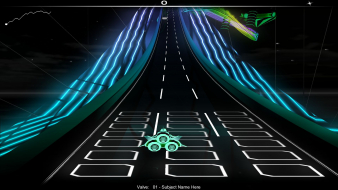
Audiosurf is a uniquely-styled music themed indie game. In a nutshell, think music/rhythm game meets Dr. Mario. You control a space ship flying through a track filled with colorful blocks, and can add these to a Tetris-style well by touching them. Match 3 colors in a row to remove them and gain points, and you can rack up big combos by setting up complex chain reactions.

The twist is that the levels are generated from your own music - you can give Audiosurf any music CD or any unencrypted mp3/wma/wav/flac/whatever and it will generate a track whose slope matches the pace of your music, and with colorful blocks that sync with the beat and are colored according to its intensity.





Author:  TBZ [ 09 Aug 2009, 19:17 ]
Post subject:  Re: Audiosurf: Detailed report

Native. It runs in windowed mode on startup, but a "Fullscreen" button will make it automatically use your desktop res.

You can also edit the "runfullscreen: false" to true, in the "Steamsteamappscommonaudiosurf", and the game will start up in fullscreen, skipping the windowed mode bit.
Doesn't really make a huge difference, it's more of a preference thing I guess.

Author:  [email protected] [ 09 Aug 2009, 20:02 ]
Post subject:  Audiosurf: Detailed report

TBH I think the stretched game play is fine... I play it on TH and still enjoy it.

Author:  Leapo [ 10 Aug 2009, 21:45 ]
Post subject:  Audiosurf: Detailed report

I just checked, and the game appears to be hor+ if you simply stretch it out in windowed mode.

Edit: It's definitely hor+

My screenshot


Your screenshot

Author:  The_cranky_hermit [ 11 Aug 2009, 03:32 ]
Post subject:  Audiosurf: Detailed report

I just looked into windowed mode, and at first it was really confusing trying to figure out what's going on. But I figured it out.

First, here's a baseline shot at 1600x1200 to show what it's supposed to look like.


Now, it turns out, that in windowed mode, your desktop resolution affects the aspect ratio. I use 1920x1200, and here's what it looks like in default windowed mode on my desktop:


It looks like it was stretched to 16:10 and then the sides cut off to make it 4:3 again. Strange!

In order for Windowed mode to look right, you *must* have your desktop resolution set to a 4:3 mode. Here's that same window when my desktop res is 1600x1200:


Anyway, now that the aspect is correct, you can, in fact, make it hor + by horizontally stretching the window.


However - keep in mind that my desktop is set to a 4:3 resolution and is pillarboxed, so I'm not getting the full use of my screen's width. And since the window needs to be "shorter" than 4:3 in order for the hor + to work, I don't get the full use of my screen's height either. In order for hor + to work, I need to set it up so the screen looks like this:


I don't think I can endorse a hor + solution that puts a small window in the middle of the screen.

Author:  Leapo [ 11 Aug 2009, 04:09 ]
Post subject:  Audiosurf: Detailed report

Even with your desktop set to a 16:10 resolution, it's still a massive improvement over fully stretched, especially for triplehead (as you can see in this 5040x1050 screenshot)


I guess this makes it "hor+ with caveats"...

Author:  The_cranky_hermit [ 11 Aug 2009, 06:08 ]
Post subject:  Audiosurf: Detailed report

Even with your desktop set to a 16:10 resolution, it's still a massive improvement over fully stretched

But it *is* fully stretched. A 16:10 window on a 16:10 desktop will show you exactly the same thing as a fullscreen 1920x1200 shot.

especially for triplehead (as you can see in this 5040x1050 screenshot)

Not if the TH user needs to set his desktop resolution to 16:10 first. Then it's kind of pointless.

Author:  Leapo [ 11 Aug 2009, 09:45 ]
Post subject:  Audiosurf: Detailed report

Even with your desktop set to a 16:10 resolution, it's still a massive improvement over fully stretched

But it *is* fully stretched. A 16:10 window on a 16:10 desktop will show you exactly the same thing as a fullscreen 1920x1200 shot.

Yes, we've determined the game stretches for single-screen users. My reference to 16:10 resolutions was on a per-monitor basis, not the desktop as a whole, since Audiosurf only seems to care about the aspect ratio of the primary monitor.

especially for triplehead (as you can see in this 5040x1050 screenshot)

Not if the TH user needs to set his desktop resolution to 16:10 first. Then it's kind of pointless.

Since Audosurf only looks at the primary monitor (which will be 16:10 anyway) I don't see the problem... Once it's open you just stretch it to the additional two 16:10 screens on either side and the game gives you hor+, as you can see in the screenshot I posted.

The only people who won't be able to get hor+ in triplewide are TripleHead2Go users, since the game will see a 48:10 monitor rather than the primary of three 16:10 monitors.

Author:  The_cranky_hermit [ 11 Aug 2009, 17:48 ]
Post subject:  Audiosurf: Detailed report

Yes, we've determined the game stretches for single-screen users.

The vast majority of us are single-screen users. That doesn't make the game "hor + with caveats." That makes it "hor + for users with multiple 4:3 monitors and don't use TH2Go... but stretched for everyone else."

Still, if you do have multiple monitors and don't use TH2Go (not sure how many that would be), this could be quite useful. I'll add a surround section with the info.

Author:  Leapo [ 11 Aug 2009, 21:42 ]
Post subject:  Audiosurf: Detailed report

That makes it "hor + for users with multiple 4:3 monitors and don't use TH2Go... but stretched for everyone else.

I would revise that to "hor+ in windowed mode for anyone with a 4:3 primary monitor".

If a TH2Go user plugged in a 4:3 monitor and set it to primary, Audiosurf would use that for its base aspect ratio. Its then possible to drag the game over to the TH2Go setup and stretch it out across all 3 screens in windowed mode with perfect hor+. The same work-around would also correct the stretching for widescreen users.

With this in mind, I'm going to play around with a memory editor. I can allow hor+ at all times if I can find where the game stores that base aspect ratio and tweak it. This is more Racer_S's territory though, so I make no promises.

Page 1 of 1 All times are UTC [ DST ]
Powered by phpBB® Forum Software © phpBB Group
https://www.phpbb.com/