Widescreen Gaming Forum
https://www.wsgf.org/phpBB3/

Painkiller: Overdose
https://www.wsgf.org/phpBB3/viewtopic.php?f=61&t=15253
Page 1 of 2

Author:  Tanuki [ 07 Nov 2007, 06:56 ]
Post subject:  Painkiller: Overdose


Widescreen Grade: B
Ultra-Widescreen Grade: Incomplete
Multi-monitor Grade: B
4k Grade: Incomplete

Read Full Detailed Report - Painkiller: Overdose

Players take on the role of Belial, who was recently freed by the defeat of Lucifier in the previous Painkiller games. Belial is out for revenge on those who imprisoned him due to his unique lineage of having a demon mommy and an angel daddy. Bad divine and demonic creatures! No! Don't touch! The gameplay is essentially the same as the previous Painkiller games. So if it moves, kill it. There are new weapons in the game along with the old classics which have been given a demonic makeover. You are an outcast with no people to call your own. What better way to feel better about yourself than by killing something that deserves killing?
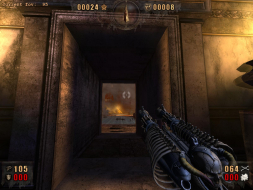

4:3
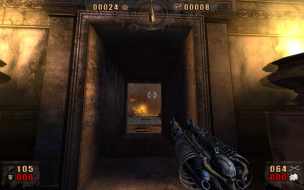

16:10
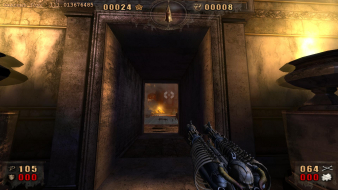

16:9


3x1


Author:  The_cranky_hermit [ 07 Nov 2007, 08:16 ]
Post subject:  Painkiller Overdose

Can you try to find a method for increasing the FOV via .ini edit? If the FOV change is auto-saved and is persistent between games, then that means there's a file somewhere that stores your FOV. In Painkiller, it's in binconfig.ini.

Here's a brute-force method of finding the file, if necessary. Set the FOV to 1. Save and quit the game. Now make a copy of the entire Painkiller OD folder. Launch the game again, from the original folder. Set the FOV to 95. Save and quit the game. Now move a handful of files from the back-up folder into the original, and test the game each time, taking note of which files you restored. If the game is absurdly zoomed in when you quickload, that means the last batch of files you restored contains the one with the FOV setting. When this happens, start the procedure again, this time only backing up the batch of files that you've isolated the FOV one to. Repeat until you find it.

Author:  Tanuki [ 07 Nov 2007, 08:42 ]
Post subject:  Painkiller Overdose

I could try that.

I have already spent a large amount of time looking for any ini files with none to be found.

I cannot even find savegames. I tried looking in the steam folder eventhoguh I have the box version. Documents and settings, application data, etc.

Sure I will do it. Maybe this weekend. 8)

Author:  The_cranky_hermit [ 08 Nov 2007, 01:07 ]
Post subject:  Painkiller Overdose

Actually, here's another thought. I've never tried this myself (and I probably should), but here's a procedure that might be a whole lot faster and easier.

Launch the game, set the FOV to 1, and save. Quit.
Make a copy of the folder.
Launch the game from the original folder, quickload, set the FOV to 95, and save. Quit.
Download Windiff:
http://www.grigsoft.com/download-windiff.htm

Run it. Go to File->Compare Directories, make sure "Include subdirectories" is checked. Put the path to the Painkiller dir in Dir 1 and the backup in Dir 2. It should give a list of different files.

Author:  dopefish [ 08 Nov 2007, 01:22 ]
Post subject:  Painkiller Overdose

:?:

Author:  The_cranky_hermit [ 08 Nov 2007, 01:28 ]
Post subject:  Painkiller Overdose

Thanks.

Sakatei, if you update your method section with this .ini edit solution, I'll get around to grading right after. Just one other detail - is the weapon cropping bug strictly cosmetic?

Author:  Tanuki [ 08 Nov 2007, 04:38 ]
Post subject:  Painkiller Overdose

There's a .ini file for the game.

Overdose.ini

Cfg.Resolution = "1680X1050"
Cfg.FOV = 105.26861929

C:Documents and SettingsLocal SettingsApplication DataPainkiller Overdose

It wasn't that hard to find. Just look in the few typical places that programs store their settings.


Apparently I have lost the ability to properly use the search function in XP.

Thanks for not rubbing my face in it.

EDIT - Note to self. Set hidden directories to visible.

Author:  Tanuki [ 08 Nov 2007, 05:32 ]
Post subject:  Painkiller Overdose

Just one other detail - is the weapon cropping bug strictly cosmetic?


Yes.

Author:  The_cranky_hermit [ 08 Nov 2007, 05:48 ]
Post subject:  Painkiller Overdose

==Grading==

Calculated grade: C
Potential grade: B

Major unresolved issues:
Does multiplayer allow the increased FOV? And to what extent?

Minor unresolved issues:
None.

Summary of widescreen-related flaws:
.ini solution
Stretched 2D screens
Weapon display bugs
Stretched HUD
Stretched FMVs

Cranky's coverage estimate: 88.5%

Author:  Tanuki [ 27 May 2008, 02:34 ]
Post subject:  Painkiller Overdose

Updated.

Page 1 of 2 All times are UTC [ DST ]
Powered by phpBB® Forum Software © phpBB Group
https://www.phpbb.com/