| Widescreen Gaming Forum https://www.wsgf.org/phpBB3/ |
|
| GTR 2 - FIA GT Racing Game https://www.wsgf.org/phpBB3/viewtopic.php?f=61&t=14987 |
Page 1 of 2 |
| Author: | Mach1.9pants [ 05 Sep 2007, 12:09 ] |
| Post subject: | GTR 2 - FIA GT Racing Game |
![]() Widescreen Grade: B Ultra-Widescreen Grade: B Multi-monitor Grade: C 4k Grade: Incomplete Read Full Detailed Report - GTR 2 - FIA GT Racing Game GTR 2 is a racing simulation with high levels of realism from 10tacle and SimBin, it is an official game of the FIA GT Championship for the 2003 & 2004 seasons. It also features multiplayer modes with up to 28 players. ![]() 4:3 ![]() 16:10 ![]() 16:9 ![]() 21:9 ![]() 3x1 |
|
| Author: | The_cranky_hermit [ 05 Sep 2007, 22:43 ] |
| Post subject: | GTR 2: Detailed Report |
==Aspect ratio support== Can you provide a 16:9 and a 16:10 shot from the same place? ==Grading== Calculated grade: C+ Potential grade: Certified Major unresolved issues: Are 1280x720, 1280x800, 1440x900, and 1920x1080 supported? Need 16:9 and 16:10 comparison shot Minor unresolved issues: None Cranky's coverage estimate: 77.5% |
|
| Author: | Mach1.9pants [ 06 Sep 2007, 05:13 ] |
| Post subject: | GTR 2: Detailed Report |
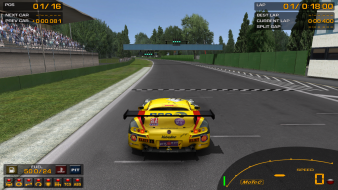
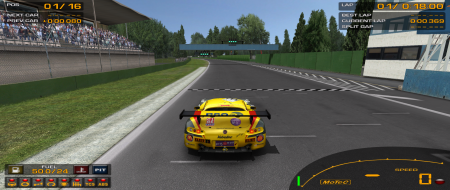
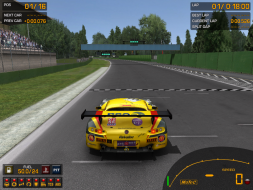
Hi Changed the aspect screenshots. I stopped the car, made it a hell of a lot easier ;) M1.9P Oh I put a 4:3 screen shot of the scope for Armed Assault as well |
|
| Author: | Tanuki [ 06 Sep 2007, 06:16 ] |
| Post subject: | GTR 2: Detailed Report |
Could you get some pics up of the third person camera modes? |
|
| Author: | Mach1.9pants [ 06 Sep 2007, 06:35 ] |
| Post subject: | GTR 2: Detailed Report |
Three other views, taken from the same point as the aspect ratio shots. All 1920x1200
I didn't even think about the other views, I never use anything but 'cockpit' type views in games: First Person or it is cheating ;) M1.9P Edit: Added a 4:3 1600x1200 image in third person, edited detailed report to include slight HUD stretch
|
|
| Author: | The_cranky_hermit [ 06 Sep 2007, 20:45 ] |
| Post subject: | GTR 2: Detailed Report |
==Grading== Calculated grade: C+ Potential grade: B+ Major unresolved issues: Are 1280x720 or 1920x1080 supported? Minor unresolved issues: Are 1280x800 and 1440x900 supported? Summary of widescreen-related flaws: HUD stretch Cranky's coverage estimate: 88.5% |
|
| Author: | Tanuki [ 06 Sep 2007, 22:27 ] |
| Post subject: | GTR 2: Detailed Report |
Major unresolved issues: Yes, yes, yes, and yes. |
|
| Author: | The_cranky_hermit [ 06 Sep 2007, 22:57 ] |
| Post subject: | GTR 2: Detailed Report |
==Grading== Calculated grade: B+ Major unresolved issues: None Minor unresolved issues: None Summary of widescreen-related flaws: HUD stretch Cranky's coverage estimate: 100% |
|
| Author: | Mach1.9pants [ 06 Sep 2007, 23:01 ] |
| Post subject: | GTR 2: Detailed Report |
Major unresolved issues: Thanks mate, I just tested them as well ;) I followed the great tutorial on how set custom resolutions. I am just had Cranky the Grading Hermit re-assess the grading on this and it is done-Sweet! Thanks Cranky |
|
| Author: | Hardtale [ 22 Oct 2007, 05:25 ] |
| Post subject: | GTR 2: Detailed Report |
Ah excellent, thanks for the tip on the custom res! It didn't click until I just dug in. Just got a WS last week so still learning the ropes. For anyone else new to this follow the great tutorial here: http://www.widescreengamingforum.com/forum/posting.php?mode=editpost&p=116908 Then use the gtr2config.exe and the resolution will now show up in the list. |
|
| Page 1 of 2 | All times are UTC [ DST ] |
| Powered by phpBB® Forum Software © phpBB Group https://www.phpbb.com/ |
|