Widescreen Gaming Forum
https://www.wsgf.org/phpBB3/

Fable: The Lost Chapters
https://www.wsgf.org/phpBB3/viewtopic.php?f=61&t=13948
Page 1 of 2

Author:  kotmfu [ 04 Dec 2006, 15:15 ]
Post subject:  Fable: The Lost Chapters


Widescreen Grade: A
Multi-monitor Grade: B

Read Full Detailed Report - Fable: The Lost Chapters

RPG from the mind of Peter Molyneux. In Fable, the players' every action determines their character's skills, appearances and moralities. Life stories are created from childhood through adulthood and on to old age. Players may choose the paths of righteousness or dedicate their characters' lives to evil; observing as they transform into reflections of their actions and decisions. As players' characters develop, the world reacts to them and their actions. People comment on their successes, failures, appearances and behaviors. Their many opinions are expressed through applause, mockery, trepidation, panic and even flirtation. With each person characters aid and every creature they slay, the world is changed forever. In Fable, gamers decide: "Who will I be?


Author:  The_cranky_hermit [ 05 Dec 2006, 00:26 ]
Post subject:  Fable: The Lost Chapters - Detailed Report

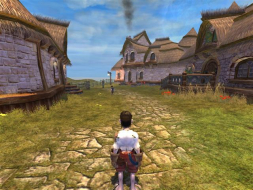
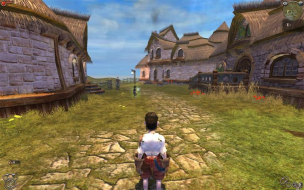
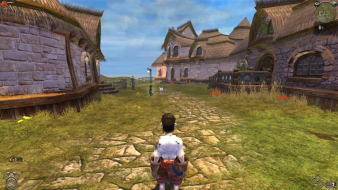
I did a comparison of the pictures. Some horizontal FOV is gained, but some vertical FOV is lost. In these comparison pictures, I've put the 4:3 picture on top of the widescreen one so that they share the same common area, and another one where I put a 16:10 picture on top of the 16:10 one. Details to the left and right of the yellow lines represent FOV gained, and details above and below the red lines represent FOV lost.


It appears that more FOV is gained than lost, so this is graded as if it were hor + (certified).

Also, the cut-scene (both FMV and rendered) effect is called "anamorphism." You can read up on it here.

Author:  The_cranky_hermit [ 21 Apr 2009, 18:50 ]
Post subject:  Fable: The Lost Chapters - Detailed Report

New grading, to reflect new rules:

Calculated grade: B+
Potential grade: Certified

Major oustanding DR omissions:
Need TH information

Author:  Dem Pyros [ 03 Jan 2010, 23:30 ]
Post subject:  Re: Fable: The Lost Chapters - Detailed Report

Quick Triplehead Comparison.

4:3 (1024x768)


16:10 (1440x900)


12:3 (4:3 Triplehead @ 3072x768)

Author:  The_cranky_hermit [ 04 Jan 2010, 00:19 ]
Post subject:  Re: Fable: The Lost Chapters - Detailed Report

Here's a composite shot:


Think this is hor + enough to warrant certification?

Author:  Dem Pyros [ 04 Jan 2010, 00:57 ]
Post subject:  Re: Fable: The Lost Chapters - Detailed Report

Think this is hor + enough to warrant certification?

Personally, no. Far too much vertical space is removed. It feels too narrow playing it.

Author:  Tanuki [ 04 Jan 2010, 04:48 ]
Post subject:  Re: Fable: The Lost Chapters - Detailed Report

I think Fable Explorer can fix this. Anyone used it before?

EDIT - Under CAMERA MODE. They have all the different camarea values and their fovs. I think you can just change them and have Explorer make a mod.

Author:  Dem Pyros [ 04 Jan 2010, 07:54 ]
Post subject:  Re: Fable: The Lost Chapters - Detailed Report

I think Fable Explorer can fix this. Anyone used it before?

EDIT - Under CAMERA MODE. They have all the different camarea values and their fovs. I think you can just change them and have Explorer make a mod.

Fantastic job picking up on that Tanuki!

I gave it a whirl, although this is my first time ever using the program so please excuse any discrepancies.

This is what I did:
1.) Extracted the program into the Fable installation folder.
2.) Opened up Fable Explorer and under the CAMERA_MODE subset, selected "CAMERA_PC_NORMAL" and increased the FOV from 90.

3.) "Appl[ied] Changes" and then saved the mod and launched the game from the toolbar menu.

Fable Explorer has an alternate DirectX9 dll, so it didn't get along too well with SoftTH. Without SoftTH it worked well, and when SoftTH was initialized after Fable Explorer everything worked fine.

I tried out four FOVs for the main camera. 110, 120, 130, and 150. 150 was the result I got from an online FOV calculator for a 4.8 AR, 110 was a conservative estimate, 130 a good midpoint, and 120 seemed to be the best. Looking at the shots now compared to the original 4:3, I think that somewhere between 110-115 would probably be correct.

110


120


130


150


A note: Adjusting the FOV through only the "CAMERA_PC_NORMAL" variable only changed the field of view for (obviously) the main camera. In order for this to be a usable hack, all of the other camera variables would have to be changed. In the brief time that I messed around with this, all of the cutscenes still had a very restricted field of view.

Author:  Tanuki [ 04 Jan 2010, 21:02 ]
Post subject:  Re: Fable: The Lost Chapters - Detailed Report

Fantastic job picking up on that Tanuki!


I couldn't even get it to work.

I was thinking if you take the 4:3 and then get the exact fov for 16:10 and 16:9 you might be able to get the formula to calculate the fov for any aspect ratio. If I can get it working I will try and do up the pics.

Author:  Deusfaux [ 16 Feb 2010, 05:38 ]
Post subject:  Re: Fable: The Lost Chapters - Detailed Report

Why do some games have Hor+ and Vert- listed in the WGL where this one does not?

Page 1 of 2 All times are UTC [ DST ]
Powered by phpBB® Forum Software © phpBB Group
https://www.phpbb.com/