Widescreen Gaming Forum
https://www.wsgf.org/phpBB3/

Pariah
https://www.wsgf.org/phpBB3/viewtopic.php?f=61&t=13791
Page 1 of 1

Author:  version8 [ 02 May 2005, 07:29 ]
Post subject:  Pariah


Widescreen Grade: B
Ultra-Widescreen Grade: Incomplete
Multi-monitor Grade: Unsupported
4k Grade: Incomplete

Read Full Detailed Report - Pariah

Pariah is a first-person shooter computer game developed by Digital Extremes, co-developers of the Unreal franchise. It was released on May 3, 2005 for Windows and Xbox. It uses a modified version of the Unreal engine and the Havok physics engine. A demo featuring the multiplayer portion of the game was released half a month before the game. Pariah received mixed reviews from critics.


4:3


16:10


16:9


21:9


3x1


Author:  Paradigm Shifter [ 02 May 2005, 12:38 ]
Post subject:  Solution: Pariah [Edit] [Hor +] [Flawed]

PC or Mac?

Try looking in the registry (be careful, and make a backup first) to see if you can find any resolution linked keys. If not, it's probably an .exe hack... (if it'll work at all.)

I'll move this thread to the relevant forum, once I know what that is, k? ;)

Author:  Tempus [ 02 May 2005, 16:51 ]
Post subject:  Solution: Pariah [Edit] [Hor +] [Flawed]

It's in the System directory. Works fine.

Author:  Paradigm Shifter [ 02 May 2005, 17:17 ]
Post subject:  Solution: Pariah [Edit] [Hor +] [Flawed]

I take it it uses the Unreal engine, then?

This thread has more on the UT engine games:

http://www.widescreengamingforum.com/forum/viewtopic.php?t=17

Author:  skipclarke [ 05 May 2005, 18:17 ]
Post subject:  Solution: Pariah [Edit] [Hor +] [Flawed]

You can reset the FOV by opening the console and typing "FOV xxx" The default appears to be 70, so the widescreen would be 84

Author:  The_cranky_hermit [ 21 Oct 2006, 22:22 ]
Post subject:  Solution: Pariah [Edit] [Hor +] [Flawed]

This info is based on the demo.

Warning: This solution will require you to start the game over if you have already started playing.

If you haven't created a profile yet, you can skip all the steps that involve deleting files.

Go to gameDirsaves, and delete everything. Go to gameDirsystem. Delete User.ini if it's there. Also, look for any .ini files with the same name as your profile (for example, the default profile name, Mason, has a file called Mason.ini), and delete them (editting them for FOV won't work).

Now edit the file DefUser.ini, and look for this part:
[Engine.PlayerController]
...
DefaultFOV=70.000000

Edit the DefaultFOV line to set your FOV. According to the FOV Calc, it should be 80.080645 for 16:10, and 86.073033 for 16:9.

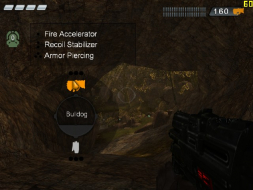
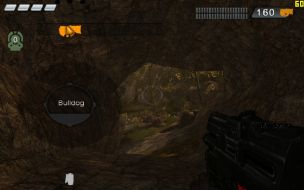
Now launch the game and create a profile. The FOV will be correct (you can view User.ini and .ini to confirm this). But, there is one major problem: The weapon selection interface is not only stretched, but the weapon icons themselves actually "jump" off of the interface. They jump so far that the description box for the Bulldog is no longer visible, and in the case of the grenade launcher, you actually have to move the mouse cursor off screen to the left in order to select it.


1024x768


1280x800

Page 1 of 1 All times are UTC [ DST ]
Powered by phpBB® Forum Software © phpBB Group
https://www.phpbb.com/