Widescreen Gaming Forum
https://www.wsgf.org/phpBB3/

Left Behind: Eternal Forces
https://www.wsgf.org/phpBB3/viewtopic.php?f=61&t=13656
Page 1 of 1

Author:  skipclarke [ 18 Sep 2006, 22:01 ]
Post subject:  Left Behind: Eternal Forces


Widescreen Grade: B
Ultra-Widescreen Grade: Incomplete
Multi-monitor Grade: C
4k Grade: Incomplete

Read Full Detailed Report - Left Behind: Eternal Forces

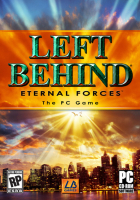
Left Behind: Eternal Forces is an RTS based on the best-selling Christian book series, "Left Behind."


4:3


16:10


16:9


3x1


Author:  The_cranky_hermit [ 18 Sep 2006, 22:10 ]
Post subject:  Left Behind: Eternal Forces (Demo): Detailed Report

The corrections:

==Screen change==
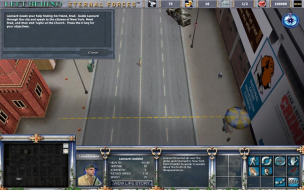
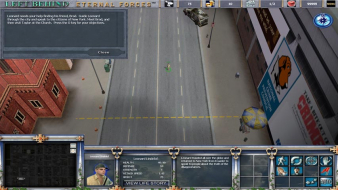
You said that only 16:10 is hor+, but that's not what the screenshots show. Did you copy+paste from the Crashday report and forget to remove that part?

==Supported resolutions==
You listed 1920x1080 twice. I assume one of them is meant to be 1920x1200?

==Singleplayer anomalies==
Since this is a demo, you should note that you were unable to find any in the demo, and the full version may or may not have anomalies.

==Multiplayer support==
I believe the full version *does* have multiplayer mode. Since hor+ is automatic and native, you can assume that multiplayer is also hor+.

==Grading==

Calculated grade: B-
Potential grade: B+

Major unresolved issues:
None

Minor unresolved issues:
Does the full version have any singleplayer anomalies?
Does the full version have cut-scenes?
If so, how are they handled?

Summary of widescreen-related flaws:
Stretched HUD

Author:  skipclarke [ 18 Sep 2006, 22:16 ]
Post subject:  Left Behind: Eternal Forces (Demo): Detailed Report

Edited

Author:  skipclarke [ 19 Sep 2006, 04:56 ]
Post subject:  Left Behind: Eternal Forces (Demo): Detailed Report

Confirmed that the demo runs at 1680x1050

Author:  scavvenjahh [ 05 May 2009, 15:07 ]
Post subject:  Left Behind: Eternal Forces (Demo): Detailed Report

==Surround Gaming Support==

.ini edit required, windowed mode only.
Open My DocumentsLeft Behind GamesEternal Forcesuser.cfg in Notepad.
1) Windowed mode :
cfg.r_fullscreen = false
2) Resolution :
cfg.r_height =
cfg.r_width =

Hor+ gameplay, stretched HUD.

4:3, fullscreen


WTH, windowed

Page 1 of 1 All times are UTC [ DST ]
Powered by phpBB® Forum Software © phpBB Group
https://www.phpbb.com/