Widescreen Gaming Forum
https://www.wsgf.org/phpBB3/

Brothers in Arms: Road to Hill 30
https://www.wsgf.org/phpBB3/viewtopic.php?f=61&t=13163
Page 1 of 1

Author:  czarman [ 07 Apr 2006, 02:43 ]
Post subject:  Brothers in Arms: Road to Hill 30


Widescreen Grade: B
Ultra-Widescreen Grade: B
Multi-monitor Grade: C
4k Grade: Incomplete

Read Full Detailed Report - Brothers in Arms: Road to Hill 30

Brothers in Arms: Road to Hill 30 is a WWII themed FPS/Strategy game hybrid from Gearbox Software and Ubisoft. You are assigned fire teams, assault teams, and/or tanks to command, and must utilize them effectively in order to accomplish your tasks.


4:3


16:10


16:9


21:9


3x1


Author:  Sweetz [ 05 Mar 2007, 02:21 ]
Post subject:  Brothers in Arms: Detailed Report

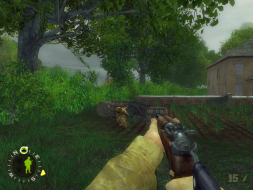
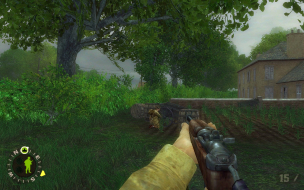
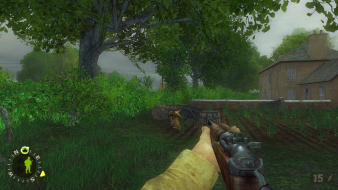
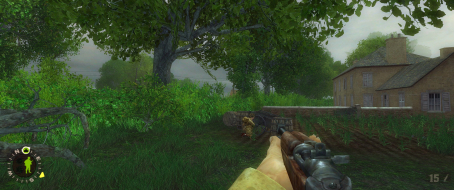
There's another issue here, might not be major but it's really bugging me. The FOV change does not affect the player's in-view weapon/hand.

For example (resized from original res for forum):
1024x768 FOV=63 (default)


1360x768 FOV=80


The gun is very obviously vert-, while the rest of the image is not. No matter what FOV I set, it does not affect the gun, so it must have it's own FOV or something. If anyone knows how to fix this I'd much appreciate it, widescreen makes the gun look way to close to the player.

---------------------------

PS The_cranky_hermit, you don't need to jump through hoops to get the FOV to stick. The game keeps profile specific *.ini files, it's just a matter of locating them. Don't edit defuser.ini or user.ini in the game directory, go to:

"C:Documents and Settings[WindowsUserName]Application DataGearbox SoftwareBrothers In Arms[ProfileName]"

If you edit the user.ini there it will stick (as well as be specific to the given profile)

Author:  hip63 [ 07 May 2007, 15:00 ]
Post subject:  Brothers in Arms: Detailed Report

***Update*** (from a noob) :hide

The above was posted about the demo version of Brothers In Arms: Road to Hill 30 but it appears that the retail version of the game (v1.11 if your patched) has full widescreen support as well as the sequel Brother In Arms: Earned in Blood v1.0. I was able to dial up to 1680x1050 resolution (Max of my Dell 2007WFP) with no issues. HUD seems fine as well. Hell you guys may even want give the gold award as I find no issues at all. They seem to have perfect support as far as I can tell :rockout

Not suprising considering they are based on the Unreal Engine :D

Yeah sure, they are getting a little old now but still they are great looking and playing games.

hip63 :P

hey not bad for a first post from a noob!

P.S. - Brother In Arms: Earned in Blood contains STARFORCE, if you don't want SF loaded with that game (few would blame you), PM me for the method to run it with out SF.

Author:  The_cranky_hermit [ 07 May 2007, 17:06 ]
Post subject:  Brothers in Arms: Detailed Report

Yes, I know that widescreen resolutions are supported natively. If you had read the solution, you'd see that it's for manually increasing the FOV, not for setting the resolution. The last part of the solution even says set your resolution to a widescreen one from the menu. Unless the patch causes the game to adjust the FOV automatically (which is something that no pre-2006 Unreal engine game has ever done), then the patch doesn't "updated" anything in terms of widescreen solution.

Page 1 of 1 All times are UTC [ DST ]
Powered by phpBB® Forum Software © phpBB Group
https://www.phpbb.com/