Widescreen Gaming Forum

[-noun] Web community dedicated to ensuring PC games run properly on your tablet, netbook, personal computer, HDTV and multi-monitor gaming rig.
It is currently 12 Jul 2026, 10:35

All times are UTC [ DST ]


Post new topic Reply to topic  [ 54 posts ]  Go to page Previous  1 ... 5, 6, 7, 8, 9, 10, 11 ... 54  Next
Author Message
 Post subject: Mirror's Edge
PostPosted: 13 Mar 2009, 05:54 
Offline
Insiders
Insiders

Joined: 07 Nov 2005, 04:16
Posts: 3010
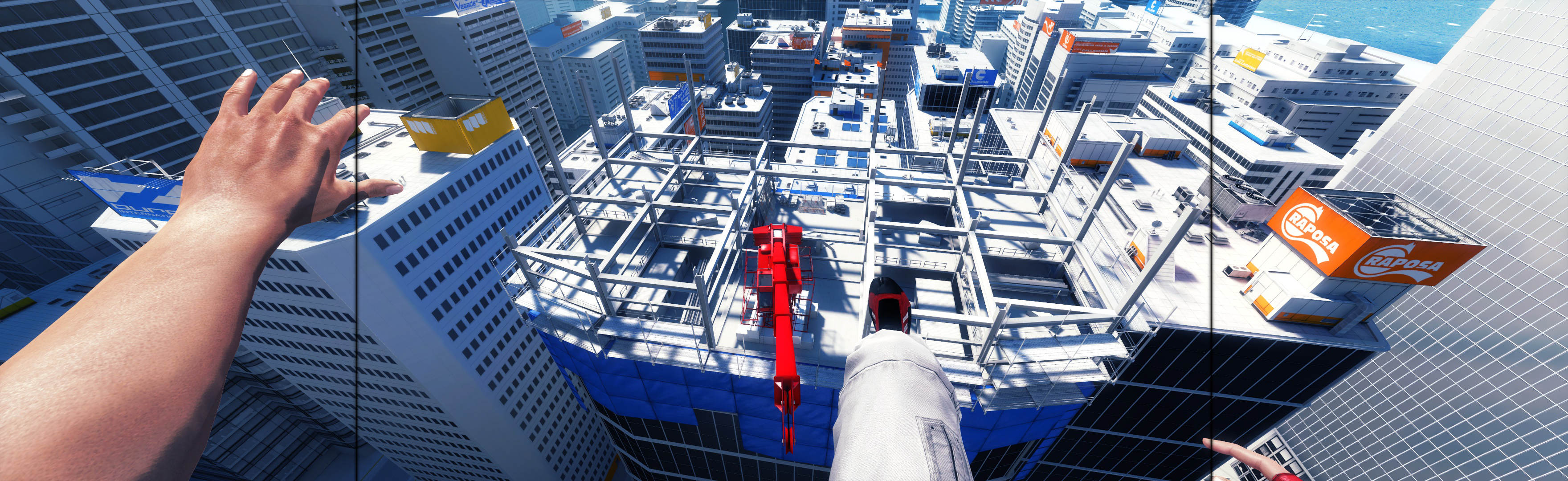
Don't look at the black bars. Look at the space in between them. Think of it as a widescreen movie, where "black bars" are to be expected.


Top
 Profile  
Reply with quote  
 Post subject: Mirror's Edge
PostPosted: 21 Apr 2009, 19:04 
Offline
Insiders
Insiders

Joined: 07 Nov 2005, 04:16
Posts: 3010
New grade, to reflect new rules:

Calculated grade: B+

TH hack is a blemish

CCE: 100%


Top
 Profile  
Reply with quote  
 Post subject: Mirror's Edge
PostPosted: 02 Sep 2009, 21:55 
Offline

Joined: 10 Apr 2008, 03:49
Posts: 7
Hehehe, I didn't even see that the bars were there. It's all psychological.


Top
 Profile  
Reply with quote  
 Post subject: Mirror's Edge
PostPosted: 02 Sep 2009, 23:41 
Offline

Joined: 15 Sep 2007, 21:28
Posts: 446
IMO the TH hack is a bit more than a blemish. I feel this way for the following reasons:

There is an extremely severe frame rate hit with this hack requiring a large reduction in graphics settings on my PC.

The TH hack under some conditions completely breaks many menus.

This post is not intended to contest your grading and is more for me to moan and groan about poor support from EA.


Top
 Profile  
Reply with quote  
 Post subject: Mirror's Edge
PostPosted: 03 Sep 2009, 00:24 
Offline
Insiders
Insiders

Joined: 07 Nov 2005, 04:16
Posts: 3010
Well, since a complete lack of TH support would be considered a blemish, the most flawed TH hack in the world couldn't reasonably be called worse than that.


Top
 Profile  
Reply with quote  
 Post subject: Mirror's Edge
PostPosted: 03 Sep 2009, 01:04 
Offline
User avatar

Joined: 09 Aug 2006, 14:17
Posts: 1506
Hehehe, I didn't even see that the bars were there. It's all psychological.


I never notice them either... I will play a game, enjoy it, then go to a forum to talk about it and see a ton of people complaining about the bars I never even noticed existed.

I've been watching widescreen movies since laserdisc though, that might be why.


Top
 Profile  
Reply with quote  
 Post subject: Mirror's Edge
PostPosted: 04 Sep 2009, 02:43 
Offline
User avatar

Joined: 14 Nov 2006, 15:48
Posts: 2356
[quote]Hehehe, I didn't even see that the bars were there. It's all psychological.


I never notice them either... I will play a game, enjoy it, then go to a forum to talk about it and see a ton of people complaining about the bars I never even noticed existed.

I've been watching widescreen movies since laserdisc though, that might be why.

Its the same kind of people that buy a widescreen dvd and then have their tv stretch it.


Top
 Profile  
Reply with quote  
 Post subject: Re: Mirror's Edge
PostPosted: 24 Jan 2010, 15:09 
Offline

Joined: 11 Oct 2009, 16:28
Posts: 57
Hey guys, is the menu also so zoomed in at you?
I used the fov Hack and ingame it looks good but the menu looks awfull.

Once while i was trying i got some issue that the menu was only half so much zoomed in like in non-TH (normal) Mode.
Is there a way to correct the menu in triplehead?


Top
 Profile  
Reply with quote  
 Post subject: Re: Mirror's Edge
PostPosted: 24 Jan 2010, 17:40 
Offline
Editors
Editors
User avatar

Joined: 06 Mar 2008, 17:20
Posts: 3424
Is there a way to correct the menu in triplehead?
Nope, and according to Racer_S it would be tricky to fix this.
FOV hack discussion thread: http://www.widescreengamingforum.com/forum/viewtopic.php?t=14061


Top
 Profile  
Reply with quote  
 Post subject: Re: Mirror's Edge
PostPosted: 24 Jan 2010, 19:46 
Offline

Joined: 11 Oct 2009, 16:28
Posts: 57
Can somebody edit the Mirror's Edge Wikipage for adding one Surroundgaming issue?

There are typical clippingbugs like in Stalker or all games with sourceengine:
(happens if you stand in an room's corner or next to a wall)

maybe someone else can confirm that?


Top
 Profile  
Reply with quote  
 Post subject: Re: Mirror's Edge
PostPosted: 24 Jan 2010, 21:00 
Offline
Editors
Editors
User avatar

Joined: 06 Mar 2008, 17:20
Posts: 3424
Welcome to überwidescreen Gaming...
Almost each and every game has minor clipping issues here and there in Surround. The Wiki cannot keep track of every little imperfection caused by Hor+ gameplay in Surround. Just like swollen/shrunken menus, these things happen and experienced Surround gamers should expect them to... especially when a 3rd-party hack is needed. :wink:
If this issue really annoys you, feel free to try a higher value in the FOV hack until you see only solid walls all around when facing a corner.


Top
 Profile  
Reply with quote  
 Post subject: Re: Mirror's Edge
PostPosted: 28 Apr 2010, 21:55 
Offline

Joined: 04 Mar 2010, 20:17
Posts: 34
so this FOV hack will not support my 6052x1200 resolution?


Top
 Profile  
Reply with quote  
 Post subject: Re: Mirror's Edge
PostPosted: 29 Apr 2010, 17:24 
Offline
Editors
Editors
User avatar

Joined: 06 Mar 2008, 17:20
Posts: 3424
6052 ?? :?
The game engine may have a hard time struggling with super-high resolutions, so peformance and playability are not guaranteed when using the FOV hack. The FOV hack itself, though, has no resolution limit.


Top
 Profile  
Reply with quote  
 Post subject: Re: Mirror's Edge
PostPosted: 04 May 2010, 00:41 
Offline

Joined: 04 Mar 2010, 20:17
Posts: 34
6052 ?? :?
The game engine may have a hard time struggling with super-high resolutions, so peformance and playability are not guaranteed when using the FOV hack. The FOV hack itself, though, has no resolution limit.


6052 *Bezel management on eyefinity


Top
 Profile  
Reply with quote  
 Post subject: Re: Mirror's Edge
PostPosted: 08 Oct 2010, 22:17 
Offline
Founder
Founder
User avatar

Joined: 13 Oct 2003, 05:00
Posts: 7358
What would the FOV be for 5752x1920 (5x1-P + bezel)? Aspect is 2.995:1.


Top
 Profile  
Reply with quote  
 Post subject: Re: Mirror's Edge
PostPosted: 09 Oct 2010, 00:17 
Offline
Founder
Founder
User avatar

Joined: 13 Oct 2003, 05:00
Posts: 7358
Realized I could do it through the trial and error. 0.0089. Getting about 60fps in the training with the Eyefinity6 in SoftTH


Top
 Profile  
Reply with quote  
PostPosted: 19 Feb 2011, 13:34 
Offline
Editors
Editors
User avatar

Joined: 06 Nov 2008, 01:08
Posts: 1898
K i found a way to run ME all maxed, including PhysX and AA 4x, at 5040x1050 (around 60 FPS) with my 3-way SLI rig, by forcing wtih Nvidia Inspector, in Mirror's Edge profile, SLI rendering mode to SLI_GPU_COUNT_ONE. Racer_S hack was also used of course - (link removed) .
Dont forget to update game to version 1.01 (the patch includes some physX fixes).


Top
 Profile  
Reply with quote  
 Post subject: Re: Mirror's Edge
PostPosted: 07 Mar 2011, 09:16 
Offline

Joined: 07 Mar 2011, 09:03
Posts: 2
Trying the FOV hack on my rig too, but running into a problem. I play the game on a 16:9 monitor with a 1680x1050 resolution.

When I enable the hack ingame, the only thing I can see is a whitescreen with in the left corner VERY small the actual game. Falling of a building gives me for a short time the correct screen.

Bought the game by Steam, so newest version, and in the FOV-hack I tried some settings, also the setting with everything on zero (aspect ratio and FOV). The key '*' enables the FOV hack, but I can't disable the hack with '/', as in explained in readme of FOV hack, to get my normal screen back.

Screenshot:


Top
 Profile  
Reply with quote  
 Post subject: Hey everyone, sorry to
PostPosted: 27 Sep 2011, 00:57 
Offline

Joined: 26 Nov 2010, 06:29
Posts: 33
Hey everyone, sorry to resurrect an old thread, but I recently purchased ME on steam.

I cannot get it to work at 5760x1200 in eyefinity, even with the Racer S hack. I set the hack to version 1.01 and can't get anything to happen, trying to enable the hack on version 1.0 resulted in ME crashing.

Please help! I'd love to play this on 3 screens, especially since I know its "possible" (at least on non-steam versions?)

i7-930, 5870 x2, running 11.8 drivers right now


Top
 Profile  
Reply with quote  
 Post subject: Mike whats the values of
PostPosted: 27 Sep 2011, 01:04 
Offline
Editors
Editors
User avatar

Joined: 06 Nov 2008, 01:08
Posts: 1898
Mike what are the values of "Aspect" and "FOV" in the hack ?


Top
 Profile  
Reply with quote  
PostPosted: 27 Sep 2011, 02:18 
Offline

Joined: 26 Nov 2010, 06:29
Posts: 33
The last attempt the aspect was 1.77, FOV .008776

I moved both sliders in many different directions, while trying to enable/disable the hack in game ... could not get the game to adjust.

I am assuming this is because the hack is written for versions 1.00 and 1.01 of the game, and this is not the same exe steam uses?


Top
 Profile  
Reply with quote  
PostPosted: 27 Sep 2011, 11:44 
Offline
Editors
Editors
User avatar

Joined: 06 Nov 2008, 01:08
Posts: 1898
Yes, 1.00 and 1.01 only, well its possible, im running a retail 1.01 version btw.


Top
 Profile  
Reply with quote  
PostPosted: 08 Oct 2011, 17:03 
Offline

Joined: 08 Oct 2011, 16:17
Posts: 1
Guys need your help. I want to play on notebook with 1280x800 res and Black Bars looks ugly.
So I used Racer_S hack to change aspect.
When I change 1.777 (16:9) to 1.778 all is fine (Black Bars increased)
But when I change 1.777 to 1.6 (16:10) or just 1.776 i got decreased Black Bars and lol - inverted 3D in MainMenu and white screen in game.
UPD: it's not inverted in MainMenu, it's cropped 3D, but the reflection down still remain.

Can anyone help me, please? : (


Top
 Profile  
Reply with quote  
PostPosted: 08 Oct 2011, 17:18 
Offline
Editors
Editors
User avatar

Joined: 06 Nov 2008, 01:08
Posts: 1898
Can anyone help me, please? : (


I tried it here at 1280x800 and got the same result, the hack works great at multi-monitor resolutions, you can get wider AR than 16:9 but not 16:10.


Top
 Profile  
Reply with quote  
 Post subject: So I bought this game on
PostPosted: 26 Feb 2012, 10:03 
Offline

Joined: 20 Feb 2012, 07:50
Posts: 1
So I bought this game on Steam when it was on sale and I have no idea how any of you guys are getting it to work. I have 3 1080 screens in eyefinity and the game lets me choose an eyefinity resolution like 4800x900 but when I select that resolution the menu goes absolutely nuts and the game only displays on the middle screen, the left and right monitors are just black.

My roomates game does the exact same thing.

I have searched for a solution but everyone else seems to be able to run this game on eyefinity with no problems.


Top
 Profile  
Reply with quote  
PostPosted: 27 Feb 2012, 14:01 
Offline
Editors
Editors
User avatar

Joined: 06 Nov 2008, 01:08
Posts: 1898
I have no idea how any of you guys are getting it to work.


Hey Crab_Cake, have you checked game's Detailed Report, under "Eyefinity/Surround Specific Solution" ? You should run a fix to run this game at multi-monitor resolutions.


Top
 Profile  
Reply with quote  
 Post subject: To make it work again
PostPosted: 01 Oct 2012, 23:59 
Offline

Joined: 22 Aug 2010, 20:18
Posts: 5
Hello everybody,

ones I made it work, to run mirrors edge with flawless widescreen on the three monitors on my eyefinity. But after a couple of month not playing anymore I forgot how to use it...
After one hour searching the web I still didnt found it. Could you please help me on that?
I tried so far to make it run through following: run flawless widescreen and choose Mirror's Edge/ run FOV Hack - Mirror's Edge v1.1 / lounch the game / push the hotkey Ctrl + Alt + F12 ...And nothing happens... - Only the middle screen shows the game.

What do I do wrong?

Thank you very much in advance!


Top
 Profile  
Reply with quote  
 Post subject: Re: Mirror's Edge
PostPosted: 12 Oct 2013, 05:25 
Offline

Joined: 18 Jan 2011, 02:19
Posts: 5
WAY too late, but I just want to share my success in getting ME to work with my 6870 CF at 5760x1080.

I haven't tried re-enabling the things I disabled, but this works:

1) create a ME profile in CCC with CF disabled.
2) download Racer_S' hack from here: http://www.tocaedit.com/ (right hand side)
3) run the hack tool and keep it running.
4) fire up the game...in settings choose whatever res you want, turn off AA
5) start a game and hit the * key and then + and - ( / = disable)

here are the settings that seem good to me:

Image

and here's what it looks like:
https://dl.dropboxusercontent.com/u/1124641/me.jpg

I'm getting about 45fps on high details....will try re-enabling CF and AA.
Mike


Top
 Profile  
Reply with quote  
 Post subject: Re: Mirror's Edge
PostPosted: 12 Oct 2013, 06:33 
Offline
Insiders
Insiders
User avatar

Joined: 19 Sep 2006, 16:25
Posts: 1055
Location: Ruckersville, Virginia
I always found that Mirror's Edge looked best when you raise the FOV just a bit above what is standard. Glad you got it working, this game is breathtaking on triplewide.

_________________
EVGA GeForce GTX 970 SC ACX 2.0 3.5GB | 3 X LG Flatron 24EA53VQ in Nvidia Surround | Optoma HD20


Top
 Profile  
Reply with quote  
 Post subject: Re: Mirror's Edge
PostPosted: 26 May 2014, 05:17 
Offline

Joined: 26 May 2014, 05:15
Posts: 3
pr0ton wrote:
Trying the FOV hack on my rig too, but running into a problem. I play the game on a 16:9 monitor with a 1680x1050 resolution.

When I enable the hack ingame, the only thing I can see is a whitescreen with in the left corner VERY small the actual game. Falling of a building gives me for a short time the correct screen.

Bought the game by Steam, so newest version, and in the FOV-hack I tried some settings, also the setting with everything on zero (aspect ratio and FOV). The key '*' enables the FOV hack, but I can't disable the hack with '/', as in explained in readme of FOV hack, to get my normal screen back.

Screenshot:


Resurrecting old thread because of this. Both FWS and the google drive hack give me the same result.


Top
 Profile  
Reply with quote  
 Post subject: Re: Mirror's Edge
PostPosted: 30 May 2014, 11:24 
Offline
Editors
Editors
User avatar

Joined: 06 Mar 2008, 17:20
Posts: 3424
When asking for tech help it's always a good idea to post some details about your config (GPU and native res, OS, Origin/Steam game)...

Try disabling AA and lowering Graphics Quality. ME's anti-aliasing and custom lighting engine are massive resource hogs at extreme resolutions.


Top
 Profile  
Reply with quote  
 Post subject: Re: Mirror's Edge
PostPosted: 03 Jun 2014, 06:27 
Offline

Joined: 26 May 2014, 05:15
Posts: 3
scavvenjahh wrote:
When asking for tech help it's always a good idea to post some details about your config (GPU and native res, OS, Origin/Steam game)...

Try disabling AA and lowering Graphics Quality. ME's anti-aliasing and custom lighting engine are massive resource hogs at extreme resolutions.


I'm playing on a GTX 670 @ 1440x900 on Win 7 64-bit Steam. I run the game fine, but I run into this white screen issue nonetheless .


Top
 Profile  
Reply with quote  
 Post subject: Re: Mirror's Edge
PostPosted: 20 Mar 2015, 14:16 
Offline

Joined: 20 Mar 2015, 14:10
Posts: 5
Hello I'm new to this forum, truthfully I haven't had any problems running any of the games I have bought in my native resolution of 2560x1080p. For some reason Mirror's Edge, which I purchased yesterday from Steam doesn't seem to want to run at 2560x1080, even though the option is given, it plays with black bars on the edges. can someone on this forume please help me to fix this? The game looks great in full 1080p I'd really like to try playing it at my resolution though. Thanks!


Top
 Profile  
Reply with quote  
 Post subject: Re: Mirror's Edge
PostPosted: 20 Mar 2015, 19:46 
Offline
Editors
Editors
User avatar

Joined: 06 Mar 2008, 17:20
Posts: 3424
:welcome

For 21:9 you need to use the same solution as for Multi-monitor. Grab Flawless Widescreen, run it and click Mirror's Edge in the list of available plugins. Then leave FWS running, launch the game and you should be enjoying fullscreen parkour in no time.

If everything goes well, feel free to upload your screenshots to the Detailed Report !


Top
 Profile  
Reply with quote  
 Post subject: Re: Mirror's Edge
PostPosted: 15 Jul 2015, 02:33 
Offline
User avatar

Joined: 15 Jul 2015, 00:44
Posts: 3
I'm having problems with Mirror's Edge at 21:9. Using Flawless Widescreen works perfectly, however adding Bindings to TdInput.ini (such as a shortcut to exit the game with Alt+F4) breaks the fix. The hud seems to receive the fix just the same, however a vertical letterbox remains. I assume this is because the memory hack no longer works properly, due to new values in the game's allocated memory (sorry if this isn't the correct nomenclature). Is there any possible work around for this?
Pictures demonstrating the problem:

Image
Before any bindings/inputs added to TdInput.ini

Image
After adding new inputs.

Like I said before, the hud is still altered, but the FOV remains the same and the game presents a vertical letterbox.
Any possibility of fixing this issue?


Top
 Profile  
Reply with quote  
 Post subject: Re: Mirror's Edge
PostPosted: 03 Sep 2015, 00:22 
Offline
Insiders
Insiders

Joined: 21 Oct 2014, 23:33
Posts: 291
luluco250,

I have confirmed that this game won't spread if TdInput.ini is edited. This issue should be noted in game's DR. You should find alternate solution for key binding.

I would recommend a gaming mouse that has extra programmable buttons. This gets you past the need for binding edits. It's more flexible, less problems, & easier setup per game. Worth it.


Top
 Profile  
Reply with quote  
 Post subject: Re: Mirror's Edge
PostPosted: 24 Sep 2015, 13:53 
Offline

Joined: 24 Sep 2015, 13:50
Posts: 5
I have a problem with 2560x1080. I have flawless widescreen and the Mirror's Edge Plugin enabled and I'm running version 1.01 of Mirr'rs Edge (although it's cracked version, this might be a problem). When I run the game in 1920x1080 it looks normal, everything works fine, but when I go 2560x1080 in the in-game menu it goes into a weird low resolution mode but its still 16:9. Anybody encountered this same problem? Maybe I should just buy the game?


Top
 Profile  
Reply with quote  
 Post subject: Re: Mirror's Edge
PostPosted: 24 Sep 2015, 21:41 
Offline
Insiders
Insiders

Joined: 21 Oct 2014, 23:33
Posts: 291
maxz, there are a couple things you should try.

1. When FWS is on & game is started, what does FWS say in its status window? If game process is not being found, buying the game will fix it.

(But if FWS finds game, continue)

2. Go to link below & do point #3: "Flawless Widescreen (FWS)". This procedure will override resolution to proper.
http://www.wsgf.org/blog/imusrt/2015/09/04/mirrors-edge-2009-manual-plp-instructions
Image


Top
 Profile  
Reply with quote  
 Post subject: Re: Mirror's Edge
PostPosted: 25 Sep 2015, 11:38 
Offline

Joined: 24 Sep 2015, 13:50
Posts: 5
Thank you for the quick reply imusrt. As a side note, I think this community is awesome and I already donated to both FWS and WSGF, hopefully I'll get a donator badge next to my user name soon. Obviously I'll be relying on these user tweaks for the next few years so I'm being self-serving here too.

Well I'm testing it now. As for part 1, the game is indeed detected in FWS and it recognizes the version correctly.

I'll go to the link now and test, and report back later!


Top
 Profile  
Reply with quote  
 Post subject: Re: Mirror's Edge
PostPosted: 25 Sep 2015, 14:44 
Offline

Joined: 24 Sep 2015, 13:50
Posts: 5
Ok so I bought the game on Origin just to eliminate the possibility of the version being bad, it cost me 3€ so no big deal.

I did what you said in the instructions, here's what my flawless widescreen looks like:
Image

I also disabled scaling in my Nvidia Control panel:
Image

I started my Mirror's Edge game and set the resolution in game to 2560x1080. Then I run Flawless Widescreen with the Mirror's Edge plugin enabled. When I'm done with that all the menus look low-res, this doesn't bother me, it wouldn't be a problem as long as the game actually worked in 21:9.
However when I start a new game, the game is still in 16:9 with black bars on the side.

Here's what my Mirrors Edge plug-in in looks like.

Image

Oh and when I start the game it briefly flashes to full-screen and then immediately goes back to 16:9

I'm on Windows 10 64-bit with a GTX 970.

Anything else I should try? Need any other info?


Top
 Profile  
Reply with quote  
 Post subject: Re: Mirror's Edge
PostPosted: 25 Sep 2015, 20:48 
Offline
Insiders
Insiders

Joined: 21 Oct 2014, 23:33
Posts: 291
Alright, you can fix this.
1. First try changing Hud Y: 0. That is correct entry for your layout.

2. If #1 looks bad too, FWS resolution override settings need to be fudged a bit. I know it sounds weird, but do it.

Use these FWS menu settings:
- Width: 2560
- Height: 1080
- Horizontal Display Count: 3
- Vertical Display Count: 1
- Hud Width: 1920
- Hud Height: 1080
- Hud X: 320 (2560 minus 1920 divided by 2 = imaginery side offset)
- Hud Y: 0
(this all tells FWS you have imaginary skinny side monitors & 16:9 center, which should correct your issues)


Last edited by imusrt on 29 Sep 2015, 20:36, edited 1 time in total.

Top
 Profile  
Reply with quote  
 Post subject: Re: Mirror's Edge
PostPosted: 26 Sep 2015, 00:42 
Offline

Joined: 24 Sep 2015, 13:50
Posts: 5
Ok so here's my settings now:
Image

However it still doesn't work, exactly the same problem as before. Once again the game briefly flashes to fullscreen so as to tease me and then the black borders on the sides come back :(
Could there be some scaling option? I did disable scaling in nvidia control panel. I'm running flawless widescreen as administrator to give it full access.

Sorry to bother you with this, I really appreciate the help though.


Top
 Profile  
Reply with quote  
 Post subject: Re: Mirror's Edge
PostPosted: 28 Sep 2015, 02:56 
Offline
Insiders
Insiders

Joined: 21 Oct 2014, 23:33
Posts: 291
[edited]
Sorry, the HUD X offset was incorrect I think. Re-read my post above (edited nums) & try the FWS override numbers again. This is likely what is blocking your spread.

However other 21:9 gamers have no problem with this game. It is possible there is something weird going on, on only your PC. Not sure cause, but I would think the manual method would still work...


Top
 Profile  
Reply with quote  
 Post subject: Re: Mirror's Edge
PostPosted: 07 Feb 2016, 16:35 
Offline

Joined: 07 Feb 2016, 16:27
Posts: 1
maxz, you should change ingame language to English. This might help


Top
 Profile  
Reply with quote  
 Post subject: Re: Mirror's Edge
PostPosted: 28 Apr 2016, 02:55 
Offline
User avatar

Joined: 17 Jul 2010, 21:49
Posts: 79
I'm also having trouble getting Mirror's Edge to work in multi-monitor using Flawless Widescreen.

Running fresh install of Mirror's Edge 1.0.1.0 via Origin. I followed the manual instructions and in FWS I've got Override Display Detection set and configured correctly.

Flawless Widescreen detects the game, and displays the following:
Mirror's Edge - Path=C:\Program Files (x86)\Origin Games\Mirrors Edge\Binaries\MirrorsEdge.exe (32bit)
Base Address=0x400000, Process ID=9988, Version=v1.0.1.0 (Manual) -> Detected: 1.0.1.0 (Origin)
Resolution=6030x1080, Aspect=5.583, Monitors=3x1, Bezel Comp=False - (\\.\CustomDisplay on FWS Virtual Adapter)

But if I set the game to that resolution, all the menus become a garbled low-res mess with text overlapping on the center screen, and in game only the center monitor displays anything, while the side monitors are on but blank.


Top
 Profile  
Reply with quote  
 Post subject: Re: Mirror's Edge
PostPosted: 18 Jul 2016, 00:35 
Offline

Joined: 13 Jun 2016, 01:08
Posts: 1
Anyone find a way to use ultrawide in time trials? It's 16:9 with Pure Pack DLC.


Top
 Profile  
Reply with quote  
 Post subject: Re: Mirror's Edge
PostPosted: 27 Jun 2017, 04:40 
Offline

Joined: 27 Jun 2017, 04:36
Posts: 1
Timobkg wrote:
I'm also having trouble getting Mirror's Edge to work in multi-monitor using Flawless Widescreen.

Running fresh install of Mirror's Edge 1.0.1.0 via Origin. I followed the manual instructions and in FWS I've got Override Display Detection set and configured correctly.

Flawless Widescreen detects the game, and displays the following:
Mirror's Edge - Path=C:\Program Files (x86)\Origin Games\Mirrors Edge\Binaries\MirrorsEdge.exe (32bit)
Base Address=0x400000, Process ID=9988, Version=v1.0.1.0 (Manual) -> Detected: 1.0.1.0 (Origin)
Resolution=6030x1080, Aspect=5.583, Monitors=3x1, Bezel Comp=False - (\\.\CustomDisplay on FWS Virtual Adapter)

But if I set the game to that resolution, all the menus become a garbled low-res mess with text overlapping on the center screen, and in game only the center monitor displays anything, while the side monitors are on but blank.


I got the same problem and can't find any solution. Steam version and surround Nvidia.


Top
 Profile  
Reply with quote  
Display posts from previous:  Sort by  
Post new topic Reply to topic  [ 54 posts ]  Go to page Previous  1 ... 5, 6, 7, 8, 9, 10, 11 ... 54  Next

All times are UTC [ DST ]


Who is online

Users browsing this forum: No registered users and 17 guests


You cannot post new topics in this forum
You cannot reply to topics in this forum
You cannot edit your posts in this forum
You cannot delete your posts in this forum
You cannot post attachments in this forum

Search for:
Jump to:  
cron


Powered by phpBB® Forum Software © phpBB Group