Widescreen Gaming Forum

[-noun] Web community dedicated to ensuring PC games run properly on your tablet, netbook, personal computer, HDTV and multi-monitor gaming rig.
It is currently 12 Jul 2026, 09:44

All times are UTC [ DST ]


Post new topic Reply to topic  [ 13 posts ]  Go to page Previous  1, 2, 3, 4, 5, 6, 7 ... 13  Next
Author Message
PostPosted: 01 Jun 2012, 19:19 
Offline

Joined: 23 Feb 2011, 21:49
Posts: 87
Full native Surround support. Isn't that refreshing, for once!


Top
 Profile  
Reply with quote  
 Post subject: Screens from
PostPosted: 01 Jun 2012, 20:30 
Offline
User avatar

Joined: 21 Jun 2011, 06:55
Posts: 10
<edit: broken images removed>


Top
 Profile  
Reply with quote  
PostPosted: 01 Jun 2012, 20:57 
Offline
Insiders
Insiders
User avatar

Joined: 26 Jan 2010, 01:51
Posts: 354
Downloading all 29 GB's worth right now. Will post screenshots soon.


Top
 Profile  
Reply with quote  
PostPosted: 02 Jun 2012, 09:11 
Offline
Insiders
Insiders

Joined: 01 Sep 2010, 11:38
Posts: 516
SOOOO good!! Forced me to buy the Steam version, even though I have the collectors coming on Tuesday! I wish they released Red Dead Redemption on Pc.... imagine that across 3 screens!

_________________
起死回生 (kishi kaisei) Wake from death and return to life..


Top
 Profile  
Reply with quote  
PostPosted: 02 Jun 2012, 12:28 
Offline
Insiders
Insiders

Joined: 08 Nov 2011, 09:36
Posts: 156
Location: The Netherlands
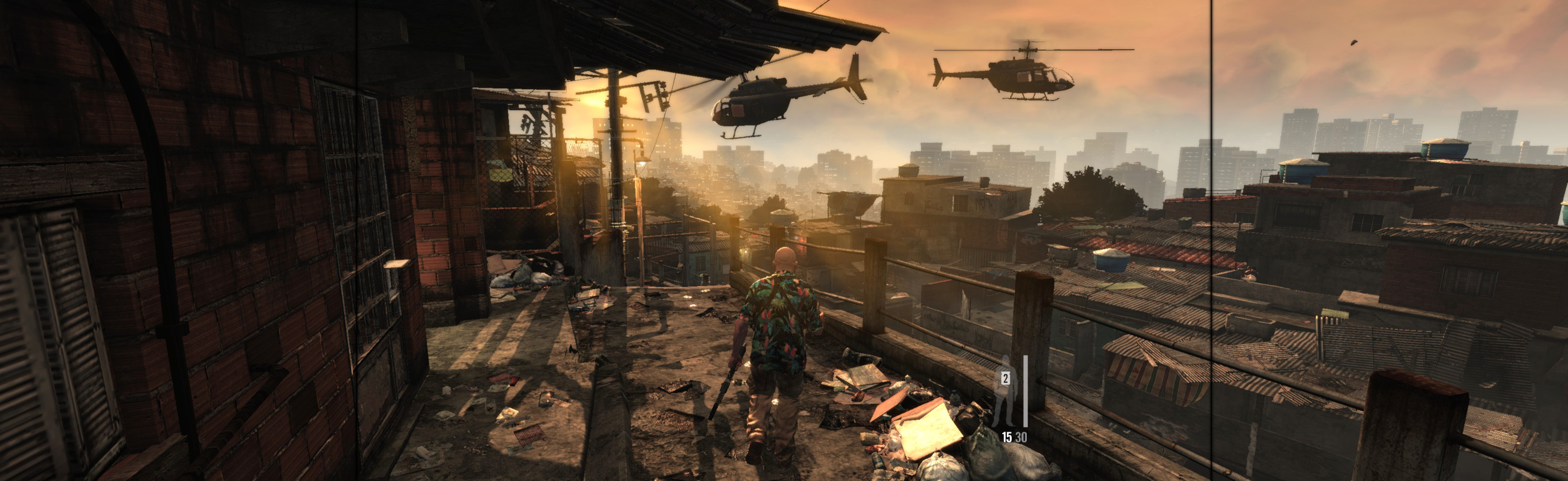
I can comfirme that the game is working properly in nvidia surround.I haven't found anny bugs yet the fov and aspect ratio is good. Here is a screenshot:

Image

The game is really awsome!! :bigsmile:

Sh4dowking

_________________
Asrock Z77 Extreme 4 ----- Intel Core i7 2700K ----- GTX 680 Twinn Frozer III ----- NVIDIA Geforce GT 520 1x Edition


Top
 Profile  
Reply with quote  
 Post subject: FOV change?
PostPosted: 03 Jun 2012, 17:48 
Offline

Joined: 22 Nov 2006, 12:15
Posts: 3
I was wondering if there is any way to change the FOV? When looking around Max takes up a lot of screen space. This is also pretty noticable in multiplayer.
In Battlefield 3 I play with 90 degree FOV, it seems this game is a lot less. My resolution is 1920x1200, if that has anything to do with it.
EDIT: It seems my horizontal FOV in BF3 is more like 115, since BF3 uses vertical FOV in the slider, right? (Or did they patch it?)

Thanks in advance if anybody can enlighten me,
Xavier.

EDIT: I looked around the configuration files, this is what I found in DocumentsRockstar GamesMax Payne 3graphics.xml.
Apart from "Resolution value" there doesn't seem to be any possible setting in there that has anything to do with FOV. And I doubt resolution value is FOV, since it's so low.
I hope they allow FOV changer like in BF2 multiplayer :)


Top
 Profile  
Reply with quote  
PostPosted: 06 Jun 2012, 12:47 
Offline
User avatar

Joined: 06 Aug 2004, 09:33
Posts: 84
I was just at youtube and was able to see two videos that confirm AMD Eyefinity working widescreen. One noted using an HD7970 @ 5760x1080 maxed settings.

SOURCE: http://www.youtube.com/watch?v=7vl7YCSXAsk
http://www.youtube.com/watch?v=Y-3xloGnM58

Just got the game today, I'll post screen later.

EDIT: Works very well at 5760x1200. Game Patched 1.0.0.22 (I think that what I saw on auto updater). HD6990 GPU (Cat. 12.1, for now)


Top
 Profile  
Reply with quote  
 Post subject: Re: Max Payne 3
PostPosted: 29 May 2015, 04:24 
Offline

Joined: 29 May 2015, 04:13
Posts: 6
Sadly, Max Payne 3 doesn't have full support for 21:9 displays. A very sad day indeed.


Top
 Profile  
Reply with quote  
 Post subject: Re: Max Payne 3
PostPosted: 30 May 2015, 06:03 
Offline
Insiders
Insiders

Joined: 21 Oct 2014, 23:33
Posts: 291
SeventhWard, for 21:9 you could spread with SoftTH & run DX9 game. Game spreads well this way, except cut-scenes are all small or cropped width.
Instructions here (for manual PLP, will work for 21:9 too): http://www.wsgf.org/blog/imusrt/2015/04 ... structions
Image
(DX9 game looks good. DX11 game will require SoftTH v3+, still in development)
I just noticed your FWS post (below). This SoftTH solution has the same issues (listed above). Pretty minor, only cutscene issues & game's getting old. So FWS plugin would not likely be created.
http://www.wsgf.org/forums/viewtopic.ph ... start=1070


Top
 Profile  
Reply with quote  
 Post subject: Re: Max Payne 3
PostPosted: 31 May 2015, 01:56 
Offline

Joined: 29 May 2015, 04:13
Posts: 6
imusrt wrote:
Pretty minor, only cutscene issues & game's getting old. So FWS plugin would not likely be created.


Hey imusrt! Thanks for the reply. Man, I sure hope it can get fixed. I know it's a little long in the tooth, but not really...she's 3 years old. And I know cutscenes are secondary to gameplay -- but as anyone who has played Max Payne 3 knows -- those cutscenes are kinda crucial in this game. Yeah they move the story forward...but they're so COOL.

I'm keeping hope alive but not holding my breath!

-SeventhWard


Top
 Profile  
Reply with quote  
Display posts from previous:  Sort by  
Post new topic Reply to topic  [ 13 posts ]  Go to page Previous  1, 2, 3, 4, 5, 6, 7 ... 13  Next

All times are UTC [ DST ]


Who is online

Users browsing this forum: No registered users and 23 guests


You cannot post new topics in this forum
You cannot reply to topics in this forum
You cannot edit your posts in this forum
You cannot delete your posts in this forum
You cannot post attachments in this forum

Search for:
Jump to:  
cron


Powered by phpBB® Forum Software © phpBB Group