Widescreen Gaming Forum

[-noun] Web community dedicated to ensuring PC games run properly on your tablet, netbook, personal computer, HDTV and multi-monitor gaming rig.
It is currently 08 Jun 2026, 22:13

All times are UTC [ DST ]


Post new topic Reply to topic  [ 19 posts ]  Go to page Previous  1, 2
Author Message
 Post subject: X3: Terran Conflict
PostPosted: 03 Nov 2009, 20:12 
Offline
Administrators
Administrators
User avatar

Joined: 02 Nov 2009, 12:14
Posts: 1031
Location: Lincoln, UK
I can do but I haven't got this reinstalled yet, I think I still have that save point but I'll take 3 new ones anyway. BTW I'm assuming you mean like I did with C&C3, one at 1680x1050, 3840x960 and 5040x1050.

But ATM I'm getting shots of Prince of Persia so I'll finish that, then do EVE since thats already installed, then I'll do this properly.

_________________
: ) Skid : )
My Multi-Monitor Focused YouTube Channel: http://www.youtube.com/c/SkidIncGaming
My Twitch channel which I've been known to stream on from time to time: http://www.twitch.tv/SkidInc
"Imagination is the only weapon in the war against reality."


Top
 Profile  
Reply with quote  
 Post subject: X3: Terran Conflict
PostPosted: 03 Nov 2009, 21:14 
Offline
Insiders
Insiders

Joined: 07 Nov 2005, 04:16
Posts: 3010
As long as you have at least two, one at a TH and one at WS (or 4:3), that's good enough.


Top
 Profile  
Reply with quote  
 Post subject: X3: Terran Conflict
PostPosted: 03 Nov 2009, 22:08 
Offline
Administrators
Administrators
User avatar

Joined: 02 Nov 2009, 12:14
Posts: 1031
Location: Lincoln, UK
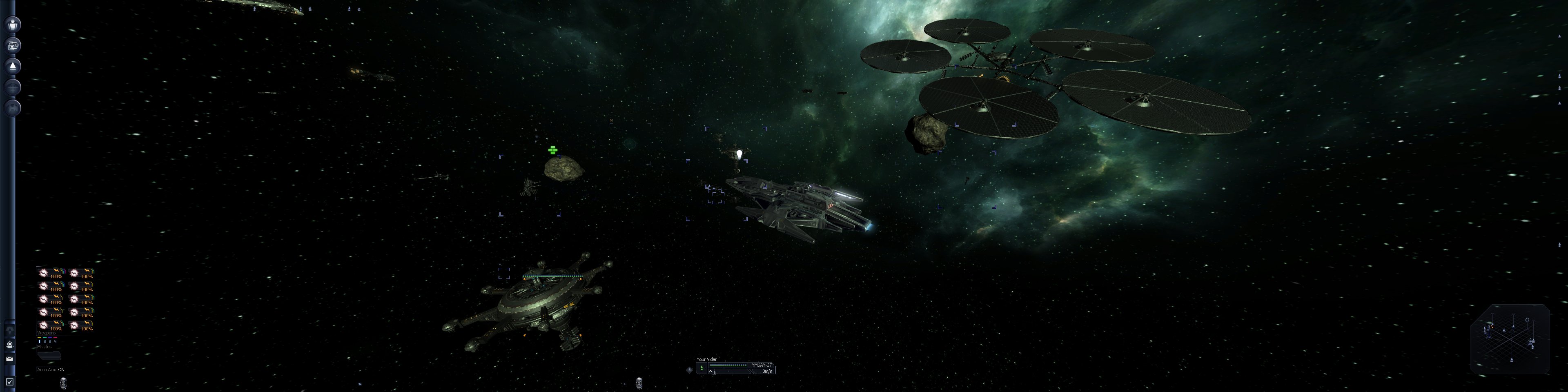
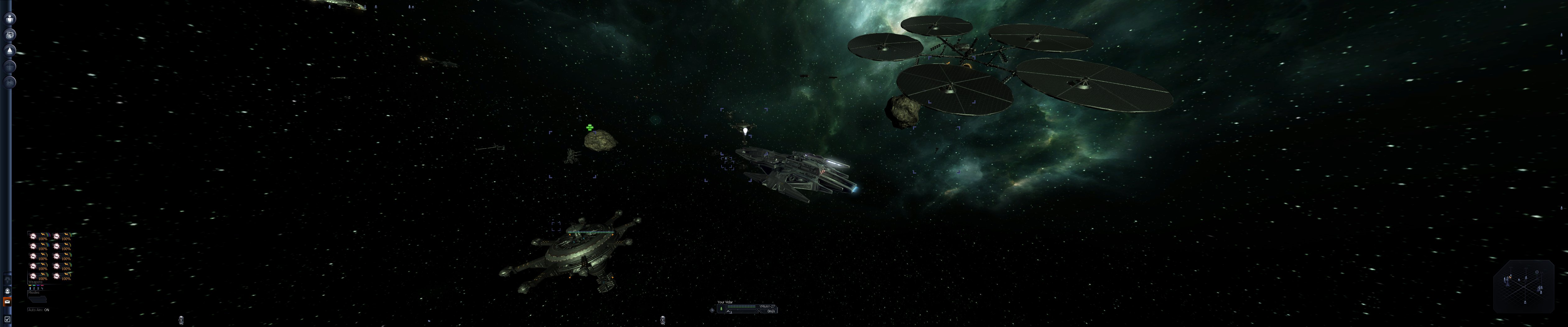
TH resolutions are supported natively, however you might need to adjust the FOV which can be found in the ingame graphics options, all screenshots was taken with it set to 100° (max setting) as I forgot what the default was and thats what I had it set to:

1680x1050


3840x960


5040x1050

_________________
: ) Skid : )
My Multi-Monitor Focused YouTube Channel: http://www.youtube.com/c/SkidIncGaming
My Twitch channel which I've been known to stream on from time to time: http://www.twitch.tv/SkidInc
"Imagination is the only weapon in the war against reality."


Top
 Profile  
Reply with quote  
 Post subject: X3: Terran Conflict
PostPosted: 03 Nov 2009, 22:37 
Offline
Insiders
Insiders

Joined: 07 Nov 2005, 04:16
Posts: 3010
The FOV setting seems to correspond to the vertical, not the horizontal. So basically, you can set it at whatever you think is enough vertical FOV - the renderer will take care of the horizontal part automatically.


Top
 Profile  
Reply with quote  
 Post subject: X3: Terran Conflict
PostPosted: 07 Nov 2009, 00:17 
Offline

Joined: 07 Jul 2007, 23:55
Posts: 2866
I couldn't find a thread on this elsewhere.

http://www.gamestop.com/Catalog/ProductDetails.aspx?product_id=76263

Is the above the same as the X3 Gold here?

http://en.wikipedia.org/wiki/X_(computer_game_series)#X3-Gold

Uhhh, why can't I post two links?


Top
 Profile  
Reply with quote  
 Post subject: X3: Terran Conflict
PostPosted: 07 Nov 2009, 00:58 
Offline
Administrators
Administrators
User avatar

Joined: 02 Nov 2009, 12:14
Posts: 1031
Location: Lincoln, UK
No, X3 and X3:TC are two different games, the gold version is both games in one box.

http://www.egosoft.com/x/xnews/200910_1_44News.html#story2

Info is on there.

Edit: oh as well, gamestop has labled it wrong, its X3: Gold, not X3: Terrain Conflict Gold.

_________________
: ) Skid : )
My Multi-Monitor Focused YouTube Channel: http://www.youtube.com/c/SkidIncGaming
My Twitch channel which I've been known to stream on from time to time: http://www.twitch.tv/SkidInc
"Imagination is the only weapon in the war against reality."


Top
 Profile  
Reply with quote  
 Post subject: X3: Terran Conflict
PostPosted: 07 Nov 2009, 01:00 
Offline

Joined: 07 Jul 2007, 23:55
Posts: 2866
Okay. So this is the version I want. 8)


Top
 Profile  
Reply with quote  
 Post subject: X3: Terran Conflict
PostPosted: 19 Nov 2009, 06:20 
Offline

Joined: 07 Jul 2007, 23:55
Posts: 2866
HUD elements are scaled properly and maintain their (pixel-based) dimensions.


Why can't I read threads properly before buying?

FYI the HUDs are not scaling, it's just the same pixel dimensions. Scaling would be an increase or decrease in the size of the HUD while maintaining the dimensions.

Yet again, another space sim I want to play, unplayable.


Top
 Profile  
Reply with quote  
 Post subject: Re:
PostPosted: 29 Apr 2010, 18:00 
Offline

Joined: 06 Jun 2006, 16:59
Posts: 16
It supports up to 5040x1050 for triple header. I used latest patch for testing


It also supports 8064x1600 (3 x Dell 30").

CJ


Top
 Profile  
Reply with quote  
Display posts from previous:  Sort by  
Post new topic Reply to topic  [ 19 posts ]  Go to page Previous  1, 2

All times are UTC [ DST ]


Who is online

Users browsing this forum: No registered users and 10 guests


You cannot post new topics in this forum
You cannot reply to topics in this forum
You cannot edit your posts in this forum
You cannot delete your posts in this forum
You cannot post attachments in this forum

Search for:
Jump to:  
cron


Powered by phpBB® Forum Software © phpBB Group