Widescreen Gaming Forum

[-noun] Web community dedicated to ensuring PC games run properly on your tablet, netbook, personal computer, HDTV and multi-monitor gaming rig.
It is currently 12 Jul 2026, 08:47

All times are UTC [ DST ]


Post new topic Reply to topic  [ 78 posts ]  Go to page 1, 2, 3, 4, 5 ... 78  Next
Author Message
 Post subject: Life Is Strange
PostPosted: 05 Mar 2015, 10:42 
Offline
Editors
Editors
User avatar

Joined: 06 Mar 2008, 17:20
Posts: 3424


Widescreen Grade: B
Ultra-Widescreen Grade: C
Multi-monitor Grade: C
4k Grade: Incomplete

Read Full Detailed Report - Life Is Strange

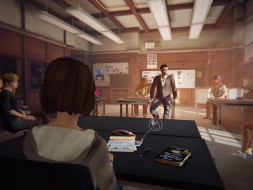
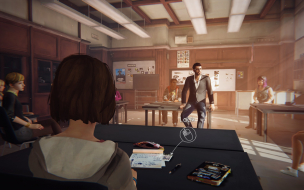
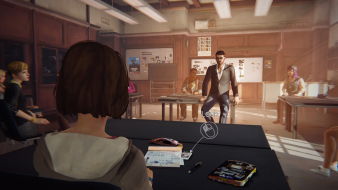
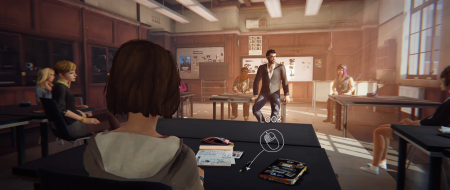
Maxine may not be the most popular girl on the campus, but she's got a gift: rewinding time to rethink choices, undo mistakes, avert bad consequences. Suddenly caught in Arcadia Bay's tangle of secrets, only she can see that the whole city is on the brink of disaster... Life Is Strange is an episodic third-person adventure with an emphasis on atmosphere and the long-term effects of Max's actions. The story should be complete by July, 2015 although no official release date was announced for any of the remaining episodes.


4:3


16:10


16:9


21:9


3x1


Last edited by scavvenjahh on 29 Jun 2015, 19:28, edited 3 times in total.
Edit


Top
 Profile  
Reply with quote  
 Post subject: Re: Life Is Strange
PostPosted: 05 Mar 2015, 13:19 
Offline
User avatar

Joined: 05 Mar 2015, 08:25
Posts: 7
are you sure that is 3x1 doesnt sound right to me...but looks good

_________________
21:9 LG Ultra Widescreen 29"


Top
 Profile  
Reply with quote  
 Post subject: Re: Life Is Strange
PostPosted: 05 Mar 2015, 14:11 
Offline
Administrators
Administrators
User avatar

Joined: 27 Dec 2009, 14:27
Posts: 1789
:welcome
contra1971 wrote:
are you sure that is 3x1 doesnt sound right to me...but looks good

The original image is 6060x1200, which would indicate 3x 1920x1200 monitors with bezel correction enabled.
3x1 does not represent an aspect ratio like 4:3, 5:4, 16:10, 16:9, 21:9 but rather an array of 3 monitors wide by 1 monitors tall.

Screenshots taken and submitted by various users for 3x1 are never the same aspect ratio in terms of exact pixel size like 1920x1080 is as many users have different bezel widths and monitor resolutions, as such we do not claim this to be any fixed ratio, but rather an array of 3x1 monitors, be that non-wide screen, wide screen or ultra-wide screen.

Hope this clears up any confusion. :)

:thumbup:

_________________
| Gigabyte X79S-UP5-WiFi Skt2011 | i7 4820k @4.4GHz Watercooled (Ivy Bridge-E) | Corsair Vengence 32GB @2133MHz 11-11-11-27 2T Quad-Channel (8x4GB) | AMD R9-Fury-X 4GB @1140/505MHz + EKWB Watercooled | 256GB Crucial MX200 SSD | 8x 1TB Samsung F3 SATA-II | Corsair 850W TX PSU | 3x Dell S2209W 22"wide TFT's (5760x1080res) | Logitech Z-5400 5.1ch speakers | Win7 Ultimate x64 |


Top
 Profile  
Reply with quote  
 Post subject: Re: Life Is Strange
PostPosted: 19 May 2015, 13:30 
Offline

Joined: 19 May 2015, 12:55
Posts: 11
The lastest patch has stopped 21:9 from working properly. The game now adds black bars on the sides to use 16:9 resolution.


Top
 Profile  
Reply with quote  
 Post subject: Re: Life Is Strange
PostPosted: 20 May 2015, 07:15 
Offline

Joined: 19 Sep 2014, 09:51
Posts: 3
Yes this is extremely annoying. I refuse to play episode 3 until it gets fixed.


Top
 Profile  
Reply with quote  
 Post subject: Re: Life Is Strange
PostPosted: 20 May 2015, 09:41 
Offline
Editors
Editors
User avatar

Joined: 06 Mar 2008, 17:20
Posts: 3424
Dang. Thanks for the heads-up.


Top
 Profile  
Reply with quote  
 Post subject: Re: Life Is Strange
PostPosted: 29 Jun 2015, 19:25 
Offline
Insiders
Insiders
User avatar

Joined: 06 Sep 2011, 09:29
Posts: 552
Location: Haarlem, the Netherlands
I spoke to zens here on the forum. He is the guy that helped out with issues with the Wither 3. He made me this .exe fix, which removes the black bares in 2560x1080:

http://www.file-upload.net/download-107 ... x.exe.html

_________________
Philips BDM4065UC(3840x2160) Acer Z35(2560x1080@200hz); 980 Ti Hybrid @stock ; 6700K 4.6ghz (1.35v)/D15; 16GB 3200mhz; Asus Maximus Ranger VIII; AX860; 1TB 960 EVO; 750GB 840 EVO; Teufel Concept D 500; Sennheiser HD6XX; Windows 10 (latest build)


Top
 Profile  
Reply with quote  
 Post subject: Re: Life Is Strange
PostPosted: 03 Jul 2015, 22:52 
Offline
User avatar

Joined: 21 Mar 2015, 15:37
Posts: 23
How does this fix work? Where do I run it? Does it work for 3440x1440?


Top
 Profile  
Reply with quote  
 Post subject: Re: Life Is Strange
PostPosted: 04 Jul 2015, 08:38 
Offline
Insiders
Insiders
User avatar

Joined: 06 Sep 2011, 09:29
Posts: 552
Location: Haarlem, the Netherlands
Northmountain wrote:
How does this fix work? Where do I run it? Does it work for 3440x1440?


Replace the fixed .exe with your .exe and just run the game. Not sure if it will work for 3440x1440, but please report back and let us know.

_________________
Philips BDM4065UC(3840x2160) Acer Z35(2560x1080@200hz); 980 Ti Hybrid @stock ; 6700K 4.6ghz (1.35v)/D15; 16GB 3200mhz; Asus Maximus Ranger VIII; AX860; 1TB 960 EVO; 750GB 840 EVO; Teufel Concept D 500; Sennheiser HD6XX; Windows 10 (latest build)


Top
 Profile  
Reply with quote  
 Post subject: Re: Life Is Strange
PostPosted: 04 Jul 2015, 09:28 
Offline
User avatar

Joined: 21 Mar 2015, 15:37
Posts: 23
Wijkert wrote:
Northmountain wrote:
How does this fix work? Where do I run it? Does it work for 3440x1440?


Replace the fixed .exe with your .exe and just run the game. Not sure if it will work for 3440x1440, but please report back and let us know.

Yeah, ok, I'm an idiot. :doh:

Thanks, I'll definitely post what I find out.


Top
 Profile  
Reply with quote  
 Post subject: Re: Life Is Strange
PostPosted: 04 Jul 2015, 10:10 
Offline
User avatar

Joined: 21 Mar 2015, 15:37
Posts: 23
Wijkert wrote:
Northmountain wrote:
How does this fix work? Where do I run it? Does it work for 3440x1440?


Replace the fixed .exe with your .exe and just run the game. Not sure if it will work for 3440x1440, but please report back and let us know.

Here goes.

Menus are working.
Previous chapter recap, not working (I'm guessing it's a prerender).
Chapter intro, not working (same reason).
In-game works just fine. FOV seems quite narrow, though.
Phone menu interface is stretched (which I think is unfixable).
The icons flying all over the place is now fixed when compared to the previous ini-edit, so that is great.

:clap: for getting this fix out!


Top
 Profile  
Reply with quote  
 Post subject: Re: Life Is Strange
PostPosted: 04 Jul 2015, 11:23 
Offline
Insiders
Insiders
User avatar

Joined: 06 Sep 2011, 09:29
Posts: 552
Location: Haarlem, the Netherlands
I played with a fov of a 100, although I must say that it didn't feel like it. Her is a link to the wiki page to help you add fov values to the function keys:

http://pcgamingwiki.com/wiki/Life_Is_Strange

_________________
Philips BDM4065UC(3840x2160) Acer Z35(2560x1080@200hz); 980 Ti Hybrid @stock ; 6700K 4.6ghz (1.35v)/D15; 16GB 3200mhz; Asus Maximus Ranger VIII; AX860; 1TB 960 EVO; 750GB 840 EVO; Teufel Concept D 500; Sennheiser HD6XX; Windows 10 (latest build)


Top
 Profile  
Reply with quote  
 Post subject: Re: Life Is Strange
PostPosted: 28 Jul 2015, 11:38 
Offline

Joined: 19 May 2015, 12:55
Posts: 11
.exe fix now doesn't seem to be working since patch for episode 4.


Top
 Profile  
Reply with quote  
 Post subject: Re: Life Is Strange
PostPosted: 29 Jul 2015, 21:56 
Offline

Joined: 29 Jul 2015, 21:13
Posts: 1
I can't get this fix to work, I tried looking through a resource editor but can't find a difference between the patched one and this. The black bars are driving me nuts.


Top
 Profile  
Reply with quote  
 Post subject: Re: Life Is Strange
PostPosted: 31 Jul 2015, 15:12 
Offline
User avatar

Joined: 21 Mar 2015, 15:37
Posts: 23
Yup, we definitely need another fix.


Top
 Profile  
Reply with quote  
 Post subject: Re: Life Is Strange
PostPosted: 31 Jul 2015, 17:12 
Offline

Joined: 01 May 2015, 23:46
Posts: 8
Same there , thanks a lot for your work guys !


Top
 Profile  
Reply with quote  
 Post subject: Re: Life Is Strange
PostPosted: 31 Jul 2015, 21:35 
Offline

Joined: 04 Mar 2015, 14:35
Posts: 100
sry guys Wijkert asked me about it, but he didnt read my pm till now so here it is:

http://www.file-upload.net/download-10802365/LifeIsStrangeEpisode_blackbars_fix_episode4.rar.html

enjoy!


Top
 Profile  
Reply with quote  
 Post subject: Re: Life Is Strange
PostPosted: 01 Aug 2015, 09:53 
Offline

Joined: 19 May 2015, 12:55
Posts: 11
zens wrote:
sry guys Wijkert asked me about it, but he didnt read my pm till now so here it is:

http://www.file-upload.net/download-10802365/LifeIsStrangeEpisode_blackbars_fix_episode4.rar.html

enjoy!


Thanks for the link.

It might just be me but the game stops working soon as I launch it with when using that .exe

*edit: nevermind. seems to work when launching with safe mode.


Last edited by Peacemaker on 01 Aug 2015, 11:45, edited 1 time in total.

Top
 Profile  
Reply with quote  
 Post subject: Re: Life Is Strange
PostPosted: 01 Aug 2015, 11:39 
Offline
Insiders
Insiders
User avatar

Joined: 06 Sep 2011, 09:29
Posts: 552
Location: Haarlem, the Netherlands
zens wrote:
sry guys Wijkert asked me about it, but he didnt read my pm till now so here it is:

http://www.file-upload.net/download-10802365/LifeIsStrangeEpisode_blackbars_fix_episode4.rar.html

enjoy!


That is my bad. Was swamped with work this week.

_________________
Philips BDM4065UC(3840x2160) Acer Z35(2560x1080@200hz); 980 Ti Hybrid @stock ; 6700K 4.6ghz (1.35v)/D15; 16GB 3200mhz; Asus Maximus Ranger VIII; AX860; 1TB 960 EVO; 750GB 840 EVO; Teufel Concept D 500; Sennheiser HD6XX; Windows 10 (latest build)


Top
 Profile  
Reply with quote  
 Post subject: Re: Life Is Strange
PostPosted: 01 Aug 2015, 12:46 
Offline
User avatar

Joined: 21 Mar 2015, 15:37
Posts: 23
zens wrote:
sry guys Wijkert asked me about it, but he didnt read my pm till now so here it is:

http://www.file-upload.net/download-10802365/LifeIsStrangeEpisode_blackbars_fix_episode4.rar.html

enjoy!

Thank you sooo much.

Incidentally, I do not have to launch in safe mode - for what it's worth.


Top
 Profile  
Reply with quote  
 Post subject: Re: Life Is Strange
PostPosted: 01 Aug 2015, 14:03 
Offline
Insiders
Insiders
User avatar

Joined: 06 Sep 2011, 09:29
Posts: 552
Location: Haarlem, the Netherlands
Using the fix, as soon as I start episode 4, I get the following error message:


Attachments:
lis_error.jpg
lis_error.jpg [ 45.58 KiB | Viewed 5667 times ]

_________________
Philips BDM4065UC(3840x2160) Acer Z35(2560x1080@200hz); 980 Ti Hybrid @stock ; 6700K 4.6ghz (1.35v)/D15; 16GB 3200mhz; Asus Maximus Ranger VIII; AX860; 1TB 960 EVO; 750GB 840 EVO; Teufel Concept D 500; Sennheiser HD6XX; Windows 10 (latest build)
Top
 Profile  
Reply with quote  
 Post subject: Re: Life Is Strange
PostPosted: 01 Aug 2015, 14:05 
Offline
User avatar

Joined: 21 Mar 2015, 15:37
Posts: 23
I got that message from the old fix - are you absolutely sure you're using the new one?


Top
 Profile  
Reply with quote  
 Post subject: Re: Life Is Strange
PostPosted: 01 Aug 2015, 14:15 
Offline
Insiders
Insiders
User avatar

Joined: 06 Sep 2011, 09:29
Posts: 552
Location: Haarlem, the Netherlands
So I might have figured it out. I set bForceNoMovies=false to bForceNoMovies=true (in Documents\My Games\Life Is Strange\LifeIsStrangeGame\Config\LifeIsStrangeEngine.ini) before launching the game. After changing it back, the crash no longer occurs. Weird.

_________________
Philips BDM4065UC(3840x2160) Acer Z35(2560x1080@200hz); 980 Ti Hybrid @stock ; 6700K 4.6ghz (1.35v)/D15; 16GB 3200mhz; Asus Maximus Ranger VIII; AX860; 1TB 960 EVO; 750GB 840 EVO; Teufel Concept D 500; Sennheiser HD6XX; Windows 10 (latest build)


Top
 Profile  
Reply with quote  
 Post subject: Re: Life Is Strange
PostPosted: 01 Aug 2015, 23:01 
Offline

Joined: 04 Mar 2015, 14:35
Posts: 100
So there seems some problems still? Personally i dont own the game, will see if i can get it and look what it is.


Top
 Profile  
Reply with quote  
 Post subject: Re: Life Is Strange
PostPosted: 02 Aug 2015, 00:29 
Offline
Insiders
Insiders
User avatar

Joined: 06 Sep 2011, 09:29
Posts: 552
Location: Haarlem, the Netherlands
zens wrote:
So there seems some problems still? Personally i dont own the game, will see if i can get it and look what it is.


I don't think anyone has a problem using your fix. At least my issue was resolved as stated in my previous post. Almost finished the episode today and experienced no crashes. Thanks for helping us out! :twothumb:

_________________
Philips BDM4065UC(3840x2160) Acer Z35(2560x1080@200hz); 980 Ti Hybrid @stock ; 6700K 4.6ghz (1.35v)/D15; 16GB 3200mhz; Asus Maximus Ranger VIII; AX860; 1TB 960 EVO; 750GB 840 EVO; Teufel Concept D 500; Sennheiser HD6XX; Windows 10 (latest build)


Top
 Profile  
Reply with quote  
 Post subject: Re: Life Is Strange
PostPosted: 02 Aug 2015, 19:04 
Offline

Joined: 04 Mar 2015, 14:35
Posts: 100
Thats good to know, thanks for the reply Wijkert!


Top
 Profile  
Reply with quote  
 Post subject: Re: Life Is Strange
PostPosted: 02 Aug 2015, 21:43 
Offline

Joined: 30 Mar 2014, 22:02
Posts: 3
zens wrote:
So there seems some problems still? Personally i dont own the game, will see if i can get it and look what it is.


There's still a problem for users with 7.1 audio. Your fix is based on an older version of the game. A version in which the game simply didn't boot for anyone with a 7.1 audio system. That has since been patched, but unfortunately your latest fix reverts the game to the bugged version and still crashes on boot for me. I sent you a PM yesterday with a link to the latest exe (for version 1.0.0.347790).

If there's a simple way for me to apply the fix, I'd love to know how. I hate to keep bothering you, especially if you don't even own the game.


Top
 Profile  
Reply with quote  
 Post subject: Re: Life Is Strange
PostPosted: 04 Aug 2015, 21:38 
Offline

Joined: 04 Mar 2015, 14:35
Posts: 100
@ BrightSilence,

now i understood the problem. :)

here u go hope that works:
http://www.file-upload.net/download-10818288/LifeIsStrange.exe.html


Top
 Profile  
Reply with quote  
 Post subject: Re: Life Is Strange
PostPosted: 04 Aug 2015, 22:01 
Offline

Joined: 30 Mar 2014, 22:02
Posts: 3
@zens,

You're a life saver! It works flawlessly now.

I realize that my case was getting increasingly rare, using both a 21:9 display and a 7.1 audio setup, so I want you to know I really appreciate your help.
If you still don't own the game, first episode is on me. PM me an email address to receive the steam gift if you're interested.


Top
 Profile  
Reply with quote  
 Post subject: Re: Life Is Strange
PostPosted: 10 Aug 2015, 12:39 
Offline

Joined: 10 Aug 2015, 12:36
Posts: 1
Hi, I'm running 3 1920x1080 monitors running in NVidia Surround (so resolution is 5760x1080). Even using the fixes linked here and selecting that resolution I get a weird result which is a sort of slightly stretched resolution that only slightly extends around the middle monitor and into the other ones, it is very ugly and not at all what the 3x1 display shown on page 1 looks like.

Can anyone help? Thanks.


Top
 Profile  
Reply with quote  
 Post subject: Re: Life Is Strange
PostPosted: 11 Aug 2015, 16:14 
Offline

Joined: 10 Aug 2015, 18:44
Posts: 4
The last exe file for 2560x1080 no works correct.The image look some zoomed from original.Like camera to near and cut some image up and down on screen.Can you fixe that in a new .exe?¿

I try to wait for that. Ty for your time.

See you


Top
 Profile  
Reply with quote  
 Post subject: Re: Life Is Strange
PostPosted: 12 Aug 2015, 18:55 
Offline

Joined: 04 Mar 2015, 14:35
Posts: 100
hi netboyWSFG,

u should try to increase the fov. Take a look http://www.wsgf.org/dr/life-strange/en.

...

Regginator3 wrote:
Hi, I'm running 3 1920x1080 monitors running in NVidia Surround (so resolution is 5760x1080). Even using the fixes linked here and selecting that resolution I get a weird result which is a sort of slightly stretched resolution that only slightly extends around the middle monitor and into the other ones, it is very ugly and not at all what the 3x1 display shown on page 1 looks like.

Can anyone help? Thanks.


try that one: http://www.file-upload.net/download-10836774/LifeIsStrange_surround-5760x1080-_fix.exe.html

- setup nativ res. 5760x1080 and use this exe wich removes the black bars, and increase the fov like explained in the main page (first link above).

but...

Quote:
Eyefinity / Surround Specific Solution & Issues

Barely playable: a fixed FOV causes the interaction widget to scale incorrectly. Other 2D elements stretch.


So it may look still "fucked".


Last edited by zens on 12 Aug 2015, 19:19, edited 4 times in total.

Top
 Profile  
Reply with quote  
 Post subject: Re: Life Is Strange
PostPosted: 12 Aug 2015, 19:11 
Offline

Joined: 10 Aug 2015, 18:44
Posts: 4
zens wrote:
hi netboyWSFG,

u should try to increase the fov. Take a look http://www.wsgf.org/dr/life-strange/en.


I try already and now works for me.


Top
 Profile  
Reply with quote  
 Post subject: Re: Life Is Strange
PostPosted: 13 Aug 2015, 20:59 
Offline

Joined: 10 Aug 2015, 18:44
Posts: 4
netboyWSFG wrote:
zens wrote:
hi netboyWSFG,

u should try to increase the fov. Take a look http://www.wsgf.org/dr/life-strange/en.


I try already and NO works for me.

I fail writting,soz my english no so good

I mean that i try commands in main page already to change the FOV and no work.
So i will play on 16:9 for now but if somebody knows what can i do i will check the page eventually.

ty


Top
 Profile  
Reply with quote  
 Post subject: Re: Life Is Strange
PostPosted: 20 Oct 2015, 08:19 
Offline
Insiders
Insiders
User avatar

Joined: 06 Sep 2011, 09:29
Posts: 552
Location: Haarlem, the Netherlands
Hi guys. Episode 5 was released today and I created a black bars fix for 2560*1080: https://drive.google.com/file/d/0B8t_dI ... sp=sharing

Check this page to increase the FOV: http://pcgamingwiki.com/wiki/Life_Is_Strange

_________________
Philips BDM4065UC(3840x2160) Acer Z35(2560x1080@200hz); 980 Ti Hybrid @stock ; 6700K 4.6ghz (1.35v)/D15; 16GB 3200mhz; Asus Maximus Ranger VIII; AX860; 1TB 960 EVO; 750GB 840 EVO; Teufel Concept D 500; Sennheiser HD6XX; Windows 10 (latest build)


Top
 Profile  
Reply with quote  
 Post subject: Re: Life Is Strange
PostPosted: 20 Oct 2015, 11:15 
Offline

Joined: 20 Oct 2015, 11:02
Posts: 2
Thanks for the new fix, Wijkert. Any chance you can make one for 3440x1440? I used the one you provided and it worked great. I'm just wondering if using one for 3440x1440 would make a difference. Thanks again!


Top
 Profile  
Reply with quote  
 Post subject: Re: Life Is Strange
PostPosted: 20 Oct 2015, 11:33 
Offline
Insiders
Insiders
User avatar

Joined: 21 May 2011, 14:18
Posts: 1232
I worked yesterday on a fix for this game.
The fix is focused ON Surround/Eyefinity mainly, but it might work for 21:9 aspect ratio.

Fixes:
- Aspect Ratio correction. (black bars)
- Automatic FOV adjustment to your resolution (based on the INTENDED FOV in-game). So, no need anymore to bind keys for fov values and break everything.
- HUD correction. UI is centred on the middle monitor now.
- In-game "Interaction UI" is correctly scaled and correctly positioning over the element. (Meaning you can ACTUALLY play the game, is not missing or miss-aligning).

I haven't finished testing the fix yesterday night;) But, once I'll finish I'll release it;)

_________________
WideScreen Fixer... Fixes your Surround problems to give a gorgeous 3D Surround Experience!
WideScreen Fixer

Only website to show TRUE 3D Vision Surround Gaming Videos(viewable by anyone) only at
3D Vision Surround Gallery

E-mail and Paypal (for people who wants it): [email protected]


Top
 Profile  
Reply with quote  
 Post subject: Re: Life Is Strange
PostPosted: 20 Oct 2015, 12:06 
Offline
Insiders
Insiders
User avatar

Joined: 06 Sep 2011, 09:29
Posts: 552
Location: Haarlem, the Netherlands
S P A C E wrote:
Thanks for the new fix, Wijkert. Any chance you can make one for 3440x1440? I used the one you provided and it worked great. I'm just wondering if using one for 3440x1440 would make a difference. Thanks again!


Try this one: https://drive.google.com/file/d/0B8t_dI ... sp=sharing

These fixes are dependent on the aspect ratio. 2560x1080 (~2.37) is almost the same as 3440x1440 (~2.39). That's why my first fix kinda works for you as well. That said, the fix helifax is talking about sounds a lot more thorough. But even if the FOV is corrected without the arrows moving out of place, the game wasn't designed for wider aspect ratio's, so I aspect that characters will still pop in and out of view in cut scenes.

_________________
Philips BDM4065UC(3840x2160) Acer Z35(2560x1080@200hz); 980 Ti Hybrid @stock ; 6700K 4.6ghz (1.35v)/D15; 16GB 3200mhz; Asus Maximus Ranger VIII; AX860; 1TB 960 EVO; 750GB 840 EVO; Teufel Concept D 500; Sennheiser HD6XX; Windows 10 (latest build)


Top
 Profile  
Reply with quote  
 Post subject: Re: Life Is Strange
PostPosted: 20 Oct 2015, 14:08 
Offline
Insiders
Insiders
User avatar

Joined: 21 May 2011, 14:18
Posts: 1232
Wijkert wrote:
S P A C E wrote:
Thanks for the new fix, Wijkert. Any chance you can make one for 3440x1440? I used the one you provided and it worked great. I'm just wondering if using one for 3440x1440 would make a difference. Thanks again!


Try this one: https://drive.google.com/file/d/0B8t_dI ... sp=sharing

These fixes are dependent on the aspect ratio. 2560x1080 (~2.37) is almost the same as 3440x1440 (~2.39). That's why my first fix kinda works for you as well. That said, the fix helifax is talking about sounds a lot more thorough. But even if the FOV is corrected without the arrows moving out of place, the game wasn't designed for wider aspect ratio's, so I aspect that characters will still pop in and out of view in cut scenes.


Nope. That is because you are using Higher FOVs that intended. That said, the game constantly changes the fov. Locking the FOV at, lets say 130, basically breaks everything (even the desired cinematic experience). It's like playing a different game and the cutscenes are totally OFF from how they should look like.

_________________
WideScreen Fixer... Fixes your Surround problems to give a gorgeous 3D Surround Experience!
WideScreen Fixer

Only website to show TRUE 3D Vision Surround Gaming Videos(viewable by anyone) only at
3D Vision Surround Gallery

E-mail and Paypal (for people who wants it): [email protected]


Top
 Profile  
Reply with quote  
 Post subject: Re: Life Is Strange
PostPosted: 20 Oct 2015, 15:05 
Offline
Insiders
Insiders
User avatar

Joined: 06 Sep 2011, 09:29
Posts: 552
Location: Haarlem, the Netherlands
helifax wrote:
Nope. That is because you are using Higher FOVs that intended. That said, the game constantly changes the fov. Locking the FOV at, lets say 130, basically breaks everything (even the desired cinematic experience). It's like playing a different game and the cutscenes are totally OFF from how they should look like.


Interesting. Will try your fix when its done.

_________________
Philips BDM4065UC(3840x2160) Acer Z35(2560x1080@200hz); 980 Ti Hybrid @stock ; 6700K 4.6ghz (1.35v)/D15; 16GB 3200mhz; Asus Maximus Ranger VIII; AX860; 1TB 960 EVO; 750GB 840 EVO; Teufel Concept D 500; Sennheiser HD6XX; Windows 10 (latest build)


Top
 Profile  
Reply with quote  
 Post subject: Re: Life Is Strange
PostPosted: 20 Oct 2015, 18:56 
Offline
I Donated
I Donated
User avatar

Joined: 30 May 2012, 03:56
Posts: 92
Thanks Helifax for the upcoming fix! :onethumb: I look forward to replaying the game from the beginning in surround. I remember in episode 1 (and maybe 2) you could fix it by editing the config file, but the fix stopped working & I lost interest in playing the game on a single screen. Now we can get our $$$ worth.



_________________
| i7 3930K | 16GB Mushkin Redline 2133MHz | ASUS Rampage IV Formula | EVGA 2080ti SC ULTRA | EVGA Supernova 1200W PS | 2x Samsung EVO 500GB SSD RAID 0 | 2x IBM 520 SSD 240GB | Rosewill Blackhawk | 3x Acer Predator G-Sync 144MHz @ 7680x1440 |


Top
 Profile  
Reply with quote  
 Post subject: Re: Life Is Strange
PostPosted: 21 Oct 2015, 05:04 
Offline

Joined: 20 Oct 2015, 11:02
Posts: 2
Wijkert wrote:
S P A C E wrote:
Thanks for the new fix, Wijkert. Any chance you can make one for 3440x1440? I used the one you provided and it worked great. I'm just wondering if using one for 3440x1440 would make a difference. Thanks again!


Try this one: https://drive.google.com/file/d/0B8t_dI ... sp=sharing

These fixes are dependent on the aspect ratio. 2560x1080 (~2.37) is almost the same as 3440x1440 (~2.39). That's why my first fix kinda works for you as well. That said, the fix helifax is talking about sounds a lot more thorough. But even if the FOV is corrected without the arrows moving out of place, the game wasn't designed for wider aspect ratio's, so I aspect that characters will still pop in and out of view in cut scenes.


Thanks again, Wijkert! The fix works great. I'll be using it in the meantime until helifax releases his new fix.


Top
 Profile  
Reply with quote  
 Post subject: Re: Life Is Strange
PostPosted: 21 Oct 2015, 19:11 
Offline
Insiders
Insiders
User avatar

Joined: 21 May 2011, 14:18
Posts: 1232
Image


Fix is up at: http://3dsurroundgaming.com/WSF.html
My favourite : Unreal Engine;))

THIS WAS TESTED ONLY ON SURROUND! No idea if it will work for 21:9 single monitor (or how). Please share results!
Tested ONLY on Steam version. Other versions not supported.

Tested:
Episode 1-5 STEAM

Fixes:
- Aspect Ratio correction. (black bars)
- Automatic FOV adjustment to your resolution (based on the INTENDED FOV in-game). So, no need anymore to bind keys for fov values and break everything.
- HUD correction. UI is centred on the middle monitor now.
- In-game "Interaction UI" is correctly scaled and correctly positioning over the element. (Meaning you can ACTUALLY play the game, is not missing or miss-aligning).

Requires:
WideScreen Fixer version 662.
You can download it from the same page(TOP of PAGE).

Install:
- Put the dll file in the "Plugins" folder of WideScreen Fixer.
- Start WSF (as Admin)
- Start game, once is started press "*" (numpad star) key to enable the fix.

Known issues:
- Do not use FOV keybinds with this fix. The FOV is automatically calculated. Using a different FOV than the fix provides will break the lining up of the UI.
- There might still be some scenes where the fov is not updated. (This game uses Dynamic FOV almost constantly and is hard for me to find all values).
- If the game glitches (like falling through the floor - Episode 2 "Shoot bottles" encounter) disable the fix and reload the last checkpoint (Is so much one can do).

Enjoy!

_________________
WideScreen Fixer... Fixes your Surround problems to give a gorgeous 3D Surround Experience!
WideScreen Fixer

Only website to show TRUE 3D Vision Surround Gaming Videos(viewable by anyone) only at
3D Vision Surround Gallery

E-mail and Paypal (for people who wants it): [email protected]


Top
 Profile  
Reply with quote  
 Post subject: Re: Life Is Strange
PostPosted: 23 Oct 2015, 21:46 
Offline

Joined: 25 Jan 2015, 18:51
Posts: 25
Thank you so much for the fix helifax! I briefly tested it on my 21:9 2560x1080 monitor and it seems to run well. The main menu looks a bit strange but in game it seems good. I will keep you posted if I notice something.

Attachment:
2015-10-21_00002.jpg
2015-10-21_00002.jpg [ 120.63 KiB | Viewed 5377 times ]


Attachment:
2015-10-21_00003.jpg
2015-10-21_00003.jpg [ 427.99 KiB | Viewed 5439 times ]


Someone should add your solution on the game report, it's not even mentioned and it works much better.


Top
 Profile  
Reply with quote  
 Post subject: Re: Life Is Strange
PostPosted: 23 Oct 2015, 22:04 
Offline

Joined: 18 Nov 2014, 09:23
Posts: 10
works like a charme so far, helifax (21:9 here). thank you so much! :)


Top
 Profile  
Reply with quote  
 Post subject: Re: Life Is Strange
PostPosted: 24 Oct 2015, 16:41 
Offline
User avatar

Joined: 24 Oct 2015, 16:16
Posts: 3
helifax wrote:
Image


Fix is up at: http://3dsurroundgaming.com/WSF.html
My favourite : Unreal Engine;))

THIS WAS TESTED ONLY ON SURROUND! No idea if it will work for 21:9 single monitor (or how). Please share results!
Tested ONLY on Steam version. Other versions not supported.

Tested:
Episode 1-5 STEAM

Fixes:
- Aspect Ratio correction. (black bars)
- Automatic FOV adjustment to your resolution (based on the INTENDED FOV in-game). So, no need anymore to bind keys for fov values and break everything.
- HUD correction. UI is centred on the middle monitor now.
- In-game "Interaction UI" is correctly scaled and correctly positioning over the element. (Meaning you can ACTUALLY play the game, is not missing or miss-aligning).

Requires:
WideScreen Fixer version 662.
You can download it from the same page(TOP of PAGE).

Install:
- Put the dll file in the "Plugins" folder of WideScreen Fixer.
- Start WSF (as Admin)
- Start game, once is started press "*" (numpad star) key to enable the fix.

Known issues:
- Do not use FOV keybinds with this fix. The FOV is automatically calculated. Using a different FOV than the fix provides will break the lining up of the UI.
- There might still be some scenes where the fov is not updated. (This game uses Dynamic FOV almost constantly and is hard for me to find all values).
- If the game glitches (like falling through the floor - Episode 2 "Shoot bottles" encounter) disable the fix and reload the last checkpoint (Is so much one can do).

Enjoy!


I had a problem with this fix when i activate this fix it doesn't delete black bars instead of this whole screen is start shaking. Tell me please what i did wrong!
NOTE: My resolution is 1280x1024 and Aspect Ratio is 5:4
Video of problem:


Top
 Profile  
Reply with quote  
 Post subject: Re: Life Is Strange
PostPosted: 25 Oct 2015, 17:08 
Offline
User avatar

Joined: 24 Oct 2015, 16:16
Posts: 3
Someone answer me or not?


Top
 Profile  
Reply with quote  
 Post subject: Re: Life Is Strange
PostPosted: 26 Oct 2015, 12:11 
Offline
Insiders
Insiders
User avatar

Joined: 21 May 2011, 14:18
Posts: 1232
Mesenzio wrote:
Thank you so much for the fix helifax! I briefly tested it on my 21:9 2560x1080 monitor and it seems to run well. The main menu looks a bit strange but in game it seems good. I will keep you posted if I notice something.

Attachment:
2015-10-21_00002.jpg


Attachment:
2015-10-21_00003.jpg


Someone should add your solution on the game report, it's not even mentioned and it works much better.


Ah, yes the menu might look funky since I think I developed it using a triple screen mode in mind;) I see you are using only one monitor so that is why it might look squished. The UI is still positioned in the middle of the image (where the central monitor) should exist;)
I'll check it out and see if this is the case;)

_________________
WideScreen Fixer... Fixes your Surround problems to give a gorgeous 3D Surround Experience!
WideScreen Fixer

Only website to show TRUE 3D Vision Surround Gaming Videos(viewable by anyone) only at
3D Vision Surround Gallery

E-mail and Paypal (for people who wants it): [email protected]


Top
 Profile  
Reply with quote  
 Post subject: Re: Life Is Strange
PostPosted: 26 Oct 2015, 12:14 
Offline
Insiders
Insiders
User avatar

Joined: 21 May 2011, 14:18
Posts: 1232
MaxCaufield wrote:
Someone answer me or not?


No idea mate. You have a weird monitor there. No idea why is not working for you. You need to figure it out.
Btw, are you playing the game from Steam?

_________________
WideScreen Fixer... Fixes your Surround problems to give a gorgeous 3D Surround Experience!
WideScreen Fixer

Only website to show TRUE 3D Vision Surround Gaming Videos(viewable by anyone) only at
3D Vision Surround Gallery

E-mail and Paypal (for people who wants it): [email protected]


Top
 Profile  
Reply with quote  
 Post subject: Re: Life Is Strange
PostPosted: 26 Oct 2015, 12:45 
Offline
User avatar

Joined: 24 Oct 2015, 16:16
Posts: 3
helifax wrote:
MaxCaufield wrote:
Someone answer me or not?


No idea mate. You have a weird monitor there. No idea why is not working for you. You need to figure it out.
Btw, are you playing the game from Steam?


Yes on Steam


Top
 Profile  
Reply with quote  
 Post subject: Re: Life Is Strange
PostPosted: 27 Oct 2015, 03:56 
Offline

Joined: 25 Jan 2015, 18:51
Posts: 25
helifax wrote:
Mesenzio wrote:
Thank you so much for the fix helifax! I briefly tested it on my 21:9 2560x1080 monitor and it seems to run well. The main menu looks a bit strange but in game it seems good. I will keep you posted if I notice something.

Attachment:
2015-10-21_00002.jpg


Attachment:
2015-10-21_00003.jpg


Someone should add your solution on the game report, it's not even mentioned and it works much better.


Ah, yes the menu might look funky since I think I developed it using a triple screen mode in mind;) I see you are using only one monitor so that is why it might look squished. The UI is still positioned in the middle of the image (where the central monitor) should exist;)
I'll check it out and see if this is the case;)


Yes, menus and interface are centered but squished, I supposed that is the issue. Totally playable though, so no biggie.

I had a crash in Episode 2 however,
Spoiler:
when you shoot beer bottles
.


Top
 Profile  
Reply with quote  
 Post subject: Re: Life Is Strange
PostPosted: 27 Oct 2015, 12:14 
Offline

Joined: 27 Oct 2015, 12:09
Posts: 4
helifax wrote:
Mesenzio wrote:
Thank you so much for the fix helifax! I briefly tested it on my 21:9 2560x1080 monitor and it seems to run well. The main menu looks a bit strange but in game it seems good. I will keep you posted if I notice something.

Attachment:
2015-10-21_00002.jpg


Attachment:
2015-10-21_00003.jpg


Someone should add your solution on the game report, it's not even mentioned and it works much better.


Ah, yes the menu might look funky since I think I developed it using a triple screen mode in mind;) I see you are using only one monitor so that is why it might look squished. The UI is still positioned in the middle of the image (where the central monitor) should exist;)
I'll check it out and see if this is the case;)


Any chance we can get this fix working for 3440x1440 single monitors with the menus and ui not being all squished? It would be greatly appreciated.


Top
 Profile  
Reply with quote  
 Post subject: Re: Life Is Strange
PostPosted: 27 Oct 2015, 12:19 
Offline
Insiders
Insiders
User avatar

Joined: 21 May 2011, 14:18
Posts: 1232
Mesenzio wrote:
helifax wrote:
Mesenzio wrote:
Thank you so much for the fix helifax! I briefly tested it on my 21:9 2560x1080 monitor and it seems to run well. The main menu looks a bit strange but in game it seems good. I will keep you posted if I notice something.

Attachment:
2015-10-21_00002.jpg


Attachment:
2015-10-21_00003.jpg


Someone should add your solution on the game report, it's not even mentioned and it works much better.


Ah, yes the menu might look funky since I think I developed it using a triple screen mode in mind;) I see you are using only one monitor so that is why it might look squished. The UI is still positioned in the middle of the image (where the central monitor) should exist;)
I'll check it out and see if this is the case;)


Yes, menus and interface are centered but squished, I supposed that is the issue. Totally playable though, so no biggie.

I had a crash in Episode 2 however,
Spoiler:
when you shoot beer bottles
.


Yes, I know. For some reason the game goes highwire there if the fix is enabled. (You either get a crash or you fall through the floor). I wasn't able to find out what causes that behaviour though... If you disable the fix when that scene starts (before shooting the 1st bottle) and enable it after all the bottles are shot you should get around this issue...

_________________
WideScreen Fixer... Fixes your Surround problems to give a gorgeous 3D Surround Experience!
WideScreen Fixer

Only website to show TRUE 3D Vision Surround Gaming Videos(viewable by anyone) only at
3D Vision Surround Gallery

E-mail and Paypal (for people who wants it): [email protected]


Top
 Profile  
Reply with quote  
 Post subject: Re: Life Is Strange
PostPosted: 02 Nov 2015, 20:46 
Offline
Insiders
Insiders
User avatar

Joined: 21 May 2011, 14:18
Posts: 1232
For 21:9 Users:

- I made a toggle to disable the HUD centering. You can find it if you click on the little gear in WSF. By default the option is disabled.
You can grab the latest plugin from here: http://3dsurroundgaming.com/WSF.html

Requires:
WideScreen Fixer version 662.
You can download it from the same page(TOP of PAGE).

Install:
- Put the dll file in the "Plugins" folder of WideScreen Fixer.
- Start WSF (as Admin)
- Start game, once is started press "*" (numpad star) key to enable the fix.

Known issues:
- Do not use FOV keybinds with this fix. The FOV is automatically calculated. Using a different FOV than the fix provides will break the lining up of the UI.
- There might still be some scenes where the fov is not updated. (This game uses Dynamic FOV almost constantly and is hard for me to find all values).
- If the game glitches (like falling through the floor - Episode 2 "Shoot bottles" encounter) disable the fix and reload the last checkpoint (Is so much one can do).

Cheers! Let me know if is working :)

_________________
WideScreen Fixer... Fixes your Surround problems to give a gorgeous 3D Surround Experience!
WideScreen Fixer

Only website to show TRUE 3D Vision Surround Gaming Videos(viewable by anyone) only at
3D Vision Surround Gallery

E-mail and Paypal (for people who wants it): [email protected]


Top
 Profile  
Reply with quote  
 Post subject: Re: Life Is Strange
PostPosted: 04 Nov 2015, 01:07 
Offline

Joined: 27 Oct 2015, 12:09
Posts: 4
helifax wrote:
For 21:9 Users:

- I made a toggle to disable the HUD centering. You can find it if you click on the little gear in WSF. By default the option is disabled.
You can grab the latest plugin from here: http://3dsurroundgaming.com/WSF.html

Requires:
WideScreen Fixer version 662.
You can download it from the same page(TOP of PAGE).

Install:
- Put the dll file in the "Plugins" folder of WideScreen Fixer.
- Start WSF (as Admin)
- Start game, once is started press "*" (numpad star) key to enable the fix.

Known issues:
- Do not use FOV keybinds with this fix. The FOV is automatically calculated. Using a different FOV than the fix provides will break the lining up of the UI.
- There might still be some scenes where the fov is not updated. (This game uses Dynamic FOV almost constantly and is hard for me to find all values).
- If the game glitches (like falling through the floor - Episode 2 "Shoot bottles" encounter) disable the fix and reload the last checkpoint (Is so much one can do).

Cheers! Let me know if is working :)


the hud is still messed up....when I leave hud fix off (default) the hud doesnt scale correctly to 21:9 screen and markers are not placed correctly over object (they look stretched out) when the hud fix is on the hud and markers are squished (which im guessing is the correct use since it is being centered for triple monitor setups)

if you can get the hud so its not stretched and is correct for a single 21:9 aspect monitor that would be amazing....I've been waiting for this fix to play the last episode cant wait to play it.


Top
 Profile  
Reply with quote  
 Post subject: Re: Life Is Strange
PostPosted: 04 Nov 2015, 01:35 
Offline
Insiders
Insiders
User avatar

Joined: 21 May 2011, 14:18
Posts: 1232
I don't have a 21:9 Monitor and honestly I don't care:)
I have Surround and the fix was made for Surround/Eyefinity!

Since you are using ONE monitor the only thing I can say is use a 16:9 Aspect Ratio resolution;) It's not like you are MISSING 2 FREAKING SCREENS anyway:))

Sorry, but I can't CODE things for something I can't test and have no idea how it looks like;))

(No pun intended)

_________________
WideScreen Fixer... Fixes your Surround problems to give a gorgeous 3D Surround Experience!
WideScreen Fixer

Only website to show TRUE 3D Vision Surround Gaming Videos(viewable by anyone) only at
3D Vision Surround Gallery

E-mail and Paypal (for people who wants it): [email protected]


Top
 Profile  
Reply with quote  
 Post subject: Re: Life Is Strange
PostPosted: 04 Nov 2015, 15:30 
Offline

Joined: 27 Oct 2015, 12:09
Posts: 4
helifax wrote:
I don't have a 21:9 Monitor and honestly I don't care:)
I have Surround and the fix was made for Surround/Eyefinity!

Since you are using ONE monitor the only thing I can say is use a 16:9 Aspect Ratio resolution;) It's not like you are MISSING 2 FREAKING SCREENS anyway:))

Sorry, but I can't CODE things for something I can't test and have no idea how it looks like;))

(No pun intended)


no problem...I guess ill play in 16:9 then....thanks for trying though its really appreciated


Top
 Profile  
Reply with quote  
 Post subject: Re: Life Is Strange
PostPosted: 07 Nov 2015, 18:56 
Offline

Joined: 25 Jan 2015, 18:51
Posts: 25
I played it on a 21:9 and with the last version the hud fix was quite good, maybe a bit squished but definitely playable. I encountered only one bud in Episode 5 when
Spoiler:
you have to pick up the bottles again the one on the car is ureachable
.


Top
 Profile  
Reply with quote  
 Post subject: Re: Life Is Strange
PostPosted: 15 Nov 2015, 20:29 
Offline
User avatar

Joined: 15 Nov 2015, 20:26
Posts: 1
helifax i am using your fix and i have 2560x1080 monitor. The problem is that during cutscenes my screen is shaking most of the time... Any solutions?


Top
 Profile  
Reply with quote  
 Post subject: Re: Life Is Strange
PostPosted: 23 Jan 2016, 21:52 
Offline

Joined: 23 Jan 2016, 21:49
Posts: 12
Is there any way to remove the black bars with the latest patch? What values do I hex edit in the .exe


Top
 Profile  
Reply with quote  
 Post subject: Re: Life Is Strange
PostPosted: 27 Jan 2016, 03:19 
Offline
User avatar

Joined: 27 Jan 2016, 02:54
Posts: 1
Location: Barcelona
helifax wrote:
For 21:9 Users:

- I made a toggle to disable the HUD centering. You can find it if you click on the little gear in WSF. By default the option is disabled.
You can grab the latest plugin from here: http://3dsurroundgaming.com/WSF.html

Requires:
WideScreen Fixer version 662.
You can download it from the same page(TOP of PAGE).

Install:
- Put the dll file in the "Plugins" folder of WideScreen Fixer.
- Start WSF (as Admin)
- Start game, once is started press "*" (numpad star) key to enable the fix.

Known issues:
- Do not use FOV keybinds with this fix. The FOV is automatically calculated. Using a different FOV than the fix provides will break the lining up of the UI.
- There might still be some scenes where the fov is not updated. (This game uses Dynamic FOV almost constantly and is hard for me to find all values).
- If the game glitches (like falling through the floor - Episode 2 "Shoot bottles" encounter) disable the fix and reload the last checkpoint (Is so much one can do).

Cheers! Let me know if is working :)


Hi there Heliax!
Thx for your plugin and program =D I was trying to use this plugin but when I just turn on with numeric ' * ' my game got crashed ( http://i.imgur.com/vI65KBC.png ) . My setup is an Eyefinity at 5760x1080 (without bezel) I can run game at 1920:1080 and withouy any issues. I didn't touch anything on settings. Only did what you said before. Any tip to run it propperly? If you need any oter info, just tell me!


Top
 Profile  
Reply with quote  
 Post subject: Re: Life Is Strange
PostPosted: 01 Feb 2016, 23:39 
Offline

Joined: 29 Jan 2016, 01:07
Posts: 12
I can confirm that the halifax fix with widescreen fixer makes the game crash. I started today the game and yet found no way to remove the black bars. :(

I play in 2560x1080, steam version with original exe


Top
 Profile  
Reply with quote  
 Post subject: Re: Life Is Strange
PostPosted: 11 Apr 2016, 10:29 
Offline
User avatar

Joined: 04 Oct 2014, 15:31
Posts: 25
rogermorse wrote:
I can confirm that the halifax fix with widescreen fixer makes the game crash. I started today the game and yet found no way to remove the black bars. :(

I play in 2560x1080, steam version with original exe


Same issue here.

For such an immersive game, its damaged by the lack of support the developers have given it for multi and 21:9

Hopefully Halifax can find the time to take another look.


Top
 Profile  
Reply with quote  
 Post subject: Re: Life Is Strange
PostPosted: 11 Apr 2016, 20:54 
Offline
Insiders
Insiders
User avatar

Joined: 11 Dec 2008, 23:51
Posts: 685
Location: Germany
Solution for 21:9: FOV via ini edit & Aspect ratio via HEX edit.

Aspect Ratio: Go to ...\Steam\steamapps\common\Life Is Strange\Binaries\Win32LifeIsStrange.exe
Look for this Hex Code: 39 8E E3 3F and change it to your Aspect Ratio. for example CD 90 18 40 (21:9)

FOV: Go to C:\Users\....\Steam\steamapps\common\\Life Is Strange\LifeIsStrangeGame\Config\DefaultInput.ini
Add this Lines under [Engine.PlayerInput]
+Bindings=(Name="Q",Command="FOV 83.93"

_________________
CZARMAN aka 彼得爸爸


Top
 Profile  
Reply with quote  
 Post subject: Re: Life Is Strange
PostPosted: 12 Apr 2016, 02:01 
Offline
Insiders
Insiders
User avatar

Joined: 21 May 2011, 14:18
Posts: 1232
Rifte wrote:
rogermorse wrote:
I can confirm that the halifax fix with widescreen fixer makes the game crash. I started today the game and yet found no way to remove the black bars. :(

I play in 2560x1080, steam version with original exe


Same issue here.

For such an immersive game, its damaged by the lack of support the developers have given it for multi and 21:9

Hopefully Halifax can find the time to take another look.


I updated the fix last month and is working perfectly fine here (Steam ONLY - last patch). Don't know, don't care about 21:9, so you are on your own there...
What I do care is Tripple Screen (Eyefinity/Surround)

_________________
WideScreen Fixer... Fixes your Surround problems to give a gorgeous 3D Surround Experience!
WideScreen Fixer

Only website to show TRUE 3D Vision Surround Gaming Videos(viewable by anyone) only at
3D Vision Surround Gallery

E-mail and Paypal (for people who wants it): [email protected]


Top
 Profile  
Reply with quote  
 Post subject: Re: Life Is Strange
PostPosted: 12 Apr 2016, 03:15 
Offline
User avatar

Joined: 04 Oct 2014, 15:31
Posts: 25
helifax wrote:
Rifte wrote:
rogermorse wrote:
. Don't know, don't care about 21:9, so you are on your own there...
What I do care is Tripple Screen (Eyefinity/Surround)


Ouch! :cry:


Top
 Profile  
Reply with quote  
 Post subject: Re: Life Is Strange
PostPosted: 12 Apr 2016, 03:38 
Offline
User avatar

Joined: 04 Oct 2014, 15:31
Posts: 25
czarman wrote:
Solution for 21:9: FOV via ini edit & Aspect ratio via HEX edit.

Aspect Ratio: Go to ...\Steam\steamapps\common\Life Is Strange\Binaries\Win32LifeIsStrange.exe
Look for this Hex Code: 39 8E E3 3F and change it to your Aspect Ratio. for example CD 90 18 40 (21:9)

FOV: Go to C:\Users\....\Steam\steamapps\common\\Life Is Strange\LifeIsStrangeGame\Config\DefaultInput.ini
Add this Lines under [Engine.PlayerInput]
+Bindings=(Name="Q",Command="FOV 83.93"


This worked a treat, thanks buddy!


Top
 Profile  
Reply with quote  
 Post subject: Re: Life Is Strange
PostPosted: 17 Jun 2016, 21:58 
Offline

Joined: 17 Jun 2016, 21:49
Posts: 7
Hello guys, im about to take this game on steam for my wife, i was trying to run the demo on 3840x1024(3x1 Landscape) and even using the WSF(Fixer) with the profile you guys suggested, the game opens without UI, it seems isnt recognizing resolution or something,...black borders remains ... Is that workinh on full version only? Did i forgot something, ini editing maybe?

Helps are appreciated
Ty


Top
 Profile  
Reply with quote  
 Post subject: Re: Life Is Strange
PostPosted: 18 Jun 2016, 09:42 
Offline
Editors
Editors
User avatar

Joined: 06 Mar 2008, 17:20
Posts: 3424
Sounds like the fix was inactive, did you press "*" ?
Or you can try the hex edit posted by czarman: in Win32LifeIsStrange.exe search 398EE33F and replace with 00007040 to remove the black bars.


Top
 Profile  
Reply with quote  
 Post subject: Re: Life Is Strange
PostPosted: 18 Jun 2016, 18:34 
Offline

Joined: 17 Jun 2016, 21:49
Posts: 7
Thanks for the answer, it was the version of the game, got the full version and the fix still working, looks cool on eyefinity. =) my wife gonna love it =) ty scavenjah


Top
 Profile  
Reply with quote  
 Post subject: Re: Life Is Strange
PostPosted: 02 Oct 2016, 07:23 
Offline

Joined: 02 Oct 2016, 07:20
Posts: 1
czarman wrote:
Solution for 21:9: FOV via ini edit & Aspect ratio via HEX edit.

Aspect Ratio: Go to ...\Steam\steamapps\common\Life Is Strange\Binaries\Win32LifeIsStrange.exe
Look for this Hex Code: 39 8E E3 3F and change it to your Aspect Ratio. for example CD 90 18 40 (21:9)

FOV: Go to C:\Users\....\Steam\steamapps\common\\Life Is Strange\LifeIsStrangeGame\Config\DefaultInput.ini
Add this Lines under [Engine.PlayerInput]
+Bindings=(Name="Q",Command="FOV 83.93"


Hey guys, I'm new to ultrawide and I've never had to tinker with this stuff before. Could someone please tell me how to search for a hex code? I've found the exe, but I don't know what to do from there...


Top
 Profile  
Reply with quote  
 Post subject: Re: Life Is Strange
PostPosted: 04 Oct 2016, 12:04 
Offline
Editors
Editors
User avatar

Joined: 06 Mar 2008, 17:20
Posts: 3424
First off, you need a hex editor. There are thousands free hex editors out there, I use Notepad++ with the Hex plugin.
Then in the exe file you do a simple search/replace like you would in a text editor but instead of words, you use the hexadecimal bits posted by czarman.

The FOV edit is done in an .ini file, so it's a simple text edit this time around. Add the line, save and close. Then press Q to fix the FOV in-game.
Hope it helps :welcome


Top
 Profile  
Reply with quote  
 Post subject: Re: Life Is Strange
PostPosted: 09 Apr 2017, 13:00 
Offline

Joined: 23 Nov 2015, 23:08
Posts: 5
I'm trying to remove letter boxing for the current game version 1.0.0.397609 with no luck. Neither Hex editing (czarman's method) nor widescreen fixer (with plugin by helifax) removes black bars. Is it because game got updated, can anyone please confirm?


Top
 Profile  
Reply with quote  
 Post subject: Re: Life Is Strange
PostPosted: 19 Jun 2017, 18:06 
Offline

Joined: 07 Aug 2016, 01:57
Posts: 9
czarman wrote:
Solution for 21:9: FOV via ini edit & Aspect ratio via HEX edit.

Aspect Ratio: Go to ...\Steam\steamapps\common\Life Is Strange\Binaries\Win32LifeIsStrange.exe
Look for this Hex Code: 39 8E E3 3F and change it to your Aspect Ratio. for example CD 90 18 40 (21:9)

FOV: Go to C:\Users\....\Steam\steamapps\common\\Life Is Strange\LifeIsStrangeGame\Config\DefaultInput.ini
Add this Lines under [Engine.PlayerInput]
+Bindings=(Name="Q",Command="FOV 83.93"


Hello. Does not work for me. The game can't launch after I changed the values in HxD (error 0xc0000142). Tried two times. How can I solve this ? Thank you.


Top
 Profile  
Reply with quote  
 Post subject: Re: Life Is Strange
PostPosted: 20 Jun 2017, 18:02 
Offline
Insiders
Insiders
User avatar

Joined: 11 Dec 2008, 23:51
Posts: 685
Location: Germany
I just tried it out with the latest Steam Version and it worked like described:

Hex edit 39 8E E3 3F --> CD 90 18 40 and add the FOV Line in the LifeIsStrangInput.ini

Attachment:
life.jpg
life.jpg [ 64.3 KiB | Viewed 5429 times ]


Attachment:
life2.jpg
life2.jpg [ 23.15 KiB | Viewed 5436 times ]

_________________
CZARMAN aka 彼得爸爸


Top
 Profile  
Reply with quote  
 Post subject: Re: Life Is Strange
PostPosted: 15 Aug 2017, 11:17 
Offline

Joined: 19 Jul 2016, 10:14
Posts: 6
Hi, does anyone know if these hex values are the same for 3440x1440p? (or if not what values I should use). Thanks. UPDATE: Same values seem to work! (fingers crossed;)


Top
 Profile  
Reply with quote  
 Post subject: Re: Life Is Strange
PostPosted: 18 Sep 2017, 07:59 
Offline
User avatar

Joined: 18 Sep 2017, 07:55
Posts: 1
Location: Warsaw, Poland
Installing Life is Strange a few days ago for the first time (all DLSc), I ofc ran into the same issue: 16:9 was only showing, black bars left and right.

For some reason, I could not get the exe files offered here to work with my 34" Asus @ 3440x1440.

However - in case anyone else has a similar problem - I was provided with an exe file @ http://steamcommunity.com/app/319630/di ... 076310932/ which does work (supposedly for all episodes; am in the middle of episode 3 currently, so far no issues). 3440x1440 in all its beauty!

Cheers


Top
 Profile  
Reply with quote  
 Post subject: Re: Life Is Strange
PostPosted: 13 Jan 2018, 22:03 
Offline

Joined: 20 May 2016, 23:03
Posts: 17
Hi guys,

Any news of a similar fix for the latest "Before the Storm" episodes? I've confirmed that the WSF fix no longer works - not really a surprise since the game now uses Unity instead of Unreal.
Any help is much appreciated.


Top
 Profile  
Reply with quote  
Display posts from previous:  Sort by  
Post new topic Reply to topic  [ 78 posts ]  Go to page 1, 2, 3, 4, 5 ... 78  Next

All times are UTC [ DST ]


Who is online

Users browsing this forum: Google [Bot] and 22 guests


You cannot post new topics in this forum
You cannot reply to topics in this forum
You cannot edit your posts in this forum
You cannot delete your posts in this forum
You cannot post attachments in this forum

Search for:
Jump to:  
cron


Powered by phpBB® Forum Software © phpBB Group