
Thx a lot for the illustrated answer (+rep)! Now i understand the functionality.
It's a pity that the two outputs can't be used to adress two monitors separately.
I was planning to change my config from two rigs (6870E6 Monitors: 3x1/1/1 + 5770 Monitors: 3x1) to one rig (3/3/1/1), but this ...
Search found 36 matches
- 04 Apr 2012, 07:07
- Forum: AMD Eyefinity Discussions
- Topic: Zotac to release Passive DisplayPort/Mini-Displayport to 2 x HDMI Adapter
- Replies: 50
- Views: 22514
- 03 Apr 2012, 06:40
- Forum: AMD Eyefinity Discussions
- Topic: Zotac to release Passive DisplayPort/Mini-Displayport to 2 x HDMI Adapter
- Replies: 50
- Views: 22514
BHawthorne wrote:It spans
It spans them for dual screen resolutions and mirrors for single screen. For example, 1920x1080 would mirror the screens while 3840x1080 would span. On spanning resolution it treats the two display span as one wide pseudo-display. Think of it as a cost effective Matrox DH2G box.
What if you ...
What if you ...
- 22 Feb 2012, 07:17
- Forum: AMD Eyefinity Discussions
- Topic: 2x eyefinity 6 = 12 displays ?
- Replies: 34
- Views: 16104
Delphium wrote:This is not a
This is not a simple video splitter, it is an MST HUB.
DisplayPort v1.2 is able to drive 4x 1920x1080 out of a single port, however you require an MST HUB to seperate the 4 video channels, which this Zotec 2x HDMI device achieves.
That sounds really interesting. What about the ...
- 26 Jan 2012, 07:04
- Forum: Hardware Discussions
- Topic: Recommend me 3 monitors for Eyefinity.
- Replies: 2
- Views: 1615
I can recommend
I can recommend those:
http://widescreengamingforum.com/forum/forums/hardware-software-support/hardware-discussions/18244/excellent-27-monitor-display-port
I think it's in your budget and they are 27'' and have display port.
http://widescreengamingforum.com/forum/forums/hardware-software-support/hardware-discussions/18244/excellent-27-monitor-display-port
I think it's in your budget and they are 27'' and have display port.
- 06 Dec 2011, 13:25
- Forum: Battlestations
- Topic: Post your "Command Centre" Pictures Here
- Replies: 1436
- Views: 633974
Ryom wrote:Brother, you
Brother, you should consider ditching the surround system and getting good 2.0 or 2.1 speakers with stands that can sit to either side of your desk for proper channel separation. That'd get your speakers out of the way of the monitors as well and get you some more desk space back. Or just wall ...
- 22 Nov 2011, 17:33
- Forum: Battlestations
- Topic: Post your "Command Centre" Pictures Here
- Replies: 1436
- Views: 633974
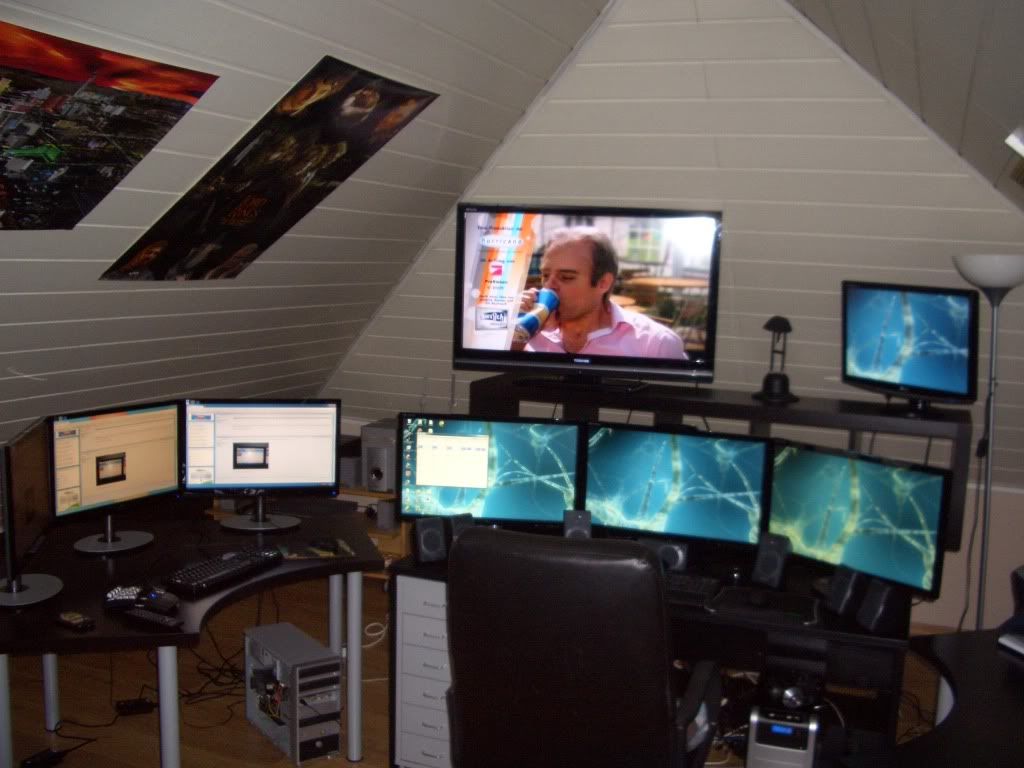
So, at last my setup is
So, at last my setup is complete.
System 1 - HD6870 Eyfinity6 + 3x27'' + 1x40'' + 1x24''
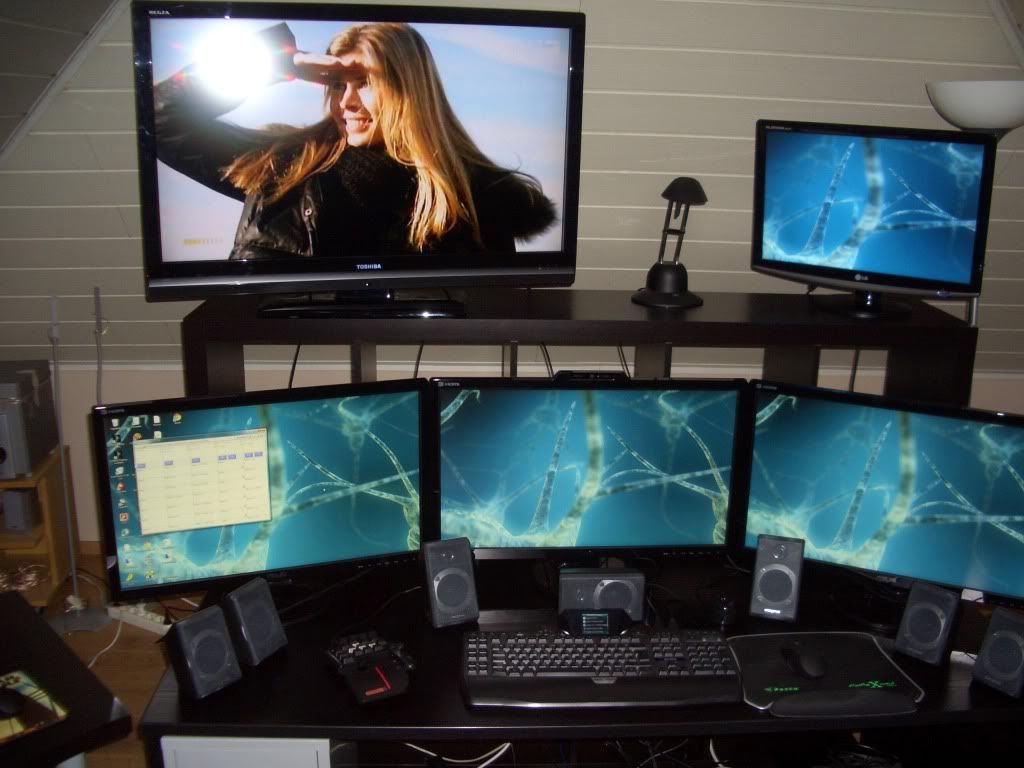
System2 - HD5770 Flex + 3x24''
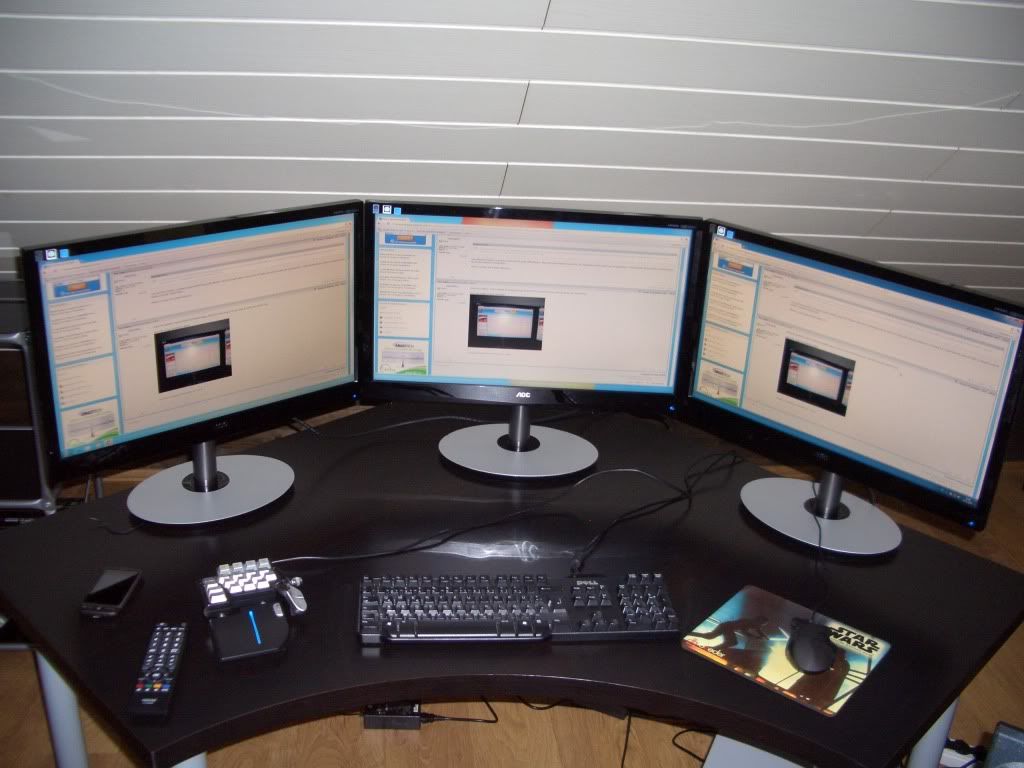
Complete Setup
System 1 - HD6870 Eyfinity6 + 3x27'' + 1x40'' + 1x24''
System2 - HD5770 Flex + 3x24''
Complete Setup
- 22 Nov 2011, 16:54
- Forum: AMD Eyefinity Discussions
- Topic: Black borders around desktop on sidescreens - need help (again)
- Replies: 3
- Views: 2187
Solved the problem. I had to
Solved the problem. I had to disable the eyefinity-group. Then CCC let me active overscan. Now all screen are used full-size.
Here's the image I promied for Rebel:

Here's the image I promied for Rebel:
- 22 Nov 2011, 06:57
- Forum: AMD Eyefinity Discussions
- Topic: Black borders around desktop on sidescreens - need help (again)
- Replies: 3
- Views: 2187
Rebelstar wrote:I have the
I have the same borders on my third monitor connected via dp-vga but only in a non-native resolution like 4800x900, but it's fine while 5760x1080. Can you make a photo of these borders? I want to compare with mine. This bugging me a lot, not sure what to do also
I also had these borders on ...
I also had these borders on ...
- 21 Nov 2011, 19:40
- Forum: AMD Eyefinity Discussions
- Topic: Black borders around desktop on sidescreens - need help (again)
- Replies: 3
- Views: 2187
Black borders around desktop on sidescreens - need help (again)
New installed Windows 7 System. Eyefinity works, but only center screen is using the full screen size. The other two monitors left and right have black borders around the desktop (not whole screen size is used)
Overscan option in CCC is greyed out.
Checking the option "Enable GPU scaling ...
Overscan option in CCC is greyed out.
Checking the option "Enable GPU scaling ...
- 21 Nov 2011, 07:28
- Forum: AMD Eyefinity Discussions
- Topic: Cannot activate 3rd monitor - need help
- Replies: 4
- Views: 2099
Davros wrote:Eyefinity does
Eyefinity does not support xp
perhaps extended desktop will work
Unfortunately it doesn't. Maybe Eyefinity supports Win 98/95/3.11? 8)
- 20 Nov 2011, 18:08
- Forum: AMD Eyefinity Discussions
- Topic: Cannot activate 3rd monitor - need help
- Replies: 4
- Views: 2099
Rebelstar wrote:I have no
I have no words... Is there any good reason to use Windows XP on nowdays, OS from 2001? I'm always do self-trolling when I see "XP" letters. It's almost 2012 and soon will be a Windows 8 and you still can't decide which OS to use? And you answered your questions yourself - Works under Windows 7 and ...
- 20 Nov 2011, 15:06
- Forum: AMD Eyefinity Discussions
- Topic: Cannot activate 3rd monitor - need help
- Replies: 4
- Views: 2099
Cannot activate 3rd monitor - need help
CCC (Version 2011.1025.2152.37348) doesn't let me activate my third monitor.
It is detected an the tooltip says "To enable this display right click and select desired desktop mode", but right-clicking doesn't do anything.
When I deactivate one of two running monitors, the third one can be ...
It is detected an the tooltip says "To enable this display right click and select desired desktop mode", but right-clicking doesn't do anything.
When I deactivate one of two running monitors, the third one can be ...
- 20 Nov 2011, 11:22
- Forum: Hardware Discussions
- Topic: Excellent 27'' Monitor with Display Port
- Replies: 5
- Views: 2654
The Beard wrote:What the mic
What the mic like on the webcam? If it's passable then I might take the leap on that as well.
Sorry, no mic, just the cam :(
- 17 Nov 2011, 06:47
- Forum: Hardware Discussions
- Topic: Excellent 27'' Monitor with Display Port
- Replies: 5
- Views: 2654
Excellent 27'' Monitor with Display Port
I recently bought:
2 x ASUS VE278Q (http://www.amazon.de/gp/product/B0041RXPQY)
1 x ASUS VK278Q (http://www.amazon.de/gp/product/B0041VDCL8)
Identical models except for VK also having an integrated webcam.
These are really excellent monitors for a very good price also regarding that ...
2 x ASUS VE278Q (http://www.amazon.de/gp/product/B0041RXPQY)
1 x ASUS VK278Q (http://www.amazon.de/gp/product/B0041VDCL8)
Identical models except for VK also having an integrated webcam.
These are really excellent monitors for a very good price also regarding that ...
- 16 Nov 2011, 09:19
- Forum: AMD Eyefinity Discussions
- Topic: 6870 E6 with 5 Monitors
- Replies: 7
- Views: 2678
suiken_2mieu wrote:Ghostwire
[quote]Thanks for the answers!
[quote]All the others will need active adapters.
Except they are connected DP to DP (see original post), correct?
Whoops, sorry I was just scanning.
No Problem ;)
- 15 Nov 2011, 07:20
- Forum: AMD Eyefinity Discussions
- Topic: 6870 E6 with 5 Monitors
- Replies: 7
- Views: 2678
Delphium wrote:Ghostwire
[quote]Except they are connected DP to DP (see original post), correct?
Correct :)
THX ! :onethumb
- 14 Nov 2011, 08:10
- Forum: AMD Eyefinity Discussions
- Topic: 6870 E6 with 5 Monitors
- Replies: 7
- Views: 2678
suiken_2mieu wrote:All the
Thanks for the answers!
All the others will need active adapters.
Except they are connected DP to DP (see original post), correct?
I use Asus DirectCu II (6950 or 6970) - which has 4 normal sized DP plus 2 DVI. This sounds more suited to your setup. I'd also say, the extra grunt over ...
All the others will need active adapters.
Except they are connected DP to DP (see original post), correct?
I use Asus DirectCu II (6950 or 6970) - which has 4 normal sized DP plus 2 DVI. This sounds more suited to your setup. I'd also say, the extra grunt over ...
- 11 Nov 2011, 08:24
- Forum: AMD Eyefinity Discussions
- Topic: 6870 E6 with 5 Monitors
- Replies: 7
- Views: 2678
6870 E6 with 5 Monitors
Hi Widescreen-Fellows !
I want to upgrade my GPU and my monitors and have the following question:
If I choose a HD6870 Eyefinity6 and three monitors with display port + two monitors with DVI/HDMI.
Is it correct that i DON'T need any ACTIVE (!) DP adaptors to connect all five monitors?
I want to upgrade my GPU and my monitors and have the following question:
If I choose a HD6870 Eyefinity6 and three monitors with display port + two monitors with DVI/HDMI.
Is it correct that i DON'T need any ACTIVE (!) DP adaptors to connect all five monitors?
- 27 Oct 2011, 06:22
- Forum: Other Multi-Monitor Solutions
- Topic: 360 Degree Gaming Simulator on The Gadget Show
- Replies: 7
- Views: 3991
Awesome !!!(I don't have
Awesome !!!
(I don't have more words for this)
(I don't have more words for this)
- 06 Sep 2011, 07:32
- Forum: Other Multi-Monitor Solutions
- Topic: 5th monitor?
- Replies: 4
- Views: 2567
This is working with my setup
This is working with my setup (HD5770 Flex + GTX260). The setup is something strange, but it works. I have Eyfinity 3/1/1 with Windows 7 with four 24'' TFTs and one 40'' Full HD TV.