
This is the same problem that i have in XP32 Bits and Windows7 64 Bits.
I have the same 4320x900 in both systems, but in 5040x1050 the monitors displays 1280x1024 and the image appears as 5040x1050 but blurried...
Search found 12 matches
- 02 Apr 2009, 20:10
- Forum: Multi-Monitor Gaming
- Topic: Cant get 5040x1050 to work, Matrox support says no gtx295
- Replies: 16
- Views: 6756
- 15 Feb 2009, 11:26
- Forum: Other Multi-Monitor Solutions
- Topic: Monitors OSD says 1280x1024 @57hz when doing 5040x1050
- Replies: 13
- Views: 5562
Monitors OSD says 1280x1024 @57hz when doing 5040x1050
This is the response from Matrox.....
Hi
The triple wide mode 3x1680x1050 is outputted at a refresh rate of 57Hz.
This is the limitation of the dual-link DVI connection and cannot be exceeded.
It is very likely that your monitors are having problems syncing to that lower ...
Hi
The triple wide mode 3x1680x1050 is outputted at a refresh rate of 57Hz.
This is the limitation of the dual-link DVI connection and cannot be exceeded.
It is very likely that your monitors are having problems syncing to that lower ...
- 05 Feb 2009, 12:11
- Forum: Other Multi-Monitor Solutions
- Topic: Monitors OSD says 1280x1024 @57hz when doing 5040x1050
- Replies: 13
- Views: 5562
Monitors OSD says 1280x1024 @57hz when doing 5040x1050
"Change flat panel scaling"
This works only for me in 4320 x 900 and the image are best.. in 5040x1050 the problem is the same.
the Nvidia control panel say that the native resolution of the monitor (Matrox Triplehead) is 3840 x 1024 ...
This works only for me in 4320 x 900 and the image are best.. in 5040x1050 the problem is the same.
the Nvidia control panel say that the native resolution of the monitor (Matrox Triplehead) is 3840 x 1024 ...
- 04 Feb 2009, 21:33
- Forum: Other Multi-Monitor Solutions
- Topic: Monitors OSD says 1280x1024 @57hz when doing 5040x1050
- Replies: 13
- Views: 5562
Monitors OSD says 1280x1024 @57hz when doing 5040x1050
Exactly the same problem i have, my monitors are 22' LG L225WS analog with vga>DVI converters.
The monitors when i put the computer in 5040x1050 says that the resolution are 1280x1024...
The system works fine in 4320 x 900
Any ideas ??
Thanks.
The monitors when i put the computer in 5040x1050 says that the resolution are 1280x1024...
The system works fine in 4320 x 900
Any ideas ??
Thanks.
- 27 Nov 2008, 09:21
- Forum: Multi-Monitor Gaming
- Topic: SBK 08 Superbikes World Championship
- Replies: 2
- Views: 1534
SBK 08 Superbikes World Championship
You need activate the hidden files & system folders option in windows to see those folders.
- 22 Nov 2008, 18:51
- Forum: Multi-Monitor Gaming
- Topic: Motogp 07 Working with TH2Go
- Replies: 4
- Views: 2969
Motogp 07 Working with TH2Go
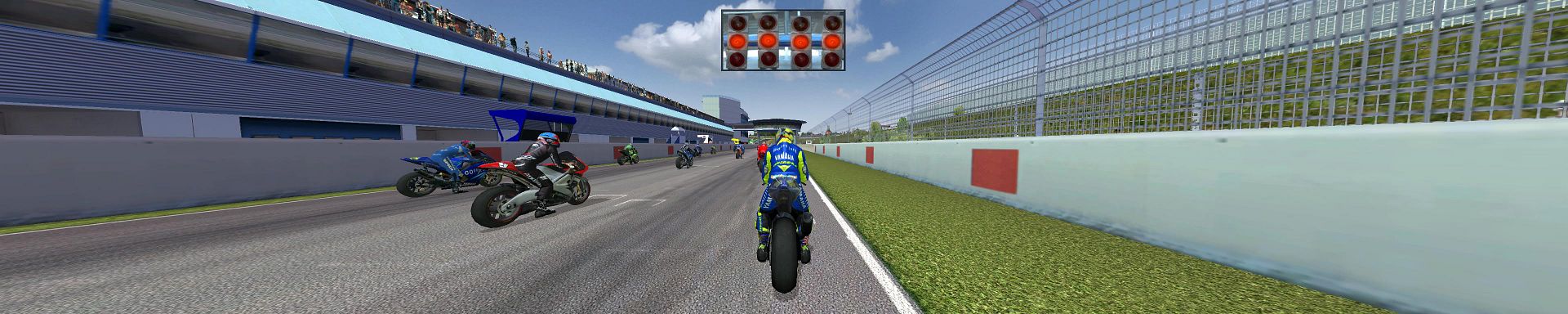
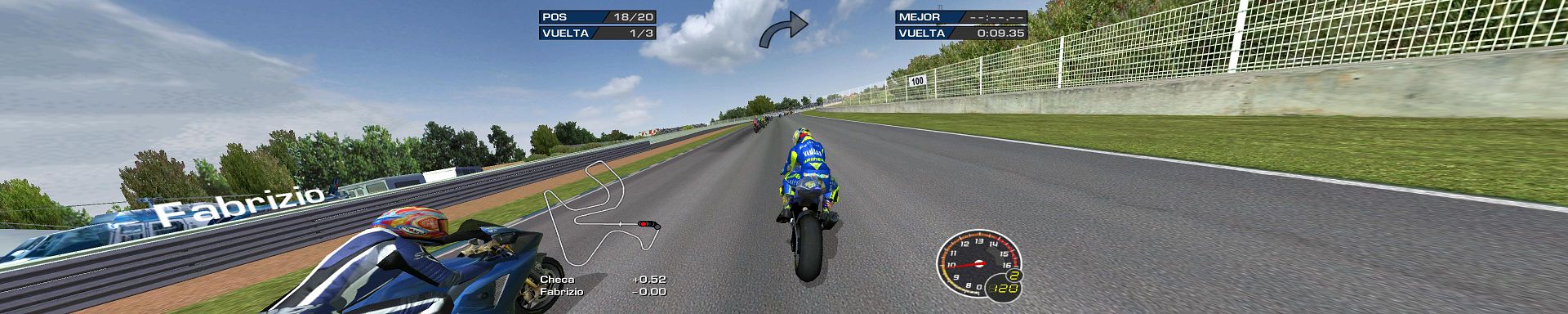
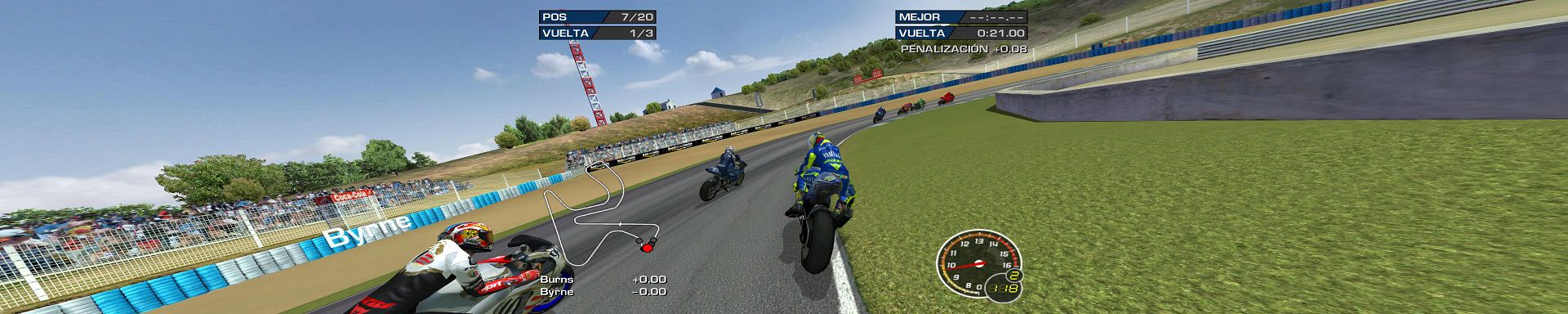
For me works ok, have you edit the motogp.ini file with the correct parameters above ?
- 09 Nov 2008, 23:28
- Forum: Multi-Monitor Gaming
- Topic: Motogp 08 Working in TH2GO
- Replies: 9
- Views: 4781
Motogp 08 Working in TH2GO
Motogp08 have 125,250 and motogp races, and is a good simulator, very addictive....
If you want to play mgp07 (Climax/THQ game) in the th2go need to edit motogp.cfg file and add:
vmode/width = 3840
vmode/height = 768
vmode/windowed = 1
vmode/widescreen = false
Or any ...
If you want to play mgp07 (Climax/THQ game) in the th2go need to edit motogp.cfg file and add:
vmode/width = 3840
vmode/height = 768
vmode/windowed = 1
vmode/widescreen = false
Or any ...
- 31 Oct 2008, 21:54
- Forum: Multi-Monitor Gaming
- Topic: Motogp 08 Working in TH2GO
- Replies: 9
- Views: 4781
Motogp 08 Working in TH2GO
In windows XP in the folder:
C:Documents and Settingsyour USERApplication DataCapcomMotoGP08
You find the file Config.ini that contains:
[Video Configuration]
DeviceID=0
WideScreen=1
Windowed=0
VSync=1
MultisampleQuality=0
Width=3840
Height=1024
RefreshRate=60 ...
C:Documents and Settingsyour USERApplication DataCapcomMotoGP08
You find the file Config.ini that contains:
[Video Configuration]
DeviceID=0
WideScreen=1
Windowed=0
VSync=1
MultisampleQuality=0
Width=3840
Height=1024
RefreshRate=60 ...
- 27 Oct 2008, 21:58
- Forum: Multi-Monitor Gaming
- Topic: Motogp 08 Working in TH2GO
- Replies: 9
- Views: 4781
Motogp 08 Working in TH2GO
Thanks, now the screenshots:


- 27 Oct 2008, 20:53
- Forum: Multi-Monitor Gaming
- Topic: Motogp 08 Working in TH2GO
- Replies: 9
- Views: 4781
Motogp 08 Working in TH2GO
The new motogp 08 works native in TH2Go, only with the config.ini tweak.
Please what program to make a screenshot in TH2go and put images ?
Thanks
Jose - Spain
Please what program to make a screenshot in TH2go and put images ?
Thanks
Jose - Spain
- 19 Sep 2008, 15:43
- Forum: Multi-Monitor Gaming
- Topic: Motogp 07 Working with TH2Go
- Replies: 4
- Views: 2969
Motogp 07 Working with TH2Go
The game suport native Surround, need to add this to motogp.cfg (my system are a 7600GT and TH2Go Digital):
vmode/width = 3840
vmode/height = 768
vmode/windowed = 1
vmode/widescreen = false
Game only works in windowed mode and widescreen setting in off.
I don't have screenshots ...
vmode/width = 3840
vmode/height = 768
vmode/windowed = 1
vmode/widescreen = false
Game only works in windowed mode and widescreen setting in off.
I don't have screenshots ...
- 12 Sep 2008, 09:01
- Forum: Multi-Monitor Gaming
- Topic: SBK 08 Superbikes World Championship
- Replies: 2
- Views: 1534
SBK 08 Superbikes World Championship
Hello all from Spain, just connect my new TH2GO, and test SBK08, the game admit Surround gaming via tweaking the ini file located in:
C:documents and settingsApplication DataBlackBeanSBK08
This is my current settings for my setup:
[Language]
LanguageID=10
[Video Configuration ...
C:documents and settingsApplication DataBlackBeanSBK08
This is my current settings for my setup:
[Language]
LanguageID=10
[Video Configuration ...