| Author |
Message |
Forum: 4k & UHD Gaming Topic: Window 10 4K monior with 2 1080's question |
| Toothless |
|
Posted: 25 May 2016, 09:05
|
|
Replies: 7
Views: 11611
|
what I ended up doing is 5760 X 1080
Then game only on the center 4K monitor. I can still game on 3 monitors, but at 1080 |
|
 |
Forum: Hardware Discussions Topic: new Nvidia Pascal GTX 1080 and 1070, worth waiting for? |
| Toothless |
|
Posted: 25 May 2016, 09:00
|
|
Replies: 6
Views: 8412
|
Pre-orders sold out the 1080 on some brands.........everyone will be waiting 
1080 runs very hot 82C......many brands coming out with custom cooler editions....These I can wait
2 more days if you are a lucky one to snatch one |
|
|
Forum: 4k & UHD Gaming Topic: Window 10 4K monior with 2 1080's question |
| Toothless |
|
Posted: 11 Oct 2015, 07:37
|
|
Replies: 7
Views: 11611
|
| Found out it is a "Windows" issue that Microsoft is not listening. Problem being multi monitors with a 4K monitor. Found this information where you mess with registry. Didn't stick for me, so that was my inquire if WIndows 10 would be any better, but no :( http://answers.microsoft.com/en-u... |
|
|
Forum: 4k & UHD Gaming Topic: Window 10 4K monior with 2 1080's question |
| Toothless |
|
Posted: 07 Oct 2015, 23:51
|
|
Replies: 7
Views: 11611
|
| For nVidia surround you need to have the same resolution on all Monitors. AFAIK That was not my question. I am in surround right now with 1-4k monitor windows 7. Does Windows 10 address multi monitors with different resolutions is my question. I am reading in Windows 10 you can make resolutions cha... |
|
|
Forum: 4k & UHD Gaming Topic: Window 10 4K monior with 2 1080's question |
| Toothless |
|
Posted: 07 Oct 2015, 03:01
|
|
Replies: 7
Views: 11611
|
| I recently bought a Dell 27in 4K monitor. In my new triple monitor setup, the 4K is in the middle and the other 1080's to the left and right. I am currently using WIndow 7 Pro 64bit and this version came out before 4K monitors in which they don't play well together. I want to game on just the 4K mon... |
|
|
Forum: Multi-Monitor Gaming Topic: 1 monitor with G-Sync, 2 without? |
| Toothless |
|
Posted: 07 Oct 2015, 02:48
|
|
Replies: 4
Views: 7366
|
| At first I thought you bought a 4K monitor with existing 1080's. But they are all 1080. I don't think you will notice without gsync. You can turn if off with your mentioned new monitor. To use it, you would need to play on that one monitor. I just bought a Dell 27in 4K monitor on a price match for $... |
|
|
Forum: Site News & Suggestion Box Topic: WSGF 10th Anniversary Game Giveaway [closed 13th Nov 2013] |
| Toothless |
|
Posted: 16 Oct 2013, 22:17
|
|
Replies: 60
Views: 55216
|
| Stopped by to say happy 10th anniversary |
|
|
Forum: Mods, Tweaks, Tools & Tutorials Topic: Flawless Widescreen |
| Toothless |
|
Posted: 28 Apr 2012, 07:02
|
|
Replies: 1251
Views: 1120622
|
| Hayden, this is just tooo awesome! I am going to download your hard work and lets see how much I can really enjoy 3 monitor's :) Just wanted to leave a note that I appreciated your hard work in making the available for the many games you have listed. Keep doing what you are doing, great work! Tooth |
|
|
Forum: Other Multi-Monitor Solutions Topic: New to TH2G |
| Toothless |
|
Posted: 15 Oct 2011, 09:51
|
|
Replies: 2
Views: 2366
|
Bezel Management (Windows7)
-start
-all programs
-matrox graphics
-Matrox GXM Quick Setup
-advanced
-click on "GXM"
-click on "Bezel manement (for GXM)
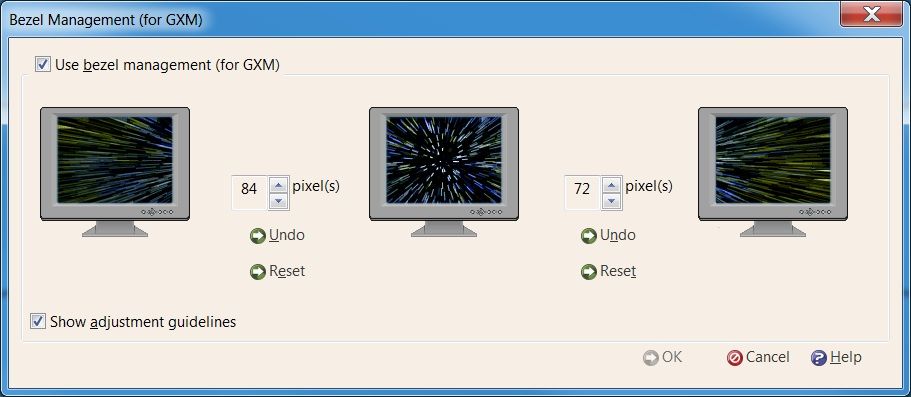 |
|
|
Forum: Other Multi-Monitor Solutions Topic: I need advise on 3 monitor setup with Alienware M17x R3 |
| Toothless |
|
Posted: 20 Jul 2011, 04:54
|
|
Replies: 2
Views: 3620
|
Nvidia with "display Port"? I dont think so. 2 monitors per Nvidia. Need second video card for your 3rd monitor.
or get.....TripleHead2go with one Nvidia = 3 monitors
correct me if I am wrong. I dont think Nvidia has any display ports? |
|
|
Forum: Other Multi-Monitor Solutions Topic: TH2G and Dirt 3 |
| Toothless |
|
Posted: 20 Jul 2011, 04:44
|
|
Replies: 2
Views: 2017
|
be sure and get latest directx and Microsoft Visual C+++ 2008. if playing on laptop, it wont work (according to min requirements)
Worked for me with 3 screens |
|
|
Forum: Multi-Monitor Gaming Topic: Bulletstorm Eyefinity Fix? |
| Toothless |
|
Posted: 26 Feb 2011, 23:58
|
|
Replies: 108
Views: 43078
|
| http://www.youtube.com/watch?v=OEbbMcYjwBw Crouched=75 Running=100 Sliding=110 Whip=85 Normal=85 Zoomed=45 Cutscenes=80,90,varying Interactions=varying Video is 5760x1080, just adding about +50 to all FOV values and capping it at 150 to stop fisheye when running etc. Fix has some flaws with respect... |
|
|
Forum: Other Multi-Monitor Solutions Topic: Crysis 2 Beta Leak supports 5040 X 1050 |
| Toothless |
|
Posted: 26 Feb 2011, 23:52
|
|
Replies: 3
Views: 2259
|
| That's not really support... the HUD is stretched and off on the peripheral screens where you can't see it. that annoys me. :-| dude, it is a crappy B-E-T-A. Expect beta quality. The game is not released until next MONTH- 3/22 for PC I was pointing out it does support 5040 x 1050. non triplehead2go... |
|
|
Forum: Other Multi-Monitor Solutions Topic: Battlestorm (PC) support 5040 X 1050 |
| Toothless |
|
Posted: 26 Feb 2011, 23:47
|
|
Replies: 7
Views: 4213
|
| Great. :| Now compare to 1680x1050 and cry. that makes no sense at all. what is the purpose of widescreen monitors? if you dont have the game and equiptment to support the newest released games, speak from actual experience. I will never go back to a single monitor, never. my screen shot was to poi... |
|
|
Forum: Other Multi-Monitor Solutions Topic: Battlestorm (PC) support 5040 X 1050 |
| Toothless |
|
Posted: 23 Feb 2011, 06:12
|
|
Replies: 7
Views: 4213
|
Didnt have to touch a thing, see screen shot

 |
|
|
Forum: Other Multi-Monitor Solutions Topic: Crysis 2 Beta Leak supports 5040 X 1050 |
| Toothless |
|
Posted: 13 Feb 2011, 07:37
|
|
Replies: 3
Views: 2259
|

Code: http://www.youtube.com/watch?v=cYYY-tVXRF4
w/TripleHead2Go
 |
|
|
Forum: Other Multi-Monitor Solutions Topic: Dead Space 2 can't do 5040x1050@57hz |
| Toothless |
|
Posted: 06 Feb 2011, 22:14
|
|
Replies: 18
Views: 8735
|
| Even tho we are not at 5040 x 1050, I stil get the full triple monitor wide screen mode. To me, staying at the highest default in my main game menu fills out my screen nicely. See Dead Space screen below. (I did nothing extra with TripleHead2Go with desktop resolution 5040 x 1050) Damn, them creatur... |
|
|
Forum: Other Multi-Monitor Solutions Topic: Fresh reload, stuck back at 3840 x 1024 |
| Toothless |
|
Posted: 16 Jan 2011, 21:45
|
|
Replies: 1
Views: 1796
|
1-right click desktop
2-select Nvidia control panel
3-follow screen shots below:


 |
|
|
Forum: Battlestations Topic: Post your "Command Centre" Pictures Here |
| Toothless |
|
Posted: 03 Jan 2011, 08:03
|
|
Replies: 1436
Views: 627017
|
Mod edit: I've moved your post here as you were pretty much just showing off your desk.
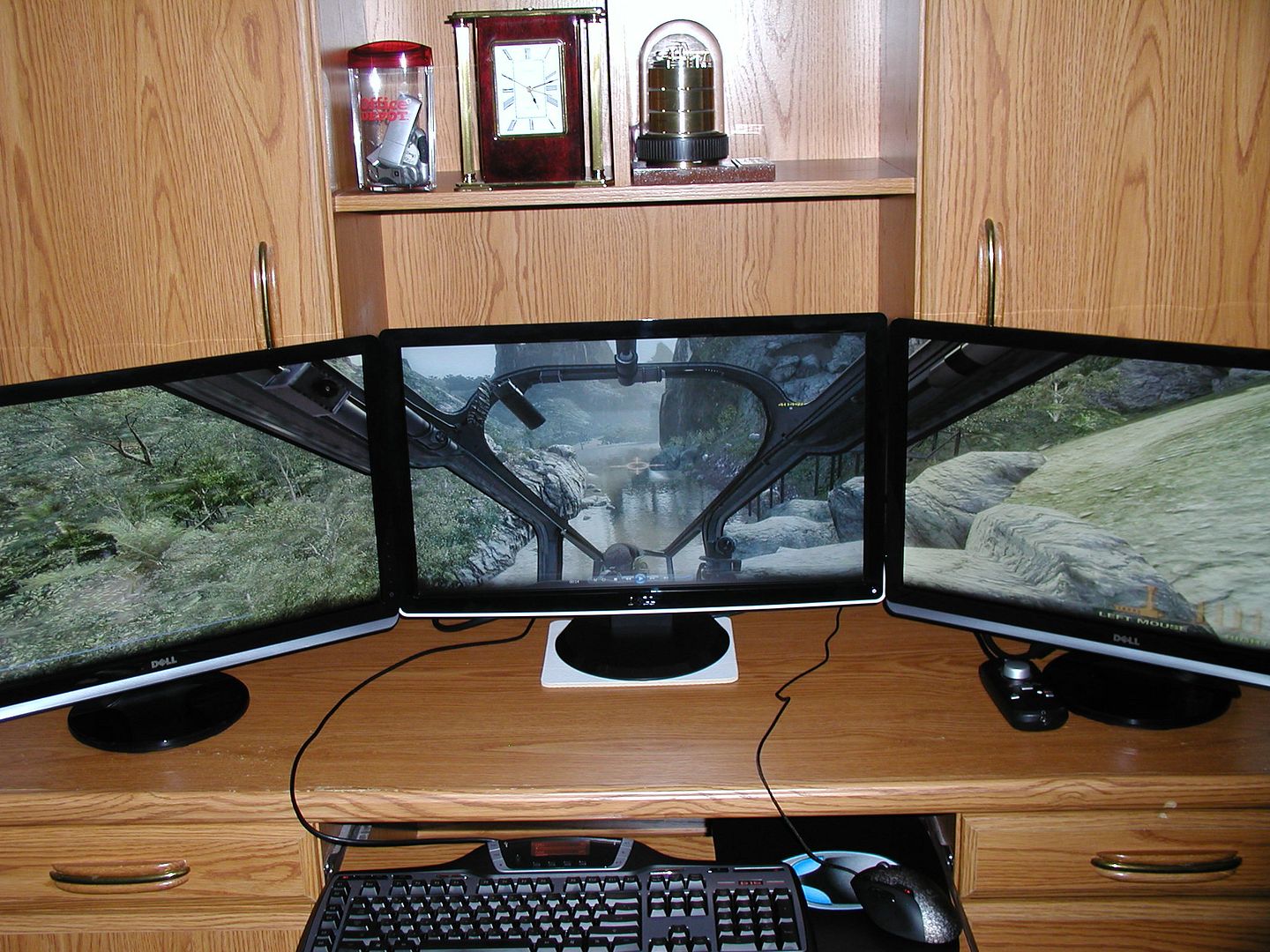
(using triplehead2go-COD Black Ops Game)
 |
|
|
Forum: YouTube Links Topic: Blacks Ops like it should be played!! |
| Toothless |
|
Posted: 11 Dec 2010, 08:23
|
|
Replies: 1
Views: 1748
|
| Black Ops Triple Monitor Widescreen mode recorded in 1080p HD, You got to check it out! 3 - 24 inch Dell Monitors. http://www.youtube.com/watch?v=1X_cQb7UDyE This all made sense when I followed dopefish detailed instructions in link below. Thanks a bunch. now I find my eyes wonder from side to side.... |
|
|
| Sort by: |


 Login
Login FAQ
FAQ Search
 Members