

ATI / AMD Custom Resolutions (Non-EDID Method)

User created game mods, skins, texture packs and camera tools
User avatar
suiken_2mieu
Insiders
Insiders
Posts: 2351
Joined: 20 Aug 2009, 04:20
Location: Virginia
Contact:

ATI / AMD Custom Resolutions (Non-EDID Method)

Post by suiken_2mieu »

So for some reason AMD / ATI doesn't want you to make custom resolutions. This had been extremely annoying for me ever since the TH2Go. nVidia Users have been enjoying this for a while. So I finally buckled down and figured it out.

Tutorial: Make Custom Resolutions with out flashing EDID or making an EDID Mask.

What it useful for:
--Faux-TH2Go (surround) Resolutions (Try Before you buy)
--Older Games that don't support the resolutions your monitor does.
--Getting the TH2Go to work (need testing but I assume it works).
--Recording Surround Footage on fraps.
--Lan Parties (you can only bring one monitor)
--Forcing Aspect in movies.

What you need:
--ATI/AMD Video Card
--Catalyst Control Center (CCC)
--Regedit.exe (or other registry editor)**
--Notepad.exe (or other word processor)

I'm going to assume you are using Windows 7. This probably works in WinXP and Vista, but I have not tested this.

Step 1:
Open a notepad window and set it to the side. The open CCC. Go to the information tab. On recent version, it should be on the left side. Left click on the Software section. Then Right click "2D Driver File Path" and left click "copy selected" from the context menu. Mouse over to the notepad window and paste the address.
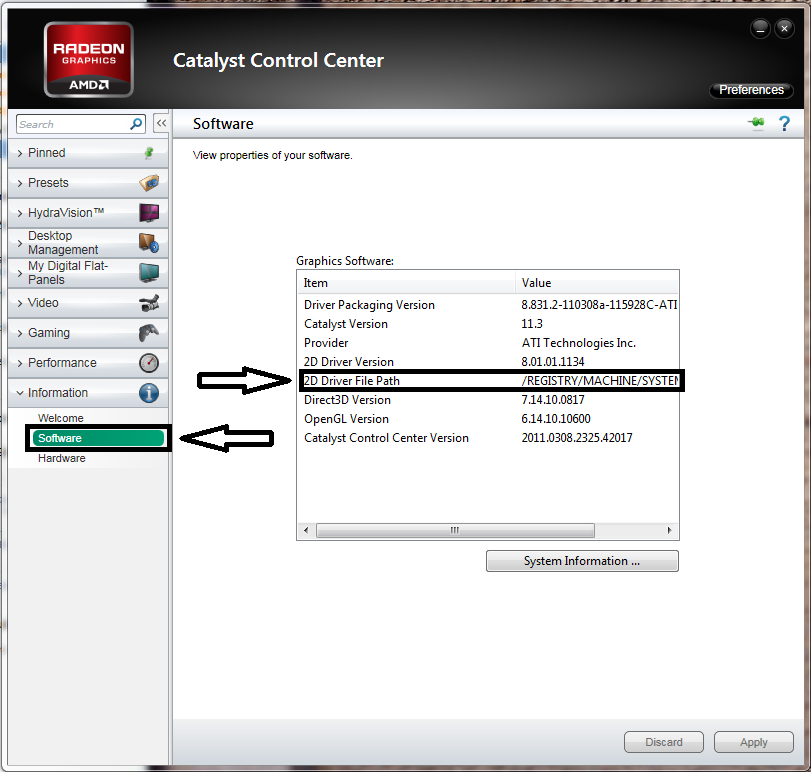


It should look similar to this:

Code: Select all

2D Driver File Path   /REGISTRY/MACHINE/SYSTEM/ControlSet001/Control/CLASS/{4D36E968-E325-11CE-BFC1-08002BE10318}/0000   


Note: The part that looks like {4D36E968-E325-11CE-BFC1-08002BE10318} will be random.

Step 2:
Left click the start menu. Type in regedit.exe and hit enter (you may also go to run to do this). Now navigate to that folder above. Then find an entry called "DALNonStandardModesBCD1"
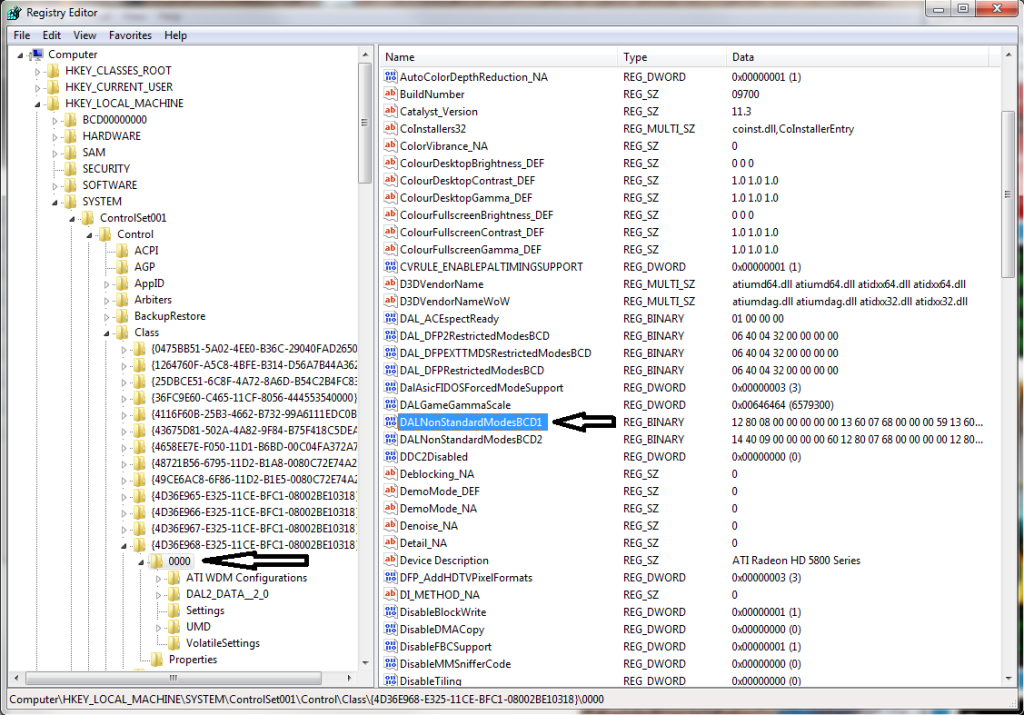


Right click it and left click "Modify..."

A new window will come up. The first 2 pairs are your X Resolution Value, the next two pairs are your Y Resolution Value and the last pair is your refresh rate.
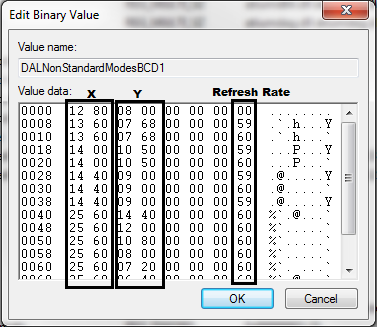


I have already pre-added some values of my own. Add the ones you're looking for. At this point, I'll tell you, you cannot force you monitor to run at a resolution bigger than its native resolution. Ala 5760x1200 on my 2560x1600 screen.

Left Click "OK" then Reboot.

Right click the desktop and left click "screen resolution" and left click the "Resolution:" drop down menu and you should see the new resolutions.
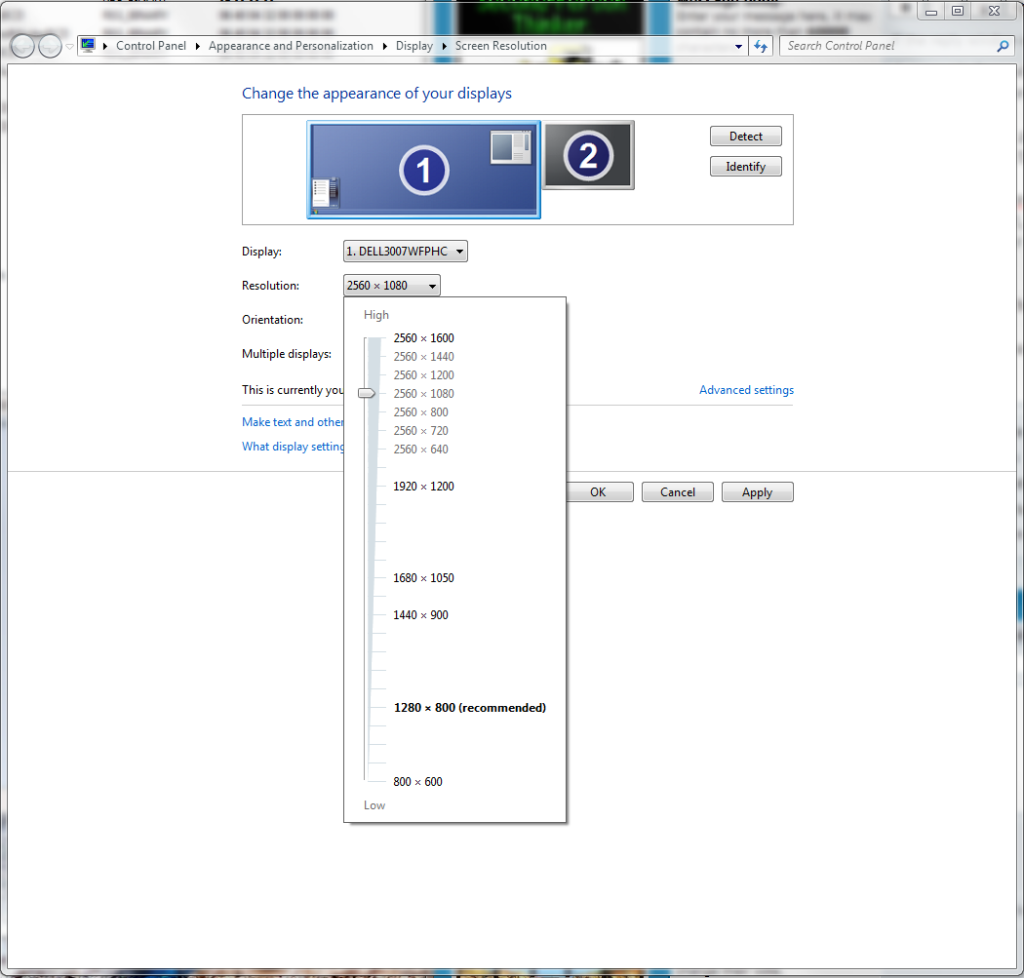


Note: You will not see the resolutions shadowed like that unless you select them with the slider, I just added them in for example.

EDIT: So I just realized, it's not going to matter if you use these resolutions unless you use some scaling. Change your desktop resolution to something that isn't a native resolution. In CCC go to the "My Digital Flat-Panels" tab. Under that click "Properties (Digital Flat-Panel). Click the box next to "Enable GPU Scaling" and set it to "Maintain Aspect Ratio" or "Use Centered Timings." The former stretches the image to the size of the panel but while keeping the aspect ratio the same. The latter maps the resolution 1:1 as it was intended, you will have significant black bars on smaller resolutions.

You will need to redo this process every time you redo drivers.

EDIT 2:
I have suspicion that "DALNonStandardModesBCD2" is the second monitor. Then DALNonStandardModesBCD3 is the 3rd and so on. I don't have time to test right now, but if you're trying to target a certain monitor, this is how I advise going about it.
Eyefinity is unaffected by this method. So I still cant get 5760x1200 on my 3x30"rs.
There's a couple SLS entry's I've been looking at, but I haven't seen anything that looks like resolutions.

EDIT3: When will this end? Who Knows? Anyway, I started trying to get 2560x1440 16:9 on my 2560x1600 16:10 screen. I wanted to see just how small / different those newfangled 27"rs are. Honestly, I saw just how much screen was being eaten away and I was majorly put off. There's like an inch on the top and bottom of my screen when used. It bothers me greatly. Until I go to play a game like BC2 and I forget about the new larger bezels. This is actually really fun to mess with. Have fun. Here's the resolutions I used.

2560x1440 16:9
2560x1200 Middle Ground
2560x1080 21:9 [MovieWide 1080p]
2560 x 800 Middle Ground (I can actually read text at this res)
2560 x 720 (surround) [~3x5:4]
2560 x 640 3:1 (surround) [3x4:3]

**I'm not in anyway responsible for what ever you do to your computer.

System Core: | Intel Core i5-2500K + ASUS P8Z68-V + 16GB Corsair XMS3 DDR3 1333 MHz | Win7 x64 | MSI R7970 Lightning 3GB [1105/1400] |
Display: | 3 x Dell Ultrasharp 3007WFP-HC @ 7680x1600 | Dell u3011 |
K4sh
Posts: 145
Joined: 19 Aug 2010, 23:05

Re: ATI / AMD Custom Resolutions (Non-EDID Method)

Post by K4sh »

Just read your post few hours ago and your strategy gave me an idea.
I just wanted to know where could Eyefinity be stored and just found out.
The key is in the same path as the others you mentioned.

It's named KMD_SlsConfiguration

3 non bezel resolutions are coded into it (low, medium and highest)
3 bezels corrected are coded also.
So i tried to modify the first one (lowest) with a resolution that could be ranked as medium.
I rebooted and the registry was reverted to its original state :evil:

It maybe more complicated than what i thought and a checksum may also be coded into it.

If someone more talented and brave than me wants to give a try ...

Maybe i will give anothers tries but for now i'm pissed
User avatar
suiken_2mieu
Insiders
Insiders
Posts: 2351
Joined: 20 Aug 2009, 04:20
Location: Virginia
Contact:

Re: ATI / AMD Custom Resolutions (Non-EDID Method)

Post by suiken_2mieu »

Oh this is good news, I really want to change 5040x1050 to 5760x1200 and 2400x600 to 5040x1050.
System Core: | Intel Core i5-2500K + ASUS P8Z68-V + 16GB Corsair XMS3 DDR3 1333 MHz | Win7 x64 | MSI R7970 Lightning 3GB [1105/1400] |
Display: | 3 x Dell Ultrasharp 3007WFP-HC @ 7680x1600 | Dell u3011 |
spiken0
Posts: 13
Joined: 29 Aug 2010, 11:47

custom res

Post by spiken0 »

that should help
http://morrisoft.wordpress.com/2010/07/20/morrisoft-ati-custom-resolution-tool/
ChainMale
Posts: 74
Joined: 01 Dec 2011, 19:57
Location: Toronto

spiken0 wrote:that should

Post by ChainMale »

that should help
http://morrisoft.wordpress.com/2010/07/20/morrisoft-ati-custom-resolution-tool/


Thats freakin hilarious.. way ta go guys.

I know there were some "modes" missing.. now I can stuff them in. heh.

ATI does the triples based on;
1920
1680
800

..eh? there's a few missing!
1366 (prolly would pick this up if ya had it)
1280 ..afew
1024

640 triple? heh

All the modes ones monitor has should be availible to Eyefinity. Should it not?

I mean they are putting in -extra- code to stop the other rez's.
- AMD 965 @3.8 - Gigabyte 790fx ud5 - AMD 7970 Ghz - OCZ Reaper 4GB - OCZ Vetex - Eyefinity 3x Asus vw266h - Samsung t260hd + 226ux - (soundcard) - Sony 5.1 ~700w - PC P&C 750w - Corsair K60 -
ChainMale
Posts: 74
Joined: 01 Dec 2011, 19:57
Location: Toronto

spiken0 wrote:that should

Post by ChainMale »

that should help
http://morrisoft.wordpress.com/2010/07/20/morrisoft-ati-custom-resolution-tool/


opps, no worky! :(

I hit "Get Resolutions" ..error. "No ATI cards" Liar! 8)

2x 5870. win7 x64, ATI 12.1 preview (could this be prob'?), 3x 26" 1920x1200

I got the v1.02.
- AMD 965 @3.8 - Gigabyte 790fx ud5 - AMD 7970 Ghz - OCZ Reaper 4GB - OCZ Vetex - Eyefinity 3x Asus vw266h - Samsung t260hd + 226ux - (soundcard) - Sony 5.1 ~700w - PC P&C 750w - Corsair K60 -
User avatar
suiken_2mieu
Insiders
Insiders
Posts: 2351
Joined: 20 Aug 2009, 04:20
Location: Virginia
Contact:

You may need to do things

Post by suiken_2mieu »

You may need to do things manually.
System Core: | Intel Core i5-2500K + ASUS P8Z68-V + 16GB Corsair XMS3 DDR3 1333 MHz | Win7 x64 | MSI R7970 Lightning 3GB [1105/1400] |
Display: | 3 x Dell Ultrasharp 3007WFP-HC @ 7680x1600 | Dell u3011 |
User avatar
AussieTimmeh
Editors
Editors
Posts: 1441
Joined: 14 Oct 2009, 03:11

Ok, so I am going to test

Post by AussieTimmeh »

Ok, so I am going to test this on a Matrox Triplehead2Go Digital Edition. I should be able to get 5040x1050 @59Hz if this works. I tried this method when I was using Eyefinity and I had a heap of BSOD corruption issues, but I'll give it another go on the TH2G.

I just want to confirm what I am supposed to do. Because the Triplehead2Go is viewed as one monitor, am I only changing "DALNonStandardModesBCD1" to 5040x1050 @ 59Hz or do I need to change it to 1680x1050 @59Hz and then make the same change to "DALNonStandardModesBCD2" and "DALNonStandardModesBCD3"?
i5-2500K @ 4Ghz ° Asus P8Z68 ° GTX670 Windforce OC ° 8GB DDR3 RipjawsX ° 4x Viewsonic VA2703 ° Logitech G15 / G5 / G27 ° Razer Vespula ° TrackIR 5 ° Thrustmaster Warthog HOTAS
User avatar
suiken_2mieu
Insiders
Insiders
Posts: 2351
Joined: 20 Aug 2009, 04:20
Location: Virginia
Contact:

Well it should just be 50 40

Post by suiken_2mieu »

Well it should just be 50 40 10 50 59. Though since the th2go sends the last two two frames iver usb, that maybe the issue. Id say try 57hz as well.
System Core: | Intel Core i5-2500K + ASUS P8Z68-V + 16GB Corsair XMS3 DDR3 1333 MHz | Win7 x64 | MSI R7970 Lightning 3GB [1105/1400] |
Display: | 3 x Dell Ultrasharp 3007WFP-HC @ 7680x1600 | Dell u3011 |
User avatar
AussieTimmeh
Editors
Editors
Posts: 1441
Joined: 14 Oct 2009, 03:11

Ok, so first I set Windows to

Post by AussieTimmeh »

Ok, so first I set Windows to a single monitor desktop from Eyefinity before shutting down.

I connected the TH2G and when I started the PC, it has set me to a resolution of 3840x800 by default. There is no Matrox software on the PC at this time. When I navigate to the entry in the registry as described, the options do not match the options I currently have in my Windows screen resolution.

For example, the highest figure in the "DALNonStandardModesBCD1" is 1400 1050 59, but my non-native resolution of 3840x800 is not present, nor are other not native options such as 1600x1200 and 1920x1080 which are available to me in the Windows screen resolution. This suggest to me it isn't using this list to generate my resolutions available. Also, it seems weird that it automatically remembered the last resolution I had used before I uninstalled all the Matrox software at the end of my Red Green Blue article.

I have checked and double checked the directory is the same as the one listed in the CCC.

So I went ahead and added it anyway.


Didn't change anything:


I installed the Matrox PowerDesk. Nothing changed after a reboot as far as resolutions was concerned.

I noticed there was a "DALNonStandardModesBCD" with no number next to it. It had 3 large resolutions in it:


But they didn't appear in my available screen resolutions.


Notice in the screenshot above, it now knows that the device is a TH2G.

So in total I had 4 of "DALNonStandardModesBCD", one with no number and then 1, 2, and 3. None of which contained anything that looked like the list that appears in my dropdown.

Where do I go from here to keep testing this for you?
i5-2500K @ 4Ghz ° Asus P8Z68 ° GTX670 Windforce OC ° 8GB DDR3 RipjawsX ° 4x Viewsonic VA2703 ° Logitech G15 / G5 / G27 ° Razer Vespula ° TrackIR 5 ° Thrustmaster Warthog HOTAS
User avatar
Haldi
Editors
Editors
Posts: 2286
Joined: 08 May 2011, 18:58

suiken did you manage to

Post by Haldi »

suiken did you manage to change Eyefinity Resolution with that? Cuz now matter what i tried with ADL_SDK i never managed to change Eyefinity resolutions!
We gonna send it to outa space!
User avatar
suiken_2mieu
Insiders
Insiders
Posts: 2351
Joined: 20 Aug 2009, 04:20
Location: Virginia
Contact:

Did you add 5040x1050 as a

Post by suiken_2mieu »

Did you add 5040x1050 as a resolution through Powerdesk?
System Core: | Intel Core i5-2500K + ASUS P8Z68-V + 16GB Corsair XMS3 DDR3 1333 MHz | Win7 x64 | MSI R7970 Lightning 3GB [1105/1400] |
Display: | 3 x Dell Ultrasharp 3007WFP-HC @ 7680x1600 | Dell u3011 |
User avatar
AussieTimmeh
Editors
Editors
Posts: 1441
Joined: 14 Oct 2009, 03:11

Yeah I tried that. It

Post by AussieTimmeh »

Yeah I tried that. It required a reboot after selecting it, and when the desktop came back up, it would say that the selected mode could not be applied. It would just be at 3840x800 that I had set previously.
i5-2500K @ 4Ghz ° Asus P8Z68 ° GTX670 Windforce OC ° 8GB DDR3 RipjawsX ° 4x Viewsonic VA2703 ° Logitech G15 / G5 / G27 ° Razer Vespula ° TrackIR 5 ° Thrustmaster Warthog HOTAS
User avatar
suiken_2mieu
Insiders
Insiders
Posts: 2351
Joined: 20 Aug 2009, 04:20
Location: Virginia
Contact:

Haldi wrote:suiken did you

Post by suiken_2mieu »

suiken did you manage to change Eyefinity Resolution with that? Cuz now matter what i tried with ADL_SDK i never managed to change Eyefinity resolutions!

I've been trying, I still cant get anything to effect it. I've also tried talking to the amd support team, but get idiots who just tell me how to setup eyefinity when I'm asking them how to get specific resolutions. What I'd like to do is talk specifically with the driver team and see what they can come up with. I still don't see why I cant run 5760x1200 without SoftTH.
System Core: | Intel Core i5-2500K + ASUS P8Z68-V + 16GB Corsair XMS3 DDR3 1333 MHz | Win7 x64 | MSI R7970 Lightning 3GB [1105/1400] |
Display: | 3 x Dell Ultrasharp 3007WFP-HC @ 7680x1600 | Dell u3011 |
FenixLightflight
Posts: 1
Joined: 14 Nov 2012, 17:27

Re: ATI / AMD Custom Resolutions (Non-EDID Method)

Post by FenixLightflight »

Did anyone get this to work?

I need it because the game I am playing, only allows to run window mode in the second highest resolution.
So I have 5760x1080, and next is 4900x1080 - I can only run 4900x1080 in window mode. Thats why I wish to add
5759x1079 as a custom resultion.


im currently running 5760x1080 and i found this in registry, as someone else mentions in this thread :

REGISTRY/MACHINE/SYSTEM/CurrentControlSet/Control/CLASS/{4D36E968-E325-11CE-BFC1-08002BE10318}/0008
path i found "kmd_slsconfirguration"

it has like 300 lines in total

one line is called :


0130 80 16 00 00 38 04 00 00


5760x1080 =
5760 = hex = 1680
1080 = hex = 438

its kinda backwards and i dont really get it but cant be coincidence that it matches exacly the hex of the resolution?.

think i can add another line to the 300 others with another resolution like :

7f 16 00 00 37 04 00 00

that should be 5759x1079 ?


I tried adding 7f 16 00 00 37 04 00 00 at the buttom, but upon reboot the line is gone again.
CILLER
Posts: 55
Joined: 29 Jan 2010, 08:10

Re: ATI / AMD Custom Resolutions (Non-EDID Method)

Post by CILLER »

I would love to get custom resolutions working, especially 21:9 on eyefinity. But so far I cant find a way to do it.
i7 2600k | AMD HD7970 @ 1100MHz | 8GB 1333 DDR3 | Crucial M4 | 3x Dell U2311h @ eyefinity | Thrustmaster F430 | trackir 5.0
User avatar
suiken_2mieu
Insiders
Insiders
Posts: 2351
Joined: 20 Aug 2009, 04:20
Location: Virginia
Contact:

Re: ATI / AMD Custom Resolutions (Non-EDID Method)

Post by suiken_2mieu »

CILLER wrote:I would love to get custom resolutions working, especially 21:9 on eyefinity. But so far I cant find a way to do it.


Well use Toasty X's Custom Resolution Tool. It makes an EDID Mask (override) and even works with Eyefinity / Surround. Here's my thread on it: *Working* Custom Eyefinity Resolutions [Tutorial Inside]

Here's a screen shot of 21:9 Eyefinity (7680x1080 or 3x2560x1080):
Image
System Core: | Intel Core i5-2500K + ASUS P8Z68-V + 16GB Corsair XMS3 DDR3 1333 MHz | Win7 x64 | MSI R7970 Lightning 3GB [1105/1400] |
Display: | 3 x Dell Ultrasharp 3007WFP-HC @ 7680x1600 | Dell u3011 |
User avatar
skipclarke
Founder
Founder
Posts: 7358
Joined: 13 Oct 2003, 05:00

Re: ATI / AMD Custom Resolutions (Non-EDID Method)

Post by skipclarke »

I realize this is an old thread, but I wanted to add my experience. I used this to run 3440x1440 on my 4k panel. This means I can do the following resolutions all on one panel:
- 1600x1200
- 1920x1080
- 1920x1200
- 2560x1440
- 2560x1600
- 3440x1440
- 3840x2160

I can test 4:3, 16:10, 16:9, 21:9 and 4k all without changing monitor. For games that allow in-game res switching, this is awesome. I only need to swap to my 3x1080p for Eyefinity. Previously I had to also swap to my 21:9 for 2560x1080.

Now I can also benchmark 3440x1440. Only problem is that the monitor window-boxes it (black bars on all sides). Can't force it to fill aspect. GPU scaling fails, but it's fine for testing.
User avatar
suiken_2mieu
Insiders
Insiders
Posts: 2351
Joined: 20 Aug 2009, 04:20
Location: Virginia
Contact:

Re: ATI / AMD Custom Resolutions (Non-EDID Method)

Post by suiken_2mieu »

Are you still using the P2815Q? Are you letting the video card scale or the monitor scale?

If you're letting the video card scale you can scale by aspect ratio. The other thing you can do is use bigger resolutions that maximize the space on the panel:

2700x2160 5:4
2880x2160 4:3
3456x2160 16:10
3840x2160 16:9
3840x1607 21:9

Although I that might not be useful if you're trying to benchmark performance at normal resolutions.

If you're letting the panel scale the resolutions, you're limited by the options it has.
System Core: | Intel Core i5-2500K + ASUS P8Z68-V + 16GB Corsair XMS3 DDR3 1333 MHz | Win7 x64 | MSI R7970 Lightning 3GB [1105/1400] |
Display: | 3 x Dell Ultrasharp 3007WFP-HC @ 7680x1600 | Dell u3011 |
User avatar
skipclarke
Founder
Founder
Posts: 7358
Joined: 13 Oct 2003, 05:00

Re: ATI / AMD Custom Resolutions (Non-EDID Method)

Post by skipclarke »

I tried to get the GPU to force the aspect scaling, but the setting would reset itself...

I'm now using the Samsung U28D590D.
Post Reply

Who is online

Users browsing this forum: No registered users and 2 guests